



Visual Workflow
Using Visual Workflow to Enhance
  the Sales and Service Clouds
Keith Sadler & Kapil Dua

Riptide Software
Agenda

What is Visual Workflow?         Which Designer should I use?

Use Cases                        Sales Cloud Flow demo
    Sales Cloud                     Desktop Designer features
    Service Cloud
                                 Service Cloud Flow demo
Advantages of Flow Designers         Cloud Designer features

                                 Q&A
What is Visual Workflow?
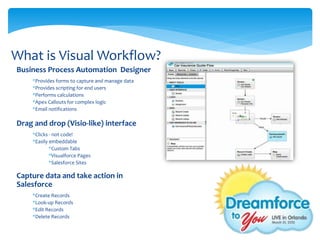
Business Process Automation Designer
    *Provides forms to capture and manage data
    *Provides scripting for end users
    *Performs calculations
    *Apex Callouts for complex logic
    *Email notifications

Drag and drop (Visio-like) interface
    *Clicks - not code!
    *Easily embeddable
            *Custom Tabs
            *Visualforce Pages
            *Salesforce Sites

Capture data and take action in
Salesforce
    *Create Records
    *Look-up Records
    *Edit Records
    *Delete Records
Flow Use Cases
Sales Cloud
    *Inbound/Outbound Telesales
         *Call scripting
         *Guided selling
         *Reduced training
    *Face to Face
         *Rich Visualforce interface for
         presentation
Flow Use Cases
Sales Cloud Results
    * Decrease in customer life cycle
    * Increase in customers contacted
    * Consistent brand messaging
    * Transparency for management
    * Decrease in start up time for
    employees
Flow Use Cases
Service Cloud
    *Multi-step forms for online self-
    service and trouble shooting guides
         *Helps guide user to find solutions
         to specific problems
    *Gives clients the ability to reach out
    without speaking with staff
    *Allows internal employee efficiency
Flow Use Cases
Service Cloud Results
    * Decrease in support resources needed
    * Increases customer engagement
    * Decreased resolution time
    * Decreased talk time
    * Increased self resolutions by customers
Advantages of Flow Designers

Desktop Designer
   Convert Leads
   Sub-Flow Support
   Validate Flow    Cloud Designer
   Flow Simulator    Native to Salesforce
   Copy & Paste      Uses Standard Formula Engine
                      Rich Interface
                      Less Complexity
                      Quicker deployment
Potential Risks


 Desktop Designer                  Cloud Designer
 Not native to Salesforce – No     No lead conversion without
  upgrades                           code
                                    No flow validating
 More complex
                                    No support for sub-flows
 Must upload to Salesforce
 Cannot edit flow in Salesforce
Flow – Which Way to Go?

Desktop Designer
    *   If lead conversion is necessary the
        desktop version has built in element
    *   Use for complex flows as this
        supports the use of:
        *   Sub-Flows (one flow to another)
        *   Flow Validation (will it work?)
        *   Flow Simulations (end user view)


Cloud Designer
    *   Use for flows with less
        complexity, which will not
        benefit from sub-flows
    *   Use if you need editable
        flows to be stored in
        Salesforce
Sales Cloud
Demonstration
Visual workflow which will assist in
guided selling for a field agent
Service Cloud
Demonstration
Visual workflow which will assist a
customer navigate through online
support
Why Implement Flow?

Increases Internal Efficiency
    Data management
       Automates creating, editing, and
        deleting Salesforce records
       Send the right records to the right
        people
    Reduces training efforts
    Manage flows without IT support
       Control flows with clicks not code

Enhances Customer Support
    Help Now!
       Guides end-user to optimal solution
Community Resources

Salesforce Desktop Flow Designer Workbook

Salesforce Visual Workflow Webinar

Salesforce Cloud Flow Designer Workbook

DeveloperForce Page – Get your own demo org

Salesforce Flow Designer Comparison
Thank YOU!

DF2UFL 2012: Visual Workflow for Sales and Service Clouds

  • 1.
    Visual Workflow Using VisualWorkflow to Enhance the Sales and Service Clouds
  • 2.
    Keith Sadler &Kapil Dua Riptide Software
  • 3.
    Agenda What is VisualWorkflow? Which Designer should I use? Use Cases Sales Cloud Flow demo  Sales Cloud  Desktop Designer features  Service Cloud Service Cloud Flow demo Advantages of Flow Designers  Cloud Designer features Q&A
  • 4.
    What is VisualWorkflow? Business Process Automation Designer *Provides forms to capture and manage data *Provides scripting for end users *Performs calculations *Apex Callouts for complex logic *Email notifications Drag and drop (Visio-like) interface *Clicks - not code! *Easily embeddable *Custom Tabs *Visualforce Pages *Salesforce Sites Capture data and take action in Salesforce *Create Records *Look-up Records *Edit Records *Delete Records
  • 5.
    Flow Use Cases SalesCloud *Inbound/Outbound Telesales *Call scripting *Guided selling *Reduced training *Face to Face *Rich Visualforce interface for presentation
  • 6.
    Flow Use Cases SalesCloud Results * Decrease in customer life cycle * Increase in customers contacted * Consistent brand messaging * Transparency for management * Decrease in start up time for employees
  • 7.
    Flow Use Cases ServiceCloud *Multi-step forms for online self- service and trouble shooting guides *Helps guide user to find solutions to specific problems *Gives clients the ability to reach out without speaking with staff *Allows internal employee efficiency
  • 8.
    Flow Use Cases ServiceCloud Results * Decrease in support resources needed * Increases customer engagement * Decreased resolution time * Decreased talk time * Increased self resolutions by customers
  • 9.
    Advantages of FlowDesigners Desktop Designer  Convert Leads  Sub-Flow Support  Validate Flow Cloud Designer  Flow Simulator  Native to Salesforce  Copy & Paste  Uses Standard Formula Engine  Rich Interface  Less Complexity  Quicker deployment
  • 10.
    Potential Risks DesktopDesigner Cloud Designer  Not native to Salesforce – No  No lead conversion without upgrades code  No flow validating  More complex  No support for sub-flows  Must upload to Salesforce  Cannot edit flow in Salesforce
  • 11.
    Flow – WhichWay to Go? Desktop Designer * If lead conversion is necessary the desktop version has built in element * Use for complex flows as this supports the use of: * Sub-Flows (one flow to another) * Flow Validation (will it work?) * Flow Simulations (end user view) Cloud Designer * Use for flows with less complexity, which will not benefit from sub-flows * Use if you need editable flows to be stored in Salesforce
  • 12.
    Sales Cloud Demonstration Visual workflowwhich will assist in guided selling for a field agent
  • 13.
    Service Cloud Demonstration Visual workflowwhich will assist a customer navigate through online support
  • 14.
    Why Implement Flow? IncreasesInternal Efficiency  Data management  Automates creating, editing, and deleting Salesforce records  Send the right records to the right people  Reduces training efforts  Manage flows without IT support  Control flows with clicks not code Enhances Customer Support  Help Now!  Guides end-user to optimal solution
  • 15.
    Community Resources Salesforce DesktopFlow Designer Workbook Salesforce Visual Workflow Webinar Salesforce Cloud Flow Designer Workbook DeveloperForce Page – Get your own demo org Salesforce Flow Designer Comparison
  • 16.