Presentation :
Lightening Programming
By : Mansour Eddih
Updated March27,2020
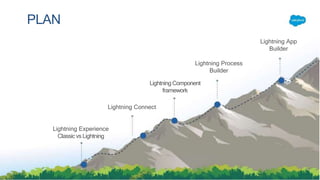
Lightning Experience
Classicvs Lightning
Lightning Connect
LightningComponent
framework
Lightning Process
Builder
Lightning App
Builder
PLAN
INTRODUCTION
The Lightning Experience is an innovation in
productive user experience designed to help
customers to work more efficiently.
ADVANTAGES OF USING
LIGHTNING EXPERIENCE
• Device-aware and cross browser compatibility
• Drag-and-drop status change functionality.
• Smart views
• Intuitive and multiple column dashboards.
• Faster development.
• App extendibility using AppExchange.
• More productivity out-of-the-box.
• Faster customization and app development
ADVANTAGES OF USING LIGHTNING EXPERIENCE
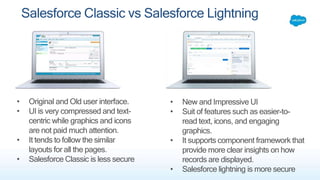
• Original and Old user interface.
• UI is very compressed and text-
centric while graphics and icons
are not paid much attention.
• It tends to follow the similar
layouts for all the pages.
• Salesforce Classic is less secure
• New and Impressive UI
• Suit of features such as easier-to-
read text, icons, and engaging
graphics.
• It supports component framework that
provide more clear insights on how
records are displayed.
• Salesforce lightning is more secure
Salesforce Classic vs Salesforce Lightning
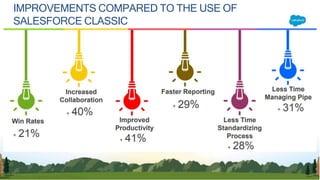
IMPROVEMENTS COMPARED TO THE USE OF
SALESFORCE CLASSIC
Salesforce has provided Lightning Design System
with which we can build custom applications with a
look and feel similar to lightning experience. Its pre-
built HTML and CSS library intended to be used in
Visualforce and Lightning Components.
We have used these collection of design patterns,
components for creating VF pages for lightning
experience as well as lightning components.
Following are few benefits to use this system:
• Consistent User Experience
• Deliver Apps Fast
• Open source framework and reusable code base
to build apps in record time
DEVELOPING APPS WITH LIGHTNING
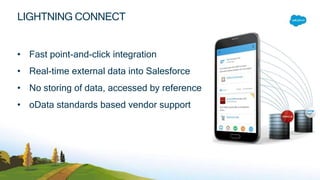
LIGHTNING CONNECT
• Fast point-and-click integration
• Real-time external data into Salesforce
• No storing of data, accessed by reference
• oData standards based vendor support
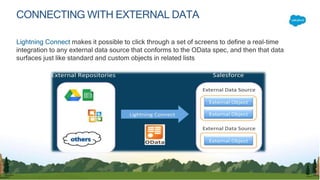
CONNECTING WITH EXTERNAL DATA
Lightning Connect makes it possible to click through a set of screens to define a real-time
integration to any external data source that conforms to the OData spec, and then that data
surfaces just like standard and custom objects in related lists
The Lightning Component framework is a modern user interface framework for developing
dynamic web apps for mobile and desktop devices. We can build highly interactive app
with an innovative user interface, single-page applications, widgets for use in Lightning
App Builder as well as for Salesforce1.
We have built lightning components for single page application to manage events, Week
View calendar for logged in User etc. which can be used in lightning builder.
LIGHTNING COMPONENTS
LIGHTNING COMPONENTS FRAMEWORK OVERVIEW
LIGHTNING COMPONENTS
FRAMEWORK
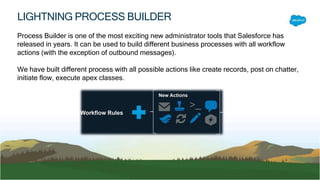
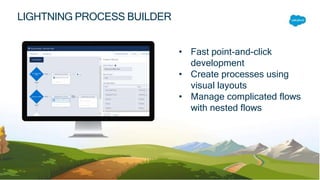
Process Builder is one of the most exciting new administrator tools that Salesforce has
released in years. It can be used to build different business processes with all workflow
actions (with the exception of outbound messages).
We have built different process with all possible actions like create records, post on chatter,
initiate flow, execute apex classes.
LIGHTNING PROCESS BUILDER
• Fast point-and-click
development
• Create processes using
visual layouts
• Manage complicated flows
with nested flows
LIGHTNING PROCESS BUILDER
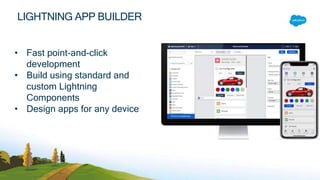
• Fast point-and-click
development
• Build using standard and
custom Lightning
Components
• Design apps for any device
LIGHTNING APP BUILDER
• SPAs (Single Page Applications)
• Link with existing standard pages.
• Expose Global Actions for more interactivity
• Dashboard-style Applications
• “Point” Applications to solve a particular task
WHAT CAN I BUILD WITH LIGHTNING APP BUILDER?
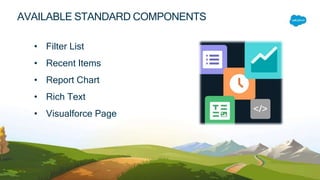
• Filter List
• Recent Items
• Report Chart
• Rich Text
• Visualforce Page
AVAILABLE STANDARD COMPONENTS
lightning presentation

lightning presentation

  • 1.
    Presentation : Lightening Programming By: Mansour Eddih Updated March27,2020
  • 3.
    Lightning Experience Classicvs Lightning LightningConnect LightningComponent framework Lightning Process Builder Lightning App Builder PLAN
  • 4.
  • 5.
    The Lightning Experienceis an innovation in productive user experience designed to help customers to work more efficiently.
  • 8.
  • 9.
    • Device-aware andcross browser compatibility • Drag-and-drop status change functionality. • Smart views • Intuitive and multiple column dashboards. • Faster development. • App extendibility using AppExchange. • More productivity out-of-the-box. • Faster customization and app development ADVANTAGES OF USING LIGHTNING EXPERIENCE
  • 11.
    • Original andOld user interface. • UI is very compressed and text- centric while graphics and icons are not paid much attention. • It tends to follow the similar layouts for all the pages. • Salesforce Classic is less secure • New and Impressive UI • Suit of features such as easier-to- read text, icons, and engaging graphics. • It supports component framework that provide more clear insights on how records are displayed. • Salesforce lightning is more secure Salesforce Classic vs Salesforce Lightning
  • 12.
    IMPROVEMENTS COMPARED TOTHE USE OF SALESFORCE CLASSIC
  • 13.
    Salesforce has providedLightning Design System with which we can build custom applications with a look and feel similar to lightning experience. Its pre- built HTML and CSS library intended to be used in Visualforce and Lightning Components. We have used these collection of design patterns, components for creating VF pages for lightning experience as well as lightning components. Following are few benefits to use this system: • Consistent User Experience • Deliver Apps Fast • Open source framework and reusable code base to build apps in record time
  • 14.
  • 15.
    LIGHTNING CONNECT • Fastpoint-and-click integration • Real-time external data into Salesforce • No storing of data, accessed by reference • oData standards based vendor support
  • 16.
    CONNECTING WITH EXTERNALDATA Lightning Connect makes it possible to click through a set of screens to define a real-time integration to any external data source that conforms to the OData spec, and then that data surfaces just like standard and custom objects in related lists
  • 17.
    The Lightning Componentframework is a modern user interface framework for developing dynamic web apps for mobile and desktop devices. We can build highly interactive app with an innovative user interface, single-page applications, widgets for use in Lightning App Builder as well as for Salesforce1. We have built lightning components for single page application to manage events, Week View calendar for logged in User etc. which can be used in lightning builder. LIGHTNING COMPONENTS
  • 18.
  • 19.
  • 20.
    Process Builder isone of the most exciting new administrator tools that Salesforce has released in years. It can be used to build different business processes with all workflow actions (with the exception of outbound messages). We have built different process with all possible actions like create records, post on chatter, initiate flow, execute apex classes. LIGHTNING PROCESS BUILDER
  • 21.
    • Fast point-and-click development •Create processes using visual layouts • Manage complicated flows with nested flows LIGHTNING PROCESS BUILDER
  • 22.
    • Fast point-and-click development •Build using standard and custom Lightning Components • Design apps for any device LIGHTNING APP BUILDER
  • 23.
    • SPAs (SinglePage Applications) • Link with existing standard pages. • Expose Global Actions for more interactivity • Dashboard-style Applications • “Point” Applications to solve a particular task WHAT CAN I BUILD WITH LIGHTNING APP BUILDER?
  • 24.
    • Filter List •Recent Items • Report Chart • Rich Text • Visualforce Page AVAILABLE STANDARD COMPONENTS