React presentation
React hooks vs Class-based components
Presented By:
Lehru Angela Jamimah
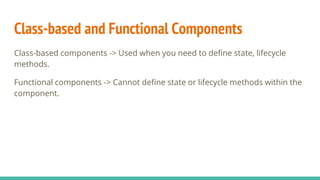
Class-based and Functional Components
Class-based components -> Used when you need to define state, lifecycle
methods.
Functional components -> Cannot define state or lifecycle methods within the
component.
Let’s build a React app with classes
STEP 1.
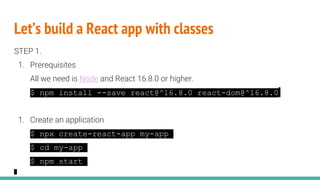
1. Prerequisites
All we need is Node and React 16.8.0 or higher.
$ npm install --save react@^16.8.0 react-dom@^16.8.0
1. Create an application
$ npx create-react-app my-app
$ cd my-app
$ npm start
Let’s build a React app with classes
STEP 2.
1. Create some class based and functional components.
// Todo.js (class based component)
import React, {Component} from 'react';
import Item from './Item';
class Todo extends Component {
state = {
todos: [
{text: 'Learn about React'},
{text: 'Meet friend for lunch'},
{text: 'Build really cool todo app'}
]
};
Let’s build a React app with classes (Continued)
handleShowTodos = () => {
const { showTodos } = this.state;
this.setState({ showTodos: !showTodos });
};
render(){
const {todos} = this.state;
return(
<div className='app'>
<div className='todo-list'>
<button onClick={this.handleShowTodos}>Show Todos</button>
{todos.map((todo, index)=>(
<Item key={index} index={index} todo={todo} />
))}
</div>
</div> )}}
export default Todo;
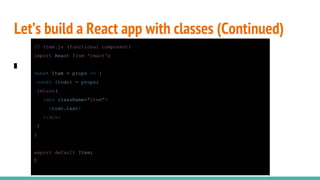
Let’s build a React app with classes (Continued)
// Item.js (functional component)
import React from 'react';
const Item = props => {
const {todo} = props;
return(
<div className="item">
{todo.text}
</div>
)
}
export default Item;
Let’s build a React app with classes
STEP 3.
1. Application works, great!
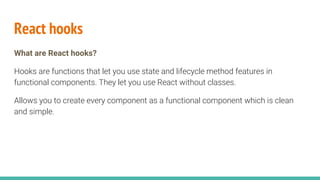
React hooks
What are React hooks?
Hooks are functions that let you use state and lifecycle method features in
functional components. They let you use React without classes.
Allows you to create every component as a functional component which is clean
and simple.
Classes vs react hooks/ why use React hooks
● Complex components become hard to understand
● Classes confuse both people and machines
Note:
● 100% backwards-compatible
● There are no plans to remove classes from React
● Hooks don’t replace your knowledge of React concepts
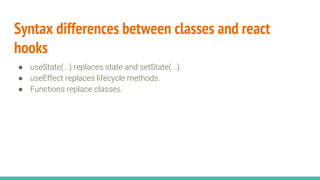
Syntax differences between classes and react
hooks
● useState(...) replaces state and setState(...).
● useEffect replaces lifecycle methods.
● Functions replace classes.
Let’s introduce React hooks into our application
STEP 1.
1. Use the useState hook.
// Todo.js
. . .
const Todo = props => {
const [todos, setTodos] = useState([
{text: 'Learn about React'},
{text: 'Meet friend for lunch'},
{text: 'Build really cool todo app'}
]);
const [showTodos, setShowTodos] = useState(false);
const handleShowTodos = () => {
setShowTodos(!showTodos);
};
Let’s introduce React hooks into our application
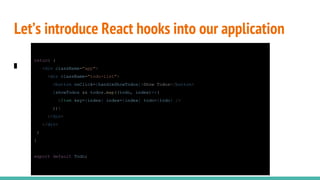
return (
<div className="app">
<div className="todo-list">
<button onClick={handleShowTodos}>Show Todos</button>
{showTodos && todos.map((todo, index)=>(
<Item key={index} index={index} todo={todo} />
))}
</div>
</div>
)
}
export default Todo;
Let’s introduce React hooks into our application
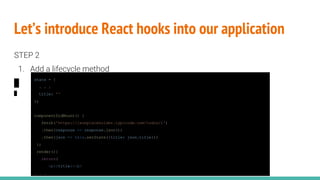
STEP 2
1. Add a lifecycle method
state = {
. . .
title: ''
};
componentDidMount() {
fetch('https://jsonplaceholder.typicode.com/todos/1')
.then(response => response.json())
.then(json => this.setState({title: json.title}))
};
render(){
return(
<p>{title}</p>
. . .
Let’s introduce React hooks into our application
STEP 2
2. Use the useEffect hook.
. . .
const [title, setTitle] = useState('');
useEffect(()=>{
fetch('https://jsonplaceholder.typicode.com/todos/1')
.then(response => response.json())
.then(json => setTitle(json.title))
}, []);
return (
. . .
<p>{title}</p>
)
Let’s introduce React hooks into our application
STEP 2.
1. Application works, great!
Homework
Look into how the useEffect hook is used to replace the rest of the lifecycle
methods i.e componentDidUpdate(), componentWillUnmount(),
shouldComponentUpdate() and getDerivedStateFromProps().
Resources
Github repo - https://github.com/LehruAngela/react-hooks
Docs and tutorials:
● https://scotch.io/tutorials/build-a-react-to-do-app-with-react-hooks-no-class-components
● https://reactjs.org/docs/hooks-intro.html
● https://www.youtube.com/watch?v=-MlNBTSg_Ww&t=2687s
Pluginkla2019 - React Presentation

Pluginkla2019 - React Presentation

  • 1.
    React presentation React hooksvs Class-based components Presented By: Lehru Angela Jamimah
  • 2.
    Class-based and FunctionalComponents Class-based components -> Used when you need to define state, lifecycle methods. Functional components -> Cannot define state or lifecycle methods within the component.
  • 3.
    Let’s build aReact app with classes STEP 1. 1. Prerequisites All we need is Node and React 16.8.0 or higher. $ npm install --save react@^16.8.0 react-dom@^16.8.0 1. Create an application $ npx create-react-app my-app $ cd my-app $ npm start
  • 4.
    Let’s build aReact app with classes STEP 2. 1. Create some class based and functional components. // Todo.js (class based component) import React, {Component} from 'react'; import Item from './Item'; class Todo extends Component { state = { todos: [ {text: 'Learn about React'}, {text: 'Meet friend for lunch'}, {text: 'Build really cool todo app'} ] };
  • 5.
    Let’s build aReact app with classes (Continued) handleShowTodos = () => { const { showTodos } = this.state; this.setState({ showTodos: !showTodos }); }; render(){ const {todos} = this.state; return( <div className='app'> <div className='todo-list'> <button onClick={this.handleShowTodos}>Show Todos</button> {todos.map((todo, index)=>( <Item key={index} index={index} todo={todo} /> ))} </div> </div> )}} export default Todo;
  • 6.
    Let’s build aReact app with classes (Continued) // Item.js (functional component) import React from 'react'; const Item = props => { const {todo} = props; return( <div className="item"> {todo.text} </div> ) } export default Item;
  • 7.
    Let’s build aReact app with classes STEP 3. 1. Application works, great!
  • 8.
    React hooks What areReact hooks? Hooks are functions that let you use state and lifecycle method features in functional components. They let you use React without classes. Allows you to create every component as a functional component which is clean and simple.
  • 9.
    Classes vs reacthooks/ why use React hooks ● Complex components become hard to understand ● Classes confuse both people and machines Note: ● 100% backwards-compatible ● There are no plans to remove classes from React ● Hooks don’t replace your knowledge of React concepts
  • 10.
    Syntax differences betweenclasses and react hooks ● useState(...) replaces state and setState(...). ● useEffect replaces lifecycle methods. ● Functions replace classes.
  • 11.
    Let’s introduce Reacthooks into our application STEP 1. 1. Use the useState hook. // Todo.js . . . const Todo = props => { const [todos, setTodos] = useState([ {text: 'Learn about React'}, {text: 'Meet friend for lunch'}, {text: 'Build really cool todo app'} ]); const [showTodos, setShowTodos] = useState(false); const handleShowTodos = () => { setShowTodos(!showTodos); };
  • 12.
    Let’s introduce Reacthooks into our application return ( <div className="app"> <div className="todo-list"> <button onClick={handleShowTodos}>Show Todos</button> {showTodos && todos.map((todo, index)=>( <Item key={index} index={index} todo={todo} /> ))} </div> </div> ) } export default Todo;
  • 13.
    Let’s introduce Reacthooks into our application STEP 2 1. Add a lifecycle method state = { . . . title: '' }; componentDidMount() { fetch('https://jsonplaceholder.typicode.com/todos/1') .then(response => response.json()) .then(json => this.setState({title: json.title})) }; render(){ return( <p>{title}</p> . . .
  • 14.
    Let’s introduce Reacthooks into our application STEP 2 2. Use the useEffect hook. . . . const [title, setTitle] = useState(''); useEffect(()=>{ fetch('https://jsonplaceholder.typicode.com/todos/1') .then(response => response.json()) .then(json => setTitle(json.title)) }, []); return ( . . . <p>{title}</p> )
  • 15.
    Let’s introduce Reacthooks into our application STEP 2. 1. Application works, great! Homework Look into how the useEffect hook is used to replace the rest of the lifecycle methods i.e componentDidUpdate(), componentWillUnmount(), shouldComponentUpdate() and getDerivedStateFromProps().
  • 16.
    Resources Github repo -https://github.com/LehruAngela/react-hooks Docs and tutorials: ● https://scotch.io/tutorials/build-a-react-to-do-app-with-react-hooks-no-class-components ● https://reactjs.org/docs/hooks-intro.html ● https://www.youtube.com/watch?v=-MlNBTSg_Ww&t=2687s