INTRODUCTION TO
REACT CLASS BASED COMPONENT
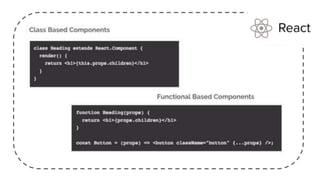
React class based components are the bread and butter of
most modern web apps built in ReactJS. These components
are simple classes (made up of multiple functions that add
functionality to the application). All class based
components are child classes for the Component class of
ReactJS.
Before React 16.8, Class components were the only way to
track state and lifecycle on a React component. Function
components were considered "state-less".
React class based components are the bread and butter of
most modern web apps built in ReactJS. These components
are simple classes (made up of multiple functions that add
functionality to the application). All class based
components are child classes for the Component class of
ReactJS.
Before React 16.8, Class components were the only way to
track state and lifecycle on a React component.
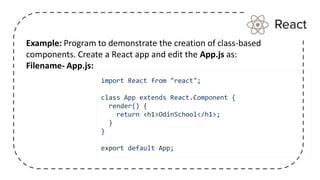
Example: Program to demonstrate the creation of class-based
components. Create a React app and edit the App.js as:
Filename- App.js:
import React from "react";
class App extends React.Component {
render() {
return <h1>OdinSchool</h1>;
}
}
export default App;
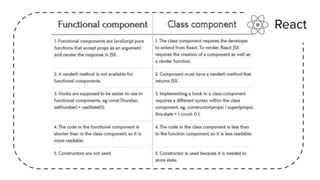
The main feature of class-based components that
distinguished them from functional components is
that they have access to a state which dictates the
current behavior and appearance of the component
class App extends React.Component {
constructor(props) {
super(props);
this.state = { change: true };
}
render() {
return (
<div>
<button
onClick={() => {
this.setState({ change: !this.state.change });
}}
>
Click Here!
</button>
Data is passed to other components with the help of props. Props work similarly for
all components in ReactJS be they class based or functional. Props are always
passed down from the parent component to the child component. ReactJS does not
allow a component to modify its own props as a rule. The only way to modify the
props is to change the props being passed from the parent component to the child
component. This is generally done by passing a reference to a function in the parent
component, which changes the props being passed to the child component.
Props
INTRODUCTION TO
LIFE CYCLE METHODS
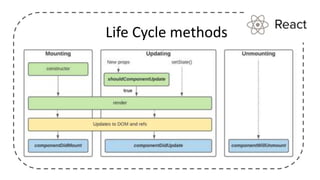
Class-based components have access to the lifecycle functions
like componentWillMount(), componentDidMount(),
componentWillReceiveProps(),componentWillUpdate(),
shouldComponentUpdate(),render() and componentWillUnmount();.
These lifecycle functions are called at different stages of the lifecycle and are used
for a variety of purposes like changing the state or doing some work (like fetching
data from an external API). They are also referred to as lifecycle hooks.
Life Cycle methods
Life Cycle methods
Life Cycle methods
Mounting
constructor
The constructor() method is called before anything else, when the component is
initiated, and it is the natural place to set up the initial state and other initial values.
The constructor() method is called with the props, as arguments, and you should
always start by calling the super(props) before anything else, this will initiate the
parent's constructor method and allows the component to inherit methods from its
parent (React.Component).
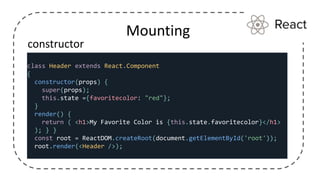
Mounting
constructor
class Header extends React.Component
{
constructor(props) {
super(props);
this.state ={favoritecolor: "red"};
}
render() {
return ( <h1>My Favorite Color is {this.state.favoritecolor}</h1>
); } }
const root = ReactDOM.createRoot(document.getElementById('root'));
root.render(<Header />);
Mounting
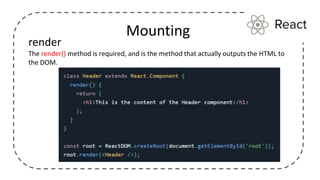
render
The render() method is required, and is the method that actually outputs the HTML to
the DOM.
Mounting
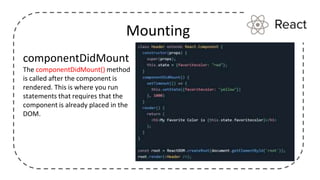
componentDidMount
The componentDidMount() method
is called after the component is
rendered. This is where you run
statements that requires that the
component is already placed in the
DOM.
Updating
The next phase in the lifecycle is when a component is updated. A component is
updated whenever there is a change in the component's state or props. React has
five built-in methods that gets called, in this order, when a component is
updated:
• shouldComponentUpdate()
• render()
• componentDidUpdate()
The render() method is required and will always be called, the others are optional
and will be called if you define them.
shouldComponentUpdate()
In the shouldComponentUpdate() method you can return a
Boolean value that specifies whether React should continue with
the rendering or not.
The default value is true.
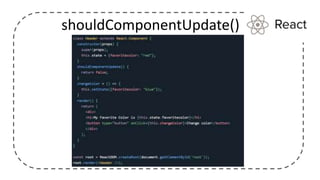
The example below shows what happens when
the shouldComponentUpdate() method returns false:
shouldComponentUpdate()
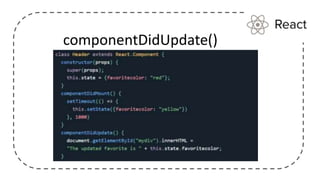
componentDidUpdate()
The componentDidUpdate method is called after the component is
updated in the DOM.
The example below might seem complicated, but all it does is
this:
When the component is mounting it is rendered with the favorite
color "red".
When the component has been mounted, a timer changes the
state, and the color becomes "yellow".
componentDidUpdate()
Unmounting
The next phase in the lifecycle is when a component is removed
from the DOM, or unmounting as React likes to call it.
React has only one built-in method that gets called when a
component is unmounted:
•componentWillUnmount()
componentWillUnmount
The componentWillUnmount method is called when the component
is about to be removed from the DOM.
class based component.pptx

class based component.pptx

  • 1.
  • 2.
    React class basedcomponents are the bread and butter of most modern web apps built in ReactJS. These components are simple classes (made up of multiple functions that add functionality to the application). All class based components are child classes for the Component class of ReactJS. Before React 16.8, Class components were the only way to track state and lifecycle on a React component. Function components were considered "state-less".
  • 3.
    React class basedcomponents are the bread and butter of most modern web apps built in ReactJS. These components are simple classes (made up of multiple functions that add functionality to the application). All class based components are child classes for the Component class of ReactJS. Before React 16.8, Class components were the only way to track state and lifecycle on a React component.
  • 4.
    Example: Program todemonstrate the creation of class-based components. Create a React app and edit the App.js as: Filename- App.js: import React from "react"; class App extends React.Component { render() { return <h1>OdinSchool</h1>; } } export default App;
  • 5.
    The main featureof class-based components that distinguished them from functional components is that they have access to a state which dictates the current behavior and appearance of the component class App extends React.Component { constructor(props) { super(props); this.state = { change: true }; } render() { return ( <div> <button onClick={() => { this.setState({ change: !this.state.change }); }} > Click Here! </button>
  • 6.
    Data is passedto other components with the help of props. Props work similarly for all components in ReactJS be they class based or functional. Props are always passed down from the parent component to the child component. ReactJS does not allow a component to modify its own props as a rule. The only way to modify the props is to change the props being passed from the parent component to the child component. This is generally done by passing a reference to a function in the parent component, which changes the props being passed to the child component. Props
  • 7.
  • 8.
    Class-based components haveaccess to the lifecycle functions like componentWillMount(), componentDidMount(), componentWillReceiveProps(),componentWillUpdate(), shouldComponentUpdate(),render() and componentWillUnmount();. These lifecycle functions are called at different stages of the lifecycle and are used for a variety of purposes like changing the state or doing some work (like fetching data from an external API). They are also referred to as lifecycle hooks. Life Cycle methods
  • 9.
  • 10.
  • 11.
    Mounting constructor The constructor() methodis called before anything else, when the component is initiated, and it is the natural place to set up the initial state and other initial values. The constructor() method is called with the props, as arguments, and you should always start by calling the super(props) before anything else, this will initiate the parent's constructor method and allows the component to inherit methods from its parent (React.Component).
  • 12.
    Mounting constructor class Header extendsReact.Component { constructor(props) { super(props); this.state ={favoritecolor: "red"}; } render() { return ( <h1>My Favorite Color is {this.state.favoritecolor}</h1> ); } } const root = ReactDOM.createRoot(document.getElementById('root')); root.render(<Header />);
  • 13.
    Mounting render The render() methodis required, and is the method that actually outputs the HTML to the DOM.
  • 14.
    Mounting componentDidMount The componentDidMount() method iscalled after the component is rendered. This is where you run statements that requires that the component is already placed in the DOM.
  • 15.
    Updating The next phasein the lifecycle is when a component is updated. A component is updated whenever there is a change in the component's state or props. React has five built-in methods that gets called, in this order, when a component is updated: • shouldComponentUpdate() • render() • componentDidUpdate() The render() method is required and will always be called, the others are optional and will be called if you define them.
  • 16.
    shouldComponentUpdate() In the shouldComponentUpdate()method you can return a Boolean value that specifies whether React should continue with the rendering or not. The default value is true. The example below shows what happens when the shouldComponentUpdate() method returns false:
  • 17.
  • 18.
    componentDidUpdate() The componentDidUpdate methodis called after the component is updated in the DOM. The example below might seem complicated, but all it does is this: When the component is mounting it is rendered with the favorite color "red". When the component has been mounted, a timer changes the state, and the color becomes "yellow".
  • 19.
  • 20.
    Unmounting The next phasein the lifecycle is when a component is removed from the DOM, or unmounting as React likes to call it. React has only one built-in method that gets called when a component is unmounted: •componentWillUnmount()
  • 21.
    componentWillUnmount The componentWillUnmount methodis called when the component is about to be removed from the DOM.