ReactJs : Tutorial-07-Forms-Events in ReactJs
Working with Forms
In reactjs Html input elements like <input />, <textarea /> and <select /> has their own state
and needs to be updated when user interacts using the setState() method.
In this chapter, we will see how to work with forms in reactjs.
Working with Events in ReactJS
Working with events in reactjs is same as how you would have done in javascript. You can
use all the event handlers that are used in javascript. The setState() method is used to
update the state when the user interacts with any Html element.
Here is a working example of how to use events in reactjs.
import React from 'react';
import ReactDOM from 'react-dom';
import './index.css';
// import App from './App';
import * as serviceWorker from './serviceWorker';
import COMP_LIFE from './complife';
ReactDOM.render(
<React.StrictMode>
<COMP_LIFE />
</React.StrictMode>,
document.getElementById('root')
);
import React from 'react';
import ReactDOM from 'react-dom';
class COMP_LIFE extends React.Component {
constructor(props) {
super(props);
//this.state = { name: '', revname: '' };
this.state = { name: '' };
this.UpdateName = this.UpdateName.bind(this);
this.testclick = this.testclick.bind(this);
}
UpdateName(event) {
this.setState({ name: event.target.value });
//this.setState({ revname: event.target.value + '1' });
}
testclick(event) {
alert("The name entered is: " + this.state.name);
}
ReactJs : Tutorial-07-Forms-Events in ReactJs
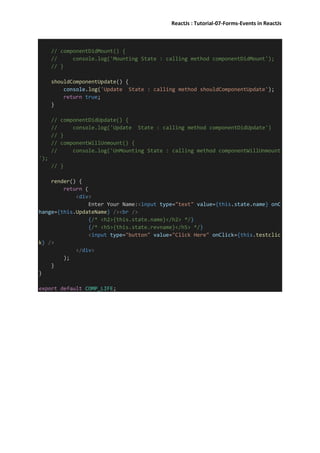
// componentDidMount() {
// console.log('Mounting State : calling method componentDidMount');
// }
shouldComponentUpdate() {
console.log('Update State : calling method shouldComponentUpdate');
return true;
}
// componentDidUpdate() {
// console.log('Update State : calling method componentDidUpdate')
// }
// componentWillUnmount() {
// console.log('UnMounting State : calling method componentWillUnmount
');
// }
render() {
return (
<div>
Enter Your Name:<input type="text" value={this.state.name} onC
hange={this.UpdateName} /><br />
{/* <h2>{this.state.name}</h2> */}
{/* <h5>{this.state.revname}</h5> */}
<input type="button" value="Click Here" onClick={this.testclic
k} />
</div>
);
}
}
export default COMP_LIFE;

React js t7 - forms-events

  • 1.
    ReactJs : Tutorial-07-Forms-Eventsin ReactJs Working with Forms In reactjs Html input elements like <input />, <textarea /> and <select /> has their own state and needs to be updated when user interacts using the setState() method. In this chapter, we will see how to work with forms in reactjs. Working with Events in ReactJS Working with events in reactjs is same as how you would have done in javascript. You can use all the event handlers that are used in javascript. The setState() method is used to update the state when the user interacts with any Html element. Here is a working example of how to use events in reactjs. import React from 'react'; import ReactDOM from 'react-dom'; import './index.css'; // import App from './App'; import * as serviceWorker from './serviceWorker'; import COMP_LIFE from './complife'; ReactDOM.render( <React.StrictMode> <COMP_LIFE /> </React.StrictMode>, document.getElementById('root') ); import React from 'react'; import ReactDOM from 'react-dom'; class COMP_LIFE extends React.Component { constructor(props) { super(props); //this.state = { name: '', revname: '' }; this.state = { name: '' }; this.UpdateName = this.UpdateName.bind(this); this.testclick = this.testclick.bind(this); } UpdateName(event) { this.setState({ name: event.target.value }); //this.setState({ revname: event.target.value + '1' }); } testclick(event) { alert("The name entered is: " + this.state.name); }
  • 2.
    ReactJs : Tutorial-07-Forms-Eventsin ReactJs // componentDidMount() { // console.log('Mounting State : calling method componentDidMount'); // } shouldComponentUpdate() { console.log('Update State : calling method shouldComponentUpdate'); return true; } // componentDidUpdate() { // console.log('Update State : calling method componentDidUpdate') // } // componentWillUnmount() { // console.log('UnMounting State : calling method componentWillUnmount '); // } render() { return ( <div> Enter Your Name:<input type="text" value={this.state.name} onC hange={this.UpdateName} /><br /> {/* <h2>{this.state.name}</h2> */} {/* <h5>{this.state.revname}</h5> */} <input type="button" value="Click Here" onClick={this.testclic k} /> </div> ); } } export default COMP_LIFE;