PROGRAMMABLE LOGIC
CONTROLLER
L. SUDHA
CMTI
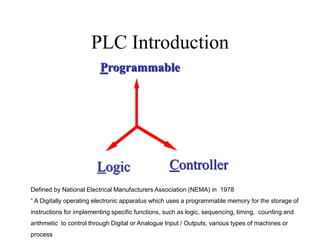
PLC Introduction
Controller
Programmable
Logic
Defined by National Electrical Manufacturers Association (NEMA) in 1978
“ A Digitally operating electronic apparatus which uses a programmable memory for the storage of
instructions for implementing specific functions, such as logic, sequencing, timing, counting and
arithmetic to control through Digital or Analogue Input / Outputs, various types of machines or
process
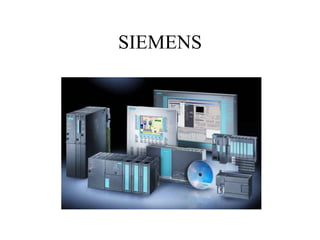
SIEMENS
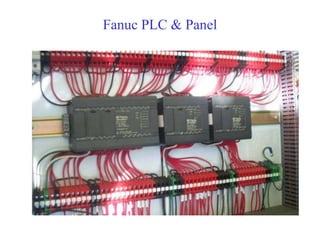
Fanuc PLC & Panel
Advantages of PLC
Cost effective for controlling complex
systems.
Flexible and can be reapplied to control
other systems quickly and easily.
Computational abilities allow more
sophisticated control.
Trouble shooting aids make programming
easier and reduce downtime.
Reliable components make these likely to
operate for years before failure.
PLC APPLICATIONS
• Machine control
• Process control
• Automated product quality
inspection
• Data acquisition
• Material handling
• Sorters,packing lines, wrappers
Subsystems of a CNC system
Servo
HMI
MMI
PLC
(INTEGRATED)
PMC / PMI / PC
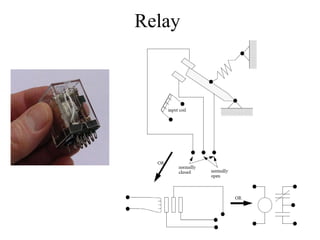
Relay
12/13/2022
SOLID STATE RELAYS
Generation of PLCs
Program based
(Software)
Relay Based
Circuit
IC based
Solid State
NC-PLC window
NC
PLC
Part
Program
M
S
T
I / Os
MMC
status
Servo
status
Interlocks
Program
execution
status
Role of a PLC
Part Program
Input devices
Output devices
•Digital
– Pushbuttons, limit switches
– Sensors, selectorswitches
•Analog devices
–Voltage or current inputs 0-100mA
and converts to digital information
–Flow meters,
–Pressure transducers,
–Thermocouples
Output Devices
• Digital devices
– Lights,leds, relay, small motors
• Analog devices
– Converts D to A
– 0-10V or 4-20mA
– Position control
– Flow control
– Pressure regulator
Part Program
O0110
N001 G90 ; Absolute coordinate system
N002 M06 T01 ; Select tool #1 (turning tool)
N003 M03 S2000 ; Turn spindle on (CW), set 2000 rpm
N004 G00 X0.0 Z-0.9 ; Rapid traverse
N005 G01 X0.0 Z-1.0 F10 ; enter part
N006 G01 X1.0 ; make facing cut
N007 G01 Z-3.9 ; turn side
N008 M30 ; end of program
PLC ARCHITECTURE
PROGRAMMER
PROGRAM
MEMORY
INPUT
MODULE CPU
OUTPUT
MODULE
INPUTS OUTPUTS
PLC
DATA
MEMORY
PC / HAND HELD UNIT
PLC ARCHITECTURE Contd
INPUT
IMAGE
TABLE
OUTPUT
IMAGE
TABLE
LOGIC
DIO DIO
INPUTS OUTPUTS
OP
&
NC
OP
&
NC
Electrical Connectivity to External World
Input Devices
Output Devices
24 V 5 V
5 V 24 V
Optical Isolation
Optical Isolation
Machine Tool Functionality handled by PLC
PLC
Turret / ATC
Tailstock & Quill
Chuck
Spindle Gear change, etc.
Chip Conveyer
Lubrication
Coolant
Machine Tool Interlock
Scanning Cycle
Read Inputs
Run Internal Diags
Execute Logic
Update outputs
Outputs
• Timer, Counters
• LED
• Solenoid
Inputs
 Push Button
 Sensor
 Limit switch
 Fast Input !
 Emergency
 Probe Input
 Over travel Limit (NC controls)
FAST INPUTS
• CRITICAL INPUTS LIKE OVER TRAVEL LIMIT SWITCHES,
EMERGENCY STOP ARE FAST INPUTS TO PLC
• FAST INPUTS ARE GENERALLY CONNECTED WITH NC
CONTACTS
• TIME / INTERRUPT BASED SCANNING
Timers
ON Delay Timer
OFF Delay Timer
Pulse Timer
Extended Pulse Timer
Enable
Output
Delay
Output
Delay
Enable
Enable
Output
Delay
Delay
Enable
Output
Counters
Enable
Event
Output
Types of Counters
1. UP Counter
2. DOWN Counter
3. UPDOWN Counter
DIGITAL OUTPUT MODULES
OUTPUT
MODULE
24V DC
LOAD
OUTPUT
MODULE
LOAD
24V GND
SINKING TYPE SOURCING TYPE
OUTPUT MODULES Contd
OUTPUT
MODULE
24V GND
24V DC
24V GND
LOAD
RELAY
RELAY TYPE
Miscellaneous Codes
Postlude
M-Code
Prelude
M03: Spindle CW
M04: Spindle CCW
M08: Coolant ON
•
•
•
•
M05: Spindle stop
M09: Coolant OFF
MST Codes
NC PLC
MST Execution
MST Codes
Programming Languages
1. Ladder
2. Statement List
3. Flow Chart
4. HLL – High Level Language
IEC-1131-3 is the PLC programming Standard for Exchangeability
Ladder Programming
• Ladder is one of the powerful
ways of programming
• It is also known as Universal
Programming Language
• Standard for all PLCs from
different manufacturers
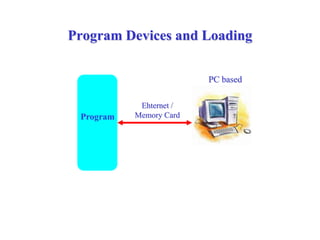
Program Devices and Loading
PC based
Program
Ehternet /
Memory Card
PROCEDURAL STEPS
1. Define the process
2. List out the sensors (Input & Output)
3. Assign the PLC I/O numbers
4. Build the logic’s
5. Key in the program into the PLC (Download if
program is developed in a Personal Computer)
6. Check the logic by forcing the inputs
7. Use I/O simulator and check the logic
8. Check the logic for various conditions of input
9. Make modifications if required and try again
Important points to remember during
Ladder Programming
• Logic is always executed from Left to Right and Top to Bottom.
The Input side of the Logic is executed first before executing
the Output side logic.
• All Internal Flags (Except Retentive Flags) are initialized to ‘0’
on power up.
• All Outputs are initialized to ‘0’ on power up.
• Output Flags can be used in the Input side, but not vice-versa.
• For a particular input either NO or NC symbol can be placed in
the Logic irrespective of the type of Contact used in Input.
• All logical sequences are generally a combination of AND, OR
and NOT logic’s only.
NOT GATE
The ladder logic equivalent for a NOT function looks like a
normal contact but with a slash through it.
Input A Output
0 1
1 0
The simplest of all logic functions is the NOT gate.
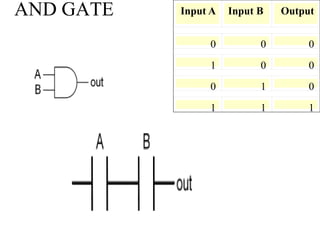
AND GATE Input A Input B Output
0 0 0
1 0 0
0 1 0
1 1 1
OR GATE Input A Input B Output
0 0 0
1 0 1
0 1 1
1 1 1
NOR GATE Input A Input B Output
0 0 1
1 0 0
0 1 0
1 1 0
NAND GATE
Input A Input B Output
0 0 1
1 0 1
0 1 1
1 1 0
XOR GATE
Input A Input B Output
0 0 0
1 0 1
0 1 1
1 1 0
XNOR GATE
Input A Input B Output
0 0 1
1 0 0
0 1 0
1 1 1
Logical Instructions
AND Logic
OR Logic
I1.0 I2.0 O1.0
I1.0 O1.0
I2.0
Latch
I1.0 O1.0
O1.0
DIGITAL IO SPECS
• NO OF INPUTS : 8/16/32
• INPUT TYPE : SOURCING / SINKING
• INPUT VOLTAGE : 10-32VDC
• INPUT TURN ON LEVEL – 8VDC,@2.3mADC
MINIMUM
• INPUT TURN OFF LEVEL –
2.5VDC@0.05maADC MAXIMUM
• INPUT SOURCE : 5VDC FROM
CONTROLLER
I/O Devices
Selection of PLCs
The points to be remembered while selecting PLC are as follows:
1. No. of Inputs / Outputs the PLC can handle
2. Type of Inputs / Outputs supported
3. No. of Timers / Counters available
4. Types of Counters / Timers available
5. Scan time per K of the PLC
6. PLC memory capacity
7. Fast / Interrupt Input and Power On scan
8. Proramming languages supported
9. Programming devices supported
10. Diagnostic features like Forcing function and Power Flow Diagram
11. Axes Control supported with PID algorithmn
12. Any Networking capability available
13. Special functions like Turret / ATC macros supported
14. Arithmetic / Boolean Instruction set
15. Isolation of Inputs / Outputs from PLC
16. Watch dog Timer
Logical Instructions
AND Logic
OR Logic
I1.0 I2.0 O1.0
I1.0 O1.0
I2.0
Latch
I1.0 O1.0
O1.0
Single Shot
I1.0 F1.0
F2.0
F2.0
Logical instructions Contd
Oscillator
F2.0 F2.0
O1.0
I1.0 O1.0
O1.0
Latch with Unlatch (Motor ON / OFF)
I2.0
I1.0 O1.0
O1.0
I2.0
Thank You

PLCpptFeb222017.ppt

  • 1.
  • 2.
    PLC Introduction Controller Programmable Logic Defined byNational Electrical Manufacturers Association (NEMA) in 1978 “ A Digitally operating electronic apparatus which uses a programmable memory for the storage of instructions for implementing specific functions, such as logic, sequencing, timing, counting and arithmetic to control through Digital or Analogue Input / Outputs, various types of machines or process
  • 3.
  • 4.
  • 5.
    Advantages of PLC Costeffective for controlling complex systems. Flexible and can be reapplied to control other systems quickly and easily. Computational abilities allow more sophisticated control. Trouble shooting aids make programming easier and reduce downtime. Reliable components make these likely to operate for years before failure.
  • 6.
    PLC APPLICATIONS • Machinecontrol • Process control • Automated product quality inspection • Data acquisition • Material handling • Sorters,packing lines, wrappers
  • 7.
    Subsystems of aCNC system Servo HMI MMI PLC (INTEGRATED) PMC / PMI / PC
  • 8.
  • 9.
  • 10.
    Generation of PLCs Programbased (Software) Relay Based Circuit IC based Solid State
  • 11.
    NC-PLC window NC PLC Part Program M S T I /Os MMC status Servo status Interlocks Program execution status
  • 12.
    Role of aPLC Part Program Input devices Output devices •Digital – Pushbuttons, limit switches – Sensors, selectorswitches •Analog devices –Voltage or current inputs 0-100mA and converts to digital information –Flow meters, –Pressure transducers, –Thermocouples Output Devices • Digital devices – Lights,leds, relay, small motors • Analog devices – Converts D to A – 0-10V or 4-20mA – Position control – Flow control – Pressure regulator Part Program O0110 N001 G90 ; Absolute coordinate system N002 M06 T01 ; Select tool #1 (turning tool) N003 M03 S2000 ; Turn spindle on (CW), set 2000 rpm N004 G00 X0.0 Z-0.9 ; Rapid traverse N005 G01 X0.0 Z-1.0 F10 ; enter part N006 G01 X1.0 ; make facing cut N007 G01 Z-3.9 ; turn side N008 M30 ; end of program
  • 13.
  • 14.
  • 15.
    Electrical Connectivity toExternal World Input Devices Output Devices 24 V 5 V 5 V 24 V Optical Isolation Optical Isolation
  • 16.
    Machine Tool Functionalityhandled by PLC PLC Turret / ATC Tailstock & Quill Chuck Spindle Gear change, etc. Chip Conveyer Lubrication Coolant Machine Tool Interlock
  • 17.
    Scanning Cycle Read Inputs RunInternal Diags Execute Logic Update outputs Outputs • Timer, Counters • LED • Solenoid Inputs  Push Button  Sensor  Limit switch  Fast Input !  Emergency  Probe Input  Over travel Limit (NC controls)
  • 18.
    FAST INPUTS • CRITICALINPUTS LIKE OVER TRAVEL LIMIT SWITCHES, EMERGENCY STOP ARE FAST INPUTS TO PLC • FAST INPUTS ARE GENERALLY CONNECTED WITH NC CONTACTS • TIME / INTERRUPT BASED SCANNING
  • 19.
    Timers ON Delay Timer OFFDelay Timer Pulse Timer Extended Pulse Timer Enable Output Delay Output Delay Enable Enable Output Delay Delay Enable Output
  • 20.
    Counters Enable Event Output Types of Counters 1.UP Counter 2. DOWN Counter 3. UPDOWN Counter
  • 21.
    DIGITAL OUTPUT MODULES OUTPUT MODULE 24VDC LOAD OUTPUT MODULE LOAD 24V GND SINKING TYPE SOURCING TYPE
  • 22.
    OUTPUT MODULES Contd OUTPUT MODULE 24VGND 24V DC 24V GND LOAD RELAY RELAY TYPE
  • 23.
    Miscellaneous Codes Postlude M-Code Prelude M03: SpindleCW M04: Spindle CCW M08: Coolant ON • • • • M05: Spindle stop M09: Coolant OFF
  • 24.
    MST Codes NC PLC MSTExecution MST Codes
  • 25.
    Programming Languages 1. Ladder 2.Statement List 3. Flow Chart 4. HLL – High Level Language IEC-1131-3 is the PLC programming Standard for Exchangeability
  • 26.
    Ladder Programming • Ladderis one of the powerful ways of programming • It is also known as Universal Programming Language • Standard for all PLCs from different manufacturers
  • 27.
    Program Devices andLoading PC based Program Ehternet / Memory Card
  • 28.
    PROCEDURAL STEPS 1. Definethe process 2. List out the sensors (Input & Output) 3. Assign the PLC I/O numbers 4. Build the logic’s 5. Key in the program into the PLC (Download if program is developed in a Personal Computer) 6. Check the logic by forcing the inputs 7. Use I/O simulator and check the logic 8. Check the logic for various conditions of input 9. Make modifications if required and try again
  • 29.
    Important points toremember during Ladder Programming • Logic is always executed from Left to Right and Top to Bottom. The Input side of the Logic is executed first before executing the Output side logic. • All Internal Flags (Except Retentive Flags) are initialized to ‘0’ on power up. • All Outputs are initialized to ‘0’ on power up. • Output Flags can be used in the Input side, but not vice-versa. • For a particular input either NO or NC symbol can be placed in the Logic irrespective of the type of Contact used in Input. • All logical sequences are generally a combination of AND, OR and NOT logic’s only.
  • 30.
    NOT GATE The ladderlogic equivalent for a NOT function looks like a normal contact but with a slash through it. Input A Output 0 1 1 0 The simplest of all logic functions is the NOT gate.
  • 31.
    AND GATE InputA Input B Output 0 0 0 1 0 0 0 1 0 1 1 1
  • 32.
    OR GATE InputA Input B Output 0 0 0 1 0 1 0 1 1 1 1 1
  • 33.
    NOR GATE InputA Input B Output 0 0 1 1 0 0 0 1 0 1 1 0
  • 34.
    NAND GATE Input AInput B Output 0 0 1 1 0 1 0 1 1 1 1 0
  • 35.
    XOR GATE Input AInput B Output 0 0 0 1 0 1 0 1 1 1 1 0
  • 36.
    XNOR GATE Input AInput B Output 0 0 1 1 0 0 0 1 0 1 1 1
  • 37.
    Logical Instructions AND Logic ORLogic I1.0 I2.0 O1.0 I1.0 O1.0 I2.0 Latch I1.0 O1.0 O1.0
  • 38.
    DIGITAL IO SPECS •NO OF INPUTS : 8/16/32 • INPUT TYPE : SOURCING / SINKING • INPUT VOLTAGE : 10-32VDC • INPUT TURN ON LEVEL – 8VDC,@2.3mADC MINIMUM • INPUT TURN OFF LEVEL – 2.5VDC@0.05maADC MAXIMUM • INPUT SOURCE : 5VDC FROM CONTROLLER
  • 39.
  • 40.
    Selection of PLCs Thepoints to be remembered while selecting PLC are as follows: 1. No. of Inputs / Outputs the PLC can handle 2. Type of Inputs / Outputs supported 3. No. of Timers / Counters available 4. Types of Counters / Timers available 5. Scan time per K of the PLC 6. PLC memory capacity 7. Fast / Interrupt Input and Power On scan 8. Proramming languages supported 9. Programming devices supported 10. Diagnostic features like Forcing function and Power Flow Diagram 11. Axes Control supported with PID algorithmn 12. Any Networking capability available 13. Special functions like Turret / ATC macros supported 14. Arithmetic / Boolean Instruction set 15. Isolation of Inputs / Outputs from PLC 16. Watch dog Timer
  • 41.
    Logical Instructions AND Logic ORLogic I1.0 I2.0 O1.0 I1.0 O1.0 I2.0 Latch I1.0 O1.0 O1.0 Single Shot I1.0 F1.0 F2.0 F2.0
  • 42.
    Logical instructions Contd Oscillator F2.0F2.0 O1.0 I1.0 O1.0 O1.0 Latch with Unlatch (Motor ON / OFF) I2.0 I1.0 O1.0 O1.0 I2.0
  • 43.