Digital Graphic Narrative Planning
Use this booklet to help structure your planning and collate your planning documents.
Considerations:
There are lots of things to consider in this project. Fill out each section in detail to show you have thought about each one. You
should imagine that this is a live project, so considerations like cost, quantity and codes of practice must be thought about in that
context rather than just as a college project.
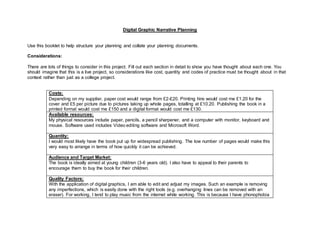
Costs:
Depending on my supplier, paper cost would range from £2-£20. Printing hire would cost me £1.20 for the
cover and £5 per picture due to pictures taking up whole pages, totalling at £10.20. Publishing the book in a
printed format would cost me £150 and a digital format would cost me £130.
Available resources:
My physical resources include paper, pencils, a pencil sharpener, and a computer with monitor, keyboard and
mouse. Software used includes Video editing software and Microsoft Word.
Quantity:
I would most likely have the book put up for widespread publishing. The low number of pages would make this
very easy to arrange in terms of how quickly it can be achieved.
Audience and Target Market:
The book is ideally aimed at young children (3-6 years old). I also have to appeal to their parents to
encourage them to buy the book for their children.
Quality Factors:
With the application of digital graphics, I am able to edit and adjust my images. Such an example is removing
any imperfections, which is easily done with the right tools (e.g. overhanging lines can be removed with an
eraser). For working, I tend to play music from the internet while working. This is because I have phonophobia
and the presence of a fire alarm in the room I am working in makes me feel uncomfortable, so music helps me
relax.
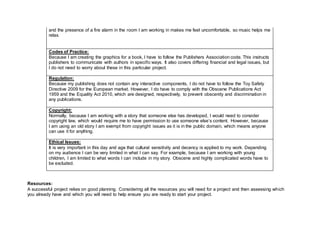
Codes of Practice:
Because I am creating the graphics for a book, I have to follow the Publishers Association code. This instructs
publishers to communicate with authors in specific ways. It also covers differing financial and legal issues, but
I do not need to worry about these in this particular project.
Regulation:
Because my publishing does not contain any interactive components, I do not have to follow the Toy Safety
Directive 2009 for the European market. However, I do have to comply with the Obscene Publications Act
1959 and the Equality Act 2010, which are designed, respectively, to prevent obscenity and discrimination in
any publications.
Copyright:
Normally, because I am working with a story that someone else has developed, I would need to consider
copyright law, which would require me to have permission to use someone else’s content. However, because
I am using an old story I am exempt from copyright issues as it is in the public domain, which means anyone
can use it for anything.
Ethical Issues:
It is very important in this day and age that cultural sensitivity and decency is applied to my work. Depending
on my audience I can be very limited in what I can say. For example, because I am working with young
children, I am limited to what words I can include in my story. Obscene and highly complicated words have to
be excluded.
Resources:
A successful project relies on good planning. Considering all the resources you will need for a project and then assessing which
you already have and which you will need to help ensure you are ready to start your project.
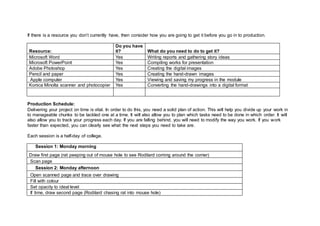
If there is a resource you don’t currently have, then consider how you are going to get it before you go in to production.
Resource:
Do you have
it? What do you need to do to get it?
Microsoft Word Yes Writing reports and gathering story ideas
Microsoft PowerPoint Yes Compiling works for presentation
Adobe Photoshop Yes Creating the digital images
Pencil and paper Yes Creating the hand-drawn images
Apple computer Yes Viewing and saving my progress in the module
Konica Minolta scanner and photocopier Yes Converting the hand-drawings into a digital format
Production Schedule:
Delivering your project on time is vital. In order to do this, you need a solid plan of action. This will help you divide up your work in
to manageable chunks to be tackled one at a time. It will also allow you to plan which tasks need to be done in which order. It will
also allow you to track your progress each day. If you are falling behind, you will need to modify the way you work. If you work
faster than expected, you can clearly see what the next steps you need to take are.
Each session is a half-day of college.
Session 1: Monday morning
Draw first page (rat peeping out of mouse hole to see Rodilard coming around the corner)
Scan page
Session 2: Monday afternoon
Open scanned page and trace over drawing
Fill with colour
Set opacity to ideal level
If time, draw second page (Rodilard chasing rat into mouse hole)
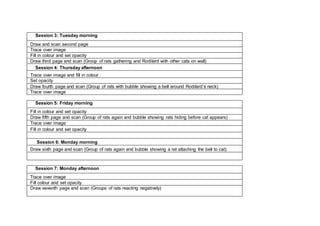
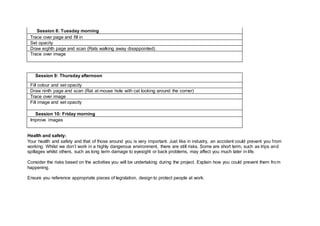
Session 3: Tuesday morning
Draw and scan second page
Trace over image
Fill in colour and set opacity
Draw third page and scan (Group of rats gathering and Rodilard with other cats on wall)
Session 4: Thursday afternoon
Trace over image and fill in colour
Set opacity
Draw fourth page and scan (Group of rats with bubble showing a bell around Rodilard’s neck)
Trace over image
Session 5: Friday morning
Fill in colour and set opacity
Draw fifth page and scan (Group of rats again and bubble showing rats hiding before cat appears)
Trace over image
Fill in colour and set opacity
Session 6: Monday morning
Draw sixth page and scan (Group of rats again and bubble showing a rat attaching the bell to cat)
Session 7: Monday afternoon
Trace over image
Fill colour and set opacity
Draw seventh page and scan (Groups of rats reacting negatively)
Session 8: Tuesday morning
Trace over page and fill in
Set opacity
Draw eighth page and scan (Rats walking away disappointed)
Trace over image
Session 9: Thursday afternoon
Fill colour and set opacity
Draw ninth page and scan (Rat at mouse hole with cat looking around the corner)
Trace over image
Fill image and set opacity
Session 10: Friday morning
Improve images
Health and safety:
Your health and safety and that of those around you is very important. Just like in industry, an accident could prevent you from
working. Whilst we don’t work in a highly dangerous environment, there are still risks. Some are short term, such as trips and
spillages whilst others, such as long term damage to eyesight or back problems, may affect you much later in life.
Consider the risks based on the activities you will be undertaking during the project. Explain how you could prevent them from
happening.
Ensure you reference appropriate pieces of legislation, design to protect people at work.
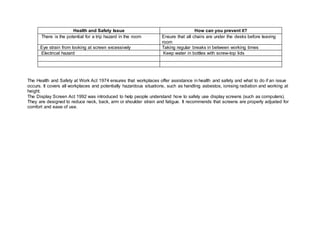
Health and Safety Issue How can you prevent it?
There is the potential for a trip hazard in the room Ensure that all chairs are under the desks before leaving
room
Eye strain from looking at screen excessively Taking regular breaks in between working times
Electrical hazard Keep water in bottles with screw-top lids
The Health and Safety at Work Act 1974 ensures that workplaces offer assistance in health and safety and what to do if an issue
occurs. It covers all workplaces and potentially hazardous situations, such as handling asbestos, ionising radiation and working at
height.
The Display Screen Act 1992 was introduced to help people understand how to safely use display screens (such as computers).
They are designed to reduce neck, back, arm or shoulder strain and fatigue. It recommends that screens are properly adjusted for
comfort and ease of use.

Planning booklet

  • 1.
    Digital Graphic NarrativePlanning Use this booklet to help structure your planning and collate your planning documents. Considerations: There are lots of things to consider in this project. Fill out each section in detail to show you have thought about each one. You should imagine that this is a live project, so considerations like cost, quantity and codes of practice must be thought about in that context rather than just as a college project. Costs: Depending on my supplier, paper cost would range from £2-£20. Printing hire would cost me £1.20 for the cover and £5 per picture due to pictures taking up whole pages, totalling at £10.20. Publishing the book in a printed format would cost me £150 and a digital format would cost me £130. Available resources: My physical resources include paper, pencils, a pencil sharpener, and a computer with monitor, keyboard and mouse. Software used includes Video editing software and Microsoft Word. Quantity: I would most likely have the book put up for widespread publishing. The low number of pages would make this very easy to arrange in terms of how quickly it can be achieved. Audience and Target Market: The book is ideally aimed at young children (3-6 years old). I also have to appeal to their parents to encourage them to buy the book for their children. Quality Factors: With the application of digital graphics, I am able to edit and adjust my images. Such an example is removing any imperfections, which is easily done with the right tools (e.g. overhanging lines can be removed with an eraser). For working, I tend to play music from the internet while working. This is because I have phonophobia
  • 2.
    and the presenceof a fire alarm in the room I am working in makes me feel uncomfortable, so music helps me relax. Codes of Practice: Because I am creating the graphics for a book, I have to follow the Publishers Association code. This instructs publishers to communicate with authors in specific ways. It also covers differing financial and legal issues, but I do not need to worry about these in this particular project. Regulation: Because my publishing does not contain any interactive components, I do not have to follow the Toy Safety Directive 2009 for the European market. However, I do have to comply with the Obscene Publications Act 1959 and the Equality Act 2010, which are designed, respectively, to prevent obscenity and discrimination in any publications. Copyright: Normally, because I am working with a story that someone else has developed, I would need to consider copyright law, which would require me to have permission to use someone else’s content. However, because I am using an old story I am exempt from copyright issues as it is in the public domain, which means anyone can use it for anything. Ethical Issues: It is very important in this day and age that cultural sensitivity and decency is applied to my work. Depending on my audience I can be very limited in what I can say. For example, because I am working with young children, I am limited to what words I can include in my story. Obscene and highly complicated words have to be excluded. Resources: A successful project relies on good planning. Considering all the resources you will need for a project and then assessing which you already have and which you will need to help ensure you are ready to start your project.
  • 3.
    If there isa resource you don’t currently have, then consider how you are going to get it before you go in to production. Resource: Do you have it? What do you need to do to get it? Microsoft Word Yes Writing reports and gathering story ideas Microsoft PowerPoint Yes Compiling works for presentation Adobe Photoshop Yes Creating the digital images Pencil and paper Yes Creating the hand-drawn images Apple computer Yes Viewing and saving my progress in the module Konica Minolta scanner and photocopier Yes Converting the hand-drawings into a digital format Production Schedule: Delivering your project on time is vital. In order to do this, you need a solid plan of action. This will help you divide up your work in to manageable chunks to be tackled one at a time. It will also allow you to plan which tasks need to be done in which order. It will also allow you to track your progress each day. If you are falling behind, you will need to modify the way you work. If you work faster than expected, you can clearly see what the next steps you need to take are. Each session is a half-day of college. Session 1: Monday morning Draw first page (rat peeping out of mouse hole to see Rodilard coming around the corner) Scan page Session 2: Monday afternoon Open scanned page and trace over drawing Fill with colour Set opacity to ideal level If time, draw second page (Rodilard chasing rat into mouse hole)
  • 4.
    Session 3: Tuesdaymorning Draw and scan second page Trace over image Fill in colour and set opacity Draw third page and scan (Group of rats gathering and Rodilard with other cats on wall) Session 4: Thursday afternoon Trace over image and fill in colour Set opacity Draw fourth page and scan (Group of rats with bubble showing a bell around Rodilard’s neck) Trace over image Session 5: Friday morning Fill in colour and set opacity Draw fifth page and scan (Group of rats again and bubble showing rats hiding before cat appears) Trace over image Fill in colour and set opacity Session 6: Monday morning Draw sixth page and scan (Group of rats again and bubble showing a rat attaching the bell to cat) Session 7: Monday afternoon Trace over image Fill colour and set opacity Draw seventh page and scan (Groups of rats reacting negatively)
  • 5.
    Session 8: Tuesdaymorning Trace over page and fill in Set opacity Draw eighth page and scan (Rats walking away disappointed) Trace over image Session 9: Thursday afternoon Fill colour and set opacity Draw ninth page and scan (Rat at mouse hole with cat looking around the corner) Trace over image Fill image and set opacity Session 10: Friday morning Improve images Health and safety: Your health and safety and that of those around you is very important. Just like in industry, an accident could prevent you from working. Whilst we don’t work in a highly dangerous environment, there are still risks. Some are short term, such as trips and spillages whilst others, such as long term damage to eyesight or back problems, may affect you much later in life. Consider the risks based on the activities you will be undertaking during the project. Explain how you could prevent them from happening. Ensure you reference appropriate pieces of legislation, design to protect people at work.
  • 6.
    Health and SafetyIssue How can you prevent it? There is the potential for a trip hazard in the room Ensure that all chairs are under the desks before leaving room Eye strain from looking at screen excessively Taking regular breaks in between working times Electrical hazard Keep water in bottles with screw-top lids The Health and Safety at Work Act 1974 ensures that workplaces offer assistance in health and safety and what to do if an issue occurs. It covers all workplaces and potentially hazardous situations, such as handling asbestos, ionising radiation and working at height. The Display Screen Act 1992 was introduced to help people understand how to safely use display screens (such as computers). They are designed to reduce neck, back, arm or shoulder strain and fatigue. It recommends that screens are properly adjusted for comfort and ease of use.