Promise, Pitfalls, & Procrastination


                                      Andrew Conry-Murray
                       Business Editor – Network Computing

                                            Jonathan Feldman
                                 Director of IT – Asheville, NC
              Contributing Editor – InformationWeek Analytics

                                               Michael Healey
                      President – Yeoman Technology Group
              Contributing Editor – InformationWeek Analytics
                                    ©2009 Yeoman Technology Group – All rights Reserved
Current state of Windows 7
Focus Areas
   Core OS Requirements
   Virtualization Questions
   Testing Requirements
   Deployment Options
Alternatives?
Interactive session – Questions encouraged


                               ©2009 Yeoman Technology Group – All rights Reserved
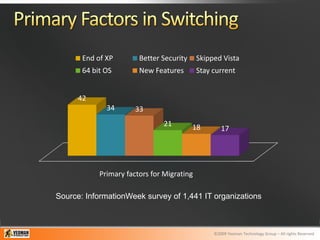
End of XP        Better Security     Skipped Vista
       64 bit OS        New Features        Stay current


      42
              34       33
                               21         18        17


            Primary factors for Migrating

Source: InformationWeek survey of 1,441 IT organizations


                                                 ©2009 Yeoman Technology Group – All rights Reserved
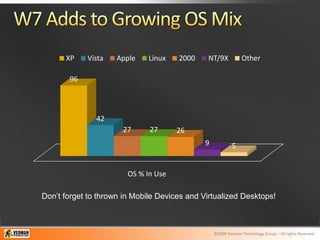
XP    Vista    Apple    Linux   2000     NT/9X            Other

       96


               42
                      27      27      26
                                              9            5


                        OS % In Use

Don’t forget to thrown in Mobile Devices and Virtualized Desktops!


                                                  ©2009 Yeoman Technology Group – All rights Reserved
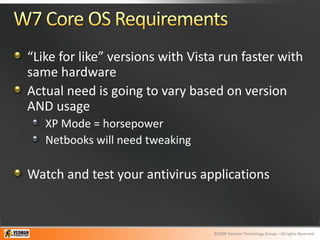
“Like for like” versions with Vista run faster with
same hardware
Actual need is going to vary based on version
AND usage
   XP Mode = horsepower
   Netbooks will need tweaking

Watch and test your antivirus applications


                                  ©2009 Yeoman Technology Group – All rights Reserved
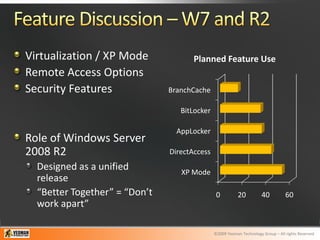
Virtualization / XP Mode              Planned Feature Use
Remote Access Options
Security Features              BranchCache

                                  BitLocker

                                 AppLocker
Role of Windows Server
2008 R2                        DirectAccess
  Designed as a unified           XP Mode
  release
  “Better Together” = “Don’t                   0          20          40          60
  work apart”

                                              ©2009 Yeoman Technology Group – All rights Reserved
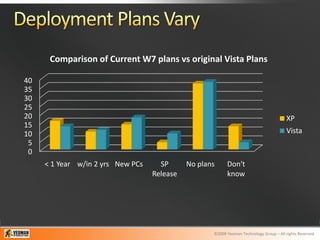
Comparison of Current W7 plans vs original Vista Plans

40
35
30
25
20                                                                                      XP
15
10                                                                                      Vista
 5
 0
     < 1 Year w/in 2 yrs New PCs     SP      No plans     Don't
                                   Release                know


                                                    ©2009 Yeoman Technology Group – All rights Reserved
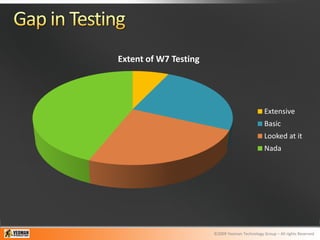
Extent of W7 Testing


                                                Extensive
                                                Basic
                                                Looked at it
                                                Nada


                       ©2009 Yeoman Technology Group – All rights Reserved
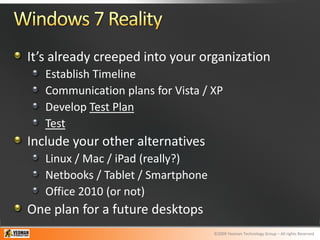
It’s already creeped into your organization
   Establish Timeline
   Communication plans for Vista / XP
   Develop Test Plan
   Test
Include your other alternatives
   Linux / Mac / iPad (really?)
   Netbooks / Tablet / Smartphone
   Office 2010 (or not)
One plan for a future desktops
                                    ©2009 Yeoman Technology Group – All rights Reserved

Planning and implementing windows 7

  • 1.
    Promise, Pitfalls, &Procrastination Andrew Conry-Murray Business Editor – Network Computing Jonathan Feldman Director of IT – Asheville, NC Contributing Editor – InformationWeek Analytics Michael Healey President – Yeoman Technology Group Contributing Editor – InformationWeek Analytics ©2009 Yeoman Technology Group – All rights Reserved
  • 2.
    Current state ofWindows 7 Focus Areas Core OS Requirements Virtualization Questions Testing Requirements Deployment Options Alternatives? Interactive session – Questions encouraged ©2009 Yeoman Technology Group – All rights Reserved
  • 3.
    End of XP Better Security Skipped Vista 64 bit OS New Features Stay current 42 34 33 21 18 17 Primary factors for Migrating Source: InformationWeek survey of 1,441 IT organizations ©2009 Yeoman Technology Group – All rights Reserved
  • 4.
    XP Vista Apple Linux 2000 NT/9X Other 96 42 27 27 26 9 5 OS % In Use Don’t forget to thrown in Mobile Devices and Virtualized Desktops! ©2009 Yeoman Technology Group – All rights Reserved
  • 5.
    “Like for like”versions with Vista run faster with same hardware Actual need is going to vary based on version AND usage XP Mode = horsepower Netbooks will need tweaking Watch and test your antivirus applications ©2009 Yeoman Technology Group – All rights Reserved
  • 6.
    Virtualization / XPMode Planned Feature Use Remote Access Options Security Features BranchCache BitLocker AppLocker Role of Windows Server 2008 R2 DirectAccess Designed as a unified XP Mode release “Better Together” = “Don’t 0 20 40 60 work apart” ©2009 Yeoman Technology Group – All rights Reserved
  • 7.
    Comparison of CurrentW7 plans vs original Vista Plans 40 35 30 25 20 XP 15 10 Vista 5 0 < 1 Year w/in 2 yrs New PCs SP No plans Don't Release know ©2009 Yeoman Technology Group – All rights Reserved
  • 8.
    Extent of W7Testing Extensive Basic Looked at it Nada ©2009 Yeoman Technology Group – All rights Reserved
  • 9.
    It’s already creepedinto your organization Establish Timeline Communication plans for Vista / XP Develop Test Plan Test Include your other alternatives Linux / Mac / iPad (really?) Netbooks / Tablet / Smartphone Office 2010 (or not) One plan for a future desktops ©2009 Yeoman Technology Group – All rights Reserved