






Plan, track, and forecast with JIRA
Annie Ioceva
Atlassian Solution Architect,
Nemetschek Bulgaria
Agenda
GET MOST OF JIRA MANAGEMENT
JIRA MANAGEMENT ADD-ONS
IN FOCUS: TEMPO BUDGETS
Agenda
GET MOST OF JIRA MANAGEMENT
JIRA MANAGEMENT ADD-ONS
IN FOCUS: TEMPO BUDGETS
How to get most of
JIRA management features
Use tools as they are
designed to be used!
Get most of JIRA management
 Define your milestones in JIRA (as Releases)
 Represent big features (known scope) as Epics
 Track team’s velocity - use Sprints to deliver value in short
increments and let JIRA keep track of team’s velocity
 Analyze past performance to forecast future performance
Milestones as Releases
 Start and End Dates should represent the moment work is planned
to happen
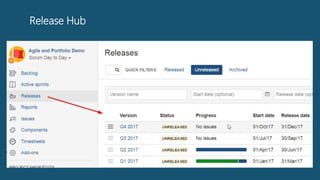
 JIRA Release Hub shows release status overview
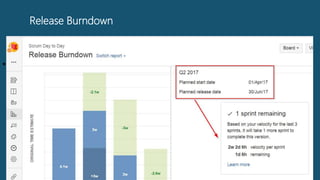
 Use JIRA Versions Burndown and Releases Report to understand if
your milestones are reachable
 Most management Add-ons rely on JIRA Releases as planning
phases or projects; visualized on timeline etc.
Release Hub
Release Burndown
•
Calculation of % done needs data
 Estimate tickets before launching Sprints (e.g. set Original Time
Estimate)
 While working on issues: log worked hours and set RTE
 At the end of issue’s workflow: always set issue Resolution
 At the end of issue’s workflow: always set Remaining Time to ZERO
 Most management Add-ons use this resolution and RTE data to
calculate progress and filter backlog from work done
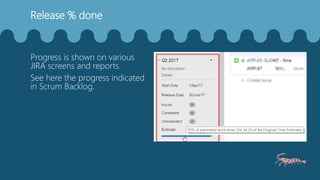
Release % done
Progress is shown on various
JIRA screens and reports.
See here the progress indicated
in Scrum Backlog.
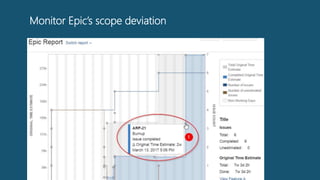
Monitor Epic’s scope deviation
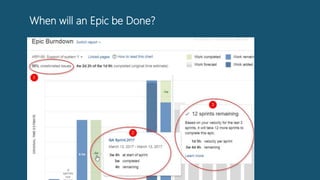
When will an Epic be Done?
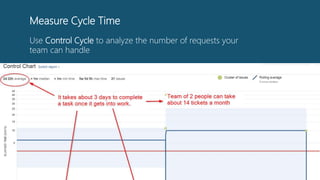
Measure Cycle Time
Use Control Cycle to analyze the number of requests your
team can handle
Agenda
GET MOST OF JIRA MANAGEMENT
JIRA MANAGEMENT ADD-ONS
IN FOCUS: TEMPO BUDGETS
Key decisions when choosing JIRA
management Add-ons
Key decisions
 Do you plan standardization of JIRA usage?
 Which will be your primary planning system?
 How do you expect to scale in next 2 year?
 What kind of projects will be managed in JIRA?
(e.g. IT & Support, Agile Development, Fixed price etc.)
 Do you plan to switch hosting/ switch to data center?
 Which add-on best meets your needs?
(e.g. Is there bi-directional synchronization?)
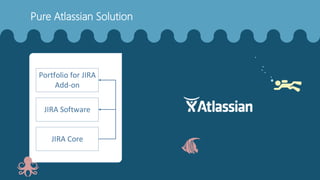
JIRA Core
JIRA Software
Portfolio for JIRA
Add-on
Pure Atlassian Solution
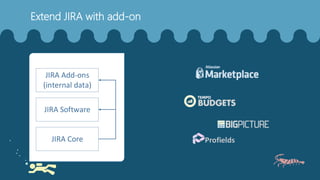
JIRA Core
JIRA Software
JIRA Add-ons
(internal data)
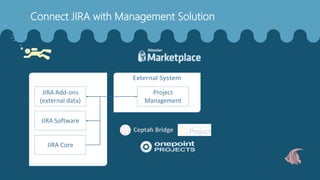
Extend JIRA with add-on
JIRA Core
JIRA Software
JIRA Add-ons
(external data)
Project
Management
Connect JIRA with Management Solution
Agenda
GET MOST OF JIRA MANAGEMENT
JIRA MANAGEMENT ADD-ONS
IN FOCUS: TEMPO BUDGETS
About Tempo
Used by over 120 of Global 500
Tempo is trusted by world leading companies, across all sectors.
9
years
10,000+
customers
100+
countries
80+
employees
Experience you can rely on
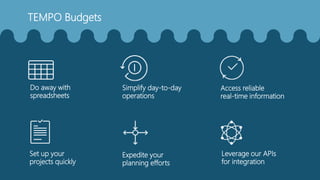
Access reliable
real-time information
Simplify day-to-day
operations
Do away with
spreadsheets
Set up your
projects quickly
Expedite your
planning efforts
Leverage our APIs
for integration
TEMPO Budgets
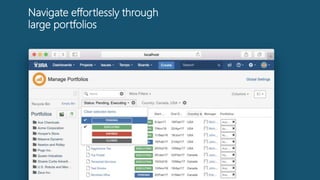
Navigate effortlessly through
large portfolios
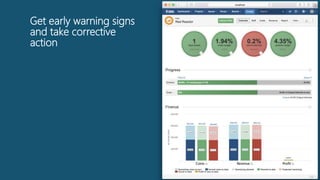
Get early warning signs
and take corrective
action
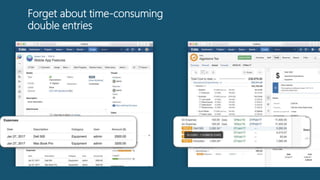
Forget about time-consuming
double entries
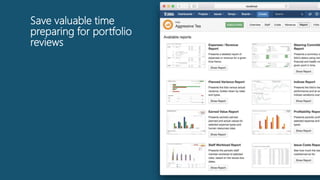
Save valuable time
preparing for portfolio
reviews
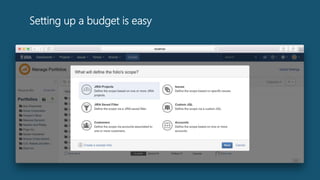
Setting up a budget is easy
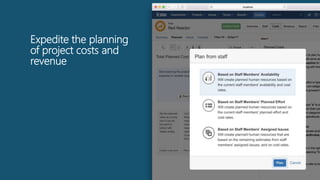
Expedite the planning
of project costs and
revenue
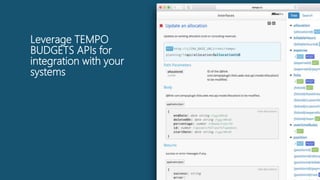
Leverage TEMPO
BUDGETS APIs for
integration with your
systems
Agenda
GET MOST OF JIRA MANAGEMENT
JIRA MANAGEMENT ADD-ONS
IN FOCUS: TEMPO BUDGETS
Thank you!
Annie Ioceva
Atlassian Solution Architect,
Nemetschek Bulgaria

Plan, track and forecast with JIRA

Editor's Notes

  • #3 16:20 – 17:00 = 40 минути
  • #4 16:20 – 16:40 = 20 минути – JIRA Best practices
  • #13 Use Epics Burndown and Epic Report to understand when will Features be delivered and monitor for scope increases Use Control Cycle to analyze what number of requests your team can handle
  • #14 Use Epics Burndown and Epic Report to understand when will Features be delivered and monitor for scope increases Use Control Cycle to analyze what number of requests your team can handle
  • #15 Use Epics Burndown and Epic Report to understand when will Features be delivered and monitor for scope increases
  • #16 16:40 – 16:50 = 10 минути – Management Add-ons
  • #22 16:50 – 17:00 = 10 минути – Tempo
  • #28 The powerful portfolio overview supports advanced filters and customization so that you easily can classify and sort through all your projects.
  • #29 All the metrics of your projects are available in comprehensive visual dashboards. Get a clear picture of your current and projected performance compared to the delivery time and budget you planned.
  • #30 Expenses entered in issues are automatically reported in the actual costs of your project. Similarly, consulting revenues are automatically derived from time spent on issues.
  • #31 The reliable and transparent information in Tempo Budgets is available through customizable real-time reports. It will also help your financial departments gain confidence in complying with standards like SOX or GAAP.
  • #32 Tempo Budgets helps you set up the scope and timeline of your projects through a simple guided wizard.
  • #33 Based on the team resources allocated to your project or the estimated effort of the issues included in your project scope, Tempo Budgets helps you extrapolate the costs and revenue of your project.
  • #34 Our open APIs give you access to key Tempo functionalities, so that you can drive more integration and automation between JIRA, Tempo and your ecosystem of solutions.
  • #35 16:20 – 17:00 = 40 минути