Photography Post Processing
Editing pictures in Photoshop
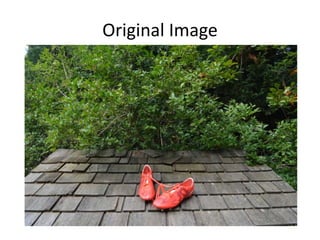
Original Image
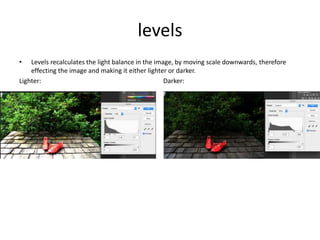
levels
• Levels recalculates the light balance in the image, by moving scale downwards, therefore
effecting the image and making it either lighter or darker.
Lighter: Darker:
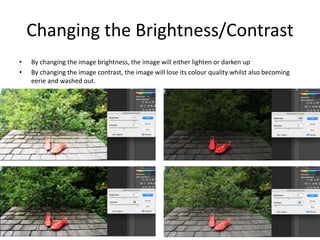
Changing the Brightness/Contrast
• By changing the image brightness, the image will either lighten or darken up
• By changing the image contrast, the image will lose its colour quality whilst also becoming
eerie and washed out.
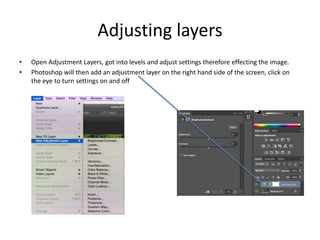
Adjusting layers
• Open Adjustment Layers, got into levels and adjust settings therefore effecting the image.
• Photoshop will then add an adjustment layer on the right hand side of the screen, click on
the eye to turn settings on and off
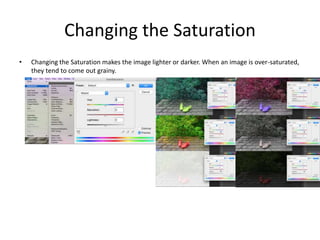
Changing the Saturation
• Changing the Saturation makes the image lighter or darker. When an image is over-saturated,
they tend to come out grainy.

Photography post processing examples

  • 1.
  • 2.
  • 3.
    levels • Levels recalculatesthe light balance in the image, by moving scale downwards, therefore effecting the image and making it either lighter or darker. Lighter: Darker:
  • 4.
    Changing the Brightness/Contrast •By changing the image brightness, the image will either lighten or darken up • By changing the image contrast, the image will lose its colour quality whilst also becoming eerie and washed out.
  • 5.
    Adjusting layers • OpenAdjustment Layers, got into levels and adjust settings therefore effecting the image. • Photoshop will then add an adjustment layer on the right hand side of the screen, click on the eye to turn settings on and off
  • 6.
    Changing the Saturation •Changing the Saturation makes the image lighter or darker. When an image is over-saturated, they tend to come out grainy.