


Pete Brown Applied Information Sciences, Inc. www.AppliedIS.com  Personal Site: www.irritatedVowel.com
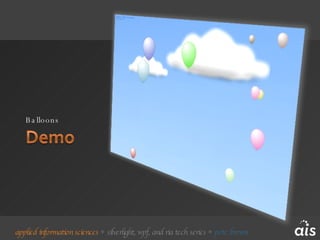
Balloons
Carbon Calculator Project May to July 2007 Started on 1.0, moved to 1.1 early June Jointly sponsored by Microsoft and AIS Client: Conservation International AIS Staff: Pete Brown – PM and Silverlight code and User Experience Steve Suing – Virtual Earth, SharePoint, and some Silverlight rough-ins Both: zero prior Silverlight / RIA, or SharePoint experience
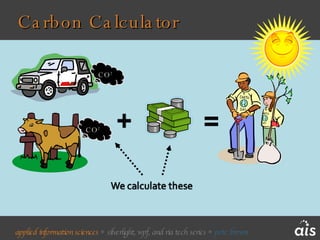
Carbon Calculator CO 2 CO 2
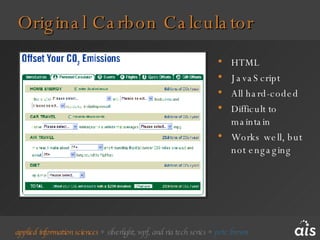
HTML JavaScript All hard-coded Difficult to maintain Works well, but not engaging Original Carbon Calculator
Direction and Constraints Deliver on or before 7/7/7 for the LiveEarth event Use original calculator as starting point and keep simple Use existing data and algorithms Rehost / rewrite ok Integrate Virtual Earth, Images and Video to show projects Use MOSS 2007 lists and libraries for data store
Direction and Constraints Keep Conservation International interaction to a minimum Going through entire site redesign for multiple domains Keep Silverlight Team interaction to a minimum Preparing Silverlight 1.0 release Use only public bits and information Keep download size small – no bitmaps Direction later retracted right before delivery
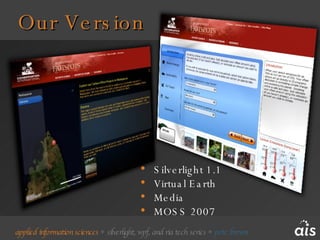
Our Version Silverlight 1.1 Virtual Earth Media MOSS 2007
Carbon Calculator
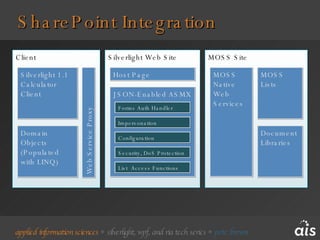
SharePoint Integration Client Silverlight Web Site MOSS Site JSON-Enabled ASMX Silverlight 1.1 Calculator Client Impersonation Configuration MOSS Native Web Services Security, DoS Protection MOSS Lists Web Service Proxy Domain Objects (Populated with LINQ) Forms Auth Handler Document Libraries List  Access Functions Host Page
Virtual Earth Integration JavaScript integration layer Translate points from Virtual Earth into Silverlight Draw all vectors in Silverlight Handle all interaction via Silverlight Lots of examples now available
UserControls as Screens One UserControl per screen Wizard page Full Screen One XAML file per screen Easily maintained in Blend Provides a familiar window-like model Optimized for bunch-of-boxes UI, but could extend to more creative UX Named storyboards for Show and Hide Easier to work than dynamic screens using CreateFromXaml() Separate classes / code-behind
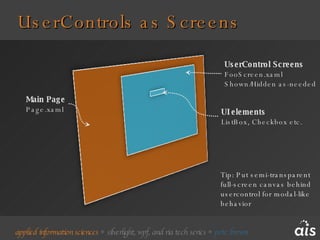
UserControls as Screens Main Page Page.xaml UserControl Screens FooScreen.xaml Shown/Hidden as-needed UI elements ListBox, Checkbox etc. Tip: Put semi-transparent full-screen canvas behind usercontrol for modal-like behavior
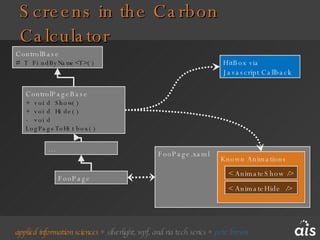
Screens in the Carbon Calculator FooPage.xaml Known Animations ControlPageBase + void Show() + void Hide() - void LogPageToHitbox() ControlBase # T FindByName<T>() FooPage … < AnimateShow /> < AnimateHide  /> HitBox via Javascript Callback
UserControls As Screens
Designer – Developer Workflow Fairly clean hand-off between designer and developer Not as good as WPF - Yet Example 1 Steve wrote video player functionality, left it ugly Pete styled up the UI without affecting any code Example 2 Pete created wireframe for Virtual Earth viewer and left it ugly Steve worked with wireframe Pete reworked UI without touching any code Decide on a contract Control names, types
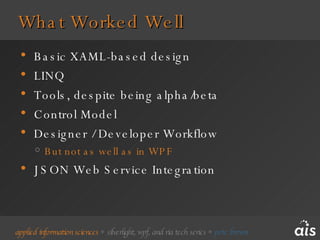
What Worked Well Basic XAML-based design LINQ Tools, despite being alpha/beta Control Model Designer / Developer Workflow But not as well as in WPF JSON Web Service Integration
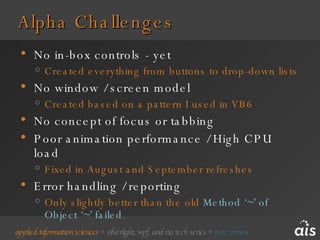
Alpha Challenges No in-box controls - yet Created everything from buttons to drop-down lists No window / screen model Created based on a pattern I used in VB6 No concept of focus or tabbing Poor animation performance / High CPU load Fixed in August and September refreshes Error handling / reporting Only slightly better than the old  Method ‘~’ of Object ‘~’ failed .
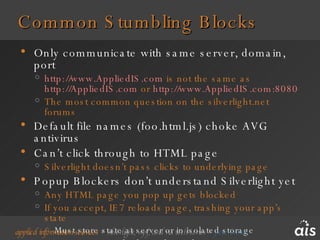
Common Stumbling Blocks Only communicate with same server, domain, port http://www.AppliedIS.com  is not the same as  http://AppliedIS.com  or  http://www.AppliedIS.com:8080   The most common question on the silverlight.net forums Default file names (foo.html.js) choke AVG antivirus Can’t click through to HTML page Silverlight doesn’t pass clicks to underlying page Popup Blockers don’t understand Silverlight yet Any HTML page you pop up gets blocked If you accept, IE7 reloads page, trashing your app’s state Must store state at server or in isolated storage Test Your Encoded Media Files
Changes We’d Make Better animations now that performance has improved Used to take 50-75% CPU for basic animation Richer Graphics : Get outside the box/screen model Client likes current version, but the RIA is lacking in “R” due to time / alpha / experience constraints Still feels like a Windows application in many ways Will be easier when layout panels included
Resources and Links Silverlight Community Site www.silverlight.net   Conservation International Carbon Calculator www.biodiversityhotspots.org/CarbonCalculator/Pages/CarbonCalculator.aspx   Applied Information Sciences, Inc www.AppliedIS.com   All links and demos available from my blog www.irritatedVowel.com

Pete Brown - AIS - Real World Siverlight Dev Camp DC

  • 1.
    Pete Brown AppliedInformation Sciences, Inc. www.AppliedIS.com Personal Site: www.irritatedVowel.com
  • 2.
  • 3.
    Carbon Calculator ProjectMay to July 2007 Started on 1.0, moved to 1.1 early June Jointly sponsored by Microsoft and AIS Client: Conservation International AIS Staff: Pete Brown – PM and Silverlight code and User Experience Steve Suing – Virtual Earth, SharePoint, and some Silverlight rough-ins Both: zero prior Silverlight / RIA, or SharePoint experience
  • 4.
  • 5.
    HTML JavaScript Allhard-coded Difficult to maintain Works well, but not engaging Original Carbon Calculator
  • 6.
    Direction and ConstraintsDeliver on or before 7/7/7 for the LiveEarth event Use original calculator as starting point and keep simple Use existing data and algorithms Rehost / rewrite ok Integrate Virtual Earth, Images and Video to show projects Use MOSS 2007 lists and libraries for data store
  • 7.
    Direction and ConstraintsKeep Conservation International interaction to a minimum Going through entire site redesign for multiple domains Keep Silverlight Team interaction to a minimum Preparing Silverlight 1.0 release Use only public bits and information Keep download size small – no bitmaps Direction later retracted right before delivery
  • 8.
    Our Version Silverlight1.1 Virtual Earth Media MOSS 2007
  • 9.
  • 10.
    SharePoint Integration ClientSilverlight Web Site MOSS Site JSON-Enabled ASMX Silverlight 1.1 Calculator Client Impersonation Configuration MOSS Native Web Services Security, DoS Protection MOSS Lists Web Service Proxy Domain Objects (Populated with LINQ) Forms Auth Handler Document Libraries List Access Functions Host Page
  • 11.
    Virtual Earth IntegrationJavaScript integration layer Translate points from Virtual Earth into Silverlight Draw all vectors in Silverlight Handle all interaction via Silverlight Lots of examples now available
  • 12.
    UserControls as ScreensOne UserControl per screen Wizard page Full Screen One XAML file per screen Easily maintained in Blend Provides a familiar window-like model Optimized for bunch-of-boxes UI, but could extend to more creative UX Named storyboards for Show and Hide Easier to work than dynamic screens using CreateFromXaml() Separate classes / code-behind
  • 13.
    UserControls as ScreensMain Page Page.xaml UserControl Screens FooScreen.xaml Shown/Hidden as-needed UI elements ListBox, Checkbox etc. Tip: Put semi-transparent full-screen canvas behind usercontrol for modal-like behavior
  • 14.
    Screens in theCarbon Calculator FooPage.xaml Known Animations ControlPageBase + void Show() + void Hide() - void LogPageToHitbox() ControlBase # T FindByName<T>() FooPage … < AnimateShow /> < AnimateHide /> HitBox via Javascript Callback
  • 15.
  • 16.
    Designer – DeveloperWorkflow Fairly clean hand-off between designer and developer Not as good as WPF - Yet Example 1 Steve wrote video player functionality, left it ugly Pete styled up the UI without affecting any code Example 2 Pete created wireframe for Virtual Earth viewer and left it ugly Steve worked with wireframe Pete reworked UI without touching any code Decide on a contract Control names, types
  • 17.
    What Worked WellBasic XAML-based design LINQ Tools, despite being alpha/beta Control Model Designer / Developer Workflow But not as well as in WPF JSON Web Service Integration
  • 18.
    Alpha Challenges Noin-box controls - yet Created everything from buttons to drop-down lists No window / screen model Created based on a pattern I used in VB6 No concept of focus or tabbing Poor animation performance / High CPU load Fixed in August and September refreshes Error handling / reporting Only slightly better than the old Method ‘~’ of Object ‘~’ failed .
  • 19.
    Common Stumbling BlocksOnly communicate with same server, domain, port http://www.AppliedIS.com is not the same as http://AppliedIS.com or http://www.AppliedIS.com:8080 The most common question on the silverlight.net forums Default file names (foo.html.js) choke AVG antivirus Can’t click through to HTML page Silverlight doesn’t pass clicks to underlying page Popup Blockers don’t understand Silverlight yet Any HTML page you pop up gets blocked If you accept, IE7 reloads page, trashing your app’s state Must store state at server or in isolated storage Test Your Encoded Media Files
  • 20.
    Changes We’d MakeBetter animations now that performance has improved Used to take 50-75% CPU for basic animation Richer Graphics : Get outside the box/screen model Client likes current version, but the RIA is lacking in “R” due to time / alpha / experience constraints Still feels like a Windows application in many ways Will be easier when layout panels included
  • 21.
    Resources and LinksSilverlight Community Site www.silverlight.net Conservation International Carbon Calculator www.biodiversityhotspots.org/CarbonCalculator/Pages/CarbonCalculator.aspx Applied Information Sciences, Inc www.AppliedIS.com All links and demos available from my blog www.irritatedVowel.com