Building Applications
         with
 Silverlight 4 -Part 1
    Dennis J. Perlot
Speaker.Bio.ToString


Dennis J. Perlot
    Many years experience
    Computer Science/Engineering degree
    Artificial Intelligence/Machine Learning
    Smithsonian Innovators Award
    Instructor for Franklins.Net
    Technology Community Advocate
    Speaker/ Technology Evangelist
Announcing


3rd Monday of each month

NERD Center                      Microsoft Offices
Cambridge, MA                    Farmington, CT

First Meeting Oct 18th 6:00pm in Cambridge
Housekeeping


PLEASE
Set phone to silent/vibrate
Hold questions to insure we can get through the material

        70+ Slides                10 Demos

I will be here all day if we run out of time
Why are you here?


Free Training

Free Coffee

Free Food

You care about user interface
Examples of Bad UI


Disclaimer

Apologies
Tab Tab Tab Tab
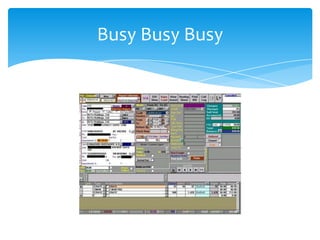
Busy Busy Busy
Reduce Complexity
Density
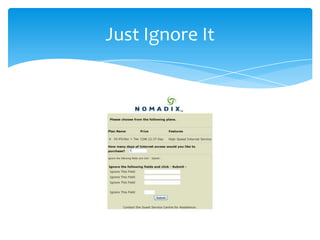
Just Ignore It
Even More Bad UI
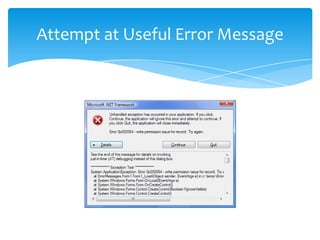
Attempt at Useful Error Message
The most useless error message
User Interface is Important


To end users interface is the system
  User frustration leads to abandonment

Good User Interface is now expected
  Applications rejected if lacking

“User Centered Design” groups

Many moving to User Experience (UX)
Different levels


User Interface Designer
Interactions, colors, fonts, etc.


Information Architect
Logical organization of application


User Experience Designer
Total experience including install, call center, etc.
Read These Books!


Don’t Make Me Think
  By Steve Krug


Why Software Sucks
  By David Platt
Design Toolbox


http://www.microsoft.com/design/toolbox/
Tutorials to help developers with design
Sample Titles:
  Introduction to Design Composition
  Balance: White Space and Visual Weight
  Understanding Hue, Saturation and Value
  The Psychology of Color
  Understanding the Concept of Themes and Gestalt
Silverlight


Background
What new in version 4
Controls and Templates
Data binding
WCF/RIA

And lots of demos
History


WPF/E – E for Everywhere
  Prior working name
Silverlight
  Version 1.0 – March 2007
     Layout, video, 2D, java script
  Version 2.0 – Sept 2008
     Standard controls, sockets, .NET languages
  Version 3.0 – July 2009
     60 Controls, 1080p, out of browser
  Version 4.0 – April 2010
     Printing, elevated trust
New Stuff


What is new with Silverlight 4?
 Many Incremental Improvements
 Rich Text Box
 Web Cam and Microphone
 Text Trimming
 Right Mouse Button and Wheel Support

Visual Studio 2010
  Houston, we have a design surface!
More OOB


Additional Out of Browser features
 Toast Notifications
 COM Inter Op
 Elevated trust
 Local file system access
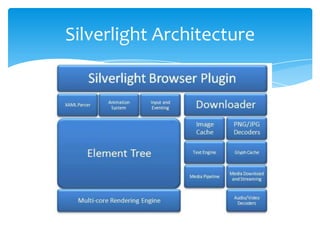
Silverlight Architecture
Where will it run?


Silverlight requires browser plug-in

Plug-in available for
  Internet Explorer
  Fire Fox
  Safari
  Chrome
  Opera
  Sea Monkey
  Mono – under dev
What do I need ?


Visual Studio 2010
Silverlight 4 runtime plug-in
Silverlight 4 toolkit
WCF RIA toolkit
Expression Blend 4

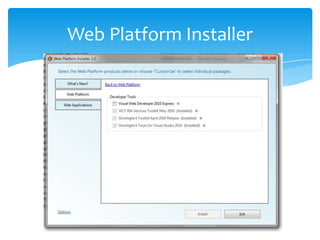
Or Use Web Platform Installer
Web Platform Installer
XAML


eXtensible Application Markup Language
  Must be Well Formed

Used for WPF and Silverlight

Think of it as HTML on steroids

  Ctrl k+d is your friend
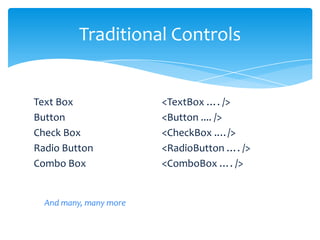
Traditional Controls


Text Box                <TextBox …. />
Button                  <Button .... />
Check Box               <CheckBox .…/>
Radio Button            <RadioButton …. />
Combo Box               <ComboBox …. />


  And many, many more
Margins


Margin=Left, Top, Right, Bottom

Many Flavors
  Margin = “5,5,5,5”
  Margin = “5,5”       Left / Right, Top/ Bottom
  Margin = “5”         All get same value
Layout Controls


Canvas
  Left, Right, Bottom, Top positioning of elements
Grid
  Tabular row/column layout – like HTML tables
Stack Panel
  Arranges child elements vertically or horizontally
It Starts with a Silverlight App
Demo


Hello World
And we get…
You Got To Have Style


Styles leverage setter properties
  Tied to control type
Quickly change “Look and Feel”
  Add as many as needed
Named Styles
  Controls definition references explicitly
Implicit Styles
  Think of as default styles
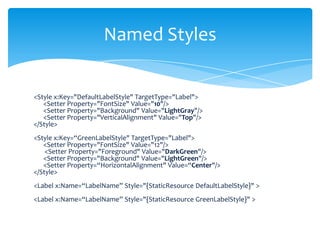
Named Styles


<Style x:Key="DefaultLabelStyle" TargetType="Label">
   <Setter Property="FontSize" Value="10"/>
   <Setter Property="Background" Value="LightGray"/>
   <Setter Property="VerticalAlignment" Value="Top"/>
</Style>
<Style x:Key=“GreenLabelStyle" TargetType="Label">
   <Setter Property="FontSize" Value="12"/>
    <Setter Property="Foreground" Value="DarkGreen"/>
   <Setter Property="Background" Value="LightGreen"/>
   <Setter Property=“HorizontalAlignment" Value=“Center"/>
</Style>
<Label x:Name=“LabelName” Style="{StaticResource DefaultLabelStyle}" >
<Label x:Name=“LabelName” Style="{StaticResource GreenLabelStyle}" >
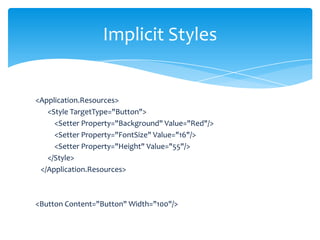
Implicit Styles


<Application.Resources>
   <Style TargetType="Button">
     <Setter Property="Background" Value="Red"/>
     <Setter Property="FontSize" Value="16"/>
     <Setter Property="Height" Value="55"/>
   </Style>
 </Application.Resources>


<Button Content="Button" Width="100"/>
Demo


Implicit and Named Styles
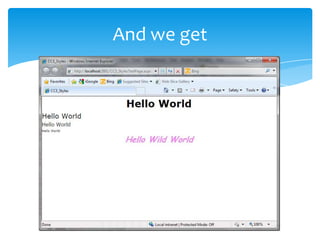
And we get
Text Trimming


Property of TextBlock

Determines visible limit

Truncates text exceeding width

Places Ellipsis to indicate more…
Demo


Text Trimming
And we get
Mouse Support


Right Mouse button support
Context menu
 Easy with Silverlight 4 toolkit
Mouse Wheel support

Must handle events or get passed along
 Mouse down and Mouse up
Demo


Mouse Right Click and Wheel
Animations


Easier to do than prior to WPF
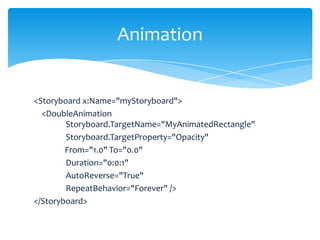
Storyboards
Animations
 Begin Time, Duration, Auto Reverse
 Vary value of a property double, single, color, point
Trigger Event
Easing Functions
Animation


<Storyboard x:Name="myStoryboard">
  <DoubleAnimation
        Storyboard.TargetName="MyAnimatedRectangle"
        Storyboard.TargetProperty="Opacity"
        From="1.0" To="0.0"
        Duration="0:0:1"
        AutoReverse="True"
        RepeatBehavior="Forever" />
</Storyboard>
Draw Loop But which Timer?


System.Windows.Forms.Timer
WinForms development, runs on WinForm UI thread
System.Timers.Timer
By default runs on a worker thread but supports a
SynchronizationObject which can be set to a UI object
meaning the timer runs on the UI thread
System.Threading.Timer
Recommended for Silverlight
Demo


EKG like Animation
Or
Planet Orbits
Data Binding

Bindings
  Tie control properties to data sources or other properties
  Declarative through XAML (or programmatic)
Data Context
  Data flows from parent to child controls
Data Templates
  Key for data binding
  Set of elements to be applied repeatedly
  Like ASP.NET repeater control
Binding Types

Binding Target                         Binding Source


Dependency Object                           Object


                         OneWay
Dependency Property
                         TwoWay            Property

                      OneWayToSource
Data Binding


<Label Content="{Binding path=PropertyName}"

  <Label Content="{Binding Path=BizFunction}“


ControlName.DataContext = Object;

  ListBox1.DataContext = List <T>;
Demo


Slider to text box demo
Data Templates


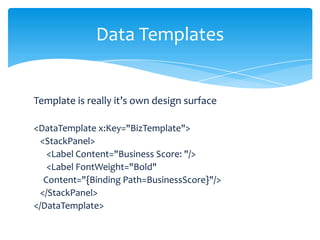
Template is really it’s own design surface

<DataTemplate x:Key="BizTemplate">
  <StackPanel>
    <Label Content="Business Score: "/>
    <Label FontWeight="Bold"
   Content="{Binding Path=BusinessScore}"/>
  </StackPanel>
</DataTemplate>
Data Templates


Bold fields are bound data
Data Templates


<DataTemplate x:Key="AttackerTemplate">
<Border BorderBrush="Red" BorderThickness="1" Width="300">
<StackPanel Orientation="Horizontal" >
         <TextBlock Text="Name: " />
         <TextBlock FontWeight="Bold"
                  Text="{Binding Path=Name}"/>
         <TextBlock Text=" BS : "/>
         <TextBlock FontWeight="Bold"
         Text="{Binding Path=BallisticSkill}"/>
 </StackPanel>
Web Services


Lots of options
Lots of confusion
WCF/RIA Recommended for Silverlight
Rich tooling support in VS 2010
 Project Template support
WCF RIA


ADO.NET Entity Framework
 Data Model
 Generate from Database
Domain Service Class
 WCF services that encapsulate the business logic
 Exposes a set of operations
Business Application Template
 Built in authentication
Demo


WCF/RIA with Northwind database
Demo


Every developer’s favorite:
       The Data Grid
             and now
       The Data Form
Common Questions


All XAML in Silverlight?
  Not yet, just a subset


How can I quickly change the look and feel?
  Use Styles
Common Questions


What about deployment?
  Nothing special needed on web server
  Use Publish to web server
  Hosting page detects if Silverlight installed
Common Questions


What about performance?
  Define goals
  Measure early and often
  Minimize the byte count
  Watch depth of logical tree
  Will take advantage of hardware like GPU, Pixel Shader,
  Vertex Shader, etc.
  Watch the XAP size
  Enable application library caching
Common Questions


What abut design patterns?
  Unity
  MEF – Multiple Extensible Framework
  MV-VM – Model View – View Model
  MV-VM light
  Prism
Resources


http://www.silverlight.net
channel9.msdn.com/shows/silverlighttv
http://live.visitmix.com
http://www.Silverlightshow.net

Window Presentation Foundation Unleashed – Adam Nathan

Silverlight 3 Programmers Reference - Wrox
BLOGS


Scott Guthrie (ScottGu)
Silverlight
  John Papa
  Jesse Liberty
  Tim Heuer
Expression Blend
  Adam Kinney
Jesse Liberty advice


1. Go to http://www.silverlight.net/getstarted and download the
components you need
2. Work your way through #1-5 in the “Start Learning Silverlight”
section on that same page
3. Take a look http://jesseliberty.com/Tags/gettingstarted
4. Take a look at the Silverlight How-Do-I videos, picking subjects
that seem interesting to you.
5. Join the http://forums.silverlight.net/forums/14.aspx
They are the very best place to get fast answers.
UI Reading List


About Face 1, About Face 2, About Face 3,
The Inmates are Running the Asylum
  by Alan Cooper
Don’t Make Me Think
  by Steve Krug
Why Software Sucks
  by David Platt
Understanding Comics – The Invisible Art
  by Scott McCloud
Demos (if we have time)


BI Dashboard Prototype

Combat Explorer
Questions


and hopefully some answers
10 Things Silverlight Dev Must Know


  9. How to Hand-Code XAML
  8. How to Use Expression Blend
  7. How to Write Value Converters
  6. Threading
  5. Async Programming
  4. An Architectural Pattern (like MVVM or similar)
  3. The Layout System
  2. Dependency Properties
  1. Binding
  0. Our limitations, and when to call in a designer.

Building appsinsilverlight4 part_1

  • 1.
    Building Applications with Silverlight 4 -Part 1 Dennis J. Perlot
  • 2.
    Speaker.Bio.ToString Dennis J. Perlot Many years experience Computer Science/Engineering degree Artificial Intelligence/Machine Learning Smithsonian Innovators Award Instructor for Franklins.Net Technology Community Advocate Speaker/ Technology Evangelist
  • 3.
    Announcing 3rd Monday ofeach month NERD Center Microsoft Offices Cambridge, MA Farmington, CT First Meeting Oct 18th 6:00pm in Cambridge
  • 4.
    Housekeeping PLEASE Set phone tosilent/vibrate Hold questions to insure we can get through the material 70+ Slides 10 Demos I will be here all day if we run out of time
  • 5.
    Why are youhere? Free Training Free Coffee Free Food You care about user interface
  • 6.
    Examples of BadUI Disclaimer Apologies
  • 7.
  • 8.
  • 9.
  • 10.
  • 11.
  • 12.
  • 13.
    Attempt at UsefulError Message
  • 14.
    The most uselesserror message
  • 15.
    User Interface isImportant To end users interface is the system User frustration leads to abandonment Good User Interface is now expected Applications rejected if lacking “User Centered Design” groups Many moving to User Experience (UX)
  • 16.
    Different levels User InterfaceDesigner Interactions, colors, fonts, etc. Information Architect Logical organization of application User Experience Designer Total experience including install, call center, etc.
  • 17.
    Read These Books! Don’tMake Me Think By Steve Krug Why Software Sucks By David Platt
  • 18.
    Design Toolbox http://www.microsoft.com/design/toolbox/ Tutorials tohelp developers with design Sample Titles: Introduction to Design Composition Balance: White Space and Visual Weight Understanding Hue, Saturation and Value The Psychology of Color Understanding the Concept of Themes and Gestalt
  • 19.
    Silverlight Background What new inversion 4 Controls and Templates Data binding WCF/RIA And lots of demos
  • 20.
    History WPF/E – Efor Everywhere Prior working name Silverlight Version 1.0 – March 2007 Layout, video, 2D, java script Version 2.0 – Sept 2008 Standard controls, sockets, .NET languages Version 3.0 – July 2009 60 Controls, 1080p, out of browser Version 4.0 – April 2010 Printing, elevated trust
  • 21.
    New Stuff What isnew with Silverlight 4? Many Incremental Improvements Rich Text Box Web Cam and Microphone Text Trimming Right Mouse Button and Wheel Support Visual Studio 2010 Houston, we have a design surface!
  • 22.
    More OOB Additional Outof Browser features Toast Notifications COM Inter Op Elevated trust Local file system access
  • 23.
  • 24.
    Where will itrun? Silverlight requires browser plug-in Plug-in available for Internet Explorer Fire Fox Safari Chrome Opera Sea Monkey Mono – under dev
  • 25.
    What do Ineed ? Visual Studio 2010 Silverlight 4 runtime plug-in Silverlight 4 toolkit WCF RIA toolkit Expression Blend 4 Or Use Web Platform Installer
  • 26.
  • 27.
  • 28.
    XAML eXtensible Application MarkupLanguage Must be Well Formed Used for WPF and Silverlight Think of it as HTML on steroids Ctrl k+d is your friend
  • 29.
    Traditional Controls Text Box <TextBox …. /> Button <Button .... /> Check Box <CheckBox .…/> Radio Button <RadioButton …. /> Combo Box <ComboBox …. /> And many, many more
  • 30.
    Margins Margin=Left, Top, Right,Bottom Many Flavors Margin = “5,5,5,5” Margin = “5,5” Left / Right, Top/ Bottom Margin = “5” All get same value
  • 31.
    Layout Controls Canvas Left, Right, Bottom, Top positioning of elements Grid Tabular row/column layout – like HTML tables Stack Panel Arranges child elements vertically or horizontally
  • 32.
    It Starts witha Silverlight App
  • 33.
  • 34.
  • 35.
    You Got ToHave Style Styles leverage setter properties Tied to control type Quickly change “Look and Feel” Add as many as needed Named Styles Controls definition references explicitly Implicit Styles Think of as default styles
  • 36.
    Named Styles <Style x:Key="DefaultLabelStyle"TargetType="Label"> <Setter Property="FontSize" Value="10"/> <Setter Property="Background" Value="LightGray"/> <Setter Property="VerticalAlignment" Value="Top"/> </Style> <Style x:Key=“GreenLabelStyle" TargetType="Label"> <Setter Property="FontSize" Value="12"/> <Setter Property="Foreground" Value="DarkGreen"/> <Setter Property="Background" Value="LightGreen"/> <Setter Property=“HorizontalAlignment" Value=“Center"/> </Style> <Label x:Name=“LabelName” Style="{StaticResource DefaultLabelStyle}" > <Label x:Name=“LabelName” Style="{StaticResource GreenLabelStyle}" >
  • 37.
    Implicit Styles <Application.Resources> <Style TargetType="Button"> <Setter Property="Background" Value="Red"/> <Setter Property="FontSize" Value="16"/> <Setter Property="Height" Value="55"/> </Style> </Application.Resources> <Button Content="Button" Width="100"/>
  • 38.
  • 39.
  • 40.
    Text Trimming Property ofTextBlock Determines visible limit Truncates text exceeding width Places Ellipsis to indicate more…
  • 41.
  • 42.
  • 43.
    Mouse Support Right Mousebutton support Context menu Easy with Silverlight 4 toolkit Mouse Wheel support Must handle events or get passed along Mouse down and Mouse up
  • 44.
  • 45.
    Animations Easier to dothan prior to WPF Storyboards Animations Begin Time, Duration, Auto Reverse Vary value of a property double, single, color, point Trigger Event Easing Functions
  • 46.
    Animation <Storyboard x:Name="myStoryboard"> <DoubleAnimation Storyboard.TargetName="MyAnimatedRectangle" Storyboard.TargetProperty="Opacity" From="1.0" To="0.0" Duration="0:0:1" AutoReverse="True" RepeatBehavior="Forever" /> </Storyboard>
  • 47.
    Draw Loop Butwhich Timer? System.Windows.Forms.Timer WinForms development, runs on WinForm UI thread System.Timers.Timer By default runs on a worker thread but supports a SynchronizationObject which can be set to a UI object meaning the timer runs on the UI thread System.Threading.Timer Recommended for Silverlight
  • 48.
  • 49.
    Data Binding Bindings Tie control properties to data sources or other properties Declarative through XAML (or programmatic) Data Context Data flows from parent to child controls Data Templates Key for data binding Set of elements to be applied repeatedly Like ASP.NET repeater control
  • 50.
    Binding Types Binding Target Binding Source Dependency Object Object OneWay Dependency Property TwoWay Property OneWayToSource
  • 51.
    Data Binding <Label Content="{Bindingpath=PropertyName}" <Label Content="{Binding Path=BizFunction}“ ControlName.DataContext = Object; ListBox1.DataContext = List <T>;
  • 52.
  • 53.
    Data Templates Template isreally it’s own design surface <DataTemplate x:Key="BizTemplate"> <StackPanel> <Label Content="Business Score: "/> <Label FontWeight="Bold" Content="{Binding Path=BusinessScore}"/> </StackPanel> </DataTemplate>
  • 54.
  • 55.
    Data Templates <DataTemplate x:Key="AttackerTemplate"> <BorderBorderBrush="Red" BorderThickness="1" Width="300"> <StackPanel Orientation="Horizontal" > <TextBlock Text="Name: " /> <TextBlock FontWeight="Bold" Text="{Binding Path=Name}"/> <TextBlock Text=" BS : "/> <TextBlock FontWeight="Bold" Text="{Binding Path=BallisticSkill}"/> </StackPanel>
  • 56.
    Web Services Lots ofoptions Lots of confusion WCF/RIA Recommended for Silverlight Rich tooling support in VS 2010 Project Template support
  • 57.
    WCF RIA ADO.NET EntityFramework Data Model Generate from Database Domain Service Class WCF services that encapsulate the business logic Exposes a set of operations Business Application Template Built in authentication
  • 58.
  • 59.
    Demo Every developer’s favorite: The Data Grid and now The Data Form
  • 60.
    Common Questions All XAMLin Silverlight? Not yet, just a subset How can I quickly change the look and feel? Use Styles
  • 61.
    Common Questions What aboutdeployment? Nothing special needed on web server Use Publish to web server Hosting page detects if Silverlight installed
  • 62.
    Common Questions What aboutperformance? Define goals Measure early and often Minimize the byte count Watch depth of logical tree Will take advantage of hardware like GPU, Pixel Shader, Vertex Shader, etc. Watch the XAP size Enable application library caching
  • 63.
    Common Questions What abutdesign patterns? Unity MEF – Multiple Extensible Framework MV-VM – Model View – View Model MV-VM light Prism
  • 64.
  • 65.
    BLOGS Scott Guthrie (ScottGu) Silverlight John Papa Jesse Liberty Tim Heuer Expression Blend Adam Kinney
  • 66.
    Jesse Liberty advice 1.Go to http://www.silverlight.net/getstarted and download the components you need 2. Work your way through #1-5 in the “Start Learning Silverlight” section on that same page 3. Take a look http://jesseliberty.com/Tags/gettingstarted 4. Take a look at the Silverlight How-Do-I videos, picking subjects that seem interesting to you. 5. Join the http://forums.silverlight.net/forums/14.aspx They are the very best place to get fast answers.
  • 67.
    UI Reading List AboutFace 1, About Face 2, About Face 3, The Inmates are Running the Asylum by Alan Cooper Don’t Make Me Think by Steve Krug Why Software Sucks by David Platt Understanding Comics – The Invisible Art by Scott McCloud
  • 68.
    Demos (if wehave time) BI Dashboard Prototype Combat Explorer
  • 69.
  • 70.
    10 Things SilverlightDev Must Know 9. How to Hand-Code XAML 8. How to Use Expression Blend 7. How to Write Value Converters 6. Threading 5. Async Programming 4. An Architectural Pattern (like MVVM or similar) 3. The Layout System 2. Dependency Properties 1. Binding 0. Our limitations, and when to call in a designer.

Editor's Notes

  • #8 Now tabs are a good thing but too much of a good thing………………
  • #9 This keeps showing up when you google, I mean bing, bad UI examples
  • #29 Must be well formed
  • #34 Create pageDrag text blockRemove height, Set horz align center, remove margin, Change text, set vert to center, Add font size
  • #39 CC3_Styles
  • #45 Create new project – SL appAdd context menu from toolbox , choose items, Silver ContextMenu be sure it is toolkitAdd 3 textbox 2 slider and 3 color rectangles red, green, blueWire textbox to slider valuesAsk crowd what they like to do for menu itemsPast event handlers
  • #48 Can also do DrawLoop type animations
  • #53 Create ProjectType Grid row defType stackpanel text block, text box, sliderCut and paste, change names
  • #57 Asmx, wcf,odata, rest, soap, plain wcf, wcf with RIA,
  • #59 Create biz appIn web project add new item ado.net entity Generate from database, connect stringRebuild solutionWhy Need EDM for next stepsIn Web project add new item Domain Service class (show search)RebuildIn Silverlight project add new item silverlight pageOrders, Employees,Drag table from data sourceRemove height and width values from gridsAutoGen Columns to TRUEAdd nav to Mainpage.xamlRun appShow column movement
  • #60 Show person class with basic
  • #71 Show person class