Perl Brown Bag


            Data Mining

              Shaun Griffith
              March 20, 2006


05/13/12        ATI Confidential   1
Agenda


           •Program Structure
            •Slinging Strings


05/13/12                        2
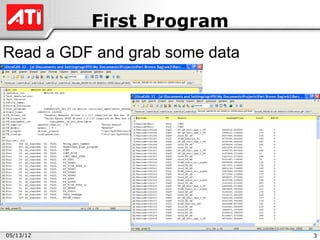
First Program
Read a GDF and grab some data


05/13/12                        3
Program Structure
Shebang
    •#!/path/to/perl
•Unix shell runs this program on the script
•Other choices
    •DOS:
           #!/this/doesn’t/do/much
    •Unix – find Perl in your path
                eval '(exit $?0)' && eval 'exec perl -w -S $0 ${1+"$@"}‘
                                  && eval 'exec perl -w -S $0 $argv:q'
                                  if 0;
                # The above invocation finds Perl in the path,
                # wherever it may be
05/13/12                                                                   4
Program So Far
#!/your/perl/here


05/13/12                             5
Scriptures
Also known as “strictures”
           use strict;
           use warnings;
Strict
•Declare all variables before use (“vars”)
•No symbolic references (“refs”)
•Declare all subroutines before use (“subs”)


05/13/12                                       6
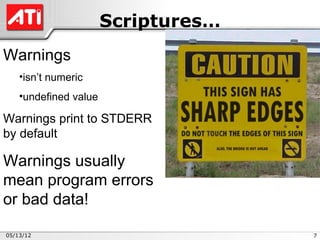
Scriptures…
Warnings
    •isn’t numeric
    •undefined value

Warnings print to STDERR
by default

Warnings usually
mean program errors
or bad data!

05/13/12                             7
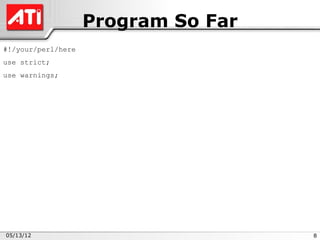
Program So Far
#!/your/perl/here
use strict;
use warnings;


05/13/12                             8
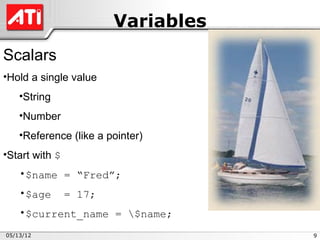
Variables
Scalars
•Hold a single value
    •String
    •Number
    •Reference (like a pointer)
•Start with $
    •$name = “Fred”;
    •$age       = 17;
    •$current_name = $name;

05/13/12                            9
Variables…
Arrays
•Hold more than one value (scalar)
•Order is important
•Start with @ or $
    •@list = (1,2,3,4,5);
    •$list[3] = “Markam”;
    •@list[11,28] = (“Red”,”Green”);
•Size: $size = @list;
•Last index:   $last = $#list;

05/13/12                               10
Variables…
Hashes
• Pairs of data: key and value
• No order – No duplicate keys
• Start with % or @ or $
           %cost = ( “apples” => 0.45,
                    “bananas” => 0.55 );
           @cost{@fruit} = ( 0.45, 0.55 );
           $cost{apples} = 0.45;
• List of keys: @keys = keys %cost;
• Size: $fruit = scalar keys %cost;


05/13/12                                     11
Reading Files
Perl DWIM (Do What I Mean)
• To read files listed on the command line:
while (<>) { do_something_here; }
    • “<>” is the “diamond” operator
    • If empty, reads from STDIN (a file “handle”)…
    • …which defaults to @ARGV
    • “<>” automatically opens and closes files


05/13/12                                              12
Program So Far
#!/your/perl/here
use strict;
use warnings;


while (<>)
{
}


05/13/12                             13
Matching
To match barcodes:
    m/barcode=(d+)/i;
    • m// is the match operator
    • barcode= is literal text to match
    •d+ matches one or more digits (0-9)
    • () captures matches into $1, $2, etc.
    •/i ignores case

To print it out:
    print “$1n”; # n is end of line
Putting them together:
    if ( m/barcode=(d+)/i )
    { print “$1n”; }

05/13/12                                      14
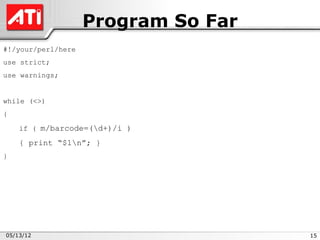
Program So Far
#!/your/perl/here
use strict;
use warnings;


while (<>)
{

    if ( m/barcode=(d+)/i )

    { print “$1n”; }
}


05/13/12                             15
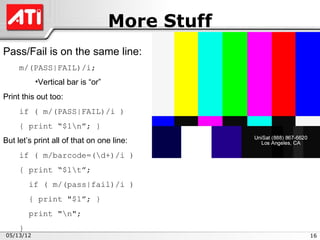
More Stuff
Pass/Fail is on the same line:
     m/(PASS|FAIL)/i;
           •Vertical bar is “or”
Print this out too:
     if ( m/(PASS|FAIL)/i )
     { print “$1n”; }
But let’s print all of that on one line:
     if ( m/barcode=(d+)/i )
     { print “$1t”;
         if ( m/(pass|fail)/i )
         { print "$1”; }
         print "n";
     }
05/13/12                                        16
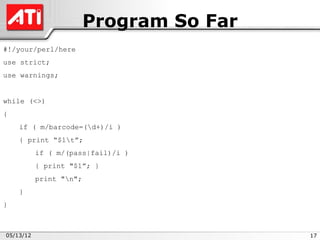
Program So Far
#!/your/perl/here
use strict;
use warnings;


while (<>)
{
    if ( m/barcode=(d+)/i )
    { print “$1t”;
           if ( m/(pass|fail)/i )
           { print "$1”; }
           print "n";
    }
}


05/13/12                                  17
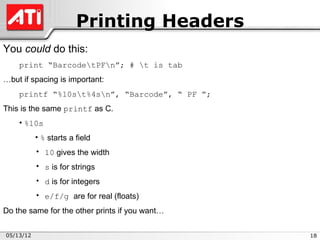
Printing Headers
You could do this:
    print “BarcodetPFn”; # t is tab
…but if spacing is important:
    printf “%10st%4sn”, “Barcode”, “ PF ”;
This is the same printf as C.
    • %10s
           • % starts a field
           • 10 gives the width
           • s is for strings
           • d is for integers
           • e/f/g are for real (floats)
Do the same for the other prints if you want…

05/13/12                                        18
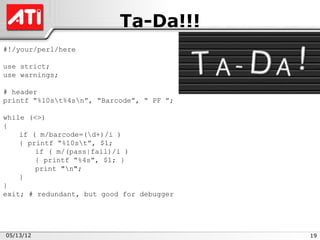
Ta-Da!!!
#!/your/perl/here

use strict;
use warnings;

# header
printf “%10st%4sn”, “Barcode”, “ PF ”;

while (<>)
{
    if ( m/barcode=(d+)/i )
    { printf “%10st”, $1;
        if ( m/(pass|fail)/i )
        { printf “%4s”, $1; }
        print "n";
    }
}
exit; # redundant, but good for debugger


05/13/12                                   19
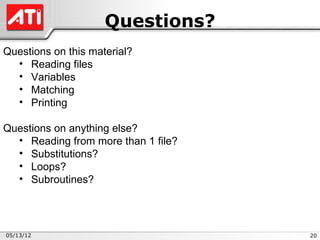
Questions?
Questions on this material?
  • Reading files
  • Variables
  • Matching
  • Printing

Questions on anything else?
  • Reading from more than 1 file?
  • Substitutions?
  • Loops?
  • Subroutines?


05/13/12                             20
Next Time

           Running Perl
           Perl Debugger


05/13/12                   21

Perl Intro 2 First Program

  • 1.
    Perl Brown Bag Data Mining Shaun Griffith March 20, 2006 05/13/12 ATI Confidential 1
  • 2.
    Agenda •Program Structure •Slinging Strings 05/13/12 2
  • 3.
    First Program Read aGDF and grab some data 05/13/12 3
  • 4.
    Program Structure Shebang •#!/path/to/perl •Unix shell runs this program on the script •Other choices •DOS: #!/this/doesn’t/do/much •Unix – find Perl in your path eval '(exit $?0)' && eval 'exec perl -w -S $0 ${1+"$@"}‘ && eval 'exec perl -w -S $0 $argv:q' if 0; # The above invocation finds Perl in the path, # wherever it may be 05/13/12 4
  • 5.
  • 6.
    Scriptures Also known as“strictures” use strict; use warnings; Strict •Declare all variables before use (“vars”) •No symbolic references (“refs”) •Declare all subroutines before use (“subs”) 05/13/12 6
  • 7.
    Scriptures… Warnings •isn’t numeric •undefined value Warnings print to STDERR by default Warnings usually mean program errors or bad data! 05/13/12 7
  • 8.
    Program So Far #!/your/perl/here usestrict; use warnings; 05/13/12 8
  • 9.
    Variables Scalars •Hold a singlevalue •String •Number •Reference (like a pointer) •Start with $ •$name = “Fred”; •$age = 17; •$current_name = $name; 05/13/12 9
  • 10.
    Variables… Arrays •Hold more thanone value (scalar) •Order is important •Start with @ or $ •@list = (1,2,3,4,5); •$list[3] = “Markam”; •@list[11,28] = (“Red”,”Green”); •Size: $size = @list; •Last index: $last = $#list; 05/13/12 10
  • 11.
    Variables… Hashes • Pairs ofdata: key and value • No order – No duplicate keys • Start with % or @ or $ %cost = ( “apples” => 0.45, “bananas” => 0.55 ); @cost{@fruit} = ( 0.45, 0.55 ); $cost{apples} = 0.45; • List of keys: @keys = keys %cost; • Size: $fruit = scalar keys %cost; 05/13/12 11
  • 12.
    Reading Files Perl DWIM(Do What I Mean) • To read files listed on the command line: while (<>) { do_something_here; } • “<>” is the “diamond” operator • If empty, reads from STDIN (a file “handle”)… • …which defaults to @ARGV • “<>” automatically opens and closes files 05/13/12 12
  • 13.
    Program So Far #!/your/perl/here usestrict; use warnings; while (<>) { } 05/13/12 13
  • 14.
    Matching To match barcodes: m/barcode=(d+)/i; • m// is the match operator • barcode= is literal text to match •d+ matches one or more digits (0-9) • () captures matches into $1, $2, etc. •/i ignores case To print it out: print “$1n”; # n is end of line Putting them together: if ( m/barcode=(d+)/i ) { print “$1n”; } 05/13/12 14
  • 15.
    Program So Far #!/your/perl/here usestrict; use warnings; while (<>) { if ( m/barcode=(d+)/i ) { print “$1n”; } } 05/13/12 15
  • 16.
    More Stuff Pass/Fail ison the same line: m/(PASS|FAIL)/i; •Vertical bar is “or” Print this out too: if ( m/(PASS|FAIL)/i ) { print “$1n”; } But let’s print all of that on one line: if ( m/barcode=(d+)/i ) { print “$1t”; if ( m/(pass|fail)/i ) { print "$1”; } print "n"; } 05/13/12 16
  • 17.
    Program So Far #!/your/perl/here usestrict; use warnings; while (<>) { if ( m/barcode=(d+)/i ) { print “$1t”; if ( m/(pass|fail)/i ) { print "$1”; } print "n"; } } 05/13/12 17
  • 18.
    Printing Headers You coulddo this: print “BarcodetPFn”; # t is tab …but if spacing is important: printf “%10st%4sn”, “Barcode”, “ PF ”; This is the same printf as C. • %10s • % starts a field • 10 gives the width • s is for strings • d is for integers • e/f/g are for real (floats) Do the same for the other prints if you want… 05/13/12 18
  • 19.
    Ta-Da!!! #!/your/perl/here use strict; use warnings; #header printf “%10st%4sn”, “Barcode”, “ PF ”; while (<>) { if ( m/barcode=(d+)/i ) { printf “%10st”, $1; if ( m/(pass|fail)/i ) { printf “%4s”, $1; } print "n"; } } exit; # redundant, but good for debugger 05/13/12 19
  • 20.
    Questions? Questions on thismaterial? • Reading files • Variables • Matching • Printing Questions on anything else? • Reading from more than 1 file? • Substitutions? • Loops? • Subroutines? 05/13/12 20
  • 21.
    Next Time Running Perl Perl Debugger 05/13/12 21