Perl Brown Bag


            File Handles


              Shaun Griffith
               May 1, 2006

05/13/12        ATI Confidential   1
Agenda
Filehandles
   • What are they?
     • Predefined
     • Open
     • Close
     • EOF
     • Pipes
FTP Scripting
     •Non-Perl FTP hacking


05/13/12                       2
File Handles
What are File Handles?
     • File handles act like a reference to a
     specific entity in the file system.
     • Ordinarily associated with a file or a
     stream.
         • A “stream” is data piped through a
           process (e.g., cat or gzip).


05/13/12                                        3
How do You Call Them?
How do you reference them?
     • File handles do not have a sigil (i.e.,
     no $/@/%)
     • Just a bare identifier, by convention,
     all uppercase:
         • MY_FILE_HANDLE
         • XYZ
         • ABC


05/13/12                                         4
Predefined File Handles
Perl has several predefined file
handles:
• Like “C”:
   • STDIN
   • STDOUT (default for print)
   • STDERR (default for warn/die)
• Unique to Perl:
   • ARGV (default for <>)

     • DATA
           • Perl “magic”
                                                ARGV
        • inline after __DATA__                   !
               • (note the double underlines)


05/13/12                                               5
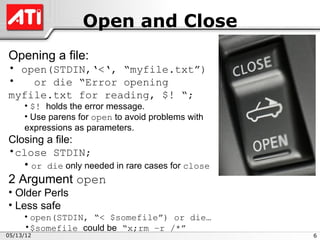
Open and Close
Opening a file:
• open(STDIN,‘<‘, “myfile.txt”)
•   or die “Error opening
myfile.txt for reading, $! “;
     • $! holds the error message.
     • Use parens for open to avoid problems with
     expressions as parameters.
Closing a file:
•close STDIN;
   • or die only needed in rare cases for close
2 Argument open
• Older Perls
• Less safe
     • open(STDIN, “< $somefile”) or die…
     •$somefile could be “x;rm –r /*”
05/13/12                                            6
EOF
Why check for EOF?
• while (<>) does this for you…
• But with multiple input files, $. (input line number) is not
reset.
• To reset the line number for each new file:
    • while (<>)
     • { do something here }
     • continue
     • { close( ARGV ) if eof }
•Note: no parens!!!
    • eof is the same as eof( ARGV ), the current file read
     with <>
     • eof() is the final file in @ARGV
•Other uses – output filename derived from input filename:
    • if ( eof )
     •{ close( ARGV );
     • open(STDOUT,‘>’,$ARGV[0].”out”; }
05/13/12                                                         7
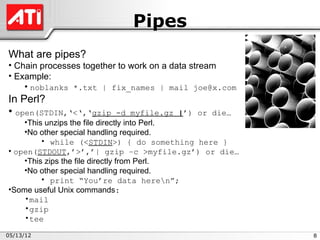
Pipes
What are pipes?
• Chain processes together to work on a data stream
• Example:
    • noblanks *.txt | fix_names | mail joe@x.com
In Perl?
• open(STDIN,‘<‘,‘gzip            -d myfile.gz |’) or die…
    •This unzips the file directly into Perl.
    •No other special handling required.
         • while (<STDIN>) { do something here }
• open(STDOUT,’>’,’| gzip –c >myfile.gz’) or die…
    •This zips the file directly from Perl.
    •No other special handling required.
         • print “You’re data heren”;
•Some useful Unix commands:
    •mail
    •gzip
    •tee

05/13/12                                                     8
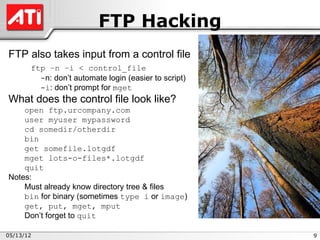
FTP Hacking
FTP also takes input from a control file
       ftp –n –i < control_file
         -n: don’t automate login (easier to script)
         -i: don’t prompt for mget
What does the control file look like?
    open ftp.urcompany.com
    user myuser mypassword
    cd somedir/otherdir
    bin
    get somefile.lotgdf
    mget lots-o-files*.lotgdf
    quit
Notes:
    Must already know directory tree & files
    bin for binary (sometimes type i or image)
    get, put, mget, mput
    Don’t forget to quit

05/13/12                                               9
Next Time?
Command Line Arguments?
     •Catching them
     •Checking them
     •Using them
     •My pet module


05/13/12                           10

Perl Intro 8 File Handles

  • 1.
    Perl Brown Bag File Handles Shaun Griffith May 1, 2006 05/13/12 ATI Confidential 1
  • 2.
    Agenda Filehandles • What are they? • Predefined • Open • Close • EOF • Pipes FTP Scripting •Non-Perl FTP hacking 05/13/12 2
  • 3.
    File Handles What areFile Handles? • File handles act like a reference to a specific entity in the file system. • Ordinarily associated with a file or a stream. • A “stream” is data piped through a process (e.g., cat or gzip). 05/13/12 3
  • 4.
    How do YouCall Them? How do you reference them? • File handles do not have a sigil (i.e., no $/@/%) • Just a bare identifier, by convention, all uppercase: • MY_FILE_HANDLE • XYZ • ABC 05/13/12 4
  • 5.
    Predefined File Handles Perlhas several predefined file handles: • Like “C”: • STDIN • STDOUT (default for print) • STDERR (default for warn/die) • Unique to Perl: • ARGV (default for <>) • DATA • Perl “magic” ARGV • inline after __DATA__ ! • (note the double underlines) 05/13/12 5
  • 6.
    Open and Close Openinga file: • open(STDIN,‘<‘, “myfile.txt”) • or die “Error opening myfile.txt for reading, $! “; • $! holds the error message. • Use parens for open to avoid problems with expressions as parameters. Closing a file: •close STDIN; • or die only needed in rare cases for close 2 Argument open • Older Perls • Less safe • open(STDIN, “< $somefile”) or die… •$somefile could be “x;rm –r /*” 05/13/12 6
  • 7.
    EOF Why check forEOF? • while (<>) does this for you… • But with multiple input files, $. (input line number) is not reset. • To reset the line number for each new file: • while (<>) • { do something here } • continue • { close( ARGV ) if eof } •Note: no parens!!! • eof is the same as eof( ARGV ), the current file read with <> • eof() is the final file in @ARGV •Other uses – output filename derived from input filename: • if ( eof ) •{ close( ARGV ); • open(STDOUT,‘>’,$ARGV[0].”out”; } 05/13/12 7
  • 8.
    Pipes What are pipes? •Chain processes together to work on a data stream • Example: • noblanks *.txt | fix_names | mail joe@x.com In Perl? • open(STDIN,‘<‘,‘gzip -d myfile.gz |’) or die… •This unzips the file directly into Perl. •No other special handling required. • while (<STDIN>) { do something here } • open(STDOUT,’>’,’| gzip –c >myfile.gz’) or die… •This zips the file directly from Perl. •No other special handling required. • print “You’re data heren”; •Some useful Unix commands: •mail •gzip •tee 05/13/12 8
  • 9.
    FTP Hacking FTP alsotakes input from a control file ftp –n –i < control_file -n: don’t automate login (easier to script) -i: don’t prompt for mget What does the control file look like? open ftp.urcompany.com user myuser mypassword cd somedir/otherdir bin get somefile.lotgdf mget lots-o-files*.lotgdf quit Notes: Must already know directory tree & files bin for binary (sometimes type i or image) get, put, mget, mput Don’t forget to quit 05/13/12 9
  • 10.
    Next Time? Command LineArguments? •Catching them •Checking them •Using them •My pet module 05/13/12 10