Percona XtraDB Cluster in a
nutshell
Hands-on tutorial
Liz van Dijk
Kenny Gryp
Frédéric Descamps
3 Nov 2014
Percona XtraDB Cluster in a
nutshell
Hands-on tutorial
Liz van Dijk
Kenny Gryp
Frédéric Descamps
3 Nov 2014
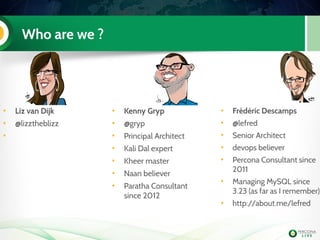
Who are we ?
• Frédéric Descamps
• @lefred
• Senior Architect
• devops believer
• Percona Consultant since
2011
• Managing MySQL since
3.23 (as far as I remember)
• http://about.me/lefred
• Kenny Gryp
• @gryp
• Principal Architect
• Kali Dal expert
• Kheer master
• Naan believer
• Paratha Consultant
since 2012
• Liz van Dijk
• @lizztheblizz
•
Agenda
PXC and galera replication
concepts
Migrating a master/slave setup
State transfer
Config / schema changes
Application interaction
Advanced Topics
4
Percona
• We are the oldest and largest independent MySQL
Support, Consulting, Remote DBA, Training, and
Software Development company with a global,
24x7 staff of nearly 100 serving more than 2,000
customers in 50+ countries since 2006 !
• Our contributions to the MySQL community include
open source server and tools software, books, and
original research published on the Percona's Blog
5
Get more after the tutorial
Synchronous Revelation, Alexey Yurchenko, 9:40am -
10:05am
Moving a MySQL infrastructure with 130K QPS to
Galera, Walther Heck, 2:10pm – 3.00pm @ Cromwell
1&2
Galera Cluster New Features, Seppo Jaakola, 3:10pm –
4:00pm @ Cromwell 3&4
15 Tips to Boost your Galera Cluster, lefred, 5:30pm –
6:20pm @ Cromwell 1&2
Concepts
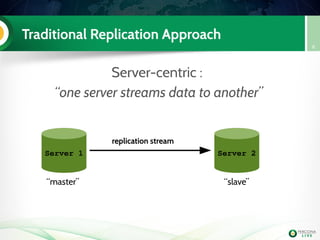
Traditional Replication Approach
Server-centric :
“one server streams data to another”
8
Server 1 Server 2
replication stream
“master” “slave”
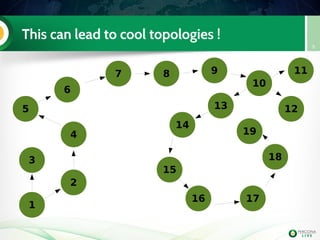
This can lead to cool topologies !
9
1
2
3
4
5
6
7 8 9
10
1213
14
15
16 17
18
19
11
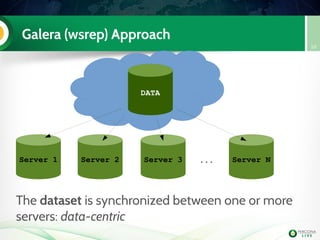
Galera (wsrep) Approach
10
DATA
Server 1 Server 2 Server 3 Server N...
The dataset is synchronized between one or more
servers: data-centric
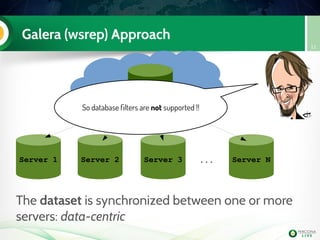
Galera (wsrep) Approach
11
DATA
Server 1 Server 2 Server 3 Server N...
The dataset is synchronized between one or more
servers: data-centric
So database filters are not supported !!
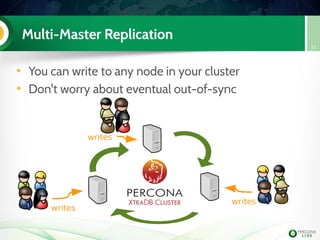
Multi-Master Replication
• You can write to any node in your cluster
• Don't worry about eventual out-of-sync
12
writes
writes
writes
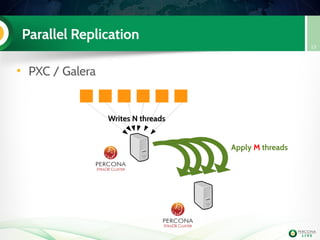
Parallel Replication
• PXC / Galera
13
Writes N threads
Apply M threads
Understanding Galera
14
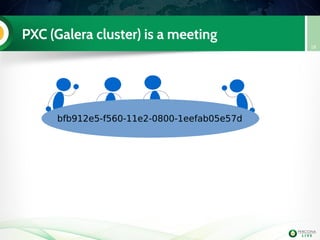
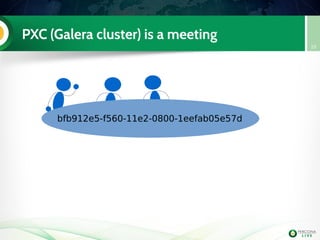
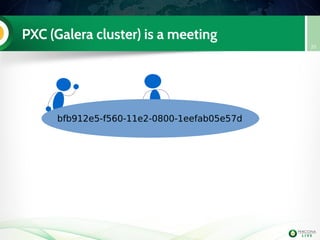
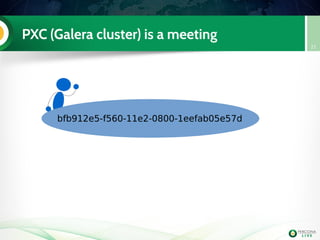
The cluster can be
seen as a meeting !
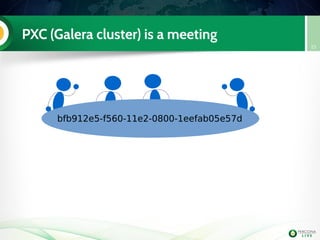
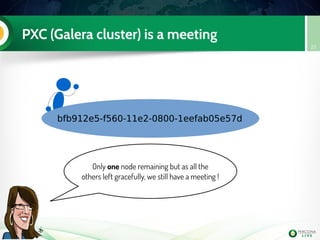
PXC (Galera cluster) is a meeting
15
bfb912e5-f560-11e2-0800-1eefab05e57d
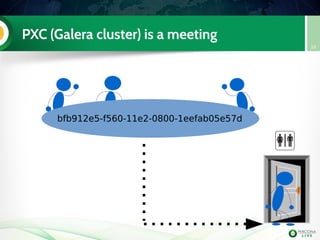
PXC (Galera cluster) is a meeting
16
bfb912e5-f560-11e2-0800-1eefab05e57d
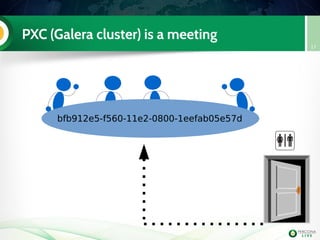
PXC (Galera cluster) is a meeting
17
bfb912e5-f560-11e2-0800-1eefab05e57d
PXC (Galera cluster) is a meeting
18
bfb912e5-f560-11e2-0800-1eefab05e57d
PXC (Galera cluster) is a meeting
19
bfb912e5-f560-11e2-0800-1eefab05e57d
PXC (Galera cluster) is a meeting
20
bfb912e5-f560-11e2-0800-1eefab05e57d
PXC (Galera cluster) is a meeting
21
bfb912e5-f560-11e2-0800-1eefab05e57d
PXC (Galera cluster) is a meeting
22
bfb912e5-f560-11e2-0800-1eefab05e57d
Only one node remaining but as all the
others left gracefully, we still have a meeting !
PXC (Galera cluster) is a meeting
23
PXC (Galera cluster) is a meeting
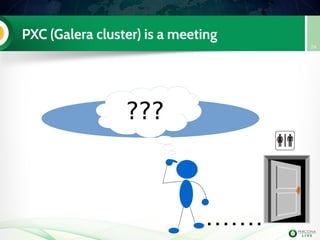
24
???
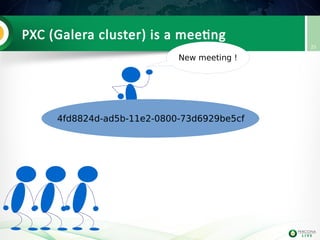
PXC (Galera cluster) is a meeting
25
4fd8824d-ad5b-11e2-0800-73d6929be5cf
New meeting !
Ready ? Handson!
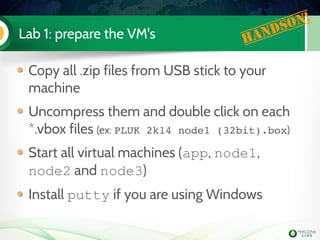
Lab 1: prepare the VM's Handson!
Copy all .zip files from USB stick to your
machine
Uncompress them and double click on each
*.vbox files (ex: PLUK 2k14 node1 (32bit).box)
Start all virtual machines (app, node1,
node2 and node3)
Install putty if you are using Windows
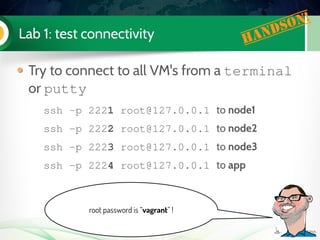
Lab 1: test connectivity Handson!
Try to connect to all VM's from a terminal
or putty
ssh ­p 2221 root@127.0.0.1 to node1
ssh ­p 2222 root@127.0.0.1 to node2
ssh ­p 2223 root@127.0.0.1 to node3
ssh ­p 2224 root@127.0.0.1 to app
root password is “vagrant” !
Lab 1: everybody OK ? Handson!
Lab 1: YES !! Handson!
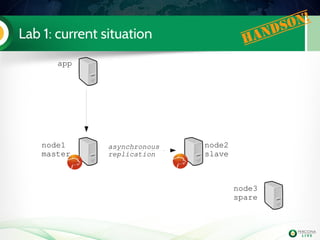
Lab 1: current situation Handson!
app
node1
master
node2
slave
node3
spare
asynchronous
replication
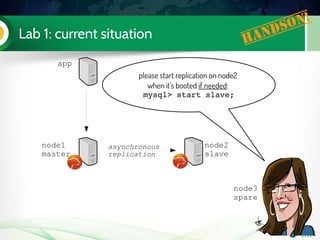
Lab 1: current situation Handson!
app
node1
master
node2
slave
node3
spare
asynchronous
replication
please start replication on node2
when it's booted if needed:
mysql> start slave;
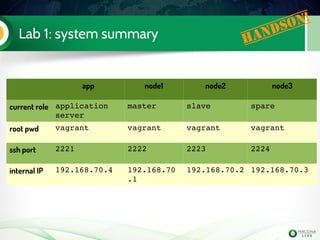
Lab 1: system summary Handson!
app node1 node2 node3
current role application 
server
master slave spare
root pwd vagrant vagrant vagrant vagrant
ssh port 2221 2222 2223 2224
internal IP 192.168.70.4 192.168.70
.1
192.168.70.2 192.168.70.3
Is PXC Good for me?
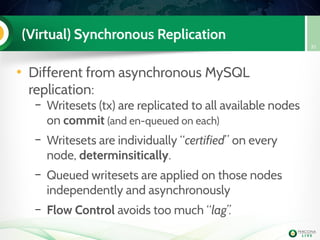
(Virtual) Synchronous Replication
• Different from asynchronous MySQL
replication:
– Writesets (tx) are replicated to all available nodes
on commit (and en-queued on each)
– Writesets are individually “certified” on every
node, determinsitically.
– Queued writesets are applied on those nodes
independently and asynchronously
– Flow Control avoids too much “lag”.
35
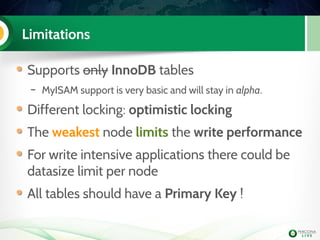
Limitations
Supports only InnoDB tables
– MyISAM support is very basic and will stay in alpha.
Different locking: optimistic locking
The weakest node limits the write performance
For write intensive applications there could be
datasize limit per node
All tables should have a Primary Key !
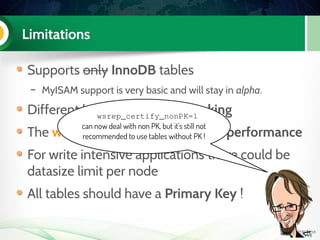
Limitations
Supports only InnoDB tables
– MyISAM support is very basic and will stay in alpha.
Different locking: optimistic locking
The weakest node limits the write performance
For write intensive applications there could be
datasize limit per node
All tables should have a Primary Key !
wsrep_certify_nonPK=1
can now deal with non PK, but it's still not
recommended to use tables without PK !
Limitations (2)
Large transactions are not recommended if
you write on all nodes simultaneously
If your application has a data hotspot then
PXC may not be right for you.
By default a writeset can contain maximum
128k rows and limited to 1G
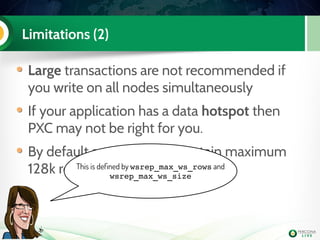
Limitations (2)
Large transactions are not recommended if
you write on all nodes simultaneously
If your application has a data hotspot then
PXC may not be right for you.
By default a writeset can contain maximum
128k rows and limited to 1GThis is defined by wsrep_max_ws_rows and
wsrep_max_ws_size
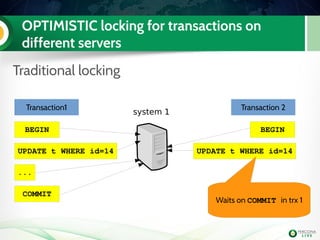
OPTIMISTIC locking for transactions on
different servers
Traditional locking
system 1
Transaction 1 Transaction 2
BEGIN
Transaction1
BEGIN
UPDATE t WHERE id=14 UPDATE t WHERE id=14
...
COMMIT
Waits on COMMIT in trx 1
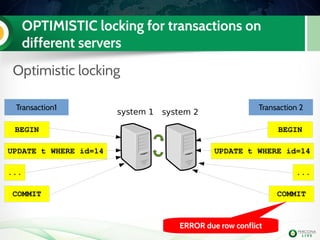
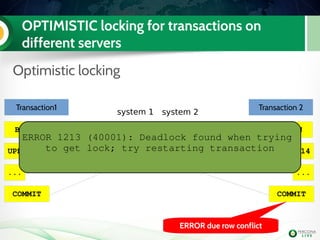
OPTIMISTIC locking for transactions on
different servers
Optimistic locking
system 1
Transaction 1 Transaction 2
BEGIN
Transaction1
BEGIN
UPDATE t WHERE id=14 UPDATE t WHERE id=14
...
COMMIT
system 2
...
COMMIT
ERROR due row conflict
OPTIMISTIC locking for transactions on
different servers
Optimistic locking
system 1
Transaction 1 Transaction 2
BEGIN
Transaction1
BEGIN
UPDATE t WHERE id=14 UPDATE t WHERE id=14
...
COMMIT
system 2
...
COMMIT
ERROR due row conflict
ERROR 1213 (40001): Deadlock found when trying 
to get lock; try restarting transaction
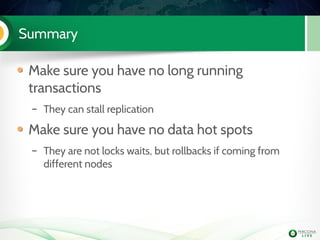
Summary
Make sure you have no long running
transactions
– They can stall replication
Make sure you have no data hot spots
– They are not locks waits, but rollbacks if coming from
different nodes
Migrating a master/slave setup
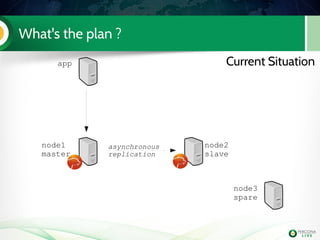
What's the plan ?
app
node1
master
node2
slave
node3
spare
asynchronous
replication
Current Situation
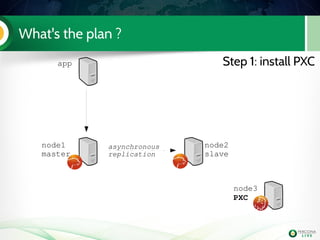
What's the plan ?
app
node1
master
node2
slave
node3
PXC
asynchronous
replication
Step 1: install PXC
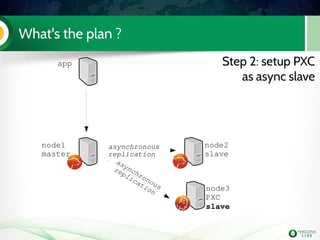
What's the plan ?
app
node1
master
node2
slave
node3
PXC
slave
asynchronous
replication
Step 2: setup PXC
as async slave
asynchronous
replication
asynchronous
replication
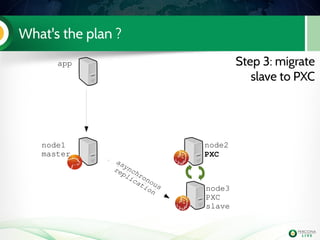
What's the plan ?
app
node1
master
node2
PXC
node3
PXC
slave
Step 3: migrate
slave to PXC
asynchronous
replication
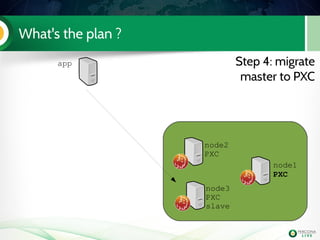
What's the plan ?
app
node1
PXC
node2
PXC
node3
PXC
slave
Step 4: migrate
master to PXC
Lab 2: Install PXC on node3
Install Percona­XtraDB­Cluster­
server­56
Edit my.cnf to have the mandatory PXC
settings
node3
PXC
Handson!
[mysqld]
binlog_format=ROW
wsrep_provider=/usr/lib/libgalera_smm.so 
wsrep_cluster_address=gcomm://192.168.70.3
wsrep_node_address=192.168.70.3
wsrep_cluster_name=Pluk2k13
wsrep_node_name=node3
  
innodb_autoinc_lock_mode=2
Step 2: setup that single node cluster as
asynchronous slave
We need to verify if the configuration is
ready for that
Make a slave
Bootstrap our single node Percona
XtraDB Cluster
Start replication.... we use 5.6 with
GTID!
Disable selinux on all boxes !
– setenforce 0
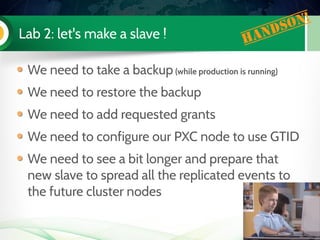
Lab 2: let's make a slave ! Handson!
We need to take a backup (while production is running)
We need to restore the backup
We need to add requested grants
We need to configure our PXC node to use GTID
We need to see a bit longer and prepare that
new slave to spread all the replicated events to
the future cluster nodes
Lab 2: It's time for some extra work ! Handson!
It's always better to have a specific user to use
with xtrabackup (we will use it later for SST too)
Even if you use the default datadir in MySQL,
it's mandatory to add it in my.cnf
node1 mysql> GRANT reload, lock tables, replication client ON 
*.* TO 'sst'@'localhost' IDENTIFIED BY 'sst'; 
datadir=/var/lib/mysl
[xtrabackup]
user=sst
password=sst
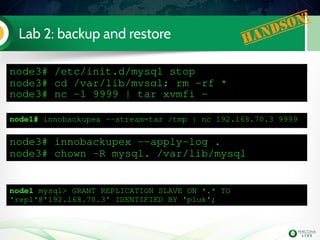
Lab 2: backup and restore Handson!
node3# /etc/init.d/mysql stop
node3# cd /var/lib/mysql; rm ­rf *
node3# nc ­l 9999 | tar xvmfi ­
node1# innobackupex ­­stream=tar /tmp | nc 192.168.70.3 9999
node3# innobackupex ­­apply­log .
node3# chown ­R mysql. /var/lib/mysql
node1 mysql> GRANT REPLICATION SLAVE ON *.* TO 
'repl'@'192.168.70.3' IDENTIFIED BY 'pluk'; 
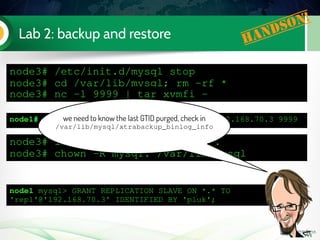
Lab 2: backup and restore Handson!
node3# /etc/init.d/mysql stop
node3# cd /var/lib/mysql; rm ­rf *
node3# nc ­l 9999 | tar xvmfi ­
node1# innobackupex ­­stream=tar /tmp | nc 192.168.70.3 9999
node3# innobackupex ­­apply­log .
node3# chown ­R mysql. /var/lib/mysql
node1 mysql> GRANT REPLICATION SLAVE ON *.* TO 
'repl'@'192.168.70.3' IDENTIFIED BY 'pluk'; 
we need to know the last GTID purged, check in
/var/lib/mysql/xtrabackup_binlog_info
Lab 2: configuration for replication Handson!
[mysqld]
binlog_format=ROW
log_slave_updates
wsrep_provider=/usr/lib/libgalera_smm.so 
wsrep_cluster_address=gcomm://192.168.70.3
wsrep_node_address=192.168.70.3
wsrep_cluster_name=Pluk2k13
wsrep_node_name=node3
wsrep_slave_threads=2
wsrep_sst_method=xtrabackup­v2
wsrep_sst_auth=sst:sst
innodb_autoinc_lock_mode=2
innodb_file_per_table
gtid_mode=on
enforce_gtid_consistency
skip_slave_start
server­id=3
log_bin=mysql­bin
datadir=/var/lib/mysql
[xtrabackup]
user=sst
password=sst
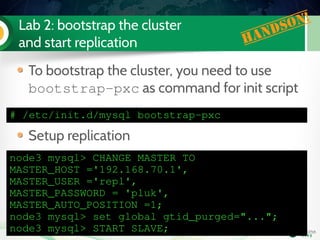
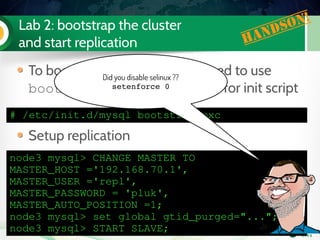
Lab 2: bootstrap the cluster
and start replication Handson!
# /etc/init.d/mysql bootstrap­pxc
To bootstrap the cluster, you need to use
bootstrap­pxc as command for init script
Setup replication
node3 mysql> CHANGE MASTER TO 
MASTER_HOST ='192.168.70.1',
MASTER_USER ='repl',
MASTER_PASSWORD = 'pluk',
MASTER_AUTO_POSITION =1;
node3 mysql> set global gtid_purged="...";
node3 mysql> START SLAVE;
Lab 2: bootstrap the cluster
and start replication Handson!
# /etc/init.d/mysql bootstrap­pxc
To bootstrap the cluster, you need to use
bootstrap­pxc as command for init script
Setup replication
node3 mysql> CHANGE MASTER TO 
MASTER_HOST ='192.168.70.1',
MASTER_USER ='repl',
MASTER_PASSWORD = 'pluk',
MASTER_AUTO_POSITION =1;
node3 mysql> set global gtid_purged="...";
node3 mysql> START SLAVE;
Did you disable selinux ??
setenforce 0
Lab 3: migrate 5.6 slave to PXC (step 3)
Install PXC on node2
Configure it
Start it (don't bootstrap it !)
Check the mysql logs on both
PXC nodes
node2
PXC
node3
PXC
slave
Handson!
wsrep_cluster_address=gcomm://192.168.70.2,192.168.70.3
wsrep_node_address=192.168.70.2
wsrep_node_name=node2
[...]
Lab 3: migrate 5.6 slave to PXC (step 3)
Install PXC on node2
Configure it
Start it (don't bootstrap it !)
Check the mysql logs on both
PXC nodes
node2
PXC
node3
PXC
slave
Handson!
wsrep_cluster_address=gcomm://192.168.70.2,192.168.70.3
wsrep_node_address=192.168.70.2
wsrep_node_name=node2
[...]
Did you disable selinux ??
setenforce 0
Lab 3: migrate 5.6 slave to PXC (step 3)
Install PXC on node2
Configure it
Start it (don't bootstrap it !)
Check the mysql logs on both
PXC nodes
node2
PXC
node3
PXC
slave
Handson!
wsrep_cluster_address=gcomm://192.168.70.2,192.168.70.3
wsrep_node_address=192.168.70.2
wsrep_node_name=node2
[...]
on node3 (the donor) tail the file innobackup.backup.log in datadir
on node 2 (the joiner) as soon as created check the file innobackup.prepare.log
Lab 3: migrate 5.6 slave to PXC (step 3)
Install PXC on node2
Configure it
Start it (don't bootstrap it !)
Check the mysql logs on both
PXC nodes
node2
PXC
node3
PXC
slave
Handson!
wsrep_cluster_address=gcomm://192.168.70.2,192.168.70.3
wsrep_node_address=192.168.70.2
wsrep_node_name=node2
[...]
we can check on one of the nodes if the cluster
is indeed running with two nodes:
mysql> show global status like 'wsrep_cluster_size';
+­­­­­­­­­­­­­­­­­­­­+­­­­­­­+
| Variable_name      | Value |
+­­­­­­­­­­­­­­­­­­­­+­­­­­­­+
| wsrep_cluster_size | 2     |
+­­­­­­­­­­­­­­­­­­­­+­­­­­­­+
StateTransfer Summary
75
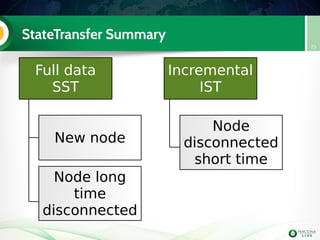
Full data
SST
Incremental
IST
New node
Node long
time
disconnected
Node
disconnected
short time
Snapshot State Transfer
76
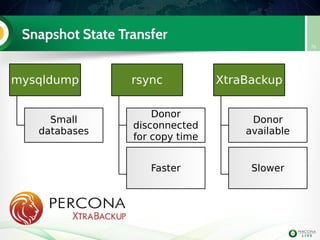
mysqldump
Small
databases
rsync
Donor
disconnected
for copy time
Faster
XtraBackup
Donor
available
Slower
Incremental State Transfer
77
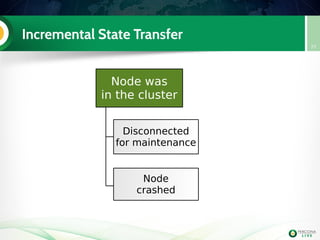
Node was
in the cluster
Disconnected
for maintenance
Node
crashed
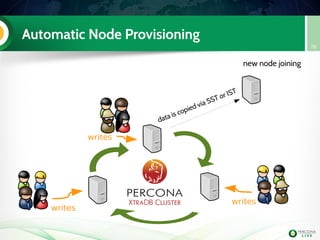
Automatic Node Provisioning
78
writes
writes
writes
new node joining
data is copied via SST or IST
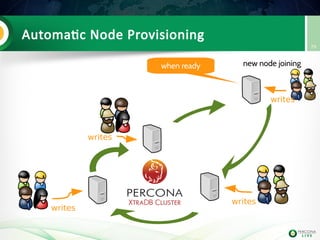
Automatic Node Provisioning
79
writes
writes
writes
new node joiningwhen ready
writes
What's new in SST
XtraBackup as SST
XtraBackup as SST now supports xbstream
format. This allows:
– Xtrabackup in parallel
– Compression
– Compact format
– Encryption
Lab 4: Xtrabackup & xbstream
as SST (step 4)
Migrate the master to PXC
Configure SST to use Xtrabackup with 2
threads and compression
[mysqld]
wsrep_sst_method=xtrabackup­v2
wsrep_sst_auth=sst:sst
[xtrabackup]
compress
parallel=2
compress­threads=2
[sst]
streamfmt=xbstream
Handson!
qpress needs to be
installed on all nodes
don't forget to stop & reset async slave
Using a load balancer
PXC with a Load balancer
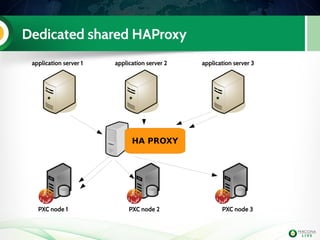
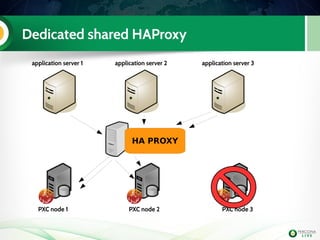
• PXC can be integrate with a load balancer and
service can be checked using clustercheck or
pyclustercheck
• The load balancer can be a dedicated one
• or integrated on each application servers
84
Dedicated shared HAProxy
application server 1 application server 2 application server 3
PXC node 1 PXC node 2 PXC node 3
HA PROXY
Dedicated shared HAProxy
application server 1 application server 2 application server 3
PXC node 1 PXC node 2 PXC node 3
HA PROXY
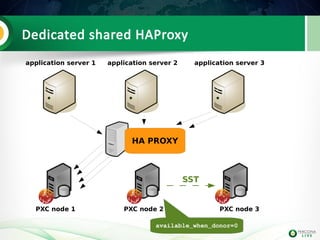
Dedicated shared HAProxy
application server 1 application server 2 application server 3
PXC node 1 PXC node 2 PXC node 3
HA PROXY
SST
available_when_donor=0
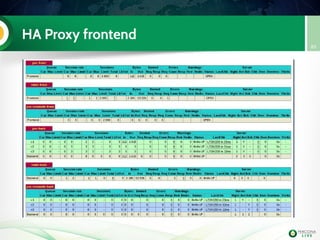
HA Proxy frontend
89
Lab 5: PXC and Load Balancer Handson!
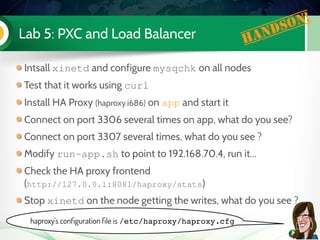
Intsall xinetd and configure mysqchk on all nodes
Test that it works using curl
Install HA Proxy (haproxy.i686) on app and start it
Connect on port 3306 several times on app, what do you see?
Connect on port 3307 several times, what do you see ?
Modify run­app.sh to point to 192.168.70.4, run it...
Check the HA proxy frontend
(http://127.0.0.1:8081/haproxy/stats)
Stop xinetd on the node getting the writes, what do you see ?
haproxy's configuration file is /etc/haproxy/haproxy.cfg
Rolling out changes
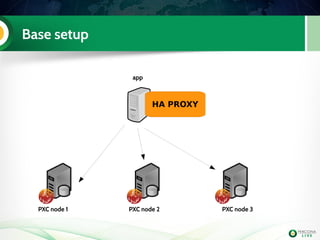
Base setup
app
PXC node 1 PXC node 2 PXC node 3
HA PROXY
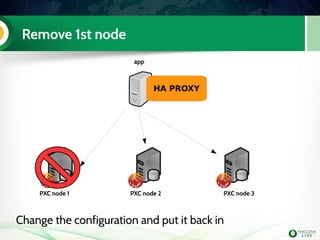
Remove 1st node
app
PXC node 1 PXC node 2 PXC node 3
HA PROXY
Change the configuration and put it back in
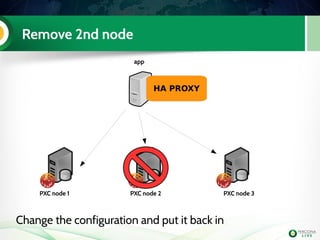
Remove 2nd node
app
PXC node 1 PXC node 2 PXC node 3
HA PROXY
Change the configuration and put it back in
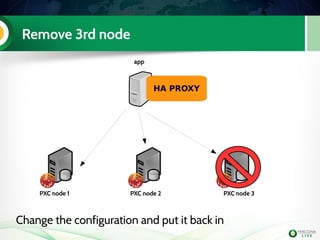
Remove 3rd node
app
PXC node 1 PXC node 2 PXC node 3
HA PROXY
Change the configuration and put it back in
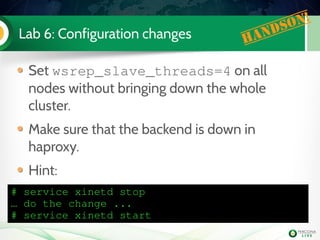
Lab 6: Configuration changes Handson!
Set wsrep_slave_threads=4 on all
nodes without bringing down the whole
cluster.
Make sure that the backend is down in
haproxy.
Hint:
# service xinetd stop
… do the change ...
# service xinetd start
Schema changes: pt-online-shema-change
Does the work in chunks
Everything is done in small transactions,
which counts as a good workload
It can't modify tables with triggers
It's slower than 5.6 online DDL
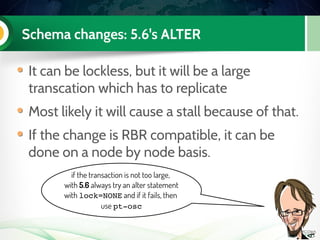
Schema changes: 5.6's ALTER
It can be lockless, but it will be a large
transcation which has to replicate
Most likely it will cause a stall because of that.
If the change is RBR compatible, it can be
done on a node by node basis.
if the transaction is not too large,
with 5.6 always try an alter statement
with lock=NONE and if it fails, then
use pt­osc
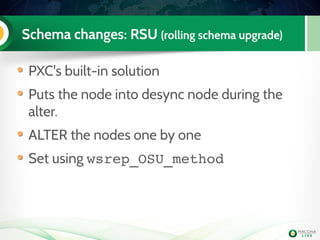
Schema changes: RSU (rolling schema upgrade)
PXC's built-in solution
Puts the node into desync node during the
alter.
ALTER the nodes one by one
Set using wsrep_OSU_method
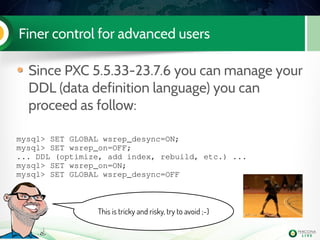
Finer control for advanced users
Since PXC 5.5.33-23.7.6 you can manage your
DDL (data definition language) you can
proceed as follow:
mysql> SET GLOBAL wsrep_desync=ON;
mysql> SET wsrep_on=OFF;
... DDL (optimize, add index, rebuild, etc.) ...
mysql> SET wsrep_on=ON;
mysql> SET GLOBAL wsrep_desync=OFF
This is tricky and risky, try to avoid ;-)
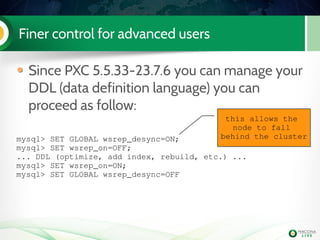
Finer control for advanced users
Since PXC 5.5.33-23.7.6 you can manage your
DDL (data definition language) you can
proceed as follow:
mysql> SET GLOBAL wsrep_desync=ON; 
mysql> SET wsrep_on=OFF; 
... DDL (optimize, add index, rebuild, etc.) ...
mysql> SET wsrep_on=ON;
mysql> SET GLOBAL wsrep_desync=OFF
this allows the 
node to fall 
behind the cluster
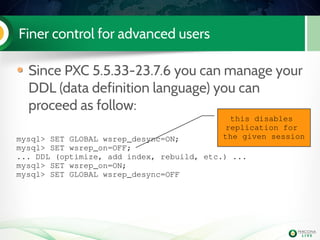
Finer control for advanced users
Since PXC 5.5.33-23.7.6 you can manage your
DDL (data definition language) you can
proceed as follow:
mysql> SET GLOBAL wsrep_desync=ON; 
mysql> SET wsrep_on=OFF; 
... DDL (optimize, add index, rebuild, etc.) ...
mysql> SET wsrep_on=ON;
mysql> SET GLOBAL wsrep_desync=OFF
this disables 
replication for 
the given session
myq_gadgets
During the rest of the day we will use
myq_status to monitor our cluster
Command line utility part of myq_gadgets
Written by Jay Janssen -
https://github.com/jayjanssen/myq_gadgets
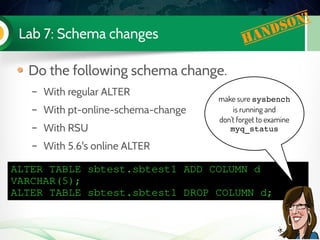
Lab 7: Schema changes Handson!
Do the following schema change.
– With regular ALTER
– With pt-online-schema-change
– With RSU
– With 5.6's online ALTER
ALTER TABLE sbtest.sbtest1 ADD COLUMN d 
VARCHAR(5);
ALTER TABLE sbtest.sbtest1 DROP COLUMN d;
make sure sysbench
is running and
don't forget to examine
myq_status
Let's break things
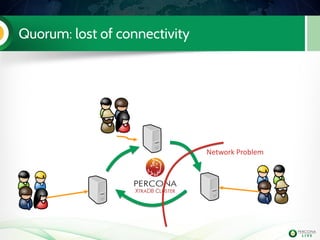
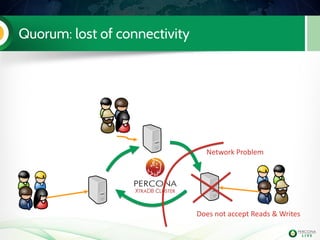
PXC manages Quorum
If a node does not see more than 50% of the total
amount of nodes: reads/writes are not accepted.
Split brain is prevented
This requires at least 3 nodes to be effective
a node can be an arbitrator (garbd), joining the
communication, but not having any MySQL running
Can be disabled (but be warned!)
You can cheat and play with node weight
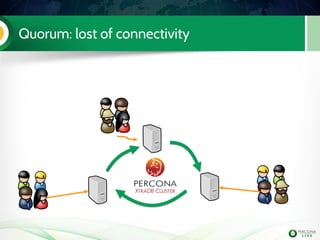
Quorum: lost of connectivity
Network Problem
Quorum: lost of connectivity
Network Problem
Does not accept Reads & Writes
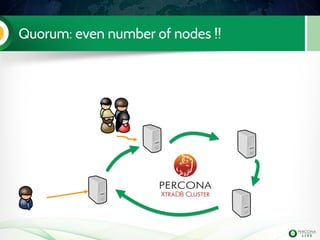
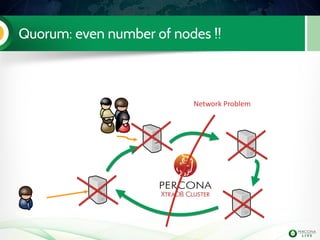
Quorum: even number of nodes !!
Network Problem
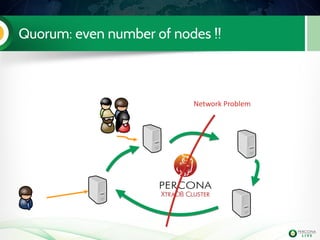
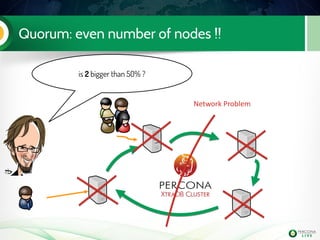
Quorum: even number of nodes !!
Network Problem
Quorum: even number of nodes !!
Network Problem
is 2 bigger than 50% ?
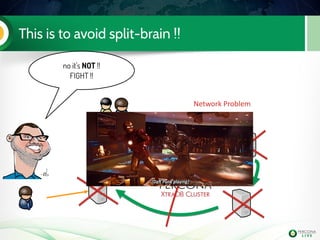
This is to avoid split-brain !!
Network Problem
no it's NOT !!
FIGHT !!
Cheat with nodes weight for quorum
You can define the weight of a node to affect
the quorum calculation using the galera
parameter pc.weight (default is 1)
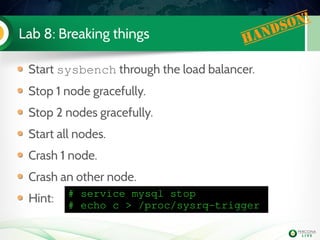
Lab 8: Breaking things Handson!
Start sysbench through the load balancer.
Stop 1 node gracefully.
Stop 2 nodes gracefully.
Start all nodes.
Crash 1 node.
Crash an other node.
Hint: # service mysql stop
# echo c > /proc/sysrq­trigger
Asynchronous replication from
PXC
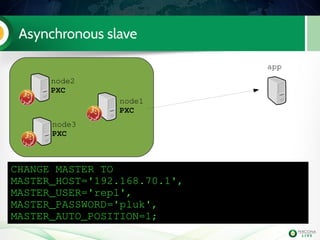
Asynchronous slave
app
node1
PXC
node2
PXC
node3
PXC
CHANGE MASTER TO
MASTER_HOST='192.168.70.1',
MASTER_USER='repl',
MASTER_PASSWORD='pluk',
MASTER_AUTO_POSITION=1;
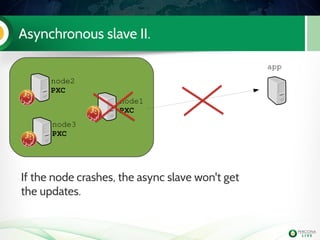
Asynchronous slave II.
app
node1
PXC
node2
PXC
node3
PXC
If the node crashes, the async slave won't get
the updates.
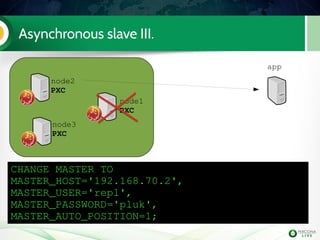
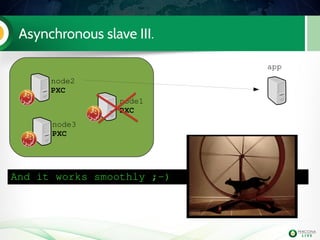
Asynchronous slave III.
app
node1
PXC
node2
PXC
node3
PXC
CHANGE MASTER TO
MASTER_HOST='192.168.70.2',
MASTER_USER='repl',
MASTER_PASSWORD='pluk',
MASTER_AUTO_POSITION=1;
Asynchronous slave III.
app
node1
PXC
node2
PXC
node3
PXC
And it works smoothly ;­)
Lab 9: Asynchronous replication Handson!
Prepare the cluster for this lab
– nothing to do as we use xtrabackup >= 2.1.7 ;-)
Make sure some sysbench workload is running through
some haproxy
before xtrabackup 2.1.7,
rsync was the only
sst method supporting the copy of
binary logs
Lab 9: Asynchronous replication Handson!
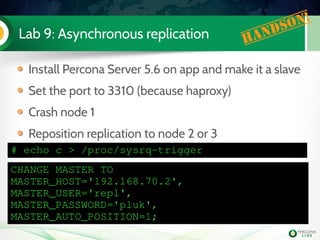
Install Percona Server 5.6 on app and make it a slave
Set the port to 3310 (because haproxy)
Crash node 1
Reposition replication to node 2 or 3
CHANGE MASTER TO
MASTER_HOST='192.168.70.2',
MASTER_USER='repl',
MASTER_PASSWORD='pluk',
MASTER_AUTO_POSITION=1;
# echo c > /proc/sysrq­trigger
WAN replication
WAN replication
MySQL
MySQL
MySQL
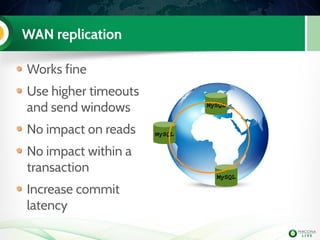
Works fine
Use higher timeouts
and send windows
No impact on reads
No impact within a
transaction
Increase commit
latency
WAN replication - latencies
MySQL
MySQL
MySQL
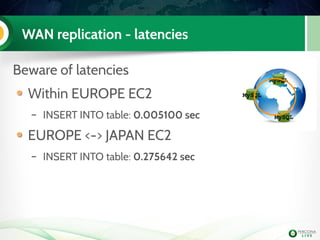
Beware of latencies
Within EUROPE EC2
– INSERT INTO table: 0.005100 sec
EUROPE <-> JAPAN EC2
– INSERT INTO table: 0.275642 sec
WAN replication with MySQL asynchronous
replication
MySQL
MySQL
MySQL
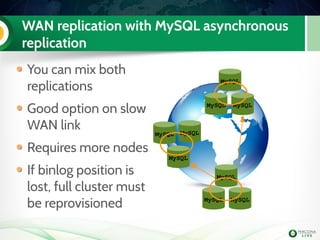
You can mix both
replications
Good option on slow
WAN link
Requires more nodes
If binlog position is
lost, full cluster must
be reprovisioned
MySQL
MySQL
MySQL
MySQL
MySQL MySQL
Better WAN Replication with Galera 3.0
Galera 3.0's replication mode is optimized for
high latency networks
Uses cluster segments
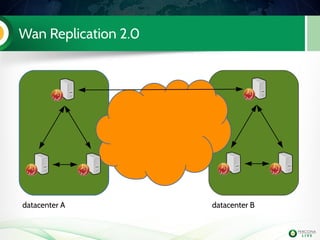
Wan Replication 2.0
datacenter A datacenter B
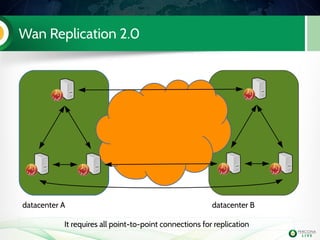
Wan Replication 2.0
datacenter A datacenter B
It requires all point-to-point connections for replication
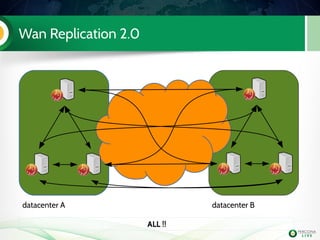
Wan Replication 2.0
datacenter A datacenter B
ALL !!
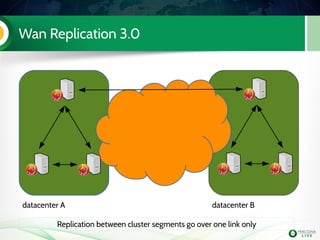
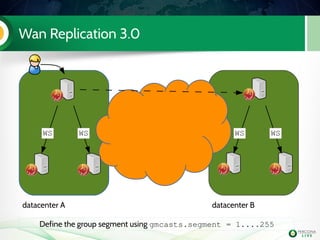
Wan Replication 3.0
datacenter A datacenter B
Replication between cluster segments go over one link only
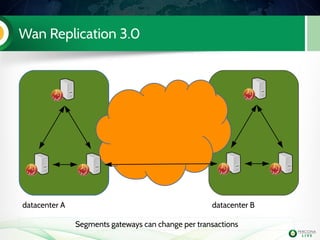
Wan Replication 3.0
datacenter A datacenter B
Segments gateways can change per transactions
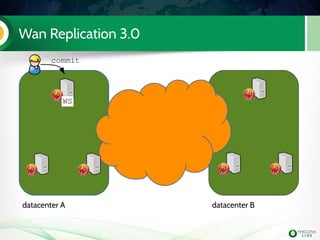
Wan Replication 3.0
datacenter A datacenter B
commit
WS
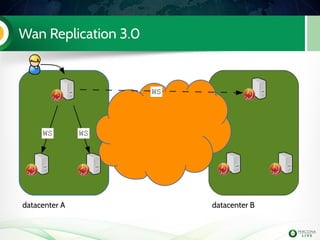
Wan Replication 3.0
datacenter A datacenter B
WSWS
WS
Wan Replication 3.0
datacenter A datacenter B
WSWS WSWS
Define the group segment using gmcasts.segment = 1....255
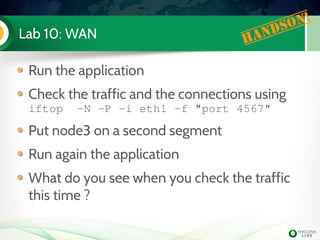
Lab 10: WAN Handson!
Run the application
Check the traffic and the connections using
iftop  ­N ­P ­i eth1 ­f "port 4567"
Put node3 on a second segment
Run again the application
What do you see when you check the traffic
this time ?
Credits
WSREP patches and Galera library is
developed by Codership Oy
Percona & Codership present tomorrow
http://www.percona.com/live/london-2013/
Resources
Percona XtraDB Cluster website:
http://www.percona.com/software/percona-xtradb-cluster/
Codership website: http://www.codership.com/wiki/doku.php
PXC articles on percona's blog:
http://www.percona.com/blog/category/percona-xtradb-cluster/
devops animations: http://devopsreactions.tumblr.com/
Thank you !
tutorial is OVER !
Percona provides
24 x 7 Support Services
Quick and Easy Access to Consultants
Same Day Emergency Data Recovery
Remote DBA Services
sales@percona.com or 00442081330309

Percon XtraDB Cluster in a nutshell

  • 1.
    Percona XtraDB Clusterin a nutshell Hands-on tutorial Liz van Dijk Kenny Gryp Frédéric Descamps 3 Nov 2014
  • 2.
    Percona XtraDB Clusterin a nutshell Hands-on tutorial Liz van Dijk Kenny Gryp Frédéric Descamps 3 Nov 2014
  • 3.
    Who are we? • Frédéric Descamps • @lefred • Senior Architect • devops believer • Percona Consultant since 2011 • Managing MySQL since 3.23 (as far as I remember) • http://about.me/lefred • Kenny Gryp • @gryp • Principal Architect • Kali Dal expert • Kheer master • Naan believer • Paratha Consultant since 2012 • Liz van Dijk • @lizztheblizz •
  • 4.
    Agenda PXC and galerareplication concepts Migrating a master/slave setup State transfer Config / schema changes Application interaction Advanced Topics 4
  • 5.
    Percona • We arethe oldest and largest independent MySQL Support, Consulting, Remote DBA, Training, and Software Development company with a global, 24x7 staff of nearly 100 serving more than 2,000 customers in 50+ countries since 2006 ! • Our contributions to the MySQL community include open source server and tools software, books, and original research published on the Percona's Blog 5
  • 6.
    Get more afterthe tutorial Synchronous Revelation, Alexey Yurchenko, 9:40am - 10:05am Moving a MySQL infrastructure with 130K QPS to Galera, Walther Heck, 2:10pm – 3.00pm @ Cromwell 1&2 Galera Cluster New Features, Seppo Jaakola, 3:10pm – 4:00pm @ Cromwell 3&4 15 Tips to Boost your Galera Cluster, lefred, 5:30pm – 6:20pm @ Cromwell 1&2
  • 7.
  • 8.
    Traditional Replication Approach Server-centric: “one server streams data to another” 8 Server 1 Server 2 replication stream “master” “slave”
  • 9.
    This can leadto cool topologies ! 9 1 2 3 4 5 6 7 8 9 10 1213 14 15 16 17 18 19 11
  • 10.
    Galera (wsrep) Approach 10 DATA Server 1Server 2 Server 3 Server N... The dataset is synchronized between one or more servers: data-centric
  • 11.
    Galera (wsrep) Approach 11 DATA Server 1Server 2 Server 3 Server N... The dataset is synchronized between one or more servers: data-centric So database filters are not supported !!
  • 12.
    Multi-Master Replication • Youcan write to any node in your cluster • Don't worry about eventual out-of-sync 12 writes writes writes
  • 13.
    Parallel Replication • PXC/ Galera 13 Writes N threads Apply M threads
  • 14.
    Understanding Galera 14 The clustercan be seen as a meeting !
  • 15.
    PXC (Galera cluster)is a meeting 15 bfb912e5-f560-11e2-0800-1eefab05e57d
  • 16.
    PXC (Galera cluster)is a meeting 16 bfb912e5-f560-11e2-0800-1eefab05e57d
  • 17.
    PXC (Galera cluster)is a meeting 17 bfb912e5-f560-11e2-0800-1eefab05e57d
  • 18.
    PXC (Galera cluster)is a meeting 18 bfb912e5-f560-11e2-0800-1eefab05e57d
  • 19.
    PXC (Galera cluster)is a meeting 19 bfb912e5-f560-11e2-0800-1eefab05e57d
  • 20.
    PXC (Galera cluster)is a meeting 20 bfb912e5-f560-11e2-0800-1eefab05e57d
  • 21.
    PXC (Galera cluster)is a meeting 21 bfb912e5-f560-11e2-0800-1eefab05e57d
  • 22.
    PXC (Galera cluster)is a meeting 22 bfb912e5-f560-11e2-0800-1eefab05e57d Only one node remaining but as all the others left gracefully, we still have a meeting !
  • 23.
    PXC (Galera cluster)is a meeting 23
  • 24.
    PXC (Galera cluster)is a meeting 24 ???
  • 25.
    PXC (Galera cluster)is a meeting 25 4fd8824d-ad5b-11e2-0800-73d6929be5cf New meeting !
  • 26.
  • 27.
    Lab 1: preparethe VM's Handson! Copy all .zip files from USB stick to your machine Uncompress them and double click on each *.vbox files (ex: PLUK 2k14 node1 (32bit).box) Start all virtual machines (app, node1, node2 and node3) Install putty if you are using Windows
  • 28.
    Lab 1: testconnectivity Handson! Try to connect to all VM's from a terminal or putty ssh ­p 2221 root@127.0.0.1 to node1 ssh ­p 2222 root@127.0.0.1 to node2 ssh ­p 2223 root@127.0.0.1 to node3 ssh ­p 2224 root@127.0.0.1 to app root password is “vagrant” !
  • 29.
    Lab 1: everybodyOK ? Handson!
  • 30.
    Lab 1: YES!! Handson!
  • 31.
    Lab 1: currentsituation Handson! app node1 master node2 slave node3 spare asynchronous replication
  • 32.
    Lab 1: currentsituation Handson! app node1 master node2 slave node3 spare asynchronous replication please start replication on node2 when it's booted if needed: mysql> start slave;
  • 33.
    Lab 1: systemsummary Handson! app node1 node2 node3 current role application  server master slave spare root pwd vagrant vagrant vagrant vagrant ssh port 2221 2222 2223 2224 internal IP 192.168.70.4 192.168.70 .1 192.168.70.2 192.168.70.3
  • 34.
    Is PXC Goodfor me?
  • 35.
    (Virtual) Synchronous Replication •Different from asynchronous MySQL replication: – Writesets (tx) are replicated to all available nodes on commit (and en-queued on each) – Writesets are individually “certified” on every node, determinsitically. – Queued writesets are applied on those nodes independently and asynchronously – Flow Control avoids too much “lag”. 35
  • 36.
    Limitations Supports only InnoDBtables – MyISAM support is very basic and will stay in alpha. Different locking: optimistic locking The weakest node limits the write performance For write intensive applications there could be datasize limit per node All tables should have a Primary Key !
  • 37.
    Limitations Supports only InnoDBtables – MyISAM support is very basic and will stay in alpha. Different locking: optimistic locking The weakest node limits the write performance For write intensive applications there could be datasize limit per node All tables should have a Primary Key ! wsrep_certify_nonPK=1 can now deal with non PK, but it's still not recommended to use tables without PK !
  • 38.
    Limitations (2) Large transactionsare not recommended if you write on all nodes simultaneously If your application has a data hotspot then PXC may not be right for you. By default a writeset can contain maximum 128k rows and limited to 1G
  • 39.
    Limitations (2) Large transactionsare not recommended if you write on all nodes simultaneously If your application has a data hotspot then PXC may not be right for you. By default a writeset can contain maximum 128k rows and limited to 1GThis is defined by wsrep_max_ws_rows and wsrep_max_ws_size
  • 40.
    OPTIMISTIC locking fortransactions on different servers Traditional locking system 1 Transaction 1 Transaction 2 BEGIN Transaction1 BEGIN UPDATE t WHERE id=14 UPDATE t WHERE id=14 ... COMMIT Waits on COMMIT in trx 1
  • 41.
    OPTIMISTIC locking fortransactions on different servers Optimistic locking system 1 Transaction 1 Transaction 2 BEGIN Transaction1 BEGIN UPDATE t WHERE id=14 UPDATE t WHERE id=14 ... COMMIT system 2 ... COMMIT ERROR due row conflict
  • 42.
    OPTIMISTIC locking fortransactions on different servers Optimistic locking system 1 Transaction 1 Transaction 2 BEGIN Transaction1 BEGIN UPDATE t WHERE id=14 UPDATE t WHERE id=14 ... COMMIT system 2 ... COMMIT ERROR due row conflict ERROR 1213 (40001): Deadlock found when trying  to get lock; try restarting transaction
  • 43.
    Summary Make sure youhave no long running transactions – They can stall replication Make sure you have no data hot spots – They are not locks waits, but rollbacks if coming from different nodes
  • 44.
  • 45.
    What's the plan? app node1 master node2 slave node3 spare asynchronous replication Current Situation
  • 46.
    What's the plan? app node1 master node2 slave node3 PXC asynchronous replication Step 1: install PXC
  • 47.
    What's the plan? app node1 master node2 slave node3 PXC slave asynchronous replication Step 2: setup PXC as async slave asynchronous replication asynchronous replication
  • 48.
    What's the plan? app node1 master node2 PXC node3 PXC slave Step 3: migrate slave to PXC asynchronous replication
  • 49.
    What's the plan? app node1 PXC node2 PXC node3 PXC slave Step 4: migrate master to PXC
  • 50.
    Lab 2: InstallPXC on node3 Install Percona­XtraDB­Cluster­ server­56 Edit my.cnf to have the mandatory PXC settings node3 PXC Handson! [mysqld] binlog_format=ROW wsrep_provider=/usr/lib/libgalera_smm.so  wsrep_cluster_address=gcomm://192.168.70.3 wsrep_node_address=192.168.70.3 wsrep_cluster_name=Pluk2k13 wsrep_node_name=node3    innodb_autoinc_lock_mode=2
  • 51.
    Step 2: setupthat single node cluster as asynchronous slave We need to verify if the configuration is ready for that Make a slave Bootstrap our single node Percona XtraDB Cluster Start replication.... we use 5.6 with GTID! Disable selinux on all boxes ! – setenforce 0
  • 52.
    Lab 2: let'smake a slave ! Handson! We need to take a backup (while production is running) We need to restore the backup We need to add requested grants We need to configure our PXC node to use GTID We need to see a bit longer and prepare that new slave to spread all the replicated events to the future cluster nodes
  • 53.
    Lab 2: It'stime for some extra work ! Handson! It's always better to have a specific user to use with xtrabackup (we will use it later for SST too) Even if you use the default datadir in MySQL, it's mandatory to add it in my.cnf node1 mysql> GRANT reload, lock tables, replication client ON  *.* TO 'sst'@'localhost' IDENTIFIED BY 'sst';  datadir=/var/lib/mysl [xtrabackup] user=sst password=sst
  • 54.
    Lab 2: backupand restore Handson! node3# /etc/init.d/mysql stop node3# cd /var/lib/mysql; rm ­rf * node3# nc ­l 9999 | tar xvmfi ­ node1# innobackupex ­­stream=tar /tmp | nc 192.168.70.3 9999 node3# innobackupex ­­apply­log . node3# chown ­R mysql. /var/lib/mysql node1 mysql> GRANT REPLICATION SLAVE ON *.* TO  'repl'@'192.168.70.3' IDENTIFIED BY 'pluk'; 
  • 55.
    Lab 2: backupand restore Handson! node3# /etc/init.d/mysql stop node3# cd /var/lib/mysql; rm ­rf * node3# nc ­l 9999 | tar xvmfi ­ node1# innobackupex ­­stream=tar /tmp | nc 192.168.70.3 9999 node3# innobackupex ­­apply­log . node3# chown ­R mysql. /var/lib/mysql node1 mysql> GRANT REPLICATION SLAVE ON *.* TO  'repl'@'192.168.70.3' IDENTIFIED BY 'pluk';  we need to know the last GTID purged, check in /var/lib/mysql/xtrabackup_binlog_info
  • 56.
    Lab 2: configurationfor replication Handson! [mysqld] binlog_format=ROW log_slave_updates wsrep_provider=/usr/lib/libgalera_smm.so  wsrep_cluster_address=gcomm://192.168.70.3 wsrep_node_address=192.168.70.3 wsrep_cluster_name=Pluk2k13 wsrep_node_name=node3 wsrep_slave_threads=2 wsrep_sst_method=xtrabackup­v2 wsrep_sst_auth=sst:sst innodb_autoinc_lock_mode=2 innodb_file_per_table gtid_mode=on enforce_gtid_consistency skip_slave_start server­id=3 log_bin=mysql­bin datadir=/var/lib/mysql [xtrabackup] user=sst password=sst
  • 57.
    Lab 2: bootstrapthe cluster and start replication Handson! # /etc/init.d/mysql bootstrap­pxc To bootstrap the cluster, you need to use bootstrap­pxc as command for init script Setup replication node3 mysql> CHANGE MASTER TO  MASTER_HOST ='192.168.70.1', MASTER_USER ='repl', MASTER_PASSWORD = 'pluk', MASTER_AUTO_POSITION =1; node3 mysql> set global gtid_purged="..."; node3 mysql> START SLAVE;
  • 58.
    Lab 2: bootstrapthe cluster and start replication Handson! # /etc/init.d/mysql bootstrap­pxc To bootstrap the cluster, you need to use bootstrap­pxc as command for init script Setup replication node3 mysql> CHANGE MASTER TO  MASTER_HOST ='192.168.70.1', MASTER_USER ='repl', MASTER_PASSWORD = 'pluk', MASTER_AUTO_POSITION =1; node3 mysql> set global gtid_purged="..."; node3 mysql> START SLAVE; Did you disable selinux ?? setenforce 0
  • 59.
    Lab 3: migrate5.6 slave to PXC (step 3) Install PXC on node2 Configure it Start it (don't bootstrap it !) Check the mysql logs on both PXC nodes node2 PXC node3 PXC slave Handson! wsrep_cluster_address=gcomm://192.168.70.2,192.168.70.3 wsrep_node_address=192.168.70.2 wsrep_node_name=node2 [...]
  • 60.
    Lab 3: migrate5.6 slave to PXC (step 3) Install PXC on node2 Configure it Start it (don't bootstrap it !) Check the mysql logs on both PXC nodes node2 PXC node3 PXC slave Handson! wsrep_cluster_address=gcomm://192.168.70.2,192.168.70.3 wsrep_node_address=192.168.70.2 wsrep_node_name=node2 [...] Did you disable selinux ?? setenforce 0
  • 61.
    Lab 3: migrate5.6 slave to PXC (step 3) Install PXC on node2 Configure it Start it (don't bootstrap it !) Check the mysql logs on both PXC nodes node2 PXC node3 PXC slave Handson! wsrep_cluster_address=gcomm://192.168.70.2,192.168.70.3 wsrep_node_address=192.168.70.2 wsrep_node_name=node2 [...] on node3 (the donor) tail the file innobackup.backup.log in datadir on node 2 (the joiner) as soon as created check the file innobackup.prepare.log
  • 62.
    Lab 3: migrate5.6 slave to PXC (step 3) Install PXC on node2 Configure it Start it (don't bootstrap it !) Check the mysql logs on both PXC nodes node2 PXC node3 PXC slave Handson! wsrep_cluster_address=gcomm://192.168.70.2,192.168.70.3 wsrep_node_address=192.168.70.2 wsrep_node_name=node2 [...] we can check on one of the nodes if the cluster is indeed running with two nodes: mysql> show global status like 'wsrep_cluster_size'; +­­­­­­­­­­­­­­­­­­­­+­­­­­­­+ | Variable_name      | Value | +­­­­­­­­­­­­­­­­­­­­+­­­­­­­+ | wsrep_cluster_size | 2     | +­­­­­­­­­­­­­­­­­­­­+­­­­­­­+
  • 63.
    StateTransfer Summary 75 Full data SST Incremental IST Newnode Node long time disconnected Node disconnected short time
  • 64.
  • 65.
    Incremental State Transfer 77 Nodewas in the cluster Disconnected for maintenance Node crashed
  • 66.
    Automatic Node Provisioning 78 writes writes writes newnode joining data is copied via SST or IST
  • 67.
  • 68.
  • 69.
    XtraBackup as SST XtraBackupas SST now supports xbstream format. This allows: – Xtrabackup in parallel – Compression – Compact format – Encryption
  • 70.
    Lab 4: Xtrabackup& xbstream as SST (step 4) Migrate the master to PXC Configure SST to use Xtrabackup with 2 threads and compression [mysqld] wsrep_sst_method=xtrabackup­v2 wsrep_sst_auth=sst:sst [xtrabackup] compress parallel=2 compress­threads=2 [sst] streamfmt=xbstream Handson! qpress needs to be installed on all nodes don't forget to stop & reset async slave
  • 71.
    Using a loadbalancer
  • 72.
    PXC with aLoad balancer • PXC can be integrate with a load balancer and service can be checked using clustercheck or pyclustercheck • The load balancer can be a dedicated one • or integrated on each application servers 84
  • 73.
    Dedicated shared HAProxy applicationserver 1 application server 2 application server 3 PXC node 1 PXC node 2 PXC node 3 HA PROXY
  • 74.
    Dedicated shared HAProxy applicationserver 1 application server 2 application server 3 PXC node 1 PXC node 2 PXC node 3 HA PROXY
  • 75.
    Dedicated shared HAProxy applicationserver 1 application server 2 application server 3 PXC node 1 PXC node 2 PXC node 3 HA PROXY SST available_when_donor=0
  • 76.
  • 77.
    Lab 5: PXCand Load Balancer Handson! Intsall xinetd and configure mysqchk on all nodes Test that it works using curl Install HA Proxy (haproxy.i686) on app and start it Connect on port 3306 several times on app, what do you see? Connect on port 3307 several times, what do you see ? Modify run­app.sh to point to 192.168.70.4, run it... Check the HA proxy frontend (http://127.0.0.1:8081/haproxy/stats) Stop xinetd on the node getting the writes, what do you see ? haproxy's configuration file is /etc/haproxy/haproxy.cfg
  • 78.
  • 79.
    Base setup app PXC node1 PXC node 2 PXC node 3 HA PROXY
  • 80.
    Remove 1st node app PXCnode 1 PXC node 2 PXC node 3 HA PROXY Change the configuration and put it back in
  • 81.
    Remove 2nd node app PXCnode 1 PXC node 2 PXC node 3 HA PROXY Change the configuration and put it back in
  • 82.
    Remove 3rd node app PXCnode 1 PXC node 2 PXC node 3 HA PROXY Change the configuration and put it back in
  • 83.
    Lab 6: Configurationchanges Handson! Set wsrep_slave_threads=4 on all nodes without bringing down the whole cluster. Make sure that the backend is down in haproxy. Hint: # service xinetd stop … do the change ... # service xinetd start
  • 84.
    Schema changes: pt-online-shema-change Doesthe work in chunks Everything is done in small transactions, which counts as a good workload It can't modify tables with triggers It's slower than 5.6 online DDL
  • 85.
    Schema changes: 5.6'sALTER It can be lockless, but it will be a large transcation which has to replicate Most likely it will cause a stall because of that. If the change is RBR compatible, it can be done on a node by node basis. if the transaction is not too large, with 5.6 always try an alter statement with lock=NONE and if it fails, then use pt­osc
  • 86.
    Schema changes: RSU(rolling schema upgrade) PXC's built-in solution Puts the node into desync node during the alter. ALTER the nodes one by one Set using wsrep_OSU_method
  • 87.
    Finer control foradvanced users Since PXC 5.5.33-23.7.6 you can manage your DDL (data definition language) you can proceed as follow: mysql> SET GLOBAL wsrep_desync=ON; mysql> SET wsrep_on=OFF; ... DDL (optimize, add index, rebuild, etc.) ... mysql> SET wsrep_on=ON; mysql> SET GLOBAL wsrep_desync=OFF This is tricky and risky, try to avoid ;-)
  • 88.
    Finer control foradvanced users Since PXC 5.5.33-23.7.6 you can manage your DDL (data definition language) you can proceed as follow: mysql> SET GLOBAL wsrep_desync=ON;  mysql> SET wsrep_on=OFF;  ... DDL (optimize, add index, rebuild, etc.) ... mysql> SET wsrep_on=ON; mysql> SET GLOBAL wsrep_desync=OFF this allows the  node to fall  behind the cluster
  • 89.
    Finer control foradvanced users Since PXC 5.5.33-23.7.6 you can manage your DDL (data definition language) you can proceed as follow: mysql> SET GLOBAL wsrep_desync=ON;  mysql> SET wsrep_on=OFF;  ... DDL (optimize, add index, rebuild, etc.) ... mysql> SET wsrep_on=ON; mysql> SET GLOBAL wsrep_desync=OFF this disables  replication for  the given session
  • 90.
    myq_gadgets During the restof the day we will use myq_status to monitor our cluster Command line utility part of myq_gadgets Written by Jay Janssen - https://github.com/jayjanssen/myq_gadgets
  • 91.
    Lab 7: Schemachanges Handson! Do the following schema change. – With regular ALTER – With pt-online-schema-change – With RSU – With 5.6's online ALTER ALTER TABLE sbtest.sbtest1 ADD COLUMN d  VARCHAR(5); ALTER TABLE sbtest.sbtest1 DROP COLUMN d; make sure sysbench is running and don't forget to examine myq_status
  • 92.
  • 93.
    PXC manages Quorum Ifa node does not see more than 50% of the total amount of nodes: reads/writes are not accepted. Split brain is prevented This requires at least 3 nodes to be effective a node can be an arbitrator (garbd), joining the communication, but not having any MySQL running Can be disabled (but be warned!) You can cheat and play with node weight
  • 94.
    Quorum: lost ofconnectivity
  • 95.
    Quorum: lost ofconnectivity Network Problem
  • 96.
    Quorum: lost ofconnectivity Network Problem Does not accept Reads & Writes
  • 97.
  • 98.
    Quorum: even numberof nodes !! Network Problem
  • 99.
    Quorum: even numberof nodes !! Network Problem
  • 100.
    Quorum: even numberof nodes !! Network Problem is 2 bigger than 50% ?
  • 101.
    This is toavoid split-brain !! Network Problem no it's NOT !! FIGHT !!
  • 102.
    Cheat with nodesweight for quorum You can define the weight of a node to affect the quorum calculation using the galera parameter pc.weight (default is 1)
  • 103.
    Lab 8: Breakingthings Handson! Start sysbench through the load balancer. Stop 1 node gracefully. Stop 2 nodes gracefully. Start all nodes. Crash 1 node. Crash an other node. Hint: # service mysql stop # echo c > /proc/sysrq­trigger
  • 104.
  • 105.
  • 106.
    Asynchronous slave II. app node1 PXC node2 PXC node3 PXC Ifthe node crashes, the async slave won't get the updates.
  • 107.
  • 108.
  • 109.
    Lab 9: Asynchronousreplication Handson! Prepare the cluster for this lab – nothing to do as we use xtrabackup >= 2.1.7 ;-) Make sure some sysbench workload is running through some haproxy before xtrabackup 2.1.7, rsync was the only sst method supporting the copy of binary logs
  • 110.
    Lab 9: Asynchronousreplication Handson! Install Percona Server 5.6 on app and make it a slave Set the port to 3310 (because haproxy) Crash node 1 Reposition replication to node 2 or 3 CHANGE MASTER TO MASTER_HOST='192.168.70.2', MASTER_USER='repl', MASTER_PASSWORD='pluk', MASTER_AUTO_POSITION=1; # echo c > /proc/sysrq­trigger
  • 111.
  • 112.
    WAN replication MySQL MySQL MySQL Works fine Usehigher timeouts and send windows No impact on reads No impact within a transaction Increase commit latency
  • 113.
    WAN replication -latencies MySQL MySQL MySQL Beware of latencies Within EUROPE EC2 – INSERT INTO table: 0.005100 sec EUROPE <-> JAPAN EC2 – INSERT INTO table: 0.275642 sec
  • 114.
    WAN replication withMySQL asynchronous replication MySQL MySQL MySQL You can mix both replications Good option on slow WAN link Requires more nodes If binlog position is lost, full cluster must be reprovisioned MySQL MySQL MySQL MySQL MySQL MySQL
  • 115.
    Better WAN Replicationwith Galera 3.0 Galera 3.0's replication mode is optimized for high latency networks Uses cluster segments
  • 116.
  • 117.
    Wan Replication 2.0 datacenterA datacenter B It requires all point-to-point connections for replication
  • 118.
    Wan Replication 2.0 datacenterA datacenter B ALL !!
  • 119.
    Wan Replication 3.0 datacenterA datacenter B Replication between cluster segments go over one link only
  • 120.
    Wan Replication 3.0 datacenterA datacenter B Segments gateways can change per transactions
  • 121.
    Wan Replication 3.0 datacenterA datacenter B commit WS
  • 122.
    Wan Replication 3.0 datacenterA datacenter B WSWS WS
  • 123.
    Wan Replication 3.0 datacenterA datacenter B WSWS WSWS Define the group segment using gmcasts.segment = 1....255
  • 124.
    Lab 10: WANHandson! Run the application Check the traffic and the connections using iftop  ­N ­P ­i eth1 ­f "port 4567" Put node3 on a second segment Run again the application What do you see when you check the traffic this time ?
  • 125.
    Credits WSREP patches andGalera library is developed by Codership Oy Percona & Codership present tomorrow http://www.percona.com/live/london-2013/
  • 126.
    Resources Percona XtraDB Clusterwebsite: http://www.percona.com/software/percona-xtradb-cluster/ Codership website: http://www.codership.com/wiki/doku.php PXC articles on percona's blog: http://www.percona.com/blog/category/percona-xtradb-cluster/ devops animations: http://devopsreactions.tumblr.com/
  • 127.
  • 128.
    Percona provides 24 x7 Support Services Quick and Easy Access to Consultants Same Day Emergency Data Recovery Remote DBA Services sales@percona.com or 00442081330309