SMART SANTANDER
Setting up your own Testbed
Daniel Bimschas
E-mail: bimschas@itm.uni-luebeck.de

Copyright © SmartSantander Project FP7-ICT-2009-5 257992. All Rights reserved.

Palic, 2nd September 2013
1
Learning Goals
• After this session you will know…
– how to set up your own
• desktop testbed
• lab testbed

– what the Testbed Runtime project is
– where to find relevant documentation
– how to federate testbeds

Copyright © SmartSantander Project FP7-ICT-2009-5 257992. All Rights reserved.

2
Outline
1.
2.
3.
4.
5.
6.
7.
8.
9.

Testbed Architecture
The Testbed Runtime Project
Testbed Runtime in Action
Installation
API Basics
Configuration
Extending TR with Plugins
Federation
Summary & References

Copyright © SmartSantander Project FP7-ICT-2009-5 257992. All Rights reserved.

3
Setting up your own Testbed

1. TESTBED ARCHITECTURE

Copyright © SmartSantander Project FP7-ICT-2009-5 257992. All Rights reserved.

4
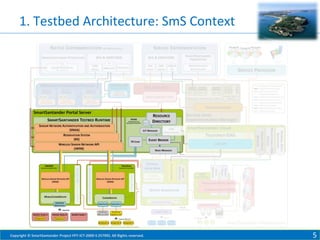
1. Testbed Architecture: SmS Context

Copyright © SmartSantander Project FP7-ICT-2009-5 257992. All Rights reserved.

5
1. Testbed Architecture: Planes

Management Plane

flash(), reset(), …

send(), receive(), …

REST API

WiseGui

SOAP API

Client Plane

Experimentation Scripts /
Custom Clients

SmartSantander
Testbed Runtime

Direct connection
(with e.g.,
IPv6 <-> 6LoWPAN
conversion)

UART
[1..*]

802.15.4

[1..*]

Sensornodes

Experiment / Data Plane

Copyright © SmartSantander Project FP7-ICT-2009-5 257992. All Rights reserved.

6
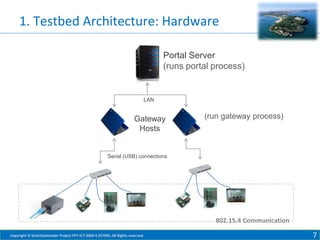
1. Testbed Architecture: Hardware
Portal Server
(runs portal process)

LAN

Gateway
Hosts

(run gateway process)

Serial (USB) connections

802.15.4 Communication
Copyright © SmartSantander Project FP7-ICT-2009-5 257992. All Rights reserved.

7
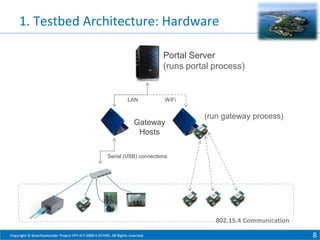
1. Testbed Architecture: Hardware
Portal Server
(runs portal process)

LAN

WiFi

Gateway
Hosts

(run gateway process)

Serial (USB) connections

802.15.4 Communication
Copyright © SmartSantander Project FP7-ICT-2009-5 257992. All Rights reserved.

8
Setting up your own Testbed

2. THE TESTBED RUNTIME PROJECT

Copyright © SmartSantander Project FP7-ICT-2009-5 257992. All Rights reserved.

9
2. The Testbed Runtime Project

•
•
•
•
•

Reference implementation of WISEBED APIs
The “backbone” of testbeds
20 (bugfix) releases in the last 3 years
Run at 5/9 testbed sites of WISEBED project
Basis for node-level experimentation in the
SmartSantander project

Copyright © SmartSantander Project FP7-ICT-2009-5 257992. All Rights reserved.

10
2. The Testbed Runtime Project
• Source Code
https://github.com/itm/testbed-runtime/
• Documentation
https://github.com/itm/testbed-runtime/wiki

• Issue Tracker
https://github.com/itm/testbed-runtime/
• Mailing Lists
testbed-runtime-users@wisebed.eu
wisebed-users@wisebed.eu

Copyright © SmartSantander Project FP7-ICT-2009-5 257992. All Rights reserved.

11
2. The Testbed Runtime Project
• Last release: Version 0.8.5, about a year ago
• Today: Version 0.9 beta (soon to be released)
• Version 0.9 is a complete rewrite with
–
–
–
–
–
–

lots of improvements,
many simplifications (e.g., configuration),
higher performance,
cleaner design,
better extensibility,
embedded REST API and WiseGui frontend

Copyright © SmartSantander Project FP7-ICT-2009-5 257992. All Rights reserved.

12
Setting up your own Testbed

3. TESTBED RUNTIME IN ACTION

Copyright © SmartSantander Project FP7-ICT-2009-5 257992. All Rights reserved.

13
3. Testbed Runtime in Action
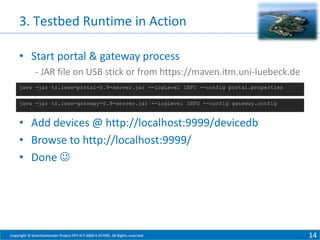
• Start portal & gateway process
- JAR file on USB stick or from https://maven.itm.uni-luebeck.de
java -jar tr.iwsn-portal-0.9-server.jar --logLevel INFO --config portal.properties
java -jar tr.iwsn-gateway-0.9-server.jar --logLevel INFO --config gateway.config

• Add devices @ http://localhost:9999/devicedb
• Browse to http://localhost:9999/
• Done 

Copyright © SmartSantander Project FP7-ICT-2009-5 257992. All Rights reserved.

14
3. Testbed Runtime in Action
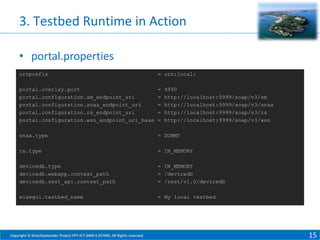
• portal.properties
urnprefix

= urn:local:

portal.overlay.port
portal.configuration.sm_endpoint_uri
portal.configuration.snaa_endpoint_uri
portal.configuration.rs_endpoint_uri
portal.configuration.wsn_endpoint_uri_base

=
=
=
=
=

snaa.type

= DUMMY

rs.type

= IN_MEMORY

devicedb.type
devicedb.webapp.context_path
devicedb.rest_api.context_path

= IN_MEMORY
= /devicedb
= /rest/v1.0/devicedb

wisegui.testbed_name

= My local testbed

Copyright © SmartSantander Project FP7-ICT-2009-5 257992. All Rights reserved.

9990
http://localhost:9999/soap/v3/sm
http://localhost:9999/soap/v3/snaa
http://localhost:9999/soap/v3/rs
http://localhost:9999/soap/v3/wsn

15
3. Testbed Runtime in Action
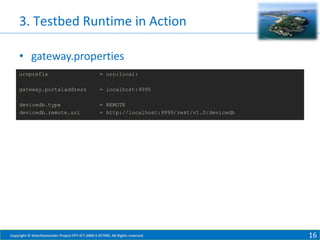
• gateway.properties
urnprefix

= urn:local:

gateway.portaladdress

= localhost:9990

devicedb.type
devicedb.remote.uri

= REMOTE
= http://localhost:9999/rest/v1.0/devicedb

Copyright © SmartSantander Project FP7-ICT-2009-5 257992. All Rights reserved.

16
Setting up your own Testbed

4. INSTALLATION – DEBIAN PKG

Copyright © SmartSantander Project FP7-ICT-2009-5 257992. All Rights reserved.

17
4. Installation – Debian Pkg
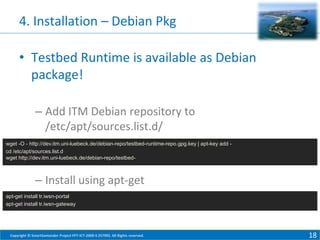
• Testbed Runtime is available as Debian
package!
– Add ITM Debian repository to
/etc/apt/sources.list.d/
wget -O - http://dev.itm.uni-luebeck.de/debian-repo/testbed-runtime-repo.gpg.key | apt-key add cd /etc/apt/sources.list.d
wget http://dev.itm.uni-luebeck.de/debian-repo/testbed-

– Install using apt-get
apt-get install tr.iwsn-portal
apt-get install tr.iwsn-gateway

Copyright © SmartSantander Project FP7-ICT-2009-5 257992. All Rights reserved.

18
4. Installation – Debian Pkg
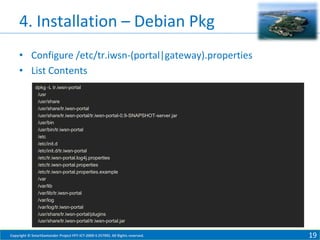
• Configure /etc/tr.iwsn-(portal|gateway).properties
• List Contents
dpkg -L tr.iwsn-portal
/usr
/usr/share
/usr/share/tr.iwsn-portal
/usr/share/tr.iwsn-portal/tr.iwsn-portal-0.9-SNAPSHOT-server.jar
/usr/bin
/usr/bin/tr.iwsn-portal
/etc
/etc/init.d
/etc/init.d/tr.iwsn-portal
/etc/tr.iwsn-portal.log4j.properties
/etc/tr.iwsn-portal.properties
/etc/tr.iwsn-portal.properties.example
/var
/var/lib
/var/lib/tr.iwsn-portal
/var/log
/var/log/tr.iwsn-portal
/usr/share/tr.iwsn-portal/plugins
/usr/share/tr.iwsn-portal/tr.iwsn-portal.jar
Copyright © SmartSantander Project FP7-ICT-2009-5 257992. All Rights reserved.

19
4. Installation – Debian Pkg
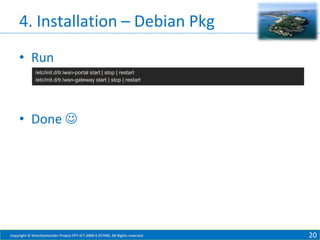
• Run
/etc/init.d/tr.iwsn-portal start | stop | restart
/etc/init.d/tr.iwsn-gateway start | stop | restart

• Done 

Copyright © SmartSantander Project FP7-ICT-2009-5 257992. All Rights reserved.

20
Setting up your own Testbed

5. API BASICS

Copyright © SmartSantander Project FP7-ICT-2009-5 257992. All Rights reserved.

21
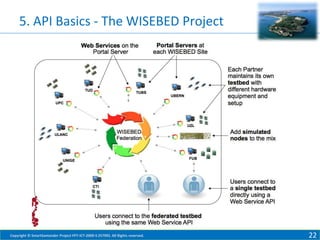
5. API Basics - The WISEBED Project

Copyright © SmartSantander Project FP7-ICT-2009-5 257992. All Rights reserved.

22
5. API Basics: The WISEBED Approach
• Establish a well-defined, standardized API for
sensor node-level experimentation
• Allows to wrap existing testbeds
• Enables client application to rely on API
– TMON
– WiseGui
– Experimentation Scripts
– Custom Clients
–…
Copyright © SmartSantander Project FP7-ICT-2009-5 257992. All Rights reserved.

23
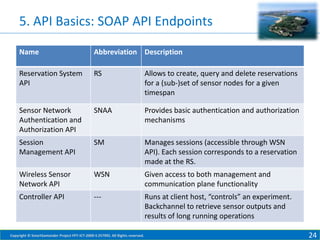
5. API Basics: SOAP API Endpoints
Name

Abbreviation Description

Reservation System
API

RS

Allows to create, query and delete reservations
for a (sub-)set of sensor nodes for a given
timespan

Sensor Network
Authentication and
Authorization API

SNAA

Provides basic authentication and authorization
mechanisms

Session
Management API

SM

Manages sessions (accessible through WSN
API). Each session corresponds to a reservation
made at the RS.

Wireless Sensor
Network API

WSN

Given access to both management and
communication plane functionality

Controller API

---

Runs at client host, “controls” an experiment.
Backchannel to retrieve sensor outputs and
results of long running operations

Copyright © SmartSantander Project FP7-ICT-2009-5 257992. All Rights reserved.

24
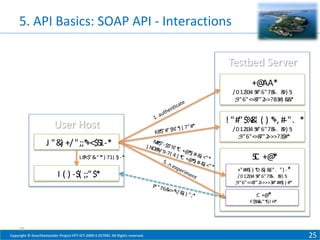
5. API Basics: SOAP API - Interactions

+@
AA*
/ 0 12 5
334 #"6"78-. 8 5
5 9) :
;9"6"<=8 >>?B3#) & *
7"2
&

*
)
" * ( 7" #
$" #" $%
*
K8

J "& +/ ";;* 1-*
)
+<$5
L8<$"& ") 71( 5 -*
* -"*
)

M*
8$
"
) NO8 " -$5 % *
* / 9- " C +@
#
*
5
7( 4
) * + ) #-& <" *
C @ )
*) #-&
5
) <" *

I ( ) -$( ;;"$*
P " 76
"
& =* /
< < &
))"

! "#"$% ' ( ) * #-". *
&
+,
/ 0 12 5
334 #"6"78-. 8 5
5 9) :
;9"6"<=8 >>>?3$#*
7"2

5 +@
C *
+"##5 ) * & &
( D ) E". ") -*
/ 0 12 5
334 #"6"78-. 8 5
5 9) :
;9"6"<=8 >>>>3#"##5 ) #*
7"2
(

;*

C +@
*
F$5 & G! H
% -"* *

25
Copyright © SmartSantander Project FP7-ICT-2009-5 257992. All Rights reserved.

25
Setting up your own Testbed

6. CONFIGURATION

Copyright © SmartSantander Project FP7-ICT-2009-5 257992. All Rights reserved.

26
6. Configuration – Modules
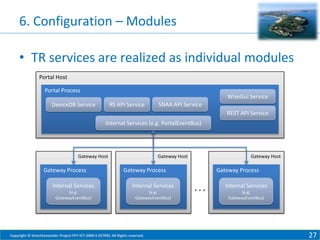
• TR services are realized as individual modules
Portal Host
Portal Process

WiseGui Service

DeviceDB Service

RS API Service

SNAA API Service
REST API Service

Internal Services (e.g. PortalEventBus)

Gateway Host

Gateway Process

Gateway Host

Gateway Host

Gateway Process

Internal Services

Internal Services

(e.g.
GatewayEventBus)

(e.g.
GatewayEventBus)

Copyright © SmartSantander Project FP7-ICT-2009-5 257992. All Rights reserved.

Gateway Process

…

Internal Services
(e.g.
GatewayEventBus)

27
6. Configuration – Modules
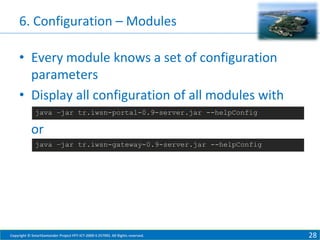
• Every module knows a set of configuration
parameters
• Display all configuration of all modules with
java –jar tr.iwsn-portal-0.9-server.jar --helpConfig

or
java –jar tr.iwsn-gateway-0.9-server.jar --helpConfig

Copyright © SmartSantander Project FP7-ICT-2009-5 257992. All Rights reserved.

28
6. Configuration – SNAA Module
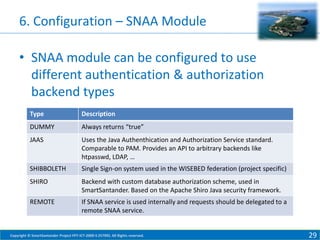
• SNAA module can be configured to use
different authentication & authorization
backend types
Type

Description

DUMMY

Always returns “true”

JAAS

Uses the Java Authenthication and Authorization Service standard.
Comparable to PAM. Provides an API to arbitrary backends like
htpasswd, LDAP, …

SHIBBOLETH

Single Sign-on system used in the WISEBED federation (project specific)

SHIRO

Backend with custom database authorization scheme, used in
SmartSantander. Based on the Apache Shiro Java security framework.

REMOTE

If SNAA service is used internally and requests should be delegated to a
remote SNAA service.

Copyright © SmartSantander Project FP7-ICT-2009-5 257992. All Rights reserved.

29
6. Configuration – SNAA Module
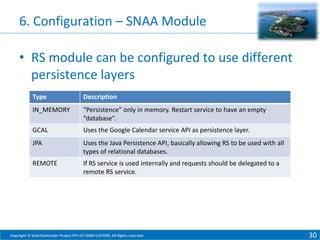
• RS module can be configured to use different
persistence layers
Type

Description

IN_MEMORY

“Persistence” only in memory. Restart service to have an empty
“database”.

GCAL

Uses the Google Calendar service API as persistence layer.

JPA

Uses the Java Persistence API, basically allowing RS to be used with all
types of relational databases.

REMOTE

If RS service is used internally and requests should be delegated to a
remote RS service.

Copyright © SmartSantander Project FP7-ICT-2009-5 257992. All Rights reserved.

30
6. Configuration – SNAA Module
• … and some more module options remain!
• Full configuration parameters reference:
https://github.com/itm/testbed-runtime/wiki

Copyright © SmartSantander Project FP7-ICT-2009-5 257992. All Rights reserved.

31
Setting up your own Testbed

7. EXTENDING TR WITH PLUGINS

Copyright © SmartSantander Project FP7-ICT-2009-5 257992. All Rights reserved.

32
7. Extending TR with Plugins
• New in TR Version 0.9: Plugins 
• Plugins can be developed for both Portal and Gateway
host
• Examples for portal plugins:
– Plugin that records node outputs in a database & exposes
a Web service to retrieve recorded outputs from DB
– Plugin that automatically flashes unreserved nodes with a
default image (e.g., to assess the communication channel
topology by measuring link qualities)
– Plugin that measures usage statistics

• Examples for gateway plugins
– New drivers for currently unsupported device types

Copyright © SmartSantander Project FP7-ICT-2009-5 257992. All Rights reserved.

33
7. Extending TR with Plugins
• Plugins…
– are based on the OSGi platform
– can be installed and uninstalled at runtime by copying
to / deleting a plugin jar from a plugin directory
– can access all internal events of TR
– are simple to implement

• Currently available plugins:
– Mock Device
(runs on gateway, for deployment debugging)
– Default Image Plugin (runs on portal)
Copyright © SmartSantander Project FP7-ICT-2009-5 257992. All Rights reserved.

34
Setting up your own Testbed

8. FEDERATION

Copyright © SmartSantander Project FP7-ICT-2009-5 257992. All Rights reserved.

35
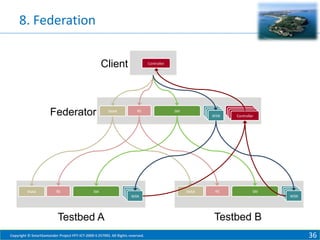
8. Federation
Client

Federator

SNAA

RS

SNAA

Controller

RS

SM
WSN

SNAA

SM

RS

Controller
Controller
Controller
Controller

SM
WSN

WSN

Testbed A
Copyright © SmartSantander Project FP7-ICT-2009-5 257992. All Rights reserved.

Testbed B
36
8. Federation
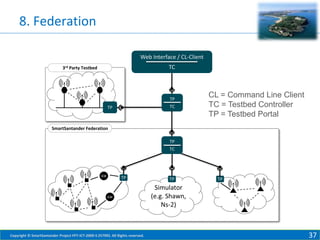
Web Interface / CL-Client
TC

3rd Party Testbed

TP
TC

TP

CL = Command Line Client
TC = Testbed Controller
TP = Testbed Portal

SmartSantander Federation
TP
TC

GW

TP

GW

Copyright © SmartSantander Project FP7-ICT-2009-5 257992. All Rights reserved.

TP

TP

Simulator
(e.g. Shawn,
Ns-2)

37
8. Federation
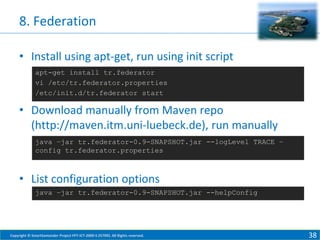
• Install using apt-get, run using init script
apt-get install tr.federator
vi /etc/tr.federator.properties
/etc/init.d/tr.federator start

• Download manually from Maven repo
(http://maven.itm.uni-luebeck.de), run manually
java –jar tr.federator-0.9-SNAPSHOT.jar --logLevel TRACE –
config tr.federator.properties

• List configuration options
java –jar tr.federator-0.9-SNAPSHOT.jar --helpConfig

Copyright © SmartSantander Project FP7-ICT-2009-5 257992. All Rights reserved.

38
Setting up your own Testbed

9. RESOURCES

Copyright © SmartSantander Project FP7-ICT-2009-5 257992. All Rights reserved.

39
9. Resources
• Testbed Runtime Source Code, Issue Tracker,
Documentation
https://github.com/itm/testbed-runtime
https://github.com/itm/testbed-runtime/wiki

• Join Mailing Lists
testbed-runtime-users-subscribe@wisebed.eu
wisebed-users-subscribe@wisebed.eu

• Contact me directly
bimschas@itm.uni-luebeck.de

Copyright © SmartSantander Project FP7-ICT-2009-5 257992. All Rights reserved.

40

2013 09-02 senzations-bimschas-part4-setting-up-your-own-testbed

  • 1.
    SMART SANTANDER Setting upyour own Testbed Daniel Bimschas E-mail: bimschas@itm.uni-luebeck.de Copyright © SmartSantander Project FP7-ICT-2009-5 257992. All Rights reserved. Palic, 2nd September 2013 1
  • 2.
    Learning Goals • Afterthis session you will know… – how to set up your own • desktop testbed • lab testbed – what the Testbed Runtime project is – where to find relevant documentation – how to federate testbeds Copyright © SmartSantander Project FP7-ICT-2009-5 257992. All Rights reserved. 2
  • 3.
    Outline 1. 2. 3. 4. 5. 6. 7. 8. 9. Testbed Architecture The TestbedRuntime Project Testbed Runtime in Action Installation API Basics Configuration Extending TR with Plugins Federation Summary & References Copyright © SmartSantander Project FP7-ICT-2009-5 257992. All Rights reserved. 3
  • 4.
    Setting up yourown Testbed 1. TESTBED ARCHITECTURE Copyright © SmartSantander Project FP7-ICT-2009-5 257992. All Rights reserved. 4
  • 5.
    1. Testbed Architecture:SmS Context Copyright © SmartSantander Project FP7-ICT-2009-5 257992. All Rights reserved. 5
  • 6.
    1. Testbed Architecture:Planes Management Plane flash(), reset(), … send(), receive(), … REST API WiseGui SOAP API Client Plane Experimentation Scripts / Custom Clients SmartSantander Testbed Runtime Direct connection (with e.g., IPv6 <-> 6LoWPAN conversion) UART [1..*] 802.15.4 [1..*] Sensornodes Experiment / Data Plane Copyright © SmartSantander Project FP7-ICT-2009-5 257992. All Rights reserved. 6
  • 7.
    1. Testbed Architecture:Hardware Portal Server (runs portal process) LAN Gateway Hosts (run gateway process) Serial (USB) connections 802.15.4 Communication Copyright © SmartSantander Project FP7-ICT-2009-5 257992. All Rights reserved. 7
  • 8.
    1. Testbed Architecture:Hardware Portal Server (runs portal process) LAN WiFi Gateway Hosts (run gateway process) Serial (USB) connections 802.15.4 Communication Copyright © SmartSantander Project FP7-ICT-2009-5 257992. All Rights reserved. 8
  • 9.
    Setting up yourown Testbed 2. THE TESTBED RUNTIME PROJECT Copyright © SmartSantander Project FP7-ICT-2009-5 257992. All Rights reserved. 9
  • 10.
    2. The TestbedRuntime Project • • • • • Reference implementation of WISEBED APIs The “backbone” of testbeds 20 (bugfix) releases in the last 3 years Run at 5/9 testbed sites of WISEBED project Basis for node-level experimentation in the SmartSantander project Copyright © SmartSantander Project FP7-ICT-2009-5 257992. All Rights reserved. 10
  • 11.
    2. The TestbedRuntime Project • Source Code https://github.com/itm/testbed-runtime/ • Documentation https://github.com/itm/testbed-runtime/wiki • Issue Tracker https://github.com/itm/testbed-runtime/ • Mailing Lists testbed-runtime-users@wisebed.eu wisebed-users@wisebed.eu Copyright © SmartSantander Project FP7-ICT-2009-5 257992. All Rights reserved. 11
  • 12.
    2. The TestbedRuntime Project • Last release: Version 0.8.5, about a year ago • Today: Version 0.9 beta (soon to be released) • Version 0.9 is a complete rewrite with – – – – – – lots of improvements, many simplifications (e.g., configuration), higher performance, cleaner design, better extensibility, embedded REST API and WiseGui frontend Copyright © SmartSantander Project FP7-ICT-2009-5 257992. All Rights reserved. 12
  • 13.
    Setting up yourown Testbed 3. TESTBED RUNTIME IN ACTION Copyright © SmartSantander Project FP7-ICT-2009-5 257992. All Rights reserved. 13
  • 14.
    3. Testbed Runtimein Action • Start portal & gateway process - JAR file on USB stick or from https://maven.itm.uni-luebeck.de java -jar tr.iwsn-portal-0.9-server.jar --logLevel INFO --config portal.properties java -jar tr.iwsn-gateway-0.9-server.jar --logLevel INFO --config gateway.config • Add devices @ http://localhost:9999/devicedb • Browse to http://localhost:9999/ • Done  Copyright © SmartSantander Project FP7-ICT-2009-5 257992. All Rights reserved. 14
  • 15.
    3. Testbed Runtimein Action • portal.properties urnprefix = urn:local: portal.overlay.port portal.configuration.sm_endpoint_uri portal.configuration.snaa_endpoint_uri portal.configuration.rs_endpoint_uri portal.configuration.wsn_endpoint_uri_base = = = = = snaa.type = DUMMY rs.type = IN_MEMORY devicedb.type devicedb.webapp.context_path devicedb.rest_api.context_path = IN_MEMORY = /devicedb = /rest/v1.0/devicedb wisegui.testbed_name = My local testbed Copyright © SmartSantander Project FP7-ICT-2009-5 257992. All Rights reserved. 9990 http://localhost:9999/soap/v3/sm http://localhost:9999/soap/v3/snaa http://localhost:9999/soap/v3/rs http://localhost:9999/soap/v3/wsn 15
  • 16.
    3. Testbed Runtimein Action • gateway.properties urnprefix = urn:local: gateway.portaladdress = localhost:9990 devicedb.type devicedb.remote.uri = REMOTE = http://localhost:9999/rest/v1.0/devicedb Copyright © SmartSantander Project FP7-ICT-2009-5 257992. All Rights reserved. 16
  • 17.
    Setting up yourown Testbed 4. INSTALLATION – DEBIAN PKG Copyright © SmartSantander Project FP7-ICT-2009-5 257992. All Rights reserved. 17
  • 18.
    4. Installation –Debian Pkg • Testbed Runtime is available as Debian package! – Add ITM Debian repository to /etc/apt/sources.list.d/ wget -O - http://dev.itm.uni-luebeck.de/debian-repo/testbed-runtime-repo.gpg.key | apt-key add cd /etc/apt/sources.list.d wget http://dev.itm.uni-luebeck.de/debian-repo/testbed- – Install using apt-get apt-get install tr.iwsn-portal apt-get install tr.iwsn-gateway Copyright © SmartSantander Project FP7-ICT-2009-5 257992. All Rights reserved. 18
  • 19.
    4. Installation –Debian Pkg • Configure /etc/tr.iwsn-(portal|gateway).properties • List Contents dpkg -L tr.iwsn-portal /usr /usr/share /usr/share/tr.iwsn-portal /usr/share/tr.iwsn-portal/tr.iwsn-portal-0.9-SNAPSHOT-server.jar /usr/bin /usr/bin/tr.iwsn-portal /etc /etc/init.d /etc/init.d/tr.iwsn-portal /etc/tr.iwsn-portal.log4j.properties /etc/tr.iwsn-portal.properties /etc/tr.iwsn-portal.properties.example /var /var/lib /var/lib/tr.iwsn-portal /var/log /var/log/tr.iwsn-portal /usr/share/tr.iwsn-portal/plugins /usr/share/tr.iwsn-portal/tr.iwsn-portal.jar Copyright © SmartSantander Project FP7-ICT-2009-5 257992. All Rights reserved. 19
  • 20.
    4. Installation –Debian Pkg • Run /etc/init.d/tr.iwsn-portal start | stop | restart /etc/init.d/tr.iwsn-gateway start | stop | restart • Done  Copyright © SmartSantander Project FP7-ICT-2009-5 257992. All Rights reserved. 20
  • 21.
    Setting up yourown Testbed 5. API BASICS Copyright © SmartSantander Project FP7-ICT-2009-5 257992. All Rights reserved. 21
  • 22.
    5. API Basics- The WISEBED Project Copyright © SmartSantander Project FP7-ICT-2009-5 257992. All Rights reserved. 22
  • 23.
    5. API Basics:The WISEBED Approach • Establish a well-defined, standardized API for sensor node-level experimentation • Allows to wrap existing testbeds • Enables client application to rely on API – TMON – WiseGui – Experimentation Scripts – Custom Clients –… Copyright © SmartSantander Project FP7-ICT-2009-5 257992. All Rights reserved. 23
  • 24.
    5. API Basics:SOAP API Endpoints Name Abbreviation Description Reservation System API RS Allows to create, query and delete reservations for a (sub-)set of sensor nodes for a given timespan Sensor Network Authentication and Authorization API SNAA Provides basic authentication and authorization mechanisms Session Management API SM Manages sessions (accessible through WSN API). Each session corresponds to a reservation made at the RS. Wireless Sensor Network API WSN Given access to both management and communication plane functionality Controller API --- Runs at client host, “controls” an experiment. Backchannel to retrieve sensor outputs and results of long running operations Copyright © SmartSantander Project FP7-ICT-2009-5 257992. All Rights reserved. 24
  • 25.
    5. API Basics:SOAP API - Interactions +@ AA* / 0 12 5 334 #"6"78-. 8 5 5 9) : ;9"6"<=8 >>?B3#) & * 7"2 & * ) " * ( 7" # $" #" $% * K8 J "& +/ ";;* 1-* ) +<$5 L8<$"& ") 71( 5 -* * -"* ) M* 8$ " ) NO8 " -$5 % * * / 9- " C +@ # * 5 7( 4 ) * + ) #-& <" * C @ ) *) #-& 5 ) <" * I ( ) -$( ;;"$* P " 76 " & =* / < < & ))" ! "#"$% ' ( ) * #-". * & +, / 0 12 5 334 #"6"78-. 8 5 5 9) : ;9"6"<=8 >>>?3$#* 7"2 5 +@ C * +"##5 ) * & & ( D ) E". ") -* / 0 12 5 334 #"6"78-. 8 5 5 9) : ;9"6"<=8 >>>>3#"##5 ) #* 7"2 ( ;* C +@ * F$5 & G! H % -"* * 25 Copyright © SmartSantander Project FP7-ICT-2009-5 257992. All Rights reserved. 25
  • 26.
    Setting up yourown Testbed 6. CONFIGURATION Copyright © SmartSantander Project FP7-ICT-2009-5 257992. All Rights reserved. 26
  • 27.
    6. Configuration –Modules • TR services are realized as individual modules Portal Host Portal Process WiseGui Service DeviceDB Service RS API Service SNAA API Service REST API Service Internal Services (e.g. PortalEventBus) Gateway Host Gateway Process Gateway Host Gateway Host Gateway Process Internal Services Internal Services (e.g. GatewayEventBus) (e.g. GatewayEventBus) Copyright © SmartSantander Project FP7-ICT-2009-5 257992. All Rights reserved. Gateway Process … Internal Services (e.g. GatewayEventBus) 27
  • 28.
    6. Configuration –Modules • Every module knows a set of configuration parameters • Display all configuration of all modules with java –jar tr.iwsn-portal-0.9-server.jar --helpConfig or java –jar tr.iwsn-gateway-0.9-server.jar --helpConfig Copyright © SmartSantander Project FP7-ICT-2009-5 257992. All Rights reserved. 28
  • 29.
    6. Configuration –SNAA Module • SNAA module can be configured to use different authentication & authorization backend types Type Description DUMMY Always returns “true” JAAS Uses the Java Authenthication and Authorization Service standard. Comparable to PAM. Provides an API to arbitrary backends like htpasswd, LDAP, … SHIBBOLETH Single Sign-on system used in the WISEBED federation (project specific) SHIRO Backend with custom database authorization scheme, used in SmartSantander. Based on the Apache Shiro Java security framework. REMOTE If SNAA service is used internally and requests should be delegated to a remote SNAA service. Copyright © SmartSantander Project FP7-ICT-2009-5 257992. All Rights reserved. 29
  • 30.
    6. Configuration –SNAA Module • RS module can be configured to use different persistence layers Type Description IN_MEMORY “Persistence” only in memory. Restart service to have an empty “database”. GCAL Uses the Google Calendar service API as persistence layer. JPA Uses the Java Persistence API, basically allowing RS to be used with all types of relational databases. REMOTE If RS service is used internally and requests should be delegated to a remote RS service. Copyright © SmartSantander Project FP7-ICT-2009-5 257992. All Rights reserved. 30
  • 31.
    6. Configuration –SNAA Module • … and some more module options remain! • Full configuration parameters reference: https://github.com/itm/testbed-runtime/wiki Copyright © SmartSantander Project FP7-ICT-2009-5 257992. All Rights reserved. 31
  • 32.
    Setting up yourown Testbed 7. EXTENDING TR WITH PLUGINS Copyright © SmartSantander Project FP7-ICT-2009-5 257992. All Rights reserved. 32
  • 33.
    7. Extending TRwith Plugins • New in TR Version 0.9: Plugins  • Plugins can be developed for both Portal and Gateway host • Examples for portal plugins: – Plugin that records node outputs in a database & exposes a Web service to retrieve recorded outputs from DB – Plugin that automatically flashes unreserved nodes with a default image (e.g., to assess the communication channel topology by measuring link qualities) – Plugin that measures usage statistics • Examples for gateway plugins – New drivers for currently unsupported device types Copyright © SmartSantander Project FP7-ICT-2009-5 257992. All Rights reserved. 33
  • 34.
    7. Extending TRwith Plugins • Plugins… – are based on the OSGi platform – can be installed and uninstalled at runtime by copying to / deleting a plugin jar from a plugin directory – can access all internal events of TR – are simple to implement • Currently available plugins: – Mock Device (runs on gateway, for deployment debugging) – Default Image Plugin (runs on portal) Copyright © SmartSantander Project FP7-ICT-2009-5 257992. All Rights reserved. 34
  • 35.
    Setting up yourown Testbed 8. FEDERATION Copyright © SmartSantander Project FP7-ICT-2009-5 257992. All Rights reserved. 35
  • 36.
  • 37.
    8. Federation Web Interface/ CL-Client TC 3rd Party Testbed TP TC TP CL = Command Line Client TC = Testbed Controller TP = Testbed Portal SmartSantander Federation TP TC GW TP GW Copyright © SmartSantander Project FP7-ICT-2009-5 257992. All Rights reserved. TP TP Simulator (e.g. Shawn, Ns-2) 37
  • 38.
    8. Federation • Installusing apt-get, run using init script apt-get install tr.federator vi /etc/tr.federator.properties /etc/init.d/tr.federator start • Download manually from Maven repo (http://maven.itm.uni-luebeck.de), run manually java –jar tr.federator-0.9-SNAPSHOT.jar --logLevel TRACE – config tr.federator.properties • List configuration options java –jar tr.federator-0.9-SNAPSHOT.jar --helpConfig Copyright © SmartSantander Project FP7-ICT-2009-5 257992. All Rights reserved. 38
  • 39.
    Setting up yourown Testbed 9. RESOURCES Copyright © SmartSantander Project FP7-ICT-2009-5 257992. All Rights reserved. 39
  • 40.
    9. Resources • TestbedRuntime Source Code, Issue Tracker, Documentation https://github.com/itm/testbed-runtime https://github.com/itm/testbed-runtime/wiki • Join Mailing Lists testbed-runtime-users-subscribe@wisebed.eu wisebed-users-subscribe@wisebed.eu • Contact me directly bimschas@itm.uni-luebeck.de Copyright © SmartSantander Project FP7-ICT-2009-5 257992. All Rights reserved. 40