Pegasus
Automate, recover, and debug scientific computations.
Rafael Ferreira da Silva
http://pegasus.isi.edu
Pegasus http://pegasus.isi.edu 2
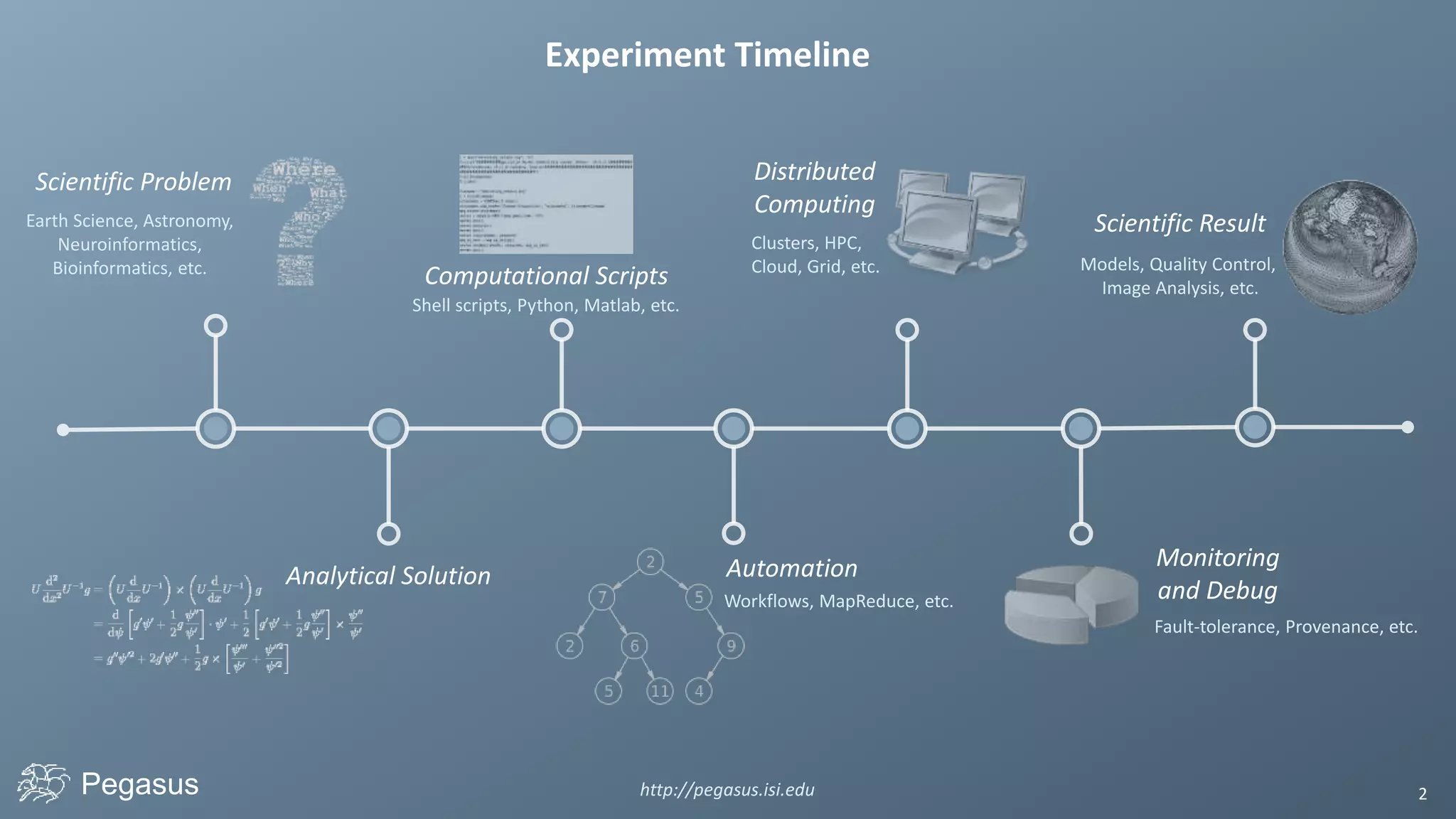
Scientific Problem
Analytical Solution
Computational Scripts
Automation
Experiment Timeline
Monitoring
and Debug
Scientific Result
Models, Quality Control,
Image Analysis, etc.
Fault-tolerance, Provenance, etc.
Shell scripts, Python, Matlab, etc.
Earth Science, Astronomy,
Neuroinformatics,
Bioinformatics, etc.
Distributed
Computing
Workflows, MapReduce, etc.
Clusters, HPC,
Cloud, Grid, etc.
Pegasus http://pegasus.isi.edu 3
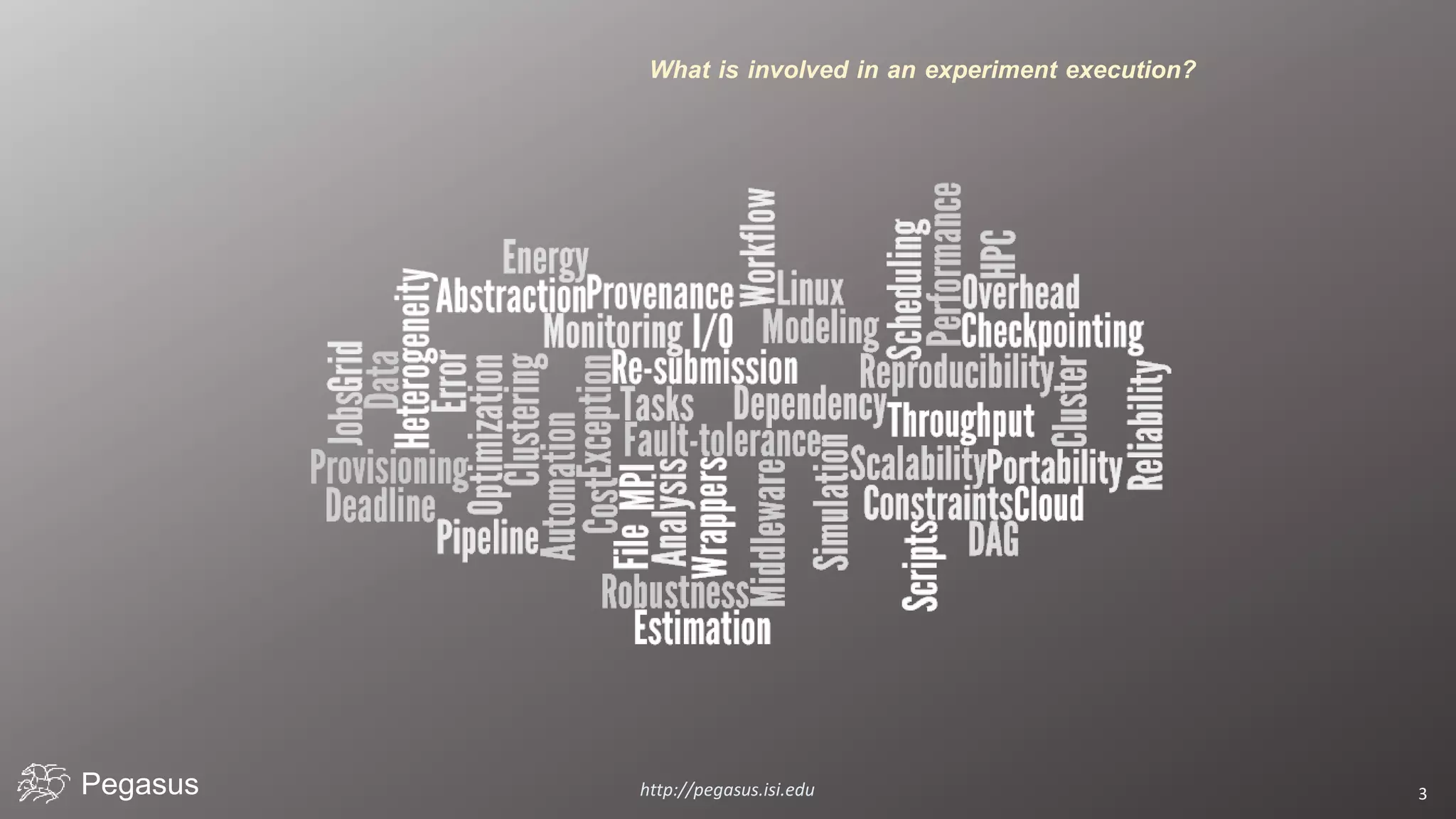
What is involved in an experiment execution?
Pegasus http://pegasus.isi.edu 4
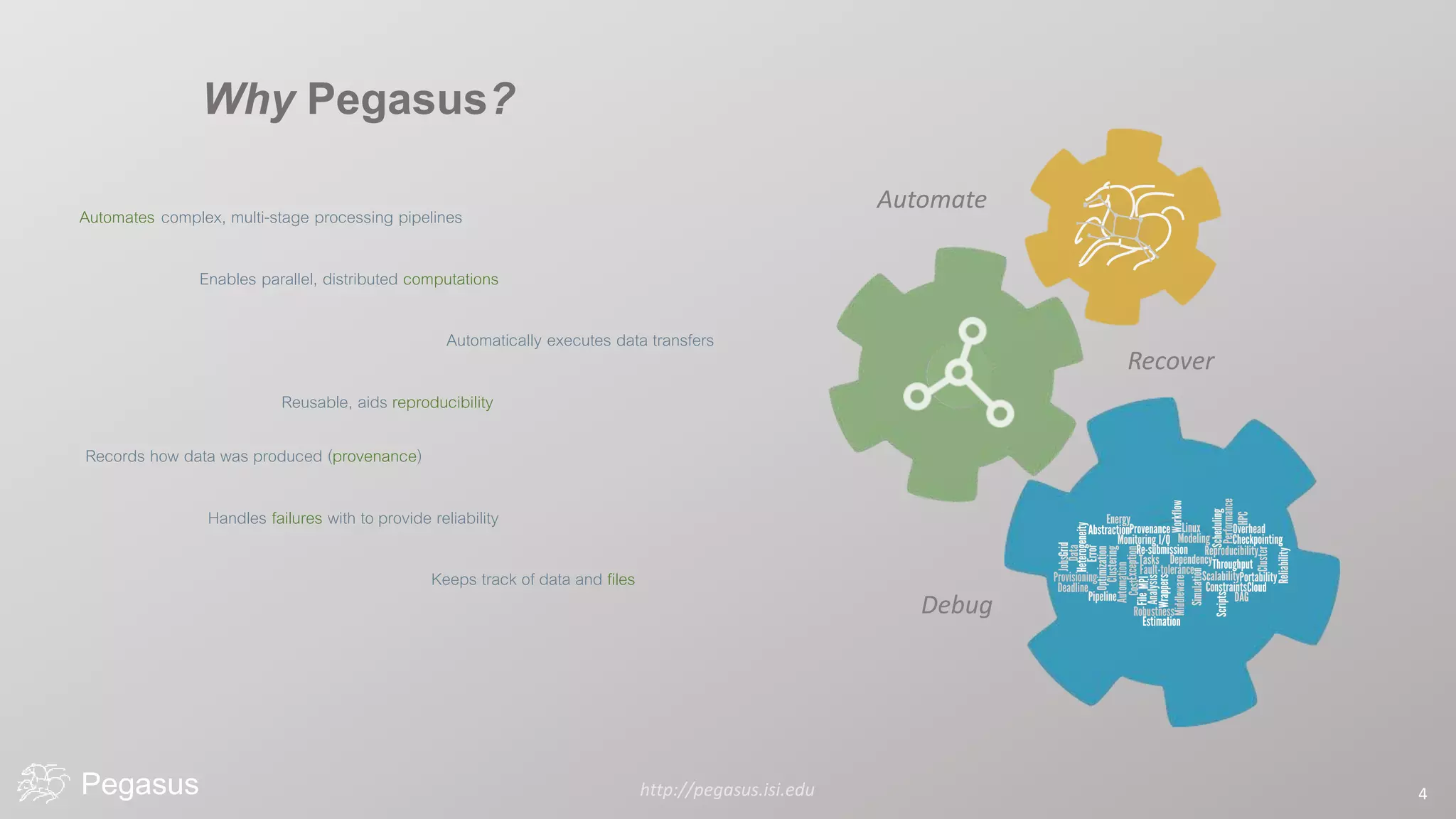
Automate
Recover
Debug
Why Pegasus?
Automates complex, multi-stage processing pipelines
Enables parallel, distributed computations
Automatically executes data transfers
Reusable, aids reproducibility
Records how data was produced (provenance)
Handles failures with to provide reliability
Keeps track of data and files
Pegasus http://pegasus.isi.edu 5
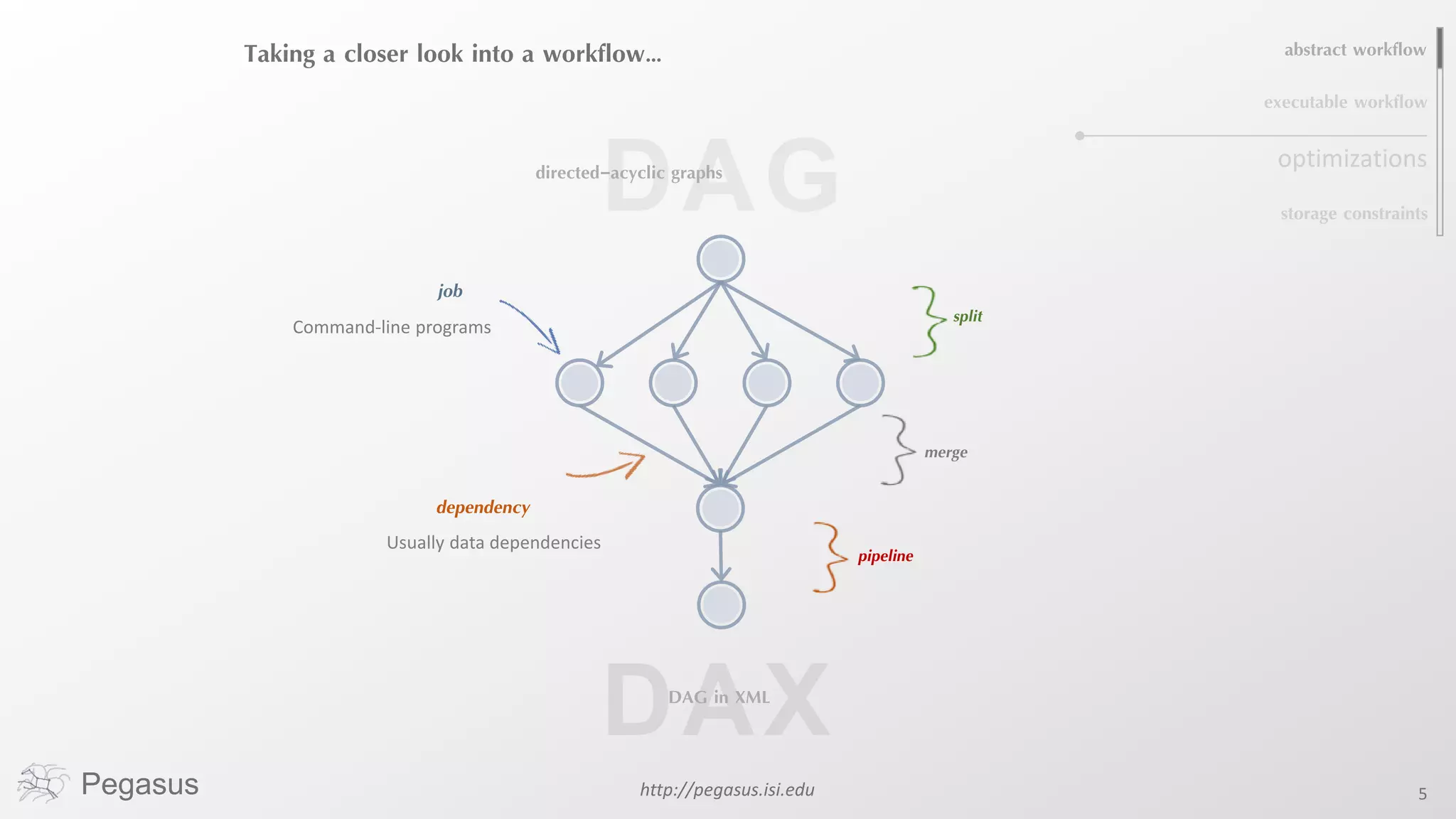
Taking a closer look into a workflow…
job
dependency
Usually data dependencies
split
merge
pipeline
Command-line programs
DAGdirected-acyclic graphs
abstract workflow
executable workflow
storage constraints
optimizations
DAG in XML
Pegasus http://pegasus.isi.edu 6
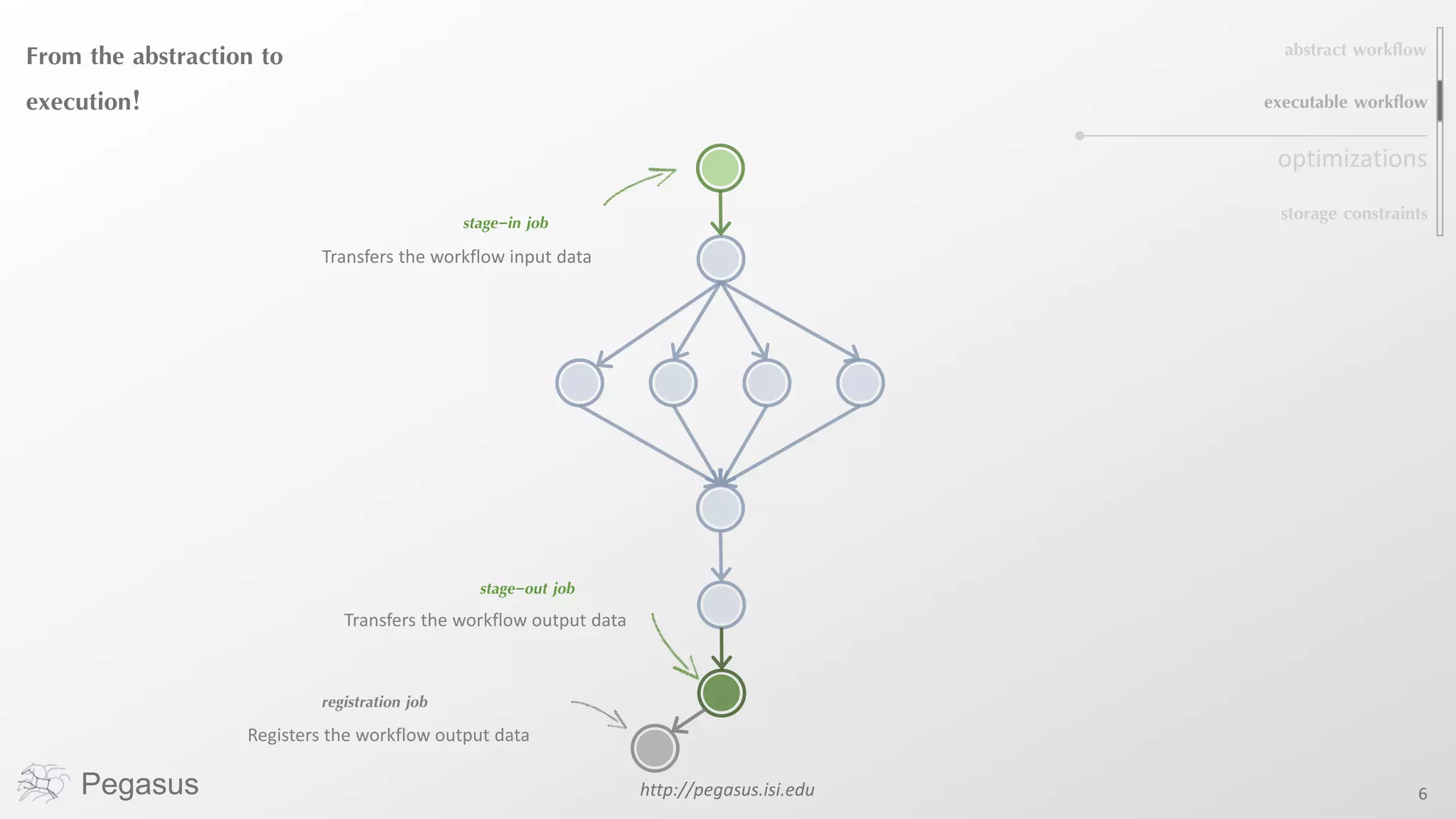
From the abstraction to
execution!
stage-in job
stage-out job
registration job
Transfers the workflow input data
Transfers the workflow output data
Registers the workflow output data
abstract workflow
executable workflow
storage constraints
optimizations
Pegasus http://pegasus.isi.edu 7
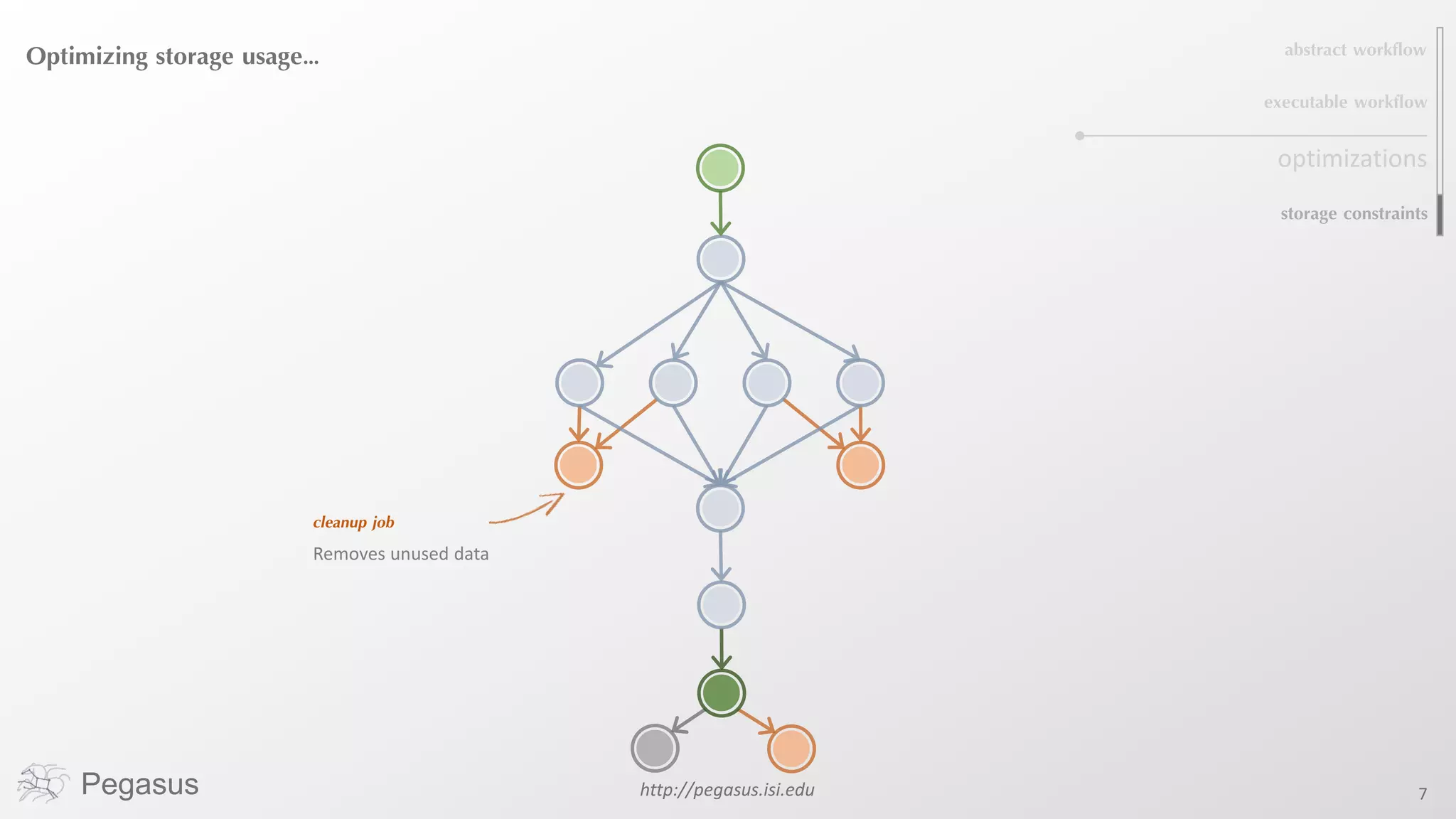
Optimizing storage usage…
cleanup job
Removes unused data
abstract workflow
executable workflow
storage constraints
optimizations
Pegasus http://pegasus.isi.edu 8
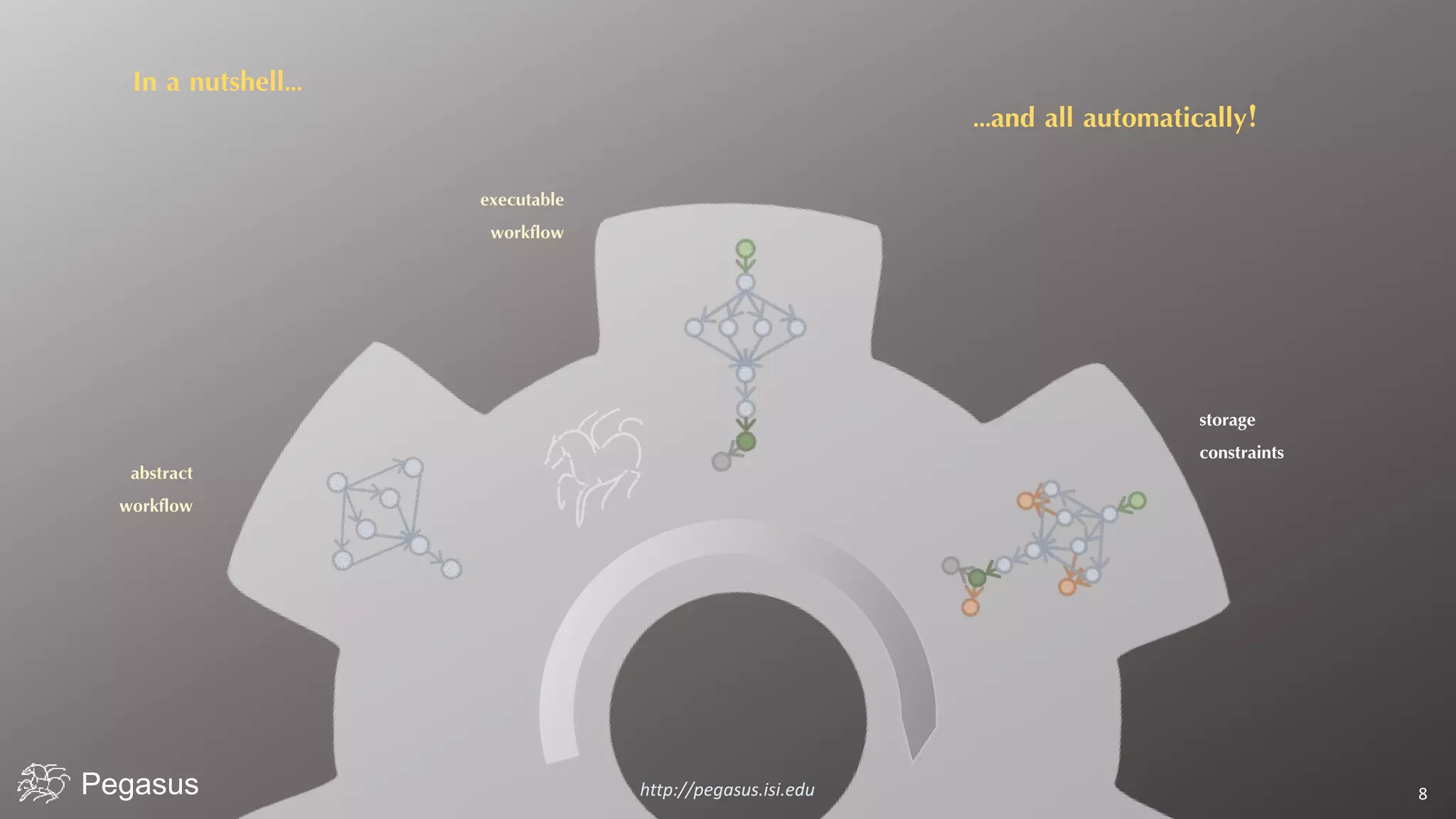
In a nutshell…
executable
workflow
abstract
workflow
storage
constraints
…and all automatically!
Pegasus http://pegasus.isi.edu 9
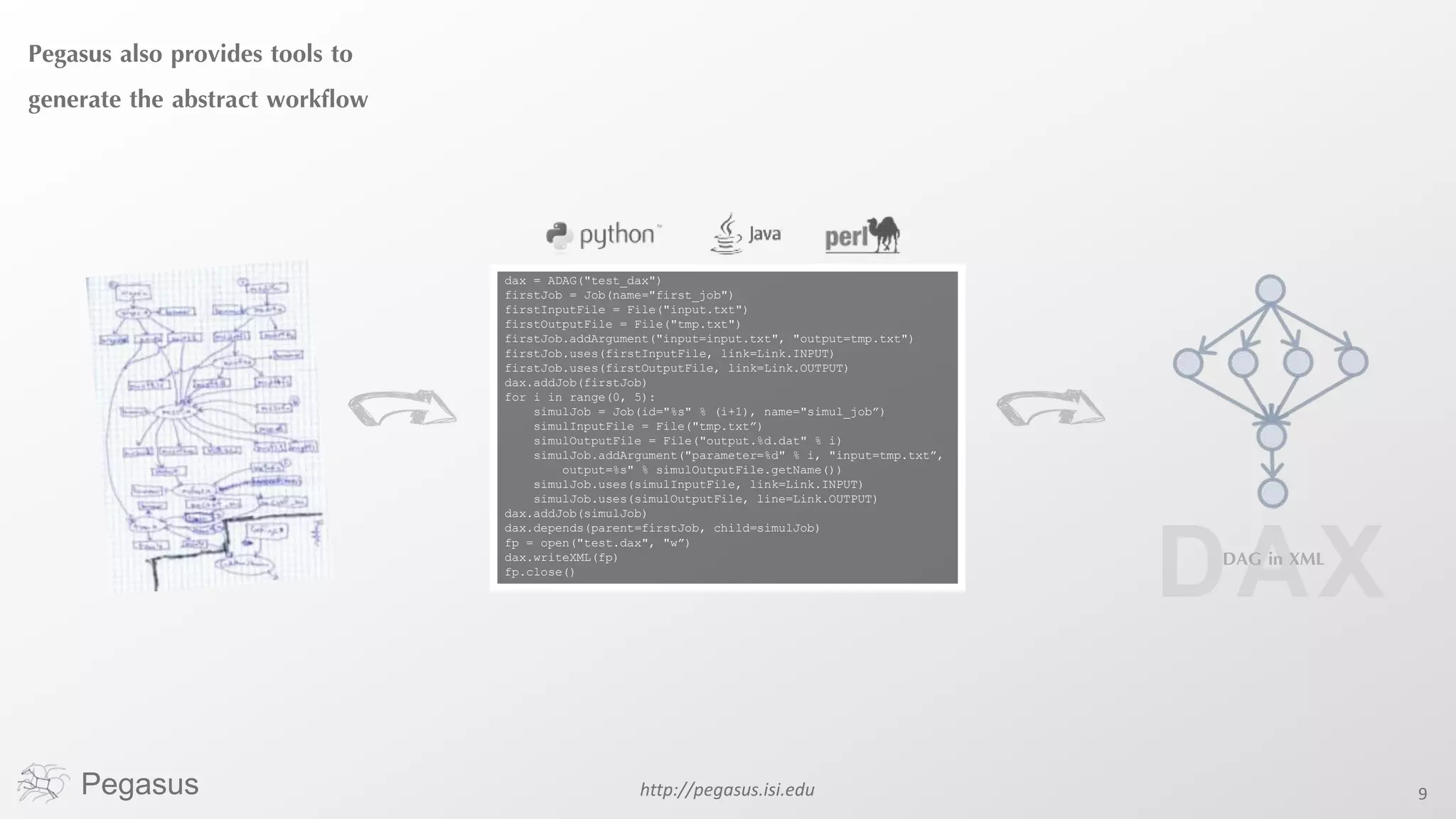
Pegasus also provides tools to
generate the abstract workflow
dax = ADAG("test_dax")
firstJob = Job(name="first_job")
firstInputFile = File("input.txt")
firstOutputFile = File("tmp.txt")
firstJob.addArgument("input=input.txt", "output=tmp.txt")
firstJob.uses(firstInputFile, link=Link.INPUT)
firstJob.uses(firstOutputFile, link=Link.OUTPUT)
dax.addJob(firstJob)
for i in range(0, 5):
simulJob = Job(id="%s" % (i+1), name="simul_job”)
simulInputFile = File("tmp.txt”)
simulOutputFile = File("output.%d.dat" % i)
simulJob.addArgument("parameter=%d" % i, "input=tmp.txt”,
output=%s" % simulOutputFile.getName())
simulJob.uses(simulInputFile, link=Link.INPUT)
simulJob.uses(simulOutputFile, line=Link.OUTPUT)
dax.addJob(simulJob)
dax.depends(parent=firstJob, child=simulJob)
fp = open("test.dax", "w”)
dax.writeXML(fp)
fp.close()
DAG in XML
Pegasus http://pegasus.isi.edu 10
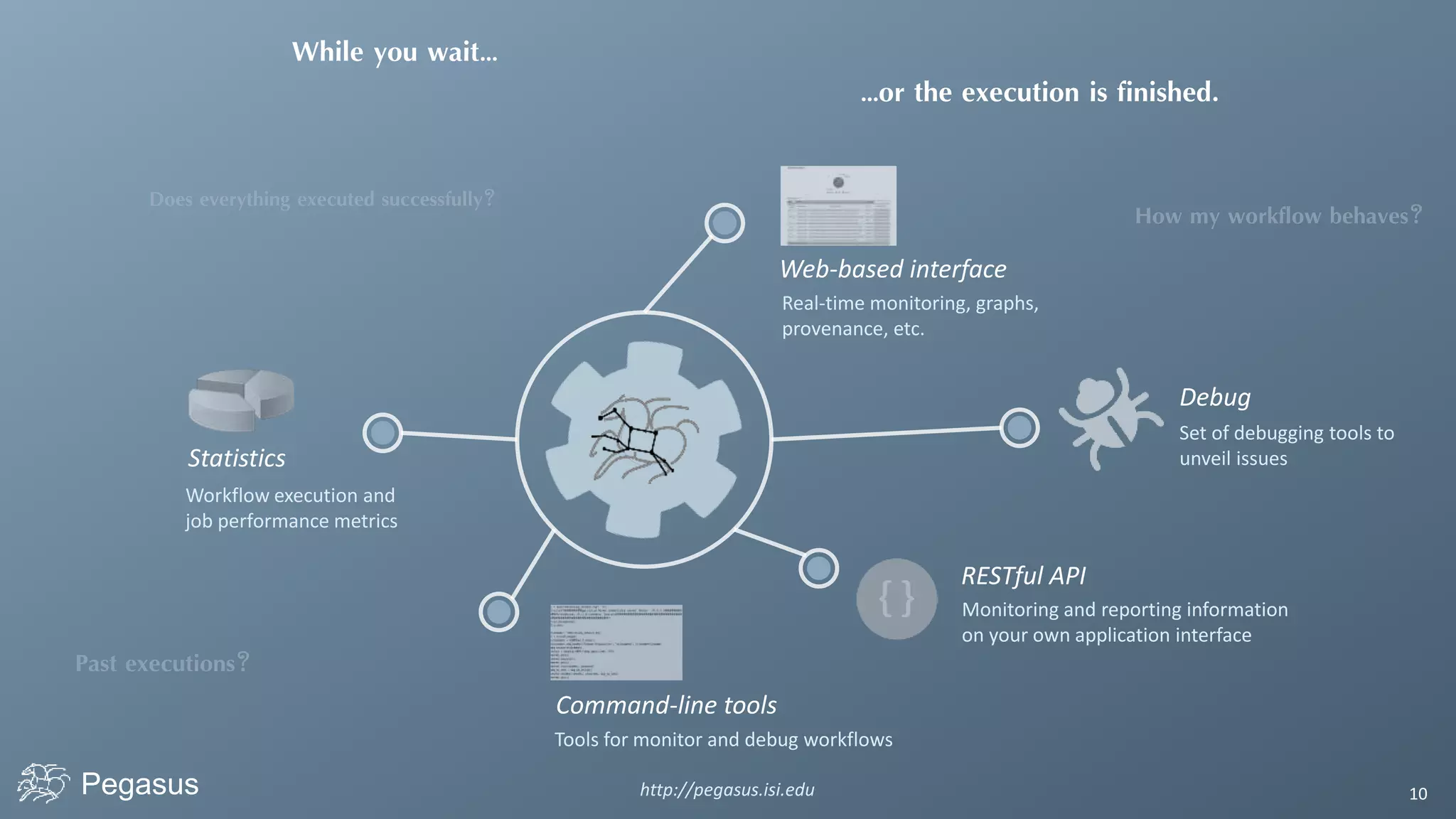
Statistics
Workflow execution and
job performance metrics
While you wait…
…or the execution is finished.
Command-line tools
Tools for monitor and debug workflows
Web-based interface
Real-time monitoring, graphs,
provenance, etc.
Debug
Set of debugging tools to
unveil issues
RESTful API
Monitoring and reporting information
on your own application interface
Pegasus http://pegasus.isi.edu 11
Pegasus
dashboard
web interface for monitoring
and debugging workflows
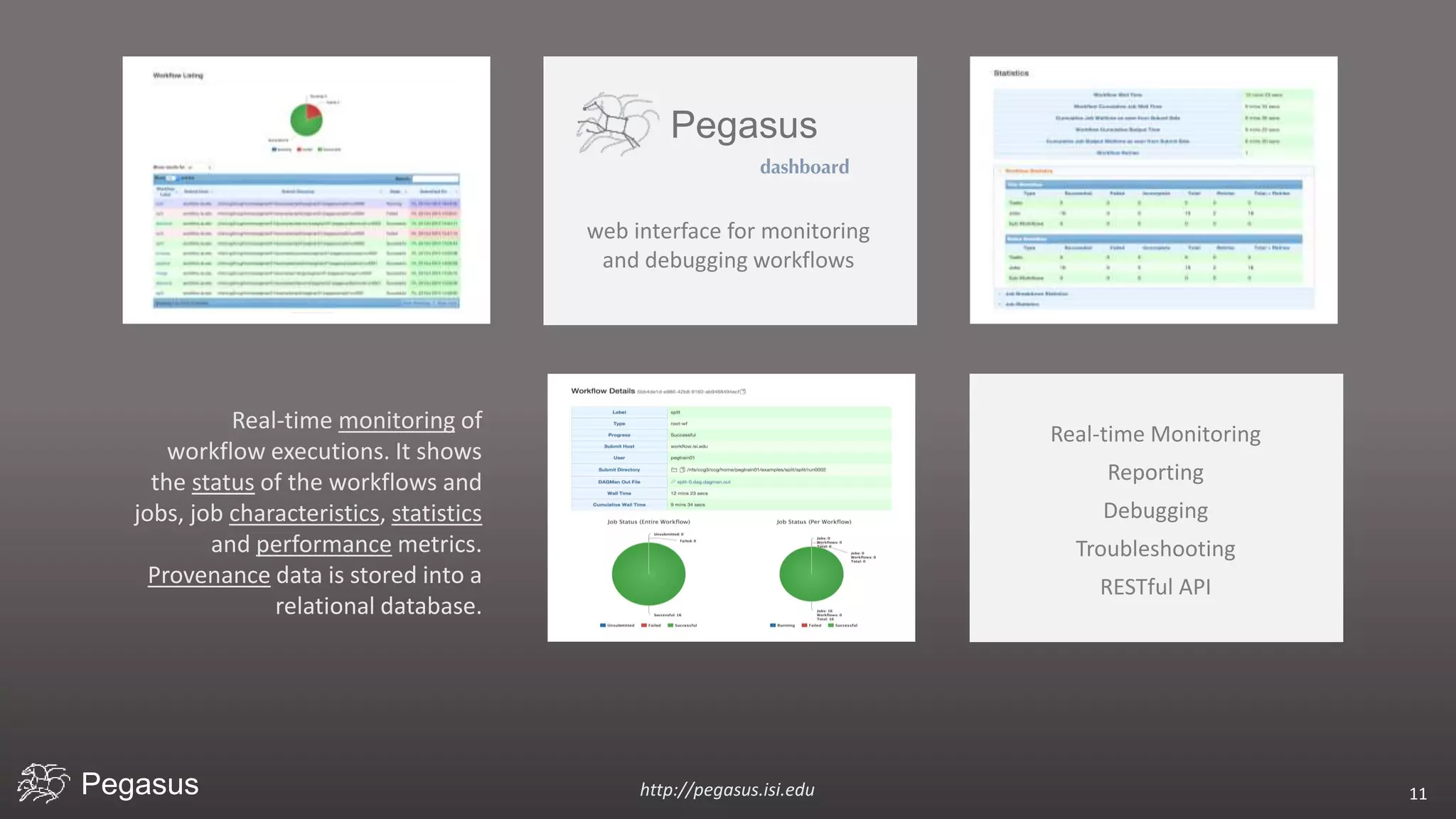
Real-time monitoring of
workflow executions. It shows
the status of the workflows and
jobs, job characteristics, statistics
and performance metrics.
Provenance data is stored into a
relational database.
Real-time Monitoring
Reporting
Debugging
Troubleshooting
RESTful API
Pegasus http://pegasus.isi.edu 12
Pegasus
dashboard
web interface for monitoring
and debugging workflows
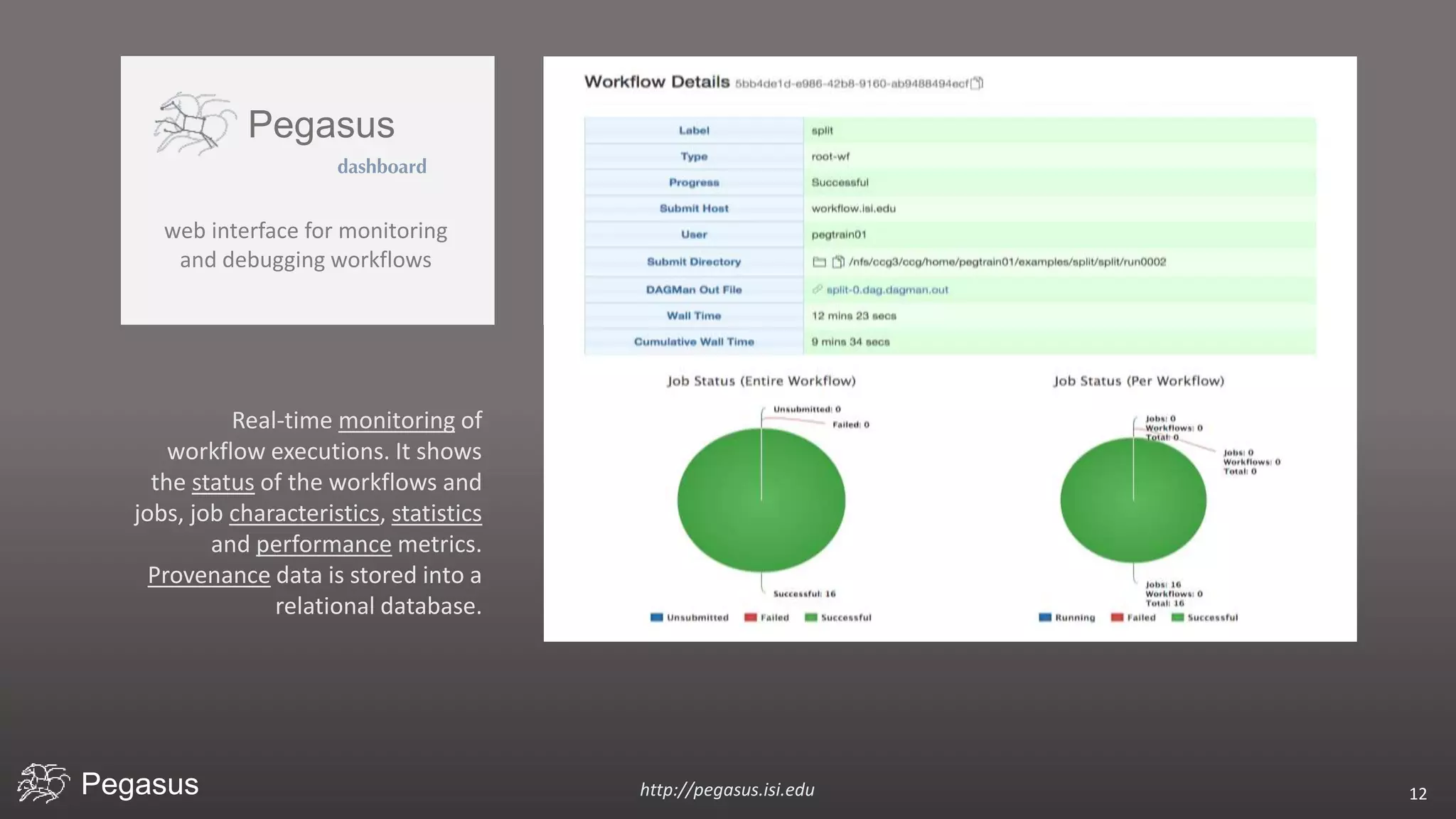
Real-time monitoring of
workflow executions. It shows
the status of the workflows and
jobs, job characteristics, statistics
and performance metrics.
Provenance data is stored into a
relational database.
Pegasus
dashboard
web interface for monitoring
and debugging workflows
http://pegasus.isi.edu 13Pegasus
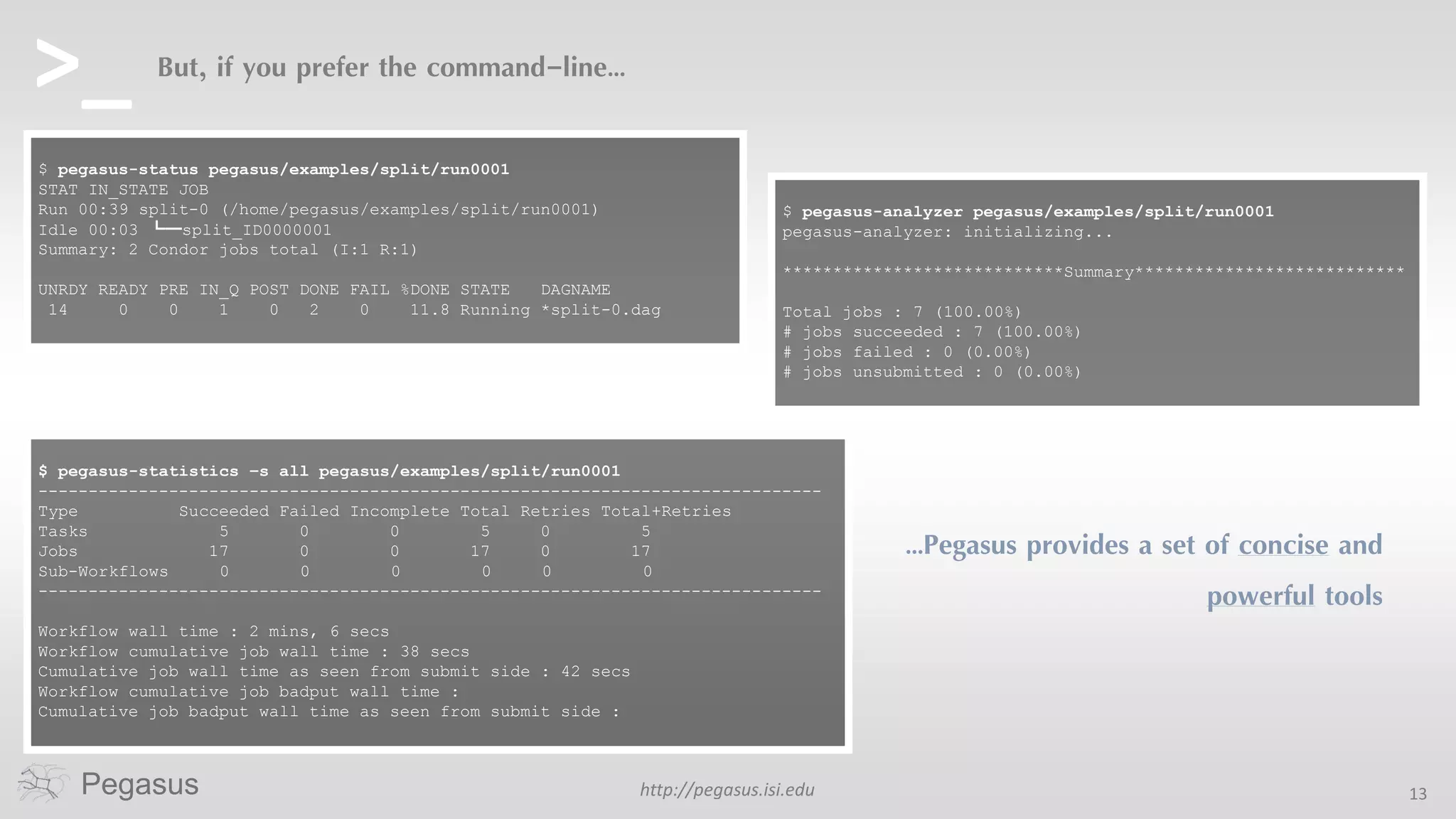
But, if you prefer the command-line…
…Pegasus provides a set of concise and
powerful tools
$ pegasus-status pegasus/examples/split/run0001
STAT IN_STATE JOB
Run 00:39 split-0 (/home/pegasus/examples/split/run0001)
Idle 00:03 ┗━split_ID0000001
Summary: 2 Condor jobs total (I:1 R:1)
UNRDY READY PRE IN_Q POST DONE FAIL %DONE STATE DAGNAME
14 0 0 1 0 2 0 11.8 Running *split-0.dag
$ pegasus-statistics –s all pegasus/examples/split/run0001
------------------------------------------------------------------------------
Type Succeeded Failed Incomplete Total Retries Total+Retries
Tasks 5 0 0 5 0 5
Jobs 17 0 0 17 0 17
Sub-Workflows 0 0 0 0 0 0
------------------------------------------------------------------------------
Workflow wall time : 2 mins, 6 secs
Workflow cumulative job wall time : 38 secs
Cumulative job wall time as seen from submit side : 42 secs
Workflow cumulative job badput wall time :
Cumulative job badput wall time as seen from submit side :
$ pegasus-analyzer pegasus/examples/split/run0001
pegasus-analyzer: initializing...
****************************Summary***************************
Total jobs : 7 (100.00%)
# jobs succeeded : 7 (100.00%)
# jobs failed : 0 (0.00%)
# jobs unsubmitted : 0 (0.00%)
>_
Pegasus http://pegasus.isi.edu 14
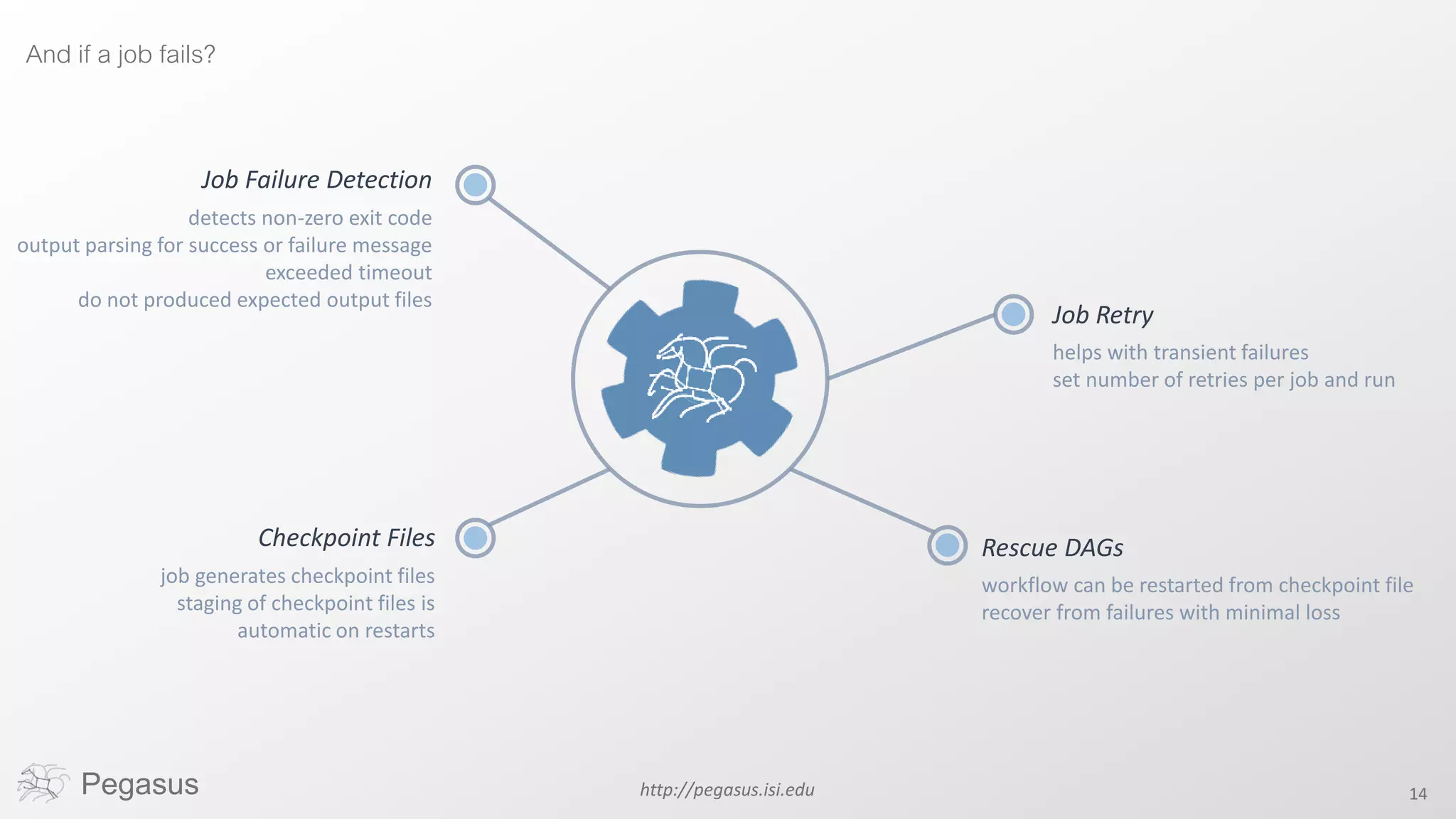
And if a job fails?
Job Failure Detection
detects non-zero exit code
output parsing for success or failure message
exceeded timeout
do not produced expected output files
Job Retry
helps with transient failures
set number of retries per job and run
Rescue DAGs
workflow can be restarted from checkpoint file
recover from failures with minimal loss
Checkpoint Files
job generates checkpoint files
staging of checkpoint files is
automatic on restarts
W o r r i e d a b o u t
data?LetPegasusmanageitforyou
Pegasus http://pegasus.isi.edu 15
http://pegasus.isi.edu 16
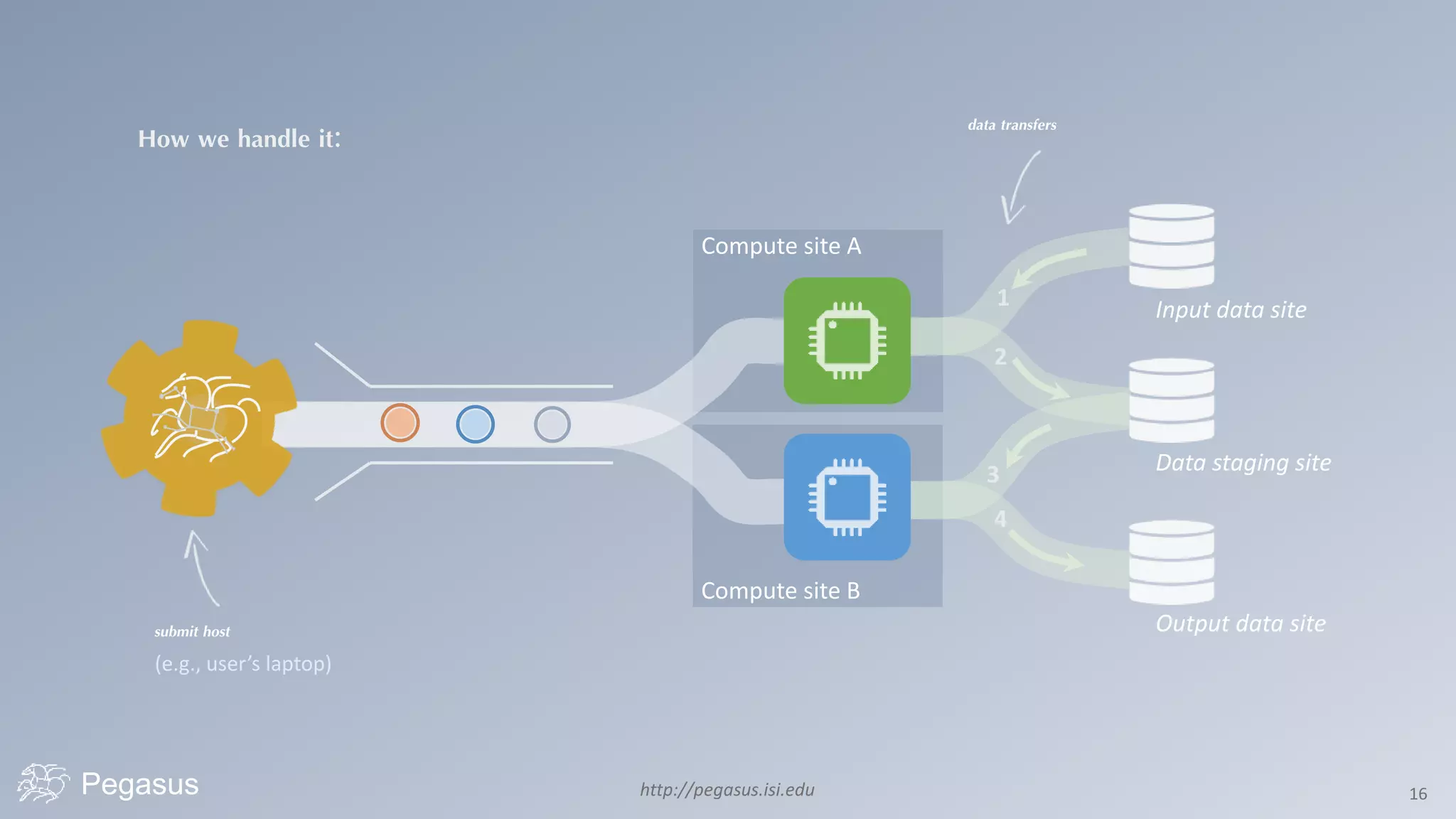
How we handle it:
Pegasus
Input data site
Data staging site
Output data site
Compute site B
Compute site A
data transfers
submit host
(e.g., user’s laptop)
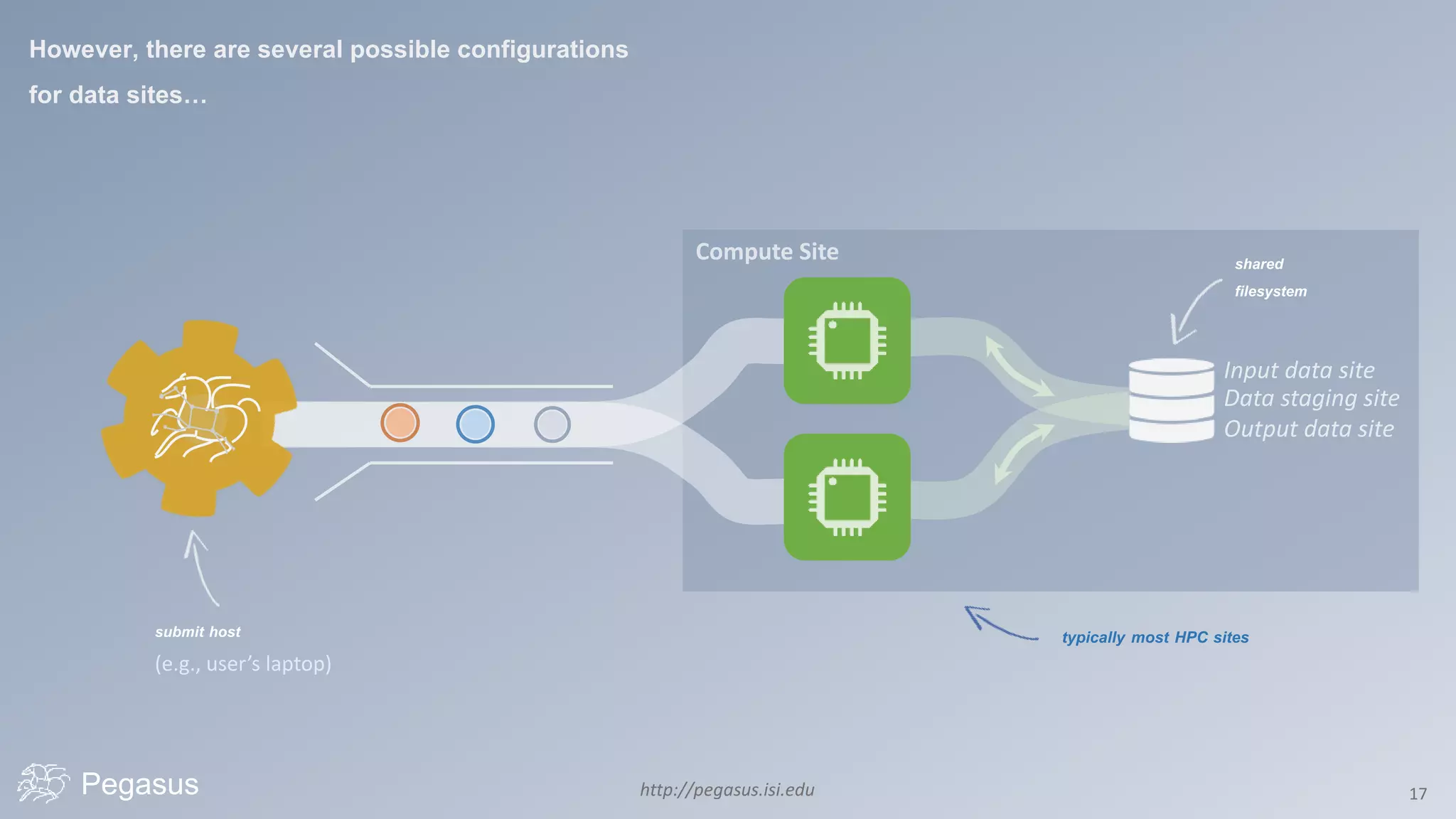
http://pegasus.isi.edu 17Pegasus
shared
filesystem
submit host
(e.g., user’s laptop)
However, there are several possible configurations
for data sites…
typically most HPC sites
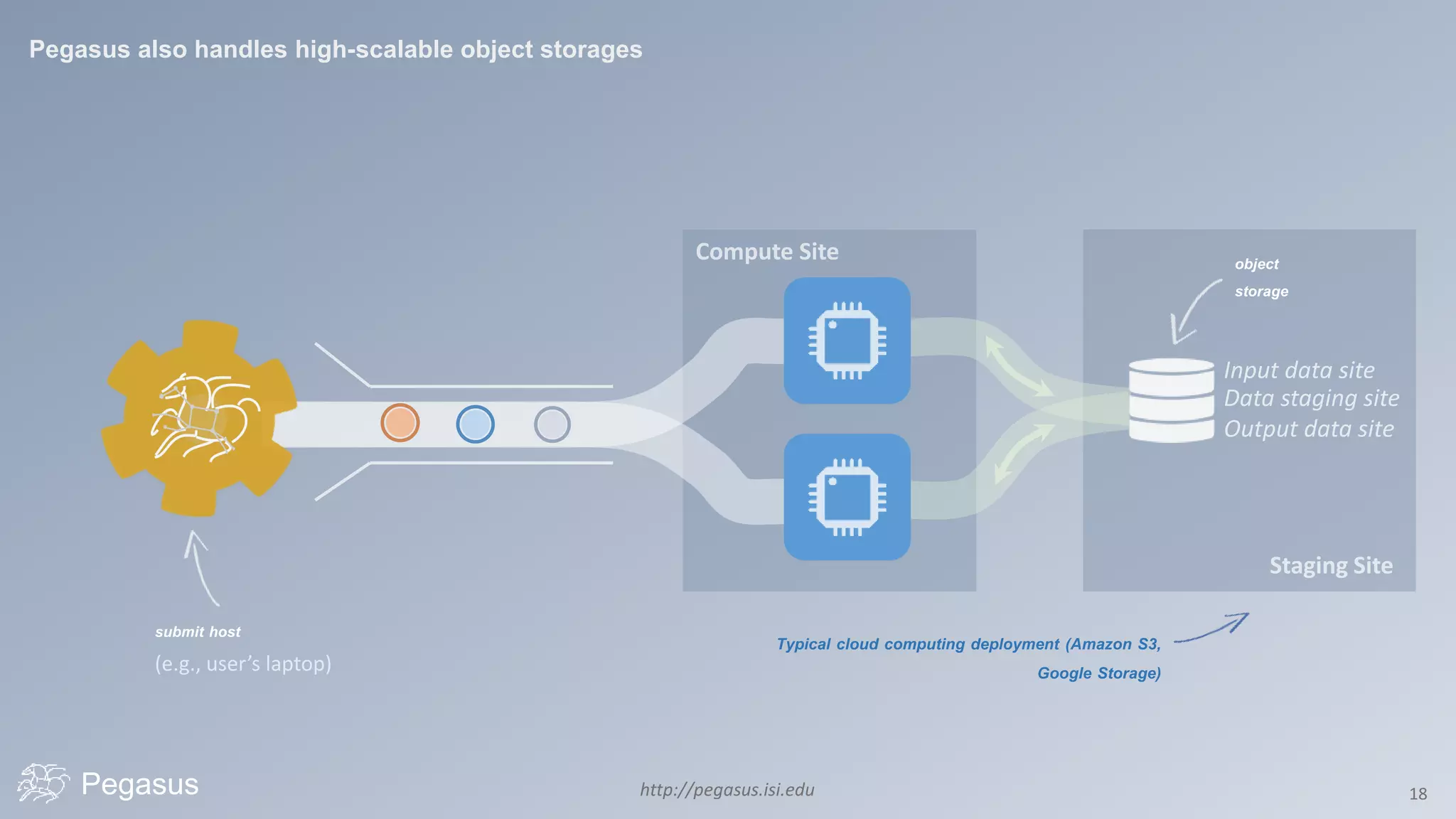
http://pegasus.isi.edu 18Pegasus
object
storage
submit host
(e.g., user’s laptop)
Pegasus also handles high-scalable object storages
Typical cloud computing deployment (Amazon S3,
Google Storage)
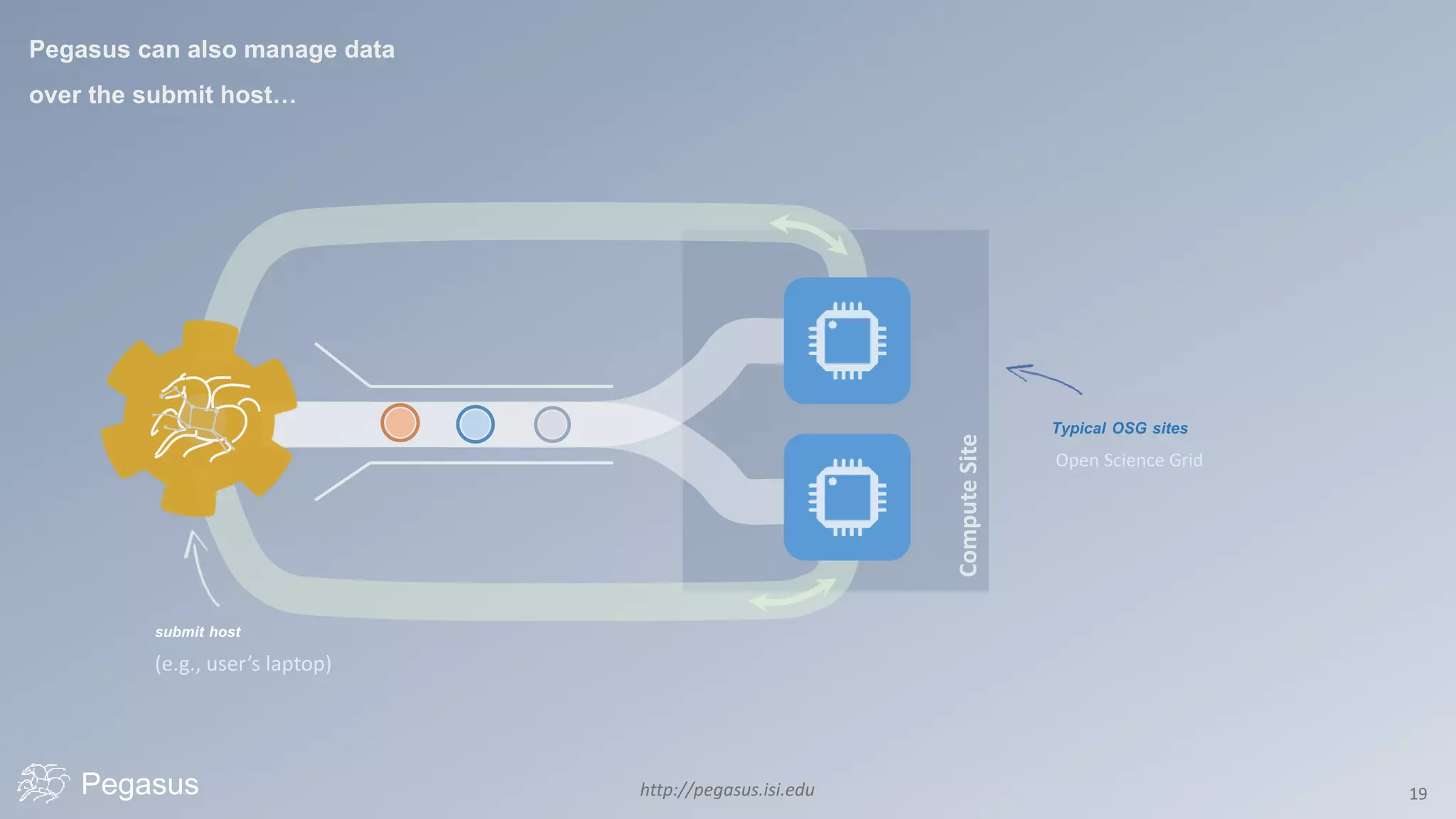
http://pegasus.isi.edu 19Pegasus
submit host
(e.g., user’s laptop)
Pegasus can also manage data
over the submit host…
Typical OSG sites
Open Science Grid
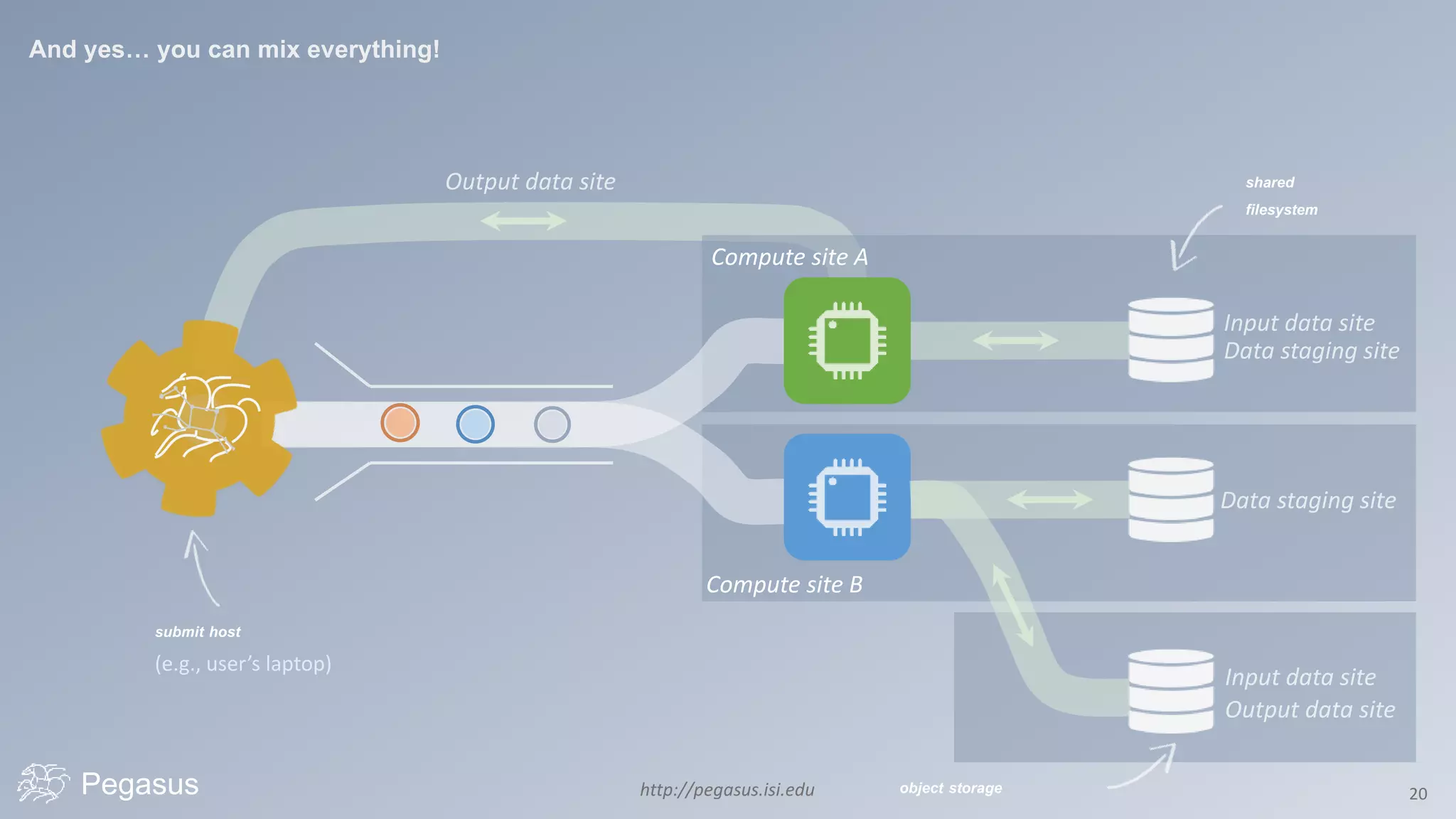
http://pegasus.isi.edu 20Pegasus
shared
filesystem
submit host
(e.g., user’s laptop)
And yes… you can mix everything!
Compute site B
Compute site A
object storage
Pegasus http://pegasus.isi.edu 21
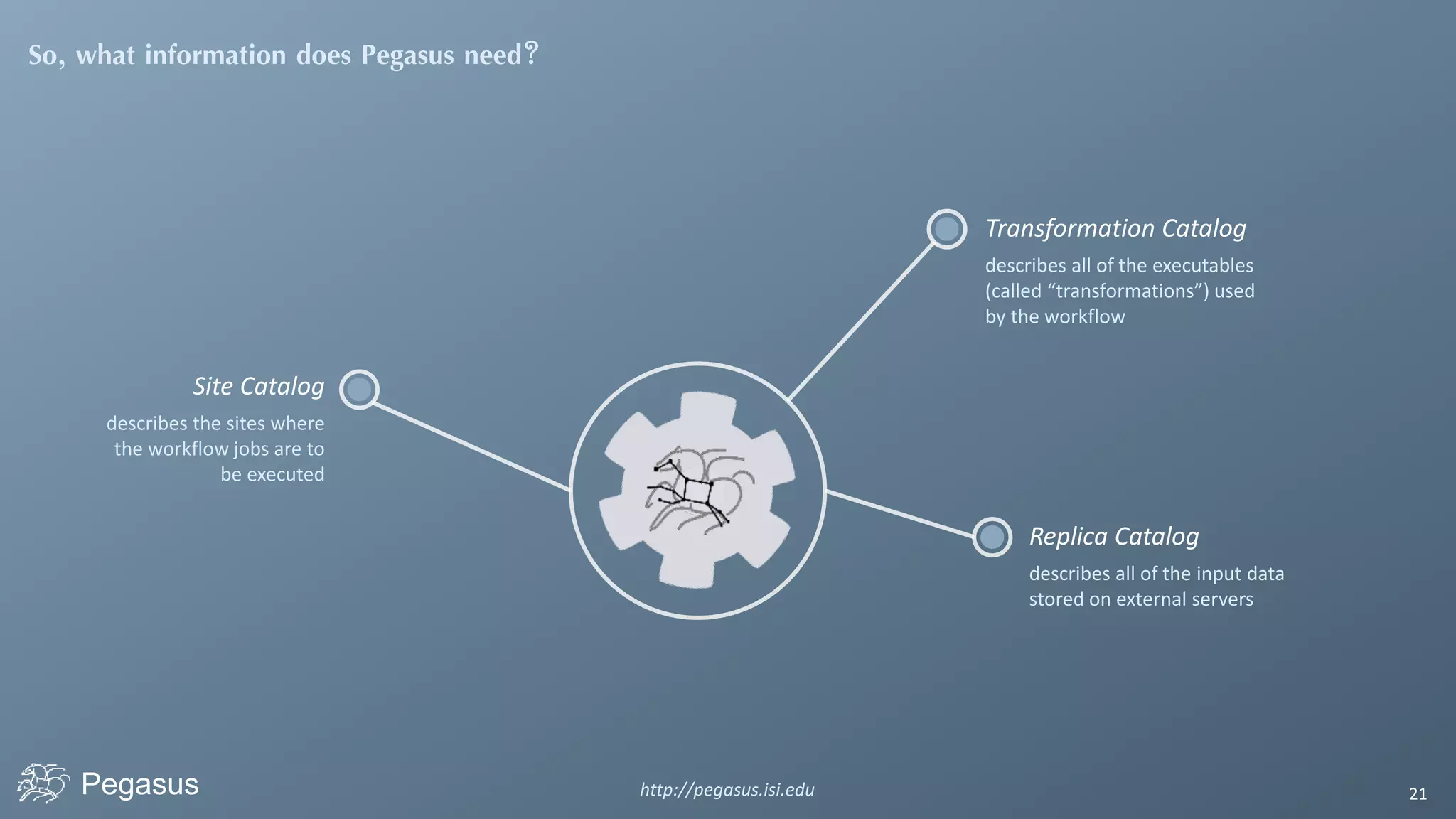
So, what information does Pegasus need?
Site Catalog
describes the sites where
the workflow jobs are to
be executed
Transformation Catalog
describes all of the executables
(called “transformations”) used
by the workflow
Replica Catalog
describes all of the input data
stored on external servers
Pegasus http://pegasus.isi.edu 22
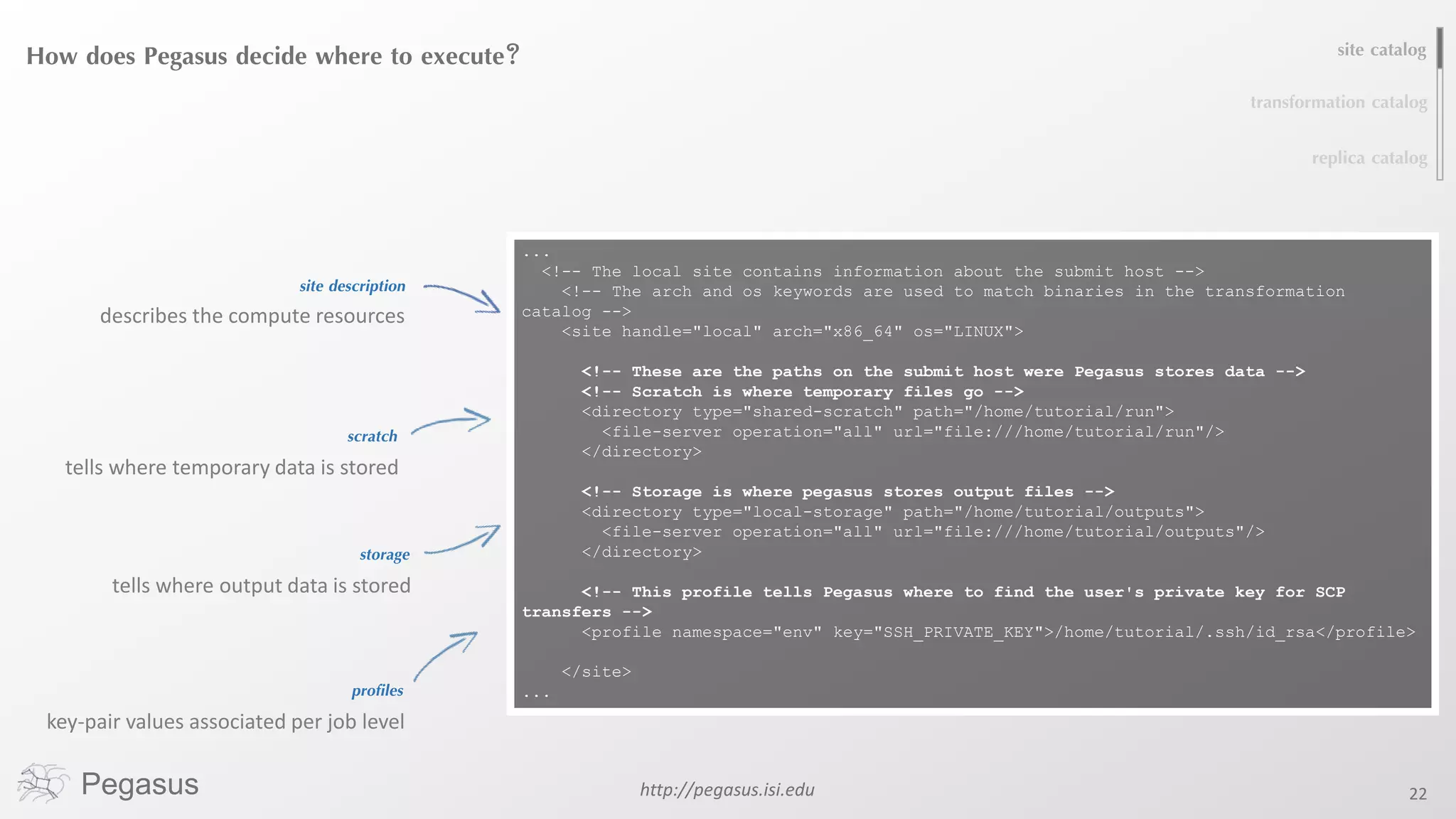
How does Pegasus decide where to execute?
site description
describes the compute resources
storage
tells where output data is stored
site catalog
transformation catalog
replica catalog
...
<!-- The local site contains information about the submit host -->
<!-- The arch and os keywords are used to match binaries in the transformation
catalog -->
<site handle="local" arch="x86_64" os="LINUX">
<!-- These are the paths on the submit host were Pegasus stores data -->
<!-- Scratch is where temporary files go -->
<directory type="shared-scratch" path="/home/tutorial/run">
<file-server operation="all" url="file:///home/tutorial/run"/>
</directory>
<!-- Storage is where pegasus stores output files -->
<directory type="local-storage" path="/home/tutorial/outputs">
<file-server operation="all" url="file:///home/tutorial/outputs"/>
</directory>
<!-- This profile tells Pegasus where to find the user's private key for SCP
transfers -->
<profile namespace="env" key="SSH_PRIVATE_KEY">/home/tutorial/.ssh/id_rsa</profile>
</site>
...
scratch
tells where temporary data is stored
profiles
key-pair values associated per job level
Pegasus http://pegasus.isi.edu 23
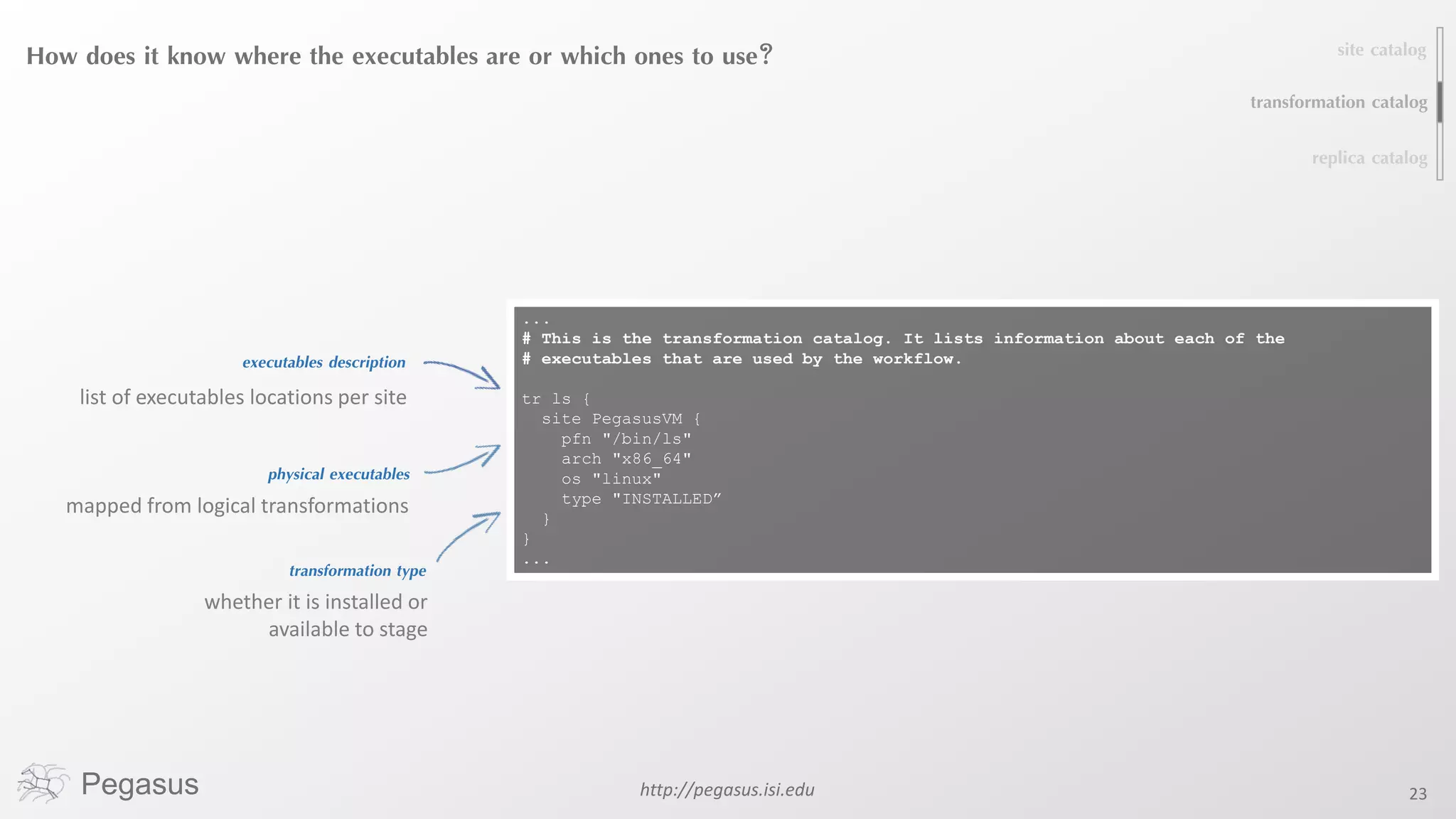
How does it know where the executables are or which ones to use?
executables description
list of executables locations per site
physical executables
site catalog
transformation catalog
replica catalog
...
# This is the transformation catalog. It lists information about each of the
# executables that are used by the workflow.
tr ls {
site PegasusVM {
pfn "/bin/ls"
arch "x86_64"
os "linux"
type "INSTALLED”
}
}
...
transformation type
whether it is installed or
available to stage
mapped from logical transformations
Pegasus http://pegasus.isi.edu 24
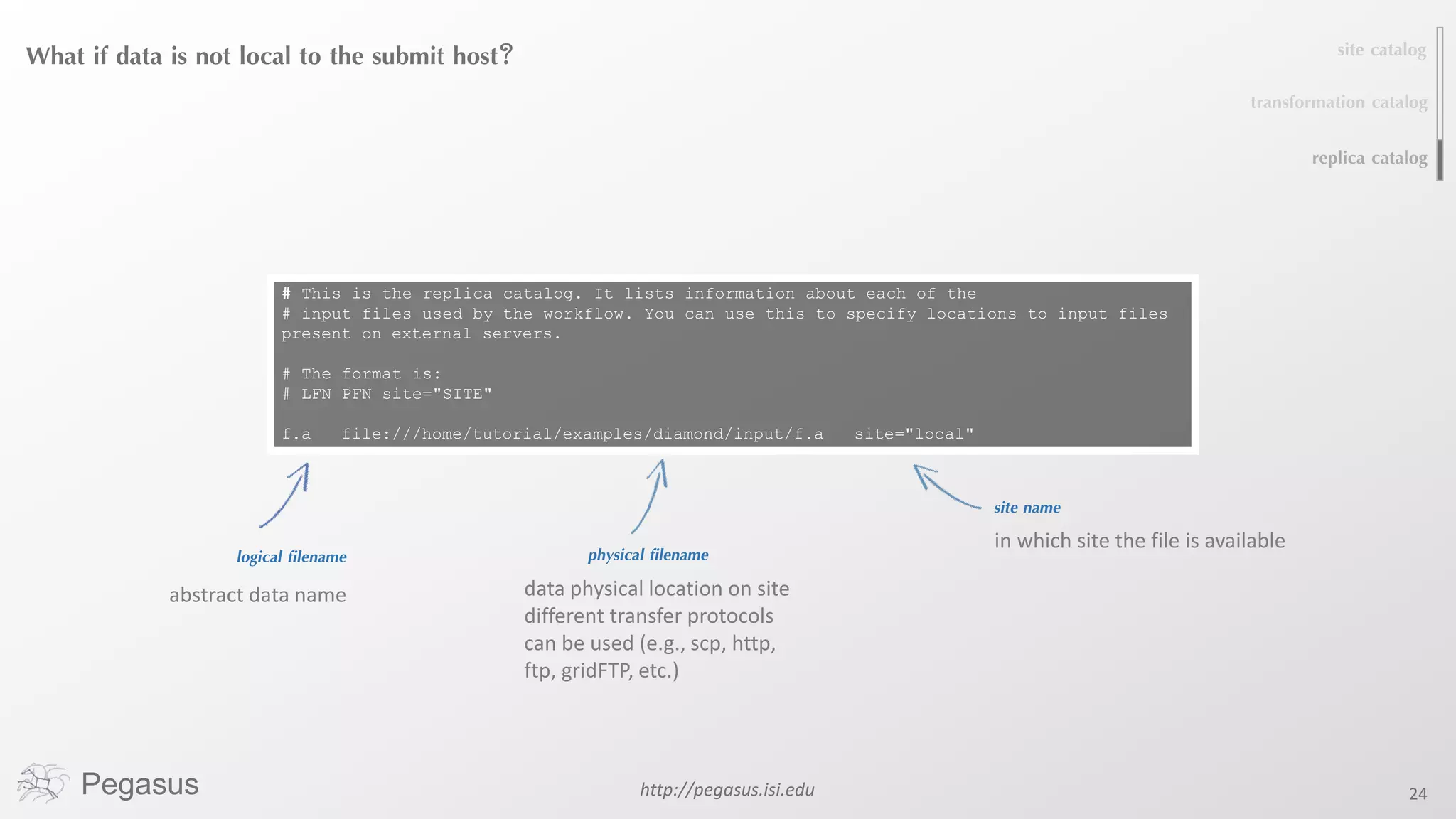
What if data is not local to the submit host?
logical filename
abstract data name
physical filename
site catalog
transformation catalog
replica catalog
# This is the replica catalog. It lists information about each of the
# input files used by the workflow. You can use this to specify locations to input files
present on external servers.
# The format is:
# LFN PFN site="SITE"
f.a file:///home/tutorial/examples/diamond/input/f.a site="local"
site name
in which site the file is available
data physical location on site
different transfer protocols
can be used (e.g., scp, http,
ftp, gridFTP, etc.)
Pegasus http://pegasus.isi.edu 25
A few more features…
Pegasus http://pegasus.isi.edu 26
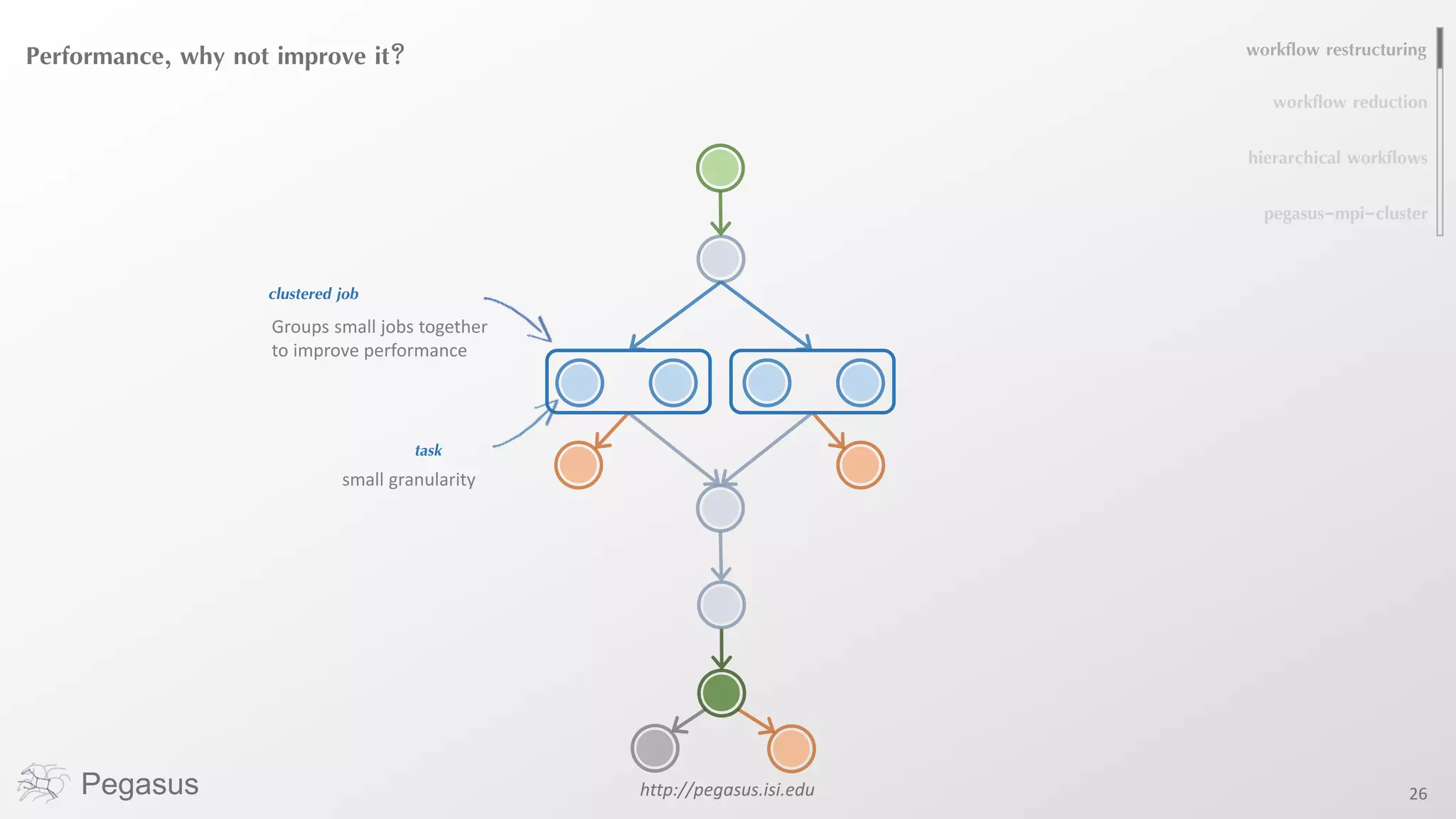
Performance, why not improve it?
clustered job
Groups small jobs together
to improve performance
task
small granularity
workflow restructuring
workflow reduction
pegasus-mpi-cluster
hierarchical workflows
Pegasus http://pegasus.isi.edu 27
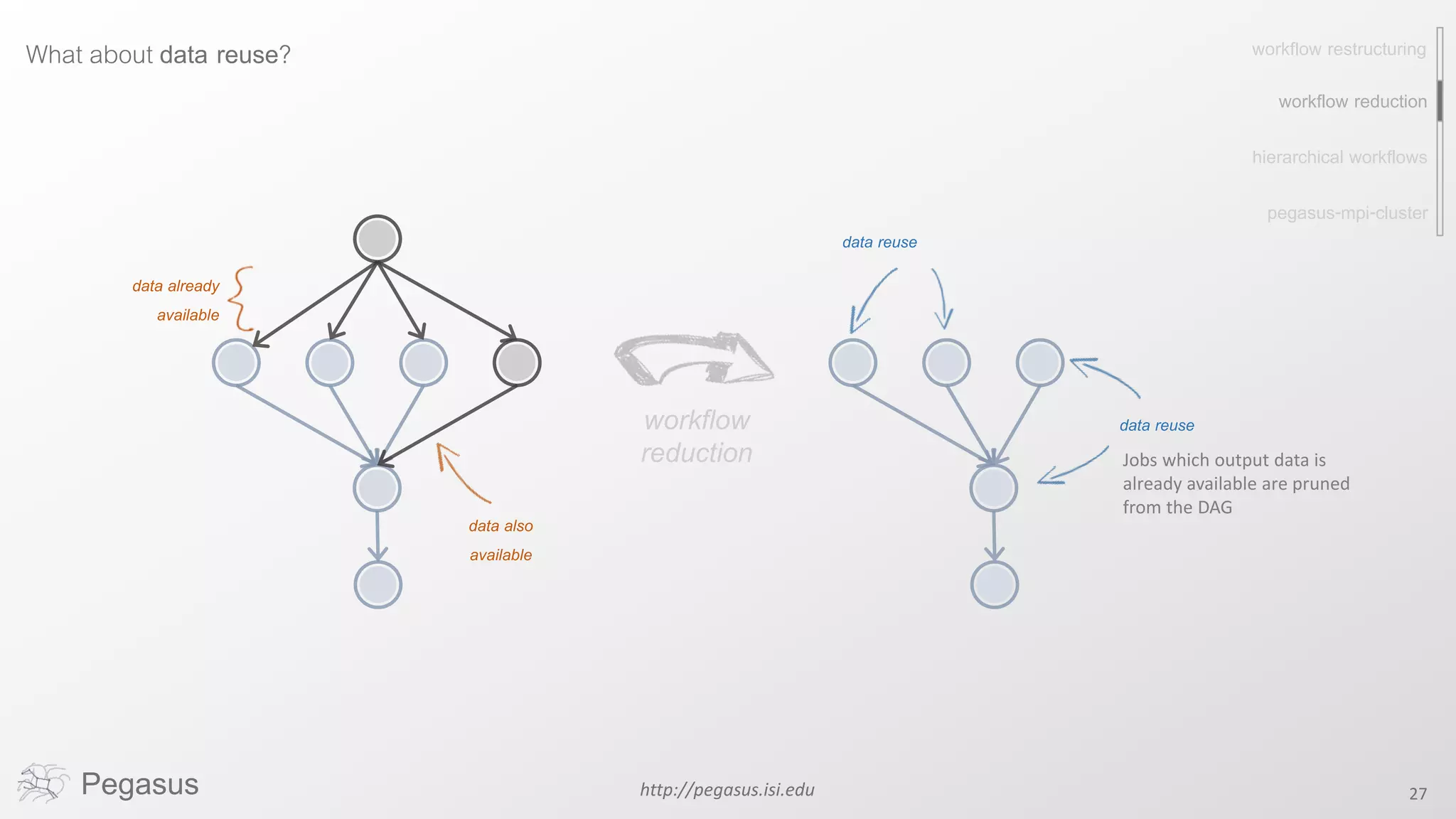
What about data reuse?
data already
available
Jobs which output data is
already available are pruned
from the DAG
data reuse
workflow restructuring
workflow reduction
pegasus-mpi-cluster
hierarchical workflows
workflow
reduction
data also
available
data reuse
http://pegasus.isi.edu 28
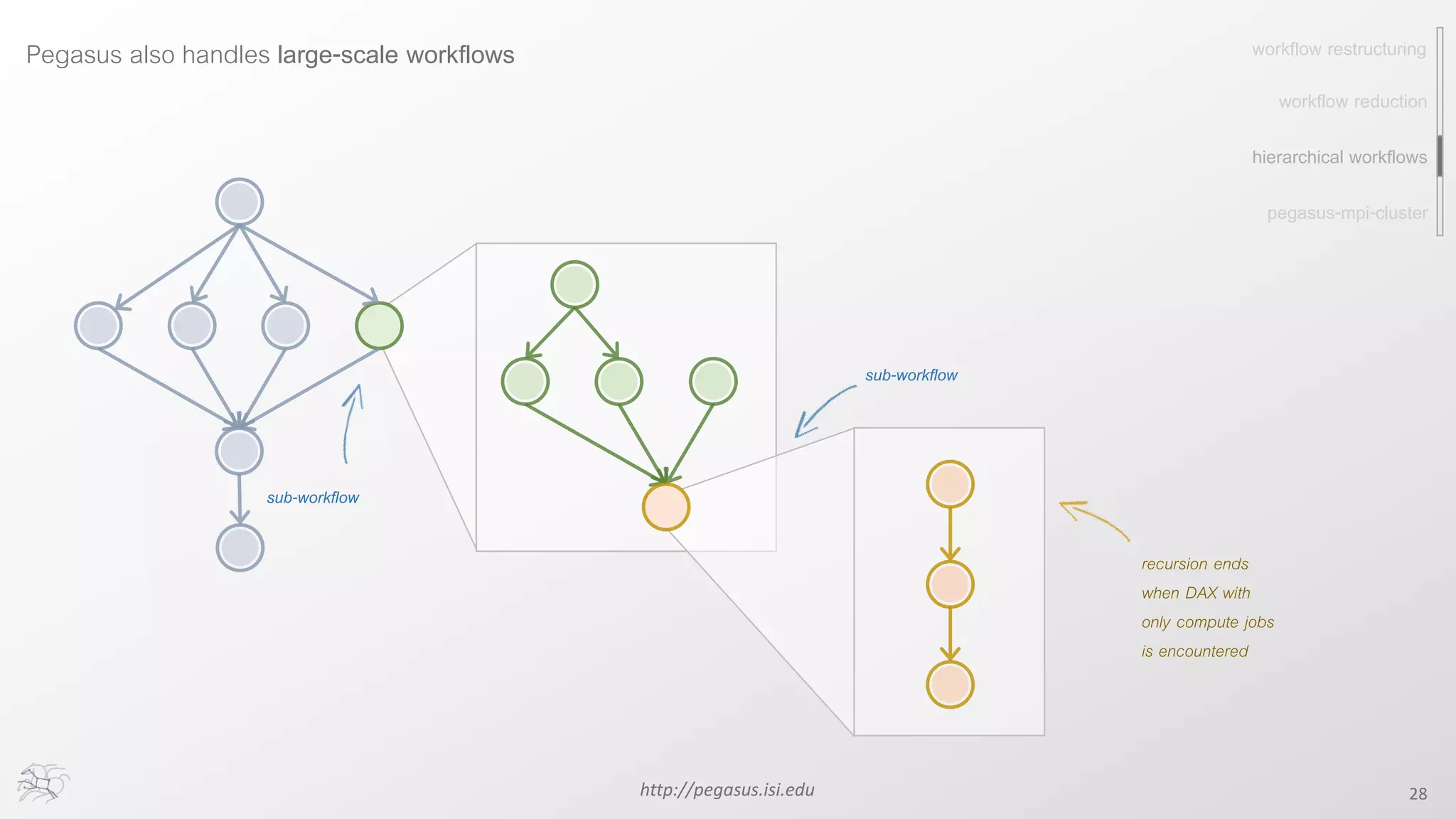
Pegasus also handles large-scale workflows
pegasus-mpi-cluster
recursion ends
when DAX with
only compute jobs
is encountered
sub-workflow
sub-workflow
workflow restructuring
workflow reduction
hierarchical workflows
Pegasus http://pegasus.isi.edu 29
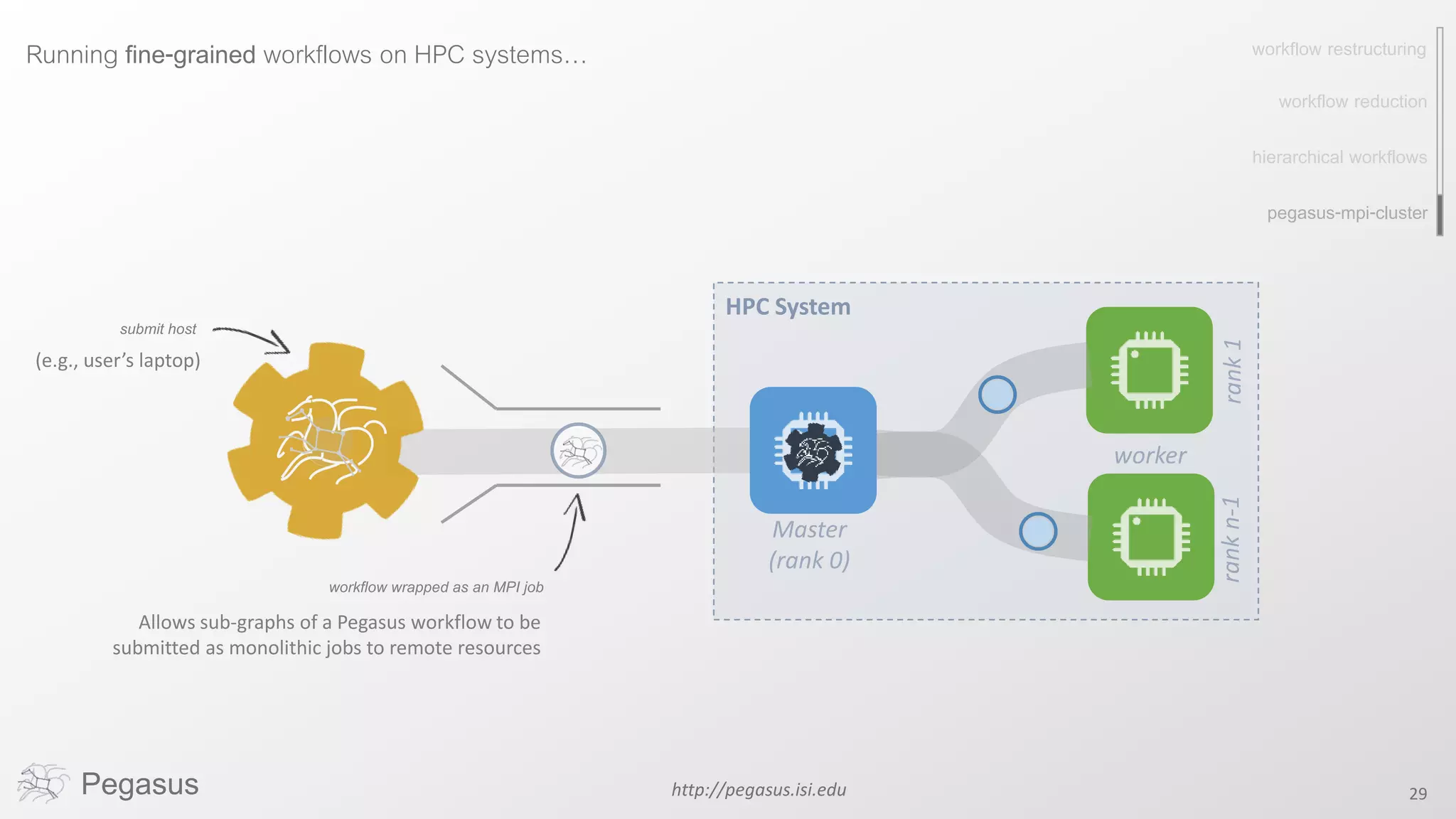
Running fine-grained workflows on HPC systems…
pegasus-mpi-cluster
HPC System
submit host
(e.g., user’s laptop)
workflow wrapped as an MPI job
Allows sub-graphs of a Pegasus workflow to be
submitted as monolithic jobs to remote resources
workflow restructuring
workflow reduction
hierarchical workflows
Pegasus http://pegasus.isi.edu 30
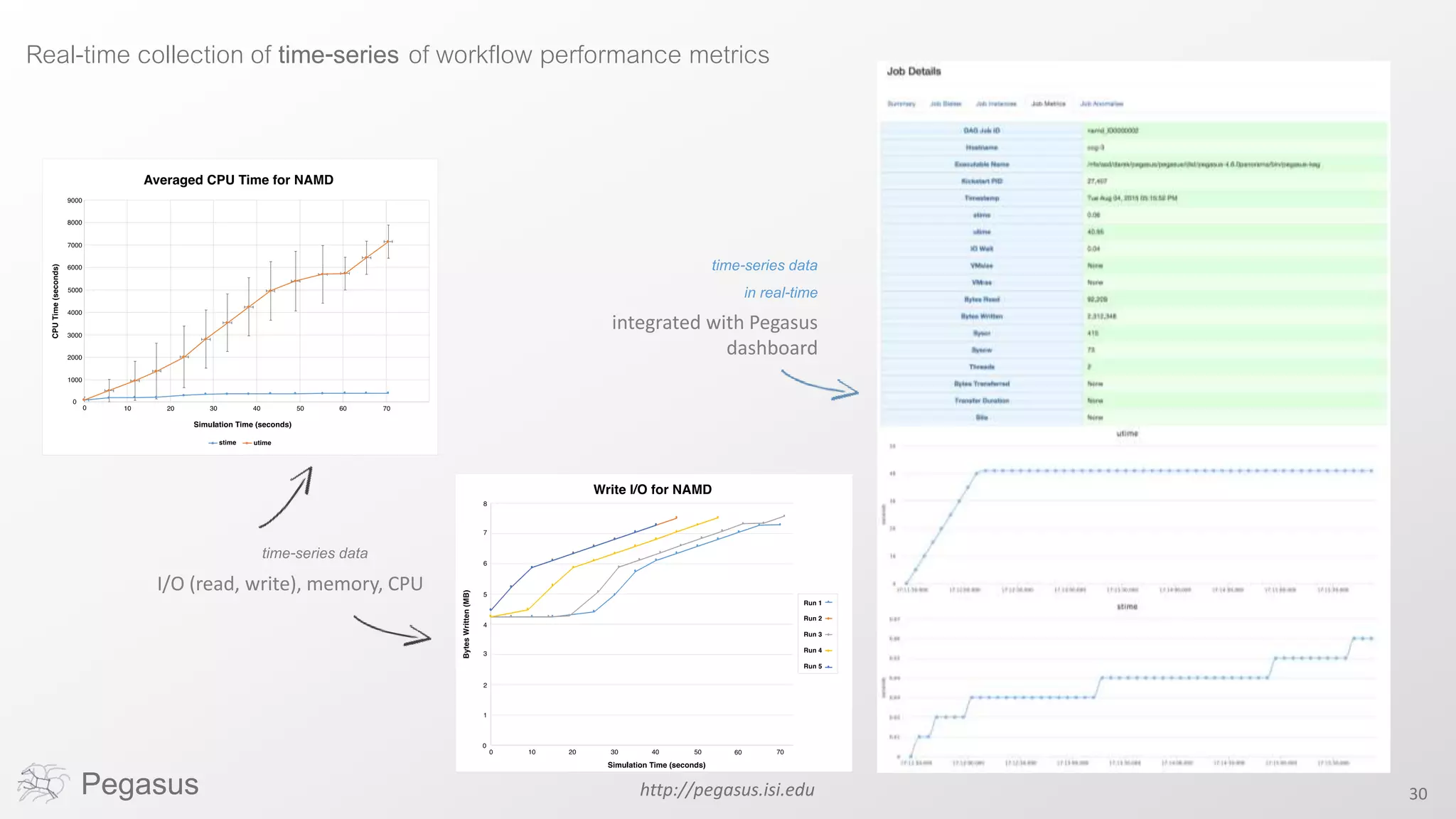
Real-time collection of time-series of workflow performance metrics
time-series data
in real-time
integrated with Pegasus
dashboard
time-series data
I/O (read, write), memory, CPU
Pegasus http://pegasus.isi.edu 31
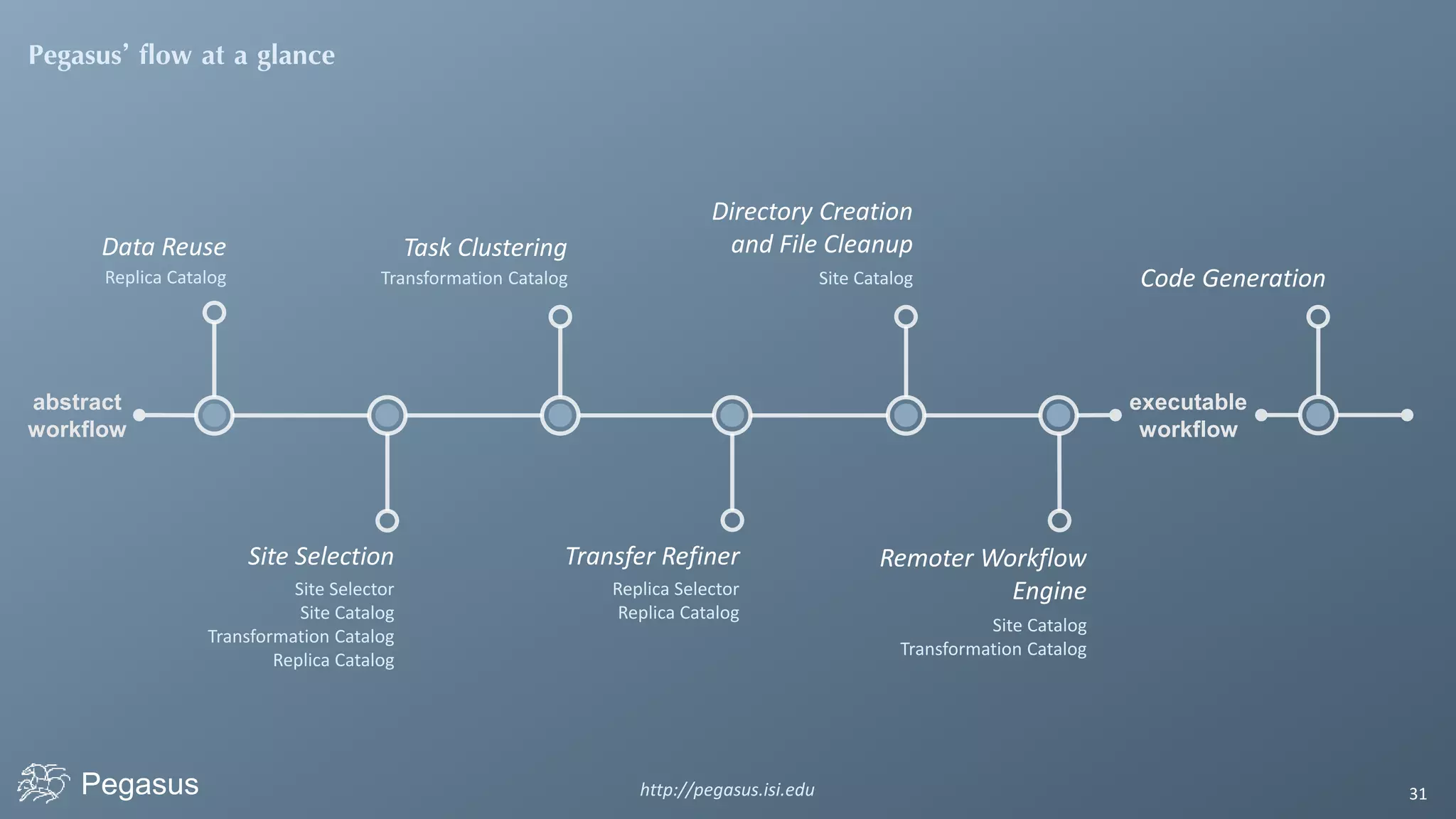
Pegasus’ flow at a glance
abstract
workflow
Data Reuse
Replica Catalog
Site Selection
Site Selector
Site Catalog
Transformation Catalog
Replica Catalog
Task Clustering
Transformation Catalog
Transfer Refiner
Replica Selector
Replica Catalog
Directory Creation
and File Cleanup
Site Catalog
Remoter Workflow
Engine
Site Catalog
Transformation Catalog
executable
workflow
Code Generation
Pegasus 32
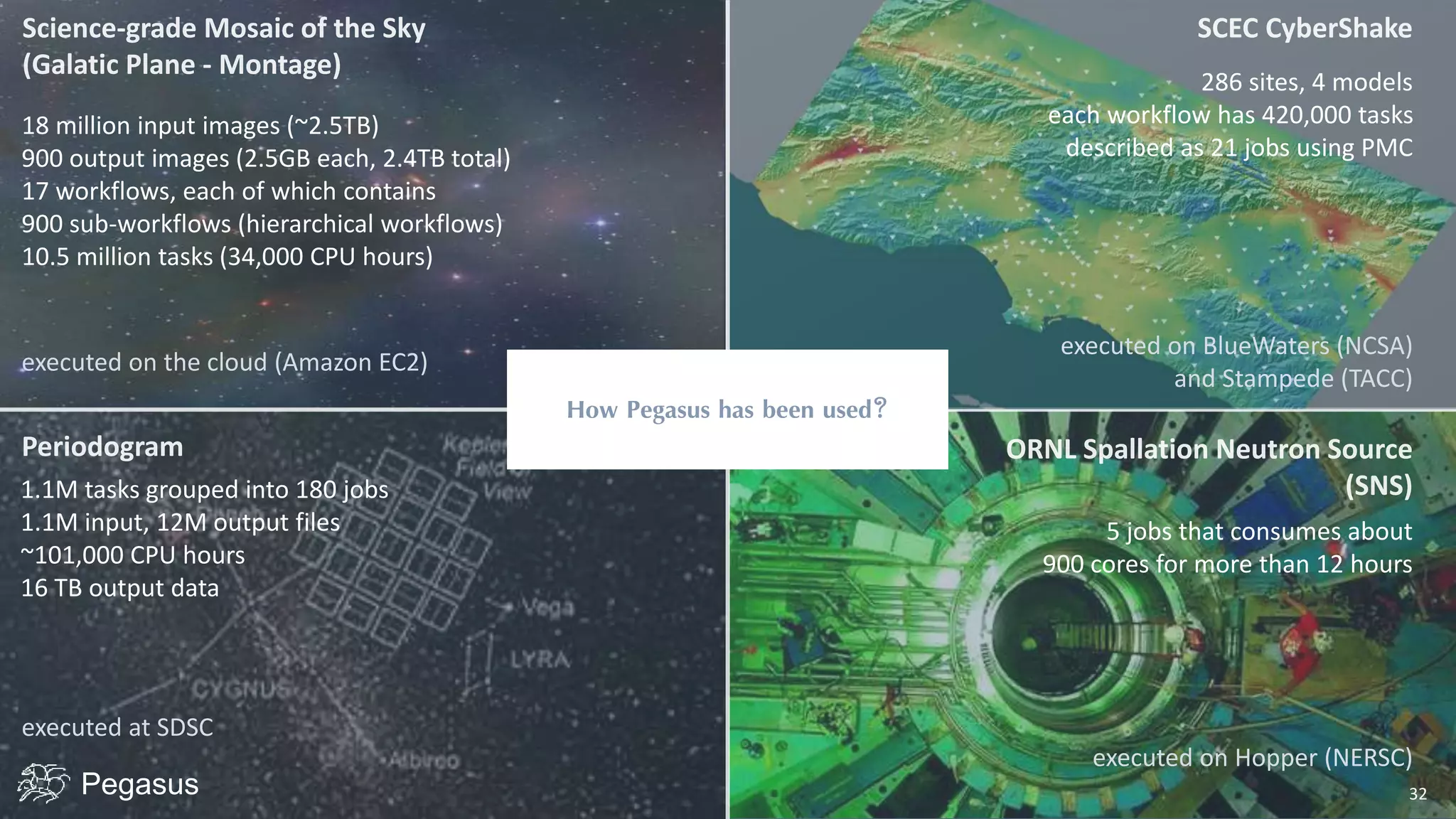
286 sites, 4 models
each workflow has 420,000 tasks
described as 21 jobs using PMC
executed on BlueWaters (NCSA)
and Stampede (TACC)
How Pegasus has been used?
5 jobs that consumes about
900 cores for more than 12 hours
executed on Hopper (NERSC)
executed on the cloud (Amazon EC2)
executed at SDSC
18 million input images (~2.5TB)
900 output images (2.5GB each, 2.4TB total)
17 workflows, each of which contains
900 sub-workflows (hierarchical workflows)
10.5 million tasks (34,000 CPU hours)
1.1M tasks grouped into 180 jobs
1.1M input, 12M output files
~101,000 CPU hours
16 TB output data
Pegasus
Automate, recover, and debug scientific computations.
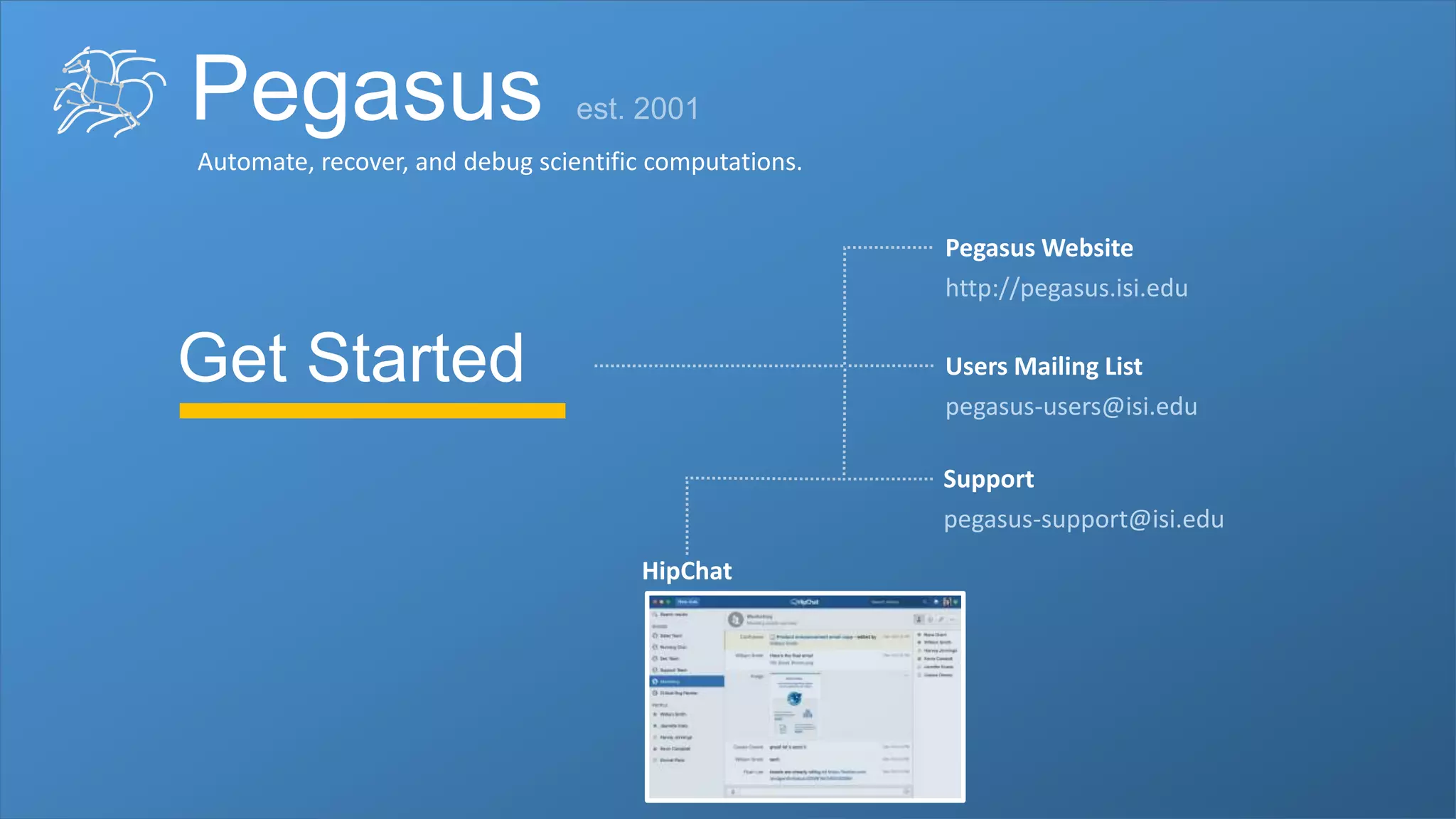
Get Started
Pegasus Website
http://pegasus.isi.edu
Users Mailing List
pegasus-users@isi.edu
Support
pegasus-support@isi.edu
HipChat
Pegasus
Automate, recover, and debug scientific computations.
Thank You
Questions?
Rafael Ferreira da Silva
Karan Vahi
Rafael Ferreira da Silva
Rajiv Mayani
Mats Rynge
Gideon Juve
Ewa Deelman

Pegasus - automate, recover, and debug scientific computations

  • 1.
    Pegasus Automate, recover, anddebug scientific computations. Rafael Ferreira da Silva http://pegasus.isi.edu
  • 2.
    Pegasus http://pegasus.isi.edu 2 ScientificProblem Analytical Solution Computational Scripts Automation Experiment Timeline Monitoring and Debug Scientific Result Models, Quality Control, Image Analysis, etc. Fault-tolerance, Provenance, etc. Shell scripts, Python, Matlab, etc. Earth Science, Astronomy, Neuroinformatics, Bioinformatics, etc. Distributed Computing Workflows, MapReduce, etc. Clusters, HPC, Cloud, Grid, etc.
  • 3.
    Pegasus http://pegasus.isi.edu 3 Whatis involved in an experiment execution?
  • 4.
    Pegasus http://pegasus.isi.edu 4 Automate Recover Debug WhyPegasus? Automates complex, multi-stage processing pipelines Enables parallel, distributed computations Automatically executes data transfers Reusable, aids reproducibility Records how data was produced (provenance) Handles failures with to provide reliability Keeps track of data and files
  • 5.
    Pegasus http://pegasus.isi.edu 5 Takinga closer look into a workflow… job dependency Usually data dependencies split merge pipeline Command-line programs DAGdirected-acyclic graphs abstract workflow executable workflow storage constraints optimizations DAG in XML
  • 6.
    Pegasus http://pegasus.isi.edu 6 Fromthe abstraction to execution! stage-in job stage-out job registration job Transfers the workflow input data Transfers the workflow output data Registers the workflow output data abstract workflow executable workflow storage constraints optimizations
  • 7.
    Pegasus http://pegasus.isi.edu 7 Optimizingstorage usage… cleanup job Removes unused data abstract workflow executable workflow storage constraints optimizations
  • 8.
    Pegasus http://pegasus.isi.edu 8 Ina nutshell… executable workflow abstract workflow storage constraints …and all automatically!
  • 9.
    Pegasus http://pegasus.isi.edu 9 Pegasusalso provides tools to generate the abstract workflow dax = ADAG("test_dax") firstJob = Job(name="first_job") firstInputFile = File("input.txt") firstOutputFile = File("tmp.txt") firstJob.addArgument("input=input.txt", "output=tmp.txt") firstJob.uses(firstInputFile, link=Link.INPUT) firstJob.uses(firstOutputFile, link=Link.OUTPUT) dax.addJob(firstJob) for i in range(0, 5): simulJob = Job(id="%s" % (i+1), name="simul_job”) simulInputFile = File("tmp.txt”) simulOutputFile = File("output.%d.dat" % i) simulJob.addArgument("parameter=%d" % i, "input=tmp.txt”, output=%s" % simulOutputFile.getName()) simulJob.uses(simulInputFile, link=Link.INPUT) simulJob.uses(simulOutputFile, line=Link.OUTPUT) dax.addJob(simulJob) dax.depends(parent=firstJob, child=simulJob) fp = open("test.dax", "w”) dax.writeXML(fp) fp.close() DAG in XML
  • 10.
    Pegasus http://pegasus.isi.edu 10 Statistics Workflowexecution and job performance metrics While you wait… …or the execution is finished. Command-line tools Tools for monitor and debug workflows Web-based interface Real-time monitoring, graphs, provenance, etc. Debug Set of debugging tools to unveil issues RESTful API Monitoring and reporting information on your own application interface
  • 11.
    Pegasus http://pegasus.isi.edu 11 Pegasus dashboard webinterface for monitoring and debugging workflows Real-time monitoring of workflow executions. It shows the status of the workflows and jobs, job characteristics, statistics and performance metrics. Provenance data is stored into a relational database. Real-time Monitoring Reporting Debugging Troubleshooting RESTful API
  • 12.
    Pegasus http://pegasus.isi.edu 12 Pegasus dashboard webinterface for monitoring and debugging workflows Real-time monitoring of workflow executions. It shows the status of the workflows and jobs, job characteristics, statistics and performance metrics. Provenance data is stored into a relational database. Pegasus dashboard web interface for monitoring and debugging workflows
  • 13.
    http://pegasus.isi.edu 13Pegasus But, ifyou prefer the command-line… …Pegasus provides a set of concise and powerful tools $ pegasus-status pegasus/examples/split/run0001 STAT IN_STATE JOB Run 00:39 split-0 (/home/pegasus/examples/split/run0001) Idle 00:03 ┗━split_ID0000001 Summary: 2 Condor jobs total (I:1 R:1) UNRDY READY PRE IN_Q POST DONE FAIL %DONE STATE DAGNAME 14 0 0 1 0 2 0 11.8 Running *split-0.dag $ pegasus-statistics –s all pegasus/examples/split/run0001 ------------------------------------------------------------------------------ Type Succeeded Failed Incomplete Total Retries Total+Retries Tasks 5 0 0 5 0 5 Jobs 17 0 0 17 0 17 Sub-Workflows 0 0 0 0 0 0 ------------------------------------------------------------------------------ Workflow wall time : 2 mins, 6 secs Workflow cumulative job wall time : 38 secs Cumulative job wall time as seen from submit side : 42 secs Workflow cumulative job badput wall time : Cumulative job badput wall time as seen from submit side : $ pegasus-analyzer pegasus/examples/split/run0001 pegasus-analyzer: initializing... ****************************Summary*************************** Total jobs : 7 (100.00%) # jobs succeeded : 7 (100.00%) # jobs failed : 0 (0.00%) # jobs unsubmitted : 0 (0.00%) >_
  • 14.
    Pegasus http://pegasus.isi.edu 14 Andif a job fails? Job Failure Detection detects non-zero exit code output parsing for success or failure message exceeded timeout do not produced expected output files Job Retry helps with transient failures set number of retries per job and run Rescue DAGs workflow can be restarted from checkpoint file recover from failures with minimal loss Checkpoint Files job generates checkpoint files staging of checkpoint files is automatic on restarts
  • 15.
    W o rr i e d a b o u t data?LetPegasusmanageitforyou Pegasus http://pegasus.isi.edu 15
  • 16.
    http://pegasus.isi.edu 16 How wehandle it: Pegasus Input data site Data staging site Output data site Compute site B Compute site A data transfers submit host (e.g., user’s laptop)
  • 17.
    http://pegasus.isi.edu 17Pegasus shared filesystem submit host (e.g.,user’s laptop) However, there are several possible configurations for data sites… typically most HPC sites
  • 18.
    http://pegasus.isi.edu 18Pegasus object storage submit host (e.g.,user’s laptop) Pegasus also handles high-scalable object storages Typical cloud computing deployment (Amazon S3, Google Storage)
  • 19.
    http://pegasus.isi.edu 19Pegasus submit host (e.g.,user’s laptop) Pegasus can also manage data over the submit host… Typical OSG sites Open Science Grid
  • 20.
    http://pegasus.isi.edu 20Pegasus shared filesystem submit host (e.g.,user’s laptop) And yes… you can mix everything! Compute site B Compute site A object storage
  • 21.
    Pegasus http://pegasus.isi.edu 21 So,what information does Pegasus need? Site Catalog describes the sites where the workflow jobs are to be executed Transformation Catalog describes all of the executables (called “transformations”) used by the workflow Replica Catalog describes all of the input data stored on external servers
  • 22.
    Pegasus http://pegasus.isi.edu 22 Howdoes Pegasus decide where to execute? site description describes the compute resources storage tells where output data is stored site catalog transformation catalog replica catalog ... <!-- The local site contains information about the submit host --> <!-- The arch and os keywords are used to match binaries in the transformation catalog --> <site handle="local" arch="x86_64" os="LINUX"> <!-- These are the paths on the submit host were Pegasus stores data --> <!-- Scratch is where temporary files go --> <directory type="shared-scratch" path="/home/tutorial/run"> <file-server operation="all" url="file:///home/tutorial/run"/> </directory> <!-- Storage is where pegasus stores output files --> <directory type="local-storage" path="/home/tutorial/outputs"> <file-server operation="all" url="file:///home/tutorial/outputs"/> </directory> <!-- This profile tells Pegasus where to find the user's private key for SCP transfers --> <profile namespace="env" key="SSH_PRIVATE_KEY">/home/tutorial/.ssh/id_rsa</profile> </site> ... scratch tells where temporary data is stored profiles key-pair values associated per job level
  • 23.
    Pegasus http://pegasus.isi.edu 23 Howdoes it know where the executables are or which ones to use? executables description list of executables locations per site physical executables site catalog transformation catalog replica catalog ... # This is the transformation catalog. It lists information about each of the # executables that are used by the workflow. tr ls { site PegasusVM { pfn "/bin/ls" arch "x86_64" os "linux" type "INSTALLED” } } ... transformation type whether it is installed or available to stage mapped from logical transformations
  • 24.
    Pegasus http://pegasus.isi.edu 24 Whatif data is not local to the submit host? logical filename abstract data name physical filename site catalog transformation catalog replica catalog # This is the replica catalog. It lists information about each of the # input files used by the workflow. You can use this to specify locations to input files present on external servers. # The format is: # LFN PFN site="SITE" f.a file:///home/tutorial/examples/diamond/input/f.a site="local" site name in which site the file is available data physical location on site different transfer protocols can be used (e.g., scp, http, ftp, gridFTP, etc.)
  • 25.
  • 26.
    Pegasus http://pegasus.isi.edu 26 Performance,why not improve it? clustered job Groups small jobs together to improve performance task small granularity workflow restructuring workflow reduction pegasus-mpi-cluster hierarchical workflows
  • 27.
    Pegasus http://pegasus.isi.edu 27 Whatabout data reuse? data already available Jobs which output data is already available are pruned from the DAG data reuse workflow restructuring workflow reduction pegasus-mpi-cluster hierarchical workflows workflow reduction data also available data reuse
  • 28.
    http://pegasus.isi.edu 28 Pegasus alsohandles large-scale workflows pegasus-mpi-cluster recursion ends when DAX with only compute jobs is encountered sub-workflow sub-workflow workflow restructuring workflow reduction hierarchical workflows
  • 29.
    Pegasus http://pegasus.isi.edu 29 Runningfine-grained workflows on HPC systems… pegasus-mpi-cluster HPC System submit host (e.g., user’s laptop) workflow wrapped as an MPI job Allows sub-graphs of a Pegasus workflow to be submitted as monolithic jobs to remote resources workflow restructuring workflow reduction hierarchical workflows
  • 30.
    Pegasus http://pegasus.isi.edu 30 Real-timecollection of time-series of workflow performance metrics time-series data in real-time integrated with Pegasus dashboard time-series data I/O (read, write), memory, CPU
  • 31.
    Pegasus http://pegasus.isi.edu 31 Pegasus’flow at a glance abstract workflow Data Reuse Replica Catalog Site Selection Site Selector Site Catalog Transformation Catalog Replica Catalog Task Clustering Transformation Catalog Transfer Refiner Replica Selector Replica Catalog Directory Creation and File Cleanup Site Catalog Remoter Workflow Engine Site Catalog Transformation Catalog executable workflow Code Generation
  • 32.
    Pegasus 32 286 sites,4 models each workflow has 420,000 tasks described as 21 jobs using PMC executed on BlueWaters (NCSA) and Stampede (TACC) How Pegasus has been used? 5 jobs that consumes about 900 cores for more than 12 hours executed on Hopper (NERSC) executed on the cloud (Amazon EC2) executed at SDSC 18 million input images (~2.5TB) 900 output images (2.5GB each, 2.4TB total) 17 workflows, each of which contains 900 sub-workflows (hierarchical workflows) 10.5 million tasks (34,000 CPU hours) 1.1M tasks grouped into 180 jobs 1.1M input, 12M output files ~101,000 CPU hours 16 TB output data
  • 33.
    Pegasus Automate, recover, anddebug scientific computations. Get Started Pegasus Website http://pegasus.isi.edu Users Mailing List pegasus-users@isi.edu Support pegasus-support@isi.edu HipChat
  • 34.
    Pegasus Automate, recover, anddebug scientific computations. Thank You Questions? Rafael Ferreira da Silva Karan Vahi Rafael Ferreira da Silva Rajiv Mayani Mats Rynge Gideon Juve Ewa Deelman

Editor's Notes

  • #5 Handle failures with to provide reliability