USER
                                     GUIDE


TRADE MAP
TRADE STATISTICS FOR INTERNATIONAL
BUSINESS DEVELOPMENT
Trade Map - User Guide


              January 2009


    International Trade Centre UNCTAD/WTO
          Market Analysis and Research
          Division of Market Development
              54-56 rue de Montbrillant
                 Palais des Nations
             1211 Geneva, Switzerland
Abbreviations

CIF              Cost, insurance and freight
COMESA           Common Market for Eastern and Southern Africa
EBOPS            Extended Balance of Payment Services Classification
FOB              Free on board
GATS             General Agreement on Trade in Services
HS               Harmonized System of product nomenclature
ITC              International Trade Centre UNCTAD/WTO
LDCs             Least developed countries
m.               million
MERCOSUR         Mercado Comun del Sur (South American Common Market)
MFN              Most Favoured Nation
n.e.s.           not elsewhere specified
p.a.             per annum
SITC             Standard International Trade Classification
TSI              Trade Support Institution
UNCTAD           United Nations Conference on Trade and Development
UNSD             United Nations Statistics Division
WTO              World Trade Organization

For     additional   terms    and     their     explanations     visit   our     online    glossary     at:
http://www.trademap.org/stGlossary.aspx


Note:

Please note that the statistics in Trade Map undergo annual updates, as well as updates throughout the year
as new information becomes available. These updates may generate varying figures or trends from what is
seen in this User Guide, however the principles and applications of Trade Map remain the same. Please
contact marketanalysis@intracen.org or more information or assistance.
ITC’S MARKET ANALYSIS SERVICES – TRADE MAP


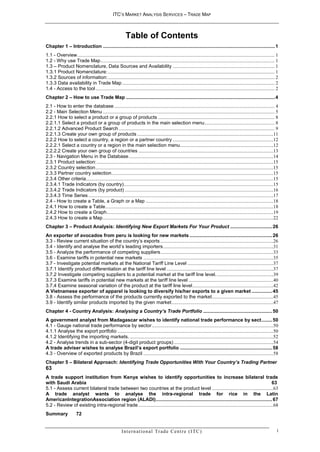
                                                             Table of Contents
Chapter 1 – Introduction ............................................................................................................................... 1
1.1 - Overview ................................................................................................................................................................. 1
1.2 - Why use Trade Map .............................................................................................................................................. 1
1.3 – Product Nomenclature, Data Sources and Availability ................................................................................... 1
1.3.1 Product Nomenclature: ........................................................................................................................................ 1
1.3.2 Sources of information: ........................................................................................................................................ 2
1.3.3 Data availability in Trade Map ............................................................................................................................ 2
1.4 - Access to the tool .................................................................................................................................................. 2
Chapter 2 – How to use Trade Map .............................................................................................................. 4
2.1 - How to enter the database ................................................................................................................................... 4
2.2 - Main Selection Menu ............................................................................................................................................ 5
2.2.1 How to select a product or a group of products ............................................................................................... 8
2.2.1.1 Select a product or a group of products in the main selection menu ......................................................... 8
2.2.1.2 Advanced Product Search ............................................................................................................................... 9
2.2.1.3 Create your own group of products ...............................................................................................................11
2.2.2 How to select a country, a region or a partner country ..................................................................................12
2.2.2.1 Select a country or a region in the main selection menu ............................................................................12
2.2.2.2 Create your own group of countries ..............................................................................................................13
2.3 - Navigation Menu in the Database ......................................................................................................................14
2.3.1 Product selection: ................................................................................................................................................15
2.3.2 Country selection .................................................................................................................................................15
2.3.3 Partner country selection ....................................................................................................................................15
2.3.4 Other criteria.........................................................................................................................................................15
2.3.4.1 Trade Indicators (by country) ..........................................................................................................................15
2.3.4.2 Trade Indicators (by product) .........................................................................................................................16
2.3.4.3 Time Series .......................................................................................................................................................17
2.4 - How to create a Table, a Graph or a Map ........................................................................................................18
2.4.1 How to create a Table .........................................................................................................................................18
2.4.2 How to create a Graph ........................................................................................................................................19
2.4.3 How to create a Map ...........................................................................................................................................22
Chapter 3 – Product Analysis: Identifying New Export Markets For Your Product ............................... 26
An exporter of avocados from peru is looking for new markets ............................................................. 26
3.3 - Review current situation of the country’s exports ............................................................................................26
3.4 - Identify and analyse the world’s leading importers ..........................................................................................31
3.5 - Analyze the performance of competing suppliers ............................................................................................33
3.6 - Examine tariffs in potential new markets ..........................................................................................................35
3.7 - Investigate potential markets at the National Tariff Line Level ......................................................................37
3.7.1 Identify product differentiation at the tariff line level .......................................................................................37
3.7.2 Investigate competing suppliers to a potential market at the tariff line level. ..............................................39
3.7.3 Examine tariffs in potential new markets at the tariff line level .....................................................................40
3.7.4 Examine seasonal variation of the product at the tariff line level ..................................................................42
A Vietnamese exporter of apparel is looking to diversify his/her exports to a given market ............... 45
3.8 - Assess the performance of the products currently exported to the market ..................................................45
3.9 - Identify similar products imported by the given market ...................................................................................47
Chapter 4 - Country Analysis: Analysing a Country’s Trade Portfolio ................................................... 50
A government analyst from Madagascar wishes to identify national trade performance by sect ........ 50
4.1 - Gauge national trade performance by sector ...................................................................................................50
4.1.1 Analyse the export portfolio ...............................................................................................................................50
4.1.2 Identifying the importing markets. .....................................................................................................................52
4.2 - Analyse trends in a sub-sector (4-digit product groups) .................................................................................54
A trade adviser wishes to analyse Brazil’s export portfolio .................................................................... 58
4.3 - Overview of exported products by Brazil ..........................................................................................................58
Chapter 5 – Bilateral Approach: Identifying Trade Opportunities With Your Country’s Trading Partner
63
A trade support institution from Kenya wishes to identify opportunities to increase bilateral trade
with Saudi Arabia                                                                                                                                          63
5.1 - Assess current bilateral trade between two countries at the product level ..................................................63
A trade analyst wants to analyse the intra-regional trade for rice in the Latin
AmericanIntegrationAssociation region (ALADI) ...................................................................................... 67
5.2 - Review of existing intra-regional trade ..............................................................................................................68
Summary                72


                                                          I n t e r n a t i o n a l Tr a d e C e n t r e ( I TC )                                                                i
ITC’S MARKET ANALYSIS SERVICES – TRADE MAP


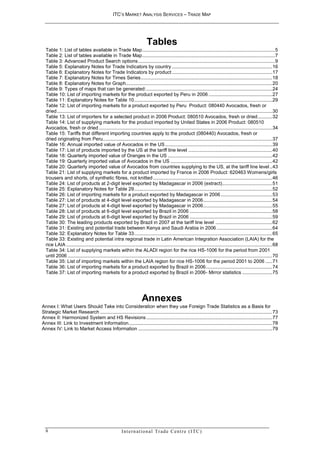
                                                                          Tables
  Table 1: List of tables available in Trade Map .................................................................................................. 5
  Table 2: List of tables available in Trade Map .................................................................................................. 7
  Table 3: Advanced Product Search options ..................................................................................................... 9
  Table 5: Explanatory Notes for Trade Indicators by country .......................................................................... 16
  Table 6: Explanatory Notes for Trade Indicators by product .......................................................................... 17
  Table 7: Explanatory Notes for Times Series ................................................................................................. 18
  Table 8: Explanatory Notes for Graph ............................................................................................................ 20
  Table 9: Types of maps that can be generated: ............................................................................................. 24
  Table 10: List of importing markets for the product exported by Peru in 2006 ............................................... 27
  Table 11: Explanatory Notes for Table 10 ...................................................................................................... 29
  Table 12: List of importing markets for a product exported by Peru Product: 080440 Avocados, fresh or
  dried ............................................................................................................................................................... 30
  Table 13: List of importers for a selected product in 2006 Product: 080510 Avocados, fresh or dried........... 32
  Table 14: List of supplying markets for the product imported by United States in 2006 Product: 080510
  Avocados, fresh or dried ................................................................................................................................ 34
  Table 15: Tariffs that different importing countries apply to the product (080440) Avocados, fresh or
  dried originating from Peru. ............................................................................................................................ 37
  Table 16: Annual imported value of Avocados in the US ............................................................................... 39
  Table 17: List of products imported by the US at the tariff line level .............................................................. 40
  Table 18: Quarterly imported value of Oranges in the US ............................................................................. 42
  Table 19: Quarterly imported value of Avocados in the US ........................................................................... 42
  Table 20: Quarterly imported value of Avocados from countries supplying to the US, at the tariff line level .. 43
  Table 21: List of supplying markets for a product imported by France in 2006 Product: 620463 Womens/girls
  trousers and shorts, of synthetic fibres, not knitted ........................................................................................ 46
  Table 24: List of products at 2-digit level exported by Madagascar in 2006 (extract) ..................................... 51
  Table 25: Explanatory Notes for Table 29 ...................................................................................................... 52
  Table 26: List of importing markets for a product exported by Madagascar in 2006 ...................................... 53
  Table 27: List of products at 4-digit level exported by Madagascar in 2006 ................................................... 54
  Table 27: List of products at 4-digit level exported by Madagascar in 2006 ................................................... 55
  Table 28: List of products at 6-digit level exported by Brazil in 2006 ............................................................. 58
  Table 29: List of products at 6-digit level exported by Brazil in 2006 ............................................................. 59
  Table 30: The leading products exported by Brazil in 2007 at the tariff line level .......................................... 62
  Table 31: Existing and potential trade between Kenya and Saudi Arabia in 2006 ......................................... 64
  Table 32: Explanatory Notes for Table 33 ...................................................................................................... 65
  Table 33: Existing and potential intra regional trade in Latin American Integration Association (LAIA) for the
  rice LAIA ........................................................................................................................................................ 68
  Table 34: List of supplying markets within the ALADI region for the rice HS-1006 for the period from 2001
  until 2006 ....................................................................................................................................................... 70
  Table 35: List of importing markets within the LAIA region for rice HS-1006 for the period 2001 to 2006 ..... 71
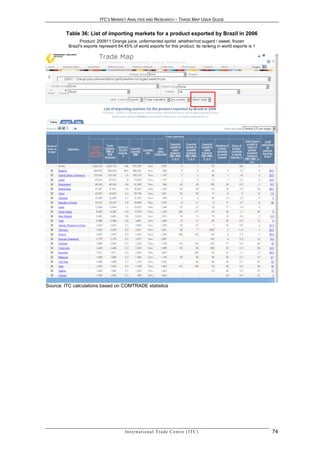
  Table 36: List of importing markets for a product exported by Brazil in 2006 ................................................. 74
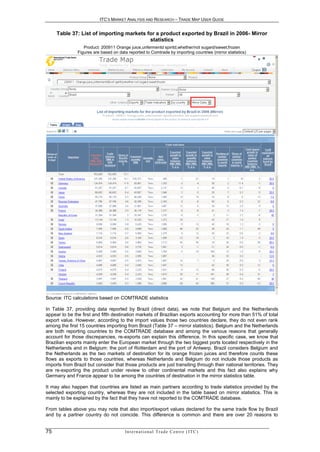
  Table 37: List of importing markets for a product exported by Brazil in 2006- Mirror statistics ...................... 75


                                                                       Annexes
Annex I: What Users Should Take into Consideration when they use Foreign Trade Statistics as a Basis for
Strategic Market Research ............................................................................................................................... 73
Annex II: Harmonized System and HS Revisions ............................................................................................. 77
Annex III: Link to Investment Information .......................................................................................................... 78
Annex IV: Link to Market Access Information ................................................................................................... 79


  ii                                                    I n t e r n a t i o n a l Tr a d e C e n t r e ( I TC )
ITC’S MARKET ANALYSIS AND RESEARCH – TRADE MAP USER GUIDE


                                     CHAPTER 1 – INTRODUCTION

1 . 1 - O ve r vi e w
Understanding the structure and evolution of international markets is essential for both firms and trade
support institutions (TSIs). As outwardly oriented firms scan world markets for opportunities to diversify
products and export markets, as well as sources of foreign imports, they are confronted with questions such
as the following:

- What is the size of the world market for a product?
- What are the trends for that market – i.e. is the market growing and by how much?
- With which countries does my country currently trade for certain products?
- Are there opportunities to identify new or alternative markets?
- What tariff barriers exist in a specific market?
- Which countries compete to supply to a specific market and to the world?

Trade Support Institutions need to identify which sectors and partner countries to prioritize and which
development strategies to focus on. Detailed analysis of trade statistics helps them gauge a country’s
competitiveness and identify priority products and export markets by answering questions such as:

- What are my country’s priority products and markets for trade promotion?
- What countries supply the majority of my country’s imports?
- What alternative sources of supply are available?
- What is my country’s current trade performance?
- For what products is there potential to increase bilateral trade with a specific partner?
- What are the trade flows between my country and a specific region or economic group?


1 . 2 - W h y u s e Tr a d e M a p
Trade Map was developed by the International Trade Centre (ITC) to help both trade support institutions and
enterprises to answer these and related questions and thereby facilitate strategic market research.

Trade Map organizes a large volume of primary trade data and presents them in an accessible, user-
friendly, and interactive Web-based application. It provides users with indicators on country or product
performance, demand, alternative markets and the performance of competitors. It presents information in
tables, charts and maps, and allows export or import queries by: product, country, group of products or
group of countries.


1 . 3 – P r o d u c t N o m e n c l a t u r e , D a t a S o u r c e s a n d Av a i l a b i l i t y

1.3.1 Product Nomenclature:

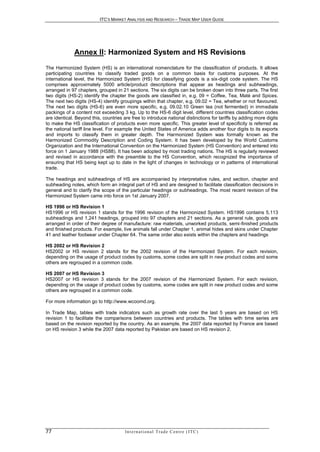
Trade Map is based on the Harmonized System. The Harmonized System is an international nomenclature
for the classification of products published by the World Customs Organization (www.wcoomd.org). It allows
participating countries to classify traded goods on a common basis for customs purposes. At the
international level, the Harmonized System (HS) for classifying goods is a six-digit code system. The HS
comprises approximately 5,300 article/product descriptions that appear as headings and subheadings,
arranged in 99 chapters, grouped in 21 sections. The six digits can be broken down into three parts. The first
two digits (HS-2) identify the chapter the goods are classified in, e.g. 09 = Coffee, Tea, Maté and Spices.
The next two digits (HS-4) identify groupings within that chapter, e.g. 09.02 = Tea, whether or not flavoured.
The next two digits (HS-6) are even more specific, e.g. 09.02.10 Green tea (not fermented)... Up to the HS-6
digit level, all countries classify products in the same way (a few exceptions exist where some countries
apply old versions of the HS).

Beyond the six-digit level, the classification becomes national. Countries are free to introduce national
distinctions for tariffs by adding more digits to make the HS classification of products even more specific.
This greater level of specificity is referred to as the national tariff line level. For example Canada adds


1                                     In t e r n a t i o n a l T r a d e C e n t r e ( I T C )
ITC’S MARKET ANALYSIS AND RESEARCH – TRADE MAP USER GUIDE


another two digits to its exports and imports to classify them in greater depth and the code 09023010 is the
code for black tea, packaged as tea bags.


1.3.2 Sources of information:

Different sources of information are contained in Trade Map. First, Trade Map is based on the world’s largest
database of trade statistics, COMTRADE, maintained by the United Nations Statistics Division (UNSD) -
http://unstats.un.org/unsd/comtrade. COMTRADE covers more than 90% of world trade or around 200
countries. Trade Map is able to present data for an even larger number of countries and territories (around
                                                   1
220) by using both reported and mirror statistics . Data is presented at the 2-, 4- or 6-digit level of the
Harmonized System (HS) on a yearly basis. (See Annex II: Harmonized System and HS Revisions)

Reported data and mirrors statistics
Annual data is available not only for countries that report their own trade data, but also for the over 50
primarily low-income countries that do not report national trade statistics to COMTRADE. The trade of these
countries has been reconstructed on the basis of data reported by partner countries or mirror statistics.
Although using mirror statistics has its shortcomings (see Annex I), it does generate a wealth of information,
which would otherwise be unavailable. This mix of direct and mirror statistics gives the best estimation of the
worldwide market for all products. The user will notice that mirror data are presented in orange colour in
order to be distinguished from direct data.

Most detailed national statistics
The Trade Map database also includes additional data for over 120 countries (mostly OECD) at the 8- and
10-digit level on a annual and monthly or quarterly basis and more than 50 countries on a quarterly or
monthly basis. ITC collects data at the tariff line level directly from the institutions in charge in each country
(national customs authorities, ministries of commerce …etc).

Import tariffs
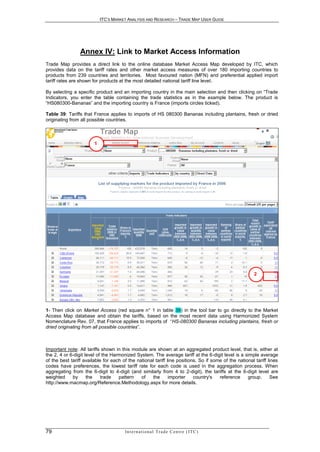
In addition, Trade Map contains tariff information expressed as Ad Valorem Equivalents applied by over 180
countries. These data are directly retrieved from the Market Access Map database. By clicking on the value
corresponding the Tariff AVE, you will be automatically linked to ITC’s online tool Market Access Map,
(www.macmap.org), containing information on market access measures, trade agreements and rules of
origin.


1.3.3 Data availability in Trade Map

You can check the countries for which Trade Map presents reported or mirror data by clicking on “Data
availability” - http://www.trademap.org/stDataAvailability.aspx. This annex will also indicate how current the
data is.


1.4 - Access to the tool
Thanks to financial contributions from the World Bank and ITC’s Global Trust Fund, ITC has been able to
provide free access to its market analysis tools Trade Map, Market Access Map, Product Map and
Investment Map to users in developing countries in 2008 and 2009.This free access may be extended
beyond December 2009.

ITC is delighted to be able to respond to the growing demand for online access to its trade intelligence tools.
                                                                            2
Users in developing countries and economies in transition , can register to ITC’s market analysis online tools
through a common registration portal at http://www.intracen.org/mat/

For users in developed countries, Trade Map is available on a subscription basis. You may want to first
register online for a one-week free trial to familiarise yourself with the tools. Please visit our web page for
more information on subscription options and fees at http://www.intracen.org/mat/OptionsFees.aspx

In the menu item “Reference Material”, the list of Developing and Developed countries is available.


2
    http://www.intracen.org/mat/developing.aspx

                                          In t e r n a t i o n a l T r a d e C e n t r e ( I T C )              2
ITC’S MARKET ANALYSIS AND RESEARCH – TRADE MAP USER GUIDE


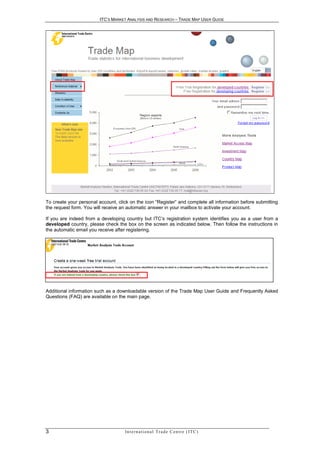
To create your personal account, click on the icon “Register” and complete all information before submitting
the request form. You will receive an automatic answer in your mailbox to activate your account.

If you are indeed from a developing country but ITC’s registration system identifies you as a user from a
developed country, please check the box on the screen as indicated below. Then follow the instructions in
the automatic email you receive after registering.


Additional information such as a downloadable version of the Trade Map User Guide and Frequently Asked
Questions (FAQ) are available on the main page.


3                                   In t e r n a t i o n a l T r a d e C e n t r e ( I T C )
ITC’S MARKET ANALYSIS AND RESEARCH – TRADE MAP USER GUIDE


           CHAPTER 2 – HOW TO USE TRADE MAP

2 . 1 - H ow t o e n t e r t h e d a t a b a s e


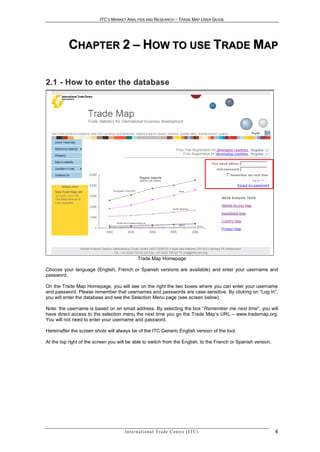
                                               Trade Map Homepage

Choose your language (English, French or Spanish versions are available) and enter your username and
password.

On the Trade Map Homepage, you will see on the right the two boxes where you can enter your username
and password. Please remember that usernames and passwords are case sensitive. By clicking on “Log In”,
you will enter the database and see the Selection Menu page (see screen below).

Note: the username is based on an email address. By selecting the box “Remember me next time”, you will
have direct access to the selection menu the next time you go the Trade Map’s URL – www.trademap.org.
You will not need to enter your username and password.

Hereinafter the screen shots will always be of the ITC Generic English version of the tool.

At the top right of the screen you will be able to switch from the English, to the French or Spanish version.


                                      In t e r n a t i o n a l T r a d e C e n t r e ( I T C )                  4
ITC’S MARKET ANALYSIS AND RESEARCH – TRADE MAP USER GUIDE


2 . 2 - Ma i n Se l e c t i o n Me n u
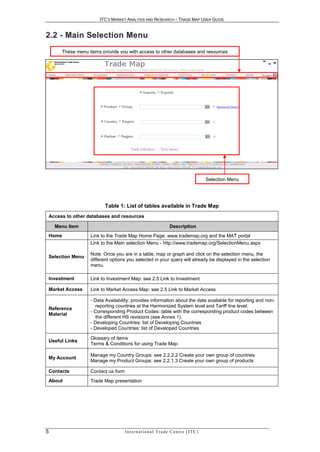
      These menu items provide you with access to other databases and resources


                                                                                               Selection Menu


                         Table 1: List of tables available in Trade Map
 Access to other databases and resources

    Menu Item                                                         Description
 Home             Link to the Trade Map Home Page: www.trademap.org and the MAT portal
                  Link to the Main selection Menu - http://www.trademap.org/SelectionMenu.aspx

                  Note: Once you are in a table, map or graph and click on the selection menu, the
 Selection Menu
                  different options you selected in your query will already be displayed in the selection
                  menu.

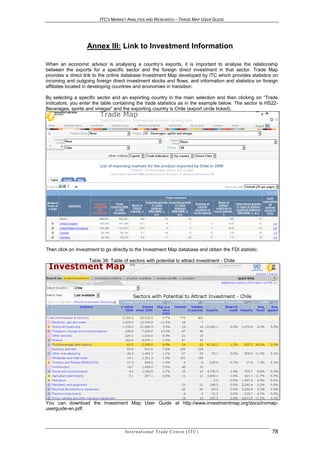
 Investment       Link to Investment Map: see 2.5 Link to Investment

 Market Access    Link to Market Access Map: see 2.5 Link to Market Access

                  - Data Availability: provides information about the data available for reporting and non-
                    reporting countries at the Harmonized System level and Tariff line level.
 Reference
                  - Corresponding Product Codes: table with the corresponding product codes between
 Material
                    the different HS revisions (see Annex 1).
                  - Developing Countries: list of Developing Countries
                  - Developed Countries: list of Developed Countries

                  Glossary of items
 Useful Links
                  Terms & Conditions for using Trade Map

                  Manage my Country Groups: see 2.2.2.2 Create your own group of countries
 My Account
                  Manage my Product Groups: see 2.2.1.3 Create your own group of products

 Contacts         Contact us form
 About            Trade Map presentation


5                                   In t e r n a t i o n a l T r a d e C e n t r e ( I T C )
ITC’S MARKET ANALYSIS AND RESEARCH – TRADE MAP USER GUIDE


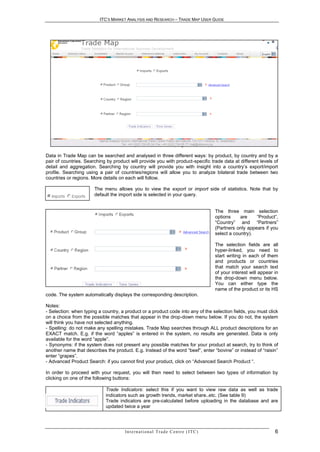
                                Trade Map Selection Menu (English version)

Data in Trade Map can be searched and analysed in three different ways: by product, by country and by a
pair of countries. Searching by product will provide you with product-specific trade data at different levels of
detail and aggregation. Searching by country will provide you with insight into a country’s export/import
profile. Searching using a pair of countries/regions will allow you to analyze bilateral trade between two
countries or regions. More details on each will follow.

                       The menu allows you to view the export or import side of statistics. Note that by
                       default the import side is selected in your query.


                                                                                                 The three main selection
                                                                                                 options     are    “Product”,
                                                                                                 “Country” and “Partners”
                                                                                                 (Partners only appears if you
                                                                                                 select a country).

                                                                                                 The selection fields are all
                                                                                                 hyper-linked, you need to
                                                                                                 start writing in each of them
                                                                                                 and products or countries
                                                                                                 that match your search text
                                                                                                 of your interest will appear in
                                                                                                 the drop-down menu below.
                                                                                                 You can either type the
                                                                                                 name of the product or its HS
code. The system automatically displays the corresponding description.

Notes:
- Selection: when typing a country, a product or a product code into any of the selection fields, you must click
on a choice from the possible matches that appear in the drop-down menu below. If you do not, the system
will think you have not selected anything.
- Spelling: do not make any spelling mistakes. Trade Map searches through ALL product descriptions for an
EXACT match. E.g. if the word “apples” is entered in the system, no results are generated. Data is only
available for the word “apple”.
- Synonyms: if the system does not present any possible matches for your product at search, try to think of
another name that describes the product. E.g. Instead of the word “beef”, enter “bovine” or instead of “raisin”
enter “grapes”.
- Advanced Product Search: if you cannot find your product, click on “Advanced Search Product “.

In order to proceed with your request, you will then need to select between two types of information by
clicking on one of the following buttons:

                            Trade Indicators: select this if you want to view raw data as well as trade
                            indicators such as growth trends, market share..etc. (See table 9)
                            Trade indicators are pre-calculated before uploading in the database and are
                            updated twice a year


                                      In t e r n a t i o n a l T r a d e C e n t r e ( I T C )                                6
ITC’S MARKET ANALYSIS AND RESEARCH – TRADE MAP USER GUIDE


                              Times Series: select if you want to view data over several years or several
                              quarters or several months (See table 11)
                              When you switch from value to different indicators, all the calculations on the
                              times series are done online and every week new data are uploaded in the
                              database.


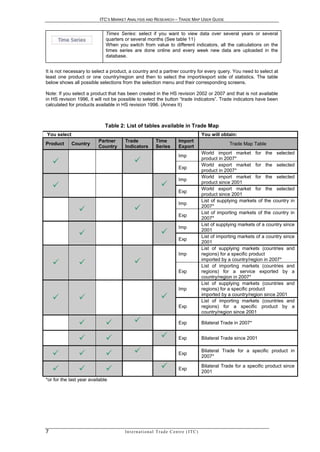
It is not necessary to select a product, a country and a partner country for every query. You need to select at
least one product or one country/region and then to select the import/export side of statistics. The table
below shows all possible selections from the selection menu and their corresponding screens.

Note: If you select a product that has been created in the HS revision 2002 or 2007 and that is not available
in HS revision 1996, it will not be possible to select the button “trade indicators”. Trade indicators have been
calculated for products available in HS revision 1996. (Annex II)


                             Table 2: List of tables available in Trade Map
You select                                                                                       You will obtain:
                          Partner     Trade                  Time              Import
Product      Country                                                                                          Trade Map Table
                          Country     Indicators             Series            Export
                                                                                                 World import market for the selected
                                                                               Imp
                                                                                               product in 2007*
                                                                                                 World export market for the selected
                                                                               Exp
                                                                                                 product in 2007*
                                                                                                 World import market for the selected
                                                                               Imp
                                                                                               product since 2001
                                                                                                 World export market for the selected
                                                                               Exp
                                                                                                 product since 2001
                                                                                                 List of supplying markets of the country in
                                                                               Imp
                                                                                               2007*
                                                                                                 List of importing markets of the country in
                                                                               Exp
                                                                                                 2007*
                                                                                                 List of supplying markets of a country since
                                                                               Imp
                                                                                               2001
                                                                                                 List of importing markets of a country since
                                                                               Exp
                                                                                                 2001
                                                                                                 List of supplying markets (countries and
                                                                               Imp               regions) for a specific product

                                                                                              imported by a country/region in 2007*
                                                                                                 List of importing markets (countries and
                                                                               Exp               regions) for a service exported by a
                                                                                                 country/region in 2007*
                                                                                                 List of supplying markets (countries and
                                                                               Imp               regions) for a specific product

                                                                                              imported by a country/region since 2001
                                                                                                 List of importing markets (countries and
                                                                               Exp               regions) for a specific product by a
                                                                                                 country/region since 2001

                                                                            Exp               Bilateral Trade in 2007*


                                                                            Exp               Bilateral Trade since 2001


                                                                           Exp
                                                                                                 Bilateral Trade for a specific product in
                                                                                                 2007*

                                                                           Exp
                                                                                                 Bilateral Trade for a specific product since
                                                                                                 2001
*or for the last year available


7                                     In t e r n a t i o n a l T r a d e C e n t r e ( I T C )
ITC’S MARKET ANALYSIS AND RESEARCH – TRADE MAP USER GUIDE


2.2.1 How to select a product or a group of products

2.2.1.1 Select a product or a group of products in the main selection menu

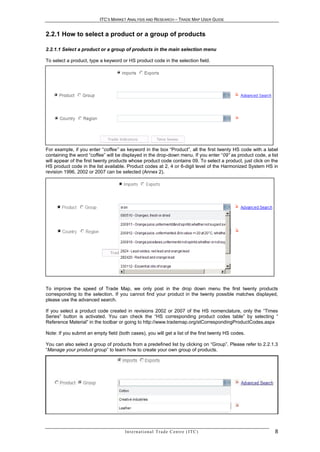
To select a product, type a keyword or HS product code in the selection field.


Select a product

For example, if you enter “coffee” as keyword in the box “Product”, all the first twenty HS code with a label
containing the word “coffee” will be displayed in the drop-down menu. If you enter “09” as product code, a list
will appear of the first twenty products whose product code contains 09. To select a product, just click on the
HS product code in the list available. Product codes at 2, 4 or 6-digit level of the Harmonized System HS in
revision 1996, 2002 or 2007 can be selected (Annex 2).


To improve the speed of Trade Map, we only post in the drop down menu the first twenty products
corresponding to the selection. If you cannot find your product in the twenty possible matches displayed,
please use the advanced search.

If you select a product code created in revisions 2002 or 2007 of the HS nomenclature, only the “Times
Series” button is activated. You can check the “HS corresponding product codes table” by selecting “
Reference Material” in the toolbar or going to http://www.trademap.org/stCorrespondingProductCodes.aspx

Note: If you submit an empty field (both cases), you will get a list of the first twenty HS codes.

You can also select a group of products from a predefined list by clicking on “Group”. Please refer to 2.2.1.3
“Manage your product group” to learn how to create your own group of products.


                                       In t e r n a t i o n a l T r a d e C e n t r e ( I T C )              8
ITC’S MARKET ANALYSIS AND RESEARCH – TRADE MAP USER GUIDE


2.2.1.2 Advanced Product Search

Search by Keywords
The Advanced Product Search by keyword helps you to look for the corresponding HS code of the product
using one or several keywords in the HS product descriptions at 2, 4 and6 digit level of the Harmonized
system and at the tariff line level. The main advantages of this “Advanced Product Search” are:
        This search engine can look for the product either written in singular or plural, and recognizes the
         similarities between words (example: freeze-frozen)
        Several keywords can be given for a specific product.
        You will be presented with all the possible codes (HS or tariff line level) of varieties/species for the
         same product, related products and product derivatives. There is no limitation to the first twenty
         products.
Product labels are longer than on the Main Selection Menu.


                              Table 3: Advanced Product Search options
                                                                                                  You select:
                                                                                                   At the       At the
                                                                                                   2, 4, 6      tariff
Cases                                 Solution                                                                           Country
                                                                                                    digit        line
                                                                                                   levels       level
Find the HS code of my                Use different keywords
product                                                                                              
Find the HS code at the tariff        Use different keywords
line level for all countries                                                                                     
Find the HS code at the tariff
line level for a country                                                                                                  
I cannot find the HS code of          By looking at the tariff line level,
my product at the 2,4,or 6            you might be able to identify the
digit HS level.                       first HS 6-digit of your product                                           
                                      See example 1
Find a product          and     its   See example 2
derivatives                                                                                          
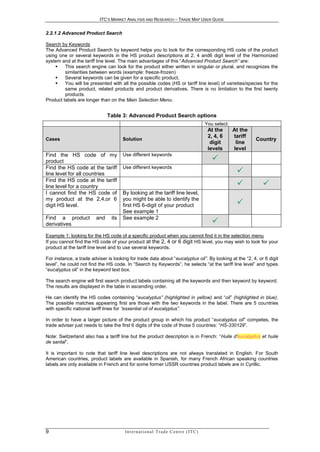
Example 1: looking for the HS code of a specific product when you cannot find it in the selection menu
If you cannot find the HS code of your product at the 2, 4 or 6 digit HS level, you may wish to look for your
product at the tariff line level and to use several keywords.

For instance, a trade adviser is looking for trade data about “eucalyptus oil”. By looking at the “2, 4, or 6 digit
level”, he could not find the HS code. In “Search by Keywords”, he selects “at the tariff line level” and types
“eucalyptus oil” in the keyword text box.

The search engine will first search product labels containing all the keywords and then keyword by keyword.
The results are displayed in the table in ascending order.

He can identify the HS codes containing “eucalyptus” (highlighted in yellow) and “oil” (highlighted in blue).
The possible matches appearing first are those with the two keywords in the label. There are 5 countries
with specific national tariff lines for “essential oil of eucalyptus”.

In order to have a larger picture of the product group in which his product “eucalyptus oil” competes, the
trade adviser just needs to take the first 6 digits of the code of those 5 countries: “HS-330129”.

Note: Switzerland also has a tariff line but the product description is in French: “Huile d'eucalyptus et huile
de santal”.

It is important to note that tariff line level descriptions are not always translated in English. For South
American countries, product labels are available in Spanish, for many French African speaking countries
labels are only available in French and for some former USSR countries product labels are in Cyrillic.


9                                      In t e r n a t i o n a l T r a d e C e n t r e ( I T C )
ITC’S MARKET ANALYSIS AND RESEARCH – TRADE MAP USER GUIDE


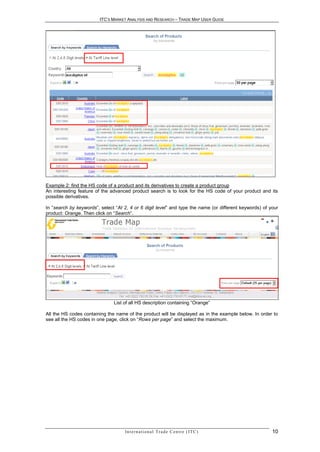
Example 2: find the HS code of a product and its derivatives to create a product group
An interesting feature of the advanced product search is to look for the HS code of your product and its
possible derivatives.

In “search by keywords”, select “At 2, 4 or 6 digit level” and type the name (or different keywords) of your
product: Orange. Then click on “Search”.


                               List of all HS description containing “Orange”

All the HS codes containing the name of the product will be displayed as in the example below. In order to
see all the HS codes in one page, click on “Rows per page” and select the maximum.


                                    In t e r n a t i o n a l T r a d e C e n t r e ( I T C )             10
ITC’S MARKET ANALYSIS AND RESEARCH – TRADE MAP USER GUIDE


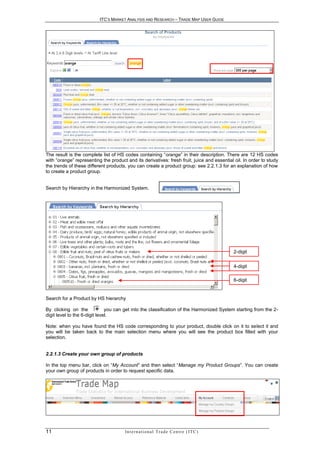
The result is the complete list of HS codes containing “orange” in their description. There are 12 HS codes
with “orange” representing the product and its derivatives: fresh fruit, juice and essential oil. In order to study
the trends of these different products, you can create a product group: see 2.2.1.3 for an explanation of how
to create a product group.


Search by Hierarchy in the Harmonized System.


                                                                                                  2-digit


                                                                                                  4-digit

                                                                                                  6-digit


Search for a Product by HS hierarchy

By clicking on the             you can get into the classification of the Harmonized System starting from the 2-
digit level to the 6-digit level.

Note: when you have found the HS code corresponding to your product, double click on it to select it and
you will be taken back to the main selection menu where you will see the product box filled with your
selection.


2.2.1.3 Create your own group of products

In the top menu bar, click on “My Account” and then select “Manage my Product Groups”. You can create
your own group of products in order to request specific data.


11                                     In t e r n a t i o n a l T r a d e C e n t r e ( I T C )
ITC’S MARKET ANALYSIS AND RESEARCH – TRADE MAP USER GUIDE


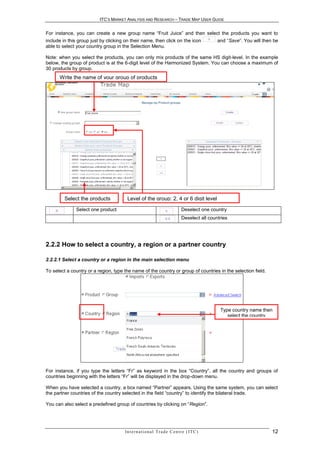
For instance, you can create a new group name “Fruit Juice” and then select the products you want to
include in this group just by clicking on their name, then click on the icon                      and “Save”. You will then be
able to select your country group in the Selection Menu.

Note: when you select the products, you can only mix products of the same HS digit-level. In the example
below, the group of product is at the 6-digit level of the Harmonized System. You can choose a maximum of
30 products by group.
      Write the name of your group of products


         Select the products           Level of the group: 2, 4 or 6 digit level

              Select one product                                                 Deselect one country
                                                                                 Deselect all countries


2.2.2 How to select a country, a region or a partner country

2.2.2.1 Select a country or a region in the main selection menu

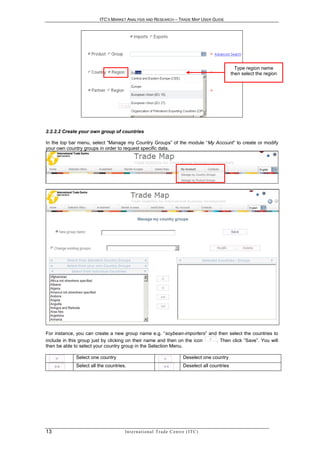
To select a country or a region, type the name of the country or group of countries in the selection field.


                                                                                                   Type country name then
                                                                                                      select the country


For instance, if you type the letters “Fr” as keyword in the box “Country”, all the country and groups of
countries beginning with the letters “Fr” will be displayed in the drop-down menu.

When you have selected a country, a box named “Partner” appears. Using the same system, you can select
the partner countries of the country selected in the field “country” to identify the bilateral trade.

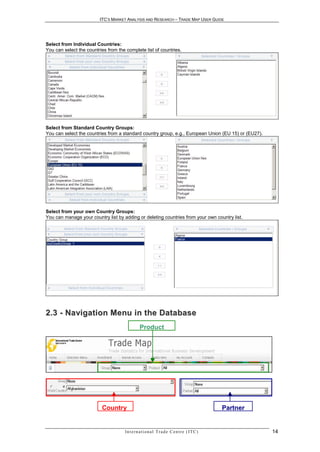
You can also select a predefined group of countries by clicking on “Region”.


                                      In t e r n a t i o n a l T r a d e C e n t r e ( I T C )                             12
ITC’S MARKET ANALYSIS AND RESEARCH – TRADE MAP USER GUIDE


                                                                                                            Type region name
                                                                                                          then select the region


2.2.2.2 Create your own group of countries

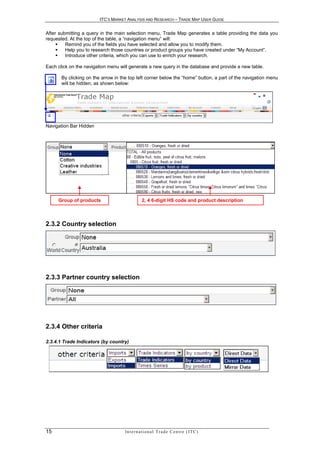
In the top bar menu, select “Manage my Country Groups” of the module “My Account” to create or modify
your own country groups in order to request specific data.


For instance, you can create a new group name e.g. “soybean-importers” and then select the countries to
include in this group just by clicking on their name and then on the icon . Then click “Save”. You will
then be able to select your country group in the Selection Menu.

             Select one country                                                  Deselect one country
             Select all the countries.                                           Deselect all countries


13                                   In t e r n a t i o n a l T r a d e C e n t r e ( I T C )
ITC’S MARKET ANALYSIS AND RESEARCH – TRADE MAP USER GUIDE


Select from Individual Countries:
You can select the countries from the complete list of countries.


Select from Standard Country Groups:
You can select the countries from a standard country group, e.g., European Union (EU 15) or (EU27).


Select from your own Country Groups:
You can manage your country list by adding or deleting countries from your own country list.


2 . 3 - N a vi g a t i o n M e n u i n t h e D a t a b a s e
                                                Product


                          Country                                                               Partner


                                     In t e r n a t i o n a l T r a d e C e n t r e ( I T C )             14
ITC’S MARKET ANALYSIS AND RESEARCH – TRADE MAP USER GUIDE


After submitting a query in the main selection menu, Trade Map generates a table providing the data you
requested. At the top of the table, a “navigation menu” will:
        Remind you of the fields you have selected and allow you to modify them.
        Help you to research those countries or product groups you have created under “My Account”.
        Introduce other criteria, which you can use to enrich your research.

Each click on the navigation menu will generate a new query in the database and provide a new table.

       By clicking on the arrow in the top left corner below the “home” button, a part of the navigation menu
       will be hidden, as shown below:


Navigation Bar Hidden


2.3.1 Product selection:


     Group of products                          2, 4 6-digit HS code and product description


2.3.2 Country selection


2.3.3 Partner country selection


2.3.4 Other criteria

2.3.4.1 Trade Indicators (by country)


15                                  In t e r n a t i o n a l T r a d e C e n t r e ( I T C )
ITC’S MARKET ANALYSIS AND RESEARCH – TRADE MAP USER GUIDE


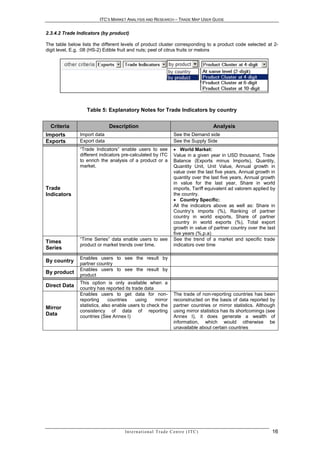
2.3.4.2 Trade Indicators (by product)

The table below lists the different levels of product cluster corresponding to a product code selected at 2-
digit level, E.g. :08 (HS-2) Edible fruit and nuts; peel of citrus fruits or melons


                   Table 5: Explanatory Notes for Trade Indicators by country


  Criteria                   Description                                                       Analysis
Imports        Import data                                               See the Demand side
Exports        Export data                                               See the Supply Side
               “Trade Indicators” enable users to see                     World Market:
               different indicators pre-calculated by ITC                Value in a given year in USD thousand, Trade
               to enrich the analysis of a product or a                  Balance (Exports minus Imports), Quantity,
               market.                                                   Quantity Unit, Unit Value, Annual growth in
                                                                         value over the last five years, Annual growth in
                                                                         quantity over the last five years, Annual growth
                                                                         in value for the last year, Share in world
Trade                                                                    imports, Tariff equivalent ad valorem applied by
Indicators                                                               the country.
                                                                          Country Specific:
                                                                         All the indicators above as well as: Share in
                                                                         Country’s imports (%), Ranking of partner
                                                                         country in world exports, Share of partner
                                                                         country in world exports (%), Total export
                                                                         growth in value of partner country over the last
                                                                         five years (%,p.a)
               “Time Series” data enable users to see                    See the trend of a market and specific trade
Times
               product or market trends over time.                       indicators over time
Series
               Enables users to see the result by
By country
               partner country
               Enables users to see the result by
By product
               product
               This option is only available when a
Direct Data
               country has reported its trade data
               Enables users to get data for non-                        The trade of non-reporting countries has been
               reporting      countries   using    mirror                reconstructed on the basis of data reported by
               statistics, also enable users to check the                partner countries or mirror statistics. Although
Mirror
               consistency of data of reporting                          using mirror statistics has its shortcomings (see
Data           countries (See Annex I)                                   Annex I), it does generate a wealth of
                                                                         information, which would otherwise be
                                                                         unavailable about certain countries


                                    In t e r n a t i o n a l T r a d e C e n t r e ( I T C )                            16
ITC’S MARKET ANALYSIS AND RESEARCH – TRADE MAP USER GUIDE


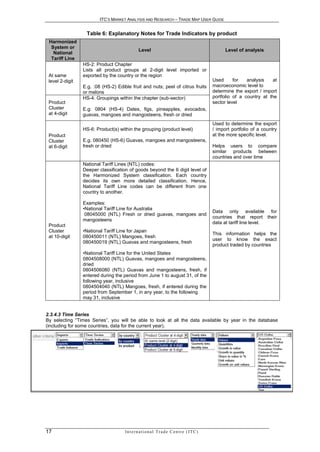
                  Table 6: Explanatory Notes for Trade Indicators by product
 Harmonized
  System or
                                               Level                                                  Level of analysis
   National
  Tariff Line
                 HS-2: Product Chapter
                 Lists all product groups at 2-digit level imported or
 At same         exported by the country or the region
 level 2-digit                                                                                  Used      for   analysis    at
                 E.g. :08 (HS-2) Edible fruit and nuts; peel of citrus fruits                   macroeconomic level to
                 or melons                                                                      determine the export / import
                 HS-4: Groupings within the chapter (sub-sector)                                portfolio of a country at the
 Product                                                                                        sector level
 Cluster         E.g: 0804 (HS-4) Dates, figs, pineapples, avocados,
 at 4-digit      guavas, mangoes and mangosteens, fresh or dried
                                                                                                Used to determine the export
                 HS-6: Product(s) within the grouping (product level)                           / import portfolio of a country
 Product                                                                                        at the more specific level.
 Cluster         E.g. 080450 (HS-6) Guavas, mangoes and mangosteens,
 at 6-digit      fresh or dried                                                                 Helps users to compare
                                                                                                similar products between
                                                                                                countries and over time
                 National Tariff Lines (NTL) codes:
                 Deeper classification of goods beyond the 6 digit level of
                 the Harmonized System classification. Each country
                 decides its own more detailed classification. Hence,
                 National Tariff Line codes can be different from one
                 country to another.

                 Examples:
                 •National Tariff Line for Australia
                                                                                                Data only available for
                  08045000 (NTL) Fresh or dried guavas, mangoes and
                                                                                                countries that report their
                 mangosteens
                                                                                                data at tariff line level.
 Product
 Cluster         •National Tariff Line for Japan
                                                                                                This information helps the
 at 10-digit     080450011 (NTL) Mangoes, fresh
                                                                                                user to know the exact
                 080450019 (NTL) Guavas and mangosteens, fresh
                                                                                                product traded by countries
                 •National Tariff Line for the United States
                 0804508000 (NTL) Guavas, mangoes and mangosteens,
                 dried
                 0804506080 (NTL) Guavas and mangosteens, fresh, if
                 entered during the period from June 1 to august 31, of the
                 following year, inclusive
                 0804504040 (NTL) Mangoes, fresh, if entered during the
                 period from September 1, in any year, to the following
                 may 31, inclusive


2.3.4.3 Time Series
By selecting “Times Series”, you will be able to look at all the data available by year in the database
(including for some countries, data for the current year).


17                                   In t e r n a t i o n a l T r a d e C e n t r e ( I T C )
ITC’S MARKET ANALYSIS AND RESEARCH – TRADE MAP USER GUIDE


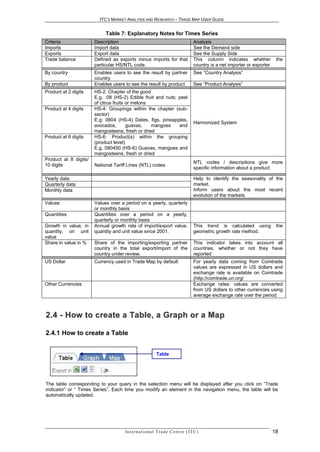
                            Table 7: Explanatory Notes for Times Series
Criteria               Description                                                       Analysis
Imports                Import data                                                       See the Demand side
Exports                Export data                                                       See the Supply Side
Trade balance          Defined as exports minus imports for that                         This column indicates whether            the
                       particular HS/NTL code.                                           country is a net importer or exporter
By country             Enables users to see the result by partner                        See “Country Analysis”
                       country
By product             Enables users to see the result by product                        See “Product Analysis”
Product at 2 digits    HS-2: Chapter of the good
                       E.g. :08 (HS-2) Edible fruit and nuts; peel
                       of citrus fruits or melons
Product at 4 digits    HS-4: Groupings within the chapter (sub-
                       sector)
                       E.g: 0804 (HS-4) Dates, figs, pineapples,
                                                                                         Harmonized System
                       avocados,        guavas,   mangoes     and
                       mangosteens, fresh or dried
Product at 6 digits    HS-6: Product(s) within the grouping
                       (product level)
                       E.g. 080450 (HS-6) Guavas, mangoes and
                       mangosteens, fresh or dried
Product at 8 digits/
                                                                                         NTL codes / descriptions give more
10 digits              National Tariff Lines (NTL) codes
                                                                                         specific information about a product

Yearly data                                                                              Help to identify the seasonality of the
Quarterly data                                                                           market.
Monthly data                                                                             Inform users about the most recent
                                                                                         evolution of the markets
Values                 Values over a period on a yearly, quarterly
                       or monthly basis
Quantities             Quantities over a period on a yearly,
                       quarterly or monthly basis
Growth in value, in    Annual growth rate of import/export value,                        This trend is calculated using           the
quantity, on unit      quantity and unit value since 2001.                               geometric growth rate method.
value
Share in value in %    Share of the importing/exporting partner                          This indicator takes into account all
                       country in the total export/import of the                         countries, whether or not they have
                       country under review.                                             reported
US Dollar              Currency used in Trade Map by default                             For yearly data coming from Comtrade
                                                                                         values are expressed in US dollars and
                                                                                         exchange rate is available on Comtrade
                                                                                         (http://comtrade.un.org/
Other Currencies                                                                         Exchange rates: values are converted
                                                                                         from US dollars to other currencies using
                                                                                         average exchange rate over the period


2 . 4 - H ow t o c r e a t e a Ta b l e , a G r a p h o r a M a p

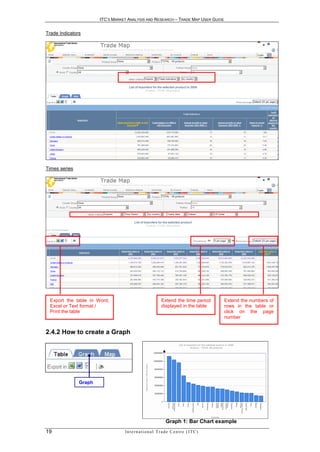
2.4.1 How to create a Table


                                                            Table


The table corresponding to your query in the selection menu will be displayed after you click on “Trade
indicator” or “ Times Series”. Each time you modify an element in the navigation menu, the table will be
automatically updated.


                                     In t e r n a t i o n a l T r a d e C e n t r e ( I T C )                                    18
ITC’S MARKET ANALYSIS AND RESEARCH – TRADE MAP USER GUIDE


Trade Indicators


Times series


 Export the table in Word,                                   Extend the time period          Extend the numbers of
 Excel or Text format /                                      displayed in the table          rows in the table or
 Print the table                                                                             click on the page
                                                                                             number


2.4.2 How to create a Graph


               Graph


                                                                 Graph 1: Bar Chart example
19                                In t e r n a t i o n a l T r a d e C e n t r e ( I T C )
ITC’S MARKET ANALYSIS AND RESEARCH – TRADE MAP USER GUIDE


                                             When “Graph“ and “Map” are in grey, it means that it is not possible to
                                            create a Graph or Map from the corresponding table.

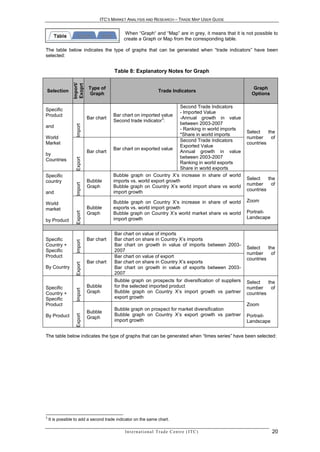
The table below indicates the type of graphs that can be generated when “trade indicators” have been
selected:


                                        Table 8: Explanatory Notes for Graph
                 Import/
                 Exoprt
                            Type of                                                                        Graph
Selection                                                             Trade Indicators
                            Graph                                                                         Options

                                                                       Second Trade Indicators
Specific
                                                                       - Imported Value
Product                                 Bar chart on imported value
                            Bar chart                         3        -Annual growth in value
                                        Second trade indicator :
                                                                       between 2003-2007
                   Import


and
                                                                       - Ranking in world imports
                                                                                                        Select    the
                                                                       *Share in world imports
World                                                                                                   number      of
                                                                       Second Trade Indicators
Market                                                                                                  countries
                                                                       Exported Value
                                        Bar chart on exported value
                            Bar chart                                  Annual growth in value
by
                                                                       between 2003-2007
                   Export


Countries
                                                                       Ranking in world exports
                                                                       Share in world exports
Specific                                Bubble graph on Country X’s increase in share of world
                            Bubble      imports vs. world export growth                                 Select    the
country
                   Import


                            Graph       Bubble graph on Country X’s world import share vs world         number      of
                                        import growth                                                   countries
and

                                        Bubble graph on Country X’s increase in share of world          Zoom
World
market                      Bubble      exports vs. world import growth
                                        Bubble graph on Country X’s world market share vs world         Portrait-
                   Export


                            Graph
                                        import growth                                                   Landscape
by Product

                                        Bar chart on value of imports
Specific                    Bar chart   Bar chart on share in Country X’s imports
                   Import


Country +                               Bar chart on growth in value of imports between 2003-
                                                                                                        Select    the
Specific                                2007
                                                                                                        number      of
Product                                 Bar chart on value of export
                                                                                                        countries
                            Bar chart   Bar chart on share in Country X’s exports
                   Export


By Country                              Bar chart on growth in value of exports between 2003-
                                        2007
                                        Bubble graph on prospects for diversification of suppliers      Select    the
Specific                    Bubble      for the selected imported product                               number      of
                   Import


Country +                   Graph       Bubble graph on Country X’s import growth vs partner            countries
Specific                                export growth
Product                                                                                                 Zoom
                                        Bubble graph on prospect for market diversification
                            Bubble
                                        Bubble graph on Country X’s export growth vs partner
                   Export


By Product                  Graph                                                                       Portrait-
                                        import growth                                                   Landscape


The table below indicates the type of graphs that can be generated when “times series” have been selected:


3
    It is possible to add a second trade indicator on the same chart.

                                             In t e r n a t i o n a l T r a d e C e n t r e ( I T C )               20
ITC’S MARKET ANALYSIS AND RESEARCH – TRADE MAP USER GUIDE


              Import/
              Export
                           Type of
Selection                                                         Times Series                                  Graph Options
                           Graph


               Import
                        Bar chart       Bar chart on imported value
Specific                Or Curve        Curve on imported value
                                                                                                              Select the number
Country +
                                                                                                              of countries
Specific
               Export
                        Bar chart or    Bar chart on exported value
Product                 Curve           Curve on exported value                                               Select the years
By
              Balance

                        Bar chart or    Bar chart on balance in value                                         Graph options
Country
              Trade


                        Curve           Curve on balance in value


Graph Options:
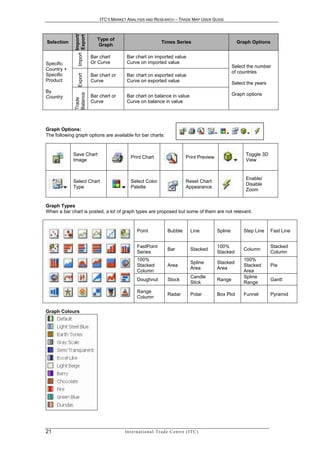
The following graph options are available for bar charts:


             Save Chart                                                                                             Toggle 3D
                                           Print Chart                               Print Preview
             Image                                                                                                  View


                                                                                                                    Enable/
             Select Chart                  Select Color                              Reset Chart
                                                                                                                    Disable
             Type                          Palette                                   Appearance
                                                                                                                    Zoom


Graph Types
When a bar chart is posted, a lot of graph types are proposed but some of them are not relevant.


                                                Point                  Bubble            Line        Spline        Step Line     Fast Line


                                                FastPoint                                            100%                        Stacked
                                                                       Bar               Stacked                   Column
                                                Series                                               Stacked                     Column
                                                100%                                                               100%
                                                                                         Spline      Stacked
                                                Stacked                Area                                        Stacked       Pie
                                                                                         Area        Area
                                                Column                                                             Area
                                                                                         Candle                    Spline
                                                Doughnut               Stock                         Range                       Gantt
                                                                                         Stick                     Range
                                                Range
                                                                       Radar             Polar       Box Plot      Funnel        Pyramid
                                                Column

Graph Colours


21                                     In t e r n a t i o n a l T r a d e C e n t r e ( I T C )
ITC’S MARKET ANALYSIS AND RESEARCH – TRADE MAP USER GUIDE


2.4.3 How to create a Map


                                                        Map


                                                When “ Map “ is in grey, it means that it is not possible to
                                                generate a Map

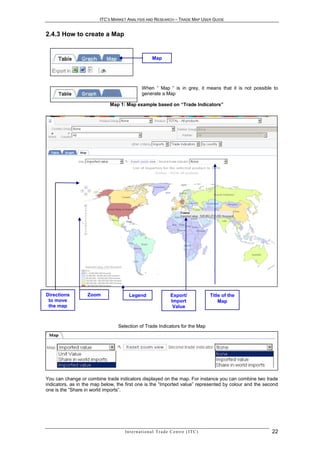
                             Map 1: Map example based on “Trade Indicators”


Directions         Zoom                Legend                         Export/                  Title of the
 to move                                                              Import                       Map
 the map                                                               Value


                                 Selection of Trade Indicators for the Map


You can change or combine trade indicators displayed on the map. For instance you can combine two trade
indicators, as in the map below, the first one is the “Imported value” represented by colour and the second
one is the “Share in world imports”.


                                    In t e r n a t i o n a l T r a d e C e n t r e ( I T C )                  22
ITC’S MARKET ANALYSIS AND RESEARCH – TRADE MAP USER GUIDE


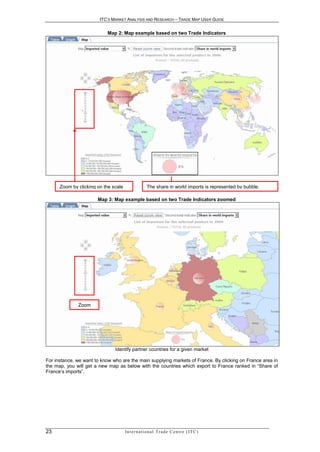
                           Map 2: Map example based on two Trade Indicators


      Zoom by clicking on the scale                   The share in world imports is represented by bubble.

                       Map 3: Map example based on two Trade Indicators zoomed


              Zoom


                               Identify partner countries for a given market

For instance, we want to know who are the main supplying markets of France. By clicking on France area in
the map, you will get a new map as below with the countries which export to France ranked in “Share of
France‘s imports”.


23                                    In t e r n a t i o n a l T r a d e C e n t r e ( I T C )
ITC’S MARKET ANALYSIS AND RESEARCH – TRADE MAP USER GUIDE


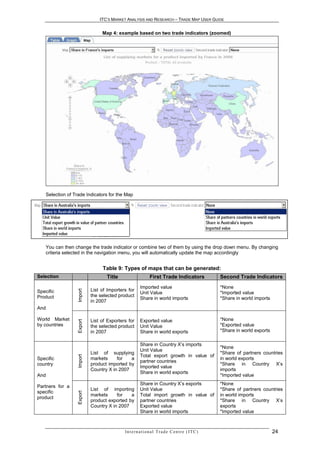
                                 Map 4: example based on two trade indicators (zoomed)


    Selection of Trade Indicators for the Map


    You can then change the trade indicator or combine two of them by using the drop down menu. By changing
    criteria selected in the navigation menu, you will automatically update the map accordingly


                                 Table 9: Types of maps that can be generated:
Selection                          Title                      First Trade Indicators                   Second Trade Indicators
                                                       Imported value                                  *None
                            List of Importers for
                   Import


Specific                                               Unit Value                                      *Imported value
Product                     the selected product
                                                       Share in world imports                          *Share in world imports
                            in 2007
And

World Market                List of Exporters for      Exported value                                  *None
                   Export


by countries                the selected product       Unit Value                                      *Exported value
                            in 2007                    Share in world exports                          *Share in world exports

                                                       Share in Country X’s imports
                                                                                                       *None
                                                       Unit Value
                            List of supplying                                                          *Share of partners countries
                                                       Total export growth in value of
                   Import


Specific                    markets     for   a                                                        in world exports
                                                       partner countries
country                     product imported by                                                        *Share in Country X’s
                                                       Imported value
                            Country X in 2007                                                          imports
                                                       Share in world exports
And                                                                                                    *Imported value
                                                       Share in Country X’s exports                    *None
Partners for a
                            List of importing          Unit Value                                      *Share of partners countries
specific
                   Export


                            markets     for   a        Total import growth in value of                 in world imports
product
                            product exported by        partner countries                               *Share in Country X’s
                            Country X in 2007          Exported value                                  exports
                                                       Share in world imports                          *Imported value


                                            In t e r n a t i o n a l T r a d e C e n t r e ( I T C )                             24
ITC’S MARKET ANALYSIS AND RESEARCH – TRADE MAP USER GUIDE


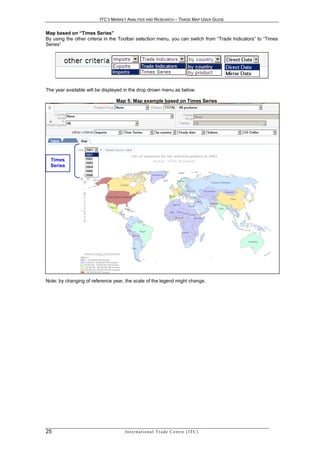
Map based on “Times Series”
By using the other criteria in the Toolbar selection menu, you can switch from “Trade Indicators” to “Times
Series”


The year available will be displayed in the drop drown menu as below.

                                Map 5: Map example based on Times Series


  Times
  Series


Note: by changing of reference year, the scale of the legend might change.


25                                  In t e r n a t i o n a l T r a d e C e n t r e ( I T C )
ITC’S MARKET ANALYSIS AND RESEARCH – TRADE MAP USER GUIDE


             CHAPTER 3 – PRODUCT ANALYSIS:
       IDENTIFYING NEW EXPORT MARKETS FOR
                            YOUR PRODUCT

Trade Map data can be looked at from three perspectives: product, country and bilaterally for any two
countries. Focussing on a product allows users to analyse export markets and potential suppliers for this
product and identify the structure of those markets including recent trends in supply and demand,
opportunities to diversify into alternative markets or away from traditional sources of supply. This section
describes product analysis in terms of answering a series of specific questions from the perspective of Trade
Support Institutions (TSIs) and Exporters.

Typical question could be:
- What are the major importing countries for a product?
- What are the trends?
- Which countries are the major competitors in a specific market?
- What are the tariff measures applied in a potential new market?


                  AN E X P O R T E R O F AV O C AD O S F R O M P E R U I S
                                 L O O K I N G F O R N E W M AR K E T S


This section will deal with analysing trade data for a particular product using the example of an exporter of
avocados from Peru wishing to identify new potential markets.

Several initial steps are involved in identifying which market(s) may offer opportunities in terms of export
development. In terms of analysing the trade data, the exporter wishes first to review Peru’s exports to
identify current trading partners, how they rank as world importers and what are the general trends of those
markets. He/she may then want to gauge the performance of Peruvian exports at the international level. As
a next step, he/she might wish to identify the world’s leading importing countries for Avocados to select a
shortlist of markets to concentrate his/her effort. Finally, once the exporter has identified those potential
target countries, he/she should find out which countries currently supply those markets, his/her own
country’s performance and if it has any comparative advantage in terms of tariffs it faces versus its
competitors.


3.3 - Review current situation of the countr y’s ex ports
As a first step, the Peruvian exporter of Avocados could use Trade Map to see which countries currently
import Avocados from Peru. In order to do so, in the selection, the exporter should start entering “Avocado”
                                                                                        4
as key word and a list of product descriptions containing the word “avocado” will appear .

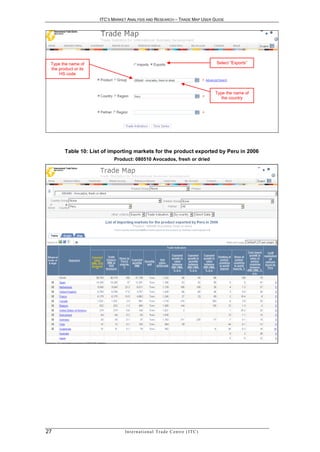
Then the exporter chooses “080510-Avocados, Fresh or Dried” (screen below) as the product under review
and types “Peru” in the country box. Once the application produces the options, in this case only the country
name “Peru”, he/she should then click on it to select it. In order to see the importing countries of avocados
from Peru, he/she selects “Exports”, and clicks on “Trade Indicators”. The full list of importing countries for
this product is generated (Table 10).


4
    If none of the products satisfies the request, click on “Advanced Search” (see 2.2.1 Advanced Selection Menu)

                                           In t e r n a t i o n a l T r a d e C e n t r e ( I T C )                 26
ITC’S MARKET ANALYSIS AND RESEARCH – TRADE MAP USER GUIDE


 Type the name of                                                                           Select “Exports”
 the product or its
     HS code


                                                                                            Type the name of
                                                                                               the country


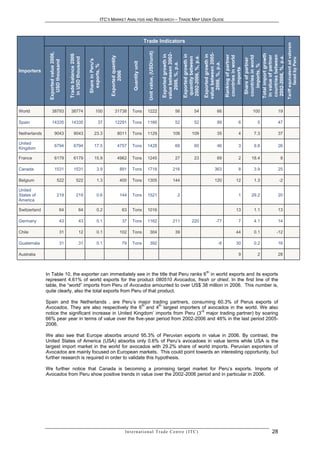
        Table 10: List of importing markets for the product exported by Peru in 2006
                            Product: 080510 Avocados, fresh or dried


27                               In t e r n a t i o n a l T r a d e C e n t r e ( I T C )
ITC’S MARKET ANALYSIS AND RESEARCH – TRADE MAP USER GUIDE


                                                                                                                          Trade Indicators


                                                                                                                                                                                                                                                                  Tariff equivalent ad valorem
                                                                                                                            Unit value, (USD/unit)
                Exported value 2006,


                                                                                                                                                     value between 2002-


                                                                                                                                                                                                value between 2005-


                                                                                                                                                                                                                                           Total import growth
                                       Trade balance 2006


                                                                                                                                                     Exported growth in


                                                                                                                                                                           Exported growth in


                                                                                                                                                                                                Exported growth in


                                                                                                                                                                                                                      Ranking of partner


                                                                                                                                                                                                                                            countries between
                                                                                                                                                                                                                                            in value of partner
                                                                                                                                                                                                                      countries in world


                                                                                                                                                                                                                                            countries in world
                                                                                                                                                                           2002-2006, %, p.a.


                                                                                                                                                                                                                                            2002-2006, %, p.a.
                                                                               Exported quantity


                                                                                                                                                                            quantity between
                                        in USD thousand


                                                                                                                                                                                                                                                                          faced by Peru
                                                                                                                                                                                                                                             Share of partner
                                                            Share in Peru's
                   USD thousand


                                                                                                          Quantity unit


                                                                                                                                                         2006, %, p.a.


                                                                                                                                                                                                    2006, %, p.a.


                                                                                                                                                                                                                                                imports, %
                                                              exports, %


                                                                                                                                                                                                                           imports
Importers


                                                                                     2006
World              38793                38774                       100             31738                Tons              1222                                    56                  54                      66                              100         19

Spain              14335                14335                          37           12291                Tons              1166                                    52                  52                      89                   6            5         47

Netherlands             9043                9043                  23.3                  8011             Tons              1129                                  108                109                        35                   4          7.3         37

United
                        6794                6794                  17.5                  4757             Tons              1428                                    66                  60                      46                   3          9.8         26
Kingdom

France                  6179                6179                  15.9                  4962             Tons              1245                                    27                  23                      69                   2         18.4           8

Canada                  1531                1531                     3.9                    891          Tons              1718                                  216                                        363                     8          3.9         25

Belgium                     522                 522                  1.3                    400          Tons              1305                                  144                                        120                   12           1.3           -2

United
States of                   219                 219                  0.6                    144          Tons              1521                                       2                                                             1         29.2         20
America

Switzerland                      64                  64              0.2                           63    Tons              1016                                                                                                   13           1.1         13

Germany                          43                  43              0.1                           37    Tons              1162                                  211                220                      -77                    7          4.1         14

Chile                            31                  12              0.1                    102          Tons                  304                                 39                                                             44           0.1         -12

Guatemala                        31                  31              0.1                           79    Tons                  392                                                                              -6                30           0.2         16

Australia                                                                                                                                                                                                                           9            2         28


                                                                                                                                                                                                  th
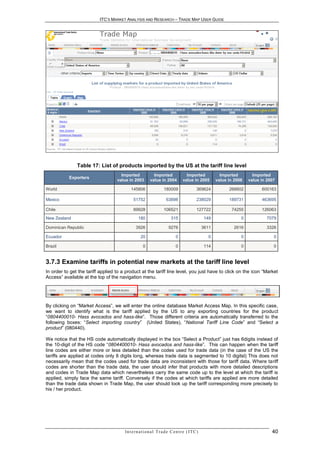
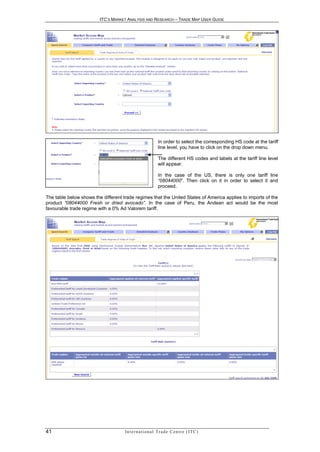
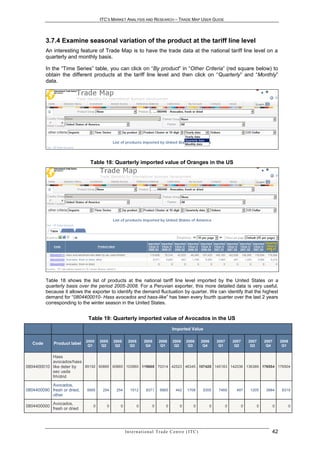
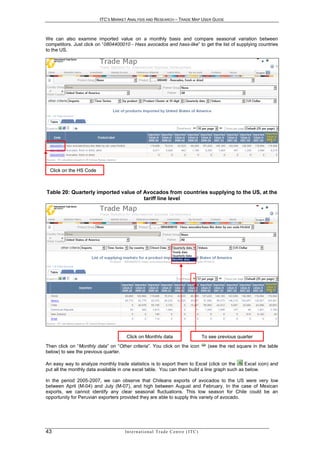
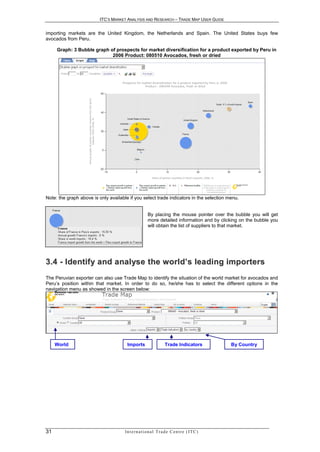
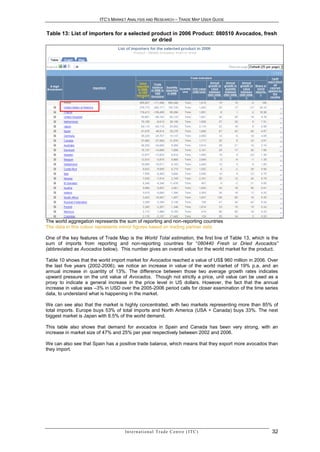
              In Table 10, the exporter can immediately see in the title that Peru ranks 6 in world exports and its exports
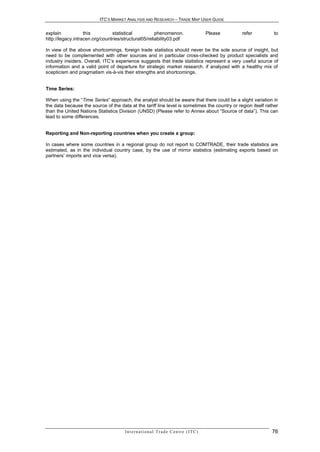
              represent 4.61% of world exports for the product 080510 Avocados, fresh or dried. In the first line of the
              table, the “world” imports from Peru of Avocados amounted to over US$ 38 million in 2006. This number is,
              quite clearly, also the total exports from Peru of that product.

              Spain and the Netherlands , are Peru’s major trading partners, consuming 60.3% of Perus exports of
                                                           th      th
              Avocados. They are also respectively the 6 and 4 largest importers of avocados in the world. We also
                                                                                     rd
              notice the significant increase in United Kingdom’ imports from Peru (3 major trading partner) by soaring
              66% pear year in terms of value over the five-year period from 2002-2006 and 46% in the last period 2005-
              2006.

              We also see that Europe absorbs around 95.3% of Peruvian exports in value in 2006. By contrast, the
              United States of America (USA) absorbs only 0.6% of Peru’s avocadoes in value terms while USA is the
              largest import market in the world for avocados with 29.2% share of world imports. Peruvian exporters of
              Avocados are mainly focused on European markets. This could point towards an interesting opportunity, but
              further research is required in order to validate this hypothesis.

              We further notice that Canada is becoming a promising target market for Peru’s exports. Imports of
              Avocados from Peru show positive trends in value over the 2002-2006 period and in particular in 2006.


                                                                                                    In t e r n a t i o n a l T r a d e C e n t r e ( I T C )                                                                                            28
ITC’S MARKET ANALYSIS AND RESEARCH – TRADE MAP USER GUIDE


                               Table 11: Explanatory Notes for Table 10
    Title of the column                                             Definition
Exported value 2006, USD        Value imported (exported) in 2006 in current US$ thousand as reported by
thousand                        countries to the COMTRADE database or as calculated with mirror statistics.
Trade balance 2006 in USD       Exports minus imports for that particular HS/NTL code. This column
thousand                        indicates whether the country is a net importer or exporter.
Share in Peru's exports, %      Share of partner countries in the exports of the country under review
                                Quantity exported in 2006. Where mirror statistics are used, quantity may
Exported quantity 2006
                                differ across reporting countries.
Quantity unit                   The unit in which quantities are reported.
                                Value in USD divided per quantity. This indicator can be used as a proxy for
                                price.
Unit value, (USD/unit)
                                Does not take into account issues such as differences in product qualities,
                                seasonal prices, currency fluctuations etc..
                                Annual growth rate of export value over the 5-year period. This indicator is
                                calculated using the least squares method. If a country does not report trade
Exported growth in value
                                data in any of the years being examined, the calculation is based on mirror
between 2002-2006, %, p.a.
                                statistics. No trend is calculated in cases where the reporting country data is
                                not available for at least a four-year period.
                                Annual growth rate of exports in quantity over the 5-year period. This
Exported      growth in         indicator is calculated using the least squares method. If a country does not
quantity between 2002-          report trade data in any of the years being examined, the calculation is
2006, %, p.a.                   based on mirror statistics. No trend is calculated in cases where the
                                reporting country data is not available for at least a four-year period.
                                This growth rate is a good complement to the 5-year trend, indicating
Exported growth in value        whether growth trends have been stable or volatile over the 5 years and
between 2005-2006, %, p.a.      showing the country performance over the most recent 12 month period
                                available.
Ranking      of     partner     This indicates the world ranking of the partner country as an importer in
countries in world imports      2006.
Share of partner countries      This indicates what percentage of world imports the partner country
in world imports, %             accounts for
                                This indicates how much the partner country’s imports from the world have
Total import growth in          grown for the selected product. This indicator is calculated on data as
value of partner countries      reported by the importing country. This, combined with the indicator on
between 2002-2006, %, p.a.      export growth calculated above, allows the analyst to see how the market
                                share of the country under review has changed.
                                The effective level of protection faced by the exporter. By clicking on the link,
                                the user can also see the tariffs applied by the partner to competing
Tariff   equivalent       ad    countries.
valorem faced by         the    This data is extracted from ITC’s Market Access Map                         tool,
exporting country               www.macmap.org
                                An exporter can use this module to scan the world for the best market
                                access conditions offered to him/her by all possible importing countries.

Using “Times Series” in the navigation bar, we can see in the table below that Peru has constantly increased
the quantity it exports to European countries and had a 12 fold increase in the value of its exports of
avocados over the period 2001-2006.


29                                   In t e r n a t i o n a l T r a d e C e n t r e ( I T C )
ITC’S MARKET ANALYSIS AND RESEARCH – TRADE MAP USER GUIDE


               Table 12: List of importing markets for a product exported by Peru
                           Product: 080440 Avocados, fresh or dried


Graph approach:
By clicking on the “Graph”, you can obtain the figures in bar chart that can help you refine the analysis (see
2.8 Graph)

          Graph 2: Bar Chart on Exported Value. List of importing markets for a product
                                       exported by Peru
                                  Product: 080440 Avocados, fresh or dried


By clicking on the box on the upper left-hand side, you can select different kinds of graph. For instance the
“Bubble graph for prospect market diversification”.

The graph below shows that the Peru’s exports of avocados are not geographically diversified, as there are
few importing countries. Spain represents almost 40% and three other countries represent more than 15%.
The size of the bubble indicates the size of the markets. We can also notice that Peru is winning market
share in it’s largest importing partners, which also present high growth rate-. The most salient of these


                                     In t e r n a t i o n a l T r a d e C e n t r e ( I T C )              30
ITC’S MARKET ANALYSIS AND RESEARCH – TRADE MAP USER GUIDE


importing markets are the United Kingdom, the Netherlands and Spain. The United States buys few
avocados from Peru.

     Graph: 3 Bubble graph of prospects for market diversification for a product exported by Peru in
                            2006 Product: 080510 Avocados, fresh or dried


Note: the graph above is only available if you select trade indicators in the selection menu.


                                                       By placing the mouse pointer over the bubble you will get
                                                       more detailed information and by clicking on the bubble you
                                                       will obtain the list of suppliers to that market.


3.4 - Identif y and anal yse the world’s leading importers
The Peruvian exporter can also use Trade Map to identify the situation of the world market for avocados and
Peru’s position within that market. In order to do so, he/she has to select the different options in the
navigation menu as showed in the screen below:


     World                             Imports                      Trade Indicators             By Country


31                                    In t e r n a t i o n a l T r a d e C e n t r e ( I T C )
ITC’S MARKET ANALYSIS AND RESEARCH – TRADE MAP USER GUIDE


Table 13: List of importers for a selected product in 2006 Product: 080510 Avocados, fresh
                                           or dried


The world aggregation represents the sum of reporting and non-reporting countries
The data in this colour represents mirror figures based on trading partner data

One of the key features of Trade Map is the World Total estimation, the first line of Table 13, which is the
sum of imports from reporting and non-reporting countries for “080440 Fresh or Dried Avocados”
(abbreviated as Avocados below). This number gives an overall value for the world market for the product.

Table 10 shows that the world import market for Avocados reached a value of US$ 960 million in 2006. Over
the last five years (2002-2006), we notice an increase in value of the world market of 19% p.a. and an
annual increase in quantity of 13%. The difference between those two average growth rates indicates
upward pressure on the unit value of Avocados. Though not strictly a price, unit value can be used as a
proxy to indicate a general increase in the price level in US dollars. However, the fact that the annual
increase in value was –3% in USD over the 2005-2006 period calls for closer examination of the time series
data, to understand what is happening in the market.

We can see also that the market is highly concentrated, with two markets representing more than 85% of
total imports. Europe buys 53% of total imports and North America (USA + Canada) buys 33%. The next
biggest market is Japan with 6.5% of the world demand.

This table also shows that demand for avocados in Spain and Canada has been very strong, with an
increase in market size of 47% and 25% per year respectively between 2002 and 2006.

We can also see that Spain has a positive trade balance, which means that they export more avocados than
they import.


                                    In t e r n a t i o n a l T r a d e C e n t r e ( I T C )             32
ITC’S MARKET ANALYSIS AND RESEARCH – TRADE MAP USER GUIDE


3.5 - Anal yze the performance of competing suppliers
After identifying which are the most interesting potential markets, the next logical step for the exporter is to
gather more information on those countries that supply Avocados to these potential markets. As an exporter
from Peru, you may want to identify the main competitors you’ll face when entering the potential target
markets.

You can obtain the list of supplying markets of an importing country by clicking on the country name
highlighted in blue in the list of importers for the selected product.

For instance, the United States could be a market worth examining as it had an annual growth in value
between 2002 and 2006 of 20% but contracted in value over the 2005-2006 period by 27% (i.e. growth was
–27%). Click on “United States” in the table below in order to see which are the countries supplying
avocados to the US.

                                                                   Trade Indicators

                                                                                           Annual       Annual      Annual
                 Value     Trade
                                                                              Unit        growth in    growth in   growth in Share in
 Importers     imported balance in      Quantity
                                                           Quantity          value          value       quantity     value    world
              in 2006, in 2006 in       imported
                                                            Unit             (USD/        between      between     between imports,
                 USD        USD          in 2006
                                                                              unit)         2002-        2002-       2005-     %
               thousand thousand
                                                                                           2006, %      2006, %     2006, %
World            959657      -117496         594266               Tons         1615               19          13          -3     100
United
States of        279772      -262717         192725               Tons         1452               20          17         -27    29.15
America
France           176412      -139499           95286              Tons         1851               8            1          4     18.38
United
                  93861       -89162           60123              Tons         1561               26          25         18      9.78
Kingdom
Netherlands       70185        -8613           38190              Tons         1838               37          28          9      7.31

Japan             63116       -63116           29032              Tons         2174               22          18          5      6.58

Spain             47675        48814           28275              Tons         1686               47          42         68      4.97
Germany           39229       -29707           19137              Tons         2050               14           4         18      4.09
Canada            37560       -37560           21876              Tons         1717               25           9         23      3.91

Australia         26332       -24060            9359              Tons         2814               28          21         10      2.74

Denmark           15137       -14680            7006              Tons         2161               29          17         24      1.58
Sweden            12977       -12822            6516              Tons         1992               15           9         -23     1.35

Belgium           12010        -3875            5860              Tons         2049               -2          -9          -1     1.25

Switzerland       10090       -10071            4102              Tons         2460               13           3          6      1.05


The table also shows that this country is already importing from Peru, Chile and Dominican Republic, which
could make it easier for newcomers from these countries to enter the market. Once the Peruvian exporter
knows that neighbouring countries are competitors, he/she could research what advantages those
competitors may have, e.g. logistics, distribution channels, trade agreements, political ties, etc.


33                                     In t e r n a t i o n a l T r a d e C e n t r e ( I T C )
ITC’S MARKET ANALYSIS AND RESEARCH – TRADE MAP USER GUIDE


    Table 14: List of supplying markets for the product imported by United States in 2006
                          Product: 080510 Avocados, fresh or dried


                                                                                                                                     Trade Indicators


                                                                                                                                                                                                     Tariff equivalent ad valorem
                                                           Share in USAs imports,


                                                                                                                                                                   quantity between 2002-
                                                                                       Imported quantity 2006


                                                                                                                                                                                                            applied by USA
                                                                                                                                                                   Total export growth in
                                   Trade balance 2006 in


                                                                                                                                          Unit value, (USD/unit)
            Imported value 2006,


                                                                                                                                                                    value between 2002-


                                                                                                                                                                    value between 2005-
                                                                                                                                                                     Imported growth in


                                                                                                                                                                     Imported growth in


                                                                                                                                                                     Imported growth in


                                                                                                                                                                     Ranking of partner


                                                                                                                                                                     countries between
                                                                                                                                                                      countries in world


                                                                                                                                                                      countries in world


                                                                                                                                                                      2002-2006, %, p.a.
                                                                                                                                                                       Share of partner


                                                                                                                                                                       value of partner
               USD thousand


                                      USD thousand


                                                                                                                     Quantity unit


                                                                                                                                                                        2006, %, p.a.


                                                                                                                                                                        2006, %, p.a.


                                                                                                                                                                        2006, %, p.a.


                                                                                                                                                                         exports, %


Exporters
                                                                                                                                                                           exports
                                                                     %


World       279772 -262717                                     100                  192725                           Tons               1452                        20   17   -27        100    20

Mexico      189839 -188549 67.9                                                     108975                           Tons               1742                        57   51   -20   1    39.1   34                            0
Chile        74490                 -74389 26.6                                        71340                          Tons               1044                        -5   1    -42   3    11.4   8                 7.7

Dominican    15418                 -15418                        5.5                  12398                          Tons               1244                         7   1    -21   12     2    8                             0
Republic
Peru                        24                  -24                       0                                     12   Tons               2000                                        6     4.6   56                            0

France                                                                                                                                                                              7      4    9                 8.4

Israel                                                                                                                                                                              5      4    5                             0
Kenya                                                                                                                                                                               9      2    9                             0

New                                                                                                                                                                                 8      3    25                8.4
Zealand
South                                                                                                                                                                               10     2    5                             0
Africa
Canada                             10926                                                                                                                                                                                      0


                                                                                    In t e r n a t i o n a l T r a d e C e n t r e ( I T C )                                                                34
ITC’S MARKET ANALYSIS AND RESEARCH – TRADE MAP USER GUIDE


In this case, Mexico, Chile and Dominican Republic are the only suppliers of the US market. Mexico is the
main supplier and accounts for 67.93% of the US imports of Avocado. Chile has a 26.6% share in US
imports of Avocado and is located as far away from the market as Peru.

However Chilean exports of avocados to the US showed declining growth rates over the 5 year period with a
5% reduction in value over the period (2001-2006) and –42% over the last year (2005-2006). It could be
interesting to analyze why the US, which is the largest importer of avocados has only three suppliers. This
could also mean that there is an export potential for a new trading partner.

By clicking on Graph, then choosing “Curve on imported value”, we can see that Mexico is the only exporting
country that significantly increased its exports between 2001 and 2007.

                     Graph 4: List of supplying markets for a product imported by the USA


                                                                                                         Mexico


                                                                                                 Chile

                                                                                                         Dominican
                                                                                                          Republic


3 . 6 - Ex a m i ne t a r i f f s i n p ot e nt i a l n ew ma r k e t s
Trade Map also contains information on Ad Valorem Equivalent (AVE) tariffs applied by the country under
review (last column on the right in the table above). These data are extracted from ITC’s Market Access Map
tool (www.macmap.org).

This information allows the analyst to gauge market access conditions for any potential market and also to
compare the market access conditions faced by Peru relative to its competitors.

Definition of Ad Valorem Equivalent (AVE) tariff:
Import tariffs can take a variety of forms- Most often they are expressed in ad valorem terms, i.e. a
percentage of the value of the product however often they are expressed in specific terms e.g. $2 per kg or
4,000 Yen per pair of shoes or $0.88/kg on the sugar content of a product. This can make it difficult to
compare tariffs. Hence, it is necessary to convert all tariffs to a comparable base – i.e. express the effect of
the tariff as a percentage of the unit value of the product

More specifically:

        An “Ad Valorem” (AV) tariff is a tariff levied on the unit value of the product, and it is expressed as a
         percentage of that value. For example, a tariff of 15% will levy a duty of 15 percent of the value of
         the merchandise.
        Specific tariffs are tariffs levied on the volume or the number of units of the product, and are
         expressed as a monetary amount per unit of the import e.g. $3 per kg. Compound tariffs are a
         combination of ad valorem and specific rates, such as 14% plus $3 per kg.

All of these tariffs are converted to Ad-Valorem Equivalents, AVEs, using a standard methodology refined by
ITC. It is therefore possible to calculate an AVE tariff at 2, 4 and 6-digits. (To read a more detailed
explanation      of    how    AVE      tariffs are   calculated   in    Market   Access    Map     go    to
http://www.macmap.org/Reference.Methodology.aspx)

AVEs presented in Trade Map are available at either the 2-digit, 4-digit or 6-digit level of the Harmonized
System (HS). Tariffs at the national tariff line are also available in Trade Map but you first need to select an


35                                    In t e r n a t i o n a l T r a d e C e n t r e ( I T C )
ITC’S MARKET ANALYSIS AND RESEARCH – TRADE MAP USER GUIDE


importing country product at the tariff line level and then click on the Market Access tab available on the top
of the navigation menu. (see Annex IV)

Tariff information at the 6-digit level allows the user to get a quick overview of the average level of protection
applied to a group of products in order to quickly screen and rank markets.

According to the last column on table 14, the Peruvian exporter faces an AVE of 0% on Avocados (HS
080440), the same as Mexico and the Dominican Republic, but much lower than that faced by Chile, which
is 8.4%.

To further screen the market the exporter would need to examine other market access measures possibly
applied by US to Peruvian avocados such as sanitary and phytosanitary measures This information is not
yet available in our databases but links to web sites offering information about non-tariff measures are
available in the Useful Links section of Market Access Map at http://www.macmap.org/Useful.Links.aspx.

In the table above, by clicking on the value highlighted in blue “0” corresponding to Peru in the column “Tariff
equivalent ad valorem applied by USA”, we can find all the tariffs that importing countries apply to the
product “HS 080440- Avocados” originating from Peru. (See table 15)


                                                                                                 Ad valorem equivalent


                                      In t e r n a t i o n a l T r a d e C e n t r e ( I T C )                           36
ITC’S MARKET ANALYSIS AND RESEARCH – TRADE MAP USER GUIDE


Table 15: Tariffs that different importing countries apply to the product (080440) Avocados,
                              fresh or dried originating from Peru.


Compare Tariffs with Market Access Map:
The second module of Market Access Map, Compare Tariffs has been designed to assist exporters,
importers and trade support institutions. An exporter can use this module to scan the world for the best
market access conditions offered to him/her by all possible importing countries. An importer can use the
module to get a birds’ eye view of what tariff rates his/her country applies to all possible exporting countries
in order to minimize tariffs on imported materials. A trade support institution (TSI) can use the Compare
Tariffs module to identify products and markets that offer good prospects for trade promotion.

It is important to note that the tariffs presented in the Compare Tariffs module are shown at either the 2-digit,
4-digit or 6-digit level of the Harmonized System (HS). They are not shown at the most detailed product
level, the national tariff line, given this level does not allow for international comparison.

In order to get more detailed information on tariffs in the selected country at the tariff line level, the exporter
has to select the tab “Quick Search” in Market Access Map to find out about the type of regime, certification
and rules of origin.

We invite you to read the first two chapters of the Market Access Map User Guide in order to navigate the
tool easily.


3 . 7 - I n ve s t i g a t e p o t e n t i a l m a r k e t s a t t h e N a t i o n a l Ta r i f f L i n e
L e ve l 5

3.7.1 Identify product differentiation at the tariff line level

Trade Map also allows the user to analyze the HS-6 information at the more detailed “national tariff line
      6
level” . The Tariff line level refers to more detailed classification codes that each country uses to classify
traded products for the purpose of levying duties and otherwise to more precisely identify products. It usually


5
  The trade data at the tariff line level appears through the “Times Series” approach. If you click on “+”in Trade Indicators,
you get data at the tariff line level.
6
  Sometimes the source of data published at tariff line level and source of data provided by UNSD at 6-digit level is not the
same (see Annex 1)

37                                         In t e r n a t i o n a l T r a d e C e n t r e ( I T C )
ITC’S MARKET ANALYSIS AND RESEARCH – TRADE MAP USER GUIDE


is a further break down of the product group covered at the HS 6 level. (Check online for the reporting and
non-reporting countries at http://www.trademap.org/stDataAvailability.aspx)

For instance, the HS 6 digit code “080440-Avocados, fresh or dried” includes different types of avocados in
the same group. There are three US’ national tariff line codes that fit within this 6-digit clusterthat distinguish
between different varieties. For example, “Hass” avocado is medium-sized fruit, weighing 200-300 g. The
skin turns a dark, purplish-black when ripe, while the skin of "green" cultivars remains green. Note that the
third code finishes with 00 and contains no trade data in the past 5 years.

-0804400010 “Hass avocados and avocados determined by the secretary of USDA to be hass-like”
-0804400090 “Avocados, fresh or dried, other”
-0804400000 “Avocados, fresh or dried”

This information allows the user to refine his research and target specific products.

There are different ways to access data at the tariff line level. You can use either the “Advanced Search” for
a product” (see 2.2.1.2 Advanced Product Search) or the Navigation Menu as in the example below. First,
you have to click on the drop down menu (red square). If different specific tariff line code appears, it means
that trade data at tariff line level is available for the country under review.


                     6-digit level


              USA National Tariff level


Then you click on “By product” in “Other Criteria” (red square below) to obtain the different products at the
tariff line level.


                                       In t e r n a t i o n a l T r a d e C e n t r e ( I T C )                 38
ITC’S MARKET ANALYSIS AND RESEARCH – TRADE MAP USER GUIDE


For some countries this information is also available on a quarterly or monthly basis. Click on “Yearly Data”
to reveal the drop-down menu showing also options to get “Quarterly” and “Monthly” data (red square
above).


                      Table 16: Annual imported value of Avocados in the US

                                                Imported              Imported                                Imported    Imported
                                                                                          Imported Value
                                                 Value in              Value in                                Value in    Value in
                                                                                            in 2005,US
     Code           Product label                2003,US               2004,US                                 2006,US     2007,US
                                                                                               Dollar
                                                  Dollar                Dollar                                  Dollar      Dollar
                                                                                             thousand
                                                thousand              thousand                                thousand    thousand

             Hass avocados/hass-like
0804400010                                           145806                  180009                  369624      266602       600163
             deter by sec usda frh/drid

             Avocados, fresh or dried,
0804400090                                             10926                    8828                 16132        13170        13154
             other

0804400000   Avocados, fresh or dried                         0                       0                  0            0               0


For a Peruvian exporter, this more detailed data is very useful, because it allows the exporter to focus on the
specific variety of avocados that the US imports. Here, we can see that imports of the variety of avocado
“Hass” have increased between 2003 and 2007, albeit with a decrease in 2006.

You may also want to click on “Other Criteria”, to obtain the data in terms of Values, Quantities, Growth in
value, Growth in quantity, Share in value in %, Unit Value and Growth on unit value.


3.7.2 Investigate competing suppliers to a potential market at the tariff line
level.

As we did before to find out who were the suppliers of avocados in the United States (4.3 – Analyze the
performance of competitors), by clicking on the product “0804400010- Hass avocados and hass-like” we can
see who are the main competitors for the supply of this particular variety of avocados to the US market.

We can see that Peru doesn’t export this variety of avocado to the US market. Most of the trading partners
of the US have constantly increased their exports of “0804400010- Hass avocados and hass-like” between
2003 and 2007.


39                                        In t e r n a t i o n a l T r a d e C e n t r e ( I T C )
ITC’S MARKET ANALYSIS AND RESEARCH – TRADE MAP USER GUIDE


               Table 17: List of products imported by the US at the tariff line level
                                     Imported               Imported                 Imported              Imported        Imported
           Exporters
                                   value in 2003          value in 2004            value in 2005         value in 2006   value in 2007

World                                      145806                   180009                   369624            266602          600163

Mexico                                       51752                    63898                  238029            189731          463695

Chile                                        89928                  106521                   127722             74255          126063
New Zealand                                      180                      315                     149                0           7079

Dominican Republic                             3926                     9276                      3611           2616            3326

Ecuador                                           20                         0                      0                0               0

Brazil                                              0                        0                    114                0               0


3.7.3 Examine tariffs in potential new markets at the tariff line level
In order to get the tariff applied to a product at the tariff line level, you just have to click on the icon “Market
Access” available at the top of the navigation menu.


By clicking on “Market Access”, we will enter the online database Market Access Map. In this specific case,
we want to identify what is the tariff applied by the US to any exporting countries for the product
“0804400010- Hass avocados and hass-like”. Those different criteria are automatically transferred to the
following boxes: “Select importing country” (United States), “National Tariff Line Code” and “Select a
product” (080440).

We notice that the HS code automatically displayed in the box “Select a Product” just has 6digits instead of
the 10-digit of the HS code “0804400010- Hass avocados and hass-like”. This can happen when the tariff
line codes are either more or less detailed than the codes used for trade data (in the case of the US the
tariffs are applied at codes only 8 digits long, whereas trade data is segmented to 10 digitsl) This does not
necessarily mean that the codes used for trade data are inconsistent with those for tariff data. Where tariff
codes are shorter than the trade data, the user should infer that products with more detailed descriptions
and codes in Trade Map data which nevertheless carry the same code up to the level at which the tariff is
applied, simply face the same tariff. Conversely if the codes at which tariffs are applied are more detailed
than the trade data shown in Trade Map, the user should look up the tariff corresponding more precisely to
his / her product.


                                       In t e r n a t i o n a l T r a d e C e n t r e ( I T C )                                     40
ITC’S MARKET ANALYSIS AND RESEARCH – TRADE MAP USER GUIDE


                                                              In order to select the corresponding HS code at the tariff
                                                              line level, you have to click on the drop down menu.

                                                              The different HS codes and labels at the tariff line level
                                                              will appear.

                                                              In the case of the US, there is only one tariff line
                                                              “08044000”. Then click on it in order to select it and
                                                              proceed.

The table below shows the different trade regimes that the United States of America applies to imports of the
product “08044000 Fresh or dried avocado”. In the case of Peru, the Andean act would be the most
favourable trade regime with a 0% Ad Valorem tariff.


41                                   In t e r n a t i o n a l T r a d e C e n t r e ( I T C )
ITC’S MARKET ANALYSIS AND RESEARCH – TRADE MAP USER GUIDE


          3.7.4 Examine seasonal variation of the product at the tariff line level
          An interesting feature of Trade Map is to have the trade data at the national tariff line level on a
          quarterly and monthly basis.

          In the “Time Series” table, you can click on “By product” in “Other Criteria” (red square below) to
          obtain the different products at the tariff line level and then click on “Quarterly” and “Monthly”
          data.


                                Table 18: Quarterly imported value of Oranges in the US


          Table 18 shows the list of products at the national tariff line level imported by the United States on a
          quarterly basis over the period 2005-2008. For a Peruvian exporter, this more detailed data is very useful,
          because it allows the exporter to identify the demand fluctuation by quarter. We can identify that the highest
          demand for “0804400010- Hass avocados and hass-like” has been every fourth quarter over the last 2 years
          corresponding to the winter season in the United States.


                               Table 19: Quarterly imported value of Avocados in the US
                                                                                       Imported Value

                              2005   2005   2005     2005        2005       2006       2006      2006         2006       2007       2007       2007       2007       2008
   Code      Product label     Q1     Q2     Q2       Q3          Q4         Q1         Q2        Q3           Q4         Q1         Q2         Q3         Q4         Q1


           Hass
           avocados/hass
0804400010 like deter by 85192 60865 60865 103960 119608 70314 42523 46345 107420 145183 142036 136389 176554 176504
           sec usda
           frh/drid
           Avocados,
0804400090 fresh or dried,    5995    254    254      1512         8371      5665        442      1708        5355       7469         497      1205       3984       8319
           other
             Avocados,
0804400000                       0      0      0            0           0         0          0         0             0          0          0          0          0          0
             fresh or dried


                                                   In t e r n a t i o n a l T r a d e C e n t r e ( I T C )                                                  42
ITC’S MARKET ANALYSIS AND RESEARCH – TRADE MAP USER GUIDE


We can also examine imported value on a monthly basis and compare seasonal variation between
competitors. Just click on “0804400010 - Hass avocados and hass-like” to get the list of supplying countries
to the US.


 Click on the HS Code


Table 20: Quarterly imported value of Avocados from countries supplying to the US, at the
                                      tariff line level


                                      Click on Monthly data                                     To see previous quarter
Then click on “Monthly data” on “Other criteria”. You click on the icon                           (see the red square in the table
below) to see the previous quarter.

An easy way to analyze monthly trade statistics is to export them to Excel (click on the      Excel icon) and
put all the monthly data available in one excel table. You can then build a line graph such as below.

In the period 2005-2007, we can observe that Chileans exports of avocados to the US were very low
between April (M-04) and July (M-07), and high between August and February. In the case of Mexican
exports, we cannot identify any clear seasonal fluctuations. This low season for Chile could be an
opportunity for Peruvian exporters provided they are able to supply this variety of avocado.


43                                   In t e r n a t i o n a l T r a d e C e n t r e ( I T C )
ITC’S MARKET ANALYSIS AND RESEARCH – TRADE MAP USER GUIDE


                                            Graph 5: List of supplying markets for a product imported by the US
                                                      List of supplying markets for a product imported by the US

  Imported Value in USD, thousand   60000


                                    50000


                                    40000                                                                                              Mexico

                                                                                                                                       Chile
                                    30000
                                                                                                                                       Dominican
                                                                                                                                       Republic
                                    20000


                                    10000


                                       0
                                            2005-M01
                                            2005-M02
                                            2005-M03
                                            2005-M04
                                            2005-M05
                                            2005-M06
                                            2005-M07
                                            2005-M08
                                            2005-M09
                                            2005-M10
                                            2005-M11
                                            2005-M12
                                            2006-M01
                                            2006-M02
                                            2006-M03
                                            2006-M04
                                            2006-M05
                                            2006-M06
                                            2006-M07
                                            2006-M08
                                            2006-M09
                                            2006-M10
                                            2006-M11
                                            2006-M12
                                            2007-M01
                                            2007-M02
                                            2007-M03
                                            2007-M04
                                            2007-M05
                                            2007-M06
                                            2007-M07
                                            2007-M08
                                            2007-M09
                                            2007-M10
                                            2007-M11
                                            2007-M12
                                            2008-M01
                                            2008-M02
                                            2008-M03
                                                                                  Month


Another interesting indicator to analyse is the unit price. Just click on “Values” and then select “Unit Value”.
In the table below we can compare the unit value of the export product in US dollars per kilo between
competitors on a quarterly basis. It is possible to extend the time period to get all the quarters available in
Trade Map.


                                                                                         Click to extend the period displayed

Then to facilitate the analysis, it is possible export the data to Excel (click on the                                  Excel icon).


                                                             In t e r n a t i o n a l T r a d e C e n t r e ( I T C )                           44
ITC’S MARKET ANALYSIS AND RESEARCH – TRADE MAP USER GUIDE


In the period 2005-2007, we can observe that the unit price of Mexican avocados is at least 50% more
expensive than its competitors. The unit value difference increased in 2007 and was almost the double of its
competitors.
We can also notice that the Mexican unit price is the lowest during the third quarter. Taking into account the
geographic proximity of Mexico, this unit value difference requires a deeper analysis from the Peruvian
exporter.

                                       Graph 6: Unit value per supplying countries for a product imported by the US on a quarterly
                                                                                  basis

                                             Unit value per supplying countries for a product im ported by the US on a quarterly
                                                                                    basis
     Unit Value (US Dollar/Kilogram)


                                        3

                                       2.5

                                        2
                                                                                                                                   Mexico
                                       1.5
                                                                                                                                   Chile
                                        1

                                       0.5

                                        0
                                             2005- 2005- 2005- 2005- 2006- 2006- 2006- 2006- 2007- 2007- 2007- 2007- 2008-
                                              Q1    Q2    Q3    Q4    Q1    Q2    Q3    Q4    Q1    Q2    Q3    Q4    Q1
                                                                                         Quarter


                                       A V I E T N AM E S E E X P O R T E R O F AP P A R E L I S L O O K I N G
                                           TO D IV ER SI FY H IS /H ER E XP O RT S T O A G I VE N
                                                                                   M AR K E T


An entrepreneur based in Vietnam has been exporting apparel to France for the past few years. Wishing to
improve his/her performance, he/she may want to scan the French market to find opportunities for
differentiating his/her production. Trade Map could be used first to monitor the current situation of
Vietnamese exports on the French market compared to its competitors and then to look for similar products
with growing demand in the same export market.


3.8 - Assess the performance of the products currentl y
e x p or t e d t o t he m a r k e t
As a first step in the process of outlining an effective export strategy, the Vietnamese exporter of “HS
620463 -not knitted womens/girls trousers and shorts of synthetic fibres” may need to analyze his/her
current situation in the French market. By selecting the product “HS 620463”, “France” and “Import” on the
Selection Menu, he/she can obtain the table below, which describes the French market for the product under
review.


45                                                                   In t e r n a t i o n a l T r a d e C e n t r e ( I T C )
ITC’S MARKET ANALYSIS AND RESEARCH – TRADE MAP USER GUIDE


  Table 21: List of supplying markets for a product imported by France in 2006
Product: 620463 Womens/girls trousers and shorts, of synthetic fibres, not knitted


                           In t e r n a t i o n a l T r a d e C e n t r e ( I T C )   46
ITC’S MARKET ANALYSIS AND RESEARCH – TRADE MAP USER GUIDE


                                                                                                                            Trade Indicators


                                                                                                                                                                                               Tariff AVE applied by France
                                                                                                                                                          Imported growth in value


                                                                                                                                                          Imported growth in value


                                                                                                                                                           countries between 2002-
                                                                                                                                                            quantity between 2002-
                                                                                  Imported quantity 2006


                                                                                                                                                            between 2002-2006, %,


                                                                                                                                                            between 2005-2006, %,


                                                                                                                                                            Total export growth in
                                     Trade balance 2006 in


                                                                                                                                 Unit value, (USD/unit)
              Imported value 2006,


                                                                                                                                                              Imported growth in


                                                                                                                                                              Ranking of partner
                                                                                                                                                               countries in world


                                                                                                                                                               countries in world
                                                             Share in France's


                                                                                                                                                                Share of partner


                                                                                                                                                                value of partner
                 USD thousand


                                        USD thousand


                                                                                                            Quantity unit


                                                                                                                                                                 2006, %, p.a.


                                                                                                                                                                 2006, %, p.a.
                                                                imports, %


                                                                                                                                                                  exports, %
                                                                                                                                                                    exports
Exporters


                                                                                                                                                                      p.a.


                                                                                                                                                                      p.a.
                                                                                 10,42
World       323,359                  -205,565                     100                                      Tons                 31,033                      3     -3    -3        100     1
                                                                                     0

China        66,597                   -66,576                   20.6 2,146                                 Tons                 31,033                     27    21    -12   1    19.6   14

Morocco      35,044                   -34,809                   10.8 1,129                                 Tons                 31,040                      1    -11    7    14    1.8   -14

Romania      22,548                   -22,520                              7        727                    Tons                 31,015                      7     -3    -7   7     4.2    -1

Tunisia      20,762                   -20,107                       6.4             669                    Tons                 31,034                      -3   -13    5    22    1.3   -14

Viet Nam     19,949                   -19,949                       6.2             643                    Tons                 31,025                     55    60    149   6     4.6   33

Thailand     18,283                   -18,242                       5.7             589                    Tons                 31,041                      -1    -2   24    25     1    13

Bulgaria     15,152                   -14,163                       4.7             488                    Tons                 31,049                      2     -4   14    20    1.4    0

Indonesia    13,188                   -13,188                       4.1             425                    Tons                 31,031                      4     9    13    10    2.6    4

Turkey       12,455                   -12,117                       3.9             401                    Tons                 31,060                      -8   -17   -12   4     4.8    -5

Italy             9,823                        5,586                       3        317                    Tons                 30,987                      0     9    -21   11    2.4    -6

Banglades
                  8,661                    -8,661                   2.7             279                    Tons                 31,043                      0    -11    -2   8     3.3    3
h

Cambodia          7,640                    -7,640                   2.4             246                    Tons                 31,057                      -4    -4   -38   15    1.7   13

Belgium           6,282                  13,875                     1.9             202                    Tons                 31,099                     -10   -10   -35   5     4.7    -8


The table indicates that Vietnam ranks 5th with 6.2% share of the French market, it experiences a positive
trend. Over the last 5 years Vietnamese exports increased in value and in quantity by 55% and 60%
respectively, and in the last year, while the French overall import trend in value decreased by 3%, they
achieved an extremely high growth rate (+149%).

In addition we can also see that Vietnam is faring better than all its competitors. China, the largest exporter
to France for this product is also growing quickly while most competitors are losing market share.


3 . 9 - I d e n t i f y s i m i l a r p r o d u c t s i m p o r t e d b y t h e g i ve n m a r k e t
This favourable situation may lead the Vietnamese exporter to consider increasing sales by expanding the
portfolio of products. To do so, that exporter should examine opportunities for product diversification in order
to benefit from this promising trend for the product under review. He/she needs then to know what
complementary products French imports and among them, what related products are experiencing growth.

By clicking on “By Product” in the “the Other Criteria” bar, he/she can generate the list of potential products
for diversification at the tariff line level for the corresponding 6-digit product. Trade Map will provide the
exporter with a list of all products belonging to the same product cluster imported by France starting with HS
620463. (See table below). The trade data will be displayed for the most recent years available: in this case
they cover the period 2003-2007.


47                                                                        In t e r n a t i o n a l T r a d e C e n t r e ( I T C )
ITC’S MARKET ANALYSIS AND RESEARCH – TRADE MAP USER GUIDE


  Click on “by product” to get the data at the tariff line level


                 Table 22: List of products at 8-digit level imported by France in 2006


                                                                Imported          Imported           Imported    Imported    Imported
                                                                 Value in          Value in           Value in    Value in    Value in
  Code                   Product label                           2003,US           2004,US            2005,US     2006,US     2007,US
                                                                  Dollar            Dollar             Dollar      Dollar      Dollar
                                                                thousand          thousand           thousand    thousand    thousand
         WOMEN''S OR GIRLS'' TROUSERS AND
         BREECHES, OF SYNTHETIC FIBRES (NOT OF
         CUT CORDUROY, OF DENIM OR KNITTED OR
62046318 CROCHETED AND EXCL. INDUSTRIAL AND                         292781             309212          266400      254002      253431
         OCCUPATIONAL CLOTHING, BIB AND BRACE
         OVERALLS, BRIEFS AND TRACKSUIT
         BOTTOMS)

           WOMEN''S OR GIRLS'' SHORTS OF SYNTHETIC
62046390 FIBRES (EXCL. KNITTED OR CROCHETED,                          53769              65306          64169       70842       80033
           PANTIES AND SWIMWEAR)

         WOMEN''S OR GIRLS'' TROUSERS AND
         BREECHES, OF SYNTHETIC FIBRES,
62046311 INDUSTRIAL AND OCCUPATIONAL (EXCL.                             2843              3689           3828        4909        5363
         KNITTED OR CROCHETED AND BIB AND BRACE
         OVERALLS)

           WOMEN''S OR GIRLS'' BIB AND BRACE
           OVERALLS, OF SYNTHETIC FIBRES (EXCL.
62046339 KNITTED OR CROCHETED, OCCUPATIONAL                             1569                848           743         907         652
           AND INDUSTRIAL)

           WOMEN''S OR GIRLS'' BIB AND BRACE
           OVERALLS, OF SYNTHETIC FIBRES,
62046331 INDUSTRIAL AND OCCUPATIONAL (EXCL.                               123                   28          56          39          99
           KNITTED OR CROCHETED)


The exporter may want also to investigate trends of imported values and quantities of this specific market.
He/she just needs to click on “Other Criteria” in the navigation bar to complement with annual growth rates in
value and quantity. The information is also available in the local currency (€).


                                     In t e r n a t i o n a l T r a d e C e n t r e ( I T C )                                       48
ITC’S MARKET ANALYSIS AND RESEARCH – TRADE MAP USER GUIDE


 Click on “values” to get more about the trends at the tariff line level


                       Table 23: Importations growth in value on a yearly basis


                                                                                                                                 Imported Value
                                                             value between


                                                                                value between


                                                                                                 value between


                                                                                                                 value between
                                                              2003-2004, %


                                                                                 2004-2005, %


                                                                                                  2005-2006, %


                                                                                                                  2006-2007, %
                                                                                 importations
                                                              importations


                                                                                                  importations


                                                                                                                  importations


                                                                                                                                   in 2007,US
                                                                growth in


                                                                                   growth in


                                                                                                    growth in


                                                                                                                    growth in


                                                                                                                                    thousand
                                                                                                                                      Dollar
     Code               Product label


            WOMEN''S OR GIRLS'' TROUSERS AND
            BREECHES, OF SYNTHETIC FIBRES (NOT OF
            CUT CORDUROY, OF DENIM OR KNITTED OR
62046318    CROCHETED AND EXCL. INDUSTRIAL AND                       5.61              -13.85          -4.65           -0.22         253431
            OCCUPATIONAL CLOTHING, BIB AND BRACE
            OVERALLS, BRIEFS AND TRACKSUIT
            BOTTOMS)

            WOMEN''S OR GIRLS'' SHORTS OF
62046390    SYNTHETIC FIBRES (EXCL. KNITTED OR                     21.46                 -1.74          10.4          12.97            80033
            CROCHETED, PANTIES AND SWIMWEAR)

            WOMEN''S OR GIRLS'' TROUSERS AND
            BREECHES, OF SYNTHETIC FIBRES,
62046311    INDUSTRIAL AND OCCUPATIONAL (EXCL.                     29.76                  3.77        28.24             9.25             5363
            KNITTED OR CROCHETED AND BIB AND
            BRACE OVERALLS)

            WOMEN''S OR GIRLS'' BIB AND BRACE
            OVERALLS, OF SYNTHETIC FIBRES (EXCL.
62046339    KNITTED OR CROCHETED, OCCUPATIONAL
                                                                  -45.95               -12.38         22.07          -28.11               652
            AND INDUSTRIAL)

            WOMEN''S OR GIRLS'' BIB AND BRACE
            OVERALLS, OF SYNTHETIC FIBRES,
62046331    INDUSTRIAL AND OCCUPATIONAL (EXCL.
                                                                  -77.24                   100       -30.36          153.85                 99
            KNITTED OR CROCHETED)


49                                  In t e r n a t i o n a l T r a d e C e n t r e ( I T C )
ITC’S MARKET ANALYSIS AND RESEARCH – TRADE MAP USER GUIDE


                      CHAPTER 4 - COUNTRY ANALYSIS:
                       ANALYSING A COUNTRY’S TRADE
                                         PORTFOLIO

Trade Map data can be analysed also by country. Analysing by country allows users to assess the national
trade performance of a specific country or group of countries. It can also give an overview of national
competitiveness vis-à-vis competitors. Trade Map data could serve as inputs for national export strategies,
industry policy or trade support institutional planning.

This section describes country analysis in terms of answering a series of specific questions from the
perspective of Ministries, Research Institutes and Trade Support Institutions (TSIs).

Typical question could be:
- What are the major trading partners of a country?
- What are the top exported and imported products of a country?
- What are the most dynamics export sectors of a country?


           A G O V E R N M E N T A N AL Y S T F R O M M AD A G A S C A R
                   W I S H E S T O I D E N T I F Y N AT I O N AL T R A D E
                           P E R F O R M AN C E B Y S E C T O R


4 . 1 - Ga uge n a t i o n a l t r a de p e r f or ma nc e b y s e c t o r
The government of Madagascar may wish to investigate how the country’s exports compete in the world
market in order to best prioritize efforts to attract foreign or domestic investment and/or to promote trade.


4.1.1 Analyse the export portfolio


By selecting Madagascar as the country in the Selection Menu and indicating “Export” then clicking on
“Trade Indicators” (above), Trade Map generates a list of Madagascar’s exports sectors (at the 2-digit level
of the Harmonized System) sorted by value.


                                     In t e r n a t i o n a l T r a d e C e n t r e ( I T C )             50
ITC’S MARKET ANALYSIS AND RESEARCH – TRADE MAP USER GUIDE


     Table 24: List of products at 2-digit level exported by Madagascar in 2006 (extract)


                                                                              Trade Indicators

                                                             Annual            Annual
                                                    Annual            Annual
                                                             growth            growth
                                 Exported   Trade   growth            growth
 Code      Product label                                        in            of world Share in
                                   value   balance in value          in value                   Ranking
                                                            quantity          imports   world
                                   2006,   2006 in between           between                    in world
                                                            between           between exports,
                                   USD       USD     2002-             2005-                    exports
                                                              2002-             2002-    %
                                 thousand thousand 2006, %,          2006, %,
                                                            2006, %,          2006, %,
                                                      p.a.              p.a.
                                                               p.a.              p.a.

TOTAL All products               1,008,158    -752,105                   7                          21    17   0.01   141

        Articles of apparel,
61      accessories, knit or      183,443      181,530                  34                          17    10   0.13   55
        crochet
        Articles of apparel,
62      accessories,    not       160,651      155,226                  23                           0    9     0.1   63
        knit or crochet
        Fish, crustaceans,
03      molluscs,    aquatic      139,150      106,705                  -1                          22    10   0.22   58
        invertebrates nes
        Coffee, tea, mate
09                                 93,214        92,324                -24                          30    16   0.42   38
        and spices
        Mineral fuels, oils,
27      distillation products,     80,427     -248,761                  24                          86    31     0    122
        etc
        Meat,    fish   and
16      seafood        food        45,119        44,339                  2                          119   13   0.15   56
        preparations nes
        Pearls,    precious
71      stones,     metals,        28,810        28,304                 25                          51    15   0.01   104
        coins, etc
        Printed     books,
49                                 28,763          3,353              160                           115   9    0.08   60
        newspapers,


51                                       In t e r n a t i o n a l T r a d e C e n t r e ( I T C )
ITC’S MARKET ANALYSIS AND RESEARCH – TRADE MAP USER GUIDE


          pictures etc

          Wood and articles
44        of   wood, wood               20,921       17,948                 45                          -45   12     0.02        92
          charcoal

52        Cotton                        16,393      -61,115                 17                          17    6      0.03        90

          Edible fruit, nuts,
08        peel of citrus fruit,         13,826       13,466                  2                          -23   13     0.03       103
          melons
          Cocoa and cocoa
18                                      13,783       12,635                  4                          237   11     0.06        62
          preparations


From the first line of this table the analyst can see that overall, Madagascar ranks 141 among the world’s
exporters in goods, with a 7% p.a. growth in exports over the 2002-2006 period (compared with the average
annual world import growth of 17% over the same period) and 21% p.a. over the 2005-2006 period. This
would suggest that Madagascar over the 5 year period, has reduced its share in world trade overall. Looking
at exports at the HS 2-digit level can serve to highlight the general performance of different sectors and
possibly point to sectors interesting from the perspective of attracting foreign or domestic investment.
Sectors such as "HS 61-Articles of apparel, accessories, knit or crochet” and "HS 62-Articles of apparel,
accessories, not knit or crochet” are experiencing high growth in value (34% and 23% p.a. respectively),
while world exports of these products are only growing at 10% and 9% p.a. respectively. These may be
attractive sectors for investment.


                                       Table 25: Explanatory Notes for Table 29
HS rev. 1                                        HS product code for product imported in 2006. HS. rev. 1 refers to
                                                 Revision One of the Harmonized System (HS) nomenclature 1996.
                                                 This distinguishes the codes from other revisions of the HS. BOP
                                                 stands for the Extended Balance of Payments Services Classification
                                                 (see Annex II: EBOPS)
Product                                          Abbreviated product description respectively corresponding to the HS
                                                 nomenclatures.
Exported      value        2006,       USD       Value of 2006 exports in the selected product. These figures are as
thousand                                         reported by countries to the COMTRADE database or as calculated
                                                 with mirror statistics.
Trade balance            2006     in   USD       Defined as exports minus imports for that particular HS/NTL code.
thousand                                         This column indicates whether the country is a net importer or net
                                                 exporter.
Annual growth in value between                   Annual growth in the value of exports. This trend is calculated by the
2002-2006, %, p.a.                               least squares method. If a country did not report trade data in 2006,
                                                 the trend calculation is based on mirror statistics. No trend is
                                                 calculated in cases where the reporting country data is not available
                                                 for at least a four-year period.
Annual growth in quantity between                Annual growth in the quantity of exports. This trend is calculated
2002-2006, %, p.a.                               using the same method as the growth in value.
Annual growth in value between                   This growth over the most recent 12 month period is a good
2005-2006, %, p.a.                               complement to the 5-year trend, indicating whether growth trends
                                                 have been stable or volatile over the 5 years and showing the country
                                                 performance over the last year.
Share in world exports, %:                       This indicator is calculated based on Trade Map’s world estimation,
                                                 which includes reported and mirror data.
Ranking in world exports                         The world ranking in 2006 of the selected country in world exports of
                                                 the product under review.


4.1.2 Identifying the importing markets.

In order to obtain the countries importing from Madagascar, select “By country” in “Other Criteria” in the
navigation menu. Trade Map generates a list of Madagascar’s importing partners, sorted by value.

                                                                                 Click on “By Country” to get the list of importing
                                                                                 countries of Madagascar


                                             In t e r n a t i o n a l T r a d e C e n t r e ( I T C )                             52
ITC’S MARKET ANALYSIS AND RESEARCH – TRADE MAP USER GUIDE


        Table 26: List of importing markets for a product exported by Madagascar in 2006
                                              Product: TOTAL All products


                                                                  Trade Indicators


                                                                                                                                            Tariff AVE faced by
                                                                                                                             Total import


                                                                                                                                                Madagascar
                                                                  Exported           Exported                     Share of
                                                                                                                               growth in
                              Trade                               growth in          growth in        Ranking      partner
Importers       Exported                                                                                                        value of
                             balance       Share in                 value              value         of partner   countrie
                 value                                                                                                          partner
                             2006 in     Madagascar's             between            between         countries       s in
               2006, USD                                                                                                      countries
                               USD        exports, %                2002-              2005-          in world      world
               thousand                                                                                                        between
                            thousand                              2006, %,           2006, %,         imports     imports,
                                                                                                                              2002-2006,
                                                                     p.a.               p.a.                          %
                                                                                                                                 %, p.a.

World           1,008,158     -752,105                    100                   7               21                    100             17

France            398,726     165,884                    39.5                   4               39            7        4.3            15
United
States  of        150,785       88,275                     15                   0              -18            2       15.7            13
America

Area Nes*7         71,906       -1,568                    7.1                 37                92

Germany            60,402       17,254                       6                15                12            3        7.5            16
Italy              41,985       15,087                    4.2                 22                82            8        3.6            15
United
                   30,705       13,783                       3                  7               91            5          5            15
Kingdom

Spain              24,165       -5,375                    2.4                 14               101           13        2.7            18

China              22,188     -290,349                    2.2                 49               -35            4        6.5            28

Belgium            22,030       -8,321                    2.2                 22               128            9        2.9            16

Singapore          19,626       13,354                    1.9                  -7               38           16          2            20


7
    Area Nes: Area No where Else Specified:

53                                        In t e r n a t i o n a l T r a d e C e n t r e ( I T C )
ITC’S MARKET ANALYSIS AND RESEARCH – TRADE MAP USER GUIDE


4.2 - Anal yse trends in a sub-sector (4-digit product groups)
Alternatively, the analyst may prefer to have a more in depth look at each of the sectors listed in Table 27.
By clicking on the “+”, in the first column called HS4, we can see all the products at HS 4-digit level included
in this product cluster listed by code (Table).


    Click on the “+” to get the list of product at the HS 4-digit level include in the product cluster HS-61.
    cluster listed by code (Table).


          Table 27: List of products at 4-digit level exported by Madagascar in 2006
                                        Product: TOTAL All products


                                      In t e r n a t i o n a l T r a d e C e n t r e ( I T C )               54
ITC’S MARKET ANALYSIS AND RESEARCH – TRADE MAP USER GUIDE


              Table 27: List of products at 4-digit level exported by Madagascar in 2006
                                                 Product: TOTAL All products
                                                                                              Trade Indicators

                                                                        Annual            Annual
                                                               Annual            Annual
                                                                        growth            growth
                                            Exported   Trade   growth            growth                                     Share
    Code           Product label                                           in            of world
                                              value   balance in value          in value                                      in     Ranking
                                                                       quantity          imports
                                              2006,   2006 in between           between                                     world    in world
                                                                       between           between
                                              USD       USD     2002-             2005-                                     export   exports
                                                                         2002-             2002-
                                            thousand thousand 2006, %,          2006, %,                                     s, %
                                                                       2006, %,          2006, %,
                                                                 p.a.              p.a.
                                                                          p.a.              p.a.

TOTAL       All products                    1,008,158         -752,105                    7                      21    17     0.01       141

            Jerseys,         pullovers,
6110        cardigans, etc, knitted or         24,253            24,160                 23               2       -26   7      0.06         63
            crocheted
            T-shirts, singlets and other
6109                                           20,036            19,515                 32              39        -5   14     0.07         65
            vests, knitted or crocheted
            Garments,      knitted     or
6114                                           15,341            15,328                 45              54       -17   21     0.42         34
            crocheted, nes
            Women's suits,dresses,skirt
6104                                           13,747            13,539                   9             64       32    10      0.1         56
            etc&short, knit/croch
            Men's suits,jackets,trousers
6103                                             4,537             4,417                33              46       32    8      0.07         55
            etc&shorts, knit/croch
            Men's shirts, knitted or
6105                                             3,917             3,849              147               124   395      10     0.06         62
            crocheted

….          Not complete


For instance, among the products listed, “HS-6105 Men's shirts, knitted or crocheted” appears to be a
promising product group as it has shown substantial growth over both 5 years and the most recent-12 month
period (147% and 395% p.a.), while world imports have grown 17% p.a. from 2002-2006. Madagascar’s high
rate of export growth could be explained by looking at quarterly data.

The analyst can generate a graphical representation in the form of a bubble graph by clicking on “bubble
                               8
graph” at the top of the screen .


8
    By default 20 products appear in the graph. It is possible to reduce this number to ease the interpretation of the graph.

55                                           In t e r n a t i o n a l T r a d e C e n t r e ( I T C )
ITC’S MARKET ANALYSIS AND RESEARCH – TRADE MAP USER GUIDE


    Graph 7: Growth of national supply and international demand for export products of Madagascar
                                        in 2006, HS 4-digit level


Graph 7 presents Madagascar’s export performance for all the HS 4-digit product codes within the "HS 61-
Articles of apparel, accessories, knit or crochet”. The chart shows the export value of each product (size of
the bubbles), and compares Madagascar’s annual increase in world market share since 2002 (horizontal
axis) with the annual growth of international demand between 2002-2006 (vertical axis). This chart is
showing the export performance in dynamic terms (dynamic analysis).

The annual increase in world market share represents the “Annual growth in value between 2002-06” minus
the “Average Annual growth of world imports between 2002-06 of the product.

For instance, for the product “HS6114-Garments, knitted or crocheted, nes”:

              Annual growth in value between 2002-06                                            45%
              minus average Annual growth of world imports between 2002-06                      21%
              = Annual increase in world market share                                           24%

The chart also indicates the average nominal growth of the total exports of the world for the period 2002 to
2006 (red horizontal reference line), which was 17%. Moreover, the vertical line indicates the 0% growth of
Madagascar’s world market share (red vertical reference line).

It should be noted that the criterion for distinguishing growing and declining products in this chart is the
annual average nominal growth rate of total world imports from 2002 to 2006, which was 17%. Products,
whose world imports have grown below this rate (i.e. 17% annually), are classified as declining products, as
their shares in world trade are declining, while products located in the upper quadrants are growing
products, as they are growing faster than the world market.

                                     In t e r n a t i o n a l T r a d e C e n t r e ( I T C )             56
ITC’S MARKET ANALYSIS AND RESEARCH – TRADE MAP USER GUIDE


The vertical and horizontal axis are particularly interesting in terms of trade development, since they divide
the chart into four quadrants with different characteristics: Winners in growing sectors, Winners in
declining markets, Losers in growing sectors, Losers in declining sectors. Each of these is described
briefly below.

Winners in growing sectors- (Champions):
The upper-right quadrant contains Winners in growing sectors. These are export products with a relative
high-growth in the country’s product portfolio and a world demand above the world average rate. They
comprise products, which are growing faster than world trade in general, and for which Madagascar has
been able to outperform world market growth and has, consequently, increased its share in world exports,
such as HS6114.
Exporters of these products have proven their international competitiveness over the period. Trade
promotion efforts for these products are unlikely to be controversial, as they are national successes.
Promotional efforts in these products might consider broadening supply capacity.

Losers in growing sectors - (Underachievers):
Located in the upper-left quadrant, these are sectors for which Madagascar has lost world market share
while the world market has grown. Careful examination by entrepreneurs and trade promoters can help
determine how resources (if any) might be invested to better profit from a growing international demand.
These products can alert policy makers to opportunities for trade promotion and other efforts. To better
understand however how one might respond, it would be necessary to examine the data at the most detailed
level to determine which products in particular that offer the best growth and check whether indeed
Madagascar is exporting these products and how Madagascar’s performance compares with the world
average for each. Positive global trends at the 4-digit level of product detail can mask considerable variation
at the 6-digit or tariff line level of detail. Reasons for underperformance may be many and include supply-
side capacity constraints, product quality issues and market access barriers.

Winners in declining markets:

Products in this quadrant are characterized by growing shares of the country’s exporters in world export
markets that are declining or growing below the world average rate. From a trade promotion perspective,
niche-marketing strategies might help in pin-pointing the positive trade performance of specific products from
the overall decline in these markets.

For some countries, for which growth rates are not calculated, the chart is not available or not complete
(some sectors may be not be displayed due to a lack of consistent time series data).

World import markets for products in this quadrant, such as HS6105-Men's shirts, knitted or crocheted
(10%), are growing below the world average rate (17%), but the market share of Madagascar’s exporters is
growing (137%).

Losers in declining sectors

Products in this quadrant are characterized by declining shares of the country’s exporters in world import
markets that are growing below the world average rate. World imports of the product concerned have
increased at a below-average rate and Madagascar’s share of the world market has decreased.

Trade promotion efforts for product groups in this category face an up-hill task. They need to adopt an
integrated approach to take into account bottlenecks both on the supply and on the demand side


Notes: growth rates are calculated using the least squares methods. In the charts, annual growth rates of
world market share above 100% have been cut off and set at 100%.


57                                   In t e r n a t i o n a l T r a d e C e n t r e ( I T C )
ITC’S MARKET ANALYSIS AND RESEARCH – TRADE MAP USER GUIDE


          A T R AD E AD V I S E R W I S H E S T O A N A L Y S E B R AZ I L ’ S
                                     EX PO RT PO RT FO LI O


4 . 3 - O ve r vi e w o f e x p o r t e d p r o d u c t s b y B r a z i l
A trade advisor wants to have a quick overview of the export portfolio of Brazil. To refine the research, he
can analyze the Brazilian exports at the 6-digit level of the Harmonized System to obtain an overview of the
top products exported by Brazil.

In the selection menu, type “Brazil” in the Country box, select “Exports” and click on “Trade Indicators”.


                                                     Selection Menu

By default, you will get the table with the list of importing markets for the product exported by Madagascar in
2006. Then click on “Product Cluster at 6-digit level” in “Other Criteria”.


              Table 28: List of products at 6-digit level exported by Brazil in 2006


                                      In t e r n a t i o n a l T r a d e C e n t r e ( I T C )               58
ITC’S MARKET ANALYSIS AND RESEARCH – TRADE MAP USER GUIDE


                        Table 29: List of products at 6-digit level exported by Brazil in 2006


                                                                                            Trade Indicators

                                                                                                         Annual
                                                                                Annual Annual
                                                                                                 Annual growth
                                                                                growth growth
                                                               Trade                             growth     of
 Code             Product label              Exported                              in      in                    Share in
                                                              balance                           in value world            Ranking
                                              value                              value quantity                   world
                                                              2006 in                            betwee imports           in world
                                            2006, USD                           betwee betwee                    exports,
                                                                USD                              n 2005- betwee           exports
                                            thousand                            n 2002- n 2002-                     %
                                                             thousand                             2006,  n 2002-
                                                                                 2006,   2006,
                                                                                                 %, p.a.  2006,
                                                                                %, p.a. %, p.a.
                                                                                                         %, p.a.
                                            137,806,2
TOTAL    All products                                        46,463,410                 24                     16   17    1.15   22
                                                   00
         Petroleum oils and oils obtained
270900                                      6,894,528        -2,168,026                 42                11   66   31    0.72   25
         from bituminous minerals, crude
         Iron ores&concentrates,oth than
260111   roasted    iron     pyrites,non-   5,750,496          5,750,477                32                11   30   43   24.42   2
         agglomerated

120100   Soya beans                         5,663,424          5,653,669                16                11   6    9    35.15   2

170111   Raw sugar, cane                    3,935,802          3,935,802                36                15   65   16    51.8   1

         Petroleum oils&oils obtained
271000   from bituminous minerals,o/than    3,607,543           -686,613                32                6    29   37    0.79   30
         crude etc
         Iron ores & concentrates,other
260112   than         roasted      iron     3,198,375          3,198,375                37                8    12   34   33.16   1
         pyrites,agglomerated
         Automobiles     w    reciprocatg
870323   piston engine displacg > 1500 cc   3,035,996          1,677,579                16                15   6    6     1.51   12
         to 3000 cc
         Coffee,    not    roasted,   not
090111                                      2,928,218          2,928,218                28                -1   16   21   26.99   1
         decaffeinated


        59                                     In t e r n a t i o n a l T r a d e C e n t r e ( I T C )
ITC’S MARKET ANALYSIS AND RESEARCH – TRADE MAP USER GUIDE


          Transmission       apparatus,for
852520    radioteleph          incorporatg    2,816,168           2,279,945                27                48   10    27    1.49        15
          reception apparatus
          Commodities      not   elsewhere
999999                                        2,615,609           2,615,609                23                     20    71    0.68        23
          specified

020230    Bovine cuts boneless, frozen        2,463,023           2,448,483                50                37   38    14   27.56        1

          Chemical                   wood
470329    pulp,soda/sulphate,non-             2,428,551           2,428,343                19                15   23    13     30         1
          coniferous,semi-bl/bleachd,nes
          Soya-bean oil-cake&oth solid
230400    residues,whether or not ground      2,419,188           2,393,757                  3               0    -16   9    21.24        2
          or pellet
          Aircraft nes of an unladen weight
880240                                        2,362,329           2,354,464              102                 87   30    10    2.76        5
          exceeding 15,000 kg

170199    Refined sugar, in solid form, nes   2,231,158           2,231,127                26                5    45    20   20.75        1


     From Table 29, a new type of chart can be generated, which follows the same structure of Graph 7, but with
     a few significant differences. First, the horizontal axis represents the “World market share of Brazil in 2006”
     and the vertical axis represents the “Annual growth of world imports over the last five years (2002-2006)”.

     Select the “Bubble graph on Brazil’s world market share vs. world import growth” in the drop-down menu.


     The colour of the bubble allows us to easily identifying whether Brazil is increasing or decreasing its world
     market share for a particular product over the last five years 2002-2006 (see the legend below).


                                                                                                                   9
     We are now able to assess the performance of Brazil’s 15 leading export products (HS 6-digit level) in world
     markets and evaluate their importance in term of world market share.

                    Graph 8: Bubble graph on Brazil’s world market share vs. world import market share


     9
         By default 20 products appear in the graph. It is possible to reduce this number to ease the interpretation of the graph.

                                                  In t e r n a t i o n a l T r a d e C e n t r e ( I T C )                           60
ITC’S MARKET ANALYSIS AND RESEARCH – TRADE MAP USER GUIDE


For instance, for the product “HS26011-Iron ores & concentrates, other than roasted iron pyrites, non-
agglomerated “ annual growth of world imports has grown by 43% over the last 5 years (2002-2006) and
Brazilian exports represents 24% of world market share. The bubble is in yellow because Brazil has been
losing market share in the world market over the last five years: Brazil’s export growth over the last five
years (in table : 32%) is inferior to the world import growth (in table : 43%) over the last five years.

By moving your mouse on the bubble, you will get the detailed information in term of World market share,
Annual growth of world imports and the Export value in USD, of the products.


Please note that HS-99999 (upper left in the graph):
The product HS-99999 is the last classification of the Harmonized System. This is used for two main
reasons: (1) the country wants to protect its trade information or (2) reported data is incomplete.

For more in depth analysis of the leading Brazilian export products, the analyst can click “Times Series” in
“Other Criteria” in the navigation menu to examine the trade data of the products and specific trade
indicators over time, shown as below in Table 30 (a minimum of a 5-year time period in the table). The total
exports from Brazil to the world increased significantly from US$73 billion to US$160 billion between 2001
and 2007.


If a country has reported trade data at the tariff line level, it is possible to get all products at the tariff line
level exported or imported by the country. A quick way to know it, is to click on “Product Cluster” in “Other
criteria”, if “Product Cluster at 10-digit “ is available, then you can have trade data a the tariff line level.


61                                     In t e r n a t i o n a l T r a d e C e n t r e ( I T C )
ITC’S MARKET ANALYSIS AND RESEARCH – TRADE MAP USER GUIDE


       Table 30: The leading products exported by Brazil in 2007 at the tariff line level


Note: the number of years available at the tariff line level is not the same as at the 6-digit level.


                                       In t e r n a t i o n a l T r a d e C e n t r e ( I T C )         62
ITC’S MARKET ANALYSIS AND RESEARCH – TRADE MAP USER GUIDE


         CHAPTER 5 – BILATERAL APPROACH:
     IDENTIFYING TRADE OPPORTUNITIES WITH
         YOUR COUNTRY’S TRADING PARTNER

             A T R AD E S U P P O R T I N S T I T U T I O N F R O M K E N Y A
        W I S H E S T O I D E N T I F Y O P P O R T U N I T I E S T O I N C R E AS E
                 B I L A T E R AL T R A D E W I T H S AU D I AR A B I A


A Trade Support Institution based in Kenya may wish to expand current trade between its country and a
neighbouring country, such as Saudi Arabia. This organization is interested in identifying sectors and
products on which to focus its trade promotion efforts. We will demonstrate how that TSI can analyze trade
potential at the HS six-digit level.


5.1 - Assess current bilateral trade betw een tw o countries
a t t h e p r o d u c t l e ve l
This example focuses on a TSI in Kenya analyzing the trade potential with Saudi Arabia. The first step would
be to select “Kenya” as the country under review, “Saudi Arabia as the partner country and ‘Export’ in the
selection menu (Screen above). The resulting table provides bilateral trade data at the sector level (HS 2-
digit).


                      Selection Menu: bilateral trade between Kenya and Saudi Arabia

Trade Map also allows analysis of bilateral trade potential at the HS 6-digit level. By selecting by “Product
Cluster at 6 digit level”, the analyst can generate a list of individual products exported from Kenya to Saudi
Arabia and the respective indicative trade potential (Table X below)

The analyst can sort this data by value or by indicative potential trade. Trade potential is defined as the
lower of the value a selected country exports to the world or the value the partner country imports from the
world minus the current trade between the two countries under review. The trade potential is indicative only
and serves as a departure point for further research. It gives an overview of the complementarities of the two
economies.


63                                   In t e r n a t i o n a l T r a d e C e n t r e ( I T C )
ITC’S MARKET ANALYSIS AND RESEARCH – TRADE MAP USER GUIDE


                   To sort through Kenya’s leading HS-6 products exported to Saudi Arabia, click on the link “Indicative
                                                 10
                   potential trade, USD thousand” on the last column on the right of the table.


                              Table 31: Existing and potential trade between Kenya and Saudi Arabia in 2006
                                                                                                                                  Saudi Arabia's imports from
                                           Kenya's exports to Saudi Arabia                                                                                                                        Kenya's exports to world


                                                                                                                                                                                                                                                                Indicative potential trade,
                                                                                                                                            world


                                                                                                                                                                                                                                                                     USD thousand
   Product Code


                                            Value in 2006, USD


                                                                                                                                       Value in 2006, USD


                                                                                                                                                                                                    Value in 2006, USD
                                                                      2002-2006, %, p.a.


                                                                                                                                                            2002-2006, %, p.a.


                                                                                                                                                                                                                         2002-2006, %, p.a.
                                                                      Annual growth in


                                                                                                                                                            Annual growth in


                                                                                                                                                                                                                         Annual growth in
                                                                                            Share in Kenya's


                                                                                                               applied by Saudi
                                                                                                               Arabia to Kenya
                                                                                                               Equivalent AVE


                                                                                                                                                                                 Share in world


                                                                                                                                                                                                                                              Share in world
                                                                        value between


                                                                                                                                                              value between


                                                                                                                                                                                                                           value between
                                                                                                                                                                                  imports, %
                                                                                              exports, %


                                                                                                                                                                                                                                               exports, %
                                                thousand


                                                                                                                                           thousand


                                                                                                                                                                                                        thousand
                  Product Label


                                                                                                                                                                                                  3,014,89
TOTAL             All products                 9,567                               20              0.32                             69,800,240                        22           0.57                                               13        0.03           3,005,331
                                                                                                                                                                                                         8
                  Coffee, not roasted,
090111
                  not decaffeinated
                                                      926                           -1                 0.6                0                57,890                     24           0.51            154,652                            14        1.43                 56,964

                  Black        tea
                  (fermented)    &
090240            partly fermented             2,411                               43              0.56                   0                56,742                        7         3.09            429,927                               7 25.34                     54,331
                  tea in packages
                  exceed 3 kg
                  Cut flowers & flower
                  buds for bouquets or
060310
                  ornamental
                                                      687                       235                0.17                                         9,527                 28           0.16            414,895                            21        6.79                         8,840
                  purposes, fresh

                  Chewing         gum
170410            containing    sugar,                500                          28              6.45                 10                      9,759                  -3          1.23                7,746                          20                 1                   7,246
                  except medicinal

                  Table,       kitchen,
761519            household      goods                     55                    -16                   0.9                5                19,861                     26           0.78                6,094                          19        0.25                         6,039
                  nes, of aluminium

                  Pineapples nes,o/w
                  prep             or
200820            presvd,sugared,swe                       37                      15              0.07                   5                     5,110                 15           0.54             52,551                               3      6.36                         5,073
                  etened,spirited  or
                  not

081090            Fruits, fresh nes                              9               -23               0.19                   0                     9,712                 20           0.79                4,853                             8      0.47                         4,844

                  Guavas,      mangoes
080450            and mangosteens,                    560                             7        12.86                      0                27,634                        6         2.69                4,354                          28        0.54                         3,794
                  fresh or dried

                  Salt (includg table
                  salt&denaturd salt)
250100
                  pure         sodium
                                                           33                                      0.46                   5                     2,783                    3         0.12                7,147                           -1       0.43                         2,750
                  chloride&sea water

                  Art      funfair,game
                  tab,pintab,sp      tab
950490
                  casino game&auto
                                                                 1                                 0.02                   5                     2,413                    7         0.02                6,275                          18        0.06                         2,412
                  bowl alley equip
                   ITC Calculations based on COMTRADE's statistics

                   10
                        Indicative Potential Trade is not available at 2 or 4-digit HS level.

                                                                                           In t e r n a t i o n a l T r a d e C e n t r e ( I T C )                                                                                                      64
ITC’S MARKET ANALYSIS AND RESEARCH – TRADE MAP USER GUIDE


Kenya's exports have been reported by partners countries
Saudi Arabia's imports have been reported by Saudi Arabia

From Table 31, the TSI can see actual trade between Kenya and Saudi Arabia, Saudi Arabia’s imports from
the world, and Kenya’s exports to the world, both for overall trade and for individual products listed.

Total exports from Kenya to Saudi Arabia amounted to over US$ 9.5 million in 2006 and grew at an annual
growth rate of 20% over the 2002-2006 period. Saudi Arabia’s imports from the world were almost US$ 70
billion with an annual growth rate of 22%. Kenya’s exports to the world were US$ 3 billion and grew annually
by 13%. Overall, the bilateral trade between two countries is not much as it represents only 0,3% of Kenya’s
exports

Over the 2002-2006 period, Saudi Arabian imports of black tea (HS-090240) have increased by 7% per
annum while imports from Kenya have increased by 43% per annum. This means that Kenya’s exporters
have increased their market share in Saudi Arabia. However Saudi Arabia only represents 0.5% of Kenya’s
exports and Kenya represents 4% of Saudi Arabia’s imports. Therefore there is still a potential to grow
bilateral trade.

To estimate potential trade for black tea, we subtract Kenya’s actual exports to Saudi Arabia from the lower
of the two values: the value of Saudi imports from the world (56.7 millions) or Kenya’s exports to the world
(US$ 430 millions) and we get an indicative potential of US$ 54 millions.

                Saudi imports from the world                                                     US$ 56.7 million
                - Kenya's exports to Saudi Arabia                                                 US$ 2.4 million
                = Indicative potential trade                                                     US$ 54.3 million

We also should be aware of valuable information presented in the table in the column “Equivalent AVE
applied by Saudi Arabia to Kenya” which allows the analyst to evaluate the tariff measures applied by Saudi
Arabia to products coming from Kenya. The product “HS-090240-Black tea” exported by Kenya to Saudi
Arabia faces no import tariff, as the AVE is zero.

By clicking on the icon    in the column of Saudi’s imports from the world corresponding to “HS-090240-
Black tea (fermented) & partly fermented tea in packages exceed 3 kg”, we can show a list of all supplying
markets of that particular product to Saudi Arabia. Alternatively, by clicking on the icon in the column of
Kenya's exports to world, we can view the importing markets for “HS-090240” from Kenya.


                               Table 32: Explanatory Notes for Table 33
Product code:                          Product code for the product traded between the two countries under
                                       review.
Product label:                         Abbreviated product description corresponding to the HS 6-digit code.
Selected country exports to the partner country:
Value 2006, in US$ thousand:           The trade between the two selected countries, as reported by the
                                       selected country to the COMTRADE database or as reported by the
                                       selected partner country to the COMTRADE database if the selected
                                       country has not reported trade data.
Annual growth in value over the last The growth of exports from the country to the selected partner
five years (2002-2006), %:             country. Annual growth rate of export value over the 5-year period.
                                       This trend is calculated using the least squares method. If a country
                                       reports trade data for all years except the most recent year, the trend
                                       calculation is based on mirror statistics. No trend is calculated in
                                       cases where there are not 4 consecutive years of reported data
                                       except in the case mentioned above where the last year is missing. If
                                       however the last 4 years of the period are reported but the first year is
                                       missing, the 5-year trend is based on only 4 years of reported data.
Share in country’s exports, %:         Share of the partner country in the exports of the target country for
                                       the selected product.
Equivalent ad valorem tariff applied “Average” tariff faced by the exporter. This data is extracted from
by the importing country to the ITC’s Market Access Map - www.macmap.org
exporting country
Partner country’s imports from the world:
Value 2006, in US$ thousand:           The value imported by the partner country from the world for the
                                       product under review, as reported to the COMTRADE database or as
                                       calculated with mirror statistics.
Annual growth in value over the last The growth of imports from the world for the selected partner country.
five years (2002-2006),%:              The trend is calculated using the least squares method. If the
                                       selected partner country does not report trade data in 2006, the trend
                                       calculation is based on mirror statistics. No trend is calculated in

65                                    In t e r n a t i o n a l T r a d e C e n t r e ( I T C )
ITC’S MARKET ANALYSIS AND RESEARCH – TRADE MAP USER GUIDE


                                         cases where there are not 4 consecutive years of reported data
                                         except in the case mentioned above where the last year is missing. If
                                         however the last 4 years of the period are reported but the first year is
                                         missing, the 5-year trend is based on only 4 years of reported data.
Share in world imports, %                Share of the partner country in the world import for the selected
                                         product.
Selected country exports to world:
Value 2006, in US$ thousand:             The value exported by the country to the world for the product group
                                         under review, as reported to the COMTRADE database or as
                                         calculated with mirror statistics.
Annual growth in value over the last     The growth of exports from the country to the world. Annual growth
five years (2002-2006),%:                rate of export value over the 5-year period. This trend is calculated
                                         using the least squares method. If a country does not report trade
                                         data in 2006, the trend calculation is based on mirror statistics. No
                                         trend is calculated in cases where there are not 4 consecutive years
                                         of reported data except in the case mentioned above where the last
                                         year is missing. If however the last 4 years of the period are reported
                                         but the first year is missing, the 5-year trend is based on only 4 years
                                         of reported data.
Share in world exports, %                Share of the country in the world export for the selected product.
Indicative potential trade, in US$       The potential trade between the two selected countries as calculated
thousand:                                in 2006. Trade potential is defined as the lower value of the amount a
                                         market exports (imports) to the world and the amount the partner
                                         country imports (exports) from the world, minus the existing trade
                                         between the two countries under review. In other words, high
                                         potential means that the partner country’s imports are significant and
                                         the country’s exports are also significant while at the same time the
                                         share of the country in the imports of the partner country is small.


                                       In t e r n a t i o n a l T r a d e C e n t r e ( I T C )                66
ITC’S MARKET ANALYSIS AND RESEARCH – TRADE MAP USER GUIDE


       A T R AD E AN A L Y S T W AN T S T O AN A L Y S E T H E I N T R A-
       RE GI ON AL T R AD E F OR R IC E IN T HE L AT I N AM E R I C AN
          I N T E G R AT I O N AS S O C I AT I O N R E G I O N ( AL AD I )

Trade Map also allows analysis of trade flows within a region. The trade analyst wants to analyze the current
trade for the product “Rice” inside the Latin American Integration Association (LAIA) region.

As a first step the trade analyst creates his own group of products related to rice.

                                                                                                  Identify the HS codes of
                                                                                                  each products and create
                                                                                                  your group of products::

                                                                                                  First the trade adviser has to
                                                                                                  identify the HS codes at the
                                                                                                  6-digit level of each product
                                                                                                  following the steps in 2.2.1.3
                                                                                                  to create his own group of
                                                                                                  products. The trade adviser
                                                                                                  calls his product group “Rice
                                                                                                  LAIA”.


The following message will appear once your group of
product is created:

Select the region and region partner

On the Selection Menu, if you select “Region” in the Partner box, you will have as first choice your own
country groups then the set of pre-selected regional groups (e.g. COMESA, MERCOSUR, etc.). To see the
full list of the pre-selected regional groups, go to the “my Country Groups” (2.2.2.2).

In this case, the trade analyst would like to identify the intra regional trade in the Latin American Integration
Association (LAIA).

Select the product and regions in the main selection menu

Select “Group” in the Product Box, type “Rice LAIA” and your product group will appear in the drop down
menu.
Select “Region” in the Country box and type “Latin American Integration Association (LAIA)”.
Select “Region” in the Partner box and type LAIA.


67                                     In t e r n a t i o n a l T r a d e C e n t r e ( I T C )
ITC’S MARKET ANALYSIS AND RESEARCH – TRADE MAP USER GUIDE


    Select Rice
       LAIA


      Select                                                                                        Type LAIA
      Region


                  Selection Menu: Intra-Trade in LAIA Region for product group “Rice LAIA”

Note: Of the radio buttons “Imports” –“Exports”, select“Exports”.


5 . 2 - R e vi e w o f e x i s t i n g i n t r a - r e g i o n a l t r a d e

      Table 33: Existing and potential intra regional trade in Latin American Integration
                             Association (LAIA) for the rice LAIA


         ITC Calculations based on COMTRADE's statistics


                                         In t e r n a t i o n a l T r a d e C e n t r e ( I T C )               68
ITC’S MARKET ANALYSIS AND RESEARCH – TRADE MAP USER GUIDE


                Latin American Integration
                   Association (LAIA)'s                     Latin American Integration                      Latin American Integration
                exports to Latin American                  Association (LAIA)'s imports                    Association (LAIA)'s exports                Indicative potential trade
Product Product  Integration Association                           from world                                        to world
 code    label            (LAIA)
                       Value      Value        Value       Value in      Value in        Value in           Value in       Value in   Value in Potential Potential Potential
                      in 2004    in 2005      in 2006       2004          2005            2006               2004           2005       2006     in 2004   in 2005   in 2006
         All
TOTAL products        54,038,630 69,137,269   87,885,935   362,353,073 429,065,108 513,939,689              432,445,118 522,988,818   622,421,773   308,314,443   359,927,839   426,053,754


         Rice
                       221,385    213,550      285,030       506,874        390,772         509,750            272,543      374,036     498,525        51,158       160,486       213,495
         LAIA

       Rice   in
       the husk
100610 (paddy or        29,422       7,025        6,075      201,593        148,931         185,286             29,620        7,292        6,117           198           267            42
       rough)

         Rice,
100620 husked           55,228      50,488      53,274        57,345         50,936           55,219            58,812       52,318      80,106          2,117           448         1,945
         (brown)

       Rice,
       semi-
       milled or
       wholly
100630 milled,         132,808    151,133      218,903       241,624        184,850         261,365            169,193      245,824     343,915        36,385        33,717        42,462
       whether
       or      not
       polished
       or glazed

         Rice,
100640 broken            3,927       4,904        6,778        6,312           6,055           7,880            14,918       68,602      68,387          2,385         1,151         1,102


                 Bilateral trade data have been reported by Latin American Integration Association (LAIA)
                 Latin American Integration Association (LAIA)'s imports have been reported by Latin American Integration Association (LAIA)
                 Latin American Integration Association (LAIA)'s exports have been reported by Latin American Integration Association (LAIA)

                 The first line of the table above presents total trade for all products within the LAIA region and its imports
                 and exports with the rest of the world.

                 The second line shows the trade statistics for the group of products “Rice LAIA” which is the sum of the
                 trade data for the four HS-6 products selected.

                 By looking at trade data for “Rice-LAIA” in 2006, we can see that rice valued at US$ 285 million has been
                                                                                 traded in the LAIA region and that the
                                                                                 LAIA imported US$ 509,748 million of rice
                                                                                 from the world (this figure includes imports
                                                                                 from the region). We can therefore deduce
                                                                                 that half of the LAIA imports of rice (HS-
                                                                                 1006) come coming from countries within
                                                             LAIA ’s exports
                                                             LAIA’s exports
                                                                                 the region.
                                                                          USD 213,495
                                                                               213,495,000
                                                                    (498,525,000- -285,030 )
                                                                       (498,525     285,030,000)              By looking at the trade data for “HS
                                 US
                                Intr
                                 D                                                                            100630 Rice, semi-milled or wholly milled,
                                a
                              Intra-Trade
                                 285 Tra
                                   -                                                                          whether or not polished or glazed”, we can
                            USD 285,030,000
                                 ,03 de
                                                                             LAIA ’s imports
                                                                             LAIA’s imports                   see that US$ 218,903 million of this
                                 0
                                                                             USD 224,720
                                                                         (509,750,000285,030)
                                                                          (509,750 - - 285,030,000)
                                                                                                              particular rice has been traded in the LAIA
                                                                                                              region and that LAIA has imported US$
                                                                                                              261,365 million of this specific rice from
                                                                                                              the world. We deduce that 80% of the
                                                                                                                    region’s imports of “HS-100630 Rice,
                                                                                                              semi-milled or wholly milled, whether or
                                                                                                              not polished or glazed” come from within
                                                                                                              the region.


                 Now if we look at the trade data for “HS100610- Rice” in the husk (paddy or rough)”, we can see that the
                 LAIA’s imports represent US$ 185 million and that the intra-trade represents only US$ 6 million. For this
                 particular type of rice, the intra-trade is very low compare to the total imports. “Paddy rice” is still raw; it has
                 to be processed to be edible. LAIA countries might import it and then process it themselves. We can also
                 deduce that almost all LAIA exports of “HS100610- Rice” in the husk (paddy or rough)” are going to LAIA
                 countries.


                 69                                             In t e r n a t i o n a l T r a d e C e n t r e ( I T C )
ITC’S MARKET ANALYSIS AND RESEARCH – TRADE MAP USER GUIDE


Now the analyst might be interested to see who are the main exporting countries and importing countries in
trade within the LAIA region.

In order to look at the supply side, you have to use the navigation menu and select “by reporting countries”
in the bar “other criteria”.


  Table 34: List of supplying markets within the ALADI region for the rice HS-1006 for the
                                period from 2001 until 2006


The table below presents the intra-regional exported value of “HS-Rice LAIA” for each country member of
the LAIA region for the period from 2003 to 2007 (sorted by 2006 value, highlighted in red). The first line
represents the total exports of rice within the LAIA region. The first three main intra-regional exporters within
the LAIA are Uruguay, Argentina and Ecuador representing 90% of the intra-regional rice supply in 2006.


Notes:
- 2007 trade data are missing in the table because those countries have not reported to Comtrade yet (only
Brazil did). This is the reason why the value for LAIA is posted in red.
- The indicators Quantity, Share in value, Growth in Quantity, Unit Values and Growth in unit values are not
available when a country group is aggregated.

In order to look at the demand side, you have to use the navigation menu and select “by partner countries” in
the bar “other criteria”.


                                      In t e r n a t i o n a l T r a d e C e n t r e ( I T C )                70
ITC’S MARKET ANALYSIS AND RESEARCH – TRADE MAP USER GUIDE


                                                                    11
The table below presents the intra-regional imported value of “HS-Rice LAIA” for each country member of
the LAIA region for the period from 2003 to 2006 (sorted by 2006 value). The first line represents the total
imports of rice within the LAIA region. The first three main intra-regional importers within the LAIA are Brazil,
Colombia and Chile representing 94% of the intra-regional rice demand in 2006.


     Table 35: List of importing markets within the LAIA region for rice HS-1006 for the period
                                           2001 to 2006


11
   In this table, we only post the partner countries but the values are based on the exports provided by reporting countries
this is the reason why “Exported Value” is the title of the column.

71                                        In t e r n a t i o n a l T r a d e C e n t r e ( I T C )
ITC’S MARKET ANALYSIS AND RESEARCH – TRADE MAP USER GUIDE


                                                                                               SUMMARY

Trade Map provides information on trade flows in a user friendly and easily accessible format. Users have
access to one of the world’s largest trade database, containing indicators on national export performance,
international demand, alternative markets, and the role of competitors from both the product and country
perspective. Users can quickly and easily:

       Analyze present export markets. Examine the performance and dynamics of a country’s export
        markets for any product, identifying the number and size of export markets and the concentration of
        exports and highlighting countries where market share has increased.

       Pre-select priority markets. View the world’s major importing countries, with indicators illustrating
        the extent of import concentration in the world’s markets and in which countries demand has
        increased significantly over the period.

       View competitors in the global market. Competing countries, exporting the same product, are
        ranked in terms of value, with additional indicators on quantities, growth and market share,
        highlighting the position of a country in world exports, as well as the position of neighbouring
        countries.

       Assess competitors in specific export markets. View a country’s competitors in any leading target
        market, with information on the export performance of these competitors, showing the number of
        supplying countries and their performance in the market.

       Find information on average tariff applied by countries by following a direct link to Market Access
        Map that provides tariff-line market access information such as ad-valorem and specific tariffs as
        well as tariff-rate quotas, MFN and preferential tariffs arising out of bilateral and regional trade
        agreements.

       View trade data at the tariff line level. Trade flows are described at the most detailed level for an
        average of 10,000 products and over 100 countries worldwide, covering almost 90% of world trade.

       Identify new sources of supply. Countries exporting a product both to the world and to a specific
        market are ranked against one another, allowing direct comparisons of current and potential
        national suppliers.

       Review opportunities for product diversification in a specific market by comparing import demand
        for related products in the market under review.

       Assess national trade performance. Make an overall evaluation of national trade performance and
        identify sectors and products to examine further in terms of their potential for investment and trade
        promotion.

       Identify existing and potential bilateral trade with any partner country or region. Bilateral trade
        opportunities can be identified by comparing actual bilateral trade, demand in terms of the global
        imports of partner countries and the global export supply capacity of the home country.

       Access trade data as recent as the previous quarter in the same year for some countries. Users
        can also analyze long time series on a monthly basis to see seasonality and better analyze the
        impact on trade of any event.


                                    In t e r n a t i o n a l T r a d e C e n t r e ( I T C )              72
ITC’S MARKET ANALYSIS AND RESEARCH – TRADE MAP USER GUIDE


               Annex I: What Users Should Take into Consideration
               when they use Foreign Trade Statistics as a Basis for
                           Strategic Market Research
    Foreign trade statistics provide a differentiated picture of trade flows among countries. They are
    comprehensive in terms of product coverage (more than 5,300 products under the Harmonized System),
    geographical coverage (around 220 countries and territories covering 97% of world trade) and time series
    (data under the Harmonized System are available since 1990). Moreover, they are readily available at a
    moderate cost. This makes them an attractive source for market research and the assessment of trade
    performance.

    Against this background, ITC has developed a number of tools for international marketing and trade
    promotion based on trade statistics: Trade Map, Market Access Map, Investment Map and Product Map. All
    these tools strive to present trade statistics in an analytical and user-friendly format. Notwithstanding the
    attractiveness of this comprehensive source of information, users should factor in the following weak
    points of foreign trade statistics:


       Trade data are never complete. Smuggling and non-reporting represent a serious problem in a number of
        countries. In addition, trade statistics, like any source of information, are not free of mistakes and omissions.

       Most countries include re-imports in their imports and re-exports in their exports. For example a low-
        income country may show up as an exporter of airplanes simply because its national airline has sold second-
        hand planes.

       The export value refers to the total or contract value. According to international conventions for reporting
        trade statistics, the export value refers to the total or contract value, which may of course, be very different
        from local value-added. For many processing activities the local value added remains below 20% of the
        export value.

       Different products are categorized differently. Even at the lowest level of disaggregation, product groups
        in the trade nomenclatures do not necessarily reflect trade names and often contain a wide range of different
        products. Moreover, the product nomenclature is sometimes misleading. The labels of aggregated product
        groups are often very general and provide at times only limited guidance on the leading items within the
        group of products concerned.

       Exchange rate fluctuations are not always recorded. Exchange rate fluctuations are not always properly
        recorded in international trade statistics. Values are normally aggregated over the period of one year in local
        currency and converted into US dollars.

       Mirror statistics are sometimes used. For countries that do not report trade data to the United Nations, ITC
        uses partner country data, an approach referred to as mirror statistics. Mirror statistics are a second-best
        solution being better than having no data at all and allowing the coverage of the over 50 primarily low-
        income countries that do not report national trade statistics to COMTRADE. At the same time, they have a
        number of shortcomings when compared to the first-best solution of nationally reported data. First and
        foremost, they do not cover trade with other non-reporting countries. As a result, mirror statistics hardly cover
        South-South trade and would not be a suitable source for an assessment of intra-African trade. Second, there
        is the problem of trans-shipments, which may hide the actual source of supply. Third, mirror statistics invert
        the reporting standards by valuing exports in c.i.f. terms (i.e. including transport cost and insurance) and
        imports in f.o.b. terms (excluding these items).


    In an effort to make some of these discrepancies more transparent, we have included the option of viewing
    Mirror statistics within Trade Map (See bottom of Table 36). Table 36 presents the data of those countries
    that import Frozen Orange Juice from Brazil as reported by Brazil. While Table 30 presents the same data
    as reported by Brazilian partner countries.


    .


    73                                     In t e r n a t i o n a l T r a d e C e n t r e ( I T C )
ITC’S MARKET ANALYSIS AND RESEARCH – TRADE MAP USER GUIDE


        Table 36: List of importing markets for a product exported by Brazil in 2006
               Product: 200911 Orange juice, unfermented spiritd ,whether/not sugard / sweet, frozen
         Brazil's exports represent 64.45% of world exports for this product, its ranking in world exports is 1


Source: ITC calculations based on COMTRADE statistics


                                       In t e r n a t i o n a l T r a d e C e n t r e ( I T C )                   74
ITC’S MARKET ANALYSIS AND RESEARCH – TRADE MAP USER GUIDE


     Table 37: List of importing markets for a product exported by Brazil in 2006- Mirror
                                          statistics
                  Product: 200911 Orange juice,unfermentd spiritd,whether/not sugard/sweet,frozen
               Figures are based on data reported to Comtrade by importing countries (mirror statistics)


Source: ITC calculations based on COMTRADE statistics

In Table 37, providing data reported by Brazil (direct data), we note that Belgium and the Netherlands
appear to be the first and fifth destination markets of Brazilian exports accounting for more than 51% of total
export value. However, according to the import values those two countries declare, they do not even rank
among the first 15 countries importing from Brazil (Table 37 – mirror statistics). Belgium and the Netherlands
are both reporting countries to the COMTRADE database and among the various reasons that generally
account for those discrepancies, re-exports can explain this difference. In this specific case, we know that
Brazilian exports mainly enter the European market through the two biggest ports located respectively in the
Netherlands and in Belgium: the port of Rotterdam and the port of Antwerp. Brazil considers Belgium and
the Netherlands as the two markets of destination for its orange frozen juices and therefore counts these
flows as exports to those countries, whereas Netherlands and Belgium do not include those products as
imports from Brazil but consider that those products are just transiting through their national territories. They
are re-exporting the product under review to other continental markets and this fact also explains why
Germany and France appear to be among the countries of destination in the mirror statistics table.

It may also happen that countries are listed as main partners according to trade statistics provided by the
selected exporting country, whereas they are not included in the table based on mirror statistics. This is
mainly to be explained by the fact that they have not reported to the COMTRADE database.

From tables above you may note that also import/export values declared for the same trade flow by Brazil
and by a partner country do not coincide. This difference is common and there are over 20 reasons to


75                                      In t e r n a t i o n a l T r a d e C e n t r e ( I T C )
ITC’S MARKET ANALYSIS AND RESEARCH – TRADE MAP USER GUIDE


explain            this         statistical           phenomenon.                                Please   refer   to
http://legacy.intracen.org/countries/structural05/reliability03.pdf

In view of the above shortcomings, foreign trade statistics should never be the sole source of insight, but
need to be complemented with other sources and in particular cross-checked by product specialists and
industry insiders. Overall, ITC’s experience suggests that trade statistics represent a very useful source of
information and a valid point of departure for strategic market research, if analyzed with a healthy mix of
scepticism and pragmatism vis-à-vis their strengths and shortcomings.


Time Series:

When using the “Time Series” approach, the analyst should be aware that there could be a slight variation in
the data because the source of the data at the tariff line level is sometimes the country or region itself rather
than the United Nations Statistics Division (UNSD) (Please refer to Annex about “Source of data”). This can
lead to some differences.


Reporting and Non-reporting countries when you create a group:

In cases where some countries in a regional group do not report to COMTRADE, their trade statistics are
estimated, as in the individual country case, by the use of mirror statistics (estimating exports based on
partners’ imports and vice versa).


                                      In t e r n a t i o n a l T r a d e C e n t r e ( I T C )                    76
ITC’S MARKET ANALYSIS AND RESEARCH – TRADE MAP USER GUIDE


              Annex II: Harmonized System and HS Revisions
The Harmonized System (HS) is an international nomenclature for the classification of products. It allows
participating countries to classify traded goods on a common basis for customs purposes. At the
international level, the Harmonized System (HS) for classifying goods is a six-digit code system. The HS
comprises approximately 5000 article/product descriptions that appear as headings and subheadings,
arranged in 97 chapters, grouped in 21 sections. The six digits can be broken down into three parts. The first
two digits (HS-2) identify the chapter the goods are classified in, e.g. 09 = Coffee, Tea, Maté and Spices.
The next two digits (HS-4) identify groupings within that chapter, e.g. 09.02 = Tea, whether or not flavoured.
The next two digits (HS-6) are even more specific, e.g. 09.02.10 Green tea (not fermented) in immediate
packings of a content not exceeding 3 kg. Up to the HS-6 digit level, different countries classification codes
are identical. Beyond this, countries are free to introduce national distinctions for tariffs by adding more digits
to make the HS classification of products even more specific. This greater level of specificity is referred as
the national tariff line level. For example the United States of America adds another four digits to its exports
and imports to classify them in greater depth. The Harmonized System was formally known as the
Harmonized Commodity Description and Coding System. It has been developed by the World Customs
Organization and the International Convention on the Harmonized System (HS Convention) and entered into
force on 1 January 1988 (HS88). It has been adopted by most trading nations. The HS is regularly reviewed
and revised in accordance with the preamble to the HS Convention, which recognized the importance of
ensuring that HS being kept up to date in the light of changes in technology or in patterns of international
trade.

The headings and subheadings of HS are accompanied by interpretative rules, and section, chapter and
subheading notes, which form an integral part of HS and are designed to facilitate classification decisions in
general and to clarify the scope of the particular headings or subheadings. The most recent revision of the
Harmonized System came into force on 1st January 2007.

HS 1996 or HS Revision 1
HS1996 or HS revision 1 stands for the 1996 revision of the Harmonized System. HS1996 contains 5,113
subheadings and 1,241 headings, grouped into 97 chapters and 21 sections. As a general rule, goods are
arranged in order of their degree of manufacture: raw materials, unworked products, semi-finished products
and finished products. For example, live animals fall under Chapter 1, animal hides and skins under Chapter
41 and leather footwear under Chapter 64. The same order also exists within the chapters and headings

HS 2002 or HS Revision 2
HS2002 or HS revision 2 stands for the 2002 revision of the Harmonized System. For each revision,
depending on the usage of product codes by customs, some codes are split in new product codes and some
others are regrouped in a common code.

HS 2007 or HS Revision 3
HS2007 or HS revision 3 stands for the 2007 revision of the Harmonized System. For each revision,
depending on the usage of product codes by customs, some codes are split in new product codes and some
others are regrouped in a common code.

For more information go to http://www.wcoomd.org.

In Trade Map, tables with trade indicators such as growth rate over the last 5 years are based on HS
revision 1 to facilitate the comparisons between countries and products. The tables with time series are
based on the revision reported by the country. As an example, the 2007 data reported by France are based
on HS revision 3 while the 2007 data reported by Pakistan are based on HS revision 2.


77                                     In t e r n a t i o n a l T r a d e C e n t r e ( I T C )
ITC’S MARKET ANALYSIS AND RESEARCH – TRADE MAP USER GUIDE


                   Annex III: Link to Investment Information

When an economic advisor is analysing a country’s exports, it is important to analyse the relationship
between the exports for a specific sector and the foreign direct investment in that sector. Trade Map
provides a direct link to the online database Investment Map developed by ITC which provides statistics on
incoming and outgoing foreign direct investment stocks and flows, and information and statistics on foreign
affiliates located in developing countries and economies in transition.

By selecting a specific sector and an exporting country in the main selection and then clicking on “Trade
Indicators, you enter the table containing the trade statistics as in the example below. The sector is HS22-
Beverages, spirits and vinegar” and the exporting country is Chile (export circle ticked).


Then click on Investment to go directly to the Investment Map database and obtain the FDI statistic.

                    Table 38: Table of sectors with potential to attract investment - Chile


You can download the Investment Map User Guide at http://www.investmentmap.org/docs/invmap-
userguide-en.pdf.


                                     In t e r n a t i o n a l T r a d e C e n t r e ( I T C )            78
ITC’S MARKET ANALYSIS AND RESEARCH – TRADE MAP USER GUIDE


                 Annex IV: Link to Market Access Information
Trade Map provides a direct link to the online database Market Access Map developed by ITC, which
provides data on the tariff rates and other market access measures of over 180 importing countries to
products from 239 countries and territories. Most favoured nation (MFN) and preferential applied import
tariff rates are shown for products at the most detailed national tariff line level.

By selecting a specific product and an importing country in the main selection and then clicking on “Trade
Indicators, you enter the table containing the trade statistics as in the example below. The product is
“HS080300-Bananas” and the importing country is France (imports circles ticked).

Table 39: Tariffs that France applies to imports of HS 080300 Bananas including plantains, fresh or dried
originating from all possible countries.


                        1


                                                                                                       2


1- Then click on Market Access (red square n° 1 in table 39) in the tool bar to go directly to the Market
Access Map database and obtain the tariffs, based on the most recent data using Harmonized System
Nomenclature Rev. 07, that France applies to imports of “HS-080300 Bananas including plantains, fresh or
dried originating from all possible countries”.


Important note: All tariffs shown in this module are shown at an aggregated product level, that is, either at
the 2, 4 or 6-digit level of the Harmonized System. The average tariff at the 6-digit level is a simple average
of the best tariff available for each of the national tariff line positions. So if some of the national tariff lines
codes have preferences, the lowest tariff rate for each code is used in the aggregation process. When
aggregating from the 6-digit to 4-digit (and similarly from 4 to 2-digit), the tariffs at the 6-digit level are
weighted     by      the    trade   pattern    of   the       importer    country's   reference     group.      See
http://www.macmap.org/Reference.Methodology.aspx for more details.


79                                     In t e r n a t i o n a l T r a d e C e n t r e ( I T C )
ITC’S MARKET ANALYSIS AND RESEARCH – TRADE MAP USER GUIDE


2- If you click on the tariff applied by France to Ecuador (red square n° 2 in table 39), you will get all the
tariffs that different countries apply to the product “HS-080300 Bananas including plantains, fresh or dried
originating from Ecuador”


You can also see the example in 3.6 - Examine tariffs in potential new markets in the Trade Map User Guide
page 35.


                                     In t e r n a t i o n a l T r a d e C e n t r e ( I T C )              80
ITC’S MARKET ANALYSIS AND RESEARCH – TRADE MAP USER GUIDE


“Compare Tariff and Trade” with Market Access Map:
The second module of Market Access Map, Compare Tariff and Trade has been designed to assist
exporters, importers and trade support institutions. An exporter can use this module to scan the world for the
best market access conditions offered to him/her by all possible importing countries. An importer can use
the module to get a birds eye view of what tariff rates his/her country applies to all possible exporting
countries in order to minimize tariffs on imported materials. A trade support institution (TSI) can use
Compare Tariffs and Trade module to identify products and markets that offer good prospects for trade
promotion.

It is important to note that the tariffs presented in the Compare Tariff and Trade module are shown at either
the 2-digit, 4-digit or 6-digit level of the Harmonized System (HS) of product nomenclature. They are not
shown at the most detailed product level, the national tariff line.
In order to get more detailed information on tariffs in the selected country at the tariff line level, the exporter
has to select the tab “Quick Search” in Market Access Map to find out about the type of regime, certification
and rules of origin.
We invite users of ITC’s market analysis tools to read the first two chapters of the Market Access Map User
Guide in order to navigate easily in the tool.

The Market Access Map User Guide is available at: http://www.macmap.org/User.Guide.aspx


81                                     In t e r n a t i o n a l T r a d e C e n t r e ( I T C )

Pedro Espino Vargas- Trade map user guide 2012

  • 1.
    USER GUIDE TRADE MAP TRADE STATISTICS FOR INTERNATIONAL BUSINESS DEVELOPMENT
  • 3.
    Trade Map -User Guide January 2009 International Trade Centre UNCTAD/WTO Market Analysis and Research Division of Market Development 54-56 rue de Montbrillant Palais des Nations 1211 Geneva, Switzerland
  • 4.
    Abbreviations CIF Cost, insurance and freight COMESA Common Market for Eastern and Southern Africa EBOPS Extended Balance of Payment Services Classification FOB Free on board GATS General Agreement on Trade in Services HS Harmonized System of product nomenclature ITC International Trade Centre UNCTAD/WTO LDCs Least developed countries m. million MERCOSUR Mercado Comun del Sur (South American Common Market) MFN Most Favoured Nation n.e.s. not elsewhere specified p.a. per annum SITC Standard International Trade Classification TSI Trade Support Institution UNCTAD United Nations Conference on Trade and Development UNSD United Nations Statistics Division WTO World Trade Organization For additional terms and their explanations visit our online glossary at: http://www.trademap.org/stGlossary.aspx Note: Please note that the statistics in Trade Map undergo annual updates, as well as updates throughout the year as new information becomes available. These updates may generate varying figures or trends from what is seen in this User Guide, however the principles and applications of Trade Map remain the same. Please contact marketanalysis@intracen.org or more information or assistance.
  • 5.
    ITC’S MARKET ANALYSISSERVICES – TRADE MAP Table of Contents Chapter 1 – Introduction ............................................................................................................................... 1 1.1 - Overview ................................................................................................................................................................. 1 1.2 - Why use Trade Map .............................................................................................................................................. 1 1.3 – Product Nomenclature, Data Sources and Availability ................................................................................... 1 1.3.1 Product Nomenclature: ........................................................................................................................................ 1 1.3.2 Sources of information: ........................................................................................................................................ 2 1.3.3 Data availability in Trade Map ............................................................................................................................ 2 1.4 - Access to the tool .................................................................................................................................................. 2 Chapter 2 – How to use Trade Map .............................................................................................................. 4 2.1 - How to enter the database ................................................................................................................................... 4 2.2 - Main Selection Menu ............................................................................................................................................ 5 2.2.1 How to select a product or a group of products ............................................................................................... 8 2.2.1.1 Select a product or a group of products in the main selection menu ......................................................... 8 2.2.1.2 Advanced Product Search ............................................................................................................................... 9 2.2.1.3 Create your own group of products ...............................................................................................................11 2.2.2 How to select a country, a region or a partner country ..................................................................................12 2.2.2.1 Select a country or a region in the main selection menu ............................................................................12 2.2.2.2 Create your own group of countries ..............................................................................................................13 2.3 - Navigation Menu in the Database ......................................................................................................................14 2.3.1 Product selection: ................................................................................................................................................15 2.3.2 Country selection .................................................................................................................................................15 2.3.3 Partner country selection ....................................................................................................................................15 2.3.4 Other criteria.........................................................................................................................................................15 2.3.4.1 Trade Indicators (by country) ..........................................................................................................................15 2.3.4.2 Trade Indicators (by product) .........................................................................................................................16 2.3.4.3 Time Series .......................................................................................................................................................17 2.4 - How to create a Table, a Graph or a Map ........................................................................................................18 2.4.1 How to create a Table .........................................................................................................................................18 2.4.2 How to create a Graph ........................................................................................................................................19 2.4.3 How to create a Map ...........................................................................................................................................22 Chapter 3 – Product Analysis: Identifying New Export Markets For Your Product ............................... 26 An exporter of avocados from peru is looking for new markets ............................................................. 26 3.3 - Review current situation of the country’s exports ............................................................................................26 3.4 - Identify and analyse the world’s leading importers ..........................................................................................31 3.5 - Analyze the performance of competing suppliers ............................................................................................33 3.6 - Examine tariffs in potential new markets ..........................................................................................................35 3.7 - Investigate potential markets at the National Tariff Line Level ......................................................................37 3.7.1 Identify product differentiation at the tariff line level .......................................................................................37 3.7.2 Investigate competing suppliers to a potential market at the tariff line level. ..............................................39 3.7.3 Examine tariffs in potential new markets at the tariff line level .....................................................................40 3.7.4 Examine seasonal variation of the product at the tariff line level ..................................................................42 A Vietnamese exporter of apparel is looking to diversify his/her exports to a given market ............... 45 3.8 - Assess the performance of the products currently exported to the market ..................................................45 3.9 - Identify similar products imported by the given market ...................................................................................47 Chapter 4 - Country Analysis: Analysing a Country’s Trade Portfolio ................................................... 50 A government analyst from Madagascar wishes to identify national trade performance by sect ........ 50 4.1 - Gauge national trade performance by sector ...................................................................................................50 4.1.1 Analyse the export portfolio ...............................................................................................................................50 4.1.2 Identifying the importing markets. .....................................................................................................................52 4.2 - Analyse trends in a sub-sector (4-digit product groups) .................................................................................54 A trade adviser wishes to analyse Brazil’s export portfolio .................................................................... 58 4.3 - Overview of exported products by Brazil ..........................................................................................................58 Chapter 5 – Bilateral Approach: Identifying Trade Opportunities With Your Country’s Trading Partner 63 A trade support institution from Kenya wishes to identify opportunities to increase bilateral trade with Saudi Arabia 63 5.1 - Assess current bilateral trade between two countries at the product level ..................................................63 A trade analyst wants to analyse the intra-regional trade for rice in the Latin AmericanIntegrationAssociation region (ALADI) ...................................................................................... 67 5.2 - Review of existing intra-regional trade ..............................................................................................................68 Summary 72 I n t e r n a t i o n a l Tr a d e C e n t r e ( I TC ) i
  • 6.
    ITC’S MARKET ANALYSISSERVICES – TRADE MAP Tables Table 1: List of tables available in Trade Map .................................................................................................. 5 Table 2: List of tables available in Trade Map .................................................................................................. 7 Table 3: Advanced Product Search options ..................................................................................................... 9 Table 5: Explanatory Notes for Trade Indicators by country .......................................................................... 16 Table 6: Explanatory Notes for Trade Indicators by product .......................................................................... 17 Table 7: Explanatory Notes for Times Series ................................................................................................. 18 Table 8: Explanatory Notes for Graph ............................................................................................................ 20 Table 9: Types of maps that can be generated: ............................................................................................. 24 Table 10: List of importing markets for the product exported by Peru in 2006 ............................................... 27 Table 11: Explanatory Notes for Table 10 ...................................................................................................... 29 Table 12: List of importing markets for a product exported by Peru Product: 080440 Avocados, fresh or dried ............................................................................................................................................................... 30 Table 13: List of importers for a selected product in 2006 Product: 080510 Avocados, fresh or dried........... 32 Table 14: List of supplying markets for the product imported by United States in 2006 Product: 080510 Avocados, fresh or dried ................................................................................................................................ 34 Table 15: Tariffs that different importing countries apply to the product (080440) Avocados, fresh or dried originating from Peru. ............................................................................................................................ 37 Table 16: Annual imported value of Avocados in the US ............................................................................... 39 Table 17: List of products imported by the US at the tariff line level .............................................................. 40 Table 18: Quarterly imported value of Oranges in the US ............................................................................. 42 Table 19: Quarterly imported value of Avocados in the US ........................................................................... 42 Table 20: Quarterly imported value of Avocados from countries supplying to the US, at the tariff line level .. 43 Table 21: List of supplying markets for a product imported by France in 2006 Product: 620463 Womens/girls trousers and shorts, of synthetic fibres, not knitted ........................................................................................ 46 Table 24: List of products at 2-digit level exported by Madagascar in 2006 (extract) ..................................... 51 Table 25: Explanatory Notes for Table 29 ...................................................................................................... 52 Table 26: List of importing markets for a product exported by Madagascar in 2006 ...................................... 53 Table 27: List of products at 4-digit level exported by Madagascar in 2006 ................................................... 54 Table 27: List of products at 4-digit level exported by Madagascar in 2006 ................................................... 55 Table 28: List of products at 6-digit level exported by Brazil in 2006 ............................................................. 58 Table 29: List of products at 6-digit level exported by Brazil in 2006 ............................................................. 59 Table 30: The leading products exported by Brazil in 2007 at the tariff line level .......................................... 62 Table 31: Existing and potential trade between Kenya and Saudi Arabia in 2006 ......................................... 64 Table 32: Explanatory Notes for Table 33 ...................................................................................................... 65 Table 33: Existing and potential intra regional trade in Latin American Integration Association (LAIA) for the rice LAIA ........................................................................................................................................................ 68 Table 34: List of supplying markets within the ALADI region for the rice HS-1006 for the period from 2001 until 2006 ....................................................................................................................................................... 70 Table 35: List of importing markets within the LAIA region for rice HS-1006 for the period 2001 to 2006 ..... 71 Table 36: List of importing markets for a product exported by Brazil in 2006 ................................................. 74 Table 37: List of importing markets for a product exported by Brazil in 2006- Mirror statistics ...................... 75 Annexes Annex I: What Users Should Take into Consideration when they use Foreign Trade Statistics as a Basis for Strategic Market Research ............................................................................................................................... 73 Annex II: Harmonized System and HS Revisions ............................................................................................. 77 Annex III: Link to Investment Information .......................................................................................................... 78 Annex IV: Link to Market Access Information ................................................................................................... 79 ii I n t e r n a t i o n a l Tr a d e C e n t r e ( I TC )
  • 8.
    ITC’S MARKET ANALYSISAND RESEARCH – TRADE MAP USER GUIDE CHAPTER 1 – INTRODUCTION 1 . 1 - O ve r vi e w Understanding the structure and evolution of international markets is essential for both firms and trade support institutions (TSIs). As outwardly oriented firms scan world markets for opportunities to diversify products and export markets, as well as sources of foreign imports, they are confronted with questions such as the following: - What is the size of the world market for a product? - What are the trends for that market – i.e. is the market growing and by how much? - With which countries does my country currently trade for certain products? - Are there opportunities to identify new or alternative markets? - What tariff barriers exist in a specific market? - Which countries compete to supply to a specific market and to the world? Trade Support Institutions need to identify which sectors and partner countries to prioritize and which development strategies to focus on. Detailed analysis of trade statistics helps them gauge a country’s competitiveness and identify priority products and export markets by answering questions such as: - What are my country’s priority products and markets for trade promotion? - What countries supply the majority of my country’s imports? - What alternative sources of supply are available? - What is my country’s current trade performance? - For what products is there potential to increase bilateral trade with a specific partner? - What are the trade flows between my country and a specific region or economic group? 1 . 2 - W h y u s e Tr a d e M a p Trade Map was developed by the International Trade Centre (ITC) to help both trade support institutions and enterprises to answer these and related questions and thereby facilitate strategic market research. Trade Map organizes a large volume of primary trade data and presents them in an accessible, user- friendly, and interactive Web-based application. It provides users with indicators on country or product performance, demand, alternative markets and the performance of competitors. It presents information in tables, charts and maps, and allows export or import queries by: product, country, group of products or group of countries. 1 . 3 – P r o d u c t N o m e n c l a t u r e , D a t a S o u r c e s a n d Av a i l a b i l i t y 1.3.1 Product Nomenclature: Trade Map is based on the Harmonized System. The Harmonized System is an international nomenclature for the classification of products published by the World Customs Organization (www.wcoomd.org). It allows participating countries to classify traded goods on a common basis for customs purposes. At the international level, the Harmonized System (HS) for classifying goods is a six-digit code system. The HS comprises approximately 5,300 article/product descriptions that appear as headings and subheadings, arranged in 99 chapters, grouped in 21 sections. The six digits can be broken down into three parts. The first two digits (HS-2) identify the chapter the goods are classified in, e.g. 09 = Coffee, Tea, Maté and Spices. The next two digits (HS-4) identify groupings within that chapter, e.g. 09.02 = Tea, whether or not flavoured. The next two digits (HS-6) are even more specific, e.g. 09.02.10 Green tea (not fermented)... Up to the HS-6 digit level, all countries classify products in the same way (a few exceptions exist where some countries apply old versions of the HS). Beyond the six-digit level, the classification becomes national. Countries are free to introduce national distinctions for tariffs by adding more digits to make the HS classification of products even more specific. This greater level of specificity is referred to as the national tariff line level. For example Canada adds 1 In t e r n a t i o n a l T r a d e C e n t r e ( I T C )
  • 9.
    ITC’S MARKET ANALYSISAND RESEARCH – TRADE MAP USER GUIDE another two digits to its exports and imports to classify them in greater depth and the code 09023010 is the code for black tea, packaged as tea bags. 1.3.2 Sources of information: Different sources of information are contained in Trade Map. First, Trade Map is based on the world’s largest database of trade statistics, COMTRADE, maintained by the United Nations Statistics Division (UNSD) - http://unstats.un.org/unsd/comtrade. COMTRADE covers more than 90% of world trade or around 200 countries. Trade Map is able to present data for an even larger number of countries and territories (around 1 220) by using both reported and mirror statistics . Data is presented at the 2-, 4- or 6-digit level of the Harmonized System (HS) on a yearly basis. (See Annex II: Harmonized System and HS Revisions) Reported data and mirrors statistics Annual data is available not only for countries that report their own trade data, but also for the over 50 primarily low-income countries that do not report national trade statistics to COMTRADE. The trade of these countries has been reconstructed on the basis of data reported by partner countries or mirror statistics. Although using mirror statistics has its shortcomings (see Annex I), it does generate a wealth of information, which would otherwise be unavailable. This mix of direct and mirror statistics gives the best estimation of the worldwide market for all products. The user will notice that mirror data are presented in orange colour in order to be distinguished from direct data. Most detailed national statistics The Trade Map database also includes additional data for over 120 countries (mostly OECD) at the 8- and 10-digit level on a annual and monthly or quarterly basis and more than 50 countries on a quarterly or monthly basis. ITC collects data at the tariff line level directly from the institutions in charge in each country (national customs authorities, ministries of commerce …etc). Import tariffs In addition, Trade Map contains tariff information expressed as Ad Valorem Equivalents applied by over 180 countries. These data are directly retrieved from the Market Access Map database. By clicking on the value corresponding the Tariff AVE, you will be automatically linked to ITC’s online tool Market Access Map, (www.macmap.org), containing information on market access measures, trade agreements and rules of origin. 1.3.3 Data availability in Trade Map You can check the countries for which Trade Map presents reported or mirror data by clicking on “Data availability” - http://www.trademap.org/stDataAvailability.aspx. This annex will also indicate how current the data is. 1.4 - Access to the tool Thanks to financial contributions from the World Bank and ITC’s Global Trust Fund, ITC has been able to provide free access to its market analysis tools Trade Map, Market Access Map, Product Map and Investment Map to users in developing countries in 2008 and 2009.This free access may be extended beyond December 2009. ITC is delighted to be able to respond to the growing demand for online access to its trade intelligence tools. 2 Users in developing countries and economies in transition , can register to ITC’s market analysis online tools through a common registration portal at http://www.intracen.org/mat/ For users in developed countries, Trade Map is available on a subscription basis. You may want to first register online for a one-week free trial to familiarise yourself with the tools. Please visit our web page for more information on subscription options and fees at http://www.intracen.org/mat/OptionsFees.aspx In the menu item “Reference Material”, the list of Developing and Developed countries is available. 2 http://www.intracen.org/mat/developing.aspx In t e r n a t i o n a l T r a d e C e n t r e ( I T C ) 2
  • 10.
    ITC’S MARKET ANALYSISAND RESEARCH – TRADE MAP USER GUIDE To create your personal account, click on the icon “Register” and complete all information before submitting the request form. You will receive an automatic answer in your mailbox to activate your account. If you are indeed from a developing country but ITC’s registration system identifies you as a user from a developed country, please check the box on the screen as indicated below. Then follow the instructions in the automatic email you receive after registering. Additional information such as a downloadable version of the Trade Map User Guide and Frequently Asked Questions (FAQ) are available on the main page. 3 In t e r n a t i o n a l T r a d e C e n t r e ( I T C )
  • 11.
    ITC’S MARKET ANALYSISAND RESEARCH – TRADE MAP USER GUIDE CHAPTER 2 – HOW TO USE TRADE MAP 2 . 1 - H ow t o e n t e r t h e d a t a b a s e Trade Map Homepage Choose your language (English, French or Spanish versions are available) and enter your username and password. On the Trade Map Homepage, you will see on the right the two boxes where you can enter your username and password. Please remember that usernames and passwords are case sensitive. By clicking on “Log In”, you will enter the database and see the Selection Menu page (see screen below). Note: the username is based on an email address. By selecting the box “Remember me next time”, you will have direct access to the selection menu the next time you go the Trade Map’s URL – www.trademap.org. You will not need to enter your username and password. Hereinafter the screen shots will always be of the ITC Generic English version of the tool. At the top right of the screen you will be able to switch from the English, to the French or Spanish version. In t e r n a t i o n a l T r a d e C e n t r e ( I T C ) 4
  • 12.
    ITC’S MARKET ANALYSISAND RESEARCH – TRADE MAP USER GUIDE 2 . 2 - Ma i n Se l e c t i o n Me n u These menu items provide you with access to other databases and resources Selection Menu Table 1: List of tables available in Trade Map Access to other databases and resources Menu Item Description Home Link to the Trade Map Home Page: www.trademap.org and the MAT portal Link to the Main selection Menu - http://www.trademap.org/SelectionMenu.aspx Note: Once you are in a table, map or graph and click on the selection menu, the Selection Menu different options you selected in your query will already be displayed in the selection menu. Investment Link to Investment Map: see 2.5 Link to Investment Market Access Link to Market Access Map: see 2.5 Link to Market Access - Data Availability: provides information about the data available for reporting and non- reporting countries at the Harmonized System level and Tariff line level. Reference - Corresponding Product Codes: table with the corresponding product codes between Material the different HS revisions (see Annex 1). - Developing Countries: list of Developing Countries - Developed Countries: list of Developed Countries Glossary of items Useful Links Terms & Conditions for using Trade Map Manage my Country Groups: see 2.2.2.2 Create your own group of countries My Account Manage my Product Groups: see 2.2.1.3 Create your own group of products Contacts Contact us form About Trade Map presentation 5 In t e r n a t i o n a l T r a d e C e n t r e ( I T C )
  • 13.
    ITC’S MARKET ANALYSISAND RESEARCH – TRADE MAP USER GUIDE Trade Map Selection Menu (English version) Data in Trade Map can be searched and analysed in three different ways: by product, by country and by a pair of countries. Searching by product will provide you with product-specific trade data at different levels of detail and aggregation. Searching by country will provide you with insight into a country’s export/import profile. Searching using a pair of countries/regions will allow you to analyze bilateral trade between two countries or regions. More details on each will follow. The menu allows you to view the export or import side of statistics. Note that by default the import side is selected in your query. The three main selection options are “Product”, “Country” and “Partners” (Partners only appears if you select a country). The selection fields are all hyper-linked, you need to start writing in each of them and products or countries that match your search text of your interest will appear in the drop-down menu below. You can either type the name of the product or its HS code. The system automatically displays the corresponding description. Notes: - Selection: when typing a country, a product or a product code into any of the selection fields, you must click on a choice from the possible matches that appear in the drop-down menu below. If you do not, the system will think you have not selected anything. - Spelling: do not make any spelling mistakes. Trade Map searches through ALL product descriptions for an EXACT match. E.g. if the word “apples” is entered in the system, no results are generated. Data is only available for the word “apple”. - Synonyms: if the system does not present any possible matches for your product at search, try to think of another name that describes the product. E.g. Instead of the word “beef”, enter “bovine” or instead of “raisin” enter “grapes”. - Advanced Product Search: if you cannot find your product, click on “Advanced Search Product “. In order to proceed with your request, you will then need to select between two types of information by clicking on one of the following buttons: Trade Indicators: select this if you want to view raw data as well as trade indicators such as growth trends, market share..etc. (See table 9) Trade indicators are pre-calculated before uploading in the database and are updated twice a year In t e r n a t i o n a l T r a d e C e n t r e ( I T C ) 6
  • 14.
    ITC’S MARKET ANALYSISAND RESEARCH – TRADE MAP USER GUIDE Times Series: select if you want to view data over several years or several quarters or several months (See table 11) When you switch from value to different indicators, all the calculations on the times series are done online and every week new data are uploaded in the database. It is not necessary to select a product, a country and a partner country for every query. You need to select at least one product or one country/region and then to select the import/export side of statistics. The table below shows all possible selections from the selection menu and their corresponding screens. Note: If you select a product that has been created in the HS revision 2002 or 2007 and that is not available in HS revision 1996, it will not be possible to select the button “trade indicators”. Trade indicators have been calculated for products available in HS revision 1996. (Annex II) Table 2: List of tables available in Trade Map You select You will obtain: Partner Trade Time Import Product Country Trade Map Table Country Indicators Series Export World import market for the selected Imp   product in 2007* World export market for the selected Exp product in 2007* World import market for the selected Imp   product since 2001 World export market for the selected Exp product since 2001 List of supplying markets of the country in Imp   2007* List of importing markets of the country in Exp 2007* List of supplying markets of a country since Imp   2001 List of importing markets of a country since Exp 2001 List of supplying markets (countries and Imp regions) for a specific product    imported by a country/region in 2007* List of importing markets (countries and Exp regions) for a service exported by a country/region in 2007* List of supplying markets (countries and Imp regions) for a specific product    imported by a country/region since 2001 List of importing markets (countries and Exp regions) for a specific product by a country/region since 2001    Exp Bilateral Trade in 2007*    Exp Bilateral Trade since 2001     Exp Bilateral Trade for a specific product in 2007*     Exp Bilateral Trade for a specific product since 2001 *or for the last year available 7 In t e r n a t i o n a l T r a d e C e n t r e ( I T C )
  • 15.
    ITC’S MARKET ANALYSISAND RESEARCH – TRADE MAP USER GUIDE 2.2.1 How to select a product or a group of products 2.2.1.1 Select a product or a group of products in the main selection menu To select a product, type a keyword or HS product code in the selection field. Select a product For example, if you enter “coffee” as keyword in the box “Product”, all the first twenty HS code with a label containing the word “coffee” will be displayed in the drop-down menu. If you enter “09” as product code, a list will appear of the first twenty products whose product code contains 09. To select a product, just click on the HS product code in the list available. Product codes at 2, 4 or 6-digit level of the Harmonized System HS in revision 1996, 2002 or 2007 can be selected (Annex 2). To improve the speed of Trade Map, we only post in the drop down menu the first twenty products corresponding to the selection. If you cannot find your product in the twenty possible matches displayed, please use the advanced search. If you select a product code created in revisions 2002 or 2007 of the HS nomenclature, only the “Times Series” button is activated. You can check the “HS corresponding product codes table” by selecting “ Reference Material” in the toolbar or going to http://www.trademap.org/stCorrespondingProductCodes.aspx Note: If you submit an empty field (both cases), you will get a list of the first twenty HS codes. You can also select a group of products from a predefined list by clicking on “Group”. Please refer to 2.2.1.3 “Manage your product group” to learn how to create your own group of products. In t e r n a t i o n a l T r a d e C e n t r e ( I T C ) 8
  • 16.
    ITC’S MARKET ANALYSISAND RESEARCH – TRADE MAP USER GUIDE 2.2.1.2 Advanced Product Search Search by Keywords The Advanced Product Search by keyword helps you to look for the corresponding HS code of the product using one or several keywords in the HS product descriptions at 2, 4 and6 digit level of the Harmonized system and at the tariff line level. The main advantages of this “Advanced Product Search” are:  This search engine can look for the product either written in singular or plural, and recognizes the similarities between words (example: freeze-frozen)  Several keywords can be given for a specific product.  You will be presented with all the possible codes (HS or tariff line level) of varieties/species for the same product, related products and product derivatives. There is no limitation to the first twenty products. Product labels are longer than on the Main Selection Menu. Table 3: Advanced Product Search options You select: At the At the 2, 4, 6 tariff Cases Solution Country digit line levels level Find the HS code of my Use different keywords product  Find the HS code at the tariff Use different keywords line level for all countries  Find the HS code at the tariff line level for a country   I cannot find the HS code of By looking at the tariff line level, my product at the 2,4,or 6 you might be able to identify the digit HS level. first HS 6-digit of your product  See example 1 Find a product and its See example 2 derivatives  Example 1: looking for the HS code of a specific product when you cannot find it in the selection menu If you cannot find the HS code of your product at the 2, 4 or 6 digit HS level, you may wish to look for your product at the tariff line level and to use several keywords. For instance, a trade adviser is looking for trade data about “eucalyptus oil”. By looking at the “2, 4, or 6 digit level”, he could not find the HS code. In “Search by Keywords”, he selects “at the tariff line level” and types “eucalyptus oil” in the keyword text box. The search engine will first search product labels containing all the keywords and then keyword by keyword. The results are displayed in the table in ascending order. He can identify the HS codes containing “eucalyptus” (highlighted in yellow) and “oil” (highlighted in blue). The possible matches appearing first are those with the two keywords in the label. There are 5 countries with specific national tariff lines for “essential oil of eucalyptus”. In order to have a larger picture of the product group in which his product “eucalyptus oil” competes, the trade adviser just needs to take the first 6 digits of the code of those 5 countries: “HS-330129”. Note: Switzerland also has a tariff line but the product description is in French: “Huile d'eucalyptus et huile de santal”. It is important to note that tariff line level descriptions are not always translated in English. For South American countries, product labels are available in Spanish, for many French African speaking countries labels are only available in French and for some former USSR countries product labels are in Cyrillic. 9 In t e r n a t i o n a l T r a d e C e n t r e ( I T C )
  • 17.
    ITC’S MARKET ANALYSISAND RESEARCH – TRADE MAP USER GUIDE Example 2: find the HS code of a product and its derivatives to create a product group An interesting feature of the advanced product search is to look for the HS code of your product and its possible derivatives. In “search by keywords”, select “At 2, 4 or 6 digit level” and type the name (or different keywords) of your product: Orange. Then click on “Search”. List of all HS description containing “Orange” All the HS codes containing the name of the product will be displayed as in the example below. In order to see all the HS codes in one page, click on “Rows per page” and select the maximum. In t e r n a t i o n a l T r a d e C e n t r e ( I T C ) 10
  • 18.
    ITC’S MARKET ANALYSISAND RESEARCH – TRADE MAP USER GUIDE The result is the complete list of HS codes containing “orange” in their description. There are 12 HS codes with “orange” representing the product and its derivatives: fresh fruit, juice and essential oil. In order to study the trends of these different products, you can create a product group: see 2.2.1.3 for an explanation of how to create a product group. Search by Hierarchy in the Harmonized System. 2-digit 4-digit 6-digit Search for a Product by HS hierarchy By clicking on the you can get into the classification of the Harmonized System starting from the 2- digit level to the 6-digit level. Note: when you have found the HS code corresponding to your product, double click on it to select it and you will be taken back to the main selection menu where you will see the product box filled with your selection. 2.2.1.3 Create your own group of products In the top menu bar, click on “My Account” and then select “Manage my Product Groups”. You can create your own group of products in order to request specific data. 11 In t e r n a t i o n a l T r a d e C e n t r e ( I T C )
  • 19.
    ITC’S MARKET ANALYSISAND RESEARCH – TRADE MAP USER GUIDE For instance, you can create a new group name “Fruit Juice” and then select the products you want to include in this group just by clicking on their name, then click on the icon and “Save”. You will then be able to select your country group in the Selection Menu. Note: when you select the products, you can only mix products of the same HS digit-level. In the example below, the group of product is at the 6-digit level of the Harmonized System. You can choose a maximum of 30 products by group. Write the name of your group of products Select the products Level of the group: 2, 4 or 6 digit level Select one product Deselect one country Deselect all countries 2.2.2 How to select a country, a region or a partner country 2.2.2.1 Select a country or a region in the main selection menu To select a country or a region, type the name of the country or group of countries in the selection field. Type country name then select the country For instance, if you type the letters “Fr” as keyword in the box “Country”, all the country and groups of countries beginning with the letters “Fr” will be displayed in the drop-down menu. When you have selected a country, a box named “Partner” appears. Using the same system, you can select the partner countries of the country selected in the field “country” to identify the bilateral trade. You can also select a predefined group of countries by clicking on “Region”. In t e r n a t i o n a l T r a d e C e n t r e ( I T C ) 12
  • 20.
    ITC’S MARKET ANALYSISAND RESEARCH – TRADE MAP USER GUIDE Type region name then select the region 2.2.2.2 Create your own group of countries In the top bar menu, select “Manage my Country Groups” of the module “My Account” to create or modify your own country groups in order to request specific data. For instance, you can create a new group name e.g. “soybean-importers” and then select the countries to include in this group just by clicking on their name and then on the icon . Then click “Save”. You will then be able to select your country group in the Selection Menu. Select one country Deselect one country Select all the countries. Deselect all countries 13 In t e r n a t i o n a l T r a d e C e n t r e ( I T C )
  • 21.
    ITC’S MARKET ANALYSISAND RESEARCH – TRADE MAP USER GUIDE Select from Individual Countries: You can select the countries from the complete list of countries. Select from Standard Country Groups: You can select the countries from a standard country group, e.g., European Union (EU 15) or (EU27). Select from your own Country Groups: You can manage your country list by adding or deleting countries from your own country list. 2 . 3 - N a vi g a t i o n M e n u i n t h e D a t a b a s e Product Country Partner In t e r n a t i o n a l T r a d e C e n t r e ( I T C ) 14
  • 22.
    ITC’S MARKET ANALYSISAND RESEARCH – TRADE MAP USER GUIDE After submitting a query in the main selection menu, Trade Map generates a table providing the data you requested. At the top of the table, a “navigation menu” will:  Remind you of the fields you have selected and allow you to modify them.  Help you to research those countries or product groups you have created under “My Account”.  Introduce other criteria, which you can use to enrich your research. Each click on the navigation menu will generate a new query in the database and provide a new table. By clicking on the arrow in the top left corner below the “home” button, a part of the navigation menu will be hidden, as shown below: Navigation Bar Hidden 2.3.1 Product selection: Group of products 2, 4 6-digit HS code and product description 2.3.2 Country selection 2.3.3 Partner country selection 2.3.4 Other criteria 2.3.4.1 Trade Indicators (by country) 15 In t e r n a t i o n a l T r a d e C e n t r e ( I T C )
  • 23.
    ITC’S MARKET ANALYSISAND RESEARCH – TRADE MAP USER GUIDE 2.3.4.2 Trade Indicators (by product) The table below lists the different levels of product cluster corresponding to a product code selected at 2- digit level, E.g. :08 (HS-2) Edible fruit and nuts; peel of citrus fruits or melons Table 5: Explanatory Notes for Trade Indicators by country Criteria Description Analysis Imports Import data See the Demand side Exports Export data See the Supply Side “Trade Indicators” enable users to see  World Market: different indicators pre-calculated by ITC Value in a given year in USD thousand, Trade to enrich the analysis of a product or a Balance (Exports minus Imports), Quantity, market. Quantity Unit, Unit Value, Annual growth in value over the last five years, Annual growth in quantity over the last five years, Annual growth in value for the last year, Share in world Trade imports, Tariff equivalent ad valorem applied by Indicators the country.  Country Specific: All the indicators above as well as: Share in Country’s imports (%), Ranking of partner country in world exports, Share of partner country in world exports (%), Total export growth in value of partner country over the last five years (%,p.a) “Time Series” data enable users to see See the trend of a market and specific trade Times product or market trends over time. indicators over time Series Enables users to see the result by By country partner country Enables users to see the result by By product product This option is only available when a Direct Data country has reported its trade data Enables users to get data for non- The trade of non-reporting countries has been reporting countries using mirror reconstructed on the basis of data reported by statistics, also enable users to check the partner countries or mirror statistics. Although Mirror consistency of data of reporting using mirror statistics has its shortcomings (see Data countries (See Annex I) Annex I), it does generate a wealth of information, which would otherwise be unavailable about certain countries In t e r n a t i o n a l T r a d e C e n t r e ( I T C ) 16
  • 24.
    ITC’S MARKET ANALYSISAND RESEARCH – TRADE MAP USER GUIDE Table 6: Explanatory Notes for Trade Indicators by product Harmonized System or Level Level of analysis National Tariff Line HS-2: Product Chapter Lists all product groups at 2-digit level imported or At same exported by the country or the region level 2-digit Used for analysis at E.g. :08 (HS-2) Edible fruit and nuts; peel of citrus fruits macroeconomic level to or melons determine the export / import HS-4: Groupings within the chapter (sub-sector) portfolio of a country at the Product sector level Cluster E.g: 0804 (HS-4) Dates, figs, pineapples, avocados, at 4-digit guavas, mangoes and mangosteens, fresh or dried Used to determine the export HS-6: Product(s) within the grouping (product level) / import portfolio of a country Product at the more specific level. Cluster E.g. 080450 (HS-6) Guavas, mangoes and mangosteens, at 6-digit fresh or dried Helps users to compare similar products between countries and over time National Tariff Lines (NTL) codes: Deeper classification of goods beyond the 6 digit level of the Harmonized System classification. Each country decides its own more detailed classification. Hence, National Tariff Line codes can be different from one country to another. Examples: •National Tariff Line for Australia Data only available for 08045000 (NTL) Fresh or dried guavas, mangoes and countries that report their mangosteens data at tariff line level. Product Cluster •National Tariff Line for Japan This information helps the at 10-digit 080450011 (NTL) Mangoes, fresh user to know the exact 080450019 (NTL) Guavas and mangosteens, fresh product traded by countries •National Tariff Line for the United States 0804508000 (NTL) Guavas, mangoes and mangosteens, dried 0804506080 (NTL) Guavas and mangosteens, fresh, if entered during the period from June 1 to august 31, of the following year, inclusive 0804504040 (NTL) Mangoes, fresh, if entered during the period from September 1, in any year, to the following may 31, inclusive 2.3.4.3 Time Series By selecting “Times Series”, you will be able to look at all the data available by year in the database (including for some countries, data for the current year). 17 In t e r n a t i o n a l T r a d e C e n t r e ( I T C )
  • 25.
    ITC’S MARKET ANALYSISAND RESEARCH – TRADE MAP USER GUIDE Table 7: Explanatory Notes for Times Series Criteria Description Analysis Imports Import data See the Demand side Exports Export data See the Supply Side Trade balance Defined as exports minus imports for that This column indicates whether the particular HS/NTL code. country is a net importer or exporter By country Enables users to see the result by partner See “Country Analysis” country By product Enables users to see the result by product See “Product Analysis” Product at 2 digits HS-2: Chapter of the good E.g. :08 (HS-2) Edible fruit and nuts; peel of citrus fruits or melons Product at 4 digits HS-4: Groupings within the chapter (sub- sector) E.g: 0804 (HS-4) Dates, figs, pineapples, Harmonized System avocados, guavas, mangoes and mangosteens, fresh or dried Product at 6 digits HS-6: Product(s) within the grouping (product level) E.g. 080450 (HS-6) Guavas, mangoes and mangosteens, fresh or dried Product at 8 digits/ NTL codes / descriptions give more 10 digits National Tariff Lines (NTL) codes specific information about a product Yearly data Help to identify the seasonality of the Quarterly data market. Monthly data Inform users about the most recent evolution of the markets Values Values over a period on a yearly, quarterly or monthly basis Quantities Quantities over a period on a yearly, quarterly or monthly basis Growth in value, in Annual growth rate of import/export value, This trend is calculated using the quantity, on unit quantity and unit value since 2001. geometric growth rate method. value Share in value in % Share of the importing/exporting partner This indicator takes into account all country in the total export/import of the countries, whether or not they have country under review. reported US Dollar Currency used in Trade Map by default For yearly data coming from Comtrade values are expressed in US dollars and exchange rate is available on Comtrade (http://comtrade.un.org/ Other Currencies Exchange rates: values are converted from US dollars to other currencies using average exchange rate over the period 2 . 4 - H ow t o c r e a t e a Ta b l e , a G r a p h o r a M a p 2.4.1 How to create a Table Table The table corresponding to your query in the selection menu will be displayed after you click on “Trade indicator” or “ Times Series”. Each time you modify an element in the navigation menu, the table will be automatically updated. In t e r n a t i o n a l T r a d e C e n t r e ( I T C ) 18
  • 26.
    ITC’S MARKET ANALYSISAND RESEARCH – TRADE MAP USER GUIDE Trade Indicators Times series Export the table in Word, Extend the time period Extend the numbers of Excel or Text format / displayed in the table rows in the table or Print the table click on the page number 2.4.2 How to create a Graph Graph Graph 1: Bar Chart example 19 In t e r n a t i o n a l T r a d e C e n t r e ( I T C )
  • 27.
    ITC’S MARKET ANALYSISAND RESEARCH – TRADE MAP USER GUIDE When “Graph“ and “Map” are in grey, it means that it is not possible to create a Graph or Map from the corresponding table. The table below indicates the type of graphs that can be generated when “trade indicators” have been selected: Table 8: Explanatory Notes for Graph Import/ Exoprt Type of Graph Selection Trade Indicators Graph Options Second Trade Indicators Specific - Imported Value Product Bar chart on imported value Bar chart 3 -Annual growth in value Second trade indicator : between 2003-2007 Import and - Ranking in world imports Select the *Share in world imports World number of Second Trade Indicators Market countries Exported Value Bar chart on exported value Bar chart Annual growth in value by between 2003-2007 Export Countries Ranking in world exports Share in world exports Specific Bubble graph on Country X’s increase in share of world Bubble imports vs. world export growth Select the country Import Graph Bubble graph on Country X’s world import share vs world number of import growth countries and Bubble graph on Country X’s increase in share of world Zoom World market Bubble exports vs. world import growth Bubble graph on Country X’s world market share vs world Portrait- Export Graph import growth Landscape by Product Bar chart on value of imports Specific Bar chart Bar chart on share in Country X’s imports Import Country + Bar chart on growth in value of imports between 2003- Select the Specific 2007 number of Product Bar chart on value of export countries Bar chart Bar chart on share in Country X’s exports Export By Country Bar chart on growth in value of exports between 2003- 2007 Bubble graph on prospects for diversification of suppliers Select the Specific Bubble for the selected imported product number of Import Country + Graph Bubble graph on Country X’s import growth vs partner countries Specific export growth Product Zoom Bubble graph on prospect for market diversification Bubble Bubble graph on Country X’s export growth vs partner Export By Product Graph Portrait- import growth Landscape The table below indicates the type of graphs that can be generated when “times series” have been selected: 3 It is possible to add a second trade indicator on the same chart. In t e r n a t i o n a l T r a d e C e n t r e ( I T C ) 20
  • 28.
    ITC’S MARKET ANALYSISAND RESEARCH – TRADE MAP USER GUIDE Import/ Export Type of Selection Times Series Graph Options Graph Import Bar chart Bar chart on imported value Specific Or Curve Curve on imported value Select the number Country + of countries Specific Export Bar chart or Bar chart on exported value Product Curve Curve on exported value Select the years By Balance Bar chart or Bar chart on balance in value Graph options Country Trade Curve Curve on balance in value Graph Options: The following graph options are available for bar charts: Save Chart Toggle 3D Print Chart Print Preview Image View Enable/ Select Chart Select Color Reset Chart Disable Type Palette Appearance Zoom Graph Types When a bar chart is posted, a lot of graph types are proposed but some of them are not relevant. Point Bubble Line Spline Step Line Fast Line FastPoint 100% Stacked Bar Stacked Column Series Stacked Column 100% 100% Spline Stacked Stacked Area Stacked Pie Area Area Column Area Candle Spline Doughnut Stock Range Gantt Stick Range Range Radar Polar Box Plot Funnel Pyramid Column Graph Colours 21 In t e r n a t i o n a l T r a d e C e n t r e ( I T C )
  • 29.
    ITC’S MARKET ANALYSISAND RESEARCH – TRADE MAP USER GUIDE 2.4.3 How to create a Map Map When “ Map “ is in grey, it means that it is not possible to generate a Map Map 1: Map example based on “Trade Indicators” Directions Zoom Legend Export/ Title of the to move Import Map the map Value Selection of Trade Indicators for the Map You can change or combine trade indicators displayed on the map. For instance you can combine two trade indicators, as in the map below, the first one is the “Imported value” represented by colour and the second one is the “Share in world imports”. In t e r n a t i o n a l T r a d e C e n t r e ( I T C ) 22
  • 30.
    ITC’S MARKET ANALYSISAND RESEARCH – TRADE MAP USER GUIDE Map 2: Map example based on two Trade Indicators Zoom by clicking on the scale The share in world imports is represented by bubble. Map 3: Map example based on two Trade Indicators zoomed Zoom Identify partner countries for a given market For instance, we want to know who are the main supplying markets of France. By clicking on France area in the map, you will get a new map as below with the countries which export to France ranked in “Share of France‘s imports”. 23 In t e r n a t i o n a l T r a d e C e n t r e ( I T C )
  • 31.
    ITC’S MARKET ANALYSISAND RESEARCH – TRADE MAP USER GUIDE Map 4: example based on two trade indicators (zoomed) Selection of Trade Indicators for the Map You can then change the trade indicator or combine two of them by using the drop down menu. By changing criteria selected in the navigation menu, you will automatically update the map accordingly Table 9: Types of maps that can be generated: Selection Title First Trade Indicators Second Trade Indicators Imported value *None List of Importers for Import Specific Unit Value *Imported value Product the selected product Share in world imports *Share in world imports in 2007 And World Market List of Exporters for Exported value *None Export by countries the selected product Unit Value *Exported value in 2007 Share in world exports *Share in world exports Share in Country X’s imports *None Unit Value List of supplying *Share of partners countries Total export growth in value of Import Specific markets for a in world exports partner countries country product imported by *Share in Country X’s Imported value Country X in 2007 imports Share in world exports And *Imported value Share in Country X’s exports *None Partners for a List of importing Unit Value *Share of partners countries specific Export markets for a Total import growth in value of in world imports product product exported by partner countries *Share in Country X’s Country X in 2007 Exported value exports Share in world imports *Imported value In t e r n a t i o n a l T r a d e C e n t r e ( I T C ) 24
  • 32.
    ITC’S MARKET ANALYSISAND RESEARCH – TRADE MAP USER GUIDE Map based on “Times Series” By using the other criteria in the Toolbar selection menu, you can switch from “Trade Indicators” to “Times Series” The year available will be displayed in the drop drown menu as below. Map 5: Map example based on Times Series Times Series Note: by changing of reference year, the scale of the legend might change. 25 In t e r n a t i o n a l T r a d e C e n t r e ( I T C )
  • 33.
    ITC’S MARKET ANALYSISAND RESEARCH – TRADE MAP USER GUIDE CHAPTER 3 – PRODUCT ANALYSIS: IDENTIFYING NEW EXPORT MARKETS FOR YOUR PRODUCT Trade Map data can be looked at from three perspectives: product, country and bilaterally for any two countries. Focussing on a product allows users to analyse export markets and potential suppliers for this product and identify the structure of those markets including recent trends in supply and demand, opportunities to diversify into alternative markets or away from traditional sources of supply. This section describes product analysis in terms of answering a series of specific questions from the perspective of Trade Support Institutions (TSIs) and Exporters. Typical question could be: - What are the major importing countries for a product? - What are the trends? - Which countries are the major competitors in a specific market? - What are the tariff measures applied in a potential new market? AN E X P O R T E R O F AV O C AD O S F R O M P E R U I S L O O K I N G F O R N E W M AR K E T S This section will deal with analysing trade data for a particular product using the example of an exporter of avocados from Peru wishing to identify new potential markets. Several initial steps are involved in identifying which market(s) may offer opportunities in terms of export development. In terms of analysing the trade data, the exporter wishes first to review Peru’s exports to identify current trading partners, how they rank as world importers and what are the general trends of those markets. He/she may then want to gauge the performance of Peruvian exports at the international level. As a next step, he/she might wish to identify the world’s leading importing countries for Avocados to select a shortlist of markets to concentrate his/her effort. Finally, once the exporter has identified those potential target countries, he/she should find out which countries currently supply those markets, his/her own country’s performance and if it has any comparative advantage in terms of tariffs it faces versus its competitors. 3.3 - Review current situation of the countr y’s ex ports As a first step, the Peruvian exporter of Avocados could use Trade Map to see which countries currently import Avocados from Peru. In order to do so, in the selection, the exporter should start entering “Avocado” 4 as key word and a list of product descriptions containing the word “avocado” will appear . Then the exporter chooses “080510-Avocados, Fresh or Dried” (screen below) as the product under review and types “Peru” in the country box. Once the application produces the options, in this case only the country name “Peru”, he/she should then click on it to select it. In order to see the importing countries of avocados from Peru, he/she selects “Exports”, and clicks on “Trade Indicators”. The full list of importing countries for this product is generated (Table 10). 4 If none of the products satisfies the request, click on “Advanced Search” (see 2.2.1 Advanced Selection Menu) In t e r n a t i o n a l T r a d e C e n t r e ( I T C ) 26
  • 34.
    ITC’S MARKET ANALYSISAND RESEARCH – TRADE MAP USER GUIDE Type the name of Select “Exports” the product or its HS code Type the name of the country Table 10: List of importing markets for the product exported by Peru in 2006 Product: 080510 Avocados, fresh or dried 27 In t e r n a t i o n a l T r a d e C e n t r e ( I T C )
  • 35.
    ITC’S MARKET ANALYSISAND RESEARCH – TRADE MAP USER GUIDE Trade Indicators Tariff equivalent ad valorem Unit value, (USD/unit) Exported value 2006, value between 2002- value between 2005- Total import growth Trade balance 2006 Exported growth in Exported growth in Exported growth in Ranking of partner countries between in value of partner countries in world countries in world 2002-2006, %, p.a. 2002-2006, %, p.a. Exported quantity quantity between in USD thousand faced by Peru Share of partner Share in Peru's USD thousand Quantity unit 2006, %, p.a. 2006, %, p.a. imports, % exports, % imports Importers 2006 World 38793 38774 100 31738 Tons 1222 56 54 66 100 19 Spain 14335 14335 37 12291 Tons 1166 52 52 89 6 5 47 Netherlands 9043 9043 23.3 8011 Tons 1129 108 109 35 4 7.3 37 United 6794 6794 17.5 4757 Tons 1428 66 60 46 3 9.8 26 Kingdom France 6179 6179 15.9 4962 Tons 1245 27 23 69 2 18.4 8 Canada 1531 1531 3.9 891 Tons 1718 216 363 8 3.9 25 Belgium 522 522 1.3 400 Tons 1305 144 120 12 1.3 -2 United States of 219 219 0.6 144 Tons 1521 2 1 29.2 20 America Switzerland 64 64 0.2 63 Tons 1016 13 1.1 13 Germany 43 43 0.1 37 Tons 1162 211 220 -77 7 4.1 14 Chile 31 12 0.1 102 Tons 304 39 44 0.1 -12 Guatemala 31 31 0.1 79 Tons 392 -6 30 0.2 16 Australia 9 2 28 th In Table 10, the exporter can immediately see in the title that Peru ranks 6 in world exports and its exports represent 4.61% of world exports for the product 080510 Avocados, fresh or dried. In the first line of the table, the “world” imports from Peru of Avocados amounted to over US$ 38 million in 2006. This number is, quite clearly, also the total exports from Peru of that product. Spain and the Netherlands , are Peru’s major trading partners, consuming 60.3% of Perus exports of th th Avocados. They are also respectively the 6 and 4 largest importers of avocados in the world. We also rd notice the significant increase in United Kingdom’ imports from Peru (3 major trading partner) by soaring 66% pear year in terms of value over the five-year period from 2002-2006 and 46% in the last period 2005- 2006. We also see that Europe absorbs around 95.3% of Peruvian exports in value in 2006. By contrast, the United States of America (USA) absorbs only 0.6% of Peru’s avocadoes in value terms while USA is the largest import market in the world for avocados with 29.2% share of world imports. Peruvian exporters of Avocados are mainly focused on European markets. This could point towards an interesting opportunity, but further research is required in order to validate this hypothesis. We further notice that Canada is becoming a promising target market for Peru’s exports. Imports of Avocados from Peru show positive trends in value over the 2002-2006 period and in particular in 2006. In t e r n a t i o n a l T r a d e C e n t r e ( I T C ) 28
  • 36.
    ITC’S MARKET ANALYSISAND RESEARCH – TRADE MAP USER GUIDE Table 11: Explanatory Notes for Table 10 Title of the column Definition Exported value 2006, USD Value imported (exported) in 2006 in current US$ thousand as reported by thousand countries to the COMTRADE database or as calculated with mirror statistics. Trade balance 2006 in USD Exports minus imports for that particular HS/NTL code. This column thousand indicates whether the country is a net importer or exporter. Share in Peru's exports, % Share of partner countries in the exports of the country under review Quantity exported in 2006. Where mirror statistics are used, quantity may Exported quantity 2006 differ across reporting countries. Quantity unit The unit in which quantities are reported. Value in USD divided per quantity. This indicator can be used as a proxy for price. Unit value, (USD/unit) Does not take into account issues such as differences in product qualities, seasonal prices, currency fluctuations etc.. Annual growth rate of export value over the 5-year period. This indicator is calculated using the least squares method. If a country does not report trade Exported growth in value data in any of the years being examined, the calculation is based on mirror between 2002-2006, %, p.a. statistics. No trend is calculated in cases where the reporting country data is not available for at least a four-year period. Annual growth rate of exports in quantity over the 5-year period. This Exported growth in indicator is calculated using the least squares method. If a country does not quantity between 2002- report trade data in any of the years being examined, the calculation is 2006, %, p.a. based on mirror statistics. No trend is calculated in cases where the reporting country data is not available for at least a four-year period. This growth rate is a good complement to the 5-year trend, indicating Exported growth in value whether growth trends have been stable or volatile over the 5 years and between 2005-2006, %, p.a. showing the country performance over the most recent 12 month period available. Ranking of partner This indicates the world ranking of the partner country as an importer in countries in world imports 2006. Share of partner countries This indicates what percentage of world imports the partner country in world imports, % accounts for This indicates how much the partner country’s imports from the world have Total import growth in grown for the selected product. This indicator is calculated on data as value of partner countries reported by the importing country. This, combined with the indicator on between 2002-2006, %, p.a. export growth calculated above, allows the analyst to see how the market share of the country under review has changed. The effective level of protection faced by the exporter. By clicking on the link, the user can also see the tariffs applied by the partner to competing Tariff equivalent ad countries. valorem faced by the This data is extracted from ITC’s Market Access Map tool, exporting country www.macmap.org An exporter can use this module to scan the world for the best market access conditions offered to him/her by all possible importing countries. Using “Times Series” in the navigation bar, we can see in the table below that Peru has constantly increased the quantity it exports to European countries and had a 12 fold increase in the value of its exports of avocados over the period 2001-2006. 29 In t e r n a t i o n a l T r a d e C e n t r e ( I T C )
  • 37.
    ITC’S MARKET ANALYSISAND RESEARCH – TRADE MAP USER GUIDE Table 12: List of importing markets for a product exported by Peru Product: 080440 Avocados, fresh or dried Graph approach: By clicking on the “Graph”, you can obtain the figures in bar chart that can help you refine the analysis (see 2.8 Graph) Graph 2: Bar Chart on Exported Value. List of importing markets for a product exported by Peru Product: 080440 Avocados, fresh or dried By clicking on the box on the upper left-hand side, you can select different kinds of graph. For instance the “Bubble graph for prospect market diversification”. The graph below shows that the Peru’s exports of avocados are not geographically diversified, as there are few importing countries. Spain represents almost 40% and three other countries represent more than 15%. The size of the bubble indicates the size of the markets. We can also notice that Peru is winning market share in it’s largest importing partners, which also present high growth rate-. The most salient of these In t e r n a t i o n a l T r a d e C e n t r e ( I T C ) 30
  • 38.
    ITC’S MARKET ANALYSISAND RESEARCH – TRADE MAP USER GUIDE importing markets are the United Kingdom, the Netherlands and Spain. The United States buys few avocados from Peru. Graph: 3 Bubble graph of prospects for market diversification for a product exported by Peru in 2006 Product: 080510 Avocados, fresh or dried Note: the graph above is only available if you select trade indicators in the selection menu. By placing the mouse pointer over the bubble you will get more detailed information and by clicking on the bubble you will obtain the list of suppliers to that market. 3.4 - Identif y and anal yse the world’s leading importers The Peruvian exporter can also use Trade Map to identify the situation of the world market for avocados and Peru’s position within that market. In order to do so, he/she has to select the different options in the navigation menu as showed in the screen below: World Imports Trade Indicators By Country 31 In t e r n a t i o n a l T r a d e C e n t r e ( I T C )
  • 39.
    ITC’S MARKET ANALYSISAND RESEARCH – TRADE MAP USER GUIDE Table 13: List of importers for a selected product in 2006 Product: 080510 Avocados, fresh or dried The world aggregation represents the sum of reporting and non-reporting countries The data in this colour represents mirror figures based on trading partner data One of the key features of Trade Map is the World Total estimation, the first line of Table 13, which is the sum of imports from reporting and non-reporting countries for “080440 Fresh or Dried Avocados” (abbreviated as Avocados below). This number gives an overall value for the world market for the product. Table 10 shows that the world import market for Avocados reached a value of US$ 960 million in 2006. Over the last five years (2002-2006), we notice an increase in value of the world market of 19% p.a. and an annual increase in quantity of 13%. The difference between those two average growth rates indicates upward pressure on the unit value of Avocados. Though not strictly a price, unit value can be used as a proxy to indicate a general increase in the price level in US dollars. However, the fact that the annual increase in value was –3% in USD over the 2005-2006 period calls for closer examination of the time series data, to understand what is happening in the market. We can see also that the market is highly concentrated, with two markets representing more than 85% of total imports. Europe buys 53% of total imports and North America (USA + Canada) buys 33%. The next biggest market is Japan with 6.5% of the world demand. This table also shows that demand for avocados in Spain and Canada has been very strong, with an increase in market size of 47% and 25% per year respectively between 2002 and 2006. We can also see that Spain has a positive trade balance, which means that they export more avocados than they import. In t e r n a t i o n a l T r a d e C e n t r e ( I T C ) 32
  • 40.
    ITC’S MARKET ANALYSISAND RESEARCH – TRADE MAP USER GUIDE 3.5 - Anal yze the performance of competing suppliers After identifying which are the most interesting potential markets, the next logical step for the exporter is to gather more information on those countries that supply Avocados to these potential markets. As an exporter from Peru, you may want to identify the main competitors you’ll face when entering the potential target markets. You can obtain the list of supplying markets of an importing country by clicking on the country name highlighted in blue in the list of importers for the selected product. For instance, the United States could be a market worth examining as it had an annual growth in value between 2002 and 2006 of 20% but contracted in value over the 2005-2006 period by 27% (i.e. growth was –27%). Click on “United States” in the table below in order to see which are the countries supplying avocados to the US. Trade Indicators Annual Annual Annual Value Trade Unit growth in growth in growth in Share in Importers imported balance in Quantity Quantity value value quantity value world in 2006, in 2006 in imported Unit (USD/ between between between imports, USD USD in 2006 unit) 2002- 2002- 2005- % thousand thousand 2006, % 2006, % 2006, % World 959657 -117496 594266 Tons 1615 19 13 -3 100 United States of 279772 -262717 192725 Tons 1452 20 17 -27 29.15 America France 176412 -139499 95286 Tons 1851 8 1 4 18.38 United 93861 -89162 60123 Tons 1561 26 25 18 9.78 Kingdom Netherlands 70185 -8613 38190 Tons 1838 37 28 9 7.31 Japan 63116 -63116 29032 Tons 2174 22 18 5 6.58 Spain 47675 48814 28275 Tons 1686 47 42 68 4.97 Germany 39229 -29707 19137 Tons 2050 14 4 18 4.09 Canada 37560 -37560 21876 Tons 1717 25 9 23 3.91 Australia 26332 -24060 9359 Tons 2814 28 21 10 2.74 Denmark 15137 -14680 7006 Tons 2161 29 17 24 1.58 Sweden 12977 -12822 6516 Tons 1992 15 9 -23 1.35 Belgium 12010 -3875 5860 Tons 2049 -2 -9 -1 1.25 Switzerland 10090 -10071 4102 Tons 2460 13 3 6 1.05 The table also shows that this country is already importing from Peru, Chile and Dominican Republic, which could make it easier for newcomers from these countries to enter the market. Once the Peruvian exporter knows that neighbouring countries are competitors, he/she could research what advantages those competitors may have, e.g. logistics, distribution channels, trade agreements, political ties, etc. 33 In t e r n a t i o n a l T r a d e C e n t r e ( I T C )
  • 41.
    ITC’S MARKET ANALYSISAND RESEARCH – TRADE MAP USER GUIDE Table 14: List of supplying markets for the product imported by United States in 2006 Product: 080510 Avocados, fresh or dried Trade Indicators Tariff equivalent ad valorem Share in USAs imports, quantity between 2002- Imported quantity 2006 applied by USA Total export growth in Trade balance 2006 in Unit value, (USD/unit) Imported value 2006, value between 2002- value between 2005- Imported growth in Imported growth in Imported growth in Ranking of partner countries between countries in world countries in world 2002-2006, %, p.a. Share of partner value of partner USD thousand USD thousand Quantity unit 2006, %, p.a. 2006, %, p.a. 2006, %, p.a. exports, % Exporters exports % World 279772 -262717 100 192725 Tons 1452 20 17 -27 100 20 Mexico 189839 -188549 67.9 108975 Tons 1742 57 51 -20 1 39.1 34 0 Chile 74490 -74389 26.6 71340 Tons 1044 -5 1 -42 3 11.4 8 7.7 Dominican 15418 -15418 5.5 12398 Tons 1244 7 1 -21 12 2 8 0 Republic Peru 24 -24 0 12 Tons 2000 6 4.6 56 0 France 7 4 9 8.4 Israel 5 4 5 0 Kenya 9 2 9 0 New 8 3 25 8.4 Zealand South 10 2 5 0 Africa Canada 10926 0 In t e r n a t i o n a l T r a d e C e n t r e ( I T C ) 34
  • 42.
    ITC’S MARKET ANALYSISAND RESEARCH – TRADE MAP USER GUIDE In this case, Mexico, Chile and Dominican Republic are the only suppliers of the US market. Mexico is the main supplier and accounts for 67.93% of the US imports of Avocado. Chile has a 26.6% share in US imports of Avocado and is located as far away from the market as Peru. However Chilean exports of avocados to the US showed declining growth rates over the 5 year period with a 5% reduction in value over the period (2001-2006) and –42% over the last year (2005-2006). It could be interesting to analyze why the US, which is the largest importer of avocados has only three suppliers. This could also mean that there is an export potential for a new trading partner. By clicking on Graph, then choosing “Curve on imported value”, we can see that Mexico is the only exporting country that significantly increased its exports between 2001 and 2007. Graph 4: List of supplying markets for a product imported by the USA Mexico Chile Dominican Republic 3 . 6 - Ex a m i ne t a r i f f s i n p ot e nt i a l n ew ma r k e t s Trade Map also contains information on Ad Valorem Equivalent (AVE) tariffs applied by the country under review (last column on the right in the table above). These data are extracted from ITC’s Market Access Map tool (www.macmap.org). This information allows the analyst to gauge market access conditions for any potential market and also to compare the market access conditions faced by Peru relative to its competitors. Definition of Ad Valorem Equivalent (AVE) tariff: Import tariffs can take a variety of forms- Most often they are expressed in ad valorem terms, i.e. a percentage of the value of the product however often they are expressed in specific terms e.g. $2 per kg or 4,000 Yen per pair of shoes or $0.88/kg on the sugar content of a product. This can make it difficult to compare tariffs. Hence, it is necessary to convert all tariffs to a comparable base – i.e. express the effect of the tariff as a percentage of the unit value of the product More specifically:  An “Ad Valorem” (AV) tariff is a tariff levied on the unit value of the product, and it is expressed as a percentage of that value. For example, a tariff of 15% will levy a duty of 15 percent of the value of the merchandise.  Specific tariffs are tariffs levied on the volume or the number of units of the product, and are expressed as a monetary amount per unit of the import e.g. $3 per kg. Compound tariffs are a combination of ad valorem and specific rates, such as 14% plus $3 per kg. All of these tariffs are converted to Ad-Valorem Equivalents, AVEs, using a standard methodology refined by ITC. It is therefore possible to calculate an AVE tariff at 2, 4 and 6-digits. (To read a more detailed explanation of how AVE tariffs are calculated in Market Access Map go to http://www.macmap.org/Reference.Methodology.aspx) AVEs presented in Trade Map are available at either the 2-digit, 4-digit or 6-digit level of the Harmonized System (HS). Tariffs at the national tariff line are also available in Trade Map but you first need to select an 35 In t e r n a t i o n a l T r a d e C e n t r e ( I T C )
  • 43.
    ITC’S MARKET ANALYSISAND RESEARCH – TRADE MAP USER GUIDE importing country product at the tariff line level and then click on the Market Access tab available on the top of the navigation menu. (see Annex IV) Tariff information at the 6-digit level allows the user to get a quick overview of the average level of protection applied to a group of products in order to quickly screen and rank markets. According to the last column on table 14, the Peruvian exporter faces an AVE of 0% on Avocados (HS 080440), the same as Mexico and the Dominican Republic, but much lower than that faced by Chile, which is 8.4%. To further screen the market the exporter would need to examine other market access measures possibly applied by US to Peruvian avocados such as sanitary and phytosanitary measures This information is not yet available in our databases but links to web sites offering information about non-tariff measures are available in the Useful Links section of Market Access Map at http://www.macmap.org/Useful.Links.aspx. In the table above, by clicking on the value highlighted in blue “0” corresponding to Peru in the column “Tariff equivalent ad valorem applied by USA”, we can find all the tariffs that importing countries apply to the product “HS 080440- Avocados” originating from Peru. (See table 15) Ad valorem equivalent In t e r n a t i o n a l T r a d e C e n t r e ( I T C ) 36
  • 44.
    ITC’S MARKET ANALYSISAND RESEARCH – TRADE MAP USER GUIDE Table 15: Tariffs that different importing countries apply to the product (080440) Avocados, fresh or dried originating from Peru. Compare Tariffs with Market Access Map: The second module of Market Access Map, Compare Tariffs has been designed to assist exporters, importers and trade support institutions. An exporter can use this module to scan the world for the best market access conditions offered to him/her by all possible importing countries. An importer can use the module to get a birds’ eye view of what tariff rates his/her country applies to all possible exporting countries in order to minimize tariffs on imported materials. A trade support institution (TSI) can use the Compare Tariffs module to identify products and markets that offer good prospects for trade promotion. It is important to note that the tariffs presented in the Compare Tariffs module are shown at either the 2-digit, 4-digit or 6-digit level of the Harmonized System (HS). They are not shown at the most detailed product level, the national tariff line, given this level does not allow for international comparison. In order to get more detailed information on tariffs in the selected country at the tariff line level, the exporter has to select the tab “Quick Search” in Market Access Map to find out about the type of regime, certification and rules of origin. We invite you to read the first two chapters of the Market Access Map User Guide in order to navigate the tool easily. 3 . 7 - I n ve s t i g a t e p o t e n t i a l m a r k e t s a t t h e N a t i o n a l Ta r i f f L i n e L e ve l 5 3.7.1 Identify product differentiation at the tariff line level Trade Map also allows the user to analyze the HS-6 information at the more detailed “national tariff line 6 level” . The Tariff line level refers to more detailed classification codes that each country uses to classify traded products for the purpose of levying duties and otherwise to more precisely identify products. It usually 5 The trade data at the tariff line level appears through the “Times Series” approach. If you click on “+”in Trade Indicators, you get data at the tariff line level. 6 Sometimes the source of data published at tariff line level and source of data provided by UNSD at 6-digit level is not the same (see Annex 1) 37 In t e r n a t i o n a l T r a d e C e n t r e ( I T C )
  • 45.
    ITC’S MARKET ANALYSISAND RESEARCH – TRADE MAP USER GUIDE is a further break down of the product group covered at the HS 6 level. (Check online for the reporting and non-reporting countries at http://www.trademap.org/stDataAvailability.aspx) For instance, the HS 6 digit code “080440-Avocados, fresh or dried” includes different types of avocados in the same group. There are three US’ national tariff line codes that fit within this 6-digit clusterthat distinguish between different varieties. For example, “Hass” avocado is medium-sized fruit, weighing 200-300 g. The skin turns a dark, purplish-black when ripe, while the skin of "green" cultivars remains green. Note that the third code finishes with 00 and contains no trade data in the past 5 years. -0804400010 “Hass avocados and avocados determined by the secretary of USDA to be hass-like” -0804400090 “Avocados, fresh or dried, other” -0804400000 “Avocados, fresh or dried” This information allows the user to refine his research and target specific products. There are different ways to access data at the tariff line level. You can use either the “Advanced Search” for a product” (see 2.2.1.2 Advanced Product Search) or the Navigation Menu as in the example below. First, you have to click on the drop down menu (red square). If different specific tariff line code appears, it means that trade data at tariff line level is available for the country under review. 6-digit level USA National Tariff level Then you click on “By product” in “Other Criteria” (red square below) to obtain the different products at the tariff line level. In t e r n a t i o n a l T r a d e C e n t r e ( I T C ) 38
  • 46.
    ITC’S MARKET ANALYSISAND RESEARCH – TRADE MAP USER GUIDE For some countries this information is also available on a quarterly or monthly basis. Click on “Yearly Data” to reveal the drop-down menu showing also options to get “Quarterly” and “Monthly” data (red square above). Table 16: Annual imported value of Avocados in the US Imported Imported Imported Imported Imported Value Value in Value in Value in Value in in 2005,US Code Product label 2003,US 2004,US 2006,US 2007,US Dollar Dollar Dollar Dollar Dollar thousand thousand thousand thousand thousand Hass avocados/hass-like 0804400010 145806 180009 369624 266602 600163 deter by sec usda frh/drid Avocados, fresh or dried, 0804400090 10926 8828 16132 13170 13154 other 0804400000 Avocados, fresh or dried 0 0 0 0 0 For a Peruvian exporter, this more detailed data is very useful, because it allows the exporter to focus on the specific variety of avocados that the US imports. Here, we can see that imports of the variety of avocado “Hass” have increased between 2003 and 2007, albeit with a decrease in 2006. You may also want to click on “Other Criteria”, to obtain the data in terms of Values, Quantities, Growth in value, Growth in quantity, Share in value in %, Unit Value and Growth on unit value. 3.7.2 Investigate competing suppliers to a potential market at the tariff line level. As we did before to find out who were the suppliers of avocados in the United States (4.3 – Analyze the performance of competitors), by clicking on the product “0804400010- Hass avocados and hass-like” we can see who are the main competitors for the supply of this particular variety of avocados to the US market. We can see that Peru doesn’t export this variety of avocado to the US market. Most of the trading partners of the US have constantly increased their exports of “0804400010- Hass avocados and hass-like” between 2003 and 2007. 39 In t e r n a t i o n a l T r a d e C e n t r e ( I T C )
  • 47.
    ITC’S MARKET ANALYSISAND RESEARCH – TRADE MAP USER GUIDE Table 17: List of products imported by the US at the tariff line level Imported Imported Imported Imported Imported Exporters value in 2003 value in 2004 value in 2005 value in 2006 value in 2007 World 145806 180009 369624 266602 600163 Mexico 51752 63898 238029 189731 463695 Chile 89928 106521 127722 74255 126063 New Zealand 180 315 149 0 7079 Dominican Republic 3926 9276 3611 2616 3326 Ecuador 20 0 0 0 0 Brazil 0 0 114 0 0 3.7.3 Examine tariffs in potential new markets at the tariff line level In order to get the tariff applied to a product at the tariff line level, you just have to click on the icon “Market Access” available at the top of the navigation menu. By clicking on “Market Access”, we will enter the online database Market Access Map. In this specific case, we want to identify what is the tariff applied by the US to any exporting countries for the product “0804400010- Hass avocados and hass-like”. Those different criteria are automatically transferred to the following boxes: “Select importing country” (United States), “National Tariff Line Code” and “Select a product” (080440). We notice that the HS code automatically displayed in the box “Select a Product” just has 6digits instead of the 10-digit of the HS code “0804400010- Hass avocados and hass-like”. This can happen when the tariff line codes are either more or less detailed than the codes used for trade data (in the case of the US the tariffs are applied at codes only 8 digits long, whereas trade data is segmented to 10 digitsl) This does not necessarily mean that the codes used for trade data are inconsistent with those for tariff data. Where tariff codes are shorter than the trade data, the user should infer that products with more detailed descriptions and codes in Trade Map data which nevertheless carry the same code up to the level at which the tariff is applied, simply face the same tariff. Conversely if the codes at which tariffs are applied are more detailed than the trade data shown in Trade Map, the user should look up the tariff corresponding more precisely to his / her product. In t e r n a t i o n a l T r a d e C e n t r e ( I T C ) 40
  • 48.
    ITC’S MARKET ANALYSISAND RESEARCH – TRADE MAP USER GUIDE In order to select the corresponding HS code at the tariff line level, you have to click on the drop down menu. The different HS codes and labels at the tariff line level will appear. In the case of the US, there is only one tariff line “08044000”. Then click on it in order to select it and proceed. The table below shows the different trade regimes that the United States of America applies to imports of the product “08044000 Fresh or dried avocado”. In the case of Peru, the Andean act would be the most favourable trade regime with a 0% Ad Valorem tariff. 41 In t e r n a t i o n a l T r a d e C e n t r e ( I T C )
  • 49.
    ITC’S MARKET ANALYSISAND RESEARCH – TRADE MAP USER GUIDE 3.7.4 Examine seasonal variation of the product at the tariff line level An interesting feature of Trade Map is to have the trade data at the national tariff line level on a quarterly and monthly basis. In the “Time Series” table, you can click on “By product” in “Other Criteria” (red square below) to obtain the different products at the tariff line level and then click on “Quarterly” and “Monthly” data. Table 18: Quarterly imported value of Oranges in the US Table 18 shows the list of products at the national tariff line level imported by the United States on a quarterly basis over the period 2005-2008. For a Peruvian exporter, this more detailed data is very useful, because it allows the exporter to identify the demand fluctuation by quarter. We can identify that the highest demand for “0804400010- Hass avocados and hass-like” has been every fourth quarter over the last 2 years corresponding to the winter season in the United States. Table 19: Quarterly imported value of Avocados in the US Imported Value 2005 2005 2005 2005 2005 2006 2006 2006 2006 2007 2007 2007 2007 2008 Code Product label Q1 Q2 Q2 Q3 Q4 Q1 Q2 Q3 Q4 Q1 Q2 Q3 Q4 Q1 Hass avocados/hass 0804400010 like deter by 85192 60865 60865 103960 119608 70314 42523 46345 107420 145183 142036 136389 176554 176504 sec usda frh/drid Avocados, 0804400090 fresh or dried, 5995 254 254 1512 8371 5665 442 1708 5355 7469 497 1205 3984 8319 other Avocados, 0804400000 0 0 0 0 0 0 0 0 0 0 0 0 0 0 fresh or dried In t e r n a t i o n a l T r a d e C e n t r e ( I T C ) 42
  • 50.
    ITC’S MARKET ANALYSISAND RESEARCH – TRADE MAP USER GUIDE We can also examine imported value on a monthly basis and compare seasonal variation between competitors. Just click on “0804400010 - Hass avocados and hass-like” to get the list of supplying countries to the US. Click on the HS Code Table 20: Quarterly imported value of Avocados from countries supplying to the US, at the tariff line level Click on Monthly data To see previous quarter Then click on “Monthly data” on “Other criteria”. You click on the icon (see the red square in the table below) to see the previous quarter. An easy way to analyze monthly trade statistics is to export them to Excel (click on the Excel icon) and put all the monthly data available in one excel table. You can then build a line graph such as below. In the period 2005-2007, we can observe that Chileans exports of avocados to the US were very low between April (M-04) and July (M-07), and high between August and February. In the case of Mexican exports, we cannot identify any clear seasonal fluctuations. This low season for Chile could be an opportunity for Peruvian exporters provided they are able to supply this variety of avocado. 43 In t e r n a t i o n a l T r a d e C e n t r e ( I T C )
  • 51.
    ITC’S MARKET ANALYSISAND RESEARCH – TRADE MAP USER GUIDE Graph 5: List of supplying markets for a product imported by the US List of supplying markets for a product imported by the US Imported Value in USD, thousand 60000 50000 40000 Mexico Chile 30000 Dominican Republic 20000 10000 0 2005-M01 2005-M02 2005-M03 2005-M04 2005-M05 2005-M06 2005-M07 2005-M08 2005-M09 2005-M10 2005-M11 2005-M12 2006-M01 2006-M02 2006-M03 2006-M04 2006-M05 2006-M06 2006-M07 2006-M08 2006-M09 2006-M10 2006-M11 2006-M12 2007-M01 2007-M02 2007-M03 2007-M04 2007-M05 2007-M06 2007-M07 2007-M08 2007-M09 2007-M10 2007-M11 2007-M12 2008-M01 2008-M02 2008-M03 Month Another interesting indicator to analyse is the unit price. Just click on “Values” and then select “Unit Value”. In the table below we can compare the unit value of the export product in US dollars per kilo between competitors on a quarterly basis. It is possible to extend the time period to get all the quarters available in Trade Map. Click to extend the period displayed Then to facilitate the analysis, it is possible export the data to Excel (click on the Excel icon). In t e r n a t i o n a l T r a d e C e n t r e ( I T C ) 44
  • 52.
    ITC’S MARKET ANALYSISAND RESEARCH – TRADE MAP USER GUIDE In the period 2005-2007, we can observe that the unit price of Mexican avocados is at least 50% more expensive than its competitors. The unit value difference increased in 2007 and was almost the double of its competitors. We can also notice that the Mexican unit price is the lowest during the third quarter. Taking into account the geographic proximity of Mexico, this unit value difference requires a deeper analysis from the Peruvian exporter. Graph 6: Unit value per supplying countries for a product imported by the US on a quarterly basis Unit value per supplying countries for a product im ported by the US on a quarterly basis Unit Value (US Dollar/Kilogram) 3 2.5 2 Mexico 1.5 Chile 1 0.5 0 2005- 2005- 2005- 2005- 2006- 2006- 2006- 2006- 2007- 2007- 2007- 2007- 2008- Q1 Q2 Q3 Q4 Q1 Q2 Q3 Q4 Q1 Q2 Q3 Q4 Q1 Quarter A V I E T N AM E S E E X P O R T E R O F AP P A R E L I S L O O K I N G TO D IV ER SI FY H IS /H ER E XP O RT S T O A G I VE N M AR K E T An entrepreneur based in Vietnam has been exporting apparel to France for the past few years. Wishing to improve his/her performance, he/she may want to scan the French market to find opportunities for differentiating his/her production. Trade Map could be used first to monitor the current situation of Vietnamese exports on the French market compared to its competitors and then to look for similar products with growing demand in the same export market. 3.8 - Assess the performance of the products currentl y e x p or t e d t o t he m a r k e t As a first step in the process of outlining an effective export strategy, the Vietnamese exporter of “HS 620463 -not knitted womens/girls trousers and shorts of synthetic fibres” may need to analyze his/her current situation in the French market. By selecting the product “HS 620463”, “France” and “Import” on the Selection Menu, he/she can obtain the table below, which describes the French market for the product under review. 45 In t e r n a t i o n a l T r a d e C e n t r e ( I T C )
  • 53.
    ITC’S MARKET ANALYSISAND RESEARCH – TRADE MAP USER GUIDE Table 21: List of supplying markets for a product imported by France in 2006 Product: 620463 Womens/girls trousers and shorts, of synthetic fibres, not knitted In t e r n a t i o n a l T r a d e C e n t r e ( I T C ) 46
  • 54.
    ITC’S MARKET ANALYSISAND RESEARCH – TRADE MAP USER GUIDE Trade Indicators Tariff AVE applied by France Imported growth in value Imported growth in value countries between 2002- quantity between 2002- Imported quantity 2006 between 2002-2006, %, between 2005-2006, %, Total export growth in Trade balance 2006 in Unit value, (USD/unit) Imported value 2006, Imported growth in Ranking of partner countries in world countries in world Share in France's Share of partner value of partner USD thousand USD thousand Quantity unit 2006, %, p.a. 2006, %, p.a. imports, % exports, % exports Exporters p.a. p.a. 10,42 World 323,359 -205,565 100 Tons 31,033 3 -3 -3 100 1 0 China 66,597 -66,576 20.6 2,146 Tons 31,033 27 21 -12 1 19.6 14 Morocco 35,044 -34,809 10.8 1,129 Tons 31,040 1 -11 7 14 1.8 -14 Romania 22,548 -22,520 7 727 Tons 31,015 7 -3 -7 7 4.2 -1 Tunisia 20,762 -20,107 6.4 669 Tons 31,034 -3 -13 5 22 1.3 -14 Viet Nam 19,949 -19,949 6.2 643 Tons 31,025 55 60 149 6 4.6 33 Thailand 18,283 -18,242 5.7 589 Tons 31,041 -1 -2 24 25 1 13 Bulgaria 15,152 -14,163 4.7 488 Tons 31,049 2 -4 14 20 1.4 0 Indonesia 13,188 -13,188 4.1 425 Tons 31,031 4 9 13 10 2.6 4 Turkey 12,455 -12,117 3.9 401 Tons 31,060 -8 -17 -12 4 4.8 -5 Italy 9,823 5,586 3 317 Tons 30,987 0 9 -21 11 2.4 -6 Banglades 8,661 -8,661 2.7 279 Tons 31,043 0 -11 -2 8 3.3 3 h Cambodia 7,640 -7,640 2.4 246 Tons 31,057 -4 -4 -38 15 1.7 13 Belgium 6,282 13,875 1.9 202 Tons 31,099 -10 -10 -35 5 4.7 -8 The table indicates that Vietnam ranks 5th with 6.2% share of the French market, it experiences a positive trend. Over the last 5 years Vietnamese exports increased in value and in quantity by 55% and 60% respectively, and in the last year, while the French overall import trend in value decreased by 3%, they achieved an extremely high growth rate (+149%). In addition we can also see that Vietnam is faring better than all its competitors. China, the largest exporter to France for this product is also growing quickly while most competitors are losing market share. 3 . 9 - I d e n t i f y s i m i l a r p r o d u c t s i m p o r t e d b y t h e g i ve n m a r k e t This favourable situation may lead the Vietnamese exporter to consider increasing sales by expanding the portfolio of products. To do so, that exporter should examine opportunities for product diversification in order to benefit from this promising trend for the product under review. He/she needs then to know what complementary products French imports and among them, what related products are experiencing growth. By clicking on “By Product” in the “the Other Criteria” bar, he/she can generate the list of potential products for diversification at the tariff line level for the corresponding 6-digit product. Trade Map will provide the exporter with a list of all products belonging to the same product cluster imported by France starting with HS 620463. (See table below). The trade data will be displayed for the most recent years available: in this case they cover the period 2003-2007. 47 In t e r n a t i o n a l T r a d e C e n t r e ( I T C )
  • 55.
    ITC’S MARKET ANALYSISAND RESEARCH – TRADE MAP USER GUIDE Click on “by product” to get the data at the tariff line level Table 22: List of products at 8-digit level imported by France in 2006 Imported Imported Imported Imported Imported Value in Value in Value in Value in Value in Code Product label 2003,US 2004,US 2005,US 2006,US 2007,US Dollar Dollar Dollar Dollar Dollar thousand thousand thousand thousand thousand WOMEN''S OR GIRLS'' TROUSERS AND BREECHES, OF SYNTHETIC FIBRES (NOT OF CUT CORDUROY, OF DENIM OR KNITTED OR 62046318 CROCHETED AND EXCL. INDUSTRIAL AND 292781 309212 266400 254002 253431 OCCUPATIONAL CLOTHING, BIB AND BRACE OVERALLS, BRIEFS AND TRACKSUIT BOTTOMS) WOMEN''S OR GIRLS'' SHORTS OF SYNTHETIC 62046390 FIBRES (EXCL. KNITTED OR CROCHETED, 53769 65306 64169 70842 80033 PANTIES AND SWIMWEAR) WOMEN''S OR GIRLS'' TROUSERS AND BREECHES, OF SYNTHETIC FIBRES, 62046311 INDUSTRIAL AND OCCUPATIONAL (EXCL. 2843 3689 3828 4909 5363 KNITTED OR CROCHETED AND BIB AND BRACE OVERALLS) WOMEN''S OR GIRLS'' BIB AND BRACE OVERALLS, OF SYNTHETIC FIBRES (EXCL. 62046339 KNITTED OR CROCHETED, OCCUPATIONAL 1569 848 743 907 652 AND INDUSTRIAL) WOMEN''S OR GIRLS'' BIB AND BRACE OVERALLS, OF SYNTHETIC FIBRES, 62046331 INDUSTRIAL AND OCCUPATIONAL (EXCL. 123 28 56 39 99 KNITTED OR CROCHETED) The exporter may want also to investigate trends of imported values and quantities of this specific market. He/she just needs to click on “Other Criteria” in the navigation bar to complement with annual growth rates in value and quantity. The information is also available in the local currency (€). In t e r n a t i o n a l T r a d e C e n t r e ( I T C ) 48
  • 56.
    ITC’S MARKET ANALYSISAND RESEARCH – TRADE MAP USER GUIDE Click on “values” to get more about the trends at the tariff line level Table 23: Importations growth in value on a yearly basis Imported Value value between value between value between value between 2003-2004, % 2004-2005, % 2005-2006, % 2006-2007, % importations importations importations importations in 2007,US growth in growth in growth in growth in thousand Dollar Code Product label WOMEN''S OR GIRLS'' TROUSERS AND BREECHES, OF SYNTHETIC FIBRES (NOT OF CUT CORDUROY, OF DENIM OR KNITTED OR 62046318 CROCHETED AND EXCL. INDUSTRIAL AND 5.61 -13.85 -4.65 -0.22 253431 OCCUPATIONAL CLOTHING, BIB AND BRACE OVERALLS, BRIEFS AND TRACKSUIT BOTTOMS) WOMEN''S OR GIRLS'' SHORTS OF 62046390 SYNTHETIC FIBRES (EXCL. KNITTED OR 21.46 -1.74 10.4 12.97 80033 CROCHETED, PANTIES AND SWIMWEAR) WOMEN''S OR GIRLS'' TROUSERS AND BREECHES, OF SYNTHETIC FIBRES, 62046311 INDUSTRIAL AND OCCUPATIONAL (EXCL. 29.76 3.77 28.24 9.25 5363 KNITTED OR CROCHETED AND BIB AND BRACE OVERALLS) WOMEN''S OR GIRLS'' BIB AND BRACE OVERALLS, OF SYNTHETIC FIBRES (EXCL. 62046339 KNITTED OR CROCHETED, OCCUPATIONAL -45.95 -12.38 22.07 -28.11 652 AND INDUSTRIAL) WOMEN''S OR GIRLS'' BIB AND BRACE OVERALLS, OF SYNTHETIC FIBRES, 62046331 INDUSTRIAL AND OCCUPATIONAL (EXCL. -77.24 100 -30.36 153.85 99 KNITTED OR CROCHETED) 49 In t e r n a t i o n a l T r a d e C e n t r e ( I T C )
  • 57.
    ITC’S MARKET ANALYSISAND RESEARCH – TRADE MAP USER GUIDE CHAPTER 4 - COUNTRY ANALYSIS: ANALYSING A COUNTRY’S TRADE PORTFOLIO Trade Map data can be analysed also by country. Analysing by country allows users to assess the national trade performance of a specific country or group of countries. It can also give an overview of national competitiveness vis-à-vis competitors. Trade Map data could serve as inputs for national export strategies, industry policy or trade support institutional planning. This section describes country analysis in terms of answering a series of specific questions from the perspective of Ministries, Research Institutes and Trade Support Institutions (TSIs). Typical question could be: - What are the major trading partners of a country? - What are the top exported and imported products of a country? - What are the most dynamics export sectors of a country? A G O V E R N M E N T A N AL Y S T F R O M M AD A G A S C A R W I S H E S T O I D E N T I F Y N AT I O N AL T R A D E P E R F O R M AN C E B Y S E C T O R 4 . 1 - Ga uge n a t i o n a l t r a de p e r f or ma nc e b y s e c t o r The government of Madagascar may wish to investigate how the country’s exports compete in the world market in order to best prioritize efforts to attract foreign or domestic investment and/or to promote trade. 4.1.1 Analyse the export portfolio By selecting Madagascar as the country in the Selection Menu and indicating “Export” then clicking on “Trade Indicators” (above), Trade Map generates a list of Madagascar’s exports sectors (at the 2-digit level of the Harmonized System) sorted by value. In t e r n a t i o n a l T r a d e C e n t r e ( I T C ) 50
  • 58.
    ITC’S MARKET ANALYSISAND RESEARCH – TRADE MAP USER GUIDE Table 24: List of products at 2-digit level exported by Madagascar in 2006 (extract) Trade Indicators Annual Annual Annual Annual growth growth Exported Trade growth growth Code Product label in of world Share in value balance in value in value Ranking quantity imports world 2006, 2006 in between between in world between between exports, USD USD 2002- 2005- exports 2002- 2002- % thousand thousand 2006, %, 2006, %, 2006, %, 2006, %, p.a. p.a. p.a. p.a. TOTAL All products 1,008,158 -752,105 7 21 17 0.01 141 Articles of apparel, 61 accessories, knit or 183,443 181,530 34 17 10 0.13 55 crochet Articles of apparel, 62 accessories, not 160,651 155,226 23 0 9 0.1 63 knit or crochet Fish, crustaceans, 03 molluscs, aquatic 139,150 106,705 -1 22 10 0.22 58 invertebrates nes Coffee, tea, mate 09 93,214 92,324 -24 30 16 0.42 38 and spices Mineral fuels, oils, 27 distillation products, 80,427 -248,761 24 86 31 0 122 etc Meat, fish and 16 seafood food 45,119 44,339 2 119 13 0.15 56 preparations nes Pearls, precious 71 stones, metals, 28,810 28,304 25 51 15 0.01 104 coins, etc Printed books, 49 28,763 3,353 160 115 9 0.08 60 newspapers, 51 In t e r n a t i o n a l T r a d e C e n t r e ( I T C )
  • 59.
    ITC’S MARKET ANALYSISAND RESEARCH – TRADE MAP USER GUIDE pictures etc Wood and articles 44 of wood, wood 20,921 17,948 45 -45 12 0.02 92 charcoal 52 Cotton 16,393 -61,115 17 17 6 0.03 90 Edible fruit, nuts, 08 peel of citrus fruit, 13,826 13,466 2 -23 13 0.03 103 melons Cocoa and cocoa 18 13,783 12,635 4 237 11 0.06 62 preparations From the first line of this table the analyst can see that overall, Madagascar ranks 141 among the world’s exporters in goods, with a 7% p.a. growth in exports over the 2002-2006 period (compared with the average annual world import growth of 17% over the same period) and 21% p.a. over the 2005-2006 period. This would suggest that Madagascar over the 5 year period, has reduced its share in world trade overall. Looking at exports at the HS 2-digit level can serve to highlight the general performance of different sectors and possibly point to sectors interesting from the perspective of attracting foreign or domestic investment. Sectors such as "HS 61-Articles of apparel, accessories, knit or crochet” and "HS 62-Articles of apparel, accessories, not knit or crochet” are experiencing high growth in value (34% and 23% p.a. respectively), while world exports of these products are only growing at 10% and 9% p.a. respectively. These may be attractive sectors for investment. Table 25: Explanatory Notes for Table 29 HS rev. 1 HS product code for product imported in 2006. HS. rev. 1 refers to Revision One of the Harmonized System (HS) nomenclature 1996. This distinguishes the codes from other revisions of the HS. BOP stands for the Extended Balance of Payments Services Classification (see Annex II: EBOPS) Product Abbreviated product description respectively corresponding to the HS nomenclatures. Exported value 2006, USD Value of 2006 exports in the selected product. These figures are as thousand reported by countries to the COMTRADE database or as calculated with mirror statistics. Trade balance 2006 in USD Defined as exports minus imports for that particular HS/NTL code. thousand This column indicates whether the country is a net importer or net exporter. Annual growth in value between Annual growth in the value of exports. This trend is calculated by the 2002-2006, %, p.a. least squares method. If a country did not report trade data in 2006, the trend calculation is based on mirror statistics. No trend is calculated in cases where the reporting country data is not available for at least a four-year period. Annual growth in quantity between Annual growth in the quantity of exports. This trend is calculated 2002-2006, %, p.a. using the same method as the growth in value. Annual growth in value between This growth over the most recent 12 month period is a good 2005-2006, %, p.a. complement to the 5-year trend, indicating whether growth trends have been stable or volatile over the 5 years and showing the country performance over the last year. Share in world exports, %: This indicator is calculated based on Trade Map’s world estimation, which includes reported and mirror data. Ranking in world exports The world ranking in 2006 of the selected country in world exports of the product under review. 4.1.2 Identifying the importing markets. In order to obtain the countries importing from Madagascar, select “By country” in “Other Criteria” in the navigation menu. Trade Map generates a list of Madagascar’s importing partners, sorted by value. Click on “By Country” to get the list of importing countries of Madagascar In t e r n a t i o n a l T r a d e C e n t r e ( I T C ) 52
  • 60.
    ITC’S MARKET ANALYSISAND RESEARCH – TRADE MAP USER GUIDE Table 26: List of importing markets for a product exported by Madagascar in 2006 Product: TOTAL All products Trade Indicators Tariff AVE faced by Total import Madagascar Exported Exported Share of growth in Trade growth in growth in Ranking partner Importers Exported value of balance Share in value value of partner countrie value partner 2006 in Madagascar's between between countries s in 2006, USD countries USD exports, % 2002- 2005- in world world thousand between thousand 2006, %, 2006, %, imports imports, 2002-2006, p.a. p.a. % %, p.a. World 1,008,158 -752,105 100 7 21 100 17 France 398,726 165,884 39.5 4 39 7 4.3 15 United States of 150,785 88,275 15 0 -18 2 15.7 13 America Area Nes*7 71,906 -1,568 7.1 37 92 Germany 60,402 17,254 6 15 12 3 7.5 16 Italy 41,985 15,087 4.2 22 82 8 3.6 15 United 30,705 13,783 3 7 91 5 5 15 Kingdom Spain 24,165 -5,375 2.4 14 101 13 2.7 18 China 22,188 -290,349 2.2 49 -35 4 6.5 28 Belgium 22,030 -8,321 2.2 22 128 9 2.9 16 Singapore 19,626 13,354 1.9 -7 38 16 2 20 7 Area Nes: Area No where Else Specified: 53 In t e r n a t i o n a l T r a d e C e n t r e ( I T C )
  • 61.
    ITC’S MARKET ANALYSISAND RESEARCH – TRADE MAP USER GUIDE 4.2 - Anal yse trends in a sub-sector (4-digit product groups) Alternatively, the analyst may prefer to have a more in depth look at each of the sectors listed in Table 27. By clicking on the “+”, in the first column called HS4, we can see all the products at HS 4-digit level included in this product cluster listed by code (Table). Click on the “+” to get the list of product at the HS 4-digit level include in the product cluster HS-61. cluster listed by code (Table). Table 27: List of products at 4-digit level exported by Madagascar in 2006 Product: TOTAL All products In t e r n a t i o n a l T r a d e C e n t r e ( I T C ) 54
  • 62.
    ITC’S MARKET ANALYSISAND RESEARCH – TRADE MAP USER GUIDE Table 27: List of products at 4-digit level exported by Madagascar in 2006 Product: TOTAL All products Trade Indicators Annual Annual Annual Annual growth growth Exported Trade growth growth Share Code Product label in of world value balance in value in value in Ranking quantity imports 2006, 2006 in between between world in world between between USD USD 2002- 2005- export exports 2002- 2002- thousand thousand 2006, %, 2006, %, s, % 2006, %, 2006, %, p.a. p.a. p.a. p.a. TOTAL All products 1,008,158 -752,105 7 21 17 0.01 141 Jerseys, pullovers, 6110 cardigans, etc, knitted or 24,253 24,160 23 2 -26 7 0.06 63 crocheted T-shirts, singlets and other 6109 20,036 19,515 32 39 -5 14 0.07 65 vests, knitted or crocheted Garments, knitted or 6114 15,341 15,328 45 54 -17 21 0.42 34 crocheted, nes Women's suits,dresses,skirt 6104 13,747 13,539 9 64 32 10 0.1 56 etc&short, knit/croch Men's suits,jackets,trousers 6103 4,537 4,417 33 46 32 8 0.07 55 etc&shorts, knit/croch Men's shirts, knitted or 6105 3,917 3,849 147 124 395 10 0.06 62 crocheted …. Not complete For instance, among the products listed, “HS-6105 Men's shirts, knitted or crocheted” appears to be a promising product group as it has shown substantial growth over both 5 years and the most recent-12 month period (147% and 395% p.a.), while world imports have grown 17% p.a. from 2002-2006. Madagascar’s high rate of export growth could be explained by looking at quarterly data. The analyst can generate a graphical representation in the form of a bubble graph by clicking on “bubble 8 graph” at the top of the screen . 8 By default 20 products appear in the graph. It is possible to reduce this number to ease the interpretation of the graph. 55 In t e r n a t i o n a l T r a d e C e n t r e ( I T C )
  • 63.
    ITC’S MARKET ANALYSISAND RESEARCH – TRADE MAP USER GUIDE Graph 7: Growth of national supply and international demand for export products of Madagascar in 2006, HS 4-digit level Graph 7 presents Madagascar’s export performance for all the HS 4-digit product codes within the "HS 61- Articles of apparel, accessories, knit or crochet”. The chart shows the export value of each product (size of the bubbles), and compares Madagascar’s annual increase in world market share since 2002 (horizontal axis) with the annual growth of international demand between 2002-2006 (vertical axis). This chart is showing the export performance in dynamic terms (dynamic analysis). The annual increase in world market share represents the “Annual growth in value between 2002-06” minus the “Average Annual growth of world imports between 2002-06 of the product. For instance, for the product “HS6114-Garments, knitted or crocheted, nes”: Annual growth in value between 2002-06 45% minus average Annual growth of world imports between 2002-06 21% = Annual increase in world market share 24% The chart also indicates the average nominal growth of the total exports of the world for the period 2002 to 2006 (red horizontal reference line), which was 17%. Moreover, the vertical line indicates the 0% growth of Madagascar’s world market share (red vertical reference line). It should be noted that the criterion for distinguishing growing and declining products in this chart is the annual average nominal growth rate of total world imports from 2002 to 2006, which was 17%. Products, whose world imports have grown below this rate (i.e. 17% annually), are classified as declining products, as their shares in world trade are declining, while products located in the upper quadrants are growing products, as they are growing faster than the world market. In t e r n a t i o n a l T r a d e C e n t r e ( I T C ) 56
  • 64.
    ITC’S MARKET ANALYSISAND RESEARCH – TRADE MAP USER GUIDE The vertical and horizontal axis are particularly interesting in terms of trade development, since they divide the chart into four quadrants with different characteristics: Winners in growing sectors, Winners in declining markets, Losers in growing sectors, Losers in declining sectors. Each of these is described briefly below. Winners in growing sectors- (Champions): The upper-right quadrant contains Winners in growing sectors. These are export products with a relative high-growth in the country’s product portfolio and a world demand above the world average rate. They comprise products, which are growing faster than world trade in general, and for which Madagascar has been able to outperform world market growth and has, consequently, increased its share in world exports, such as HS6114. Exporters of these products have proven their international competitiveness over the period. Trade promotion efforts for these products are unlikely to be controversial, as they are national successes. Promotional efforts in these products might consider broadening supply capacity. Losers in growing sectors - (Underachievers): Located in the upper-left quadrant, these are sectors for which Madagascar has lost world market share while the world market has grown. Careful examination by entrepreneurs and trade promoters can help determine how resources (if any) might be invested to better profit from a growing international demand. These products can alert policy makers to opportunities for trade promotion and other efforts. To better understand however how one might respond, it would be necessary to examine the data at the most detailed level to determine which products in particular that offer the best growth and check whether indeed Madagascar is exporting these products and how Madagascar’s performance compares with the world average for each. Positive global trends at the 4-digit level of product detail can mask considerable variation at the 6-digit or tariff line level of detail. Reasons for underperformance may be many and include supply- side capacity constraints, product quality issues and market access barriers. Winners in declining markets: Products in this quadrant are characterized by growing shares of the country’s exporters in world export markets that are declining or growing below the world average rate. From a trade promotion perspective, niche-marketing strategies might help in pin-pointing the positive trade performance of specific products from the overall decline in these markets. For some countries, for which growth rates are not calculated, the chart is not available or not complete (some sectors may be not be displayed due to a lack of consistent time series data). World import markets for products in this quadrant, such as HS6105-Men's shirts, knitted or crocheted (10%), are growing below the world average rate (17%), but the market share of Madagascar’s exporters is growing (137%). Losers in declining sectors Products in this quadrant are characterized by declining shares of the country’s exporters in world import markets that are growing below the world average rate. World imports of the product concerned have increased at a below-average rate and Madagascar’s share of the world market has decreased. Trade promotion efforts for product groups in this category face an up-hill task. They need to adopt an integrated approach to take into account bottlenecks both on the supply and on the demand side Notes: growth rates are calculated using the least squares methods. In the charts, annual growth rates of world market share above 100% have been cut off and set at 100%. 57 In t e r n a t i o n a l T r a d e C e n t r e ( I T C )
  • 65.
    ITC’S MARKET ANALYSISAND RESEARCH – TRADE MAP USER GUIDE A T R AD E AD V I S E R W I S H E S T O A N A L Y S E B R AZ I L ’ S EX PO RT PO RT FO LI O 4 . 3 - O ve r vi e w o f e x p o r t e d p r o d u c t s b y B r a z i l A trade advisor wants to have a quick overview of the export portfolio of Brazil. To refine the research, he can analyze the Brazilian exports at the 6-digit level of the Harmonized System to obtain an overview of the top products exported by Brazil. In the selection menu, type “Brazil” in the Country box, select “Exports” and click on “Trade Indicators”. Selection Menu By default, you will get the table with the list of importing markets for the product exported by Madagascar in 2006. Then click on “Product Cluster at 6-digit level” in “Other Criteria”. Table 28: List of products at 6-digit level exported by Brazil in 2006 In t e r n a t i o n a l T r a d e C e n t r e ( I T C ) 58
  • 66.
    ITC’S MARKET ANALYSISAND RESEARCH – TRADE MAP USER GUIDE Table 29: List of products at 6-digit level exported by Brazil in 2006 Trade Indicators Annual Annual Annual Annual growth growth growth Trade growth of Code Product label Exported in in Share in balance in value world Ranking value value quantity world 2006 in betwee imports in world 2006, USD betwee betwee exports, USD n 2005- betwee exports thousand n 2002- n 2002- % thousand 2006, n 2002- 2006, 2006, %, p.a. 2006, %, p.a. %, p.a. %, p.a. 137,806,2 TOTAL All products 46,463,410 24 16 17 1.15 22 00 Petroleum oils and oils obtained 270900 6,894,528 -2,168,026 42 11 66 31 0.72 25 from bituminous minerals, crude Iron ores&concentrates,oth than 260111 roasted iron pyrites,non- 5,750,496 5,750,477 32 11 30 43 24.42 2 agglomerated 120100 Soya beans 5,663,424 5,653,669 16 11 6 9 35.15 2 170111 Raw sugar, cane 3,935,802 3,935,802 36 15 65 16 51.8 1 Petroleum oils&oils obtained 271000 from bituminous minerals,o/than 3,607,543 -686,613 32 6 29 37 0.79 30 crude etc Iron ores & concentrates,other 260112 than roasted iron 3,198,375 3,198,375 37 8 12 34 33.16 1 pyrites,agglomerated Automobiles w reciprocatg 870323 piston engine displacg > 1500 cc 3,035,996 1,677,579 16 15 6 6 1.51 12 to 3000 cc Coffee, not roasted, not 090111 2,928,218 2,928,218 28 -1 16 21 26.99 1 decaffeinated 59 In t e r n a t i o n a l T r a d e C e n t r e ( I T C )
  • 67.
    ITC’S MARKET ANALYSISAND RESEARCH – TRADE MAP USER GUIDE Transmission apparatus,for 852520 radioteleph incorporatg 2,816,168 2,279,945 27 48 10 27 1.49 15 reception apparatus Commodities not elsewhere 999999 2,615,609 2,615,609 23 20 71 0.68 23 specified 020230 Bovine cuts boneless, frozen 2,463,023 2,448,483 50 37 38 14 27.56 1 Chemical wood 470329 pulp,soda/sulphate,non- 2,428,551 2,428,343 19 15 23 13 30 1 coniferous,semi-bl/bleachd,nes Soya-bean oil-cake&oth solid 230400 residues,whether or not ground 2,419,188 2,393,757 3 0 -16 9 21.24 2 or pellet Aircraft nes of an unladen weight 880240 2,362,329 2,354,464 102 87 30 10 2.76 5 exceeding 15,000 kg 170199 Refined sugar, in solid form, nes 2,231,158 2,231,127 26 5 45 20 20.75 1 From Table 29, a new type of chart can be generated, which follows the same structure of Graph 7, but with a few significant differences. First, the horizontal axis represents the “World market share of Brazil in 2006” and the vertical axis represents the “Annual growth of world imports over the last five years (2002-2006)”. Select the “Bubble graph on Brazil’s world market share vs. world import growth” in the drop-down menu. The colour of the bubble allows us to easily identifying whether Brazil is increasing or decreasing its world market share for a particular product over the last five years 2002-2006 (see the legend below). 9 We are now able to assess the performance of Brazil’s 15 leading export products (HS 6-digit level) in world markets and evaluate their importance in term of world market share. Graph 8: Bubble graph on Brazil’s world market share vs. world import market share 9 By default 20 products appear in the graph. It is possible to reduce this number to ease the interpretation of the graph. In t e r n a t i o n a l T r a d e C e n t r e ( I T C ) 60
  • 68.
    ITC’S MARKET ANALYSISAND RESEARCH – TRADE MAP USER GUIDE For instance, for the product “HS26011-Iron ores & concentrates, other than roasted iron pyrites, non- agglomerated “ annual growth of world imports has grown by 43% over the last 5 years (2002-2006) and Brazilian exports represents 24% of world market share. The bubble is in yellow because Brazil has been losing market share in the world market over the last five years: Brazil’s export growth over the last five years (in table : 32%) is inferior to the world import growth (in table : 43%) over the last five years. By moving your mouse on the bubble, you will get the detailed information in term of World market share, Annual growth of world imports and the Export value in USD, of the products. Please note that HS-99999 (upper left in the graph): The product HS-99999 is the last classification of the Harmonized System. This is used for two main reasons: (1) the country wants to protect its trade information or (2) reported data is incomplete. For more in depth analysis of the leading Brazilian export products, the analyst can click “Times Series” in “Other Criteria” in the navigation menu to examine the trade data of the products and specific trade indicators over time, shown as below in Table 30 (a minimum of a 5-year time period in the table). The total exports from Brazil to the world increased significantly from US$73 billion to US$160 billion between 2001 and 2007. If a country has reported trade data at the tariff line level, it is possible to get all products at the tariff line level exported or imported by the country. A quick way to know it, is to click on “Product Cluster” in “Other criteria”, if “Product Cluster at 10-digit “ is available, then you can have trade data a the tariff line level. 61 In t e r n a t i o n a l T r a d e C e n t r e ( I T C )
  • 69.
    ITC’S MARKET ANALYSISAND RESEARCH – TRADE MAP USER GUIDE Table 30: The leading products exported by Brazil in 2007 at the tariff line level Note: the number of years available at the tariff line level is not the same as at the 6-digit level. In t e r n a t i o n a l T r a d e C e n t r e ( I T C ) 62
  • 70.
    ITC’S MARKET ANALYSISAND RESEARCH – TRADE MAP USER GUIDE CHAPTER 5 – BILATERAL APPROACH: IDENTIFYING TRADE OPPORTUNITIES WITH YOUR COUNTRY’S TRADING PARTNER A T R AD E S U P P O R T I N S T I T U T I O N F R O M K E N Y A W I S H E S T O I D E N T I F Y O P P O R T U N I T I E S T O I N C R E AS E B I L A T E R AL T R A D E W I T H S AU D I AR A B I A A Trade Support Institution based in Kenya may wish to expand current trade between its country and a neighbouring country, such as Saudi Arabia. This organization is interested in identifying sectors and products on which to focus its trade promotion efforts. We will demonstrate how that TSI can analyze trade potential at the HS six-digit level. 5.1 - Assess current bilateral trade betw een tw o countries a t t h e p r o d u c t l e ve l This example focuses on a TSI in Kenya analyzing the trade potential with Saudi Arabia. The first step would be to select “Kenya” as the country under review, “Saudi Arabia as the partner country and ‘Export’ in the selection menu (Screen above). The resulting table provides bilateral trade data at the sector level (HS 2- digit). Selection Menu: bilateral trade between Kenya and Saudi Arabia Trade Map also allows analysis of bilateral trade potential at the HS 6-digit level. By selecting by “Product Cluster at 6 digit level”, the analyst can generate a list of individual products exported from Kenya to Saudi Arabia and the respective indicative trade potential (Table X below) The analyst can sort this data by value or by indicative potential trade. Trade potential is defined as the lower of the value a selected country exports to the world or the value the partner country imports from the world minus the current trade between the two countries under review. The trade potential is indicative only and serves as a departure point for further research. It gives an overview of the complementarities of the two economies. 63 In t e r n a t i o n a l T r a d e C e n t r e ( I T C )
  • 71.
    ITC’S MARKET ANALYSISAND RESEARCH – TRADE MAP USER GUIDE To sort through Kenya’s leading HS-6 products exported to Saudi Arabia, click on the link “Indicative 10 potential trade, USD thousand” on the last column on the right of the table. Table 31: Existing and potential trade between Kenya and Saudi Arabia in 2006 Saudi Arabia's imports from Kenya's exports to Saudi Arabia Kenya's exports to world Indicative potential trade, world USD thousand Product Code Value in 2006, USD Value in 2006, USD Value in 2006, USD 2002-2006, %, p.a. 2002-2006, %, p.a. 2002-2006, %, p.a. Annual growth in Annual growth in Annual growth in Share in Kenya's applied by Saudi Arabia to Kenya Equivalent AVE Share in world Share in world value between value between value between imports, % exports, % exports, % thousand thousand thousand Product Label 3,014,89 TOTAL All products 9,567 20 0.32 69,800,240 22 0.57 13 0.03 3,005,331 8 Coffee, not roasted, 090111 not decaffeinated 926 -1 0.6 0 57,890 24 0.51 154,652 14 1.43 56,964 Black tea (fermented) & 090240 partly fermented 2,411 43 0.56 0 56,742 7 3.09 429,927 7 25.34 54,331 tea in packages exceed 3 kg Cut flowers & flower buds for bouquets or 060310 ornamental 687 235 0.17 9,527 28 0.16 414,895 21 6.79 8,840 purposes, fresh Chewing gum 170410 containing sugar, 500 28 6.45 10 9,759 -3 1.23 7,746 20 1 7,246 except medicinal Table, kitchen, 761519 household goods 55 -16 0.9 5 19,861 26 0.78 6,094 19 0.25 6,039 nes, of aluminium Pineapples nes,o/w prep or 200820 presvd,sugared,swe 37 15 0.07 5 5,110 15 0.54 52,551 3 6.36 5,073 etened,spirited or not 081090 Fruits, fresh nes 9 -23 0.19 0 9,712 20 0.79 4,853 8 0.47 4,844 Guavas, mangoes 080450 and mangosteens, 560 7 12.86 0 27,634 6 2.69 4,354 28 0.54 3,794 fresh or dried Salt (includg table salt&denaturd salt) 250100 pure sodium 33 0.46 5 2,783 3 0.12 7,147 -1 0.43 2,750 chloride&sea water Art funfair,game tab,pintab,sp tab 950490 casino game&auto 1 0.02 5 2,413 7 0.02 6,275 18 0.06 2,412 bowl alley equip ITC Calculations based on COMTRADE's statistics 10 Indicative Potential Trade is not available at 2 or 4-digit HS level. In t e r n a t i o n a l T r a d e C e n t r e ( I T C ) 64
  • 72.
    ITC’S MARKET ANALYSISAND RESEARCH – TRADE MAP USER GUIDE Kenya's exports have been reported by partners countries Saudi Arabia's imports have been reported by Saudi Arabia From Table 31, the TSI can see actual trade between Kenya and Saudi Arabia, Saudi Arabia’s imports from the world, and Kenya’s exports to the world, both for overall trade and for individual products listed. Total exports from Kenya to Saudi Arabia amounted to over US$ 9.5 million in 2006 and grew at an annual growth rate of 20% over the 2002-2006 period. Saudi Arabia’s imports from the world were almost US$ 70 billion with an annual growth rate of 22%. Kenya’s exports to the world were US$ 3 billion and grew annually by 13%. Overall, the bilateral trade between two countries is not much as it represents only 0,3% of Kenya’s exports Over the 2002-2006 period, Saudi Arabian imports of black tea (HS-090240) have increased by 7% per annum while imports from Kenya have increased by 43% per annum. This means that Kenya’s exporters have increased their market share in Saudi Arabia. However Saudi Arabia only represents 0.5% of Kenya’s exports and Kenya represents 4% of Saudi Arabia’s imports. Therefore there is still a potential to grow bilateral trade. To estimate potential trade for black tea, we subtract Kenya’s actual exports to Saudi Arabia from the lower of the two values: the value of Saudi imports from the world (56.7 millions) or Kenya’s exports to the world (US$ 430 millions) and we get an indicative potential of US$ 54 millions. Saudi imports from the world US$ 56.7 million - Kenya's exports to Saudi Arabia US$ 2.4 million = Indicative potential trade US$ 54.3 million We also should be aware of valuable information presented in the table in the column “Equivalent AVE applied by Saudi Arabia to Kenya” which allows the analyst to evaluate the tariff measures applied by Saudi Arabia to products coming from Kenya. The product “HS-090240-Black tea” exported by Kenya to Saudi Arabia faces no import tariff, as the AVE is zero. By clicking on the icon in the column of Saudi’s imports from the world corresponding to “HS-090240- Black tea (fermented) & partly fermented tea in packages exceed 3 kg”, we can show a list of all supplying markets of that particular product to Saudi Arabia. Alternatively, by clicking on the icon in the column of Kenya's exports to world, we can view the importing markets for “HS-090240” from Kenya. Table 32: Explanatory Notes for Table 33 Product code: Product code for the product traded between the two countries under review. Product label: Abbreviated product description corresponding to the HS 6-digit code. Selected country exports to the partner country: Value 2006, in US$ thousand: The trade between the two selected countries, as reported by the selected country to the COMTRADE database or as reported by the selected partner country to the COMTRADE database if the selected country has not reported trade data. Annual growth in value over the last The growth of exports from the country to the selected partner five years (2002-2006), %: country. Annual growth rate of export value over the 5-year period. This trend is calculated using the least squares method. If a country reports trade data for all years except the most recent year, the trend calculation is based on mirror statistics. No trend is calculated in cases where there are not 4 consecutive years of reported data except in the case mentioned above where the last year is missing. If however the last 4 years of the period are reported but the first year is missing, the 5-year trend is based on only 4 years of reported data. Share in country’s exports, %: Share of the partner country in the exports of the target country for the selected product. Equivalent ad valorem tariff applied “Average” tariff faced by the exporter. This data is extracted from by the importing country to the ITC’s Market Access Map - www.macmap.org exporting country Partner country’s imports from the world: Value 2006, in US$ thousand: The value imported by the partner country from the world for the product under review, as reported to the COMTRADE database or as calculated with mirror statistics. Annual growth in value over the last The growth of imports from the world for the selected partner country. five years (2002-2006),%: The trend is calculated using the least squares method. If the selected partner country does not report trade data in 2006, the trend calculation is based on mirror statistics. No trend is calculated in 65 In t e r n a t i o n a l T r a d e C e n t r e ( I T C )
  • 73.
    ITC’S MARKET ANALYSISAND RESEARCH – TRADE MAP USER GUIDE cases where there are not 4 consecutive years of reported data except in the case mentioned above where the last year is missing. If however the last 4 years of the period are reported but the first year is missing, the 5-year trend is based on only 4 years of reported data. Share in world imports, % Share of the partner country in the world import for the selected product. Selected country exports to world: Value 2006, in US$ thousand: The value exported by the country to the world for the product group under review, as reported to the COMTRADE database or as calculated with mirror statistics. Annual growth in value over the last The growth of exports from the country to the world. Annual growth five years (2002-2006),%: rate of export value over the 5-year period. This trend is calculated using the least squares method. If a country does not report trade data in 2006, the trend calculation is based on mirror statistics. No trend is calculated in cases where there are not 4 consecutive years of reported data except in the case mentioned above where the last year is missing. If however the last 4 years of the period are reported but the first year is missing, the 5-year trend is based on only 4 years of reported data. Share in world exports, % Share of the country in the world export for the selected product. Indicative potential trade, in US$ The potential trade between the two selected countries as calculated thousand: in 2006. Trade potential is defined as the lower value of the amount a market exports (imports) to the world and the amount the partner country imports (exports) from the world, minus the existing trade between the two countries under review. In other words, high potential means that the partner country’s imports are significant and the country’s exports are also significant while at the same time the share of the country in the imports of the partner country is small. In t e r n a t i o n a l T r a d e C e n t r e ( I T C ) 66
  • 74.
    ITC’S MARKET ANALYSISAND RESEARCH – TRADE MAP USER GUIDE A T R AD E AN A L Y S T W AN T S T O AN A L Y S E T H E I N T R A- RE GI ON AL T R AD E F OR R IC E IN T HE L AT I N AM E R I C AN I N T E G R AT I O N AS S O C I AT I O N R E G I O N ( AL AD I ) Trade Map also allows analysis of trade flows within a region. The trade analyst wants to analyze the current trade for the product “Rice” inside the Latin American Integration Association (LAIA) region. As a first step the trade analyst creates his own group of products related to rice. Identify the HS codes of each products and create your group of products:: First the trade adviser has to identify the HS codes at the 6-digit level of each product following the steps in 2.2.1.3 to create his own group of products. The trade adviser calls his product group “Rice LAIA”. The following message will appear once your group of product is created: Select the region and region partner On the Selection Menu, if you select “Region” in the Partner box, you will have as first choice your own country groups then the set of pre-selected regional groups (e.g. COMESA, MERCOSUR, etc.). To see the full list of the pre-selected regional groups, go to the “my Country Groups” (2.2.2.2). In this case, the trade analyst would like to identify the intra regional trade in the Latin American Integration Association (LAIA). Select the product and regions in the main selection menu Select “Group” in the Product Box, type “Rice LAIA” and your product group will appear in the drop down menu. Select “Region” in the Country box and type “Latin American Integration Association (LAIA)”. Select “Region” in the Partner box and type LAIA. 67 In t e r n a t i o n a l T r a d e C e n t r e ( I T C )
  • 75.
    ITC’S MARKET ANALYSISAND RESEARCH – TRADE MAP USER GUIDE Select Rice LAIA Select Type LAIA Region Selection Menu: Intra-Trade in LAIA Region for product group “Rice LAIA” Note: Of the radio buttons “Imports” –“Exports”, select“Exports”. 5 . 2 - R e vi e w o f e x i s t i n g i n t r a - r e g i o n a l t r a d e Table 33: Existing and potential intra regional trade in Latin American Integration Association (LAIA) for the rice LAIA ITC Calculations based on COMTRADE's statistics In t e r n a t i o n a l T r a d e C e n t r e ( I T C ) 68
  • 76.
    ITC’S MARKET ANALYSISAND RESEARCH – TRADE MAP USER GUIDE Latin American Integration Association (LAIA)'s Latin American Integration Latin American Integration exports to Latin American Association (LAIA)'s imports Association (LAIA)'s exports Indicative potential trade Product Product Integration Association from world to world code label (LAIA) Value Value Value Value in Value in Value in Value in Value in Value in Potential Potential Potential in 2004 in 2005 in 2006 2004 2005 2006 2004 2005 2006 in 2004 in 2005 in 2006 All TOTAL products 54,038,630 69,137,269 87,885,935 362,353,073 429,065,108 513,939,689 432,445,118 522,988,818 622,421,773 308,314,443 359,927,839 426,053,754 Rice 221,385 213,550 285,030 506,874 390,772 509,750 272,543 374,036 498,525 51,158 160,486 213,495 LAIA Rice in the husk 100610 (paddy or 29,422 7,025 6,075 201,593 148,931 185,286 29,620 7,292 6,117 198 267 42 rough) Rice, 100620 husked 55,228 50,488 53,274 57,345 50,936 55,219 58,812 52,318 80,106 2,117 448 1,945 (brown) Rice, semi- milled or wholly 100630 milled, 132,808 151,133 218,903 241,624 184,850 261,365 169,193 245,824 343,915 36,385 33,717 42,462 whether or not polished or glazed Rice, 100640 broken 3,927 4,904 6,778 6,312 6,055 7,880 14,918 68,602 68,387 2,385 1,151 1,102 Bilateral trade data have been reported by Latin American Integration Association (LAIA) Latin American Integration Association (LAIA)'s imports have been reported by Latin American Integration Association (LAIA) Latin American Integration Association (LAIA)'s exports have been reported by Latin American Integration Association (LAIA) The first line of the table above presents total trade for all products within the LAIA region and its imports and exports with the rest of the world. The second line shows the trade statistics for the group of products “Rice LAIA” which is the sum of the trade data for the four HS-6 products selected. By looking at trade data for “Rice-LAIA” in 2006, we can see that rice valued at US$ 285 million has been traded in the LAIA region and that the LAIA imported US$ 509,748 million of rice from the world (this figure includes imports from the region). We can therefore deduce that half of the LAIA imports of rice (HS- 1006) come coming from countries within LAIA ’s exports LAIA’s exports the region. USD 213,495 213,495,000 (498,525,000- -285,030 ) (498,525 285,030,000) By looking at the trade data for “HS US Intr D 100630 Rice, semi-milled or wholly milled, a Intra-Trade 285 Tra - whether or not polished or glazed”, we can USD 285,030,000 ,03 de LAIA ’s imports LAIA’s imports see that US$ 218,903 million of this 0 USD 224,720 (509,750,000285,030) (509,750 - - 285,030,000) particular rice has been traded in the LAIA region and that LAIA has imported US$ 261,365 million of this specific rice from the world. We deduce that 80% of the region’s imports of “HS-100630 Rice, semi-milled or wholly milled, whether or not polished or glazed” come from within the region. Now if we look at the trade data for “HS100610- Rice” in the husk (paddy or rough)”, we can see that the LAIA’s imports represent US$ 185 million and that the intra-trade represents only US$ 6 million. For this particular type of rice, the intra-trade is very low compare to the total imports. “Paddy rice” is still raw; it has to be processed to be edible. LAIA countries might import it and then process it themselves. We can also deduce that almost all LAIA exports of “HS100610- Rice” in the husk (paddy or rough)” are going to LAIA countries. 69 In t e r n a t i o n a l T r a d e C e n t r e ( I T C )
  • 77.
    ITC’S MARKET ANALYSISAND RESEARCH – TRADE MAP USER GUIDE Now the analyst might be interested to see who are the main exporting countries and importing countries in trade within the LAIA region. In order to look at the supply side, you have to use the navigation menu and select “by reporting countries” in the bar “other criteria”. Table 34: List of supplying markets within the ALADI region for the rice HS-1006 for the period from 2001 until 2006 The table below presents the intra-regional exported value of “HS-Rice LAIA” for each country member of the LAIA region for the period from 2003 to 2007 (sorted by 2006 value, highlighted in red). The first line represents the total exports of rice within the LAIA region. The first three main intra-regional exporters within the LAIA are Uruguay, Argentina and Ecuador representing 90% of the intra-regional rice supply in 2006. Notes: - 2007 trade data are missing in the table because those countries have not reported to Comtrade yet (only Brazil did). This is the reason why the value for LAIA is posted in red. - The indicators Quantity, Share in value, Growth in Quantity, Unit Values and Growth in unit values are not available when a country group is aggregated. In order to look at the demand side, you have to use the navigation menu and select “by partner countries” in the bar “other criteria”. In t e r n a t i o n a l T r a d e C e n t r e ( I T C ) 70
  • 78.
    ITC’S MARKET ANALYSISAND RESEARCH – TRADE MAP USER GUIDE 11 The table below presents the intra-regional imported value of “HS-Rice LAIA” for each country member of the LAIA region for the period from 2003 to 2006 (sorted by 2006 value). The first line represents the total imports of rice within the LAIA region. The first three main intra-regional importers within the LAIA are Brazil, Colombia and Chile representing 94% of the intra-regional rice demand in 2006. Table 35: List of importing markets within the LAIA region for rice HS-1006 for the period 2001 to 2006 11 In this table, we only post the partner countries but the values are based on the exports provided by reporting countries this is the reason why “Exported Value” is the title of the column. 71 In t e r n a t i o n a l T r a d e C e n t r e ( I T C )
  • 79.
    ITC’S MARKET ANALYSISAND RESEARCH – TRADE MAP USER GUIDE SUMMARY Trade Map provides information on trade flows in a user friendly and easily accessible format. Users have access to one of the world’s largest trade database, containing indicators on national export performance, international demand, alternative markets, and the role of competitors from both the product and country perspective. Users can quickly and easily:  Analyze present export markets. Examine the performance and dynamics of a country’s export markets for any product, identifying the number and size of export markets and the concentration of exports and highlighting countries where market share has increased.  Pre-select priority markets. View the world’s major importing countries, with indicators illustrating the extent of import concentration in the world’s markets and in which countries demand has increased significantly over the period.  View competitors in the global market. Competing countries, exporting the same product, are ranked in terms of value, with additional indicators on quantities, growth and market share, highlighting the position of a country in world exports, as well as the position of neighbouring countries.  Assess competitors in specific export markets. View a country’s competitors in any leading target market, with information on the export performance of these competitors, showing the number of supplying countries and their performance in the market.  Find information on average tariff applied by countries by following a direct link to Market Access Map that provides tariff-line market access information such as ad-valorem and specific tariffs as well as tariff-rate quotas, MFN and preferential tariffs arising out of bilateral and regional trade agreements.  View trade data at the tariff line level. Trade flows are described at the most detailed level for an average of 10,000 products and over 100 countries worldwide, covering almost 90% of world trade.  Identify new sources of supply. Countries exporting a product both to the world and to a specific market are ranked against one another, allowing direct comparisons of current and potential national suppliers.  Review opportunities for product diversification in a specific market by comparing import demand for related products in the market under review.  Assess national trade performance. Make an overall evaluation of national trade performance and identify sectors and products to examine further in terms of their potential for investment and trade promotion.  Identify existing and potential bilateral trade with any partner country or region. Bilateral trade opportunities can be identified by comparing actual bilateral trade, demand in terms of the global imports of partner countries and the global export supply capacity of the home country.  Access trade data as recent as the previous quarter in the same year for some countries. Users can also analyze long time series on a monthly basis to see seasonality and better analyze the impact on trade of any event. In t e r n a t i o n a l T r a d e C e n t r e ( I T C ) 72
  • 80.
    ITC’S MARKET ANALYSISAND RESEARCH – TRADE MAP USER GUIDE Annex I: What Users Should Take into Consideration when they use Foreign Trade Statistics as a Basis for Strategic Market Research Foreign trade statistics provide a differentiated picture of trade flows among countries. They are comprehensive in terms of product coverage (more than 5,300 products under the Harmonized System), geographical coverage (around 220 countries and territories covering 97% of world trade) and time series (data under the Harmonized System are available since 1990). Moreover, they are readily available at a moderate cost. This makes them an attractive source for market research and the assessment of trade performance. Against this background, ITC has developed a number of tools for international marketing and trade promotion based on trade statistics: Trade Map, Market Access Map, Investment Map and Product Map. All these tools strive to present trade statistics in an analytical and user-friendly format. Notwithstanding the attractiveness of this comprehensive source of information, users should factor in the following weak points of foreign trade statistics:  Trade data are never complete. Smuggling and non-reporting represent a serious problem in a number of countries. In addition, trade statistics, like any source of information, are not free of mistakes and omissions.  Most countries include re-imports in their imports and re-exports in their exports. For example a low- income country may show up as an exporter of airplanes simply because its national airline has sold second- hand planes.  The export value refers to the total or contract value. According to international conventions for reporting trade statistics, the export value refers to the total or contract value, which may of course, be very different from local value-added. For many processing activities the local value added remains below 20% of the export value.  Different products are categorized differently. Even at the lowest level of disaggregation, product groups in the trade nomenclatures do not necessarily reflect trade names and often contain a wide range of different products. Moreover, the product nomenclature is sometimes misleading. The labels of aggregated product groups are often very general and provide at times only limited guidance on the leading items within the group of products concerned.  Exchange rate fluctuations are not always recorded. Exchange rate fluctuations are not always properly recorded in international trade statistics. Values are normally aggregated over the period of one year in local currency and converted into US dollars.  Mirror statistics are sometimes used. For countries that do not report trade data to the United Nations, ITC uses partner country data, an approach referred to as mirror statistics. Mirror statistics are a second-best solution being better than having no data at all and allowing the coverage of the over 50 primarily low- income countries that do not report national trade statistics to COMTRADE. At the same time, they have a number of shortcomings when compared to the first-best solution of nationally reported data. First and foremost, they do not cover trade with other non-reporting countries. As a result, mirror statistics hardly cover South-South trade and would not be a suitable source for an assessment of intra-African trade. Second, there is the problem of trans-shipments, which may hide the actual source of supply. Third, mirror statistics invert the reporting standards by valuing exports in c.i.f. terms (i.e. including transport cost and insurance) and imports in f.o.b. terms (excluding these items). In an effort to make some of these discrepancies more transparent, we have included the option of viewing Mirror statistics within Trade Map (See bottom of Table 36). Table 36 presents the data of those countries that import Frozen Orange Juice from Brazil as reported by Brazil. While Table 30 presents the same data as reported by Brazilian partner countries. . 73 In t e r n a t i o n a l T r a d e C e n t r e ( I T C )
  • 81.
    ITC’S MARKET ANALYSISAND RESEARCH – TRADE MAP USER GUIDE Table 36: List of importing markets for a product exported by Brazil in 2006 Product: 200911 Orange juice, unfermented spiritd ,whether/not sugard / sweet, frozen Brazil's exports represent 64.45% of world exports for this product, its ranking in world exports is 1 Source: ITC calculations based on COMTRADE statistics In t e r n a t i o n a l T r a d e C e n t r e ( I T C ) 74
  • 82.
    ITC’S MARKET ANALYSISAND RESEARCH – TRADE MAP USER GUIDE Table 37: List of importing markets for a product exported by Brazil in 2006- Mirror statistics Product: 200911 Orange juice,unfermentd spiritd,whether/not sugard/sweet,frozen Figures are based on data reported to Comtrade by importing countries (mirror statistics) Source: ITC calculations based on COMTRADE statistics In Table 37, providing data reported by Brazil (direct data), we note that Belgium and the Netherlands appear to be the first and fifth destination markets of Brazilian exports accounting for more than 51% of total export value. However, according to the import values those two countries declare, they do not even rank among the first 15 countries importing from Brazil (Table 37 – mirror statistics). Belgium and the Netherlands are both reporting countries to the COMTRADE database and among the various reasons that generally account for those discrepancies, re-exports can explain this difference. In this specific case, we know that Brazilian exports mainly enter the European market through the two biggest ports located respectively in the Netherlands and in Belgium: the port of Rotterdam and the port of Antwerp. Brazil considers Belgium and the Netherlands as the two markets of destination for its orange frozen juices and therefore counts these flows as exports to those countries, whereas Netherlands and Belgium do not include those products as imports from Brazil but consider that those products are just transiting through their national territories. They are re-exporting the product under review to other continental markets and this fact also explains why Germany and France appear to be among the countries of destination in the mirror statistics table. It may also happen that countries are listed as main partners according to trade statistics provided by the selected exporting country, whereas they are not included in the table based on mirror statistics. This is mainly to be explained by the fact that they have not reported to the COMTRADE database. From tables above you may note that also import/export values declared for the same trade flow by Brazil and by a partner country do not coincide. This difference is common and there are over 20 reasons to 75 In t e r n a t i o n a l T r a d e C e n t r e ( I T C )
  • 83.
    ITC’S MARKET ANALYSISAND RESEARCH – TRADE MAP USER GUIDE explain this statistical phenomenon. Please refer to http://legacy.intracen.org/countries/structural05/reliability03.pdf In view of the above shortcomings, foreign trade statistics should never be the sole source of insight, but need to be complemented with other sources and in particular cross-checked by product specialists and industry insiders. Overall, ITC’s experience suggests that trade statistics represent a very useful source of information and a valid point of departure for strategic market research, if analyzed with a healthy mix of scepticism and pragmatism vis-à-vis their strengths and shortcomings. Time Series: When using the “Time Series” approach, the analyst should be aware that there could be a slight variation in the data because the source of the data at the tariff line level is sometimes the country or region itself rather than the United Nations Statistics Division (UNSD) (Please refer to Annex about “Source of data”). This can lead to some differences. Reporting and Non-reporting countries when you create a group: In cases where some countries in a regional group do not report to COMTRADE, their trade statistics are estimated, as in the individual country case, by the use of mirror statistics (estimating exports based on partners’ imports and vice versa). In t e r n a t i o n a l T r a d e C e n t r e ( I T C ) 76
  • 84.
    ITC’S MARKET ANALYSISAND RESEARCH – TRADE MAP USER GUIDE Annex II: Harmonized System and HS Revisions The Harmonized System (HS) is an international nomenclature for the classification of products. It allows participating countries to classify traded goods on a common basis for customs purposes. At the international level, the Harmonized System (HS) for classifying goods is a six-digit code system. The HS comprises approximately 5000 article/product descriptions that appear as headings and subheadings, arranged in 97 chapters, grouped in 21 sections. The six digits can be broken down into three parts. The first two digits (HS-2) identify the chapter the goods are classified in, e.g. 09 = Coffee, Tea, Maté and Spices. The next two digits (HS-4) identify groupings within that chapter, e.g. 09.02 = Tea, whether or not flavoured. The next two digits (HS-6) are even more specific, e.g. 09.02.10 Green tea (not fermented) in immediate packings of a content not exceeding 3 kg. Up to the HS-6 digit level, different countries classification codes are identical. Beyond this, countries are free to introduce national distinctions for tariffs by adding more digits to make the HS classification of products even more specific. This greater level of specificity is referred as the national tariff line level. For example the United States of America adds another four digits to its exports and imports to classify them in greater depth. The Harmonized System was formally known as the Harmonized Commodity Description and Coding System. It has been developed by the World Customs Organization and the International Convention on the Harmonized System (HS Convention) and entered into force on 1 January 1988 (HS88). It has been adopted by most trading nations. The HS is regularly reviewed and revised in accordance with the preamble to the HS Convention, which recognized the importance of ensuring that HS being kept up to date in the light of changes in technology or in patterns of international trade. The headings and subheadings of HS are accompanied by interpretative rules, and section, chapter and subheading notes, which form an integral part of HS and are designed to facilitate classification decisions in general and to clarify the scope of the particular headings or subheadings. The most recent revision of the Harmonized System came into force on 1st January 2007. HS 1996 or HS Revision 1 HS1996 or HS revision 1 stands for the 1996 revision of the Harmonized System. HS1996 contains 5,113 subheadings and 1,241 headings, grouped into 97 chapters and 21 sections. As a general rule, goods are arranged in order of their degree of manufacture: raw materials, unworked products, semi-finished products and finished products. For example, live animals fall under Chapter 1, animal hides and skins under Chapter 41 and leather footwear under Chapter 64. The same order also exists within the chapters and headings HS 2002 or HS Revision 2 HS2002 or HS revision 2 stands for the 2002 revision of the Harmonized System. For each revision, depending on the usage of product codes by customs, some codes are split in new product codes and some others are regrouped in a common code. HS 2007 or HS Revision 3 HS2007 or HS revision 3 stands for the 2007 revision of the Harmonized System. For each revision, depending on the usage of product codes by customs, some codes are split in new product codes and some others are regrouped in a common code. For more information go to http://www.wcoomd.org. In Trade Map, tables with trade indicators such as growth rate over the last 5 years are based on HS revision 1 to facilitate the comparisons between countries and products. The tables with time series are based on the revision reported by the country. As an example, the 2007 data reported by France are based on HS revision 3 while the 2007 data reported by Pakistan are based on HS revision 2. 77 In t e r n a t i o n a l T r a d e C e n t r e ( I T C )
  • 85.
    ITC’S MARKET ANALYSISAND RESEARCH – TRADE MAP USER GUIDE Annex III: Link to Investment Information When an economic advisor is analysing a country’s exports, it is important to analyse the relationship between the exports for a specific sector and the foreign direct investment in that sector. Trade Map provides a direct link to the online database Investment Map developed by ITC which provides statistics on incoming and outgoing foreign direct investment stocks and flows, and information and statistics on foreign affiliates located in developing countries and economies in transition. By selecting a specific sector and an exporting country in the main selection and then clicking on “Trade Indicators, you enter the table containing the trade statistics as in the example below. The sector is HS22- Beverages, spirits and vinegar” and the exporting country is Chile (export circle ticked). Then click on Investment to go directly to the Investment Map database and obtain the FDI statistic. Table 38: Table of sectors with potential to attract investment - Chile You can download the Investment Map User Guide at http://www.investmentmap.org/docs/invmap- userguide-en.pdf. In t e r n a t i o n a l T r a d e C e n t r e ( I T C ) 78
  • 86.
    ITC’S MARKET ANALYSISAND RESEARCH – TRADE MAP USER GUIDE Annex IV: Link to Market Access Information Trade Map provides a direct link to the online database Market Access Map developed by ITC, which provides data on the tariff rates and other market access measures of over 180 importing countries to products from 239 countries and territories. Most favoured nation (MFN) and preferential applied import tariff rates are shown for products at the most detailed national tariff line level. By selecting a specific product and an importing country in the main selection and then clicking on “Trade Indicators, you enter the table containing the trade statistics as in the example below. The product is “HS080300-Bananas” and the importing country is France (imports circles ticked). Table 39: Tariffs that France applies to imports of HS 080300 Bananas including plantains, fresh or dried originating from all possible countries. 1 2 1- Then click on Market Access (red square n° 1 in table 39) in the tool bar to go directly to the Market Access Map database and obtain the tariffs, based on the most recent data using Harmonized System Nomenclature Rev. 07, that France applies to imports of “HS-080300 Bananas including plantains, fresh or dried originating from all possible countries”. Important note: All tariffs shown in this module are shown at an aggregated product level, that is, either at the 2, 4 or 6-digit level of the Harmonized System. The average tariff at the 6-digit level is a simple average of the best tariff available for each of the national tariff line positions. So if some of the national tariff lines codes have preferences, the lowest tariff rate for each code is used in the aggregation process. When aggregating from the 6-digit to 4-digit (and similarly from 4 to 2-digit), the tariffs at the 6-digit level are weighted by the trade pattern of the importer country's reference group. See http://www.macmap.org/Reference.Methodology.aspx for more details. 79 In t e r n a t i o n a l T r a d e C e n t r e ( I T C )
  • 87.
    ITC’S MARKET ANALYSISAND RESEARCH – TRADE MAP USER GUIDE 2- If you click on the tariff applied by France to Ecuador (red square n° 2 in table 39), you will get all the tariffs that different countries apply to the product “HS-080300 Bananas including plantains, fresh or dried originating from Ecuador” You can also see the example in 3.6 - Examine tariffs in potential new markets in the Trade Map User Guide page 35. In t e r n a t i o n a l T r a d e C e n t r e ( I T C ) 80
  • 88.
    ITC’S MARKET ANALYSISAND RESEARCH – TRADE MAP USER GUIDE “Compare Tariff and Trade” with Market Access Map: The second module of Market Access Map, Compare Tariff and Trade has been designed to assist exporters, importers and trade support institutions. An exporter can use this module to scan the world for the best market access conditions offered to him/her by all possible importing countries. An importer can use the module to get a birds eye view of what tariff rates his/her country applies to all possible exporting countries in order to minimize tariffs on imported materials. A trade support institution (TSI) can use Compare Tariffs and Trade module to identify products and markets that offer good prospects for trade promotion. It is important to note that the tariffs presented in the Compare Tariff and Trade module are shown at either the 2-digit, 4-digit or 6-digit level of the Harmonized System (HS) of product nomenclature. They are not shown at the most detailed product level, the national tariff line. In order to get more detailed information on tariffs in the selected country at the tariff line level, the exporter has to select the tab “Quick Search” in Market Access Map to find out about the type of regime, certification and rules of origin. We invite users of ITC’s market analysis tools to read the first two chapters of the Market Access Map User Guide in order to navigate easily in the tool. The Market Access Map User Guide is available at: http://www.macmap.org/User.Guide.aspx 81 In t e r n a t i o n a l T r a d e C e n t r e ( I T C )