PRESENTED BY

PALLAVI SAKHARAM BELKAR

        MLISC

      2012-2013
What is Patent ?

   A patent is an exclusive right granted by the government for
an invention. It provides protection for the invention to the
owner of the patent for a limited period which varies from
country to country.


   Patent is also a property right granted to a person or legal
entity (e.g., a corporation) by the Patent and Trademark Office.
The right conferred is “the right to exclude others from making,
using, offering for sale or selling” the patented invention in any
country or from importing the invention into the country.
What is Database ?

    A database is a collection of information that is organized so
that it can easily be accessed, managed, and updated. In one view,
databases can be classified according to types of content:
bibliographic, full-text, numeric, and images.

 Importance of Patent Database :

   Patent Information is commonly not available in developing
countries . There are significant obstacles to identifying the
patent status of any particular product even in rich countries.
There are many patents field on various products . Patent
applications may be easily searchable.
Patent Databases :


1. PatentScope (WIPO)

2. EKASWA

3. EPIDOS-INPADOC

4. Canadian Patents Database (CIPO)
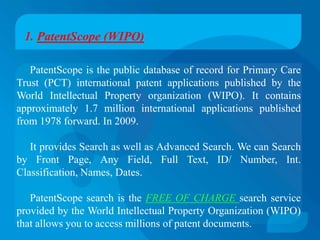
1. PatentScope (WIPO)

   PatentScope is the public database of record for Primary Care
Trust (PCT) international patent applications published by the
World Intellectual Property organization (WIPO). It contains
approximately 1.7 million international applications published
from 1978 forward. In 2009.

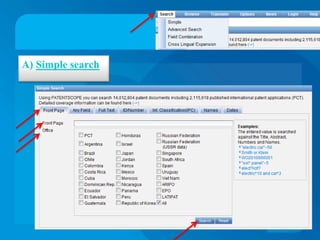
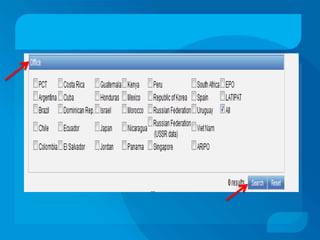
   It provides Search as well as Advanced Search. We can Search
by Front Page, Any Field, Full Text, ID/ Number, Int.
Classification, Names, Dates.

   PatentScope search is the FREE OF CHARGE search service
provided by the World Intellectual Property Organization (WIPO)
that allows you to access millions of patent documents.
A) Simple search
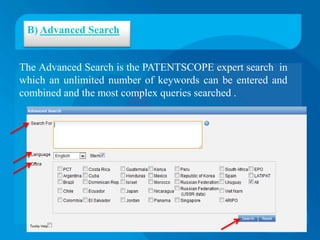
B) Advanced Search


The Advanced Search is the PATENTSCOPE expert search in
which an unlimited number of keywords can be entered and
combined and the most complex queries searched .
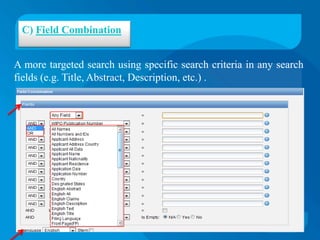
C) Field Combination


A more targeted search using specific search criteria in any search
fields (e.g. Title, Abstract, Description, etc.) .
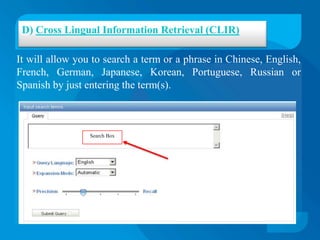
D) Cross Lingual Information Retrieval (CLIR)

It will allow you to search a term or a phrase in Chinese, English,
French, German, Japanese, Korean, Portuguese, Russian or
Spanish by just entering the term(s).


                 Search Box
2. EKASWA


   EKASWA is India’s first patent database hosted by Technology
Information and Forecasting Council (TIFAC).

   The patent search services can be availed free of cost by
universities, academic institutions, Govt. R&D institutions and
government departments.
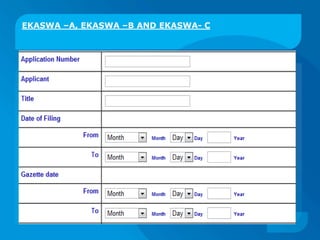
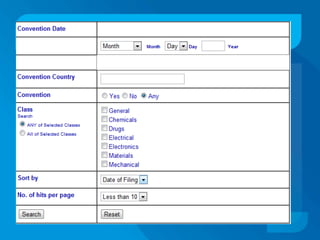
EKASWA –A, EKASWA –B AND EKASWA- C
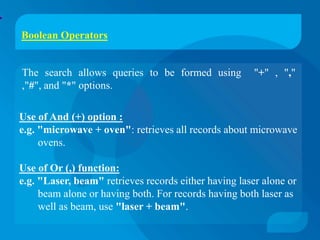
Boolean Operators


The search allows queries to be formed using           "+" , ","
,"#", and "*" options.

Use of And (+) option :
e.g. "microwave + oven": retrieves all records about microwave
     ovens.

Use of Or (,) function:
e.g. "Laser, beam" retrieves records either having laser alone or
     beam alone or having both. For records having both laser as
     well as beam, use "laser + beam".
Use of bracket [ ] option: (Works only in Title Field) :
e.g."Laser+ [carbon monoxide, infra red]" looks for carbon
    monoxide lasers as well a infrared lasers.

Use of wildcard option:
e.g. use " * " for plural. In the Title field, the keyword "lamp*
     " locates lamp as well as lamps.

Use of Not (#) option: (Works only in Title Filed):
e.g. microwave# [oven, antenna] locates all those records
     which contain microwave without oven or antenna.
3. EPIDOS-INPADOC

EPIDOS-INPADOC is complete database under the National
Informatics Centre (NIC).

It is one of the most comprehensive database on the Patent
Bibliography. This database is known as EPIDOS (European
Patent Information and Document Service).

European Patent Office (EPO) publishes this database. EPO has
been receiving the bibliography of all the patents filed and
granted in approximately 71 countries since 1968.

It contains over 33 millions references from 1968 onwards.
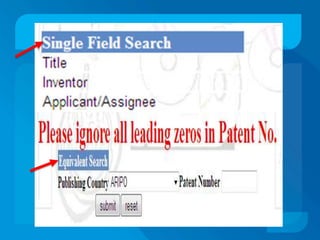
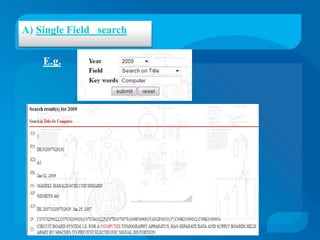
A) Single Field search

    E.g.
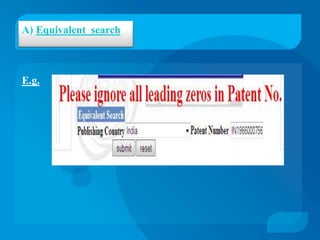
A) Equivalent search


E.g.
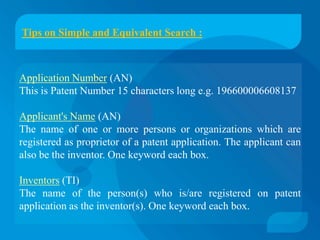
Tips on Simple and Equivalent Search :


Application Number (AN)
This is Patent Number 15 characters long e.g. 196600006608137

Applicant's Name (AN)
The name of one or more persons or organizations which are
registered as proprietor of a patent application. The applicant can
also be the inventor. One keyword each box.

Inventors (TI)
The name of the person(s) who is/are registered on patent
application as the inventor(s). One keyword each box.
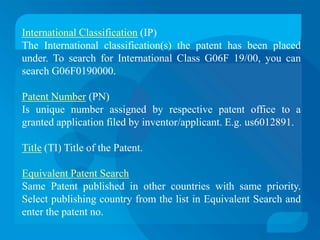
International Classification (IP)
The International classification(s) the patent has been placed
under. To search for International Class G06F 19/00, you can
search G06F0190000.

Patent Number (PN)
Is unique number assigned by respective patent office to a
granted application filed by inventor/applicant. E.g. us6012891.

Title (TI) Title of the Patent.

Equivalent Patent Search
Same Patent published in other countries with same priority.
Select publishing country from the list in Equivalent Search and
enter the patent no.
4. Canadian Patents Database (CIPO)

The Canadian Patents Database, which is maintained by the
Canadian Intellectual Property Office (CIPO), contains more
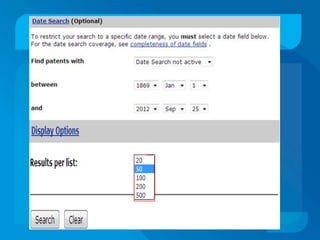
than two million Canadian patents and published applications
from 1869 to the present.

You can search, retrieve and study more than 2,110,000 patent
documents.

Full-text images are available from 1920 onward.

In addition, as of January 29, 2010, abstracts in both English and
French are available.
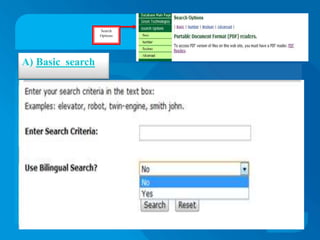
Search
                  Options


A) Basic search
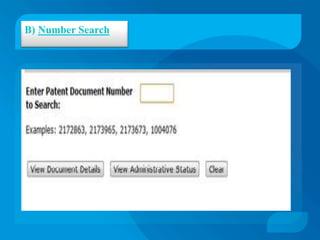
B) Number Search
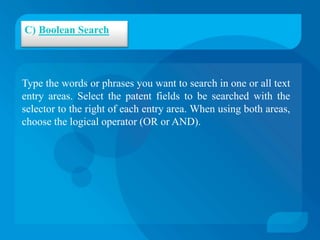
C) Boolean Search


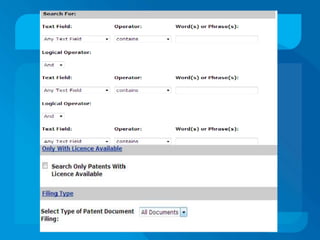
Type the words or phrases you want to search in one or all text
entry areas. Select the patent fields to be searched with the
selector to the right of each entry area. When using both areas,
choose the logical operator (OR or AND).
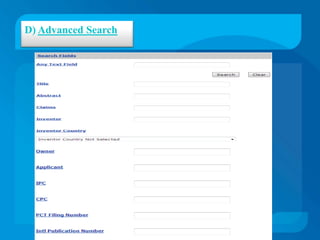
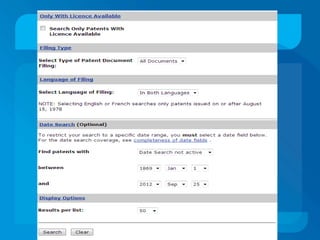
D) Advanced Search
References :


Patent Facilitating Center (n.d.). Retrieved on September 1, 2012 from
http://pfc.org.in/fac/fac.htm

What is INPADOC-EPIDOS? (2010). Retrieved September 4, 2012 from
http://patinfo.nic.in/

Patent Scope (WIPO) (n.d.). Retrieved September 6, 2012 from
http://www.wipo.int/pctdb/index.jsp

Canadian Intellectual Property   Office (n.d.). Retrieved September 9,
2012              from              http://brevets-patents.ic.gc.ca/opic-
cipo/cpd/eng/introduction.html
Patent database with one example

Patent database with one example

  • 1.
    PRESENTED BY PALLAVI SAKHARAMBELKAR MLISC 2012-2013
  • 2.
    What is Patent? A patent is an exclusive right granted by the government for an invention. It provides protection for the invention to the owner of the patent for a limited period which varies from country to country. Patent is also a property right granted to a person or legal entity (e.g., a corporation) by the Patent and Trademark Office. The right conferred is “the right to exclude others from making, using, offering for sale or selling” the patented invention in any country or from importing the invention into the country.
  • 3.
    What is Database? A database is a collection of information that is organized so that it can easily be accessed, managed, and updated. In one view, databases can be classified according to types of content: bibliographic, full-text, numeric, and images. Importance of Patent Database : Patent Information is commonly not available in developing countries . There are significant obstacles to identifying the patent status of any particular product even in rich countries. There are many patents field on various products . Patent applications may be easily searchable.
  • 4.
    Patent Databases : 1.PatentScope (WIPO) 2. EKASWA 3. EPIDOS-INPADOC 4. Canadian Patents Database (CIPO)
  • 5.
    1. PatentScope (WIPO) PatentScope is the public database of record for Primary Care Trust (PCT) international patent applications published by the World Intellectual Property organization (WIPO). It contains approximately 1.7 million international applications published from 1978 forward. In 2009. It provides Search as well as Advanced Search. We can Search by Front Page, Any Field, Full Text, ID/ Number, Int. Classification, Names, Dates. PatentScope search is the FREE OF CHARGE search service provided by the World Intellectual Property Organization (WIPO) that allows you to access millions of patent documents.
  • 6.
  • 7.
    B) Advanced Search TheAdvanced Search is the PATENTSCOPE expert search in which an unlimited number of keywords can be entered and combined and the most complex queries searched .
  • 8.
    C) Field Combination Amore targeted search using specific search criteria in any search fields (e.g. Title, Abstract, Description, etc.) .
  • 10.
    D) Cross LingualInformation Retrieval (CLIR) It will allow you to search a term or a phrase in Chinese, English, French, German, Japanese, Korean, Portuguese, Russian or Spanish by just entering the term(s). Search Box
  • 11.
    2. EKASWA EKASWA is India’s first patent database hosted by Technology Information and Forecasting Council (TIFAC). The patent search services can be availed free of cost by universities, academic institutions, Govt. R&D institutions and government departments.
  • 12.
    EKASWA –A, EKASWA–B AND EKASWA- C
  • 14.
    Boolean Operators The searchallows queries to be formed using "+" , "," ,"#", and "*" options. Use of And (+) option : e.g. "microwave + oven": retrieves all records about microwave ovens. Use of Or (,) function: e.g. "Laser, beam" retrieves records either having laser alone or beam alone or having both. For records having both laser as well as beam, use "laser + beam".
  • 15.
    Use of bracket[ ] option: (Works only in Title Field) : e.g."Laser+ [carbon monoxide, infra red]" looks for carbon monoxide lasers as well a infrared lasers. Use of wildcard option: e.g. use " * " for plural. In the Title field, the keyword "lamp* " locates lamp as well as lamps. Use of Not (#) option: (Works only in Title Filed): e.g. microwave# [oven, antenna] locates all those records which contain microwave without oven or antenna.
  • 16.
    3. EPIDOS-INPADOC EPIDOS-INPADOC iscomplete database under the National Informatics Centre (NIC). It is one of the most comprehensive database on the Patent Bibliography. This database is known as EPIDOS (European Patent Information and Document Service). European Patent Office (EPO) publishes this database. EPO has been receiving the bibliography of all the patents filed and granted in approximately 71 countries since 1968. It contains over 33 millions references from 1968 onwards.
  • 18.
    A) Single Fieldsearch E.g.
  • 19.
  • 20.
    Tips on Simpleand Equivalent Search : Application Number (AN) This is Patent Number 15 characters long e.g. 196600006608137 Applicant's Name (AN) The name of one or more persons or organizations which are registered as proprietor of a patent application. The applicant can also be the inventor. One keyword each box. Inventors (TI) The name of the person(s) who is/are registered on patent application as the inventor(s). One keyword each box.
  • 21.
    International Classification (IP) TheInternational classification(s) the patent has been placed under. To search for International Class G06F 19/00, you can search G06F0190000. Patent Number (PN) Is unique number assigned by respective patent office to a granted application filed by inventor/applicant. E.g. us6012891. Title (TI) Title of the Patent. Equivalent Patent Search Same Patent published in other countries with same priority. Select publishing country from the list in Equivalent Search and enter the patent no.
  • 22.
    4. Canadian PatentsDatabase (CIPO) The Canadian Patents Database, which is maintained by the Canadian Intellectual Property Office (CIPO), contains more than two million Canadian patents and published applications from 1869 to the present. You can search, retrieve and study more than 2,110,000 patent documents. Full-text images are available from 1920 onward. In addition, as of January 29, 2010, abstracts in both English and French are available.
  • 23.
    Search Options A) Basic search
  • 24.
  • 25.
    C) Boolean Search Typethe words or phrases you want to search in one or all text entry areas. Select the patent fields to be searched with the selector to the right of each entry area. When using both areas, choose the logical operator (OR or AND).
  • 28.
  • 30.
    References : Patent FacilitatingCenter (n.d.). Retrieved on September 1, 2012 from http://pfc.org.in/fac/fac.htm What is INPADOC-EPIDOS? (2010). Retrieved September 4, 2012 from http://patinfo.nic.in/ Patent Scope (WIPO) (n.d.). Retrieved September 6, 2012 from http://www.wipo.int/pctdb/index.jsp Canadian Intellectual Property Office (n.d.). Retrieved September 9, 2012 from http://brevets-patents.ic.gc.ca/opic- cipo/cpd/eng/introduction.html