
R.D.SIVAKUMAR, M.Sc.,M.Phil.,M.Tech.,
Assistant Professor of Computer Science &
Assistant Professor and Head, Department of M.Com.(CA),
Ayya Nadar Janaki Ammal College,
Sivakasi – 626 124.
Mobile: 099440-42243
e-mail : sivamsccsit@gmail.com
website: www.rdsivakumar.blogspot.in
PARAGRAPH ALIGNMENT
PARAGRAPH ALIGNMENT
One of the most common changes is to change the alignment of a paragraph.
A paragraph is any text followed by a hard return. A hard return is inserted every time
when Enter is pressed. Soft returns are inserted as line breaks by StarOffice
Each time Enter is pressed, the paragraph options for that paragraph are carried down to
the next paragraph
For instance, one can center the document title or right align text like a newspaper banner.
The text in the paragraphs can be justified to keep both margins even.
Four types of alignment can be selected, and the best way to make a change is to use
the Formatting toolbar. Following steps are used:
1. To change the alignment of one paragraph, first click within that
paragraph. To change the alignment of several paragraphs,
select the ones needing change.
2. Do one of the following
Click to left align text.
Click to right align text
Click to justify text.
Click to center text.
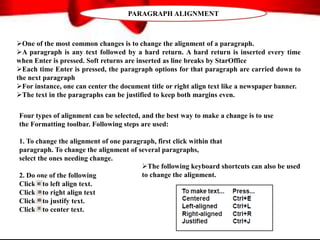
The following keyboard shortcuts can also be used
to change the alignment.
THANK YOU..!!

Paragraph Alignment - R.D.Sivakumar

  • 1.
    R.D.SIVAKUMAR, M.Sc.,M.Phil.,M.Tech., Assistant Professorof Computer Science & Assistant Professor and Head, Department of M.Com.(CA), Ayya Nadar Janaki Ammal College, Sivakasi – 626 124. Mobile: 099440-42243 e-mail : sivamsccsit@gmail.com website: www.rdsivakumar.blogspot.in PARAGRAPH ALIGNMENT
  • 2.
    PARAGRAPH ALIGNMENT One ofthe most common changes is to change the alignment of a paragraph. A paragraph is any text followed by a hard return. A hard return is inserted every time when Enter is pressed. Soft returns are inserted as line breaks by StarOffice Each time Enter is pressed, the paragraph options for that paragraph are carried down to the next paragraph For instance, one can center the document title or right align text like a newspaper banner. The text in the paragraphs can be justified to keep both margins even. Four types of alignment can be selected, and the best way to make a change is to use the Formatting toolbar. Following steps are used: 1. To change the alignment of one paragraph, first click within that paragraph. To change the alignment of several paragraphs, select the ones needing change. 2. Do one of the following Click to left align text. Click to right align text Click to justify text. Click to center text. The following keyboard shortcuts can also be used to change the alignment.
  • 3.