Introduction to pandas
Srashti Deshmukh
Pandas
But, why?
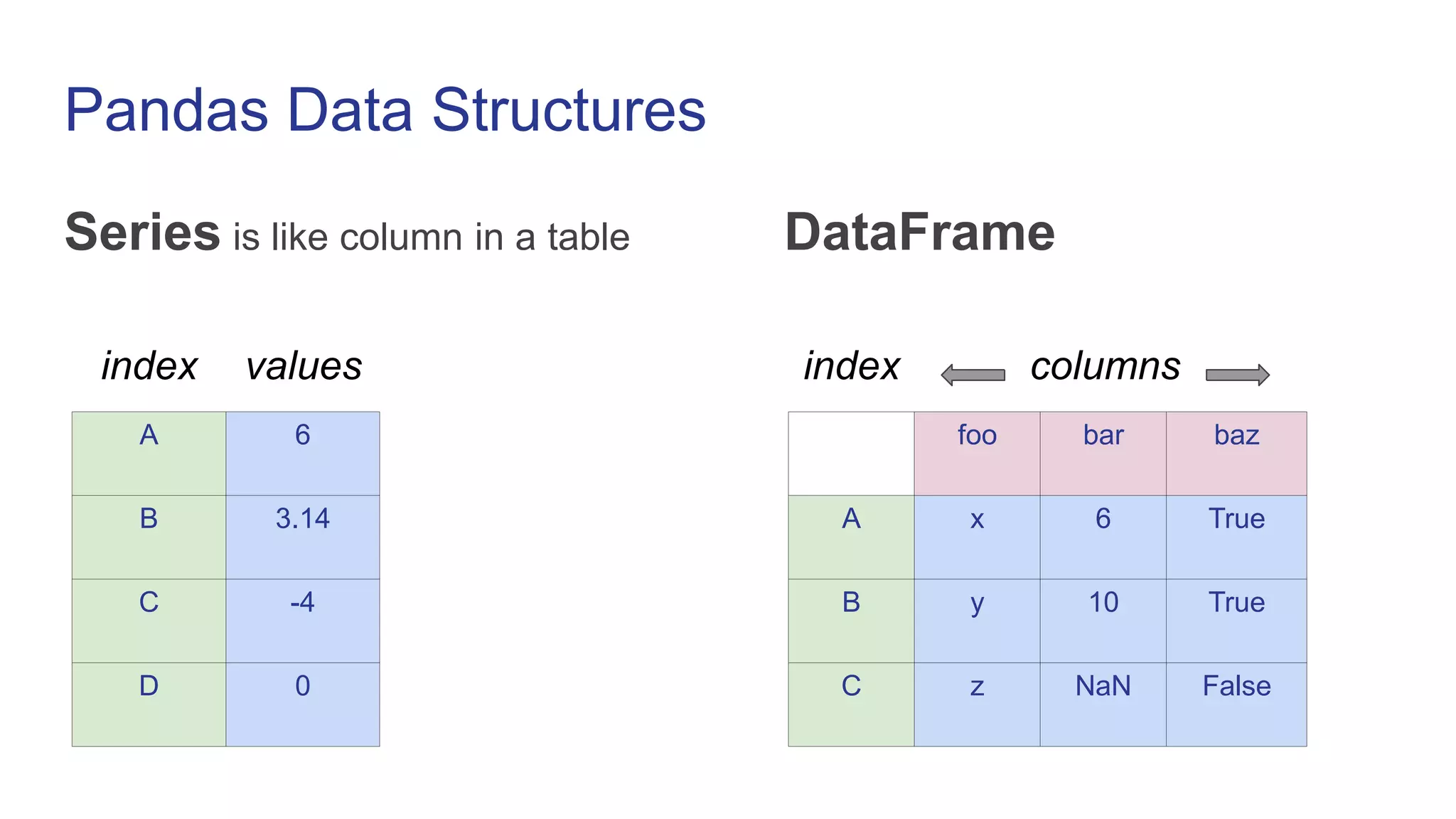
Pandas Data Structures
Series is like column in a table DataFrame
A 6
B 3.14
C -4
D 0
foo bar baz
A x 6 True
B y 10 True
C z NaN False
index values index columns
Creating Series
import pandas as pd
s1 = pd.Series([1, 2, 3, 4])
0 1
1 2
2 3
3 4
s2 = pd.Series([1, 2, 3, 4], index=[‘A’, ‘B’, ‘C’, ‘D’])
A 1
B 2
C 3
D 4
Creating DataFrame
df = pd.DataFrame({‘foo’: [‘x’, ‘y’, ‘z’],
‘bar’: [6, 10, None],
‘baz’: [True, True, False]})
foo bar baz
0 x 6 True
1 y 10 True
2 z NaN False
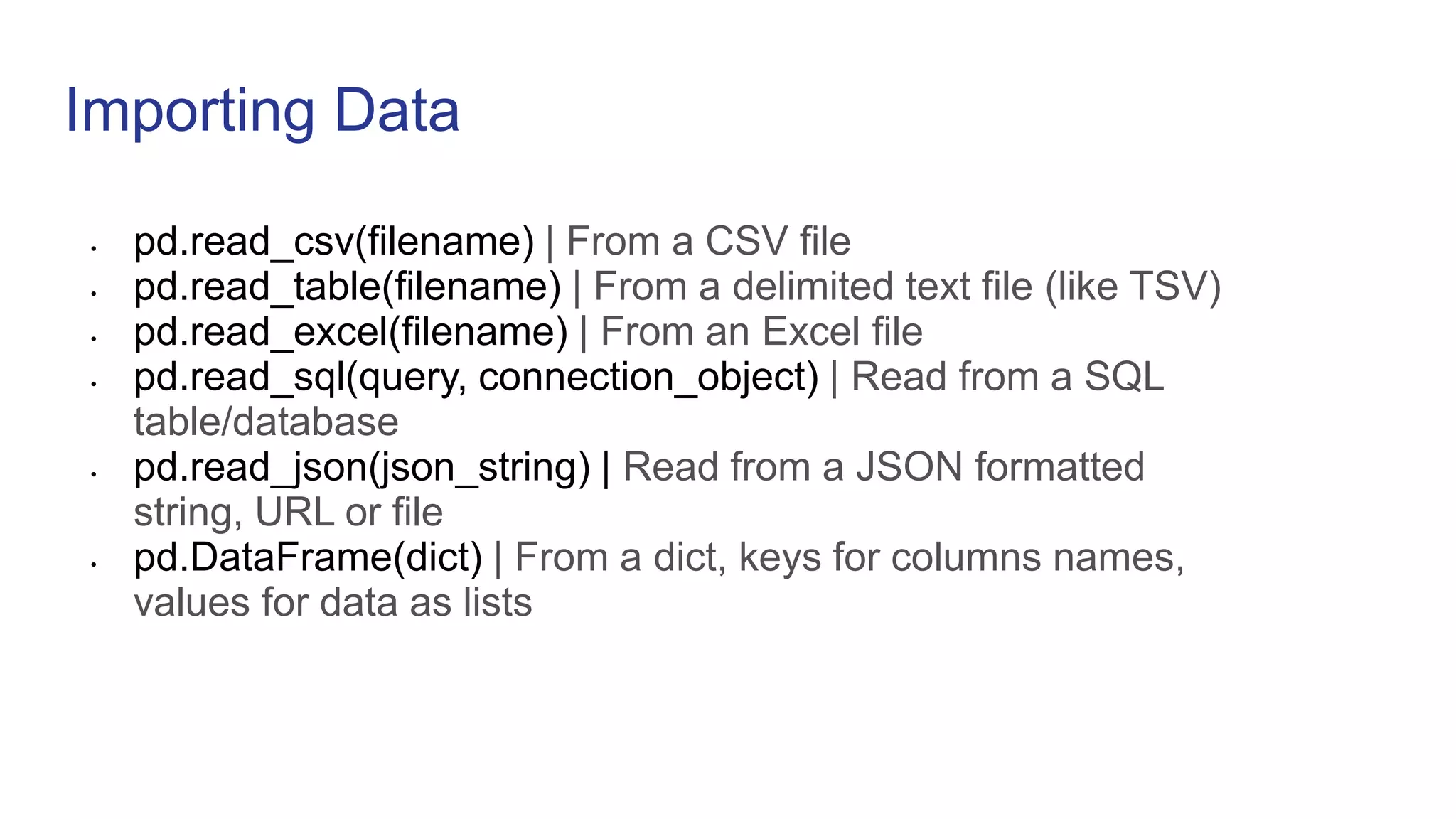
Importing Data
• pd.read_csv(filename) | From a CSV file
• pd.read_table(filename) | From a delimited text file (like TSV)
• pd.read_excel(filename) | From an Excel file
• pd.read_sql(query, connection_object) | Read from a SQL
table/database
• pd.read_json(json_string) | Read from a JSON formatted
string, URL or file
• pd.DataFrame(dict) | From a dict, keys for columns names,
values for data as lists
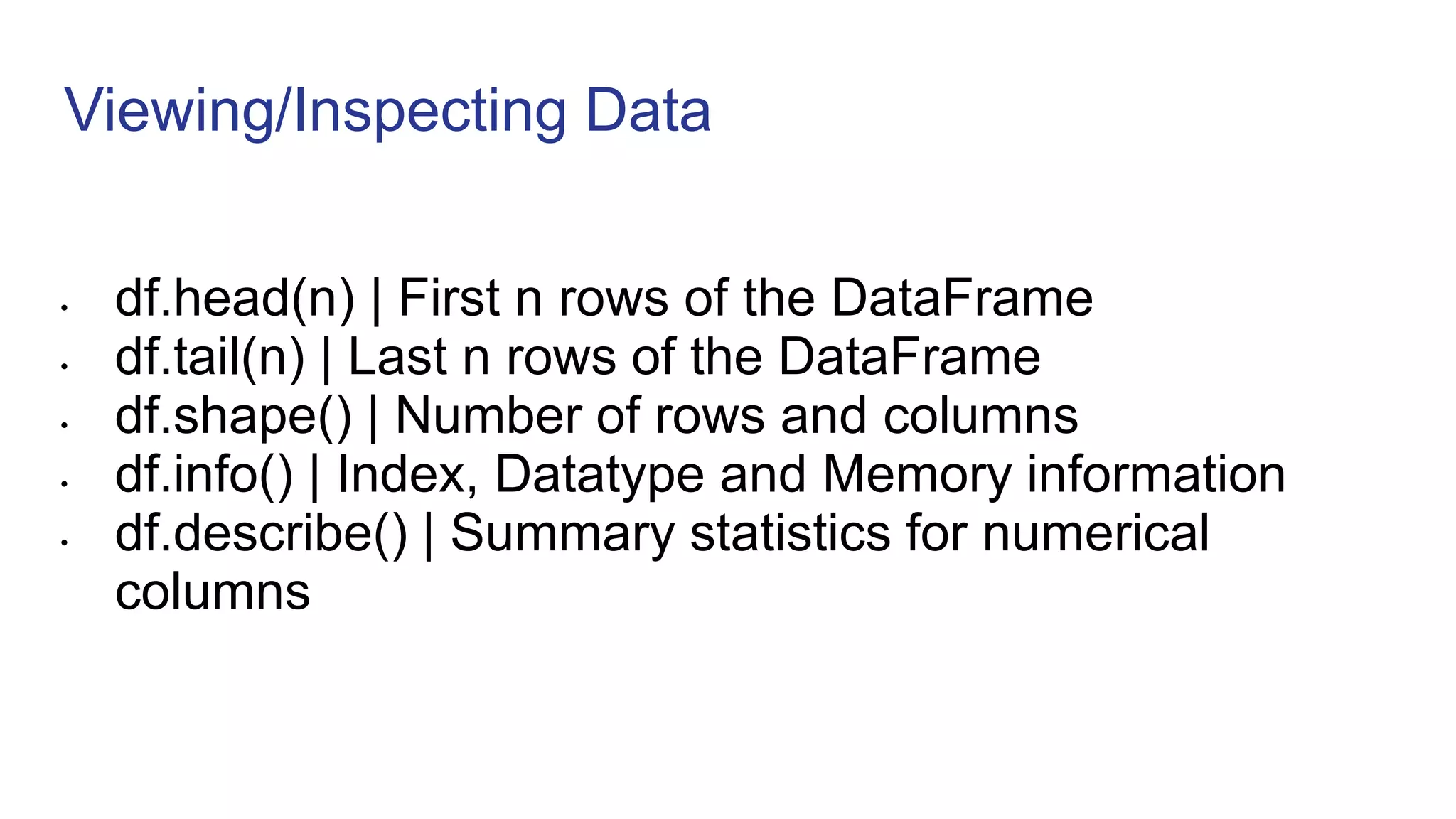
Viewing/Inspecting Data
• df.head(n) | First n rows of the DataFrame
• df.tail(n) | Last n rows of the DataFrame
• df.shape() | Number of rows and columns
• df.info() | Index, Datatype and Memory information
• df.describe() | Summary statistics for numerical
columns
Creating DataFrame from list
calories=[420,300,150]
duration=[6,10,5]
df=pd.DataFrame(list (zip(calories , duration) ),columns=[‘Calories’,’Duration’])
Calories Duration
0 420 6
1 300 10
2 150 5
Column Selection
df[‘Calories’]
Calories
0 420
1 300
2 150
Calories Duration
0 420 6
1 300 10
2 150 5
Column Selection
df[[‘Calories’,’Duration’]]
Calories Duration
0 420 6
1 300 10
2 150 5
Calories Duration
0 420 6
1 300 10
2 150 5
Row Selection
df.loc[0]
Calories 420
Duration 6
Calories Duration
0 420 6
1 300 10
2 150 5
Row Selection
df.loc[0:2] OR
df.loc[[0,1]]
Calories Duration
0 420 6
1 300 10
Calories Duration
0 420 6
1 300 10
2 150 5
Cleaning wrong data
df.loc[2, 'Duration'] = 5
Calories Duration
0 420 6
1 300 10
2 150 5
Calories Duration
0 420 6
1 300 10
2 150 500
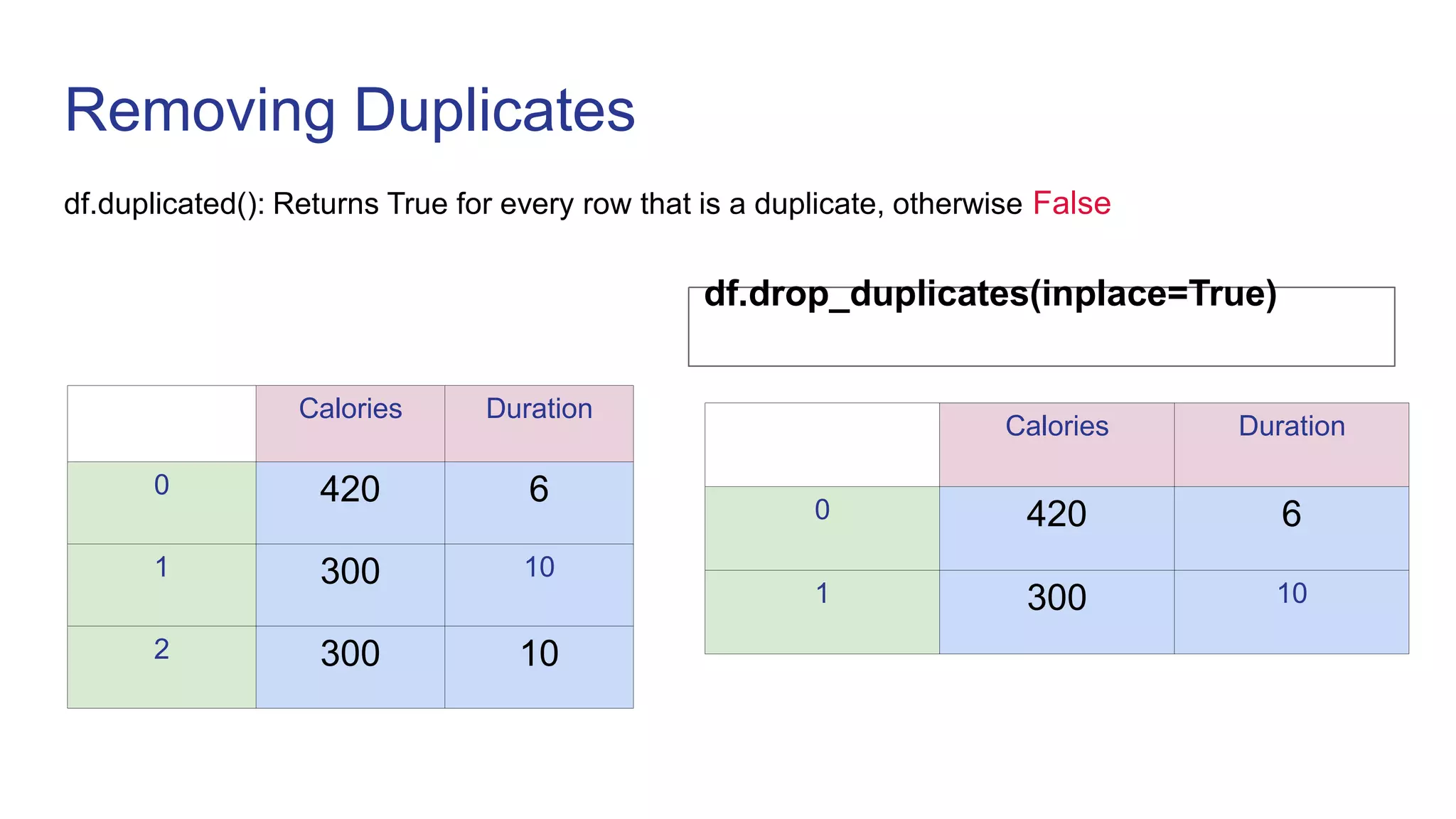
Removing Duplicates
df.duplicated(): Returns True for every row that is a duplicate, otherwise False
df.drop_duplicates(inplace=True)
Calories Duration
0 420 6
1 300 10
Calories Duration
0 420 6
1 300 10
2 300 10
Conditional Filtering
foo bar baz
0 x 6 True
1 y 10 True
2 z NaN False
df[ (df[‘baz’]) ]
foo bar baz
0 x 6 True
1 y 10 True
Conditional Filtering
foo bar baz
0 x 6 True
1 y 10 True
2 z NaN False
df[ (df['foo'] == 'x') |
(df['foo'] == 'z') ]
foo bar baz
0 x 6 True
2 z NaN False
Handling Missing Values
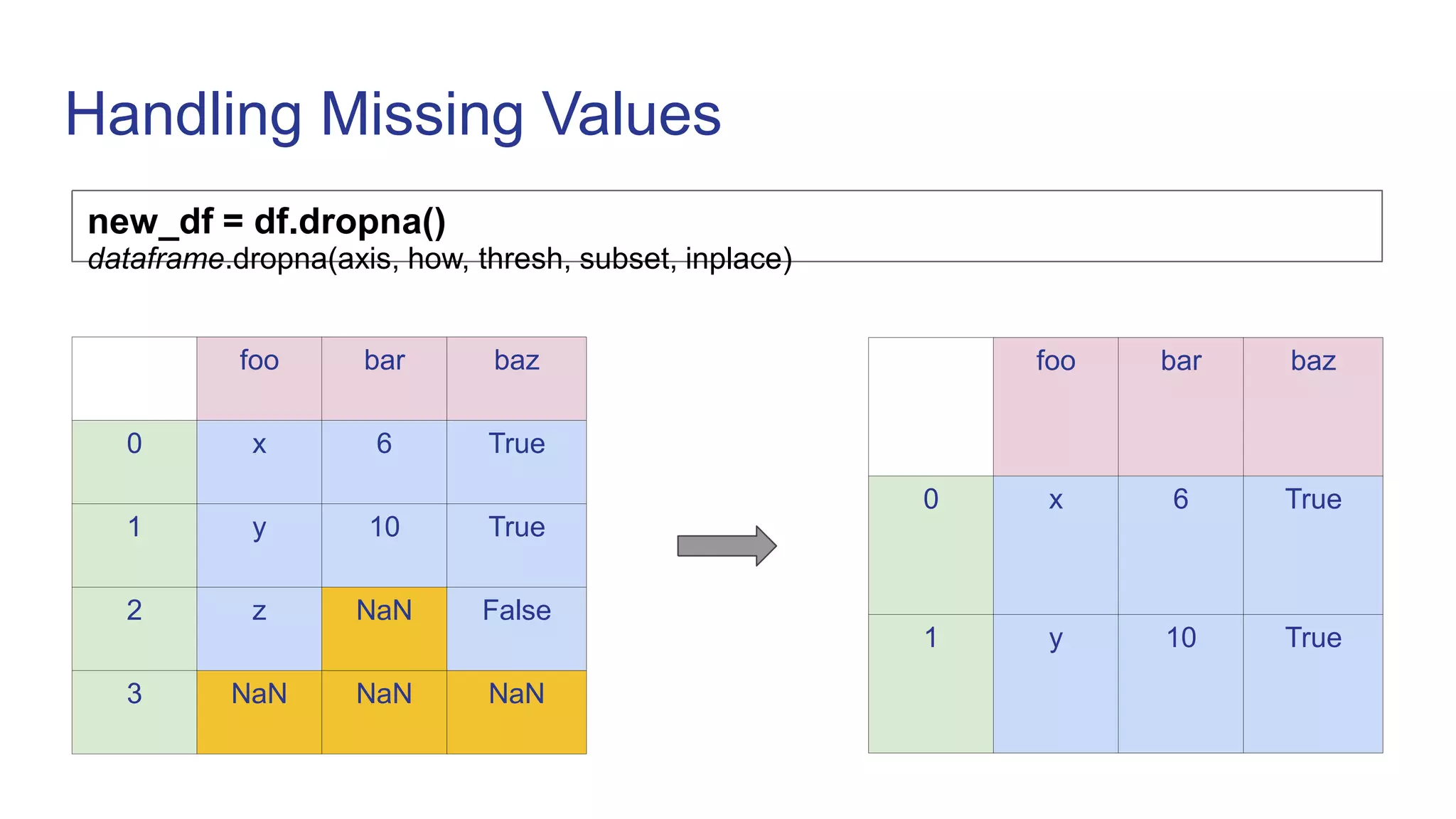
new_df = df.dropna()
dataframe.dropna(axis, how, thresh, subset, inplace)
foo bar baz
0 x 6 True
1 y 10 True
2 z NaN False
3 NaN NaN NaN
foo bar baz
0 x 6 True
1 y 10 True
Handling Missing Values
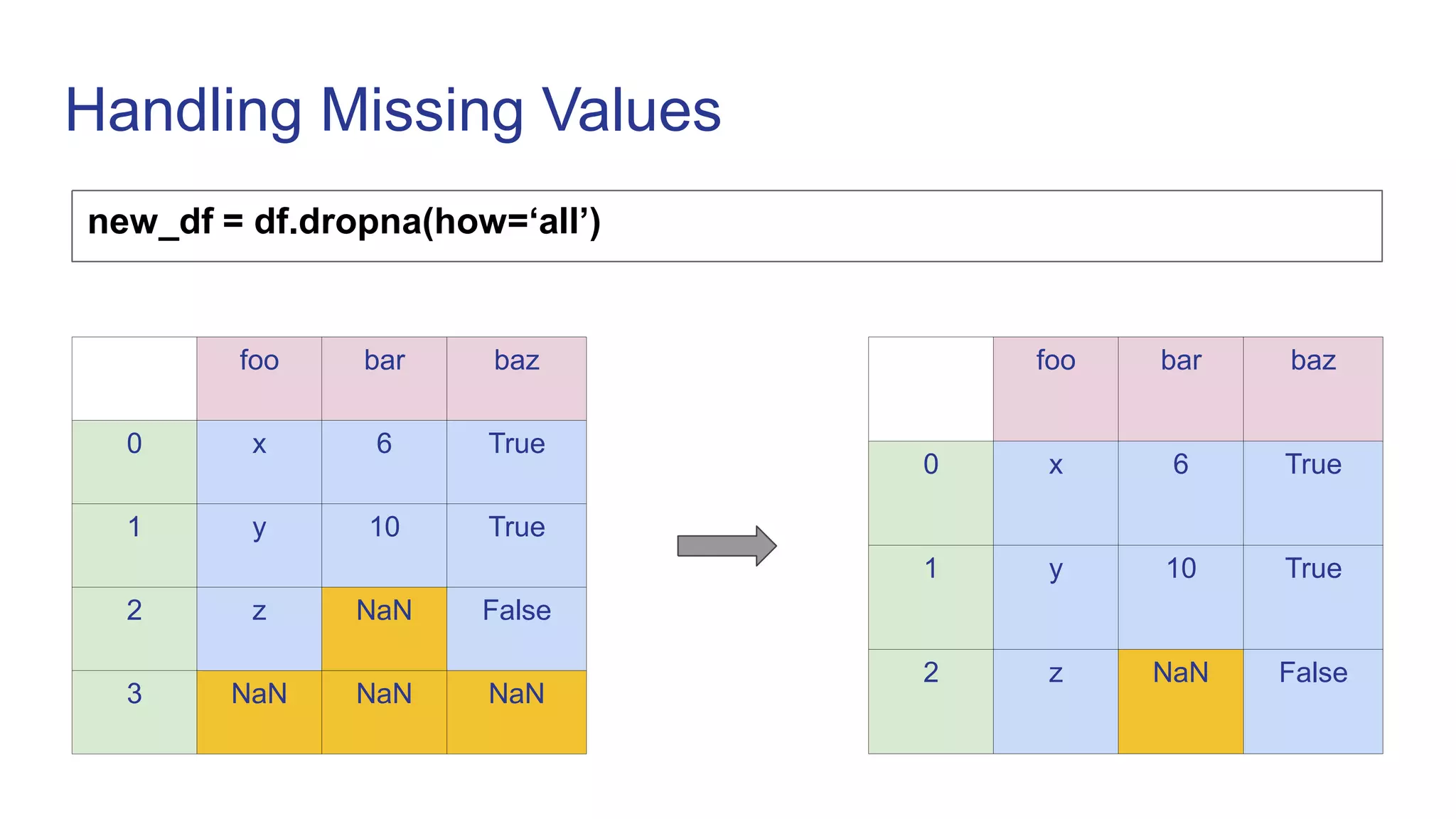
new_df = df.dropna(how=‘all’)
foo bar baz
0 x 6 True
1 y 10 True
2 z NaN False
foo bar baz
0 x 6 True
1 y 10 True
2 z NaN False
3 NaN NaN NaN
Handling Missing Values
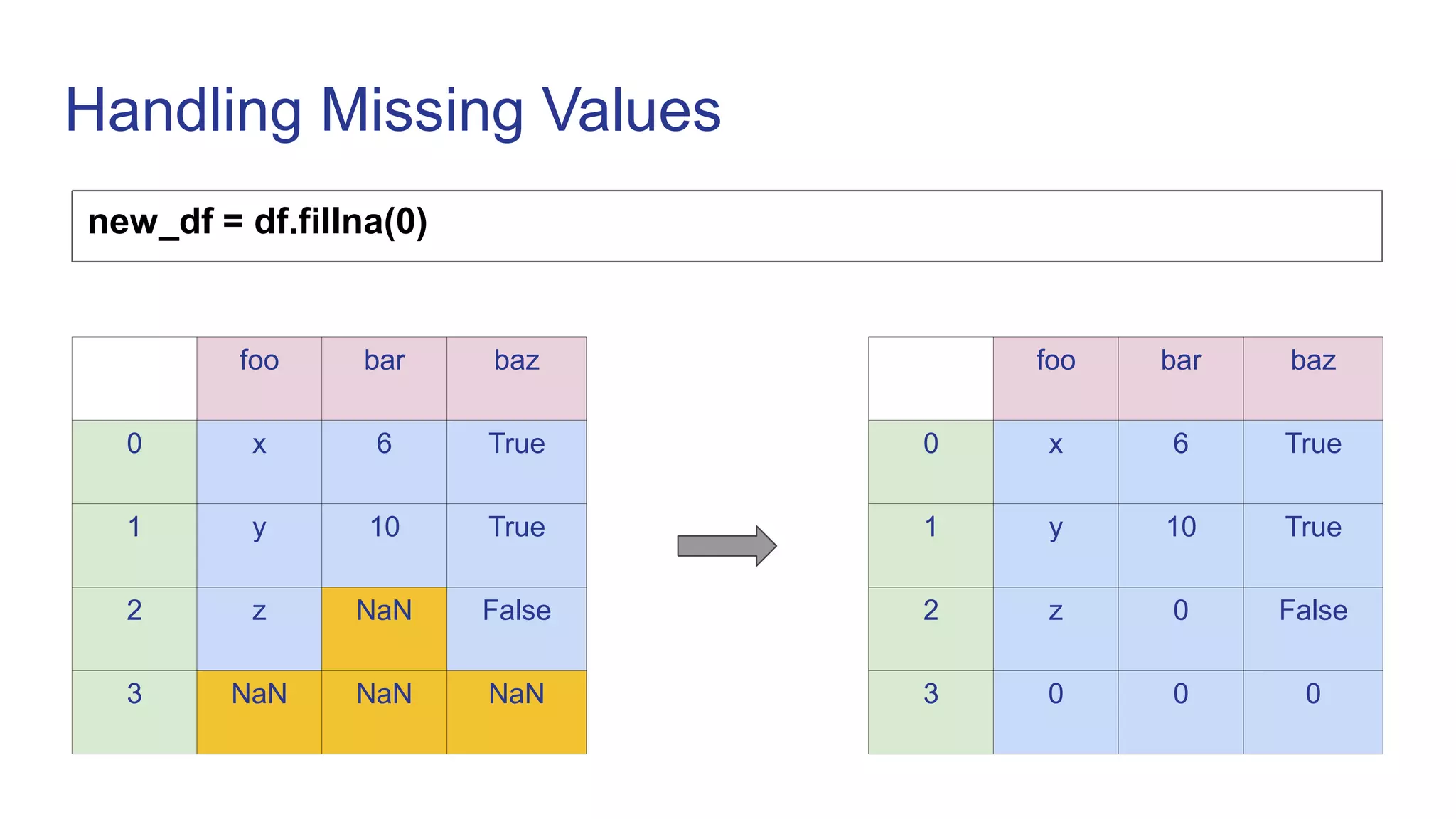
new_df = df.fillna(0)
foo bar baz
0 x 6 True
1 y 10 True
2 z NaN False
3 NaN NaN NaN
foo bar baz
0 x 6 True
1 y 10 True
2 z 0 False
3 0 0 0
Handling Missing Values
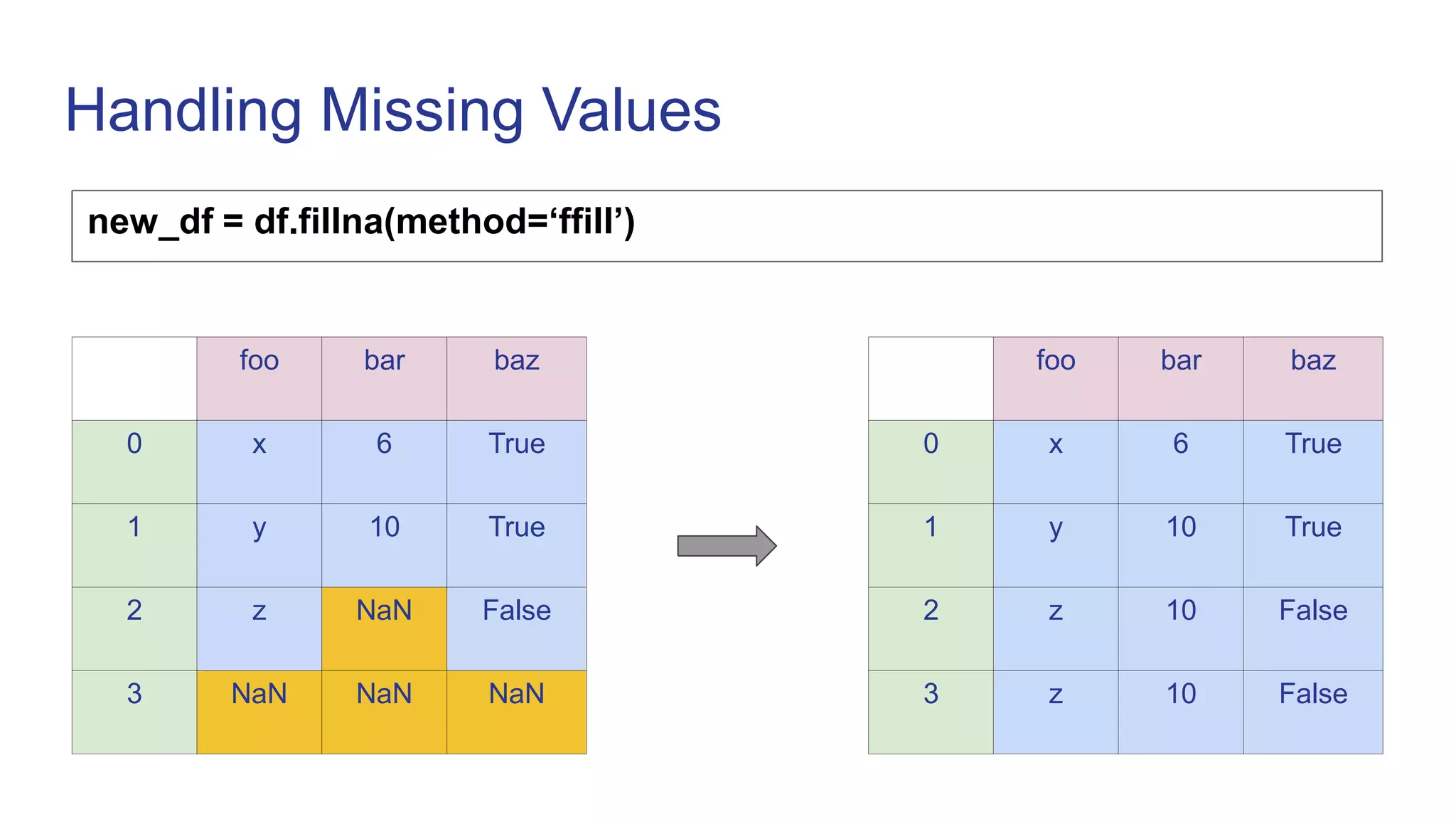
new_df = df.fillna(method=‘ffill’)
foo bar baz
0 x 6 True
1 y 10 True
2 z NaN False
3 NaN NaN NaN
foo bar baz
0 x 6 True
1 y 10 True
2 z 10 False
3 z 10 False
Indexing
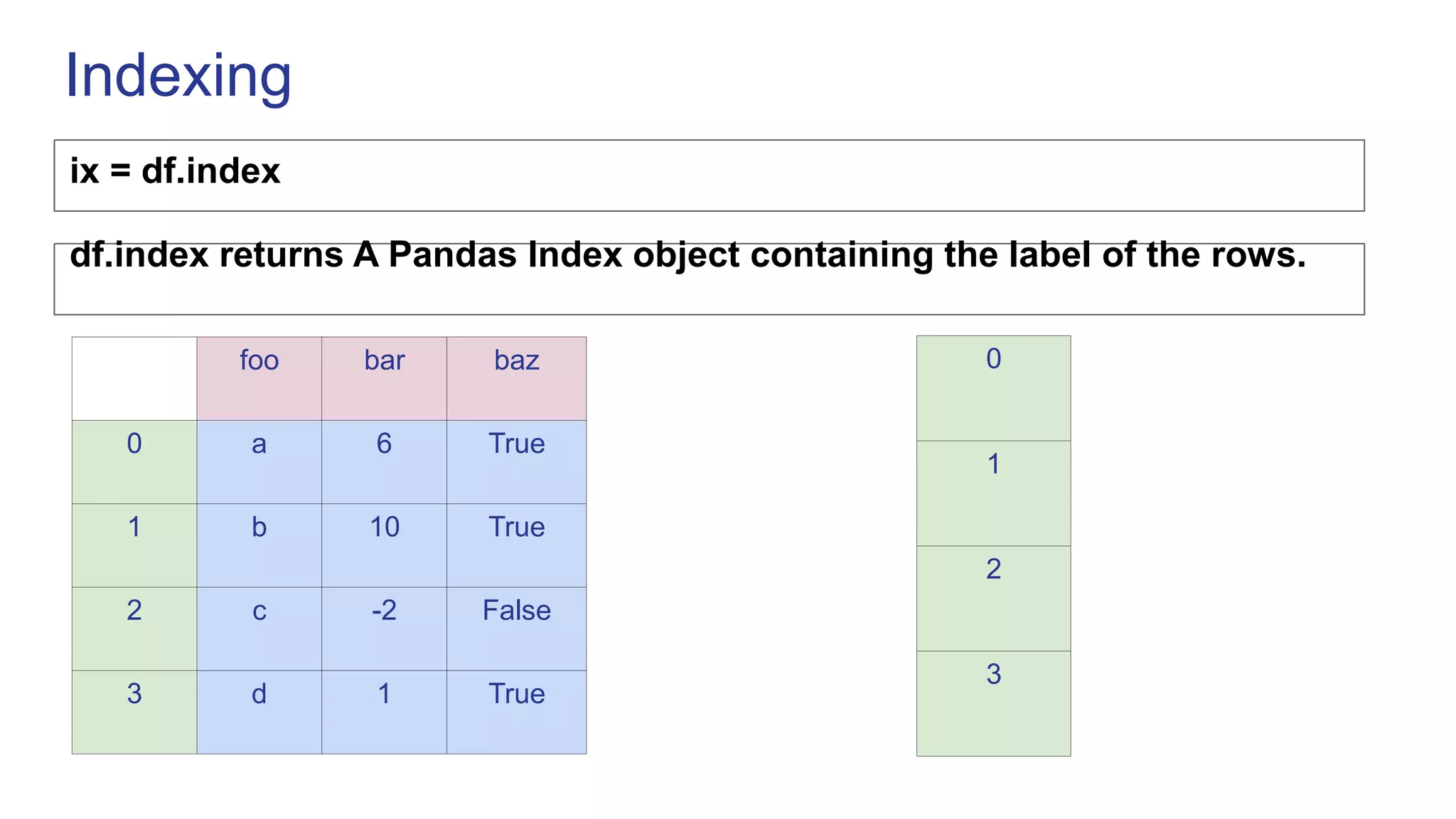
ix = df.index
foo bar baz
0 a 6 True
1 b 10 True
2 c -2 False
3 d 1 True
0
1
2
3
df.index returns A Pandas Index object containing the label of the rows.
Indexing
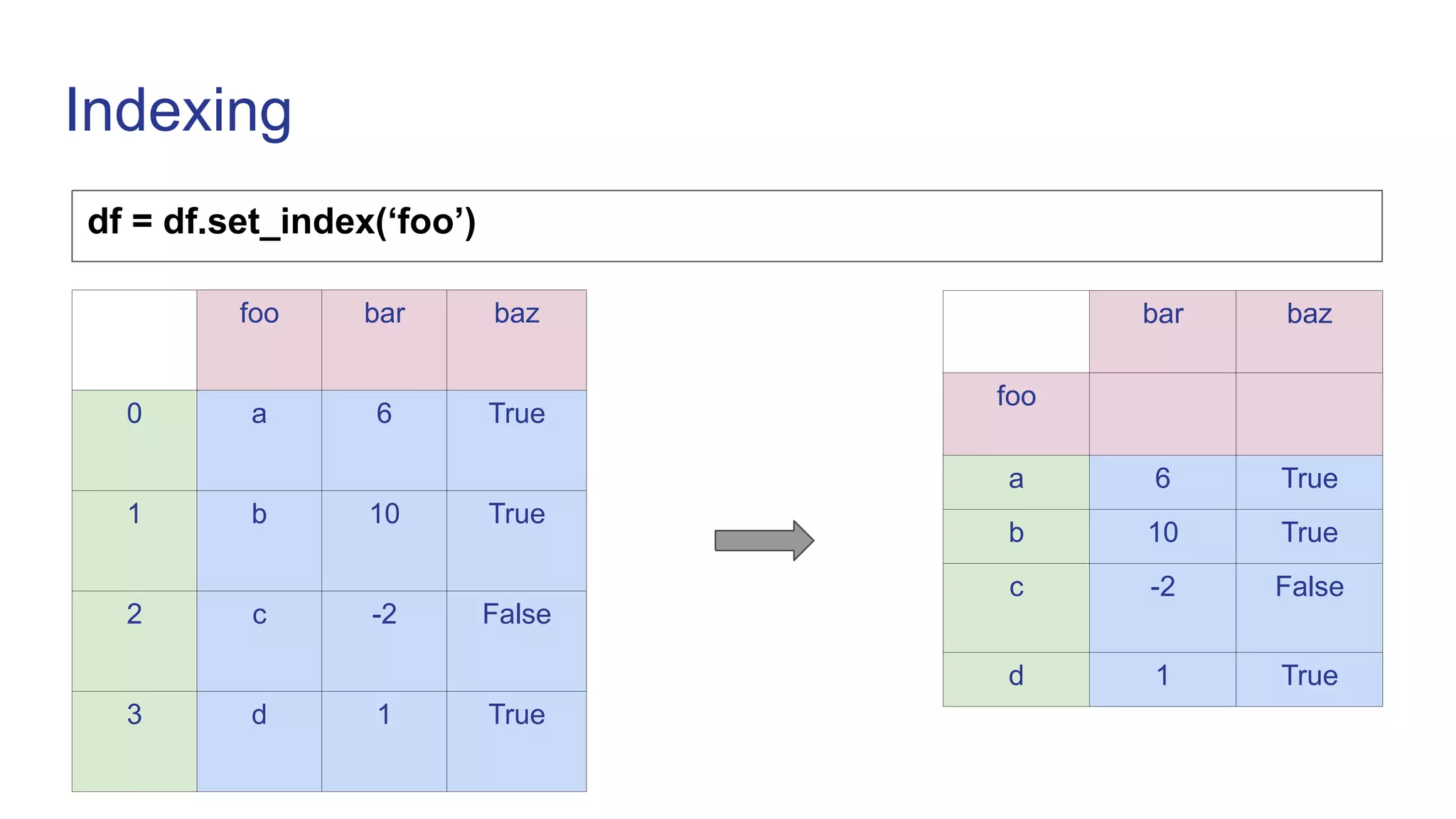
df = df.set_index(‘foo’)
bar baz
foo
a 6 True
b 10 True
c -2 False
d 1 True
foo bar baz
0 a 6 True
1 b 10 True
2 c -2 False
3 d 1 True
Indexing
df.loc[‘a’]
bar baz
foo
a 6 True
b 10 True
c -2 False
d 1 True
bar 6
baz True
df.iloc[0]
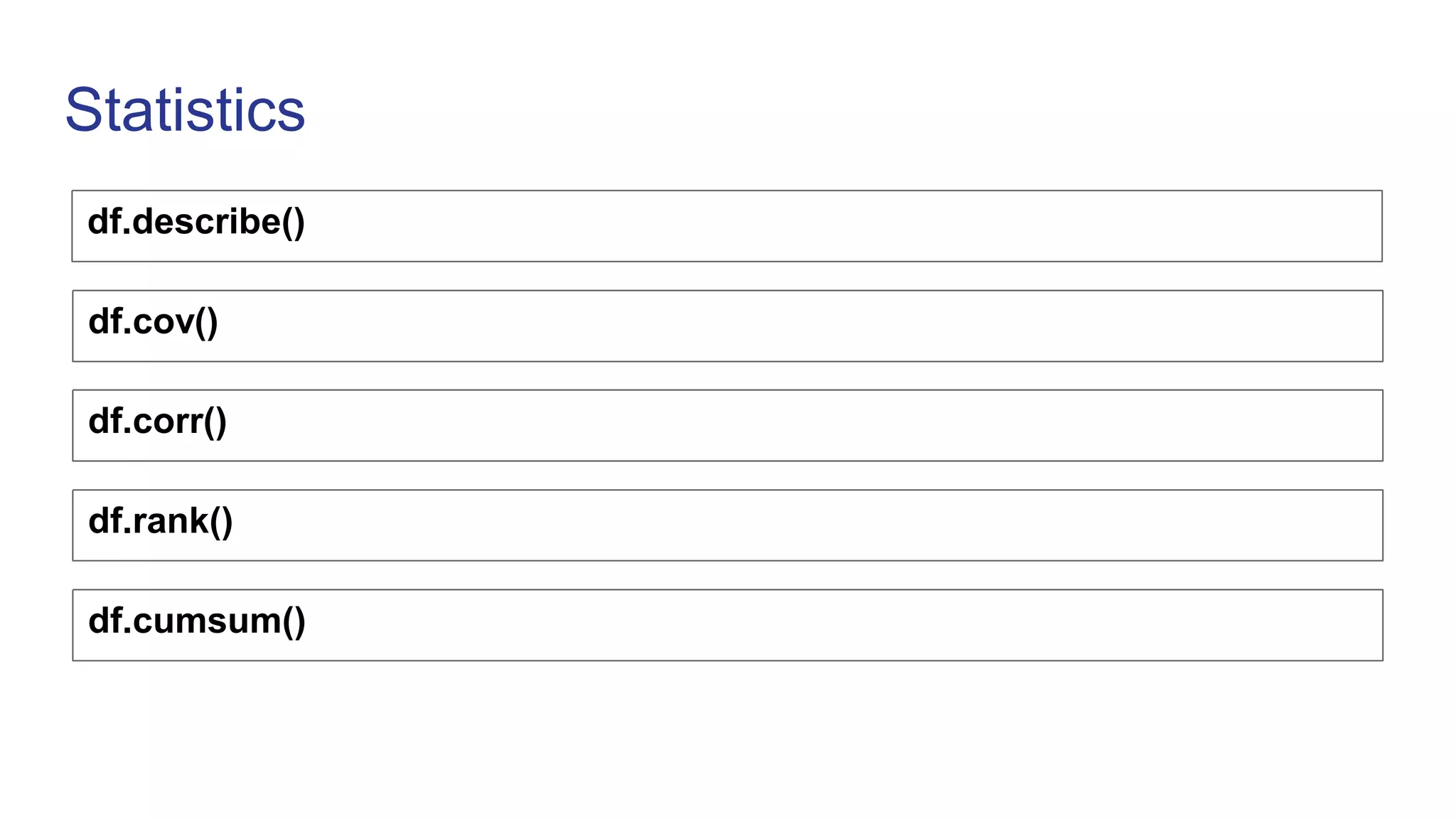
Statistics
df.describe()
df.cov()
df.corr()
df.rank()
df.cumsum()
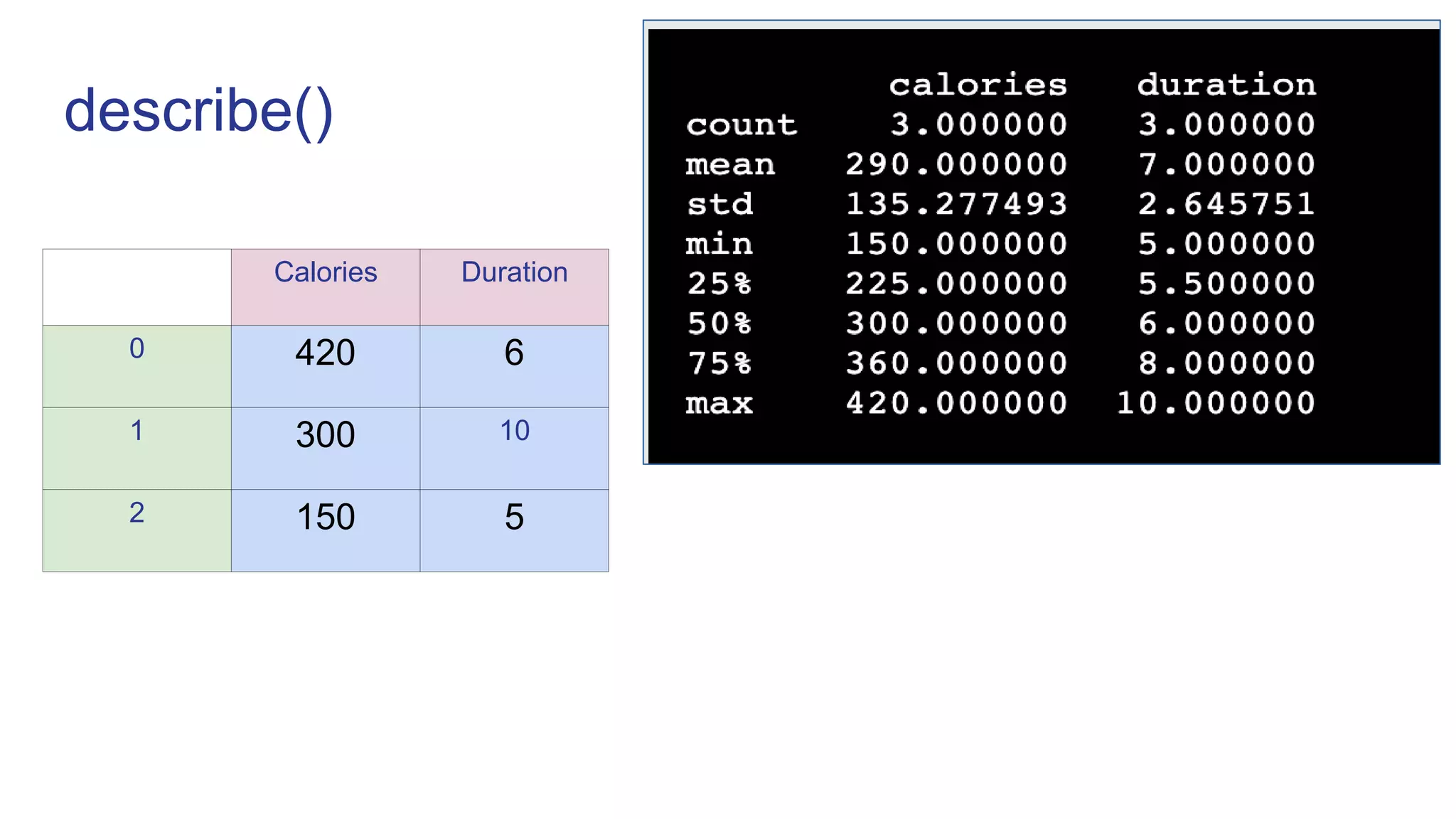
describe()
Calories Duration
0 420 6
1 300 10
2 150 5
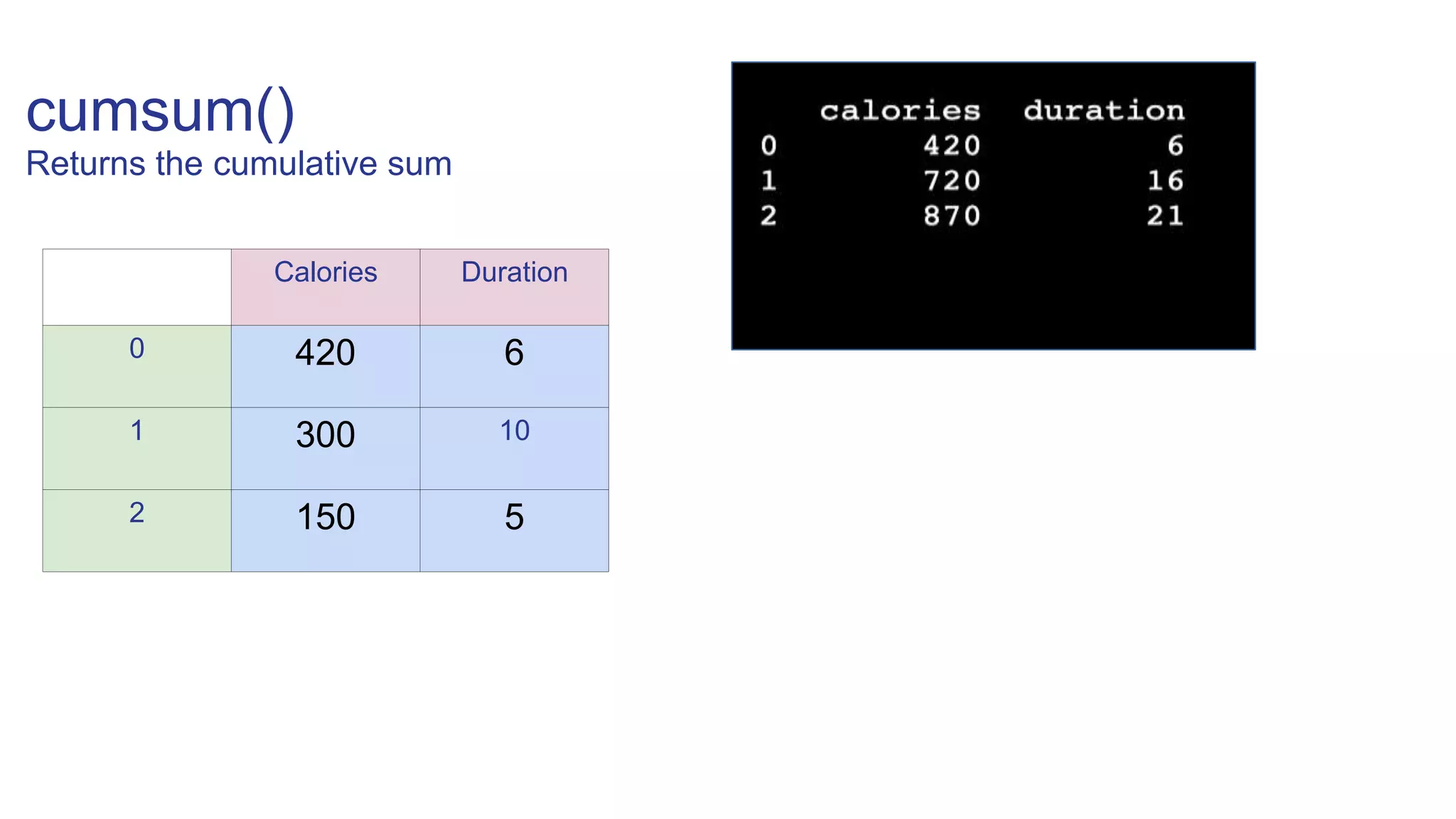
cumsum()
Returns the cumulative sum
Calories Duration
0 420 6
1 300 10
2 150 5
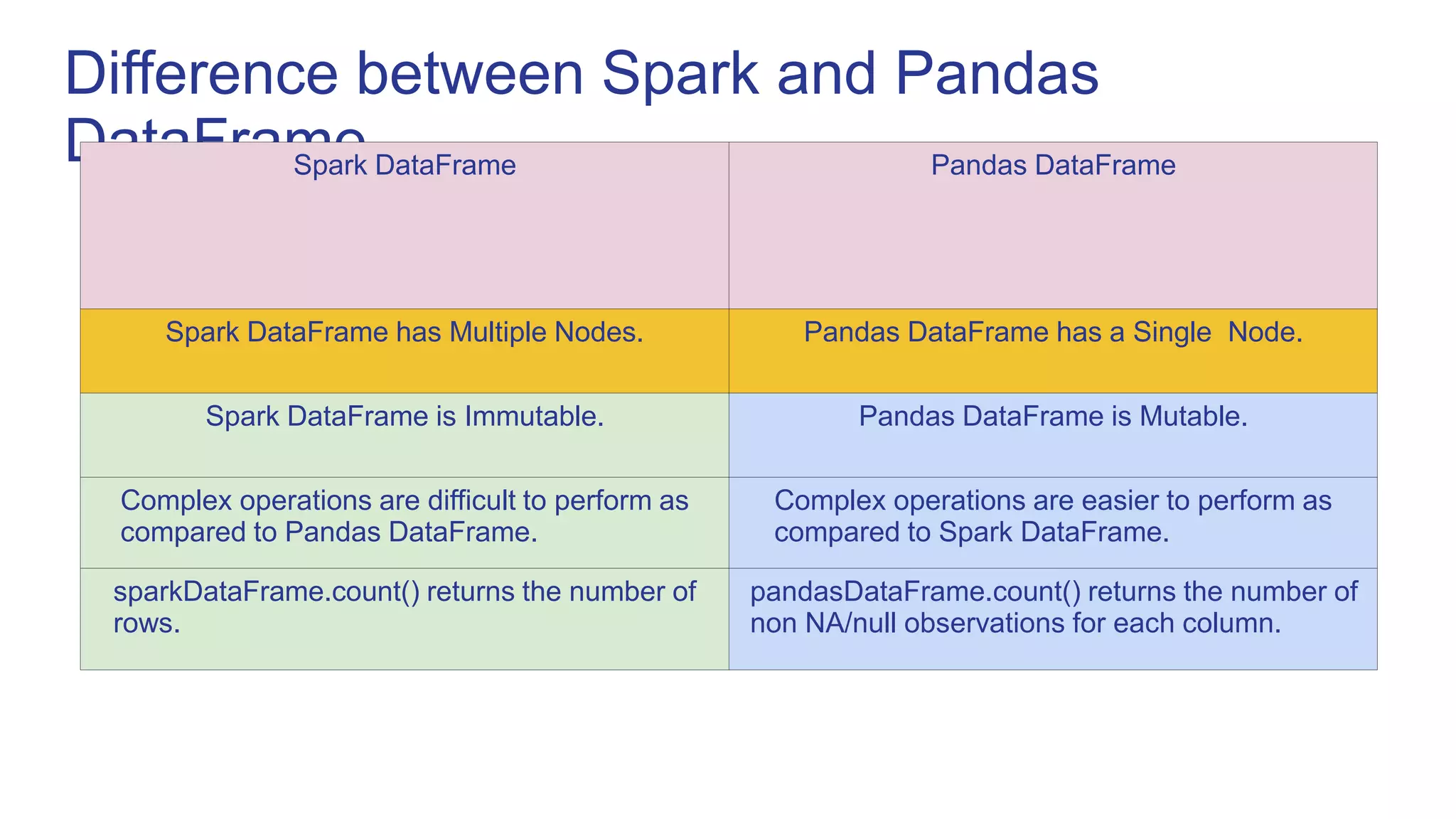
Difference between Spark and Pandas
DataFrame
Spark DataFrame Pandas DataFrame
Spark DataFrame has Multiple Nodes. Pandas DataFrame has a Single Node.
Spark DataFrame is Immutable. Pandas DataFrame is Mutable.
Complex operations are difficult to perform as
compared to Pandas DataFrame.
Complex operations are easier to perform as
compared to Spark DataFrame.
sparkDataFrame.count() returns the number of
rows.
pandasDataFrame.count() returns the number of
non NA/null observations for each column.
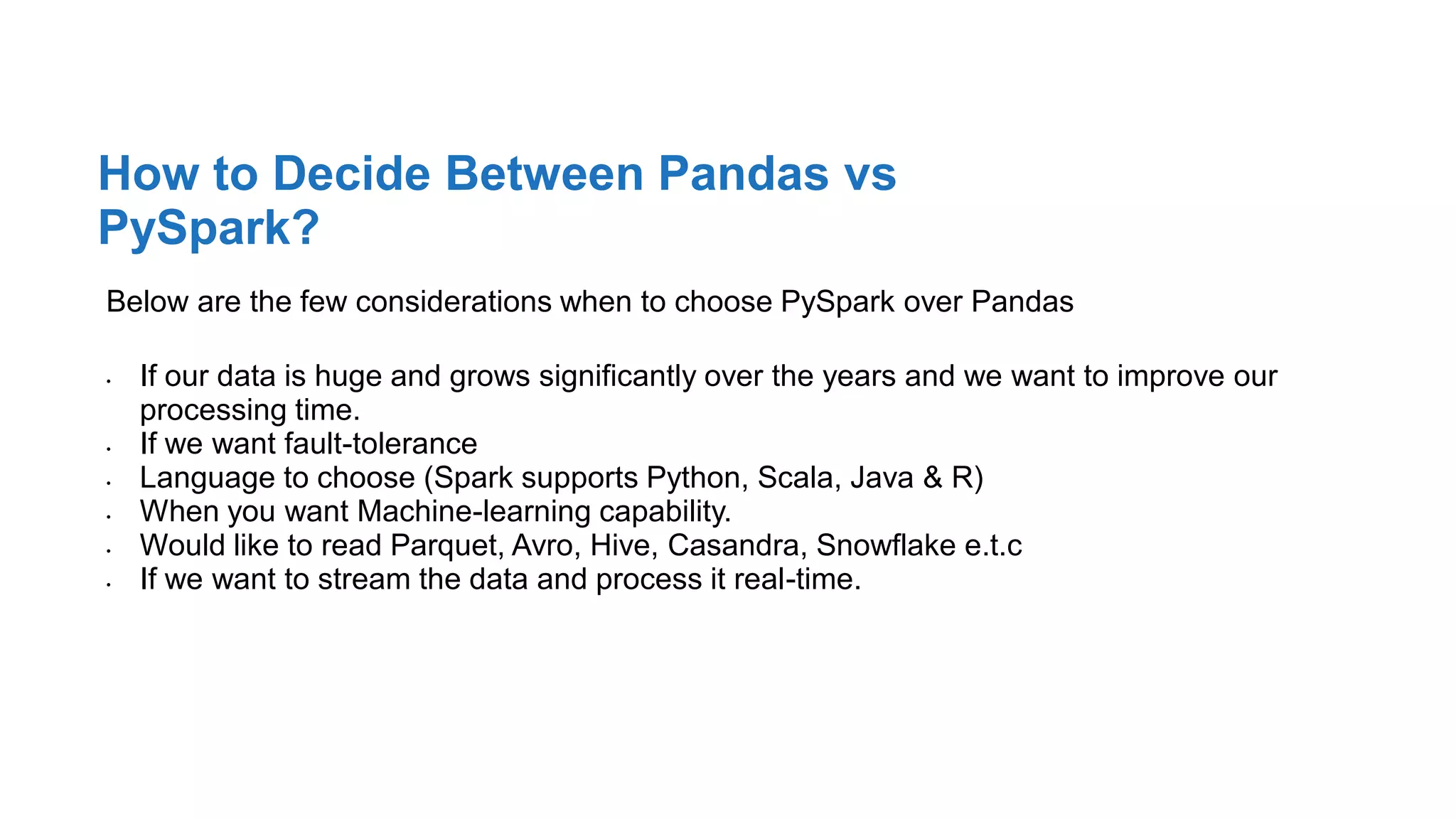
Below are the few considerations when to choose PySpark over Pandas
• If our data is huge and grows significantly over the years and we want to improve our
processing time.
• If we want fault-tolerance
• Language to choose (Spark supports Python, Scala, Java & R)
• When you want Machine-learning capability.
• Would like to read Parquet, Avro, Hive, Casandra, Snowflake e.t.c
• If we want to stream the data and process it real-time.
How to Decide Between Pandas vs
PySpark?
The team
Answer the question, “Why are we the ones to solve the problem we identified?”
@sahildua2305
Thank you!

Pandas.ppt

  • 1.
  • 2.
  • 3.
    Pandas Data Structures Seriesis like column in a table DataFrame A 6 B 3.14 C -4 D 0 foo bar baz A x 6 True B y 10 True C z NaN False index values index columns
  • 4.
    Creating Series import pandasas pd s1 = pd.Series([1, 2, 3, 4]) 0 1 1 2 2 3 3 4 s2 = pd.Series([1, 2, 3, 4], index=[‘A’, ‘B’, ‘C’, ‘D’]) A 1 B 2 C 3 D 4
  • 5.
    Creating DataFrame df =pd.DataFrame({‘foo’: [‘x’, ‘y’, ‘z’], ‘bar’: [6, 10, None], ‘baz’: [True, True, False]}) foo bar baz 0 x 6 True 1 y 10 True 2 z NaN False
  • 6.
    Importing Data • pd.read_csv(filename)| From a CSV file • pd.read_table(filename) | From a delimited text file (like TSV) • pd.read_excel(filename) | From an Excel file • pd.read_sql(query, connection_object) | Read from a SQL table/database • pd.read_json(json_string) | Read from a JSON formatted string, URL or file • pd.DataFrame(dict) | From a dict, keys for columns names, values for data as lists
  • 7.
    Viewing/Inspecting Data • df.head(n)| First n rows of the DataFrame • df.tail(n) | Last n rows of the DataFrame • df.shape() | Number of rows and columns • df.info() | Index, Datatype and Memory information • df.describe() | Summary statistics for numerical columns
  • 8.
    Creating DataFrame fromlist calories=[420,300,150] duration=[6,10,5] df=pd.DataFrame(list (zip(calories , duration) ),columns=[‘Calories’,’Duration’]) Calories Duration 0 420 6 1 300 10 2 150 5
  • 9.
    Column Selection df[‘Calories’] Calories 0 420 1300 2 150 Calories Duration 0 420 6 1 300 10 2 150 5
  • 10.
    Column Selection df[[‘Calories’,’Duration’]] Calories Duration 0420 6 1 300 10 2 150 5 Calories Duration 0 420 6 1 300 10 2 150 5
  • 11.
    Row Selection df.loc[0] Calories 420 Duration6 Calories Duration 0 420 6 1 300 10 2 150 5
  • 12.
    Row Selection df.loc[0:2] OR df.loc[[0,1]] CaloriesDuration 0 420 6 1 300 10 Calories Duration 0 420 6 1 300 10 2 150 5
  • 13.
    Cleaning wrong data df.loc[2,'Duration'] = 5 Calories Duration 0 420 6 1 300 10 2 150 5 Calories Duration 0 420 6 1 300 10 2 150 500
  • 14.
    Removing Duplicates df.duplicated(): ReturnsTrue for every row that is a duplicate, otherwise False df.drop_duplicates(inplace=True) Calories Duration 0 420 6 1 300 10 Calories Duration 0 420 6 1 300 10 2 300 10
  • 15.
    Conditional Filtering foo barbaz 0 x 6 True 1 y 10 True 2 z NaN False df[ (df[‘baz’]) ] foo bar baz 0 x 6 True 1 y 10 True
  • 16.
    Conditional Filtering foo barbaz 0 x 6 True 1 y 10 True 2 z NaN False df[ (df['foo'] == 'x') | (df['foo'] == 'z') ] foo bar baz 0 x 6 True 2 z NaN False
  • 17.
    Handling Missing Values new_df= df.dropna() dataframe.dropna(axis, how, thresh, subset, inplace) foo bar baz 0 x 6 True 1 y 10 True 2 z NaN False 3 NaN NaN NaN foo bar baz 0 x 6 True 1 y 10 True
  • 18.
    Handling Missing Values new_df= df.dropna(how=‘all’) foo bar baz 0 x 6 True 1 y 10 True 2 z NaN False foo bar baz 0 x 6 True 1 y 10 True 2 z NaN False 3 NaN NaN NaN
  • 19.
    Handling Missing Values new_df= df.fillna(0) foo bar baz 0 x 6 True 1 y 10 True 2 z NaN False 3 NaN NaN NaN foo bar baz 0 x 6 True 1 y 10 True 2 z 0 False 3 0 0 0
  • 20.
    Handling Missing Values new_df= df.fillna(method=‘ffill’) foo bar baz 0 x 6 True 1 y 10 True 2 z NaN False 3 NaN NaN NaN foo bar baz 0 x 6 True 1 y 10 True 2 z 10 False 3 z 10 False
  • 21.
    Indexing ix = df.index foobar baz 0 a 6 True 1 b 10 True 2 c -2 False 3 d 1 True 0 1 2 3 df.index returns A Pandas Index object containing the label of the rows.
  • 22.
    Indexing df = df.set_index(‘foo’) barbaz foo a 6 True b 10 True c -2 False d 1 True foo bar baz 0 a 6 True 1 b 10 True 2 c -2 False 3 d 1 True
  • 23.
    Indexing df.loc[‘a’] bar baz foo a 6True b 10 True c -2 False d 1 True bar 6 baz True df.iloc[0]
  • 24.
  • 25.
  • 26.
    cumsum() Returns the cumulativesum Calories Duration 0 420 6 1 300 10 2 150 5
  • 27.
    Difference between Sparkand Pandas DataFrame Spark DataFrame Pandas DataFrame Spark DataFrame has Multiple Nodes. Pandas DataFrame has a Single Node. Spark DataFrame is Immutable. Pandas DataFrame is Mutable. Complex operations are difficult to perform as compared to Pandas DataFrame. Complex operations are easier to perform as compared to Spark DataFrame. sparkDataFrame.count() returns the number of rows. pandasDataFrame.count() returns the number of non NA/null observations for each column.
  • 28.
    Below are thefew considerations when to choose PySpark over Pandas • If our data is huge and grows significantly over the years and we want to improve our processing time. • If we want fault-tolerance • Language to choose (Spark supports Python, Scala, Java & R) • When you want Machine-learning capability. • Would like to read Parquet, Avro, Hive, Casandra, Snowflake e.t.c • If we want to stream the data and process it real-time. How to Decide Between Pandas vs PySpark?
  • 29.
    The team Answer thequestion, “Why are we the ones to solve the problem we identified?” @sahildua2305 Thank you!