Pandas is aPython library built on top of NumPy, designed for
data wrangling, analysis, and manipulation.The core
objects are:
• Series: 1D labeled array
• DataFrame: 2D labeled tabular structure (rows + columns)
3.
1. CREATING DATAFRAMES
importpandas as pd
import numpy as np
# From dictionary
data = {
'Name': ['Alice', 'Bob', 'Charlie', 'David'],
'Age': [25, 30, 35, 40],
'Score': [85.5, 90.3, 78.9, 88.2]
}
df = pd.DataFrame(data)
print(df)
# From NumPy array
arr = np.arange(12).reshape(4, 3)
df2 = pd.DataFrame(arr,
columns=['A', 'B', 'C'])
print(df2)
# From CSV
df_csv = pd.read_csv("data.csv")
4.
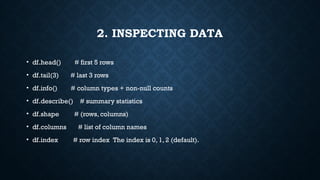
2. INSPECTING DATA
•df.head() # first 5 rows
• df.tail(3) # last 3 rows
• df.info() # column types + non-null counts
• df.describe() # summary statistics
• df.shape # (rows, columns)
• df.columns # list of column names
• df.index # row index The index is 0, 1, 2 (default).
Row selection
df.iloc[0] #first row by position
df.iloc[0:2] # slicing by position
df.loc[1] # row with index label 1
df.loc[1:3, ['Name']] # specific rows + columns
df['Score']
# 0 85.5
#1 90.3
# 2 78.9
# 3 88.2
df['Score'] > 80
# 0 True
# 1 True
# 2 False
# 3 True
Name Age Score Passed
0 Alice 25 85.5 True
1 Bob 30 90.3 True
2 Charlie 35 78.9 False
3 David 40 88.2 True
This is how it works
df['Passed'] = df['Score'] > 80
10.
DF.LOC[0, 'SCORE'] #ROW WITH INDEX=0, COLUMN='SCORE'
.loc Label-based indexing
→
• Uses row labels and column labels.
• Works with actual names (index names, column names).
.iloc Integer-location based indexing
→
• Uses row positions and column positions (like Python list indexing).
df.iloc[0, 1] # first row (0), second column (1)
11.
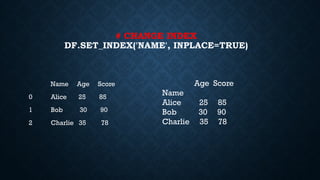
# CHANGE INDEX
DF.SET_INDEX('NAME',INPLACE=TRUE)
Name Age Score
0 Alice 25 85
1 Bob 30 90
2 Charlie 35 78
Age Score
Name
Alice 25 85
Bob 30 90
Charlie 35 78
DF.ISNULL()
Name Age Score
0False False False
1 False True False
2 False False True
3 False True False
df.isnull().sum()
Name 0
Age 2
Score 1
dtype: int64
14.
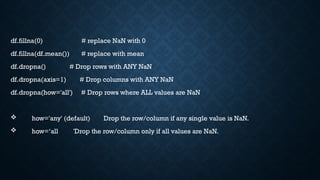
df.fillna(0) # replaceNaN with 0
df.fillna(df.mean()) # replace with mean
df.dropna() # Drop rows with ANY NaN
df.dropna(axis=1) # Drop columns with ANY NaN
df.dropna(how='all') # Drop rows where ALL values are NaN
how='any' (default) Drop the row/column if any single value is NaN.
how=‘all 'Drop the row/column only if all values are NaN.
df.groupby('Dept').agg({
'Salary': ['mean', 'max','min'],
'Bonus': 'sum'
})
Salary Bonus
mean max min sum
Dept
Finance 70000.0 70000 70000 8000
HR 56500.0 58000 55000 7000
IT 62500.0 65000 60000 11000
18.
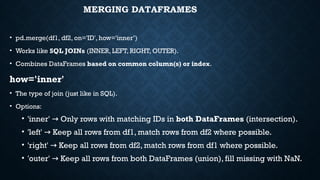
MERGING DATAFRAMES
• pd.merge(df1,df2, on='ID', how='inner’)
• Works like SQL JOINs (INNER, LEFT, RIGHT, OUTER).
• Combines DataFrames based on common column(s) or index.
how='inner'
• The type of join (just like in SQL).
• Options:
• 'inner' Only rows with matching IDs in
→ both DataFrames (intersection).
• 'left' Keep all rows from df1, match rows from df2 where possible.
→
• 'right' Keep all rows from df2, match rows from df1 where possible.
→
• 'outer' Keep all rows from both DataFrames (union), fill missing with NaN.
→
19.
import pandas aspd
# First DataFrame
df1 = pd.DataFrame({
'ID': [1, 2, 3],
'Name': ['Alice', 'Bob', 'Charlie']
})
# Second DataFrame
df2 = pd.DataFrame({
'ID': [2, 3, 4],
'Score': [85, 90, 95]
})
# Merge
merged = pd.merge(df1, df2, on='ID', how='inner')
print(merged)
ID Name Score
0 2 Bob 85
1 3 Charlie 90
20.
RESHAPING DATA
Reshaping meanschanging the structure or layout of DataFrame — switching
between wide and long formats, or reorganizing data for analysis.
• 1. Pivot (wide format)
• 2. Melt (long format)
21.
1. Pivot (wideformat)
Turn unique values from one column into multiple columns.
import pandas as pd
df = pd.DataFrame({
"Month": ["Jan", "Jan", "Feb", "Feb"],
"Product": ["A", "B", "A", "B"],
"Sales": [100, 150, 200, 250]
})
print("Original (long format):")
print(df)
22.
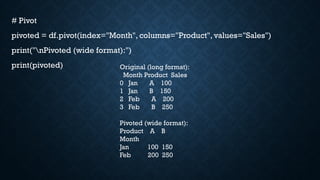
# Pivot
pivoted =df.pivot(index="Month", columns="Product", values="Sales")
print("nPivoted (wide format):")
print(pivoted) Original (long format):
Month Product Sales
0 Jan A 100
1 Jan B 150
2 Feb A 200
3 Feb B 250
Pivoted (wide format):
Product A B
Month
Jan 100 150
Feb 200 250
23.
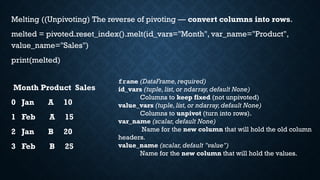
Melting ((Unpivoting) Thereverse of pivoting — convert columns into rows.
melted = pivoted.reset_index().melt(id_vars="Month", var_name="Product",
value_name="Sales")
print(melted)
Month Product Sales
0 Jan A 10
1 Feb A 15
2 Jan B 20
3 Feb B 25
frame (DataFrame,required)
id_vars (tuple,list,or ndarray,default None)
Columns to keep fixed (not unpivoted)
value_vars (tuple,list,or ndarray,default None)
Columns to unpivot (turn into rows).
var_name (scalar, default None)
Name for the new column that will hold the old column
headers.
value_name (scalar,default "value")
Name for the new column that will hold the values.
ID Math Science
01 90 88
1 2 80 92
2 3 85 79
ID variable value
0 1 Math 90
1 2 Math 80
2 3 Math 85
3 1 Science 88
4 2 Science 92
5 3 Science 79
frame (DataFrame,required)
id_vars (tuple,list,or ndarray,default None)
Columns to keep fixed (not unpivoted)
value_vars (tuple,list,or ndarray,default None)
Columns to unpivot (turn into rows).
var_name (scalar, default None)
Name for the new column that will hold the old column
headers.
value_name (scalar, default "value")
Name for the new column that will hold the values.
melted = pd.melt(df, id_vars=['ID'], value_vars=['Math', 'Science'])
print(melted)
melted = pd.melt(
df,
id_vars=["Student"],
value_vars=["Math","Science", "English"],
var_name="Subject",
value_name="Marks"
)
print(melted)
Student Subject Marks
0 A Math 90
1 B Math 80
2 C Math 85
3 A Science 88
4 B Science 92
5 C Science 79
6 A English 95
7 B English 85
8 C English 87
28.
3. STACK /UNSTACK
Stack: moves columns into the row index.Unstack: moves
row index levels into columns.
stacked = pivoted.stack()
print(stacked)
Month Product
Jan A 10
B 20
Feb A 15
B 25
dtype: int64
DATA WRANGLING
Data wrangling(or data munging) in pandas means cleaning, reshaping,
transforming, and enriching raw data into a usable format for analysis or modeling.
Load & Inspect
CleanTransform
Reshape
Filter & Subset
Aggregate & Summarize
Combine Data
Reindex & Sor
tFeature Engineering
![1. CREATING DATAFRAMES
import pandas as pd
import numpy as np
# From dictionary
data = {
'Name': ['Alice', 'Bob', 'Charlie', 'David'],
'Age': [25, 30, 35, 40],
'Score': [85.5, 90.3, 78.9, 88.2]
}
df = pd.DataFrame(data)
print(df)
# From NumPy array
arr = np.arange(12).reshape(4, 3)
df2 = pd.DataFrame(arr,
columns=['A', 'B', 'C'])
print(df2)
# From CSV
df_csv = pd.read_csv("data.csv")](https://image.slidesharecdn.com/pandas-251112110029-c6aba2fe/85/Using-Pandas-library-in-Python-for-Data-manipulation-3-320.jpg)
![INDEXING, SELECTING, AND FILTERING
Column selection:
df['Name'] # single column (Series)
df[['Name', 'Score']] # multiple columns (DataFrame)](https://image.slidesharecdn.com/pandas-251112110029-c6aba2fe/85/Using-Pandas-library-in-Python-for-Data-manipulation-5-320.jpg)
![Row selection
df.iloc[0] # first row by position
df.iloc[0:2] # slicing by position
df.loc[1] # row with index label 1
df.loc[1:3, ['Name']] # specific rows + columns](https://image.slidesharecdn.com/pandas-251112110029-c6aba2fe/85/Using-Pandas-library-in-Python-for-Data-manipulation-6-320.jpg)
![• Conditional filtering
df[df['Age'] > 30] # filter rows
df[(df['Age'] > 30) & (df['Score'] > 80)] # multiple conditions](https://image.slidesharecdn.com/pandas-251112110029-c6aba2fe/85/Using-Pandas-library-in-Python-for-Data-manipulation-7-320.jpg)
![4. MODIFYING DATAFRAMES
# Add new column
df['Passed'] = df['Score'] > 80
# Update values
df.loc[0, 'Score'] = 95
# Drop column
df = df.drop(columns=['Passed'])
# Rename columns
df.rename(columns={'Score': 'ExamScore'}, inplace=True)
# Change index
df.set_index('Name', inplace=True)](https://image.slidesharecdn.com/pandas-251112110029-c6aba2fe/85/Using-Pandas-library-in-Python-for-Data-manipulation-8-320.jpg)
![df['Score']
# 0 85.5
# 1 90.3
# 2 78.9
# 3 88.2
df['Score'] > 80
# 0 True
# 1 True
# 2 False
# 3 True
Name Age Score Passed
0 Alice 25 85.5 True
1 Bob 30 90.3 True
2 Charlie 35 78.9 False
3 David 40 88.2 True
This is how it works
df['Passed'] = df['Score'] > 80](https://image.slidesharecdn.com/pandas-251112110029-c6aba2fe/85/Using-Pandas-library-in-Python-for-Data-manipulation-9-320.jpg)
![DF.LOC[0, 'SCORE'] # ROW WITH INDEX=0, COLUMN='SCORE'
.loc Label-based indexing
→
• Uses row labels and column labels.
• Works with actual names (index names, column names).
.iloc Integer-location based indexing
→
• Uses row positions and column positions (like Python list indexing).
df.iloc[0, 1] # first row (0), second column (1)](https://image.slidesharecdn.com/pandas-251112110029-c6aba2fe/85/Using-Pandas-library-in-Python-for-Data-manipulation-10-320.jpg)
![5. HANDLING MISSING VALUES
import pandas as pd
import numpy as np
df = pd.DataFrame({
"Name": ["Alice", "Bob", "Charlie", "David"],
"Age": [25.0, np.nan, 30.0, np.nan],
"Score": [85.0, 90.0, np.nan, 70.0]
})
print(df)](https://image.slidesharecdn.com/pandas-251112110029-c6aba2fe/85/Using-Pandas-library-in-Python-for-Data-manipulation-12-320.jpg)

![6. GROUPING AND AGGREGATION
data = {
'Dept': ['IT', 'IT', 'HR', 'HR', 'Finance'],
'Employee': ['A', 'B', 'C', 'D', 'E'],
'Salary': [60000, 65000, 55000, 58000, 70000]
}
df = pd.DataFrame(data)
# Group by department
grouped = df.groupby('Dept')['Salary'].mean()
print(grouped)
# Multiple aggregations
df.groupby('Dept').agg({
'Salary': ['mean', 'max', 'min']
})](https://image.slidesharecdn.com/pandas-251112110029-c6aba2fe/85/Using-Pandas-library-in-Python-for-Data-manipulation-15-320.jpg)
![GROUPED = DF.GROUPBY('DEPT')['SALARY'].MEAN()
PRINT(GROUPED)
• import pandas as pd
• df = pd.DataFrame({
• 'Dept': ['IT', 'IT', 'HR', 'HR', 'Finance'],
• 'Employee': ['A', 'B', 'C', 'D', 'E'],
• 'Salary': [60000, 65000, 55000, 58000, 70000],
• 'Bonus': [5000, 6000, 4000, 3000, 8000]
• })
Dept
Finance 70000.0
HR 56500.0
IT 62500.0
Name: Salary, dtype:
float64](https://image.slidesharecdn.com/pandas-251112110029-c6aba2fe/85/Using-Pandas-library-in-Python-for-Data-manipulation-16-320.jpg)
![df.groupby('Dept').agg({
'Salary': ['mean', 'max', 'min'],
'Bonus': 'sum'
})
Salary Bonus
mean max min sum
Dept
Finance 70000.0 70000 70000 8000
HR 56500.0 58000 55000 7000
IT 62500.0 65000 60000 11000](https://image.slidesharecdn.com/pandas-251112110029-c6aba2fe/85/Using-Pandas-library-in-Python-for-Data-manipulation-17-320.jpg)
![import pandas as pd
# First DataFrame
df1 = pd.DataFrame({
'ID': [1, 2, 3],
'Name': ['Alice', 'Bob', 'Charlie']
})
# Second DataFrame
df2 = pd.DataFrame({
'ID': [2, 3, 4],
'Score': [85, 90, 95]
})
# Merge
merged = pd.merge(df1, df2, on='ID', how='inner')
print(merged)
ID Name Score
0 2 Bob 85
1 3 Charlie 90](https://image.slidesharecdn.com/pandas-251112110029-c6aba2fe/85/Using-Pandas-library-in-Python-for-Data-manipulation-19-320.jpg)

![1. Pivot (wide format)
Turn unique values from one column into multiple columns.
import pandas as pd
df = pd.DataFrame({
"Month": ["Jan", "Jan", "Feb", "Feb"],
"Product": ["A", "B", "A", "B"],
"Sales": [100, 150, 200, 250]
})
print("Original (long format):")
print(df)](https://image.slidesharecdn.com/pandas-251112110029-c6aba2fe/85/Using-Pandas-library-in-Python-for-Data-manipulation-21-320.jpg)
![• pd.melt(df, id_vars=['ID'], value_vars=['Math', 'Science'])
import pandas as pd
df = pd.DataFrame({
"ID": [1, 2, 3],
"Math": [90, 80, 85],
"Science": [88, 92, 79]
})
print(df)](https://image.slidesharecdn.com/pandas-251112110029-c6aba2fe/85/Using-Pandas-library-in-Python-for-Data-manipulation-24-320.jpg)
![ID Math Science
0 1 90 88
1 2 80 92
2 3 85 79
ID variable value
0 1 Math 90
1 2 Math 80
2 3 Math 85
3 1 Science 88
4 2 Science 92
5 3 Science 79
frame (DataFrame,required)
id_vars (tuple,list,or ndarray,default None)
Columns to keep fixed (not unpivoted)
value_vars (tuple,list,or ndarray,default None)
Columns to unpivot (turn into rows).
var_name (scalar, default None)
Name for the new column that will hold the old column
headers.
value_name (scalar, default "value")
Name for the new column that will hold the values.
melted = pd.melt(df, id_vars=['ID'], value_vars=['Math', 'Science'])
print(melted)](https://image.slidesharecdn.com/pandas-251112110029-c6aba2fe/85/Using-Pandas-library-in-Python-for-Data-manipulation-25-320.jpg)
![melted = pd.melt(
df,
id_vars=["Student"],
value_vars=["Math", "Science",
"English"],
var_name="Subject",
value_name="Marks"
)
print(melted)
Student Math Science English
0 A 90 88 95
1 B 80 92 85
2 C 85 79 87](https://image.slidesharecdn.com/pandas-251112110029-c6aba2fe/85/Using-Pandas-library-in-Python-for-Data-manipulation-26-320.jpg)
![melted = pd.melt(
df,
id_vars=["Student"],
value_vars=["Math", "Science", "English"],
var_name="Subject",
value_name="Marks"
)
print(melted)
Student Subject Marks
0 A Math 90
1 B Math 80
2 C Math 85
3 A Science 88
4 B Science 92
5 C Science 79
6 A English 95
7 B English 85
8 C English 87](https://image.slidesharecdn.com/pandas-251112110029-c6aba2fe/85/Using-Pandas-library-in-Python-for-Data-manipulation-27-320.jpg)