

... or how to start reducing the TCO of your IBM Lotus Notes clients


© 2007 - 2012 panagenda
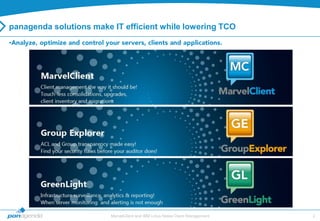
panagenda solutions make IT efficient while lowering TCO
•


                         MarvelClient and IBM Lotus Notes Client Management   2
MarvelClient and IBM Lotus Notes Client Management   3
PAN-MarvelClient-PF-100222.pptx   4
The Client Management Challenge

IBM Lotus Notes client management doesn‟t start now, it started years ago
   • Clients have been upgraded 3 times since then
   • Install directory and client type changes
        • Shared workstations vs single client installs
        • Outdated or wrong templates, id‟s etc

Meanwhile, new apps got rolled out and decommissioned
   • Icons and bookmarks were added – but probably never REmoved
   • Local replicas got created, abandoned, re-created – but probably never Removed
        • Mapped drives, outside the data directory, inside the data directory

Meanwhile, servers and users changed
   • Consolidations and name changes leave orphaned client pointers
   • Name changes and moves leave wrong location and connection docs
       • The impact of a wrong catalog.nsf or homer server are tremendous


                                MarvelClient and IBM Lotus Notes Client Management       5
                                                                                     5
The Impact of Notes 8.x

 17„000 files in Notes Program directory in 1„800 subdirectories
   • 7„500 (largely undocumented) .properties files
   • 1„500 jar files
   • 1„200 HTML files

 3„000 files in Notes Dataworkspace directory in 2„400 subdirectories, out of
   which 1„850 are empty
   • 900 (largely undocumented) XML files
   • 100+ (largely undocumented) properties files

 In total, that is
   •   20„000 files in 4„600 subdirectories
   •   8„500+ largely undocumented files
   •   Many (many many) subdirectories are plain empty, especially in Dataworkspace
   •   ... and around 100 NSFs/NTF„s
   •   ... and the good old notes.ini file
                               MarvelClient and IBM Lotus Notes Client Management      6
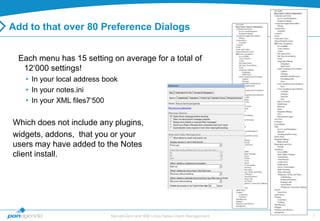
Add to that over 80 Preference Dialogs


 Each menu has 15 setting on average for a total of
  12„000 settings!
   • In your local address book
   • In your notes.ini
   • In your XML files7„500


Which does not include any plugins,
widgets, addons, that you or your
users may have added to the Notes
client install.


                            MarvelClient and IBM Lotus Notes Client Management   7
The Policy Challenge

 Policies depend on an already functioning/setup client
    • In my experience less than 75% of users actually receive policies

 They don‟t provide you with an inventory before making changes
    • Client Management “in the dark”

 They don‟t truly adapt to your users‟ unique situation
    • LAN vs VPN, Citrix user, function outside the data directory

 They aren‟t predictable
    • Can happen anytime.... or not...

 Most settings cannot be UNset once set
    • Think about it...

 They typically cannot repeat actions
    • So if the user breaks something it‟s broken until they call for help

                             MarvelClient and IBM Lotus Notes Client Management       8
                                                                                  8
PAN-MarvelClient-PF-100222.pptx   9
Transparency = Foundation of a Healthy Notes Environment


  What is out there
  • Client types, HW details, release version, available disk space, where links are pointing to, list of
    databases, all existing replicas, memory present, configuration details, etc...

  The difference between what was expected and what actually is
    • Never requires guesswork, always shows up-to-date client inventory at all

  Opportunities for improvements
    • Reduce managed storage by deleting 40% of outdated local databases and templates
    • Upgrade ODS for a client performance boost

  How (non)healthy the client infrastructure is
    • what needs to be fixed orstandardized

  Icons, bookmarks etc that users have
    • Typically shows that Notes is used much more than previously assumed (often prevents
      migration to Microsoft),


                                  MarvelClient and IBM Lotus Notes Client Management                        10
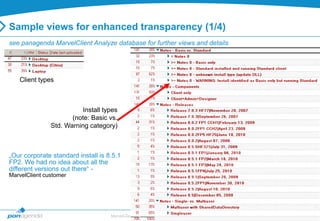
Sample views for enhanced transparency (1/4)
see panagenda MarvelClient Analyze database for further views and details


   Client types


                          Install types
                      (note: Basic vs.
               Std. Warning category)


„Our corporate standard install is 8.5.1
FP2. We had no idea about all the
different versions out there“ -
MarvelClient customer


                                    MarvelClient and IBM Lotus Notes Client Management   11
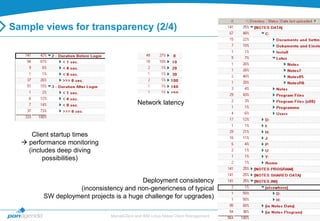
Sample views for transparency (2/4)


                                           Network latency


     Client startup times
   performance monitoring
    (includes deep diving
         possibilities)


                                        Deployment consistency
                  (inconsistency and non-genericness of typical
        SW deployment projects is a huge challenge for upgrades)

                              MarvelClient and IBM Lotus Notes Client Management   12
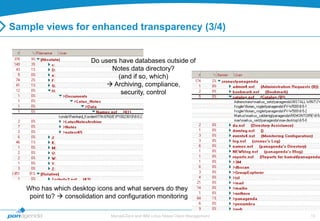
Sample views for enhanced transparency (3/4)


                         Do users have databases outside of
                               Notes data directory?
                                  (and if so, which)
                               Archiving, compliance,
                                   security, control


   Who has which desktop icons and what servers do they
    point to?  consolidation and configuration monitoring

                               MarvelClient and IBM Lotus Notes Client Management   13
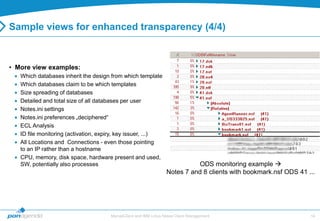
Sample views for enhanced transparency (4/4)


• More view examples:
   Which databases inherit the design from which template
   Which databases claim to be which templates
   Size spreading of databases
   Detailed and total size of all databases per user
   Notes.ini settings
   Notes.ini preferences „deciphered“
   ECL Analysis
   ID file monitoring (activation, expiry, key issuer, ...)
   All Locations and Connections - even those pointing
   to an IP rather than a hostname
   CPU, memory, disk space, hardware present and used,
   SW, potentially also processes                                           ODS monitoring example 
                                                                  Notes 7 and 8 clients with bookmark.nsf ODS 41 ...


                                      MarvelClient and IBM Lotus Notes Client Management                          14
PAN-MarvelClient-PF-100222.pptx   15
Fixing and Standardizing existing deployments

• Without transparency, it‘s virtually impossible to fix and standardize
   You can„t predict the outcome of any sweeping changes/fixes
   You don„t know what„s out there
   You don„t know how well your deployed changes are working
   You don„t know „what„s left“ to do
   You don„t know how well you„re doing (can„t prove reasons/success to upper management)

• Fixing and Standardizing can mean many different things
   One time changes such as adding a variable to the notes.ini
   Enforced configurations such as local replicas for mail, or unchangable location documents
   Roaming: standard configuration across multiple devices, done intelligently
   Comprehensive, flexible, consistent, predictable control over many different things, such as:
    Icons, bookmarks, replicas, replicator
     pages, locations, connections, toolbars, notes.ini, „Eclipse“/plugins/widgets, etc.


                                   MarvelClient and IBM Lotus Notes Client Management              16
Standardizing

Yes, we know “comprehensive, flexible, consistent, predictable“ is a lot in one
 sentence!

 However, all four are required for proper
 client management:

 • Comprehensive - to accomodate users installs and
   situations of all types
 • Flexible – to accomodate different types of users,
   traveling on VPN, using Citrix etc
 • Consistent – fixing a problem once is great but
   preventing the issue entirely is even better
 • Predictable – to ensure intended changes are
   taking place while knowing when that will happen


                               MarvelClient and IBM Lotus Notes Client Management   17
Fixing

• In most cases, fixing is just another word for:
   Lack of transparency and standardization
   Desperate symptom fighting
    „We don„t know what„s wrong, let„s re-image Notes“

   Second most expensive form of client management = help on demand
    1000 similar problems remain 1000 support calls
     persistent standardization significantly reduces number of individual
       fixes/ number of help desk incidents
    Most expensive = do nothing

In short, fixing is not a way to manage or control IBM Lotus Notes clients but merely a one
  time change applied to users


                               MarvelClient and IBM Lotus Notes Client Management             18
Consolidations, Upgrades, Recertifications, Mergers etc

•   Server consolidations: fewer servers = less cost
•   Upgrading hard- and software and ODS on servers = gaining efficiency
•   Leveraging new features by upgrading
•   Recertifying domains, mergers and server expansions
•   Load balancing and clustering servers = gaining efficiency and reliability

• During such projects, companies often face huge challenges on the client side
     How do you repoint user links to new servers while being able to turn off old server immediately?
     How do you re-point replicator page entries or history to new servers?
     How do you prevent cutoff date problems with existing local replicas?
     How do upgrade inconsistent environments in which I can„t predict what a change may cause?
     How do you upgrade all local databases without impacting my bandwidth SAN/NAS?
     How many help desk calls can be expected during such projects? How do you prevent them?
     How do you ensure best possible client performance and implement maintenance?


                                    MarvelClient and IBM Lotus Notes Client Management                   19
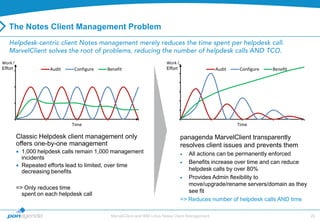
The Notes Client Management Problem


Work /                                                                  Work /
Effort               Audit     Configure   Benefit                      Effort                   Audit    Configure   Benefit


                              Time                                                                       Time

         Classic Helpdesk client management only                                 panagenda MarvelClient transparently
         offers one-by-one management                                            resolves client issues and prevents them
           1,000 helpdesk calls remain 1,000 management                             All actions can be permanently enforced
           incidents
                                                                                    Benefits increase over time and can reduce
           Repeated efforts lead to limited, over time
           decreasing benefits                                                      helpdesk calls by over 80%
                                                                                    Provides Admin flexibility to
                                                                                    move/upgrade/rename servers/domain as they
         => Only reduces time
                                                                                    see fit
           spent on each helpdesk call
                                                                                 => Reduces number of helpdesk calls AND time

                                            MarvelClient and IBM Lotus Notes Client Management                                   20
PAN-MarvelClient-PF-100222.pptx   21
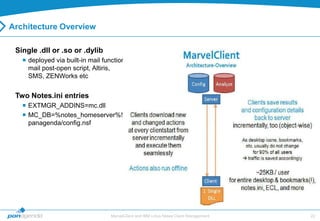
Architecture Overview

 Single .dll or .so or .dylib
    deployed via built-in mail function,
     mail post-open script, Altiris,
     SMS, ZENWorks etc


 Two Notes.ini entries
    EXTMGR_ADDINS=mc.dll
    MC_DB=%notes_homeserver%!!
     panagenda/config.nsf


                                   MarvelClient and IBM Lotus Notes Client Management   22
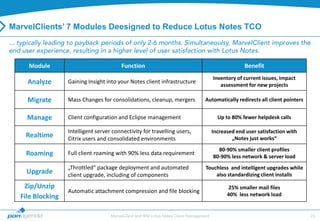
MarvelClients’ 7 Modules Deesigned to Reduce Lotus Notes TCO


    Module                               Function                                                     Benefit
                                                                                         Inventory of current issues, impact
    Analyze       Gaining Insight into your Notes client infrastructure
                                                                                            assessment for new projects

    Migrate       Mass Changes for consolidations, cleanup, mergers                Automatically redirects all client pointers


    Manage        Client configuration and Eclipse management                              Up to 80% fewer helpdesk calls

                  Intelligent server connectivity for travelling users,                  Increased end user satisfaction with
    Realtime      Citrix users and consolidated environments                                     „Notes just works“
                                                                                           80-90% smaller client profiles
    Roaming       Full client roaming with 90% less data requirement
                                                                                         80-90% less network & server load
                  „Throttled“ package deployment and automated                      Touchless and intelligent upgrades while
    Upgrade       client upgrade, including of components                               also standardizing client installs

   Zip/Unzip                                                                                   25% smaller mail files
                  Automatic attachment compression and file blocking
  File Blocking                                                                                40% less network load


                                    MarvelClient and IBM Lotus Notes Client Management                                           23
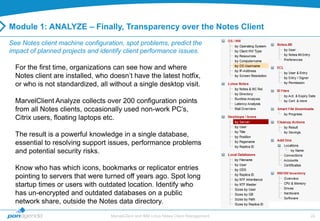
Module 1: ANALYZE – Finally, Transparency over the Notes Client
See Notes client machine configuration, spot problems, predict the
impact of planned projects and identify client performance issues.

  For the first time, organizations can see how and where
  Notes client are installed, who doesn‟t have the latest hotfix,
  or who is not standardized, all without a single desktop visit.

  MarvelClient Analyze collects over 200 configuration points
  from all Notes clients, occasionally used non-work PC‟s,
  Citrix users, floating laptops etc.

  The result is a powerful knowledge in a single database,
  essential to resolving support issues, performance problems
  and potential security risks.

  Know who has which icons, bookmarks or replicator entries
  pointing to servers that were turned off years ago. Spot long
  startup times or users with outdated location. Identify who
  has un-encrypted and outdated databases on a public
  network share, outside the Notes data directory.
                                  MarvelClient and IBM Lotus Notes Client Management   24
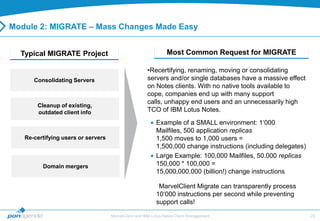
Module 2: MIGRATE – Mass Changes Made Easy


  Typical MIGRATE Project                                       Most Common Request for MIGRATE

                                                      •Recertifying, renaming, moving or consolidating
      Consolidating Servers                           servers and/or single databases have a massive effect
                                                      on Notes clients. With no native tools available to
                                                      cope, companies end up with many support
                                                      calls, unhappy end users and an unnecessarily high
       Cleanup of existing,
       outdated client info                           TCO of IBM Lotus Notes.
                                                          Example of a SMALL environment: 1„000
                                                          Mailfiles, 500 application replicas
   Re-certifying users or servers                         1,500 moves to 1,000 users =
                                                          1,500,000 change instructions (including delegates)
                                                          Large Example: 100,000 Mailfiles, 50.000 replicas
         Domain mergers                                   150,000 * 100,000 =
                                                          15,000,000,000 (billion!) change instructions

                                                           MarvelClient Migrate can transparently process
                                                          10„000 instructions per second while preventing
                                                          support calls!

                                    MarvelClient and IBM Lotus Notes Client Management                          25
Module 3: MANAGE – Total Control to Fix AND lock down Notes


  Define “the perfect Notes client” for any user group, hardware type, Notes
   version, geography, department etc and then automatically setup and enforce that configuration
   without costly and error prone manual setup
     Makes touchless new client setups fast, automated and easy
     Automatically configure Eclipse plug-ins, widgets, location and connection
      documents, notes.ini settings, local replicas, bookmarks, preferences, profile
      docs, signatures, dictionaries, full text indexes, ECLs, toolbars and more
  Since all MarvelClient actions can be set to execute once, a __ number of times or
    persistently, not only are Notes clients deployed perfectly, they remain perfectly configured
    , 365 days a year
     Over 80% support call reduction is easily achieves as help desk calls are prevented entirely
  Our cleanup feature identifies local duplicate replicas, outdated unencrypted data, rogue local
   archives and other security threats
     Take control of your environment by removing or moving data or just disabling security
      threats
  Manage ID files in a reliable and secure way with our “ID Vault” like storage facility
     ID files, certificates etc are transparently uploaded, downloaded and unlocked as needed
                                   MarvelClient and IBM Lotus Notes Client Management                26
Back-up


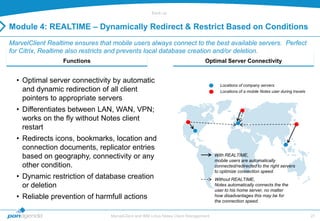
Module 4: REALTIME – Dynamically Redirect & Restrict Based on Conditions
MarvelClient Realtime ensures that mobile users always connect to the best available servers. Perfect
for Citrix, Realtime also restricts and prevents local database creation and/or deletion.
                  Functions                                                      Optimal Server Connectivity


  • Optimal server connectivity by automatic
                                                                                         Locations of company servers
    and dynamic redirection of all client                                                Locations of a mobile Notes user during travels
    pointers to appropriate servers
  • Differentiates between LAN, WAN, VPN;
    works on the fly without Notes client
    restart
  • Redirects icons, bookmarks, location and
    connection documents, replicator entries
    based on geography, connectivity or any                                            With REALTIME,
                                                                                       mobile users are automatically
    other condition.                                                                   connected/redirected to the right servers
                                                                                       to optimize connection speed.
  • Dynamic restriction of database creation                                           Without REALTIME,
    or deletion                                                                        Notes automatically connects the the
                                                                                       user to his home server, no matter
  • Reliable prevention of harmfull actions                                            how disadvantages this may be for
                                                                                       the connection speed.


                                  MarvelClient and IBM Lotus Notes Client Management                                                       27
Back-up


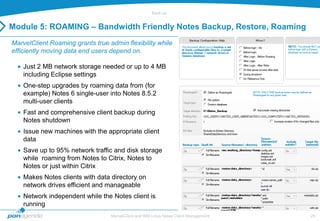
Module 5: ROAMING – Bandwidth Friendly Notes Backup, Restore, Roaming
MarvelClient Roaming grants true admin flexibility while
efficiently moving data end users depend on.

    Just 2 MB network storage needed or up to 4 MB
    including Eclipse settings
    One-step upgrades by roaming data from (for
    example) Notes 6 single-user into Notes 8.5.2
    multi-user clients
    Fast and comprehensive client backup during
    Notes shutdown
    Issue new machines with the appropriate client
    data
    Save up to 95% network traffic and disk storage
    while roaming from Notes to Citrix, Notes to
    Notes or just within Citrix
    Makes Notes clients with data directory on
    network drives efficient and manageable
    Network independent while the Notes client is
    running
                                  MarvelClient and IBM Lotus Notes Client Management   28
Back-up


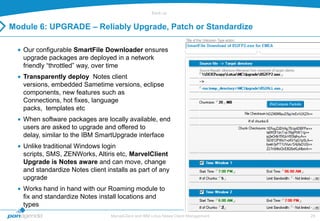
Module 6: UPGRADE – Reliably Upgrade, Patch or Standardize

   Our configurable SmartFile Downloader ensures
   upgrade packages are deployed in a network
   friendly “throttled” way, over time
   Transparently deploy Notes client
   versions, embedded Sametime versions, eclipse
   components, new features such as
   Connections, hot fixes, language
   packs, templates etc
   When software packages are locally available, end
   users are asked to upgrade and offered to
   delay, similar to the IBM SmartUpgrade interface
   Unlike traditional Windows login
   scripts, SMS, ZENWorks, Altiris etc, MarvelClient
   Upgrade is Notes aware and can move, change
   and standardize Notes client installs as part of any
   upgrade
   Works hand in hand with our Roaming module to
   fix and standardize Notes install locations and
   types
                                  MarvelClient and IBM Lotus Notes Client Management   29
Module 7: ZIP/UNZIP – Save 40% Disk Space on Top of DAOS
MarvelClient Zip/Unzip reduces storage and network costs without end user effort.


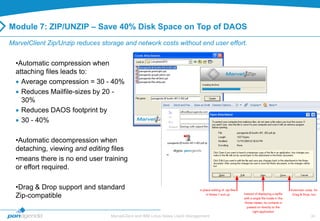
  •Automatic compression when
  attaching files leads to:
    Average compression = 30 - 40%
    Reduces Mailfile-sizes by 20 -
    30%
    Reduces DAOS footprint by
    30 - 40%

  •Automatic decompression when
  detaching, viewing and editing files
  •means there is no end user training
  or effort required.

  •Drag & Drop support and standard
  Zip-compatible

                                  MarvelClient and IBM Lotus Notes Client Management   30
Module 7: ATTACHMENT BLOCKING – Intelligent and Efficient File Handling

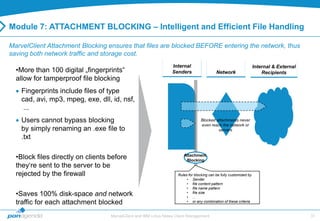
MarvelClient Attachment Blocking ensures that files are blocked BEFORE entering the network, thus
saving both network traffic and storage cost.
                                                                  Internal                                           Internal & External
  •More than 100 digital „fingerprints“                           Senders                   Network                      Recipients
  allow for tamperproof file blocking
    Fingerprints include files of type
    cad, avi, mp3, mpeg, exe, dll, id, nsf,
     ...
    Users cannot bypass blocking                                                  Blocked attachments never
                                                                                  even reach the network or
    by simply renaming an .exe file to                                                     servers
    .txt

  •Block files directly on clients before                               Attachment
                                                                         Blocking
  they„re sent to the server to be
  rejected by the firewall                                           Rules for blocking can be fully customized by
                                                                          • Sender
                                                                          • file content pattern
                                                                          • file name pattern
  •Saves 100% disk-space and network                                      • file size
                                                                          • ...
  traffic for each attachment blocked                                     • or any combination of these criteria


                                   MarvelClient and IBM Lotus Notes Client Management                                                      31
PAN-MarvelClient-PF-100222.pptx   32
MarvelClient Benefits
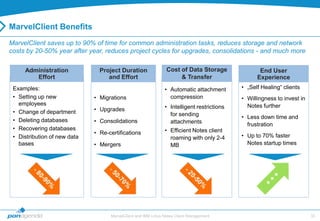
MarvelClient saves up to 90% of time for common administration tasks, reduces storage and network
costs by 20-50% year after year, reduces project cycles for upgrades, consolidations - and much more

     Administration             Project Duration                Cost of Data Storage               End User
        Effort                     and Effort                        & Transfer                   Experience
 Examples:                                                     • Automatic attachment       • „Self Healing“ clients
 • Setting up new             • Migrations                       compression                • Willingness to invest in
   employees
                              • Upgrades                       • Intelligent restrictions     Notes further
 • Change of department                                          for sending                • Less down time and
 • Deleting databases         • Consolidations                   attachments                  frustration
 • Recovering databases                                        • Efficient Notes client
                              • Re-certifications                                           • Up to 70% faster
 • Distribution of new data                                      roaming with only 2-4
   bases                      • Mergers                          MB                           Notes startup times


                                    MarvelClient and IBM Lotus Notes Client Management                                   33
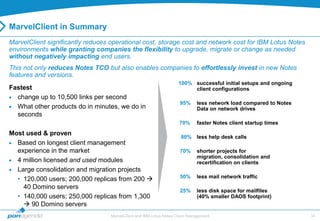
MarvelClient in Summary
MarvelClient significantly reduces operational cost, storage cost and network cost for IBM Lotus Notes
environments while granting companies the flexibility to upgrade, migrate or change as needed
without negatively impacting end users.
This not only reduces Notes TCO but also enables companies to effortlessly invest in new Notes
features and versions.
                                                                     100% successful initial setups and ongoing
Fastest                                                                   client configurations
  change up to 10,500 links per second
                                                                      95%     less network load compared to Notes
  What other products do in minutes, we do in                                 Data on network drives
  seconds
                                                                     70%      faster Notes client startup times

Most used & proven
                                                                      80% less help desk calls
  Based on longest client management
  experience in the market                                            70%     shorter projects for
                                                                              migration, consolidation and
  4 million licensed and used modules                                         recertification on clients
  Large consolidation and migration projects
                                                                      50%     less mail network traffic
  • 120,000 users; 200,000 replicas from 200 
    40 Domino servers
                                                                      25%     less disk space for mailfiles
  • 140,000 users; 250,000 replicas from 1,300                                (40% smaller DAOS footprint)
     90 Domino servers
                                   MarvelClient and IBM Lotus Notes Client Management                               34
Questions?


  Francie Tanner
  Technical Director, Americas


panagenda Inc – Client Management, Server Monitoring & more

60 State Street, Suite 700   Boston, MA 02109 (USA)
Skype: francietanner   Cell: +1 264 584 1060
Fax: +1 415 449 5940    E-Mail: francie.tanner@panagenda.com


               MarvelClient and IBM Lotus Notes Client Management   35

IBM Lotus Notes Client Management and MarvelClient

  • 1.
    ... or howto start reducing the TCO of your IBM Lotus Notes clients © 2007 - 2012 panagenda
  • 2.
    panagenda solutions makeIT efficient while lowering TCO • MarvelClient and IBM Lotus Notes Client Management 2
  • 3.
    MarvelClient and IBMLotus Notes Client Management 3
  • 4.
  • 5.
    The Client ManagementChallenge IBM Lotus Notes client management doesn‟t start now, it started years ago • Clients have been upgraded 3 times since then • Install directory and client type changes • Shared workstations vs single client installs • Outdated or wrong templates, id‟s etc Meanwhile, new apps got rolled out and decommissioned • Icons and bookmarks were added – but probably never REmoved • Local replicas got created, abandoned, re-created – but probably never Removed • Mapped drives, outside the data directory, inside the data directory Meanwhile, servers and users changed • Consolidations and name changes leave orphaned client pointers • Name changes and moves leave wrong location and connection docs • The impact of a wrong catalog.nsf or homer server are tremendous MarvelClient and IBM Lotus Notes Client Management 5 5
  • 6.
    The Impact ofNotes 8.x 17„000 files in Notes Program directory in 1„800 subdirectories • 7„500 (largely undocumented) .properties files • 1„500 jar files • 1„200 HTML files 3„000 files in Notes Dataworkspace directory in 2„400 subdirectories, out of which 1„850 are empty • 900 (largely undocumented) XML files • 100+ (largely undocumented) properties files In total, that is • 20„000 files in 4„600 subdirectories • 8„500+ largely undocumented files • Many (many many) subdirectories are plain empty, especially in Dataworkspace • ... and around 100 NSFs/NTF„s • ... and the good old notes.ini file MarvelClient and IBM Lotus Notes Client Management 6
  • 7.
    Add to thatover 80 Preference Dialogs Each menu has 15 setting on average for a total of 12„000 settings! • In your local address book • In your notes.ini • In your XML files7„500 Which does not include any plugins, widgets, addons, that you or your users may have added to the Notes client install. MarvelClient and IBM Lotus Notes Client Management 7
  • 8.
    The Policy Challenge Policies depend on an already functioning/setup client • In my experience less than 75% of users actually receive policies They don‟t provide you with an inventory before making changes • Client Management “in the dark” They don‟t truly adapt to your users‟ unique situation • LAN vs VPN, Citrix user, function outside the data directory They aren‟t predictable • Can happen anytime.... or not... Most settings cannot be UNset once set • Think about it... They typically cannot repeat actions • So if the user breaks something it‟s broken until they call for help MarvelClient and IBM Lotus Notes Client Management 8 8
  • 9.
  • 10.
    Transparency = Foundationof a Healthy Notes Environment What is out there • Client types, HW details, release version, available disk space, where links are pointing to, list of databases, all existing replicas, memory present, configuration details, etc... The difference between what was expected and what actually is • Never requires guesswork, always shows up-to-date client inventory at all Opportunities for improvements • Reduce managed storage by deleting 40% of outdated local databases and templates • Upgrade ODS for a client performance boost How (non)healthy the client infrastructure is • what needs to be fixed orstandardized Icons, bookmarks etc that users have • Typically shows that Notes is used much more than previously assumed (often prevents migration to Microsoft), MarvelClient and IBM Lotus Notes Client Management 10
  • 11.
    Sample views forenhanced transparency (1/4) see panagenda MarvelClient Analyze database for further views and details Client types Install types (note: Basic vs. Std. Warning category) „Our corporate standard install is 8.5.1 FP2. We had no idea about all the different versions out there“ - MarvelClient customer MarvelClient and IBM Lotus Notes Client Management 11
  • 12.
    Sample views fortransparency (2/4) Network latency Client startup times  performance monitoring (includes deep diving possibilities) Deployment consistency (inconsistency and non-genericness of typical SW deployment projects is a huge challenge for upgrades) MarvelClient and IBM Lotus Notes Client Management 12
  • 13.
    Sample views forenhanced transparency (3/4) Do users have databases outside of Notes data directory? (and if so, which)  Archiving, compliance, security, control Who has which desktop icons and what servers do they point to?  consolidation and configuration monitoring MarvelClient and IBM Lotus Notes Client Management 13
  • 14.
    Sample views forenhanced transparency (4/4) • More view examples: Which databases inherit the design from which template Which databases claim to be which templates Size spreading of databases Detailed and total size of all databases per user Notes.ini settings Notes.ini preferences „deciphered“ ECL Analysis ID file monitoring (activation, expiry, key issuer, ...) All Locations and Connections - even those pointing to an IP rather than a hostname CPU, memory, disk space, hardware present and used, SW, potentially also processes ODS monitoring example  Notes 7 and 8 clients with bookmark.nsf ODS 41 ... MarvelClient and IBM Lotus Notes Client Management 14
  • 15.
  • 16.
    Fixing and Standardizingexisting deployments • Without transparency, it‘s virtually impossible to fix and standardize You can„t predict the outcome of any sweeping changes/fixes You don„t know what„s out there You don„t know how well your deployed changes are working You don„t know „what„s left“ to do You don„t know how well you„re doing (can„t prove reasons/success to upper management) • Fixing and Standardizing can mean many different things One time changes such as adding a variable to the notes.ini Enforced configurations such as local replicas for mail, or unchangable location documents Roaming: standard configuration across multiple devices, done intelligently Comprehensive, flexible, consistent, predictable control over many different things, such as:  Icons, bookmarks, replicas, replicator pages, locations, connections, toolbars, notes.ini, „Eclipse“/plugins/widgets, etc. MarvelClient and IBM Lotus Notes Client Management 16
  • 17.
    Standardizing Yes, we know“comprehensive, flexible, consistent, predictable“ is a lot in one sentence! However, all four are required for proper client management: • Comprehensive - to accomodate users installs and situations of all types • Flexible – to accomodate different types of users, traveling on VPN, using Citrix etc • Consistent – fixing a problem once is great but preventing the issue entirely is even better • Predictable – to ensure intended changes are taking place while knowing when that will happen MarvelClient and IBM Lotus Notes Client Management 17
  • 18.
    Fixing • In mostcases, fixing is just another word for: Lack of transparency and standardization Desperate symptom fighting  „We don„t know what„s wrong, let„s re-image Notes“ Second most expensive form of client management = help on demand  1000 similar problems remain 1000 support calls persistent standardization significantly reduces number of individual fixes/ number of help desk incidents  Most expensive = do nothing In short, fixing is not a way to manage or control IBM Lotus Notes clients but merely a one time change applied to users MarvelClient and IBM Lotus Notes Client Management 18
  • 19.
    Consolidations, Upgrades, Recertifications,Mergers etc • Server consolidations: fewer servers = less cost • Upgrading hard- and software and ODS on servers = gaining efficiency • Leveraging new features by upgrading • Recertifying domains, mergers and server expansions • Load balancing and clustering servers = gaining efficiency and reliability • During such projects, companies often face huge challenges on the client side How do you repoint user links to new servers while being able to turn off old server immediately? How do you re-point replicator page entries or history to new servers? How do you prevent cutoff date problems with existing local replicas? How do upgrade inconsistent environments in which I can„t predict what a change may cause? How do you upgrade all local databases without impacting my bandwidth SAN/NAS? How many help desk calls can be expected during such projects? How do you prevent them? How do you ensure best possible client performance and implement maintenance? MarvelClient and IBM Lotus Notes Client Management 19
  • 20.
    The Notes ClientManagement Problem Work / Work / Effort Audit Configure Benefit Effort Audit Configure Benefit Time Time Classic Helpdesk client management only panagenda MarvelClient transparently offers one-by-one management resolves client issues and prevents them 1,000 helpdesk calls remain 1,000 management All actions can be permanently enforced incidents Benefits increase over time and can reduce Repeated efforts lead to limited, over time decreasing benefits helpdesk calls by over 80% Provides Admin flexibility to move/upgrade/rename servers/domain as they => Only reduces time see fit spent on each helpdesk call => Reduces number of helpdesk calls AND time MarvelClient and IBM Lotus Notes Client Management 20
  • 21.
  • 22.
    Architecture Overview Single.dll or .so or .dylib  deployed via built-in mail function, mail post-open script, Altiris, SMS, ZENWorks etc Two Notes.ini entries  EXTMGR_ADDINS=mc.dll  MC_DB=%notes_homeserver%!! panagenda/config.nsf MarvelClient and IBM Lotus Notes Client Management 22
  • 23.
    MarvelClients’ 7 ModulesDeesigned to Reduce Lotus Notes TCO Module Function Benefit Inventory of current issues, impact Analyze Gaining Insight into your Notes client infrastructure assessment for new projects Migrate Mass Changes for consolidations, cleanup, mergers Automatically redirects all client pointers Manage Client configuration and Eclipse management Up to 80% fewer helpdesk calls Intelligent server connectivity for travelling users, Increased end user satisfaction with Realtime Citrix users and consolidated environments „Notes just works“ 80-90% smaller client profiles Roaming Full client roaming with 90% less data requirement 80-90% less network & server load „Throttled“ package deployment and automated Touchless and intelligent upgrades while Upgrade client upgrade, including of components also standardizing client installs Zip/Unzip 25% smaller mail files Automatic attachment compression and file blocking File Blocking 40% less network load MarvelClient and IBM Lotus Notes Client Management 23
  • 24.
    Module 1: ANALYZE– Finally, Transparency over the Notes Client See Notes client machine configuration, spot problems, predict the impact of planned projects and identify client performance issues. For the first time, organizations can see how and where Notes client are installed, who doesn‟t have the latest hotfix, or who is not standardized, all without a single desktop visit. MarvelClient Analyze collects over 200 configuration points from all Notes clients, occasionally used non-work PC‟s, Citrix users, floating laptops etc. The result is a powerful knowledge in a single database, essential to resolving support issues, performance problems and potential security risks. Know who has which icons, bookmarks or replicator entries pointing to servers that were turned off years ago. Spot long startup times or users with outdated location. Identify who has un-encrypted and outdated databases on a public network share, outside the Notes data directory. MarvelClient and IBM Lotus Notes Client Management 24
  • 25.
    Module 2: MIGRATE– Mass Changes Made Easy Typical MIGRATE Project Most Common Request for MIGRATE •Recertifying, renaming, moving or consolidating Consolidating Servers servers and/or single databases have a massive effect on Notes clients. With no native tools available to cope, companies end up with many support calls, unhappy end users and an unnecessarily high Cleanup of existing, outdated client info TCO of IBM Lotus Notes. Example of a SMALL environment: 1„000 Mailfiles, 500 application replicas Re-certifying users or servers 1,500 moves to 1,000 users = 1,500,000 change instructions (including delegates) Large Example: 100,000 Mailfiles, 50.000 replicas Domain mergers 150,000 * 100,000 = 15,000,000,000 (billion!) change instructions MarvelClient Migrate can transparently process 10„000 instructions per second while preventing support calls! MarvelClient and IBM Lotus Notes Client Management 25
  • 26.
    Module 3: MANAGE– Total Control to Fix AND lock down Notes Define “the perfect Notes client” for any user group, hardware type, Notes version, geography, department etc and then automatically setup and enforce that configuration without costly and error prone manual setup  Makes touchless new client setups fast, automated and easy  Automatically configure Eclipse plug-ins, widgets, location and connection documents, notes.ini settings, local replicas, bookmarks, preferences, profile docs, signatures, dictionaries, full text indexes, ECLs, toolbars and more Since all MarvelClient actions can be set to execute once, a __ number of times or persistently, not only are Notes clients deployed perfectly, they remain perfectly configured , 365 days a year  Over 80% support call reduction is easily achieves as help desk calls are prevented entirely Our cleanup feature identifies local duplicate replicas, outdated unencrypted data, rogue local archives and other security threats  Take control of your environment by removing or moving data or just disabling security threats Manage ID files in a reliable and secure way with our “ID Vault” like storage facility  ID files, certificates etc are transparently uploaded, downloaded and unlocked as needed MarvelClient and IBM Lotus Notes Client Management 26
  • 27.
    Back-up Module 4: REALTIME– Dynamically Redirect & Restrict Based on Conditions MarvelClient Realtime ensures that mobile users always connect to the best available servers. Perfect for Citrix, Realtime also restricts and prevents local database creation and/or deletion. Functions Optimal Server Connectivity • Optimal server connectivity by automatic Locations of company servers and dynamic redirection of all client Locations of a mobile Notes user during travels pointers to appropriate servers • Differentiates between LAN, WAN, VPN; works on the fly without Notes client restart • Redirects icons, bookmarks, location and connection documents, replicator entries based on geography, connectivity or any With REALTIME, mobile users are automatically other condition. connected/redirected to the right servers to optimize connection speed. • Dynamic restriction of database creation Without REALTIME, or deletion Notes automatically connects the the user to his home server, no matter • Reliable prevention of harmfull actions how disadvantages this may be for the connection speed. MarvelClient and IBM Lotus Notes Client Management 27
  • 28.
    Back-up Module 5: ROAMING– Bandwidth Friendly Notes Backup, Restore, Roaming MarvelClient Roaming grants true admin flexibility while efficiently moving data end users depend on. Just 2 MB network storage needed or up to 4 MB including Eclipse settings One-step upgrades by roaming data from (for example) Notes 6 single-user into Notes 8.5.2 multi-user clients Fast and comprehensive client backup during Notes shutdown Issue new machines with the appropriate client data Save up to 95% network traffic and disk storage while roaming from Notes to Citrix, Notes to Notes or just within Citrix Makes Notes clients with data directory on network drives efficient and manageable Network independent while the Notes client is running MarvelClient and IBM Lotus Notes Client Management 28
  • 29.
    Back-up Module 6: UPGRADE– Reliably Upgrade, Patch or Standardize Our configurable SmartFile Downloader ensures upgrade packages are deployed in a network friendly “throttled” way, over time Transparently deploy Notes client versions, embedded Sametime versions, eclipse components, new features such as Connections, hot fixes, language packs, templates etc When software packages are locally available, end users are asked to upgrade and offered to delay, similar to the IBM SmartUpgrade interface Unlike traditional Windows login scripts, SMS, ZENWorks, Altiris etc, MarvelClient Upgrade is Notes aware and can move, change and standardize Notes client installs as part of any upgrade Works hand in hand with our Roaming module to fix and standardize Notes install locations and types MarvelClient and IBM Lotus Notes Client Management 29
  • 30.
    Module 7: ZIP/UNZIP– Save 40% Disk Space on Top of DAOS MarvelClient Zip/Unzip reduces storage and network costs without end user effort. •Automatic compression when attaching files leads to: Average compression = 30 - 40% Reduces Mailfile-sizes by 20 - 30% Reduces DAOS footprint by 30 - 40% •Automatic decompression when detaching, viewing and editing files •means there is no end user training or effort required. •Drag & Drop support and standard Zip-compatible MarvelClient and IBM Lotus Notes Client Management 30
  • 31.
    Module 7: ATTACHMENTBLOCKING – Intelligent and Efficient File Handling MarvelClient Attachment Blocking ensures that files are blocked BEFORE entering the network, thus saving both network traffic and storage cost. Internal Internal & External •More than 100 digital „fingerprints“ Senders Network Recipients allow for tamperproof file blocking Fingerprints include files of type cad, avi, mp3, mpeg, exe, dll, id, nsf, ... Users cannot bypass blocking Blocked attachments never even reach the network or by simply renaming an .exe file to servers .txt •Block files directly on clients before Attachment Blocking they„re sent to the server to be rejected by the firewall Rules for blocking can be fully customized by • Sender • file content pattern • file name pattern •Saves 100% disk-space and network • file size • ... traffic for each attachment blocked • or any combination of these criteria MarvelClient and IBM Lotus Notes Client Management 31
  • 32.
  • 33.
    MarvelClient Benefits MarvelClient savesup to 90% of time for common administration tasks, reduces storage and network costs by 20-50% year after year, reduces project cycles for upgrades, consolidations - and much more Administration Project Duration Cost of Data Storage End User Effort and Effort & Transfer Experience Examples: • Automatic attachment • „Self Healing“ clients • Setting up new • Migrations compression • Willingness to invest in employees • Upgrades • Intelligent restrictions Notes further • Change of department for sending • Less down time and • Deleting databases • Consolidations attachments frustration • Recovering databases • Efficient Notes client • Re-certifications • Up to 70% faster • Distribution of new data roaming with only 2-4 bases • Mergers MB Notes startup times MarvelClient and IBM Lotus Notes Client Management 33
  • 34.
    MarvelClient in Summary MarvelClientsignificantly reduces operational cost, storage cost and network cost for IBM Lotus Notes environments while granting companies the flexibility to upgrade, migrate or change as needed without negatively impacting end users. This not only reduces Notes TCO but also enables companies to effortlessly invest in new Notes features and versions. 100% successful initial setups and ongoing Fastest client configurations change up to 10,500 links per second 95% less network load compared to Notes What other products do in minutes, we do in Data on network drives seconds 70% faster Notes client startup times Most used & proven 80% less help desk calls Based on longest client management experience in the market 70% shorter projects for migration, consolidation and 4 million licensed and used modules recertification on clients Large consolidation and migration projects 50% less mail network traffic • 120,000 users; 200,000 replicas from 200  40 Domino servers 25% less disk space for mailfiles • 140,000 users; 250,000 replicas from 1,300 (40% smaller DAOS footprint)  90 Domino servers MarvelClient and IBM Lotus Notes Client Management 34
  • 35.
    Questions? FrancieTanner Technical Director, Americas panagenda Inc – Client Management, Server Monitoring & more 60 State Street, Suite 700 Boston, MA 02109 (USA) Skype: francietanner Cell: +1 264 584 1060 Fax: +1 415 449 5940 E-Mail: francie.tanner@panagenda.com MarvelClient and IBM Lotus Notes Client Management 35