Page Layout
The visual arrangement of text and images on a page.
Organizing Your Content
Remember, content is the message or idea we are
sharing.
Organizing happens when we arrange and place our
content into our design.
We do this using layout theories, visual hierarchies, and
grid systems.
(Costello, ch. 4)
The Gutenberg Diagram
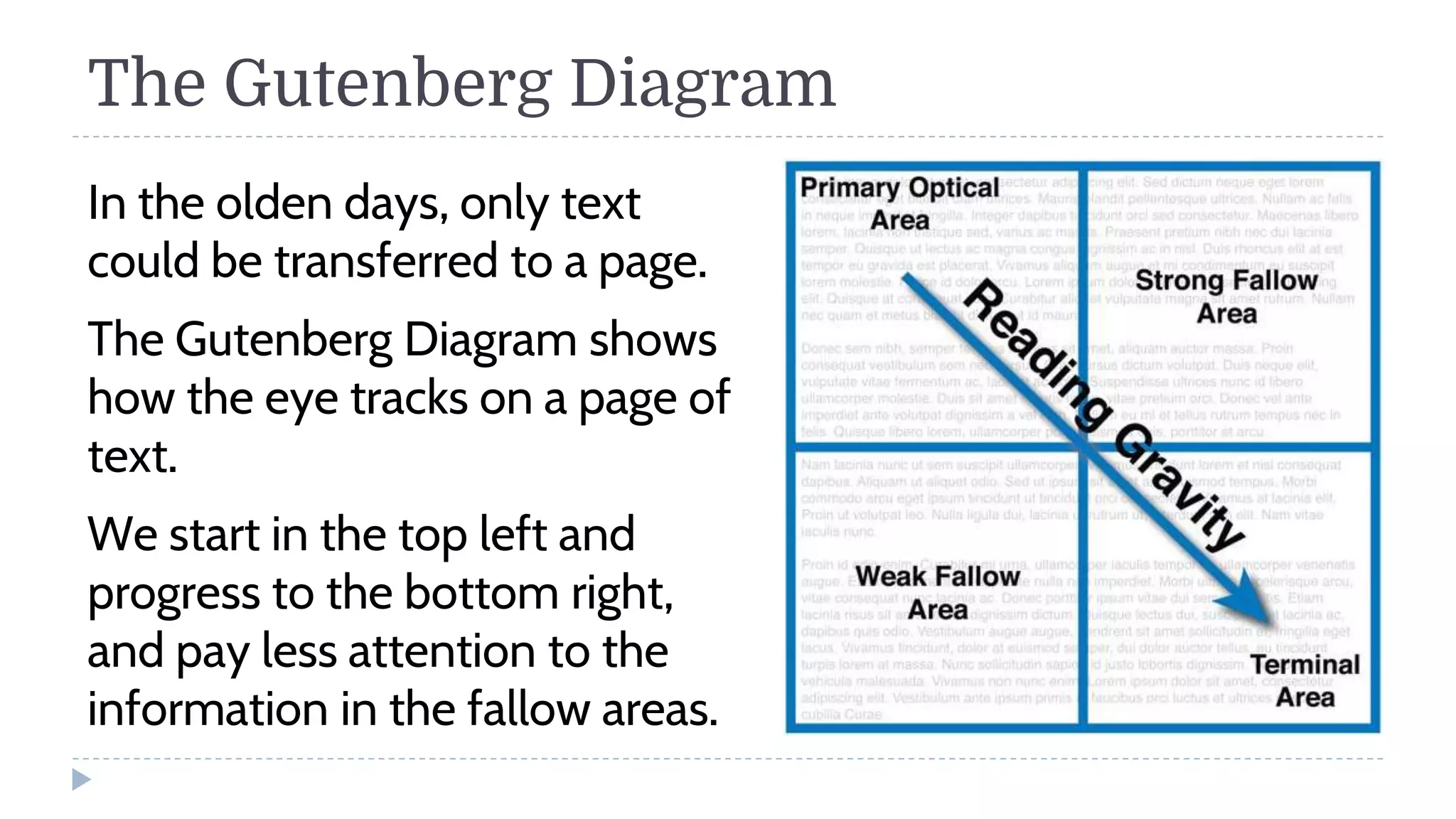
In the olden days, only text
could be transferred to a page.
The Gutenberg Diagram shows
how the eye tracks on a page of
text.
We start in the top left and
progress to the bottom right,
and pay less attention to the
information in the fallow areas.
F-Layout
A modern-day diagram that charts
how an eye tracks on a design.
Primarily used on the web.
1 2
3 4
5
Z-Layout
A variation of the Gutenberg
diagram.
Best with a row of info at the
top and bottom, and a large
image in the middle.
1 2
3
4 5
Rule of Thirds
Imagine a grid that splits the
frame into thirds vertically
and horizontally.
Place the subject along those
grid lines. The intersections of
the lines are especially
compelling.
Works regardless of the size of
the frame or the visual
medium you are designing in.
The Golden Ratio / Divine Proportion
The ratio of a:b = a+b:a = φ (1.618033…)
First mentioned by the Greek Mathematician, Euclid (300 B.C.E).
The Golden Spiral
Visual Hierarchy
How we perceive the importance
of the elements in a design.
We can create visual hierarchy by
using headlines and sub-
headings, and chunking text.
Additionally, using the design
principles of alignment,
proximity, and repetition
reinforces visual hierarchy.
The Grid System
Helps you organize and align your
content by using horizontal and
vertical lines to subdivide a design.
Anatomy of a Grid
Columns: Vertical. Often used as holding areas for
continuous running text and visual information.
Rows: Horizontal. Establish linear flowlines that can
help guide the reader’s eye across a design.
Modules: Square unit of space created by the
intersection of perpendicular lines. Independently,
the smallest unit in a grid.
Spatial zones: Two or more modules grouped
together.
Margins: Negative space between modules and
outside edges of a page or spatial zone.
ROW
COLUMN
MODULE
SPATIAL
ZONE
MARGINS
Types of Grids
Single-Column Grid
(Manuscript Grid): Most often
used in books.
Multicolumn Grid: Often used
in web and mobile design.
Modular Grid: Often used in
newspaper and magazine
design.
Fixed vs. Fluid Designs
Tangible designs, such as books, posters, etc. have fixed
dimensions
Designs for websites and mobile designs are usually fluid,
meaning they grow or shrink depending on the screen
size.
Page Templates and Style Sheets
Pre-designed pages that have placeholder text and
graphics.
Often include a color palette as well.
Templates are more rigid than grids, as the underlying
structure usually cannot be modified.
Designing Book Covers
Tips and Tricks
Front Cover Visual
Hierarchy
Book Title
Author Name
Subtitle or Tagline
Back Cover Visual
Hierarchy
Short description or blurb
of the book (100 words)
Author’s Headshot & 3-
sentence bio
Book reviews/quotes
International Standard
Book Number (or ISBN
code) and the barcode that
goes with it
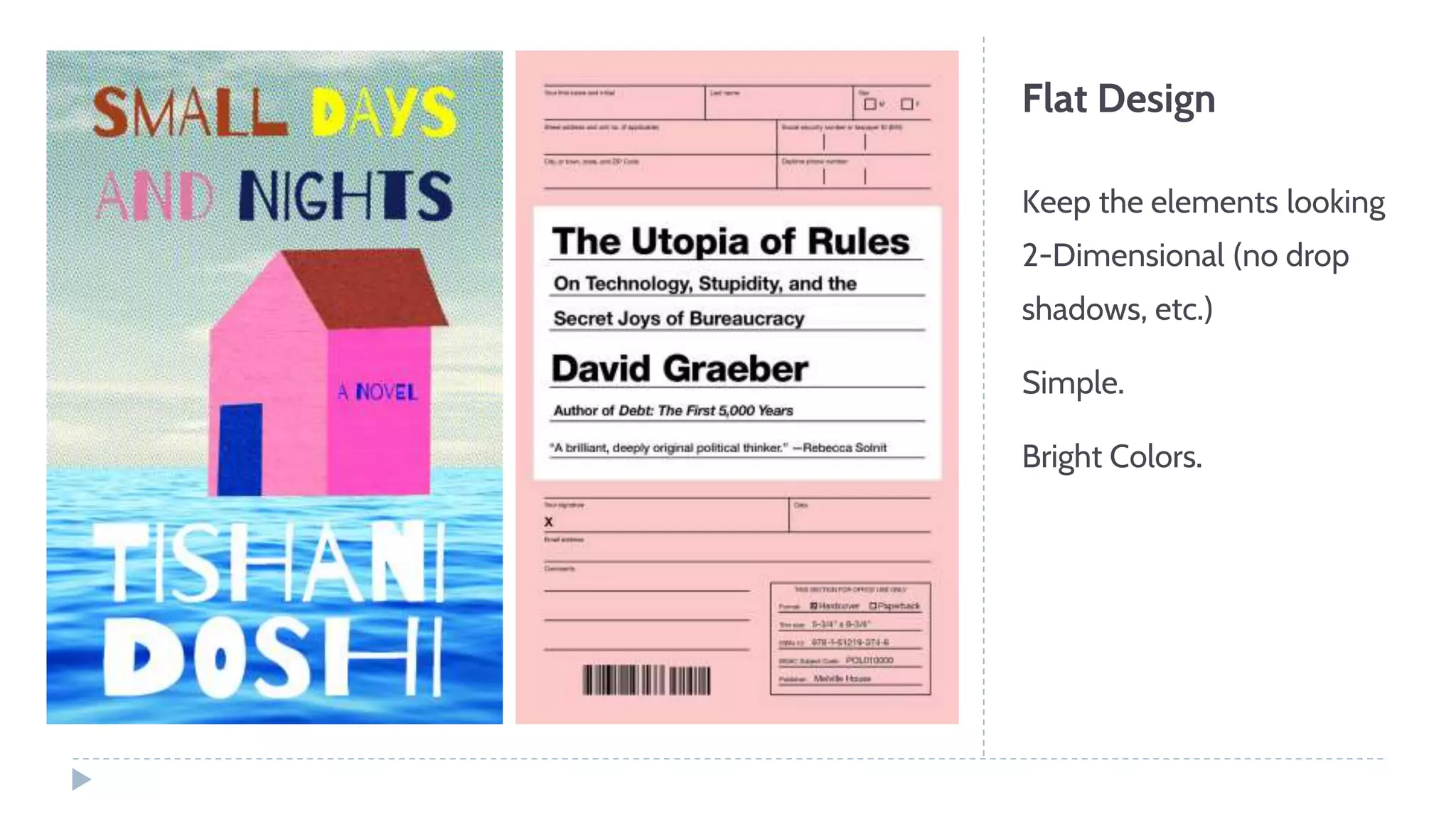
Flat Design
Keep the elements looking
2-Dimensional (no drop
shadows, etc.)
Simple.
Bright Colors.
Book Cover Dimensions
*Kindle Direct Publishing: 2,560 x 1,600 (1.6:1 aspect ratio)
Novels and Non-Fiction: 2,560px x 1,600px (1.5:1 aspect ratio)
Illustrated Books: 2,800px x 3,920px (1.4:1 aspect ratio) or
3,000px x 3,600px (1.2:1 aspect ratio)
Audiobooks: 3,200px x 3,200px (1:1 aspect ratio)

Page Layout

  • 1.
    Page Layout The visualarrangement of text and images on a page.
  • 2.
    Organizing Your Content Remember,content is the message or idea we are sharing. Organizing happens when we arrange and place our content into our design. We do this using layout theories, visual hierarchies, and grid systems. (Costello, ch. 4)
  • 3.
    The Gutenberg Diagram Inthe olden days, only text could be transferred to a page. The Gutenberg Diagram shows how the eye tracks on a page of text. We start in the top left and progress to the bottom right, and pay less attention to the information in the fallow areas.
  • 4.
    F-Layout A modern-day diagramthat charts how an eye tracks on a design. Primarily used on the web. 1 2 3 4 5
  • 5.
    Z-Layout A variation ofthe Gutenberg diagram. Best with a row of info at the top and bottom, and a large image in the middle. 1 2 3 4 5
  • 6.
    Rule of Thirds Imaginea grid that splits the frame into thirds vertically and horizontally. Place the subject along those grid lines. The intersections of the lines are especially compelling. Works regardless of the size of the frame or the visual medium you are designing in.
  • 7.
    The Golden Ratio/ Divine Proportion The ratio of a:b = a+b:a = φ (1.618033…) First mentioned by the Greek Mathematician, Euclid (300 B.C.E). The Golden Spiral
  • 9.
    Visual Hierarchy How weperceive the importance of the elements in a design. We can create visual hierarchy by using headlines and sub- headings, and chunking text. Additionally, using the design principles of alignment, proximity, and repetition reinforces visual hierarchy.
  • 10.
    The Grid System Helpsyou organize and align your content by using horizontal and vertical lines to subdivide a design.
  • 11.
    Anatomy of aGrid Columns: Vertical. Often used as holding areas for continuous running text and visual information. Rows: Horizontal. Establish linear flowlines that can help guide the reader’s eye across a design. Modules: Square unit of space created by the intersection of perpendicular lines. Independently, the smallest unit in a grid. Spatial zones: Two or more modules grouped together. Margins: Negative space between modules and outside edges of a page or spatial zone. ROW COLUMN MODULE SPATIAL ZONE MARGINS
  • 12.
    Types of Grids Single-ColumnGrid (Manuscript Grid): Most often used in books. Multicolumn Grid: Often used in web and mobile design. Modular Grid: Often used in newspaper and magazine design.
  • 13.
    Fixed vs. FluidDesigns Tangible designs, such as books, posters, etc. have fixed dimensions Designs for websites and mobile designs are usually fluid, meaning they grow or shrink depending on the screen size.
  • 14.
    Page Templates andStyle Sheets Pre-designed pages that have placeholder text and graphics. Often include a color palette as well. Templates are more rigid than grids, as the underlying structure usually cannot be modified.
  • 15.
  • 17.
    Front Cover Visual Hierarchy BookTitle Author Name Subtitle or Tagline
  • 18.
    Back Cover Visual Hierarchy Shortdescription or blurb of the book (100 words) Author’s Headshot & 3- sentence bio Book reviews/quotes International Standard Book Number (or ISBN code) and the barcode that goes with it
  • 19.
    Flat Design Keep theelements looking 2-Dimensional (no drop shadows, etc.) Simple. Bright Colors.
  • 20.
    Book Cover Dimensions *KindleDirect Publishing: 2,560 x 1,600 (1.6:1 aspect ratio) Novels and Non-Fiction: 2,560px x 1,600px (1.5:1 aspect ratio) Illustrated Books: 2,800px x 3,920px (1.4:1 aspect ratio) or 3,000px x 3,600px (1.2:1 aspect ratio) Audiobooks: 3,200px x 3,200px (1:1 aspect ratio)