MS PowerPoint is a program that is covered in the
Microsoft Office suite and is bundled unitedly with
Word, Excel, and other office productivity tools.
Microsoft PowerPoint is a powerful slide show
presentation program. MS PowerPoint applies slides
to communicate information rich in multimedia.
Introduction to Presentation software
MS PowerPoint.
How to start MS PowerPoint?
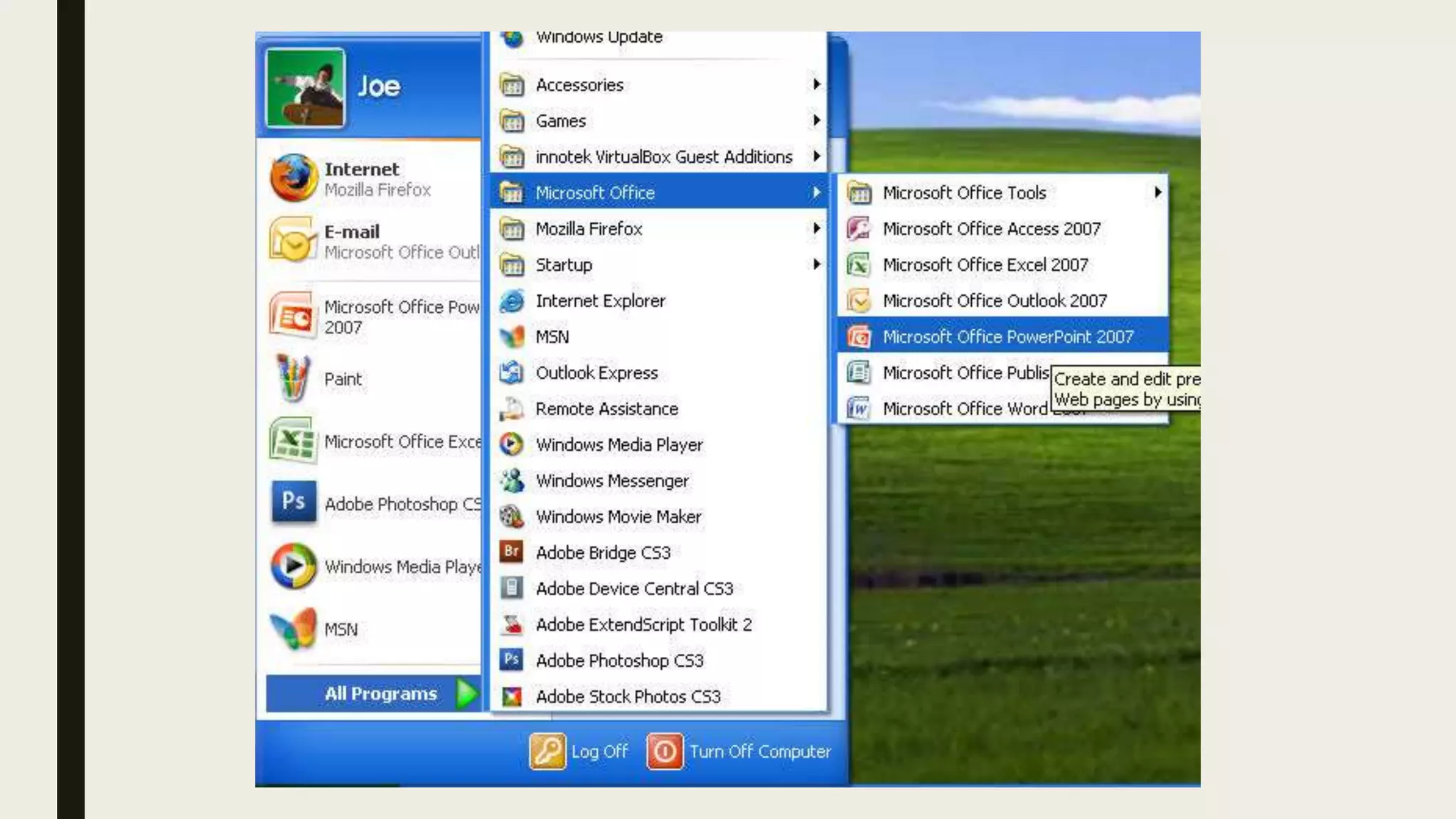
■ Click on the Start Menu–>Go to All Programs–>Click
on MS Office–> Lastly choose the MS PowerPoint
option.
■ A blank presentation will be displayed on the screen.
According to the requirement, one can modify the
template for a presentation and begin working on the
program.
Features of MS PowerPoint
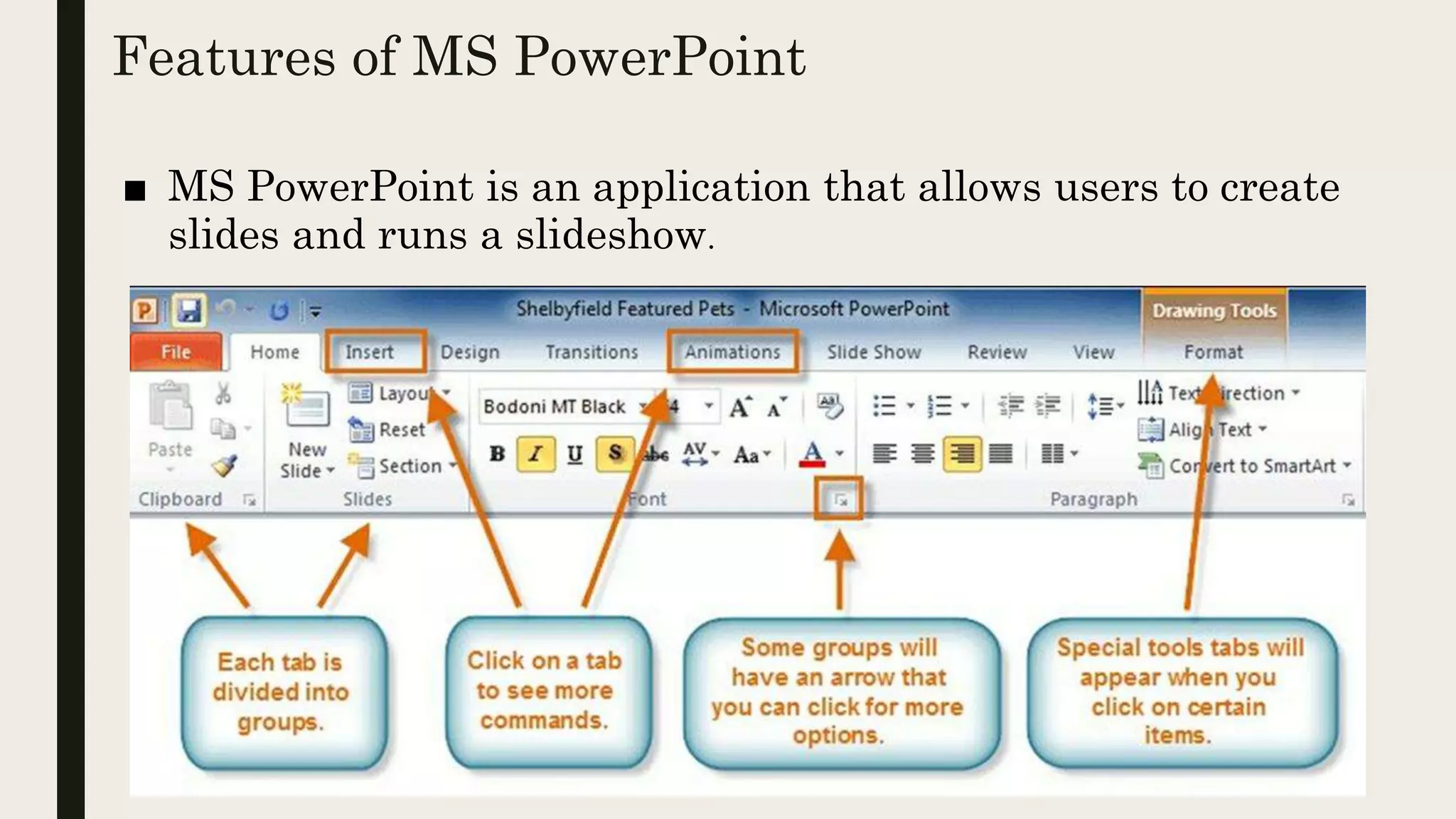
■ MS PowerPoint is an application that allows users to create
slides and runs a slideshow.
■ Home
Firstly, in PowerPoint, there are slides. Users need to add content to
them to make a presentation. From the Home menu, users can add
new slides, decide their sequence, layout, design & other word
processing functions like font change, size change, etc. PowerPoint
layout is used to change the layout of the current slide.
Features of MS PowerPoint.
■ Insert
From the Insert menu, the user can add media like pictures,
symbols, audio, video, header, footer, shapes, etc. to the slides to
enhance the user’s presentation.
■ Design
The design menu offers the user with ready-made templates &
background designs for slides that make the presentation look very
attractive.
■ Slideshow
Finally, from the Slideshow menu, the user can view the final form of
the slideshow. Users can start the slideshow from the first slide or the
slide that users are editing. They can also set display time for each slide
from the ‘Slideshow’ menu.
■ Animations
During the slide show, the slides emerge on the screen one after the
other. In case, one desires to add some animations to how a slide
displays itself, they can refer to the “Animations” category.
Transition & Animation are the unique functions of PowerPoint. These
menus offer different options in which the text appears on the slides &
takes transitions from one slide to another.
■ Review tab
The various tools that one can use under this tab are; Spelling,
Research, Thesaurus, Translate, Language. The Research button
aids in online research in books and Internet resources about a
subject or topic you are working on.
Thesaurus tool lists words arranged together according to the
similarity of meaning. By using Thesaurus in PowerPoint from the
Review tab one can easily find synonyms for relative words in the
content.
■ View tab
In the View tab, a user can have a Normal View of a presentation.
This is also called the default view. It consists of slides where one
can add content for the presentation. Next inline is the
Slide Sorter View where all the slides of the presentation are
displayed in small form on the screen.
With the Notes Page tool, the slide is presented with its notes. The
presentation/slideshow/run full screen with animation effects is
done with the Slide Show option.

P1.pptx

  • 1.
    MS PowerPoint isa program that is covered in the Microsoft Office suite and is bundled unitedly with Word, Excel, and other office productivity tools. Microsoft PowerPoint is a powerful slide show presentation program. MS PowerPoint applies slides to communicate information rich in multimedia. Introduction to Presentation software MS PowerPoint.
  • 2.
    How to startMS PowerPoint? ■ Click on the Start Menu–>Go to All Programs–>Click on MS Office–> Lastly choose the MS PowerPoint option. ■ A blank presentation will be displayed on the screen. According to the requirement, one can modify the template for a presentation and begin working on the program.
  • 4.
    Features of MSPowerPoint ■ MS PowerPoint is an application that allows users to create slides and runs a slideshow.
  • 5.
    ■ Home Firstly, inPowerPoint, there are slides. Users need to add content to them to make a presentation. From the Home menu, users can add new slides, decide their sequence, layout, design & other word processing functions like font change, size change, etc. PowerPoint layout is used to change the layout of the current slide. Features of MS PowerPoint.
  • 6.
    ■ Insert From theInsert menu, the user can add media like pictures, symbols, audio, video, header, footer, shapes, etc. to the slides to enhance the user’s presentation. ■ Design The design menu offers the user with ready-made templates & background designs for slides that make the presentation look very attractive.
  • 7.
    ■ Slideshow Finally, fromthe Slideshow menu, the user can view the final form of the slideshow. Users can start the slideshow from the first slide or the slide that users are editing. They can also set display time for each slide from the ‘Slideshow’ menu. ■ Animations During the slide show, the slides emerge on the screen one after the other. In case, one desires to add some animations to how a slide displays itself, they can refer to the “Animations” category. Transition & Animation are the unique functions of PowerPoint. These menus offer different options in which the text appears on the slides & takes transitions from one slide to another.
  • 8.
    ■ Review tab Thevarious tools that one can use under this tab are; Spelling, Research, Thesaurus, Translate, Language. The Research button aids in online research in books and Internet resources about a subject or topic you are working on. Thesaurus tool lists words arranged together according to the similarity of meaning. By using Thesaurus in PowerPoint from the Review tab one can easily find synonyms for relative words in the content.
  • 9.
    ■ View tab Inthe View tab, a user can have a Normal View of a presentation. This is also called the default view. It consists of slides where one can add content for the presentation. Next inline is the Slide Sorter View where all the slides of the presentation are displayed in small form on the screen. With the Notes Page tool, the slide is presented with its notes. The presentation/slideshow/run full screen with animation effects is done with the Slide Show option.