Operator Overloading
   Reading: Chapter 8
Why overload operators?

• We can define new data types using classes.
• Member functions are invoked by sending
  messages.
• For many classes, this notation is
  cumbersome.
• For some classes, especially mathematical
  ones, it would be nice to be able to use
  operators with instances of these classes.
Example

• Suppose we have:
  – a class (called Time) for representing time of the day
  – two Time objects time1 and time2
• We want to be able to do things like
  – compare times
      if (time1 < time2)
  – print times to an output stream
      cout << "The first time is " << time1 << endl;
Simple example in C++

• The division operator / is used for
   – integer division
   – floating point division
• Actually performs two different types of
  division, but we use the same operator, i.e., it
  is overloaded.
• We will talk about how to overload or redefine
  our own operators for classes …
How to overload
                 operators?
• An overloaded operator is nothing but a
  – function
• The name of the function is the keyword
  operator followed by the symbol for the
  operator being overloaded.
• Example:
  – the function name operator+ would be
    used to overload the + operator.
Operators That Can Be
                     Overloaded

+         -      *      /     %    ^    &     |
~         !      =      <     >    +=   -=    *=
/=        %=     ^=     &=    |=   <<   >>    >>=
<<=       ==     !=     <=    >=   &&   ||    ++
--        ->*    ‘      ->    []   ()   new   delete
new [ ]          delete [ ]
Details

• Overloading an operator like + allows statements
  like:
        object1 + object2
• This does not allow statements like:
        object1 += object2
• The += operator must be overloaded separately.
• The "aritiy" (number of operands) of the operator
  cannot change.
Implementing operator
             overloading
• The functions must have access to the
  private member data of the class.
• Two ways to write operator overloading
  functions:
  – Member functions
  – Friend functions
Using member functions

• If the first operand of the operator is a class
  instance or a reference to a class instance, the
  overloaded operator can be implemented as a
  member function.
• Example invocation
      object = object1 + object2;
• Translated by compiler to
      object = object1.operator+(object2);
• When overloading (), [], -> or any of the
  assignment operators, the operator overloading
  function must be declared as a class member.
Example - Rational
                       Numbers
class Rational
{
   public:
      Rational(int n = 0, int d = 1);
      Rational operator+(const Rational &a) const;
      Rational operator-(const Rational &a) const;
      Rational operator*(const Rational &a) const;
   private:
      int numerator;
      int denominator;
}
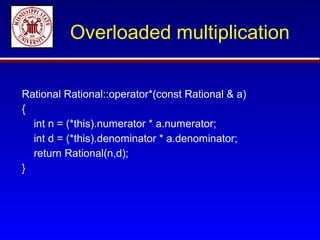
Overloaded multiplication


Rational Rational::operator*(const Rational & a)
{
  int n = (*this).numerator * a.numerator;
  int d = (*this).denominator * a.denominator;
  return Rational(n,d);
}
Assignment

• Write the 2 other overloaded operators
  for the Rational class.
Rational Rational::operator+(const Rational & a)
{
  int commonD = denominator * a.denominator;
  int n = denominator * a. numerator +
          numerator * a. denominator;
  return Rational(n,commonD);
}
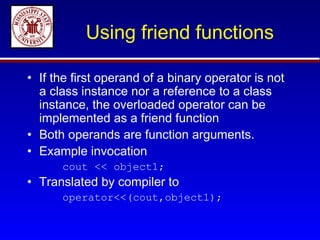
Using friend functions

• If the first operand of a binary operator is not
  a class instance nor a reference to a class
  instance, the overloaded operator can be
  implemented as a friend function
• Both operands are function arguments.
• Example invocation
      cout << object1;
• Translated by compiler to
      operator<<(cout,object1);
Example: Overloading
                  << and >>
• We often want to overload the insertion (>>) and extraction
  (<<) operators so that objects can be written and read using
  these operators.
• Phone number example: want to be able to read and write
  in format like
      (662) 325-7505
• Input statements might look like
      cin >> phone1;
• Output statements might look like
      cout << "My phone number is " << phone1 << endl;
Overloading << and >>

class PhoneNum
{
   friend ostream& operator<< (ostream&, const PhoneNum&);
   friend istream& operator>> (istream&, PhoneNum&);

     private:
        int areaCode;
        int prefix;
        int number;
};
Overloading << and >>

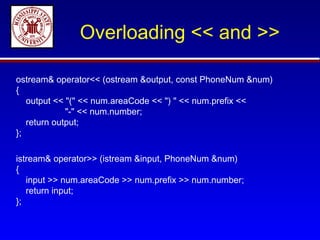
ostream& operator<< (ostream &output, const PhoneNum &num)
{
   output << "(" << num.areaCode << ") " << num.prefix <<
             "-" << num.number;
   return output;
};

istream& operator>> (istream &input, PhoneNum &num)
{
   input >> num.areaCode >> num.prefix >> num.number;
   return input;
};
Overloading << and >>

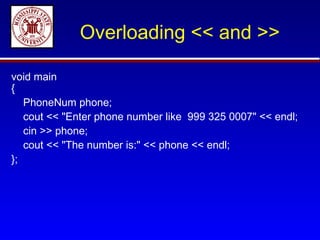
void main
{
   PhoneNum phone;
   cout << "Enter phone number like 999 325 0007" << endl;
   cin >> phone;
   cout << "The number is:" << phone << endl;
};
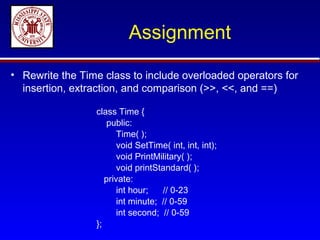
Assignment

• Rewrite the Time class to include overloaded operators for
  insertion, extraction, and comparison (>>, <<, and ==)

                 class Time {
                    public:
                        Time( );
                        void SetTime( int, int, int);
                        void PrintMilitary( );
                        void printStandard( );
                    private:
                        int hour;   // 0-23
                        int minute; // 0-59
                        int second; // 0-59
                 };

Overloading

  • 1.
    Operator Overloading Reading: Chapter 8
  • 2.
    Why overload operators? •We can define new data types using classes. • Member functions are invoked by sending messages. • For many classes, this notation is cumbersome. • For some classes, especially mathematical ones, it would be nice to be able to use operators with instances of these classes.
  • 3.
    Example • Suppose wehave: – a class (called Time) for representing time of the day – two Time objects time1 and time2 • We want to be able to do things like – compare times if (time1 < time2) – print times to an output stream cout << "The first time is " << time1 << endl;
  • 4.
    Simple example inC++ • The division operator / is used for – integer division – floating point division • Actually performs two different types of division, but we use the same operator, i.e., it is overloaded. • We will talk about how to overload or redefine our own operators for classes …
  • 5.
    How to overload operators? • An overloaded operator is nothing but a – function • The name of the function is the keyword operator followed by the symbol for the operator being overloaded. • Example: – the function name operator+ would be used to overload the + operator.
  • 6.
    Operators That CanBe Overloaded + - * / % ^ & | ~ ! = < > += -= *= /= %= ^= &= |= << >> >>= <<= == != <= >= && || ++ -- ->* ‘ -> [] () new delete new [ ] delete [ ]
  • 7.
    Details • Overloading anoperator like + allows statements like: object1 + object2 • This does not allow statements like: object1 += object2 • The += operator must be overloaded separately. • The "aritiy" (number of operands) of the operator cannot change.
  • 8.
    Implementing operator overloading • The functions must have access to the private member data of the class. • Two ways to write operator overloading functions: – Member functions – Friend functions
  • 9.
    Using member functions •If the first operand of the operator is a class instance or a reference to a class instance, the overloaded operator can be implemented as a member function. • Example invocation object = object1 + object2; • Translated by compiler to object = object1.operator+(object2); • When overloading (), [], -> or any of the assignment operators, the operator overloading function must be declared as a class member.
  • 10.
    Example - Rational Numbers class Rational { public: Rational(int n = 0, int d = 1); Rational operator+(const Rational &a) const; Rational operator-(const Rational &a) const; Rational operator*(const Rational &a) const; private: int numerator; int denominator; }
  • 11.
    Overloaded multiplication Rational Rational::operator*(constRational & a) { int n = (*this).numerator * a.numerator; int d = (*this).denominator * a.denominator; return Rational(n,d); }
  • 12.
    Assignment • Write the2 other overloaded operators for the Rational class.
  • 13.
    Rational Rational::operator+(const Rational& a) { int commonD = denominator * a.denominator; int n = denominator * a. numerator + numerator * a. denominator; return Rational(n,commonD); }
  • 14.
    Using friend functions •If the first operand of a binary operator is not a class instance nor a reference to a class instance, the overloaded operator can be implemented as a friend function • Both operands are function arguments. • Example invocation cout << object1; • Translated by compiler to operator<<(cout,object1);
  • 15.
    Example: Overloading << and >> • We often want to overload the insertion (>>) and extraction (<<) operators so that objects can be written and read using these operators. • Phone number example: want to be able to read and write in format like (662) 325-7505 • Input statements might look like cin >> phone1; • Output statements might look like cout << "My phone number is " << phone1 << endl;
  • 16.
    Overloading << and>> class PhoneNum { friend ostream& operator<< (ostream&, const PhoneNum&); friend istream& operator>> (istream&, PhoneNum&); private: int areaCode; int prefix; int number; };
  • 17.
    Overloading << and>> ostream& operator<< (ostream &output, const PhoneNum &num) { output << "(" << num.areaCode << ") " << num.prefix << "-" << num.number; return output; }; istream& operator>> (istream &input, PhoneNum &num) { input >> num.areaCode >> num.prefix >> num.number; return input; };
  • 18.
    Overloading << and>> void main { PhoneNum phone; cout << "Enter phone number like 999 325 0007" << endl; cin >> phone; cout << "The number is:" << phone << endl; };
  • 19.
    Assignment • Rewrite theTime class to include overloaded operators for insertion, extraction, and comparison (>>, <<, and ==) class Time { public: Time( ); void SetTime( int, int, int); void PrintMilitary( ); void printStandard( ); private: int hour; // 0-23 int minute; // 0-59 int second; // 0-59 };