Computer Programming - 1
‫المنوفية‬ ‫جامعة‬
First Year (Second Semester)
CS Dept., (CS132)
Dr. Hamdy M. Mousa
MENOUFIA UNIVERSITY
FACULTY OF COMPUTERS AND INFORMATION
operator
overloading
Overloading
• Function is an example of polymorphism,
which means one thing serving several
purposes.
• Member functions of a class can be
overloaded, but only by other member
functions of that class.
– To overload a member function, simply provide
in the class definition a prototype for each
version of the overloaded function, and provide
a separate function definition for each version
of the function.
#include <iostream>
using namespace std;
class printData {
public:
void print(int i) { cout << "Printing int: " << i << endl; }
void print(double f) { cout << "Printing float: " << f << endl; }
void print(char* c) { cout << "Printing character: " << c << endl; }
};
int main(void) {
printData pd;
pd.print(5); // Call print to print integer
pd.print(500.263); // Call print to print float
pd.print("Hello C++"); // Call print to print character
return 0; }
Overloading operators
Overloading Constructors
// overloading class constructors
#include <iostream>
using namespace std;
class Rectangle { int width, height;
public:
Rectangle ();
Rectangle (int, int);
int area (void) {return (width*height);}
};
Rectangle::Rectangle () { width = 5; height = 5; }
Rectangle::Rectangle (int a, int b) { width = a; height = b; }
int main () {
Rectangle rect (3, 4);
Rectangle rectb; cout << "rect area: " << rect.area() << endl;
cout << "rectb area: " << rectb.area() << endl;
return 0; }
rect area: 12
rectb area: 25
Operator Overloading
• built overloaded operator into C++ is <<:
– the stream insertion operator
– the bitwise left-shift operator
• Similarly, >> also is overloaded
– the stream extraction operator
– bitwise right-shift operator.
• overload operators with class objects
– the compiler generates the appropriate code based
on the types of the operands.
• The jobs performed by overloaded operators
also can be performed by explicit function
calls, but operator notation is often more
natural.
Overloaded Operators << & >>
• Using the Overloaded Operators of
Standard Library Class string
• class string’s overloaded operators and
several other useful member functions,
including empty, substr and at.
– Function empty determines whether a string is
empty,
– Function substr returns a string that
represents a portion of an existing string
– Function at returns the character at a specific
index in a string.
Class String’s Overloaded Operators
Cont., overloaded operators
Output
Class string’s
overloaded [] operator
does not perform any
bounds checking.
Therefore, you
must ensure that
operations using
standard class string’s
overloaded [] operator
do not accidentally
manipulate elements
outside the bounds of
the string. Class string
does provide
bounds checking in its
member function at,
which throws an
exception if its
argument is
an invalid subscript.
Fundamentals of Operator Overloading
• Use operators with your own user-defined types.
• C++ does not allow to be created new operators
– most existing operators to be overloaded
• Operator overloading is not automatic
– write operator-overloading functions to perform the desired
operations.
– An operator is overloaded by writing a non-static member
function definition or non-member function definition
– function name starts with the keyword operator followed by the
symbol for the operator being overloaded.
Example: the function name operator+ would be used to
overload the addition operator (+) for use with objects of
a particular class.
Operator Overloaded
• To use an operator on an object of a class,
the operator must be overloaded for that
class with three exceptions:
– The assignment operator (=) may be used with
every class to perform memberwise assignment
of the class’s data
• Memberwise assignment is dangerous for classes with
pointer members.
– The address (&) operator returns a pointer to the
object
– The comma operator evaluates the expression
to its left then the expression to its right, and
returns the value of the latter expression.
• this operator also can be overloaded.
Overloadable Operators
Non-overloadable Operators
Rules and Restrictions
Rules and Restrictions to Overload Operator:
• The precedence of an operator cannot be
changed by overloading.
• The associativity of an operator cannot be
changed by overloading.
– if an operator normally associates from left to right,
then so do all of its overloaded versions.
• You cannot change the “arity” of an operator (the
number of operands).
• You cannot create new operators;
– only existing operators can be overloaded.
Cont., Rules and Restrictions
Rules and Restrictions to Overload Operator:
• The meaning of how an operator works on values of
fundamental types cannot be changed by operator
overloading.
• Related operators, like + and +=, must be overloaded
separately.
• When overloading (), [], -> or any of the assignment
operators,
– the operator overloading function must be declared as
a class member.
• Operator Overloading functions can be member
functions or non-member functions.
Overloading Binary Operators
• Binary operator can be overloaded as
– non-static member function with one parameter
or
– non-member function with two parameters
• one of those parameters must be either a class
object or a reference to a class object.
• non-member operator function is often
declared as friend of a class for
performance reasons.
Operator functions
• Operator functions as member functions
– Leftmost operand must be an object (or
reference to an object) of the class
– If left operand of a different type, operator
function must be a non-member function
• non-member operator function must be a
friend if private or protected members of
that class are accessed directly
• Non-member overloaded operator functions
– Enable the operator to be commutative
Binary Overloaded Operators as Member Functions
• using < to compare two objects of a String class that you define.
• When overloading binary operator < as non-static member function
of a String class.
– if y and z are String-class objects, then y < z is treated as if
y.operator<(z) had been written,
– invoking the operator< member function with one argument:
• Overloaded operator functions for binary operators can
be member functions only when the left operand is an
object of the class in which the function is a member.
Defined as a member function
Example: Operator Overloading
class Complex {
...
public:
...
Complex operator +(const Complex &op)
{
double real = _real + op._real,
imag = _imag + op._imag;
return(Complex(real, imag));
}
...
};
c = a+b;
c = a.operator+ (b);
Binary Overloaded Operators as Non-Member Functions
• non-member function, binary operator < must
take two arguments
– one of which must be an object (or a reference
to an object) of the class.
• If y and z are String-class objects or references
to String-class objects, then y < z is treated as if
the call operator<(y, z) had been written in the
program,
• invoking function operator< :
23
Defined as a non-member function
Example: Operator Overloading
class Complex {
...
public:
...
double real() { return _real; }
//need access functions
double imag() { return _imag;
}
...
};
Complex operator +(Complex &op1, Complex &op2)
{
double real = op1.real() + op2.real(),
imag = op1.imag() + op2.imag();
return(Complex(real, imag));
}
c = a+b;
c = operator+ (a, b);
24
Defined as a friend function
Example: Operator Overloading
class Complex {
...
public:
...
friend Complex operator +(
const Complex &,
const Complex &
);
...
};
Complex operator +(Complex &op1, Complex &op2)
{
double real = op1._real + op2._real,
imag = op1._imag + op2._imag;
return(Complex(real, imag));
}
c = a+b;
c = operator+ (a, b);
Ex., Member Function Overloading
Overloading >> & <<
• Overloading the Binary Stream Insertion
and Stream Extraction Operators
• You can input and output fundamental-type
data using the stream extraction operator
>> and the stream insertion operator <<.
• The C++ class libraries overload these
binary operators for each fundamental type,
including pointers and char * strings.
– overload these operators to perform input and
output for your own types.
Overloading << and >> Operators
• Overloaded Stream-Insertion << and
Stream-Extraction >> operators
– Must have left operand of types ostream &,
istream & respectively
– It must be a non-member function (left
operand not an object of the class)
– It must be a friend function if it accesses
private data members
Friend
• Friend declarations introduce extra
coupling between classes
– Once an object is declared as a friend, it has
access to all non-public members as if they
were public
• Access is unidirectional
– If B is designated as friend of A, B can access
A’s non-public members; A cannot access B’s
• A friend function of a class is defined
outside of that class's scope
Friend
• The major use of friends is
– to provide more efficient access to data members than
the function call
– to accommodate operator functions with easy access
to private data members
• Friends can have access to everything, which
defeats data hiding, so use them carefully
• Friends have permission to change the internal
state from outside the class.
– Always recommend use member functions instead of
friends to change state
Example: Overloading >> & <<
Cont., Example
Cont., Example
Reference Parameter
• When the compiler sees the expression
cin >> phone;
• the compiler generates the non-member function
call
operator>>( cin, phone );
• When this call executes:
– reference parameter input becomes an alias for cin
– reference parameter number becomes an alias for
phone
• Stream manipulator setw limits the number of
characters read into each string.
– When used with cin and strings, setw restricts the
number of characters read to the number of
characters specified by its argument
Overloaded Operators
• Overloaded Operators as Non-Member friend Functions
• The functions operator>> and operator<< are declared in
PhoneNumber as non-member, friend functions.
• They’re non-member functions because the object of class
PhoneNumber must be the operator’s right operand.
– If these were to be PhoneNumber member functions, the
statements used to output and input an Array:
phone << cout;
phone >> cin;
– Such statements would be confusing to most C++ programmers,
• Overloaded input and output operators are declared as
friends if they need to access non-public class members
directly for performance reasons or because the class may
not offer appropriate get functions.
operator<< Member Function
#include <iostream>
using namespace std;
class Distance {
private:
int feet; // 0 to infinite
int inches; // 0 to 12
public: // required constructors
Distance() { feet = 0; inches = 0; }
Distance(int f, int i) { feet = f; inches = i; }
// ostream &operator<<( ostream &output, const Distance &D );
ostream &operator<<( ostream &output ) {
output << "F : " << feet << " I : " << inches;
return output; }
istream &operator>>( istream &input) {
input >> feet >> inches;
return input; }
//istream &operator>>( istream &input, Distance &D );
};
int main() {
Distance D1(11, 10), D2(5, 11), D3;
cout << "Enter the value of object : " << endl;
// cin >> D3;
D3 >> cin;
/*
cout << "First Distance : " << D1 << endl;
cout << "Second Distance :" << D2 << endl;
cout << "Third Distance :" << D3 << endl;
*/
D3 << cout;
system("pause");
return 0;
}
operator<< Member Function
#include <iostream>
using namespace std;
class Distance {
private:
int feet; // 0 to infinite
int inches; // 0 to 12
public: // required constructors
Distance() { feet = 0; inches = 0; }
Distance(int f, int i) { feet = f; inches = i; }
friend ostream &operator<<( ostream &output, const Distance &D ) {
output << "F : " << D.feet << " I : " << D.inches;
return output; }
friend istream &operator>>( istream &input, Distance &D ) {
input >> D.feet >> D.inches;
return input; }
};
operator<< Friend Function
int main() {
Distance D1(11, 10), D2(5, 11), D3;
cout << "Enter the value of object : " << endl;
cin >> D3;
cout << "First Distance : " << D1 << endl;
cout << "Second Distance :" << D2 << endl;
cout << "Third Distance :" << D3 << endl;
return 0;
}
operator<< Friend Function
Overloading Unary Operators
• A unary operator for a class can be
overloaded as a
– non-static member function with no arguments
– non-member function with one argument that
must be an object (or a reference to an object)
of the class.
• Member functions that implement
overloaded operators must be non-static
so that they can access the non-static data
in each object of the class.
Unary Overloaded Operators
• Unary Overloaded Operators as Member Functions
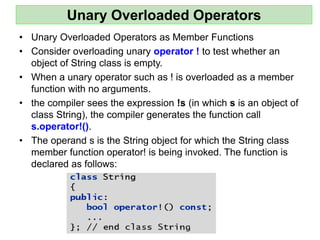
• Consider overloading unary operator ! to test whether an
object of String class is empty.
• When a unary operator such as ! is overloaded as a member
function with no arguments.
• the compiler sees the expression !s (in which s is an object of
class String), the compiler generates the function call
s.operator!().
• The operand s is the String object for which the String class
member function operator! is being invoked. The function is
declared as follows:
Unary Overloaded Operators as Non-Member Functions
• A unary operator such as ! may be overloaded as a non-
member function with one parameter in two different
ways:
– with a parameter that’s an object
• this requires a copy of the object, so the side effects of the
function are not applied to the original object,
– with a parameter that’s a reference to an object
• no copy of the original object is made, so all side effects of
this function are applied to the original object.
– If s is a String class object (or a reference to a String class
object), then !s is treated as if the call operator!(s) had
been written, invoking the non-member operator! function
that’s declared as follows:
Overloading the Unary Prefix and Postfix ++ and --Operators
• The prefix and postfix versions of the increment
and decrement operators can all be overloaded.
• We’ll see how the compiler distinguishes between
the prefix version and the postfix version of an
increment or decrement operator.
• To overload the prefix and postfix increment
operators, each overloaded operator function must
have a distinct signature,
• so that the compiler will be able to determine
which version of ++ is intended.
– The prefix versions are overloaded exactly as any
other prefix unary operator would be. Everything
stated in this section for overloading prefix and postfix
increment operators applies to overloading
predecrement and postdecrement operators.
Overloading the Prefix Increment Operator
• Suppose, that we want to add 1 to the day in Date object d1. When
the compiler sees the pre-incrementing expression ++d1, the
compiler generates the member-function call
• The prototype for this operator member function would be
• If the prefix increment operator is implemented as a non-member
function, then, when the compiler sees the expression ++d1, the
compiler generates the function call
• The prototype for this non-member operator function would be
declared as
Overloading the Postfix Increment Operator
• Overloading the postfix increment operator presents
a challenge, because the compiler must be able to
distinguish between the signatures of the
overloaded prefix and postfix increment operator
functions.
• The convention that has been adopted is that, when
the compiler sees the post-incrementing expression
d1++, it generates the member-function call
• The prototype for this operator member function is
Overloading the Postfix Increment Operator
• The argument 0 is strictly a “dummy value” that enables
the compiler to distinguish between the prefix and postfix
increment operator functions.
• The same syntax is used to differentiate between the
prefix and postfix decrement operator functions.
• If the postfix increment is implemented as a non-member
function, then, when the compiler sees the expression
d1++, the compiler generates the function call
• The prototype for this function would be
Overloading the Postfix Increment Operator
• Once again, the 0 argument is used by the compiler
to distinguish between the prefix and postfix
increment operators implemented as non-member
functions.
• Note that the postfix increment operator returns
Date objects by value, whereas the prefix increment
operator returns Date objects by reference
– the postfix increment operator typically returns a temporary
object that contains the original value of the object before
the increment occurred.
• C++ treats such objects as rvalues, which cannot be used on
the left side of an assignment. The prefix increment operator
returns the actual incremented object with its new value. Such
an object can be used as an lvalue in a continuing expression.
Case Study
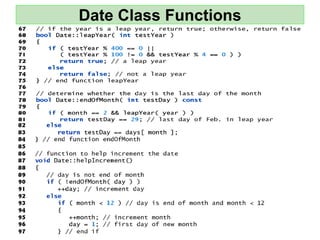
• Date class: overloaded prefix and postfix increment
operators
• The program demonstrates a Date class, which uses
overloaded prefix and postfix increment operators to add
1 to the day in a Date object, while causing appropriate
increments to the month and year if necessary.
Date Class
Date Class Functions
Testing
Dynamic Memory Management
• The size of standard C++ array data is specified
with a constant at compile time.
• Sometimes it’s useful to determine the size of an
array dynamically at execution time and then
create the array.
• C++ enables you to control the allocation and
deallocation of memory in a program for objects
and for arrays of any builtin or user-defined type.
• This is known as dynamic memory management
and is performed with the operators new and
delete.
NEW
• Use the new operator to dynamically allocate (i.e.,
reserve) the exact amount of memory required to
hold an object or array at execution time.
• The object or array is created in the free store
(also called the heap)
– Heap is a region of memory assigned to each
program for storing dynamically allocated objects.
• Once memory is allocated in the free store, you can
access it via the pointer that operator new returns.
• When you no longer need the memory, you can
return it to the free store by using the delete
operator to deallocate (i.e., release) the memory.
New operator
Consider the following statement:
Time *timePtr = new Time;
• The new operator allocates storage of the
proper size for an object of type Time, default
constructor to initialize the object and returns
a pointer to the type specified right of the
new operator (i.e., a Time *).
– If new is unable to find sufficient space for the
object, it indicates that an error occurred by
throwing an exception.
Delete operator
• To destroy a dynamically allocated object
and free the space for the object, use the
delete operator as follows:
delete timePtr;
• This statement first calls the destructor
for the object to which timePtr points,
then deallocates the memory
associated with the object, returning the
memory to the free store.
Initializing Dynamic Memory
• You can provide an initializer for a newly created
fundamental-type variable, as in
double *ptr = new double( 3.14159 );
• which initializes a newly created double to 3.14159
and assigns the resulting pointer to ptr.
• The same syntax can be used to specify a comma-
separated list of arguments to the constructor of an
object.
• Example:
Time *timePtr = new Time( 12, 45, 0 );
• initializes a new Time object to 12:45 PM and assigns
the resulting pointer to timePtr.

Lec 8.pdf a

  • 1.
    Computer Programming -1 ‫المنوفية‬ ‫جامعة‬ First Year (Second Semester) CS Dept., (CS132) Dr. Hamdy M. Mousa MENOUFIA UNIVERSITY FACULTY OF COMPUTERS AND INFORMATION
  • 2.
  • 3.
    Overloading • Function isan example of polymorphism, which means one thing serving several purposes. • Member functions of a class can be overloaded, but only by other member functions of that class. – To overload a member function, simply provide in the class definition a prototype for each version of the overloaded function, and provide a separate function definition for each version of the function.
  • 4.
    #include <iostream> using namespacestd; class printData { public: void print(int i) { cout << "Printing int: " << i << endl; } void print(double f) { cout << "Printing float: " << f << endl; } void print(char* c) { cout << "Printing character: " << c << endl; } }; int main(void) { printData pd; pd.print(5); // Call print to print integer pd.print(500.263); // Call print to print float pd.print("Hello C++"); // Call print to print character return 0; } Overloading operators
  • 5.
    Overloading Constructors // overloadingclass constructors #include <iostream> using namespace std; class Rectangle { int width, height; public: Rectangle (); Rectangle (int, int); int area (void) {return (width*height);} }; Rectangle::Rectangle () { width = 5; height = 5; } Rectangle::Rectangle (int a, int b) { width = a; height = b; } int main () { Rectangle rect (3, 4); Rectangle rectb; cout << "rect area: " << rect.area() << endl; cout << "rectb area: " << rectb.area() << endl; return 0; } rect area: 12 rectb area: 25
  • 6.
    Operator Overloading • builtoverloaded operator into C++ is <<: – the stream insertion operator – the bitwise left-shift operator • Similarly, >> also is overloaded – the stream extraction operator – bitwise right-shift operator. • overload operators with class objects – the compiler generates the appropriate code based on the types of the operands. • The jobs performed by overloaded operators also can be performed by explicit function calls, but operator notation is often more natural.
  • 7.
    Overloaded Operators <<& >> • Using the Overloaded Operators of Standard Library Class string • class string’s overloaded operators and several other useful member functions, including empty, substr and at. – Function empty determines whether a string is empty, – Function substr returns a string that represents a portion of an existing string – Function at returns the character at a specific index in a string.
  • 8.
  • 9.
  • 10.
  • 11.
    Output Class string’s overloaded []operator does not perform any bounds checking. Therefore, you must ensure that operations using standard class string’s overloaded [] operator do not accidentally manipulate elements outside the bounds of the string. Class string does provide bounds checking in its member function at, which throws an exception if its argument is an invalid subscript.
  • 12.
    Fundamentals of OperatorOverloading • Use operators with your own user-defined types. • C++ does not allow to be created new operators – most existing operators to be overloaded • Operator overloading is not automatic – write operator-overloading functions to perform the desired operations. – An operator is overloaded by writing a non-static member function definition or non-member function definition – function name starts with the keyword operator followed by the symbol for the operator being overloaded. Example: the function name operator+ would be used to overload the addition operator (+) for use with objects of a particular class.
  • 13.
    Operator Overloaded • Touse an operator on an object of a class, the operator must be overloaded for that class with three exceptions: – The assignment operator (=) may be used with every class to perform memberwise assignment of the class’s data • Memberwise assignment is dangerous for classes with pointer members. – The address (&) operator returns a pointer to the object – The comma operator evaluates the expression to its left then the expression to its right, and returns the value of the latter expression. • this operator also can be overloaded.
  • 14.
  • 15.
  • 16.
    Rules and Restrictions Rulesand Restrictions to Overload Operator: • The precedence of an operator cannot be changed by overloading. • The associativity of an operator cannot be changed by overloading. – if an operator normally associates from left to right, then so do all of its overloaded versions. • You cannot change the “arity” of an operator (the number of operands). • You cannot create new operators; – only existing operators can be overloaded.
  • 17.
    Cont., Rules andRestrictions Rules and Restrictions to Overload Operator: • The meaning of how an operator works on values of fundamental types cannot be changed by operator overloading. • Related operators, like + and +=, must be overloaded separately. • When overloading (), [], -> or any of the assignment operators, – the operator overloading function must be declared as a class member. • Operator Overloading functions can be member functions or non-member functions.
  • 18.
    Overloading Binary Operators •Binary operator can be overloaded as – non-static member function with one parameter or – non-member function with two parameters • one of those parameters must be either a class object or a reference to a class object. • non-member operator function is often declared as friend of a class for performance reasons.
  • 19.
    Operator functions • Operatorfunctions as member functions – Leftmost operand must be an object (or reference to an object) of the class – If left operand of a different type, operator function must be a non-member function • non-member operator function must be a friend if private or protected members of that class are accessed directly • Non-member overloaded operator functions – Enable the operator to be commutative
  • 20.
    Binary Overloaded Operatorsas Member Functions • using < to compare two objects of a String class that you define. • When overloading binary operator < as non-static member function of a String class. – if y and z are String-class objects, then y < z is treated as if y.operator<(z) had been written, – invoking the operator< member function with one argument: • Overloaded operator functions for binary operators can be member functions only when the left operand is an object of the class in which the function is a member.
  • 21.
    Defined as amember function Example: Operator Overloading class Complex { ... public: ... Complex operator +(const Complex &op) { double real = _real + op._real, imag = _imag + op._imag; return(Complex(real, imag)); } ... }; c = a+b; c = a.operator+ (b);
  • 22.
    Binary Overloaded Operatorsas Non-Member Functions • non-member function, binary operator < must take two arguments – one of which must be an object (or a reference to an object) of the class. • If y and z are String-class objects or references to String-class objects, then y < z is treated as if the call operator<(y, z) had been written in the program, • invoking function operator< :
  • 23.
    23 Defined as anon-member function Example: Operator Overloading class Complex { ... public: ... double real() { return _real; } //need access functions double imag() { return _imag; } ... }; Complex operator +(Complex &op1, Complex &op2) { double real = op1.real() + op2.real(), imag = op1.imag() + op2.imag(); return(Complex(real, imag)); } c = a+b; c = operator+ (a, b);
  • 24.
    24 Defined as afriend function Example: Operator Overloading class Complex { ... public: ... friend Complex operator +( const Complex &, const Complex & ); ... }; Complex operator +(Complex &op1, Complex &op2) { double real = op1._real + op2._real, imag = op1._imag + op2._imag; return(Complex(real, imag)); } c = a+b; c = operator+ (a, b);
  • 25.
  • 26.
  • 27.
    Overloading >> &<< • Overloading the Binary Stream Insertion and Stream Extraction Operators • You can input and output fundamental-type data using the stream extraction operator >> and the stream insertion operator <<. • The C++ class libraries overload these binary operators for each fundamental type, including pointers and char * strings. – overload these operators to perform input and output for your own types.
  • 28.
    Overloading << and>> Operators • Overloaded Stream-Insertion << and Stream-Extraction >> operators – Must have left operand of types ostream &, istream & respectively – It must be a non-member function (left operand not an object of the class) – It must be a friend function if it accesses private data members
  • 29.
    Friend • Friend declarationsintroduce extra coupling between classes – Once an object is declared as a friend, it has access to all non-public members as if they were public • Access is unidirectional – If B is designated as friend of A, B can access A’s non-public members; A cannot access B’s • A friend function of a class is defined outside of that class's scope
  • 30.
    Friend • The majoruse of friends is – to provide more efficient access to data members than the function call – to accommodate operator functions with easy access to private data members • Friends can have access to everything, which defeats data hiding, so use them carefully • Friends have permission to change the internal state from outside the class. – Always recommend use member functions instead of friends to change state
  • 31.
  • 32.
  • 33.
  • 34.
    Reference Parameter • Whenthe compiler sees the expression cin >> phone; • the compiler generates the non-member function call operator>>( cin, phone ); • When this call executes: – reference parameter input becomes an alias for cin – reference parameter number becomes an alias for phone • Stream manipulator setw limits the number of characters read into each string. – When used with cin and strings, setw restricts the number of characters read to the number of characters specified by its argument
  • 35.
    Overloaded Operators • OverloadedOperators as Non-Member friend Functions • The functions operator>> and operator<< are declared in PhoneNumber as non-member, friend functions. • They’re non-member functions because the object of class PhoneNumber must be the operator’s right operand. – If these were to be PhoneNumber member functions, the statements used to output and input an Array: phone << cout; phone >> cin; – Such statements would be confusing to most C++ programmers, • Overloaded input and output operators are declared as friends if they need to access non-public class members directly for performance reasons or because the class may not offer appropriate get functions.
  • 36.
    operator<< Member Function #include<iostream> using namespace std; class Distance { private: int feet; // 0 to infinite int inches; // 0 to 12 public: // required constructors Distance() { feet = 0; inches = 0; } Distance(int f, int i) { feet = f; inches = i; } // ostream &operator<<( ostream &output, const Distance &D ); ostream &operator<<( ostream &output ) { output << "F : " << feet << " I : " << inches; return output; } istream &operator>>( istream &input) { input >> feet >> inches; return input; } //istream &operator>>( istream &input, Distance &D ); };
  • 37.
    int main() { DistanceD1(11, 10), D2(5, 11), D3; cout << "Enter the value of object : " << endl; // cin >> D3; D3 >> cin; /* cout << "First Distance : " << D1 << endl; cout << "Second Distance :" << D2 << endl; cout << "Third Distance :" << D3 << endl; */ D3 << cout; system("pause"); return 0; } operator<< Member Function
  • 38.
    #include <iostream> using namespacestd; class Distance { private: int feet; // 0 to infinite int inches; // 0 to 12 public: // required constructors Distance() { feet = 0; inches = 0; } Distance(int f, int i) { feet = f; inches = i; } friend ostream &operator<<( ostream &output, const Distance &D ) { output << "F : " << D.feet << " I : " << D.inches; return output; } friend istream &operator>>( istream &input, Distance &D ) { input >> D.feet >> D.inches; return input; } }; operator<< Friend Function
  • 39.
    int main() { DistanceD1(11, 10), D2(5, 11), D3; cout << "Enter the value of object : " << endl; cin >> D3; cout << "First Distance : " << D1 << endl; cout << "Second Distance :" << D2 << endl; cout << "Third Distance :" << D3 << endl; return 0; } operator<< Friend Function
  • 40.
    Overloading Unary Operators •A unary operator for a class can be overloaded as a – non-static member function with no arguments – non-member function with one argument that must be an object (or a reference to an object) of the class. • Member functions that implement overloaded operators must be non-static so that they can access the non-static data in each object of the class.
  • 41.
    Unary Overloaded Operators •Unary Overloaded Operators as Member Functions • Consider overloading unary operator ! to test whether an object of String class is empty. • When a unary operator such as ! is overloaded as a member function with no arguments. • the compiler sees the expression !s (in which s is an object of class String), the compiler generates the function call s.operator!(). • The operand s is the String object for which the String class member function operator! is being invoked. The function is declared as follows:
  • 42.
    Unary Overloaded Operatorsas Non-Member Functions • A unary operator such as ! may be overloaded as a non- member function with one parameter in two different ways: – with a parameter that’s an object • this requires a copy of the object, so the side effects of the function are not applied to the original object, – with a parameter that’s a reference to an object • no copy of the original object is made, so all side effects of this function are applied to the original object. – If s is a String class object (or a reference to a String class object), then !s is treated as if the call operator!(s) had been written, invoking the non-member operator! function that’s declared as follows:
  • 43.
    Overloading the UnaryPrefix and Postfix ++ and --Operators • The prefix and postfix versions of the increment and decrement operators can all be overloaded. • We’ll see how the compiler distinguishes between the prefix version and the postfix version of an increment or decrement operator. • To overload the prefix and postfix increment operators, each overloaded operator function must have a distinct signature, • so that the compiler will be able to determine which version of ++ is intended. – The prefix versions are overloaded exactly as any other prefix unary operator would be. Everything stated in this section for overloading prefix and postfix increment operators applies to overloading predecrement and postdecrement operators.
  • 44.
    Overloading the PrefixIncrement Operator • Suppose, that we want to add 1 to the day in Date object d1. When the compiler sees the pre-incrementing expression ++d1, the compiler generates the member-function call • The prototype for this operator member function would be • If the prefix increment operator is implemented as a non-member function, then, when the compiler sees the expression ++d1, the compiler generates the function call • The prototype for this non-member operator function would be declared as
  • 45.
    Overloading the PostfixIncrement Operator • Overloading the postfix increment operator presents a challenge, because the compiler must be able to distinguish between the signatures of the overloaded prefix and postfix increment operator functions. • The convention that has been adopted is that, when the compiler sees the post-incrementing expression d1++, it generates the member-function call • The prototype for this operator member function is
  • 46.
    Overloading the PostfixIncrement Operator • The argument 0 is strictly a “dummy value” that enables the compiler to distinguish between the prefix and postfix increment operator functions. • The same syntax is used to differentiate between the prefix and postfix decrement operator functions. • If the postfix increment is implemented as a non-member function, then, when the compiler sees the expression d1++, the compiler generates the function call • The prototype for this function would be
  • 47.
    Overloading the PostfixIncrement Operator • Once again, the 0 argument is used by the compiler to distinguish between the prefix and postfix increment operators implemented as non-member functions. • Note that the postfix increment operator returns Date objects by value, whereas the prefix increment operator returns Date objects by reference – the postfix increment operator typically returns a temporary object that contains the original value of the object before the increment occurred. • C++ treats such objects as rvalues, which cannot be used on the left side of an assignment. The prefix increment operator returns the actual incremented object with its new value. Such an object can be used as an lvalue in a continuing expression.
  • 48.
    Case Study • Dateclass: overloaded prefix and postfix increment operators • The program demonstrates a Date class, which uses overloaded prefix and postfix increment operators to add 1 to the day in a Date object, while causing appropriate increments to the month and year if necessary.
  • 49.
  • 50.
  • 51.
  • 52.
  • 53.
  • 54.
  • 55.
    Dynamic Memory Management •The size of standard C++ array data is specified with a constant at compile time. • Sometimes it’s useful to determine the size of an array dynamically at execution time and then create the array. • C++ enables you to control the allocation and deallocation of memory in a program for objects and for arrays of any builtin or user-defined type. • This is known as dynamic memory management and is performed with the operators new and delete.
  • 56.
    NEW • Use thenew operator to dynamically allocate (i.e., reserve) the exact amount of memory required to hold an object or array at execution time. • The object or array is created in the free store (also called the heap) – Heap is a region of memory assigned to each program for storing dynamically allocated objects. • Once memory is allocated in the free store, you can access it via the pointer that operator new returns. • When you no longer need the memory, you can return it to the free store by using the delete operator to deallocate (i.e., release) the memory.
  • 57.
    New operator Consider thefollowing statement: Time *timePtr = new Time; • The new operator allocates storage of the proper size for an object of type Time, default constructor to initialize the object and returns a pointer to the type specified right of the new operator (i.e., a Time *). – If new is unable to find sufficient space for the object, it indicates that an error occurred by throwing an exception.
  • 58.
    Delete operator • Todestroy a dynamically allocated object and free the space for the object, use the delete operator as follows: delete timePtr; • This statement first calls the destructor for the object to which timePtr points, then deallocates the memory associated with the object, returning the memory to the free store.
  • 59.
    Initializing Dynamic Memory •You can provide an initializer for a newly created fundamental-type variable, as in double *ptr = new double( 3.14159 ); • which initializes a newly created double to 3.14159 and assigns the resulting pointer to ptr. • The same syntax can be used to specify a comma- separated list of arguments to the constructor of an object. • Example: Time *timePtr = new Time( 12, 45, 0 ); • initializes a new Time object to 12:45 PM and assigns the resulting pointer to timePtr.