OPERATING SYSTEM
PANKAJ DEBBARMA
Deptt. of CSE, TIT, Narsingarh
Memory Management
CONTENTS
Virtual
Memory
• No memory abstraction
• Memory abstraction
• Swapping
• Managing free memory
• Virtual Memory
• Paging
• MMU Operation
• Page tables
• Speeding up paging
• Translation Lookaside Buffer
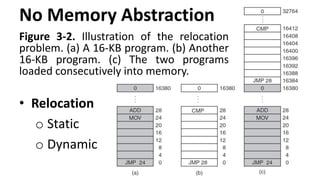
No Memory Abstraction
Figure 3-2. Illustration of the relocation
problem. (a) A 16-KB program. (b) Another
16-KB program. (c) The two programs
loaded consecutively into memory.
• Relocation
o Static
o Dynamic
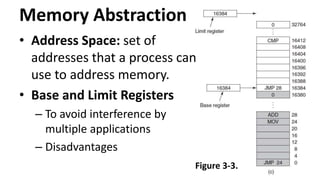
Memory Abstraction
• Address Space: set of
addresses that a process can
use to address memory.
• Base and Limit Registers
– To avoid interference by
multiple applications
– Disadvantages
Figure 3-3.
Swapping
• Background
processes
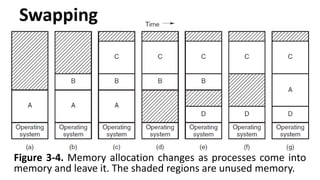
Swapping
Figure 3-4. Memory allocation changes as processes come into
memory and leave it. The shaded regions are unused memory.
Swapping
• When swapping creates multiple holes in
memory, it is possible to combine them all
into one big on by moving all the processes
downward as far as possible. This technique is
known as memory compaction.
• Issues related to memory compaction.
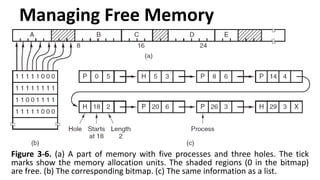
Managing Free Memory
Figure 3-6. (a) A part of memory with five processes and three holes. The tick
marks show the memory allocation units. The shaded regions (0 in the bitmap)
are free. (b) The corresponding bitmap. (c) The same information as a list.
Managing Free Memory
Figure 3-7. Four neighbour combinations for
the terminating process, X.
Virtual Memory
• Increase in memory size.
• Overlays, programs split into pieces.
– Overlay Manager.
– Time consuming, boring, and error prone.
• Virtual memory
• Pages
– Each page is a contiguous range of addresses.
– Pages are mapped onto physical memory.
Paging
Virtual Addresses | Virtual Address Space | Memory Management Unit
Figure 3-8.
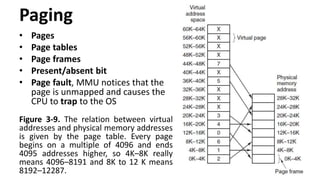
Paging
• Pages
• Page tables
• Page frames
• Present/absent bit
• Page fault, MMU notices that the
page is unmapped and causes the
CPU to trap to the OS
Figure 3-9. The relation between virtual
addresses and physical memory addresses
is given by the page table. Every page
begins on a multiple of 4096 and ends
4095 addresses higher, so 4K–8K really
means 4096–8191 and 8K to 12 K means
8192–12287.
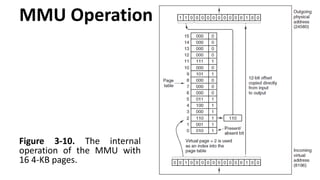
MMU Operation
Figure 3-10. The internal
operation of the MMU with
16 4-KB pages.
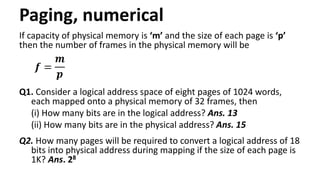
Paging, numerical
If capacity of physical memory is ‘m’ and the size of each page is ‘p’
then the number of frames in the physical memory will be
Q1. Consider a logical address space of eight pages of 1024 words,
each mapped onto a physical memory of 32 frames, then
(i) How many bits are in the logical address? Ans. 13
(ii) How many bits are in the physical address? Ans. 15
Q2. How many pages will be required to convert a logical address of 18
bits into physical address during mapping if the size of each page is
1K? Ans. 28
Page Tables
• Present/absent bit. If bit is 1, entry is valid, can be used.
Accessing with bit set to 0 causes a page fault.
• Protection bits. 0 for read/write and 1 for read only.
• Modified. dirty = write back; clean = abandon.
• Referenced. Helps in setting priority for eviction.
Figure 3-11. A typical page table entry.
Speeding Up Paging
Major issues
• The mapping from virtual address to physical
address must be fast.
• If the virtual address space is large, the page
table will be large.
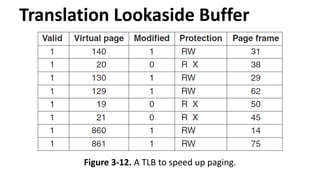
Translation Lookaside Buffer
Figure 3-12. A TLB to speed up paging.
Translation Lookaside Buffer
• If a computer system takes t1 time to access TLB and t2 time
to access memory then mapped memory access will take
t1+t2 time when page number is present in TLB.
• And when page number is not present in TLB then we
require t1 time to access TLB in which page number is not
present and t1’ time to access TLB and then t2 time to
access memory.
• So we require total t1+t1’+t2 time when page no. is not
present in TLB. To find the effective access time, we must
weigh each case by its probability as:
Teff = hit ratio * (t1 + t2) + miss ratio * (t1 + t1’ + t2)
Translation Lookaside Buffer
Q. Consider a paging system with the page table store in
memory.
(i) If a memory takes 200 nanoseconds, how long does a
paged memory reference take? Ans. 200ns
(ii) If we need TLBs and 75 percent of all page table reference
are found in the TLBs, what is the effective reference
time? (Assume that finding a page-table entry in TLBs
takes zero time, if the entry is there) Ans. 250ns
OS-01 Virtual Memory.pptx

OS-01 Virtual Memory.pptx

  • 1.
    OPERATING SYSTEM PANKAJ DEBBARMA Deptt.of CSE, TIT, Narsingarh Memory Management
  • 2.
    CONTENTS Virtual Memory • No memoryabstraction • Memory abstraction • Swapping • Managing free memory • Virtual Memory • Paging • MMU Operation • Page tables • Speeding up paging • Translation Lookaside Buffer
  • 3.
    No Memory Abstraction Figure3-2. Illustration of the relocation problem. (a) A 16-KB program. (b) Another 16-KB program. (c) The two programs loaded consecutively into memory. • Relocation o Static o Dynamic
  • 4.
    Memory Abstraction • AddressSpace: set of addresses that a process can use to address memory. • Base and Limit Registers – To avoid interference by multiple applications – Disadvantages Figure 3-3.
  • 5.
  • 6.
    Swapping Figure 3-4. Memoryallocation changes as processes come into memory and leave it. The shaded regions are unused memory.
  • 7.
    Swapping • When swappingcreates multiple holes in memory, it is possible to combine them all into one big on by moving all the processes downward as far as possible. This technique is known as memory compaction. • Issues related to memory compaction.
  • 8.
    Managing Free Memory Figure3-6. (a) A part of memory with five processes and three holes. The tick marks show the memory allocation units. The shaded regions (0 in the bitmap) are free. (b) The corresponding bitmap. (c) The same information as a list.
  • 9.
    Managing Free Memory Figure3-7. Four neighbour combinations for the terminating process, X.
  • 10.
    Virtual Memory • Increasein memory size. • Overlays, programs split into pieces. – Overlay Manager. – Time consuming, boring, and error prone. • Virtual memory • Pages – Each page is a contiguous range of addresses. – Pages are mapped onto physical memory.
  • 11.
    Paging Virtual Addresses |Virtual Address Space | Memory Management Unit Figure 3-8.
  • 12.
    Paging • Pages • Pagetables • Page frames • Present/absent bit • Page fault, MMU notices that the page is unmapped and causes the CPU to trap to the OS Figure 3-9. The relation between virtual addresses and physical memory addresses is given by the page table. Every page begins on a multiple of 4096 and ends 4095 addresses higher, so 4K–8K really means 4096–8191 and 8K to 12 K means 8192–12287.
  • 13.
    MMU Operation Figure 3-10.The internal operation of the MMU with 16 4-KB pages.
  • 14.
    Paging, numerical If capacityof physical memory is ‘m’ and the size of each page is ‘p’ then the number of frames in the physical memory will be Q1. Consider a logical address space of eight pages of 1024 words, each mapped onto a physical memory of 32 frames, then (i) How many bits are in the logical address? Ans. 13 (ii) How many bits are in the physical address? Ans. 15 Q2. How many pages will be required to convert a logical address of 18 bits into physical address during mapping if the size of each page is 1K? Ans. 28
  • 15.
    Page Tables • Present/absentbit. If bit is 1, entry is valid, can be used. Accessing with bit set to 0 causes a page fault. • Protection bits. 0 for read/write and 1 for read only. • Modified. dirty = write back; clean = abandon. • Referenced. Helps in setting priority for eviction. Figure 3-11. A typical page table entry.
  • 16.
    Speeding Up Paging Majorissues • The mapping from virtual address to physical address must be fast. • If the virtual address space is large, the page table will be large.
  • 17.
    Translation Lookaside Buffer Figure3-12. A TLB to speed up paging.
  • 18.
    Translation Lookaside Buffer •If a computer system takes t1 time to access TLB and t2 time to access memory then mapped memory access will take t1+t2 time when page number is present in TLB. • And when page number is not present in TLB then we require t1 time to access TLB in which page number is not present and t1’ time to access TLB and then t2 time to access memory. • So we require total t1+t1’+t2 time when page no. is not present in TLB. To find the effective access time, we must weigh each case by its probability as: Teff = hit ratio * (t1 + t2) + miss ratio * (t1 + t1’ + t2)
  • 19.
    Translation Lookaside Buffer Q.Consider a paging system with the page table store in memory. (i) If a memory takes 200 nanoseconds, how long does a paged memory reference take? Ans. 200ns (ii) If we need TLBs and 75 percent of all page table reference are found in the TLBs, what is the effective reference time? (Assume that finding a page-table entry in TLBs takes zero time, if the entry is there) Ans. 250ns