Order Processing Tips
AgendaObjective – To help inform you of features you may have and not be usingThis webinar will coverOrder and Item StatusProcessing OrdersFinding OrdersGlobal Parameter SettingsCommon IssuesQ&A
Order and item statusMany issues for order processing stem from the order or item statusFirst step for order processing issues where orders aren’t processing, is to check the status
Order and item status Order StatusLine Item Status
Processing ordersOriginally, M.O.M. just had a batch order processingPacker’s Workstation was added for businesses with heavy volume and helps control order processing
Processing ordersBatch Order Processing
Processing OrdersBatch Order Processing
Processing OrdersPacker’s WorkstationAssign orders to packers using the Warehouse Manager’s Station
Processing ordersChoose New Batch to assign orders to pickers and packers
Processing OrdersAssigning orders
Processing ordersChoose to automatically assign orders
Processing ordersView the graph to see assigned orders
Processing orders
Processing orders
Processing ordersGet packing slip and box label on one form to ensure the correct label is on the correct box
Processing ordersNotices A common question we see is, when do notices generate and print?Email InvoicesA common question we see is, how do I generate an email invoice with my company logo?
Processing ordersNotice Generation Credit Card DeclineThis notice will generate automatically when a credit card is declinedWill print when running the notices stageShipping Confirmation Set up the notice under Maintain -> Advertising Information -> Customer NoticesChoose the notice on the Notices Tab of Global ParametersWill queue after the shipping stage is runCan print or e-mail
Processing ordersEmail Invoices	Customer record Financial Tab must be set up to generate e-mail invoicesCustomer record must have an e-mail addressChoose on the Global Parameters Forms Tab to e-mail invoices to customersAlso in Global Parameters, set up the E-mail settings on the Notices Tab to customize how your e-mailed invoice will look
Processing ordersE-mail Invoice Example
Processing ordersManager’s Authorization SettingsThese settings solve the need for control over ordersThis will require a managers user ID to authorize an order before the order moves through any order processing stage.
Processing OrdersManager’s AuthorizationSet up in Global Parameters to stop orders
Order processingManager’s Authorization
Finding ordersA common question we see is, how do I get more visibility to orders?Multiple reports will help find orders in certain statusesThese reports do have criteria to narrow search further, ex. for a specific shipping methodManager’s Dashboard, set up per user ID, can be configured to show certain data for order control
Finding orders List Status of Pending
Finding ordersOpen Order Status
Finding OrdersManager’s Dashboard Set up per user ID
Finding Orders
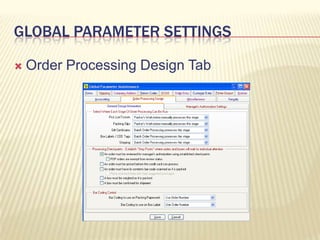
Global parameter settingsMultiple tabs of global parameters play a big factor in order processing, such asWhat forms will print and on what formWhat is required on orders before they can be savedWhere your orders process
Global Parameter settingsForms Tab
Global parameter settingsOrder Entry Tab
Global Parameter settingsOrder Processing Design Tab
Common issuesWe see a lot of support issues on order processing The next few slides will walk through some common questions that we see, and give possible resolutions
Common IssuesHow do I find the items on a canceled order?Lost Sales Report Must be set up in Global Parameters
Common issuesCanceling an order will prompt the order taker for a reason
Common issues
Common issuesMy company is changing how we do shipping, when should I make these changes?After you have run a complete batch, and no orders are left to be processedIt is bad practice to make changes while orders are waiting to be processedAlso note, it may be a good idea to test changes on a back up copy of your system
Common issuesIs there a batch reset for orders?No, there is notWhen running a batch, be sure the paperwork printed before clicking Yes
Common issuesHow do I get two copies of an invoice to print?Set this up in Global Parameters
Common issuesHow do I get a copy of the invoice?Click on the R icon, to see the Order Reset ControlsClick Print a Copy of Invoice
Common issuesWhat do the order reset controls mean?Each option is designed to do something different
Common issuesHow do I make an order show shipped without running it through shipping?Use the traffic light icon to change the item status
Common issuesWhy does this order show an Invalid Package Label Status?Check the box has a weight, correct shipping method, customer has a valid address, and the zip code auto fills
Common issuesThere is a return on the order, but I can’t process the credit card to return the moneyInvoice the order
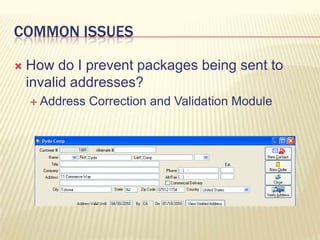
Common issuesHow do I prevent packages being sent to invalid addresses?Address Correction and Validation Module
Credit card processingCards can be charged order by orderCards can also be charged in a batch settingThe batch still gives control to process cards individuallyThe batch also gives visibility to cards that may be declined or have issues
Credit Card ProcessingBatch Credit Processing
Credit Card ProcessingAn order must be invoiced before the funds can be captured
Related TopicsPCI ComplianceJuly 2010 deadlineKB1422KB5343Transactional data flow for accounting	KB1114Gift cardsKB1349
Related topicsSome additional features of M.O.M. 7 includeEDICreate your own reports QuickBooks enhancementPass detailed information to QuickBooksAdditional Stock Item FeaturesEnhancements to multiple modules
Question & AnswerSupportsupport.dydacomp.comsupport@dydacomp.com973 237 0300Salessales@dydacomp.com800 858 3666

Order processing tips