Learning Oracle Virtual Box: 
Basics to RAC Attack 
Bobby Curtis, EMBA 
Northeast Ohio Oracle User Group Session 
November 21, 2014
Accenture Enkitec Group 
Enkitec joined Accenture’s Infrastructure Services as Accenture 
Enkitec Group (May 2014) 
Ø 17,000 Infrastructure Services professionals 
Ø 52,000 Oracle professionals 
Focus on Oracle Engineered Systems Solutions 
Ø Database Migrations & Transformations 
Ø Database-as-a-Service 
Ø Oracle Applications on Engineered Systems 
Ø Cloud-based solutions leveraging Engineered Systems 
Ø And many more offerings coming.
Speaker 
Douglasville, Georgia 
Infrastructure Principle 
IOUG, RMOUG, GAOUG, RACSIG, DISOG 
@dbasolved http://dbasolved.com bcurtis@enkitec.com 
curtisbl@gmail.com
Agenda 
• What is Oracle VM VirtualBox 
• What do I need to run VirtualBox 
• VirtualBox Virtualization Architecture 
• Installing and Running VirtualBox 
• VirtualBox Use Cases 
• Learning Resources 
• OTN Developer Days VirtualBox Appliances 
• Accessing your VM Guests 
• Tips and Tricks 
• Snapshots
What is VirtualBox? 
§ Cross platform desktop virtualization software 
§ Supported Hosts: 
§ Window, Mac, Linux and Solaris 
§ Runs on x86 based processors 
§ Intel and AMD 
§ Operating Systems Supported 
§ Windows (32-bit/64-bit) 
§ Linux (32-bit/64-bit) 
§ Solaris (32-bit and 64-bit) 
§ Benefit 
§ Free!!!!!!
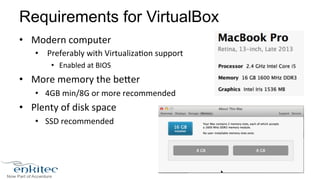
Requirements for VirtualBox 
• Modern 
computer 
• 
Preferably 
with 
Virtualiza8on 
support 
• Enabled 
at 
BIOS 
• More 
memory 
the 
be?er 
• 4GB 
min/8G 
or 
more 
recommended 
• Plenty 
of 
disk 
space 
• SSD 
recommended
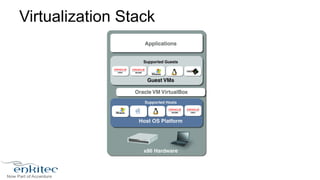
Virtualization Stack
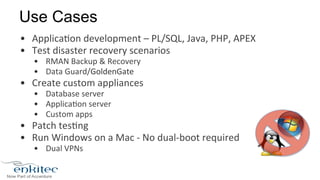
Use Cases 
• Applica8on 
development 
– 
PL/SQL, 
Java, 
PHP, 
APEX 
• Test 
disaster 
recovery 
scenarios 
• RMAN 
Backup 
& 
Recovery 
• Data 
Guard/GoldenGate 
• Create 
custom 
appliances 
• Database 
server 
• Applica8on 
server 
• Custom 
apps 
• Patch 
tes8ng 
• Run 
Windows 
on 
a 
Mac 
-­‐ 
No 
dual-­‐boot 
required 
• Dual 
VPNs
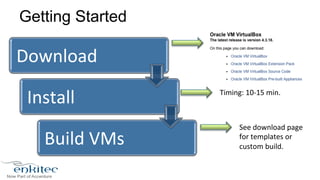
Getting Started 
Download 
Install 
Build 
VMs 
Timing: 
10-­‐15 
min. 
See 
download 
page 
for 
templates 
or 
custom 
build.
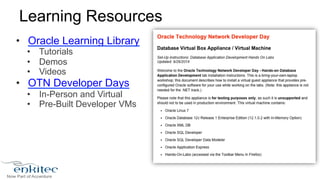
Learning Resources 
• Oracle Learning Library 
• Tutorials 
• Demos 
• Videos 
• OTN Developer Days 
• In-Person and Virtual 
• Pre-Built Developer VMs
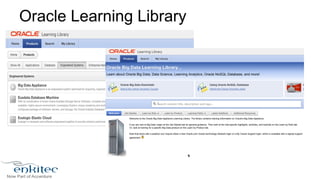
Oracle Learning Library
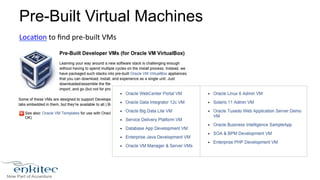
Pre-Built Virtual Machines 
Loca8on 
to 
find 
pre-­‐built 
VMs
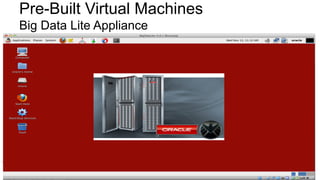
Pre-Built Virtual Machines 
Big Data Lite Appliance
Moving VMs 
• Export/Import 
Formats 
• Open 
Virtualiza8on 
Format 
(OVF) 
• Open 
Virtualiza8on 
Archive 
(OVA) 
– 
add 
disks 
in 
one 
file 
• Useful 
for 
handing 
out 
(OTNVDD) 
• Benefits 
• Useful 
for 
demos 
and 
hand-­‐outs 
• Portability 
between 
different 
hosts/OS 
• Backups
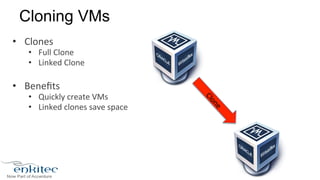
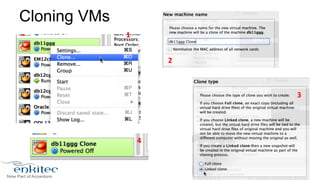
Cloning VMs 
• Clones 
• Full 
Clone 
• Linked 
Clone 
• Benefits 
• Quickly 
create 
VMs 
• Linked 
clones 
save 
space
Cloning VMs 
1 
2 
3 
4
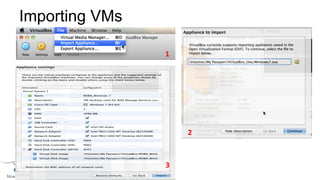
Importing VMs 
1 
2 
3
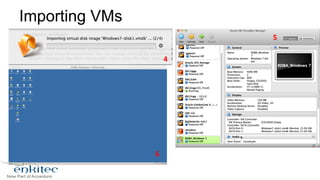
Importing VMs 
4 
5 
6
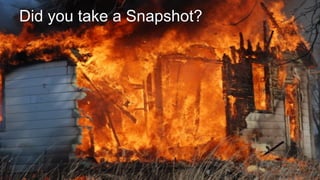
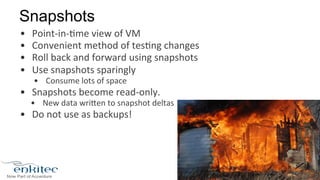
Did you take a Snapshot?
Snapshots 
• Point-­‐in-­‐8me 
view 
of 
VM 
• Convenient 
method 
of 
tes8ng 
changes 
• Roll 
back 
and 
forward 
using 
snapshots 
• Use 
snapshots 
sparingly 
• Consume 
lots 
of 
space 
• Snapshots 
become 
read-­‐only. 
• New 
data 
wri?en 
to 
snapshot 
deltas 
• Do 
not 
use 
as 
backups!
Tips and Tricks 
General 
• Add physical memory 
• Store virtual disks on SSD 
• Install Guest Additions (changes every version) 
• Enable memory over commitment (Page Fusion & Memory 
Ballooning)* 
• Disable Host I/O cache 
• Use dynamic disks 
• Linked Clones (reduce disk usage for multiple VMs) 
• Snapshots
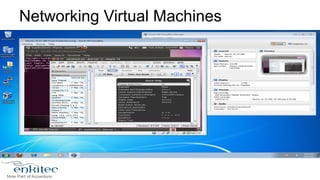
Networking Virtual Machines
Accessing Virtual Machines 
• VirtualBox 
GUI 
– Remote 
RDP 
to 
view 
VM 
from 
different 
machine 
• Networking 
– Connect 
remotely 
using 
SSH, 
VNC 
etc. 
• Port 
Forwarding 
– Connect 
to 
VM 
from 
host 
using 
forwarded 
ports 
• Shared 
Folders 
– Share 
files 
between 
VMs 
and 
host
Accessing Virtual Machines 
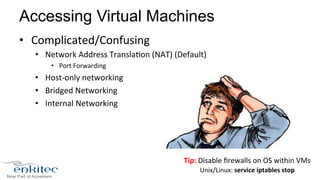
• Complicated/Confusing 
• Network 
Address 
Transla8on 
(NAT) 
(Default) 
• Port 
Forwarding 
• Host-­‐only 
networking 
• Bridged 
Networking 
• Internal 
Networking 
Tip: 
Disable 
firewalls 
on 
OS 
within 
VMs 
Unix/Linux: 
service 
iptables 
stop
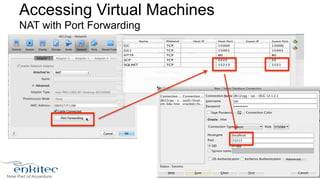
Accessing Virtual Machines 
NAT with Port Forwarding
Tips and Tricks 
N etworking 
• KISS principle 
KEEP IT SIMPLE S______!
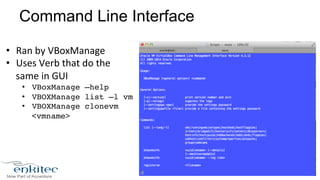
Command Line Interface 
• Ran 
by 
VBoxManage 
• Uses 
Verb 
that 
do 
the 
same 
in 
GUI 
• VBoxManage –help! 
• VBOXManage list –l vm! 
• VBOXManage clonevm 
<vmname>!
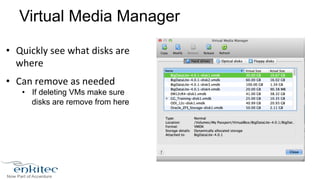
Virtual Media Manager 
• Quickly 
see 
what 
disks 
are 
where 
• Can 
remove 
as 
needed 
• If deleting VMs make sure 
disks are remove from here
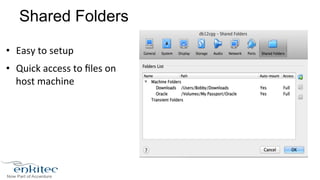
Shared Folders 
• Easy 
to 
setup 
• Quick 
access 
to 
files 
on 
host 
machine
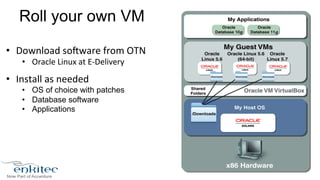
Roll your own VM 
• Download 
sofware 
from 
OTN 
• Oracle 
Linux 
at 
E-­‐Delivery 
• Install 
as 
needed 
• OS of choice with patches 
• Database software 
• Applications
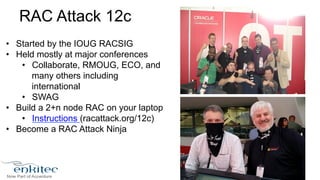
RAC Attack 12c 
• Started by the IOUG RACSIG 
• Held mostly at major conferences 
• Collaborate, RMOUG, ECO, and 
many others including 
international 
• SWAG 
• Build a 2+n node RAC on your laptop 
• Instructions (racattack.org/12c) 
• Become a RAC Attack Ninja
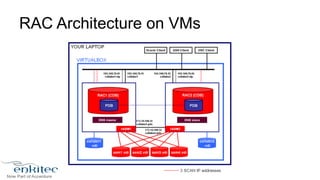
RAC Architecture on VMs
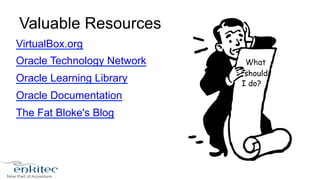
Valuable Resources 
VirtualBox.org 
Oracle Technology Network 
Oracle Learning Library 
Oracle Documentation 
The Fat Bloke's Blog
Contact Info 
@dbasolved http://dbasolved.com bcurtis@enkitec.com 
curtisbl@gmail.com

Oracle virtualbox basic to rac attack

  • 1.
    Learning Oracle VirtualBox: Basics to RAC Attack Bobby Curtis, EMBA Northeast Ohio Oracle User Group Session November 21, 2014
  • 2.
    Accenture Enkitec Group Enkitec joined Accenture’s Infrastructure Services as Accenture Enkitec Group (May 2014) Ø 17,000 Infrastructure Services professionals Ø 52,000 Oracle professionals Focus on Oracle Engineered Systems Solutions Ø Database Migrations & Transformations Ø Database-as-a-Service Ø Oracle Applications on Engineered Systems Ø Cloud-based solutions leveraging Engineered Systems Ø And many more offerings coming.
  • 3.
    Speaker Douglasville, Georgia Infrastructure Principle IOUG, RMOUG, GAOUG, RACSIG, DISOG @dbasolved http://dbasolved.com bcurtis@enkitec.com curtisbl@gmail.com
  • 4.
    Agenda • Whatis Oracle VM VirtualBox • What do I need to run VirtualBox • VirtualBox Virtualization Architecture • Installing and Running VirtualBox • VirtualBox Use Cases • Learning Resources • OTN Developer Days VirtualBox Appliances • Accessing your VM Guests • Tips and Tricks • Snapshots
  • 5.
    What is VirtualBox? § Cross platform desktop virtualization software § Supported Hosts: § Window, Mac, Linux and Solaris § Runs on x86 based processors § Intel and AMD § Operating Systems Supported § Windows (32-bit/64-bit) § Linux (32-bit/64-bit) § Solaris (32-bit and 64-bit) § Benefit § Free!!!!!!
  • 6.
    Requirements for VirtualBox • Modern computer • Preferably with Virtualiza8on support • Enabled at BIOS • More memory the be?er • 4GB min/8G or more recommended • Plenty of disk space • SSD recommended
  • 7.
  • 8.
    Use Cases •Applica8on development – PL/SQL, Java, PHP, APEX • Test disaster recovery scenarios • RMAN Backup & Recovery • Data Guard/GoldenGate • Create custom appliances • Database server • Applica8on server • Custom apps • Patch tes8ng • Run Windows on a Mac -­‐ No dual-­‐boot required • Dual VPNs
  • 9.
    Getting Started Download Install Build VMs Timing: 10-­‐15 min. See download page for templates or custom build.
  • 10.
    Learning Resources •Oracle Learning Library • Tutorials • Demos • Videos • OTN Developer Days • In-Person and Virtual • Pre-Built Developer VMs
  • 11.
  • 12.
    Pre-Built Virtual Machines Loca8on to find pre-­‐built VMs
  • 13.
    Pre-Built Virtual Machines Big Data Lite Appliance
  • 14.
    Moving VMs •Export/Import Formats • Open Virtualiza8on Format (OVF) • Open Virtualiza8on Archive (OVA) – add disks in one file • Useful for handing out (OTNVDD) • Benefits • Useful for demos and hand-­‐outs • Portability between different hosts/OS • Backups
  • 15.
    Cloning VMs •Clones • Full Clone • Linked Clone • Benefits • Quickly create VMs • Linked clones save space
  • 16.
  • 17.
  • 18.
  • 19.
    Did you takea Snapshot?
  • 20.
    Snapshots • Point-­‐in-­‐8me view of VM • Convenient method of tes8ng changes • Roll back and forward using snapshots • Use snapshots sparingly • Consume lots of space • Snapshots become read-­‐only. • New data wri?en to snapshot deltas • Do not use as backups!
  • 21.
    Tips and Tricks General • Add physical memory • Store virtual disks on SSD • Install Guest Additions (changes every version) • Enable memory over commitment (Page Fusion & Memory Ballooning)* • Disable Host I/O cache • Use dynamic disks • Linked Clones (reduce disk usage for multiple VMs) • Snapshots
  • 22.
  • 23.
    Accessing Virtual Machines • VirtualBox GUI – Remote RDP to view VM from different machine • Networking – Connect remotely using SSH, VNC etc. • Port Forwarding – Connect to VM from host using forwarded ports • Shared Folders – Share files between VMs and host
  • 24.
    Accessing Virtual Machines • Complicated/Confusing • Network Address Transla8on (NAT) (Default) • Port Forwarding • Host-­‐only networking • Bridged Networking • Internal Networking Tip: Disable firewalls on OS within VMs Unix/Linux: service iptables stop
  • 25.
    Accessing Virtual Machines NAT with Port Forwarding
  • 26.
    Tips and Tricks N etworking • KISS principle KEEP IT SIMPLE S______!
  • 27.
    Command Line Interface • Ran by VBoxManage • Uses Verb that do the same in GUI • VBoxManage –help! • VBOXManage list –l vm! • VBOXManage clonevm <vmname>!
  • 28.
    Virtual Media Manager • Quickly see what disks are where • Can remove as needed • If deleting VMs make sure disks are remove from here
  • 29.
    Shared Folders •Easy to setup • Quick access to files on host machine
  • 30.
    Roll your ownVM • Download sofware from OTN • Oracle Linux at E-­‐Delivery • Install as needed • OS of choice with patches • Database software • Applications
  • 31.
    RAC Attack 12c • Started by the IOUG RACSIG • Held mostly at major conferences • Collaborate, RMOUG, ECO, and many others including international • SWAG • Build a 2+n node RAC on your laptop • Instructions (racattack.org/12c) • Become a RAC Attack Ninja
  • 32.
  • 33.
    Valuable Resources VirtualBox.org Oracle Technology Network Oracle Learning Library Oracle Documentation The Fat Bloke's Blog
  • 36.
    Contact Info @dbasolvedhttp://dbasolved.com bcurtis@enkitec.com curtisbl@gmail.com