Bobby Curtis
Accenture Enkitec Group
Date: 2/19/2015
Room: 404
Extreme Replication:
Performance Tuning Oracle GoldenGate
for the Real World
(Oracle to Oracle Integrated Replication)
Bobby Curtis
@dbasolved
http://dbasolved.com
Work: bobby.l.curtis@accenture.com
Personal: curtisbl@gmail.com
Douglasville, Georgia
Infrastructure Principle
IOUG (RACSIG/DI SIG), RMOUG, GAOUG
Accenture Enkitec Group
Enkitec joined Accenture’s Infrastructure Services (May 2014)
-  52,000 Oracle professionals
-  17,000 Infrastructure Services professionals
Focus on Oracle Engineered Systems Solutions
-  Database Migrations
-  Oracle Applications on Engineered Systems
-  Cloud-based solutions leveraging Engineered Systems
E4 2015
May 31 – June 2, 2015
Hilton Hotel – Southlake Town Square
Dallas, TX
More Information: http://www.enkitec.com/e4
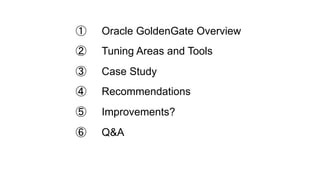
①  Oracle GoldenGate Overview
②  Tuning Areas and Tools
③  Case Study
④  Recommendations
⑤  Improvements?
⑥  Q&A
Oracle GoldenGate Overview
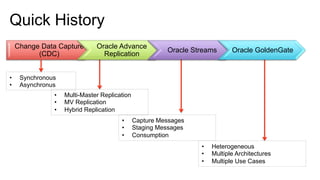
Change Data Capture
(CDC)
Oracle Advance
Replication
Oracle Streams Oracle GoldenGate
•  Multi-Master Replication
•  MV Replication
•  Hybrid Replication
•  Synchronous
•  Asynchronus
•  Capture Messages
•  Staging Messages
•  Consumption
•  Heterogeneous
•  Multiple Architectures
•  Multiple Use Cases
Quick History
What is GoldenGate?
How does GoldenGate work?
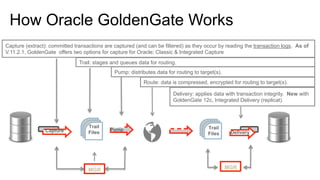
How Oracle GoldenGate Works
Capture
Trail
Files
Pump
Delivery
Trail
Files
Capture (extract): committed transactions are captured (and can be filtered) as they occur by reading the transaction logs. As of
V.11.2.1, GoldenGate offers two options for capture for Oracle; Classic & Integrated Capture
Trail: stages and queues data for routing.
Pump: distributes data for routing to target(s).
Route: data is compressed, encrypted for routing to target(s).
Delivery: applies data with transaction integrity. New with
GoldenGate 12c, Integrated Delivery (replicat).
MGRMGR
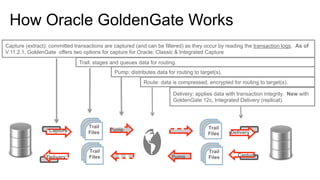
How Oracle GoldenGate Works
Capture
Trail
Files
Pump
Delivery
Trail
Files
Capture (extract): committed transactions are captured (and can be filtered) as they occur by reading the transaction logs. As of
V.11.2.1, GoldenGate offers two options for capture for Oracle; Classic & Integrated Capture
Trail: stages and queues data for routing.
Pump: distributes data for routing to target(s).
Route: data is compressed, encrypted for routing to target(s).
Delivery: applies data with transaction integrity. New with
GoldenGate 12c, Integrated Delivery (replicat).
Trail
Files
Trail
FilesDelivery Pump Capture
Integrated Extract
•  Introduced in GoldenGate 11.2.0.2
•  Integrated Extract for Oracle source databases only
•  Database release: 11.2.0.3 and later
•  Works with Logminer
•  Register Extract (capture) with database/logminer required
Example: GGSCI> register extract [ name ] database
Trail
Files
Capture
Oracle Database
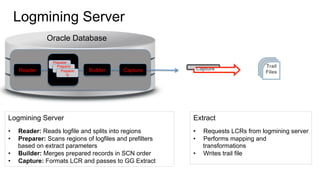
Logmining Server
Logmining Server
•  Reader: Reads logfile and splits into regions
•  Preparer: Scans regions of logfiles and prefilters
based on extract parameters
•  Builder: Merges prepared records in SCN order
•  Capture: Formats LCR and passes to GG Extract
Trail
Files
CaptureReader Builder Capture
Preparer
1Preparer
2Preparer
N
Extract
•  Requests LCRs from logmining server
•  Performs mapping and
transformations
•  Writes trail file
Oracle Database
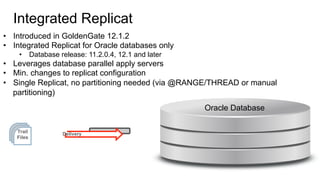
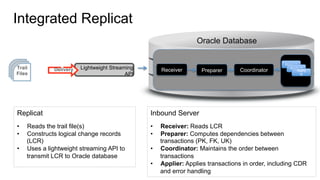
Integrated Replicat
•  Introduced in GoldenGate 12.1.2
•  Integrated Replicat for Oracle databases only
•  Database release: 11.2.0.4, 12.1 and later
•  Leverages database parallel apply servers
•  Min. changes to replicat configuration
•  Single Replicat, no partitioning needed (via @RANGE/THREAD or manual
partitioning)
Trail
Files
Delivery
Oracle Database
Integrated Replicat
Trail
Files
Lightweight Streaming
API
Delivery
Inbound Server
•  Receiver: Reads LCR
•  Preparer: Computes dependencies between
transactions (PK, FK, UK)
•  Coordinator: Maintains the order between
transactions
•  Applier: Applies transactions in order, including CDR
and error handling
Replicat
•  Reads the trail file(s)
•  Constructs logical change records
(LCR)
•  Uses a lightweight streaming API to
transmit LCR to Oracle database
Receiver Preparer Coordinator
Apply 1
Apply 2
Apply
N
Oracle Database
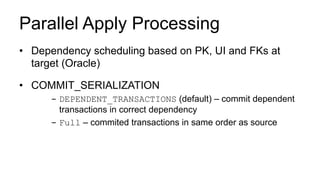
Parallel Apply Processing
•  Dependency scheduling based on PK, UI and FKs at
target (Oracle)
•  COMMIT_SERIALIZATION
-  DEPENDENT_TRANSACTIONS (default) – commit dependent
transactions in correct dependency
-  Full – commited transactions in same order as source
Tuning Areas and Tools
Why should I care about performance?
What tools are available for performance tuning?
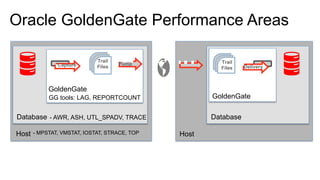
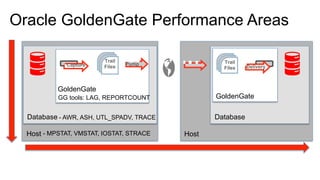
Oracle GoldenGate Performance Areas
Capture
Trail
Files
Pump Trail
Files Delivery
Host Host
Database Database
GoldenGate
GoldenGate
- MPSTAT, VMSTAT, IOSTAT, STRACE, TOP
- AWR, ASH, UTL_SPADV, TRACE
GG tools: LAG, REPORTCOUNT
GoldenGate Performance Tools
LAG Information
•  Monitor latency from the Manager process (mgr.prm)
-  LAGINFO [ SECONDS | MINUTES | HOURS ]
-  LAGREPORT [ MINUTES | HOURS ]
-  LAGCRITICAL [ SECONDS | MINUTES | HOURS]
EXAMPLE:
LAGINFOSECONDS 1
LAGREPORTMINUTES 1
LAGCRITICALSECONDS 2
•  Information output to ggserr.log
GoldenGate Performance Tools
Report Files
•  Parameters currently running
•  Table/Column Mappings
•  Runtime messages and errors
•  Runtime statistics
•  REPORTCOUNT
-  REPORTCOUNT EVERY [ # ] [ SECONDS | MINUTES |
HOURS ], RATE
Example: REPORTCOUNT EVERY 15 MINUTES, RATE
•  Files located in $OGG_HOME/dirrpt
Database Performance Tools
Automatic Workload Repository (AWR)
•  Good starting point within the database
•  Help determine potiential bottlenecks
•  Extract/Replicat are given unique SQL Module IDs
-  Used in both AWR and ASH
•  Use Active Session History (ASH) for more details on
identified session
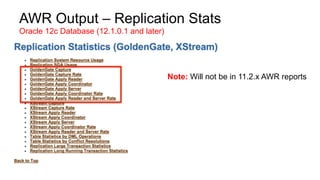
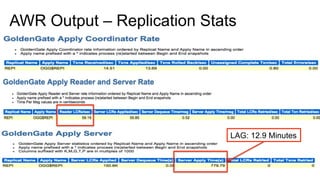
AWR Output – Replication Stats
Oracle 12c Database (12.1.0.1 and later)
Note: Will not be in 11.2.x AWR reports
Database Performance Tools
Streams Performance Advisor (Integrated Extract/Replicat Only)
•  Used to provide information on the performance of integrated
processes
•  Both Extract and Replicat
•  Provides real-time statistics
•  Has to be installed
-  Installed under GoldenGate User
-  $ORACLE_HOME/rdbms/admin/utlspadv.sql
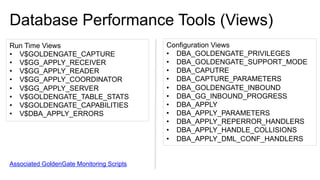
Database Performance Tools (Views)
Run Time Views
•  V$GOLDENGATE_CAPTURE
•  V$GG_APPLY_RECEIVER
•  V$GG_APPLY_READER
•  V$GG_APPLY_COORDINATOR
•  V$GG_APPLY_SERVER
•  V$GOLDENGATE_TABLE_STATS
•  V$GOLDENGATE_CAPABILITIES
•  V$DBA_APPLY_ERRORS
Configuration Views
•  DBA_GOLDENGATE_PRIVILEGES
•  DBA_GOLDENGATE_SUPPORT_MODE
•  DBA_CAPUTRE
•  DBA_CAPTURE_PARAMETERS
•  DBA_GOLDENGATE_INBOUND
•  DBA_GG_INBOUND_PROGRESS
•  DBA_APPLY
•  DBA_APPLY_PARAMETERS
•  DBA_APPLY_REPERROR_HANDLERS
•  DBA_APPLY_HANDLE_COLLISIONS
•  DBA_APPLY_DML_CONF_HANDLERS
Associated GoldenGate Monitoring Scripts
Health Checks
•  SQL based scripts that create HTML output
-  Different scripts for database releases
-  MOS:1448324.1
•  Summary
-  Overview of environment
-  Advice/Warnings of potential issues of configuration
•  Analysis
-  Compare configurations
-  Performance Recommendations
-  Detail information for diagnostic purposes
•  Statistics
-  Runtime information of Streams (GoldenGate) processing
Host Performance Tools
CPU Performance (mpstat/top)
•  Looking to see if there are any processes limited by CPU (top)
•  Looking to see what average cpu spike is (mpstat)
I/O Performance (iostat)
•  Gather for database disks and trail file locations
•  Critical before increasing parallelism
Memory Performance (vmstat)
•  Not needed for integrated processes
•  Needed if tuning classic or coordinated processes
Case Study
Capture Pump
Delivery
Trail
Files
Trail
Files
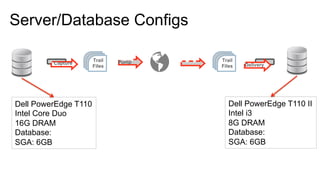
Server/Database Configs
Dell PowerEdge T110
Intel Core Duo
16G DRAM
Database:
SGA: 6GB
Dell PowerEdge T110 II
Intel i3
8G DRAM
Database:
SGA: 6GB
Oracle GoldenGate Performance Areas
Capture
Trail
Files
Pump Trail
Files Delivery
Host Host
Database Database
GoldenGate
GoldenGate
- MPSTAT, VMSTAT, IOSTAT, STRACE
- AWR, ASH, UTL_SPADV, TRACE
GG tools: LAG, REPORTCOUNT
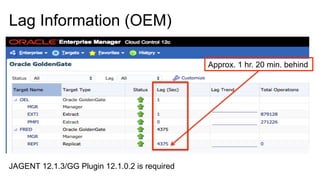
Lag Information (OEM)
Approx. 1 hr. 20 min. behind
JAGENT 12.1.3/GG Plugin 12.1.0.2 is required
Lag Information
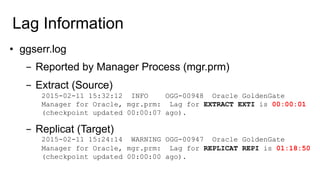
•  ggserr.log
-  Reported by Manager Process (mgr.prm)
-  Extract (Source)
2015-02-11 15:32:12 INFO OGG-00948 Oracle GoldenGate
Manager for Oracle, mgr.prm: Lag for EXTRACT EXTI is 00:00:01
(checkpoint updated 00:00:07 ago).
-  Replicat (Target)
2015-02-11 15:24:14 WARNING OGG-00947 Oracle GoldenGate
Manager for Oracle, mgr.prm: Lag for REPLICAT REPI is 01:18:50
(checkpoint updated 00:00:00 ago).
Process Statistics
EXTI.rpt
1068208 records processed as of 2015-02-11 15:30:25 (rate 57,delta 299)
PMPI.rpt
545130 records processed as of 2015-02-11 15:35:28 (rate 109,delta 281)
REPI.rpt
108483 records processed as of 2015-02-11 15:28:05 (rate 116,delta 120)
•  Monitor throughput for each process
-  REPORTCOUNT EVERY [ SECOND | MINUTES | HOURS ], RATE
-  Can impact throughput with aggressive monitoring
Total records
processed this session
Throughput for session Changes since last
report count
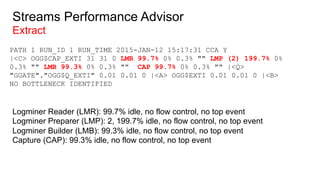
Streams Performance Advisor
Extract
PATH 1 RUN_ID 1 RUN_TIME 2015-JAN-12 15:17:31 CCA Y
|<C> OGG$CAP_EXTI 31 31 0 LMR 99.7% 0% 0.3% "" LMP (2) 199.7% 0%
0.3% "" LMB 99.3% 0% 0.3% "" CAP 99.7% 0% 0.3% "" |<Q>
"GGATE"."OGG$Q_EXTI" 0.01 0.01 0 |<A> OGG$EXTI 0.01 0.01 0 |<B>
NO BOTTLENECK IDENTIFIED
Logminer Reader (LMR): 99.7% idle, no flow control, no top event
Logminer Preparer (LMP): 2, 199.7% idle, no flow control, no top event
Logminer Builder (LMB): 99.3% idle, no flow control, no top event
Capture (CAP): 99.3% idle, no flow control, no top event
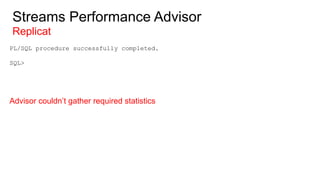
Streams Performance Advisor
Replicat
PL/SQL procedure successfully completed.
SQL>
Advisor couldn’t gather required statistics
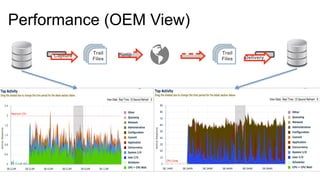
Performance (OEM View)
Capture Pump
Delivery
Trail
Files
Trail
Files
GoldenGate Configuration
Capture Pump
Delivery
Trail
Files
Trail
Files
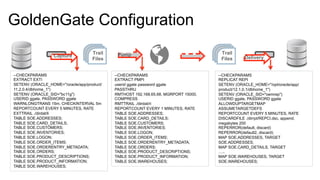
--CHECKPARAMS
EXTRACT EXTI
SETENV (ORACLE_HOME="/oracle/app/product/
11.2.0.4/dbhome_1")
SETENV (ORACLE_SID="bc11g")
USERID ggate, PASSWORD ggate
WARNLONGTRANS 15m, CHECKINTERVAL 5m
REPORTCOUNT EVERY 5 MINUTES, RATE
EXTTRAIL ./dirdat/li
TABLE SOE.ADDRESSES;
TABLE SOE.CARD_DETAILS;
TABLE SOE.CUSTOMERS;
TABLE SOE.INVENTORIES;
TABLE SOE.LOGON;
TABLE SOE.ORDER_ITEMS;
TABLE SOE.ORDERENTRY_METADATA;
TABLE SOE.ORDERS;
TABLE SOE.PRODUCT_DESCRIPTIONS;
TABLE SOE.PRODUCT_INFORMATION;
TABLE SOE.WAREHOUSES;
--CHECKPARAMS
EXTRACT PMPI
userid ggate password ggate
PASSTHRU
RMTHOST 192.168.65.68, MGRPORT 15000,
COMPRESS
RMTTRAIL ./dirdat/ri
REPORTCOUNT EVERY 1 MINUTES, RATE
TABLE SOE.ADDRESSES;
TABLE SOE.CARD_DETAILS;
TABLE SOE.CUSTOMERS;
TABLE SOE.INVENTORIES;
TABLE SOE.LOGON;
TABLE SOE.ORDER_ITEMS;
TABLE SOE.ORDERENTRY_METADATA;
TABLE SOE.ORDERS;
TABLE SOE.PRODUCT_DESCRIPTIONS;
TABLE SOE.PRODUCT_INFORMATION;
TABLE SOE.WAREHOUSES;
--CHECKPARAMS
REPLICAT REPI
SETENV (ORACLE_HOME="/opt/oracle/app/
product/12.1.0.1/dbhome_1")
SETENV (ORACLE_SID="oemrep")
USERID ggate, PASSWORD ggate
ALLOWDUPTARGETMAP
ASSUMETARGETDEFS
REPORTCOUNT EVERY 5 MINUTES, RATE
DISCARDFILE ./dirrpt/REPCI.dsc, append,
megabytes 200
REPERROR(default, discard)
REPERROR(default2, discard)
MAP SOE.ADDRESSES, TARGET
SOE.ADDRESSES;
MAP SOE.CARD_DETAILS, TARGET
…..
MAP SOE.WAREHOUSES, TARGET
SOE.WAREHOUSES;
AWR Output – Replication Stats
LAG: 12.9 Minutes
Database Views
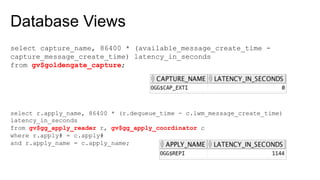
select capture_name, 86400 * (available_message_create_time -
capture_message_create_time) latency_in_seconds
from gv$goldengate_capture;
select r.apply_name, 86400 * (r.dequeue_time - c.lwm_message_create_time)
latency_in_seconds
from gv$gg_apply_reader r, gv$gg_apply_coordinator c
where r.apply# = c.apply#
and r.apply_name = c.apply_name;
Recommendations
Integrated Extract Parameters
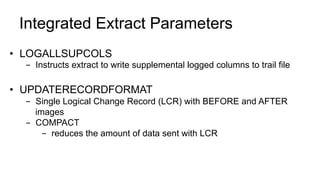
•  LOGALLSUPCOLS
-  Instructs extract to write supplemental logged columns to trail file
•  UPDATERECORDFORMAT
-  Single Logical Change Record (LCR) with BEFORE and AFTER
images
-  COMPACT
-  reduces the amount of data sent with LCR
Integrated Extract Parameters
Continued
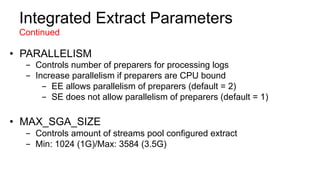
•  PARALLELISM
-  Controls number of preparers for processing logs
-  Increase parallelism if preparers are CPU bound
-  EE allows parallelism of preparers (default = 2)
-  SE does not allow parallelism of preparers (default = 1)
•  MAX_SGA_SIZE
-  Controls amount of streams pool configured extract
-  Min: 1024 (1G)/Max: 3584 (3.5G)
Integrated Replicat Parameters
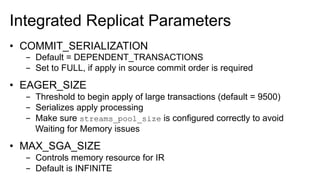
•  COMMIT_SERIALIZATION
-  Default = DEPENDENT_TRANSACTIONS
-  Set to FULL, if apply in source commit order is required
•  EAGER_SIZE
-  Threshold to begin apply of large transactions (default = 9500)
-  Serializes apply processing
-  Make sure streams_pool_size is configured correctly to avoid
Waiting for Memory issues
•  MAX_SGA_SIZE
-  Controls memory resource for IR
-  Default is INFINITE
Integrated Replicat Parameters
Continued
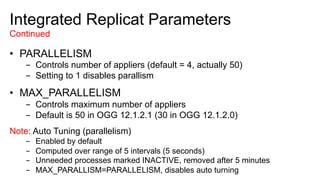
•  PARALLELISM
-  Controls number of appliers (default = 4, actually 50)
-  Setting to 1 disables parallism
•  MAX_PARALLELISM
-  Controls maximum number of appliers
-  Default is 50 in OGG 12.1.2.1 (30 in OGG 12.1.2.0)
Note: Auto Tuning (parallelism)
-  Enabled by default
-  Computed over range of 5 intervals (5 seconds)
-  Unneeded processes marked INACTIVE, removed after 5 minutes
-  MAX_PARALLISM=PARALLELISM, disables auto turning
Integrated Replicat Parameters
Continued
•  BATCHSQL
-  Controls number of appliers (default = 4)
-  Setting to 1 disables parallelism
-  Use with caution
-  Degradation can be seen in some cases.
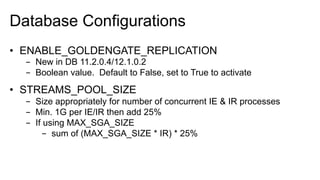
Database Configurations
•  ENABLE_GOLDENGATE_REPLICATION
-  New in DB 11.2.0.4/12.1.0.2
-  Boolean value. Default to False, set to True to activate
•  STREAMS_POOL_SIZE
-  Size appropriately for number of concurrent IE & IR processes
-  Min. 1G per IE/IR then add 25%
-  If using MAX_SGA_SIZE
-  sum of (MAX_SGA_SIZE * IR) * 25%
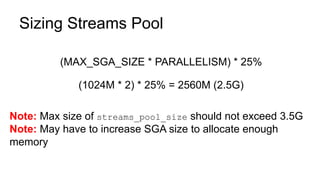
Sizing Streams Pool
(MAX_SGA_SIZE * PARALLELISM) * 25%
(1024M * 2) * 25% = 2560M (2.5G)
Note: Max size of streams_pool_size should not exceed 3.5G
Note: May have to increase SGA size to allocate enough
memory
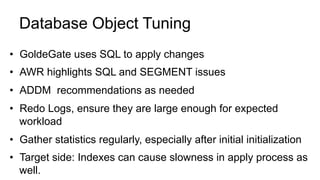
Database Object Tuning
•  GoldeGate uses SQL to apply changes
•  AWR highlights SQL and SEGMENT issues
•  ADDM recommendations as needed
•  Redo Logs, ensure they are large enough for expected
workload
•  Gather statistics regularly, especially after initial initialization
•  Target side: Indexes can cause slowness in apply process as
well.
Network Tuning
•  TCPBUFSIZE and TCPFLUSHBYTES
•  Use ping to find average round trip time (RTT)
[oracle@oel dirrpt]$ ping fred.acme.com
PING fred.acme.com (192.168.65.68) 56(84) bytes of data.
64 bytes from fred.acme.com (192.168.65.68): icmp_seq=1 ttl=64 time=0.180 ms
64 bytes from fred.acme.com (192.168.65.68): icmp_seq=2 ttl=64 time=0.173 ms
64 bytes from fred.acme.com (192.168.65.68): icmp_seq=3 ttl=64 time=0.199 ms
64 bytes from fred.acme.com (192.168.65.68): icmp_seq=4 ttl=64 time=0.203 ms
^C
--- fred.acme.com ping statistics ---
4 packets transmitted, 4 received, 0% packet loss, time 3807ms
rtt min/avg/max/mdev = 0.173/0.188/0.203/0.021 ms
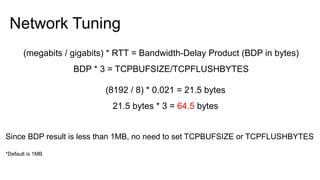
Network Tuning
(megabits / gigabits) * RTT = Bandwidth-Delay Product (BDP in bytes)
BDP * 3 = TCPBUFSIZE/TCPFLUSHBYTES
(8192 / 8) * 0.021 = 21.5 bytes
21.5 bytes * 3 = 64.5 bytes
Since BDP result is less than 1MB, no need to set TCPBUFSIZE or TCPFLUSHBYTES
*Default is 1MB
Host
Evaluate if you need bigger/newer hardware if needed!
Improvements
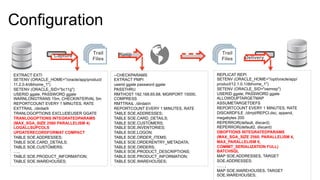
Configuration
Capture Pump
Delivery
Trail
Files
Trail
Files
EXTRACT EXTI
SETENV (ORACLE_HOME="/oracle/app/product/
11.2.0.4/dbhome_1")
SETENV (ORACLE_SID="bc11g")
USERID ggate, PASSWORD ggate
WARNLONGTRANS 15m, CHECKINTERVAL 5m
REPORTCOUNT EVERY 1 MINUTES, RATE
EXTTRAIL ./dirdat/li
TRANLOGOPTIONS EXCLUDEUSER GGATE
TRANLOGOPTIONS INTEGRATEDPARAMS
(MAX_SGA_SIZE 2560 PARALLELISM 4)
LOGALLSUPCOLS
UPDATERECORDFORMAT COMPACT
TABLE SOE.ADDRESSES;
TABLE SOE.CARD_DETAILS;
TABLE SOE.CUSTOMERS;
…..
TABLE SOE.PRODUCT_INFORMATION;
TABLE SOE.WAREHOUSES;
--CHECKPARAMS
EXTRACT PMPI
userid ggate password ggate
PASSTHRU
RMTHOST 192.168.65.68, MGRPORT 15000,
COMPRESS
RMTTRAIL ./dirdat/ri
REPORTCOUNT EVERY 1 MINUTES, RATE
TABLE SOE.ADDRESSES;
TABLE SOE.CARD_DETAILS;
TABLE SOE.CUSTOMERS;
TABLE SOE.INVENTORIES;
TABLE SOE.LOGON;
TABLE SOE.ORDER_ITEMS;
TABLE SOE.ORDERENTRY_METADATA;
TABLE SOE.ORDERS;
TABLE SOE.PRODUCT_DESCRIPTIONS;
TABLE SOE.PRODUCT_INFORMATION;
TABLE SOE.WAREHOUSES;
REPLICAT REPI
SETENV (ORACLE_HOME="/opt/oracle/app/
product/12.1.0.1/dbhome_1")
SETENV (ORACLE_SID="oemrep")
USERID ggate, PASSWORD ggate
ALLOWDUPTARGETMAP
ASSUMETARGETDEFS
REPORTCOUNT EVERY 1 MINUTES, RATE
DISCARDFILE ./dirrpt/REPCI.dsc, append,
megabytes 200
REPERROR(default, discard)
REPERROR(default2, discard)
DBOPTIONS INTEGRATEDPARAMS
(MAX_SGA_SIZE 2560, PARALLELISM 4,
MAX_PARALLELISM 6,
COMMIT_SERIALIZATION FULL)
BATCHSQL
MAP SOE.ADDRESSES, TARGET
SOE.ADDRESSES;
……;
MAP SOE.WAREHOUSES, TARGET
SOE.WAREHOUSES;
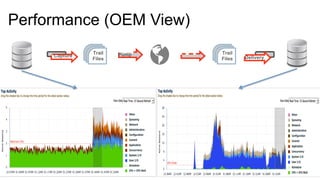
Performance (OEM View)
Capture Pump
Delivery
Trail
Files
Trail
Files
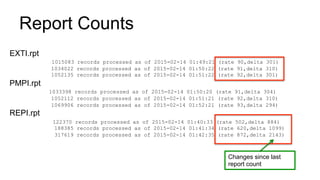
Report Counts
EXTI.rpt
1015083 records processed as of 2015-02-14 01:49:21 (rate 90,delta 301)
1034022 records processed as of 2015-02-14 01:50:22 (rate 91,delta 310)
1052135 records processed as of 2015-02-14 01:51:22 (rate 92,delta 301)
PMPI.rpt
1033398 records processed as of 2015-02-14 01:50:20 (rate 91,delta 304)
1052112 records processed as of 2015-02-14 01:51:21 (rate 92,delta 310)
1069906 records processed as of 2015-02-14 01:52:21 (rate 93,delta 294)
REPI.rpt
122370 records processed as of 2015-02-14 01:40:33 (rate 502,delta 884)
188385 records processed as of 2015-02-14 01:41:34 (rate 620,delta 1099)
317619 records processed as of 2015-02-14 01:42:35 (rate 872,delta 2143)
Changes since last
report count
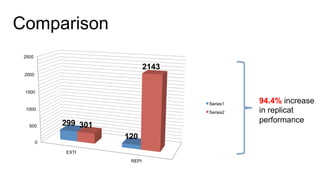
0
500
1000
1500
2000
2500
EXTI
REPI
299
120
301
2143
Series1
Series2
Comparison
94.4% increase
in replicat
performance
STOP
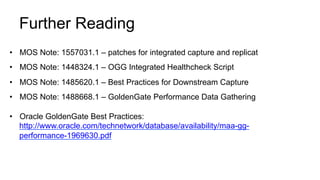
Further Reading
•  MOS Note: 1557031.1 – patches for integrated capture and replicat
•  MOS Note: 1448324.1 – OGG Integrated Healthcheck Script
•  MOS Note: 1485620.1 – Best Practices for Downstream Capture
•  MOS Note: 1488668.1 – GoldenGate Performance Data Gathering
•  Oracle GoldenGate Best Practices:
http://www.oracle.com/technetwork/database/availability/maa-gg-
performance-1969630.pdf
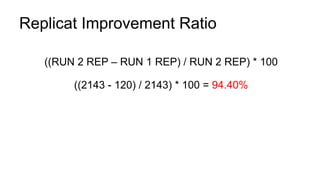
((RUN 2 REP – RUN 1 REP) / RUN 2 REP) * 100
((2143 - 120) / 2143) * 100 = 94.40%
Replicat Improvement Ratio

Extreme Replication - RMOUG Presentation

  • 1.
    Bobby Curtis Accenture EnkitecGroup Date: 2/19/2015 Room: 404 Extreme Replication: Performance Tuning Oracle GoldenGate for the Real World (Oracle to Oracle Integrated Replication)
  • 2.
    Bobby Curtis @dbasolved http://dbasolved.com Work: bobby.l.curtis@accenture.com Personal:curtisbl@gmail.com Douglasville, Georgia Infrastructure Principle IOUG (RACSIG/DI SIG), RMOUG, GAOUG
  • 3.
    Accenture Enkitec Group Enkitecjoined Accenture’s Infrastructure Services (May 2014) -  52,000 Oracle professionals -  17,000 Infrastructure Services professionals Focus on Oracle Engineered Systems Solutions -  Database Migrations -  Oracle Applications on Engineered Systems -  Cloud-based solutions leveraging Engineered Systems
  • 4.
    E4 2015 May 31– June 2, 2015 Hilton Hotel – Southlake Town Square Dallas, TX More Information: http://www.enkitec.com/e4
  • 5.
    ①  Oracle GoldenGateOverview ②  Tuning Areas and Tools ③  Case Study ④  Recommendations ⑤  Improvements? ⑥  Q&A
  • 6.
  • 7.
    Change Data Capture (CDC) OracleAdvance Replication Oracle Streams Oracle GoldenGate •  Multi-Master Replication •  MV Replication •  Hybrid Replication •  Synchronous •  Asynchronus •  Capture Messages •  Staging Messages •  Consumption •  Heterogeneous •  Multiple Architectures •  Multiple Use Cases Quick History
  • 8.
  • 9.
  • 10.
    How Oracle GoldenGateWorks Capture Trail Files Pump Delivery Trail Files Capture (extract): committed transactions are captured (and can be filtered) as they occur by reading the transaction logs. As of V.11.2.1, GoldenGate offers two options for capture for Oracle; Classic & Integrated Capture Trail: stages and queues data for routing. Pump: distributes data for routing to target(s). Route: data is compressed, encrypted for routing to target(s). Delivery: applies data with transaction integrity. New with GoldenGate 12c, Integrated Delivery (replicat). MGRMGR
  • 11.
    How Oracle GoldenGateWorks Capture Trail Files Pump Delivery Trail Files Capture (extract): committed transactions are captured (and can be filtered) as they occur by reading the transaction logs. As of V.11.2.1, GoldenGate offers two options for capture for Oracle; Classic & Integrated Capture Trail: stages and queues data for routing. Pump: distributes data for routing to target(s). Route: data is compressed, encrypted for routing to target(s). Delivery: applies data with transaction integrity. New with GoldenGate 12c, Integrated Delivery (replicat). Trail Files Trail FilesDelivery Pump Capture
  • 12.
    Integrated Extract •  Introducedin GoldenGate 11.2.0.2 •  Integrated Extract for Oracle source databases only •  Database release: 11.2.0.3 and later •  Works with Logminer •  Register Extract (capture) with database/logminer required Example: GGSCI> register extract [ name ] database Trail Files Capture Oracle Database
  • 13.
    Logmining Server Logmining Server • Reader: Reads logfile and splits into regions •  Preparer: Scans regions of logfiles and prefilters based on extract parameters •  Builder: Merges prepared records in SCN order •  Capture: Formats LCR and passes to GG Extract Trail Files CaptureReader Builder Capture Preparer 1Preparer 2Preparer N Extract •  Requests LCRs from logmining server •  Performs mapping and transformations •  Writes trail file Oracle Database
  • 14.
    Integrated Replicat •  Introducedin GoldenGate 12.1.2 •  Integrated Replicat for Oracle databases only •  Database release: 11.2.0.4, 12.1 and later •  Leverages database parallel apply servers •  Min. changes to replicat configuration •  Single Replicat, no partitioning needed (via @RANGE/THREAD or manual partitioning) Trail Files Delivery Oracle Database
  • 15.
    Integrated Replicat Trail Files Lightweight Streaming API Delivery InboundServer •  Receiver: Reads LCR •  Preparer: Computes dependencies between transactions (PK, FK, UK) •  Coordinator: Maintains the order between transactions •  Applier: Applies transactions in order, including CDR and error handling Replicat •  Reads the trail file(s) •  Constructs logical change records (LCR) •  Uses a lightweight streaming API to transmit LCR to Oracle database Receiver Preparer Coordinator Apply 1 Apply 2 Apply N Oracle Database
  • 16.
    Parallel Apply Processing • Dependency scheduling based on PK, UI and FKs at target (Oracle) •  COMMIT_SERIALIZATION -  DEPENDENT_TRANSACTIONS (default) – commit dependent transactions in correct dependency -  Full – commited transactions in same order as source
  • 17.
  • 18.
    Why should Icare about performance?
  • 19.
    What tools areavailable for performance tuning?
  • 20.
    Oracle GoldenGate PerformanceAreas Capture Trail Files Pump Trail Files Delivery Host Host Database Database GoldenGate GoldenGate - MPSTAT, VMSTAT, IOSTAT, STRACE, TOP - AWR, ASH, UTL_SPADV, TRACE GG tools: LAG, REPORTCOUNT
  • 21.
    GoldenGate Performance Tools LAGInformation •  Monitor latency from the Manager process (mgr.prm) -  LAGINFO [ SECONDS | MINUTES | HOURS ] -  LAGREPORT [ MINUTES | HOURS ] -  LAGCRITICAL [ SECONDS | MINUTES | HOURS] EXAMPLE: LAGINFOSECONDS 1 LAGREPORTMINUTES 1 LAGCRITICALSECONDS 2 •  Information output to ggserr.log
  • 22.
    GoldenGate Performance Tools ReportFiles •  Parameters currently running •  Table/Column Mappings •  Runtime messages and errors •  Runtime statistics •  REPORTCOUNT -  REPORTCOUNT EVERY [ # ] [ SECONDS | MINUTES | HOURS ], RATE Example: REPORTCOUNT EVERY 15 MINUTES, RATE •  Files located in $OGG_HOME/dirrpt
  • 23.
    Database Performance Tools AutomaticWorkload Repository (AWR) •  Good starting point within the database •  Help determine potiential bottlenecks •  Extract/Replicat are given unique SQL Module IDs -  Used in both AWR and ASH •  Use Active Session History (ASH) for more details on identified session
  • 24.
    AWR Output –Replication Stats Oracle 12c Database (12.1.0.1 and later) Note: Will not be in 11.2.x AWR reports
  • 25.
    Database Performance Tools StreamsPerformance Advisor (Integrated Extract/Replicat Only) •  Used to provide information on the performance of integrated processes •  Both Extract and Replicat •  Provides real-time statistics •  Has to be installed -  Installed under GoldenGate User -  $ORACLE_HOME/rdbms/admin/utlspadv.sql
  • 26.
    Database Performance Tools(Views) Run Time Views •  V$GOLDENGATE_CAPTURE •  V$GG_APPLY_RECEIVER •  V$GG_APPLY_READER •  V$GG_APPLY_COORDINATOR •  V$GG_APPLY_SERVER •  V$GOLDENGATE_TABLE_STATS •  V$GOLDENGATE_CAPABILITIES •  V$DBA_APPLY_ERRORS Configuration Views •  DBA_GOLDENGATE_PRIVILEGES •  DBA_GOLDENGATE_SUPPORT_MODE •  DBA_CAPUTRE •  DBA_CAPTURE_PARAMETERS •  DBA_GOLDENGATE_INBOUND •  DBA_GG_INBOUND_PROGRESS •  DBA_APPLY •  DBA_APPLY_PARAMETERS •  DBA_APPLY_REPERROR_HANDLERS •  DBA_APPLY_HANDLE_COLLISIONS •  DBA_APPLY_DML_CONF_HANDLERS Associated GoldenGate Monitoring Scripts
  • 27.
    Health Checks •  SQLbased scripts that create HTML output -  Different scripts for database releases -  MOS:1448324.1 •  Summary -  Overview of environment -  Advice/Warnings of potential issues of configuration •  Analysis -  Compare configurations -  Performance Recommendations -  Detail information for diagnostic purposes •  Statistics -  Runtime information of Streams (GoldenGate) processing
  • 28.
    Host Performance Tools CPUPerformance (mpstat/top) •  Looking to see if there are any processes limited by CPU (top) •  Looking to see what average cpu spike is (mpstat) I/O Performance (iostat) •  Gather for database disks and trail file locations •  Critical before increasing parallelism Memory Performance (vmstat) •  Not needed for integrated processes •  Needed if tuning classic or coordinated processes
  • 29.
  • 30.
    Capture Pump Delivery Trail Files Trail Files Server/Database Configs DellPowerEdge T110 Intel Core Duo 16G DRAM Database: SGA: 6GB Dell PowerEdge T110 II Intel i3 8G DRAM Database: SGA: 6GB
  • 31.
    Oracle GoldenGate PerformanceAreas Capture Trail Files Pump Trail Files Delivery Host Host Database Database GoldenGate GoldenGate - MPSTAT, VMSTAT, IOSTAT, STRACE - AWR, ASH, UTL_SPADV, TRACE GG tools: LAG, REPORTCOUNT
  • 32.
    Lag Information (OEM) Approx.1 hr. 20 min. behind JAGENT 12.1.3/GG Plugin 12.1.0.2 is required
  • 33.
    Lag Information •  ggserr.log - Reported by Manager Process (mgr.prm) -  Extract (Source) 2015-02-11 15:32:12 INFO OGG-00948 Oracle GoldenGate Manager for Oracle, mgr.prm: Lag for EXTRACT EXTI is 00:00:01 (checkpoint updated 00:00:07 ago). -  Replicat (Target) 2015-02-11 15:24:14 WARNING OGG-00947 Oracle GoldenGate Manager for Oracle, mgr.prm: Lag for REPLICAT REPI is 01:18:50 (checkpoint updated 00:00:00 ago).
  • 34.
    Process Statistics EXTI.rpt 1068208 recordsprocessed as of 2015-02-11 15:30:25 (rate 57,delta 299) PMPI.rpt 545130 records processed as of 2015-02-11 15:35:28 (rate 109,delta 281) REPI.rpt 108483 records processed as of 2015-02-11 15:28:05 (rate 116,delta 120) •  Monitor throughput for each process -  REPORTCOUNT EVERY [ SECOND | MINUTES | HOURS ], RATE -  Can impact throughput with aggressive monitoring Total records processed this session Throughput for session Changes since last report count
  • 35.
    Streams Performance Advisor Extract PATH1 RUN_ID 1 RUN_TIME 2015-JAN-12 15:17:31 CCA Y |<C> OGG$CAP_EXTI 31 31 0 LMR 99.7% 0% 0.3% "" LMP (2) 199.7% 0% 0.3% "" LMB 99.3% 0% 0.3% "" CAP 99.7% 0% 0.3% "" |<Q> "GGATE"."OGG$Q_EXTI" 0.01 0.01 0 |<A> OGG$EXTI 0.01 0.01 0 |<B> NO BOTTLENECK IDENTIFIED Logminer Reader (LMR): 99.7% idle, no flow control, no top event Logminer Preparer (LMP): 2, 199.7% idle, no flow control, no top event Logminer Builder (LMB): 99.3% idle, no flow control, no top event Capture (CAP): 99.3% idle, no flow control, no top event
  • 36.
    Streams Performance Advisor Replicat PL/SQLprocedure successfully completed. SQL> Advisor couldn’t gather required statistics
  • 37.
    Performance (OEM View) CapturePump Delivery Trail Files Trail Files
  • 38.
    GoldenGate Configuration Capture Pump Delivery Trail Files Trail Files --CHECKPARAMS EXTRACTEXTI SETENV (ORACLE_HOME="/oracle/app/product/ 11.2.0.4/dbhome_1") SETENV (ORACLE_SID="bc11g") USERID ggate, PASSWORD ggate WARNLONGTRANS 15m, CHECKINTERVAL 5m REPORTCOUNT EVERY 5 MINUTES, RATE EXTTRAIL ./dirdat/li TABLE SOE.ADDRESSES; TABLE SOE.CARD_DETAILS; TABLE SOE.CUSTOMERS; TABLE SOE.INVENTORIES; TABLE SOE.LOGON; TABLE SOE.ORDER_ITEMS; TABLE SOE.ORDERENTRY_METADATA; TABLE SOE.ORDERS; TABLE SOE.PRODUCT_DESCRIPTIONS; TABLE SOE.PRODUCT_INFORMATION; TABLE SOE.WAREHOUSES; --CHECKPARAMS EXTRACT PMPI userid ggate password ggate PASSTHRU RMTHOST 192.168.65.68, MGRPORT 15000, COMPRESS RMTTRAIL ./dirdat/ri REPORTCOUNT EVERY 1 MINUTES, RATE TABLE SOE.ADDRESSES; TABLE SOE.CARD_DETAILS; TABLE SOE.CUSTOMERS; TABLE SOE.INVENTORIES; TABLE SOE.LOGON; TABLE SOE.ORDER_ITEMS; TABLE SOE.ORDERENTRY_METADATA; TABLE SOE.ORDERS; TABLE SOE.PRODUCT_DESCRIPTIONS; TABLE SOE.PRODUCT_INFORMATION; TABLE SOE.WAREHOUSES; --CHECKPARAMS REPLICAT REPI SETENV (ORACLE_HOME="/opt/oracle/app/ product/12.1.0.1/dbhome_1") SETENV (ORACLE_SID="oemrep") USERID ggate, PASSWORD ggate ALLOWDUPTARGETMAP ASSUMETARGETDEFS REPORTCOUNT EVERY 5 MINUTES, RATE DISCARDFILE ./dirrpt/REPCI.dsc, append, megabytes 200 REPERROR(default, discard) REPERROR(default2, discard) MAP SOE.ADDRESSES, TARGET SOE.ADDRESSES; MAP SOE.CARD_DETAILS, TARGET ….. MAP SOE.WAREHOUSES, TARGET SOE.WAREHOUSES;
  • 39.
    AWR Output –Replication Stats LAG: 12.9 Minutes
  • 40.
    Database Views select capture_name,86400 * (available_message_create_time - capture_message_create_time) latency_in_seconds from gv$goldengate_capture; select r.apply_name, 86400 * (r.dequeue_time - c.lwm_message_create_time) latency_in_seconds from gv$gg_apply_reader r, gv$gg_apply_coordinator c where r.apply# = c.apply# and r.apply_name = c.apply_name;
  • 41.
  • 42.
    Integrated Extract Parameters • LOGALLSUPCOLS -  Instructs extract to write supplemental logged columns to trail file •  UPDATERECORDFORMAT -  Single Logical Change Record (LCR) with BEFORE and AFTER images -  COMPACT -  reduces the amount of data sent with LCR
  • 43.
    Integrated Extract Parameters Continued • PARALLELISM -  Controls number of preparers for processing logs -  Increase parallelism if preparers are CPU bound -  EE allows parallelism of preparers (default = 2) -  SE does not allow parallelism of preparers (default = 1) •  MAX_SGA_SIZE -  Controls amount of streams pool configured extract -  Min: 1024 (1G)/Max: 3584 (3.5G)
  • 44.
    Integrated Replicat Parameters • COMMIT_SERIALIZATION -  Default = DEPENDENT_TRANSACTIONS -  Set to FULL, if apply in source commit order is required •  EAGER_SIZE -  Threshold to begin apply of large transactions (default = 9500) -  Serializes apply processing -  Make sure streams_pool_size is configured correctly to avoid Waiting for Memory issues •  MAX_SGA_SIZE -  Controls memory resource for IR -  Default is INFINITE
  • 45.
    Integrated Replicat Parameters Continued • PARALLELISM -  Controls number of appliers (default = 4, actually 50) -  Setting to 1 disables parallism •  MAX_PARALLELISM -  Controls maximum number of appliers -  Default is 50 in OGG 12.1.2.1 (30 in OGG 12.1.2.0) Note: Auto Tuning (parallelism) -  Enabled by default -  Computed over range of 5 intervals (5 seconds) -  Unneeded processes marked INACTIVE, removed after 5 minutes -  MAX_PARALLISM=PARALLELISM, disables auto turning
  • 46.
    Integrated Replicat Parameters Continued • BATCHSQL -  Controls number of appliers (default = 4) -  Setting to 1 disables parallelism -  Use with caution -  Degradation can be seen in some cases.
  • 47.
    Database Configurations •  ENABLE_GOLDENGATE_REPLICATION - New in DB 11.2.0.4/12.1.0.2 -  Boolean value. Default to False, set to True to activate •  STREAMS_POOL_SIZE -  Size appropriately for number of concurrent IE & IR processes -  Min. 1G per IE/IR then add 25% -  If using MAX_SGA_SIZE -  sum of (MAX_SGA_SIZE * IR) * 25%
  • 48.
    Sizing Streams Pool (MAX_SGA_SIZE* PARALLELISM) * 25% (1024M * 2) * 25% = 2560M (2.5G) Note: Max size of streams_pool_size should not exceed 3.5G Note: May have to increase SGA size to allocate enough memory
  • 49.
    Database Object Tuning • GoldeGate uses SQL to apply changes •  AWR highlights SQL and SEGMENT issues •  ADDM recommendations as needed •  Redo Logs, ensure they are large enough for expected workload •  Gather statistics regularly, especially after initial initialization •  Target side: Indexes can cause slowness in apply process as well.
  • 50.
    Network Tuning •  TCPBUFSIZEand TCPFLUSHBYTES •  Use ping to find average round trip time (RTT) [oracle@oel dirrpt]$ ping fred.acme.com PING fred.acme.com (192.168.65.68) 56(84) bytes of data. 64 bytes from fred.acme.com (192.168.65.68): icmp_seq=1 ttl=64 time=0.180 ms 64 bytes from fred.acme.com (192.168.65.68): icmp_seq=2 ttl=64 time=0.173 ms 64 bytes from fred.acme.com (192.168.65.68): icmp_seq=3 ttl=64 time=0.199 ms 64 bytes from fred.acme.com (192.168.65.68): icmp_seq=4 ttl=64 time=0.203 ms ^C --- fred.acme.com ping statistics --- 4 packets transmitted, 4 received, 0% packet loss, time 3807ms rtt min/avg/max/mdev = 0.173/0.188/0.203/0.021 ms
  • 51.
    Network Tuning (megabits /gigabits) * RTT = Bandwidth-Delay Product (BDP in bytes) BDP * 3 = TCPBUFSIZE/TCPFLUSHBYTES (8192 / 8) * 0.021 = 21.5 bytes 21.5 bytes * 3 = 64.5 bytes Since BDP result is less than 1MB, no need to set TCPBUFSIZE or TCPFLUSHBYTES *Default is 1MB
  • 52.
    Host Evaluate if youneed bigger/newer hardware if needed!
  • 53.
  • 54.
    Configuration Capture Pump Delivery Trail Files Trail Files EXTRACT EXTI SETENV(ORACLE_HOME="/oracle/app/product/ 11.2.0.4/dbhome_1") SETENV (ORACLE_SID="bc11g") USERID ggate, PASSWORD ggate WARNLONGTRANS 15m, CHECKINTERVAL 5m REPORTCOUNT EVERY 1 MINUTES, RATE EXTTRAIL ./dirdat/li TRANLOGOPTIONS EXCLUDEUSER GGATE TRANLOGOPTIONS INTEGRATEDPARAMS (MAX_SGA_SIZE 2560 PARALLELISM 4) LOGALLSUPCOLS UPDATERECORDFORMAT COMPACT TABLE SOE.ADDRESSES; TABLE SOE.CARD_DETAILS; TABLE SOE.CUSTOMERS; ….. TABLE SOE.PRODUCT_INFORMATION; TABLE SOE.WAREHOUSES; --CHECKPARAMS EXTRACT PMPI userid ggate password ggate PASSTHRU RMTHOST 192.168.65.68, MGRPORT 15000, COMPRESS RMTTRAIL ./dirdat/ri REPORTCOUNT EVERY 1 MINUTES, RATE TABLE SOE.ADDRESSES; TABLE SOE.CARD_DETAILS; TABLE SOE.CUSTOMERS; TABLE SOE.INVENTORIES; TABLE SOE.LOGON; TABLE SOE.ORDER_ITEMS; TABLE SOE.ORDERENTRY_METADATA; TABLE SOE.ORDERS; TABLE SOE.PRODUCT_DESCRIPTIONS; TABLE SOE.PRODUCT_INFORMATION; TABLE SOE.WAREHOUSES; REPLICAT REPI SETENV (ORACLE_HOME="/opt/oracle/app/ product/12.1.0.1/dbhome_1") SETENV (ORACLE_SID="oemrep") USERID ggate, PASSWORD ggate ALLOWDUPTARGETMAP ASSUMETARGETDEFS REPORTCOUNT EVERY 1 MINUTES, RATE DISCARDFILE ./dirrpt/REPCI.dsc, append, megabytes 200 REPERROR(default, discard) REPERROR(default2, discard) DBOPTIONS INTEGRATEDPARAMS (MAX_SGA_SIZE 2560, PARALLELISM 4, MAX_PARALLELISM 6, COMMIT_SERIALIZATION FULL) BATCHSQL MAP SOE.ADDRESSES, TARGET SOE.ADDRESSES; ……; MAP SOE.WAREHOUSES, TARGET SOE.WAREHOUSES;
  • 55.
    Performance (OEM View) CapturePump Delivery Trail Files Trail Files
  • 56.
    Report Counts EXTI.rpt 1015083 recordsprocessed as of 2015-02-14 01:49:21 (rate 90,delta 301) 1034022 records processed as of 2015-02-14 01:50:22 (rate 91,delta 310) 1052135 records processed as of 2015-02-14 01:51:22 (rate 92,delta 301) PMPI.rpt 1033398 records processed as of 2015-02-14 01:50:20 (rate 91,delta 304) 1052112 records processed as of 2015-02-14 01:51:21 (rate 92,delta 310) 1069906 records processed as of 2015-02-14 01:52:21 (rate 93,delta 294) REPI.rpt 122370 records processed as of 2015-02-14 01:40:33 (rate 502,delta 884) 188385 records processed as of 2015-02-14 01:41:34 (rate 620,delta 1099) 317619 records processed as of 2015-02-14 01:42:35 (rate 872,delta 2143) Changes since last report count
  • 57.
  • 58.
  • 59.
    Further Reading •  MOSNote: 1557031.1 – patches for integrated capture and replicat •  MOS Note: 1448324.1 – OGG Integrated Healthcheck Script •  MOS Note: 1485620.1 – Best Practices for Downstream Capture •  MOS Note: 1488668.1 – GoldenGate Performance Data Gathering •  Oracle GoldenGate Best Practices: http://www.oracle.com/technetwork/database/availability/maa-gg- performance-1969630.pdf
  • 60.
    ((RUN 2 REP– RUN 1 REP) / RUN 2 REP) * 100 ((2143 - 120) / 2143) * 100 = 94.40% Replicat Improvement Ratio