
--BY SAURAV VERMA
-B.TECH CS 2ND
YEAR
(SGVU,JAIPUR)
COMMUNITY WORLD
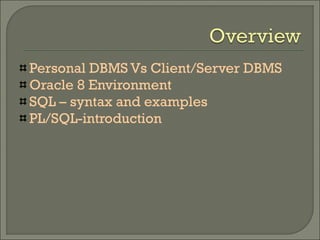
Personal DBMS Vs Client/Server DBMS
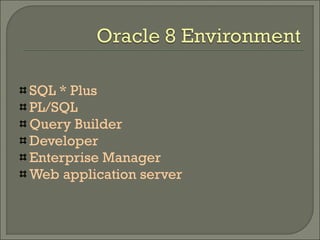
Oracle 8 Environment
SQL – syntax and examples
PL/SQL-introduction
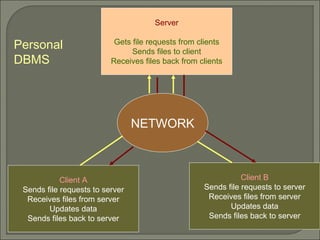
Server
Gets file requests from clients
Sends files to client
Receives files back from clients
NETWORK
Client A
Sends file requests to server
Receives files from server
Updates data
Sends files back to server
Client B
Sends file requests to server
Receives files from server
Updates data
Sends files back to server
Personal
DBMS
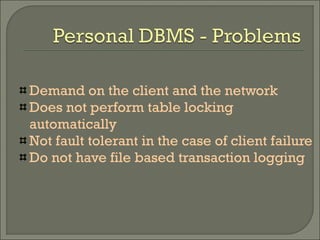
Demand on the client and the network
Does not perform table locking
automatically
Not fault tolerant in the case of client failure
Do not have file based transaction logging
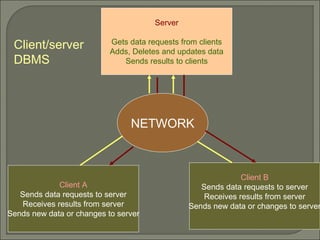
Server
Gets data requests from clients
Adds, Deletes and updates data
Sends results to clients
NETWORK
Client A
Sends data requests to server
Receives results from server
Sends new data or changes to server
Client B
Sends data requests to server
Receives results from server
Sends new data or changes to server
Client/server
DBMS
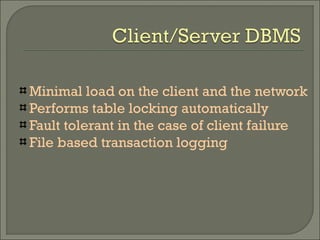
Minimal load on the client and the network
Performs table locking automatically
Fault tolerant in the case of client failure
File based transaction logging
SQL * Plus
PL/SQL
Query Builder
Developer
Enterprise Manager
Web application server
Sqlplus username/password
ALTER USER user-name IDENTIFIED BY newpassword
START filename | @ filename
CLEAR SCREEN
HELP <command>
SAVE filename[.ext] REPLACE|APPEND
EXIT
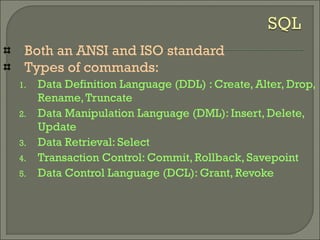
Both an ANSI and ISO standard
Types of commands:
1. Data Definition Language (DDL) : Create, Alter, Drop,
Rename,Truncate
2. Data Manipulation Language (DML): Insert, Delete,
Update
3. Data Retrieval: Select
4. Transaction Control: Commit, Rollback, Savepoint
5. Data Control Language (DCL): Grant, Revoke
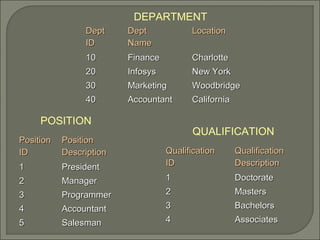
PositionPosition
IDID
PositionPosition
DescriptionDescription
11 PresidentPresident
22 ManagerManager
33 ProgrammerProgrammer
44 AccountantAccountant
55 SalesmanSalesman
QualificationQualification
IDID
QualificationQualification
DescriptionDescription
11 DoctorateDoctorate
22 MastersMasters
33 BachelorsBachelors
44 AssociatesAssociates
DeptDept
IDID
DeptDept
NameName
LocationLocation
1010 FinanceFinance CharlotteCharlotte
2020 InfosysInfosys New YorkNew York
3030 MarketingMarketing WoodbridgeWoodbridge
4040 AccountantAccountant CaliforniaCalifornia
DEPARTMENT
POSITION
QUALIFICATION
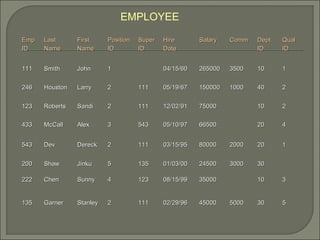
EmpEmp
IDID
LastLast
NameName
FirstFirst
NameName
PositionPosition
IDID
SuperSuper
IDID
HireHire
DateDate
SalarySalary CommComm DeptDept
IDID
QualQual
IDID
111111 SmithSmith JohnJohn 11 04/15/6004/15/60 265000265000 35003500 1010 11
246246 HoustonHouston LarryLarry 22 111111 05/19/6705/19/67 150000150000 10001000 4040 22
123123 RobertsRoberts SandiSandi 22 111111 12/02/9112/02/91 7500075000 1010 22
433433 McCallMcCall AlexAlex 33 543543 05/10/9705/10/97 6650066500 2020 44
543543 DevDev DereckDereck 22 111111 03/15/9503/15/95 8000080000 20002000 2020 11
200200 ShawShaw JinkuJinku 55 135135 01/03/0001/03/00 2450024500 30003000 3030
222222 ChenChen SunnySunny 44 123123 08/15/9908/15/99 3500035000 1010 33
135135 GarnerGarner StanleyStanley 22 111111 02/29/9602/29/96 4500045000 50005000 3030 55
EMPLOYEE
Data Definition Language:
CREATE TABLE {table}
( {column datatype [DEFAULT expr]
[column_constraint] ... | table_constraint}
[, { column datatype [DEFAULT expr]
[column_constraint] ...
)
ALTER TABLE {table}
[ADD|MODIFY {column datatype [DEFAULT expr] [column_constraint]}
[DROP drop_clause]
DROP TABLE {table} [cascade constraints]
DESC {table}
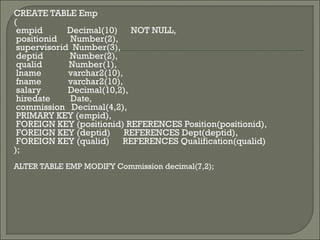
CREATE TABLE Emp
(
empid Decimal(10) NOT NULL,
positionid Number(2),
supervisorid Number(3),
deptid Number(2),
qualid Number(1),
lname varchar2(10),
fname varchar2(10),
salary Decimal(10,2),
hiredate Date,
commission Decimal(4,2),
PRIMARY KEY (empid),
FOREIGN KEY (positionid) REFERENCES Position(positionid),
FOREIGN KEY (deptid) REFERENCES Dept(deptid),
FOREIGN KEY (qualid) REFERENCES Qualification(qualid)
);
ALTER TABLE EMP MODIFY Commission decimal(7,2);
Data Manipulation Language:
INSERT INTO {table | view} [ (column [, column] ...) ]
VALUES (expr,expr ...)
UPDATE {table | view }
SET { (column [, column] = { expr | }
[WHERE condition]
DELETE [FROM] {table | view} [WHERE condition]
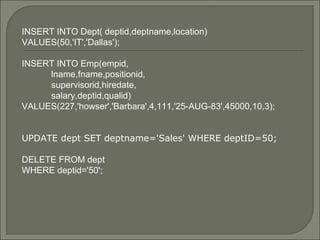
INSERT INTO Dept( deptid,deptname,location)
VALUES(50,'IT','Dallas');
INSERT INTO Emp(empid,
lname,fname,positionid,
supervisorid,hiredate,
salary,deptid,qualid)
VALUES(227,'howser','Barbara',4,111,'25-AUG-83',45000,10,3);
UPDATE dept SET deptname='Sales' WHERE deptID=50;
DELETE FROM dept
WHERE deptid='50';
Data Retrieval:
SELECT [DISTINCT | ALL] {table|view}
FROM {table | view}
[WHERE condition ]
[GROUP BY expr [, expr]]
[ORDER BY {expr} [ASC | DESC]]
select * from dept;
select deptname from dept where deptid='10';
select lname,fname from emp order by lname desc;
select max(salary) from emp group by positionid;
select deptname from dept,emp where
dept.deptid=emp.deptid and emp.empid='111';
Transaction Control:
COMMIT
ROLLBACK [ to {savepoint}]
SAVEPOINT {name}
commit;
savepoint point1;
rollback to point1;
Data Control Language:
GRANT [privileges]
ON object TO user|public
[WITH GRANT OPTION]
REVOKE [privileges]
ON object TO user|public
[CASCADE CONSTRAINTS]
grant select,update on emp to XYZ ;
revoke update on emp to XYZ;
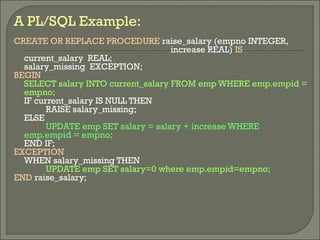
A PL/SQL Example:
CREATE OR REPLACE PROCEDURE raise_salary (empno INTEGER,
increase REAL) IS
current_salary REAL;
salary_missing EXCEPTION;
BEGIN
SELECT salary INTO current_salary FROM emp WHERE emp.empid =
empno;
IF current_salary IS NULL THEN
RAISE salary_missing;
ELSE
UPDATE emp SET salary = salary + increase WHERE
emp.empid = empno;
END IF;
EXCEPTION
WHEN salary_missing THEN
UPDATE emp SET salary=0 where emp.empid=empno;
END raise_salary;

Oracle PL-SQL

  • 1.
    --BY SAURAV VERMA -B.TECHCS 2ND YEAR (SGVU,JAIPUR) COMMUNITY WORLD
  • 2.
    Personal DBMS VsClient/Server DBMS Oracle 8 Environment SQL – syntax and examples PL/SQL-introduction
  • 3.
    Server Gets file requestsfrom clients Sends files to client Receives files back from clients NETWORK Client A Sends file requests to server Receives files from server Updates data Sends files back to server Client B Sends file requests to server Receives files from server Updates data Sends files back to server Personal DBMS
  • 4.
    Demand on theclient and the network Does not perform table locking automatically Not fault tolerant in the case of client failure Do not have file based transaction logging
  • 5.
    Server Gets data requestsfrom clients Adds, Deletes and updates data Sends results to clients NETWORK Client A Sends data requests to server Receives results from server Sends new data or changes to server Client B Sends data requests to server Receives results from server Sends new data or changes to server Client/server DBMS
  • 6.
    Minimal load onthe client and the network Performs table locking automatically Fault tolerant in the case of client failure File based transaction logging
  • 7.
    SQL * Plus PL/SQL QueryBuilder Developer Enterprise Manager Web application server
  • 8.
    Sqlplus username/password ALTER USERuser-name IDENTIFIED BY newpassword START filename | @ filename CLEAR SCREEN HELP <command> SAVE filename[.ext] REPLACE|APPEND EXIT
  • 9.
    Both an ANSIand ISO standard Types of commands: 1. Data Definition Language (DDL) : Create, Alter, Drop, Rename,Truncate 2. Data Manipulation Language (DML): Insert, Delete, Update 3. Data Retrieval: Select 4. Transaction Control: Commit, Rollback, Savepoint 5. Data Control Language (DCL): Grant, Revoke
  • 10.
    PositionPosition IDID PositionPosition DescriptionDescription 11 PresidentPresident 22 ManagerManager 33ProgrammerProgrammer 44 AccountantAccountant 55 SalesmanSalesman QualificationQualification IDID QualificationQualification DescriptionDescription 11 DoctorateDoctorate 22 MastersMasters 33 BachelorsBachelors 44 AssociatesAssociates DeptDept IDID DeptDept NameName LocationLocation 1010 FinanceFinance CharlotteCharlotte 2020 InfosysInfosys New YorkNew York 3030 MarketingMarketing WoodbridgeWoodbridge 4040 AccountantAccountant CaliforniaCalifornia DEPARTMENT POSITION QUALIFICATION
  • 11.
    EmpEmp IDID LastLast NameName FirstFirst NameName PositionPosition IDID SuperSuper IDID HireHire DateDate SalarySalary CommComm DeptDept IDID QualQual IDID 111111SmithSmith JohnJohn 11 04/15/6004/15/60 265000265000 35003500 1010 11 246246 HoustonHouston LarryLarry 22 111111 05/19/6705/19/67 150000150000 10001000 4040 22 123123 RobertsRoberts SandiSandi 22 111111 12/02/9112/02/91 7500075000 1010 22 433433 McCallMcCall AlexAlex 33 543543 05/10/9705/10/97 6650066500 2020 44 543543 DevDev DereckDereck 22 111111 03/15/9503/15/95 8000080000 20002000 2020 11 200200 ShawShaw JinkuJinku 55 135135 01/03/0001/03/00 2450024500 30003000 3030 222222 ChenChen SunnySunny 44 123123 08/15/9908/15/99 3500035000 1010 33 135135 GarnerGarner StanleyStanley 22 111111 02/29/9602/29/96 4500045000 50005000 3030 55 EMPLOYEE
  • 12.
    Data Definition Language: CREATETABLE {table} ( {column datatype [DEFAULT expr] [column_constraint] ... | table_constraint} [, { column datatype [DEFAULT expr] [column_constraint] ... ) ALTER TABLE {table} [ADD|MODIFY {column datatype [DEFAULT expr] [column_constraint]} [DROP drop_clause] DROP TABLE {table} [cascade constraints] DESC {table}
  • 13.
    CREATE TABLE Emp ( empidDecimal(10) NOT NULL, positionid Number(2), supervisorid Number(3), deptid Number(2), qualid Number(1), lname varchar2(10), fname varchar2(10), salary Decimal(10,2), hiredate Date, commission Decimal(4,2), PRIMARY KEY (empid), FOREIGN KEY (positionid) REFERENCES Position(positionid), FOREIGN KEY (deptid) REFERENCES Dept(deptid), FOREIGN KEY (qualid) REFERENCES Qualification(qualid) ); ALTER TABLE EMP MODIFY Commission decimal(7,2);
  • 14.
    Data Manipulation Language: INSERTINTO {table | view} [ (column [, column] ...) ] VALUES (expr,expr ...) UPDATE {table | view } SET { (column [, column] = { expr | } [WHERE condition] DELETE [FROM] {table | view} [WHERE condition]
  • 15.
    INSERT INTO Dept(deptid,deptname,location) VALUES(50,'IT','Dallas'); INSERT INTO Emp(empid, lname,fname,positionid, supervisorid,hiredate, salary,deptid,qualid) VALUES(227,'howser','Barbara',4,111,'25-AUG-83',45000,10,3); UPDATE dept SET deptname='Sales' WHERE deptID=50; DELETE FROM dept WHERE deptid='50';
  • 16.
    Data Retrieval: SELECT [DISTINCT| ALL] {table|view} FROM {table | view} [WHERE condition ] [GROUP BY expr [, expr]] [ORDER BY {expr} [ASC | DESC]] select * from dept; select deptname from dept where deptid='10'; select lname,fname from emp order by lname desc; select max(salary) from emp group by positionid; select deptname from dept,emp where dept.deptid=emp.deptid and emp.empid='111';
  • 17.
    Transaction Control: COMMIT ROLLBACK [to {savepoint}] SAVEPOINT {name} commit; savepoint point1; rollback to point1;
  • 18.
    Data Control Language: GRANT[privileges] ON object TO user|public [WITH GRANT OPTION] REVOKE [privileges] ON object TO user|public [CASCADE CONSTRAINTS] grant select,update on emp to XYZ ; revoke update on emp to XYZ;
  • 19.
    A PL/SQL Example: CREATEOR REPLACE PROCEDURE raise_salary (empno INTEGER, increase REAL) IS current_salary REAL; salary_missing EXCEPTION; BEGIN SELECT salary INTO current_salary FROM emp WHERE emp.empid = empno; IF current_salary IS NULL THEN RAISE salary_missing; ELSE UPDATE emp SET salary = salary + increase WHERE emp.empid = empno; END IF; EXCEPTION WHEN salary_missing THEN UPDATE emp SET salary=0 where emp.empid=empno; END raise_salary;