Optimizing Your Business with
LinkedIn Ads is a self-service advertising product that allows advertisers to reach a targeted professional audience of their choosing. 
What are LinkedIn Ads?
•Since LinkedIn is a professional networking platform, with LinkedIn ads you can ensure your campaigns reach appropriate audiences and decision makers 
•The ad platform allows campaign managers to adapt and optimize ads on the fly 
•Professional members are on LinkedIn for a reason and are more receptive to business messages 
•You can control your advertising costs by setting a budget and only pay for the clicks or impressions that you receive 
Why should you consider LinkedIn Ads?
Know your competitors and what differentiates you from them 
Create strong ad creatives to test new ideas, while keeping your message fresh 
Establish a test plan, so you can measure and improve results 
Target unique segments to find the perfect mix of targeting facets 
Build multiple campaigns to test different campaign elements 
Develop effective landing pages that drive conversion 
Key Drivers for Advertising Success
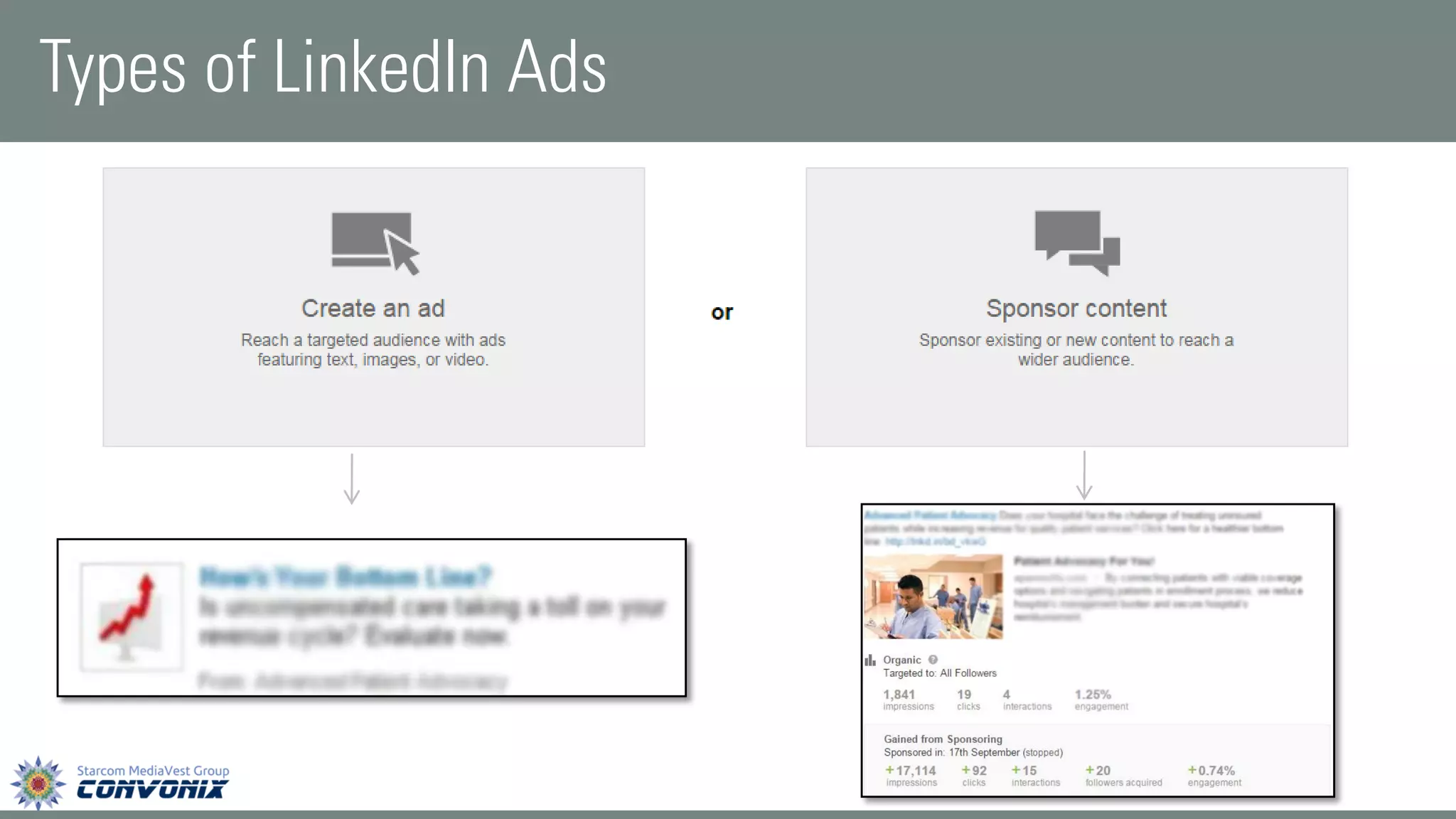
Types of LinkedIn Ads
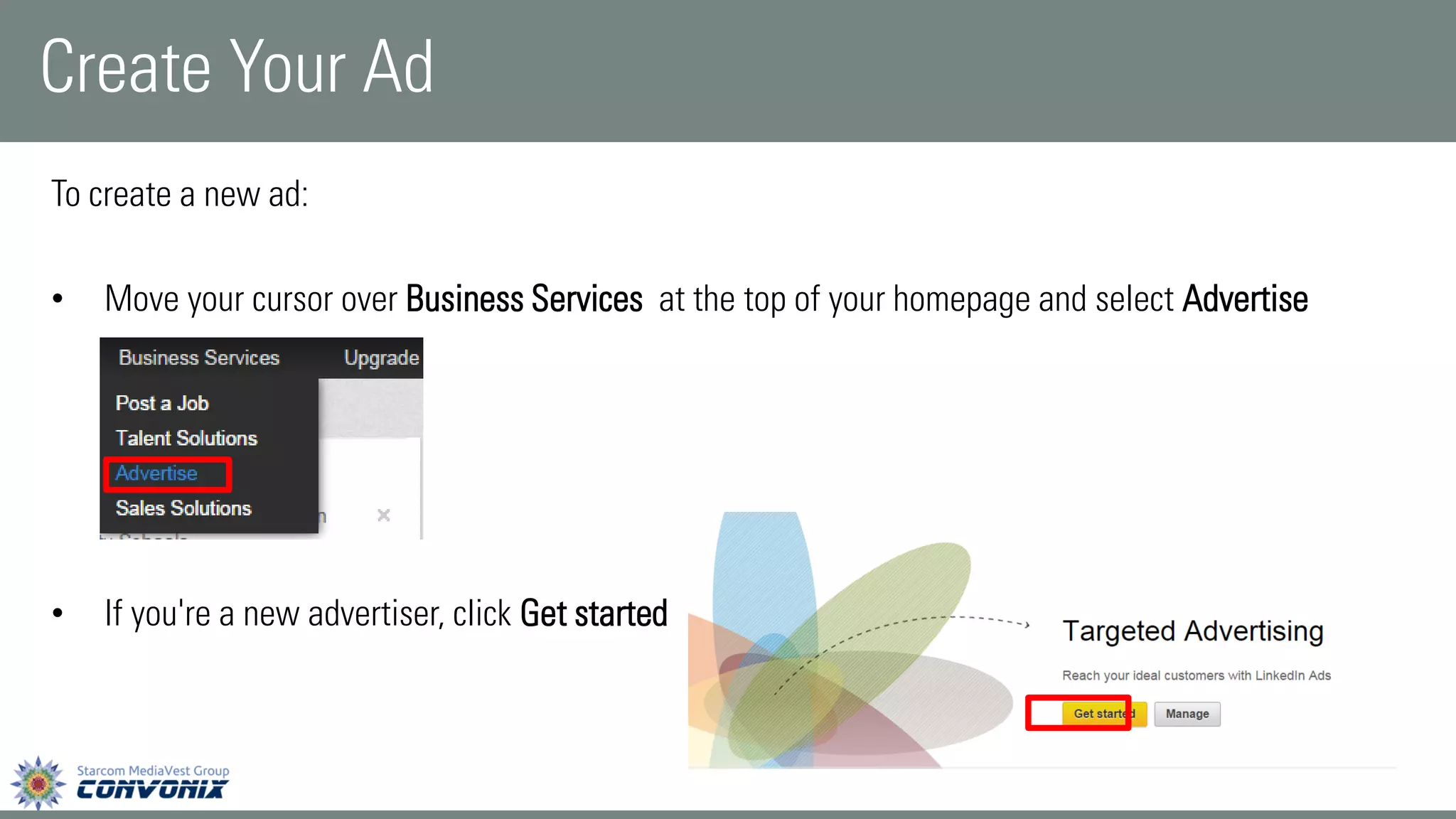
To create a new ad: 
•Move your cursor overBusiness Servicesat the top of your homepage and selectAdvertise 
•If you're a new advertiser, clickGet started 
Create Your Ad
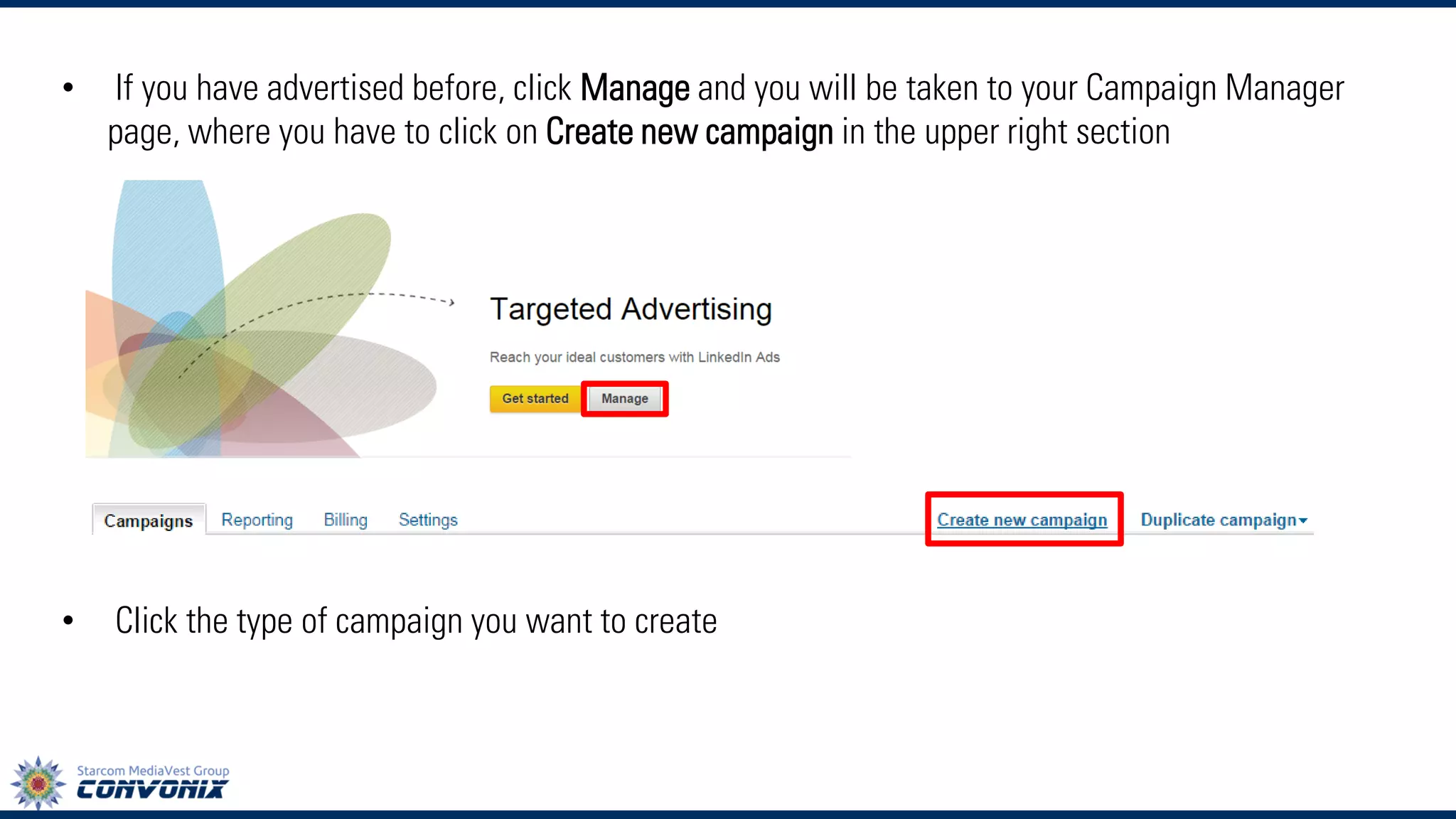
•If you have advertised before, clickManageand you will be taken to your Campaign Manager page, where you have to clickon Create new campaignin the upper right section 
•Click the type of campaign you want to create
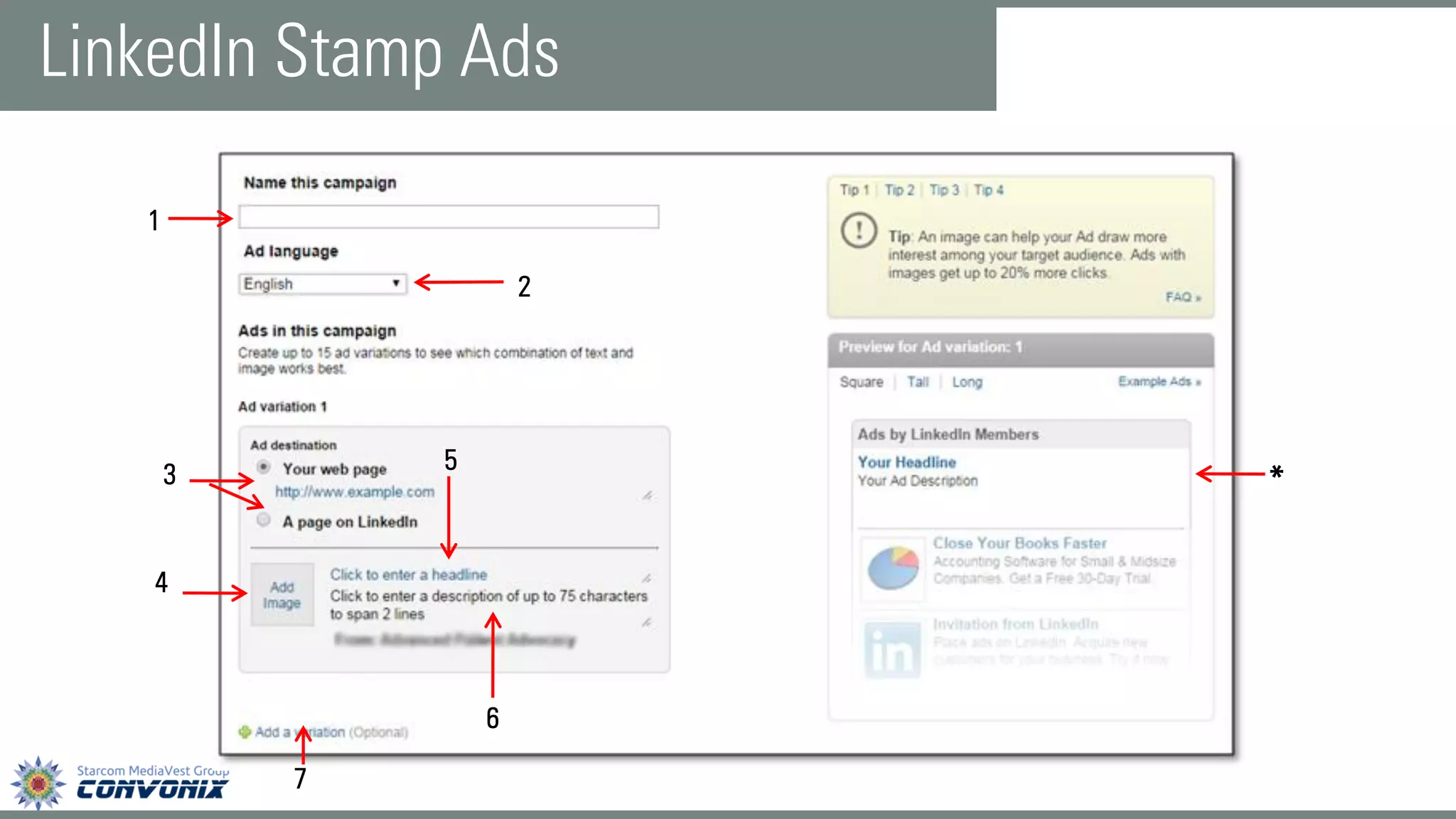
LinkedIn Stamp Ads 
1 
2 
5 
6 
4 
3 
* 7
1.This name is internal and not seen by the public, so it can be whatever you like. So try to describe the purpose of each ad when you create your ad campaign name to help you understand which ad works the best for your business 
2.You can choose what language you want your ad to be in. LinkedIn will not translate your ad into other languages, but it can be written in any of the languages LinkedIn supports, including Spanish, French, and German 
3.You can choose where you want people to be directed after clicking on your ad. You can send people to a specific external web page, such as a landing page for an offer on your website, or you can send them to a page on LinkedIn about your company, such as your company page or a group discussion 
4.Include an image with your ad that's relevant to what you offer. The LinkedIn background color is white, so images with bright colors are more likely to capture the attention of your audience. The maximum size of the image is 50 pixels wide by 50 pixels high, so be sure that the contents of your image are readable at this size
5.The headline has a 25-character limit. Choose words that grab the attentionof your target audience. Try an ad variation with a question in the headline to engage people. 
6.In the description, give people areason to take noticeand click or to learn more by highlighting special offers, unique benefits, whitepapers, free trials or demos. Includestrong call-to-action phraseslikeTry,Download or Sign up 
7.You can add ad variations--varying the ad text, call-to-action phrases, and images. You can create up to 15 different ads within a campaign. By creating multiple ads, you can discover which ads perform best 
*Please Note: As you edit your ads, a thumbnail preview appears on the right side. The preview also 
allows you to toggle the ad size. Make sure you carefully inspect the ad preview to ensure 
that the image as well as the content you have used is visible and eye-catching.
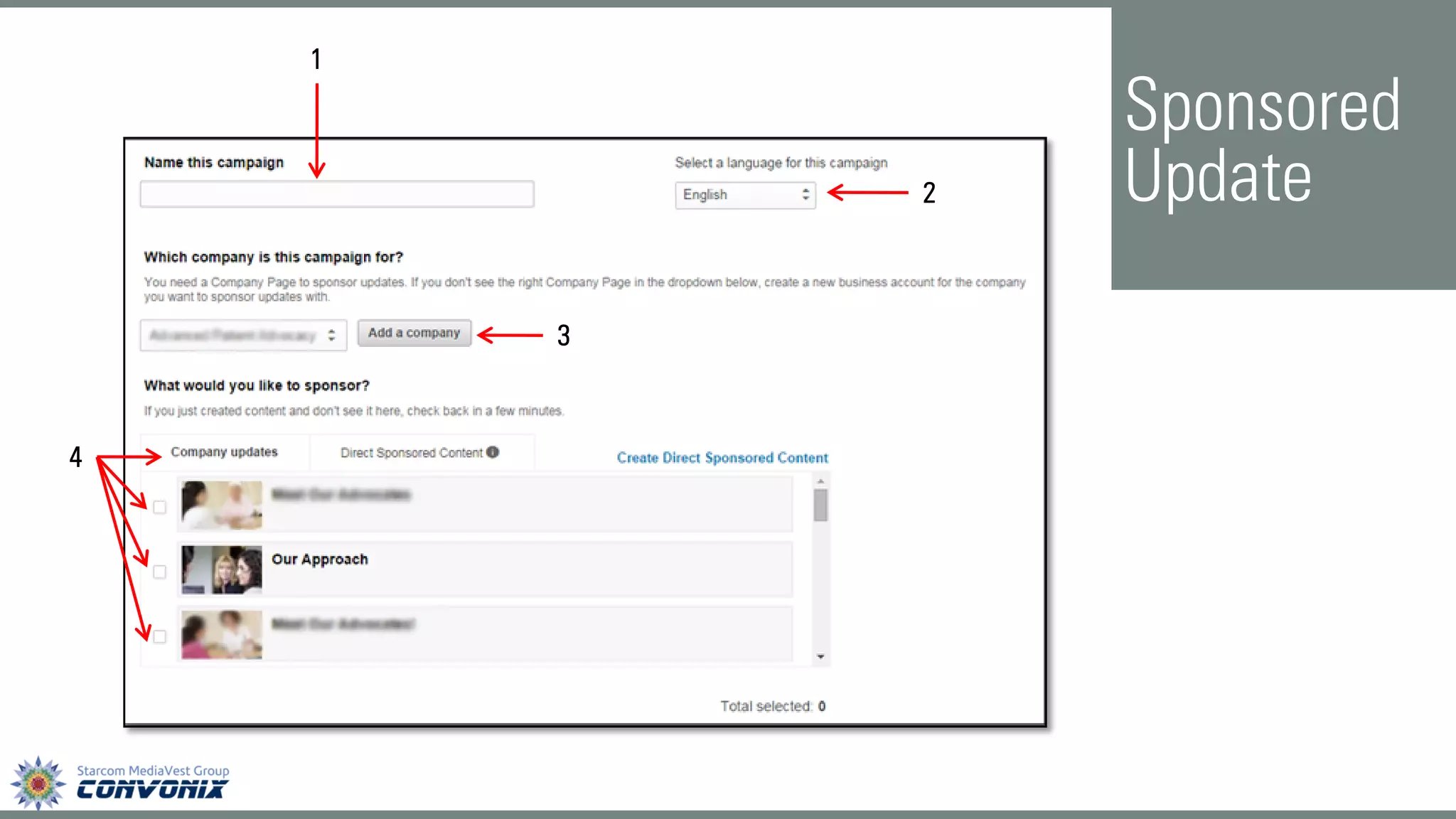
Sponsored Update 
3 
1 
4 
2
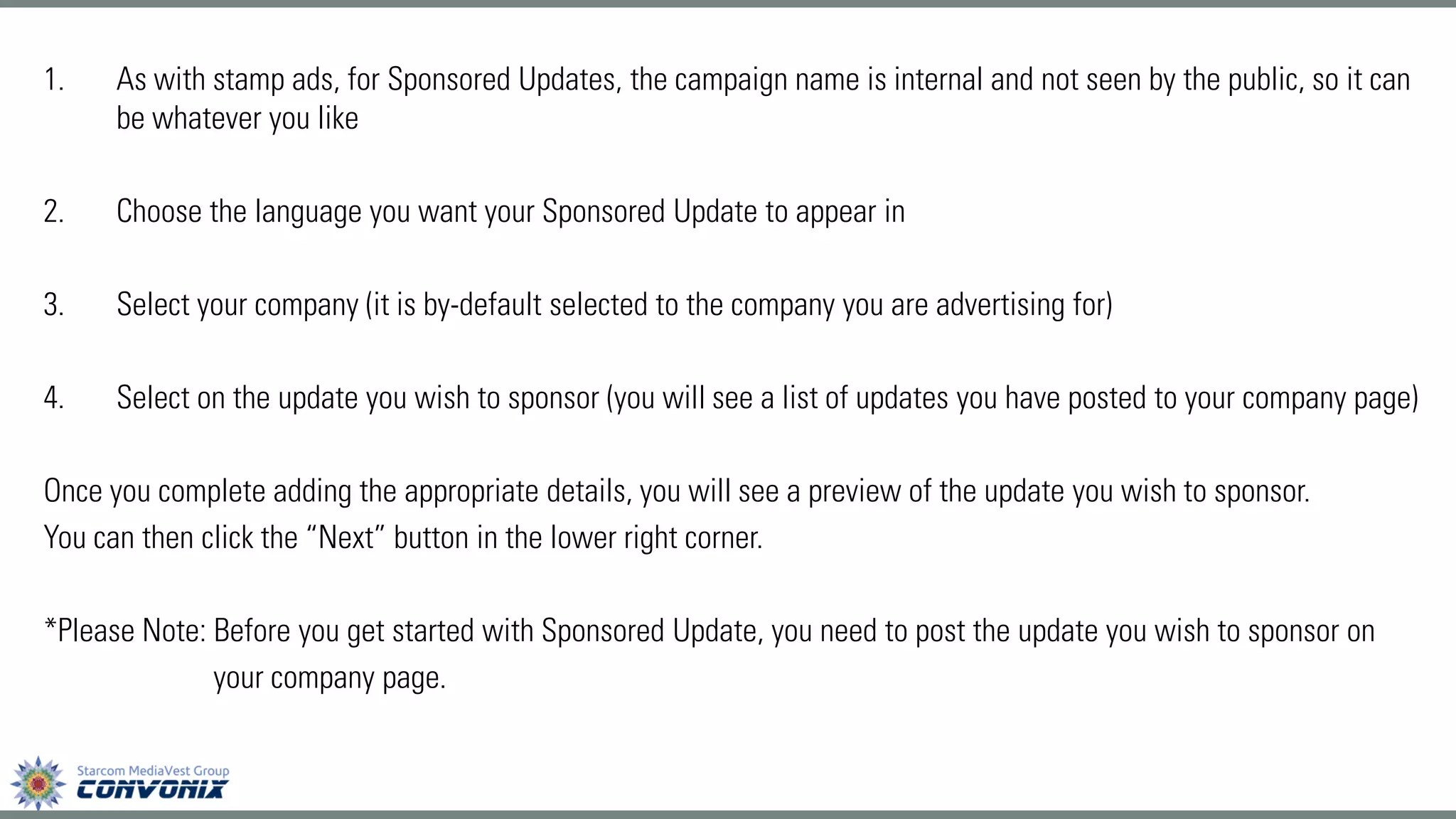
1.As with stamp ads, for Sponsored Updates, the campaign name is internal and not seen by the public, so it can be whatever you like 
2.Choose the language you want your Sponsored Update to appear in 
3.Select your company (it is by-default selected to the company you are advertising for) 
4.Select on the update you wish to sponsor (you will see a list of updates you have posted to your company page) 
Once you complete adding the appropriate details, you will see a preview of the update you wish to sponsor. 
You can then click the “Next” button in the lower right corner. 
*Please Note: Before you get started with Sponsored Update, you need to post the update you wish to sponsor on 
your company page.
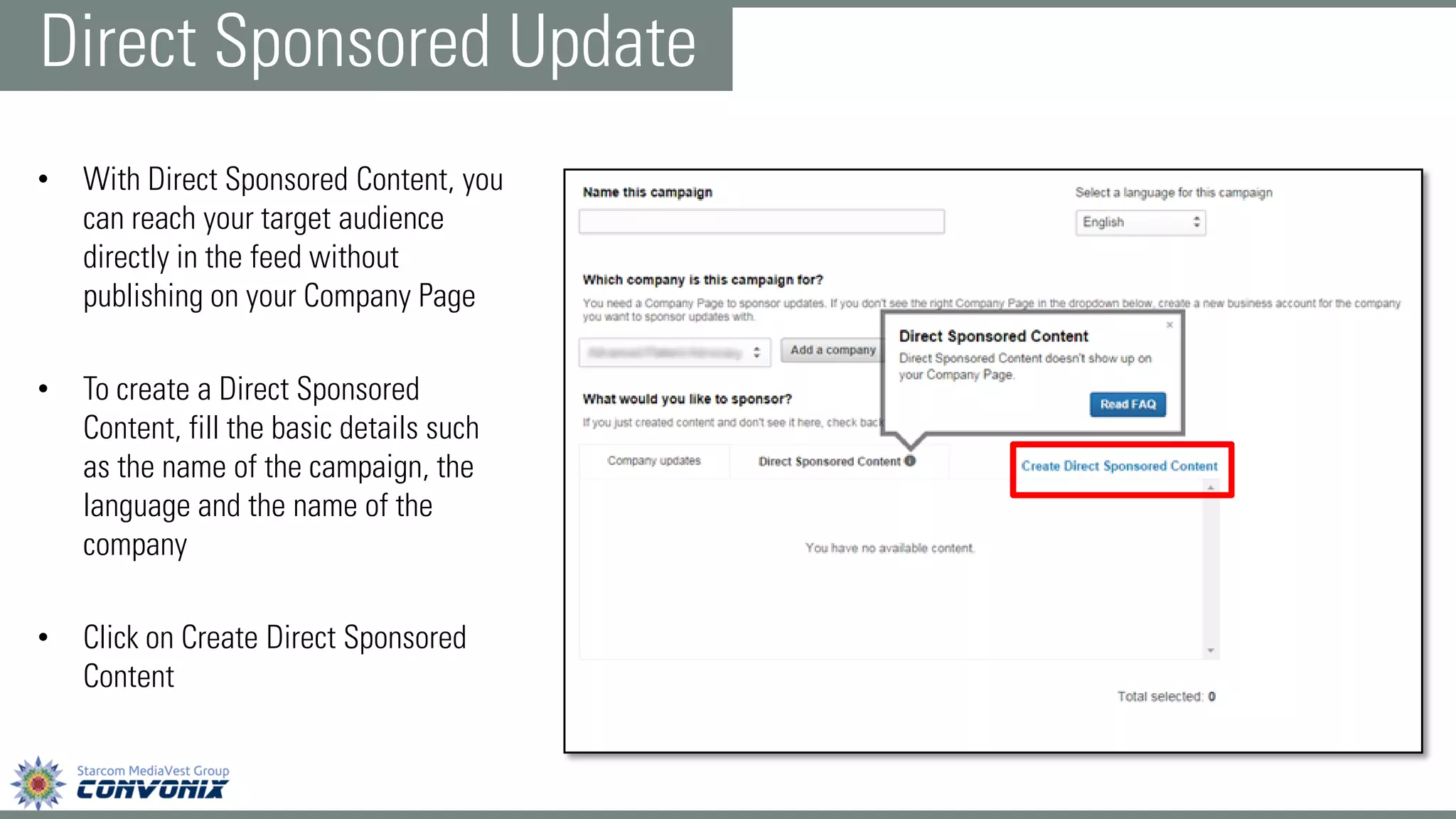
•With Direct Sponsored Content, you can reach your target audience directly in the feed without publishing on your Company Page 
•To create a Direct Sponsored Content, fill the basic details such as the name of the campaign, the language and the name of the company 
•Click on Create Direct Sponsored Content 
Direct Sponsored Update
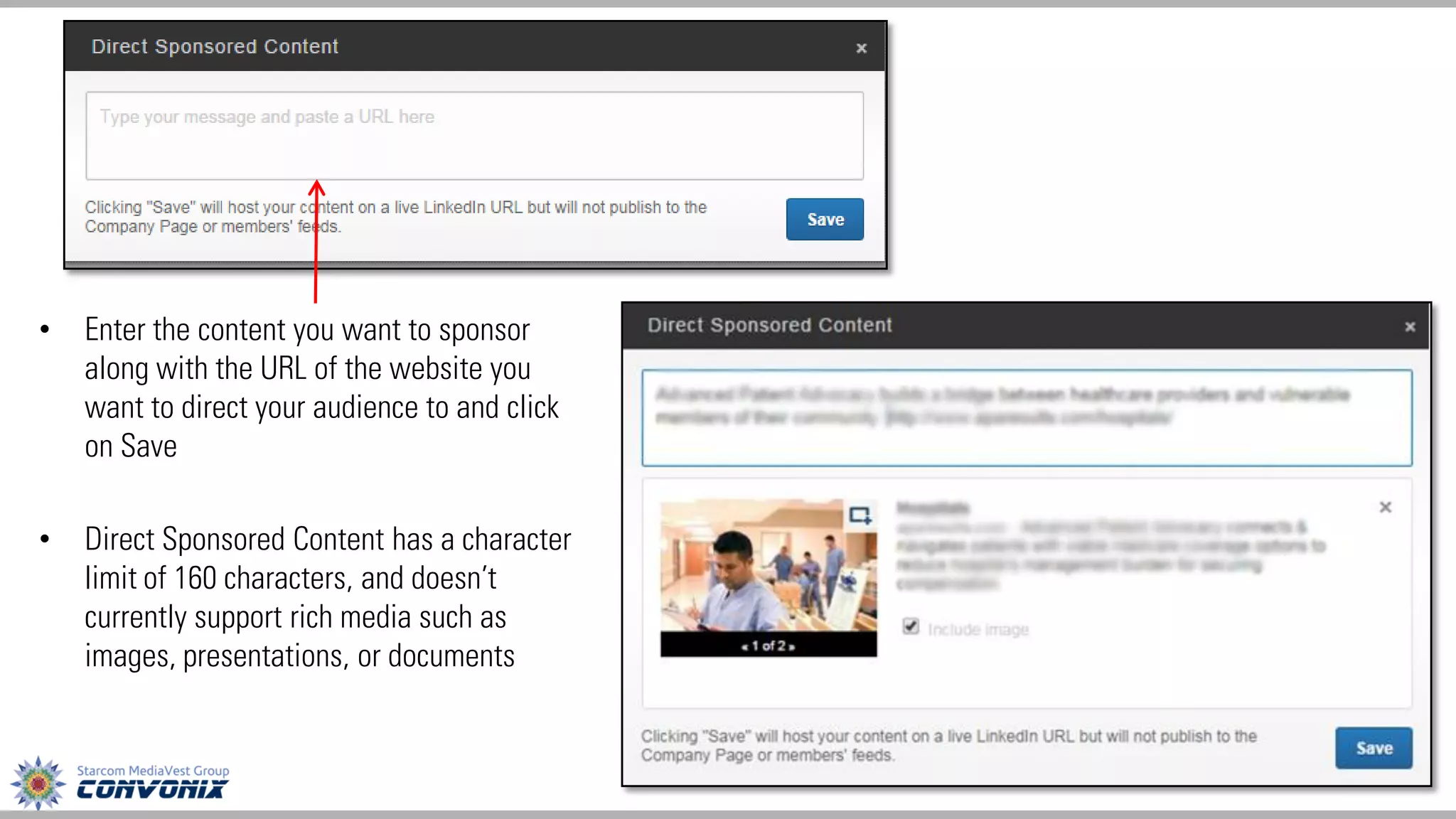
•Enter the content you want to sponsor along with the URL of the website you want to direct your audience to and click on Save 
•Direct Sponsored Content has a character limit of 160 characters, and doesn’t currently support rich media such as images, presentations, or documents
Target Audience 
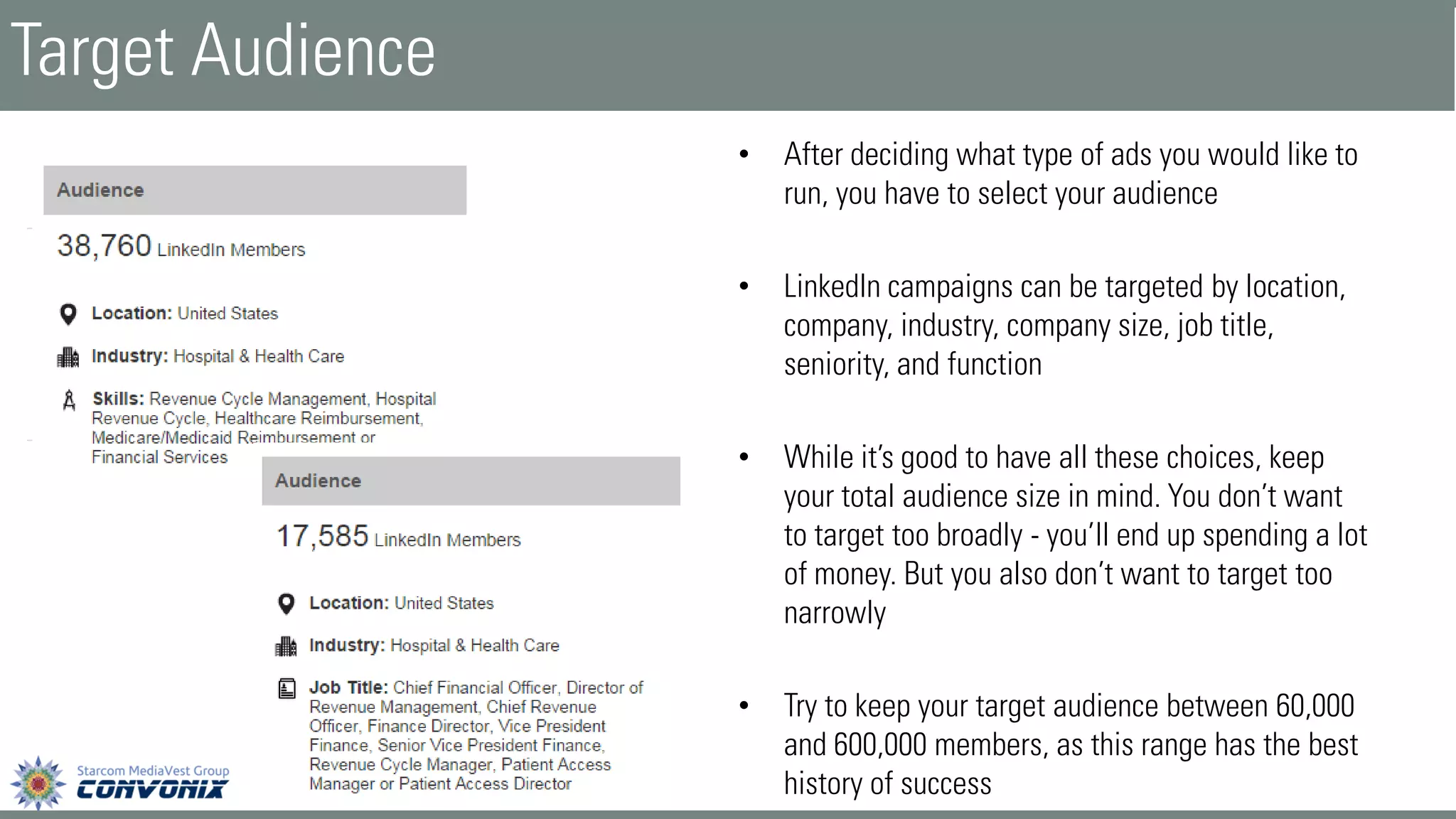
•After deciding what type of ads you would like to run, you have to select your audience 
•LinkedIn campaigns can be targeted by location, company, industry, company size, job title, seniority, and function 
•While it’s good to have all these choices, keep your total audience size in mind. You don’t want to target too broadly -you’ll end up spending a lot of money. But you also don’t want to target too narrowly 
•Try to keep your target audience between 60,000 and 600,000 members, as this range has the best history of success
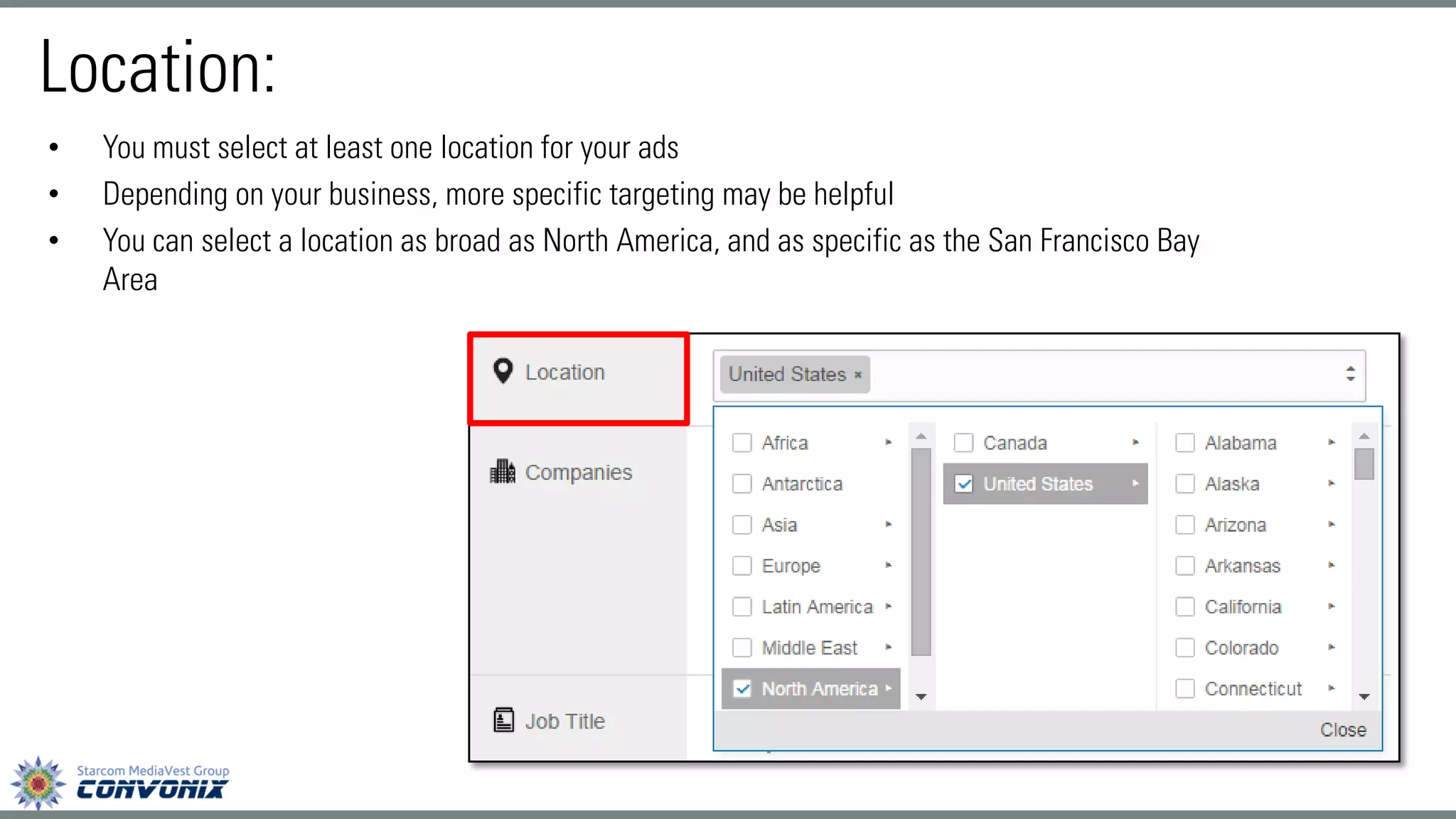
•You must select at least one location for your ads 
•Depending on your business, more specific targeting may be helpful 
•You can select a location as broad as North America, and as specific as the San Francisco Bay Area 
Location:
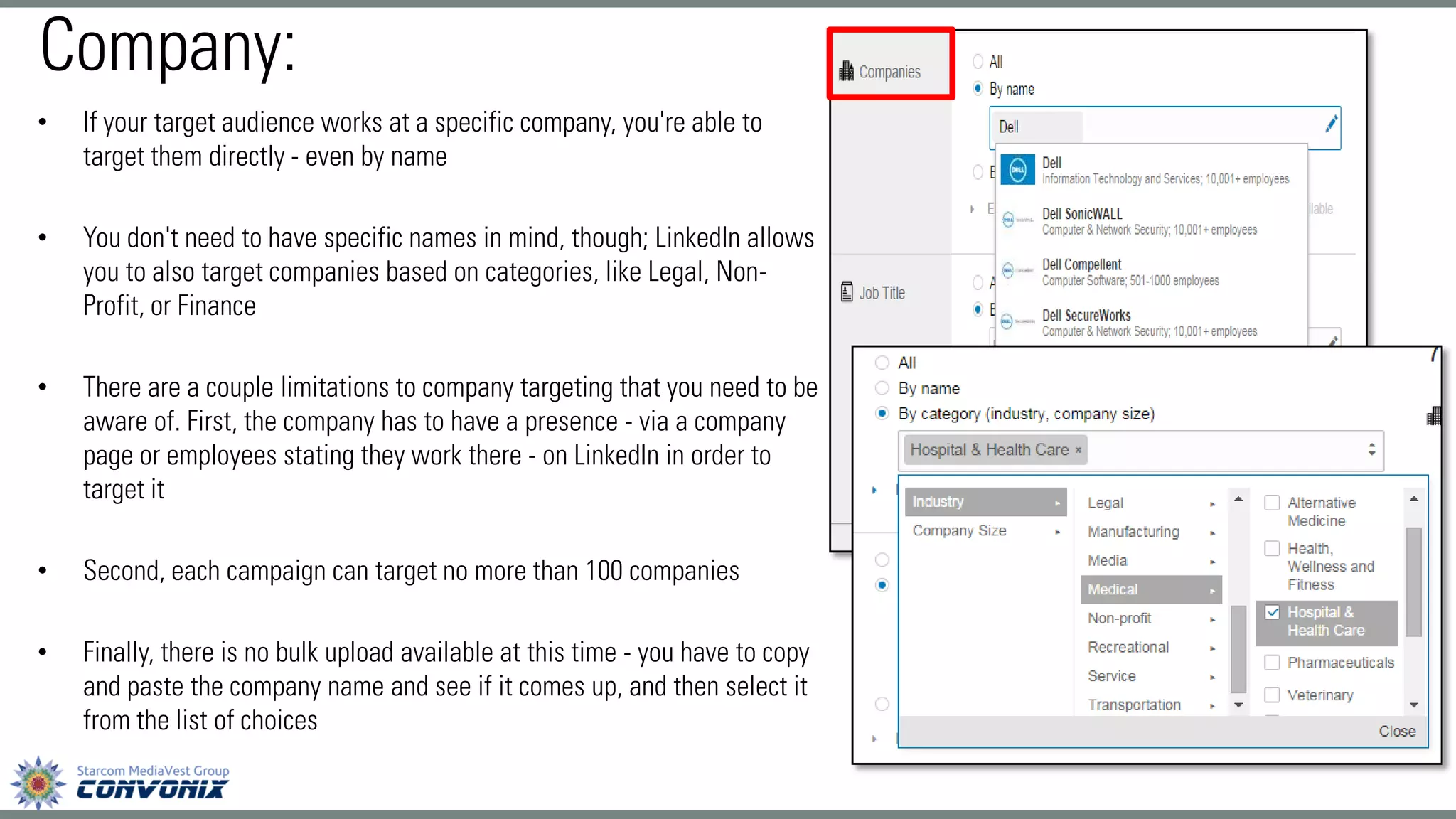
•If your target audience works at a specific company, you're able to target them directly -even by name 
•You don't need to have specific names in mind, though; LinkedIn allows you to also target companies based on categories, like Legal, Non- Profit, or Finance 
•There are a couple limitations to company targeting that you need to be aware of. First, the company has to have a presence -via a company page or employees stating they work there -on LinkedIn in order to target it 
•Second, each campaign can target no more than 100 companies 
•Finally, there is no bulk upload available at this time -you have to copy and paste the company name and see if it comes up, and then select it from the list of choices 
Company:
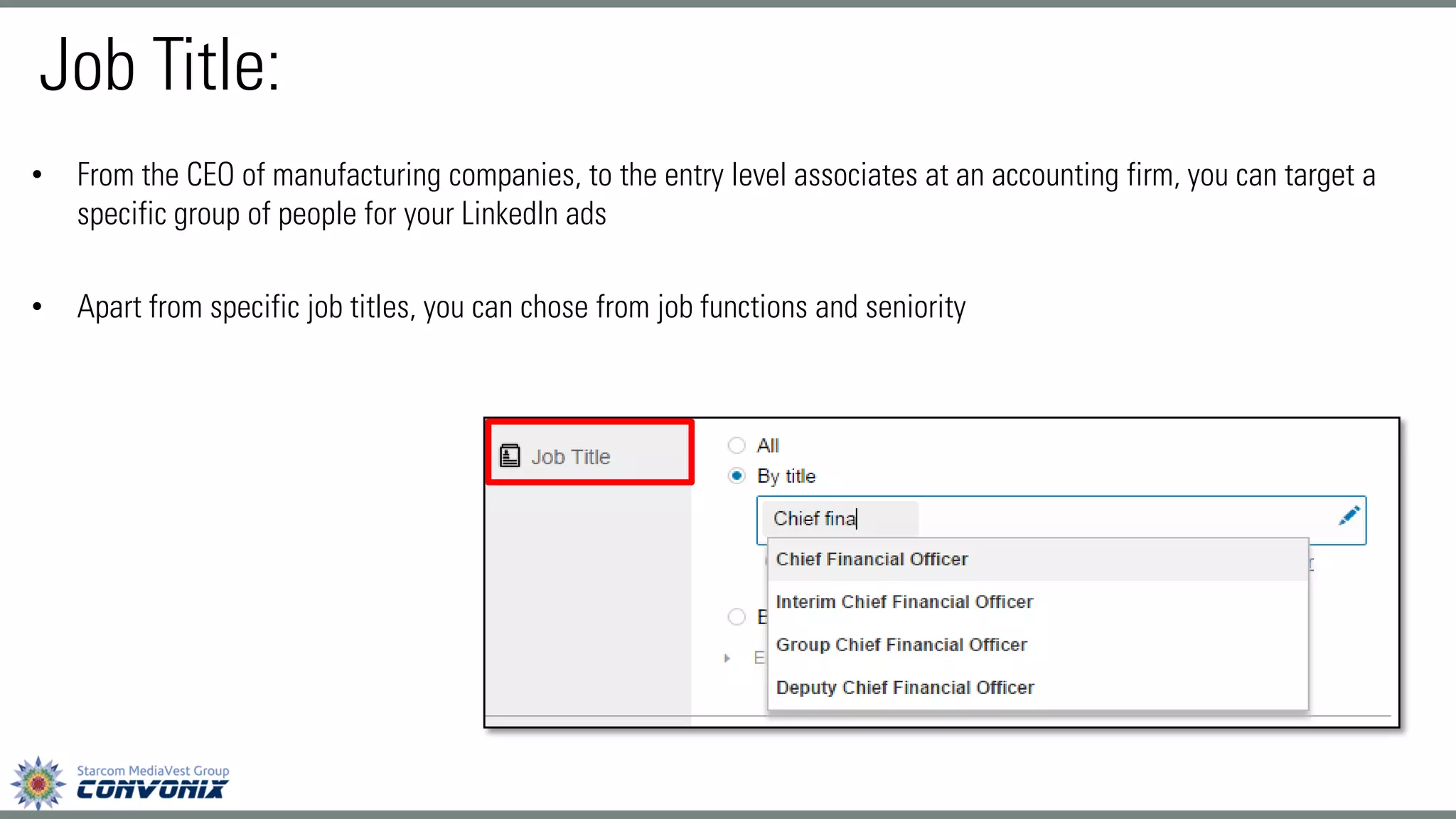
•From the CEO of manufacturing companies, to the entry level associates at an accounting firm, you can target a specific group of people for your LinkedIn ads 
•Apart from specific job titles, you can chose from job functions and seniority 
Job Title:
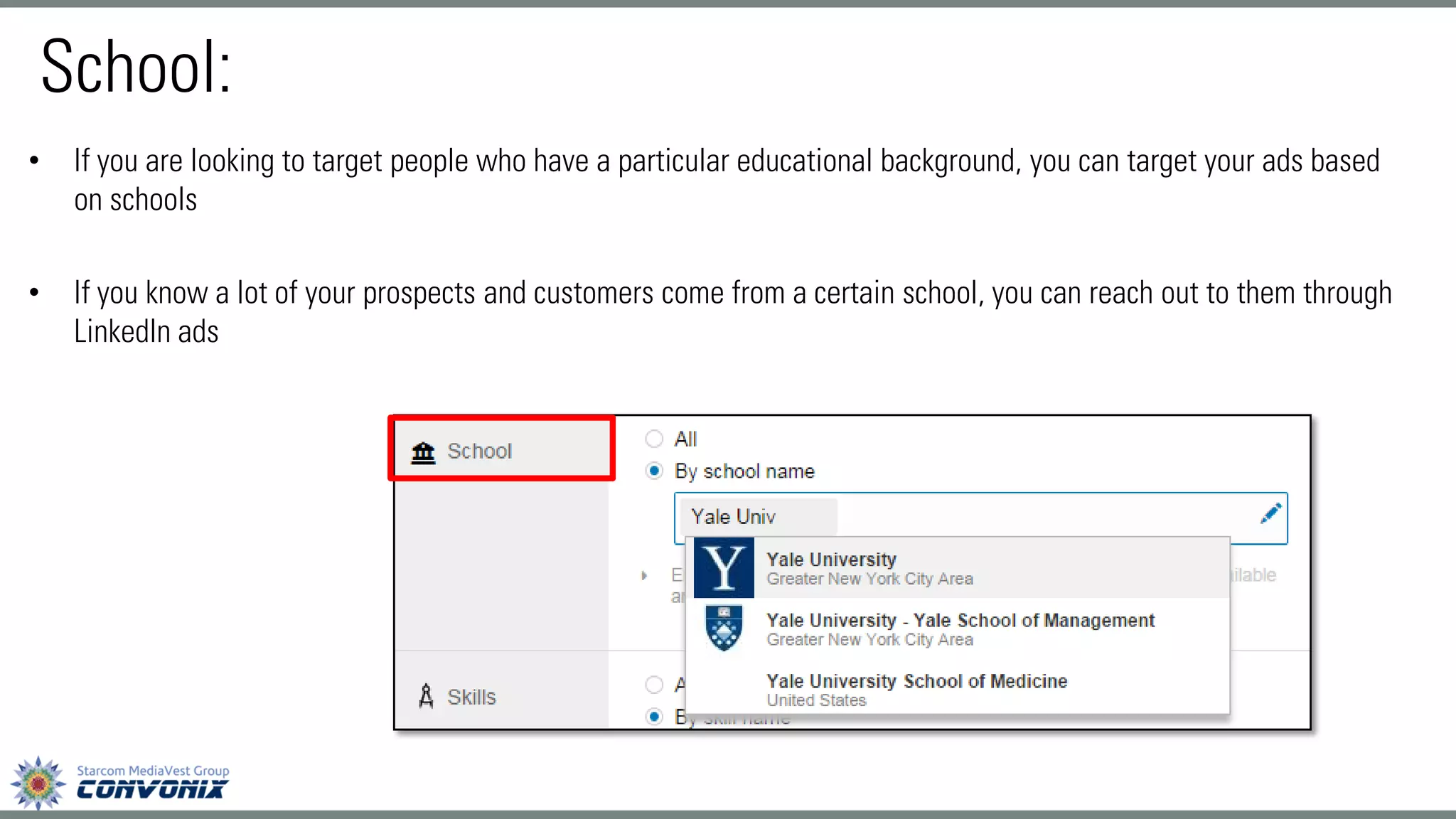
•If you are looking to target people who have a particular educational background, you can target your ads based on schools 
•If you know a lot of your prospects and customers come from a certain school, you can reach out to them through LinkedIn ads 
School:
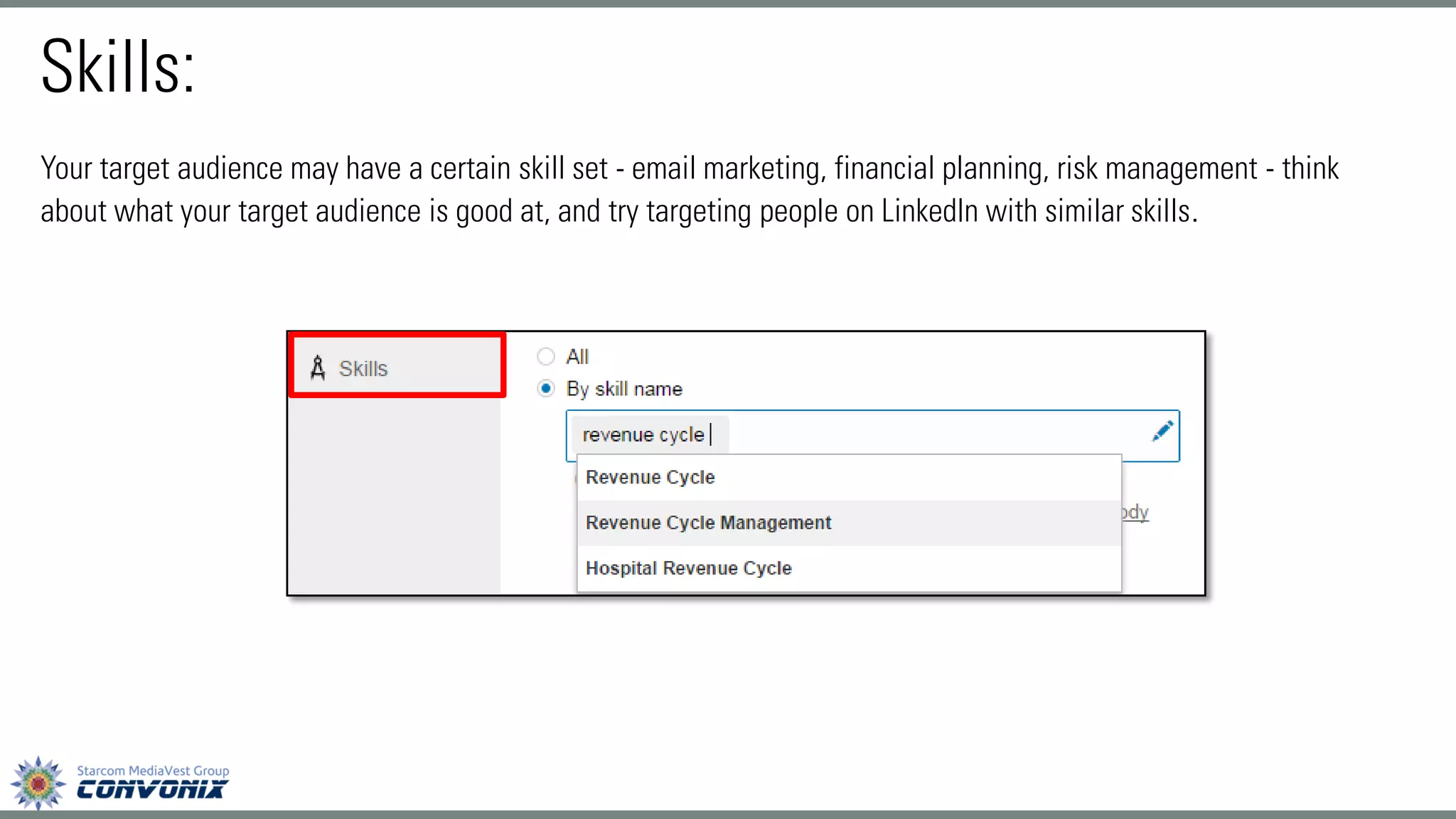
Your target audience may have a certain skill set -email marketing, financial planning, risk management -think about what your target audience is good at, and try targeting people on LinkedIn with similar skills. 
Skills:
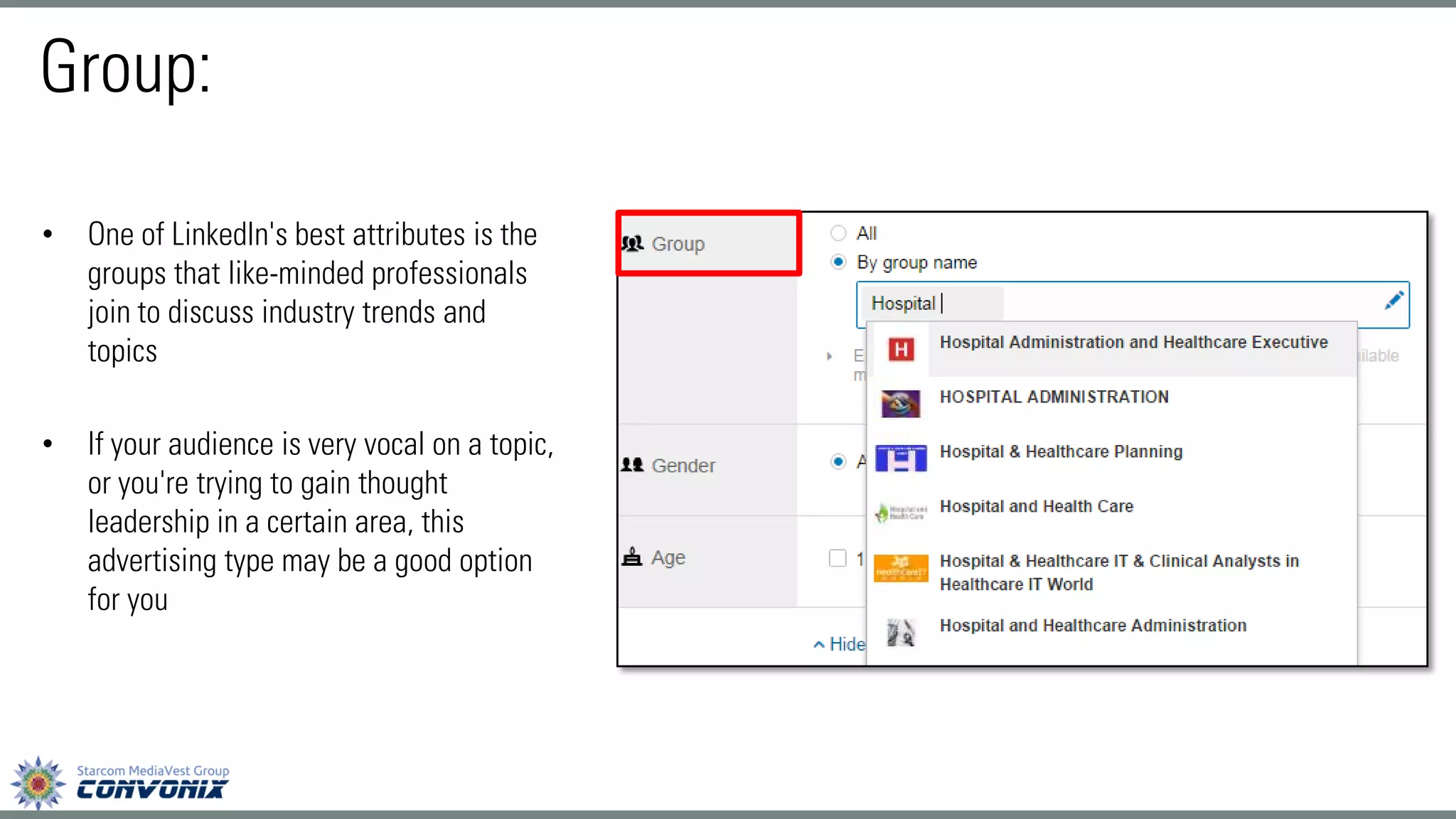
•One of LinkedIn's best attributes is the groups that like-minded professionals join to discuss industry trends and topics 
•If your audience is very vocal on a topic, or you're trying to gain thought leadership in a certain area, this advertising type may be a good option for you 
Group:
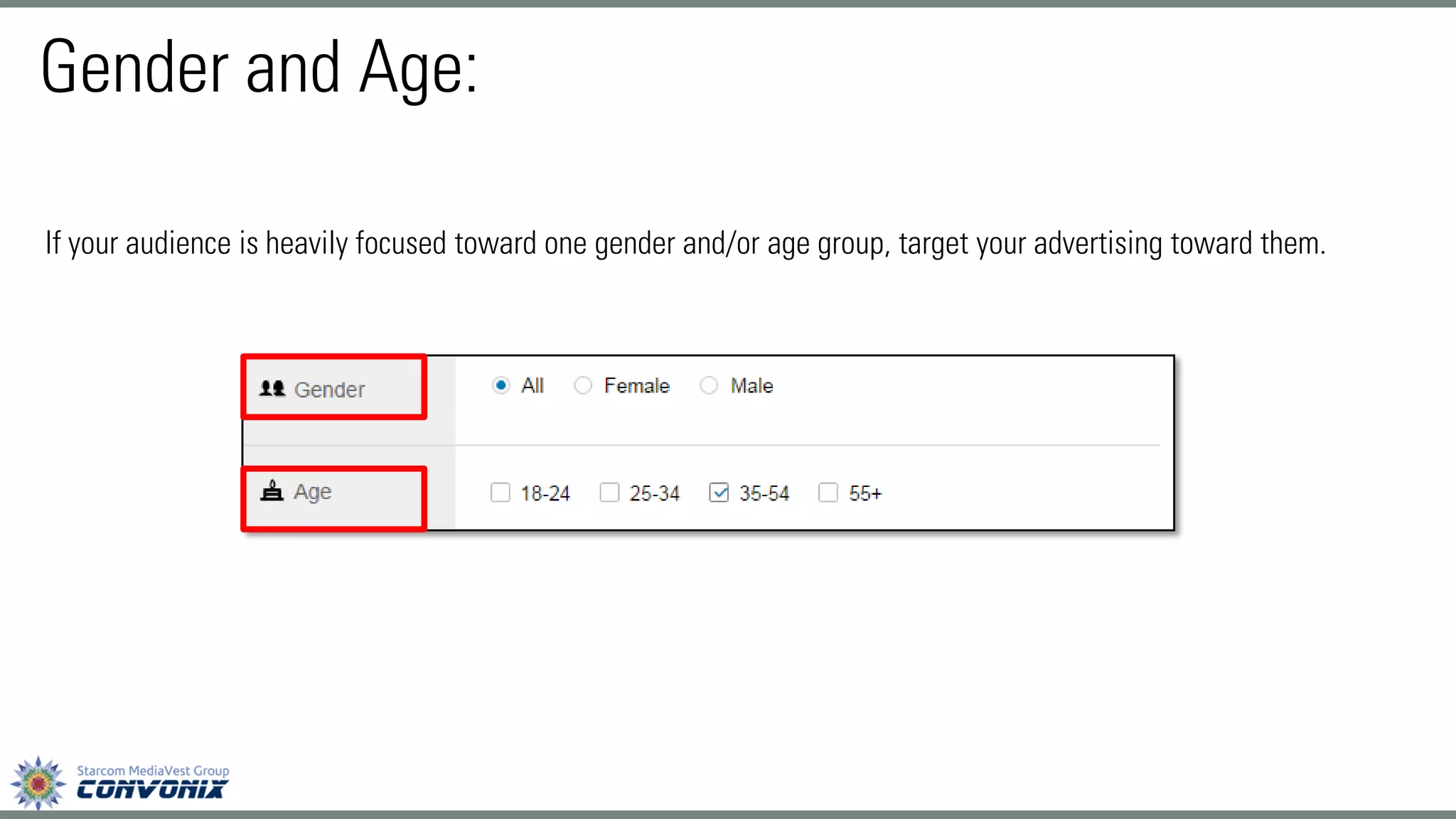
If your audience is heavily focused toward one gender and/or age group, target your advertising toward them. 
Gender and Age:
Setting Bids and Budgets 
•Once you choose your Target Audience, you are directed to the budget section 
•You control the cost of your ad campaigns in 2 ways: 
osetting bids (the maximum amount you want to pay for each individual click or every 1,000 impressions) 
osetting budgets (the maximum total amount you want to spend per day) 
•LinkedIn offers two basic pricing models: CPC (cost-per-click) and CPM (cost per 1,000 impressions)
•Deciding what form of payment to use and the best maximum bid can be tricky. When deciding between CPC and CPM, think first about your end goal. Are you trying to get as many people as possible to see your ad to help with, say, a branding campaign? If so, CPM may be the way to go. If you're trying to get more people to click on your ads to drive traffic to your website, or generate new leads, CPC may be better for you 
•If you're just getting started with LinkedIn ads, LinkedIn gives you a suggested bid range representing an estimate of the current competing bids by other advertisers targeting the same audience 
•In general, the higher you bid in this range, the more likely you are to receive impressions and clicks. Because you're competing with other advertisers for impressions and clicks, there isn't a set cost for an ad campaign
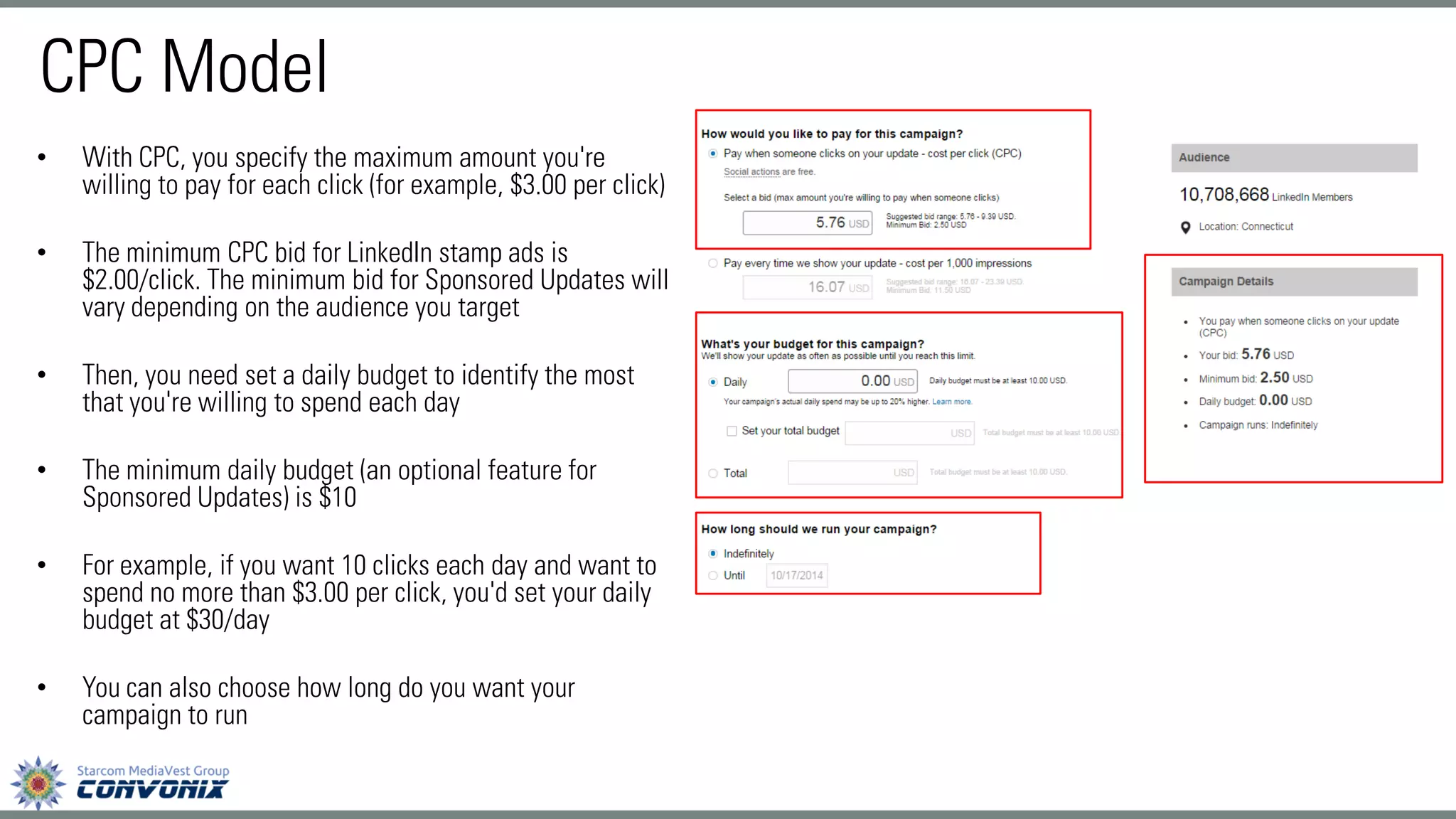
•With CPC, you specify the maximum amount you're willing to pay for each click (for example, $3.00 per click) 
•The minimum CPC bid for LinkedIn stamp ads is $2.00/click. The minimum bid for Sponsored Updates will vary depending on the audience you target 
•Then, you need set a daily budget to identify the most that you're willing to spend each day 
•The minimum daily budget (an optional feature for Sponsored Updates) is $10 
•For example, if you want 10 clicks each day and want to spend no more than $3.00 per click, you'd set your daily budget at $30/day 
•You can also choose how long do you want your campaign to run 
CPC Model
CPM Model 
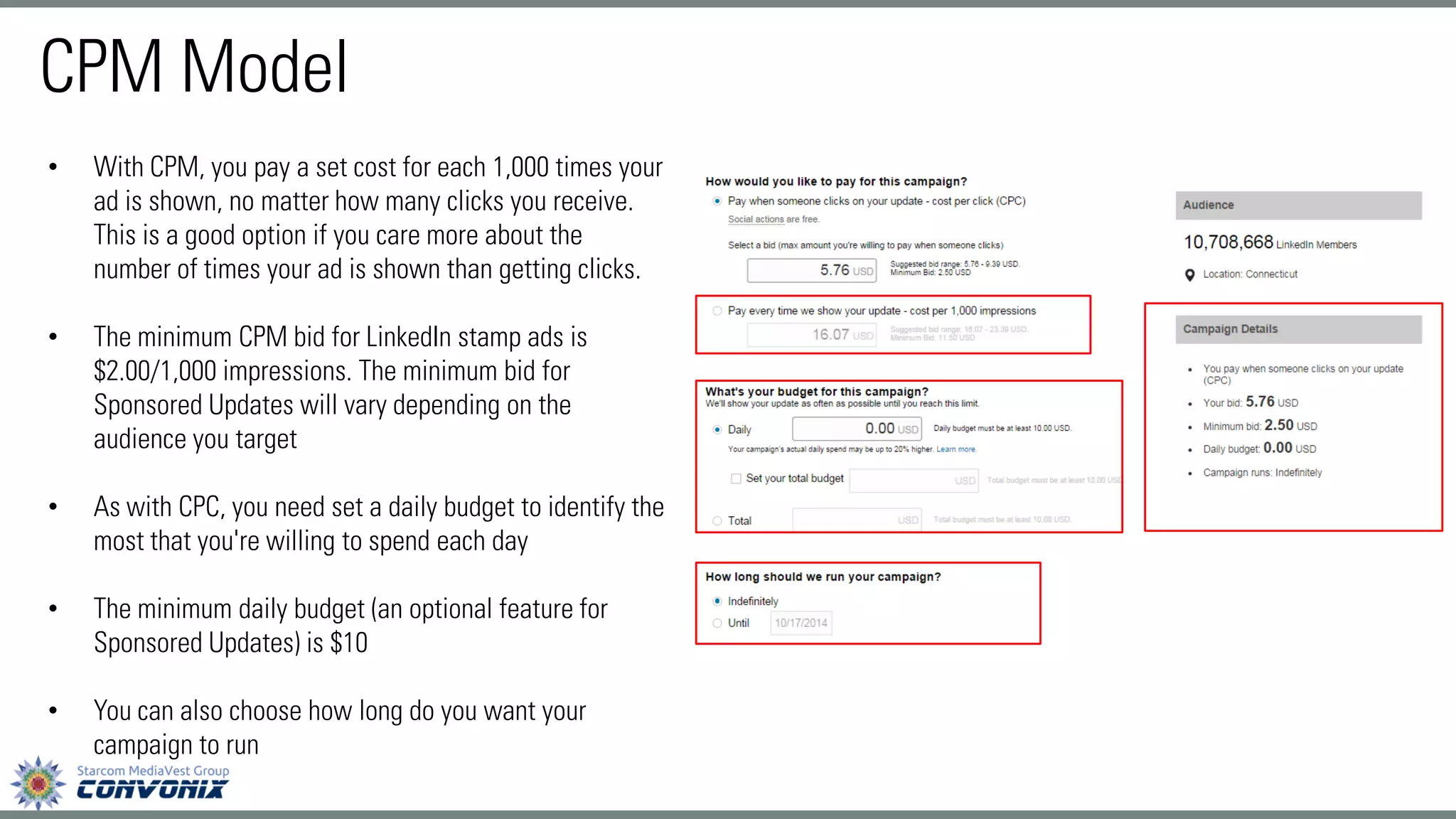
•With CPM, you pay a set cost for each 1,000 times your ad is shown, no matter how many clicks you receive. This is a good option if you care more about the number of times your ad is shown than getting clicks. 
•The minimum CPM bid for LinkedIn stamp ads is $2.00/1,000 impressions. The minimum bid for Sponsored Updates will vary depending on the audience you target 
•As with CPC, you need set a daily budget to identify the most that you're willing to spend each day 
•The minimum daily budget (an optional feature for Sponsored Updates) is $10 
•You can also choose how long do you want your campaign to run
LinkedIn Reporting 
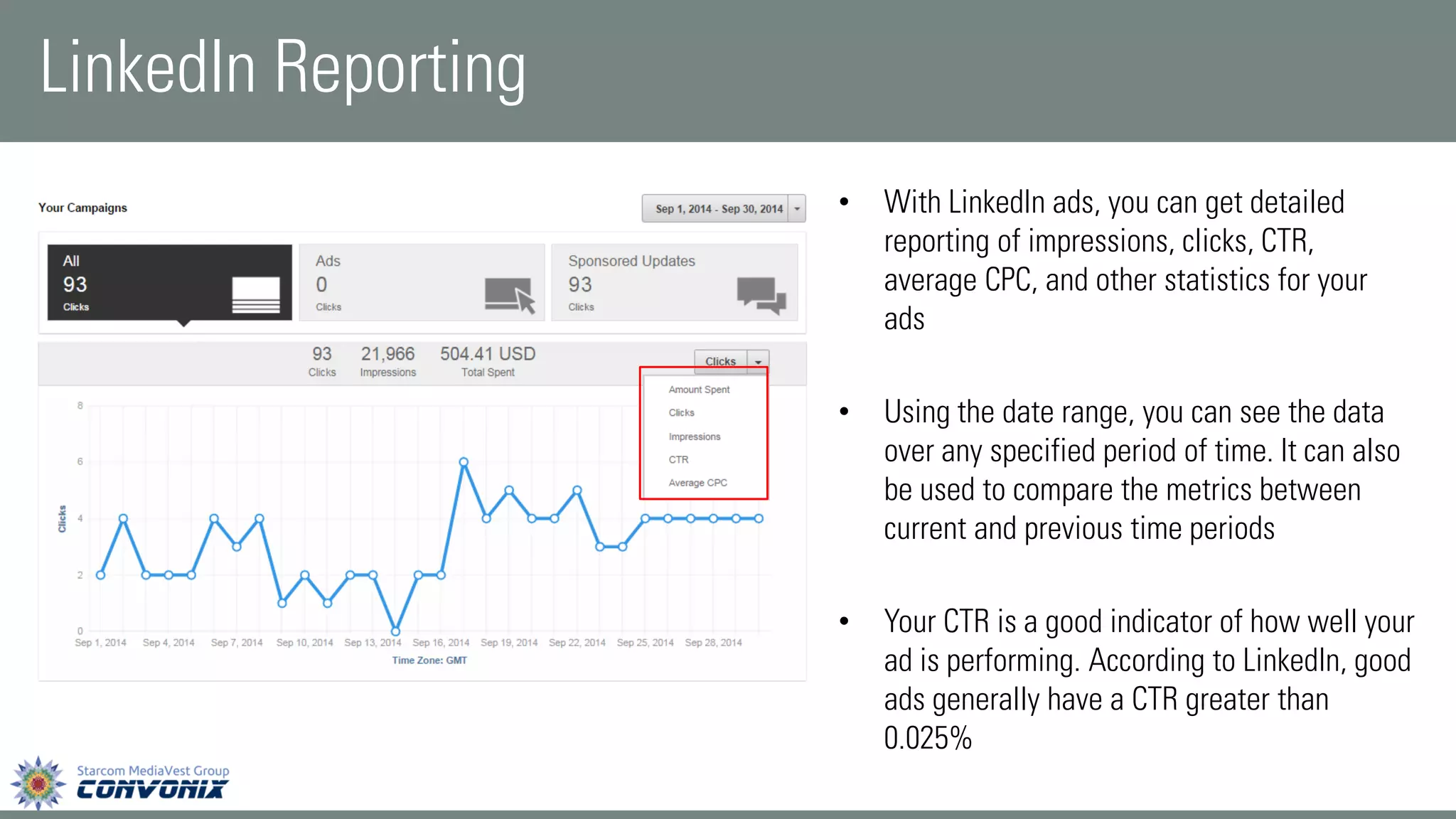
•With LinkedIn ads, you can get detailed reporting of impressions, clicks, CTR, average CPC, and other statistics for your ads 
•Using the date range, you can see the data over any specified period of time. It can also be used to compare the metrics between current and previous time periods 
•Your CTR is a good indicator of how well your ad is performing. According to LinkedIn, good ads generally have a CTR greater than 0.025%
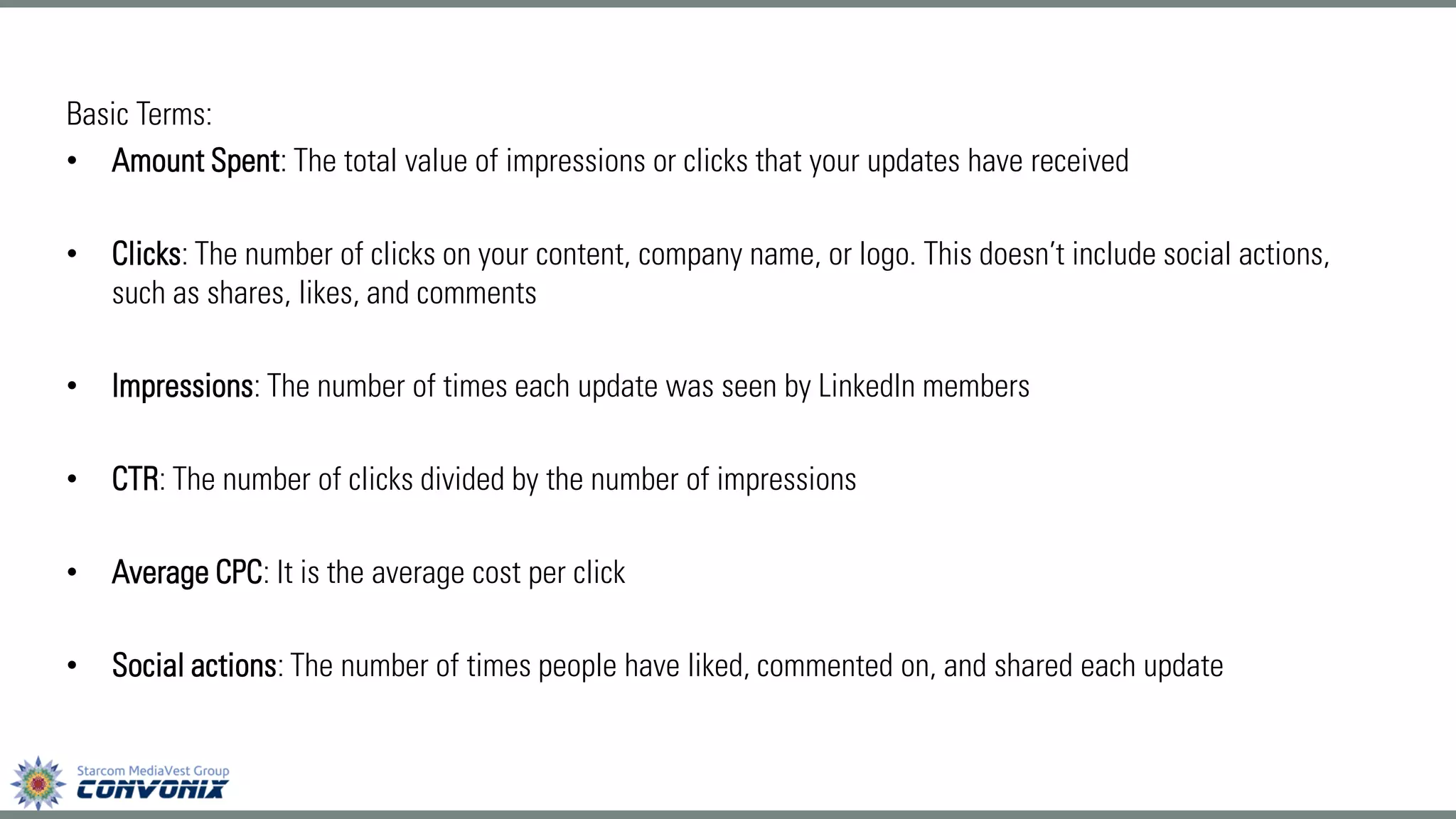
Basic Terms: 
•Amount Spent: The total value of impressions or clicks that your updates have received 
•Clicks:The number of clicks on your content, company name, or logo. This doesn’t include social actions, such as shares, likes, and comments 
•Impressions:The number of times each update was seen by LinkedIn members 
•CTR: The number of clicks divided by the number of impressions 
•Average CPC: It is the average cost per click 
•Social actions:The number of times people have liked, commented on, and shared each update
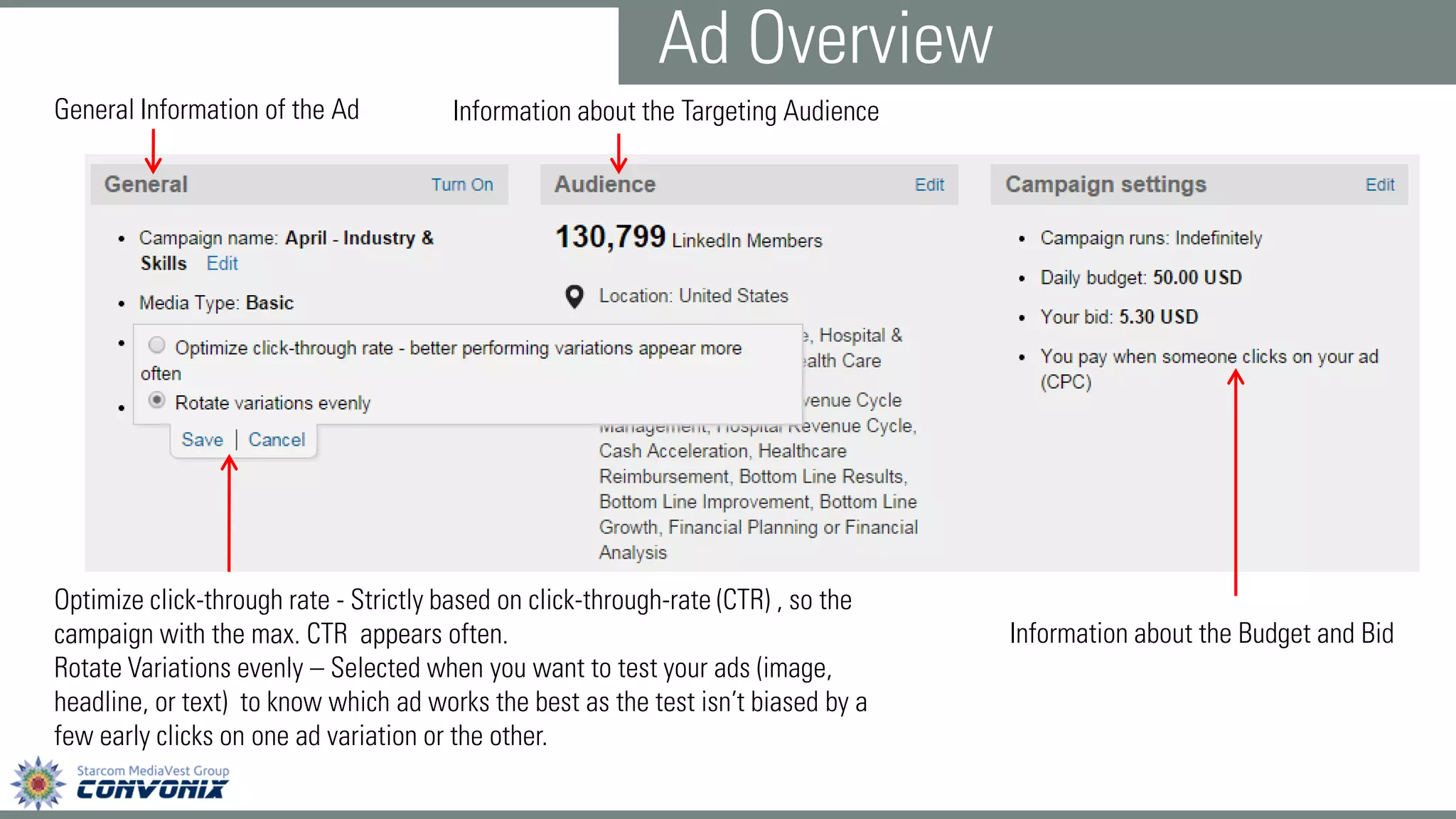
General Information of the Ad 
Information about the Targeting Audience 
Information about the Budget and Bid 
Optimize click-through rate -Strictly based on click-through-rate (CTR) , so the campaign with the max. CTR appears often. 
Rotate Variations evenly –Selected when you want to test your ads (image, headline, or text) to know which ad works the best as the test isn’t biased by a few early clicks on one ad variation or the other. 
Ad Overview
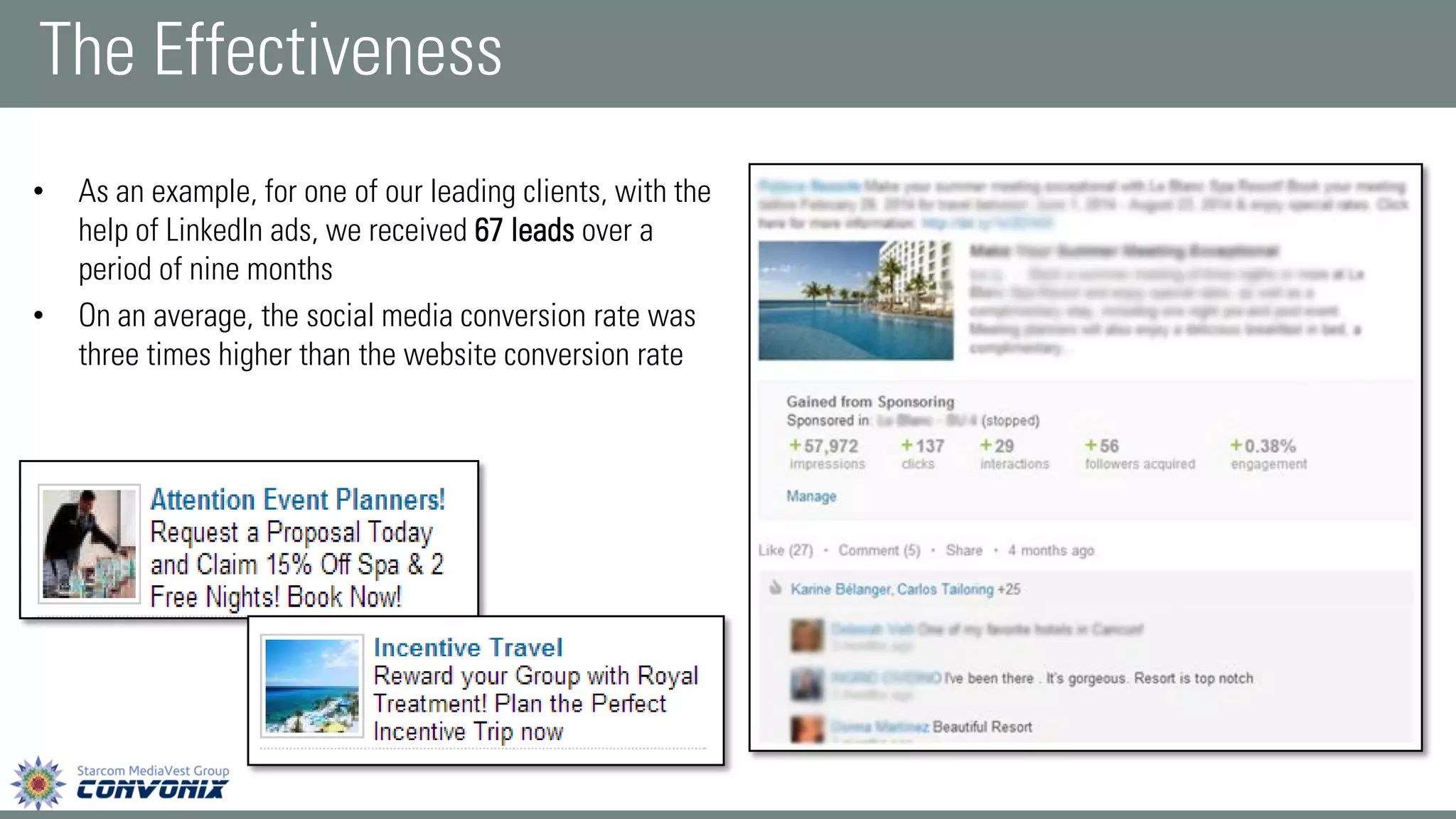
•As an example, for one of our leading clients, with the help of LinkedIn ads, we received 67 leads over a period of nine months 
•On an average, the social media conversion rate was three times higher than the website conversion rate 
The Effectiveness
Thank You!

Optimizing Your Business With LinkedIn Advertising

  • 1.
  • 2.
    LinkedIn Ads isa self-service advertising product that allows advertisers to reach a targeted professional audience of their choosing. What are LinkedIn Ads?
  • 3.
    •Since LinkedIn isa professional networking platform, with LinkedIn ads you can ensure your campaigns reach appropriate audiences and decision makers •The ad platform allows campaign managers to adapt and optimize ads on the fly •Professional members are on LinkedIn for a reason and are more receptive to business messages •You can control your advertising costs by setting a budget and only pay for the clicks or impressions that you receive Why should you consider LinkedIn Ads?
  • 4.
    Know your competitorsand what differentiates you from them Create strong ad creatives to test new ideas, while keeping your message fresh Establish a test plan, so you can measure and improve results Target unique segments to find the perfect mix of targeting facets Build multiple campaigns to test different campaign elements Develop effective landing pages that drive conversion Key Drivers for Advertising Success
  • 5.
  • 7.
    To create anew ad: •Move your cursor overBusiness Servicesat the top of your homepage and selectAdvertise •If you're a new advertiser, clickGet started Create Your Ad
  • 8.
    •If you haveadvertised before, clickManageand you will be taken to your Campaign Manager page, where you have to clickon Create new campaignin the upper right section •Click the type of campaign you want to create
  • 9.
    LinkedIn Stamp Ads 1 2 5 6 4 3 * 7
  • 10.
    1.This name isinternal and not seen by the public, so it can be whatever you like. So try to describe the purpose of each ad when you create your ad campaign name to help you understand which ad works the best for your business 2.You can choose what language you want your ad to be in. LinkedIn will not translate your ad into other languages, but it can be written in any of the languages LinkedIn supports, including Spanish, French, and German 3.You can choose where you want people to be directed after clicking on your ad. You can send people to a specific external web page, such as a landing page for an offer on your website, or you can send them to a page on LinkedIn about your company, such as your company page or a group discussion 4.Include an image with your ad that's relevant to what you offer. The LinkedIn background color is white, so images with bright colors are more likely to capture the attention of your audience. The maximum size of the image is 50 pixels wide by 50 pixels high, so be sure that the contents of your image are readable at this size
  • 11.
    5.The headline hasa 25-character limit. Choose words that grab the attentionof your target audience. Try an ad variation with a question in the headline to engage people. 6.In the description, give people areason to take noticeand click or to learn more by highlighting special offers, unique benefits, whitepapers, free trials or demos. Includestrong call-to-action phraseslikeTry,Download or Sign up 7.You can add ad variations--varying the ad text, call-to-action phrases, and images. You can create up to 15 different ads within a campaign. By creating multiple ads, you can discover which ads perform best *Please Note: As you edit your ads, a thumbnail preview appears on the right side. The preview also allows you to toggle the ad size. Make sure you carefully inspect the ad preview to ensure that the image as well as the content you have used is visible and eye-catching.
  • 12.
  • 13.
    1.As with stampads, for Sponsored Updates, the campaign name is internal and not seen by the public, so it can be whatever you like 2.Choose the language you want your Sponsored Update to appear in 3.Select your company (it is by-default selected to the company you are advertising for) 4.Select on the update you wish to sponsor (you will see a list of updates you have posted to your company page) Once you complete adding the appropriate details, you will see a preview of the update you wish to sponsor. You can then click the “Next” button in the lower right corner. *Please Note: Before you get started with Sponsored Update, you need to post the update you wish to sponsor on your company page.
  • 14.
    •With Direct SponsoredContent, you can reach your target audience directly in the feed without publishing on your Company Page •To create a Direct Sponsored Content, fill the basic details such as the name of the campaign, the language and the name of the company •Click on Create Direct Sponsored Content Direct Sponsored Update
  • 15.
    •Enter the contentyou want to sponsor along with the URL of the website you want to direct your audience to and click on Save •Direct Sponsored Content has a character limit of 160 characters, and doesn’t currently support rich media such as images, presentations, or documents
  • 16.
    Target Audience •Afterdeciding what type of ads you would like to run, you have to select your audience •LinkedIn campaigns can be targeted by location, company, industry, company size, job title, seniority, and function •While it’s good to have all these choices, keep your total audience size in mind. You don’t want to target too broadly -you’ll end up spending a lot of money. But you also don’t want to target too narrowly •Try to keep your target audience between 60,000 and 600,000 members, as this range has the best history of success
  • 17.
    •You must selectat least one location for your ads •Depending on your business, more specific targeting may be helpful •You can select a location as broad as North America, and as specific as the San Francisco Bay Area Location:
  • 18.
    •If your targetaudience works at a specific company, you're able to target them directly -even by name •You don't need to have specific names in mind, though; LinkedIn allows you to also target companies based on categories, like Legal, Non- Profit, or Finance •There are a couple limitations to company targeting that you need to be aware of. First, the company has to have a presence -via a company page or employees stating they work there -on LinkedIn in order to target it •Second, each campaign can target no more than 100 companies •Finally, there is no bulk upload available at this time -you have to copy and paste the company name and see if it comes up, and then select it from the list of choices Company:
  • 19.
    •From the CEOof manufacturing companies, to the entry level associates at an accounting firm, you can target a specific group of people for your LinkedIn ads •Apart from specific job titles, you can chose from job functions and seniority Job Title:
  • 20.
    •If you arelooking to target people who have a particular educational background, you can target your ads based on schools •If you know a lot of your prospects and customers come from a certain school, you can reach out to them through LinkedIn ads School:
  • 21.
    Your target audiencemay have a certain skill set -email marketing, financial planning, risk management -think about what your target audience is good at, and try targeting people on LinkedIn with similar skills. Skills:
  • 22.
    •One of LinkedIn'sbest attributes is the groups that like-minded professionals join to discuss industry trends and topics •If your audience is very vocal on a topic, or you're trying to gain thought leadership in a certain area, this advertising type may be a good option for you Group:
  • 23.
    If your audienceis heavily focused toward one gender and/or age group, target your advertising toward them. Gender and Age:
  • 24.
    Setting Bids andBudgets •Once you choose your Target Audience, you are directed to the budget section •You control the cost of your ad campaigns in 2 ways: osetting bids (the maximum amount you want to pay for each individual click or every 1,000 impressions) osetting budgets (the maximum total amount you want to spend per day) •LinkedIn offers two basic pricing models: CPC (cost-per-click) and CPM (cost per 1,000 impressions)
  • 25.
    •Deciding what formof payment to use and the best maximum bid can be tricky. When deciding between CPC and CPM, think first about your end goal. Are you trying to get as many people as possible to see your ad to help with, say, a branding campaign? If so, CPM may be the way to go. If you're trying to get more people to click on your ads to drive traffic to your website, or generate new leads, CPC may be better for you •If you're just getting started with LinkedIn ads, LinkedIn gives you a suggested bid range representing an estimate of the current competing bids by other advertisers targeting the same audience •In general, the higher you bid in this range, the more likely you are to receive impressions and clicks. Because you're competing with other advertisers for impressions and clicks, there isn't a set cost for an ad campaign
  • 26.
    •With CPC, youspecify the maximum amount you're willing to pay for each click (for example, $3.00 per click) •The minimum CPC bid for LinkedIn stamp ads is $2.00/click. The minimum bid for Sponsored Updates will vary depending on the audience you target •Then, you need set a daily budget to identify the most that you're willing to spend each day •The minimum daily budget (an optional feature for Sponsored Updates) is $10 •For example, if you want 10 clicks each day and want to spend no more than $3.00 per click, you'd set your daily budget at $30/day •You can also choose how long do you want your campaign to run CPC Model
  • 27.
    CPM Model •WithCPM, you pay a set cost for each 1,000 times your ad is shown, no matter how many clicks you receive. This is a good option if you care more about the number of times your ad is shown than getting clicks. •The minimum CPM bid for LinkedIn stamp ads is $2.00/1,000 impressions. The minimum bid for Sponsored Updates will vary depending on the audience you target •As with CPC, you need set a daily budget to identify the most that you're willing to spend each day •The minimum daily budget (an optional feature for Sponsored Updates) is $10 •You can also choose how long do you want your campaign to run
  • 28.
    LinkedIn Reporting •WithLinkedIn ads, you can get detailed reporting of impressions, clicks, CTR, average CPC, and other statistics for your ads •Using the date range, you can see the data over any specified period of time. It can also be used to compare the metrics between current and previous time periods •Your CTR is a good indicator of how well your ad is performing. According to LinkedIn, good ads generally have a CTR greater than 0.025%
  • 29.
    Basic Terms: •AmountSpent: The total value of impressions or clicks that your updates have received •Clicks:The number of clicks on your content, company name, or logo. This doesn’t include social actions, such as shares, likes, and comments •Impressions:The number of times each update was seen by LinkedIn members •CTR: The number of clicks divided by the number of impressions •Average CPC: It is the average cost per click •Social actions:The number of times people have liked, commented on, and shared each update
  • 30.
    General Information ofthe Ad Information about the Targeting Audience Information about the Budget and Bid Optimize click-through rate -Strictly based on click-through-rate (CTR) , so the campaign with the max. CTR appears often. Rotate Variations evenly –Selected when you want to test your ads (image, headline, or text) to know which ad works the best as the test isn’t biased by a few early clicks on one ad variation or the other. Ad Overview
  • 31.
    •As an example,for one of our leading clients, with the help of LinkedIn ads, we received 67 leads over a period of nine months •On an average, the social media conversion rate was three times higher than the website conversion rate The Effectiveness
  • 32.