Optimise
LinkedIn for
Improved Search Results
with Julie Mason
Here’s what we’re covering today:
* The Google + LinkedIn relationship
* How to optimise LinkedIn for search
* Leveraging your content on LinkedIn
www.juliemason.com.au
LinkedIn is the world’s largest
professional networking site with
over 347 million members
www.juliemason.com.au
LinkedIn have positioned themselves
as a content hub for business
www.juliemason.com.au
Every LinkedIn profile and company
page is infused with strong
metadata
www.juliemason.com.au
This is perhaps why Google tends to
consider LinkedIn more relevant
than other social networks
www.juliemason.com.au
Having said that, it is important to
note that nearly every outbound link
from LinkedIn’s platform is a “no-
follow” link
www.juliemason.com.au
But that does not mean that
LinkedIn doesn’t have great value in
helping you or your business show
up high on Google’s search results
www.juliemason.com.au
Test this out by Googling your name
or company...often it will show up
above even your website address
www.juliemason.com.au
Optimising Personal Profiles
www.juliemason.com.au
Take time to fully complete your
profile...this matters!
www.juliemason.com.au
Use anchor text in your website links
Instead of choosing ‘Company Website’
or ‘Blog’...choose ‘Other’ and insert a
keyword rich title (30 characters)
www.juliemason.com.au
Claim your Vanity URL
www.juliemason.com.au
Optimise your Experience Titles with
keywords
Titles are like H1 & H2 tags...so use them wisely for
example:
Current – Manager
Optimised – CPA Accountant Specialising In Personal
Tax
www.juliemason.com.au
Optimise your Experience
Descriptions with keywords
Descriptions are a great place to include your
keywords. Don’t keyword stuff!
By adding them in bullet-point format you can
improve your profile’s scan-ability
www.juliemason.com.au
Joining relevant LinkedIn Groups can
improve your profile’s SEO
eg: Brisbane Digital Marketing
Network gives you geo-targeted SEO
www.juliemason.com.au
For improved LinkedIn search results
– connect with more people
www.juliemason.com.au
Cross-promote your profile on...
* Other social networks
* Website(s)
* Email
www.juliemason.com.au
Collect Endorsements &
Recommendations
www.juliemason.com.au
Flesh out your LinkedIn Company
Page
www.juliemason.com.au
Add your most important keywords
and phrases separated by an asterisk
(*) at the top of your description
field (limit them to 100 characters)
www.juliemason.com.au
Then add an engaging company
description and use your keywords
and phrases throughout. Avoid
keyword stuffing.
www.juliemason.com.au
Take advantage of the Specialities
section of your company page – you
can use up to 256 characters in this
section so add your top 10 SEO
keywords
www.juliemason.com.au
LinkedIn is a content hub
www.juliemason.com.au
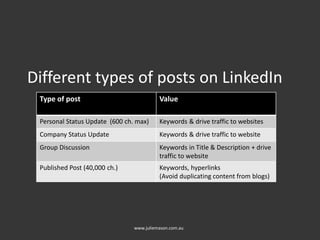
Different types of posts on LinkedIn
www.juliemason.com.au
Type of post Value
Personal Status Update (600 ch. max) Keywords & drive traffic to websites
Company Status Update Keywords & drive traffic to website
Group Discussion Keywords in Title & Description + drive
traffic to website
Published Post (40,000 ch.) Keywords, hyperlinks
(Avoid duplicating content from blogs)
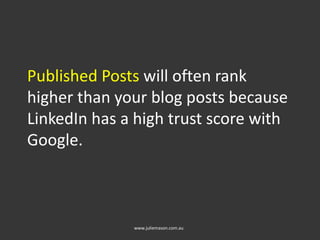
Published Posts will often rank
higher than your blog posts because
LinkedIn has a high trust score with
Google.
www.juliemason.com.au
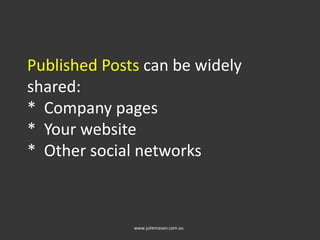
Published Posts can be widely
shared:
* Company pages
* Your website
* Other social networks
www.juliemason.com.au
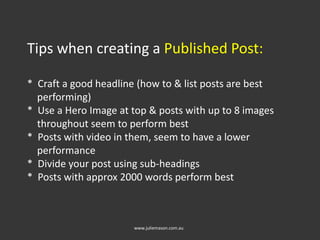
Tips when creating a Published Post:
* Craft a good headline (how to & list posts are best
performing)
* Use a Hero Image at top & posts with up to 8 images
throughout seem to perform best
* Posts with video in them, seem to have a lower
performance
* Divide your post using sub-headings
* Posts with approx 2000 words perform best
www.juliemason.com.au
Q & A

Optimise LinkedIn for Improved Search Results

  • 1.
    Optimise LinkedIn for Improved SearchResults with Julie Mason
  • 2.
    Here’s what we’recovering today: * The Google + LinkedIn relationship * How to optimise LinkedIn for search * Leveraging your content on LinkedIn www.juliemason.com.au
  • 3.
    LinkedIn is theworld’s largest professional networking site with over 347 million members www.juliemason.com.au
  • 4.
    LinkedIn have positionedthemselves as a content hub for business www.juliemason.com.au
  • 5.
    Every LinkedIn profileand company page is infused with strong metadata www.juliemason.com.au
  • 6.
    This is perhapswhy Google tends to consider LinkedIn more relevant than other social networks www.juliemason.com.au
  • 7.
    Having said that,it is important to note that nearly every outbound link from LinkedIn’s platform is a “no- follow” link www.juliemason.com.au
  • 8.
    But that doesnot mean that LinkedIn doesn’t have great value in helping you or your business show up high on Google’s search results www.juliemason.com.au
  • 9.
    Test this outby Googling your name or company...often it will show up above even your website address www.juliemason.com.au
  • 10.
  • 11.
    Take time tofully complete your profile...this matters! www.juliemason.com.au
  • 12.
    Use anchor textin your website links Instead of choosing ‘Company Website’ or ‘Blog’...choose ‘Other’ and insert a keyword rich title (30 characters) www.juliemason.com.au
  • 13.
    Claim your VanityURL www.juliemason.com.au
  • 14.
    Optimise your ExperienceTitles with keywords Titles are like H1 & H2 tags...so use them wisely for example: Current – Manager Optimised – CPA Accountant Specialising In Personal Tax www.juliemason.com.au
  • 15.
    Optimise your Experience Descriptionswith keywords Descriptions are a great place to include your keywords. Don’t keyword stuff! By adding them in bullet-point format you can improve your profile’s scan-ability www.juliemason.com.au
  • 16.
    Joining relevant LinkedInGroups can improve your profile’s SEO eg: Brisbane Digital Marketing Network gives you geo-targeted SEO www.juliemason.com.au
  • 17.
    For improved LinkedInsearch results – connect with more people www.juliemason.com.au
  • 18.
    Cross-promote your profileon... * Other social networks * Website(s) * Email www.juliemason.com.au
  • 19.
  • 20.
    Flesh out yourLinkedIn Company Page www.juliemason.com.au
  • 21.
    Add your mostimportant keywords and phrases separated by an asterisk (*) at the top of your description field (limit them to 100 characters) www.juliemason.com.au
  • 22.
    Then add anengaging company description and use your keywords and phrases throughout. Avoid keyword stuffing. www.juliemason.com.au
  • 23.
    Take advantage ofthe Specialities section of your company page – you can use up to 256 characters in this section so add your top 10 SEO keywords www.juliemason.com.au
  • 24.
    LinkedIn is acontent hub www.juliemason.com.au
  • 25.
    Different types ofposts on LinkedIn www.juliemason.com.au Type of post Value Personal Status Update (600 ch. max) Keywords & drive traffic to websites Company Status Update Keywords & drive traffic to website Group Discussion Keywords in Title & Description + drive traffic to website Published Post (40,000 ch.) Keywords, hyperlinks (Avoid duplicating content from blogs)
  • 26.
    Published Posts willoften rank higher than your blog posts because LinkedIn has a high trust score with Google. www.juliemason.com.au
  • 27.
    Published Posts canbe widely shared: * Company pages * Your website * Other social networks www.juliemason.com.au
  • 28.
    Tips when creatinga Published Post: * Craft a good headline (how to & list posts are best performing) * Use a Hero Image at top & posts with up to 8 images throughout seem to perform best * Posts with video in them, seem to have a lower performance * Divide your post using sub-headings * Posts with approx 2000 words perform best www.juliemason.com.au
  • 29.