









Mobile	
  Op*miza*on	
  That	
  
Actually	
  Works
Kyle	
  Duford	
  
eCommerce	
  Director	
  
Chrome	
  Industries	
  
@kyleduford	
  
Peter	
  McLachlan	
  
Founder	
  and	
  CPO	
  
Mobify	
  
@b1tr0t	
  
!
Chrome	
  Industries
Kyle	
  Duford	
  
eCommerce	
  Director	
  
Chrome	
  Industries	
  
@kyleduford	
  
Why	
  Mobile
“One	
  day,	
  all	
  this	
  informa<on	
  —
telecommunica<on,	
  connec<vity	
  
—	
  will	
  be	
  in	
  your	
  pocket.
Prolifera<on	
  of	
  Devices
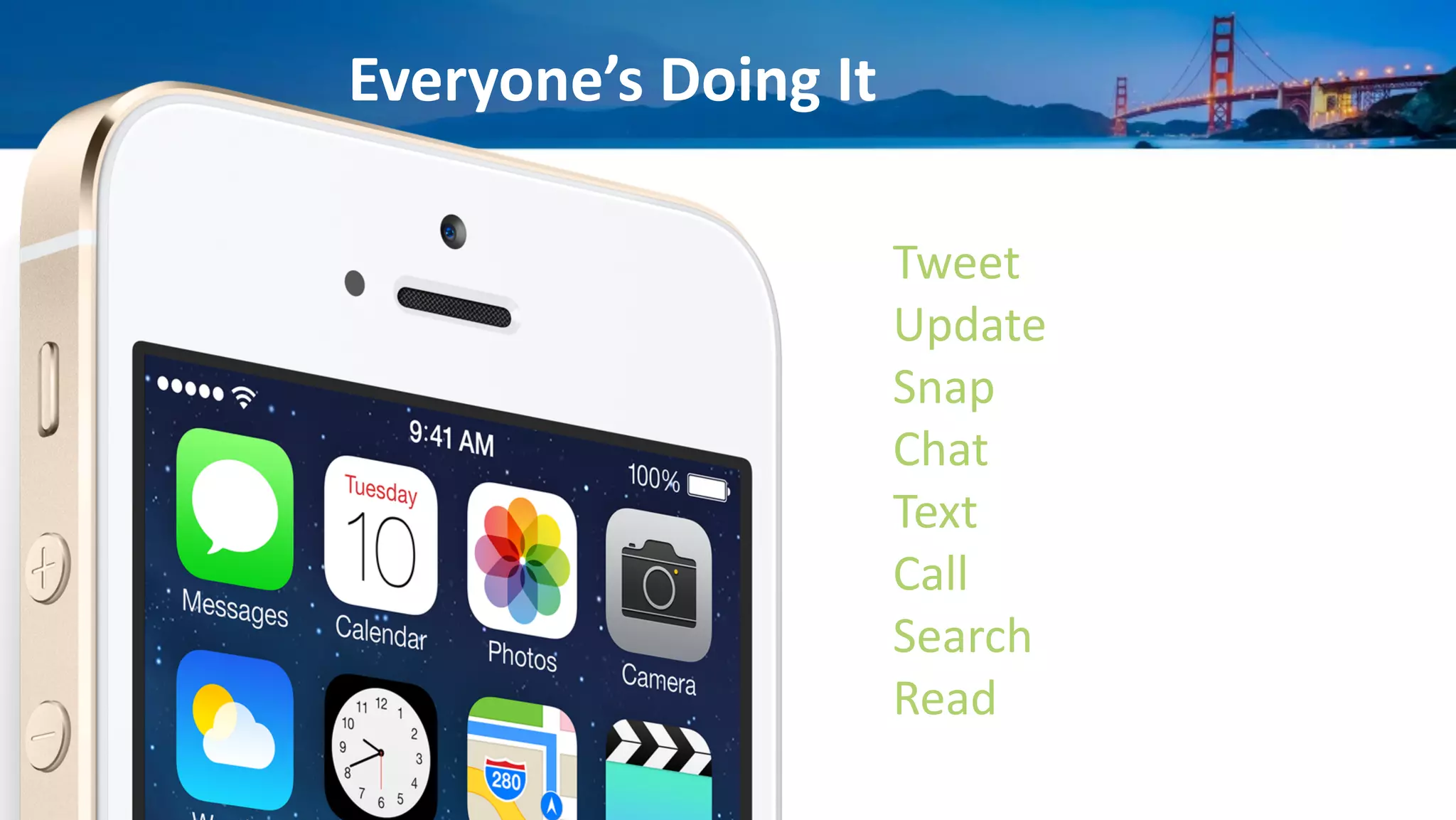
Everyone’s	
  Doing	
  It
Tweet	
  
Update	
  
Snap	
  
Chat	
  
Text	
  
Call	
  
Search	
  
Read	
  
!
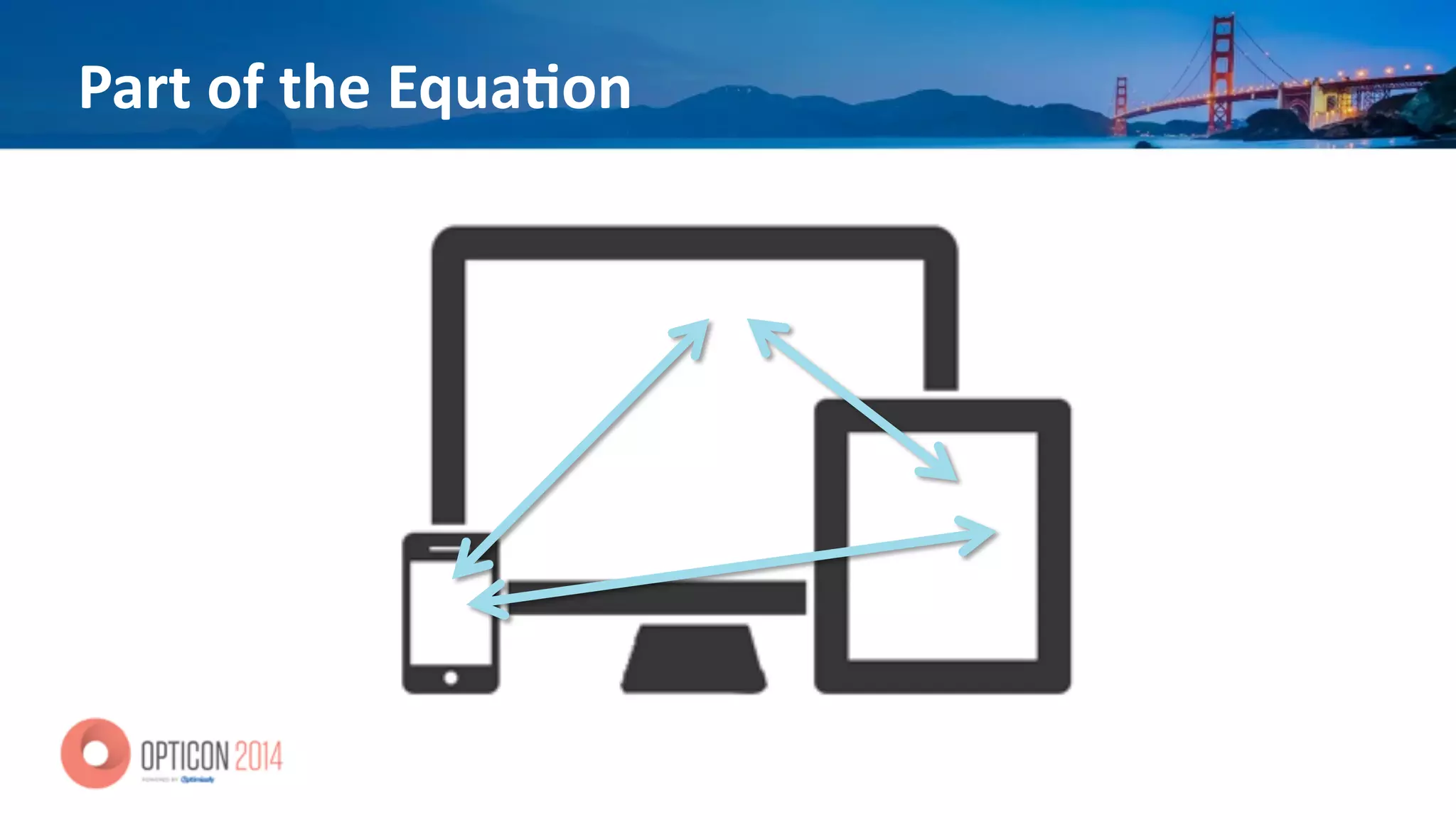
Part	
  of	
  the	
  Equa<on
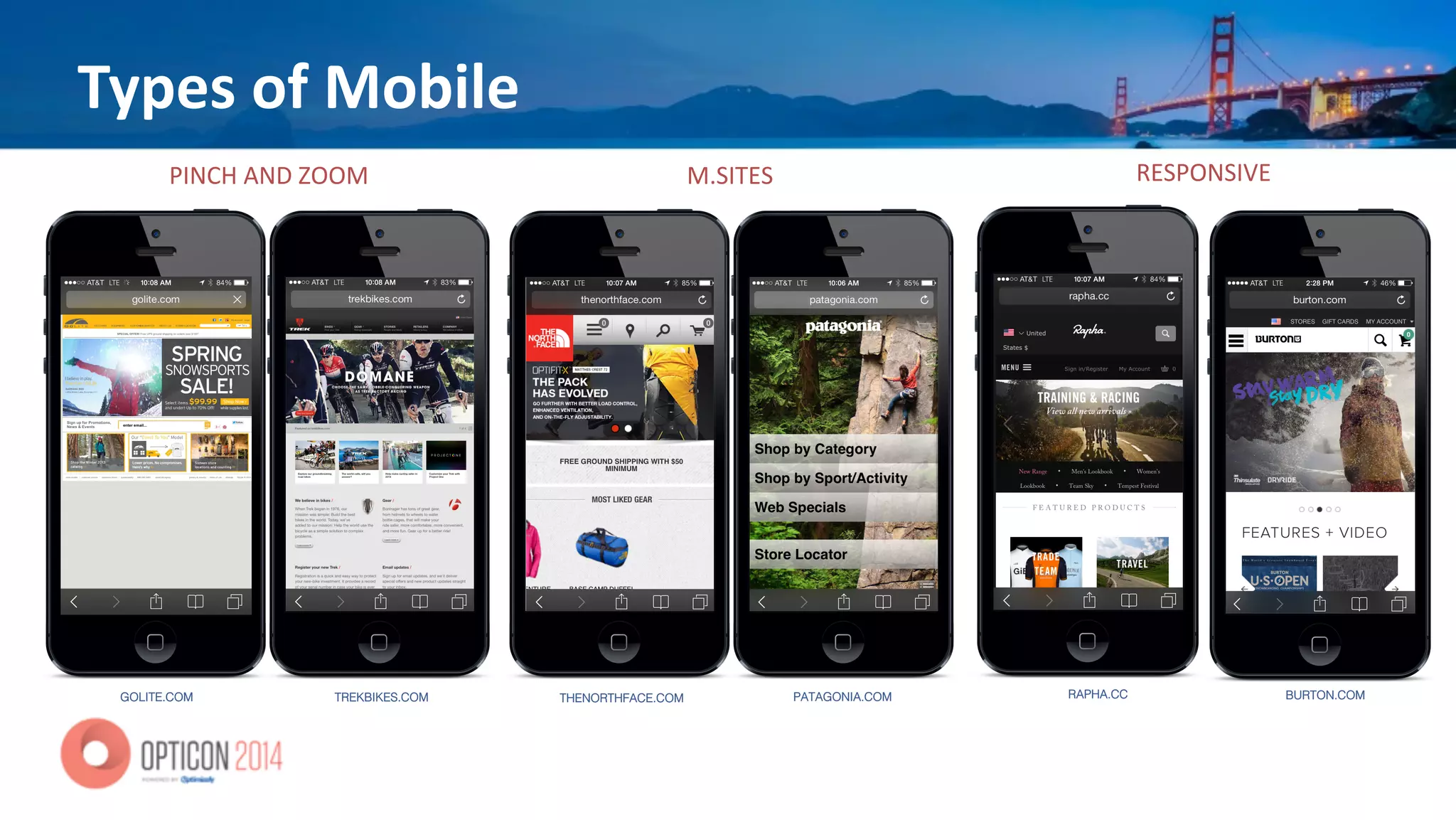
Types	
  of	
  Mobile
GOLITE.COM! TREKBIKES.COM!
PINCH&AND&ZOOM&
THENORTHFACE.COM! PATAGONIA.COM!
M.SITES'
BURTON.COM!RAPHA.CC!
RESPONSIVE)
Using	
  Data	
  to	
  Understand	
  Mobile
• CONSISTENCY	
  IN	
  ALL	
  ELEMENTS	
  
• General	
  look	
  and	
  feel	
  
• Path	
  to	
  purchase	
  
• Search	
  
• Naviga*on	
  
• Merchandising	
  (eCommerce	
  sites)	
  
• Photos	
  	
  
• Descrip*ons	
  
• Calls	
  to	
  ac*on	
  
• Run	
  sta*s*cal	
  analysis	
  on	
  anything	
  (and	
  everything)	
  
• Because	
  data	
  doesn’t	
  care	
  if	
  you’re	
  mobile	
  
– It	
  just	
  documents	
  and	
  logs	
  
• Then	
  check	
  to	
  see	
  where	
  the	
  points	
  differ,	
  if	
  any,	
  
from	
  desktop,	
  tablet	
  
• Develop	
  your	
  hypothesis	
  
• Test
Data	
  is	
  S<ll	
  King
Tes<ng
• Iden*fy	
  problem/issue	
  
• Hypothesize	
  
• Ideas	
  
• Tes*ng	
  
• Analyze	
  
• Implement	
  or	
  re-­‐test
Using	
  Data	
  to	
  Understand	
  Mobile
• NO	
  SECRET	
  TO	
  BUILDING	
  TEAMS	
  
• No	
  need	
  for	
  a	
  special	
  “Mobile	
  Ops	
  Team”	
  
• Think	
  like	
  a	
  customer	
  
• Use	
  your	
  devices	
  for	
  UAT	
  tes*ng	
  
• Give	
  the	
  ability	
  to	
  try,	
  fail	
  and	
  learn
Test.	
  Learn.	
  Repeat.
Mobify
Peter	
  McLachlan	
  
Founder	
  and	
  CPO	
  
Mobify	
  
@b1tr0t	
  
!
eCommerce Web Experience Acceleration Platform
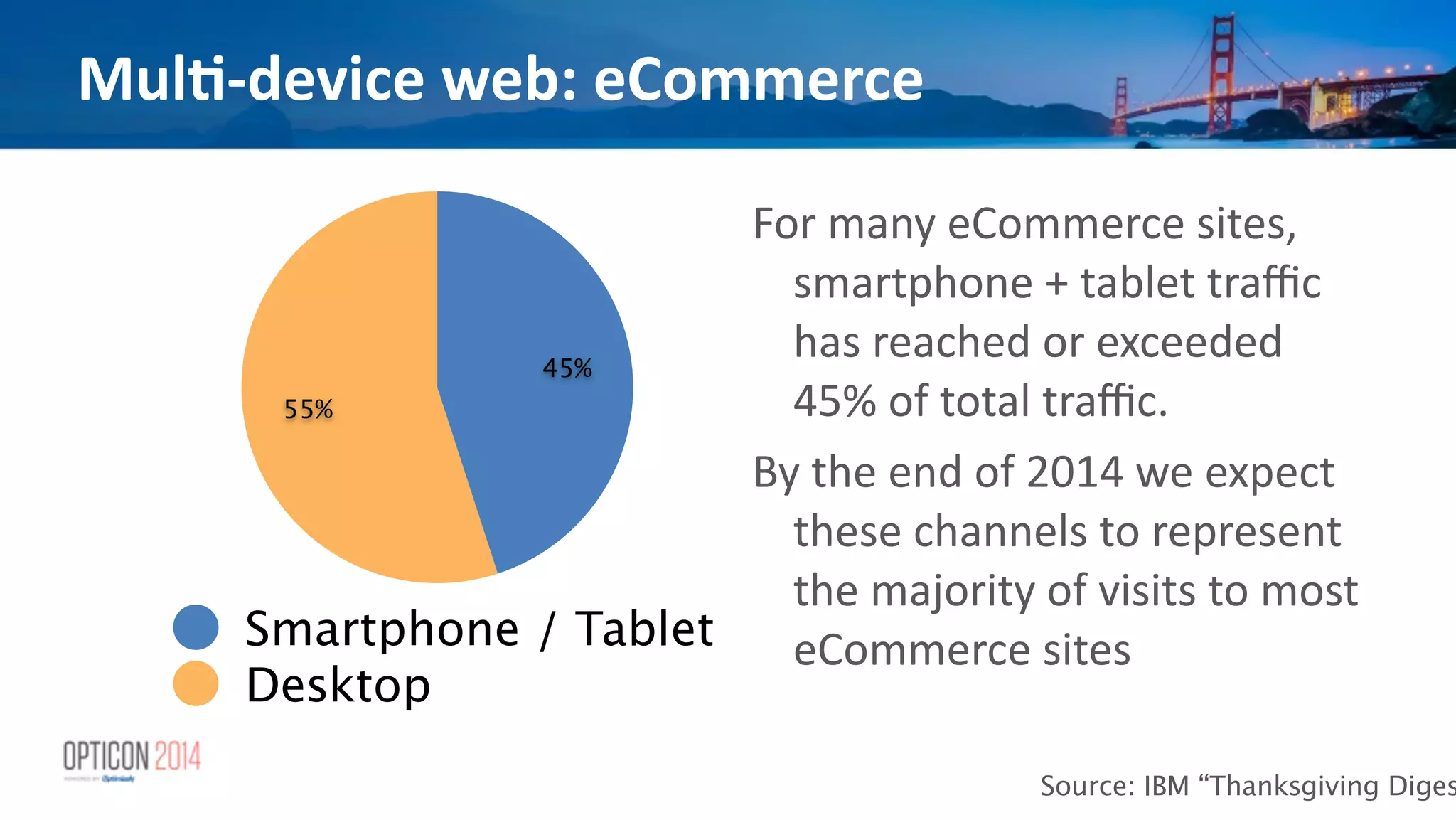
Mul<-­‐device	
  web:	
  eCommerce
55%
45%
Smartphone / Tablet
Desktop
Source: IBM “Thanksgiving Diges
For	
  many	
  eCommerce	
  sites,	
  
smartphone	
  +	
  tablet	
  traffic	
  
has	
  reached	
  or	
  exceeded	
  
45%	
  of	
  total	
  traffic.	


By	
  the	
  end	
  of	
  2014	
  we	
  expect	
  
these	
  channels	
  to	
  represent	
  
the	
  majority	
  of	
  visits	
  to	
  most	
  
eCommerce	
  sites
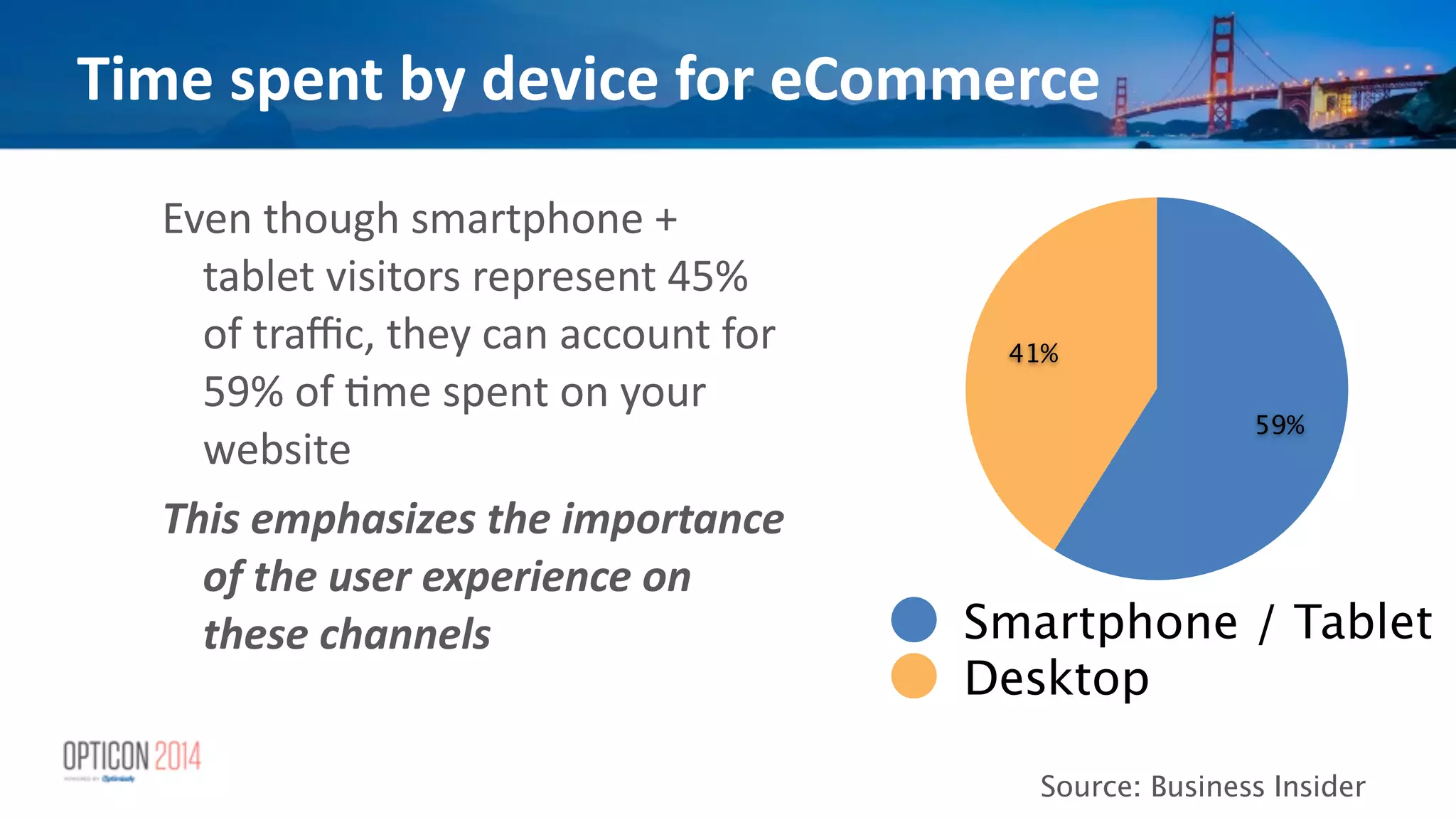
Time	
  spent	
  by	
  device	
  for	
  eCommerce
41%
59%
Smartphone / Tablet
Desktop
Source: Business Insider
Even	
  though	
  smartphone	
  +	
  
tablet	
  visitors	
  represent	
  45%	
  
of	
  traffic,	
  they	
  can	
  account	
  for	
  
59%	
  of	
  *me	
  spent	
  on	
  your	
  
website	
  
This	
  emphasizes	
  the	
  importance	
  
of	
  the	
  user	
  experience	
  on	
  
these	
  channels
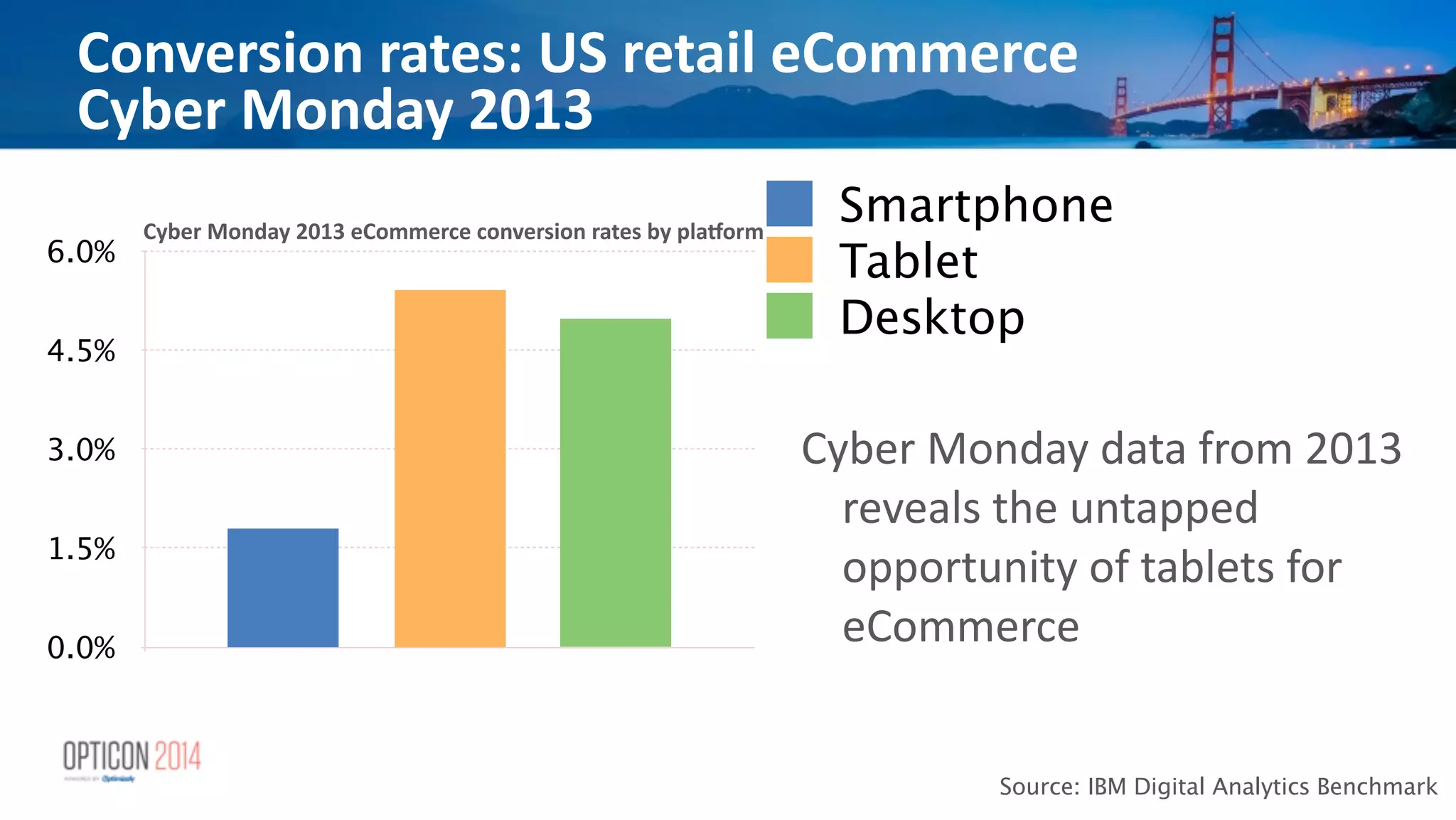
Conversion	
  rates:	
  US	
  retail	
  eCommerce	
  	
  
Cyber	
  Monday	
  2013
0.0%
1.5%
3.0%
4.5%
6.0%
Smartphone
Tablet
Desktop
Source: IBM Digital Analytics Benchmark
Cyber	
  Monday	
  data	
  from	
  2013	
  
reveals	
  the	
  untapped	
  
opportunity	
  of	
  tablets	
  for	
  
eCommerce
Cyber	
  Monday	
  2013	
  eCommerce	
  conversion	
  rates	
  by	
  plaUorm
28%
72%
Source: Google Mobile Playbook
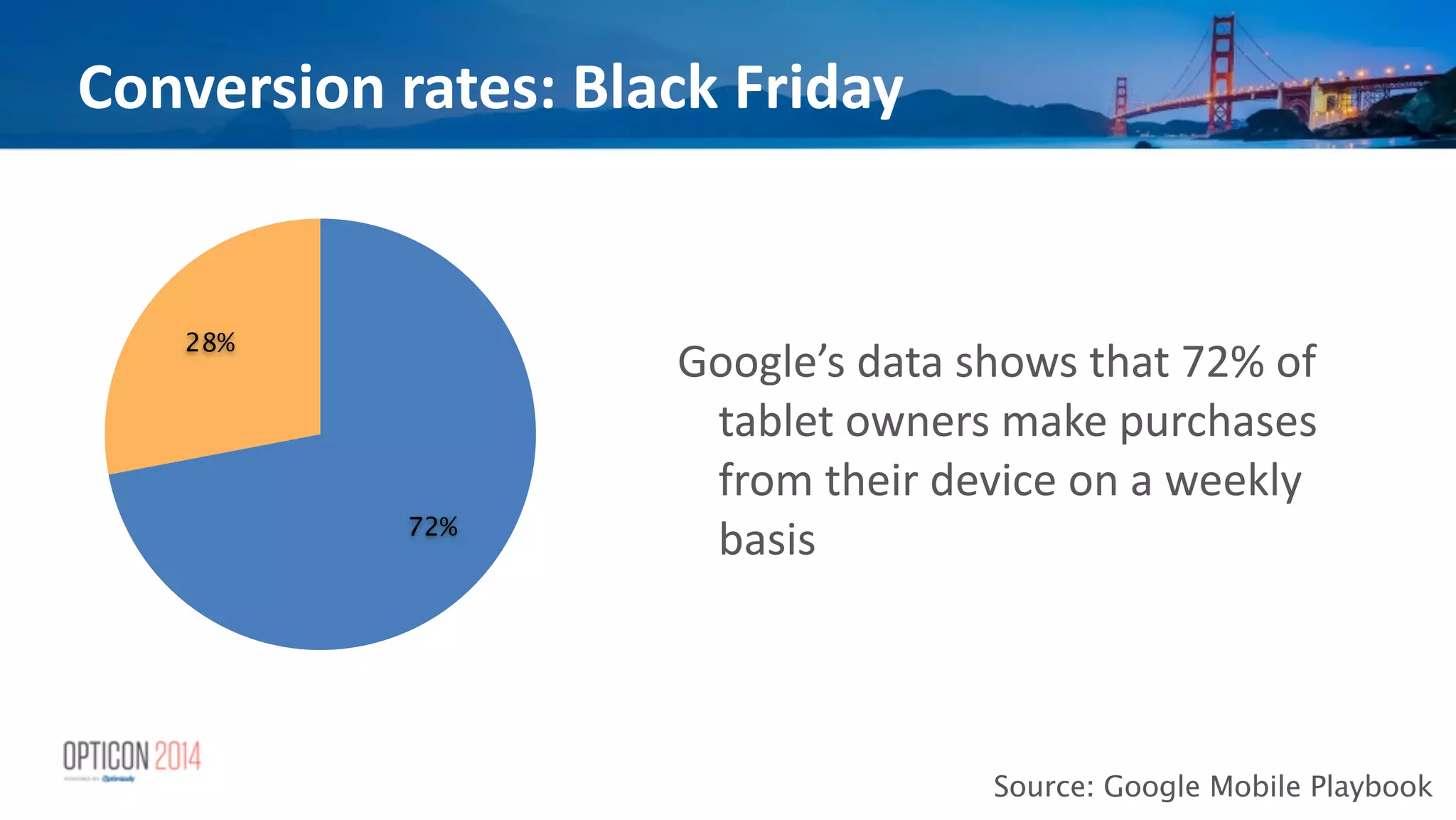
Google’s	
  data	
  shows	
  that	
  72%	
  of	
  
tablet	
  owners	
  make	
  purchases	
  
from	
  their	
  device	
  on	
  a	
  weekly	
  
basis
Conversion	
  rates:	
  Black	
  Friday
Emerging	
  opportunity:	
  the	
  tablet
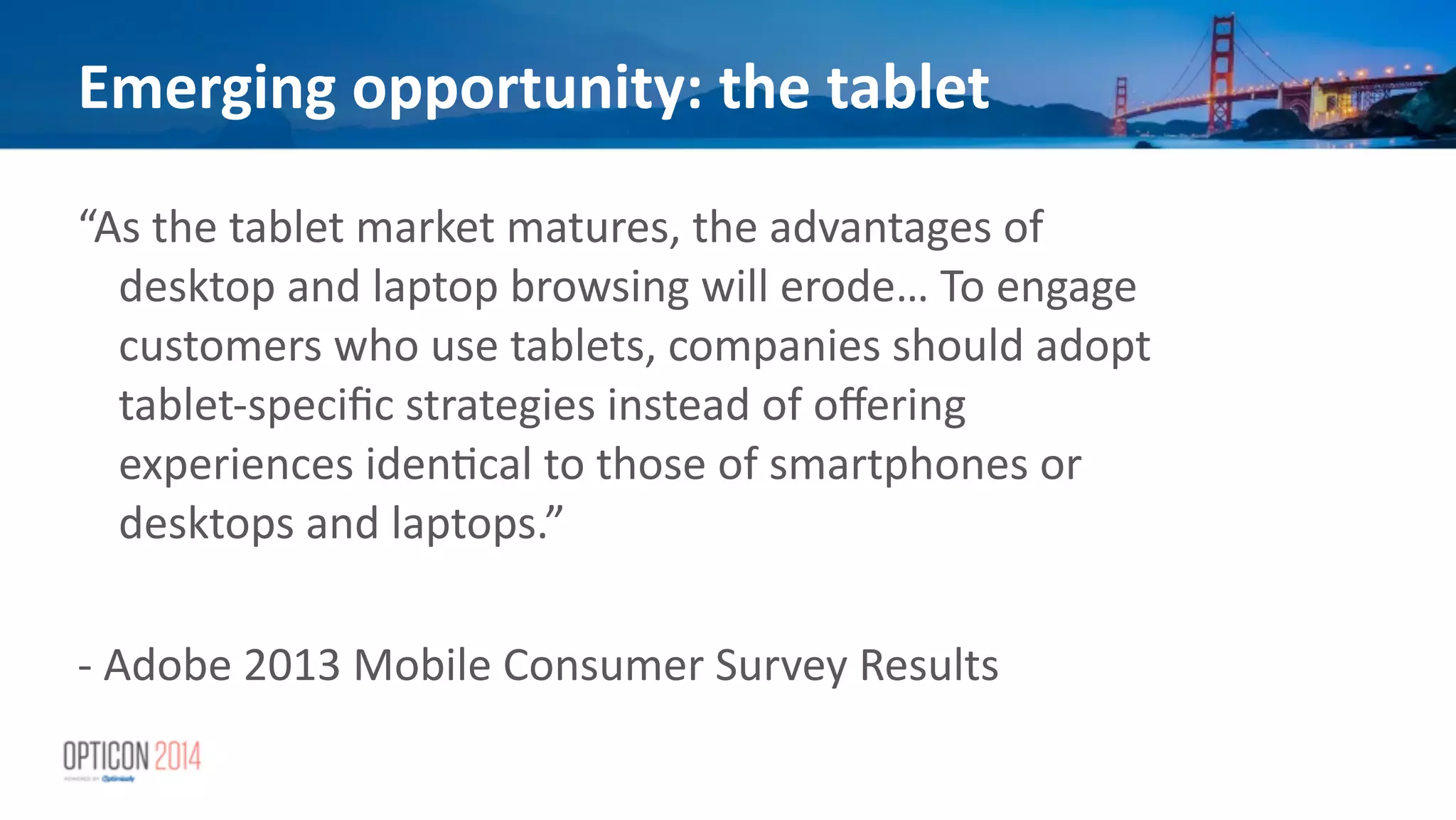
“As	
  the	
  tablet	
  market	
  matures,	
  the	
  advantages	
  of	
  
desktop	
  and	
  laptop	
  browsing	
  will	
  erode…	
  To	
  engage	
  
customers	
  who	
  use	
  tablets,	
  companies	
  should	
  adopt	
  
tablet-­‐specific	
  strategies	
  instead	
  of	
  offering	
  
experiences	
  iden*cal	
  to	
  those	
  of	
  smartphones	
  or	
  
desktops	
  and	
  laptops.”	


!
-­‐	
  Adobe	
  2013	
  Mobile	
  Consumer	
  Survey	
  Results
Why	
  A/B	
  test?	
  A	
  refresher
• A/B	
  tes*ng	
  is	
  a	
  discount	
  leading	
  indicator:	
  it	
  is	
  a	
  
crucial	
  part	
  of	
  a	
  robust	
  internal	
  UX	
  process	
  
• A/B	
  tes*ng	
  tells	
  you	
  the	
  “what”,	
  and	
  helps	
  your	
  UX	
  
analysts	
  &	
  designers	
  find	
  the	
  “why”	
  and	
  the	
  “how”	
  
through	
  rapid	
  experimenta*on	
  and	
  quan*ta*ve	
  
analysis	
  
!
Strategies	
  for	
  mul<-­‐screen	
  tes<ng
Two	
  main	
  strategies	
  
• Test	
  the	
  change	
  on	
  all	
  screen	
  sizes	
  at	
  the	
  same	
  *me	
  
• Test	
  the	
  change	
  on	
  a	
  specific	
  group	
  of	
  screen	
  sizes:	
  
“breakpoints”
Tes<ng	
  on	
  all	
  screen	
  sizes	
  at	
  the	
  same	
  <me
• May	
  or	
  may	
  not	
  be	
  technically	
  feasible	
  
• Will	
  provide	
  cross-­‐channel	
  feedback	
  
• but	
  also	
  cross-­‐channel	
  noise
Tes<ng	
  on	
  all	
  screen	
  sizes	
  at	
  the	
  same	
  <me
Feasibility	
  
• Possible	
  only	
  if	
  UX	
  change	
  is	
  relevant	
  across	
  all	
  
screen	
  sizes	
  
• Only	
  applicable	
  if	
  there	
  is	
  uniform	
  UX	
  between	
  
views	
  at	
  different	
  screen	
  sizes	
  
Tes<ng	
  on	
  all	
  screen	
  sizes	
  at	
  the	
  same	
  <me
Advantages	
  
• Provides	
  cross-­‐channel	
  data	
  
• shorter	
  total	
  test	
  dura*on	
  
• May	
  offer	
  some	
  maintenance	
  advantages	
  
Tes<ng	
  on	
  all	
  screen	
  sizes	
  at	
  the	
  same	
  <me
Disadvantages	
  
• Costly	
  for	
  
• resources	
  
• *me	
  to	
  design	
  test	
  
• Technically	
  challenging	
  
• changes	
  must	
  work	
  &	
  be	
  QA	
  approved	
  across	
  
breakpoints	
  
• or	
  be	
  designed	
  &	
  tested	
  as	
  separate	
  HTML	
  snippets	
  
Tes<ng	
  at	
  a	
  single	
  breakpoint
• Focus	
  your	
  test,	
  taking	
  into	
  account:	
  
• probable	
  user	
  context	
  &	
  intent	
  
• interac*on	
  metaphor	
  
• device	
  capabili*es	
  
• device	
  limita*ons	
  
• Can	
  be	
  a	
  complete	
  template	
  varia*on	
  or	
  minor	
  UX	
  
change
Feasibility	
  
• Can	
  be	
  done	
  regardless	
  of	
  whether	
  you	
  have	
  a	
  
unified	
  UX	
  across	
  smartphone/tablet/desktop	
  
• Works	
  for	
  Responsive	
  Web	
  Design,	
  Separate	
  Mobile	
  
Websites	
  or	
  RESS	
  approaches	
  to	
  suppor*ng	
  mobile	
  
!
Tes<ng	
  at	
  a	
  single	
  breakpoint
Advantages	
  
• Focus	
  on	
  probable	
  visitor	
  context	
  
• Focus	
  on	
  probable	
  visitor	
  use	
  case	
  
• Fewer	
  developer	
  resources	
  to	
  deploy	
  any	
  given	
  test	
  
• Less	
  QA	
  required	
  to	
  deploy	
  a	
  test	
  
• Succeed	
  or	
  fail	
  faster	
  
!
Tes<ng	
  at	
  a	
  single	
  breakpoint
Disadvantages	
  
• Can	
  result	
  in	
  diverging	
  requirements	
  for	
  different	
  
screen	
  sizes	
  that	
  are	
  difficult	
  to	
  merge	
  back	
  into	
  
your	
  codebase	
  
• though	
  an	
  adap*ve	
  templa*ng	
  solu*on	
  can	
  help	
  
you	
  “power	
  up”	
  your	
  templates	
  
!
!
Tes<ng	
  at	
  a	
  single	
  breakpoint
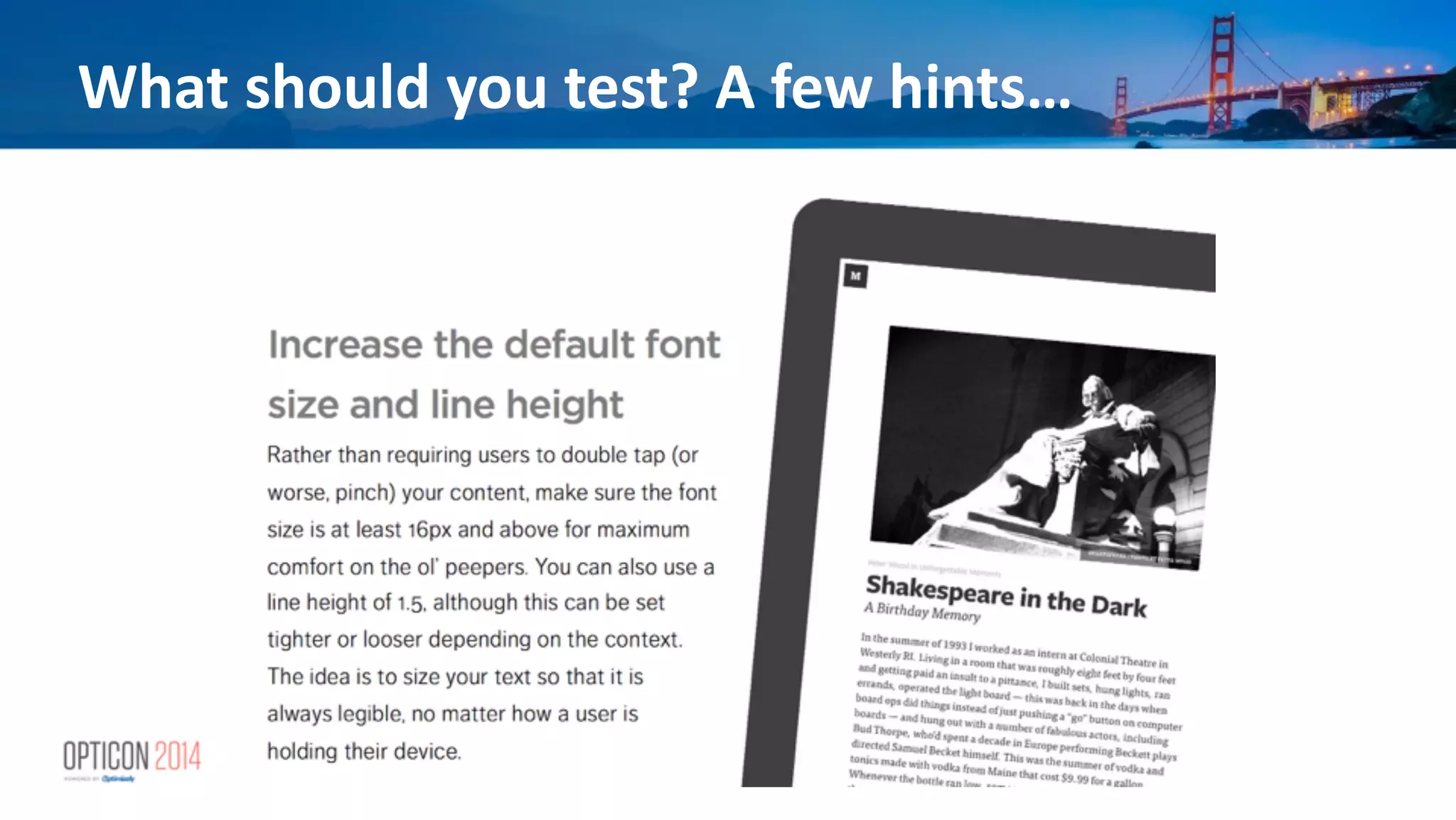
What	
  should	
  you	
  test?	
  A	
  few	
  hints…
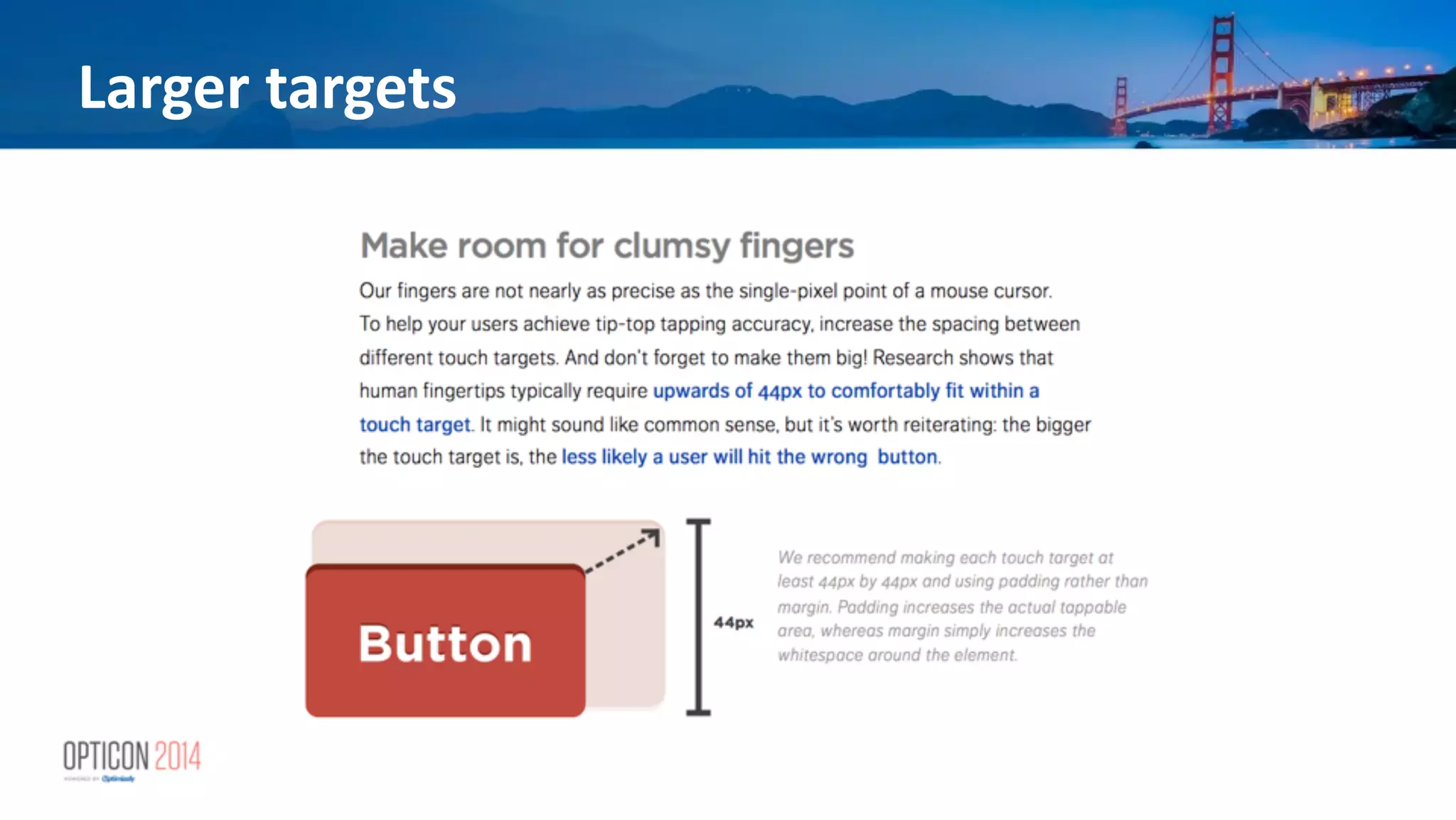
Larger	
  targets
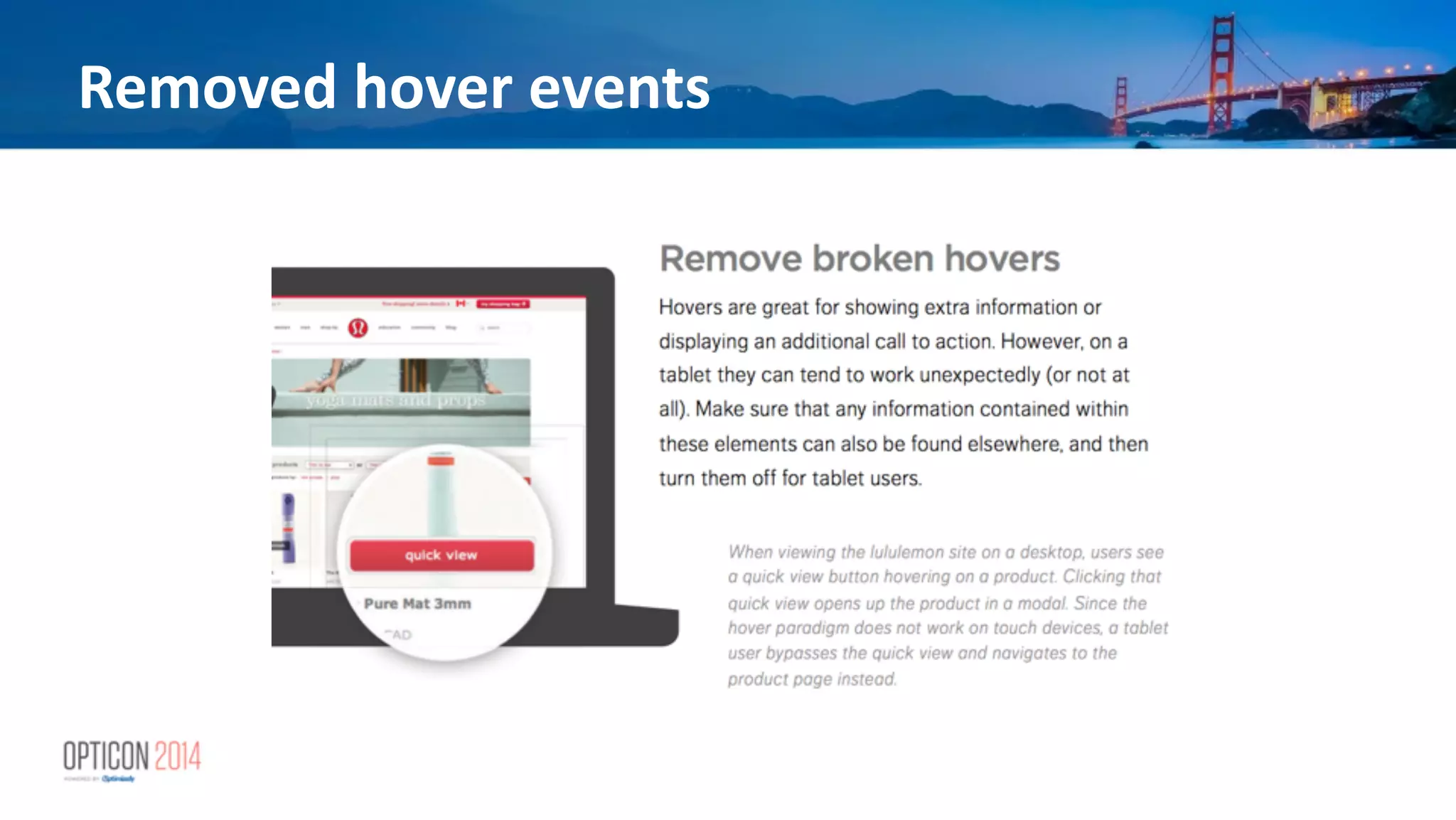
Removed	
  hover	
  events
Results
For	
  Coastal	
  Contacts,	
  through	
  
analysis	
  in	
  Google	
  Analy*cs,	
  
Mobify’s	
  team	
  iden*fied	
  that	
  
smartphone	
  visitors	
  seemed	
  
confused	
  about	
  naviga*on.	
  
An	
  A/B	
  test	
  of	
  a	
  simplified	
  naviga*on	
  
structure	
  revealed	
  that	
  
smartphone	
  conversions	
  could	
  be	
  
improved	
  by	
  as	
  much	
  as	
  50%	
  with	
  
an	
  improved	
  naviga*on	
  structure	
  
Closing	
  <ps
• Always	
  A/A	
  test	
  
• Don’t	
  jump	
  to	
  conclusions	
  too	
  early	
  
• If	
  at	
  first	
  it	
  fails…	
  try	
  again	
  
• Smaller	
  changes:	
  segment	
  by	
  device	
  type	
  &	
  screen-­‐
size	
  for	
  each	
  test
Mobile	
  Op*miza*on	
  That	
  
Actually	
  Works
Kyle	
  Duford	
  
eCommerce	
  Director	
  
Chrome	
  Industries	
  
@kyleduford	
  
Peter	
  McLachlan	
  
Founder	
  and	
  CPO	
  
Mobify	
  
@b1tr0t	
  
!

Mobile Optimization that Actually Works

  • 1.
    Mobile  Op*miza*on  That   Actually  Works Kyle  Duford   eCommerce  Director   Chrome  Industries   @kyleduford   Peter  McLachlan   Founder  and  CPO   Mobify   @b1tr0t   !
  • 2.
    Chrome  Industries Kyle  Duford   eCommerce  Director   Chrome  Industries   @kyleduford  
  • 3.
  • 4.
    “One  day,  all  this  informa<on  — telecommunica<on,  connec<vity   —  will  be  in  your  pocket.
  • 5.
  • 6.
    Everyone’s  Doing  It Tweet   Update   Snap   Chat   Text   Call   Search   Read   !
  • 7.
  • 8.
    Types  of  Mobile GOLITE.COM!TREKBIKES.COM! PINCH&AND&ZOOM& THENORTHFACE.COM! PATAGONIA.COM! M.SITES' BURTON.COM!RAPHA.CC! RESPONSIVE)
  • 9.
    Using  Data  to  Understand  Mobile • CONSISTENCY  IN  ALL  ELEMENTS   • General  look  and  feel   • Path  to  purchase   • Search   • Naviga*on   • Merchandising  (eCommerce  sites)   • Photos     • Descrip*ons   • Calls  to  ac*on  
  • 10.
    • Run  sta*s*cal  analysis  on  anything  (and  everything)   • Because  data  doesn’t  care  if  you’re  mobile   – It  just  documents  and  logs   • Then  check  to  see  where  the  points  differ,  if  any,   from  desktop,  tablet   • Develop  your  hypothesis   • Test Data  is  S<ll  King
  • 11.
    Tes<ng • Iden*fy  problem/issue   • Hypothesize   • Ideas   • Tes*ng   • Analyze   • Implement  or  re-­‐test
  • 12.
    Using  Data  to  Understand  Mobile • NO  SECRET  TO  BUILDING  TEAMS   • No  need  for  a  special  “Mobile  Ops  Team”   • Think  like  a  customer   • Use  your  devices  for  UAT  tes*ng   • Give  the  ability  to  try,  fail  and  learn
  • 13.
  • 14.
    Mobify Peter  McLachlan   Founder  and  CPO   Mobify   @b1tr0t   !
  • 15.
    eCommerce Web ExperienceAcceleration Platform
  • 16.
    Mul<-­‐device  web:  eCommerce 55% 45% Smartphone/ Tablet Desktop Source: IBM “Thanksgiving Diges For  many  eCommerce  sites,   smartphone  +  tablet  traffic   has  reached  or  exceeded   45%  of  total  traffic.       By  the  end  of  2014  we  expect   these  channels  to  represent   the  majority  of  visits  to  most   eCommerce  sites
  • 17.
    Time  spent  by  device  for  eCommerce 41% 59% Smartphone / Tablet Desktop Source: Business Insider Even  though  smartphone  +   tablet  visitors  represent  45%   of  traffic,  they  can  account  for   59%  of  *me  spent  on  your   website   This  emphasizes  the  importance   of  the  user  experience  on   these  channels
  • 18.
    Conversion  rates:  US  retail  eCommerce     Cyber  Monday  2013 0.0% 1.5% 3.0% 4.5% 6.0% Smartphone Tablet Desktop Source: IBM Digital Analytics Benchmark Cyber  Monday  data  from  2013   reveals  the  untapped   opportunity  of  tablets  for   eCommerce Cyber  Monday  2013  eCommerce  conversion  rates  by  plaUorm
  • 19.
    28% 72% Source: Google MobilePlaybook Google’s  data  shows  that  72%  of   tablet  owners  make  purchases   from  their  device  on  a  weekly   basis Conversion  rates:  Black  Friday
  • 20.
    Emerging  opportunity:  the  tablet “As  the  tablet  market  matures,  the  advantages  of   desktop  and  laptop  browsing  will  erode…  To  engage   customers  who  use  tablets,  companies  should  adopt   tablet-­‐specific  strategies  instead  of  offering   experiences  iden*cal  to  those  of  smartphones  or   desktops  and  laptops.”       ! -­‐  Adobe  2013  Mobile  Consumer  Survey  Results
  • 21.
    Why  A/B  test?  A  refresher • A/B  tes*ng  is  a  discount  leading  indicator:  it  is  a   crucial  part  of  a  robust  internal  UX  process   • A/B  tes*ng  tells  you  the  “what”,  and  helps  your  UX   analysts  &  designers  find  the  “why”  and  the  “how”   through  rapid  experimenta*on  and  quan*ta*ve   analysis   !
  • 22.
    Strategies  for  mul<-­‐screen  tes<ng Two  main  strategies   • Test  the  change  on  all  screen  sizes  at  the  same  *me   • Test  the  change  on  a  specific  group  of  screen  sizes:   “breakpoints”
  • 23.
    Tes<ng  on  all  screen  sizes  at  the  same  <me • May  or  may  not  be  technically  feasible   • Will  provide  cross-­‐channel  feedback   • but  also  cross-­‐channel  noise
  • 24.
    Tes<ng  on  all  screen  sizes  at  the  same  <me Feasibility   • Possible  only  if  UX  change  is  relevant  across  all   screen  sizes   • Only  applicable  if  there  is  uniform  UX  between   views  at  different  screen  sizes  
  • 25.
    Tes<ng  on  all  screen  sizes  at  the  same  <me Advantages   • Provides  cross-­‐channel  data   • shorter  total  test  dura*on   • May  offer  some  maintenance  advantages  
  • 26.
    Tes<ng  on  all  screen  sizes  at  the  same  <me Disadvantages   • Costly  for   • resources   • *me  to  design  test   • Technically  challenging   • changes  must  work  &  be  QA  approved  across   breakpoints   • or  be  designed  &  tested  as  separate  HTML  snippets  
  • 27.
    Tes<ng  at  a  single  breakpoint • Focus  your  test,  taking  into  account:   • probable  user  context  &  intent   • interac*on  metaphor   • device  capabili*es   • device  limita*ons   • Can  be  a  complete  template  varia*on  or  minor  UX   change
  • 28.
    Feasibility   • Can  be  done  regardless  of  whether  you  have  a   unified  UX  across  smartphone/tablet/desktop   • Works  for  Responsive  Web  Design,  Separate  Mobile   Websites  or  RESS  approaches  to  suppor*ng  mobile   ! Tes<ng  at  a  single  breakpoint
  • 29.
    Advantages   • Focus  on  probable  visitor  context   • Focus  on  probable  visitor  use  case   • Fewer  developer  resources  to  deploy  any  given  test   • Less  QA  required  to  deploy  a  test   • Succeed  or  fail  faster   ! Tes<ng  at  a  single  breakpoint
  • 30.
    Disadvantages   • Can  result  in  diverging  requirements  for  different   screen  sizes  that  are  difficult  to  merge  back  into   your  codebase   • though  an  adap*ve  templa*ng  solu*on  can  help   you  “power  up”  your  templates   ! ! Tes<ng  at  a  single  breakpoint
  • 31.
    What  should  you  test?  A  few  hints…
  • 32.
  • 33.
  • 34.
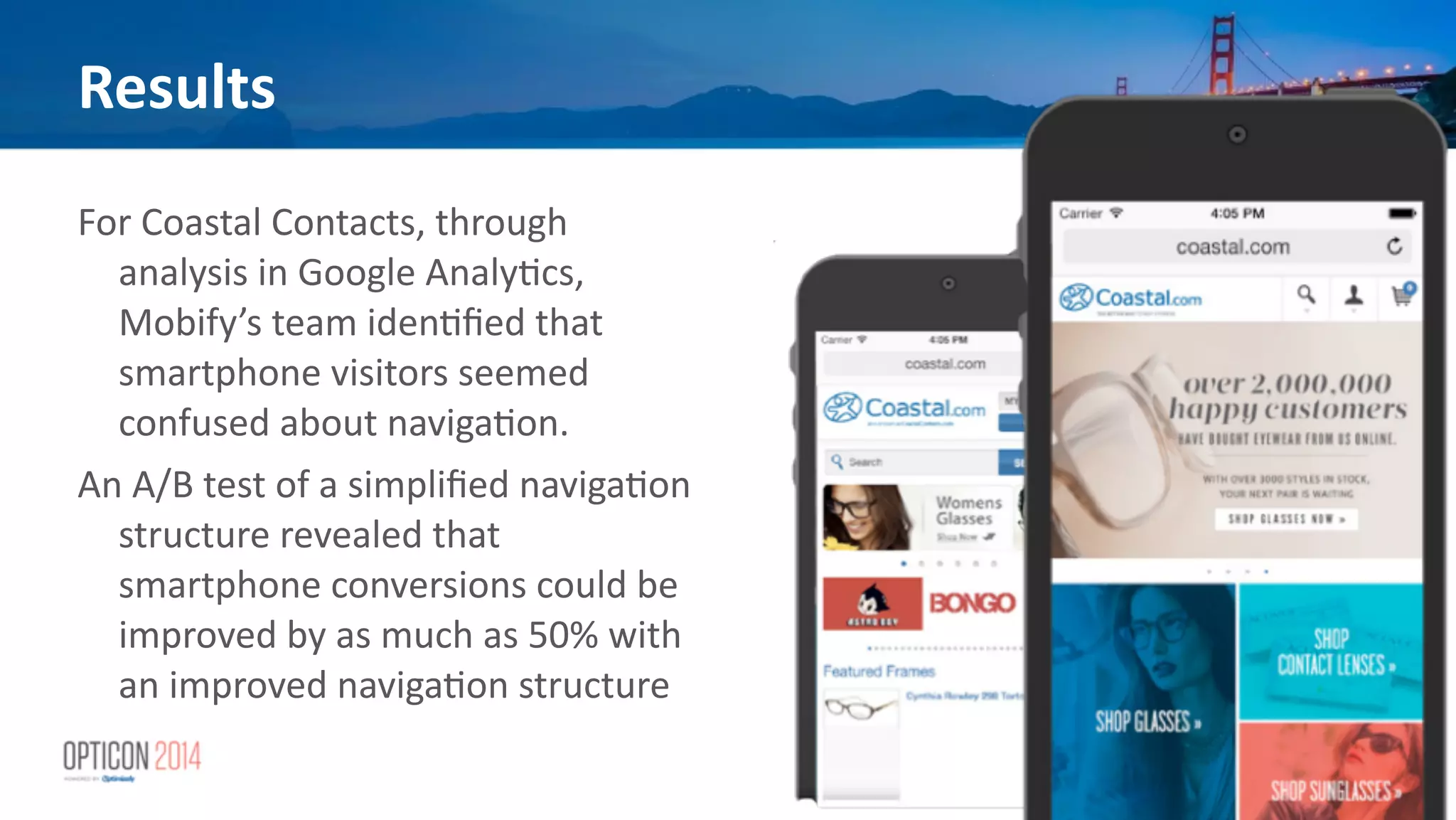
    Results For  Coastal  Contacts,  through   analysis  in  Google  Analy*cs,   Mobify’s  team  iden*fied  that   smartphone  visitors  seemed   confused  about  naviga*on.   An  A/B  test  of  a  simplified  naviga*on   structure  revealed  that   smartphone  conversions  could  be   improved  by  as  much  as  50%  with   an  improved  naviga*on  structure  
  • 35.
    Closing  <ps • Always  A/A  test   • Don’t  jump  to  conclusions  too  early   • If  at  first  it  fails…  try  again   • Smaller  changes:  segment  by  device  type  &  screen-­‐ size  for  each  test
  • 36.
    Mobile  Op*miza*on  That   Actually  Works Kyle  Duford   eCommerce  Director   Chrome  Industries   @kyleduford   Peter  McLachlan   Founder  and  CPO   Mobify   @b1tr0t   !