UNIT 2:CLOUD VIRTUALIZATION & CLUSTERS
– Implementation levels of virtualization
– Difference between traditional and Virtual Machines
– More Beowulf Clusters
– PelicanHPC
7/18/2024 1
7/18/2024 2
Implementation Levels of Virtualization
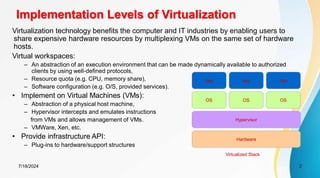
Virtualization technology benefits the computer and IT industries by enabling users to
share expensive hardware resources by multiplexing VMs on the same set of hardware
hosts.
Virtual workspaces:
– An abstraction of an execution environment that can be made dynamically available to authorized
clients by using well-defined protocols,
– Resource quota (e.g. CPU, memory share),
– Software configuration (e.g. O/S, provided services).
• Implement on Virtual Machines (VMs):
– Abstraction of a physical host machine,
– Hypervisor intercepts and emulates instructions
from VMs and allows management of VMs.
– VMWare, Xen, etc.
• Provide infrastructure API:
– Plug-ins to hardware/support structures
Hardware
OS
App App App
Hypervisor
OS OS
Virtualized Stack
7/18/2024 3
Virtual Machines
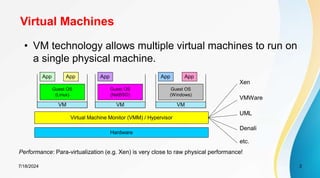
• VM technology allows multiple virtual machines to run on
a single physical machine.
Hardware
Virtual Machine Monitor (VMM) / Hypervisor
Guest OS
(Linux)
Guest OS
(NetBSD)
Guest OS
(Windows)
VM VM VM
App
App App
App
App
Xen
VMWare
UML
Denali
etc.
Performance: Para-virtualization (e.g. Xen) is very close to raw physical performance!
7/18/2024 4
Virtualization in General
Advantages of virtual machines:
– Run operating systems where the physical hardware is unavailable,
– Easier to create new machines, backup machines, etc.,
– Software testing using “clean” installs of operating systems and software,
– Emulate more machines than are physically available,
– Timeshare lightly loaded systems on one host,
– Debug problems (suspend and resume the problem machine),
– Easy migration of virtual machines (shutdown needed or not).
– Run legacy systems!
7/18/2024 5
What is the purpose and benefits?
• Cloud computing enables companies and applications, which are
system infrastructure dependent, to be infrastructure-less.
• By using the Cloud infrastructure on “pay as used and on demand”, all of
us can save in capital and operational investment!
• Clients can:
– Put their data on the platform instead of on their own desktop PCs and/or on their
own servers.
– They can put their applications on the cloud and use the servers within the cloud to
do processing and data manipulations etc.
– In computing, virtualization means to create a virtual version of a
device or resource, such as a server, storage device, network or even
an operating system where the framework divides the resource into
one or more execution environments.
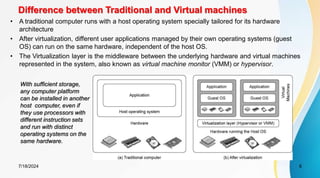
Difference between Traditional and Virtual machines
7/18/2024 6
• A traditional computer runs with a host operating system specially tailored for its hardware
architecture
• After virtualization, different user applications managed by their own operating systems (guest
OS) can run on the same hardware, independent of the host OS.
• The Virtualization layer is the middleware between the underlying hardware and virtual machines
represented in the system, also known as virtual machine monitor (VMM) or hypervisor.
With sufficient storage,
any computer platform
can be installed in another
host computer, even if
they use processors with
different instruction sets
and run with distinct
operating systems on the
same hardware.
Virtualization Layers
7/18/2024 7
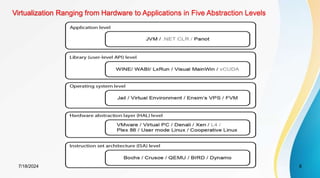
The virtualization software creates the abstraction of VMs by
interposing a virtualization layer at various levels of a
computer system.
Common virtualization layers include:
1. the instruction set architecture (ISA) level,
2. hardware level,
3. operating system level,
4. library support level, and
5. application level
Virtualization Ranging from Hardware to Applications in Five Abstraction Levels
7/18/2024 8
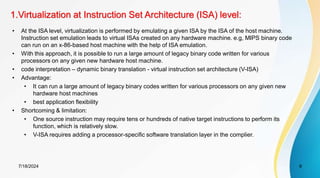
1.Virtualization at Instruction Set Architecture (ISA) level:
7/18/2024 9
• At the ISA level, virtualization is performed by emulating a given ISA by the ISA of the host machine.
Instruction set emulation leads to virtual ISAs created on any hardware machine. e.g, MIPS binary code
can run on an x-86-based host machine with the help of ISA emulation.
• With this approach, it is possible to run a large amount of legacy binary code written for various
processors on any given new hardware host machine.
• code interpretation – dynamic binary translation - virtual instruction set architecture (V-ISA)
• Advantage:
• It can run a large amount of legacy binary codes written for various processors on any given new
hardware host machines
• best application flexibility
• Shortcoming & limitation:
• One source instruction may require tens or hundreds of native target instructions to perform its
function, which is relatively slow.
• V-ISA requires adding a processor-specific software translation layer in the complier.
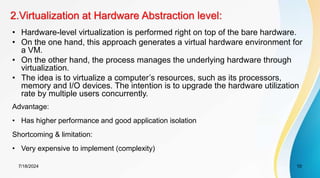
2.Virtualization at Hardware Abstraction level:
7/18/2024 10
• Hardware-level virtualization is performed right on top of the bare hardware.
• On the one hand, this approach generates a virtual hardware environment for
a VM.
• On the other hand, the process manages the underlying hardware through
virtualization.
• The idea is to virtualize a computer’s resources, such as its processors,
memory and I/O devices. The intention is to upgrade the hardware utilization
rate by multiple users concurrently.
Advantage:
• Has higher performance and good application isolation
Shortcoming & limitation:
• Very expensive to implement (complexity)
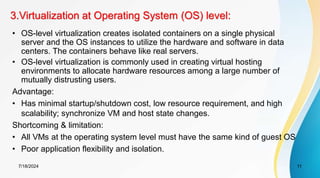
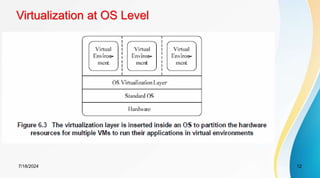
3.Virtualization at Operating System (OS) level:
7/18/2024 11
• OS-level virtualization creates isolated containers on a single physical
server and the OS instances to utilize the hardware and software in data
centers. The containers behave like real servers.
• OS-level virtualization is commonly used in creating virtual hosting
environments to allocate hardware resources among a large number of
mutually distrusting users.
Advantage:
• Has minimal startup/shutdown cost, low resource requirement, and high
scalability; synchronize VM and host state changes.
Shortcoming & limitation:
• All VMs at the operating system level must have the same kind of guest OS
• Poor application flexibility and isolation.
7/18/2024 12
Virtualization at OS Level
7/18/2024 13
Advantages of OS Extension for Virtualization
1. VMs at OS level has minimum startup/shutdown costs
2. OS-level VM can easily synchronize with its environment
Disadvantage of OS Extension for Virtualization
•All VMs in the same OS container must have the same or similar
guest OS, which restrict application flexibility of different VMs on
the same physical machine.
4.Library Support level:
7/18/2024 14
• Since most systems provide well-documented APIs, such an interface
becomes another candidate for virtualization.
• Virtualization with library interfaces is possible by controlling the
communication link between applications and the rest of a system
through API hooks.
• The software tool WINE has implemented this approach to support
Windows applications on top of UNIX hosts.
• Another example is the vCUDA which allows applications executing
within VMs to leverage GPU hardware acceleration.
Advantage:
• It has very low implementation effort
Shortcoming & limitation:
• poor application flexibility and isolation
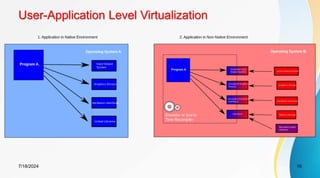
5.User-Application Level
7/18/2024 15
• Virtualization at the application level virtualizes an application as a VM. On a traditional OS, an
application often runs as a process.
• Therefore, application-level virtualization is also known as process-level virtualization.
• The most popular approach is to deploy high level language (HLL) VMs. In this scenario, the
virtualization layer sits as an application program on top of the operating system, and the layer
exports an abstraction of a VM that can run programs written and compiled to a particular
abstract machine definition.
• Other forms of application-level virtualization are known as application isolation, application
sandboxing, or application streaming.
Advantage:
• has the best application isolation
Shortcoming & limitation:
• low performance, low application flexibility and high implementation complexity.
User-Application Level Virtualization
7/18/2024 16
Virtualization Structures/Tools and Mechanisms
7/18/2024 17
• In general, there are three typical classes of VM architecture.
• Figure on slide 7 showed the architectures of a machine before and after virtualization.
• Before virtualization, the operating system manages the hardware.
• After virtualization, a virtualization layer is inserted between the hardware and the
operating system. In such a case, the virtualization layer is responsible for converting
portions of the real hardware into virtual hardware.
• Therefore, different operating systems such as Linux and Windows can run on the same
physical machine, simultaneously.
• Depending on the position of the virtualization layer, there are several classes of VM
architectures, namely the hypervisor architecture, para-virtualization, and host-based
virtualization.
• The hypervisor is also known as the VMM (Virtual Machine Monitor). They both perform
the same virtualization operations.
Hypervisor
7/18/2024 18
• A hypervisor is a hardware virtualization technique allowing multiple operating
systems, called guests to run on a host machine. This is also called the Virtual
Machine Monitor (VMM).
Type 1: bare metal hypervisor
• sits on the bare metal computer hardware like the CPU, memory, etc.
• All guest operating systems are a layer above the hypervisor.
• The original CP/CMS hypervisor developed by IBM was of this kind.
Type 2: hosted hypervisor
• Run over a host operating system.
• Hypervisor is the second layer over the hardware.
• Guest operating systems run a layer over the hypervisor.
• The OS is usually unaware of the virtualization
Full Binary Translation and Host-based Virtualization
7/18/2024 19
• Depending on implementation technologies, hardware
virtualization VM architectures can be classified into two
categories:
– Full virtualization and
– Host-based virtualization.
• Full virtualization does not need to modify the host OS. It relies
on binary translation to trap and to virtualize the execution of
certain sensitive, non virtualizable instructions.
• In a host-based system, both a host OS and a guest OS are
used. A virtualization software layer is built between the host OS
and guest OS.
• These two classes of VM architecture are introduced next.
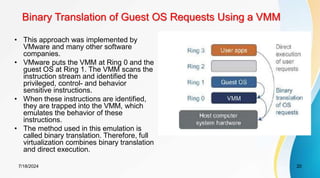
Binary Translation of Guest OS Requests Using a VMM
7/18/2024 20
• This approach was implemented by
VMware and many other software
companies.
• VMware puts the VMM at Ring 0 and the
guest OS at Ring 1. The VMM scans the
instruction stream and identified the
privileged, control- and behavior
sensitive instructions.
• When these instructions are identified,
they are trapped into the VMM, which
emulates the behavior of these
instructions.
• The method used in this emulation is
called binary translation. Therefore, full
virtualization combines binary translation
and direct execution.
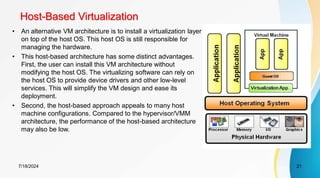
Host-Based Virtualization
7/18/2024 21
• An alternative VM architecture is to install a virtualization layer
on top of the host OS. This host OS is still responsible for
managing the hardware.
• This host-based architecture has some distinct advantages.
First, the user can install this VM architecture without
modifying the host OS. The virtualizing software can rely on
the host OS to provide device drivers and other low-level
services. This will simplify the VM design and ease its
deployment.
• Second, the host-based approach appeals to many host
machine configurations. Compared to the hypervisor/VMM
architecture, the performance of the host-based architecture
may also be low.
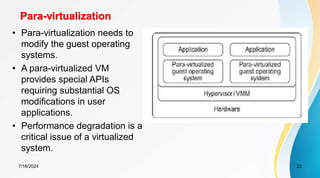
Para-virtualization
7/18/2024 22
• Para-virtualization needs to
modify the guest operating
systems.
• A para-virtualized VM
provides special APIs
requiring substantial OS
modifications in user
applications.
• Performance degradation is a
critical issue of a virtualized
system.
Full Virtualization vs. Para-Virtualization
7/18/2024 23
Full virtualization
• Does not need to modify guest OS, and critical instructions are emulated by
software through the use of binary translation.
• VMware Workstation applies full virtualization, which uses binary translation to
automatically modify x86 software on-the-fly to replace critical instructions.
Advantage: no need to modify OS.
Disadvantage: binary translation slows down the performance.
Para virtualization
• Reduces the overhead, but cost of maintaining a paravirtualized OS is high.
• The improvement depends on the workload.
• Para virtualization must modify guest OS, non-virtualizable instructions are replaced
by hyper calls that communicate directly with the hypervisor or VMM.
• Para virtualization is supported by Xen, Denali and VMware ESX.
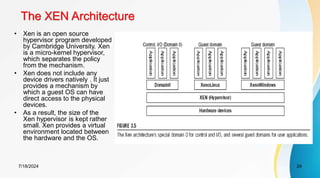
The XEN Architecture
7/18/2024 24
• Xen is an open source
hypervisor program developed
by Cambridge University. Xen
is a micro-kernel hypervisor,
which separates the policy
from the mechanism.
• Xen does not include any
device drivers natively . It just
provides a mechanism by
which a guest OS can have
direct access to the physical
devices.
• As a result, the size of the
Xen hypervisor is kept rather
small. Xen provides a virtual
environment located between
the hardware and the OS.
CPU Virtualization
7/18/2024 25
• A VM is a duplicate of an existing computer system in which a majority of the VM
instructions are executed on the host processor in native mode. Thus, unprivileged
instructions of VMs run directly on the host machine for higher efficiency. Other critical
instructions should be handled carefully for correctness and stability.
• The critical instructions are divided into three categories: privileged instructions, control–
sensitive instructions, and behavior-sensitive instructions.
• Privileged instructions execute in a privileged mode and will be trapped if executed outside
this mode.
• Control-sensitive instructions attempt to change the configuration of resources used.
Behavior-sensitive instructions have different behaviors depending on the configuration of
resources, including the load and store operations over the virtual memory.
Virtualization of CPU, Memory, and I/O Devices
7/18/2024 26
• A CPU architecture is virtualizable if it supports the ability to run the
VM’s privileged
• and unprivileged instructions in the CPU’s user mode while the
VMM runs in supervisor mode.
• When the privileged instructions including control- and behavior-
sensitive instructions of a VM are executed, they are trapped in the
VMM. In this case, the VMM acts as a unified mediator for
hardware access from different VMs to guarantee the correctness
and stability of the whole system. However, not all CPU
architectures are virtualizable.
• RI SC CPU architectures can be naturally virtualized because all
control and behavior-sensitive instructions are privileged
instructions.
• On the contrary, x86 CPU architectures are not primarily designed
to support virtualization.
Memory Virtualization
7/18/2024 27
• Virtual memory virtualization is similar to the virtual memory support
provided by modern operating systems. I n a traditional execution
environment, the operating system maintains mappings of virtual memory to
ma chine memory using page tables, which is a one-stage mapping from
virtual memory to machine memory.
• However, in a virtual execution environment, virtual memory virtualization
involves sharing the physical system memory in RAM and dynamically
allocating it to the physical memory of the VMs.
• That means a two-stage mapping process should be maintained by the
guest OS and the VMM, respectively: virtual memory to physical memory
and physical memory to machine memory.
I/O Virtualization
7/18/2024 28
• there are three ways to implement I/O virtualization: full device
emulation, para-virtualization, and direct I/O.
• I/O virtualization. Generally, this approach emulates well-known,
real-world devices. All the functions of a device or bus infrastructure,
such as device enumeration, identification, interrupts, and DMA, are
replicated in software. This software is located in the VMM and acts
as a virtual device.
• The para-virtualization method of I/O virtualization is typically used in
Xen. It is also known as the split driver model consisting of a
frontend driver and a backend driver. It achieves beer device
performance than full device emulation, it comes with a higher CPU
overhead
• Direct I/O virtualization lets the VM access devices directly. It can
achieve close-to native performance without high CPU costs.
Diskless Beowulf Cluster - PelicanHPC
• PelicanHPC is a rapid (around 5 minutes, when you know
what you're doing) means of setting up a high performance
computing (HPC) cluster for parallel computing using MPI.
• We will see what PelicanHPC does, how to use the
released CD images to set up a HPC cluster, and some
basic examples of usage.
7/18/2024 29
7/18/2024 30
PelicanHPC Installation
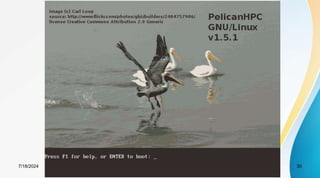
• PelicanHPC is a distribution of GNU/Linux that runs as a
"live CD" (or as a virtualization appliance).
• If the ISO image file is burnt to a CD/Flash Disk, the
resulting CD/Flash Disk can be used to boot a computer.
• The computer on which PelicanHPC is booted is referred
to as the "frontend node", which is the computer that the
user interacts with.
7/18/2024 31
Runing the PelicanHPC Cluster
• Once PelicanHPC is running, a script "pelican_setup"
may be run. This script configures the frontend node as a
netboot server.
• After this has been done, other computers can boot copies
of PelicanHPC over the network.
• These other computers are referred to as "compute
nodes".
• PelicanHPC configures the cluster made up of the frontend
node and the compute nodes so that MPIbased parallel
computing may be done.
7/18/2024 32
PelicanHPC Advantages
• A "live CD" such as PelicanHPC does not use the hard
disk of any of the nodes, so it will not destroy or alter your
installed operating system.
• When the PelicanHPC cluster is shut down, all of the
computers are in their original state, and will boot back into
whatever operating system is installed.
7/18/2024 33
PelicanHPC Features
• The frontend node can be a real computer booted using a
CD, or a virtual machine that is booted using the CD
image file.
• With this second option, PelicanHPC can be used at the
same time as the normal work environment, which may be
any of the common operating systems.
• The compute nodes are normally real computers, but they
can also be virtual.
7/18/2024 34
PelicanHPC Features
• Supports MPIbased parallel computing using Fortran (77,
90), C, C++, and GNU Octave (using MPITB).
• Offers the Open MPI and LAM/MPI implementations of
MPI.
• Cluster can be resized to add or remove nodes using the
"pelican_restarthpc" command.
7/18/2024 35
PelicanHPC Features
• Easily extensible to add packages. Also easily modifiable,
since the PelicanHPC CD image is created using a single
script that uses the Debian Live system for creating a live
CD image.
• For this reason, the distributed version is basic and
lightweight.
• Versions exist for 32 bit CPUs (Pentium 4, Core, Sempron)
and for 64 bit CPUs (Opteron, Turion, Core 2, etc.)
7/18/2024 36
PelicanHPC Features
• Contains example software:
– Linpack HPL benchmark and extensive examples that use
MPITB for GNU Octave.
7/18/2024 37
Limitations and Requirements
• The compute nodes must be booted over the network.
This is an option offered by all modern networking devices
supplied with motherboards, but it often must be enabled
in the BIOS setup.
• Enable it, and give it higher priority that booting from hard
disk or other sources.
• If you have a network card that won't do netboot, it is
possible to work around this using romomatic.
7/18/2024 38
PelicanHPC Pros and Cons
 LiveCD for instant cluster creation
 Advantages
1. Easy to use
2. A lot of built-in software
Disadvantages
1. Not persistent
2. Difficult to add software
7/18/2024 39
Worth Reading....
• http://www.pelicanhpc.org/academic_work.html
• http://distrowatch.com/table.php?distribution=pelicanhpc
• http://linux.softpedia.com/get/System/Operating-
Systems/Linux-Distributions/PelicanHPC-38025.shtml
• http://www.linux-magazine.com/Online/News/Number-
Crunching-with-Pelican-HPC-2.0
7/18/2024 40
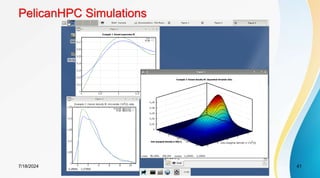
PelicanHPC Simulations
7/18/2024 41
References
1. Kai Hwang, Geoffery C. Fox and Jack J. Dongarra, “Distributed and Cloud
Computing: Clusters, Grids, Clouds and the Future of Internet”,
2. http://klucloudseminar.weebly.com/
3. http://cloudcomputingnet.com/cloud-computing-deployment-models/
4. http://gcauble.com/products/cloud-computing/
5. http://www.levelcloud.net/why-levelcloud/cloud-education-center/advantages-
and-disadvantages-of-cloud-computing/
6. www.cse.unr.edu/~mgunes/cpe401/cpe401sp12/lect15_cloud.ppt
7. http://slideplayer.com/slide/5862268/
8. https://msdn.microsoft.com/en-us/magazine/dn520239.aspx
9. http://www.thoughtsoncloud.com/2014/01/cloud-computing-defined-
characteristics-service-levels/
42
7/18/2024

VIRTUALIZATION-IMPLEMENTATION.pdf-LEVELS

  • 1.
    UNIT 2:CLOUD VIRTUALIZATION& CLUSTERS – Implementation levels of virtualization – Difference between traditional and Virtual Machines – More Beowulf Clusters – PelicanHPC 7/18/2024 1
  • 2.
    7/18/2024 2 Implementation Levelsof Virtualization Virtualization technology benefits the computer and IT industries by enabling users to share expensive hardware resources by multiplexing VMs on the same set of hardware hosts. Virtual workspaces: – An abstraction of an execution environment that can be made dynamically available to authorized clients by using well-defined protocols, – Resource quota (e.g. CPU, memory share), – Software configuration (e.g. O/S, provided services). • Implement on Virtual Machines (VMs): – Abstraction of a physical host machine, – Hypervisor intercepts and emulates instructions from VMs and allows management of VMs. – VMWare, Xen, etc. • Provide infrastructure API: – Plug-ins to hardware/support structures Hardware OS App App App Hypervisor OS OS Virtualized Stack
  • 3.
    7/18/2024 3 Virtual Machines •VM technology allows multiple virtual machines to run on a single physical machine. Hardware Virtual Machine Monitor (VMM) / Hypervisor Guest OS (Linux) Guest OS (NetBSD) Guest OS (Windows) VM VM VM App App App App App Xen VMWare UML Denali etc. Performance: Para-virtualization (e.g. Xen) is very close to raw physical performance!
  • 4.
    7/18/2024 4 Virtualization inGeneral Advantages of virtual machines: – Run operating systems where the physical hardware is unavailable, – Easier to create new machines, backup machines, etc., – Software testing using “clean” installs of operating systems and software, – Emulate more machines than are physically available, – Timeshare lightly loaded systems on one host, – Debug problems (suspend and resume the problem machine), – Easy migration of virtual machines (shutdown needed or not). – Run legacy systems!
  • 5.
    7/18/2024 5 What isthe purpose and benefits? • Cloud computing enables companies and applications, which are system infrastructure dependent, to be infrastructure-less. • By using the Cloud infrastructure on “pay as used and on demand”, all of us can save in capital and operational investment! • Clients can: – Put their data on the platform instead of on their own desktop PCs and/or on their own servers. – They can put their applications on the cloud and use the servers within the cloud to do processing and data manipulations etc. – In computing, virtualization means to create a virtual version of a device or resource, such as a server, storage device, network or even an operating system where the framework divides the resource into one or more execution environments.
  • 6.
    Difference between Traditionaland Virtual machines 7/18/2024 6 • A traditional computer runs with a host operating system specially tailored for its hardware architecture • After virtualization, different user applications managed by their own operating systems (guest OS) can run on the same hardware, independent of the host OS. • The Virtualization layer is the middleware between the underlying hardware and virtual machines represented in the system, also known as virtual machine monitor (VMM) or hypervisor. With sufficient storage, any computer platform can be installed in another host computer, even if they use processors with different instruction sets and run with distinct operating systems on the same hardware.
  • 7.
    Virtualization Layers 7/18/2024 7 Thevirtualization software creates the abstraction of VMs by interposing a virtualization layer at various levels of a computer system. Common virtualization layers include: 1. the instruction set architecture (ISA) level, 2. hardware level, 3. operating system level, 4. library support level, and 5. application level
  • 8.
    Virtualization Ranging fromHardware to Applications in Five Abstraction Levels 7/18/2024 8
  • 9.
    1.Virtualization at InstructionSet Architecture (ISA) level: 7/18/2024 9 • At the ISA level, virtualization is performed by emulating a given ISA by the ISA of the host machine. Instruction set emulation leads to virtual ISAs created on any hardware machine. e.g, MIPS binary code can run on an x-86-based host machine with the help of ISA emulation. • With this approach, it is possible to run a large amount of legacy binary code written for various processors on any given new hardware host machine. • code interpretation – dynamic binary translation - virtual instruction set architecture (V-ISA) • Advantage: • It can run a large amount of legacy binary codes written for various processors on any given new hardware host machines • best application flexibility • Shortcoming & limitation: • One source instruction may require tens or hundreds of native target instructions to perform its function, which is relatively slow. • V-ISA requires adding a processor-specific software translation layer in the complier.
  • 10.
    2.Virtualization at HardwareAbstraction level: 7/18/2024 10 • Hardware-level virtualization is performed right on top of the bare hardware. • On the one hand, this approach generates a virtual hardware environment for a VM. • On the other hand, the process manages the underlying hardware through virtualization. • The idea is to virtualize a computer’s resources, such as its processors, memory and I/O devices. The intention is to upgrade the hardware utilization rate by multiple users concurrently. Advantage: • Has higher performance and good application isolation Shortcoming & limitation: • Very expensive to implement (complexity)
  • 11.
    3.Virtualization at OperatingSystem (OS) level: 7/18/2024 11 • OS-level virtualization creates isolated containers on a single physical server and the OS instances to utilize the hardware and software in data centers. The containers behave like real servers. • OS-level virtualization is commonly used in creating virtual hosting environments to allocate hardware resources among a large number of mutually distrusting users. Advantage: • Has minimal startup/shutdown cost, low resource requirement, and high scalability; synchronize VM and host state changes. Shortcoming & limitation: • All VMs at the operating system level must have the same kind of guest OS • Poor application flexibility and isolation.
  • 12.
  • 13.
    7/18/2024 13 Advantages ofOS Extension for Virtualization 1. VMs at OS level has minimum startup/shutdown costs 2. OS-level VM can easily synchronize with its environment Disadvantage of OS Extension for Virtualization •All VMs in the same OS container must have the same or similar guest OS, which restrict application flexibility of different VMs on the same physical machine.
  • 14.
    4.Library Support level: 7/18/202414 • Since most systems provide well-documented APIs, such an interface becomes another candidate for virtualization. • Virtualization with library interfaces is possible by controlling the communication link between applications and the rest of a system through API hooks. • The software tool WINE has implemented this approach to support Windows applications on top of UNIX hosts. • Another example is the vCUDA which allows applications executing within VMs to leverage GPU hardware acceleration. Advantage: • It has very low implementation effort Shortcoming & limitation: • poor application flexibility and isolation
  • 15.
    5.User-Application Level 7/18/2024 15 •Virtualization at the application level virtualizes an application as a VM. On a traditional OS, an application often runs as a process. • Therefore, application-level virtualization is also known as process-level virtualization. • The most popular approach is to deploy high level language (HLL) VMs. In this scenario, the virtualization layer sits as an application program on top of the operating system, and the layer exports an abstraction of a VM that can run programs written and compiled to a particular abstract machine definition. • Other forms of application-level virtualization are known as application isolation, application sandboxing, or application streaming. Advantage: • has the best application isolation Shortcoming & limitation: • low performance, low application flexibility and high implementation complexity.
  • 16.
  • 17.
    Virtualization Structures/Tools andMechanisms 7/18/2024 17 • In general, there are three typical classes of VM architecture. • Figure on slide 7 showed the architectures of a machine before and after virtualization. • Before virtualization, the operating system manages the hardware. • After virtualization, a virtualization layer is inserted between the hardware and the operating system. In such a case, the virtualization layer is responsible for converting portions of the real hardware into virtual hardware. • Therefore, different operating systems such as Linux and Windows can run on the same physical machine, simultaneously. • Depending on the position of the virtualization layer, there are several classes of VM architectures, namely the hypervisor architecture, para-virtualization, and host-based virtualization. • The hypervisor is also known as the VMM (Virtual Machine Monitor). They both perform the same virtualization operations.
  • 18.
    Hypervisor 7/18/2024 18 • Ahypervisor is a hardware virtualization technique allowing multiple operating systems, called guests to run on a host machine. This is also called the Virtual Machine Monitor (VMM). Type 1: bare metal hypervisor • sits on the bare metal computer hardware like the CPU, memory, etc. • All guest operating systems are a layer above the hypervisor. • The original CP/CMS hypervisor developed by IBM was of this kind. Type 2: hosted hypervisor • Run over a host operating system. • Hypervisor is the second layer over the hardware. • Guest operating systems run a layer over the hypervisor. • The OS is usually unaware of the virtualization
  • 19.
    Full Binary Translationand Host-based Virtualization 7/18/2024 19 • Depending on implementation technologies, hardware virtualization VM architectures can be classified into two categories: – Full virtualization and – Host-based virtualization. • Full virtualization does not need to modify the host OS. It relies on binary translation to trap and to virtualize the execution of certain sensitive, non virtualizable instructions. • In a host-based system, both a host OS and a guest OS are used. A virtualization software layer is built between the host OS and guest OS. • These two classes of VM architecture are introduced next.
  • 20.
    Binary Translation ofGuest OS Requests Using a VMM 7/18/2024 20 • This approach was implemented by VMware and many other software companies. • VMware puts the VMM at Ring 0 and the guest OS at Ring 1. The VMM scans the instruction stream and identified the privileged, control- and behavior sensitive instructions. • When these instructions are identified, they are trapped into the VMM, which emulates the behavior of these instructions. • The method used in this emulation is called binary translation. Therefore, full virtualization combines binary translation and direct execution.
  • 21.
    Host-Based Virtualization 7/18/2024 21 •An alternative VM architecture is to install a virtualization layer on top of the host OS. This host OS is still responsible for managing the hardware. • This host-based architecture has some distinct advantages. First, the user can install this VM architecture without modifying the host OS. The virtualizing software can rely on the host OS to provide device drivers and other low-level services. This will simplify the VM design and ease its deployment. • Second, the host-based approach appeals to many host machine configurations. Compared to the hypervisor/VMM architecture, the performance of the host-based architecture may also be low.
  • 22.
    Para-virtualization 7/18/2024 22 • Para-virtualizationneeds to modify the guest operating systems. • A para-virtualized VM provides special APIs requiring substantial OS modifications in user applications. • Performance degradation is a critical issue of a virtualized system.
  • 23.
    Full Virtualization vs.Para-Virtualization 7/18/2024 23 Full virtualization • Does not need to modify guest OS, and critical instructions are emulated by software through the use of binary translation. • VMware Workstation applies full virtualization, which uses binary translation to automatically modify x86 software on-the-fly to replace critical instructions. Advantage: no need to modify OS. Disadvantage: binary translation slows down the performance. Para virtualization • Reduces the overhead, but cost of maintaining a paravirtualized OS is high. • The improvement depends on the workload. • Para virtualization must modify guest OS, non-virtualizable instructions are replaced by hyper calls that communicate directly with the hypervisor or VMM. • Para virtualization is supported by Xen, Denali and VMware ESX.
  • 24.
    The XEN Architecture 7/18/202424 • Xen is an open source hypervisor program developed by Cambridge University. Xen is a micro-kernel hypervisor, which separates the policy from the mechanism. • Xen does not include any device drivers natively . It just provides a mechanism by which a guest OS can have direct access to the physical devices. • As a result, the size of the Xen hypervisor is kept rather small. Xen provides a virtual environment located between the hardware and the OS.
  • 25.
    CPU Virtualization 7/18/2024 25 •A VM is a duplicate of an existing computer system in which a majority of the VM instructions are executed on the host processor in native mode. Thus, unprivileged instructions of VMs run directly on the host machine for higher efficiency. Other critical instructions should be handled carefully for correctness and stability. • The critical instructions are divided into three categories: privileged instructions, control– sensitive instructions, and behavior-sensitive instructions. • Privileged instructions execute in a privileged mode and will be trapped if executed outside this mode. • Control-sensitive instructions attempt to change the configuration of resources used. Behavior-sensitive instructions have different behaviors depending on the configuration of resources, including the load and store operations over the virtual memory. Virtualization of CPU, Memory, and I/O Devices
  • 26.
    7/18/2024 26 • ACPU architecture is virtualizable if it supports the ability to run the VM’s privileged • and unprivileged instructions in the CPU’s user mode while the VMM runs in supervisor mode. • When the privileged instructions including control- and behavior- sensitive instructions of a VM are executed, they are trapped in the VMM. In this case, the VMM acts as a unified mediator for hardware access from different VMs to guarantee the correctness and stability of the whole system. However, not all CPU architectures are virtualizable. • RI SC CPU architectures can be naturally virtualized because all control and behavior-sensitive instructions are privileged instructions. • On the contrary, x86 CPU architectures are not primarily designed to support virtualization.
  • 27.
    Memory Virtualization 7/18/2024 27 •Virtual memory virtualization is similar to the virtual memory support provided by modern operating systems. I n a traditional execution environment, the operating system maintains mappings of virtual memory to ma chine memory using page tables, which is a one-stage mapping from virtual memory to machine memory. • However, in a virtual execution environment, virtual memory virtualization involves sharing the physical system memory in RAM and dynamically allocating it to the physical memory of the VMs. • That means a two-stage mapping process should be maintained by the guest OS and the VMM, respectively: virtual memory to physical memory and physical memory to machine memory.
  • 28.
    I/O Virtualization 7/18/2024 28 •there are three ways to implement I/O virtualization: full device emulation, para-virtualization, and direct I/O. • I/O virtualization. Generally, this approach emulates well-known, real-world devices. All the functions of a device or bus infrastructure, such as device enumeration, identification, interrupts, and DMA, are replicated in software. This software is located in the VMM and acts as a virtual device. • The para-virtualization method of I/O virtualization is typically used in Xen. It is also known as the split driver model consisting of a frontend driver and a backend driver. It achieves beer device performance than full device emulation, it comes with a higher CPU overhead • Direct I/O virtualization lets the VM access devices directly. It can achieve close-to native performance without high CPU costs.
  • 29.
    Diskless Beowulf Cluster- PelicanHPC • PelicanHPC is a rapid (around 5 minutes, when you know what you're doing) means of setting up a high performance computing (HPC) cluster for parallel computing using MPI. • We will see what PelicanHPC does, how to use the released CD images to set up a HPC cluster, and some basic examples of usage. 7/18/2024 29
  • 30.
  • 31.
    PelicanHPC Installation • PelicanHPCis a distribution of GNU/Linux that runs as a "live CD" (or as a virtualization appliance). • If the ISO image file is burnt to a CD/Flash Disk, the resulting CD/Flash Disk can be used to boot a computer. • The computer on which PelicanHPC is booted is referred to as the "frontend node", which is the computer that the user interacts with. 7/18/2024 31
  • 32.
    Runing the PelicanHPCCluster • Once PelicanHPC is running, a script "pelican_setup" may be run. This script configures the frontend node as a netboot server. • After this has been done, other computers can boot copies of PelicanHPC over the network. • These other computers are referred to as "compute nodes". • PelicanHPC configures the cluster made up of the frontend node and the compute nodes so that MPIbased parallel computing may be done. 7/18/2024 32
  • 33.
    PelicanHPC Advantages • A"live CD" such as PelicanHPC does not use the hard disk of any of the nodes, so it will not destroy or alter your installed operating system. • When the PelicanHPC cluster is shut down, all of the computers are in their original state, and will boot back into whatever operating system is installed. 7/18/2024 33
  • 34.
    PelicanHPC Features • Thefrontend node can be a real computer booted using a CD, or a virtual machine that is booted using the CD image file. • With this second option, PelicanHPC can be used at the same time as the normal work environment, which may be any of the common operating systems. • The compute nodes are normally real computers, but they can also be virtual. 7/18/2024 34
  • 35.
    PelicanHPC Features • SupportsMPIbased parallel computing using Fortran (77, 90), C, C++, and GNU Octave (using MPITB). • Offers the Open MPI and LAM/MPI implementations of MPI. • Cluster can be resized to add or remove nodes using the "pelican_restarthpc" command. 7/18/2024 35
  • 36.
    PelicanHPC Features • Easilyextensible to add packages. Also easily modifiable, since the PelicanHPC CD image is created using a single script that uses the Debian Live system for creating a live CD image. • For this reason, the distributed version is basic and lightweight. • Versions exist for 32 bit CPUs (Pentium 4, Core, Sempron) and for 64 bit CPUs (Opteron, Turion, Core 2, etc.) 7/18/2024 36
  • 37.
    PelicanHPC Features • Containsexample software: – Linpack HPL benchmark and extensive examples that use MPITB for GNU Octave. 7/18/2024 37
  • 38.
    Limitations and Requirements •The compute nodes must be booted over the network. This is an option offered by all modern networking devices supplied with motherboards, but it often must be enabled in the BIOS setup. • Enable it, and give it higher priority that booting from hard disk or other sources. • If you have a network card that won't do netboot, it is possible to work around this using romomatic. 7/18/2024 38
  • 39.
    PelicanHPC Pros andCons  LiveCD for instant cluster creation  Advantages 1. Easy to use 2. A lot of built-in software Disadvantages 1. Not persistent 2. Difficult to add software 7/18/2024 39
  • 40.
    Worth Reading.... • http://www.pelicanhpc.org/academic_work.html •http://distrowatch.com/table.php?distribution=pelicanhpc • http://linux.softpedia.com/get/System/Operating- Systems/Linux-Distributions/PelicanHPC-38025.shtml • http://www.linux-magazine.com/Online/News/Number- Crunching-with-Pelican-HPC-2.0 7/18/2024 40
  • 41.
  • 42.
    References 1. Kai Hwang,Geoffery C. Fox and Jack J. Dongarra, “Distributed and Cloud Computing: Clusters, Grids, Clouds and the Future of Internet”, 2. http://klucloudseminar.weebly.com/ 3. http://cloudcomputingnet.com/cloud-computing-deployment-models/ 4. http://gcauble.com/products/cloud-computing/ 5. http://www.levelcloud.net/why-levelcloud/cloud-education-center/advantages- and-disadvantages-of-cloud-computing/ 6. www.cse.unr.edu/~mgunes/cpe401/cpe401sp12/lect15_cloud.ppt 7. http://slideplayer.com/slide/5862268/ 8. https://msdn.microsoft.com/en-us/magazine/dn520239.aspx 9. http://www.thoughtsoncloud.com/2014/01/cloud-computing-defined- characteristics-service-levels/ 42 7/18/2024