Operating System Administration
Er. S.R INAMDAR
Overview of Operating System: An Operating system is a program that
manages the computer hardware. It provides a base for application and
acts as an interface between computer hardware and computer user.
Need for Operating System
An operating system (OS) is essential for a computer system for the
following reasons:
1.Resource Management: The operating system manages the
computer's hardware resources, including the CPU, memory, and
storage devices. It allocates resources to different programs and
ensures that they do not conflict with each other.
2. Process Management: The operating system manages the
processes that run on the computer, including creating, scheduling, and
terminating processes. It provides mechanisms for inter-process
communication and ensures that processes do not interfere with each
other.
3.Memory Management: The operating system manages the
computer's memory, including virtual memory. It ensures that
programs and data are stored in memory efficiently and that memory
is allocated and de-allocated properly.
4.File Management: The operating system manages the computer’s files
and directories, including creating, deleting, and modifying files. It
provides access control mechanisms to ensure that only authorized users
can access files.
5.Device Management: The operating system manages the computer's
input/output devices, including keyboards, mice, printers, and other
peripherals. It provides device drivers that allow applications to interact
with these devices.
Operating System Structure
Operating system can be implemented with the help of various structures.
The structure of the OS depends mainly on how the various common
components of the operating system are interconnected and melded into
the kernel. There are several types of operating system (OS) structures,
each with its own unique characteristics and advantages. The most
common types of OS structures are:
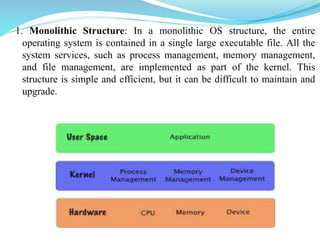
1. Monolithic Structure: In a monolithic OS structure, the entire
operating system is contained in a single large executable file. All the
system services, such as process management, memory management,
and file management, are implemented as part of the kernel. This
structure is simple and efficient, but it can be difficult to maintain and
upgrade.
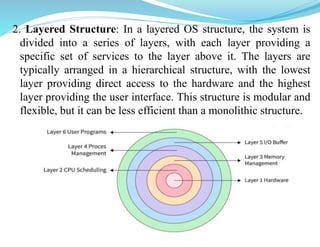
2. Layered Structure: In a layered OS structure, the system is
divided into a series of layers, with each layer providing a
specific set of services to the layer above it. The layers are
typically arranged in a hierarchical structure, with the lowest
layer providing direct access to the hardware and the highest
layer providing the user interface. This structure is modular and
flexible, but it can be less efficient than a monolithic structure.
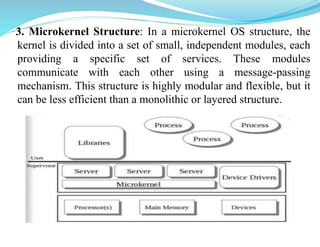
3. Microkernel Structure: In a microkernel OS structure, the
kernel is divided into a set of small, independent modules, each
providing a specific set of services. These modules
communicate with each other using a message-passing
mechanism. This structure is highly modular and flexible, but it
can be less efficient than a monolithic or layered structure.
Types of Operating Systems:
There are several types of operating systems (OS) based on their design and
functionality. The most common types of operating systems are:
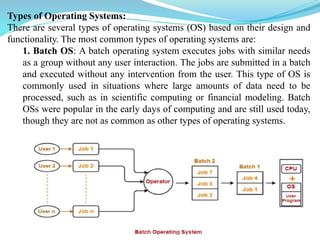
1. Batch OS: A batch operating system executes jobs with similar needs
as a group without any user interaction. The jobs are submitted in a batch
and executed without any intervention from the user. This type of OS is
commonly used in situations where large amounts of data need to be
processed, such as in scientific computing or financial modeling. Batch
OSs were popular in the early days of computing and are still used today,
though they are not as common as other types of operating systems.
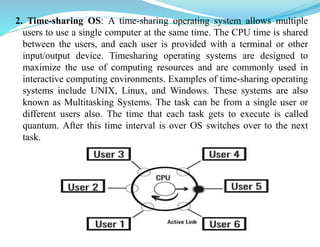
2. Time-sharing OS: A time-sharing operating system allows multiple
users to use a single computer at the same time. The CPU time is shared
between the users, and each user is provided with a terminal or other
input/output device. Timesharing operating systems are designed to
maximize the use of computing resources and are commonly used in
interactive computing environments. Examples of time-sharing operating
systems include UNIX, Linux, and Windows. These systems are also
known as Multitasking Systems. The task can be from a single user or
different users also. The time that each task gets to execute is called
quantum. After this time interval is over OS switches over to the next
task.
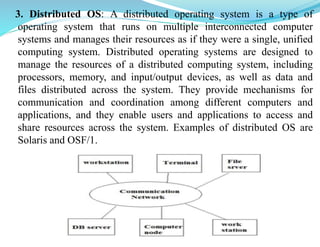
3. Distributed OS: A distributed operating system is a type of
operating system that runs on multiple interconnected computer
systems and manages their resources as if they were a single, unified
computing system. Distributed operating systems are designed to
manage the resources of a distributed computing system, including
processors, memory, and input/output devices, as well as data and
files distributed across the system. They provide mechanisms for
communication and coordination among different computers and
applications, and they enable users and applications to access and
share resources across the system. Examples of distributed OS are
Solaris and OSF/1.
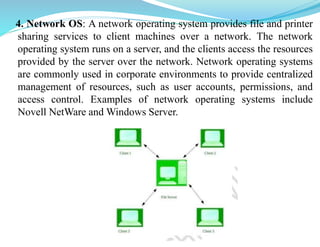
4. Network OS: A network operating system provides file and printer
sharing services to client machines over a network. The network
operating system runs on a server, and the clients access the resources
provided by the server over the network. Network operating systems
are commonly used in corporate environments to provide centralized
management of resources, such as user accounts, permissions, and
access control. Examples of network operating systems include
Novell NetWare and Windows Server.
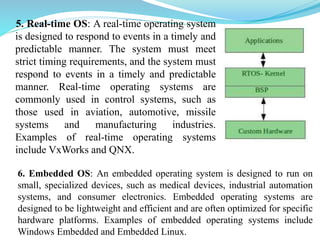
5. Real-time OS: A real-time operating system
is designed to respond to events in a timely and
predictable manner. The system must meet
strict timing requirements, and the system must
respond to events in a timely and predictable
manner. Real-time operating systems are
commonly used in control systems, such as
those used in aviation, automotive, missile
systems and manufacturing industries.
Examples of real-time operating systems
include VxWorks and QNX.
6. Embedded OS: An embedded operating system is designed to run on
small, specialized devices, such as medical devices, industrial automation
systems, and consumer electronics. Embedded operating systems are
designed to be lightweight and efficient and are often optimized for specific
hardware platforms. Examples of embedded operating systems include
Windows Embedded and Embedded Linux.
Examples of OS (desktop and mobile)
Desktop Operating Systems:
1.Microsoft Windows: This is the most widely used operating
system for desktop computers. It is user-friendly, highly
customizable, and supports a vast range of applications.
Examples: Windows XP, 7, 8.1, 10, 11, Windows Vista, etc.
2.macOS: This operating system is used exclusively on Apple
computers. It is known for its sleek design and ease of use, as
well as tight integration with other Apple products. Examples:
Mac OS X 10.0 (Cheetah), Mac OS X 10.3 (Panther), Mac OS
X 10.7 (Lion), macOS 13 (Ventura), etc.
3.Linux: Linux is an open-source operating system that can be
customized and is highly secure. It is commonly used by
developers and is popular for its reliability and performance.
Examples: Ubuntu, Fedora, Red Hat linux, Debian, CentOS,
Kali Linux etc.
Mobile Operating Systems:
1. Android: This is the most widely used operating system for
smartphones and tablets. It is developed by Google and is
highly customizable, with a large number of apps available on
the Google Play Store. Examples: Android 1.5 Cupcake,
Android 3.0 Honeycomb, Android 4.0 Ice Cream Sandwich,
Android 5.0 Lollipop, Android 8.0 Oreo, Android 12.
2. iOS: This is the operating system used exclusively on Apple
mobile devices such as iPhones and iPads. It is known for its
sleek design, ease of use, and tight integration with other
Apple products.
3. Windows Mobile: This is an operating system developed
by Microsoft for smartphones and tablets. It is designed to
work with Windows desktop applications and services, making
it a popular choice for businesses.
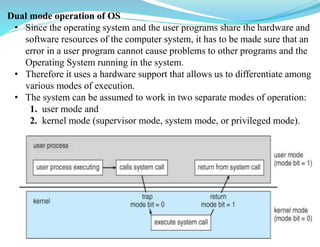
Dual mode operation of OS
• Since the operating system and the user programs share the hardware and
software resources of the computer system, it has to be made sure that an
error in a user program cannot cause problems to other programs and the
Operating System running in the system.
• Therefore it uses a hardware support that allows us to differentiate among
various modes of execution.
• The system can be assumed to work in two separate modes of operation:
1. user mode and
2. kernel mode (supervisor mode, system mode, or privileged mode).
• A hardware bit of the computer, called the mode bit, is used to indicate
the current mode: kernel (0) or user (1). With the mode bit, we are able
to distinguish between a task that is executed by the operating system
and one that is executed by the user. When the computer system is
executing a user application, the system is in user mode. When a user
application requests a service from the operating system (via a system
call), the transition from user to kernel mode takes place.
• At system boot time, the hardware starts in kernel mode. The operating
system is then loaded and starts user applications in user mode.
Whenever a trap or interrupt occurs, the hardware switches from user
mode to kernel mode (that is, changes the mode bit from 1 to 0). Thus,
whenever the operating system gains control of the computer, it is in
kernel mode.
• Initial control is within the operating system, where instructions are
executed in kernel mode. When control is given to a user application,
the mode is set to user mode. Eventually, control is switched back to
the operating system via an interrupt, a trap, or a system call.
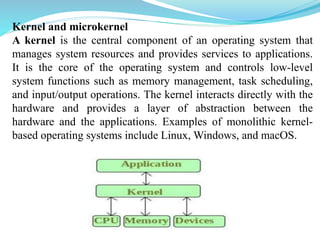
Kernel and microkernel
A kernel is the central component of an operating system that
manages system resources and provides services to applications.
It is the core of the operating system and controls low-level
system functions such as memory management, task scheduling,
and input/output operations. The kernel interacts directly with the
hardware and provides a layer of abstraction between the
hardware and the applications. Examples of monolithic kernel-
based operating systems include Linux, Windows, and macOS.
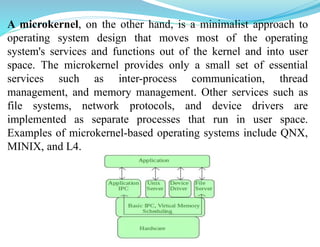
A microkernel, on the other hand, is a minimalist approach to
operating system design that moves most of the operating
system's services and functions out of the kernel and into user
space. The microkernel provides only a small set of essential
services such as inter-process communication, thread
management, and memory management. Other services such as
file systems, network protocols, and device drivers are
implemented as separate processes that run in user space.
Examples of microkernel-based operating systems include QNX,
MINIX, and L4.
Functions of Operating System
Following are some of important functions of an operating System.
• Memory Management
• Processor Management
• Device Management
• File Management
• Security
• Control over system performance
• Job accounting
• Error detecting aids
• Coordination between other software and users
Memory Management
An OS is responsible for the following tasks with regards to memory
management:
• Keeping track of which blocks of memory are currently in use, and by
which processes.
• Determining which blocks of code and data to move into and out of
memory, and when.
• Allocating and deallocating memory as needed. ( E.g. new, malloc )
Process Management:
An OS is responsible for the following tasks with regards to process
management:
• Creating and deleting both user and system processes
• Ensuring that each process receives its necessary resources, without
interfering with other processes.
• Suspending and resuming processes
• Process synchronization and communication
• Deadlock handling
Device Management
An Operating System manages device communication via their respective
drivers. It does the following activities for device management –
Keeps tracks of all devices. Program responsible for this task is known as
the I/O controller.
• Decides which process gets the device when and for how much time.
• Allocates the device in the efficient way.
• De-allocates devices.
File Management
An OS is responsible for the following tasks with regards to file system
management:
• Creating and deleting files and directories
• Supporting primitives for manipulating files and directories. ( open, flush, etc)
• Mapping files onto secondary storage.
• Backing up files onto stable permanent storage media.
Other Important Activities
Following are some of the important activities that an Operating System performs -
• Security - By means of password and similar other techniques, it prevents
unauthorized access to programs and data.
• Control over system performance - Recording delays between request for a
service and response from the system.
• Job accounting - Keeping track of time and resources used by various jobs
and users.
• Error detecting aids - Production of dumps, traces, error messages, and other
debugging and error detecting aids.
• Coordination between other software and users - Coordination and
assignment of compilers, interpreters, assemblers and other software to the
various users of the computer systems.
USER INTERFACES
User interface (UI) is the way users interact with a computer system, including the
hardware and software components. There are several types of user interfaces used in
modern operating systems, including:
1. Command Line Interface (CLI): A CLI is a text-based interface that allows
users to enter commands using a keyboard. The commands are interpreted by the
operating system and executed accordingly. Examples of CLI interfaces include the
Windows Command Prompt, macOS Terminal, and Linux Bash Shell.
2. Graphical User Interface (GUI): A GUI is a visual interface that allows users to
interact with the system using graphical elements such as icons, menus, buttons, and
windows. GUIs make it easier for users to navigate the system and perform tasks
without having to remember complex commands. Examples of GUI interfaces
include the Windows desktop, macOS Finder, and Linux desktop.
3. Touch User Interface: A touch user interface is a type of GUI that allows users to
interact with the system using touch gestures, such as tapping, swiping, and
pinching. Touch interfaces are commonly used in mobile devices such as
smartphones and tablets, as well as in some desktop systems.
4. Voice User Interface (VUI): A VUI is an interface that allows users to interact with
the system using voice commands. VUIs are commonly used in virtual assistants
such as Amazon Alexa and Apple Siri.

Operating System Concepts_1.pptx

  • 1.
  • 2.
    Overview of OperatingSystem: An Operating system is a program that manages the computer hardware. It provides a base for application and acts as an interface between computer hardware and computer user. Need for Operating System An operating system (OS) is essential for a computer system for the following reasons: 1.Resource Management: The operating system manages the computer's hardware resources, including the CPU, memory, and storage devices. It allocates resources to different programs and ensures that they do not conflict with each other. 2. Process Management: The operating system manages the processes that run on the computer, including creating, scheduling, and terminating processes. It provides mechanisms for inter-process communication and ensures that processes do not interfere with each other. 3.Memory Management: The operating system manages the computer's memory, including virtual memory. It ensures that programs and data are stored in memory efficiently and that memory is allocated and de-allocated properly.
  • 3.
    4.File Management: Theoperating system manages the computer’s files and directories, including creating, deleting, and modifying files. It provides access control mechanisms to ensure that only authorized users can access files. 5.Device Management: The operating system manages the computer's input/output devices, including keyboards, mice, printers, and other peripherals. It provides device drivers that allow applications to interact with these devices. Operating System Structure Operating system can be implemented with the help of various structures. The structure of the OS depends mainly on how the various common components of the operating system are interconnected and melded into the kernel. There are several types of operating system (OS) structures, each with its own unique characteristics and advantages. The most common types of OS structures are:
  • 4.
    1. Monolithic Structure:In a monolithic OS structure, the entire operating system is contained in a single large executable file. All the system services, such as process management, memory management, and file management, are implemented as part of the kernel. This structure is simple and efficient, but it can be difficult to maintain and upgrade.
  • 5.
    2. Layered Structure:In a layered OS structure, the system is divided into a series of layers, with each layer providing a specific set of services to the layer above it. The layers are typically arranged in a hierarchical structure, with the lowest layer providing direct access to the hardware and the highest layer providing the user interface. This structure is modular and flexible, but it can be less efficient than a monolithic structure.
  • 6.
    3. Microkernel Structure:In a microkernel OS structure, the kernel is divided into a set of small, independent modules, each providing a specific set of services. These modules communicate with each other using a message-passing mechanism. This structure is highly modular and flexible, but it can be less efficient than a monolithic or layered structure.
  • 7.
    Types of OperatingSystems: There are several types of operating systems (OS) based on their design and functionality. The most common types of operating systems are: 1. Batch OS: A batch operating system executes jobs with similar needs as a group without any user interaction. The jobs are submitted in a batch and executed without any intervention from the user. This type of OS is commonly used in situations where large amounts of data need to be processed, such as in scientific computing or financial modeling. Batch OSs were popular in the early days of computing and are still used today, though they are not as common as other types of operating systems.
  • 8.
    2. Time-sharing OS:A time-sharing operating system allows multiple users to use a single computer at the same time. The CPU time is shared between the users, and each user is provided with a terminal or other input/output device. Timesharing operating systems are designed to maximize the use of computing resources and are commonly used in interactive computing environments. Examples of time-sharing operating systems include UNIX, Linux, and Windows. These systems are also known as Multitasking Systems. The task can be from a single user or different users also. The time that each task gets to execute is called quantum. After this time interval is over OS switches over to the next task.
  • 9.
    3. Distributed OS:A distributed operating system is a type of operating system that runs on multiple interconnected computer systems and manages their resources as if they were a single, unified computing system. Distributed operating systems are designed to manage the resources of a distributed computing system, including processors, memory, and input/output devices, as well as data and files distributed across the system. They provide mechanisms for communication and coordination among different computers and applications, and they enable users and applications to access and share resources across the system. Examples of distributed OS are Solaris and OSF/1.
  • 10.
    4. Network OS:A network operating system provides file and printer sharing services to client machines over a network. The network operating system runs on a server, and the clients access the resources provided by the server over the network. Network operating systems are commonly used in corporate environments to provide centralized management of resources, such as user accounts, permissions, and access control. Examples of network operating systems include Novell NetWare and Windows Server.
  • 11.
    5. Real-time OS:A real-time operating system is designed to respond to events in a timely and predictable manner. The system must meet strict timing requirements, and the system must respond to events in a timely and predictable manner. Real-time operating systems are commonly used in control systems, such as those used in aviation, automotive, missile systems and manufacturing industries. Examples of real-time operating systems include VxWorks and QNX. 6. Embedded OS: An embedded operating system is designed to run on small, specialized devices, such as medical devices, industrial automation systems, and consumer electronics. Embedded operating systems are designed to be lightweight and efficient and are often optimized for specific hardware platforms. Examples of embedded operating systems include Windows Embedded and Embedded Linux.
  • 12.
    Examples of OS(desktop and mobile) Desktop Operating Systems: 1.Microsoft Windows: This is the most widely used operating system for desktop computers. It is user-friendly, highly customizable, and supports a vast range of applications. Examples: Windows XP, 7, 8.1, 10, 11, Windows Vista, etc. 2.macOS: This operating system is used exclusively on Apple computers. It is known for its sleek design and ease of use, as well as tight integration with other Apple products. Examples: Mac OS X 10.0 (Cheetah), Mac OS X 10.3 (Panther), Mac OS X 10.7 (Lion), macOS 13 (Ventura), etc. 3.Linux: Linux is an open-source operating system that can be customized and is highly secure. It is commonly used by developers and is popular for its reliability and performance. Examples: Ubuntu, Fedora, Red Hat linux, Debian, CentOS, Kali Linux etc.
  • 13.
    Mobile Operating Systems: 1.Android: This is the most widely used operating system for smartphones and tablets. It is developed by Google and is highly customizable, with a large number of apps available on the Google Play Store. Examples: Android 1.5 Cupcake, Android 3.0 Honeycomb, Android 4.0 Ice Cream Sandwich, Android 5.0 Lollipop, Android 8.0 Oreo, Android 12. 2. iOS: This is the operating system used exclusively on Apple mobile devices such as iPhones and iPads. It is known for its sleek design, ease of use, and tight integration with other Apple products. 3. Windows Mobile: This is an operating system developed by Microsoft for smartphones and tablets. It is designed to work with Windows desktop applications and services, making it a popular choice for businesses.
  • 14.
    Dual mode operationof OS • Since the operating system and the user programs share the hardware and software resources of the computer system, it has to be made sure that an error in a user program cannot cause problems to other programs and the Operating System running in the system. • Therefore it uses a hardware support that allows us to differentiate among various modes of execution. • The system can be assumed to work in two separate modes of operation: 1. user mode and 2. kernel mode (supervisor mode, system mode, or privileged mode).
  • 15.
    • A hardwarebit of the computer, called the mode bit, is used to indicate the current mode: kernel (0) or user (1). With the mode bit, we are able to distinguish between a task that is executed by the operating system and one that is executed by the user. When the computer system is executing a user application, the system is in user mode. When a user application requests a service from the operating system (via a system call), the transition from user to kernel mode takes place. • At system boot time, the hardware starts in kernel mode. The operating system is then loaded and starts user applications in user mode. Whenever a trap or interrupt occurs, the hardware switches from user mode to kernel mode (that is, changes the mode bit from 1 to 0). Thus, whenever the operating system gains control of the computer, it is in kernel mode. • Initial control is within the operating system, where instructions are executed in kernel mode. When control is given to a user application, the mode is set to user mode. Eventually, control is switched back to the operating system via an interrupt, a trap, or a system call.
  • 16.
    Kernel and microkernel Akernel is the central component of an operating system that manages system resources and provides services to applications. It is the core of the operating system and controls low-level system functions such as memory management, task scheduling, and input/output operations. The kernel interacts directly with the hardware and provides a layer of abstraction between the hardware and the applications. Examples of monolithic kernel- based operating systems include Linux, Windows, and macOS.
  • 17.
    A microkernel, onthe other hand, is a minimalist approach to operating system design that moves most of the operating system's services and functions out of the kernel and into user space. The microkernel provides only a small set of essential services such as inter-process communication, thread management, and memory management. Other services such as file systems, network protocols, and device drivers are implemented as separate processes that run in user space. Examples of microkernel-based operating systems include QNX, MINIX, and L4.
  • 18.
    Functions of OperatingSystem Following are some of important functions of an operating System. • Memory Management • Processor Management • Device Management • File Management • Security • Control over system performance • Job accounting • Error detecting aids • Coordination between other software and users Memory Management An OS is responsible for the following tasks with regards to memory management: • Keeping track of which blocks of memory are currently in use, and by which processes. • Determining which blocks of code and data to move into and out of memory, and when. • Allocating and deallocating memory as needed. ( E.g. new, malloc )
  • 19.
    Process Management: An OSis responsible for the following tasks with regards to process management: • Creating and deleting both user and system processes • Ensuring that each process receives its necessary resources, without interfering with other processes. • Suspending and resuming processes • Process synchronization and communication • Deadlock handling Device Management An Operating System manages device communication via their respective drivers. It does the following activities for device management – Keeps tracks of all devices. Program responsible for this task is known as the I/O controller. • Decides which process gets the device when and for how much time. • Allocates the device in the efficient way. • De-allocates devices.
  • 20.
    File Management An OSis responsible for the following tasks with regards to file system management: • Creating and deleting files and directories • Supporting primitives for manipulating files and directories. ( open, flush, etc) • Mapping files onto secondary storage. • Backing up files onto stable permanent storage media. Other Important Activities Following are some of the important activities that an Operating System performs - • Security - By means of password and similar other techniques, it prevents unauthorized access to programs and data. • Control over system performance - Recording delays between request for a service and response from the system. • Job accounting - Keeping track of time and resources used by various jobs and users. • Error detecting aids - Production of dumps, traces, error messages, and other debugging and error detecting aids. • Coordination between other software and users - Coordination and assignment of compilers, interpreters, assemblers and other software to the various users of the computer systems.
  • 21.
    USER INTERFACES User interface(UI) is the way users interact with a computer system, including the hardware and software components. There are several types of user interfaces used in modern operating systems, including: 1. Command Line Interface (CLI): A CLI is a text-based interface that allows users to enter commands using a keyboard. The commands are interpreted by the operating system and executed accordingly. Examples of CLI interfaces include the Windows Command Prompt, macOS Terminal, and Linux Bash Shell. 2. Graphical User Interface (GUI): A GUI is a visual interface that allows users to interact with the system using graphical elements such as icons, menus, buttons, and windows. GUIs make it easier for users to navigate the system and perform tasks without having to remember complex commands. Examples of GUI interfaces include the Windows desktop, macOS Finder, and Linux desktop. 3. Touch User Interface: A touch user interface is a type of GUI that allows users to interact with the system using touch gestures, such as tapping, swiping, and pinching. Touch interfaces are commonly used in mobile devices such as smartphones and tablets, as well as in some desktop systems. 4. Voice User Interface (VUI): A VUI is an interface that allows users to interact with the system using voice commands. VUIs are commonly used in virtual assistants such as Amazon Alexa and Apple Siri.