Input and Haptics
OpenXR API Overview
Instances
GetInstanceProcAddr
EnumerateInstanceExtensionProperties
CreateInstance
DestroyInstance
GetInstanceProperties
Sessions
CreateSession
BeginSession
EndSession
DestroySession
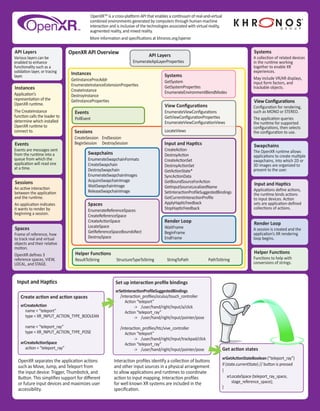
OpenXRTM
is a cross-platform API that enables a continuum of real-and-virtual
combined environments generated by computers through human-machine
interaction and is inclusive of the technologies associated with virtual reality,
augmented reality, and mixed reality.
More information and specifications at khronos.org/openxr
API Layers
Various layers can be
enabled to enhance
functionality such as a
validation layer, or tracing
layer.
Input and Haptics
Applications define actions,
the runtime binds actions
to input devices. Action
sets are application-defined
collections of actions.
Instances
Application’s
representation of the
OpenXR runtime.
The CreateInstance
function calls the loader to
determine which installed
OpenXR runtime to
connect to.
View Configurations
Configuration for rendering,
such as MONO or STEREO.
The application queries
the runtime for supported
configurations, then selects
the configuration to use.
Systems
A collection of related devices
in the runtime working
together to enable XR
experiences.
May include VR/AR displays,
input form factors, and
trackable objects.
Swapchains
The OpenXR runtime allows
applications to create multiple
swapchains, into which 2D or
3D images are organized to
present to the user.
Render Loop
A session is created and the
application’s XR rendering
loop begins.
Sessions
An active interaction
between the application
and the runtime.
An application indicates
it wants to render by
beginning a session.
Spaces
Frame of reference, how
to track real and virtual
objects and their relative
motion.
OpenXR defines 3
reference spaces, VIEW,
LOCAL, and STAGE.
Events
Events are messages sent
from the runtime into a
queue from which the
application will read one
at a time.
Helper Functions
Functions to help with
conversions of strings.
Events
PollEvent
Systems
GetSystem
GetSystemProperties
EnumerateEnvironmentBlendModes
API Layers
EnumerateApiLayerProperties
View Configurations
EnumerateViewConfigurations
GetViewConfigurationProperties
EnumerateViewConfigurationViews
LocateViews
Helper Functions
ResultToString StructureTypeToString StringToPath PathToString
Create action and action spaces
xrCreateAction
name = “teleport”
type = XR_INPUT_ACTION_TYPE_BOOLEAN
name = “teleport_ray”
type = XR_INPUT_ACTION_TYPE_POSE
xrCreateActionSpace
action = “teleport_ray”
Render Loop
WaitFrame
BeginFrame
EndFrame
Input and Haptics
CreateAction
DestroyAction
CreateActionSet
DestroyActionSet
GetActionState*
SyncActionData
GetBoundSourceForAction
GetInputSourceLocalizedName
SetInteractionProfileSuggestedBindings
GetCurrentInteractionProfile
ApplyHapticFeedback
StopHapticFeedback
Swapchains
EnumerateSwapchainFormats
CreateSwapchain
DestroySwapchain
EnumerateSwapchainImages
AcquireSwapchainImage
WaitSwapchainImage
ReleaseSwapchainImage
Spaces
EnumerateReferenceSpaces
CreateReferenceSpace
CreateActionSpace
LocateSpace
GetReferenceSpaceBoundsRect
DestroySpace
OpenXR separates the application actions
such as Move, Jump, and Teleport from
the input device: Trigger, Thumbstick, and
Button. This simplifies support for different
or future input devices and maximizes user
accessibility.
Interaction profiles identify a collection of buttons
and other input sources in a physical arrangement
to allow applications and runtimes to coordinate
action to input mapping. Interaction profiles
for well known XR systems are included in the
specification.
Set up interaction profile bindings
xrSetInteractionProfileSuggestedBindings
/interaction_profiles/oculus/touch_controller
	 Action “teleport”
		 -> /user/hand/right/input/a/click
	 Action “teleport_ray”
		 -> /user/hand/right/input/pointer/pose
/interaction_profiles/htc/vive_controller
	 Action “teleport”
		 -> /user/hand/right/input/trackpad/click
	 Action “teleport_ray”
		 -> /user/hand/right/input/pointer/pose Get action states
xrGetActionStateBoolean (“teleport_ray”)
if (state.currentState) // button is pressed
{
xrLocateSpace (teleport_ray_space,
	 stage_reference_space);
}
Learn more about OpenXR
OpenXR is maintained by the Khronos® Group, a worldwide consortium of
organizations that creates and maintains key standards used across many
industries. Visit Khronos online for resources to help you master OpenXR:
OpenXR Resource Page: khronos.org/openxr
Forums: forums.khronos.org
Slack: https://khr.io/slack
Videos & Presentations: khr.io/library
Khronos Events: khronos.org/events
Khronos Blog: khronos.org/blog
Reference Guides: khr.io/refguides
Khronos Books: khronos.org/developers/books
Khronos Merchandise: khronos.org/store
© 2019 The Khronos® Group Inc.
OpenXR Application Lifecycle
A high level overview of a typical OpenXR application including the order of function calls, creation of objects, session state changes, and the rendering loop.
Refer to the OpenXR specification at khronos.org/openxr for details.
www.khronos.org/openxr
Session States
and
Frame Loop
Applica�on
Started
Decide API and
Extensions usages
Instance
Created
Instance
Destroyed
Applica�on
Completed
Session
System
Unavailable
System
Available
Session
Created
Session
Destroyed
xrDestroyInstance
xrCreateInstance
xrGetInstanceProperties
xrEnumerateApiLayerProperties
xrEnumerateExtensionProperties
xrCreateSession
xrDestroySession
xrDestroySpace
xrDestroyAction
xrDestroyActionSet
xrDestroySwapchain
xrGetSystem
XR_ERROR
_FORM_FACTOR_UNAVAILABLE
xrPollEvent
xrGetSystemProperties
xrEnumerateViewConfigurations
xrGetViewConfigurationProperties
xrEnumerateViewConfigurationViews
xrEnumerateEnvironmentBlendModes
XR_SESSION_STATE
RUNNING or VISIBLE or FOCUSED
Execute Graphics Work
xrReleaseSwapchainImage
xrAcquireSwapchainImage
xrWaitSwapchainImage
xrLocateSpace
xrLocateViews
xrSyncActionData
xrGetActionState*
xrApplyHapticFeedback
xrStopHapticFeedback
xrGetCurrentInteractionProfile
XR_SESSION_STATE
READY
XR_SESSION_STATE
STOPPING
XR_SESSION_STATE
EXITING
XR_SESSION_STATE
LOSS_PENDING
not focused
XR_SESSION_STATE
IDLE
xrWaitFrame
xrBeginFrame
not visible
xrEnumerateReferenceSpaces
xrCreateReferenceSpace
xrCreateActionSpace
xrGetReferenceSpaceBoundsRect
xrEnumerateSwapchainFormats
xrCreateSwapchain
xrEnumerateSwapchainImages
xrCreateActionSet
xrCreateAction
xrSetInteractionProfileSuggestedBindings
xrEndFrame
xrBeginSession
xrEndSession
Handle Ac�ons

OpenXR 0.90 Overview Guide

  • 1.
    Input and Haptics OpenXRAPI Overview Instances GetInstanceProcAddr EnumerateInstanceExtensionProperties CreateInstance DestroyInstance GetInstanceProperties Sessions CreateSession BeginSession EndSession DestroySession OpenXRTM is a cross-platform API that enables a continuum of real-and-virtual combined environments generated by computers through human-machine interaction and is inclusive of the technologies associated with virtual reality, augmented reality, and mixed reality. More information and specifications at khronos.org/openxr API Layers Various layers can be enabled to enhance functionality such as a validation layer, or tracing layer. Input and Haptics Applications define actions, the runtime binds actions to input devices. Action sets are application-defined collections of actions. Instances Application’s representation of the OpenXR runtime. The CreateInstance function calls the loader to determine which installed OpenXR runtime to connect to. View Configurations Configuration for rendering, such as MONO or STEREO. The application queries the runtime for supported configurations, then selects the configuration to use. Systems A collection of related devices in the runtime working together to enable XR experiences. May include VR/AR displays, input form factors, and trackable objects. Swapchains The OpenXR runtime allows applications to create multiple swapchains, into which 2D or 3D images are organized to present to the user. Render Loop A session is created and the application’s XR rendering loop begins. Sessions An active interaction between the application and the runtime. An application indicates it wants to render by beginning a session. Spaces Frame of reference, how to track real and virtual objects and their relative motion. OpenXR defines 3 reference spaces, VIEW, LOCAL, and STAGE. Events Events are messages sent from the runtime into a queue from which the application will read one at a time. Helper Functions Functions to help with conversions of strings. Events PollEvent Systems GetSystem GetSystemProperties EnumerateEnvironmentBlendModes API Layers EnumerateApiLayerProperties View Configurations EnumerateViewConfigurations GetViewConfigurationProperties EnumerateViewConfigurationViews LocateViews Helper Functions ResultToString StructureTypeToString StringToPath PathToString Create action and action spaces xrCreateAction name = “teleport” type = XR_INPUT_ACTION_TYPE_BOOLEAN name = “teleport_ray” type = XR_INPUT_ACTION_TYPE_POSE xrCreateActionSpace action = “teleport_ray” Render Loop WaitFrame BeginFrame EndFrame Input and Haptics CreateAction DestroyAction CreateActionSet DestroyActionSet GetActionState* SyncActionData GetBoundSourceForAction GetInputSourceLocalizedName SetInteractionProfileSuggestedBindings GetCurrentInteractionProfile ApplyHapticFeedback StopHapticFeedback Swapchains EnumerateSwapchainFormats CreateSwapchain DestroySwapchain EnumerateSwapchainImages AcquireSwapchainImage WaitSwapchainImage ReleaseSwapchainImage Spaces EnumerateReferenceSpaces CreateReferenceSpace CreateActionSpace LocateSpace GetReferenceSpaceBoundsRect DestroySpace OpenXR separates the application actions such as Move, Jump, and Teleport from the input device: Trigger, Thumbstick, and Button. This simplifies support for different or future input devices and maximizes user accessibility. Interaction profiles identify a collection of buttons and other input sources in a physical arrangement to allow applications and runtimes to coordinate action to input mapping. Interaction profiles for well known XR systems are included in the specification. Set up interaction profile bindings xrSetInteractionProfileSuggestedBindings /interaction_profiles/oculus/touch_controller Action “teleport” -> /user/hand/right/input/a/click Action “teleport_ray” -> /user/hand/right/input/pointer/pose /interaction_profiles/htc/vive_controller Action “teleport” -> /user/hand/right/input/trackpad/click Action “teleport_ray” -> /user/hand/right/input/pointer/pose Get action states xrGetActionStateBoolean (“teleport_ray”) if (state.currentState) // button is pressed { xrLocateSpace (teleport_ray_space, stage_reference_space); }
  • 2.
    Learn more aboutOpenXR OpenXR is maintained by the Khronos® Group, a worldwide consortium of organizations that creates and maintains key standards used across many industries. Visit Khronos online for resources to help you master OpenXR: OpenXR Resource Page: khronos.org/openxr Forums: forums.khronos.org Slack: https://khr.io/slack Videos & Presentations: khr.io/library Khronos Events: khronos.org/events Khronos Blog: khronos.org/blog Reference Guides: khr.io/refguides Khronos Books: khronos.org/developers/books Khronos Merchandise: khronos.org/store © 2019 The Khronos® Group Inc. OpenXR Application Lifecycle A high level overview of a typical OpenXR application including the order of function calls, creation of objects, session state changes, and the rendering loop. Refer to the OpenXR specification at khronos.org/openxr for details. www.khronos.org/openxr Session States and Frame Loop Applica�on Started Decide API and Extensions usages Instance Created Instance Destroyed Applica�on Completed Session System Unavailable System Available Session Created Session Destroyed xrDestroyInstance xrCreateInstance xrGetInstanceProperties xrEnumerateApiLayerProperties xrEnumerateExtensionProperties xrCreateSession xrDestroySession xrDestroySpace xrDestroyAction xrDestroyActionSet xrDestroySwapchain xrGetSystem XR_ERROR _FORM_FACTOR_UNAVAILABLE xrPollEvent xrGetSystemProperties xrEnumerateViewConfigurations xrGetViewConfigurationProperties xrEnumerateViewConfigurationViews xrEnumerateEnvironmentBlendModes XR_SESSION_STATE RUNNING or VISIBLE or FOCUSED Execute Graphics Work xrReleaseSwapchainImage xrAcquireSwapchainImage xrWaitSwapchainImage xrLocateSpace xrLocateViews xrSyncActionData xrGetActionState* xrApplyHapticFeedback xrStopHapticFeedback xrGetCurrentInteractionProfile XR_SESSION_STATE READY XR_SESSION_STATE STOPPING XR_SESSION_STATE EXITING XR_SESSION_STATE LOSS_PENDING not focused XR_SESSION_STATE IDLE xrWaitFrame xrBeginFrame not visible xrEnumerateReferenceSpaces xrCreateReferenceSpace xrCreateActionSpace xrGetReferenceSpaceBoundsRect xrEnumerateSwapchainFormats xrCreateSwapchain xrEnumerateSwapchainImages xrCreateActionSet xrCreateAction xrSetInteractionProfileSuggestedBindings xrEndFrame xrBeginSession xrEndSession Handle Ac�ons