cloudops.com @cloudops_
Cloud-Init and
CloudStack
April 16, 2015
Pierre-Luc Dion @pdion891 pdion891
cloudops.com @cloudops_
Introduction to Cloud-Init
What’s the current capability of it in CloudStack
Some usage examples
Agenda
cloudops.com @cloudops_
Let’s learn more
about us.
About Us
cloudops.com @cloudops_Page
About Us
4
“Since 2005, CloudOps
has enabled hundreds
of enterprises and web-
based companies to
build their business in
the cloud.”
We provide private, public and
hybrid cloud solutions for businesses
seeking scalability and for enterprises
making their move to the cloud. Our
best-in-class cloud architecture allows
companies to confidently, securely, and
reliably achieve new levels of business
performance.
cloudops.com @cloudops_Page
About cloud.ca
5
“cloud.ca is a self-
service utility IaaS
platform designed for
applications,
workspaces and data.”
CloudOps operates cloud.ca a
Canadian cloud service for businesses
requiring that all or some of their data
remain in Canada for reasons of
complicance, performance, cost or
privacy.
cloudops.com @cloudops_Page
CloudMC
6
CloudMC is a multi-
cloud services
management and
orchestration software
that supports Apache
CloudStack
CloudOps has built its own proprietary
cloud services “CloudMC” front end
software for cloud service providers
(used by cloud.ca) and enterprises
looking to offer hybrid IaaS.
It supports Apache Cloudstack based
private clouds and public clouds, and
we are building support for large utility
clouds such as AWS.
cloudops.com @cloudops_
What is it?
Cloud-Init
cloudops.com @cloudops_Page
Cloud-Init
8
Collection of tools to
initialize Virtual
Machine at is first boot.
●  Python based
●  Started by Scott Moser
●  Backed by Canonical
●  Widely used by public cloud
providers (AWS, Azure, rackspace)
●  Provide easy access to meta-data
exposed by the cloud provider
cloudops.com @cloudops_Page
Operating System Supported
9
-  CentOS / RHEL
-  Ubuntu
-  OpenSuse
-  Debian
-  CoreOS
-  Others?
cloudops.com @cloudops_Page
Out of the Box
10
Per instance:
•  Generate new SSH server keys
•  Refresh /dev/urandom
•  Set hostname and domain
•  Disable ssh access from root
(force close)
•  Configure “ubuntu” ssh access
Your scripts:
/var/lib/cloud/scripts
/per-boot
/per-instance
/per-once
cloudops.com @cloudops_Page
Basic Usage of Cloud-Init
11
1.  Create user “cloud-user”
2.  password set to “cloud-user”
3.  sshkey apply to root and “cloud-user”
4.  enable sudo
/etc/cloud/cloud.cfg
system_info:	


  default_user:	


  name:	
  cloud-­‐user	


  sudo:	
  ["ALL=(ALL)	
  NOPASSWD:ALL"]	


  gecos:	
  Generic	
  cloud	
  user	


Configuration thru YAML file
cloudops.com @cloudops_Page
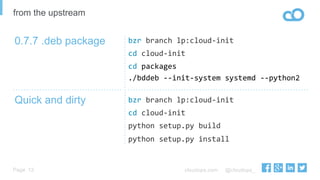
bzr	
  branch	
  lp:cloud-­‐init	
  
cd	
  cloud-­‐init	
  
cd	
  packages	
  
./bddeb	
  -­‐-­‐init-­‐system	
  systemd	
  -­‐-­‐python2	
  
bzr	
  branch	
  lp:cloud-­‐init	
  
cd	
  cloud-­‐init	
  
python	
  setup.py	
  build	
  
python	
  setup.py	
  install	
  
Quick and dirty
12
0.7.7 .deb package
from the upstream
cloudops.com @cloudops_
And CloudStack in this
story?
cloudops.com @cloudops_
What information is
retrieved?
cloudops.com @cloudops_Page
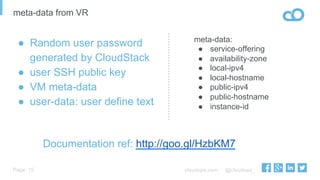
meta-data from VR
15
●  Random user password
generated by CloudStack
●  user SSH public key
●  VM meta-data
●  user-data: user define text
meta-data:
●  service-offering
●  availability-zone
●  local-ipv4
●  local-hostname
●  public-ipv4
●  public-hostname
●  instance-id
Documentation ref: http://goo.gl/HzbKM7
cloudops.com @cloudops_Page
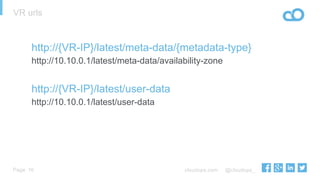
VR urls
16
http://{VR-IP}/latest/meta-data/{metadata-type}
http://10.10.0.1/latest/meta-data/availability-zone
http://{VR-IP}/latest/user-data
http://10.10.0.1/latest/user-data
cloudops.com @cloudops_Page 17
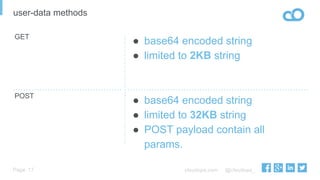
user-data methods
GET
POST
●  base64 encoded string
●  limited to 32KB string
●  POST payload contain all
params.
●  base64 encoded string
●  limited to 2KB string
cloudops.com @cloudops_
What can I do with user-data?
cloudops.com @cloudops_Page
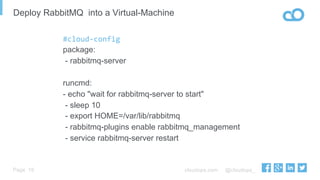
Deploy RabbitMQ into a Virtual-Machine
19
#cloud-­‐config
package:
- rabbitmq-server
runcmd:
- echo "wait for rabbitmq-server to start"
- sleep 10
- export HOME=/var/lib/rabbitmq
- rabbitmq-plugins enable rabbitmq_management
- service rabbitmq-server restart
cloudops.com @cloudops_Page
CloudStack simulator on CoreOS
20
#cloud-config
coreos:
units:
- name: simulator.service
command: start
content: |
[Unit]
Description=Cloudstack Simulator
After=docker.service
Requires=docker.service
[Service]
TimeoutStartSec=0
ExecStartPre=-/usr/bin/docker kill cloudstack
ExecStartPre=-/usr/bin/docker rm cloudstack
ExecStartPre=/usr/bin/docker pull cloudstack/simulator
ExecStart=/usr/bin/docker run -d --name cloudstack -p 80:8080 cloudstack/simulator:4.5
[Install]
WantedBy=multi-user.target
cloudops.com @cloudops_Page
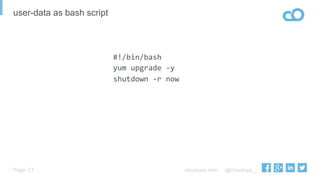
user-data as bash script
21
#!/bin/bash	
  
yum	
  upgrade	
  -­‐y	
  
shutdown	
  -­‐r	
  now	
  
cloudops.com @cloudops_Page
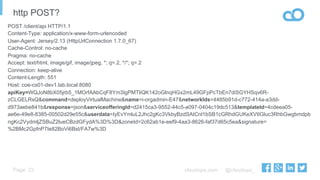
http POST?
22
POST /client/api HTTP/1.1
Content-Type: application/x-www-form-urlencoded
User-Agent: Jersey/2.13 (HttpUrlConnection 1.7.0_67)
Cache-Control: no-cache
Pragma: no-cache
Accept: text/html, image/gif, image/jpeg, *; q=.2, */*; q=.2
Connection: keep-alive
Content-Length: 551
Host: coe-cs01-dev1.lab.local:8080
apiKey=WQJoN8bX05jrb5_1MOrfAAbCqF8Ym3IgPMTliQK142oGlnqHGx2mL49GFpPcTbEn7diSGYHSqv6R-
zCLGELRsQ&command=deployVirtualMachine&name=i-orgadmin-E47&networkIds=4485b91d-c772-414a-a3dd-
d973aebe841b&response=json&serviceofferingId=d2415ca3-9552-44c5-a097-0404c19dc513&templateId=4cdeea05-
ae6e-49e8-8385-00502d29e55c&userdata=IyEvYmluL2Jhc2gKc3VkbyBzdSAtCnl1bSB1cGRhdGUKeXVtIGluc3RhbGwgbmdpb
ngKc2VydmljZSBuZ2lueCBzdGFydA%3D%3D&zoneId=2c62ab1e-eef9-4aa3-8626-faf37d65c5ea&signature=
%2BMc2GpfnP7Ie82BoVi6Bst/FA7w%3D
cloudops.com @cloudops_
Cloud-Init + CloudStack
cloudops.com @cloudops_
State of the Doc
cloudops.com @cloudops_Page
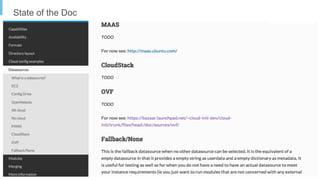
State of the Doc
25
cloudops.com @cloudops_Page
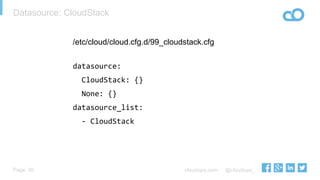
Datasource: CloudStack
26
/etc/cloud/cloud.cfg.d/99_cloudstack.cfg
datasource:	


  CloudStack:	
  {}	


  None:	
  {}	
  
datasource_list:	


  -­‐	
  CloudStack	


cloudops.com @cloudops_Page
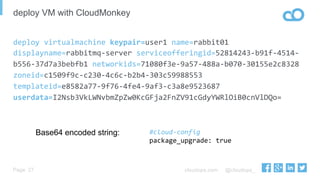
deploy VM with CloudMonkey
27
deploy	
  virtualmachine	
  keypair=user1	
  name=rabbit01	
  
displayname=rabbitmq-­‐server	
  serviceofferingid=52814243-­‐b91f-­‐4514-­‐
b556-­‐37d7a3bebfb1	
  networkids=71080f3e-­‐9a57-­‐488a-­‐b070-­‐30155e2c8328	
  
zoneid=c1509f9c-­‐c230-­‐4c6c-­‐b2b4-­‐303c59988553	
  
templateid=e8582a77-­‐9f76-­‐4fe4-­‐9af3-­‐c3a8e9523687	
  
userdata=I2Nsb3VkLWNvbmZpZw0KcGFja2FnZV91cGdyYWRlOiB0cnVlDQo=	


#cloud-­‐config	
  
package_upgrade:	
  true	
  
Base64 encoded string:
cloudops.com @cloudops_Page
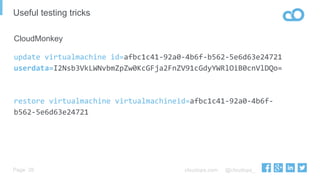
Useful testing tricks
28
CloudMonkey
update	
  virtualmachine	
  id=afbc1c41-­‐92a0-­‐4b6f-­‐b562-­‐5e6d63e24721	
  
userdata=I2Nsb3VkLWNvbmZpZw0KcGFja2FnZV91cGdyYWRlOiB0cnVlDQo=	


restore	
  virtualmachine	
  virtualmachineid=afbc1c41-­‐92a0-­‐4b6f-­‐
b562-­‐5e6d63e24721	


cloudops.com @cloudops_Page
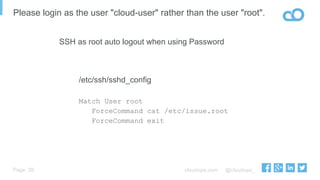
Please login as the user "cloud-user" rather than the user "root".
29
/etc/ssh/sshd_config
Match User root
ForceCommand cat /etc/issue.root
ForceCommand exit
SSH as root auto logout when using Password
cloudops.com @cloudops_
Few issues :-(
cloudops.com @cloudops_Page
URL trailing slash
31
CLOUDSTACK-7405
●  Using cloudstack older than 4.4.1
require cloud-init 0.7.5+
●  Latest ACS ( 4.4.2+), older cloud-
init work (0.6.5)
cloudops.com @cloudops_Page
change SSHkey for VM user
32
resetSSHKeyForVirtualMachineCloudStack can change SSHkey on the
VR, but not considered by cloud-init at
reboot
https://bugs.launchpad.net/cloud-init/+bug/1440265
cloudops.com @cloudops_Page
change password for VM user
33
resetPasswordForVirtualMachineCloudStack can reset password on the
VR, but not considered by cloud-init at
reboot
https://bugs.launchpad.net/cloud-init/+bug/1440263
•  Potential fix posted on 2015-04-15
cloudops.com @cloudops_Page
Recent updates
34
●  Cloud-Init upstream support password. cloud-init-0.7.7
○  resetPasswordForVirtualMachine still not working
●  CloudStack documentation now include Cloud-Init
●  Documentation Pull request submit to Cloud-Init upstream
cloudops.com @cloudops_
Alternatives
cloudops.com @cloudops_Page
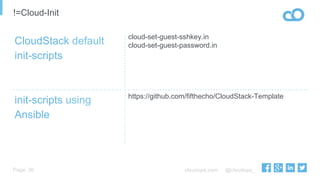
cloud-set-guest-sshkey.in
cloud-set-guest-password.in
https://github.com/fifthecho/CloudStack-Template
init-scripts using
Ansible
36
CloudStack default
init-scripts
!=Cloud-Init
cloudops.com @cloudops_Page
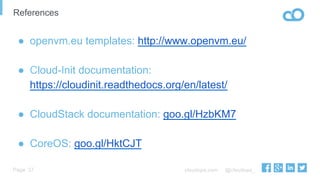
References
37
●  openvm.eu templates: http://www.openvm.eu/
●  Cloud-Init documentation:
https://cloudinit.readthedocs.org/en/latest/
●  CloudStack documentation: goo.gl/HzbKM7
●  CoreOS: goo.gl/HktCJT
cloudops.com @cloudops_
DEMO
cloudops.com @cloudops_
Questions?
cloudops.com @cloudops_
Thank you!

CloudOps CloudStack Days, Austin April 2015