OpenStack Management & Automation
using CloudForms 4.0
Prasad Mukhedkar
Senior Technical Support Engineer
Introduction
A cloud management platform is a piece of all-in-one software with integrated
tools that provide a unified platform for provisioning, management, billing, control,
and governance of resources across different types of cloud deployments, such as
private and public, and virtualized infrastructures.
Holistic Management platform for your
Cloud infrastructure
“Private IaaS Cloud deployments are set up for failure
if you don’t develop a management strategy upfront"
Source : Gartner Research
Openstack Management Challenges
● How do I provide my users with self-service yet still control what they
can see and do?
● How do I tie self-service to what's going on in my infrastructure?
● How do I provide adequate support and service levels when I give
users control?
● How do I ensure compliance on my cloud workload?
● How can I integrate this “cloud” into my existing infrastructure tools
and processes?
● How can I plan for capacity requirements to maintain of my cloud’s
illusion of unlimited resources?
Openstack Management Challenges
● How do I handle N-Tier application stacks and automate
delivery to users?
● How do I manage my capacity to maximize utilization while
still delivering adequate/ good performance and availability?
● How do I chargeback in a self-service model across multiple
clouds/platforms?
Openstack Native tools lack the functionalities
needed to deal with these challenges .
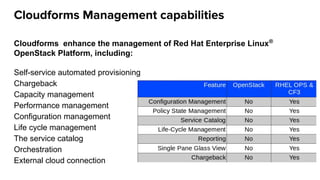
Cloudforms Management capabilities
Cloudforms enhance the management of Red Hat Enterprise Linux®
OpenStack Platform, including:
Self-service automated provisioning
Chargeback
Capacity management
Performance management
Configuration management
Life cycle management
The service catalog
Orchestration
External cloud connection
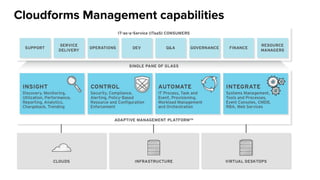
Cloudforms Management capabilities
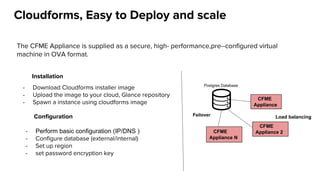
Cloudforms, Easy to Deploy and scale
The CFME Appliance is supplied as a secure, high­ performance,pre­-configured virtual
machine in OVA format.
- Download Cloudforms installer image
- Upload the image to your cloud, Glance repository
- Spawn a instance using cloudforms image
Installation
Configuration
- Perform basic configuration (IP/DNS )
- Configure database (external/internal)
- Set up region
- set password encryption key
Postgres Database
CFME
Appliance
CFME
Appliance 2
Load balancing
CFME
Appliance N
Failover
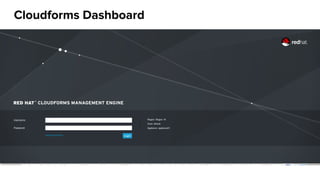
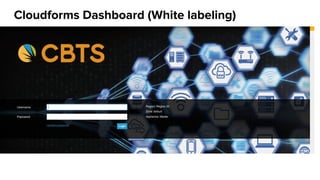
Cloudforms Dashboard
Cloudforms Dashboard (White labeling)
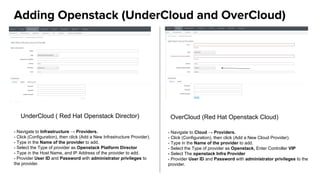
Adding Openstack (UnderCloud and OverCloud)
UnderCloud ( Red Hat Openstack Director) OverCloud (Red Hat Openstack Cloud)
- Navigate to Infrastructure → Providers.
- Click (Configuration), then click (Add a New Infrastructure Provider).
- Type in the Name of the provider to add.
- Select the Type of provider as Openstack Platform Director
- Type in the Host Name, and IP Address of the provider to add.
- Provider User ID and Password with administrator privileges to
the provider.
- Navigate to Cloud → Providers.
- Click (Configuration), then click (Add a New Cloud Provider).
- Type in the Name of the provider to add.
- Select the Type of provider as Openstack, Enter Controller VIP
- Select The openstack Infra Provider
- Provider User ID and Password with administrator privileges to the
provider.
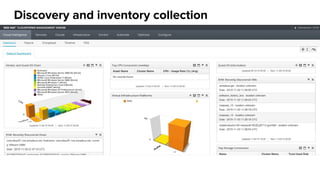
Discovery and inventory collection
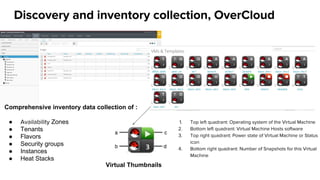
Discovery and inventory collection, OverCloud
Comprehensive inventory data collection of :
● Availability Zones
● Tenants
● Flavors
● Security groups
● Instances
● Heat Stacks
1. Top left quadrant: Operating system of the Virtual Machine
2. Bottom left quadrant: Virtual Machine Hosts software
3. Top right quadrant: Power state of Virtual Machine or Status
icon
4. Bottom right quadrant: Number of Snapshots for this Virtual
Machine
Virtual Thumbnails
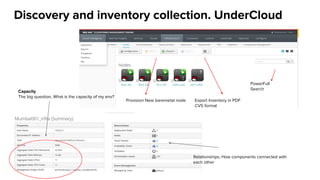
Discovery and inventory collection. UnderCloud
Export Inventory in PDF
CVS format
PowerFull
Search
Provision New baremetal node
Capacity
The big question, What is the capacity of my env?
Relationships, How components connected with
each other
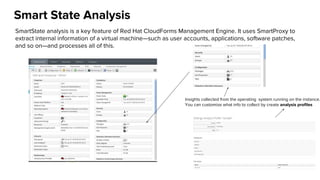
Smart State Analysis
SmartState analysis is a key feature of Red Hat CloudForms Management Engine. It uses SmartProxy to
extract internal information of a virtual machine—such as user accounts, applications, software patches,
and so on—and processes all of this.
Insights collected from the operating system running on the instance.
You can customize what info to collect by create analysis profiles
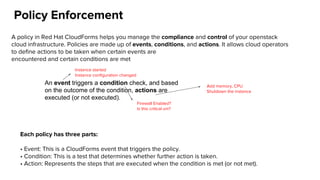
Policy Enforcement
A policy in Red Hat CloudForms helps you manage the compliance and control of your openstack
cloud infrastructure. Policies are made up of events, conditions, and actions. It allows cloud operators
to define actions to be taken when certain events are
encountered and certain conditions are met
An event triggers a condition check, and based
on the outcome of the condition, actions are
executed (or not executed).
Instance started
Instance configuration changed
Firewall Enabled?
Is this critical vm?
Add memory, CPU
Shutdown the instance
Each policy has three parts:
• Event: This is a CloudForms event that triggers the policy.
• Condition: This is a test that determines whether further action is taken.
• Action: Represents the steps that are executed when the condition is met (or not met).
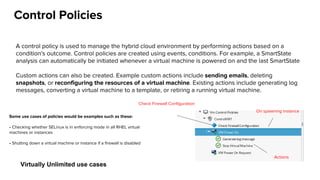
Control Policies
A control policy is used to manage the hybrid cloud environment by performing actions based on a
condition's outcome. Control policies are created using events, conditions. For example, a SmartState
analysis can automatically be initiated whenever a virtual machine is powered on and the last SmartState
Custom actions can also be created. Example custom actions include sending emails, deleting
snapshots, or reconfiguring the resources of a virtual machine. Existing actions include generating log
messages, converting a virtual machine to a template, or retiring a running virtual machine.
Check Firewall Configuration
On spawning instance
Actions
Some use cases of policies would be examples such as these:
• Checking whether SELinux is in enforcing mode in all RHEL virtual
machines or instances
• Shutting down a virtual machine or instance if a firewall is disabled
Virtually Unlimited use cases
Compliance Policies
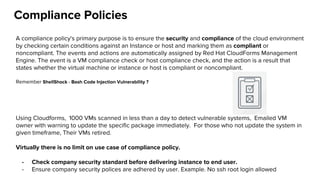
A compliance policy's primary purpose is to ensure the security and compliance of the cloud environment
by checking certain conditions against an Instance or host and marking them as compliant or
noncompliant. The events and actions are automatically assigned by Red Hat CloudForms Management
Engine. The event is a VM compliance check or host compliance check, and the action is a result that
states whether the virtual machine or instance or host is compliant or noncompliant.
Remember ShellShock - Bash Code Injection Vulnerability ?
Using Cloudforms, 1000 VMs scanned in less than a day to detect vulnerable systems, Emailed VM
owner with warning to update the specific package immediately. For those who not update the system in
given timeframe, Their VMs retired.
Virtually there is no limit on use case of compliance policy.
- Check company security standard before delivering instance to end user.
- Ensure company security polices are adhered by user. Example. No ssh root login allowed
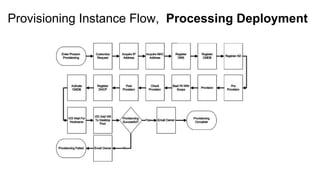
Provisioning Instance
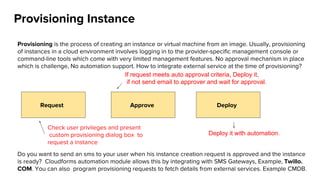
Provisioning is the process of creating an instance or virtual machine from an image. Usually, provisioning
of instances in a cloud environment involves logging in to the provider-specific management console or
command-line tools which come with very limited management features. No approval mechanism in place
which is challenge, No automation support. How to integrate external service at the time of provisioning?
Do you want to send an sms to your user when his instance creation request is approved and the instance
is ready? Cloudforms automation module allows this by integrating with SMS Gateways, Example, Twillo.
COM. You can also program provisioning requests to fetch details from external services. Example CMDB.
Request Approve Deploy
Check user privileges and present
custom provisioning dialog box to
request a instance
If request meets auto approval criteria, Deploy it,
if not send email to approver and wait for approval.
Deploy it with automation.
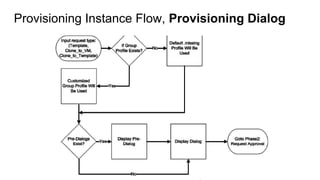
Provisioning Instance Flow, Provisioning Dialog
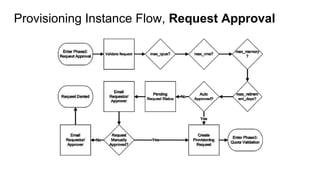
Provisioning Instance Flow, Request Approval
Provisioning Instance Flow, Processing Deployment
Automation
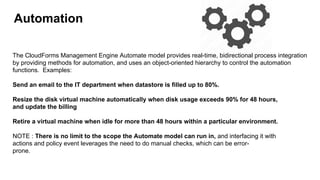
The CloudForms Management Engine Automate model provides real-time, bidirectional process integration
by providing methods for automation, and uses an object-oriented hierarchy to control the automation
functions. Examples:
Send an email to the IT department when datastore is filled up to 80%.
Resize the disk virtual machine automatically when disk usage exceeds 90% for 48 hours,
and update the billing
Retire a virtual machine when idle for more than 48 hours within a particular environment.
NOTE : There is no limit to the scope the Automate model can run in, and interfacing it with
actions and policy event leverages the need to do manual checks, which can be error-
prone.
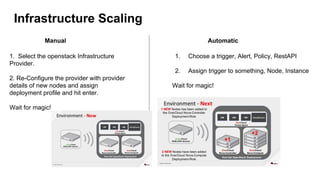
Infrastructure Scaling
Manual Automatic
1. Select the openstack Infrastructure
Provider.
2. Re-Configure the provider with provider
details of new nodes and assign
deployment profile and hit enter.
Wait for magic!
1. Choose a trigger, Alert, Policy, RestAPI
2. Assign trigger to something, Node, Instance
Wait for magic!
Service Catalog
Catalogs are another way of provisioning a set of instances or virtual machines and are used to create
application stacks that contain more than one instance or virtual machine. For example, let's consider a
multi-tier web application that contains a web tier, an application tier and a database tier, and we want
our stack to consist of two instances in each tier for high availability and failover. Instead of provisioning
each instance manually, we can create a catalog that contains the entire deployment information, thus
referred to a single template to provision the entire stack. When provisioning is enabled in a catalog, it is
called a service catalog.
Cloudforms support heat orchestration templates for creating service catalog along with its native
tool.
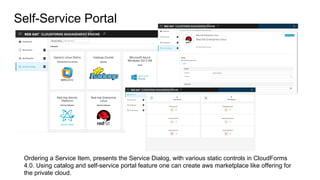
Self-Service Portal
Ordering a Service Item, presents the Service Dialog, with various static controls in CloudForms
4.0. Using catalog and self-service portal feature one can create aws marketplace like offering for
the private cloud.
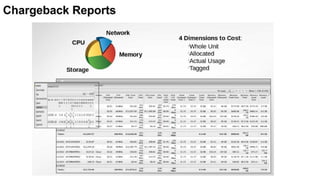
Chargeback Reports
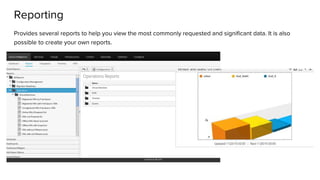
Reporting
Provides several reports to help you view the most commonly requested and significant data. It is also
possible to create your own reports.
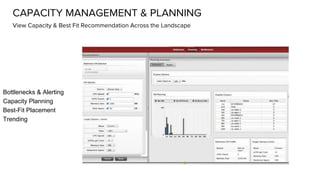
CAPACITY MANAGEMENT & PLANNING
View Capacity & Best Fit Recommendation Across the Landscape
Bottlenecks & Alerting
Capacity Planning
Best-Fit Placement
Trending
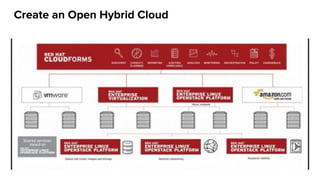
Create an Open Hybrid Cloud
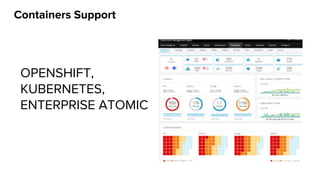
Containers Support
OPENSHIFT,
KUBERNETES,
ENTERPRISE ATOMIC
Future, Cloudforms 4.1
● Service Designer
● Ansible Integration
● SDN and SDS
● Business
Management
Questions
- Comprehensive Documentation of the product here :
https://access.redhat.com/documentation/en/red-hat-cloudforms/
- 24/7 Support Offering
http://manageiq.org

Openstack Cloud Management and Automation Using Red Hat Cloudforms 4.0

  • 1.
    OpenStack Management &Automation using CloudForms 4.0 Prasad Mukhedkar Senior Technical Support Engineer
  • 2.
    Introduction A cloud managementplatform is a piece of all-in-one software with integrated tools that provide a unified platform for provisioning, management, billing, control, and governance of resources across different types of cloud deployments, such as private and public, and virtualized infrastructures. Holistic Management platform for your Cloud infrastructure “Private IaaS Cloud deployments are set up for failure if you don’t develop a management strategy upfront" Source : Gartner Research
  • 3.
    Openstack Management Challenges ●How do I provide my users with self-service yet still control what they can see and do? ● How do I tie self-service to what's going on in my infrastructure? ● How do I provide adequate support and service levels when I give users control? ● How do I ensure compliance on my cloud workload? ● How can I integrate this “cloud” into my existing infrastructure tools and processes? ● How can I plan for capacity requirements to maintain of my cloud’s illusion of unlimited resources?
  • 4.
    Openstack Management Challenges ●How do I handle N-Tier application stacks and automate delivery to users? ● How do I manage my capacity to maximize utilization while still delivering adequate/ good performance and availability? ● How do I chargeback in a self-service model across multiple clouds/platforms? Openstack Native tools lack the functionalities needed to deal with these challenges .
  • 5.
    Cloudforms Management capabilities Cloudformsenhance the management of Red Hat Enterprise Linux® OpenStack Platform, including: Self-service automated provisioning Chargeback Capacity management Performance management Configuration management Life cycle management The service catalog Orchestration External cloud connection
  • 6.
  • 7.
    Cloudforms, Easy toDeploy and scale The CFME Appliance is supplied as a secure, high­ performance,pre­-configured virtual machine in OVA format. - Download Cloudforms installer image - Upload the image to your cloud, Glance repository - Spawn a instance using cloudforms image Installation Configuration - Perform basic configuration (IP/DNS ) - Configure database (external/internal) - Set up region - set password encryption key Postgres Database CFME Appliance CFME Appliance 2 Load balancing CFME Appliance N Failover
  • 8.
  • 9.
  • 10.
    Adding Openstack (UnderCloudand OverCloud) UnderCloud ( Red Hat Openstack Director) OverCloud (Red Hat Openstack Cloud) - Navigate to Infrastructure → Providers. - Click (Configuration), then click (Add a New Infrastructure Provider). - Type in the Name of the provider to add. - Select the Type of provider as Openstack Platform Director - Type in the Host Name, and IP Address of the provider to add. - Provider User ID and Password with administrator privileges to the provider. - Navigate to Cloud → Providers. - Click (Configuration), then click (Add a New Cloud Provider). - Type in the Name of the provider to add. - Select the Type of provider as Openstack, Enter Controller VIP - Select The openstack Infra Provider - Provider User ID and Password with administrator privileges to the provider.
  • 11.
  • 12.
    Discovery and inventorycollection, OverCloud Comprehensive inventory data collection of : ● Availability Zones ● Tenants ● Flavors ● Security groups ● Instances ● Heat Stacks 1. Top left quadrant: Operating system of the Virtual Machine 2. Bottom left quadrant: Virtual Machine Hosts software 3. Top right quadrant: Power state of Virtual Machine or Status icon 4. Bottom right quadrant: Number of Snapshots for this Virtual Machine Virtual Thumbnails
  • 13.
    Discovery and inventorycollection. UnderCloud Export Inventory in PDF CVS format PowerFull Search Provision New baremetal node Capacity The big question, What is the capacity of my env? Relationships, How components connected with each other
  • 14.
    Smart State Analysis SmartStateanalysis is a key feature of Red Hat CloudForms Management Engine. It uses SmartProxy to extract internal information of a virtual machine—such as user accounts, applications, software patches, and so on—and processes all of this. Insights collected from the operating system running on the instance. You can customize what info to collect by create analysis profiles
  • 15.
    Policy Enforcement A policyin Red Hat CloudForms helps you manage the compliance and control of your openstack cloud infrastructure. Policies are made up of events, conditions, and actions. It allows cloud operators to define actions to be taken when certain events are encountered and certain conditions are met An event triggers a condition check, and based on the outcome of the condition, actions are executed (or not executed). Instance started Instance configuration changed Firewall Enabled? Is this critical vm? Add memory, CPU Shutdown the instance Each policy has three parts: • Event: This is a CloudForms event that triggers the policy. • Condition: This is a test that determines whether further action is taken. • Action: Represents the steps that are executed when the condition is met (or not met).
  • 16.
    Control Policies A controlpolicy is used to manage the hybrid cloud environment by performing actions based on a condition's outcome. Control policies are created using events, conditions. For example, a SmartState analysis can automatically be initiated whenever a virtual machine is powered on and the last SmartState Custom actions can also be created. Example custom actions include sending emails, deleting snapshots, or reconfiguring the resources of a virtual machine. Existing actions include generating log messages, converting a virtual machine to a template, or retiring a running virtual machine. Check Firewall Configuration On spawning instance Actions Some use cases of policies would be examples such as these: • Checking whether SELinux is in enforcing mode in all RHEL virtual machines or instances • Shutting down a virtual machine or instance if a firewall is disabled Virtually Unlimited use cases
  • 17.
    Compliance Policies A compliancepolicy's primary purpose is to ensure the security and compliance of the cloud environment by checking certain conditions against an Instance or host and marking them as compliant or noncompliant. The events and actions are automatically assigned by Red Hat CloudForms Management Engine. The event is a VM compliance check or host compliance check, and the action is a result that states whether the virtual machine or instance or host is compliant or noncompliant. Remember ShellShock - Bash Code Injection Vulnerability ? Using Cloudforms, 1000 VMs scanned in less than a day to detect vulnerable systems, Emailed VM owner with warning to update the specific package immediately. For those who not update the system in given timeframe, Their VMs retired. Virtually there is no limit on use case of compliance policy. - Check company security standard before delivering instance to end user. - Ensure company security polices are adhered by user. Example. No ssh root login allowed
  • 18.
    Provisioning Instance Provisioning isthe process of creating an instance or virtual machine from an image. Usually, provisioning of instances in a cloud environment involves logging in to the provider-specific management console or command-line tools which come with very limited management features. No approval mechanism in place which is challenge, No automation support. How to integrate external service at the time of provisioning? Do you want to send an sms to your user when his instance creation request is approved and the instance is ready? Cloudforms automation module allows this by integrating with SMS Gateways, Example, Twillo. COM. You can also program provisioning requests to fetch details from external services. Example CMDB. Request Approve Deploy Check user privileges and present custom provisioning dialog box to request a instance If request meets auto approval criteria, Deploy it, if not send email to approver and wait for approval. Deploy it with automation.
  • 19.
    Provisioning Instance Flow,Provisioning Dialog
  • 20.
  • 21.
    Provisioning Instance Flow,Processing Deployment
  • 22.
    Automation The CloudForms ManagementEngine Automate model provides real-time, bidirectional process integration by providing methods for automation, and uses an object-oriented hierarchy to control the automation functions. Examples: Send an email to the IT department when datastore is filled up to 80%. Resize the disk virtual machine automatically when disk usage exceeds 90% for 48 hours, and update the billing Retire a virtual machine when idle for more than 48 hours within a particular environment. NOTE : There is no limit to the scope the Automate model can run in, and interfacing it with actions and policy event leverages the need to do manual checks, which can be error- prone.
  • 23.
    Infrastructure Scaling Manual Automatic 1.Select the openstack Infrastructure Provider. 2. Re-Configure the provider with provider details of new nodes and assign deployment profile and hit enter. Wait for magic! 1. Choose a trigger, Alert, Policy, RestAPI 2. Assign trigger to something, Node, Instance Wait for magic!
  • 24.
    Service Catalog Catalogs areanother way of provisioning a set of instances or virtual machines and are used to create application stacks that contain more than one instance or virtual machine. For example, let's consider a multi-tier web application that contains a web tier, an application tier and a database tier, and we want our stack to consist of two instances in each tier for high availability and failover. Instead of provisioning each instance manually, we can create a catalog that contains the entire deployment information, thus referred to a single template to provision the entire stack. When provisioning is enabled in a catalog, it is called a service catalog. Cloudforms support heat orchestration templates for creating service catalog along with its native tool.
  • 25.
    Self-Service Portal Ordering aService Item, presents the Service Dialog, with various static controls in CloudForms 4.0. Using catalog and self-service portal feature one can create aws marketplace like offering for the private cloud.
  • 26.
  • 27.
    Reporting Provides several reportsto help you view the most commonly requested and significant data. It is also possible to create your own reports.
  • 28.
    CAPACITY MANAGEMENT &PLANNING View Capacity & Best Fit Recommendation Across the Landscape Bottlenecks & Alerting Capacity Planning Best-Fit Placement Trending
  • 30.
    Create an OpenHybrid Cloud
  • 31.
  • 32.
    Future, Cloudforms 4.1 ●Service Designer ● Ansible Integration ● SDN and SDS ● Business Management
  • 33.
    Questions - Comprehensive Documentationof the product here : https://access.redhat.com/documentation/en/red-hat-cloudforms/ - 24/7 Support Offering http://manageiq.org