Jamcracker, Inc.
4677 Old Ironsides Drive
Santa Clara
CA, USA 95054
Hybrid Cloud Management
and
Orchestration
The Complete Solution
1
Purpose
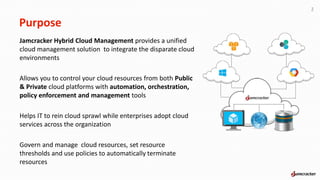
Jamcracker Hybrid Cloud Management provides a unified
cloud management solution to integrate the disparate cloud
environments
Allows you to control your cloud resources from both Public
& Private cloud platforms with automation, orchestration,
policy enforcement and management tools
Helps IT to rein cloud sprawl while enterprises adopt cloud
services across the organization
Govern and manage cloud resources, set resource
thresholds and use policies to automatically terminate
resources
2
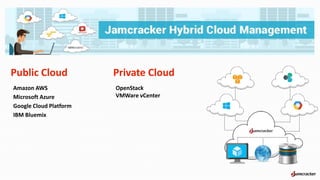
Public Cloud
Amazon AWS
Microsoft Azure
Google Cloud Platform
IBM Bluemix
3
Private Cloud
OpenStack
VMWare vCenter
Features
4
Self Service Portal – Multiple Clouds
Multi-provider catalog with Application Stack templatesCloud Analytics Dashboard displaying data
Instant access to a broad range of cloud infrastructure resources
reduce the threat of “shadow IT and cloud sprawl
Cloud Analytics
p
p
p
p
p
p
p
Real Time Analytics Dashboard
Cost Analytics Dashboard
Tag Analytics Dashboard
Cost Analytics Dashboard
Features
5
Daily Consumption Report
Shows usage data for each day
Reports usage for all products and vendors
p
p
Custom Application Stack Template
Define your own Stack Templates that your users will launch
Define custom launch options restricting regions and sizes that users are allowed to select
p
p
Features
6
VM Life Cycle Management
Orchestration of cloud infrastructure services
Notification on successful provisioning, as well as errors during provisioning
p
p
Policy Based Governance
Optimize the use of cloud resources
Track cloud usage and cost information and alerts administrators
Control cloud costs
Policy Execution Log that reports status of each policies executed
p
p
p
p
Features
7
Role Based Access Control (RBAC)
Restrict/permit users to access various functions
Gain control over proper utilization of the cloud resources
p
p
Directory Server sync
Microsoft Active Directory
Track cloud usage and cost information and alerts administrators
Control cloud costs
Policy Execution Log that reports status of each policies executed
p
p
p
p
Features
8
Showback Report
Visibility into cloud resources used by the organization and departments
Consolidated usage information by departments and business units
p
p
ANALYTICS &
REPORTING
9
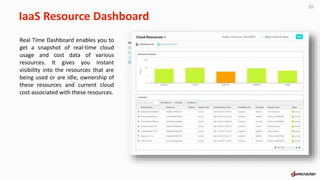
IaaS Resource Dashboard
10
Real Time Dashboard enables you to
get a snapshot of real-time cloud
usage and cost data of various
resources. It gives you instant
visibility into the resources that are
being used or are idle, ownership of
these resources and current cloud
cost associated with these resources.
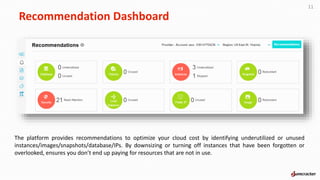
Recommendation Dashboard
11
The platform provides recommendations to optimize your cloud cost by identifying underutilized or unused
instances/images/snapshots/database/IPs. By downsizing or turning off instances that have been forgotten or
overlooked, ensures you don’t end up paying for resources that are not in use.
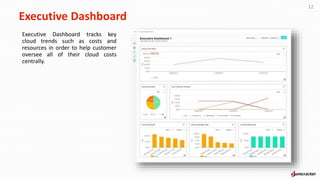
Executive Dashboard
12
Executive Dashboard tracks key
cloud trends such as costs and
resources in order to help customer
oversee all of their cloud costs
centrally.
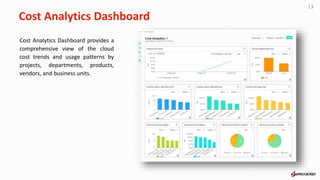
Cost Analytics Dashboard
13
Cost Analytics Dashboard provides a
comprehensive view of the cloud
cost trends and usage patterns by
projects, departments, products,
vendors, and business units.
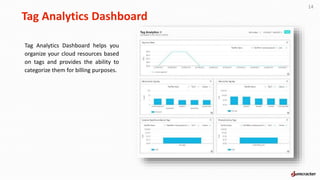
Tag Analytics Dashboard
14
Tag Analytics Dashboard helps you
organize your cloud resources based
on tags and provides the ability to
categorize them for billing purposes.
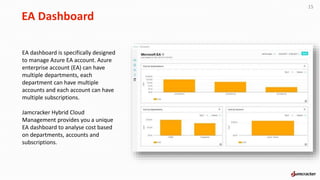
EA Dashboard
15
EA dashboard is specifically designed
to manage Azure EA account. Azure
enterprise account (EA) can have
multiple departments, each
department can have multiple
accounts and each account can have
multiple subscriptions.
Jamcracker Hybrid Cloud
Management provides you a unique
EA dashboard to analyse cost based
on departments, accounts and
subscriptions.
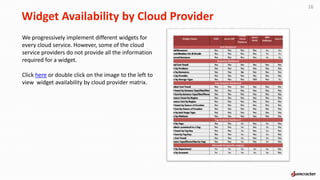
Widget Availability by Cloud Provider
16
We progressively implement different widgets for
every cloud service. However, some of the cloud
service providers do not provide all the information
required for a widget.
Click here or double click on the image to the left to
view widget availability by cloud provider matrix.
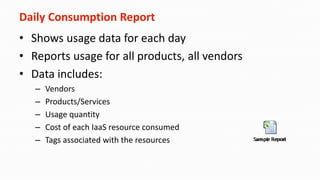
Daily Consumption Report
• Shows usage data for each day
• Reports usage for all products, all vendors
• Data includes:
– Vendors
– Products/Services
– Usage quantity
– Cost of each IaaS resource consumed
– Tags associated with the resources
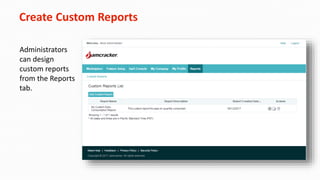
Create Custom Reports
Administrators
can design
custom reports
from the Reports
tab.
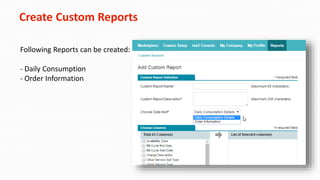
Create Custom Reports
Following Reports can be created:
- Daily Consumption
- Order Information
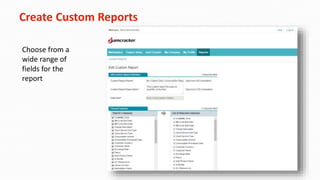
Create Custom Reports
Choose from a
wide range of
fields for the
report
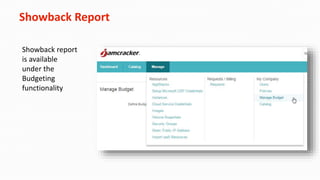
Showback Report
Showback report
is available
under the
Budgeting
functionality
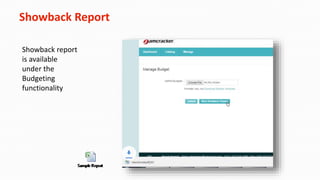
Showback Report
Showback report
is available
under the
Budgeting
functionality
GOVERNANCE
23
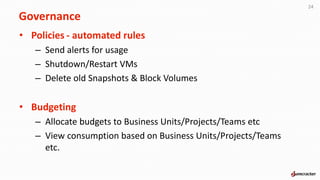
• Policies - automated rules
– Send alerts for usage
– Shutdown/Restart VMs
– Delete old Snapshots & Block Volumes
• Budgeting
– Allocate budgets to Business Units/Projects/Teams etc
– View consumption based on Business Units/Projects/Teams
etc.
24
Governance
• Define Custom Templates
– AppStacks Template allow controlling which Vendor they can be
launched into and what VM sizes are selectable by users.
• AppStack Launch Approval
– All provisioning requests go through an admin approval
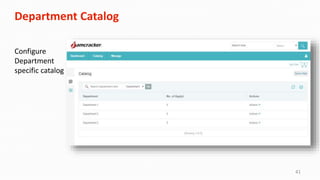
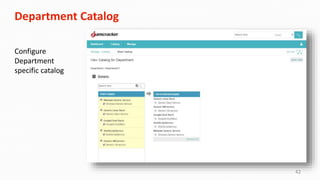
• Department Catalog
– Define which AppStack templates can be launched by each
department
25
Governance
Policies
The policy framework helps businesses create policies to optimize the use of cloud resources.
• Default Policies
– Provides out-of-box governance rules that immediately helps you control cloud costs.
• Cloud Usage Alerts:
– Tracks cloud usage and cost information and alerts administrators when the total usage for the account is greater than a certain value.
– Tracks cloud usage and cost information and alerts administrators when the total usage for a vendor specific product is greater than a
certain value.
• Prevent excess usage:
– Allows scheduling of operational hours to automatically shutdown & start virtual machines.
– Alerts administrators on volumes that have been disassociated from Virtual machines (standalone VMs) for more than a set number of days.
– Optional rule to automatically delete volumes that have been disassociated from virtual machines (standalone VMs) for more than a set
number of days.
• Logging:
– Provides a Policy Execution Log that reports status of each policies executed with details of all the actions executed.
26
Default Policies
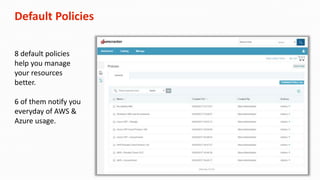
8 default policies
help you manage
your resources
better.
6 of them notify you
everyday of AWS &
Azure usage.
Custom Policies
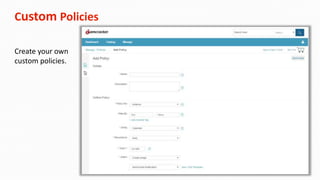
Create your own
custom policies.
29
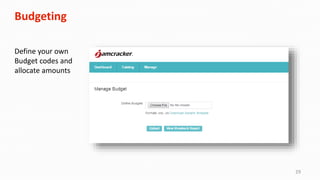
Budgeting
Define your own
Budget codes and
allocate amounts
30
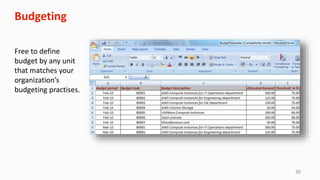
Budgeting
Free to define
budget by any unit
that matches your
organization’s
budgeting practises.
31
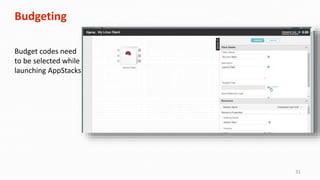
Budgeting
Budget codes need
to be selected while
launching AppStacks
32
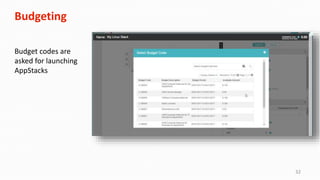
Budgeting
Budget codes are
asked for launching
AppStacks
33
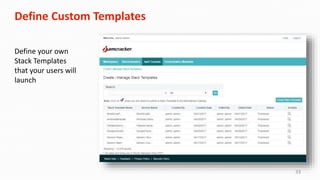
Define Custom Templates
Define your own
Stack Templates
that your users will
launch
34
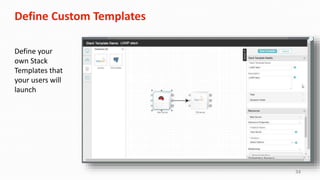
Define Custom Templates
Define your
own Stack
Templates that
your users will
launch
35
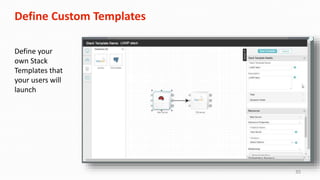
Define Custom Templates
Define your
own Stack
Templates that
your users will
launch
36
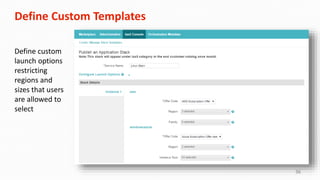
Define Custom Templates
Define custom
launch options
restricting
regions and
sizes that users
are allowed to
select
37
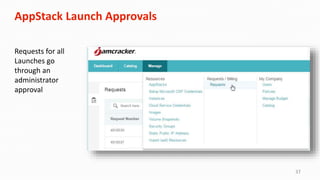
AppStack Launch Approvals
Requests for all
Launches go
through an
administrator
approval
38
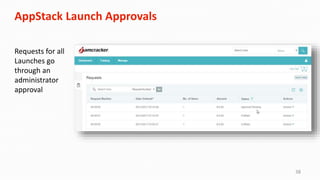
AppStack Launch Approvals
Requests for all
Launches go
through an
administrator
approval
39
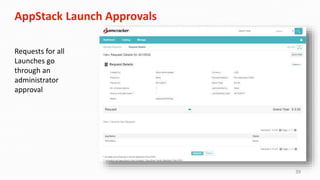
AppStack Launch Approvals
Requests for all
Launches go
through an
administrator
approval
40
Department Catalog
Configure
Department
specific catalog
41
Department Catalog
Configure
Department
specific catalog
42
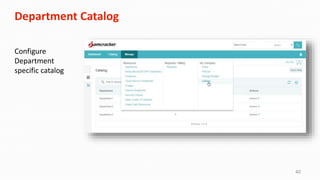
Department Catalog
Configure
Department
specific catalog
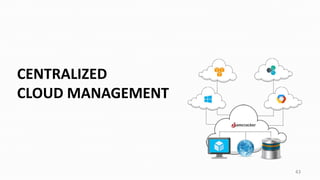
CENTRALIZED
CLOUD MANAGEMENT
43
44
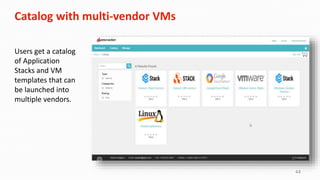
Catalog with multi-vendor VMs
Users get a catalog
of Application
Stacks and VM
templates that can
be launched into
multiple vendors.
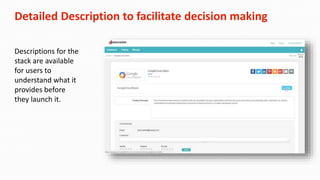
Detailed Description to facilitate decision making
Descriptions for the
stack are available
for users to
understand what it
provides before
they launch it.
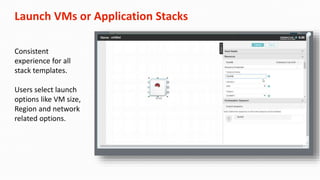
Launch VMs or Application Stacks
Consistent
experience for all
stack templates.
Users select launch
options like VM size,
Region and network
related options.
47
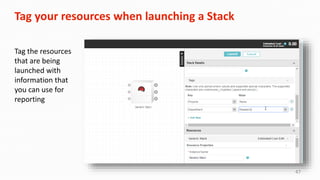
Tag your resources when launching a Stack
Tag the resources
that are being
launched with
information that
you can use for
reporting
Life Cycle Management
The solution supports end-to-end life cycle management of various cloud resources. It supports automated
provisioning and configuration of virtual machines, workload stacks, block storage, and network interfaces.
 Consistent user experience when launching and managing resources irrespective of cloud vendor.
 Orchestration of cloud infrastructure services.
 Attach/Detach/Edit cloud resources and properties
 Termination of cloud resources.
 Notification on successful provisioning, as well as errors during provisioning.
48
49
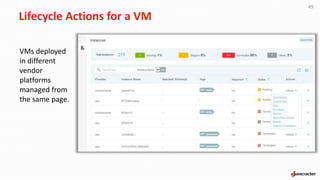
Lifecycle Actions for a VM
VMs deployed
in different
vendor
platforms
managed from
the same page.
Block Volumes
• Provision additional volumes to VMs
• Mount/Unmount from within IaaS Console
• Manage volumes from console
• All volumes actions - RBAC controlled
• More types: high performance, Provisioned IOPS
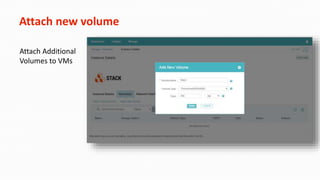
Attach new volume
Attach Additional
Volumes to VMs
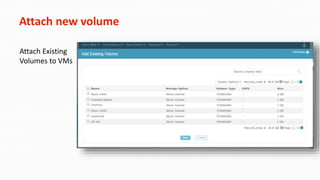
Attach new volume
Attach Existing
Volumes to VMs
Network Interfaces
• Add additional NICs
• Associate to Private Virtual Networks of your account
• Obtain & associate Static Public IP addresses
Network Interfaces
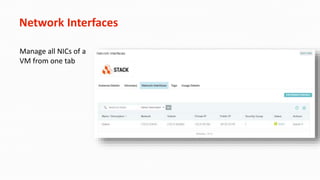
Manage all NICs of a
VM from one tab
Network Interfaces
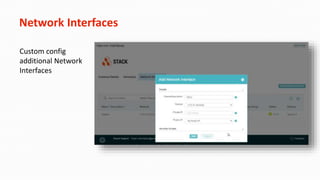
Custom config
additional Network
Interfaces
Volume Snapshots
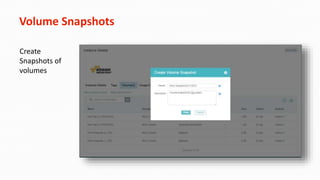
Create
Snapshots of
volumes
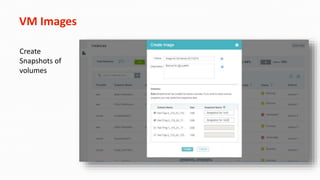
VM Images
Create
Snapshots of
volumes
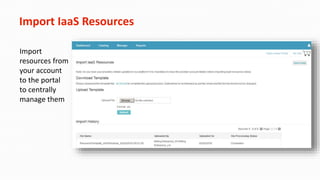
Import IaaS Resources
Import
resources from
your account
to the portal
to centrally
manage them
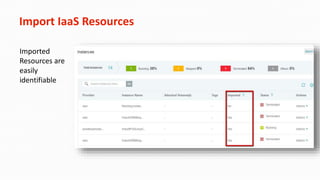
Import IaaS Resources
Imported
Resources are
easily
identifiable
60
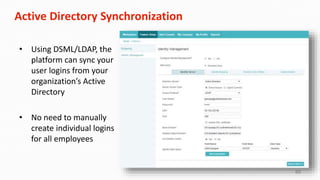
Active Directory Synchronization
• Using DSML/LDAP, the
platform can sync your
user logins from your
organization’s Active
Directory
• No need to manually
create individual logins
for all employees
61
Multi-cloud Support
The following Public Cloud vendors are supported:
• Amazon Web Services – analytics & life-cycle management
• Microsoft Azure (CSP) – analytics & life-cycle management
• Microsoft Azure (Pay As You Go) – analytics & life-cycle management
• Microsoft Azure (EA) – analytics
• Google Cloud – analytics
• IBM Bluemix (SoftLayer) – analytics
The following Private Cloud vendors are supported:
• OpenStack Mitaka – analytics & life-cycle management
• VMWare vCenter – analytics & life-cycle management
Thank you…
62
Jamcracker, Inc.
Address: 4677 Old Ironsides Drive, Santa Clara, CA, USA 95054
Phone: +1 (408) 496-5500
Email: information@jamcracker.com

Hybrid Cloud Management and Orchestration : The Complete Solution

  • 1.
    Jamcracker, Inc. 4677 OldIronsides Drive Santa Clara CA, USA 95054 Hybrid Cloud Management and Orchestration The Complete Solution 1
  • 2.
    Purpose Jamcracker Hybrid CloudManagement provides a unified cloud management solution to integrate the disparate cloud environments Allows you to control your cloud resources from both Public & Private cloud platforms with automation, orchestration, policy enforcement and management tools Helps IT to rein cloud sprawl while enterprises adopt cloud services across the organization Govern and manage cloud resources, set resource thresholds and use policies to automatically terminate resources 2
  • 3.
    Public Cloud Amazon AWS MicrosoftAzure Google Cloud Platform IBM Bluemix 3 Private Cloud OpenStack VMWare vCenter
  • 4.
    Features 4 Self Service Portal– Multiple Clouds Multi-provider catalog with Application Stack templatesCloud Analytics Dashboard displaying data Instant access to a broad range of cloud infrastructure resources reduce the threat of “shadow IT and cloud sprawl Cloud Analytics p p p p p p p Real Time Analytics Dashboard Cost Analytics Dashboard Tag Analytics Dashboard Cost Analytics Dashboard
  • 5.
    Features 5 Daily Consumption Report Showsusage data for each day Reports usage for all products and vendors p p Custom Application Stack Template Define your own Stack Templates that your users will launch Define custom launch options restricting regions and sizes that users are allowed to select p p
  • 6.
    Features 6 VM Life CycleManagement Orchestration of cloud infrastructure services Notification on successful provisioning, as well as errors during provisioning p p Policy Based Governance Optimize the use of cloud resources Track cloud usage and cost information and alerts administrators Control cloud costs Policy Execution Log that reports status of each policies executed p p p p
  • 7.
    Features 7 Role Based AccessControl (RBAC) Restrict/permit users to access various functions Gain control over proper utilization of the cloud resources p p Directory Server sync Microsoft Active Directory Track cloud usage and cost information and alerts administrators Control cloud costs Policy Execution Log that reports status of each policies executed p p p p
  • 8.
    Features 8 Showback Report Visibility intocloud resources used by the organization and departments Consolidated usage information by departments and business units p p
  • 9.
  • 10.
    IaaS Resource Dashboard 10 RealTime Dashboard enables you to get a snapshot of real-time cloud usage and cost data of various resources. It gives you instant visibility into the resources that are being used or are idle, ownership of these resources and current cloud cost associated with these resources.
  • 11.
    Recommendation Dashboard 11 The platformprovides recommendations to optimize your cloud cost by identifying underutilized or unused instances/images/snapshots/database/IPs. By downsizing or turning off instances that have been forgotten or overlooked, ensures you don’t end up paying for resources that are not in use.
  • 12.
    Executive Dashboard 12 Executive Dashboardtracks key cloud trends such as costs and resources in order to help customer oversee all of their cloud costs centrally.
  • 13.
    Cost Analytics Dashboard 13 CostAnalytics Dashboard provides a comprehensive view of the cloud cost trends and usage patterns by projects, departments, products, vendors, and business units.
  • 14.
    Tag Analytics Dashboard 14 TagAnalytics Dashboard helps you organize your cloud resources based on tags and provides the ability to categorize them for billing purposes.
  • 15.
    EA Dashboard 15 EA dashboardis specifically designed to manage Azure EA account. Azure enterprise account (EA) can have multiple departments, each department can have multiple accounts and each account can have multiple subscriptions. Jamcracker Hybrid Cloud Management provides you a unique EA dashboard to analyse cost based on departments, accounts and subscriptions.
  • 16.
    Widget Availability byCloud Provider 16 We progressively implement different widgets for every cloud service. However, some of the cloud service providers do not provide all the information required for a widget. Click here or double click on the image to the left to view widget availability by cloud provider matrix.
  • 17.
    Daily Consumption Report •Shows usage data for each day • Reports usage for all products, all vendors • Data includes: – Vendors – Products/Services – Usage quantity – Cost of each IaaS resource consumed – Tags associated with the resources
  • 18.
    Create Custom Reports Administrators candesign custom reports from the Reports tab.
  • 19.
    Create Custom Reports FollowingReports can be created: - Daily Consumption - Order Information
  • 20.
    Create Custom Reports Choosefrom a wide range of fields for the report
  • 21.
    Showback Report Showback report isavailable under the Budgeting functionality
  • 22.
    Showback Report Showback report isavailable under the Budgeting functionality
  • 23.
  • 24.
    • Policies -automated rules – Send alerts for usage – Shutdown/Restart VMs – Delete old Snapshots & Block Volumes • Budgeting – Allocate budgets to Business Units/Projects/Teams etc – View consumption based on Business Units/Projects/Teams etc. 24 Governance
  • 25.
    • Define CustomTemplates – AppStacks Template allow controlling which Vendor they can be launched into and what VM sizes are selectable by users. • AppStack Launch Approval – All provisioning requests go through an admin approval • Department Catalog – Define which AppStack templates can be launched by each department 25 Governance
  • 26.
    Policies The policy frameworkhelps businesses create policies to optimize the use of cloud resources. • Default Policies – Provides out-of-box governance rules that immediately helps you control cloud costs. • Cloud Usage Alerts: – Tracks cloud usage and cost information and alerts administrators when the total usage for the account is greater than a certain value. – Tracks cloud usage and cost information and alerts administrators when the total usage for a vendor specific product is greater than a certain value. • Prevent excess usage: – Allows scheduling of operational hours to automatically shutdown & start virtual machines. – Alerts administrators on volumes that have been disassociated from Virtual machines (standalone VMs) for more than a set number of days. – Optional rule to automatically delete volumes that have been disassociated from virtual machines (standalone VMs) for more than a set number of days. • Logging: – Provides a Policy Execution Log that reports status of each policies executed with details of all the actions executed. 26
  • 27.
    Default Policies 8 defaultpolicies help you manage your resources better. 6 of them notify you everyday of AWS & Azure usage.
  • 28.
    Custom Policies Create yourown custom policies.
  • 29.
    29 Budgeting Define your own Budgetcodes and allocate amounts
  • 30.
    30 Budgeting Free to define budgetby any unit that matches your organization’s budgeting practises.
  • 31.
    31 Budgeting Budget codes need tobe selected while launching AppStacks
  • 32.
    32 Budgeting Budget codes are askedfor launching AppStacks
  • 33.
    33 Define Custom Templates Defineyour own Stack Templates that your users will launch
  • 34.
    34 Define Custom Templates Defineyour own Stack Templates that your users will launch
  • 35.
    35 Define Custom Templates Defineyour own Stack Templates that your users will launch
  • 36.
    36 Define Custom Templates Definecustom launch options restricting regions and sizes that users are allowed to select
  • 37.
    37 AppStack Launch Approvals Requestsfor all Launches go through an administrator approval
  • 38.
    38 AppStack Launch Approvals Requestsfor all Launches go through an administrator approval
  • 39.
    39 AppStack Launch Approvals Requestsfor all Launches go through an administrator approval
  • 40.
  • 41.
  • 42.
  • 43.
  • 44.
    44 Catalog with multi-vendorVMs Users get a catalog of Application Stacks and VM templates that can be launched into multiple vendors.
  • 45.
    Detailed Description tofacilitate decision making Descriptions for the stack are available for users to understand what it provides before they launch it.
  • 46.
    Launch VMs orApplication Stacks Consistent experience for all stack templates. Users select launch options like VM size, Region and network related options.
  • 47.
    47 Tag your resourceswhen launching a Stack Tag the resources that are being launched with information that you can use for reporting
  • 48.
    Life Cycle Management Thesolution supports end-to-end life cycle management of various cloud resources. It supports automated provisioning and configuration of virtual machines, workload stacks, block storage, and network interfaces.  Consistent user experience when launching and managing resources irrespective of cloud vendor.  Orchestration of cloud infrastructure services.  Attach/Detach/Edit cloud resources and properties  Termination of cloud resources.  Notification on successful provisioning, as well as errors during provisioning. 48
  • 49.
    49 Lifecycle Actions fora VM VMs deployed in different vendor platforms managed from the same page.
  • 50.
    Block Volumes • Provisionadditional volumes to VMs • Mount/Unmount from within IaaS Console • Manage volumes from console • All volumes actions - RBAC controlled • More types: high performance, Provisioned IOPS
  • 51.
    Attach new volume AttachAdditional Volumes to VMs
  • 52.
    Attach new volume AttachExisting Volumes to VMs
  • 53.
    Network Interfaces • Addadditional NICs • Associate to Private Virtual Networks of your account • Obtain & associate Static Public IP addresses
  • 54.
    Network Interfaces Manage allNICs of a VM from one tab
  • 55.
  • 56.
  • 57.
  • 58.
    Import IaaS Resources Import resourcesfrom your account to the portal to centrally manage them
  • 59.
  • 60.
    60 Active Directory Synchronization •Using DSML/LDAP, the platform can sync your user logins from your organization’s Active Directory • No need to manually create individual logins for all employees
  • 61.
    61 Multi-cloud Support The followingPublic Cloud vendors are supported: • Amazon Web Services – analytics & life-cycle management • Microsoft Azure (CSP) – analytics & life-cycle management • Microsoft Azure (Pay As You Go) – analytics & life-cycle management • Microsoft Azure (EA) – analytics • Google Cloud – analytics • IBM Bluemix (SoftLayer) – analytics The following Private Cloud vendors are supported: • OpenStack Mitaka – analytics & life-cycle management • VMWare vCenter – analytics & life-cycle management
  • 62.
    Thank you… 62 Jamcracker, Inc. Address:4677 Old Ironsides Drive, Santa Clara, CA, USA 95054 Phone: +1 (408) 496-5500 Email: information@jamcracker.com