©
©
©
•
•
•
•
•
•


•
•

•

•
•
    •
    •

•
    •
    •

•
    •
    •
•
    •
    •


•
    •
    •
•
    •
    •

•
    •
    •
    •

•
    •
    •


•
    •

•
    •
•

    •
    •
    •
    •
    •
    •

•
    •
©
©
©
©
©
©
•
    •
    •


•
    •
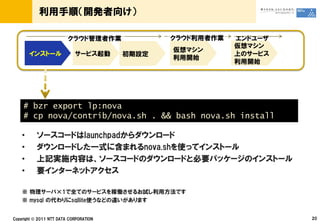
# bzr export lp:nova
# cp nova/contrib/nova.sh . && bash nova.sh install

•
•
•
•


    ©
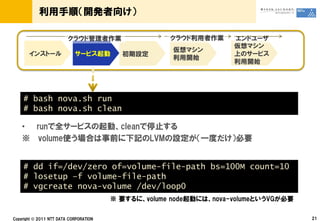
# bash nova.sh run
# bash nova.sh clean

•


# dd if=/dev/zero of=volume-file-path bs=100M count=10
# losetup –f volume-file-path
# vgcreate nova-volume /dev/loop0


    ©
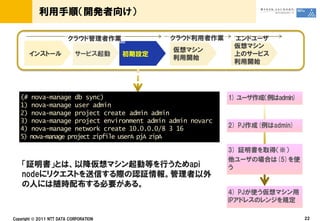
(# nova-manage db sync)
1) nova-manage user admin
2) nova-manage project create admin admin
3) nova-manage project environment admin admin novarc
4) nova-manage network create 10.0.0.0/8 3 16
5) nova-manage project zipfile userA pjA zipA


  ©
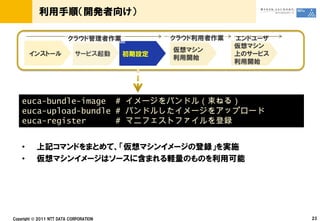
euca-bundle-image #
euca-upload-bundle #
euca-register      #


•
•


    ©
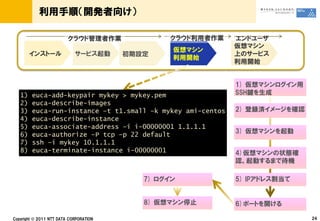
1)   euca-add-keypair mykey > mykey.pem
2)   euca-describe-images
3)   euca-run-instance –t t1.small –k mykey ami-centos
4)   euca-describe-instance
5)   euca-associate-address –i i-00000001 1.1.1.1
6)   euca-authorize –P tcp –p 22 default
7)   ssh –i mykey 10.1.1.1
8)   euca-terminate-instance i-00000001


     ©
©
•
    •
    •
    •
    •
•
    •
•
    •


•


    ©
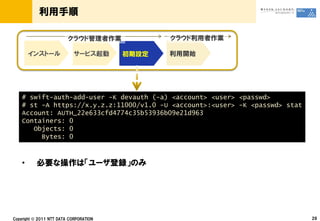
# swift-auth-add-user -K devauth (-a) <account> <user> <passwd>
# st -A https://x.y.z.z:11000/v1.0 -U <account>:<user> -K <passwd> stat
Account: AUTH_22e633cfd4774c35b53936b09e21d963
Containers: 0
   Objects: 0
     Bytes: 0


•


    ©
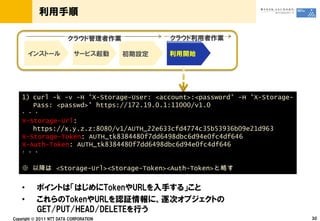
1) curl -k -v -H 'X-Storage-User: <account>:<password' -H 'X-Storage-
   Pass: <passwd>' https://172.19.0.1:11000/v1.0

X-Storage-Url:
   https://x.y.z.z:8080/v1/AUTH_22e633cfd4774c35b53936b09e21d963
X-Storage-Token: AUTH_tk8384480f7dd6498dbc6d94e0fc4df646
X-Auth-Token: AUTH_tk8384480f7dd6498dbc6d94e0fc4df646


        <Storage-Url><Storage-Token><Auth-Token>


•
•

    ©
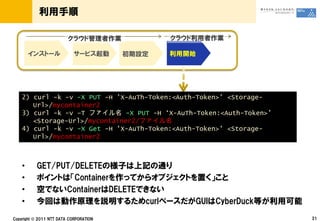
2) curl -k -v -X PUT -H 'X-AuTh-Token:<Auth-Token>' <Storage-
   Url>/mycontainer2
3) curl -k -v –T           -X PUT -H ‘X-AuTh-Token:<Auth-Token>’
   <Storage-Url>/mycontainer2/
4) curl -k -v -X Get -H 'X-AuTh-Token:<Auth-Token>' <Storage-
   Url>/mycontainer2


•
•
•
•

    ©
©
•
•
©
•
•
•
•
    •
•
Openstack at NTT Feb 7, 2011

Openstack at NTT Feb 7, 2011

  • 2.
  • 3.
  • 4.
  • 5.
  • 6.
  • 8.
    • • • • • • • •
  • 9.
    • • • • •
  • 10.
    • • • • • • • • • • • • •
  • 12.
    • • • • • • • •
  • 14.
  • 15.
  • 16.
  • 17.
  • 18.
  • 19.
  • 20.
    • • • •
  • 21.
    # bzr exportlp:nova # cp nova/contrib/nova.sh . && bash nova.sh install • • • • ©
  • 22.
    # bash nova.shrun # bash nova.sh clean • # dd if=/dev/zero of=volume-file-path bs=100M count=10 # losetup –f volume-file-path # vgcreate nova-volume /dev/loop0 ©
  • 23.
    (# nova-manage dbsync) 1) nova-manage user admin 2) nova-manage project create admin admin 3) nova-manage project environment admin admin novarc 4) nova-manage network create 10.0.0.0/8 3 16 5) nova-manage project zipfile userA pjA zipA ©
  • 24.
  • 25.
    1) euca-add-keypair mykey > mykey.pem 2) euca-describe-images 3) euca-run-instance –t t1.small –k mykey ami-centos 4) euca-describe-instance 5) euca-associate-address –i i-00000001 1.1.1.1 6) euca-authorize –P tcp –p 22 default 7) ssh –i mykey 10.1.1.1 8) euca-terminate-instance i-00000001 ©
  • 26.
  • 27.
    • • • • • •
  • 29.
    • • ©
  • 30.
    # swift-auth-add-user -Kdevauth (-a) <account> <user> <passwd> # st -A https://x.y.z.z:11000/v1.0 -U <account>:<user> -K <passwd> stat Account: AUTH_22e633cfd4774c35b53936b09e21d963 Containers: 0 Objects: 0 Bytes: 0 • ©
  • 31.
    1) curl -k-v -H 'X-Storage-User: <account>:<password' -H 'X-Storage- Pass: <passwd>' https://172.19.0.1:11000/v1.0 X-Storage-Url: https://x.y.z.z:8080/v1/AUTH_22e633cfd4774c35b53936b09e21d963 X-Storage-Token: AUTH_tk8384480f7dd6498dbc6d94e0fc4df646 X-Auth-Token: AUTH_tk8384480f7dd6498dbc6d94e0fc4df646 <Storage-Url><Storage-Token><Auth-Token> • • ©
  • 32.
    2) curl -k-v -X PUT -H 'X-AuTh-Token:<Auth-Token>' <Storage- Url>/mycontainer2 3) curl -k -v –T -X PUT -H ‘X-AuTh-Token:<Auth-Token>’ <Storage-Url>/mycontainer2/ 4) curl -k -v -X Get -H 'X-AuTh-Token:<Auth-Token>' <Storage- Url>/mycontainer2 • • • • ©
  • 33.
  • 34.
  • 41.
  • 42.