
SkyDock
How (and why) to roll your own Docker SaaS
Ryan Crawford & Grant Henderson
DevOps Meetup, May 2015
Who are we?
Squad of 4 engineers + 1 tech manager
Live within the Engineering Services “tribe”
Work across engineering squads in an enablement capacity
Release Engineering Services
We’re not Release Managers, and not Build Masters
What do we do?
Tooling
Own and operate tools that enable the
business to release software at scale
Swarm on release blockers & pain points
Provide adoption support for tools & tech
Focus on self-serviceability
What do we do?
Enablement
Coach Continuous Delivery best practices
Develop frameworks that empower teams
to adopt tech and deliver products
without reinventing the wheel
Provide adoption support for tools & tech
Focus on self-serviceability
What do we do?
R&D
Research emerging tech
Build proof-of-concepts to validate
Transition from PoC to wider rollout
Think about future adoption support &
self-serviceability
What Is SkyDock?
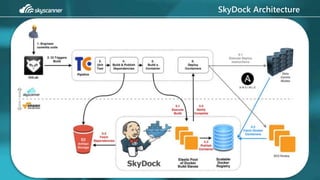
• It’s essentially your own DockerHub.com
• Scalable CI system and Registry for Docker images
• It’s mostly integration work, with a little innovation
Why bother when there is a DockerHub.com?
VCS is internal
• Want to avoid making this externally visible (susceptible to exploits)
• Want to avoid intellectual property hosted outside our network
IT Governance
• Need to retain control over user management
What about the on-premises version?
What about Docker Hub Enterprise?
• Not fully featured
• Licensing model is preventative at scale
• Cost is based on number of containers built, as well as the number
of containers you deploy
• Same applies for competitors like Quay.io
Why not just add Docker to TeamCity?
Unlimited Capacity
• Built on open source tech
• Elastically scaled pool of build agents
• The only cost is your cloud footprint
Deterministic Builds
• Short-lived ‘phoenix’ build agents
• Avoid cross-project environment corruption breaking your builds
Are there other reasons?
Scale & Resiliency
• Docker client registry is horizontally scalable
• Meta-data & artifacts persisted across AWS Availability Zones in S3
Developer Freedom
• The core build environment is simply Docker, and Docker abstracts
• Build with any software you like
• No need to request change from a centralised function
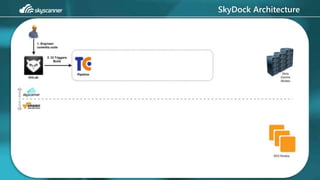
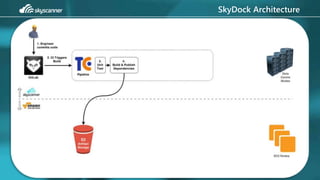
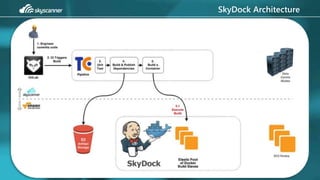
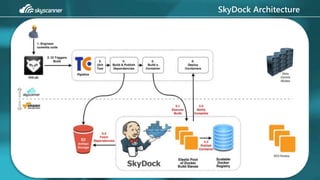
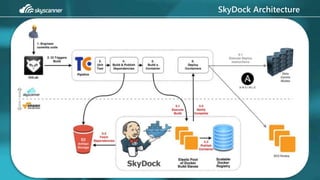
SkyDock Architecture
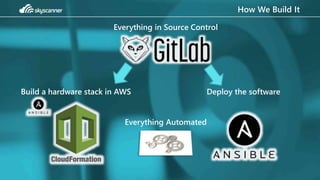
How We Build It
Build a hardware stack in AWS Deploy the software
Everything in Source Control
Everything Automated
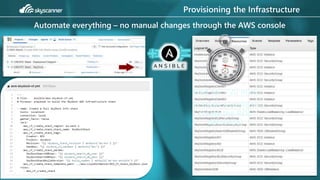
Provisioning the Infrastructure
Automate everything – no manual changes through the AWS console
Wait for ~20 mins
(It takes a while to
create the RDS
database)
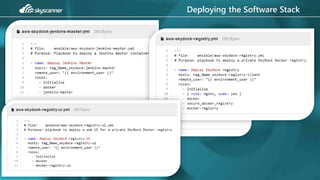
Deploying the Software Stack
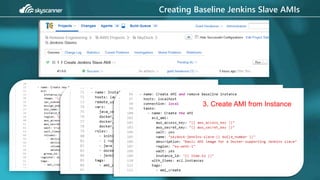
Creating Baseline Jenkins Slave AMIs
1. Create an instance
2. Provision Instance3. Create AMI from Instance
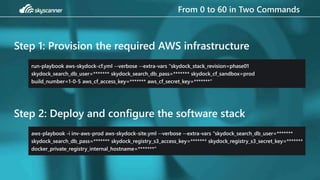
From 0 to 60 in Two Commands
Step 1: Provision the required AWS infrastructure
run-playbook aws-skydock-cf.yml --verbose --extra-vars "skydock_stack_revision=phase01
skydock_search_db_user=******* skydock_search_db_pass=******* skydock_cf_sandbox=prod
build_number=1-0-5 aws_cf_access_key=******* aws_cf_secret_key=*******"
Step 2: Deploy and configure the software stack
aws-playbook -i inv-aws-prod aws-skydock-site.yml --verbose --extra-vars "skydock_search_db_user=*******
skydock_search_db_pass=******* skydock_registry_s3_access_key=******* skydock_registry_s3_secret_key=*******
docker_private_registry_internal_hostname=*******"
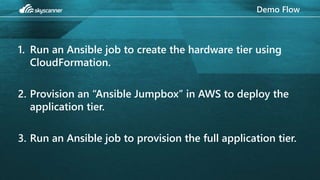
Demo Flow
1. Run an Ansible job to create the hardware tier using
CloudFormation.
2. Provision an “Ansible Jumpbox” in AWS to deploy the
application tier.
3. Run an Ansible job to provision the full application tier.
Demo
<< INSERT VIDEO HERE >>
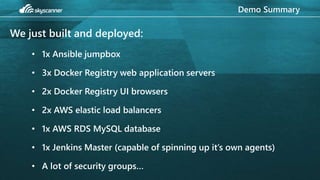
Demo Summary
We just built and deployed:
• 1x Ansible jumpbox
• 3x Docker Registry web application servers
• 2x Docker Registry UI browsers
• 2x AWS elastic load balancers
• 1x AWS RDS MySQL database
• 1x Jenkins Master (capable of spinning up it’s own agents)
• A lot of security groups…
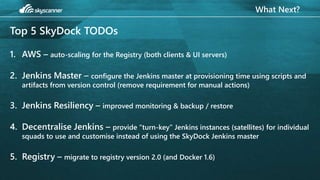
What Next?
Top 5 SkyDock TODOs
1. AWS – auto-scaling for the Registry (both clients & UI servers)
2. Jenkins Master – configure the Jenkins master at provisioning time using scripts and
artifacts from version control (remove requirement for manual actions)
3. Jenkins Resiliency – improved monitoring & backup / restore
4. Decentralise Jenkins – provide “turn-key” Jenkins instances (satellites) for individual
squads to use and customise instead of using the SkyDock Jenkins master
5. Registry – migrate to registry version 2.0 (and Docker 1.6)
thank you

How (and why) to roll your own Docker SaaS

  • 1.
    SkyDock How (and why)to roll your own Docker SaaS Ryan Crawford & Grant Henderson DevOps Meetup, May 2015
  • 2.
    Who are we? Squadof 4 engineers + 1 tech manager Live within the Engineering Services “tribe” Work across engineering squads in an enablement capacity Release Engineering Services We’re not Release Managers, and not Build Masters
  • 3.
    What do wedo? Tooling Own and operate tools that enable the business to release software at scale Swarm on release blockers & pain points Provide adoption support for tools & tech Focus on self-serviceability
  • 4.
    What do wedo? Enablement Coach Continuous Delivery best practices Develop frameworks that empower teams to adopt tech and deliver products without reinventing the wheel Provide adoption support for tools & tech Focus on self-serviceability
  • 5.
    What do wedo? R&D Research emerging tech Build proof-of-concepts to validate Transition from PoC to wider rollout Think about future adoption support & self-serviceability
  • 6.
    What Is SkyDock? •It’s essentially your own DockerHub.com • Scalable CI system and Registry for Docker images • It’s mostly integration work, with a little innovation
  • 7.
    Why bother whenthere is a DockerHub.com? VCS is internal • Want to avoid making this externally visible (susceptible to exploits) • Want to avoid intellectual property hosted outside our network IT Governance • Need to retain control over user management
  • 8.
    What about theon-premises version? What about Docker Hub Enterprise? • Not fully featured • Licensing model is preventative at scale • Cost is based on number of containers built, as well as the number of containers you deploy • Same applies for competitors like Quay.io
  • 9.
    Why not justadd Docker to TeamCity? Unlimited Capacity • Built on open source tech • Elastically scaled pool of build agents • The only cost is your cloud footprint Deterministic Builds • Short-lived ‘phoenix’ build agents • Avoid cross-project environment corruption breaking your builds
  • 10.
    Are there otherreasons? Scale & Resiliency • Docker client registry is horizontally scalable • Meta-data & artifacts persisted across AWS Availability Zones in S3 Developer Freedom • The core build environment is simply Docker, and Docker abstracts • Build with any software you like • No need to request change from a centralised function
  • 11.
  • 12.
  • 13.
  • 14.
  • 15.
  • 16.
  • 17.
    How We BuildIt Build a hardware stack in AWS Deploy the software Everything in Source Control Everything Automated
  • 18.
    Provisioning the Infrastructure Automateeverything – no manual changes through the AWS console Wait for ~20 mins (It takes a while to create the RDS database)
  • 19.
  • 20.
    Creating Baseline JenkinsSlave AMIs 1. Create an instance 2. Provision Instance3. Create AMI from Instance
  • 21.
    From 0 to60 in Two Commands Step 1: Provision the required AWS infrastructure run-playbook aws-skydock-cf.yml --verbose --extra-vars "skydock_stack_revision=phase01 skydock_search_db_user=******* skydock_search_db_pass=******* skydock_cf_sandbox=prod build_number=1-0-5 aws_cf_access_key=******* aws_cf_secret_key=*******" Step 2: Deploy and configure the software stack aws-playbook -i inv-aws-prod aws-skydock-site.yml --verbose --extra-vars "skydock_search_db_user=******* skydock_search_db_pass=******* skydock_registry_s3_access_key=******* skydock_registry_s3_secret_key=******* docker_private_registry_internal_hostname=*******"
  • 22.
    Demo Flow 1. Runan Ansible job to create the hardware tier using CloudFormation. 2. Provision an “Ansible Jumpbox” in AWS to deploy the application tier. 3. Run an Ansible job to provision the full application tier.
  • 23.
  • 24.
    Demo Summary We justbuilt and deployed: • 1x Ansible jumpbox • 3x Docker Registry web application servers • 2x Docker Registry UI browsers • 2x AWS elastic load balancers • 1x AWS RDS MySQL database • 1x Jenkins Master (capable of spinning up it’s own agents) • A lot of security groups…
  • 25.
    What Next? Top 5SkyDock TODOs 1. AWS – auto-scaling for the Registry (both clients & UI servers) 2. Jenkins Master – configure the Jenkins master at provisioning time using scripts and artifacts from version control (remove requirement for manual actions) 3. Jenkins Resiliency – improved monitoring & backup / restore 4. Decentralise Jenkins – provide “turn-key” Jenkins instances (satellites) for individual squads to use and customise instead of using the SkyDock Jenkins master 5. Registry – migrate to registry version 2.0 (and Docker 1.6)
  • 26.

Editor's Notes

  • #6  R&D We research new and emerging tech (with a view of delivering on previous points)