









Michael Irwin
Application Architect, Virginia Tech
Docker Captain
@mikesir87
App-in-a-Box
with Docker App
Warning: Lots of content ahead!
@mikesir87
● Founded in 1872
● Main campus in Blacksburg, VA, USA
○ Six campuses throughout Virginia and one in Switzerland
● ~35,000 students and ~4,500 faculty/staff
● Manages research portfolio valued more than $520 million
About Virginia Tech
@mikesir87
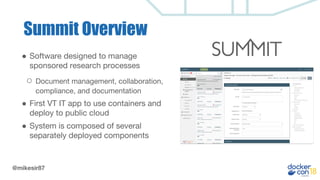
Summit Overview
● Software designed to manage
sponsored research processes
○ Document management, collaboration,
compliance, and documentation
● First VT IT app to use containers and
deploy to public cloud
● System is composed of several
separately deployed components
@mikesir87
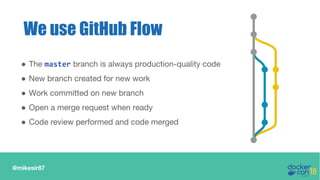
● The master branch is always production-quality code
● New branch created for new work
● Work committed on new branch
● Open a merge request when ready
● Code review performed and code merged
We use GitHub Flow
@mikesir87
With Simple Apps...
● Working on a feature is simply checking out a branch
○ Get all source code and environment together
○ May need to restart containers
@mikesir87
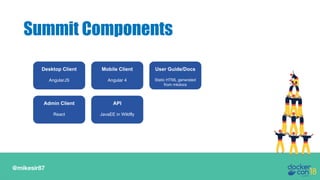
Summit Components
Desktop Client
AngularJS
Mobile Client
Angular 4
User Guide/Docs
Static HTML generated
from mkdocs
API
JavaEE in Wildfly
Admin Client
React
@mikesir87
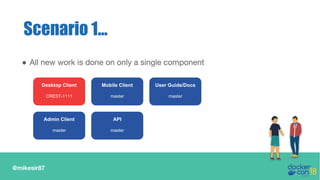
Scenario 1...
● All new work is done on only a single component
Desktop Client
CREST-1111
Mobile Client
master
User Guide/Docs
master
API
master
Admin Client
master
@mikesir87
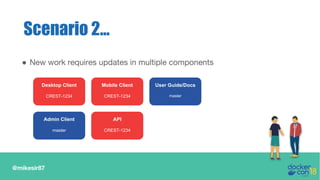
Scenario 2...
● New work requires updates in multiple components
Desktop Client
CREST-1234
Mobile Client
CREST-1234
User Guide/Docs
master
API
CREST-1234
Admin Client
master
@mikesir87
With Multiple Services...
● Switching features is much more complicated
○ Source code is still in individual components
○ Environment is scattered across repositories
@mikesir87
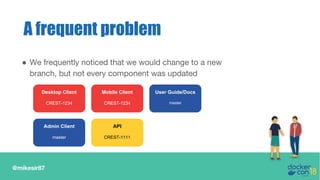
A frequent problem
● We frequently noticed that we would change to a new
branch, but not every component was updated
Desktop Client
CREST-1234
Mobile Client
CREST-1234
User Guide/Docs
master
API
CREST-1111
Admin Client
master
@mikesir87
Our Objective
● We want an “App-in-a-Box!” The ability to…
○ spin up the entire application (with all components)
○ use the latest versions of each component, whether feature
branch of latest master branch
@mikesir87
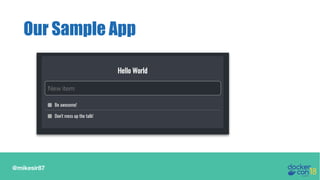
Our Sample App
@mikesir87
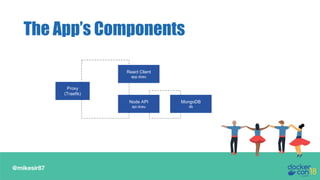
The App’s Components
Proxy
(Traefik)
React Client
app.dceu
Node API
api.dceu
MongoDB
db
@mikesir87
● Theme the app for DockerCon!
○ Change the welcome message (provided by API)
○ Apply a stylesheet to theme the client
Our Feature
Let’s check in with Sally!
@mikesir87
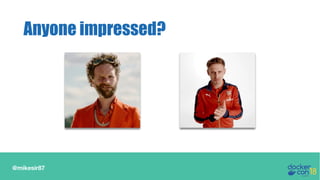
Anyone impressed?
@mikesir87
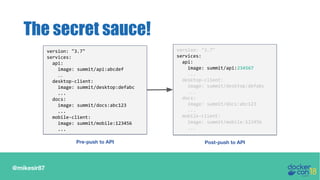
The secret sauce!
version: "3.7"
services:
api:
image: summit/api:abcdef
…
desktop-client:
image: summit/desktop:defabc
...
docs:
image: summit/docs:abc123
...
mobile-client:
image: summit/mobile:123456
...
version: "3.7"
services:
api:
image: summit/api:234567
...
desktop-client:
image: summit/desktop:defabc
...
docs:
image: summit/docs:abc123
...
mobile-client:
image: summit/mobile:123456
...
Pre-push to API Post-push to API
@mikesir87
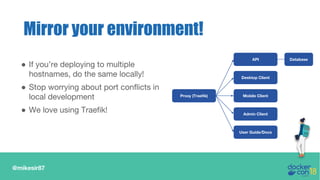
Mirror your environment!
Desktop Client
Mobile Client
User Guide/Docs
API
Admin Client
Database
Proxy (Traefik)
● If you’re deploying to multiple
hostnames, do the same locally!
● Stop worrying about port conflicts in
local development
● We love using Traefik!
@mikesir87
Great, but how?
@mikesir87
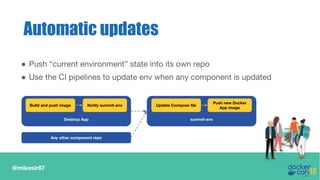
● Push “current environment” state into its own repo
● Use the CI pipelines to update env when any component is updated
Automatic updates
Desktop App
Build and push image Notify summit-env
summit-env
Update Compose file
Push new Docker
App image
Any other component repo
@mikesir87
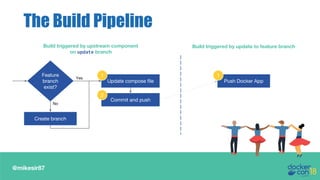
The Build Pipeline
Commit and push
Update compose file
2
Create branch
1Feature
branch
exist?
Yes
No
Build triggered by upstream component
on update branch
Build triggered by update to feature branch
Push Docker App
1
What is Docker App?
@mikesir87
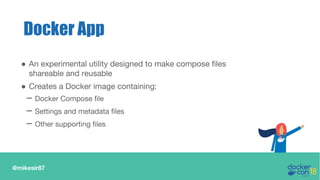
Docker App
● An experimental utility designed to make compose files
shareable and reusable
● Creates a Docker image containing:
– Docker Compose file
– Settings and metadata files
– Other supporting files
@mikesir87
Docker App, cont’d.
● App shared through a registry, just as any other image
● Settings allow for configuration within the compose file
● When deploying, custom setting values can be applied
● Can generate Helm charts
@mikesir87
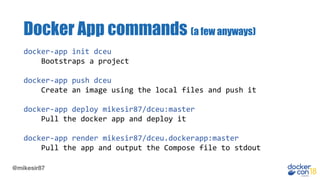
docker-app init dceu
Bootstraps a project
docker-app push dceu
Create an image using the local files and push it
docker-app deploy mikesir87/dceu:master
Pull the docker app and deploy it
docker-app render mikesir87/dceu.dockerapp:master
Pull the app and output the Compose file to stdout
Docker App commands (a few anyways)
Let’s dive into an image!
How’s this change local dev?
@mikesir87
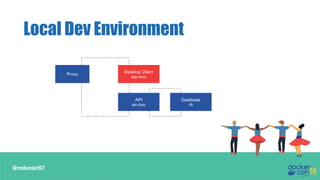
Local Dev Environment
Proxy Desktop Client
app.dceu
API
api.dceu
Database
db
Desktop Client
app.dceu
@mikesir87
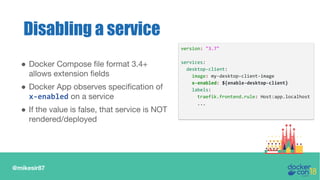
● Docker Compose file format 3.4+
allows extension fields
● Docker App observes specification of
x-enabled on a service
● If the value is false, that service is NOT
rendered/deployed
Disabling a service
version: "3.7"
services:
desktop-client:
image: my-desktop-client-image
x-enabled: ${enable-desktop-client}
labels:
traefik.frontend.rule: Host:app.localhost
...
@mikesir87
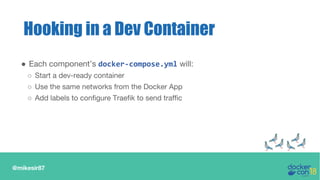
Hooking in a Dev Container
● Each component’s docker-compose.yml will:
○ Start a dev-ready container
○ Use the same networks from the Docker App
○ Add labels to configure Traefik to send traffic
Show me the demo again!
Great! What else can we do?
@mikesir87
● With docker-app render, we can use other compose features
● Feature One: Docker Compose allows use of multiple
compose files
○ Using multiple -f flags, we can add or modify services in the stack
○ NOTE: You can pipe the docker-app render directly to compose.
But, you can’t use a piped file AND a local file together.
Layering additional services
@mikesir87
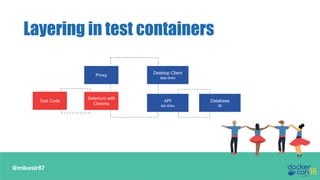
Layering in test containers
Proxy Desktop Client
app.dceu
API
api.dceu
Database
db
Selenium with
Chrome
Test Code
@mikesir87
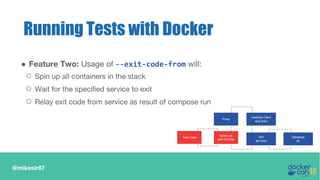
Running Tests with Docker
● Feature Two: Usage of --exit-code-from will:
○ Spin up all containers in the stack
○ Wait for the specified service to exit
○ Relay exit code from service as result of compose run
Proxy
Desktop Client
app.dceu
API
api.dceu
Database
db
Selenium
with Chrome
Test Code
Demo Time!
Tests failed! Let’s fix them!
@mikesir87
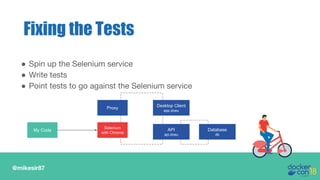
● Spin up the Selenium service
● Write tests
● Point tests to go against the Selenium service
Fixing the Tests
Proxy Desktop Client
app.dceu
API
api.dceu
Database
db
Selenium
with Chrome
My Code
@mikesir87
Generalizing things
● We noticed we frequently wanted to disable services for
local development
● Keeping track of the settings to disable services is a pain
● Wouldn’t it be nice to have a tool that asked us what
services we want disabled and kept track of the settings?
@mikesir87
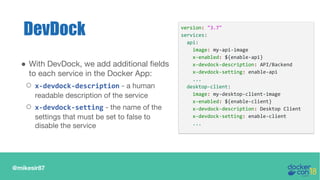
DevDock
● With DevDock, we add additional fields
to each service in the Docker App:
○ x-devdock-description - a human
readable description of the service
○ x-devdock-setting - the name of the
settings that must be set to false to
disable the service
version: "3.7"
services:
api:
image: my-api-image
x-enabled: ${enable-api}
x-devdock-description: API/Backend
x-devdock-setting: enable-api
...
desktop-client:
image: my-desktop-client-image
x-enabled: ${enable-client}
x-devdock-description: Desktop Client
x-devdock-setting: enable-client
...
@mikesir87
DevDock, cont’d.
Usage: devdock [project] [dockerapp-image]
● Two ways to run the cli:
○ No additional args - presents a cli-based UI to allow selection
of services to disable
○ Additional args - passes through to an underlying Docker
Compose command that’s running on the rendered output
Demo Time!
@mikesir87
One more thing!
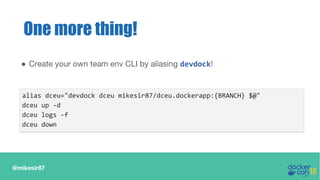
● Create your own team env CLI by aliasing devdock!
alias dceu="devdock dceu mikesir87/dceu.dockerapp:{BRANCH} $@"
dceu up -d
dceu logs -f
dceu down
@mikesir87
How to install DevDock?
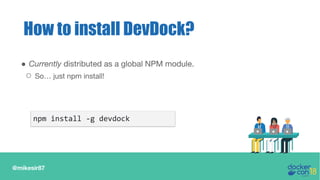
● Currently distributed as a global NPM module.
○ So… just npm install!
npm install -g devdock
@mikesir87
Recap
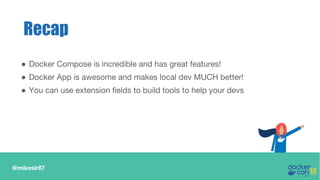
● Docker Compose is incredible and has great features!
● Docker App is awesome and makes local dev MUCH better!
● You can use extension fields to build tools to help your devs
@mikesir87
Testimonials
“Summit-in-a-box healed my relationship with my
wife and kids”
- Justin Boblitt
“I am getting better gas mileage in my Jeep now.”
- Jeff Mitchell
@mikesir87
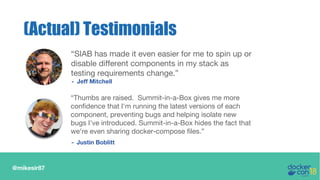
(Actual) Testimonials
“Thumbs are raised. Summit-in-a-Box gives me more
confidence that I'm running the latest versions of each
component, preventing bugs and helping isolate new
bugs I've introduced. Summit-in-a-Box hides the fact that
we're even sharing docker-compose files.”
- Justin Boblitt
“SIAB has made it even easier for me to spin up or
disable different components in my stack as
testing requirements change.”
- Jeff Mitchell
Thanks!
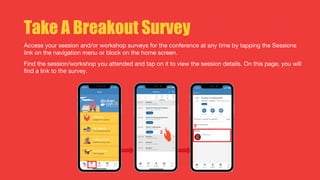
Take A Breakout Survey
Access your session and/or workshop surveys for the conference at any time by tapping the Sessions
link on the navigation menu or block on the home screen.
Find the session/workshop you attended and tap on it to view the session details. On this page, you will
find a link to the survey.
Questions?

DCEU 18: App-in-a-Box with Docker Application Packages

  • 1.
    Michael Irwin Application Architect,Virginia Tech Docker Captain @mikesir87 App-in-a-Box with Docker App
  • 2.
    Warning: Lots ofcontent ahead!
  • 3.
    @mikesir87 ● Founded in1872 ● Main campus in Blacksburg, VA, USA ○ Six campuses throughout Virginia and one in Switzerland ● ~35,000 students and ~4,500 faculty/staff ● Manages research portfolio valued more than $520 million About Virginia Tech
  • 4.
    @mikesir87 Summit Overview ● Softwaredesigned to manage sponsored research processes ○ Document management, collaboration, compliance, and documentation ● First VT IT app to use containers and deploy to public cloud ● System is composed of several separately deployed components
  • 5.
    @mikesir87 ● The masterbranch is always production-quality code ● New branch created for new work ● Work committed on new branch ● Open a merge request when ready ● Code review performed and code merged We use GitHub Flow
  • 6.
    @mikesir87 With Simple Apps... ●Working on a feature is simply checking out a branch ○ Get all source code and environment together ○ May need to restart containers
  • 7.
    @mikesir87 Summit Components Desktop Client AngularJS MobileClient Angular 4 User Guide/Docs Static HTML generated from mkdocs API JavaEE in Wildfly Admin Client React
  • 8.
    @mikesir87 Scenario 1... ● Allnew work is done on only a single component Desktop Client CREST-1111 Mobile Client master User Guide/Docs master API master Admin Client master
  • 9.
    @mikesir87 Scenario 2... ● Newwork requires updates in multiple components Desktop Client CREST-1234 Mobile Client CREST-1234 User Guide/Docs master API CREST-1234 Admin Client master
  • 10.
    @mikesir87 With Multiple Services... ●Switching features is much more complicated ○ Source code is still in individual components ○ Environment is scattered across repositories
  • 11.
    @mikesir87 A frequent problem ●We frequently noticed that we would change to a new branch, but not every component was updated Desktop Client CREST-1234 Mobile Client CREST-1234 User Guide/Docs master API CREST-1111 Admin Client master
  • 12.
    @mikesir87 Our Objective ● Wewant an “App-in-a-Box!” The ability to… ○ spin up the entire application (with all components) ○ use the latest versions of each component, whether feature branch of latest master branch
  • 13.
  • 14.
    @mikesir87 The App’s Components Proxy (Traefik) ReactClient app.dceu Node API api.dceu MongoDB db
  • 15.
    @mikesir87 ● Theme theapp for DockerCon! ○ Change the welcome message (provided by API) ○ Apply a stylesheet to theme the client Our Feature
  • 16.
    Let’s check inwith Sally!
  • 17.
  • 18.
    @mikesir87 The secret sauce! version:"3.7" services: api: image: summit/api:abcdef … desktop-client: image: summit/desktop:defabc ... docs: image: summit/docs:abc123 ... mobile-client: image: summit/mobile:123456 ... version: "3.7" services: api: image: summit/api:234567 ... desktop-client: image: summit/desktop:defabc ... docs: image: summit/docs:abc123 ... mobile-client: image: summit/mobile:123456 ... Pre-push to API Post-push to API
  • 19.
    @mikesir87 Mirror your environment! DesktopClient Mobile Client User Guide/Docs API Admin Client Database Proxy (Traefik) ● If you’re deploying to multiple hostnames, do the same locally! ● Stop worrying about port conflicts in local development ● We love using Traefik!
  • 20.
  • 21.
    @mikesir87 ● Push “currentenvironment” state into its own repo ● Use the CI pipelines to update env when any component is updated Automatic updates Desktop App Build and push image Notify summit-env summit-env Update Compose file Push new Docker App image Any other component repo
  • 22.
    @mikesir87 The Build Pipeline Commitand push Update compose file 2 Create branch 1Feature branch exist? Yes No Build triggered by upstream component on update branch Build triggered by update to feature branch Push Docker App 1
  • 23.
  • 24.
    @mikesir87 Docker App ● Anexperimental utility designed to make compose files shareable and reusable ● Creates a Docker image containing: – Docker Compose file – Settings and metadata files – Other supporting files
  • 25.
    @mikesir87 Docker App, cont’d. ●App shared through a registry, just as any other image ● Settings allow for configuration within the compose file ● When deploying, custom setting values can be applied ● Can generate Helm charts
  • 26.
    @mikesir87 docker-app init dceu Bootstrapsa project docker-app push dceu Create an image using the local files and push it docker-app deploy mikesir87/dceu:master Pull the docker app and deploy it docker-app render mikesir87/dceu.dockerapp:master Pull the app and output the Compose file to stdout Docker App commands (a few anyways)
  • 27.
  • 28.
  • 29.
    @mikesir87 Local Dev Environment ProxyDesktop Client app.dceu API api.dceu Database db Desktop Client app.dceu
  • 30.
    @mikesir87 ● Docker Composefile format 3.4+ allows extension fields ● Docker App observes specification of x-enabled on a service ● If the value is false, that service is NOT rendered/deployed Disabling a service version: "3.7" services: desktop-client: image: my-desktop-client-image x-enabled: ${enable-desktop-client} labels: traefik.frontend.rule: Host:app.localhost ...
  • 31.
    @mikesir87 Hooking in aDev Container ● Each component’s docker-compose.yml will: ○ Start a dev-ready container ○ Use the same networks from the Docker App ○ Add labels to configure Traefik to send traffic
  • 32.
    Show me thedemo again!
  • 33.
    Great! What elsecan we do?
  • 34.
    @mikesir87 ● With docker-apprender, we can use other compose features ● Feature One: Docker Compose allows use of multiple compose files ○ Using multiple -f flags, we can add or modify services in the stack ○ NOTE: You can pipe the docker-app render directly to compose. But, you can’t use a piped file AND a local file together. Layering additional services
  • 35.
    @mikesir87 Layering in testcontainers Proxy Desktop Client app.dceu API api.dceu Database db Selenium with Chrome Test Code
  • 36.
    @mikesir87 Running Tests withDocker ● Feature Two: Usage of --exit-code-from will: ○ Spin up all containers in the stack ○ Wait for the specified service to exit ○ Relay exit code from service as result of compose run Proxy Desktop Client app.dceu API api.dceu Database db Selenium with Chrome Test Code
  • 37.
  • 38.
  • 39.
    @mikesir87 ● Spin upthe Selenium service ● Write tests ● Point tests to go against the Selenium service Fixing the Tests Proxy Desktop Client app.dceu API api.dceu Database db Selenium with Chrome My Code
  • 40.
    @mikesir87 Generalizing things ● Wenoticed we frequently wanted to disable services for local development ● Keeping track of the settings to disable services is a pain ● Wouldn’t it be nice to have a tool that asked us what services we want disabled and kept track of the settings?
  • 41.
    @mikesir87 DevDock ● With DevDock,we add additional fields to each service in the Docker App: ○ x-devdock-description - a human readable description of the service ○ x-devdock-setting - the name of the settings that must be set to false to disable the service version: "3.7" services: api: image: my-api-image x-enabled: ${enable-api} x-devdock-description: API/Backend x-devdock-setting: enable-api ... desktop-client: image: my-desktop-client-image x-enabled: ${enable-client} x-devdock-description: Desktop Client x-devdock-setting: enable-client ...
  • 42.
    @mikesir87 DevDock, cont’d. Usage: devdock[project] [dockerapp-image] ● Two ways to run the cli: ○ No additional args - presents a cli-based UI to allow selection of services to disable ○ Additional args - passes through to an underlying Docker Compose command that’s running on the rendered output
  • 43.
  • 44.
    @mikesir87 One more thing! ●Create your own team env CLI by aliasing devdock! alias dceu="devdock dceu mikesir87/dceu.dockerapp:{BRANCH} $@" dceu up -d dceu logs -f dceu down
  • 45.
    @mikesir87 How to installDevDock? ● Currently distributed as a global NPM module. ○ So… just npm install! npm install -g devdock
  • 46.
    @mikesir87 Recap ● Docker Composeis incredible and has great features! ● Docker App is awesome and makes local dev MUCH better! ● You can use extension fields to build tools to help your devs
  • 47.
    @mikesir87 Testimonials “Summit-in-a-box healed myrelationship with my wife and kids” - Justin Boblitt “I am getting better gas mileage in my Jeep now.” - Jeff Mitchell
  • 48.
    @mikesir87 (Actual) Testimonials “Thumbs areraised. Summit-in-a-Box gives me more confidence that I'm running the latest versions of each component, preventing bugs and helping isolate new bugs I've introduced. Summit-in-a-Box hides the fact that we're even sharing docker-compose files.” - Justin Boblitt “SIAB has made it even easier for me to spin up or disable different components in my stack as testing requirements change.” - Jeff Mitchell
  • 49.
  • 50.
    Take A BreakoutSurvey Access your session and/or workshop surveys for the conference at any time by tapping the Sessions link on the navigation menu or block on the home screen. Find the session/workshop you attended and tap on it to view the session details. On this page, you will find a link to the survey.
  • 51.