
Warehouse Item and Location 
Management System 
Course Instructor: SYED ISHTEAQUE AHMED
Content: 
1.Introduction 
2.About Warehouse Management System 
3.Analyzing the current system 
4.User requirements 
5.Feature List 
6.Warehouse visual representation
About Warehouse
Project Goals: 
• Reliable 
• Flexible 
• User Friendly
Purpose: 
• Reduce time consumption 
• Reduce manpower 
• Help user improve the efficiency of inventory 
control operations.
Feature List
Feature List: 
 Warehouse size can be created according to the user’s specification. 
 Touch screen facility along with non touch system. 
 User will get a visual representation of warehouse and products. 
 Product and placement will be dynamic. 
 Can generate transaction log with information about product and its related 
information. 
 Can print transaction details whenever warehouse receives or release products.
Use Case
Register 
Receive product 
Release product 
Create warehouse 
View warehouse 
Transactions log 
Login 
<<include>> 
<<include>> 
<<include>> 
<<include>> 
<<include>>
Class Diagram
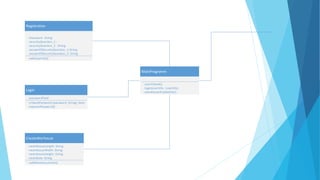
MainProgramm 
-userCheack() 
Registration 
-Password : String 
-securityQuestion_1 : 
-securityQuestion_2 : String 
-answerOfSecurityQuestion_1:String 
-answerOfSecurityQuestion_2: String 
+addUserInfo() 
Login 
-passwordField 
+cheackPassword (password :String) :bool 
CreateWarhouse 
+warehouseLength: String 
+warehouseWidth: String 
+warehouseHeight: String 
+startDate: String 
+addWarehouseInfo() 
-login(userInfo : UserInfo) 
-warehouseAvailability() 
+recoverPassword()
MainWorkspace 
-reciveProduct() 
-releaseProduct() 
-warehouseMap() 
ReciveProduct 
-addProduct() 
ReleaseProduct 
-productList:Vector 
-searchProduct() : SqlCeCommand 
-productsID :Vector 
WarehouseVirtualMap 
-reciveProduct() 
-warehouseMap() 
-viewInMap() 
-generateTransactionLog() 
Print 
Product 
-productName :String 
-productWeight :float 
-productCatagory: Catagory 
-productLength: float 
-productWidth: float 
-productHeight: float 
-productDescription: String 
-productLocation: 
-addLocation() 
-verifyLocation() 
+printReleaseProductsList (productsList: Vector) 
+printRecivedToken (productID: int) 
TransactionLog 
-addReleaseProducts (productsList: Vector) 
-addRecivedProducts (productID: int) 
Catagory 
-catagoryname 
-catagoryColor
Graphical User Interface
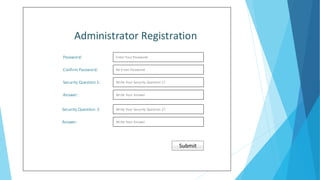
Administrator Registration 
Password: Enter Your Password 
Confirm Password: Re-Enter Password 
Security Question 1: Write Your Security Question 1? 
Write Your Answer 
Write Your Security Question 2? 
Write Your Answer 
Answer: 
Submit 
Security Question: 2 
Answer:
Password: 
Recover Password
Recover Password 
W.*? 
Enter your Security Question’s Answer 
W.*? 
Enter your Security Question’s Answer 
Enter your New password 
Re-Enter your password 
Security Question 1: 
Save 
Security’s Answer: 
Security Question 2: 
Security’s Answer: 
New Password: 
Confirm Password:
Change Password About 
Change Password 
Enter your old password 
Enter your new password 
Re-Enter your password 
Old Password: 
New Password: 
Confirm Password: 
Save
Create Warehouse 
5 
150 inch 120 inch 
5 
700 inch 
120 inch 30 inch 
Warehouse Size: 
Row No.: 
Width: Height: 
Warehouse Layout: Manual 
Grid 
Column No. 
Length: 
Grid Length: Grid Width: 
Create
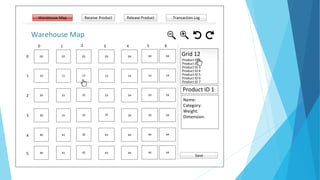
Warehouse Map Receive Product Release Product Transaction Log 
Warehouse Map 
Grid 12 
Product ID 1 
Product ID 2 
Product ID 3 
Product ID 4 
Product ID 5 
Product ID 6 
Product ID 7 
Product ID 1 
Name: 
Category: 
Weight: 
Dimension: 
2 
0 1 3 4 
00 01 03 04 
10 11 12 13 14 
20 21 22 23 24 
30 31 32 34 
40 41 42 43 44 
0 
1 
2 
3 
4 
02 
33 
5 40 41 42 43 44 
5 
04 
14 
24 
34 
44 
44 
6 
04 
14 
24 
34 
44 
44 
Save
Receive Warehouse Map Product Release Product Transaction Log 
Product Name: 
Weight: 
Category: Create New Catagory 
Category 1 
Category 2 
Category 3 
Length: Width: Height: 
Product Description: 
Next 
Product Quantity: 
Create
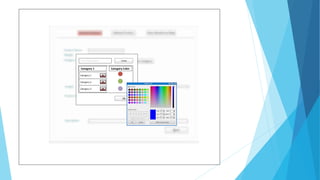
Enter Category Name Create 
Category 1 Category Color 
Category 1 
Category 2 
Category 3 
Ok
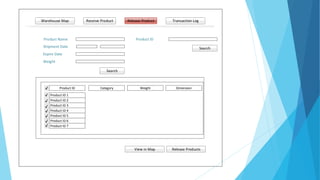
Receive Warehouse Map Product Release Product Transaction Log 
Product Name Product ID 
Shipment Date 
Expire Date 
Weight 
Search 
Product ID Category Weight Dimension 
View in Map Release Products 
Product ID 1 
Product ID 2 
Product ID 3 
Product ID 4 
Product ID 5 
Product ID 6 
Product ID 7 
Search
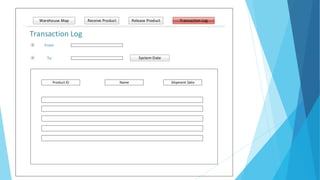
Receive Warehouse Map Product Release Product Transaction Log 
Transaction Log 
From 
To System Date 
Product ID Name Shipment Date
Q&A

Object Oriented Programming 2 (C#)

  • 1.
    Warehouse Item andLocation Management System Course Instructor: SYED ISHTEAQUE AHMED
  • 2.
    Content: 1.Introduction 2.AboutWarehouse Management System 3.Analyzing the current system 4.User requirements 5.Feature List 6.Warehouse visual representation
  • 3.
  • 4.
    Project Goals: •Reliable • Flexible • User Friendly
  • 5.
    Purpose: • Reducetime consumption • Reduce manpower • Help user improve the efficiency of inventory control operations.
  • 6.
  • 7.
    Feature List: Warehouse size can be created according to the user’s specification.  Touch screen facility along with non touch system.  User will get a visual representation of warehouse and products.  Product and placement will be dynamic.  Can generate transaction log with information about product and its related information.  Can print transaction details whenever warehouse receives or release products.
  • 8.
  • 9.
    Register Receive product Release product Create warehouse View warehouse Transactions log Login <<include>> <<include>> <<include>> <<include>> <<include>>
  • 10.
  • 11.
    MainProgramm -userCheack() Registration -Password : String -securityQuestion_1 : -securityQuestion_2 : String -answerOfSecurityQuestion_1:String -answerOfSecurityQuestion_2: String +addUserInfo() Login -passwordField +cheackPassword (password :String) :bool CreateWarhouse +warehouseLength: String +warehouseWidth: String +warehouseHeight: String +startDate: String +addWarehouseInfo() -login(userInfo : UserInfo) -warehouseAvailability() +recoverPassword()
  • 12.
    MainWorkspace -reciveProduct() -releaseProduct() -warehouseMap() ReciveProduct -addProduct() ReleaseProduct -productList:Vector -searchProduct() : SqlCeCommand -productsID :Vector WarehouseVirtualMap -reciveProduct() -warehouseMap() -viewInMap() -generateTransactionLog() Print Product -productName :String -productWeight :float -productCatagory: Catagory -productLength: float -productWidth: float -productHeight: float -productDescription: String -productLocation: -addLocation() -verifyLocation() +printReleaseProductsList (productsList: Vector) +printRecivedToken (productID: int) TransactionLog -addReleaseProducts (productsList: Vector) -addRecivedProducts (productID: int) Catagory -catagoryname -catagoryColor
  • 13.
  • 14.
    Administrator Registration Password:Enter Your Password Confirm Password: Re-Enter Password Security Question 1: Write Your Security Question 1? Write Your Answer Write Your Security Question 2? Write Your Answer Answer: Submit Security Question: 2 Answer:
  • 15.
  • 16.
    Recover Password W.*? Enter your Security Question’s Answer W.*? Enter your Security Question’s Answer Enter your New password Re-Enter your password Security Question 1: Save Security’s Answer: Security Question 2: Security’s Answer: New Password: Confirm Password:
  • 17.
    Change Password About Change Password Enter your old password Enter your new password Re-Enter your password Old Password: New Password: Confirm Password: Save
  • 18.
    Create Warehouse 5 150 inch 120 inch 5 700 inch 120 inch 30 inch Warehouse Size: Row No.: Width: Height: Warehouse Layout: Manual Grid Column No. Length: Grid Length: Grid Width: Create
  • 19.
    Warehouse Map ReceiveProduct Release Product Transaction Log Warehouse Map Grid 12 Product ID 1 Product ID 2 Product ID 3 Product ID 4 Product ID 5 Product ID 6 Product ID 7 Product ID 1 Name: Category: Weight: Dimension: 2 0 1 3 4 00 01 03 04 10 11 12 13 14 20 21 22 23 24 30 31 32 34 40 41 42 43 44 0 1 2 3 4 02 33 5 40 41 42 43 44 5 04 14 24 34 44 44 6 04 14 24 34 44 44 Save
  • 20.
    Receive Warehouse MapProduct Release Product Transaction Log Product Name: Weight: Category: Create New Catagory Category 1 Category 2 Category 3 Length: Width: Height: Product Description: Next Product Quantity: Create
  • 21.
    Enter Category NameCreate Category 1 Category Color Category 1 Category 2 Category 3 Ok
  • 22.
    Receive Warehouse MapProduct Release Product Transaction Log Product Name Product ID Shipment Date Expire Date Weight Search Product ID Category Weight Dimension View in Map Release Products Product ID 1 Product ID 2 Product ID 3 Product ID 4 Product ID 5 Product ID 6 Product ID 7 Search
  • 23.
    Receive Warehouse MapProduct Release Product Transaction Log Transaction Log From To System Date Product ID Name Shipment Date
  • 24.