Management
                                                                    Challenges

MODULE I                                               Business
                                                     Applications   Module
                                                                      I
                                                                                 Information
                                                                                 Technologies


                                                           Development     Foundation
                                                             Processes     Concepts


FOUNDATION CONCEPTS
       W            hy study information systems? Why do businesses need informa-
                    tion technology? What do you need to know about the use and
                    management of information technologies in business? The intro-
       ductory chapters of Module I are designed to answer these fundamental ques-
       tions about the role of information systems in business.
     • Chapter 1: Foundations of Information Systems in Business presents an
       overview of the five basic areas of information systems knowledge needed by
       business professionals, including the conceptual system components and major
       types of information systems. In addition, trends in information systems and an
       overview of the managerial challenges associated with information systems are
       presented.
     • Chapter 2: Competing with Information Technology introduces fundamental
       concepts of competitive advantage through information technology and illus-
       trates major strategic applications of information systems.
           Completing these chapters will prepare you to move on to study chapters
       on information technologies (Module II), business applications (Module III),
       systems development processes (Module IV), and the management challenges
       of information systems (Module V).


2
Management
                                                                                                 Challenges

CHAPTER 1                                                                           Business
                                                                                  Applications   Module
                                                                                                   I
                                                                                                              Information
                                                                                                              Technologies


                                                                                        Development     Foundation
                                                                                          Processes     Concepts


FOUNDATIONS OF INFORMATION
SYSTEMS IN BUSINESS

Chapter Highlights                                           Learning Objectives
Section I                                                    After reading and studying this chapter, you should
Foundation Concepts: Information Systems                     be able to:
in Business
                                                              1. Understand the concept of a system and how it
Real World Case: Continental Airlines: This Call Is Being        relates to information systems.
Monitored
Introduction                                                  2. Explain why knowledge of information systems is
The Real World of Information Systems
                                                                 important for business professionals, and identify
                                                                 five areas of information systems knowledge they
What You Need to Know
                                                                 need.
The Fundamental Roles of IS in Business
Trends in Information Systems
                                                              3. Give examples to illustrate how the business ap-
                                                                 plications of information systems can support a
The Role of e-Business in Business
                                                                 firm’s business processes, managerial decision
Types of Information Systems
                                                                 making, and strategies for competitive advantage.
Managerial Challenges of Information Technology
                                                              4. Provide examples of several major types of infor-
Section II                                                       mation systems from your experiences with busi-
Foundation Concepts: The Components of                           ness organizations in the real world.
Information Systems
                                                              5. Identify several challenges that a business man-
Real World Case: Lufthansa: Taking Mobile Computing
to the Skies While Keeping the Mobile Workforce                  ager might face in managing the successful and
Connected                                                        ethical development and use of information tech-
System Concepts: A Foundation                                    nology in a business.
Components of an Information System                           6. Provide examples of the components of real world
Information System Resources                                     information systems. Illustrate that in an informa-
Information System Activities                                    tion system, people use hardware, software, data,
Recognizing Information Systems                                  and networks as resources to perform input, pro-
Real World Case: Aviall Inc.: From Failure to Success with
                                                                 cessing, output, storage, and control activities
Information Technology                                           that transform data resources into information
                                                                 products.
                                                              7. Become familiar with the myriad of career oppor-
                                                                 tunities in information systems.


                                                                                                                             3
4 ● Module I / Foundation Concepts


  SECTION I                   Foundation Concepts:
                              Information Systems in Business
                              Why study information systems and information technology? That’s the same as ask-
                              ing why anyone should study accounting, finance, operations management, marketing,
                              human resource management, or any other major business function. Information systems
                              and technologies are a vital component of successful businesses and organizations—
                              some would say they are business imperatives. They thus constitute an essential field
                              of study in business administration and management. That’s why most business
                              majors include a course in information systems. Since you probably intend to be a
                              manager, entrepreneur, or business professional, it is just as important to have a basic
                              understanding of information systems as it is to understand any other functional area
                              in business.
                                  Information technologies, including Internet-based information systems, are play-
                              ing a vital and expanding role in business. Information technology can help all kinds
                              of businesses improve the efficiency and effectiveness of their business processes,
                              managerial decision making, and workgroup collaboration, thus strengthening their
                              competitive positions in a rapidly changing marketplace. This is true whether infor-
                              mation technology is used to support product development teams, customer support
                              processes, electronic commerce transactions, or any other business activity. Informa-
                              tion technologies and systems are, quite simply, a necessary ingredient for business
                              success in today’s dynamic global environment.

The Real                      Let’s take a moment to bring the real world into our discussion of the importance of
                              information systems (IS) and information technology (IT). See Figure 1.1. Read the
World of                      Real World Case about the successful use of information technology.
Information                       If we are to understand information systems and their functions, we first need to be
Systems                       clear on the concept of a system. In its simplest form, a system is a set of interrelated
                              components, with a clearly defined boundary, working together to achieve a common
                              set of objectives. Using this definition, it becomes easy to see that virtually everything
                              you can think of is a system, and one system can be made up of other systems or can be
                              a part of a bigger system. We will expand on this concept later in the next section but,
                              for now, this definition gives us a good foundation for understanding the focus of this
                              textbook: information systems.

What Is an                    As above, we’ll begin with a simple definition that we can expand upon later in the
Information System?           chapter. An information system (IS) can be any organized combination of people, hard-
                              ware, software, communications networks, data resources, and policies and procedures
                              that stores, retrieves, transforms, and disseminates information in an organization.
                              People rely on modern information systems to communicate with each other using a
                              variety of physical devices (hardware), information processing instructions and proce-
                              dures (software), communications channels (networks), and stored data (data resources).
                              While today’s information systems are typically thought of as having something to do
                              with computers, we have been using information systems since the dawn of civilization.
                              Even today we make regular use of information systems that have nothing to do with a
                              computer. Consider some of the following examples of information systems:
                              • Smoke signals for communication were used as early as recorded history can
                                account for the human discovery of fire. The pattern of smoke transmitted valu-
                                able information to others who were too far to see or hear the sender.
                              • Card catalogs in a library are designed to store data about the books in an orga-
                                nized manner that allows for a particular book to be located by its title, author
                                name, subject, or a variety of other approaches.
Chapter 1 / Foundations of Information Systems in Business ● 5


                             1
REAL WORLD
                                             Continental Airlines: This Call Is
 CASE                                        Being Monitored


I  f you’ve ever placed a call to any big company’s customer
   service department, you’ve heard the caveat: “This call
   may be monitored for quality assurance purposes.” But is
anyone really listening? Someone is—or at least the comput-
ers are—at Continental Airlines.
                                                                        Despite these accolades, before the CallMiner software
                                                                   was installed in 2001, Continental’s agents were unable to re-
                                                                   solve about 6 percent of the 60 million calls they fielded an-
                                                                   nually. Instead, these problems were routed to an internal
                                                                   help desk. The Witness data revealed that some agents
     Building customer loyalty has become crucial in the be-       “weren’t attempting to look up the answers on their own,”
leaguered airline industry, which is why Continental enlisted      says Andre Harris, director of reservations training and qual-
the help of Witness Systems, whose call-center software,           ity. New standards were put in place, and within a year,
CallMiner, does more than eavesdrop: It records conversa-          nearly 20 percent fewer calls were being sent to the help
tions and captures every keystroke, so managers know               desk, saving the company $1 million. In addition, customer
whether the right actions were taken. And because the ex-          satisfaction rose by 10 percent, and e-ticket sales increased
changes reveal what customers really want, Continental is          by 8 percent.
also mining the data to help craft marketing plans and shape            Harris soon realized that the data could be a treasure
overall strategy. Fortunately for Witness, which saw its rev-      trove for marketing and service operations too. “We thought
enues jump 60 percent to $108 million in 2003, that trend is       we were just replacing tape recorders,” she says, “but it
catching on: 53 percent of its clients are now using such data     dawned on us that we could use this system to drive business
beyond the call center.                                            decisions.” Now if enough calls come in on one topic, Con-
     Continental Airlines is the world’s seventh-largest airline   tinental can respond. For instance, when the company
and has more than 2,300 daily departures. With 134 domes-          learned that as many as 14 percent of customers were recon-
tic and 92 international destinations, Continental has the         firming flights, it ran a notice in its in-flight magazine to
broadest global route network of any U.S. airline, including       assure fliers that such calls were unnecessary.
extensive service throughout the Americas, Europe, and                  To make the call monitoring more effective, Continental
Asia. Continental has hubs serving New York, Houston,              added CallMiner, a labor-saving Witness program that auto-
Cleveland, and Guam and carries approximately 41 million           matically transcribes conversations into text. “It gives me
passengers per year on the newest jet fleet among major U.S.       more time to analyze the data,” Harris says, “rather than just
airlines. With 42,000 employees, Continental is ranked one         collect it.”
of the 100 Best Companies to Work For in America by For-                Tying speech systems to mainstream corporate IT sys-
tune Magazine. In 2003, Fortune ranked Continental highest         tems, and the use of Internet-based voice systems such as
among major U.S. carriers in the quality of its service            Voice over IP (VoIP)1, are making it easier to mine databases
and products, and No. 2 on its list of Most Admired Global         of voice records, much as companies have mined other cus-
Airlines.                                                          tomer records for years. Intelligent Voice Recognition (IVR)
                                                                   analysis tools usually can keep track of and report on a
FIGURE 1.1                                                         caller’s choices based on which menu paths the caller has
                                                                   taken. But CallMiner and a few other tools can go into the
                                                                   voice record and look for specific words or word combina-
                                                                   tions. Continental recorded a sample of its 5 million
                                                                   monthly calls and then used CallMiner to turn the dialogues
                                                                   into text to mine for certain things. It discovered that about
                                                                   10 percent of the calls contain the actual word reconfirm.
                                                                        Calls to reconfirm a flight are, “quite frankly, low-value
                                                                   calls,” says Harris. She says she used the CallMiner analysis
                                                                   to justify the deployment of a new IVR system just for flight
                                                                   confirmations.
                                                                        Continental currently has eight people listening to sam-
                                                                   ples of calls in order to manually prepare a “call-mix report,”
                                                                   which is used for analytical purposes by marketers and busi-
                                                                   ness planners at the airline. “The pilot test [of CallMiner]
                                                                   helped me realize very quickly that I can do this with one
  Virtually no business or organization, large or                  person instead of eight,” she says. And do it better.
  small, can compete without information systems
                                                                   1
  and information technology. We truly live in a                    VoIP is a technique whereby telephone conversations can be transmitted
                                                                   via the Internet at greatly reduced costs relative to conventional telephone
  wired world.
                                                                   technologies.


Source: Rick Maiman/Corbis
6 ● Module I / Foundation Concepts

     Harris’s efforts paid off and won her the Innovator of the   “With 60 million calls coming into our reservations centers
Year award from Witness Systems. This award recognizes            each year, it’s critical that we understand our interactions and
contact center managers and their respective companies for        how they’re being handled by our agents so we can look for
outstanding customer service accomplishments.                     the root cause of any challenges our agents have in servicing
     Harris was chosen for her leadership in developing and       customers. We believe in promoting and fostering excellence
implementing Continental’s “Call-Mix Survey” program for          to remain leaders in our industry.”
collecting and analyzing important data that can only be cap-          Since implementing these innovative processes and tech-
tured in the contact center and for using it to help support      nology, Continental has become a leader in customer service
the strategic direction of the organization. While monitor-       and is recognized throughout the industry. Among its indus-
ing calls through CallMiner, team leaders complete online         try accolades, Continental has been named one of the top
call-mix surveys to track the different types of calls coming     ten call centers in the industry by Call Center Magazine, listed
into the reservation centers and review calls that were re-       as a top 100 training program for three consecutive years by
ceived by the help desk.                                          Training Magazine, and ranked as one of the best companies
     Within a few months, the survey results revealed a sig-      to work for by Fortune Magazine for five years in a row.
nificant increase in customer reconfirmation calls—in some             “Continental is a perfect example of how companies can
months the number almost doubled. Reconfirmation of               use workforce optimization software to capture customer
flights is not a requirement for Continental’s passengers.        intelligence and apply the information to improve perfor-
Therefore, the quality assurance task force presented their       mance in the contact center and throughout the overall busi-
findings and enlisted other areas of the company, including       ness,” states Nancy Treaster, senior vice president, global
marketing, corporate communications, and reservation oper-        marketing for Witness Systems. “With eQuality, Continen-
ations, to educate customers that reconfirmation is unneces-      tal has generated significant return on investment through
sary. Within two months of identifying the problem and            cost savings, improved customer satisfaction and loyalty.
launching the program, the company reduced the number of          Their organization and employees like Andre are true inno-
calls almost 5 percent and has maintained a lower level of        vators in the customer service industry.”
reconfirmation calls.                                                  From the manually prepared call-mix report, Continen-
     The survey data also revealed areas in which agents          tal could see that it makes a sale on only half of all calls, but
needed more training. For example, the surveys pinpointed         it couldn’t tell why sales were lost. Telephone agents try to
the most frequently asked questions and helped Continental        elicit the reasons, and soon automated call mining will en-
identify issues with the navigation of its reservation system.    able the airline to analyze callers’ responses, Harris says. It
Using the CallMiner enabled the airline to make technolog-        may also save passengers some money the next time they
ical improvements so agents can better navigate the system.       book a Continental flight.
     “By reducing the number of reconfirmation calls and the
number of calls agents made to our support desk, we realized      Source: Adapted from Bridget Finn, “This Call Is Being Monitored,” Business
more than $1 million in annualized savings,” states Harris.       2.0, June 16, 2004. Copyright © 2004 by Time, Inc. All rights reserved.


         CASE STUDY QUESTIONS                                               REAL WORLD ACTIVITIES
 1. What are the business benefits of the CallMiner sys-           1. Many organizations are using some form of call moni-
    tem? Provide some additional examples beyond those                toring and data mining to improve customer service
    discussed in the case.                                            and to gain a greater understanding of their customers
 2. How can new technologies like CallMiner help compa-               and their needs. Using the Internet, do some investigat-
    nies improve their customer service and gain a competi-           ing into who is using this technology and in what form.
    tive edge in the marketplace? Explain.                            In addition, see if you can find information suggesting
                                                                      the real value of these technologies to the firms who
 3. Andre Harris refers to calls to reconfirm a flight as             use them.
    “quite frankly, low-value calls.” Why are they classified
    as low value? Why do you think so many customers are           2. Although companies who use call monitoring tell the
    placing such calls?                                               listener that their “call is being monitored for quality
                                                                      assurance purposes,” some customers feel this to be an
                                                                      invasion of their privacy. Break into small groups with
                                                                      your classmates, and discuss the various reasons why some
                                                                      may feel their privacy is at stake with call-monitoring
                                                                      technologies. Also, discuss your thoughts regarding
                                                                      what you believe could be done to mitigate privacy
                                                                      concerns while improving the value of the technology.
Chapter 1 / Foundations of Information Systems in Business ● 7


               • Your book bag, day planner, notebooks, and file folders are all part of an infor-
                 mation system designed to assist you in organizing the inputs provided to you via
                 handouts, lectures, presentations, and discussions. They also help you process
                 these inputs into useful outputs: homework and good exam grades.
               • The cash register at your favorite fast-food restaurant is part of a large infor-
                 mation system that tracks the products sold, the time of a sale, the inventory
                 levels, the amount of money in the cash drawer, and contributes to analysis of
                 product sales between any combination of locations anywhere in the world!
               We will explore many more examples and types of information systems throughout
               this text. Suffice to say that we are surrounded by information systems and, because of
               their importance in our everyday lives, we need to develop a clear understanding and
               appreciation of them.


Information    Business professionals rely on a variety of information systems that use various informa-
               tion technologies (ITs). While the terms information system and information technology are
Technologies   sometimes used interchangeably, they are two distinct concepts. As defined above, the
               term information system describes all of the components and resources necessary to de-
               liver its information and functions to the organization. In contrast, the term information
               technology refers to the various hardware, software, networking, and data management
               components necessary for the system to operate. In theory, an information system could
               use simple hardware components such as pencil and paper or file folders to capture and
               store its data. For our purposes, however, we will concentrate on computer-based infor-
               mation systems and their use of the following information technologies:

               • Computer hardware technologies, including microcomputers, midsize servers,
                 and large mainframe systems, and the input, output, and storage devices that sup-
                 port them.
               • Computer software technologies, including operating system software, Web
                 browsers, software productivity suites, software drivers, database management
                 systems, software for business applications like customer relationship manage-
                 ment and supply chain management, and other software-based components and
                 modules.
               • Telecommunications network technologies, including the telecommunica-
                 tions media, processors, and software needed to provide wire-based and wireless
                 access and support for the Internet and private Internet-based networks such as
                 intranets and extranets.
               • Data resource management technologies, including database management
                  system software for the development, access, and maintenance of the databases of
                  an organization.


What You          There is no longer any distinction between an IT project and a business initiative. IT at
                  Marriott is a key component of the products and services that we provide to our customers
Need to Know      and guests at our properties. As such, there’s very little that goes on within the company
                  that either I personally or one of my top executives is not involved in [9].
               Those are the words of Carl Wilson, executive vice president and CIO of the Marriott
               International chain of hotels. Employees at all levels of business, including top execu-
               tives and managers, must learn how to apply information systems and technologies to
               their unique business situations. In fact, business firms depend on all of their managers
               and employees to help them apply and manage their use of information technologies.
               So the important question for any business professional or manager is: What do you
               need to know to help manage the hardware, software, data, and network resources of
               your business so they are used for the strategic success of your company?
8 ● Module I / Foundation Concepts

FIGURE 1.2
This framework outlines
the major areas of                                                   Management
information systems                                                  Challenges
knowledge needed by
business professionals.
                                                  Business                                Information
                                                 Applications         Information        Technologies
                                                                        Systems


                                                         Development              Foundation
                                                          Processes                Concepts


An IS Knowledge               The field of information systems encompasses many complex technologies, abstract
Framework for                 behavioral concepts, and specialized applications in countless business and nonbusi-
Business                      ness areas. As a manager or business professional, you do not have to absorb all of this
Professionals                 knowledge. Figure 1.2 illustrates a useful conceptual framework that organizes the
                              knowledge presented in this text and outlines areas of knowledge you need to know
                              about information systems. It emphasizes that you should concentrate your efforts in
                              the following five areas of IS knowledge:

                              • Foundation Concepts. Fundamental behavioral, technical, business, and man-
                                     agerial concepts about the components and roles of information systems. Exam-
                                     ples include basic information system concepts derived from general systems
                                     theory, or competitive strategy concepts used to develop business applications of
                                     information technology for competitive advantage. Chapters 1 and 2 and other
                                     chapters of the text support this area of IS knowledge.
                              •      Information Technologies. Major concepts, developments, and management
                                     issues in information technology—that is, hardware, software, networks, data
                                     management, and many Internet-based technologies. Chapters 3 and 4 provide
                                     an overview of computer hardware and software technologies, while Chapters 5
                                     and 6 provide coverage of key data resource management and telecommunica-
                                     tions network technologies for business.
                              •      Business Applications. The major uses of information systems for the opera-
                                     tions, management, and competitive advantage of a business. Thus, Chapter 7
                                     covers applications of information technology in the functional areas of business
                                     like marketing, manufacturing, and accounting. Chapter 8 focuses on electronic
                                     commerce applications that most companies are using to buy and sell products
                                     on the Internet, while Chapter 9 covers the use of information systems and tech-
                                     nologies to support decision making in business.
                              •      Development Processes. How business professionals and information specialists
                                     plan, develop, and implement information systems to meet business opportunities.
                                     Several developmental methodologies are explored in Chapter 10, including the
                                     systems development life cycle and prototyping approaches to business application
                                     development.
                              •      Management Challenges. The challenges of effectively and ethically managing
                                     information technology at the end user, enterprise, and global levels of a business.
                                     Thus, Chapter 11 focuses on security challenges and security management issues
                                     in the use of information technology, while Chapter 12 covers some of the key
                                     methods business managers can use to manage the information systems function
                                     in a company with global business operations.
Chapter 1 / Foundations of Information Systems in Business ● 9


FIGURE 1.3                                                     Information Systems
The three fundamental
roles of the business
applications of information                                            Support
systems. Information                                                 Strategies
systems provide an                                                 for Competitive
organization with support                                            Advantage
for business processes and
                                                                      Support
operations, decision                                                 Business
making, and competitive                                           Decision Making
advantage.
                                                                      Support
                                                         Business Processes and Operations


The                           There are three fundamental reasons for all business applications of information tech-
                              nology. They are found in the three vital roles that information systems can perform
Fundamental                   for a business enterprise.
Roles of IS in
                              • Support of its business processes and operations.
Business                      • Support of decision making by its employees and managers.
                              • Support of its strategies for competitive advantage.
                              Figure 1.3 illustrates how the fundamental roles interact in a typical organization.
                              At any moment, information systems designed to support business processes and
                              operations may also be providing data to, or accepting data from, systems focused on
                              business decision making or on achieving competitive advantage. The same is true for
                              the other two fundamental roles of IS. Today’s organization is constantly striving to
                              achieve integration of their systems that allows for information to flow freely through
                              its systems, thus adding even greater flexibility and business support than any of the
                              individual system roles could provide.
                                   Let’s look at a typical retail store as a good example of how these roles of IS in
                              business can be implemented.


 The Fundamental              Support Business Processes. As a consumer, you regularly encounter information
 Roles of IS in               systems that support the business processes and operations at the many retail stores
                              where you shop. For example, most retail stores now use computer-based informa-
 Business:                    tion systems to help their employees record customer purchases, keep track of in-
 Examples                     ventory, pay employees, buy new merchandise, and evaluate sales trends. Store
                              operations would grind to a halt without the support of such information systems.
                                  Support Decision Making. Information systems also help store managers and
                              other business professionals make better decisions. For example, decisions on what
                              lines of merchandise need to be added or discontinued, or on what kind of invest-
                              ment they require, are typically made after an analysis provided by computer-based
                              information systems. This not only supports the decision making of store man-
                              agers, buyers, and others, but also helps them look for ways to gain an advantage
                              over other retailers in the competition for customers.
                                  Support Competitive Advantage. Gaining a strategic advantage over competi-
                              tors requires innovative application of information technologies. For example, store
                              management might make a decision to install touchscreen kiosks in all of their
                              stores, with links to their e-commerce website for online shopping. This might at-
                              tract new customers and build customer loyalty because of the ease of shopping and
                              buying merchandise provided by such information systems. Thus, strategic infor-
                              mation systems can help provide products and services that give a business a com-
                              parative advantage over its competitors.
10 ● Module I / Foundation Concepts


 WESCO                       WESCO Distribution (www.wescodist.com) is one of the world’s largest distribu-
 International:              tors of electrical products and other MRO (maintenance, repair, and operating)
                             products and advanced integrated supply procurement outsourcing services. Based
 e-Business Sales            in Pittsburgh, Pennsylvania, WESCO operates over 330 full-service branch offices
 and Supplier                in North America, employs 5,500 employees, and generates annual revenues in ex-
 System                      cess of $3.9 billion. Their revenue stems primarily from the sale of over 1 million
                             industrial and construction products. While WESCO services all major industries,
                             they concentrate their expertise in industries related to automotive manufacturing,
                             petrochemicals, food and beverages, mining and minerals, and pulp and paper
                             manufacturing.
                                 WESCO strives to maintain an in-stock inventory of approximately 140,000
                             of their high-demand product items at all times. Despite this impressive in-stock
                             line, WESCO also sells over 900,000 MRO products that they do not stock.
                             While orders for nonstock items represent around 20 percent of annual rev-
                             enues, until recently such orders occupied in excess of 40 percent of the time
                             available to the WESCO sales force. This was due to the cumbersome process of
                             having to call a nonstock product manufacturer regarding current pricing and
                             availability and then relaying the product information back to the customer via
                             another telephone call.
                                 WESCO turned to effective use of information technology to address the
                             problem. With the help of Austin, Texas-based Vignette Corporation, WESCO
                             developed a new e-business system that connected the WESCO customer order-
                             ing and inventory systems to the inventory systems of its major suppliers. The
                             real challenge to this initiative was figuring out how to pull information over the
                             Internet from the myriad of supplier systems into its own 20-year-old propri-
                             etary, mainframe legacy systems. Once the system became operational, WESCO
                             sales personnel in their 330-plus locations were able to directly access the fin-
                             ished goods inventory systems of their major suppliers. Now, when customers
                             order a nonstock item, their WESCO salesperson can send a request over the
                             system to the appropriate supplier’s inventory system, receive an answer regard-
                             ing current price and availability in about 30 seconds, and communicate the nec-
                             essary information back to the customers while they are still on the telephone
                             with WESCO.
                                 The new Web-based procurement system at WESCO has not only resulted in
                             increased sales of nonstock items, but has also reduced the duration of each cus-
                             tomer call by at least 6 minutes. This time savings for WESCO sales personnel
                             saves the company nearly an estimated $12 million annually [1, 12].


Trends in                    The business applications of information systems have expanded significantly over the
                             years. Figure 1.4 summarizes these changes.
Information                      Until the 1960s, the role of most information systems was simple: transaction pro-
Systems                      cessing, record-keeping, accounting, and other electronic data processing (EDP) applica-
                             tions. Then another role was added, the processing of all this data into useful,
                             informative reports. The concept of management information systems (MIS) was born.
                             This new role focused on developing business applications that provided managerial
                             end users with predefined management reports that would give managers the infor-
                             mation they needed for decision-making purposes.
                                 By the 1970s, it was evident that the prespecified information products produced
                             by such management information systems were not adequately meeting many of the
                             decision-making needs of management. So the concept of decision support systems (DSS)
                             was born. The new role for information systems was to provide managerial end users
                             with ad hoc and interactive support of their decision-making processes. This support
Chapter 1 / Foundations of Information Systems in Business ● 11


FIGURE 1.4                                                                             Electronic Business and Commerce: 1990s–2000s
The expanding roles of the
                                                                                       Internet-based e-business and e-commerce systems
business applications of
information systems. Note                                                                Web-enabled enterprise and global e-business operations and electronic
                                                                                           commerce on the Internet, intranets, extranets, and other networks
how the roles of computer-


                                                                                                                                                                           The Expanding Participation of End Users and Managers in IS
based information systems
                                The Expanding Roles of IS in Business and Management


have expanded over time.                                                               Strategic and End User Support: 1980s–1990s
Also, note the impact of
                                                                                       End user computing systems
these changes on the end
                                                                                          Direct computing support for end user productivity and workgroup collaboration
users and managers of an
                                                                                       Executive information systems
organization.
                                                                                          Critical information for top management
                                                                                       Expert systems
                                                                                          Knowledge-based expert advice for end users
                                                                                       Strategic information systems
                                                                                          Strategic products and services for competitive advantage


                                                                                       Decision Support: 1970s–1980s
                                                                                       Decison support systems
                                                                                         Interactive ad hoc support of the managerial decision-making process

                                                                                       Management Reporting: 1960s–1970s
                                                                                       Management information systems
                                                                                         Management reports of prespecified information to support decision making

                                                                                       Data Processing: 1950s–1960s
                                                                                       Electronic data processing systems
                                                                                         Transaction processing, record-keeping, and traditional accounting applications


                             would be tailored to the unique decisions, and decision-making styles, of managers as
                             they confronted specific types of problems in the real world.
                                 In the 1980s, several new roles for information systems appeared. First, the rapid
                             development of microcomputer processing power, application software packages, and
                             telecommunications networks gave birth to the phenomenon of end user computing.
                             End users could now use their own computing resources to support their job require-
                             ments instead of waiting for the indirect support of centralized corporate information
                             services departments.
                                 Second, it became evident that most top corporate executives did not directly use
                             either the reports of management information systems or the analytical modeling ca-
                             pabilities of decision support systems, so the concept of executive information systems
                             (EIS) was developed. These information systems were created to give top executives
                             an easy way to get the critical information they want, when they want it, tailored to the
                             formats they prefer.
                                 Third, breakthroughs occurred in the development and application of artificial
                             intelligence (AI) techniques to business information systems. Today’s systems include
                             intelligent software agents that can be programmed and deployed inside a system to
                             act on behalf of their owner, system functions that can adapt themselves based on the
                             immediate needs of the user, virtual reality applications, advanced robotics, natural
                             language processing, and a variety of applications where artificial intelligence can re-
                             place the need for human intervention, thus freeing up knowledge workers for more
                             complex tasks. Expert systems (ES) and other knowledge-based systems also forged a new
                             role for information systems. Today, expert systems can serve as consultants to users by
                             providing expert advice in limited subject areas.
12 ● Module I / Foundation Concepts

                                  An important new role for information systems appeared in the 1980s and continued
                             through the 1990s. This is the concept of a strategic role for information systems, some-
                             times called strategic information systems (SIS). In this concept, information technology
                             becomes an integral component of business processes, products, and services that help a
                             company gain a competitive advantage in the global marketplace.
                                  The mid- to late 1990s saw the revolutionary emergence of enterprise resource plan-
                             ning (ERP) systems. This organization-specific form of a strategic information system
                             integrates all facets of a firm, including its planning, manufacturing, sales, resource
                             management, customer relations, inventory control, order tracking, financial manage-
                             ment, human resources, and marketing—virtually every business function. The
                             primary advantage of these ERP systems lies in their common interface for all
                             computer-based organizational functions and their tight integration and data sharing
                             needed for flexible strategic decision making. We will explore ERP and its associated
                             functions in greater detail in Chapter 7.
                                  Finally, the rapid growth of the Internet, intranets, extranets, and other inter-
                             connected global networks in the 1990s dramatically changed the capabilities of in-
                             formation systems in business at the beginning of the 21st century. Internet-based
                             and Web-enabled enterprise and global electronic business and commerce systems
                             are becoming commonplace in the operations and management of today’s business
                             enterprises.
                                  A close look at Figure 1.4 suggests that while we have expanded our abilities with
                             regard to using information systems for conducting business, today’s information sys-
                             tems are still doing the same basic things that they began doing over 40 years ago. We
                             still need to process transactions, keep records, provide management with useful and
                             informative reports, and provide support to the foundational accounting systems and
                             processes of the organization. What has changed, however, is that we now enjoy a
                             much higher level of integration of system functions across applications, greater con-
                             nectivity across both similar and dissimilar system components, and the ability to real-
                             locate critical computing tasks such as data storage, processing, and presentation to
                             take maximum advantage of business and strategic opportunities. Because of these in-
                             creased capabilities, the systems of tomorrow will be focused on increasing both the
                             speed and reach of our systems to provide even tighter integration combined with
                             greater flexibility.


The Role of                  The Internet and related technologies and applications have changed the way busi-
                             nesses are operated and people work, and how information systems support business
e-Business in                processes, decision making, and competitive advantage. Thus, many businesses today
Business                     are using Internet technologies to Web-enable business processes and to create inno-
                             vative e-business applications. See Figure 1.5.
                                 In this text, we define e-business as the use of Internet technologies to work and
                             empower business processes, electronic commerce, and enterprise collaboration
                             within a company and with its customers, suppliers, and other business stakehold-
                             ers. In essence, e-business can be more generally considered an online exchange of
                             value. Any online exchange of information, money, resources, services, or any com-
                             bination thereof, falls under the e-business umbrella. The Internet and Internet-
                             like networks—inside the enterprise (intranet), and between an enterprise and its
                             trading partners (extranet)—have become the primary information technology in-
                             frastructure that supports the e-business applications of many companies. These
                             companies rely on e-business applications to (1) reengineer internal business
                             processes, (2) implement electronic commerce systems with their customers and
                             suppliers, and (3) promote enterprise collaboration among business teams and
                             workgroups.
                                 Enterprise collaboration systems involve the use of software tools to support com-
                             munication, coordination, and collaboration among the members of networked teams
Chapter 1 / Foundations of Information Systems in Business ● 13


FIGURE 1.5                                                            Suppliers and Other
                                 The Internet
Businesses today depend on                                             Business Partners
the Internet, intranets, and                              Extranets
extranets to implement                                                                                        Company
and manage innovative                                                                                         Boundary
e-business applications.
                                                                  Supply chain management:
                                                             Procurement, distribution, and logistics


                                                                 Intranets


                                       Engineering and                   Manufacturing                   Accounting
                                          research                       and production                  and finance


                                                                 Intranets


                                                             Customer relationship management:
                                                           Marketing   Sales      Customer service


                                                         Extranets

                                                                        Consumers and
                                                                      Business Customers


                               and workgroups. A business may use intranets, the Internet, extranets, and other net-
                               works to implement such systems. For example, employees and external consultants
                               may form a virtual team that uses a corporate intranet and the Internet for electronic
                               mail, videoconferencing, electronic discussion groups, and Web pages of work-in-
                               progress information to collaborate on business projects.
                                   Electronic commerce is the buying, selling, marketing, and servicing of products,
                               services, and information over a variety of computer networks. Many businesses now
                               use the Internet, intranets, extranets, and other networks to support every step of the
                               commercial process. This includes everything from advertising, sales, and customer
                               support on the World Wide Web, to Internet security and payment mechanisms that
                               ensure completion of delivery and payment processes. For example, electronic com-
                               merce systems include Internet websites for online sales, extranet access of inventory
                               databases by large customers, and the use of corporate intranets by sales reps to access
                               customer records for customer relationship management.


Types of                       Conceptually, the applications of information systems that are implemented in today’s
                               business world can be classified in several different ways. For example, several types of
Information                    information systems can be classified as either operations or management information
Systems                        systems. Figure 1.6 illustrates this conceptual classification of information systems ap-
                               plications. Information systems are categorized this way to spotlight the major roles
                               each plays in the operations and management of a business. Let’s look briefly at some
                               examples of such information systems categories.

Operations Support             Information systems have always been needed to process data generated by, and used
Systems                        in, business operations. Such operations support systems produce a variety of infor-
                               mation products for internal and external use. However, they do not emphasize
                               producing the specific information products that can best be used by managers.
14 ● Module I / Foundation Concepts

FIGURE 1.6 Operations and management classifications of information systems. Note how this conceptual overview
emphasizes the main purposes of information systems that support business operations and managerial decision making.


                                                        Information
                                                          Systems


           Support of   Operations                                                     Management        Support of
            Business     Support                                                         Support         Managerial
           Operations    Systems                                                        Systems        Decision Making


 Specialized    Transaction      Process      Enterprise        Management       Decision         Executive     Specialized
 Processing     Processing       Control     Collaboration       Information     Support         Information    Processing
  Systems        Systems         Systems       Systems             Systems       Systems           Systems       Systems
                 Processing     Control of    Team and           Prespecified   Interactive      Information
                  Business      Industrial    Workgroup           Reporting      Decision        Tailored for
                Transactions    Processes    Collaboration      For Managers     Support         Executives
                                               Knowlegde          Strategic       Functional
                                Expert
                                              Management         Information      Business
                               Systems
                                                Systems            Systems         Systems

                                Expert           Manage           Support        Support Basic
                              Advice to       Organizational     Competitive       Business
                           Decision Makers     Knowledge         Advantage        Functions


                               Further processing by management information systems is usually required. The role
                               of a business firm’s operations support systems is to efficiently process business transac-
                               tions, control industrial processes, support enterprise communications and collabora-
                               tion, and update corporate databases. See Figure 1.7.
                                   Transaction processing systems are an important example of operations sup-
                               port systems that record and process data resulting from business transactions. They
                               process transactions in two basic ways. In batch processing, transactions data are accu-
                               mulated over a period of time and processed periodically. In real-time (or online) pro-
                               cessing, data are processed immediately after a transaction occurs. For example,
                               point-of-sale (POS) systems at many retail stores use electronic cash register termi-
                               nals to electronically capture and transmit sales data over telecommunications links
                               to regional computer centers for immediate (real-time) or nightly (batch) process-
                               ing. Figure 1.8 is an example of software that automates accounting transaction
                               processing.
                                   Process control systems monitor and control physical processes. For example, a
                               petroleum refinery uses electronic sensors linked to computers to continually monitor


FIGURE 1.7 A summary of operations support systems with examples.

                                              Operations Support Systems

 •   Transaction processing systems. Process data resulting from business transactions, update operational databases, and
     produce business documents. Examples: sales and inventory processing and accounting systems.
 •   Process control systems. Monitor and control industrial processes. Examples: petroleum refining, power generation,
     and steel production systems.
 •   Enterprise collaboration systems. Support team, workgroup, and enterprise communications and collaboration.
     Examples: e-mail, chat, and videoconferencing groupware systems.
Chapter 1 / Foundations of Information Systems in Business ● 15


FIGURE 1.8
QuickBooks is a popular
accounting package that
automates small business
accounting transaction
processing while providing
business owners with
management reports.


                                            Source: Courtesy of QuickBooks.


                               chemical processes and make instant (real-time) adjustments that control the refinery
                               process. Enterprise collaboration systems enhance team and workgroup communi-
                               cations and productivity, and include applications that are sometimes called office
                               automation systems. For example, knowledge workers in a project team may use elec-
                               tronic mail to send and receive electronic messages, and use videoconferencing to hold
                               electronic meetings to coordinate their activities.

Management                     When information system applications focus on providing information and support
Support Systems                for effective decision making by managers, they are called management support sys-
                               tems. Providing information and support for decision making by all types of managers
                               and business professionals is a complex task. Conceptually, several major types of
                               information systems support a variety of decision-making responsibilities: (1) manage-
                               ment information systems, (2) decision support systems, and (3) executive information
                               systems. See Figure 1.9.
                                   Management information systems (MIS) provide information in the form of re-
                               ports and displays to managers and many business professionals. For example, sales
                               managers may use their networked computers and Web browsers to get instantaneous
                               displays about the sales results of their products and to access their corporate intranet
                               for daily sales analysis reports that evaluate sales made by each salesperson. Decision
                               support systems (DSS) give direct computer support to managers during the decision-
                               making process. For example, an advertising manager may use a DSS to perform a
                               what-if analysis as part of a decision to determine where to spend advertising dollars.
                               A production manager may use a DSS to decide how much product to manufacture


FIGURE 1.9 A summary of management support systems with examples.

                                              Management Support Systems

 •   Management information systems. Provide information in the form of prespecified reports and displays to support
     business decision making. Examples: sales analysis, production performance, and cost trend reporting systems.
 •   Decision support systems. Provide interactive ad hoc support for the decision-making processes of managers and
     other business professionals. Examples: product pricing, profitability forecasting, and risk analysis systems.
 •   Executive information systems. Provide critical information from MIS, DSS, and other sources tailored to the
     information needs of executives. Examples: systems for easy access to analyses of business performance, actions of
     competitors, and economic developments to support strategic planning.
16 ● Module I / Foundation Concepts

FIGURE 1.10
Management information
systems provide information
to business professionals in
a variety of easy-to-use
formats.


                               Source: Courtesy of Comshare.


                               based on the expected sales associated with a future promotion and the location and
                               availability of the raw materials necessary to manufacture the product. Executive in-
                               formation systems (EIS) provide critical information from a wide variety of internal
                               and external sources in easy-to-use displays to executives and managers. For example,
                               top executives may use touchscreen terminals to instantly view text and graphics
                               displays that highlight key areas of organizational and competitive performance.
                               Figure 1.10 is an example of an MIS report display.

Other Classifications          Several other categories of information systems can support either operations or man-
of Information                 agement applications. For example, expert systems can provide expert advice for op-
Systems                        erational chores like equipment diagnostics or for managerial decisions such as loan
                               portfolio management. Knowledge management systems are knowledge-based in-
                               formation systems that support the creation, organization, and dissemination of busi-
                               ness knowledge to employees and managers throughout a company. Information
                               systems that focus on operational and managerial applications in support of basic busi-
                               ness functions such as accounting or marketing are known as functional business sys-
                               tems. Finally, strategic information systems apply information technology to a firm’s
                               products, services, or business processes to help it gain a strategic advantage over its
                               competitors. See Figure 1.11.
                                   It is also important to realize that business applications of information systems in
                               the real world are typically integrated combinations of the several types of information
                               systems we have just mentioned. That’s because conceptual classifications of informa-
                               tion systems are designed to emphasize the many different roles of information systems.
                               In practice, these roles are combined into integrated or cross-functional informational
                               systems that provide a variety of functions. Thus, most information systems are de-
                               signed to produce information and to support decision making for various levels of
                               management and business functions, as well as to do record-keeping and transaction
                               processing chores. Whenever you analyze an information system, you will probably see
                               that it provides information for a variety of managerial levels and business functions.
Chapter 1 / Foundations of Information Systems in Business ● 17


FIGURE 1.11 A summary of other categories of information systems with examples.

                                        Other Categories of Information Systems

 •   Expert systems. Knowledge-based systems that provide expert advice and act as expert consultants to users. Examples:
     credit application advisor, process monitor, and diagnostic maintenance systems.
 •   Knowledge management systems. Knowledge-based systems that support the creation, organization, and
     dissemination of business knowledge within the enterprise. Examples: intranet access to best business practices, sales
     proposal strategies, and customer problem resolution systems.
 •   Strategic information systems. Support operations or management processes that provide a firm with strategic
     products, services, and capabilities for competitive advantage. Examples: online stock trading, shipment tracking, and
     e-commerce Web systems.
 •   Functional business systems. Support a variety of operational and managerial applications of the basic business
     functions of a company. Examples: information systems that support applications in accounting, finance, marketing,
     operations management, and human resource management.


Managerial                      Figure 1.12 illustrates the scope of the challenges and opportunities facing business man-
                                agers and professionals in effectively managing information systems and technologies.
Challenges of                   Success in today’s dynamic business environment depends heavily on maximizing the use
Information                     of Internet-based technologies and Web-enabled information systems to meet the com-
Technology                      petitive requirements of customers, suppliers, and other business partners in a global
                                marketplace. Figure 1.12 also emphasizes that information systems and their technolo-
                                gies must be managed to support the business strategies, business processes, and organi-
                                zational structures and culture of a business enterprise. That’s because computer-based
                                information systems, though heavily dependent on information technologies, are de-
                                signed, operated, and used by people in a variety of organizational settings and business
                                environments. The goal of many companies today is to maximize their customer and
                                business value by using information technology to support their employees in imple-
                                menting cooperative business processes with customers, suppliers, and others.

Success and                     By now you should be able to see that the success of an information system should not
Failure with IT                 be measured only by its efficiency in terms of minimizing costs, time, and the use of in-
                                formation resources. Success should also be measured by the effectiveness of information


FIGURE 1.12 Examples of the challenges and opportunities that business managers face in managing information
systems and technologies to meet business goals.


                                                           Information
        The Business Enterprise                            Technology
                                                                                             Customer
                                                                                              Value
     Strategies/Processes/Structure/Culture                                                  Business
                                                                                              Value


     Business / IT Challenges                     Business / IT Developments         Business / IT Goals
     Speed and flexibility requirements of        Use of the Internet, intranets,    Give customers what they want,
     product development, manufacturing,          extranets, and the Web as the      when and how they want it, at the
     and delivery cycles.                         primary IT infrastructure.         lowest cost.
     Reengineering and cross-functional           Diffusion of Web technology to     Coordination of manufacturing and business
     integration of business processes            internetwork employees,            processes with suppliers and customers.
     using Internet technologies.                 customers, and suppliers.          Marketing channel partnerships with
     Integration of e-business and e-commerce     Global networked computing,        suppliers and distributors.
     into the organization’s strategies,          collaboration, and decision
     processes, structure, and culture.           support systems.
18 ● Module I / Foundation Concepts

                             technology in supporting an organization’s business strategies, enabling its business
                             processes, enhancing its organizational structures and culture, and increasing the cus-
                             tomer and business value of the enterprise.
                                 It is important to realize, however, that information technology and information
                             systems can be mismanaged and misapplied in such a way that IS performance prob-
                             lems create both technological and business failure. Let’s look at an example of how
                             information technology contributed to business failure and success at a major
                             corporation.


 Hershey Foods:              During the late 1990s, it was common to hear about major problems being faced by
 Failure and                 companies deploying enterprise resource planning (ERP) software.1 Such deploy-
                             ments were both complex and extremely time-consuming and often resulted in
 Success with IT             large productivity and resource losses early in the implementation—an outcome
                             exactly the opposite of the goal. In 1999, Hershey Foods Corporation (www.
                             hersheys.com) ran into many of the problems common to ERP deployments when it
                             deployed SAP2 AG’s ERP software along with several other mission-critical busi-
                             ness applications. Despite this early failure, however, the candy maker ultimately
                             tasted sweet success with a major upgrade to the Web-enabled version of SAP’s
                             ERP software in 2002.
                                 The Hershey, Pennsylvania, candy manufacturer lost a gamble in 1999 when
                             it decided to install an ambitious number of SAP AG’s R/3 enterprise resource
                             planning applications simultaneously with supporting software applications from
                             two other software vendors. While this decision was clearly risky, the company
                             dramatically increased its risk by targeting the completion of this daunting task for
                             July 1999—one of its busiest times of the year. During this period each year, retail-
                             ers begin ordering large amounts of candy for sale during back-to-school days and
                             Halloween. What was originally envisioned as a four-year project was rushed into
                             just 30 months in an effort to begin reaping the benefits of the new system as soon
                             as possible. Industry sources and analysts generally classified Hershey’s decision as
                             a bad one and the initial project, a failure.
                                 Success was finally realized by Hershey, however. They worked out the prob-
                             lems with the original deployment and pursued an upgrade of the ERP system
                             to a new R/3 version in July 2001. By May 2002 the upgrade was completed at
                             a cost 20 percent under budget and without any of the order-processing and
                             product-shipment disruptions that marred the initial $112 million rollout in
                             1999.
                                 More than 30 major improvements to its core business processes were made
                             within 60 days of going live with the system upgrade. Enhancements such as the
                             automation of pick-list processing and materials management invoice verifica-
                             tion, plus credit processing for distributors to military customers, yielded mea-
                             surable time and cost savings for Hershey. While greatly reducing product
                             processing time, Hershey simultaneously achieved nearly 100 percent quality in
                             their production environment. Using the integrated business analysis tools in
                             their ERP, Hershey has been able to effectively measure the impact of their vari-
                             ous sales and marketing programs as they happen. Despite their early failures,
                             Hershey attributed their ultimate success to their strong program management
                             and executive leadership, diligent planning, and the development and implemen-
                             tation of an extensive testing and training plan. As they say, “Success is sweet”
                             [10, 13].
                             1
                              ERP stands for enterprise resource planning. This type of information system allows an organization to perform essentially
                             all of their business functions by using a common interface, common data, and total connectivity across functions. We
                             will focus more on ERPs in Chapter 7.
                             2
                              SAP is a German company specializing in the development of ERP software.
Chapter 1 / Foundations of Information Systems in Business ● 19


FIGURE 1.13
Developing information
                                                               Investigate
systems solutions to
business problems can be
implemented and managed                                                              Analyze
as a multistep process or
cycle.                                                             Developing
                                                                   Information
                                                   Maintain          System
                                                                    Solutions


                                                                                     Design


                                                              Implement


Developing                  Developing successful information system solutions to business problems is a major
IS Solutions                challenge for business managers and professionals today. As a business professional, you
                            will be responsible for proposing or developing new or improved uses of information
                            technologies for your company. As a business manager, you will also frequently manage
                            the development efforts of information systems specialists and other business end users.
                                Most computer-based information systems are conceived, designed, and imple-
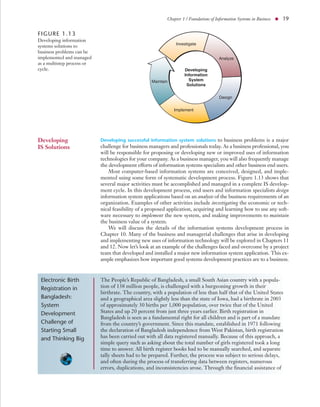
                            mented using some form of systematic development process. Figure 1.13 shows that
                            several major activities must be accomplished and managed in a complete IS develop-
                            ment cycle. In this development process, end users and information specialists design
                            information system applications based on an analysis of the business requirements of an
                            organization. Examples of other activities include investigating the economic or tech-
                            nical feasibility of a proposed application, acquiring and learning how to use any soft-
                            ware necessary to implement the new system, and making improvements to maintain
                            the business value of a system.
                                We will discuss the details of the information systems development process in
                            Chapter 10. Many of the business and managerial challenges that arise in developing
                            and implementing new uses of information technology will be explored in Chapters 11
                            and 12. Now let’s look at an example of the challenges faced and overcome by a project
                            team that developed and installed a major new information system application. This ex-
                            ample emphasizes how important good systems development practices are to a business.


 Electronic Birth           The People’s Republic of Bangladesh, a small South Asian country with a popula-
 Registration in            tion of 138 million people, is challenged with a burgeoning growth in their
                            birthrate. The country, with a population of less than half that of the United States
 Bangladesh:                and a geographical area slightly less than the state of Iowa, had a birthrate in 2003
 System                     of approximately 30 births per 1,000 population, over twice that of the United
 Development                States and up 20 percent from just three years earlier. Birth registration in
                            Bangladesh is seen as a fundamental right for all children and is part of a mandate
 Challenge of               from the country’s government. Since this mandate, established in 1971 following
 Starting Small             the declaration of Bangladesh independence from West Pakistan, birth registration
 and Thinking Big           has been carried out with all data registered manually. Because of this approach, a
                            simple query such as asking about the total number of girls registered took a long
                            time to answer. All birth register books had to be manually searched, and separate
                            tally sheets had to be prepared. Further, the process was subject to serious delays,
                            and often during the process of transferring data between registers, numerous
                            errors, duplications, and inconsistencies arose. Through the financial assistance of
20 ● Module I / Foundation Concepts


                             UNICEF, Bangladesh, the electronic birth registration information system (BRIS)
                             was developed.
                                 A number of significant challenges faced the development of the system. First,
                             the widespread poverty in Bangladesh has led to corruption in both public and pri-
                             vate sectors as individuals rely on bribes to maintain their livelihoods. Systems like
                             BRIS are viewed as a threat to corrupt activities: They remove duplicated activities
                             and they increase access to information. Thus, any system rollout beyond the pilot
                             phase and location might be resisted. Further, a severe lack of IT skills within the
                             Bangladesh public sector exists. This problem is exacerbated because many ap-
                             pointments are made on the basis of seniority or political involvement, and as a
                             result, many IT professionals are not qualified to design or maintain information
                             systems. Finally, the system budget was severely constrained due to limited funds.
                                 The key to success was the development team’s sensitivity to these issues com-
                             bined with their creative approach to system development. First, they realized that
                             by employing a young and creative staff of developers, they could reduce initial
                             costs while maximizing innovative thinking. Second, they focused their initial ef-
                             forts on changing the existing structures and processes. The team knew that more
                             significant gains in efficiency and effectiveness can often come not only from rely-
                             ing on high technology, but from improving the structures and processes of the
                             manual system. This approach ensured that the automated system would be free
                             from redundant or inefficient processes. Finally, the team realized the value of
                             starting small but anticipating the bigger picture. As such, the project started with
                             a small pilot, but was designed with an eye toward future integration with other
                             possibly yet undeveloped systems.
                                 To date, the project has been labeled a huge success. Originally rolled out in
                             a local area network format, the system has been fully operational for more than a
                             year, and a plan to move to a Web-based system that will potentially draw in a
                             much broader range of agencies and shared data is under way. Since its deployment,
                             both birth registration and immunization rates have increased. As for the budget
                             constraints—the direct costs of system development were less than US$20,000, and
                             operational costs are around US$200 per month [2, 4].


Challenges and               As a prospective manager, business professional, or knowledge worker, you will be
Ethics of IT                 challenged by the ethical responsibilities generated by the use of information tech-
                             nology. For example, what uses of information technology might be considered im-
                             proper, irresponsible, or harmful to other individuals or to society? What is the proper
                             business use of the Internet and an organization’s IT resources? What does it take to
                             be a responsible end user of information technology? How can you protect yourself
                             from computer crime and other risks of information technology? These are some of
                             the questions that outline the ethical dimensions of information systems that we will
                             discuss and illustrate with Real World Cases throughout this text. Figure 1.14 outlines
                             some of the ethical risks that may arise in the use of several major applications of
                             information technology. The following example illustrates some of the security
                             challenges associated with conducting business over the Internet.


 Citibank:                   Citigroup Inc. (www.citigroup.com), one of the world’s largest and most profitable
 Problems with               financial services companies, has been in existence since 1812 and has some 200
                             million customer accounts in more than 100 countries. It would seem that such a
 e-Mail Scams                large and prosperous organization would be protected from Internet scams as se-
                             curely as a bank vault. Unfortunately, they are the first to point out that no one is
                             immune to these activities.
Chapter 1 / Foundations of Information Systems in Business ● 21


FIGURE 1.14 Examples of some of the ethical challenges that must be faced by business managers who
implement major applications of information technology.

 Applications of IT

■   Customer                                                      Potential Risks
    Relationship                 Potential Harms                 ■   Consumer              Possible Responses
    Management                                                       boycotts
                        ■   Infringements on privacy                                         ■   Codes of ethics
■   Human                                                        ■   Work
    Resources           ■   Inaccurate information                                           ■   Incentives
                                                                     stoppages
    Management
                        ■   Collusion                                                        ■   Certification
                                                                 ■   Government
■   Business
                                                                     intervention
    Intelligence
    Systems


                                  In November 2003, Citibank customers worldwide were being targeted by scam
                             artists trying to get their confidential bank card numbers. The hoax was perpetrated
                             via e-mail that included a link directing the recipients to a Citibank website, where
                             they were greeted with a pop-up box asking them for their full debit card numbers,
                             their personal identification numbers (PINs), and their card expiration dates. How-
                             ever, the website was a fake site operated by someone trying to gain access to the
                             information. It was eventually determined that the spoofed site was hosted by a
                             Web-hosting company in Moscow.
                                  Citibank network security officials were immediately alerted and posted a
                             message to their customers on their website explaining the nature of the fraudulent
                             e-mail and what customers should do if they received it, or worse, if they had
                             responded to it.
                                  The good news is that little actual damage or loss affected Citibank customers
                             as a result of this potentially devastating fraud. Despite this, customer confidence
                             decreased, and Citibank incurred a significant cost in both money and time to se-
                             cure their site, to notify their customers of the hoax, and to investigate any poten-
                             tial losses. The business potential of the Internet also brings with it the challenge
                             of securing customer information and valuable corporate resources. This challenge
                             grows each day, and all IT professionals must work toward improving the security
                             and integrity of the Internet [5, 11].


Challenges of                Both information technology and the myriad of information systems it supports have
IT Careers                   created interesting, challenging, and lucrative career opportunities for millions of men
                             and women all over the globe. At this point in your life you may still be uncertain
                             about the career path you wish to follow, so learning more about information technol-
                             ogy may help you decide if you want to pursue an IT-related career. In recent years,
                             economic downturns have affected all job sectors, including IT. Further, rising labor
                             costs in North America, Canada, and Europe have resulted in a large-scale movement
                             to outsource basic software programming functions to India, the Middle East, and to
                             Asia-Pacific countries. Despite this move, employment opportunities in the informa-
                             tion systems field are strong, with more new and exciting jobs emerging each day as
                             organizations continue to expand their use of information technology. In addition,
                             these new jobs pose constant human resource management challenges to all organiza-
                             tions because shortages of qualified information systems personnel frequently occur.
                             The constantly changing job requirements in information systems due to the dynamic
22 ● Module I / Foundation Concepts

FIGURE 1.15                                                                                    Business Applications
Careers in IS are as diverse          Systems Analyst            System Consultant
                                                                                                    Consultant
and exciting as the
                                 Chief Information Officer      Computer Operator            Computer Serviceperson
technologies used in them.
IS professionals have career                                      Data Dictionary
                                  Network Administrator                                         Network Manager
opportunities in every                                               Specialist
business environment and          Database Administrator          Database Analyst           Documentation Specialist
activity throughout the
world.                                                          End-User Computer            Equipment Manufacturer
                                         IS Auditor
                                                                    Manager                      Representative
                                  PC Sales Representative           Programmer                  Program Librarian
                                      Project Manager             Records Manager         Hardware Sales Representative
                                  Scheduling and Control
                                                                  Security Officer         Office Automation Specialist
                                          Person
                                                                    Service Sales
                                   Senior Project Leader                                   Software Sales Representative
                                                                   Representative
                                                                  Software Quality
                                      Technical Analyst                                          Technical Writer
                                                                     Evaluator
                                    Telecommunications          Training & Standards
                                                                                             User Interface Specialist
                                         Specialist                   Manager


                               developments in business and information technologies will ensure that the long-term
                               job outlook in IT remains both positive and exciting.
                                   One major recruiter of IT professionals is the IT industry itself. Thousands of com-
                               panies develop, manufacture, market, and service computer hardware, software, data,
                               and network products and services, or provide e-business and commerce applications
                               and services, end user training, or business systems consulting. However, the biggest
                               need for qualified people comes from the millions of businesses, government agencies,
                               and other organizations that use information technology. They need many types of IS
                               professionals such as systems analysts, software developers, and network managers to
                               help them plan, develop, implement, and manage today’s Internet-based and Web-
                               enabled business/IT applications. Figure 1.15 lists just a few of the myriad of career roles
                               available to the modern IT professional.
                                   Computer systems analysts, database administrators, and other managerial-level IS
                               positions are expected to be among the fastest growing occupations through 2012.
                               Employment of IS professionals is expected to grow over 36 percent (much greater
                               than average) for all occupations as organizations continue to adopt and integrate in-
                               creasingly sophisticated technologies. Job increases will be driven by very rapid growth
                               in computer system design and related services, which is projected to be one of the
                               fastest-growing industries in the U.S. economy. In addition, many job openings will
                               arise annually from the need to replace workers who move into managerial positions
                               or other occupations or who leave the labor force.
                                   Despite the recent economic downturn among information technology firms, IS
                               professionals still enjoy favorable job prospects. The demand for networking to facili-
                               tate the sharing of information, the expansion of client/server environments, and the
                               need for specialists to use their knowledge and skills in a problem-solving capacity will
                               be major factors in the rising demand for computer systems analysts, database admin-
                               istrators, and other IS professionals. Moreover, falling prices of computer hardware
                               and software should continue to induce more businesses to expand their computerized
                               operations and to integrate new technologies into them. To maintain a competitive
                               edge and operate more efficiently, firms will keep demanding professionals who are
                               knowledgeable about the latest technologies and are able to apply them to meet the
                               needs of businesses.
Chapter 1 / Foundations of Information Systems in Business ● 23


                      Increasingly, more sophisticated and complex technology is being implemented
                  across all organizations, which should fuel the demand for these computer occupa-
                  tions. The demand grows for system analysts to help firms maximize their efficiency
                  with available technology. Expansion of electronic commerce—doing business on the
                  Internet—and the continuing need to build and maintain databases that store critical
                  information on customers, inventory, and projects are fueling demand for database ad-
                  ministrators familiar with the latest technology. Also, the increasing importance being
                  placed on “cybersecurity”—the protection of electronic information—will result in
                  a need for workers skilled in information security. Let’s take a look at IT career
                  challenges at a leading Web company.


 Amazon.com:      John Vlastelca is the technical recruiting manager of Amazon.com Inc. in Seattle.
 IT Career        He says: “We have a huge demand for software developers and systems analysts
                  who have experience building systems that support relationships with customers
 Challenges       online—people who bring together a retailing background and some IT back-
                  ground. We hire smart folks, and they are working their butts off. There is a heavy
                  dose of informality. People aren’t title-centric; the best idea wins and the career
                  path is often a vertical crossover to management or content areas.
                      “The one thing that drives us is an obsession with the customer. What helps us
                  make our selection decision is the question, ’Is this a technical person who views
                  technology as a means to an end, where the end is the customer? Or does this per-
                  son define him or herself as just a Java programmer?’
                      “But the bar is incredibly high here. It is really hard for my team to find the
                  combination of skills—the software engineer who really understands the customer
                  and the business. So half don’t make it because they are not strong enough techni-
                  cally. Other reasons have to do with soft skills—being open to ideas, just raw
                  smarts, and not being passionate enough. The problem space we operate in is unex-
                  plored territory” [7].


The IS Function   Successful management of information systems and technologies presents major chal-
                  lenges to business managers and professionals. Thus, the information systems function
                  represents:
                  • A major functional area of business equally as important to business success as the
                      functions of accounting, finance, operations management, marketing, and human
                      resources management.
                  •   An important contributor to operational efficiency, employee productivity and
                      morale, and customer service and satisfaction.
                  •   A major source of information and support needed to promote effective decision
                      making by managers and business professionals.
                  •   A vital ingredient in developing competitive products and services that give an
                      organization a strategic advantage in the global marketplace.
                  •   A dynamic, rewarding, and challenging career opportunity for millions of men
                      and women.
                  •   A key component of the resources, infrastructure, and capabilities of today’s net-
                      worked business enterprises.
24 ● Module I / Foundation Concepts


  SECTION II                 Foundation Concepts: The
                             Components of Information
                             Systems
System                       System concepts underlie all business processes as well as our understanding of infor-
                             mation systems and technologies. That’s why we need to discuss how generic system
Concepts: A                  concepts apply to business firms and the components and activities of information sys-
Foundation                   tems. Understanding system concepts will help you understand many other concepts
                             in the technology, applications, development, and management of information systems
                             that we will cover in this text. For example, system concepts help us understand:
                             • Technology. That computer networks are systems of information processing
                               components that use a variety of hardware, software, data management, and
                               telecommunications network technologies.
                             • Applications. That electronic business and commerce applications involve inter-
                               connected business information systems.
                             • Development. That developing ways to use information technology in business
                               includes designing the basic components of information systems.
                             • Management. That managing information technology emphasizes the quality,
                               strategic business value, and security of an organization’s information systems.
                             Read the Real World Case about how information systems can be used to support
                             business. We can learn a lot from this case about the use of information technology to
                             empower and support business professionals today. See Figure 1.16.

What Is a System?            We’ve used the term system well over a hundred times already and will use it thousands
                             more before we’re done. It seems reasonable that we focus our attention on exactly
                             what a system is. As we discussed at the beginning of the chapter, a system is defined
                             as a set of interrelated components, with a clearly defined boundary, working together to
                             achieve a common set of objectives by accepting inputs and producing outputs in an organized
                             transformation process. Many examples of systems can be found in the physical and bio-
                             logical sciences, in modern technology, and in human society. Thus, we can talk of the
                             physical system of the sun and its planets, the biological system of the human body, the
                             technological system of an oil refinery, and the socioeconomic system of a business
                             organization.
                                 Systems have three basic functions:
                             • Input involves capturing and assembling elements that enter the system to be
                               processed. For example, raw materials, energy, data, and human effort must be
                               secured and organized for processing.
                             • Processing involves transformation processes that convert input into output. Ex-
                               amples are a manufacturing process, the human breathing process, or mathematical
                               calculations.
                             • Output involves transferring elements that have been produced by a transforma-
                               tion process to their ultimate destination. For example, finished products, human
                               services, and management information must be transmitted to their human users.

                             Example. A manufacturing system accepts raw materials as input and produces fin-
                             ished goods as output. An information system is a system that accepts resources (data)
                             as input and processes them into products (information) as output. A business organi-
                             zation is a system where human and economic resources are transformed by various
                             business processes into goods and services.
Chapter 1 / Foundations of Information Systems in Business ● 25


                              2
REAL WORLD                                       Lufthansa: Taking Mobile Computing
                                                 to the Skies While Keeping the
 CASE                                            Mobile Workforce Connected


H         ow do you keep 3,500 highly mobile airline pilots
          trained on the latest technology and procedures,
          plugged into the corporate infrastructure, and in-
formed about schedules, weather events, and other facts that
affect their jobs throughout the world? What’s more, how do
                                                                        Today, Lufthansa pilots enjoy state-of-the-art notebook
                                                                    PCs weighing less than 3.5 pounds with several times the
                                                                    power and performance of the early Pentium III platforms.4
                                                                        So far, the payoff from mobile computing at Lufthansa
                                                                    has been significant. Giving notebooks to pilots provided the
you accomplish this while controlling costs?                        company with several key tangible and intangible benefits:
     In 2001, Lufthansa launched the “Lufthansa Mobile Ini-
tiative,” which aimed to provide all pilots with notebook           •   Pilots are more productive because they can access up-
computers. Lufthansa knew that the benefits of mobile com-              dated data electronically.
puters would translate into major gains for the company as a        •   They are more productive because they can work in a
whole.                                                                  variety of locations including airplanes, airports, hotels,
     The Lufthansa Mobile Initiative is yielding significant            and other remote locations.
productivity and efficiency improvements, while keeping
costs manageable.
                                                                    •   Pilots appreciate the convenience of not having to
                                                                        carry heavy manuals and documentation to multiple
     The successes being realized today were not without sig-           locations.
nificant challenges. Lufthansa had strict parameters that
notebook PCs needed to meet before the pilots’ union would          •   Pilots can take their required training on their laptops
sign off on the plan. Chief among the requirements were:                during downtime in any airport.
The notebooks had to have enough performance capability                   Now that all of Lufthansa’s pilots have laptops,
to run key software applications used by the pilots, the note-      Lufthansa no longer conducts classroom training. “Such
books had to weigh less than 2 kilograms (about 4.4 pounds),        training used to mean preparing training centers, arranging
their screens had to be at least 12 inches diagonally as well as    a time when pilots could attend the sessions, and actually
be bright and easy to read due to lighting conditions in the        getting the pilots to the training location,” recalls Rolf
cockpit, and battery life had to be at least five hours for long    Mueller, project manager for the Lufthansa Mobile Initia-
airplane trips.                                                     tive. “Now pilots use their notebooks for computer-based
     For the early tests of the project in 1998, Lufthansa de-      training whether they are learning about new aircraft or
cided to purchase mobile systems based on the low-voltage           things like specific hydraulic systems.” Lufthansa also plans
Mobile Intel® Pentium® III Processor–M operating at                 to phase out the desktop computers that it had previously de-
600MHz, with 128MB of RAM and a 20GB hard drive.                    ployed in airports, thereby streamlining its infrastructure
                                                                    and cutting even more costs.
                                                                          Helping Lufthansa even further is the fact that the total
FIGURE 1.16
                                                                    cost of ownership for notebooks has decreased significantly
                                                                    over the last several years. Capital costs are lower. End user op-
                                                                    erations and technical support costs are decreasing due to im-
                                                                    proved manageability and stability. “We’ve been quite happy
                                                                    with Windows XP,” said a Lufthansa representative. “Not only
                                                                    is it stable, but it’s flexible and gives us an environment that is
                                                                    easy to update and keep current. Overall, the total cost of own-
                                                                    ership is quite low because of our system of browser-based
                                                                    components and a sophisticated update network.”
                                                                          Mobile computing is catching on throughout the
                                                                    Lufthansa Group. Rolf Mueller says that in addition to
                                                                    Lufthansa Cargo, he has been talking to Lufthansa CityLine,
                                                                    the company’s short-haul passenger line that serves Europe.
                                                                    “We’re really leading the way in using mobile computers.
                                                                    Lufthansa CityLine will end up with 800 of its own note-
                                                                    books for flight captains.”
                                                                          And the Mobile Initiative at Lufthansa extends beyond
  Modern businesses implement sales readiness
                                                                    the company’s crew. Lufthansa understands fully the needs of
  systems that provide their global sales forces with
                                                                    mobile workers, including its own customers. Since late
  Web-based access to sales and marketing
  materials.                                                        2004, the announcement “We have reached surfing altitude”
                                                                    has become as familiar to Lufthansa travelers as safety

Source: Steve Chenn/Corbis.
26 ● Module I / Foundation Concepts

demonstrations, packs of peanuts, and stowing the tray in the      The system is mounted in the top of the cabin above the roof.
upright and locked position.                                       The long, thin antenna is curved like a parabolic satellite dish,
    Using the Connexion system by Boeing, Lufthansa can            and motors constantly adjust its position so that it remains
deliver broadband Internet to the aircraft and, ultimately, to     pointing at the satellite during the flight, Deal says.
their passengers.                                                      Whether the service is a success might not be a question
    Lufthansa, through Boeing, is selling the service directly     of technology or price. Aircraft cabins are one of the few
to passengers and offers either flat-rate pricing, at $19.95 for   places a busy traveler can get away from phones, e-mail, and
flights of between three and six hours or $29.95 for flights       instant messages, so some might resent the intrusion of the
of six hours or more, or metered pricing, at $9.95 for 30          Internet in the air.
minutes and 20 cents per subsequent minute.                            Boeing’s market research found up to 6 percent of peo-
    The backbone of the system is a network of transponders        ple surveyed would change their flight plans, within a certain
leased across eight commercial satellites that provides cover-     set of limits, to get aboard an aircraft that has the system,
age of most major air routes in the Northern Hemisphere.           says Michael Carson, sales director at Connexion.
Each transponder can support a high-speed data channel,                As it moves forward, Lufthansa can point to a litany of
and Boeing allocates one to be used for passenger Internet         benefits when describing its mobile computer program.
access, says Stan Deal, vice president of Connexion.               “Most of all, pilots work when they can,” says Rolf Mueller.
    There are plans for a second stream to carry live televi-      “Whether they are on their way to the airport, waiting dur-
sion, such as 24-hour news, sports and financial channels,         ing a layover, or away from work.” Equally important,
and a channel for airline use, such as sending real-time           Lufthansa passengers can be more productive.
telemetry, maintenance information, and intracompany                   Lufthansa regards their mobile computing initiative as
communications. Additional Internet data channels also can         extremely successful based on their high return on invest-
be added to keep up with demand.                                   ment (ROI). By deploying mobile PCs to all their pilots,
    Four earth stations, in Japan, Russia, Switzerland, and        they have realized significant productivity benefits while
the United States, provide the gateway link between the air-       effectively managing costs.
craft and a terrestrial network provided by Internap Network
Services that carries traffic to the Internet.                     Source: Adapted from Intel Corporation, “Lufthansa Mobile Computing
                                                                   Case Study, 2002.” © Intel Corporation, 2002 and Martyn Williams. “Broad-
    The connection to the satellite from the aircraft is ac-       band Internet Takes to the Skies,” Network World, May 17, 2004. © Network
complished using an antenna designed by Mitsubishi Electric.       World, Inc., 2004.


         CASE STUDY QUESTIONS                                                REAL WORLD ACTIVITIES
 1. Are many of Lufthansa’s challenges identified in the            1. The Connexion system by Boeing is rapidly becoming
    case similar to those being experienced by other busi-             the standard for high-speed Internet access on com-
    nesses in today’s global economy? Explain and provide              mercial airliners. Go to the Connexion website at
    some examples.                                                     www.connexionbyboeing.com, and check out some of
 2. What other tangible and intangible benefits, beyond                the features of the new system.
    those identified by Lufthansa, might a mobile work-             2. European air carriers have embraced having Internet
    force enjoy as a result of deploying mobile technolo-              access on their aircraft far faster than U.S. carriers.
    gies? Explain.                                                     Break into small groups with your classmates, and dis-
 3. Lufthansa was clearly taking a big risk with their deci-           cuss the reasons why a lack of interest still exists in the
    sion to deploy notebook computers to their pilots.                 United States. Find out how many of your friends
    What steps did they take to manage that risk, and what             would prefer an airline with onboard Internet access.
    others might be needed in today’s business environ-                Would you pay more for this service? Why or why not?
    ment? Provide some examples.
Chapter 1 / Foundations of Information Systems in Business ● 27


FIGURE 1.17 A common cybernetic system is a home temperature control system. The thermostat accepts the desired
room temperature as input and sends voltage to open the gas valve which fires the furnace. The resulting hot air goes into the
room, and the thermometer in the thermostat provides feedback to shut the system down when the desired temperature is
reached.
                                                                                 Heat Loss
  Desired                                                                              Ϫ                             Actual
   Room                                              Gas                                                              Room
Temperature                  Voltage                 Fuel                        ϩ                                 Temperature
               Thermostat               Gas Valve             Furnace                                  Room


                                                                Temperature
                                                                 Feedback


Feedback and                   The system concept becomes even more useful by including two additional elements:
Control                        feedback and control. A system with feedback and control functions is sometimes
                               called a cybernetic system, that is, a self-monitoring, self-regulating system.
                               • Feedback is data about the performance of a system. For example, data about
                                 sales performance is feedback to a sales manager. Data about the speed, altitude,
                                 attitude, and direction of an aircraft is feedback to the aircraft’s pilot or autopilot.
                               • Control involves monitoring and evaluating feedback to determine whether a
                                 system is moving toward the achievement of its goal. The control function then
                                 makes the necessary adjustments to a system’s input and processing components
                                 to ensure that it produces proper output. For example, a sales manager exercises
                                 control when reassigning salespersons to new sales territories after evaluating
                                 feedback about their sales performance. An airline pilot, or the aircraft’s autopi-
                                 lot, makes minute adjustments after evaluating the feedback from the instruments
                                 to ensure the plane is exactly where the pilot wants it to be.

                               Example. Figure 1.17 illustrates a familiar example of a self-monitoring, self-regulating,
                               thermostat-controlled heating system found in many homes; it automatically monitors
                               and regulates itself to maintain a desired temperature. Another example is the human
                               body, which can be regarded as a cybernetic system that automatically monitors and
                               adjusts many of its functions, such as temperature, heartbeat, and breathing. A business
                               also has many control activities. For example, computers may monitor and control
                               manufacturing processes, accounting procedures help control financial systems, data
                               entry displays provide control of data entry activities, and sales quotas and sales
                               bonuses attempt to control sales performance.

Other System                   Figure 1.18 uses a business organization to illustrate the fundamental components of
Characteristics                a system, as well as several other system characteristics. Note that a system does not
                               exist in a vacuum; rather, it exists and functions in an environment containing other sys-
                               tems. If a system is one of the components of a larger system, it is a subsystem, and the
                               larger system is its environment.
                                   Several systems may share the same environment. Some of these systems may be
                               connected to one another by means of a shared boundary, or interface. Figure 1.18 also
                               illustrates the concept of an open system, that is, a system that interacts with other sys-
                               tems in its environment. In this diagram, the system exchanges inputs and outputs with
                               its environment. Thus, we could say that it is connected to its environment by input
                               and output interfaces. Finally, a system that has the ability to change itself or its envi-
                               ronment in order to survive is an adaptive system.

                               Example. Organizations such as businesses and government agencies are good examples
                               of the systems in society, which is their environment. Society contains a multitude of
                               such systems, including individuals and their social, political, and economic institutions.
28 ● Module I / Foundation Concepts

FIGURE 1.18                                                             Stakeholders in the Business Environment
A business is an example of                              The Community                                        Competitors
an organizational system
where economic resources
(input) are transformed by                                                              Control
                                  Government Agencies


various business processes
(processing) into goods                                                              Management


                                                                                                                              Customers
and services (output).
Information systems
provide information
(feedback) on the                                                                            Feedback
operations of the system
to management for the                                                             Information Systems
direction and maintenance
of the system (control) as
it exchanges inputs and
                                                           Economic              Business                   Goods and
outputs with its
                                                           Resources:            Processes:                 Services:
environment.                                                 People                Market, Develop,           Products
                                                             Money                 Produce, and               Services
                                                             Material              Deliver Products           Payments
                                                             Machines              and Services               Contributions
                                                             Land                  Support Customers          Information


                                                                                                                              Stockholders
                                  Suppliers


                                                             Facilities            Other Processes            Other Effects
                                                             Energy
                                                             Information
                                                                Input                 Processing                   Output


                                                        Financial Institutions                                Labor Unions


                              Organizations themselves consist of many subsystems, such as departments, divisions,
                              process teams, and other workgroups. Organizations are examples of open systems be-
                              cause they interface and interact with other systems in their environment. Finally, or-
                              ganizations are examples of adaptive systems, since they can modify themselves to
                              meet the demands of a changing environment.
                                  If we apply our understanding of general system concepts to information systems,
                              it should be easy to see the parallels.
                                  Information systems are made up of interrelated components:
                              • People, hardware, software, peripherals, and networks.
                              They have clearly defined boundaries:
                              • Functions, modules, type of application, department, or end user group.
                              All the interrelated components work together to achieve a common goal by accepting
                              inputs and producing outputs in an organized transformation process:
                              • Using raw materials, hiring new people, manufacturing products for sale, and
                                 disseminating information to others.
                              Information systems make extensive use of feedback and control to improve their
                              effectiveness:
                              • Error messages, dialog boxes, passwords, and user rights management.
                              Many information systems are designed to change in relation to their environments
                              and are adaptive:
                              • Intelligent software agents, expert systems, and highly specialized decision support
                                 systems.
Chapter 1 / Foundations of Information Systems in Business ● 29


                               Information systems are systems just like any other system. Their value to the modern
                               organization, however, is unlike any other system ever created.


Components                     We have said that an information system is a system that accepts data resources as in-
                               put and processes them into information products as output. How does an information
of an                          system accomplish this? What system components and activities are involved?
Information                        Figure 1.19 illustrates an information system model that expresses a fundamental
System                         conceptual framework for the major components and activities of information systems.
                               An information system depends on the resources of people (end users and IS special-
                               ists), hardware (machines and media), software (programs and procedures), data (data
                               and knowledge bases), and networks (communications media and network support) to
                               perform input, processing, output, storage, and control activities that convert data
                               resources into information products.
                                   This information system model highlights the relationships among the compo-
                               nents and activities of information systems. It provides a framework that emphasizes
                               four major concepts that can be applied to all types of information systems:
                               • People, hardware, software, data, and networks are the five basic resources of
                                 information systems.
                               • People resources include end users and IS specialists, hardware resources consist
                                 of machines and media, software resources include both programs and proce-
                                 dures, data resources can include data and knowledge bases, and network re-
                                 sources include communications media and networks.
                               • Data resources are transformed by information processing activities into a variety
                                 of information products for end users.
                               • Information processing consists of the system activities of input, processing,
                                 output, storage, and control.


FIGURE 1.19
The components of an
information system. All
information systems use                                                                              S
                                                                                                 Pr oft
                                                                               es sts
people, hardware, software,                                                u rc ciali              og   w
                                                                                                     ra are
data, and network resources                                              so Spe                        ms     R
                                                                      Re                                  an es
to perform input,                                                   le d IS                                 d P ou
                                                                 op n                                          ro rce
processing, output, storage,                                  Pe rs a             System Activities              ce
                                                                                                                    du
                                                                                                                         s
                                                                U se                                                   re
and control activities that                                 n d                                                           s
                                                        E                  Control of System Performance
transform data resources
into information products.

                                                                    Input           Processing             Output
                                          Data


                                                                      of                Data                 of
                                                                                                                                     d M es
                                                                                                                                        edia


                                                                    Data                into            Information
                                                                                                                                       ourc
                                            Dat nowledg
                                             and


                                                                  Resources         Information          Products
                                               a Re


                                                                                                                       Mac are Res
                                                 K


                                                                                                                                s an
                                                    sou


                                                                                                                           hine
                                                       rces ses


                                                                                                                          dw
                                                          e Ba


                                                                           Storage of Data Resources
                                                                                                                       Har


                                                                           Network Resources
                                                                  Communications Media and Network Support
30 ● Module I / Foundation Concepts


Information                  Our basic IS model shows that an information system consists of five major resources:
                             people, hardware, software, data, and networks. Let’s briefly discuss several basic con-
System                       cepts and examples of the roles these resources play as the fundamental components of
Resources                    information systems. You should be able to recognize these five components at work
                             in any type of information system you encounter in the real world. Figure 1.20 out-
                             lines several examples of typical information system resources and products.

People Resources             People are the essential ingredient for the successful operation of all information sys-
                             tems. These people resources include end users and IS specialists.
                             •     End users (also called users or clients) are people who use an information system
                               or the information it produces. They can be customers, salespersons, engineers,
                               clerks, accountants, or managers and are found at all levels of an organization. In
                               fact, most of us are information system end users. And most end users in business
                               are knowledge workers, that is, people who spend most of their time communi-
                               cating and collaborating in teams and workgroups and creating, using, and dis-
                               tributing information.
                             • IS specialists are people who develop and operate information systems. They in-
                               clude systems analysts, software developers, system operators, and other manager-
                               ial, technical, and clerical IS personnel. Briefly, systems analysts design information
                               systems based on the information requirements of end users, software developers
                               create computer programs based on the specifications of systems analysts, and sys-
                               tem operators help to monitor and operate large computer systems and networks.

Hardware Resources           The concept of hardware resources includes all physical devices and materials used in
                             information processing. Specifically, it includes not only machines, such as computers
                             and other equipment, but also all data media, that is, tangible objects on which data are
                             recorded, from sheets of paper to magnetic or optical disks. Examples of hardware in
                             computer-based information systems are:
                             • Computer systems, which consist of central processing units containing micro-
                                   processors, and a variety of interconnected peripheral devices such as printers,
                                   scanners, monitors, and so on. Examples are hand-held, laptop, tablet, or desktop
                                   microcomputer systems, midrange computer systems, and large mainframe
                                   computer systems.


FIGURE 1.20                                          Information Systems Resources and Products
Examples of information
system resources and             People Resources
products.                          Specialists—systems analysts, software developers, system operators.
                                   End Users—anyone else who uses information systems.
                                 Hardware Resources
                                  Machines—computers, video monitors, magnetic disk drives, printers, optical scanners.
                                  Media—floppy disks, magnetic tape, optical disks, plastic cards, paper forms.
                                 Software Resources
                                   Programs—operating system programs, spreadsheet programs, word processing
                                   programs, payroll programs.
                                   Procedures—data entry procedures, error correction procedures, paycheck distribution
                                   procedures.
                                 Data Resources
                                  Product descriptions, customer records, employee files, inventory databases.
                                 Network Resources
                                  Communications media, communications processors, network access and control software.
                                 Information Products
                                   Management reports and business documents using text and graphics displays, audio
                                   responses, and paper forms.
Chapter 1 / Foundations of Information Systems in Business ● 31


                     • Computer peripherals, which are devices such as a keyboard, electronic mouse,
                        trackball, or stylus for input of data and commands, a video screen or printer for
                        output of information, and magnetic or optical disk drives for storage of data
                        resources.

Software Resources   The concept of software resources includes all sets of information processing instruc-
                     tions. This generic concept of software includes not only the sets of operating in-
                     structions called programs, which direct and control computer hardware, but also the
                     sets of information processing instructions called procedures that people need.
                          It is important to understand that even information systems that don’t use com-
                     puters have a software resource component. This is true even for the information sys-
                     tems of ancient times, or for the manual and machine-supported information systems
                     still used in the world today. They all require software resources in the form of infor-
                     mation processing instructions and procedures in order to properly capture, process,
                     and disseminate information to their users.
                          The following are examples of software resources:
                     • System software, such as an operating system program, which controls and sup-
                       ports the operations of a computer system. Microsoft Windows® and Unix are
                       but two examples of popular computer operating systems.
                     • Application software, which are programs that direct processing for a particular
                       use of computers by end users. Examples are a sales analysis program, a payroll
                       program, and a word processing program.
                     • Procedures, which are operating instructions for the people who will use an in-
                       formation system. Examples are instructions for filling out a paper form or using
                       a software package.

Data Resources       Data are more than the raw material of information systems. The concept of data
                     resources has been broadened by managers and information systems professionals.
                     They realize that data constitute valuable organizational resources. Thus, you should
                     view data the same as any organizational resource that must be managed effectively to
                     benefit all stakeholders in an organization.
                         The concept of data as an organizational resource has resulted in a variety of
                     changes in the modern organization. Data that were previously captured as a result of
                     a common transaction are now stored, processed, and analyzed using sophisticated
                     software applications that can reveal complex relationships about sales, customers,
                     competitors, and markets. In today’s wired world, the data to create a simple list of an
                     organization’s customers are protected with the same energy as the cash in a bank
                     vault. Data are the lifeblood of today’s organizations, and the effective and efficient
                     management of data is considered an integral part of organizational strategy.
                         Data can take many forms, including traditional alphanumeric data, composed of
                     numbers, letters, and other characters that describe business transactions and other events
                     and entities. Text data, consisting of sentences and paragraphs used in written communi-
                     cations; image data, such as graphic shapes and figures, and photographic and video im-
                     ages; and audio data, the human voice and other sounds, are also important forms of data.
                         The data resources of information systems are typically organized, stored, and
                     accessed by a variety of data resource management technologies into:
                     • Databases that hold processed and organized data.
                     • Knowledge bases that hold knowledge in a variety of forms such as facts, rules,
                        and case examples about successful business practices.
                         For example, data about sales transactions may be accumulated, processed, and
                     stored in a Web-enabled sales database that can be accessed for sales analysis reports
                     by managers and marketing professionals. Knowledge bases are used by knowledge
                     management systems and expert systems to share knowledge or to give expert advice
                     on specific subjects. We will explore these concepts further in later chapters.
32 ● Module I / Foundation Concepts

                             Data versus Information. The word data is the plural of datum, though data com-
                             monly represents both singular and plural forms. Data are raw facts or observations,
                             typically about physical phenomena or business transactions. For example, a spacecraft
                             launch or the sale of an automobile would generate a lot of data describing those
                             events. More specifically, data are objective measurements of the attributes (the char-
                             acteristics) of entities (such as people, places, things, and events).

                             Example. Business transactions such as buying a car or an airline ticket can produce a
                             lot of data. Just think of the hundreds of facts needed to describe the characteristics of
                             the car you want and its financing, or the details for even the simplest airline reservation.
                                 People often use the terms data and information interchangeably. However, it is
                             better to view data as raw material resources that are processed into finished informa-
                             tion products. Then we can define information as data that have been converted into
                             a meaningful and useful context for specific end users. Thus, data are usually subjected
                             to a value-added process (data processing or information processing) where (1) their form
                             is aggregated, manipulated, and organized; (2) their content is analyzed and evaluated;
                             and (3) they are placed in a proper context for a human user.
                                 The issue of context is really at the heart of understanding the difference between
                             information and data. Data can be thought of as context-independent: A list of num-
                             bers or names, by itself, does not provide any understanding of the context in which
                             it was recorded. In fact, the same list could be recorded in a variety of contexts. In
                             contrast, for data to become information, both the context of the data and the per-
                             spective of the person accessing the data become essential. The same data may be
                             considered valuable information to one person and completely irrelevant to the next.
                             Just think of data as potentially valuable to all and the value of information as being
                             valuable relative to its user.

                             Example. Names, quantities, and dollar amounts recorded on sales forms represent
                             data about sales transactions. However, a sales manager may not regard these as infor-
                             mation. Only after such facts are properly organized and manipulated can meaningful
                             sales information be furnished, specifying, for example, the amount of sales by prod-
                             uct type, sales territory, or salesperson.

Network Resources            Telecommunications technologies and networks like the Internet, intranets, and ex-
                             tranets are essential to the successful electronic business and commerce operations of
                             all types of organizations and their computer-based information systems. Telecommu-
                             nications networks consist of computers, communications processors, and other de-
                             vices interconnected by communications media and controlled by communications
                             software. The concept of network resources emphasizes that communications tech-
                             nologies and networks are a fundamental resource component of all information
                             systems. Network resources include:
                             • Communications media. Examples include twisted-pair wire, coaxial and fiber-
                               optic cables, and microwave, cellular, and satellite wireless technologies.
                             • Network infrastructure. This generic category emphasizes that many hardware,
                               software, and data technologies are needed to support the operation and use of a
                               communications network. Examples include communications processors such as
                               modems and internetwork processors, and communications control software such
                               as network operating systems and Internet browser packages.


Information                  Regardless of the type of information system, the same basic information system activities
                             occur. Let’s take a closer look now at each of the basic information processing (or data
System                       processing) activities. You should be able to recognize input, processing, output, storage,
Activities                   and control activities taking place in any information system you are studying. Figure 1.21
                             lists business examples that illustrate each of these information system activities.
Chapter 1 / Foundations of Information Systems in Business ● 33


FIGURE 1.21                                               Information System Activities
Business examples of the
basic activities of         •   Input. Optical scanning of bar-coded tags on merchandise.
information systems.        •   Processing. Calculating employee pay, taxes, and other payroll deductions.
                            •   Output. Producing reports and displays about sales performance.
                            •   Storage. Maintaining records on customers, employees, and products.
                            •   Control. Generating audible signals to indicate proper entry of sales data.


Input of Data              Data about business transactions and other events must be captured and prepared for
Resources                  processing by the input activity. Input typically takes the form of data entry activities
                           such as recording and editing. End users typically enter data directly into a computer
                           system or record data about transactions on some type of physical medium such as a
                           paper form. This usually includes a variety of editing activities to ensure that they have
                           recorded the data correctly. Once entered, data may be transferred onto a machine-
                           readable medium such as a magnetic disk until needed for processing.
                               For example, data about sales transactions may be recorded on source documents
                           such as paper order forms. (A source document is the original formal record of a
                           transaction.) Alternatively, salespersons might capture sales data using computer key-
                           boards or optical scanning devices; they are visually prompted to enter data correctly
                           by video displays. This provides them with a more convenient and efficient user in-
                           terface, that is, methods of end user input and output with a computer system. Meth-
                           ods such as optical scanning and displays of menus, prompts, and fill-in-the-blanks
                           formats make it easier for end users to enter data correctly into an information system.

Processing of Data         Data are typically subjected to processing activities such as calculating, comparing,
into Information           sorting, classifying, and summarizing. These activities organize, analyze, and manipu-
                           late data, thus converting them into information for end users. The quality of any data
                           stored in an information system must also be maintained by a continual process of cor-
                           recting and updating activities.

                           Example. Data received about a purchase can be (1) added to a running total of sales re-
                           sults, (2) compared to a standard to determine eligibility for a sales discount, (3) sorted in
                           numerical order based on product identification numbers, (4) classified into product cate-
                           gories (such as food and nonfood items), (5) summarized to provide a sales manager with
                           information about various product categories, and, finally, (6) used to update sales records.

Output of                  Information in various forms is transmitted to end users and made available to them in the
Information                output activity. The goal of information systems is the production of appropriate infor-
Products                   mation products for end users. Common information products include messages, reports,
                           forms, and graphic images, which may be provided by video displays, audio responses, pa-
                           per products, and multimedia. We routinely use the information provided by these prod-
                           ucts as we work in organizations and live in society. For example, a sales manager may
                           view a video display to check on the performance of a salesperson, accept a computer-
                           produced voice message by telephone, and receive a printout of monthly sales results.

Storage of Data            Storage is a basic system component of information systems. Storage is the informa-
Resources                  tion system activity in which data are retained in an organized manner for later use.
                           For example, just as written text material is organized into words, sentences, para-
                           graphs, and documents, stored data are commonly organized into a variety of data
                           elements and databases. This facilitates their later use in processing or retrieval as out-
                           put when needed by users of a system. Such data elements and databases are discussed
                           further in Chapter 5, Data Resource Management.
34 ● Module I / Foundation Concepts

Control of System                An important information system activity is the control of system performance. An in-
Performance                      formation system should produce feedback about its input, processing, output, and
                                 storage activities. This feedback must be monitored and evaluated to determine if the
                                 system is meeting established performance standards. Then appropriate system activ-
                                 ities must be adjusted so that proper information products are produced for end users.
                                     For example, a manager may discover that subtotals of sales amounts in a sales re-
                                 port do not add up to total sales. This might mean that data entry or processing proce-
                                 dures need to be corrected. Then changes would have to be made to ensure that all sales
                                 transactions would be properly captured and processed by a sales information system.


Recognizing                      As a business professional, you should be able to recognize the fundamental compo-
                                 nents of information systems you encounter in the real world. This means that you
Information                      should be able to identify:
Systems
                                 • The people, hardware, software, data, and network resources they use.
                                 • The types of information products they produce.
                                 • The way they perform input, processing, output, storage, and control activities.
                                     This kind of understanding will help you be a better user, developer, and manager
                                 of information systems. And that, as we have pointed out in this chapter, is important
                                 to your future success as a manager, entrepreneur, or professional in business.


    Summary

•   IS Framework for Business Professionals. The IS                   business systems. However, in the real world, most ap-
    knowledge that a business manager or professional                 plication categories are combined into cross-functional
    needs to know is illustrated in Figure 1.2 and covered in         information systems that provide information and sup-
    this chapter and text. This includes (1) foundation con-          port for decision making and also perform operational
    cepts: fundamental behavioral, technical, business, and           information processing activities. Refer to Figures 1.7,
    managerial concepts like system components and func-              1.9, and 1.11 for summaries of the major application
    tions, or competitive strategies; (2) information technolo-       categories of information systems.
    gies: concepts, developments, or management issues
    regarding hardware, software, data management, net-
                                                                  •   System Concepts. A system is a group of interrelated
                                                                      components, with a clearly defined boundary, working
    works, and other technologies; (3) business applications:         toward the attainment of a common goal by accepting
    major uses of IT for business processes, operations, de-          inputs and producing outputs in an organized transfor-
    cision making, and strategic/competitive advantage;               mation process. Feedback is data about the perfor-
    (4) development processes: how end users and IS specialists       mance of a system. Control is the component that
    develop and implement business/IT solutions to prob-              monitors and evaluates feedback and makes any neces-
    lems and opportunities arising in business; and (5) man-          sary adjustments to the input and processing compo-
    agement challenges: how to effectively and ethically              nents to ensure that proper output is produced.
    manage the IS function and IT resources to achieve top
    performance and business value in support of the busi-        •   Information System Model. An information system
    ness strategies of the enterprise.                                uses the resources of people, hardware, software, data,
                                                                      and networks to perform input, processing, output, stor-
•   Business Roles of Information Systems. Information                age, and control activities that convert data resources
    systems perform three vital roles in business firms. Busi-        into information products. Data are first collected and
    ness applications of IS support an organization’s business        converted to a form that is suitable for processing (in-
    processes and operations, business decision making, and           put). Then the data are manipulated and converted into
    strategic competitive advantage. Major application cate-          information (processing), stored for future use (storage),
    gories of information systems include operations sup-             or communicated to their ultimate user (output) accord-
    port systems, such as transaction processing systems,             ing to correct processing procedures (control).
    process control systems, and enterprise collaboration
    systems, and management support systems, such as              •   IS Resources and Products. Hardware resources
    management information systems, decision support sys-             include machines and media used in information
    tems, and executive information systems. Other major              processing. Software resources include computerized
    categories are expert systems, knowledge management               instructions (programs) and instructions for people
    systems, strategic information systems, and functional            (procedures). People resources include information
Chapter 1 / Foundations of Information Systems in Business ● 35


   systems specialists and users. Data resources include al-            produced by an information system can take a variety
   phanumeric, text, image, video, audio, and other forms               of forms, including paper reports, visual displays,
   of data. Network resources include communications                    multimedia documents, electronic messages, graphics
   media and network support. Information products                      images, and audio responses.


  K e y Te r m s a n d C o n c e p t s

These are the key terms and concepts of this chapter. The page number of their first explanation is in parentheses.
 1. Computer-based information             14. Information (••)                        23. Roles of IS in business (••)
    system (••)                                a. Information products (••)                a. Support of business processes
 2. Control (••)                           15. Information system (••)                        and operations (••)
 3. Data (••)                                                                              b. Support of business decision
                                           16. Information system activities (••)             making (••)
 4. Data or information processing (••)        a.   Input (••)                             c. Support of strategies for
 5. Data resources (••)                        b.   Processing (••)                           competitive advantage (••)
 6. Developing successful information          c.   Output (••)                        24. Software resources (••)
    system solutions (••)                      d.   Storage (••)
                                                                                           a. Programs (••)
 7. E-business (••)                            e.   Control (••)
                                                                                           b. Procedures (••)
 8. E-business applications (••)           17. Information system model (••)
                                                                                       25. System (••)
 9. Electronic commerce (••)               18. Information technology (••)
                                                                                       26. Types of information systems (••)
10. Enterprise collaboration               19. Intranet (••)
                                                                                           a. Cross-functional informational
    systems (••)                           20. Knowledge workers (••)                         systems (••)
11. Extranet (••)                          21. Network resources (••)                      b. Management support
                                                                                              systems (••)
12. Feedback (••)                          22. People resources (••)
                                                                                           c. Operations support systems (••)
13. Hardware resources (••)                    a. IS specialists (••)                      d. Functional business systems (••)
   a. Machines (••)                            b. End users (••)
   b. Media (••)


  Review Quiz

Match one of the previous key terms and concepts with one of the following brief examples or definitions. Look for the best
fit for answers that seem to fit more than one key term or concept. Defend your choices.

      1. People who spend most of their workday creating,                 8. An information system that uses computers and
         using, and distributing information.                                their hardware and software.
      2. Computer hardware and software, networks, data                   9. Anyone who uses an information system or the
         management, and other technologies.                                 information it produces.
      3. Information systems support an organization’s                   10. Applications using the Internet, corporate
         business processes, operations, decision making,                    intranets, and interorganizational extranets for
         and strategies for competitive advantage.                           electronic business operations, e-commerce, and
      4. Using IT to reengineer business processes to                        enterprise collaboration.
         support e-business operations.                                  11. The buying, selling, marketing, and servicing
      5. Using Web-based decision support systems to                         of products over the Internet and other
         support sales managers.                                             networks.

      6. Using information technology for electronic                     12. Groupware tools to support collaboration among
         commerce to gain a strategic advantage over                         networked teams.
         competitors.                                                    13. A group of interrelated components with a clearly
      7. A system that uses people, hardware, software,                      defined boundary working together toward the
         and network resources to collect, transform,                        attainment of a common goal.
         and disseminate information within an organization.             14. Data about a system’s performance.
36 ● Module I / Foundation Concepts

     15. Making adjustments to a system’s components so                33. Includes transaction processing, process control,
         that it operates properly.                                        and end user collaboration systems.
     16. Facts or observations.                                        34. Includes management information, decision
     17. Data that have been placed into a meaningful                      support, and executive information systems.
         context for an end user.                                      35. Information systems that perform transaction
     18. Converting data into information is a type of this                processing and provide information to managers
         kind of activity.                                                 across the boundaries of functional business areas.

     19. An information system uses people, hardware,                  36. Internet-like networks and websites inside a
         software, network, and data resources to perform                  company.
         input, processing, output, storage, and control               37. Interorganizational Internet-like networks among
         activities that transform data resources into                     trading partners.
         information products.                                         38. Using the Internet, intranets, and extranets to
     20. Machines and media.                                               empower internal business operations, electronic
     21. Computers, disk drives, video monitors, and                       commerce, and enterprise collaboration.
         printers are examples.                                        39. Information systems that focus on operational and
     22. Magnetic disks, optical disks, and paper forms are                managerial applications in support of basic business
         examples.                                                         functions such as accounting or marketing.

     23. Programs and procedures.                                      40. This suggests that data should be viewed the same
                                                                           as any organizational resource that must be
     24. A set of instructions for a computer.                             managed effectively to benefit all stakeholders in
     25. A set of instructions for people.                                 an organization.
     26. End users and information systems professionals.              41. This is a major challenge for business managers and
                                                                           professionals today in solving business problems.
     27. Using the keyboard of a computer to enter data.
                                                                       42. Examples include messages, reports, forms, and
     28. Computing loan payments.
                                                                           graphic images, which may be provided by video
     29. Printing a letter you wrote using a computer.                     displays, audio responses, paper products, and
     30. Saving a copy of the letter on a magnetic disk.                   multimedia.
     31. Having a sales receipt as proof of a purchase.                43. These include communications media and
                                                                           network infrastructure.
     32. Information systems can be classified into
         operations, management, and other categories.                 44. People who develop and operate information systems.


  Discussion Questions

 1. How can information technology support a company’s                performance, and management might arise with the use
    business processes and decision making, and give it a             of mobile computing devices in the field and in the
    competitive advantage? Give examples to illustrate your           cockpit? What preventive actions or solutions to these
    answer.                                                           potential problem areas could you suggest?
 2. How does the use of the Internet, intranets, and               7. What are some of the toughest management challenges
    extranets by companies today support their business               in developing IT solutions to solve business problems
    processes and activities?                                         and meet new business opportunities?
 3. Refer to the Real World Case on Continental Airlines           8. Why are there so many conceptual classifications
    in the chapter. Can you think of other ways beyond                of information systems? Why are they typically
    CallMiner that technology could be used to improve                integrated in the information systems found in the
    customer service? Explain your position and provide               real world?
    specific examples.                                             9. In what major ways have information systems in
 4. Why do big companies still fail in their use of information       business changed during the last 40 years? What is one
    technology? What should they be doing differently?                major change you think will happen in the next 10
 5. How can a manager demonstrate that he or she is a                 years? Refer to Figure 1.4 to help you answer.
    responsible end user of information systems? Give             10. Refer to the real world example of Hershey Foods in
    several examples.                                                 the chapter. Are the failure and success described due to
 6. Refer to the Real World Case on Lufthansa in                      managerial or technological challenges? Explain.
    the chapter. What challenges in pilot morale,
Chapter 1 / Foundations of Information Systems in Business ● 37


  Analysis Exercises

Complete the following exercises as individual or group projects that apply chapter concepts to real world business situations.

 1. Using PowerWeb Resources                                            a. Select several job listings most relevant to your
    Visit the McGraw-Hill PowerWeb (Figure 1.22)                           desired job title. List the degrees, training,
    website for Management Information Systems, which is                   experience, and/or certifications these job postings
    available for users of this text at                                    shared in common.
    http://www.dushkin.com/powerweb/.                                   b. Outline your plan for obtaining any requirements
         As you will see, PowerWeb is a great online                       that you do not currently have.
    resource for self-study resources on MIS topics                     c. Which website did you find most useful? Describe
    covered in this text, Web research tips and links,                     the attributes you found most important in making
    MIS periodicals, and current news on information                       this determination.
    technology topics. For example, click on the Current
    News link and search for and read a few current news            3. Skydive Chicago: Recognizing IS Components
    articles on an MIS topic you are interested in, such as            Skydive Chicago (www.SkydiveChicago.com) is one of
    cybercrime or e-commerce.                                          the United States’ premier skydiving resorts. In 2002,
                                                                       Skydive Chicago welcomed over 100 new skydivers
    a. Prepare a one- or two-page summary describing the
                                                                       who made well over 1,000 training jumps through its
       Current News articles you found most interesting and
                                                                       advanced training program. To support this enterprise,
       relevant as a business professional.
                                                                       Skydive Chicago founder Roger Nelson, 1982
    b. End your paper with a few sentences describing one              Olympic Skydiving Team captain and six-time world
       thing you have learned from your reading that                   record holder, developed an innovative training
       might help you in your future career.                           program far exceeding the specifications set forth by
 2. Career Research                                                    the United States Parachute Association (USPA)
    Select a job title that you would like to pursue as a              (www.uspa.org).
    summer intern or new graduate. Use your favorite job                   Each student in Skydive Chicago’s training program
    search websites or access the McGraw-Hill PowerWeb                 makes a series of progressive training jumps under the
    website for links to several job listing search engines.           direct supervision of a USPA-rated jumpmaster. The
    Use these resources to look up four different job                  training program gears each jump in the series toward
    postings for your desired job title.                               teaching one or two new skills. Nelson’s training


FIGURE 1.22
The McGraw-Hill
PowerWeb home page for
management information
systems.


                                Source: McGraw-Hill Higher Education.
38 ● Module I / Foundation Concepts

    innovations included mounting a video camera to the                 As the order is entered, a server checks the
    helmet of each jumpmaster. After each training jump,          availability of the parts, allocates the stock, and updates
    the jumpmaster debriefs the student using the tape for        customer and part databases stored on its magnetic
    illustration. Jumpmasters also copy well-executed student     disks. It then sends the order pick list to the warehouse
    skydives to the facility’s tape library. Using this video     printer, where warehouse personnel use the printout to
    library, students can stop by the dropzone’s training         fill the order. The company president has a networked
    room and watch video clips to prepare for their next          PC workstation in her office and so do the controller,
    jump in the training series. By videotaping each student      sales manager, inventory manager, and other executives.
    jump, the training program gains numerous benefits:           They use simple database management inquiry
                                                                  commands to get responses and reports concerning
   •    Students learn more quickly.
                                                                  sales orders, customers, and inventory, and to review
   •    Jumpmasters can identify and correct even subtle
                                                                  product demand and service trends.
        bad habits.
                                                                        Make an outline that identifies the information
   •    Students require less jumpmaster time to brief and
                                                                  system components in Office Products’s order
        debrief.
                                                                  processing system.
   •    The dropzone’s chief trainer can frequently assess
        current training techniques’ effectiveness.                a. Identify the people, hardware, software, data, and
                                                                      network resources and the information products of
   •    Jumpmasters can easily replace the video library’s
                                                                      this information system.
        dated clips with new clips reflecting any training
        program changes.                                           b. Identify the input, processing, output, storage, and
                                                                      control activities that occurred.
   •    Whenever new safety issues arise, the dropzone’s
        Safety & Training Advisor can provide the               5. Western Chemical Corporation: Recognizing the
        USPA with video documentation supporting                   Types and Roles of Information Systems
        recommendations to modify the organization’s               Western Chemical uses the Internet and an electronic
        Basic Safety Requirements.                                 commerce website to connect to its customers and
Aside from the initial capital expense for video cameras,          suppliers, and to capture data and share information
helmets, and TV/VCRs, this process adds no appreciable             about sales orders and purchases. Sales and order data
variable costs. However, both dropzone and student                 are processed immediately, and inventory and other
significantly benefit. By increased training efficiency, the       databases are updated. Videoconferencing and electronic
dropzone can train more students per instructor. The               mail services are also provided. Data generated by a
students can also see and more easily recall their skydives.       chemical refinery process are captured by sensors and
Lastly, skydivers often enjoy sharing their training triumphs      processed by a computer that also suggests answers to
and “bloopers” with their friends long after they’ve earned        a complex refinery problem posed by an engineer.
their skydiving license.                                           Managers and business professionals access reports on
                                                                   a periodic, exception, and demand basis, and use
    a. What are the inputs, processes, outputs, and storage
                                                                   computers to interactively assess the possible results
       devices associated with this information system?
                                                                   of alternative decisions. Finally, top management can
    b. Briefly describe each “process’’ associated with this
                                                                   access text summaries and graphics displays that identify
       information system.
                                                                   key elements of organizational performance and
    c. How might Skydive Chicago combine Internet                  compare them to industry and competitor performance.
       technologies and student video to their advantage?              Western Chemical Corporation has started forming
    d. What other products or services might Skydive               business alliances and using intranets, extranets, and the
       Chicago provide using Internet technologies?                Internet to build a global electronic commerce website
 4. Office Products Corporation: Recognizing IS                    to offer their customers worldwide products and
    Components                                                     services. Western Chemical is in the midst of making
    Office Products Corporation receives more than 10,000          fundamental changes to their computer-based systems
    customer orders a month, drawing on a combined                 to increase the efficiency of their e-business operations
    inventory of over 1,000 office products stocked at the         and their managers’ ability to react quickly to changing
    company’s warehouse. About 60 PCs are installed at             business conditions.
    Office Products’s headquarters and connect in a local          a. Make an outline that identifies how information
    area network to several IBM Netfinity servers. Orders             systems support (1) business operations, (2) business
    are received by phone or mail and entered into the                decision making, (3) strategic advantage, (4) an
    system by customer representatives at network                     e-business enterprise, and (5) electronic commerce
    computers, or they are entered directly by customers              at Western Chemical.
    who have shopped at the electronic commerce website            b. Western Chemical has many different types of
    developed by Office Products. Formatted screens help              information systems. Identify as many as you can in
    users follow data entry procedures. Netfinity servers             the preceding scenario. Explain the reasons for your
    store these orders on magnetic disks.                             choices.
Chapter 1 / Foundations of Information Systems in Business ● 39


                              3
REAL WORLD
                                                  Aviall Inc.: From Failure to Success
 CASE                                             with Information Technology


W               hen Joe Lacik arrived at Aviall in January 2000
                as Chief Information Officer (CIO), the sup-
                plier of airplane parts and components had
lost control of its inventory.
     An installation of Lawson Software to keep track of the
                                                                     solution: “It’s OK, it’ll only cost you another $1 million and
                                                                     I’ll fix it for you.”
                                                                           Three, to hire another software supplier. In this case,
                                                                     Aviall could get a small infantry to address the problem, and,
                                                                     watching over its shoulder, gain competency in-house to
availability and prices of the 360,000 parts it buys and then        maintain the fix for the long term. This was Lacik’s choice.
supplies to airplane operators and owners had gotten “ugly,”               Plus, in Lacik’s view, a supplier of software designed to
he says. The company couldn’t count on the price-tracking            fix a specific problem is hooked. If the software doesn’t work
software to work with its warehouse management and inven-            as advertised, it’s got to be fixed or it’s not saleable elsewhere.
tory control software from Catalyst International, or its                  The difference between hiring a consultant and hiring a
purchasing-forecasting software from Xelus.                          coding company is the difference between eggs and ham.
     The result? The wrong parts got to the wrong cus-               With eggs, the chicken is involved. With ham, the pig is
tomers. And sometimes, not even that—it got so bad that in           committed. “I wanted pigs; I didn’t want chickens,” Lacik
some instances Aviall sent empty boxes to its customers,             says.
Lacik says.                                                                The “pigs” came from New Era of Networks, an Engle-
     The company’s sales fell 8 percent, from $404.2 million         wood, Colorado, company whose products attempt to over-
in 1998 to $371.9 million in 1999. So when Lacik and new             come “language barriers” afflicting software used by large
Chief Executive Paul Fulchino arrived in the first month of          corporations.
2000, the charge was simple: Clean up the mess.                            New Era, acquired subsequently by database pioneer
     “Aviall didn’t have a middleware vision,” says Mike             Sybase of Dublin, California, created software “adapters”
Justice, who handled the account for Lawson. Translation:            that would let the different pieces of software swap data.
Aviall hadn’t figured out what it needed to get all of its new             Simply put, when two pieces of software call the same
software products to work together.                                  piece of data, an adapter figures out what has to be done.
     Yes, the wounds were self-inflicted. Aviall’s own technol-      The adapter transfers that piece of data between the two
ogy staff had picked the software and installed it.                  programs, making sure it ends up in the right place. Then
     Aviall had committed to spending as much as $40 million         each program that receives it can process the data further.
on overhauling its hardware, software, and facilities. But the             With this approach, the various applications don’t even
overhaul was double-edged. At the same time that Lacik had           have to know the others exist. “The edges don’t have to be
to come up with a “middleware vision,” the company’s head-           aware of each other,” says Bob Breton, senior director of
quarters and operations were moving to Dallas-Fort Worth             product strategy at Sybase. “All the transformations and
International Airport. A new 200,000-square-foot warehouse           decisions take place in the middle.”
would replace a 132,000-square-foot facility in Farmers                    Simple in concept, but a hard sell nonetheless. It was a
Branch, five miles away.                                             hard sell to Aviall’s finance department because the adapters
     This was supposed to be a crowning moment. Besides              in place would wind up costing an extra $1 million. It also
improving operations and lowering cost, the new building             was a hard sell inside Aviall’s information technology depart-
would sport “an impressive facade,” according to Senior VP           ment. “Hot-shot developers don’t like middleware,” Lacik
of Operations Charles Kienzle. That would be good for mar-           says. “That’s like saying to Picasso that there’s a paint-by-
keting. But it could backfire if the company’s systems didn’t        number [answer] ready to go.”
work right.                                                                Lacik freed his own developers to work on custom code
     Lacik’s answer? Find a way to get the Lawson, Xelus, and        that would actually improve functions in the distribution fa-
Catalyst software to exchange data. And while tackling that          cility. But even asking a software supplier to troubleshoot
task, make sure the data also could be swapped with other            problems is not as easy as it sounds.
key applications brought in to help it fill boxes: its new cus-            One of the most important connections would be be-
tomer service software from Siebel Systems and its Web               tween the Lawson software and the Siebel software, enabling
commerce software from BroadVision.                                  a sales representative to assure a customer that an order
     Broadly, Lacik had three choices: one, to fix the problem       could be fulfilled. The Siebel customer-service software
in-house, with existing staff. Not an option, really, because        would have to draw information on the prices and availabil-
once the fix was done, he’d have to let folks go.                    ity of parts from Lawson.
     Two, to use an outside consultant. But then it was only               Figuring out how to do that took two years—and Law-
a matter of time before some “very polished, highly paid             son even brought in e-business consultants from accounting
individuals put their arm around my shoulder and say, ‘we            firm Grant Thornton to hammer out the connections with
didn’t realize this application has a real flaw.’” The invariable    Siebel.
40 ● Module I / Foundation Concepts

     Lacik, too, pushed Sybase hard to deliver on its promise        customer has sufficient credit to make a purchase have to be
that it could make the Lawson and Siebel programs talk to            handled deftly. In the past, whether a customer had enough
each other. But when the moment of truth arrived, nothing            credit to complete the sale wasn’t figured out until after all
much happened. “When we plugged into the Siebel adapter,             the other details of the transaction were finalized. Now, the
there wasn’t much rockin’ and rollin’ going on,” says Lacik.         customer is first kicked over to the credit department (which
     Eventually, the adapter got fixed. And Lacik would find         also uses Siebel) for review and assistance.
that “the technology is the easy part” when installing some-              But the resuscitation of Aviall’s sales didn’t depend solely
thing like Siebel’s customer relationship management                 on the launch of the order management system. With
(CRM) application.                                                   adapters in place, salespeople working the Siebel system
     First, he now says, you have to change the sales force. Or      could immediately check prices and availability of parts by
at least how it conducts business. “The vast majority of CRM         querying the Lawson system. And the combination of Xelus
projects fail; and the reason is you have to change the behav-       and Catalyst made sure that the right parts got to the right
ior of the sales force,” he says.                                    customers at the right time. No empty boxes.
     In this case, Aviall’s sales force needed to get used to hav-        New radio guns help speed up the order-picking inside
ing their actions measured, Lacik contends. For the first            the warehouse. And as customers visit the distribution facil-
time, the number of sales calls a month, the types of cus-           ity, the largest in the aviation parts business, it is making the
tomers called on, and the reasons why, all would be tracked.         “very strong visual impression” that Kienzle hoped for.
Aviall’s number of inside sales and customer service repre-               Sales grew at not just double-digit rates, but almost dou-
sentatives dropped, by about five heads, in the adjustment.          bled—to $222 million in the September 2003 quarter, up
     But technically hard parts were still to come. When it          from $127.8 million the previous year. The big impetus: a $3
came to mimicking the system that its 250 inside sales,              billion, 10-year contract to sell and distribute spare parts for
branch, and customer-service people used to manage orders,           a widely used engine made by Rolls-Royce PLC, signed after
it was not an overnight proposition.                                 the building was completed. It was the biggest deal in Aviall
     “We didn’t want to re-create the order-entry process,”          history.
says Lacik. In this case, the technology staff “didn’t even               When you fly into the dark, such results aren’t guaran-
know the right questions to ask” in order to create a new            teed. You get “arrows in the back, sometimes,” says Justice.
computer-based system.                                               “Sometimes, it pays big dividends.”
     It has taken about 20 “yeah, but” sessions with salespeo-
                                                                     Source: Adapted from Tom Steinert-Thelkeld, “Aviall Thinks Outside the
ple, so far, to figure out what’s needed. And it has taken           Box,” Baseline, January 17, 2003. Copyright © 2005 by Ziff-Davis Media, Inc.
nearly three years, because issues as simple as whether a            All rights reserved.


         CASE STUDY QUESTIONS                                                  REAL WORLD ACTIVITIES
 1. Why do you think that Aviall failed in their implemen-            1. Go to Aviall’s website at www.aviall.com and look
    tation of an enterprise resource planning system? What               through some of the case studies of business solutions
    could they have done differently?                                    that Aviall provides to its customers. See if you can find
 2. How has information technology brought new business                  evidence of successes directly related to the new system.
    success to Aviall? How did IT change Aviall’s business            2. Sometimes, big failures can become big successes when
    model?                                                               working with innovative applications of technology.
 3. How could other companies use Aviall’s approach to the               Break into small groups with your classmates and dis-
    use of IT to improve their business success? Give sev-               cuss your thoughts as to why it seems a failure has to
    eral examples.                                                       happen first. Is it because we don’t hear about the suc-
                                                                         cesses unless they come from a failure? How can we
                                                                         learn from the failures in applying innovative technolo-
                                                                         gies so that more successes can be realized?

Lectura Capitulo 1. Sistemas de Información Gerencial, James O´Brien

  • 1.
    Management Challenges MODULE I Business Applications Module I Information Technologies Development Foundation Processes Concepts FOUNDATION CONCEPTS W hy study information systems? Why do businesses need informa- tion technology? What do you need to know about the use and management of information technologies in business? The intro- ductory chapters of Module I are designed to answer these fundamental ques- tions about the role of information systems in business. • Chapter 1: Foundations of Information Systems in Business presents an overview of the five basic areas of information systems knowledge needed by business professionals, including the conceptual system components and major types of information systems. In addition, trends in information systems and an overview of the managerial challenges associated with information systems are presented. • Chapter 2: Competing with Information Technology introduces fundamental concepts of competitive advantage through information technology and illus- trates major strategic applications of information systems. Completing these chapters will prepare you to move on to study chapters on information technologies (Module II), business applications (Module III), systems development processes (Module IV), and the management challenges of information systems (Module V). 2
  • 2.
    Management Challenges CHAPTER 1 Business Applications Module I Information Technologies Development Foundation Processes Concepts FOUNDATIONS OF INFORMATION SYSTEMS IN BUSINESS Chapter Highlights Learning Objectives Section I After reading and studying this chapter, you should Foundation Concepts: Information Systems be able to: in Business 1. Understand the concept of a system and how it Real World Case: Continental Airlines: This Call Is Being relates to information systems. Monitored Introduction 2. Explain why knowledge of information systems is The Real World of Information Systems important for business professionals, and identify five areas of information systems knowledge they What You Need to Know need. The Fundamental Roles of IS in Business Trends in Information Systems 3. Give examples to illustrate how the business ap- plications of information systems can support a The Role of e-Business in Business firm’s business processes, managerial decision Types of Information Systems making, and strategies for competitive advantage. Managerial Challenges of Information Technology 4. Provide examples of several major types of infor- Section II mation systems from your experiences with busi- Foundation Concepts: The Components of ness organizations in the real world. Information Systems 5. Identify several challenges that a business man- Real World Case: Lufthansa: Taking Mobile Computing to the Skies While Keeping the Mobile Workforce ager might face in managing the successful and Connected ethical development and use of information tech- System Concepts: A Foundation nology in a business. Components of an Information System 6. Provide examples of the components of real world Information System Resources information systems. Illustrate that in an informa- Information System Activities tion system, people use hardware, software, data, Recognizing Information Systems and networks as resources to perform input, pro- Real World Case: Aviall Inc.: From Failure to Success with cessing, output, storage, and control activities Information Technology that transform data resources into information products. 7. Become familiar with the myriad of career oppor- tunities in information systems. 3
  • 3.
    4 ● ModuleI / Foundation Concepts SECTION I Foundation Concepts: Information Systems in Business Why study information systems and information technology? That’s the same as ask- ing why anyone should study accounting, finance, operations management, marketing, human resource management, or any other major business function. Information systems and technologies are a vital component of successful businesses and organizations— some would say they are business imperatives. They thus constitute an essential field of study in business administration and management. That’s why most business majors include a course in information systems. Since you probably intend to be a manager, entrepreneur, or business professional, it is just as important to have a basic understanding of information systems as it is to understand any other functional area in business. Information technologies, including Internet-based information systems, are play- ing a vital and expanding role in business. Information technology can help all kinds of businesses improve the efficiency and effectiveness of their business processes, managerial decision making, and workgroup collaboration, thus strengthening their competitive positions in a rapidly changing marketplace. This is true whether infor- mation technology is used to support product development teams, customer support processes, electronic commerce transactions, or any other business activity. Informa- tion technologies and systems are, quite simply, a necessary ingredient for business success in today’s dynamic global environment. The Real Let’s take a moment to bring the real world into our discussion of the importance of information systems (IS) and information technology (IT). See Figure 1.1. Read the World of Real World Case about the successful use of information technology. Information If we are to understand information systems and their functions, we first need to be Systems clear on the concept of a system. In its simplest form, a system is a set of interrelated components, with a clearly defined boundary, working together to achieve a common set of objectives. Using this definition, it becomes easy to see that virtually everything you can think of is a system, and one system can be made up of other systems or can be a part of a bigger system. We will expand on this concept later in the next section but, for now, this definition gives us a good foundation for understanding the focus of this textbook: information systems. What Is an As above, we’ll begin with a simple definition that we can expand upon later in the Information System? chapter. An information system (IS) can be any organized combination of people, hard- ware, software, communications networks, data resources, and policies and procedures that stores, retrieves, transforms, and disseminates information in an organization. People rely on modern information systems to communicate with each other using a variety of physical devices (hardware), information processing instructions and proce- dures (software), communications channels (networks), and stored data (data resources). While today’s information systems are typically thought of as having something to do with computers, we have been using information systems since the dawn of civilization. Even today we make regular use of information systems that have nothing to do with a computer. Consider some of the following examples of information systems: • Smoke signals for communication were used as early as recorded history can account for the human discovery of fire. The pattern of smoke transmitted valu- able information to others who were too far to see or hear the sender. • Card catalogs in a library are designed to store data about the books in an orga- nized manner that allows for a particular book to be located by its title, author name, subject, or a variety of other approaches.
  • 4.
    Chapter 1 /Foundations of Information Systems in Business ● 5 1 REAL WORLD Continental Airlines: This Call Is CASE Being Monitored I f you’ve ever placed a call to any big company’s customer service department, you’ve heard the caveat: “This call may be monitored for quality assurance purposes.” But is anyone really listening? Someone is—or at least the comput- ers are—at Continental Airlines. Despite these accolades, before the CallMiner software was installed in 2001, Continental’s agents were unable to re- solve about 6 percent of the 60 million calls they fielded an- nually. Instead, these problems were routed to an internal help desk. The Witness data revealed that some agents Building customer loyalty has become crucial in the be- “weren’t attempting to look up the answers on their own,” leaguered airline industry, which is why Continental enlisted says Andre Harris, director of reservations training and qual- the help of Witness Systems, whose call-center software, ity. New standards were put in place, and within a year, CallMiner, does more than eavesdrop: It records conversa- nearly 20 percent fewer calls were being sent to the help tions and captures every keystroke, so managers know desk, saving the company $1 million. In addition, customer whether the right actions were taken. And because the ex- satisfaction rose by 10 percent, and e-ticket sales increased changes reveal what customers really want, Continental is by 8 percent. also mining the data to help craft marketing plans and shape Harris soon realized that the data could be a treasure overall strategy. Fortunately for Witness, which saw its rev- trove for marketing and service operations too. “We thought enues jump 60 percent to $108 million in 2003, that trend is we were just replacing tape recorders,” she says, “but it catching on: 53 percent of its clients are now using such data dawned on us that we could use this system to drive business beyond the call center. decisions.” Now if enough calls come in on one topic, Con- Continental Airlines is the world’s seventh-largest airline tinental can respond. For instance, when the company and has more than 2,300 daily departures. With 134 domes- learned that as many as 14 percent of customers were recon- tic and 92 international destinations, Continental has the firming flights, it ran a notice in its in-flight magazine to broadest global route network of any U.S. airline, including assure fliers that such calls were unnecessary. extensive service throughout the Americas, Europe, and To make the call monitoring more effective, Continental Asia. Continental has hubs serving New York, Houston, added CallMiner, a labor-saving Witness program that auto- Cleveland, and Guam and carries approximately 41 million matically transcribes conversations into text. “It gives me passengers per year on the newest jet fleet among major U.S. more time to analyze the data,” Harris says, “rather than just airlines. With 42,000 employees, Continental is ranked one collect it.” of the 100 Best Companies to Work For in America by For- Tying speech systems to mainstream corporate IT sys- tune Magazine. In 2003, Fortune ranked Continental highest tems, and the use of Internet-based voice systems such as among major U.S. carriers in the quality of its service Voice over IP (VoIP)1, are making it easier to mine databases and products, and No. 2 on its list of Most Admired Global of voice records, much as companies have mined other cus- Airlines. tomer records for years. Intelligent Voice Recognition (IVR) analysis tools usually can keep track of and report on a FIGURE 1.1 caller’s choices based on which menu paths the caller has taken. But CallMiner and a few other tools can go into the voice record and look for specific words or word combina- tions. Continental recorded a sample of its 5 million monthly calls and then used CallMiner to turn the dialogues into text to mine for certain things. It discovered that about 10 percent of the calls contain the actual word reconfirm. Calls to reconfirm a flight are, “quite frankly, low-value calls,” says Harris. She says she used the CallMiner analysis to justify the deployment of a new IVR system just for flight confirmations. Continental currently has eight people listening to sam- ples of calls in order to manually prepare a “call-mix report,” which is used for analytical purposes by marketers and busi- ness planners at the airline. “The pilot test [of CallMiner] helped me realize very quickly that I can do this with one Virtually no business or organization, large or person instead of eight,” she says. And do it better. small, can compete without information systems 1 and information technology. We truly live in a VoIP is a technique whereby telephone conversations can be transmitted via the Internet at greatly reduced costs relative to conventional telephone wired world. technologies. Source: Rick Maiman/Corbis
  • 5.
    6 ● ModuleI / Foundation Concepts Harris’s efforts paid off and won her the Innovator of the “With 60 million calls coming into our reservations centers Year award from Witness Systems. This award recognizes each year, it’s critical that we understand our interactions and contact center managers and their respective companies for how they’re being handled by our agents so we can look for outstanding customer service accomplishments. the root cause of any challenges our agents have in servicing Harris was chosen for her leadership in developing and customers. We believe in promoting and fostering excellence implementing Continental’s “Call-Mix Survey” program for to remain leaders in our industry.” collecting and analyzing important data that can only be cap- Since implementing these innovative processes and tech- tured in the contact center and for using it to help support nology, Continental has become a leader in customer service the strategic direction of the organization. While monitor- and is recognized throughout the industry. Among its indus- ing calls through CallMiner, team leaders complete online try accolades, Continental has been named one of the top call-mix surveys to track the different types of calls coming ten call centers in the industry by Call Center Magazine, listed into the reservation centers and review calls that were re- as a top 100 training program for three consecutive years by ceived by the help desk. Training Magazine, and ranked as one of the best companies Within a few months, the survey results revealed a sig- to work for by Fortune Magazine for five years in a row. nificant increase in customer reconfirmation calls—in some “Continental is a perfect example of how companies can months the number almost doubled. Reconfirmation of use workforce optimization software to capture customer flights is not a requirement for Continental’s passengers. intelligence and apply the information to improve perfor- Therefore, the quality assurance task force presented their mance in the contact center and throughout the overall busi- findings and enlisted other areas of the company, including ness,” states Nancy Treaster, senior vice president, global marketing, corporate communications, and reservation oper- marketing for Witness Systems. “With eQuality, Continen- ations, to educate customers that reconfirmation is unneces- tal has generated significant return on investment through sary. Within two months of identifying the problem and cost savings, improved customer satisfaction and loyalty. launching the program, the company reduced the number of Their organization and employees like Andre are true inno- calls almost 5 percent and has maintained a lower level of vators in the customer service industry.” reconfirmation calls. From the manually prepared call-mix report, Continen- The survey data also revealed areas in which agents tal could see that it makes a sale on only half of all calls, but needed more training. For example, the surveys pinpointed it couldn’t tell why sales were lost. Telephone agents try to the most frequently asked questions and helped Continental elicit the reasons, and soon automated call mining will en- identify issues with the navigation of its reservation system. able the airline to analyze callers’ responses, Harris says. It Using the CallMiner enabled the airline to make technolog- may also save passengers some money the next time they ical improvements so agents can better navigate the system. book a Continental flight. “By reducing the number of reconfirmation calls and the number of calls agents made to our support desk, we realized Source: Adapted from Bridget Finn, “This Call Is Being Monitored,” Business more than $1 million in annualized savings,” states Harris. 2.0, June 16, 2004. Copyright © 2004 by Time, Inc. All rights reserved. CASE STUDY QUESTIONS REAL WORLD ACTIVITIES 1. What are the business benefits of the CallMiner sys- 1. Many organizations are using some form of call moni- tem? Provide some additional examples beyond those toring and data mining to improve customer service discussed in the case. and to gain a greater understanding of their customers 2. How can new technologies like CallMiner help compa- and their needs. Using the Internet, do some investigat- nies improve their customer service and gain a competi- ing into who is using this technology and in what form. tive edge in the marketplace? Explain. In addition, see if you can find information suggesting the real value of these technologies to the firms who 3. Andre Harris refers to calls to reconfirm a flight as use them. “quite frankly, low-value calls.” Why are they classified as low value? Why do you think so many customers are 2. Although companies who use call monitoring tell the placing such calls? listener that their “call is being monitored for quality assurance purposes,” some customers feel this to be an invasion of their privacy. Break into small groups with your classmates, and discuss the various reasons why some may feel their privacy is at stake with call-monitoring technologies. Also, discuss your thoughts regarding what you believe could be done to mitigate privacy concerns while improving the value of the technology.
  • 6.
    Chapter 1 /Foundations of Information Systems in Business ● 7 • Your book bag, day planner, notebooks, and file folders are all part of an infor- mation system designed to assist you in organizing the inputs provided to you via handouts, lectures, presentations, and discussions. They also help you process these inputs into useful outputs: homework and good exam grades. • The cash register at your favorite fast-food restaurant is part of a large infor- mation system that tracks the products sold, the time of a sale, the inventory levels, the amount of money in the cash drawer, and contributes to analysis of product sales between any combination of locations anywhere in the world! We will explore many more examples and types of information systems throughout this text. Suffice to say that we are surrounded by information systems and, because of their importance in our everyday lives, we need to develop a clear understanding and appreciation of them. Information Business professionals rely on a variety of information systems that use various informa- tion technologies (ITs). While the terms information system and information technology are Technologies sometimes used interchangeably, they are two distinct concepts. As defined above, the term information system describes all of the components and resources necessary to de- liver its information and functions to the organization. In contrast, the term information technology refers to the various hardware, software, networking, and data management components necessary for the system to operate. In theory, an information system could use simple hardware components such as pencil and paper or file folders to capture and store its data. For our purposes, however, we will concentrate on computer-based infor- mation systems and their use of the following information technologies: • Computer hardware technologies, including microcomputers, midsize servers, and large mainframe systems, and the input, output, and storage devices that sup- port them. • Computer software technologies, including operating system software, Web browsers, software productivity suites, software drivers, database management systems, software for business applications like customer relationship manage- ment and supply chain management, and other software-based components and modules. • Telecommunications network technologies, including the telecommunica- tions media, processors, and software needed to provide wire-based and wireless access and support for the Internet and private Internet-based networks such as intranets and extranets. • Data resource management technologies, including database management system software for the development, access, and maintenance of the databases of an organization. What You There is no longer any distinction between an IT project and a business initiative. IT at Marriott is a key component of the products and services that we provide to our customers Need to Know and guests at our properties. As such, there’s very little that goes on within the company that either I personally or one of my top executives is not involved in [9]. Those are the words of Carl Wilson, executive vice president and CIO of the Marriott International chain of hotels. Employees at all levels of business, including top execu- tives and managers, must learn how to apply information systems and technologies to their unique business situations. In fact, business firms depend on all of their managers and employees to help them apply and manage their use of information technologies. So the important question for any business professional or manager is: What do you need to know to help manage the hardware, software, data, and network resources of your business so they are used for the strategic success of your company?
  • 7.
    8 ● ModuleI / Foundation Concepts FIGURE 1.2 This framework outlines the major areas of Management information systems Challenges knowledge needed by business professionals. Business Information Applications Information Technologies Systems Development Foundation Processes Concepts An IS Knowledge The field of information systems encompasses many complex technologies, abstract Framework for behavioral concepts, and specialized applications in countless business and nonbusi- Business ness areas. As a manager or business professional, you do not have to absorb all of this Professionals knowledge. Figure 1.2 illustrates a useful conceptual framework that organizes the knowledge presented in this text and outlines areas of knowledge you need to know about information systems. It emphasizes that you should concentrate your efforts in the following five areas of IS knowledge: • Foundation Concepts. Fundamental behavioral, technical, business, and man- agerial concepts about the components and roles of information systems. Exam- ples include basic information system concepts derived from general systems theory, or competitive strategy concepts used to develop business applications of information technology for competitive advantage. Chapters 1 and 2 and other chapters of the text support this area of IS knowledge. • Information Technologies. Major concepts, developments, and management issues in information technology—that is, hardware, software, networks, data management, and many Internet-based technologies. Chapters 3 and 4 provide an overview of computer hardware and software technologies, while Chapters 5 and 6 provide coverage of key data resource management and telecommunica- tions network technologies for business. • Business Applications. The major uses of information systems for the opera- tions, management, and competitive advantage of a business. Thus, Chapter 7 covers applications of information technology in the functional areas of business like marketing, manufacturing, and accounting. Chapter 8 focuses on electronic commerce applications that most companies are using to buy and sell products on the Internet, while Chapter 9 covers the use of information systems and tech- nologies to support decision making in business. • Development Processes. How business professionals and information specialists plan, develop, and implement information systems to meet business opportunities. Several developmental methodologies are explored in Chapter 10, including the systems development life cycle and prototyping approaches to business application development. • Management Challenges. The challenges of effectively and ethically managing information technology at the end user, enterprise, and global levels of a business. Thus, Chapter 11 focuses on security challenges and security management issues in the use of information technology, while Chapter 12 covers some of the key methods business managers can use to manage the information systems function in a company with global business operations.
  • 8.
    Chapter 1 /Foundations of Information Systems in Business ● 9 FIGURE 1.3 Information Systems The three fundamental roles of the business applications of information Support systems. Information Strategies systems provide an for Competitive organization with support Advantage for business processes and Support operations, decision Business making, and competitive Decision Making advantage. Support Business Processes and Operations The There are three fundamental reasons for all business applications of information tech- nology. They are found in the three vital roles that information systems can perform Fundamental for a business enterprise. Roles of IS in • Support of its business processes and operations. Business • Support of decision making by its employees and managers. • Support of its strategies for competitive advantage. Figure 1.3 illustrates how the fundamental roles interact in a typical organization. At any moment, information systems designed to support business processes and operations may also be providing data to, or accepting data from, systems focused on business decision making or on achieving competitive advantage. The same is true for the other two fundamental roles of IS. Today’s organization is constantly striving to achieve integration of their systems that allows for information to flow freely through its systems, thus adding even greater flexibility and business support than any of the individual system roles could provide. Let’s look at a typical retail store as a good example of how these roles of IS in business can be implemented. The Fundamental Support Business Processes. As a consumer, you regularly encounter information Roles of IS in systems that support the business processes and operations at the many retail stores where you shop. For example, most retail stores now use computer-based informa- Business: tion systems to help their employees record customer purchases, keep track of in- Examples ventory, pay employees, buy new merchandise, and evaluate sales trends. Store operations would grind to a halt without the support of such information systems. Support Decision Making. Information systems also help store managers and other business professionals make better decisions. For example, decisions on what lines of merchandise need to be added or discontinued, or on what kind of invest- ment they require, are typically made after an analysis provided by computer-based information systems. This not only supports the decision making of store man- agers, buyers, and others, but also helps them look for ways to gain an advantage over other retailers in the competition for customers. Support Competitive Advantage. Gaining a strategic advantage over competi- tors requires innovative application of information technologies. For example, store management might make a decision to install touchscreen kiosks in all of their stores, with links to their e-commerce website for online shopping. This might at- tract new customers and build customer loyalty because of the ease of shopping and buying merchandise provided by such information systems. Thus, strategic infor- mation systems can help provide products and services that give a business a com- parative advantage over its competitors.
  • 9.
    10 ● ModuleI / Foundation Concepts WESCO WESCO Distribution (www.wescodist.com) is one of the world’s largest distribu- International: tors of electrical products and other MRO (maintenance, repair, and operating) products and advanced integrated supply procurement outsourcing services. Based e-Business Sales in Pittsburgh, Pennsylvania, WESCO operates over 330 full-service branch offices and Supplier in North America, employs 5,500 employees, and generates annual revenues in ex- System cess of $3.9 billion. Their revenue stems primarily from the sale of over 1 million industrial and construction products. While WESCO services all major industries, they concentrate their expertise in industries related to automotive manufacturing, petrochemicals, food and beverages, mining and minerals, and pulp and paper manufacturing. WESCO strives to maintain an in-stock inventory of approximately 140,000 of their high-demand product items at all times. Despite this impressive in-stock line, WESCO also sells over 900,000 MRO products that they do not stock. While orders for nonstock items represent around 20 percent of annual rev- enues, until recently such orders occupied in excess of 40 percent of the time available to the WESCO sales force. This was due to the cumbersome process of having to call a nonstock product manufacturer regarding current pricing and availability and then relaying the product information back to the customer via another telephone call. WESCO turned to effective use of information technology to address the problem. With the help of Austin, Texas-based Vignette Corporation, WESCO developed a new e-business system that connected the WESCO customer order- ing and inventory systems to the inventory systems of its major suppliers. The real challenge to this initiative was figuring out how to pull information over the Internet from the myriad of supplier systems into its own 20-year-old propri- etary, mainframe legacy systems. Once the system became operational, WESCO sales personnel in their 330-plus locations were able to directly access the fin- ished goods inventory systems of their major suppliers. Now, when customers order a nonstock item, their WESCO salesperson can send a request over the system to the appropriate supplier’s inventory system, receive an answer regard- ing current price and availability in about 30 seconds, and communicate the nec- essary information back to the customers while they are still on the telephone with WESCO. The new Web-based procurement system at WESCO has not only resulted in increased sales of nonstock items, but has also reduced the duration of each cus- tomer call by at least 6 minutes. This time savings for WESCO sales personnel saves the company nearly an estimated $12 million annually [1, 12]. Trends in The business applications of information systems have expanded significantly over the years. Figure 1.4 summarizes these changes. Information Until the 1960s, the role of most information systems was simple: transaction pro- Systems cessing, record-keeping, accounting, and other electronic data processing (EDP) applica- tions. Then another role was added, the processing of all this data into useful, informative reports. The concept of management information systems (MIS) was born. This new role focused on developing business applications that provided managerial end users with predefined management reports that would give managers the infor- mation they needed for decision-making purposes. By the 1970s, it was evident that the prespecified information products produced by such management information systems were not adequately meeting many of the decision-making needs of management. So the concept of decision support systems (DSS) was born. The new role for information systems was to provide managerial end users with ad hoc and interactive support of their decision-making processes. This support
  • 10.
    Chapter 1 /Foundations of Information Systems in Business ● 11 FIGURE 1.4 Electronic Business and Commerce: 1990s–2000s The expanding roles of the Internet-based e-business and e-commerce systems business applications of information systems. Note Web-enabled enterprise and global e-business operations and electronic commerce on the Internet, intranets, extranets, and other networks how the roles of computer- The Expanding Participation of End Users and Managers in IS based information systems The Expanding Roles of IS in Business and Management have expanded over time. Strategic and End User Support: 1980s–1990s Also, note the impact of End user computing systems these changes on the end Direct computing support for end user productivity and workgroup collaboration users and managers of an Executive information systems organization. Critical information for top management Expert systems Knowledge-based expert advice for end users Strategic information systems Strategic products and services for competitive advantage Decision Support: 1970s–1980s Decison support systems Interactive ad hoc support of the managerial decision-making process Management Reporting: 1960s–1970s Management information systems Management reports of prespecified information to support decision making Data Processing: 1950s–1960s Electronic data processing systems Transaction processing, record-keeping, and traditional accounting applications would be tailored to the unique decisions, and decision-making styles, of managers as they confronted specific types of problems in the real world. In the 1980s, several new roles for information systems appeared. First, the rapid development of microcomputer processing power, application software packages, and telecommunications networks gave birth to the phenomenon of end user computing. End users could now use their own computing resources to support their job require- ments instead of waiting for the indirect support of centralized corporate information services departments. Second, it became evident that most top corporate executives did not directly use either the reports of management information systems or the analytical modeling ca- pabilities of decision support systems, so the concept of executive information systems (EIS) was developed. These information systems were created to give top executives an easy way to get the critical information they want, when they want it, tailored to the formats they prefer. Third, breakthroughs occurred in the development and application of artificial intelligence (AI) techniques to business information systems. Today’s systems include intelligent software agents that can be programmed and deployed inside a system to act on behalf of their owner, system functions that can adapt themselves based on the immediate needs of the user, virtual reality applications, advanced robotics, natural language processing, and a variety of applications where artificial intelligence can re- place the need for human intervention, thus freeing up knowledge workers for more complex tasks. Expert systems (ES) and other knowledge-based systems also forged a new role for information systems. Today, expert systems can serve as consultants to users by providing expert advice in limited subject areas.
  • 11.
    12 ● ModuleI / Foundation Concepts An important new role for information systems appeared in the 1980s and continued through the 1990s. This is the concept of a strategic role for information systems, some- times called strategic information systems (SIS). In this concept, information technology becomes an integral component of business processes, products, and services that help a company gain a competitive advantage in the global marketplace. The mid- to late 1990s saw the revolutionary emergence of enterprise resource plan- ning (ERP) systems. This organization-specific form of a strategic information system integrates all facets of a firm, including its planning, manufacturing, sales, resource management, customer relations, inventory control, order tracking, financial manage- ment, human resources, and marketing—virtually every business function. The primary advantage of these ERP systems lies in their common interface for all computer-based organizational functions and their tight integration and data sharing needed for flexible strategic decision making. We will explore ERP and its associated functions in greater detail in Chapter 7. Finally, the rapid growth of the Internet, intranets, extranets, and other inter- connected global networks in the 1990s dramatically changed the capabilities of in- formation systems in business at the beginning of the 21st century. Internet-based and Web-enabled enterprise and global electronic business and commerce systems are becoming commonplace in the operations and management of today’s business enterprises. A close look at Figure 1.4 suggests that while we have expanded our abilities with regard to using information systems for conducting business, today’s information sys- tems are still doing the same basic things that they began doing over 40 years ago. We still need to process transactions, keep records, provide management with useful and informative reports, and provide support to the foundational accounting systems and processes of the organization. What has changed, however, is that we now enjoy a much higher level of integration of system functions across applications, greater con- nectivity across both similar and dissimilar system components, and the ability to real- locate critical computing tasks such as data storage, processing, and presentation to take maximum advantage of business and strategic opportunities. Because of these in- creased capabilities, the systems of tomorrow will be focused on increasing both the speed and reach of our systems to provide even tighter integration combined with greater flexibility. The Role of The Internet and related technologies and applications have changed the way busi- nesses are operated and people work, and how information systems support business e-Business in processes, decision making, and competitive advantage. Thus, many businesses today Business are using Internet technologies to Web-enable business processes and to create inno- vative e-business applications. See Figure 1.5. In this text, we define e-business as the use of Internet technologies to work and empower business processes, electronic commerce, and enterprise collaboration within a company and with its customers, suppliers, and other business stakehold- ers. In essence, e-business can be more generally considered an online exchange of value. Any online exchange of information, money, resources, services, or any com- bination thereof, falls under the e-business umbrella. The Internet and Internet- like networks—inside the enterprise (intranet), and between an enterprise and its trading partners (extranet)—have become the primary information technology in- frastructure that supports the e-business applications of many companies. These companies rely on e-business applications to (1) reengineer internal business processes, (2) implement electronic commerce systems with their customers and suppliers, and (3) promote enterprise collaboration among business teams and workgroups. Enterprise collaboration systems involve the use of software tools to support com- munication, coordination, and collaboration among the members of networked teams
  • 12.
    Chapter 1 /Foundations of Information Systems in Business ● 13 FIGURE 1.5 Suppliers and Other The Internet Businesses today depend on Business Partners the Internet, intranets, and Extranets extranets to implement Company and manage innovative Boundary e-business applications. Supply chain management: Procurement, distribution, and logistics Intranets Engineering and Manufacturing Accounting research and production and finance Intranets Customer relationship management: Marketing Sales Customer service Extranets Consumers and Business Customers and workgroups. A business may use intranets, the Internet, extranets, and other net- works to implement such systems. For example, employees and external consultants may form a virtual team that uses a corporate intranet and the Internet for electronic mail, videoconferencing, electronic discussion groups, and Web pages of work-in- progress information to collaborate on business projects. Electronic commerce is the buying, selling, marketing, and servicing of products, services, and information over a variety of computer networks. Many businesses now use the Internet, intranets, extranets, and other networks to support every step of the commercial process. This includes everything from advertising, sales, and customer support on the World Wide Web, to Internet security and payment mechanisms that ensure completion of delivery and payment processes. For example, electronic com- merce systems include Internet websites for online sales, extranet access of inventory databases by large customers, and the use of corporate intranets by sales reps to access customer records for customer relationship management. Types of Conceptually, the applications of information systems that are implemented in today’s business world can be classified in several different ways. For example, several types of Information information systems can be classified as either operations or management information Systems systems. Figure 1.6 illustrates this conceptual classification of information systems ap- plications. Information systems are categorized this way to spotlight the major roles each plays in the operations and management of a business. Let’s look briefly at some examples of such information systems categories. Operations Support Information systems have always been needed to process data generated by, and used Systems in, business operations. Such operations support systems produce a variety of infor- mation products for internal and external use. However, they do not emphasize producing the specific information products that can best be used by managers.
  • 13.
    14 ● ModuleI / Foundation Concepts FIGURE 1.6 Operations and management classifications of information systems. Note how this conceptual overview emphasizes the main purposes of information systems that support business operations and managerial decision making. Information Systems Support of Operations Management Support of Business Support Support Managerial Operations Systems Systems Decision Making Specialized Transaction Process Enterprise Management Decision Executive Specialized Processing Processing Control Collaboration Information Support Information Processing Systems Systems Systems Systems Systems Systems Systems Systems Processing Control of Team and Prespecified Interactive Information Business Industrial Workgroup Reporting Decision Tailored for Transactions Processes Collaboration For Managers Support Executives Knowlegde Strategic Functional Expert Management Information Business Systems Systems Systems Systems Expert Manage Support Support Basic Advice to Organizational Competitive Business Decision Makers Knowledge Advantage Functions Further processing by management information systems is usually required. The role of a business firm’s operations support systems is to efficiently process business transac- tions, control industrial processes, support enterprise communications and collabora- tion, and update corporate databases. See Figure 1.7. Transaction processing systems are an important example of operations sup- port systems that record and process data resulting from business transactions. They process transactions in two basic ways. In batch processing, transactions data are accu- mulated over a period of time and processed periodically. In real-time (or online) pro- cessing, data are processed immediately after a transaction occurs. For example, point-of-sale (POS) systems at many retail stores use electronic cash register termi- nals to electronically capture and transmit sales data over telecommunications links to regional computer centers for immediate (real-time) or nightly (batch) process- ing. Figure 1.8 is an example of software that automates accounting transaction processing. Process control systems monitor and control physical processes. For example, a petroleum refinery uses electronic sensors linked to computers to continually monitor FIGURE 1.7 A summary of operations support systems with examples. Operations Support Systems • Transaction processing systems. Process data resulting from business transactions, update operational databases, and produce business documents. Examples: sales and inventory processing and accounting systems. • Process control systems. Monitor and control industrial processes. Examples: petroleum refining, power generation, and steel production systems. • Enterprise collaboration systems. Support team, workgroup, and enterprise communications and collaboration. Examples: e-mail, chat, and videoconferencing groupware systems.
  • 14.
    Chapter 1 /Foundations of Information Systems in Business ● 15 FIGURE 1.8 QuickBooks is a popular accounting package that automates small business accounting transaction processing while providing business owners with management reports. Source: Courtesy of QuickBooks. chemical processes and make instant (real-time) adjustments that control the refinery process. Enterprise collaboration systems enhance team and workgroup communi- cations and productivity, and include applications that are sometimes called office automation systems. For example, knowledge workers in a project team may use elec- tronic mail to send and receive electronic messages, and use videoconferencing to hold electronic meetings to coordinate their activities. Management When information system applications focus on providing information and support Support Systems for effective decision making by managers, they are called management support sys- tems. Providing information and support for decision making by all types of managers and business professionals is a complex task. Conceptually, several major types of information systems support a variety of decision-making responsibilities: (1) manage- ment information systems, (2) decision support systems, and (3) executive information systems. See Figure 1.9. Management information systems (MIS) provide information in the form of re- ports and displays to managers and many business professionals. For example, sales managers may use their networked computers and Web browsers to get instantaneous displays about the sales results of their products and to access their corporate intranet for daily sales analysis reports that evaluate sales made by each salesperson. Decision support systems (DSS) give direct computer support to managers during the decision- making process. For example, an advertising manager may use a DSS to perform a what-if analysis as part of a decision to determine where to spend advertising dollars. A production manager may use a DSS to decide how much product to manufacture FIGURE 1.9 A summary of management support systems with examples. Management Support Systems • Management information systems. Provide information in the form of prespecified reports and displays to support business decision making. Examples: sales analysis, production performance, and cost trend reporting systems. • Decision support systems. Provide interactive ad hoc support for the decision-making processes of managers and other business professionals. Examples: product pricing, profitability forecasting, and risk analysis systems. • Executive information systems. Provide critical information from MIS, DSS, and other sources tailored to the information needs of executives. Examples: systems for easy access to analyses of business performance, actions of competitors, and economic developments to support strategic planning.
  • 15.
    16 ● ModuleI / Foundation Concepts FIGURE 1.10 Management information systems provide information to business professionals in a variety of easy-to-use formats. Source: Courtesy of Comshare. based on the expected sales associated with a future promotion and the location and availability of the raw materials necessary to manufacture the product. Executive in- formation systems (EIS) provide critical information from a wide variety of internal and external sources in easy-to-use displays to executives and managers. For example, top executives may use touchscreen terminals to instantly view text and graphics displays that highlight key areas of organizational and competitive performance. Figure 1.10 is an example of an MIS report display. Other Classifications Several other categories of information systems can support either operations or man- of Information agement applications. For example, expert systems can provide expert advice for op- Systems erational chores like equipment diagnostics or for managerial decisions such as loan portfolio management. Knowledge management systems are knowledge-based in- formation systems that support the creation, organization, and dissemination of busi- ness knowledge to employees and managers throughout a company. Information systems that focus on operational and managerial applications in support of basic busi- ness functions such as accounting or marketing are known as functional business sys- tems. Finally, strategic information systems apply information technology to a firm’s products, services, or business processes to help it gain a strategic advantage over its competitors. See Figure 1.11. It is also important to realize that business applications of information systems in the real world are typically integrated combinations of the several types of information systems we have just mentioned. That’s because conceptual classifications of informa- tion systems are designed to emphasize the many different roles of information systems. In practice, these roles are combined into integrated or cross-functional informational systems that provide a variety of functions. Thus, most information systems are de- signed to produce information and to support decision making for various levels of management and business functions, as well as to do record-keeping and transaction processing chores. Whenever you analyze an information system, you will probably see that it provides information for a variety of managerial levels and business functions.
  • 16.
    Chapter 1 /Foundations of Information Systems in Business ● 17 FIGURE 1.11 A summary of other categories of information systems with examples. Other Categories of Information Systems • Expert systems. Knowledge-based systems that provide expert advice and act as expert consultants to users. Examples: credit application advisor, process monitor, and diagnostic maintenance systems. • Knowledge management systems. Knowledge-based systems that support the creation, organization, and dissemination of business knowledge within the enterprise. Examples: intranet access to best business practices, sales proposal strategies, and customer problem resolution systems. • Strategic information systems. Support operations or management processes that provide a firm with strategic products, services, and capabilities for competitive advantage. Examples: online stock trading, shipment tracking, and e-commerce Web systems. • Functional business systems. Support a variety of operational and managerial applications of the basic business functions of a company. Examples: information systems that support applications in accounting, finance, marketing, operations management, and human resource management. Managerial Figure 1.12 illustrates the scope of the challenges and opportunities facing business man- agers and professionals in effectively managing information systems and technologies. Challenges of Success in today’s dynamic business environment depends heavily on maximizing the use Information of Internet-based technologies and Web-enabled information systems to meet the com- Technology petitive requirements of customers, suppliers, and other business partners in a global marketplace. Figure 1.12 also emphasizes that information systems and their technolo- gies must be managed to support the business strategies, business processes, and organi- zational structures and culture of a business enterprise. That’s because computer-based information systems, though heavily dependent on information technologies, are de- signed, operated, and used by people in a variety of organizational settings and business environments. The goal of many companies today is to maximize their customer and business value by using information technology to support their employees in imple- menting cooperative business processes with customers, suppliers, and others. Success and By now you should be able to see that the success of an information system should not Failure with IT be measured only by its efficiency in terms of minimizing costs, time, and the use of in- formation resources. Success should also be measured by the effectiveness of information FIGURE 1.12 Examples of the challenges and opportunities that business managers face in managing information systems and technologies to meet business goals. Information The Business Enterprise Technology Customer Value Strategies/Processes/Structure/Culture Business Value Business / IT Challenges Business / IT Developments Business / IT Goals Speed and flexibility requirements of Use of the Internet, intranets, Give customers what they want, product development, manufacturing, extranets, and the Web as the when and how they want it, at the and delivery cycles. primary IT infrastructure. lowest cost. Reengineering and cross-functional Diffusion of Web technology to Coordination of manufacturing and business integration of business processes internetwork employees, processes with suppliers and customers. using Internet technologies. customers, and suppliers. Marketing channel partnerships with Integration of e-business and e-commerce Global networked computing, suppliers and distributors. into the organization’s strategies, collaboration, and decision processes, structure, and culture. support systems.
  • 17.
    18 ● ModuleI / Foundation Concepts technology in supporting an organization’s business strategies, enabling its business processes, enhancing its organizational structures and culture, and increasing the cus- tomer and business value of the enterprise. It is important to realize, however, that information technology and information systems can be mismanaged and misapplied in such a way that IS performance prob- lems create both technological and business failure. Let’s look at an example of how information technology contributed to business failure and success at a major corporation. Hershey Foods: During the late 1990s, it was common to hear about major problems being faced by Failure and companies deploying enterprise resource planning (ERP) software.1 Such deploy- ments were both complex and extremely time-consuming and often resulted in Success with IT large productivity and resource losses early in the implementation—an outcome exactly the opposite of the goal. In 1999, Hershey Foods Corporation (www. hersheys.com) ran into many of the problems common to ERP deployments when it deployed SAP2 AG’s ERP software along with several other mission-critical busi- ness applications. Despite this early failure, however, the candy maker ultimately tasted sweet success with a major upgrade to the Web-enabled version of SAP’s ERP software in 2002. The Hershey, Pennsylvania, candy manufacturer lost a gamble in 1999 when it decided to install an ambitious number of SAP AG’s R/3 enterprise resource planning applications simultaneously with supporting software applications from two other software vendors. While this decision was clearly risky, the company dramatically increased its risk by targeting the completion of this daunting task for July 1999—one of its busiest times of the year. During this period each year, retail- ers begin ordering large amounts of candy for sale during back-to-school days and Halloween. What was originally envisioned as a four-year project was rushed into just 30 months in an effort to begin reaping the benefits of the new system as soon as possible. Industry sources and analysts generally classified Hershey’s decision as a bad one and the initial project, a failure. Success was finally realized by Hershey, however. They worked out the prob- lems with the original deployment and pursued an upgrade of the ERP system to a new R/3 version in July 2001. By May 2002 the upgrade was completed at a cost 20 percent under budget and without any of the order-processing and product-shipment disruptions that marred the initial $112 million rollout in 1999. More than 30 major improvements to its core business processes were made within 60 days of going live with the system upgrade. Enhancements such as the automation of pick-list processing and materials management invoice verifica- tion, plus credit processing for distributors to military customers, yielded mea- surable time and cost savings for Hershey. While greatly reducing product processing time, Hershey simultaneously achieved nearly 100 percent quality in their production environment. Using the integrated business analysis tools in their ERP, Hershey has been able to effectively measure the impact of their vari- ous sales and marketing programs as they happen. Despite their early failures, Hershey attributed their ultimate success to their strong program management and executive leadership, diligent planning, and the development and implemen- tation of an extensive testing and training plan. As they say, “Success is sweet” [10, 13]. 1 ERP stands for enterprise resource planning. This type of information system allows an organization to perform essentially all of their business functions by using a common interface, common data, and total connectivity across functions. We will focus more on ERPs in Chapter 7. 2 SAP is a German company specializing in the development of ERP software.
  • 18.
    Chapter 1 /Foundations of Information Systems in Business ● 19 FIGURE 1.13 Developing information Investigate systems solutions to business problems can be implemented and managed Analyze as a multistep process or cycle. Developing Information Maintain System Solutions Design Implement Developing Developing successful information system solutions to business problems is a major IS Solutions challenge for business managers and professionals today. As a business professional, you will be responsible for proposing or developing new or improved uses of information technologies for your company. As a business manager, you will also frequently manage the development efforts of information systems specialists and other business end users. Most computer-based information systems are conceived, designed, and imple- mented using some form of systematic development process. Figure 1.13 shows that several major activities must be accomplished and managed in a complete IS develop- ment cycle. In this development process, end users and information specialists design information system applications based on an analysis of the business requirements of an organization. Examples of other activities include investigating the economic or tech- nical feasibility of a proposed application, acquiring and learning how to use any soft- ware necessary to implement the new system, and making improvements to maintain the business value of a system. We will discuss the details of the information systems development process in Chapter 10. Many of the business and managerial challenges that arise in developing and implementing new uses of information technology will be explored in Chapters 11 and 12. Now let’s look at an example of the challenges faced and overcome by a project team that developed and installed a major new information system application. This ex- ample emphasizes how important good systems development practices are to a business. Electronic Birth The People’s Republic of Bangladesh, a small South Asian country with a popula- Registration in tion of 138 million people, is challenged with a burgeoning growth in their birthrate. The country, with a population of less than half that of the United States Bangladesh: and a geographical area slightly less than the state of Iowa, had a birthrate in 2003 System of approximately 30 births per 1,000 population, over twice that of the United Development States and up 20 percent from just three years earlier. Birth registration in Bangladesh is seen as a fundamental right for all children and is part of a mandate Challenge of from the country’s government. Since this mandate, established in 1971 following Starting Small the declaration of Bangladesh independence from West Pakistan, birth registration and Thinking Big has been carried out with all data registered manually. Because of this approach, a simple query such as asking about the total number of girls registered took a long time to answer. All birth register books had to be manually searched, and separate tally sheets had to be prepared. Further, the process was subject to serious delays, and often during the process of transferring data between registers, numerous errors, duplications, and inconsistencies arose. Through the financial assistance of
  • 19.
    20 ● ModuleI / Foundation Concepts UNICEF, Bangladesh, the electronic birth registration information system (BRIS) was developed. A number of significant challenges faced the development of the system. First, the widespread poverty in Bangladesh has led to corruption in both public and pri- vate sectors as individuals rely on bribes to maintain their livelihoods. Systems like BRIS are viewed as a threat to corrupt activities: They remove duplicated activities and they increase access to information. Thus, any system rollout beyond the pilot phase and location might be resisted. Further, a severe lack of IT skills within the Bangladesh public sector exists. This problem is exacerbated because many ap- pointments are made on the basis of seniority or political involvement, and as a result, many IT professionals are not qualified to design or maintain information systems. Finally, the system budget was severely constrained due to limited funds. The key to success was the development team’s sensitivity to these issues com- bined with their creative approach to system development. First, they realized that by employing a young and creative staff of developers, they could reduce initial costs while maximizing innovative thinking. Second, they focused their initial ef- forts on changing the existing structures and processes. The team knew that more significant gains in efficiency and effectiveness can often come not only from rely- ing on high technology, but from improving the structures and processes of the manual system. This approach ensured that the automated system would be free from redundant or inefficient processes. Finally, the team realized the value of starting small but anticipating the bigger picture. As such, the project started with a small pilot, but was designed with an eye toward future integration with other possibly yet undeveloped systems. To date, the project has been labeled a huge success. Originally rolled out in a local area network format, the system has been fully operational for more than a year, and a plan to move to a Web-based system that will potentially draw in a much broader range of agencies and shared data is under way. Since its deployment, both birth registration and immunization rates have increased. As for the budget constraints—the direct costs of system development were less than US$20,000, and operational costs are around US$200 per month [2, 4]. Challenges and As a prospective manager, business professional, or knowledge worker, you will be Ethics of IT challenged by the ethical responsibilities generated by the use of information tech- nology. For example, what uses of information technology might be considered im- proper, irresponsible, or harmful to other individuals or to society? What is the proper business use of the Internet and an organization’s IT resources? What does it take to be a responsible end user of information technology? How can you protect yourself from computer crime and other risks of information technology? These are some of the questions that outline the ethical dimensions of information systems that we will discuss and illustrate with Real World Cases throughout this text. Figure 1.14 outlines some of the ethical risks that may arise in the use of several major applications of information technology. The following example illustrates some of the security challenges associated with conducting business over the Internet. Citibank: Citigroup Inc. (www.citigroup.com), one of the world’s largest and most profitable Problems with financial services companies, has been in existence since 1812 and has some 200 million customer accounts in more than 100 countries. It would seem that such a e-Mail Scams large and prosperous organization would be protected from Internet scams as se- curely as a bank vault. Unfortunately, they are the first to point out that no one is immune to these activities.
  • 20.
    Chapter 1 /Foundations of Information Systems in Business ● 21 FIGURE 1.14 Examples of some of the ethical challenges that must be faced by business managers who implement major applications of information technology. Applications of IT ■ Customer Potential Risks Relationship Potential Harms ■ Consumer Possible Responses Management boycotts ■ Infringements on privacy ■ Codes of ethics ■ Human ■ Work Resources ■ Inaccurate information ■ Incentives stoppages Management ■ Collusion ■ Certification ■ Government ■ Business intervention Intelligence Systems In November 2003, Citibank customers worldwide were being targeted by scam artists trying to get their confidential bank card numbers. The hoax was perpetrated via e-mail that included a link directing the recipients to a Citibank website, where they were greeted with a pop-up box asking them for their full debit card numbers, their personal identification numbers (PINs), and their card expiration dates. How- ever, the website was a fake site operated by someone trying to gain access to the information. It was eventually determined that the spoofed site was hosted by a Web-hosting company in Moscow. Citibank network security officials were immediately alerted and posted a message to their customers on their website explaining the nature of the fraudulent e-mail and what customers should do if they received it, or worse, if they had responded to it. The good news is that little actual damage or loss affected Citibank customers as a result of this potentially devastating fraud. Despite this, customer confidence decreased, and Citibank incurred a significant cost in both money and time to se- cure their site, to notify their customers of the hoax, and to investigate any poten- tial losses. The business potential of the Internet also brings with it the challenge of securing customer information and valuable corporate resources. This challenge grows each day, and all IT professionals must work toward improving the security and integrity of the Internet [5, 11]. Challenges of Both information technology and the myriad of information systems it supports have IT Careers created interesting, challenging, and lucrative career opportunities for millions of men and women all over the globe. At this point in your life you may still be uncertain about the career path you wish to follow, so learning more about information technol- ogy may help you decide if you want to pursue an IT-related career. In recent years, economic downturns have affected all job sectors, including IT. Further, rising labor costs in North America, Canada, and Europe have resulted in a large-scale movement to outsource basic software programming functions to India, the Middle East, and to Asia-Pacific countries. Despite this move, employment opportunities in the informa- tion systems field are strong, with more new and exciting jobs emerging each day as organizations continue to expand their use of information technology. In addition, these new jobs pose constant human resource management challenges to all organiza- tions because shortages of qualified information systems personnel frequently occur. The constantly changing job requirements in information systems due to the dynamic
  • 21.
    22 ● ModuleI / Foundation Concepts FIGURE 1.15 Business Applications Careers in IS are as diverse Systems Analyst System Consultant Consultant and exciting as the Chief Information Officer Computer Operator Computer Serviceperson technologies used in them. IS professionals have career Data Dictionary Network Administrator Network Manager opportunities in every Specialist business environment and Database Administrator Database Analyst Documentation Specialist activity throughout the world. End-User Computer Equipment Manufacturer IS Auditor Manager Representative PC Sales Representative Programmer Program Librarian Project Manager Records Manager Hardware Sales Representative Scheduling and Control Security Officer Office Automation Specialist Person Service Sales Senior Project Leader Software Sales Representative Representative Software Quality Technical Analyst Technical Writer Evaluator Telecommunications Training & Standards User Interface Specialist Specialist Manager developments in business and information technologies will ensure that the long-term job outlook in IT remains both positive and exciting. One major recruiter of IT professionals is the IT industry itself. Thousands of com- panies develop, manufacture, market, and service computer hardware, software, data, and network products and services, or provide e-business and commerce applications and services, end user training, or business systems consulting. However, the biggest need for qualified people comes from the millions of businesses, government agencies, and other organizations that use information technology. They need many types of IS professionals such as systems analysts, software developers, and network managers to help them plan, develop, implement, and manage today’s Internet-based and Web- enabled business/IT applications. Figure 1.15 lists just a few of the myriad of career roles available to the modern IT professional. Computer systems analysts, database administrators, and other managerial-level IS positions are expected to be among the fastest growing occupations through 2012. Employment of IS professionals is expected to grow over 36 percent (much greater than average) for all occupations as organizations continue to adopt and integrate in- creasingly sophisticated technologies. Job increases will be driven by very rapid growth in computer system design and related services, which is projected to be one of the fastest-growing industries in the U.S. economy. In addition, many job openings will arise annually from the need to replace workers who move into managerial positions or other occupations or who leave the labor force. Despite the recent economic downturn among information technology firms, IS professionals still enjoy favorable job prospects. The demand for networking to facili- tate the sharing of information, the expansion of client/server environments, and the need for specialists to use their knowledge and skills in a problem-solving capacity will be major factors in the rising demand for computer systems analysts, database admin- istrators, and other IS professionals. Moreover, falling prices of computer hardware and software should continue to induce more businesses to expand their computerized operations and to integrate new technologies into them. To maintain a competitive edge and operate more efficiently, firms will keep demanding professionals who are knowledgeable about the latest technologies and are able to apply them to meet the needs of businesses.
  • 22.
    Chapter 1 /Foundations of Information Systems in Business ● 23 Increasingly, more sophisticated and complex technology is being implemented across all organizations, which should fuel the demand for these computer occupa- tions. The demand grows for system analysts to help firms maximize their efficiency with available technology. Expansion of electronic commerce—doing business on the Internet—and the continuing need to build and maintain databases that store critical information on customers, inventory, and projects are fueling demand for database ad- ministrators familiar with the latest technology. Also, the increasing importance being placed on “cybersecurity”—the protection of electronic information—will result in a need for workers skilled in information security. Let’s take a look at IT career challenges at a leading Web company. Amazon.com: John Vlastelca is the technical recruiting manager of Amazon.com Inc. in Seattle. IT Career He says: “We have a huge demand for software developers and systems analysts who have experience building systems that support relationships with customers Challenges online—people who bring together a retailing background and some IT back- ground. We hire smart folks, and they are working their butts off. There is a heavy dose of informality. People aren’t title-centric; the best idea wins and the career path is often a vertical crossover to management or content areas. “The one thing that drives us is an obsession with the customer. What helps us make our selection decision is the question, ’Is this a technical person who views technology as a means to an end, where the end is the customer? Or does this per- son define him or herself as just a Java programmer?’ “But the bar is incredibly high here. It is really hard for my team to find the combination of skills—the software engineer who really understands the customer and the business. So half don’t make it because they are not strong enough techni- cally. Other reasons have to do with soft skills—being open to ideas, just raw smarts, and not being passionate enough. The problem space we operate in is unex- plored territory” [7]. The IS Function Successful management of information systems and technologies presents major chal- lenges to business managers and professionals. Thus, the information systems function represents: • A major functional area of business equally as important to business success as the functions of accounting, finance, operations management, marketing, and human resources management. • An important contributor to operational efficiency, employee productivity and morale, and customer service and satisfaction. • A major source of information and support needed to promote effective decision making by managers and business professionals. • A vital ingredient in developing competitive products and services that give an organization a strategic advantage in the global marketplace. • A dynamic, rewarding, and challenging career opportunity for millions of men and women. • A key component of the resources, infrastructure, and capabilities of today’s net- worked business enterprises.
  • 23.
    24 ● ModuleI / Foundation Concepts SECTION II Foundation Concepts: The Components of Information Systems System System concepts underlie all business processes as well as our understanding of infor- mation systems and technologies. That’s why we need to discuss how generic system Concepts: A concepts apply to business firms and the components and activities of information sys- Foundation tems. Understanding system concepts will help you understand many other concepts in the technology, applications, development, and management of information systems that we will cover in this text. For example, system concepts help us understand: • Technology. That computer networks are systems of information processing components that use a variety of hardware, software, data management, and telecommunications network technologies. • Applications. That electronic business and commerce applications involve inter- connected business information systems. • Development. That developing ways to use information technology in business includes designing the basic components of information systems. • Management. That managing information technology emphasizes the quality, strategic business value, and security of an organization’s information systems. Read the Real World Case about how information systems can be used to support business. We can learn a lot from this case about the use of information technology to empower and support business professionals today. See Figure 1.16. What Is a System? We’ve used the term system well over a hundred times already and will use it thousands more before we’re done. It seems reasonable that we focus our attention on exactly what a system is. As we discussed at the beginning of the chapter, a system is defined as a set of interrelated components, with a clearly defined boundary, working together to achieve a common set of objectives by accepting inputs and producing outputs in an organized transformation process. Many examples of systems can be found in the physical and bio- logical sciences, in modern technology, and in human society. Thus, we can talk of the physical system of the sun and its planets, the biological system of the human body, the technological system of an oil refinery, and the socioeconomic system of a business organization. Systems have three basic functions: • Input involves capturing and assembling elements that enter the system to be processed. For example, raw materials, energy, data, and human effort must be secured and organized for processing. • Processing involves transformation processes that convert input into output. Ex- amples are a manufacturing process, the human breathing process, or mathematical calculations. • Output involves transferring elements that have been produced by a transforma- tion process to their ultimate destination. For example, finished products, human services, and management information must be transmitted to their human users. Example. A manufacturing system accepts raw materials as input and produces fin- ished goods as output. An information system is a system that accepts resources (data) as input and processes them into products (information) as output. A business organi- zation is a system where human and economic resources are transformed by various business processes into goods and services.
  • 24.
    Chapter 1 /Foundations of Information Systems in Business ● 25 2 REAL WORLD Lufthansa: Taking Mobile Computing to the Skies While Keeping the CASE Mobile Workforce Connected H ow do you keep 3,500 highly mobile airline pilots trained on the latest technology and procedures, plugged into the corporate infrastructure, and in- formed about schedules, weather events, and other facts that affect their jobs throughout the world? What’s more, how do Today, Lufthansa pilots enjoy state-of-the-art notebook PCs weighing less than 3.5 pounds with several times the power and performance of the early Pentium III platforms.4 So far, the payoff from mobile computing at Lufthansa has been significant. Giving notebooks to pilots provided the you accomplish this while controlling costs? company with several key tangible and intangible benefits: In 2001, Lufthansa launched the “Lufthansa Mobile Ini- tiative,” which aimed to provide all pilots with notebook • Pilots are more productive because they can access up- computers. Lufthansa knew that the benefits of mobile com- dated data electronically. puters would translate into major gains for the company as a • They are more productive because they can work in a whole. variety of locations including airplanes, airports, hotels, The Lufthansa Mobile Initiative is yielding significant and other remote locations. productivity and efficiency improvements, while keeping costs manageable. • Pilots appreciate the convenience of not having to carry heavy manuals and documentation to multiple The successes being realized today were not without sig- locations. nificant challenges. Lufthansa had strict parameters that notebook PCs needed to meet before the pilots’ union would • Pilots can take their required training on their laptops sign off on the plan. Chief among the requirements were: during downtime in any airport. The notebooks had to have enough performance capability Now that all of Lufthansa’s pilots have laptops, to run key software applications used by the pilots, the note- Lufthansa no longer conducts classroom training. “Such books had to weigh less than 2 kilograms (about 4.4 pounds), training used to mean preparing training centers, arranging their screens had to be at least 12 inches diagonally as well as a time when pilots could attend the sessions, and actually be bright and easy to read due to lighting conditions in the getting the pilots to the training location,” recalls Rolf cockpit, and battery life had to be at least five hours for long Mueller, project manager for the Lufthansa Mobile Initia- airplane trips. tive. “Now pilots use their notebooks for computer-based For the early tests of the project in 1998, Lufthansa de- training whether they are learning about new aircraft or cided to purchase mobile systems based on the low-voltage things like specific hydraulic systems.” Lufthansa also plans Mobile Intel® Pentium® III Processor–M operating at to phase out the desktop computers that it had previously de- 600MHz, with 128MB of RAM and a 20GB hard drive. ployed in airports, thereby streamlining its infrastructure and cutting even more costs. Helping Lufthansa even further is the fact that the total FIGURE 1.16 cost of ownership for notebooks has decreased significantly over the last several years. Capital costs are lower. End user op- erations and technical support costs are decreasing due to im- proved manageability and stability. “We’ve been quite happy with Windows XP,” said a Lufthansa representative. “Not only is it stable, but it’s flexible and gives us an environment that is easy to update and keep current. Overall, the total cost of own- ership is quite low because of our system of browser-based components and a sophisticated update network.” Mobile computing is catching on throughout the Lufthansa Group. Rolf Mueller says that in addition to Lufthansa Cargo, he has been talking to Lufthansa CityLine, the company’s short-haul passenger line that serves Europe. “We’re really leading the way in using mobile computers. Lufthansa CityLine will end up with 800 of its own note- books for flight captains.” And the Mobile Initiative at Lufthansa extends beyond Modern businesses implement sales readiness the company’s crew. Lufthansa understands fully the needs of systems that provide their global sales forces with mobile workers, including its own customers. Since late Web-based access to sales and marketing materials. 2004, the announcement “We have reached surfing altitude” has become as familiar to Lufthansa travelers as safety Source: Steve Chenn/Corbis.
  • 25.
    26 ● ModuleI / Foundation Concepts demonstrations, packs of peanuts, and stowing the tray in the The system is mounted in the top of the cabin above the roof. upright and locked position. The long, thin antenna is curved like a parabolic satellite dish, Using the Connexion system by Boeing, Lufthansa can and motors constantly adjust its position so that it remains deliver broadband Internet to the aircraft and, ultimately, to pointing at the satellite during the flight, Deal says. their passengers. Whether the service is a success might not be a question Lufthansa, through Boeing, is selling the service directly of technology or price. Aircraft cabins are one of the few to passengers and offers either flat-rate pricing, at $19.95 for places a busy traveler can get away from phones, e-mail, and flights of between three and six hours or $29.95 for flights instant messages, so some might resent the intrusion of the of six hours or more, or metered pricing, at $9.95 for 30 Internet in the air. minutes and 20 cents per subsequent minute. Boeing’s market research found up to 6 percent of peo- The backbone of the system is a network of transponders ple surveyed would change their flight plans, within a certain leased across eight commercial satellites that provides cover- set of limits, to get aboard an aircraft that has the system, age of most major air routes in the Northern Hemisphere. says Michael Carson, sales director at Connexion. Each transponder can support a high-speed data channel, As it moves forward, Lufthansa can point to a litany of and Boeing allocates one to be used for passenger Internet benefits when describing its mobile computer program. access, says Stan Deal, vice president of Connexion. “Most of all, pilots work when they can,” says Rolf Mueller. There are plans for a second stream to carry live televi- “Whether they are on their way to the airport, waiting dur- sion, such as 24-hour news, sports and financial channels, ing a layover, or away from work.” Equally important, and a channel for airline use, such as sending real-time Lufthansa passengers can be more productive. telemetry, maintenance information, and intracompany Lufthansa regards their mobile computing initiative as communications. Additional Internet data channels also can extremely successful based on their high return on invest- be added to keep up with demand. ment (ROI). By deploying mobile PCs to all their pilots, Four earth stations, in Japan, Russia, Switzerland, and they have realized significant productivity benefits while the United States, provide the gateway link between the air- effectively managing costs. craft and a terrestrial network provided by Internap Network Services that carries traffic to the Internet. Source: Adapted from Intel Corporation, “Lufthansa Mobile Computing Case Study, 2002.” © Intel Corporation, 2002 and Martyn Williams. “Broad- The connection to the satellite from the aircraft is ac- band Internet Takes to the Skies,” Network World, May 17, 2004. © Network complished using an antenna designed by Mitsubishi Electric. World, Inc., 2004. CASE STUDY QUESTIONS REAL WORLD ACTIVITIES 1. Are many of Lufthansa’s challenges identified in the 1. The Connexion system by Boeing is rapidly becoming case similar to those being experienced by other busi- the standard for high-speed Internet access on com- nesses in today’s global economy? Explain and provide mercial airliners. Go to the Connexion website at some examples. www.connexionbyboeing.com, and check out some of 2. What other tangible and intangible benefits, beyond the features of the new system. those identified by Lufthansa, might a mobile work- 2. European air carriers have embraced having Internet force enjoy as a result of deploying mobile technolo- access on their aircraft far faster than U.S. carriers. gies? Explain. Break into small groups with your classmates, and dis- 3. Lufthansa was clearly taking a big risk with their deci- cuss the reasons why a lack of interest still exists in the sion to deploy notebook computers to their pilots. United States. Find out how many of your friends What steps did they take to manage that risk, and what would prefer an airline with onboard Internet access. others might be needed in today’s business environ- Would you pay more for this service? Why or why not? ment? Provide some examples.
  • 26.
    Chapter 1 /Foundations of Information Systems in Business ● 27 FIGURE 1.17 A common cybernetic system is a home temperature control system. The thermostat accepts the desired room temperature as input and sends voltage to open the gas valve which fires the furnace. The resulting hot air goes into the room, and the thermometer in the thermostat provides feedback to shut the system down when the desired temperature is reached. Heat Loss Desired Ϫ Actual Room Gas Room Temperature Voltage Fuel ϩ Temperature Thermostat Gas Valve Furnace Room Temperature Feedback Feedback and The system concept becomes even more useful by including two additional elements: Control feedback and control. A system with feedback and control functions is sometimes called a cybernetic system, that is, a self-monitoring, self-regulating system. • Feedback is data about the performance of a system. For example, data about sales performance is feedback to a sales manager. Data about the speed, altitude, attitude, and direction of an aircraft is feedback to the aircraft’s pilot or autopilot. • Control involves monitoring and evaluating feedback to determine whether a system is moving toward the achievement of its goal. The control function then makes the necessary adjustments to a system’s input and processing components to ensure that it produces proper output. For example, a sales manager exercises control when reassigning salespersons to new sales territories after evaluating feedback about their sales performance. An airline pilot, or the aircraft’s autopi- lot, makes minute adjustments after evaluating the feedback from the instruments to ensure the plane is exactly where the pilot wants it to be. Example. Figure 1.17 illustrates a familiar example of a self-monitoring, self-regulating, thermostat-controlled heating system found in many homes; it automatically monitors and regulates itself to maintain a desired temperature. Another example is the human body, which can be regarded as a cybernetic system that automatically monitors and adjusts many of its functions, such as temperature, heartbeat, and breathing. A business also has many control activities. For example, computers may monitor and control manufacturing processes, accounting procedures help control financial systems, data entry displays provide control of data entry activities, and sales quotas and sales bonuses attempt to control sales performance. Other System Figure 1.18 uses a business organization to illustrate the fundamental components of Characteristics a system, as well as several other system characteristics. Note that a system does not exist in a vacuum; rather, it exists and functions in an environment containing other sys- tems. If a system is one of the components of a larger system, it is a subsystem, and the larger system is its environment. Several systems may share the same environment. Some of these systems may be connected to one another by means of a shared boundary, or interface. Figure 1.18 also illustrates the concept of an open system, that is, a system that interacts with other sys- tems in its environment. In this diagram, the system exchanges inputs and outputs with its environment. Thus, we could say that it is connected to its environment by input and output interfaces. Finally, a system that has the ability to change itself or its envi- ronment in order to survive is an adaptive system. Example. Organizations such as businesses and government agencies are good examples of the systems in society, which is their environment. Society contains a multitude of such systems, including individuals and their social, political, and economic institutions.
  • 27.
    28 ● ModuleI / Foundation Concepts FIGURE 1.18 Stakeholders in the Business Environment A business is an example of The Community Competitors an organizational system where economic resources (input) are transformed by Control Government Agencies various business processes (processing) into goods Management Customers and services (output). Information systems provide information (feedback) on the Feedback operations of the system to management for the Information Systems direction and maintenance of the system (control) as it exchanges inputs and Economic Business Goods and outputs with its Resources: Processes: Services: environment. People Market, Develop, Products Money Produce, and Services Material Deliver Products Payments Machines and Services Contributions Land Support Customers Information Stockholders Suppliers Facilities Other Processes Other Effects Energy Information Input Processing Output Financial Institutions Labor Unions Organizations themselves consist of many subsystems, such as departments, divisions, process teams, and other workgroups. Organizations are examples of open systems be- cause they interface and interact with other systems in their environment. Finally, or- ganizations are examples of adaptive systems, since they can modify themselves to meet the demands of a changing environment. If we apply our understanding of general system concepts to information systems, it should be easy to see the parallels. Information systems are made up of interrelated components: • People, hardware, software, peripherals, and networks. They have clearly defined boundaries: • Functions, modules, type of application, department, or end user group. All the interrelated components work together to achieve a common goal by accepting inputs and producing outputs in an organized transformation process: • Using raw materials, hiring new people, manufacturing products for sale, and disseminating information to others. Information systems make extensive use of feedback and control to improve their effectiveness: • Error messages, dialog boxes, passwords, and user rights management. Many information systems are designed to change in relation to their environments and are adaptive: • Intelligent software agents, expert systems, and highly specialized decision support systems.
  • 28.
    Chapter 1 /Foundations of Information Systems in Business ● 29 Information systems are systems just like any other system. Their value to the modern organization, however, is unlike any other system ever created. Components We have said that an information system is a system that accepts data resources as in- put and processes them into information products as output. How does an information of an system accomplish this? What system components and activities are involved? Information Figure 1.19 illustrates an information system model that expresses a fundamental System conceptual framework for the major components and activities of information systems. An information system depends on the resources of people (end users and IS special- ists), hardware (machines and media), software (programs and procedures), data (data and knowledge bases), and networks (communications media and network support) to perform input, processing, output, storage, and control activities that convert data resources into information products. This information system model highlights the relationships among the compo- nents and activities of information systems. It provides a framework that emphasizes four major concepts that can be applied to all types of information systems: • People, hardware, software, data, and networks are the five basic resources of information systems. • People resources include end users and IS specialists, hardware resources consist of machines and media, software resources include both programs and proce- dures, data resources can include data and knowledge bases, and network re- sources include communications media and networks. • Data resources are transformed by information processing activities into a variety of information products for end users. • Information processing consists of the system activities of input, processing, output, storage, and control. FIGURE 1.19 The components of an information system. All information systems use S Pr oft es sts people, hardware, software, u rc ciali og w ra are data, and network resources so Spe ms R Re an es to perform input, le d IS d P ou op n ro rce processing, output, storage, Pe rs a System Activities ce du s U se re and control activities that n d s E Control of System Performance transform data resources into information products. Input Processing Output Data of Data of d M es edia Data into Information ourc Dat nowledg and Resources Information Products a Re Mac are Res K s an sou hine rces ses dw e Ba Storage of Data Resources Har Network Resources Communications Media and Network Support
  • 29.
    30 ● ModuleI / Foundation Concepts Information Our basic IS model shows that an information system consists of five major resources: people, hardware, software, data, and networks. Let’s briefly discuss several basic con- System cepts and examples of the roles these resources play as the fundamental components of Resources information systems. You should be able to recognize these five components at work in any type of information system you encounter in the real world. Figure 1.20 out- lines several examples of typical information system resources and products. People Resources People are the essential ingredient for the successful operation of all information sys- tems. These people resources include end users and IS specialists. • End users (also called users or clients) are people who use an information system or the information it produces. They can be customers, salespersons, engineers, clerks, accountants, or managers and are found at all levels of an organization. In fact, most of us are information system end users. And most end users in business are knowledge workers, that is, people who spend most of their time communi- cating and collaborating in teams and workgroups and creating, using, and dis- tributing information. • IS specialists are people who develop and operate information systems. They in- clude systems analysts, software developers, system operators, and other manager- ial, technical, and clerical IS personnel. Briefly, systems analysts design information systems based on the information requirements of end users, software developers create computer programs based on the specifications of systems analysts, and sys- tem operators help to monitor and operate large computer systems and networks. Hardware Resources The concept of hardware resources includes all physical devices and materials used in information processing. Specifically, it includes not only machines, such as computers and other equipment, but also all data media, that is, tangible objects on which data are recorded, from sheets of paper to magnetic or optical disks. Examples of hardware in computer-based information systems are: • Computer systems, which consist of central processing units containing micro- processors, and a variety of interconnected peripheral devices such as printers, scanners, monitors, and so on. Examples are hand-held, laptop, tablet, or desktop microcomputer systems, midrange computer systems, and large mainframe computer systems. FIGURE 1.20 Information Systems Resources and Products Examples of information system resources and People Resources products. Specialists—systems analysts, software developers, system operators. End Users—anyone else who uses information systems. Hardware Resources Machines—computers, video monitors, magnetic disk drives, printers, optical scanners. Media—floppy disks, magnetic tape, optical disks, plastic cards, paper forms. Software Resources Programs—operating system programs, spreadsheet programs, word processing programs, payroll programs. Procedures—data entry procedures, error correction procedures, paycheck distribution procedures. Data Resources Product descriptions, customer records, employee files, inventory databases. Network Resources Communications media, communications processors, network access and control software. Information Products Management reports and business documents using text and graphics displays, audio responses, and paper forms.
  • 30.
    Chapter 1 /Foundations of Information Systems in Business ● 31 • Computer peripherals, which are devices such as a keyboard, electronic mouse, trackball, or stylus for input of data and commands, a video screen or printer for output of information, and magnetic or optical disk drives for storage of data resources. Software Resources The concept of software resources includes all sets of information processing instruc- tions. This generic concept of software includes not only the sets of operating in- structions called programs, which direct and control computer hardware, but also the sets of information processing instructions called procedures that people need. It is important to understand that even information systems that don’t use com- puters have a software resource component. This is true even for the information sys- tems of ancient times, or for the manual and machine-supported information systems still used in the world today. They all require software resources in the form of infor- mation processing instructions and procedures in order to properly capture, process, and disseminate information to their users. The following are examples of software resources: • System software, such as an operating system program, which controls and sup- ports the operations of a computer system. Microsoft Windows® and Unix are but two examples of popular computer operating systems. • Application software, which are programs that direct processing for a particular use of computers by end users. Examples are a sales analysis program, a payroll program, and a word processing program. • Procedures, which are operating instructions for the people who will use an in- formation system. Examples are instructions for filling out a paper form or using a software package. Data Resources Data are more than the raw material of information systems. The concept of data resources has been broadened by managers and information systems professionals. They realize that data constitute valuable organizational resources. Thus, you should view data the same as any organizational resource that must be managed effectively to benefit all stakeholders in an organization. The concept of data as an organizational resource has resulted in a variety of changes in the modern organization. Data that were previously captured as a result of a common transaction are now stored, processed, and analyzed using sophisticated software applications that can reveal complex relationships about sales, customers, competitors, and markets. In today’s wired world, the data to create a simple list of an organization’s customers are protected with the same energy as the cash in a bank vault. Data are the lifeblood of today’s organizations, and the effective and efficient management of data is considered an integral part of organizational strategy. Data can take many forms, including traditional alphanumeric data, composed of numbers, letters, and other characters that describe business transactions and other events and entities. Text data, consisting of sentences and paragraphs used in written communi- cations; image data, such as graphic shapes and figures, and photographic and video im- ages; and audio data, the human voice and other sounds, are also important forms of data. The data resources of information systems are typically organized, stored, and accessed by a variety of data resource management technologies into: • Databases that hold processed and organized data. • Knowledge bases that hold knowledge in a variety of forms such as facts, rules, and case examples about successful business practices. For example, data about sales transactions may be accumulated, processed, and stored in a Web-enabled sales database that can be accessed for sales analysis reports by managers and marketing professionals. Knowledge bases are used by knowledge management systems and expert systems to share knowledge or to give expert advice on specific subjects. We will explore these concepts further in later chapters.
  • 31.
    32 ● ModuleI / Foundation Concepts Data versus Information. The word data is the plural of datum, though data com- monly represents both singular and plural forms. Data are raw facts or observations, typically about physical phenomena or business transactions. For example, a spacecraft launch or the sale of an automobile would generate a lot of data describing those events. More specifically, data are objective measurements of the attributes (the char- acteristics) of entities (such as people, places, things, and events). Example. Business transactions such as buying a car or an airline ticket can produce a lot of data. Just think of the hundreds of facts needed to describe the characteristics of the car you want and its financing, or the details for even the simplest airline reservation. People often use the terms data and information interchangeably. However, it is better to view data as raw material resources that are processed into finished informa- tion products. Then we can define information as data that have been converted into a meaningful and useful context for specific end users. Thus, data are usually subjected to a value-added process (data processing or information processing) where (1) their form is aggregated, manipulated, and organized; (2) their content is analyzed and evaluated; and (3) they are placed in a proper context for a human user. The issue of context is really at the heart of understanding the difference between information and data. Data can be thought of as context-independent: A list of num- bers or names, by itself, does not provide any understanding of the context in which it was recorded. In fact, the same list could be recorded in a variety of contexts. In contrast, for data to become information, both the context of the data and the per- spective of the person accessing the data become essential. The same data may be considered valuable information to one person and completely irrelevant to the next. Just think of data as potentially valuable to all and the value of information as being valuable relative to its user. Example. Names, quantities, and dollar amounts recorded on sales forms represent data about sales transactions. However, a sales manager may not regard these as infor- mation. Only after such facts are properly organized and manipulated can meaningful sales information be furnished, specifying, for example, the amount of sales by prod- uct type, sales territory, or salesperson. Network Resources Telecommunications technologies and networks like the Internet, intranets, and ex- tranets are essential to the successful electronic business and commerce operations of all types of organizations and their computer-based information systems. Telecommu- nications networks consist of computers, communications processors, and other de- vices interconnected by communications media and controlled by communications software. The concept of network resources emphasizes that communications tech- nologies and networks are a fundamental resource component of all information systems. Network resources include: • Communications media. Examples include twisted-pair wire, coaxial and fiber- optic cables, and microwave, cellular, and satellite wireless technologies. • Network infrastructure. This generic category emphasizes that many hardware, software, and data technologies are needed to support the operation and use of a communications network. Examples include communications processors such as modems and internetwork processors, and communications control software such as network operating systems and Internet browser packages. Information Regardless of the type of information system, the same basic information system activities occur. Let’s take a closer look now at each of the basic information processing (or data System processing) activities. You should be able to recognize input, processing, output, storage, Activities and control activities taking place in any information system you are studying. Figure 1.21 lists business examples that illustrate each of these information system activities.
  • 32.
    Chapter 1 /Foundations of Information Systems in Business ● 33 FIGURE 1.21 Information System Activities Business examples of the basic activities of • Input. Optical scanning of bar-coded tags on merchandise. information systems. • Processing. Calculating employee pay, taxes, and other payroll deductions. • Output. Producing reports and displays about sales performance. • Storage. Maintaining records on customers, employees, and products. • Control. Generating audible signals to indicate proper entry of sales data. Input of Data Data about business transactions and other events must be captured and prepared for Resources processing by the input activity. Input typically takes the form of data entry activities such as recording and editing. End users typically enter data directly into a computer system or record data about transactions on some type of physical medium such as a paper form. This usually includes a variety of editing activities to ensure that they have recorded the data correctly. Once entered, data may be transferred onto a machine- readable medium such as a magnetic disk until needed for processing. For example, data about sales transactions may be recorded on source documents such as paper order forms. (A source document is the original formal record of a transaction.) Alternatively, salespersons might capture sales data using computer key- boards or optical scanning devices; they are visually prompted to enter data correctly by video displays. This provides them with a more convenient and efficient user in- terface, that is, methods of end user input and output with a computer system. Meth- ods such as optical scanning and displays of menus, prompts, and fill-in-the-blanks formats make it easier for end users to enter data correctly into an information system. Processing of Data Data are typically subjected to processing activities such as calculating, comparing, into Information sorting, classifying, and summarizing. These activities organize, analyze, and manipu- late data, thus converting them into information for end users. The quality of any data stored in an information system must also be maintained by a continual process of cor- recting and updating activities. Example. Data received about a purchase can be (1) added to a running total of sales re- sults, (2) compared to a standard to determine eligibility for a sales discount, (3) sorted in numerical order based on product identification numbers, (4) classified into product cate- gories (such as food and nonfood items), (5) summarized to provide a sales manager with information about various product categories, and, finally, (6) used to update sales records. Output of Information in various forms is transmitted to end users and made available to them in the Information output activity. The goal of information systems is the production of appropriate infor- Products mation products for end users. Common information products include messages, reports, forms, and graphic images, which may be provided by video displays, audio responses, pa- per products, and multimedia. We routinely use the information provided by these prod- ucts as we work in organizations and live in society. For example, a sales manager may view a video display to check on the performance of a salesperson, accept a computer- produced voice message by telephone, and receive a printout of monthly sales results. Storage of Data Storage is a basic system component of information systems. Storage is the informa- Resources tion system activity in which data are retained in an organized manner for later use. For example, just as written text material is organized into words, sentences, para- graphs, and documents, stored data are commonly organized into a variety of data elements and databases. This facilitates their later use in processing or retrieval as out- put when needed by users of a system. Such data elements and databases are discussed further in Chapter 5, Data Resource Management.
  • 33.
    34 ● ModuleI / Foundation Concepts Control of System An important information system activity is the control of system performance. An in- Performance formation system should produce feedback about its input, processing, output, and storage activities. This feedback must be monitored and evaluated to determine if the system is meeting established performance standards. Then appropriate system activ- ities must be adjusted so that proper information products are produced for end users. For example, a manager may discover that subtotals of sales amounts in a sales re- port do not add up to total sales. This might mean that data entry or processing proce- dures need to be corrected. Then changes would have to be made to ensure that all sales transactions would be properly captured and processed by a sales information system. Recognizing As a business professional, you should be able to recognize the fundamental compo- nents of information systems you encounter in the real world. This means that you Information should be able to identify: Systems • The people, hardware, software, data, and network resources they use. • The types of information products they produce. • The way they perform input, processing, output, storage, and control activities. This kind of understanding will help you be a better user, developer, and manager of information systems. And that, as we have pointed out in this chapter, is important to your future success as a manager, entrepreneur, or professional in business. Summary • IS Framework for Business Professionals. The IS business systems. However, in the real world, most ap- knowledge that a business manager or professional plication categories are combined into cross-functional needs to know is illustrated in Figure 1.2 and covered in information systems that provide information and sup- this chapter and text. This includes (1) foundation con- port for decision making and also perform operational cepts: fundamental behavioral, technical, business, and information processing activities. Refer to Figures 1.7, managerial concepts like system components and func- 1.9, and 1.11 for summaries of the major application tions, or competitive strategies; (2) information technolo- categories of information systems. gies: concepts, developments, or management issues regarding hardware, software, data management, net- • System Concepts. A system is a group of interrelated components, with a clearly defined boundary, working works, and other technologies; (3) business applications: toward the attainment of a common goal by accepting major uses of IT for business processes, operations, de- inputs and producing outputs in an organized transfor- cision making, and strategic/competitive advantage; mation process. Feedback is data about the perfor- (4) development processes: how end users and IS specialists mance of a system. Control is the component that develop and implement business/IT solutions to prob- monitors and evaluates feedback and makes any neces- lems and opportunities arising in business; and (5) man- sary adjustments to the input and processing compo- agement challenges: how to effectively and ethically nents to ensure that proper output is produced. manage the IS function and IT resources to achieve top performance and business value in support of the busi- • Information System Model. An information system ness strategies of the enterprise. uses the resources of people, hardware, software, data, and networks to perform input, processing, output, stor- • Business Roles of Information Systems. Information age, and control activities that convert data resources systems perform three vital roles in business firms. Busi- into information products. Data are first collected and ness applications of IS support an organization’s business converted to a form that is suitable for processing (in- processes and operations, business decision making, and put). Then the data are manipulated and converted into strategic competitive advantage. Major application cate- information (processing), stored for future use (storage), gories of information systems include operations sup- or communicated to their ultimate user (output) accord- port systems, such as transaction processing systems, ing to correct processing procedures (control). process control systems, and enterprise collaboration systems, and management support systems, such as • IS Resources and Products. Hardware resources management information systems, decision support sys- include machines and media used in information tems, and executive information systems. Other major processing. Software resources include computerized categories are expert systems, knowledge management instructions (programs) and instructions for people systems, strategic information systems, and functional (procedures). People resources include information
  • 34.
    Chapter 1 /Foundations of Information Systems in Business ● 35 systems specialists and users. Data resources include al- produced by an information system can take a variety phanumeric, text, image, video, audio, and other forms of forms, including paper reports, visual displays, of data. Network resources include communications multimedia documents, electronic messages, graphics media and network support. Information products images, and audio responses. K e y Te r m s a n d C o n c e p t s These are the key terms and concepts of this chapter. The page number of their first explanation is in parentheses. 1. Computer-based information 14. Information (••) 23. Roles of IS in business (••) system (••) a. Information products (••) a. Support of business processes 2. Control (••) 15. Information system (••) and operations (••) 3. Data (••) b. Support of business decision 16. Information system activities (••) making (••) 4. Data or information processing (••) a. Input (••) c. Support of strategies for 5. Data resources (••) b. Processing (••) competitive advantage (••) 6. Developing successful information c. Output (••) 24. Software resources (••) system solutions (••) d. Storage (••) a. Programs (••) 7. E-business (••) e. Control (••) b. Procedures (••) 8. E-business applications (••) 17. Information system model (••) 25. System (••) 9. Electronic commerce (••) 18. Information technology (••) 26. Types of information systems (••) 10. Enterprise collaboration 19. Intranet (••) a. Cross-functional informational systems (••) 20. Knowledge workers (••) systems (••) 11. Extranet (••) 21. Network resources (••) b. Management support systems (••) 12. Feedback (••) 22. People resources (••) c. Operations support systems (••) 13. Hardware resources (••) a. IS specialists (••) d. Functional business systems (••) a. Machines (••) b. End users (••) b. Media (••) Review Quiz Match one of the previous key terms and concepts with one of the following brief examples or definitions. Look for the best fit for answers that seem to fit more than one key term or concept. Defend your choices. 1. People who spend most of their workday creating, 8. An information system that uses computers and using, and distributing information. their hardware and software. 2. Computer hardware and software, networks, data 9. Anyone who uses an information system or the management, and other technologies. information it produces. 3. Information systems support an organization’s 10. Applications using the Internet, corporate business processes, operations, decision making, intranets, and interorganizational extranets for and strategies for competitive advantage. electronic business operations, e-commerce, and 4. Using IT to reengineer business processes to enterprise collaboration. support e-business operations. 11. The buying, selling, marketing, and servicing 5. Using Web-based decision support systems to of products over the Internet and other support sales managers. networks. 6. Using information technology for electronic 12. Groupware tools to support collaboration among commerce to gain a strategic advantage over networked teams. competitors. 13. A group of interrelated components with a clearly 7. A system that uses people, hardware, software, defined boundary working together toward the and network resources to collect, transform, attainment of a common goal. and disseminate information within an organization. 14. Data about a system’s performance.
  • 35.
    36 ● ModuleI / Foundation Concepts 15. Making adjustments to a system’s components so 33. Includes transaction processing, process control, that it operates properly. and end user collaboration systems. 16. Facts or observations. 34. Includes management information, decision 17. Data that have been placed into a meaningful support, and executive information systems. context for an end user. 35. Information systems that perform transaction 18. Converting data into information is a type of this processing and provide information to managers kind of activity. across the boundaries of functional business areas. 19. An information system uses people, hardware, 36. Internet-like networks and websites inside a software, network, and data resources to perform company. input, processing, output, storage, and control 37. Interorganizational Internet-like networks among activities that transform data resources into trading partners. information products. 38. Using the Internet, intranets, and extranets to 20. Machines and media. empower internal business operations, electronic 21. Computers, disk drives, video monitors, and commerce, and enterprise collaboration. printers are examples. 39. Information systems that focus on operational and 22. Magnetic disks, optical disks, and paper forms are managerial applications in support of basic business examples. functions such as accounting or marketing. 23. Programs and procedures. 40. This suggests that data should be viewed the same as any organizational resource that must be 24. A set of instructions for a computer. managed effectively to benefit all stakeholders in 25. A set of instructions for people. an organization. 26. End users and information systems professionals. 41. This is a major challenge for business managers and professionals today in solving business problems. 27. Using the keyboard of a computer to enter data. 42. Examples include messages, reports, forms, and 28. Computing loan payments. graphic images, which may be provided by video 29. Printing a letter you wrote using a computer. displays, audio responses, paper products, and 30. Saving a copy of the letter on a magnetic disk. multimedia. 31. Having a sales receipt as proof of a purchase. 43. These include communications media and network infrastructure. 32. Information systems can be classified into operations, management, and other categories. 44. People who develop and operate information systems. Discussion Questions 1. How can information technology support a company’s performance, and management might arise with the use business processes and decision making, and give it a of mobile computing devices in the field and in the competitive advantage? Give examples to illustrate your cockpit? What preventive actions or solutions to these answer. potential problem areas could you suggest? 2. How does the use of the Internet, intranets, and 7. What are some of the toughest management challenges extranets by companies today support their business in developing IT solutions to solve business problems processes and activities? and meet new business opportunities? 3. Refer to the Real World Case on Continental Airlines 8. Why are there so many conceptual classifications in the chapter. Can you think of other ways beyond of information systems? Why are they typically CallMiner that technology could be used to improve integrated in the information systems found in the customer service? Explain your position and provide real world? specific examples. 9. In what major ways have information systems in 4. Why do big companies still fail in their use of information business changed during the last 40 years? What is one technology? What should they be doing differently? major change you think will happen in the next 10 5. How can a manager demonstrate that he or she is a years? Refer to Figure 1.4 to help you answer. responsible end user of information systems? Give 10. Refer to the real world example of Hershey Foods in several examples. the chapter. Are the failure and success described due to 6. Refer to the Real World Case on Lufthansa in managerial or technological challenges? Explain. the chapter. What challenges in pilot morale,
  • 36.
    Chapter 1 /Foundations of Information Systems in Business ● 37 Analysis Exercises Complete the following exercises as individual or group projects that apply chapter concepts to real world business situations. 1. Using PowerWeb Resources a. Select several job listings most relevant to your Visit the McGraw-Hill PowerWeb (Figure 1.22) desired job title. List the degrees, training, website for Management Information Systems, which is experience, and/or certifications these job postings available for users of this text at shared in common. http://www.dushkin.com/powerweb/. b. Outline your plan for obtaining any requirements As you will see, PowerWeb is a great online that you do not currently have. resource for self-study resources on MIS topics c. Which website did you find most useful? Describe covered in this text, Web research tips and links, the attributes you found most important in making MIS periodicals, and current news on information this determination. technology topics. For example, click on the Current News link and search for and read a few current news 3. Skydive Chicago: Recognizing IS Components articles on an MIS topic you are interested in, such as Skydive Chicago (www.SkydiveChicago.com) is one of cybercrime or e-commerce. the United States’ premier skydiving resorts. In 2002, Skydive Chicago welcomed over 100 new skydivers a. Prepare a one- or two-page summary describing the who made well over 1,000 training jumps through its Current News articles you found most interesting and advanced training program. To support this enterprise, relevant as a business professional. Skydive Chicago founder Roger Nelson, 1982 b. End your paper with a few sentences describing one Olympic Skydiving Team captain and six-time world thing you have learned from your reading that record holder, developed an innovative training might help you in your future career. program far exceeding the specifications set forth by 2. Career Research the United States Parachute Association (USPA) Select a job title that you would like to pursue as a (www.uspa.org). summer intern or new graduate. Use your favorite job Each student in Skydive Chicago’s training program search websites or access the McGraw-Hill PowerWeb makes a series of progressive training jumps under the website for links to several job listing search engines. direct supervision of a USPA-rated jumpmaster. The Use these resources to look up four different job training program gears each jump in the series toward postings for your desired job title. teaching one or two new skills. Nelson’s training FIGURE 1.22 The McGraw-Hill PowerWeb home page for management information systems. Source: McGraw-Hill Higher Education.
  • 37.
    38 ● ModuleI / Foundation Concepts innovations included mounting a video camera to the As the order is entered, a server checks the helmet of each jumpmaster. After each training jump, availability of the parts, allocates the stock, and updates the jumpmaster debriefs the student using the tape for customer and part databases stored on its magnetic illustration. Jumpmasters also copy well-executed student disks. It then sends the order pick list to the warehouse skydives to the facility’s tape library. Using this video printer, where warehouse personnel use the printout to library, students can stop by the dropzone’s training fill the order. The company president has a networked room and watch video clips to prepare for their next PC workstation in her office and so do the controller, jump in the training series. By videotaping each student sales manager, inventory manager, and other executives. jump, the training program gains numerous benefits: They use simple database management inquiry commands to get responses and reports concerning • Students learn more quickly. sales orders, customers, and inventory, and to review • Jumpmasters can identify and correct even subtle product demand and service trends. bad habits. Make an outline that identifies the information • Students require less jumpmaster time to brief and system components in Office Products’s order debrief. processing system. • The dropzone’s chief trainer can frequently assess current training techniques’ effectiveness. a. Identify the people, hardware, software, data, and network resources and the information products of • Jumpmasters can easily replace the video library’s this information system. dated clips with new clips reflecting any training program changes. b. Identify the input, processing, output, storage, and control activities that occurred. • Whenever new safety issues arise, the dropzone’s Safety & Training Advisor can provide the 5. Western Chemical Corporation: Recognizing the USPA with video documentation supporting Types and Roles of Information Systems recommendations to modify the organization’s Western Chemical uses the Internet and an electronic Basic Safety Requirements. commerce website to connect to its customers and Aside from the initial capital expense for video cameras, suppliers, and to capture data and share information helmets, and TV/VCRs, this process adds no appreciable about sales orders and purchases. Sales and order data variable costs. However, both dropzone and student are processed immediately, and inventory and other significantly benefit. By increased training efficiency, the databases are updated. Videoconferencing and electronic dropzone can train more students per instructor. The mail services are also provided. Data generated by a students can also see and more easily recall their skydives. chemical refinery process are captured by sensors and Lastly, skydivers often enjoy sharing their training triumphs processed by a computer that also suggests answers to and “bloopers” with their friends long after they’ve earned a complex refinery problem posed by an engineer. their skydiving license. Managers and business professionals access reports on a periodic, exception, and demand basis, and use a. What are the inputs, processes, outputs, and storage computers to interactively assess the possible results devices associated with this information system? of alternative decisions. Finally, top management can b. Briefly describe each “process’’ associated with this access text summaries and graphics displays that identify information system. key elements of organizational performance and c. How might Skydive Chicago combine Internet compare them to industry and competitor performance. technologies and student video to their advantage? Western Chemical Corporation has started forming d. What other products or services might Skydive business alliances and using intranets, extranets, and the Chicago provide using Internet technologies? Internet to build a global electronic commerce website 4. Office Products Corporation: Recognizing IS to offer their customers worldwide products and Components services. Western Chemical is in the midst of making Office Products Corporation receives more than 10,000 fundamental changes to their computer-based systems customer orders a month, drawing on a combined to increase the efficiency of their e-business operations inventory of over 1,000 office products stocked at the and their managers’ ability to react quickly to changing company’s warehouse. About 60 PCs are installed at business conditions. Office Products’s headquarters and connect in a local a. Make an outline that identifies how information area network to several IBM Netfinity servers. Orders systems support (1) business operations, (2) business are received by phone or mail and entered into the decision making, (3) strategic advantage, (4) an system by customer representatives at network e-business enterprise, and (5) electronic commerce computers, or they are entered directly by customers at Western Chemical. who have shopped at the electronic commerce website b. Western Chemical has many different types of developed by Office Products. Formatted screens help information systems. Identify as many as you can in users follow data entry procedures. Netfinity servers the preceding scenario. Explain the reasons for your store these orders on magnetic disks. choices.
  • 38.
    Chapter 1 /Foundations of Information Systems in Business ● 39 3 REAL WORLD Aviall Inc.: From Failure to Success CASE with Information Technology W hen Joe Lacik arrived at Aviall in January 2000 as Chief Information Officer (CIO), the sup- plier of airplane parts and components had lost control of its inventory. An installation of Lawson Software to keep track of the solution: “It’s OK, it’ll only cost you another $1 million and I’ll fix it for you.” Three, to hire another software supplier. In this case, Aviall could get a small infantry to address the problem, and, watching over its shoulder, gain competency in-house to availability and prices of the 360,000 parts it buys and then maintain the fix for the long term. This was Lacik’s choice. supplies to airplane operators and owners had gotten “ugly,” Plus, in Lacik’s view, a supplier of software designed to he says. The company couldn’t count on the price-tracking fix a specific problem is hooked. If the software doesn’t work software to work with its warehouse management and inven- as advertised, it’s got to be fixed or it’s not saleable elsewhere. tory control software from Catalyst International, or its The difference between hiring a consultant and hiring a purchasing-forecasting software from Xelus. coding company is the difference between eggs and ham. The result? The wrong parts got to the wrong cus- With eggs, the chicken is involved. With ham, the pig is tomers. And sometimes, not even that—it got so bad that in committed. “I wanted pigs; I didn’t want chickens,” Lacik some instances Aviall sent empty boxes to its customers, says. Lacik says. The “pigs” came from New Era of Networks, an Engle- The company’s sales fell 8 percent, from $404.2 million wood, Colorado, company whose products attempt to over- in 1998 to $371.9 million in 1999. So when Lacik and new come “language barriers” afflicting software used by large Chief Executive Paul Fulchino arrived in the first month of corporations. 2000, the charge was simple: Clean up the mess. New Era, acquired subsequently by database pioneer “Aviall didn’t have a middleware vision,” says Mike Sybase of Dublin, California, created software “adapters” Justice, who handled the account for Lawson. Translation: that would let the different pieces of software swap data. Aviall hadn’t figured out what it needed to get all of its new Simply put, when two pieces of software call the same software products to work together. piece of data, an adapter figures out what has to be done. Yes, the wounds were self-inflicted. Aviall’s own technol- The adapter transfers that piece of data between the two ogy staff had picked the software and installed it. programs, making sure it ends up in the right place. Then Aviall had committed to spending as much as $40 million each program that receives it can process the data further. on overhauling its hardware, software, and facilities. But the With this approach, the various applications don’t even overhaul was double-edged. At the same time that Lacik had have to know the others exist. “The edges don’t have to be to come up with a “middleware vision,” the company’s head- aware of each other,” says Bob Breton, senior director of quarters and operations were moving to Dallas-Fort Worth product strategy at Sybase. “All the transformations and International Airport. A new 200,000-square-foot warehouse decisions take place in the middle.” would replace a 132,000-square-foot facility in Farmers Simple in concept, but a hard sell nonetheless. It was a Branch, five miles away. hard sell to Aviall’s finance department because the adapters This was supposed to be a crowning moment. Besides in place would wind up costing an extra $1 million. It also improving operations and lowering cost, the new building was a hard sell inside Aviall’s information technology depart- would sport “an impressive facade,” according to Senior VP ment. “Hot-shot developers don’t like middleware,” Lacik of Operations Charles Kienzle. That would be good for mar- says. “That’s like saying to Picasso that there’s a paint-by- keting. But it could backfire if the company’s systems didn’t number [answer] ready to go.” work right. Lacik freed his own developers to work on custom code Lacik’s answer? Find a way to get the Lawson, Xelus, and that would actually improve functions in the distribution fa- Catalyst software to exchange data. And while tackling that cility. But even asking a software supplier to troubleshoot task, make sure the data also could be swapped with other problems is not as easy as it sounds. key applications brought in to help it fill boxes: its new cus- One of the most important connections would be be- tomer service software from Siebel Systems and its Web tween the Lawson software and the Siebel software, enabling commerce software from BroadVision. a sales representative to assure a customer that an order Broadly, Lacik had three choices: one, to fix the problem could be fulfilled. The Siebel customer-service software in-house, with existing staff. Not an option, really, because would have to draw information on the prices and availabil- once the fix was done, he’d have to let folks go. ity of parts from Lawson. Two, to use an outside consultant. But then it was only Figuring out how to do that took two years—and Law- a matter of time before some “very polished, highly paid son even brought in e-business consultants from accounting individuals put their arm around my shoulder and say, ‘we firm Grant Thornton to hammer out the connections with didn’t realize this application has a real flaw.’” The invariable Siebel.
  • 39.
    40 ● ModuleI / Foundation Concepts Lacik, too, pushed Sybase hard to deliver on its promise customer has sufficient credit to make a purchase have to be that it could make the Lawson and Siebel programs talk to handled deftly. In the past, whether a customer had enough each other. But when the moment of truth arrived, nothing credit to complete the sale wasn’t figured out until after all much happened. “When we plugged into the Siebel adapter, the other details of the transaction were finalized. Now, the there wasn’t much rockin’ and rollin’ going on,” says Lacik. customer is first kicked over to the credit department (which Eventually, the adapter got fixed. And Lacik would find also uses Siebel) for review and assistance. that “the technology is the easy part” when installing some- But the resuscitation of Aviall’s sales didn’t depend solely thing like Siebel’s customer relationship management on the launch of the order management system. With (CRM) application. adapters in place, salespeople working the Siebel system First, he now says, you have to change the sales force. Or could immediately check prices and availability of parts by at least how it conducts business. “The vast majority of CRM querying the Lawson system. And the combination of Xelus projects fail; and the reason is you have to change the behav- and Catalyst made sure that the right parts got to the right ior of the sales force,” he says. customers at the right time. No empty boxes. In this case, Aviall’s sales force needed to get used to hav- New radio guns help speed up the order-picking inside ing their actions measured, Lacik contends. For the first the warehouse. And as customers visit the distribution facil- time, the number of sales calls a month, the types of cus- ity, the largest in the aviation parts business, it is making the tomers called on, and the reasons why, all would be tracked. “very strong visual impression” that Kienzle hoped for. Aviall’s number of inside sales and customer service repre- Sales grew at not just double-digit rates, but almost dou- sentatives dropped, by about five heads, in the adjustment. bled—to $222 million in the September 2003 quarter, up But technically hard parts were still to come. When it from $127.8 million the previous year. The big impetus: a $3 came to mimicking the system that its 250 inside sales, billion, 10-year contract to sell and distribute spare parts for branch, and customer-service people used to manage orders, a widely used engine made by Rolls-Royce PLC, signed after it was not an overnight proposition. the building was completed. It was the biggest deal in Aviall “We didn’t want to re-create the order-entry process,” history. says Lacik. In this case, the technology staff “didn’t even When you fly into the dark, such results aren’t guaran- know the right questions to ask” in order to create a new teed. You get “arrows in the back, sometimes,” says Justice. computer-based system. “Sometimes, it pays big dividends.” It has taken about 20 “yeah, but” sessions with salespeo- Source: Adapted from Tom Steinert-Thelkeld, “Aviall Thinks Outside the ple, so far, to figure out what’s needed. And it has taken Box,” Baseline, January 17, 2003. Copyright © 2005 by Ziff-Davis Media, Inc. nearly three years, because issues as simple as whether a All rights reserved. CASE STUDY QUESTIONS REAL WORLD ACTIVITIES 1. Why do you think that Aviall failed in their implemen- 1. Go to Aviall’s website at www.aviall.com and look tation of an enterprise resource planning system? What through some of the case studies of business solutions could they have done differently? that Aviall provides to its customers. See if you can find 2. How has information technology brought new business evidence of successes directly related to the new system. success to Aviall? How did IT change Aviall’s business 2. Sometimes, big failures can become big successes when model? working with innovative applications of technology. 3. How could other companies use Aviall’s approach to the Break into small groups with your classmates and dis- use of IT to improve their business success? Give sev- cuss your thoughts as to why it seems a failure has to eral examples. happen first. Is it because we don’t hear about the suc- cesses unless they come from a failure? How can we learn from the failures in applying innovative technolo- gies so that more successes can be realized?