Operating Systems
Introduction to
Operating System
(OS)
Prof. Neha Tadam, CSE
What is an Operating System (1)?
• A modern computer consists of:
• One or more processors
• Main memory
• Secondary Storage
• Various input/output devices
• Managing all these varied components requires a layer of
software – the
Operating System (OS).
What is an Operating System (2)?
 An Operating System is a System program that acts as an -
• intermediary/interface between a user of a computer and the
computer hardware.
• Resource Allocator
• Manages all resources
• Decides between conflicting requests for efficient and fair resource use
• Platform – creates an environment in which application programs run.
• Control program - Controls execution of programs to prevent errors
and improper use of the computer
 OS goals:
• Control/execute user/application programs.
• Make the computer system convenient to use.
• Ease the solving of user problems.
• Use the computer hardware in an efficient manner.
 OS goals:
• Control/execute user/application programs.
• Make the computer system convenient to use.
• Ease the solving of user problems.
• Use the computer hardware in an efficient manner.
A. Frank - P. Weisberg
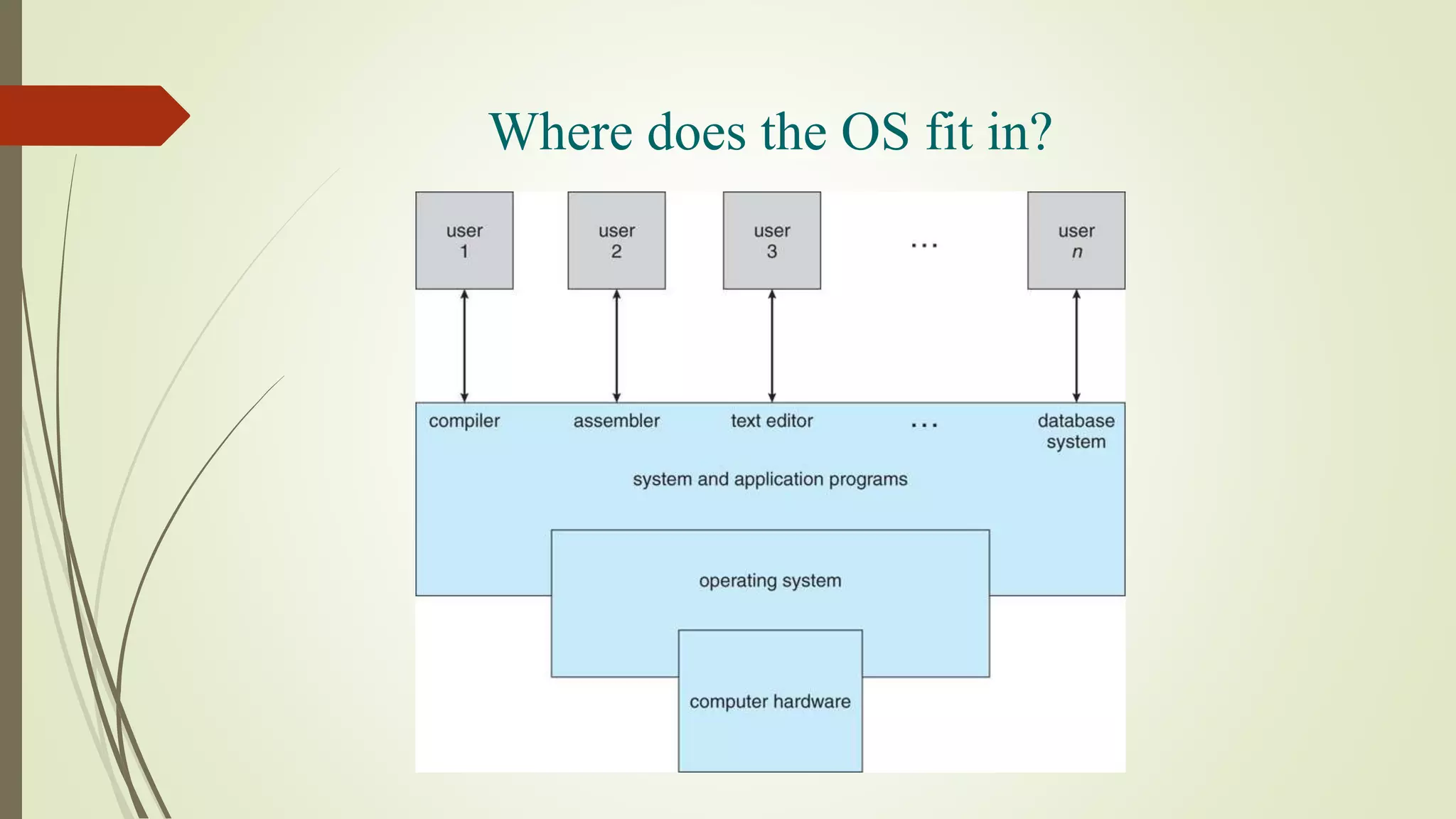
Where does the OS fit in?
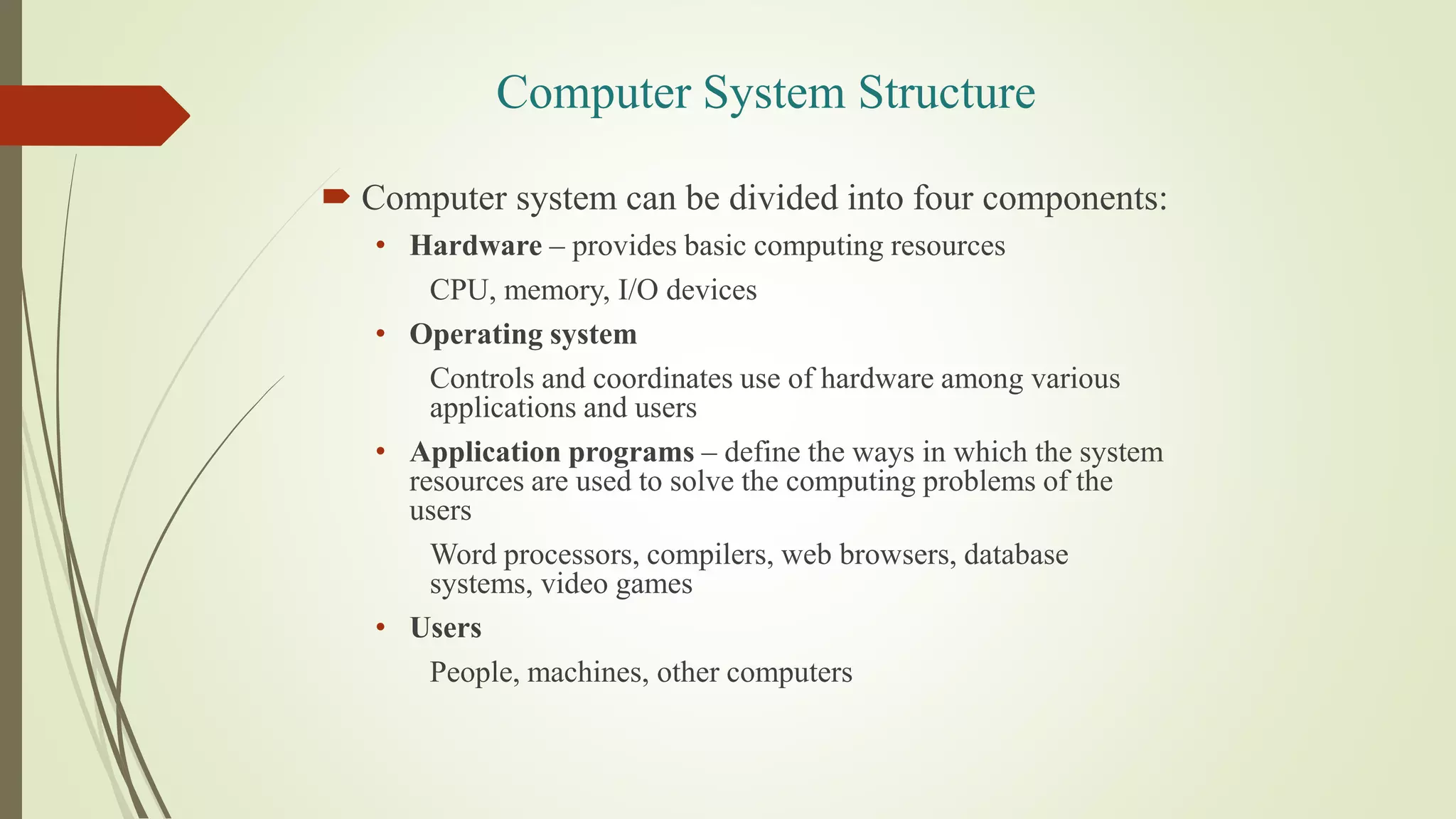
Computer System Structure
 Computer system can be divided into four components:
• Hardware – provides basic computing resources
CPU, memory, I/O devices
• Operating system
Controls and coordinates use of hardware among various
applications and users
• Application programs – define the ways in which the system
resources are used to solve the computing problems of the
users
Word processors, compilers, web browsers, database
systems, video games
• Users
People, machines, other computers
Services provided by an OS
• Facilities for program creation
• editors, compilers, linkers, debuggers, etc.
• Program execution
• loading in memory, I/O and file initialization.
• Access to I/O and files
• deals with the specifics of I/O and file formats.
• System access
• resolves conflicts for resource contention.
• protection in access to resources and data.
Why are Operating Systems Important?
Important to understand and know how to correctly
use when writing user applications.
Large and complex systems that have a high
economic impact and result in interesting problems
of management.
Few actually involved in OS design and
implementation but nevertheless many general
techniques to be learned and applied.
Combines concepts from many other areas of
Computer Science: Architecture, Languages,
Data Structures, Algorithms, etc.
COURSE SYLLABUS
 Introduction to OS
 Process Scheduling
 Process Synchronization
 Memory Management
 Unit Title: File System
 Unit Title: I/O System
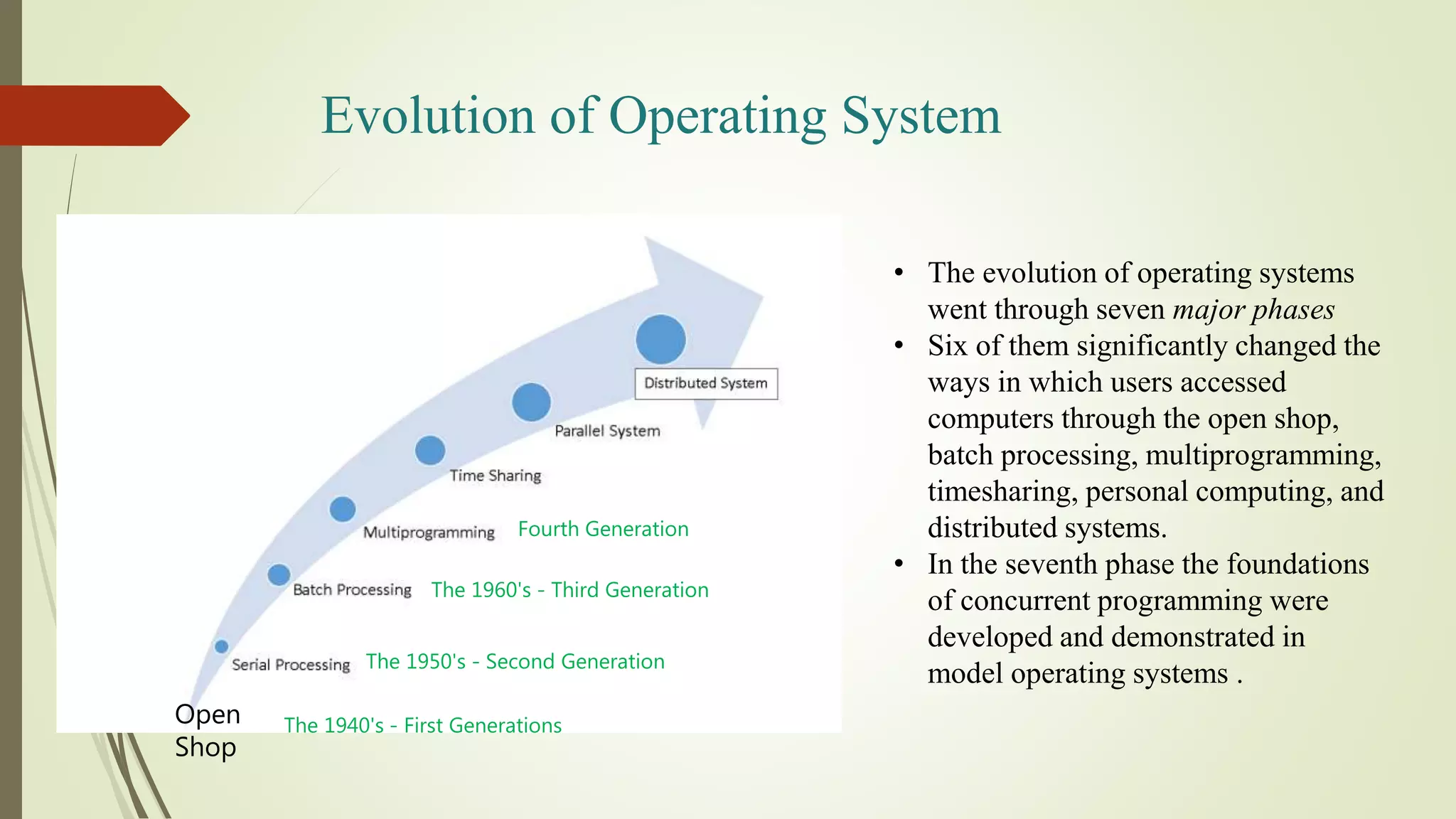
Evolution of Operating System
• The evolution of operating systems
went through seven major phases
• Six of them significantly changed the
ways in which users accessed
computers through the open shop,
batch processing, multiprogramming,
timesharing, personal computing, and
distributed systems.
• In the seventh phase the foundations
of concurrent programming were
developed and demonstrated in
model operating systems .
Open
Shop
The 1940's - First Generations
The 1950's - Second Generation
The 1960's - Third Generation
Fourth Generation
Evolution of Operating System
 Open Shop (Idea of OS)
• The story of operating systems in 1954 when computers had no operating systems
but were operated manually by their users.
• Each user was allocated a minimum 15-minute slot , of which time he usually
spent 10 minutes in setting up the equipment to do his computation . . . By the
time he got his calculation going, he may have had only 5 minutes or less of actual
computation completed-wasting two thirds of his time slot.
• Example: IBM 701 Open shop
Evolution of Operating System
 Serial Processing OS
• Programming in 1's and 0's (machine language) was quite
common for early computer systems.
• They were now asked to prepare their programs and data on
punched cards and submit them to a computing center for
execution.
• Instruction and data used to be fed into the computer through
card reader using Punch Cards.
• Job execution was done in FIFO fashion.
• Job was given to Computer using Punch Cards then later on
Magnetic Tapes were also used.
Evolution of Operating System
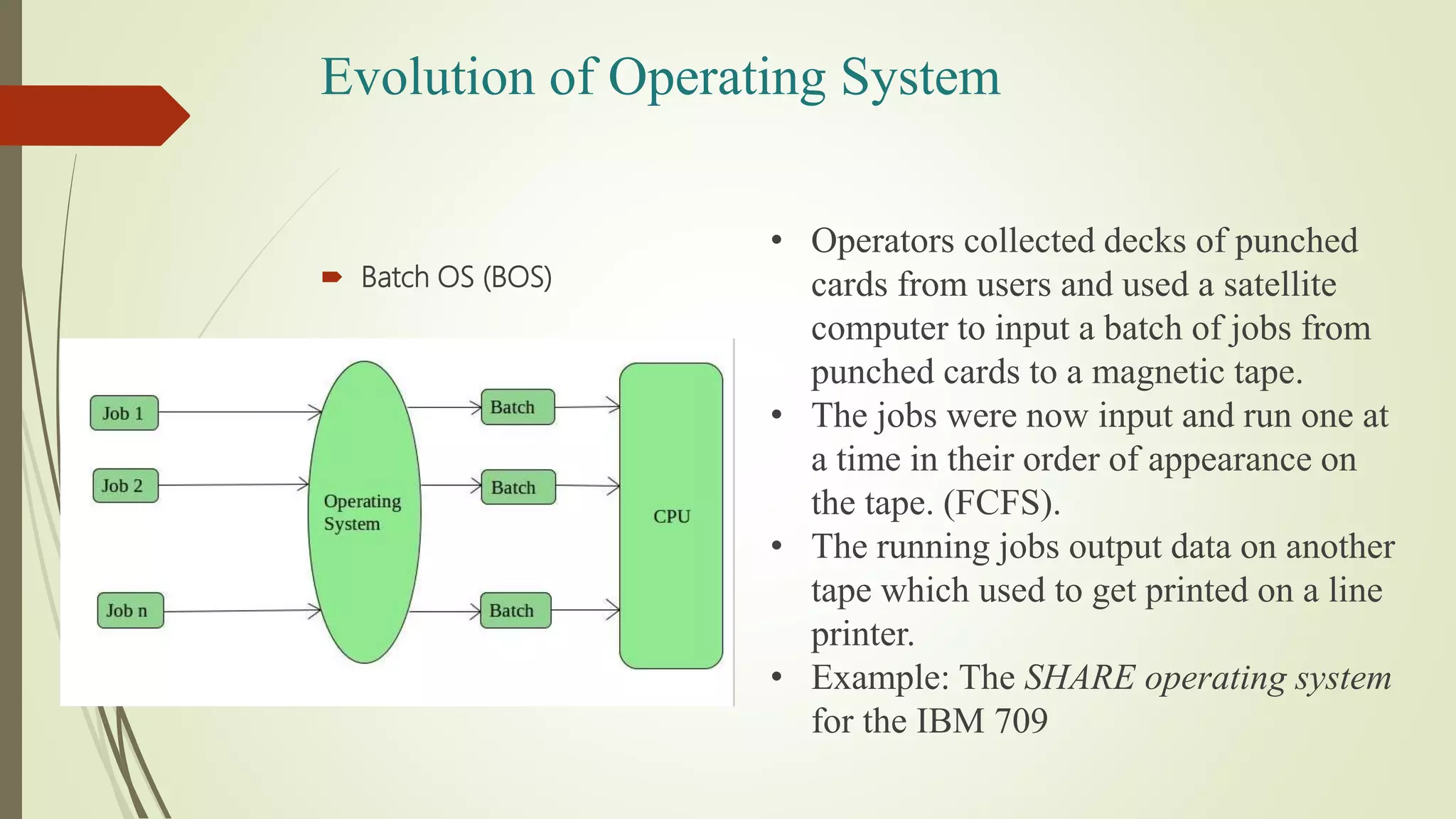
 Batch OS (BOS)
• Operators collected decks of punched
cards from users and used a satellite
computer to input a batch of jobs from
punched cards to a magnetic tape.
• The jobs were now input and run one at
a time in their order of appearance on
the tape. (FCFS).
• The running jobs output data on another
tape which used to get printed on a line
printer.
• Example: The SHARE operating system
for the IBM 709
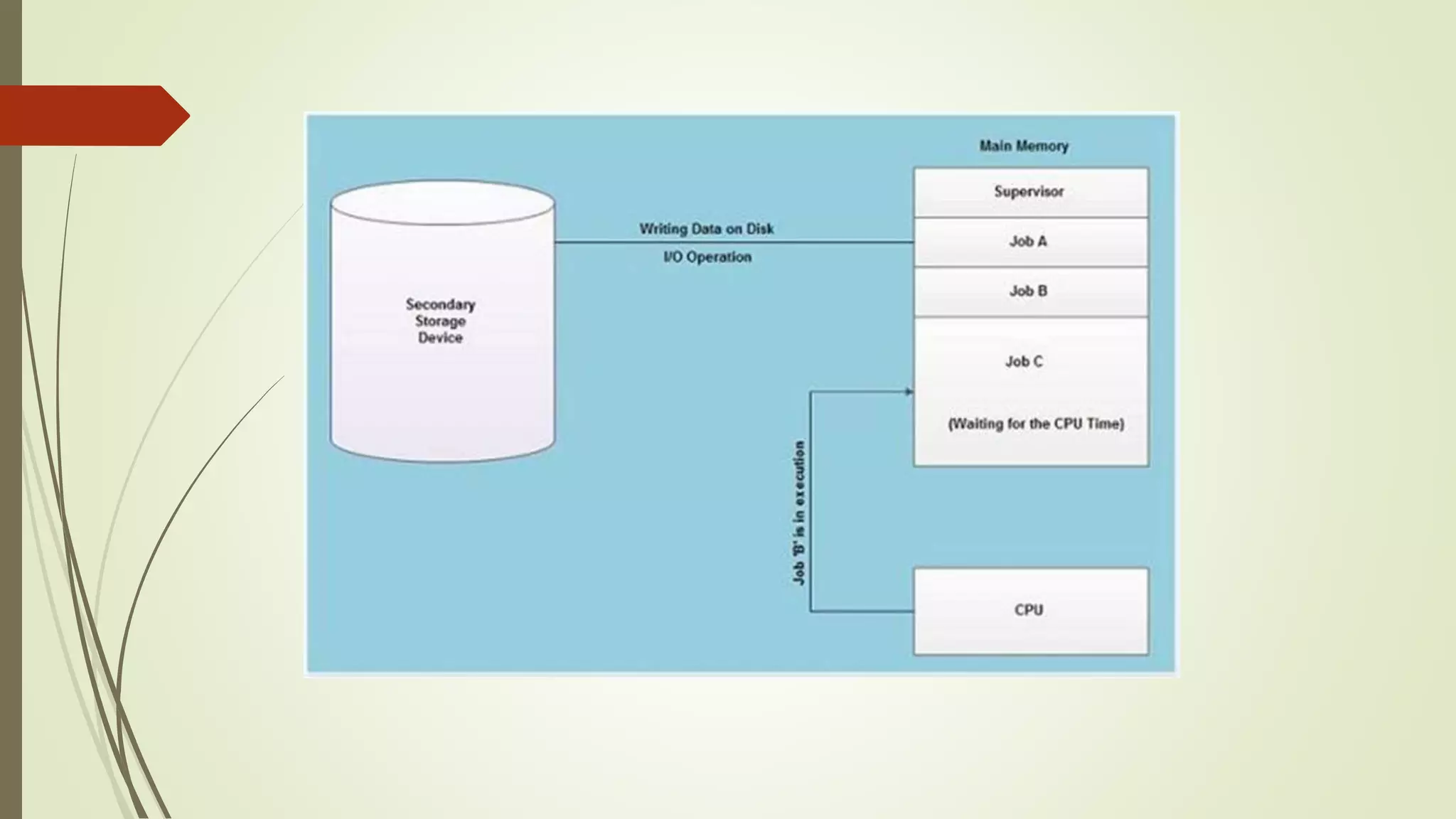
 Multiprogramming OS (needed for efficiency)
• Single user cannot keep CPU and I/O devices busy at
all times
• Multiprogramming organizes jobs (code and data) so
CPU always has one to execute
• A subset of total jobs in system is kept in memory
• One job selected and run via job scheduling
• When it has to wait (for I/O for example), OS
switches to another job
Evolution of Operating System
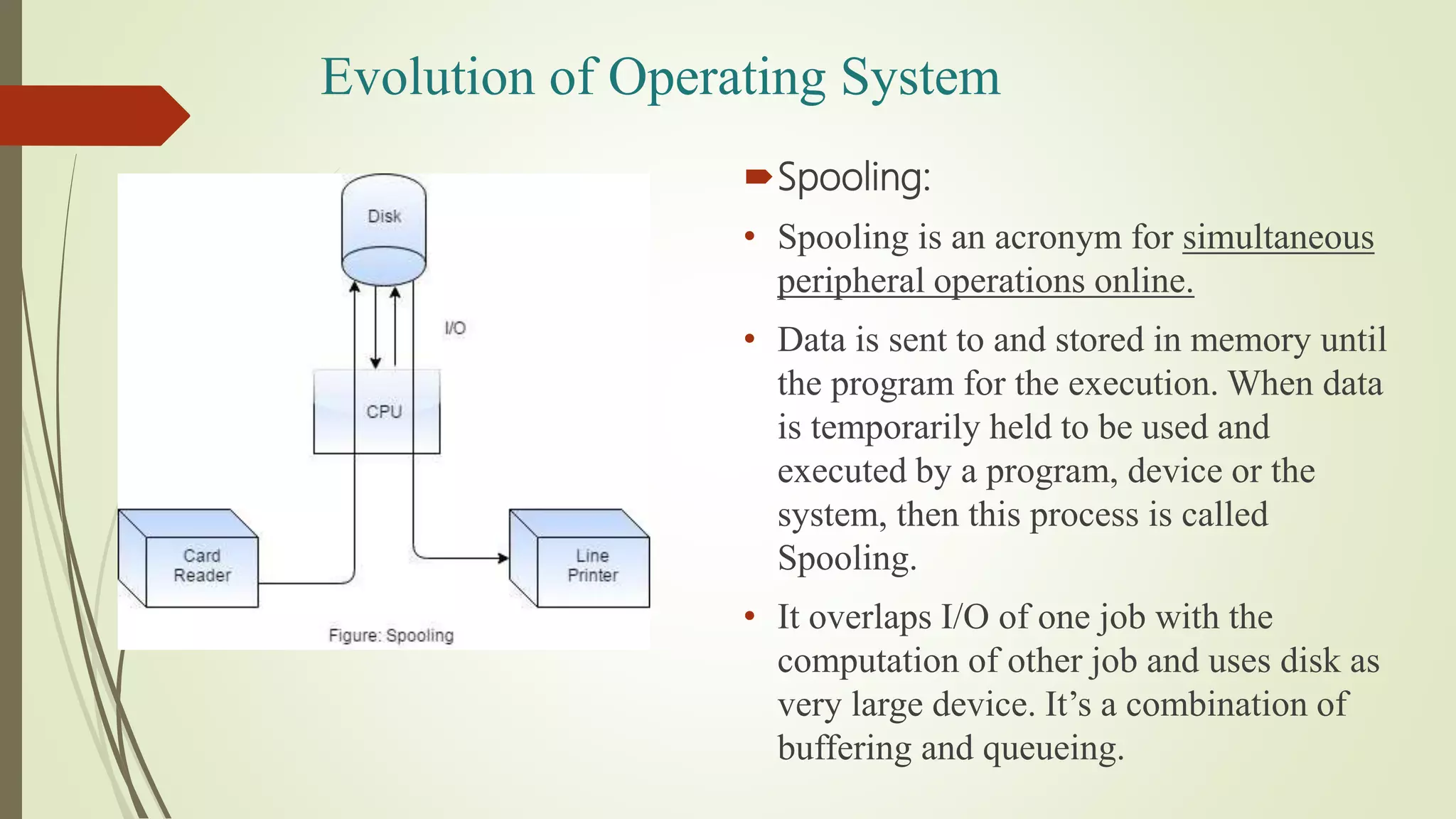
Spooling:
• Spooling is an acronym for simultaneous
peripheral operations online.
• Data is sent to and stored in memory until
the program for the execution. When data
is temporarily held to be used and
executed by a program, device or the
system, then this process is called
Spooling.
• It overlaps I/O of one job with the
computation of other job and uses disk as
very large device. It’s a combination of
buffering and queueing.
Evolution of Operating System
 Time Sharing OS (Multitasking)
• Logical extension of Multiprogramming.
• CPU executes many jobs while switching between them frequently.
• The time that each task gets to execute is called quantum(< 1 second).
After this time interval is over OS switches over to the next task.
• Each user has at least one program executing in memory - process
• If several jobs ready to run at the same time - CPU scheduling
• If processes don’t fit in memory, swapping moves them in and out to run
• Virtual memory allows execution of processes not completely in
memory
• Uses CPU scheduling and Multiprogramming simultaneously.
Evolution of Operating System
 Parallel OS
• A parallel computing system consists of multiple processors that
communicate with each other using a shared memory.
• Single computer is required. Many operations are performed
simultaneously.
• It may have shared or distributed memory.
• Processors communicate with each other through bus
Evolution of Operating System
 Distributed OS
• System components are located at different locations.
• Uses multiple computers. Multiple computers perform multiple
operations.
• It have only distributed memory
• Computer communicate with each other through message passing.
• Improves system scalability, fault tolerance and resource sharing
capabilities.
Evolution of Operating System
OS Evolution
 OS for Interactive Processing
Allowed programs to carry on dialogue with user via remote
terminals (workstations)
Real-time processing
Users demand timely response
Machines too expensive to serve only one user
Common for several users to want interactive services at the
same time
Different Operating Systems on the Same
Machine ?
 It is possible to have more than one operating system available to be
used on a machine.
 Only one operating system is run at a time, though.
 Examples:
VAX - VMS or Ultrix
IBM PCs - DOS or Linux
Operating-System Operations
 Interrupt driven (hardware and software)
Hardware interrupt by one of the devices
Software interrupt (exception or trap):
Software error (e.g., division by zero)
Request for operating system service
Other process problems include infinite loop,
processes modifying each other or the
operating system
Operating-System Operations (cont.)
 Dual-mode operation allows OS to protect itself and other system
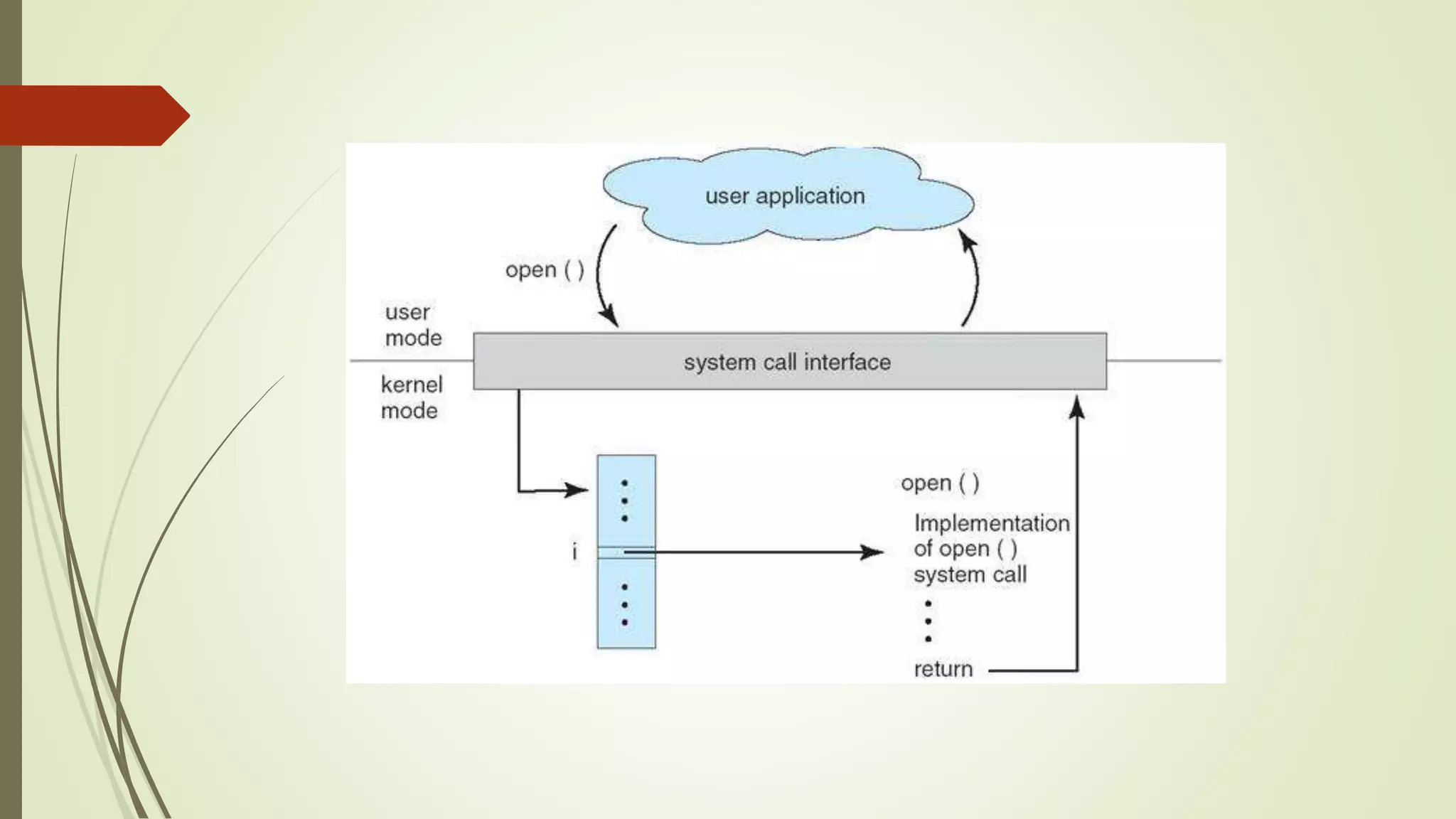
components
 User mode and kernel mode
 Mode bit provided by hardware
Provides ability to distinguish when system is running
user code or kernel code
Some instructions designated as privileged, only
executable in kernel mode
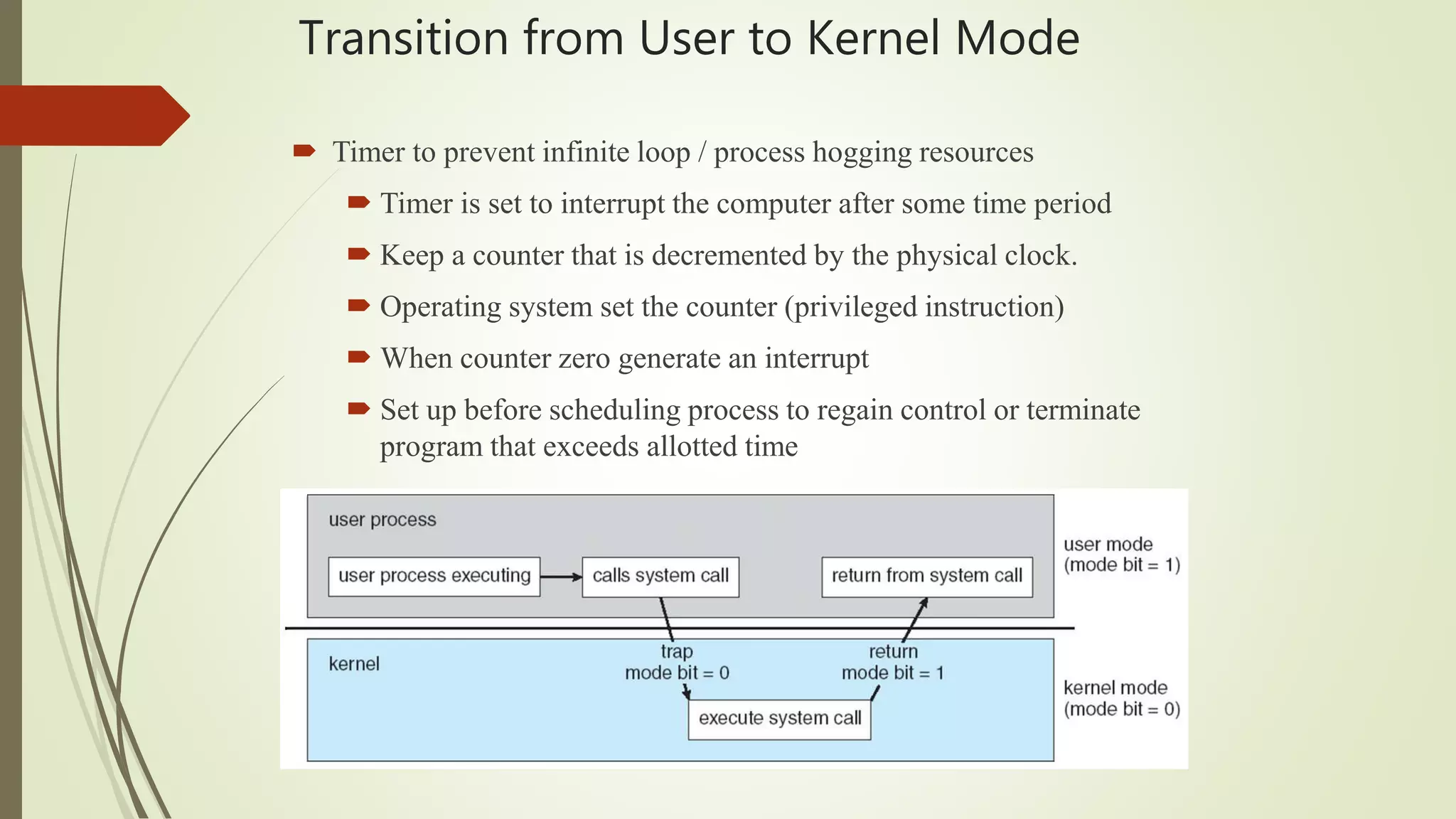
System call changes mode to kernel, return from call
resets it to user
Transition from User to Kernel Mode
 Timer to prevent infinite loop / process hogging resources
 Timer is set to interrupt the computer after some time period
 Keep a counter that is decremented by the physical clock.
 Operating system set the counter (privileged instruction)
 When counter zero generate an interrupt
 Set up before scheduling process to regain control or terminate
program that exceeds allotted time
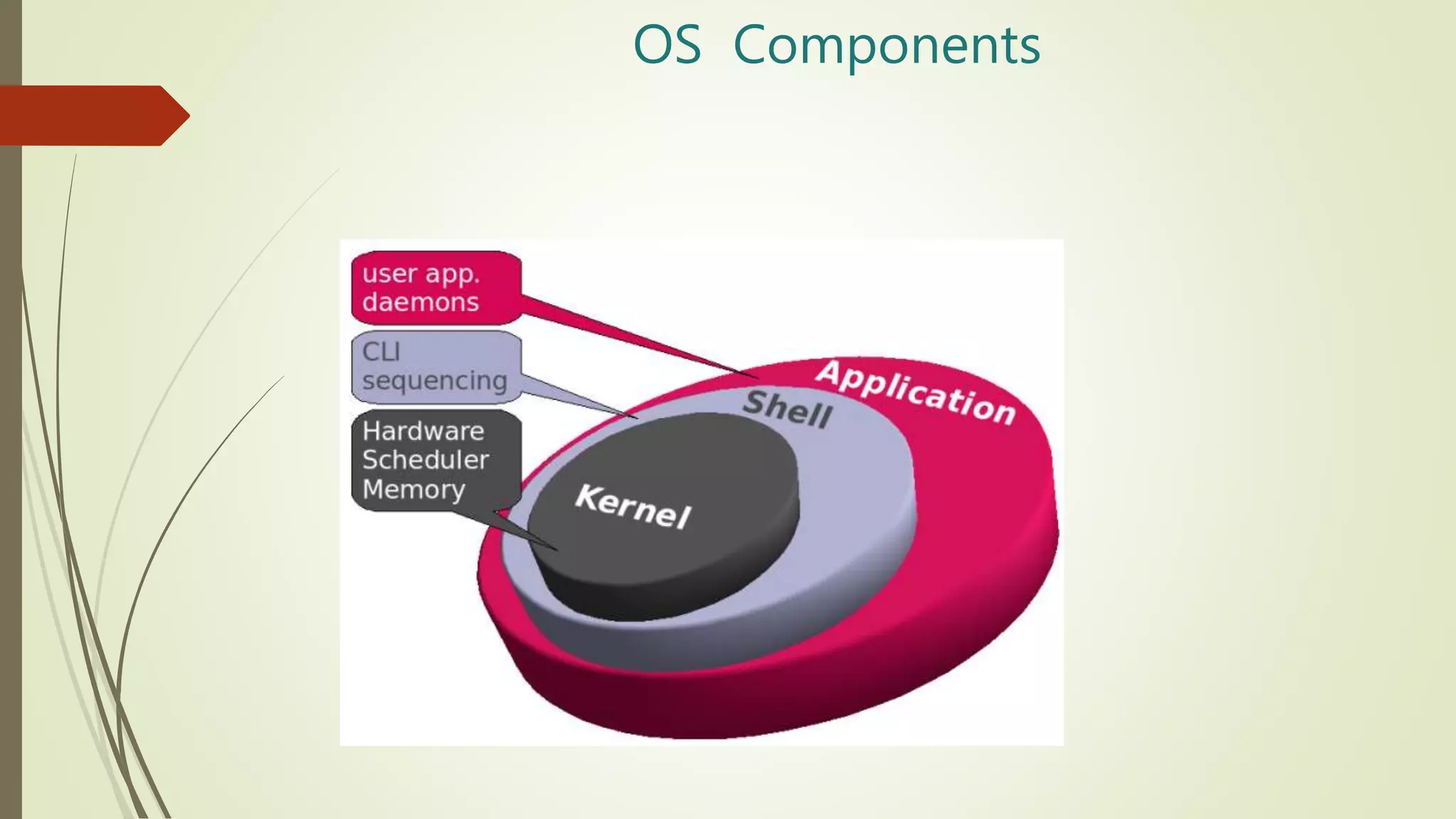
OS Components
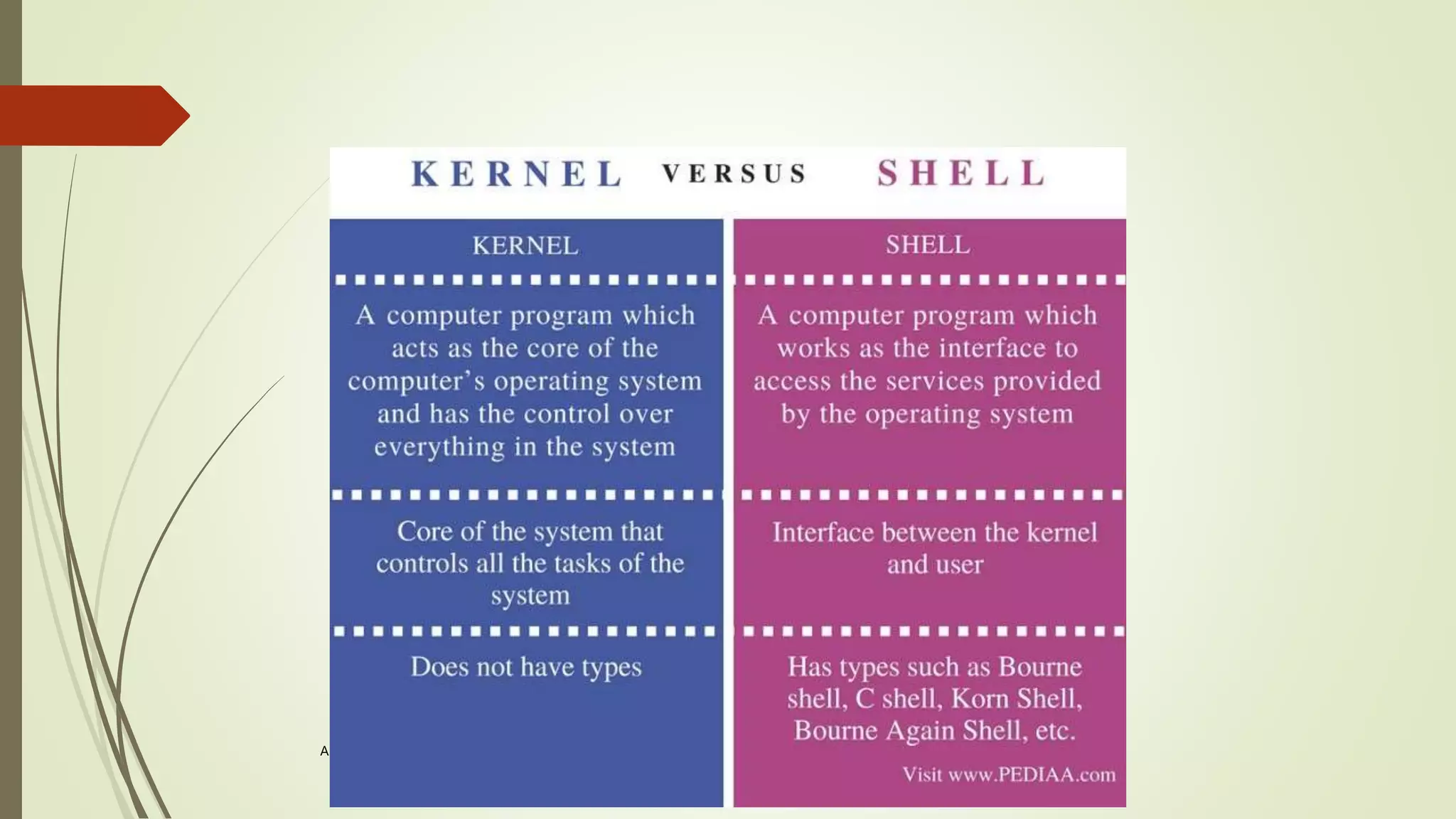
The OS Shell
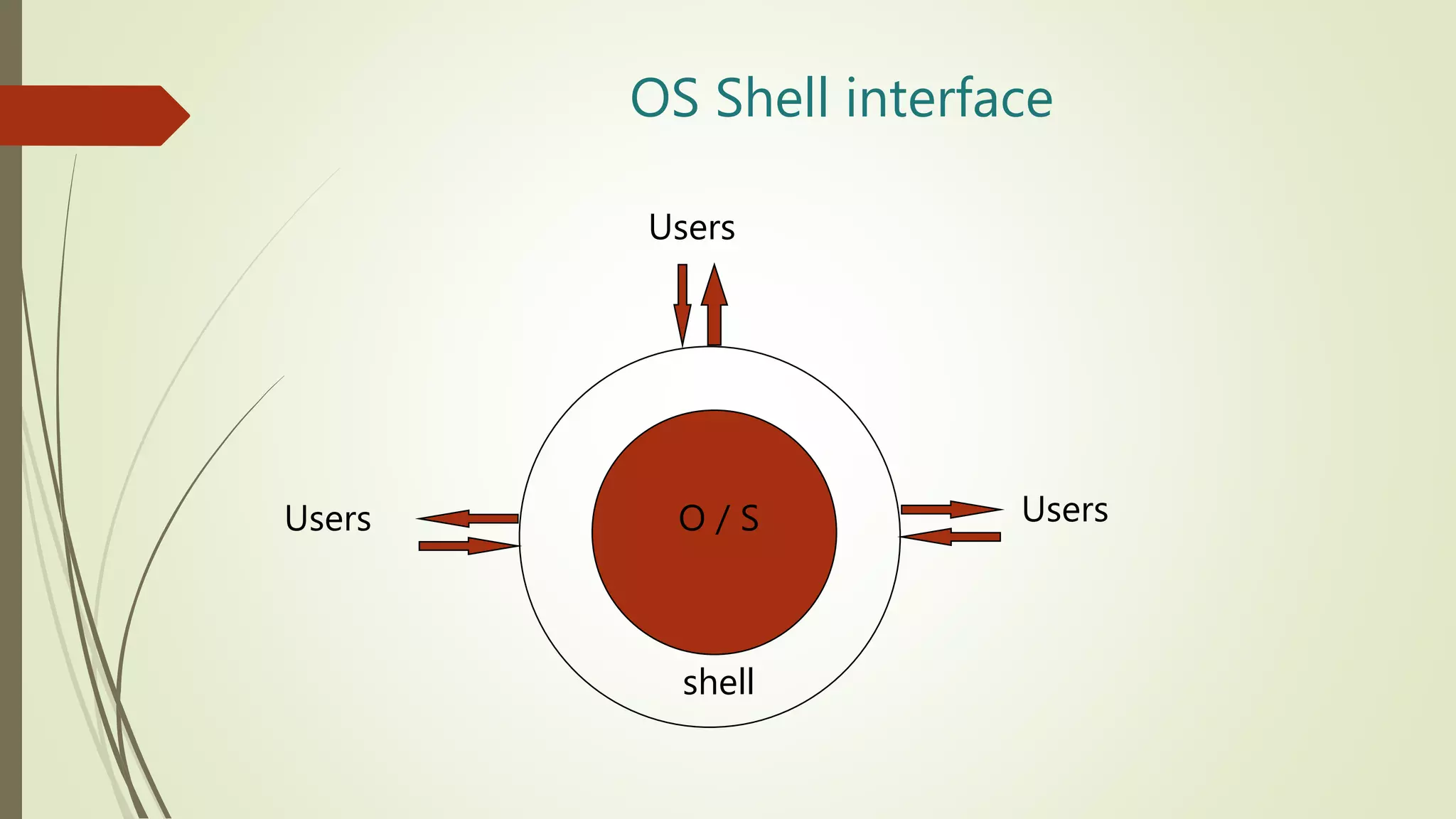
 Defines interface between OS and users
 Windows GUI
 UNIX command line
 UNIX users can choose among a variety of shells
 csh is the “C shell”
 tcsh is an enhanced “C shell”
 Shell programming
OS Shell interface
O / S
shell
Users
Users
Users
The OS Kernel
 The internal part of the OS is often called the Kernel
 Kernel Components
 Process Manager
 Memory Manager
 Storage Manager
 I/O Manager
 Protection and Security
A. Frank - P. Weisberg
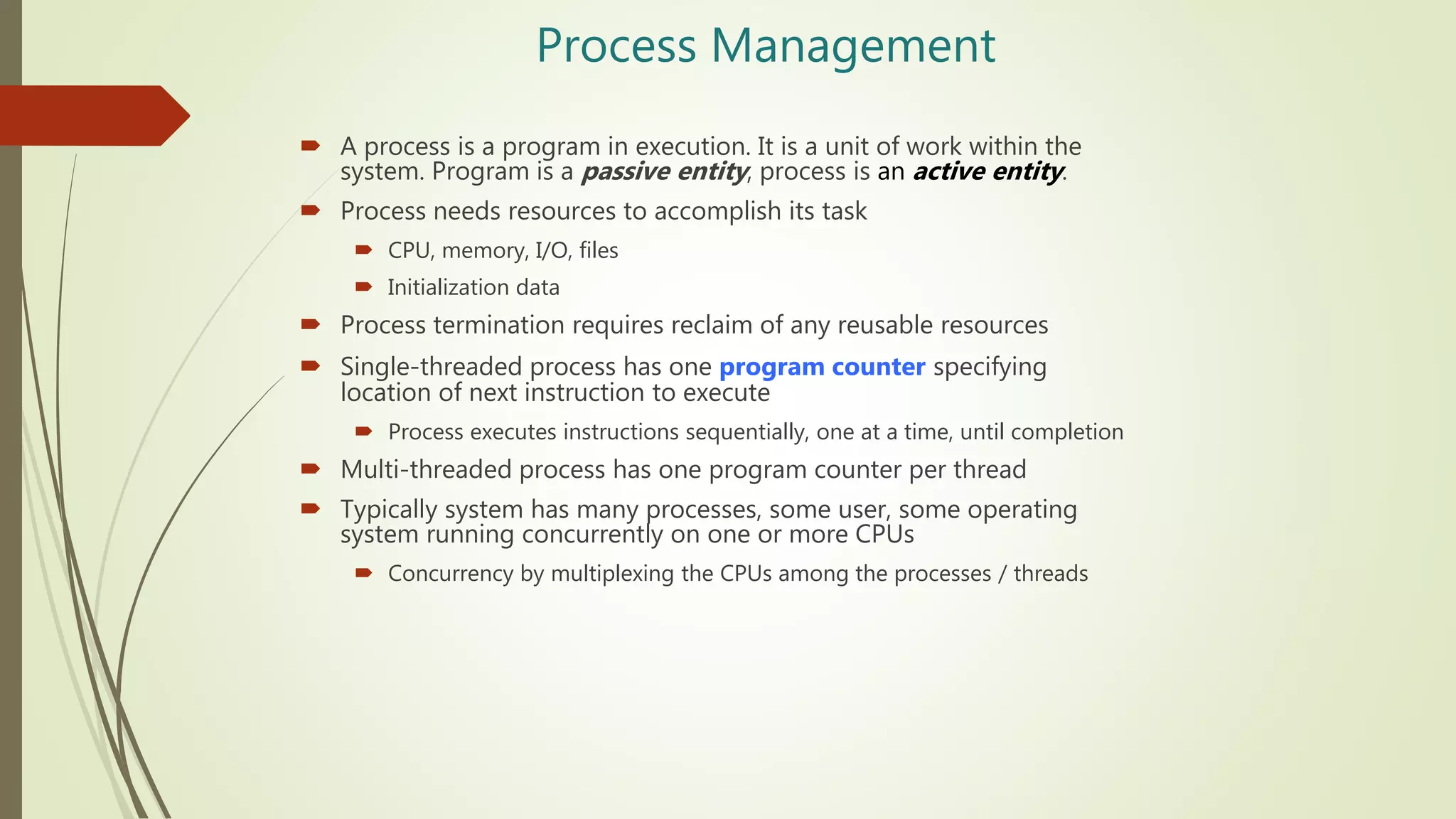
Process Management
 A process is a program in execution. It is a unit of work within the
system. Program is a passive entity, process is an active entity.
 Process needs resources to accomplish its task
 CPU, memory, I/O, files
 Initialization data
 Process termination requires reclaim of any reusable resources
 Single-threaded process has one program counter specifying
location of next instruction to execute
 Process executes instructions sequentially, one at a time, until completion
 Multi-threaded process has one program counter per thread
 Typically system has many processes, some user, some operating
system running concurrently on one or more CPUs
 Concurrency by multiplexing the CPUs among the processes / threads
Process Management Activities
 Creating and deleting both user and system processes
 Suspending and resuming processes
 Providing mechanisms for process synchronization
 Providing mechanisms for process communication
 Providing mechanisms for deadlock handling
The operating system is responsible for the following activities in
connection with process management:
Memory Management
 To execute a program all (or part) of the instructions must be in
memory
 All (or part) of the data that is needed by the program must be
in memory.
 Memory management determines what is in memory and when
 Optimizing CPU utilization and computer response to users
 Memory management activities
 Keeping track of which parts of memory are currently being used
and by whom
 Deciding which processes (or parts thereof) and data to move into
and out of memory
 Allocating and deallocating memory space as needed
Storage Management
 OS provides uniform, logical view of information storage
 Abstracts physical properties to logical storage unit - file
 Each medium is controlled by device (i.e., disk drive, tape drive)
 Varying properties include access speed, capacity, data-transfer rate, access
method (sequential or random)
 File-System management
 Files usually organized into directories
 Access control on most systems to determine who can access what
 OS activities include
 Creating and deleting files and directories
 Primitives to manipulate files and directories
 Mapping files onto secondary storage
 Backup files onto stable (non-volatile) storage media
Mass-Storage Management
 Usually disks used to store data that does not fit in main memory or
data that must be kept for a “long” period of time
 Proper management is of central importance
 Entire speed of computer operation hinges on disk subsystem and its
algorithms
 OS activities
 Free-space management
 Storage allocation
 Disk scheduling
 Some storage need not be fast
 Tertiary storage includes optical storage, magnetic tape
 Still must be managed – by OS or applications
 Varies between WORM (write-once, read-many-times) and RW (read-
write)
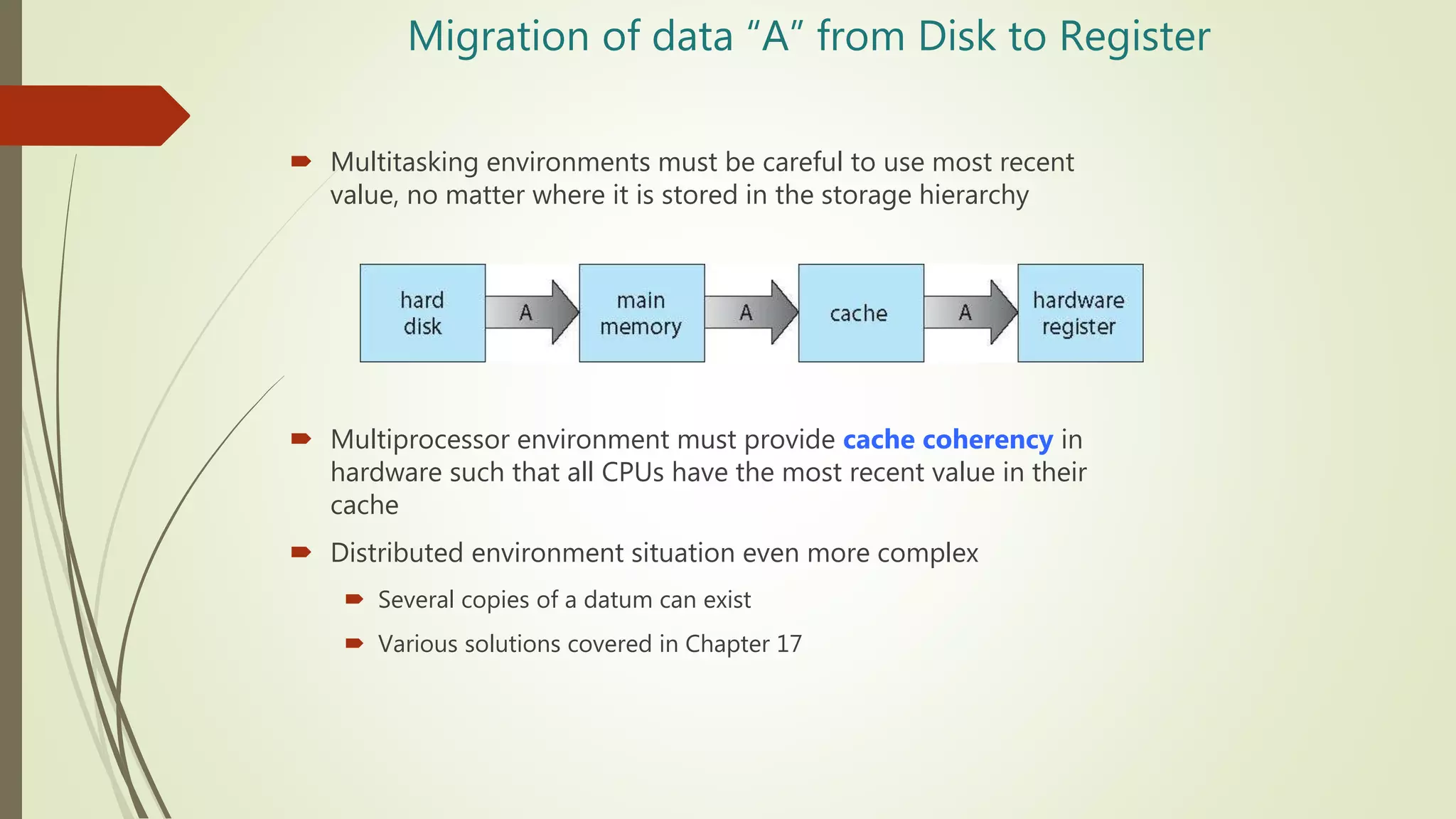
Migration of data “A” from Disk to Register
 Multitasking environments must be careful to use most recent
value, no matter where it is stored in the storage hierarchy
 Multiprocessor environment must provide cache coherency in
hardware such that all CPUs have the most recent value in their
cache
 Distributed environment situation even more complex
 Several copies of a datum can exist
 Various solutions covered in Chapter 17
I/O Subsystem
 One purpose of OS is to hide peculiarities of hardware devices
from the user
 I/O subsystem responsible for
 Memory management of I/O including buffering (storing data
temporarily while it is being transferred), caching (storing parts of data
in faster storage for performance), spooling (the overlapping of output
of one job with input of other jobs)
 General device-driver interface
 Drivers for specific hardware devices
OS Device Drivers
 Software to communicate with peripheral devices or controllers
 Each driver is unique
 Translates general requests into specific steps for that device
Protection and Security
 Protection – any mechanism for controlling access of processes or
users to resources defined by the OS
 Security – defense of the system against internal and external attacks
 Huge range, including denial-of-service, worms, viruses, identity theft, theft
of service
 Systems generally first distinguish among users, to determine who can
do what
 User identities (user IDs, security IDs) include name and associated
number, one per user
 User ID then associated with all files, processes of that user to determine
access control
 Group identifier (group ID) allows set of users to be defined and controls
managed, then also associated with each process, file
 Privilege escalation allows user to change to effective ID with more rights
OS Summary
 Shell -- interface to user
 File Manager -- manages mass memory
 Device Drivers -- communicate with peripherals
 Memory Manager -- manages main memory
 Scheduler & Dispatcher -- manage processes
System Calls
 Programming interface to the services provided
by the OS
 Typically written in a high-level language (C or
C++)
 Mostly accessed by programs via a high-level
Application Programming Interface (API)
rather than direct system call use
 Three most common APIs are Win32 API for
Windows, POSIX API for POSIX-based
systems (including virtually all versions of
UNIX, Linux, and Mac OS X), and Java API
for the Java virtual machine (JVM)
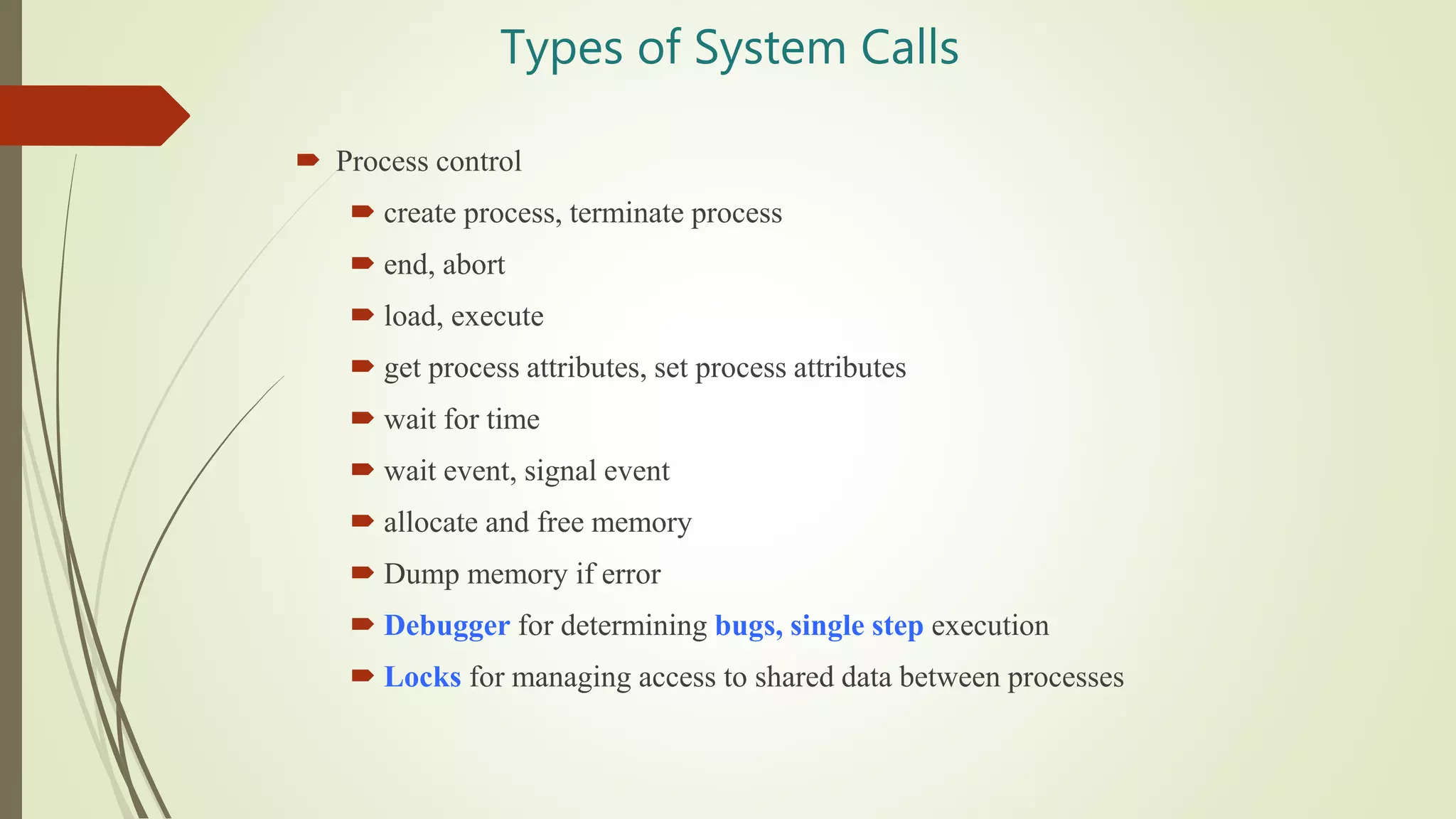
Types of System Calls
 Process control
 create process, terminate process
 end, abort
 load, execute
 get process attributes, set process attributes
 wait for time
 wait event, signal event
 allocate and free memory
 Dump memory if error
 Debugger for determining bugs, single step execution
 Locks for managing access to shared data between processes
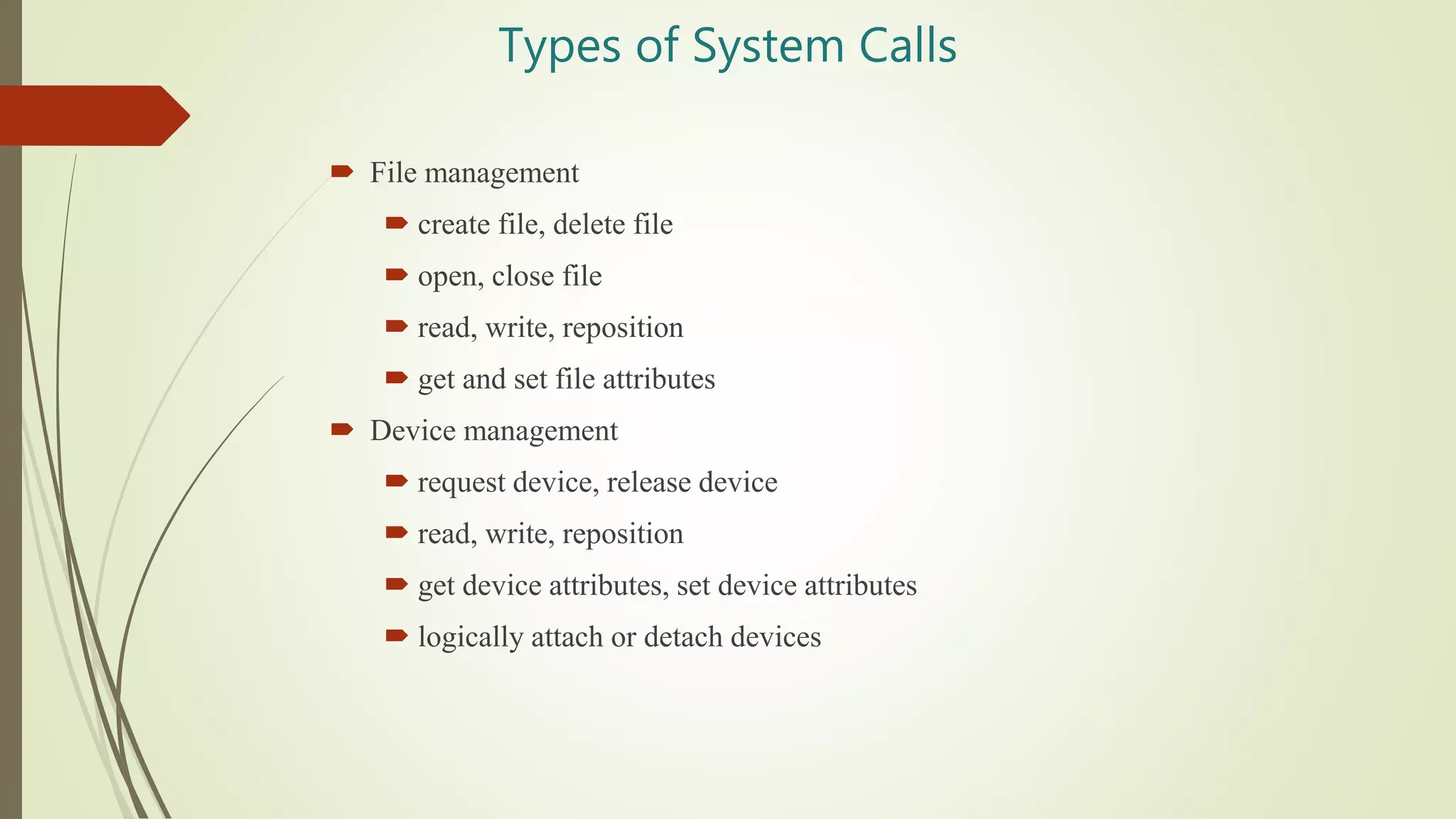
Types of System Calls
 File management
 create file, delete file
 open, close file
 read, write, reposition
 get and set file attributes
 Device management
 request device, release device
 read, write, reposition
 get device attributes, set device attributes
 logically attach or detach devices
Types of System Calls (Cont.)
 Information maintenance
 get time or date, set time or date
 get system data, set system data
 get and set process, file, or device attributes
 Communications
 create, delete communication connection
 send, receive messages if message passing model to host
name or process name
From client to server
 Shared-memory model create and gain access to memory
regions
 transfer status information
 attach and detach remote devices
Types of System Calls (Cont.)
 Protection
 Control access to resources
 Get and set permissions
 Allow and deny user access
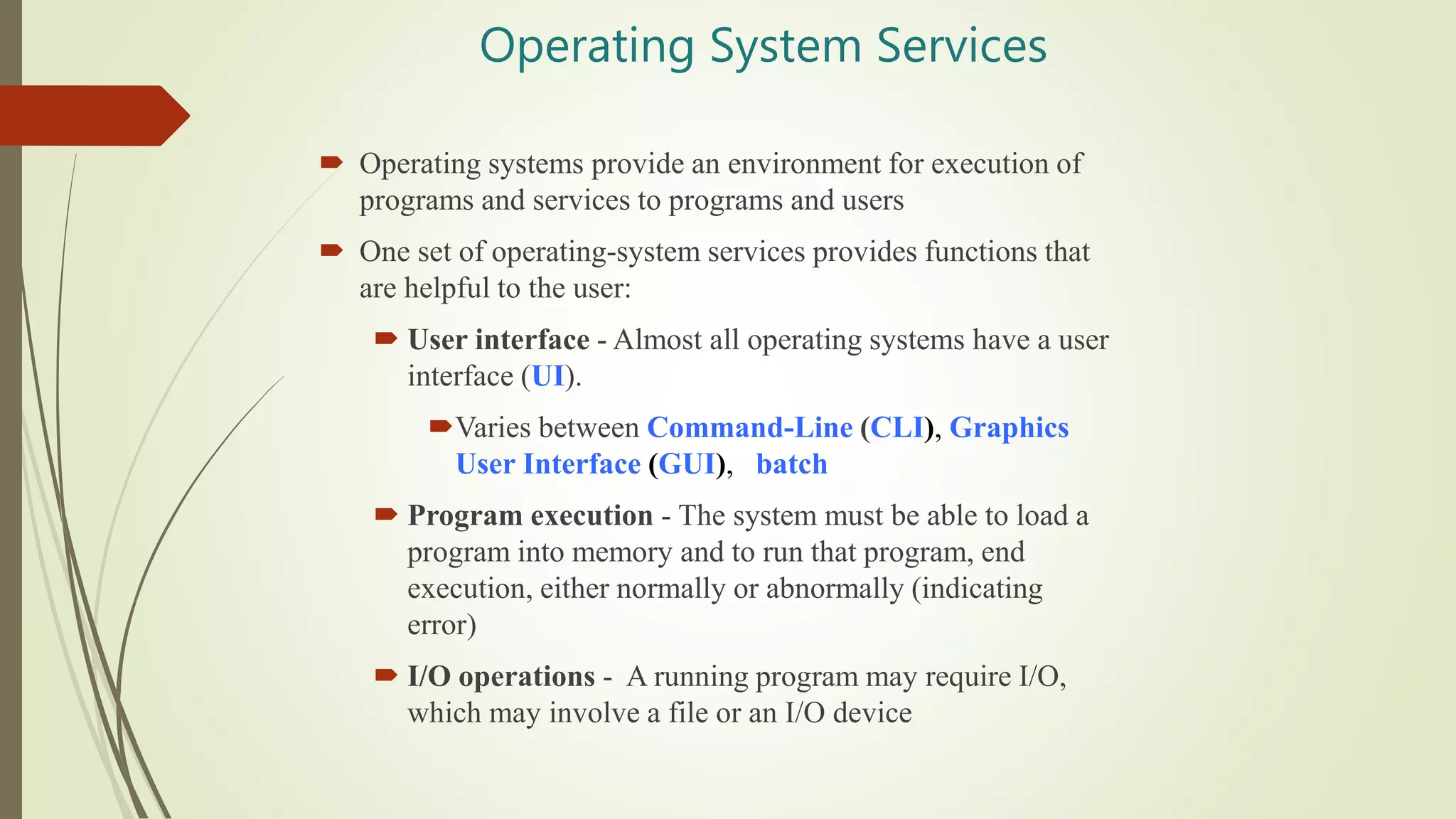
Operating System Services
 Operating systems provide an environment for execution of
programs and services to programs and users
 One set of operating-system services provides functions that
are helpful to the user:
 User interface - Almost all operating systems have a user
interface (UI).
Varies between Command-Line (CLI), Graphics
User Interface (GUI), batch
 Program execution - The system must be able to load a
program into memory and to run that program, end
execution, either normally or abnormally (indicating
error)
 I/O operations - A running program may require I/O,
which may involve a file or an I/O device
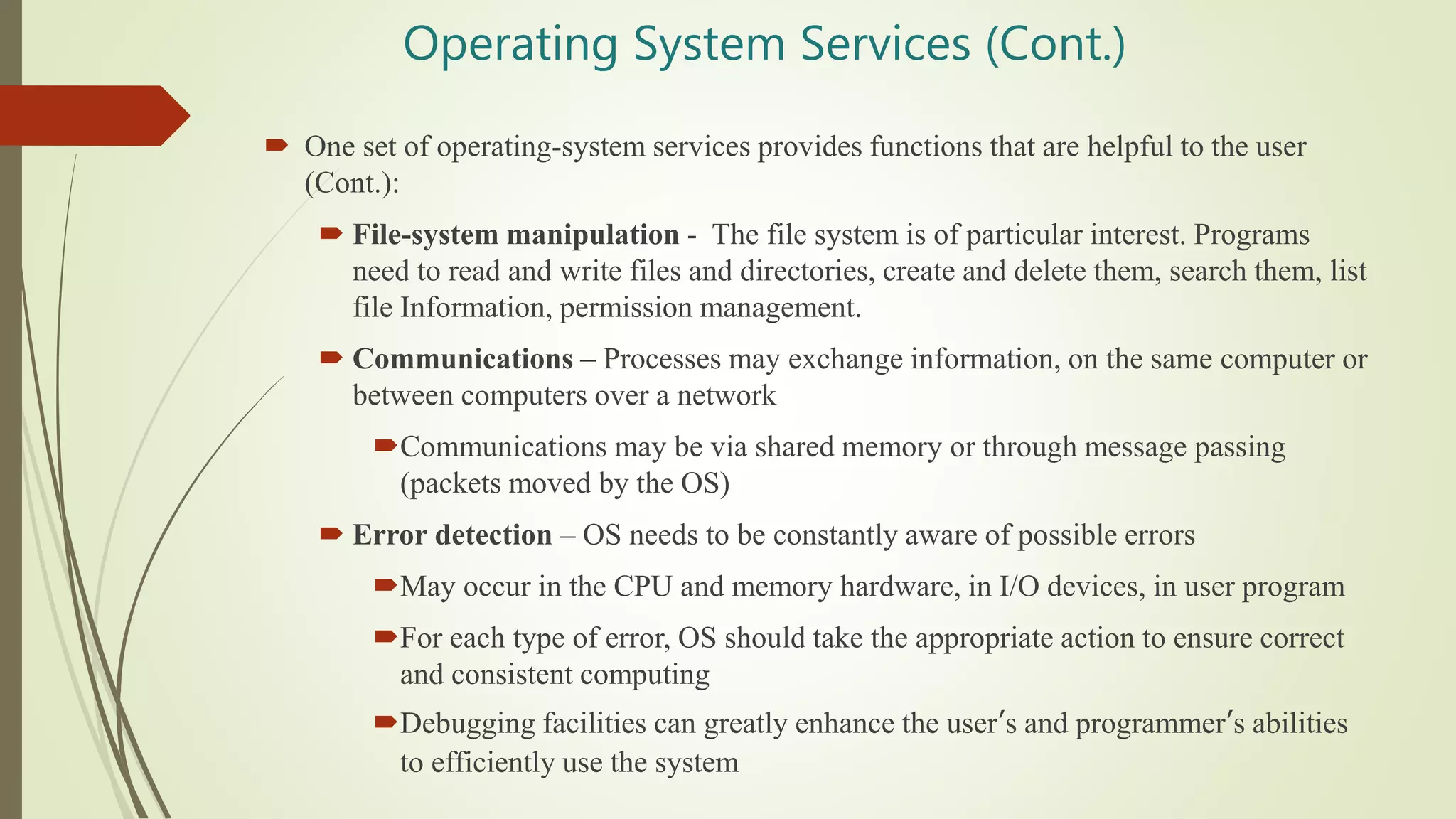
Operating System Services (Cont.)
 One set of operating-system services provides functions that are helpful to the user
(Cont.):
 File-system manipulation - The file system is of particular interest. Programs
need to read and write files and directories, create and delete them, search them, list
file Information, permission management.
 Communications – Processes may exchange information, on the same computer or
between computers over a network
Communications may be via shared memory or through message passing
(packets moved by the OS)
 Error detection – OS needs to be constantly aware of possible errors
May occur in the CPU and memory hardware, in I/O devices, in user program
For each type of error, OS should take the appropriate action to ensure correct
and consistent computing
Debugging facilities can greatly enhance the user’s and programmer’s abilities
to efficiently use the system
Operating System Services (Cont.)
 Another set of OS functions exists for ensuring the efficient
operation of the system itself via resource sharing
 Resource allocation - When multiple users or multiple jobs
running concurrently, resources must be allocated to each of
them
Many types of resources - CPU cycles, main memory, file
storage, I/O devices.
 Accounting - To keep track of which users use how much and
what kinds of computer resources
 Protection and security - The owners of information stored in
a multiuser or networked computer system may want to control
use of that information, concurrent processes should not
interfere with each other
Protection involves ensuring that all access to system
resources is controlled
Security of the system from outsiders requires user
authentication, extends to defending external I/O devices
from invalid access attempts
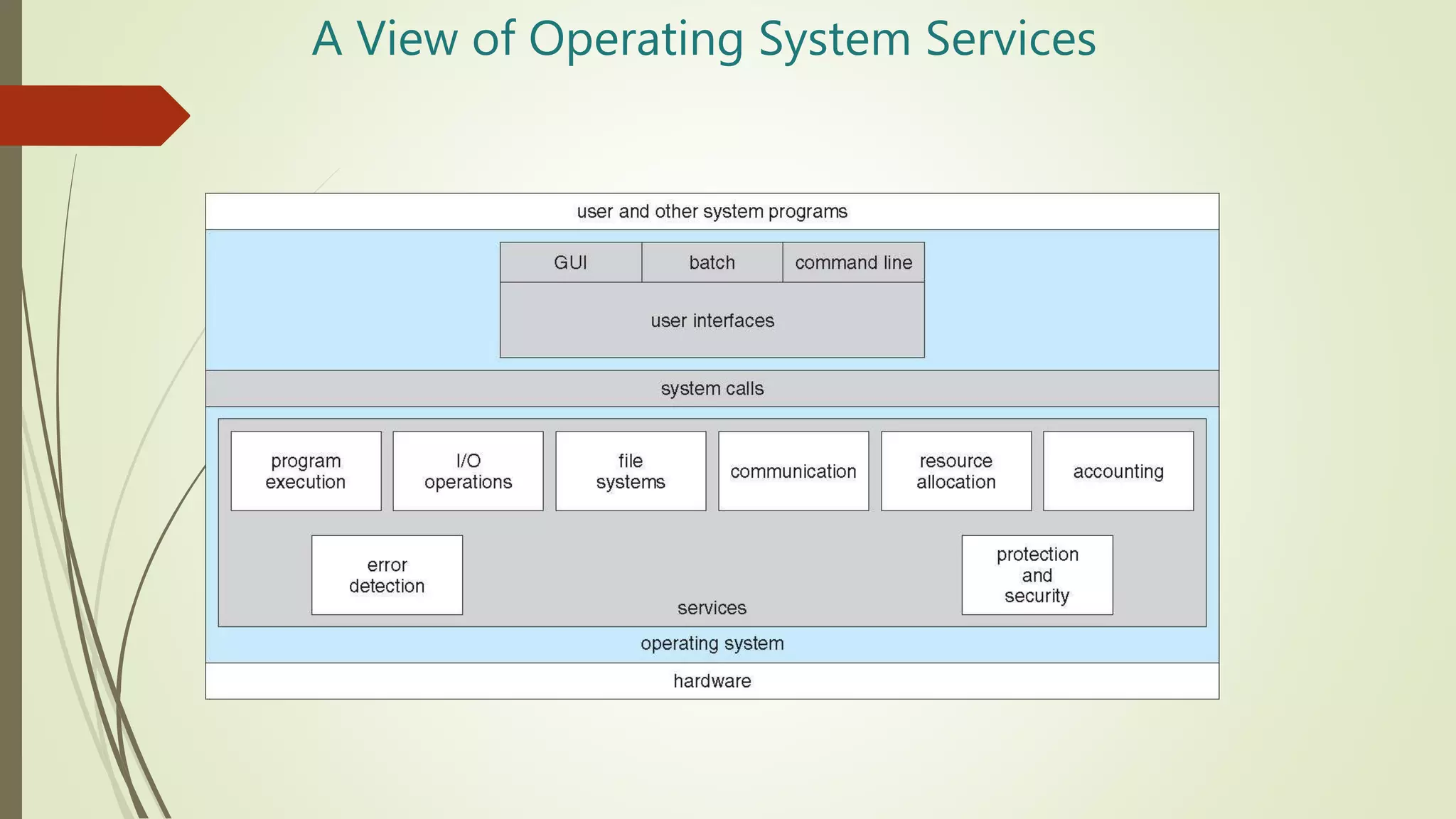
A View of Operating System Services
Nt introduction(os)

Nt introduction(os)

  • 1.
    Operating Systems Introduction to OperatingSystem (OS) Prof. Neha Tadam, CSE
  • 2.
    What is anOperating System (1)? • A modern computer consists of: • One or more processors • Main memory • Secondary Storage • Various input/output devices • Managing all these varied components requires a layer of software – the Operating System (OS).
  • 3.
    What is anOperating System (2)?  An Operating System is a System program that acts as an - • intermediary/interface between a user of a computer and the computer hardware. • Resource Allocator • Manages all resources • Decides between conflicting requests for efficient and fair resource use • Platform – creates an environment in which application programs run. • Control program - Controls execution of programs to prevent errors and improper use of the computer  OS goals: • Control/execute user/application programs. • Make the computer system convenient to use. • Ease the solving of user problems. • Use the computer hardware in an efficient manner.
  • 4.
     OS goals: •Control/execute user/application programs. • Make the computer system convenient to use. • Ease the solving of user problems. • Use the computer hardware in an efficient manner. A. Frank - P. Weisberg
  • 5.
    Where does theOS fit in?
  • 6.
    Computer System Structure Computer system can be divided into four components: • Hardware – provides basic computing resources CPU, memory, I/O devices • Operating system Controls and coordinates use of hardware among various applications and users • Application programs – define the ways in which the system resources are used to solve the computing problems of the users Word processors, compilers, web browsers, database systems, video games • Users People, machines, other computers
  • 7.
    Services provided byan OS • Facilities for program creation • editors, compilers, linkers, debuggers, etc. • Program execution • loading in memory, I/O and file initialization. • Access to I/O and files • deals with the specifics of I/O and file formats. • System access • resolves conflicts for resource contention. • protection in access to resources and data.
  • 8.
    Why are OperatingSystems Important? Important to understand and know how to correctly use when writing user applications. Large and complex systems that have a high economic impact and result in interesting problems of management. Few actually involved in OS design and implementation but nevertheless many general techniques to be learned and applied. Combines concepts from many other areas of Computer Science: Architecture, Languages, Data Structures, Algorithms, etc.
  • 9.
    COURSE SYLLABUS  Introductionto OS  Process Scheduling  Process Synchronization  Memory Management  Unit Title: File System  Unit Title: I/O System
  • 10.
    Evolution of OperatingSystem • The evolution of operating systems went through seven major phases • Six of them significantly changed the ways in which users accessed computers through the open shop, batch processing, multiprogramming, timesharing, personal computing, and distributed systems. • In the seventh phase the foundations of concurrent programming were developed and demonstrated in model operating systems . Open Shop The 1940's - First Generations The 1950's - Second Generation The 1960's - Third Generation Fourth Generation
  • 11.
    Evolution of OperatingSystem  Open Shop (Idea of OS) • The story of operating systems in 1954 when computers had no operating systems but were operated manually by their users. • Each user was allocated a minimum 15-minute slot , of which time he usually spent 10 minutes in setting up the equipment to do his computation . . . By the time he got his calculation going, he may have had only 5 minutes or less of actual computation completed-wasting two thirds of his time slot. • Example: IBM 701 Open shop
  • 12.
    Evolution of OperatingSystem  Serial Processing OS • Programming in 1's and 0's (machine language) was quite common for early computer systems. • They were now asked to prepare their programs and data on punched cards and submit them to a computing center for execution. • Instruction and data used to be fed into the computer through card reader using Punch Cards. • Job execution was done in FIFO fashion. • Job was given to Computer using Punch Cards then later on Magnetic Tapes were also used.
  • 13.
    Evolution of OperatingSystem  Batch OS (BOS) • Operators collected decks of punched cards from users and used a satellite computer to input a batch of jobs from punched cards to a magnetic tape. • The jobs were now input and run one at a time in their order of appearance on the tape. (FCFS). • The running jobs output data on another tape which used to get printed on a line printer. • Example: The SHARE operating system for the IBM 709
  • 14.
     Multiprogramming OS(needed for efficiency) • Single user cannot keep CPU and I/O devices busy at all times • Multiprogramming organizes jobs (code and data) so CPU always has one to execute • A subset of total jobs in system is kept in memory • One job selected and run via job scheduling • When it has to wait (for I/O for example), OS switches to another job Evolution of Operating System
  • 16.
    Spooling: • Spooling isan acronym for simultaneous peripheral operations online. • Data is sent to and stored in memory until the program for the execution. When data is temporarily held to be used and executed by a program, device or the system, then this process is called Spooling. • It overlaps I/O of one job with the computation of other job and uses disk as very large device. It’s a combination of buffering and queueing. Evolution of Operating System
  • 17.
     Time SharingOS (Multitasking) • Logical extension of Multiprogramming. • CPU executes many jobs while switching between them frequently. • The time that each task gets to execute is called quantum(< 1 second). After this time interval is over OS switches over to the next task. • Each user has at least one program executing in memory - process • If several jobs ready to run at the same time - CPU scheduling • If processes don’t fit in memory, swapping moves them in and out to run • Virtual memory allows execution of processes not completely in memory • Uses CPU scheduling and Multiprogramming simultaneously. Evolution of Operating System
  • 18.
     Parallel OS •A parallel computing system consists of multiple processors that communicate with each other using a shared memory. • Single computer is required. Many operations are performed simultaneously. • It may have shared or distributed memory. • Processors communicate with each other through bus Evolution of Operating System
  • 19.
     Distributed OS •System components are located at different locations. • Uses multiple computers. Multiple computers perform multiple operations. • It have only distributed memory • Computer communicate with each other through message passing. • Improves system scalability, fault tolerance and resource sharing capabilities. Evolution of Operating System
  • 20.
    OS Evolution  OSfor Interactive Processing Allowed programs to carry on dialogue with user via remote terminals (workstations) Real-time processing Users demand timely response Machines too expensive to serve only one user Common for several users to want interactive services at the same time
  • 21.
    Different Operating Systemson the Same Machine ?  It is possible to have more than one operating system available to be used on a machine.  Only one operating system is run at a time, though.  Examples: VAX - VMS or Ultrix IBM PCs - DOS or Linux
  • 22.
    Operating-System Operations  Interruptdriven (hardware and software) Hardware interrupt by one of the devices Software interrupt (exception or trap): Software error (e.g., division by zero) Request for operating system service Other process problems include infinite loop, processes modifying each other or the operating system
  • 23.
    Operating-System Operations (cont.) Dual-mode operation allows OS to protect itself and other system components  User mode and kernel mode  Mode bit provided by hardware Provides ability to distinguish when system is running user code or kernel code Some instructions designated as privileged, only executable in kernel mode System call changes mode to kernel, return from call resets it to user
  • 24.
    Transition from Userto Kernel Mode  Timer to prevent infinite loop / process hogging resources  Timer is set to interrupt the computer after some time period  Keep a counter that is decremented by the physical clock.  Operating system set the counter (privileged instruction)  When counter zero generate an interrupt  Set up before scheduling process to regain control or terminate program that exceeds allotted time
  • 25.
  • 26.
    The OS Shell Defines interface between OS and users  Windows GUI  UNIX command line  UNIX users can choose among a variety of shells  csh is the “C shell”  tcsh is an enhanced “C shell”  Shell programming
  • 27.
    OS Shell interface O/ S shell Users Users Users
  • 28.
    The OS Kernel The internal part of the OS is often called the Kernel  Kernel Components  Process Manager  Memory Manager  Storage Manager  I/O Manager  Protection and Security
  • 29.
    A. Frank -P. Weisberg
  • 30.
    Process Management  Aprocess is a program in execution. It is a unit of work within the system. Program is a passive entity, process is an active entity.  Process needs resources to accomplish its task  CPU, memory, I/O, files  Initialization data  Process termination requires reclaim of any reusable resources  Single-threaded process has one program counter specifying location of next instruction to execute  Process executes instructions sequentially, one at a time, until completion  Multi-threaded process has one program counter per thread  Typically system has many processes, some user, some operating system running concurrently on one or more CPUs  Concurrency by multiplexing the CPUs among the processes / threads
  • 31.
    Process Management Activities Creating and deleting both user and system processes  Suspending and resuming processes  Providing mechanisms for process synchronization  Providing mechanisms for process communication  Providing mechanisms for deadlock handling The operating system is responsible for the following activities in connection with process management:
  • 32.
    Memory Management  Toexecute a program all (or part) of the instructions must be in memory  All (or part) of the data that is needed by the program must be in memory.  Memory management determines what is in memory and when  Optimizing CPU utilization and computer response to users  Memory management activities  Keeping track of which parts of memory are currently being used and by whom  Deciding which processes (or parts thereof) and data to move into and out of memory  Allocating and deallocating memory space as needed
  • 33.
    Storage Management  OSprovides uniform, logical view of information storage  Abstracts physical properties to logical storage unit - file  Each medium is controlled by device (i.e., disk drive, tape drive)  Varying properties include access speed, capacity, data-transfer rate, access method (sequential or random)  File-System management  Files usually organized into directories  Access control on most systems to determine who can access what  OS activities include  Creating and deleting files and directories  Primitives to manipulate files and directories  Mapping files onto secondary storage  Backup files onto stable (non-volatile) storage media
  • 34.
    Mass-Storage Management  Usuallydisks used to store data that does not fit in main memory or data that must be kept for a “long” period of time  Proper management is of central importance  Entire speed of computer operation hinges on disk subsystem and its algorithms  OS activities  Free-space management  Storage allocation  Disk scheduling  Some storage need not be fast  Tertiary storage includes optical storage, magnetic tape  Still must be managed – by OS or applications  Varies between WORM (write-once, read-many-times) and RW (read- write)
  • 35.
    Migration of data“A” from Disk to Register  Multitasking environments must be careful to use most recent value, no matter where it is stored in the storage hierarchy  Multiprocessor environment must provide cache coherency in hardware such that all CPUs have the most recent value in their cache  Distributed environment situation even more complex  Several copies of a datum can exist  Various solutions covered in Chapter 17
  • 36.
    I/O Subsystem  Onepurpose of OS is to hide peculiarities of hardware devices from the user  I/O subsystem responsible for  Memory management of I/O including buffering (storing data temporarily while it is being transferred), caching (storing parts of data in faster storage for performance), spooling (the overlapping of output of one job with input of other jobs)  General device-driver interface  Drivers for specific hardware devices
  • 37.
    OS Device Drivers Software to communicate with peripheral devices or controllers  Each driver is unique  Translates general requests into specific steps for that device
  • 38.
    Protection and Security Protection – any mechanism for controlling access of processes or users to resources defined by the OS  Security – defense of the system against internal and external attacks  Huge range, including denial-of-service, worms, viruses, identity theft, theft of service  Systems generally first distinguish among users, to determine who can do what  User identities (user IDs, security IDs) include name and associated number, one per user  User ID then associated with all files, processes of that user to determine access control  Group identifier (group ID) allows set of users to be defined and controls managed, then also associated with each process, file  Privilege escalation allows user to change to effective ID with more rights
  • 39.
    OS Summary  Shell-- interface to user  File Manager -- manages mass memory  Device Drivers -- communicate with peripherals  Memory Manager -- manages main memory  Scheduler & Dispatcher -- manage processes
  • 40.
    System Calls  Programminginterface to the services provided by the OS  Typically written in a high-level language (C or C++)  Mostly accessed by programs via a high-level Application Programming Interface (API) rather than direct system call use  Three most common APIs are Win32 API for Windows, POSIX API for POSIX-based systems (including virtually all versions of UNIX, Linux, and Mac OS X), and Java API for the Java virtual machine (JVM)
  • 42.
    Types of SystemCalls  Process control  create process, terminate process  end, abort  load, execute  get process attributes, set process attributes  wait for time  wait event, signal event  allocate and free memory  Dump memory if error  Debugger for determining bugs, single step execution  Locks for managing access to shared data between processes
  • 43.
    Types of SystemCalls  File management  create file, delete file  open, close file  read, write, reposition  get and set file attributes  Device management  request device, release device  read, write, reposition  get device attributes, set device attributes  logically attach or detach devices
  • 44.
    Types of SystemCalls (Cont.)  Information maintenance  get time or date, set time or date  get system data, set system data  get and set process, file, or device attributes  Communications  create, delete communication connection  send, receive messages if message passing model to host name or process name From client to server  Shared-memory model create and gain access to memory regions  transfer status information  attach and detach remote devices
  • 45.
    Types of SystemCalls (Cont.)  Protection  Control access to resources  Get and set permissions  Allow and deny user access
  • 46.
    Operating System Services Operating systems provide an environment for execution of programs and services to programs and users  One set of operating-system services provides functions that are helpful to the user:  User interface - Almost all operating systems have a user interface (UI). Varies between Command-Line (CLI), Graphics User Interface (GUI), batch  Program execution - The system must be able to load a program into memory and to run that program, end execution, either normally or abnormally (indicating error)  I/O operations - A running program may require I/O, which may involve a file or an I/O device
  • 47.
    Operating System Services(Cont.)  One set of operating-system services provides functions that are helpful to the user (Cont.):  File-system manipulation - The file system is of particular interest. Programs need to read and write files and directories, create and delete them, search them, list file Information, permission management.  Communications – Processes may exchange information, on the same computer or between computers over a network Communications may be via shared memory or through message passing (packets moved by the OS)  Error detection – OS needs to be constantly aware of possible errors May occur in the CPU and memory hardware, in I/O devices, in user program For each type of error, OS should take the appropriate action to ensure correct and consistent computing Debugging facilities can greatly enhance the user’s and programmer’s abilities to efficiently use the system
  • 48.
    Operating System Services(Cont.)  Another set of OS functions exists for ensuring the efficient operation of the system itself via resource sharing  Resource allocation - When multiple users or multiple jobs running concurrently, resources must be allocated to each of them Many types of resources - CPU cycles, main memory, file storage, I/O devices.  Accounting - To keep track of which users use how much and what kinds of computer resources  Protection and security - The owners of information stored in a multiuser or networked computer system may want to control use of that information, concurrent processes should not interfere with each other Protection involves ensuring that all access to system resources is controlled Security of the system from outsiders requires user authentication, extends to defending external I/O devices from invalid access attempts
  • 49.
    A View ofOperating System Services