




June 21, 2017 www.snipe.co.in 1
Prepared :Snipe Team
June 21, 2017 2
NPM,GULP,GRUNT
Front-End Task Automation
with NPM, Grunt and Gulp
2
June 21, 2017 3
Content
Content
• Npm
• Grunt
• Gulp
3
June 21, 2017 4
NPM
NPM
4
June 21, 2017 5
NPM
• What is npm?
• Understanding package.json
• Installing packages
What is npm?
• A node package manager
• Free and open source
Understanding package.json
• It is a valid JSON object
June 21, 2017 6
NPM
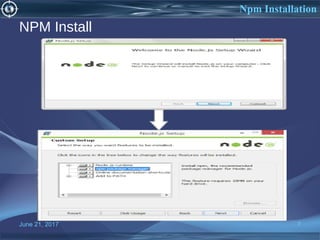
NPM Install
June 21, 2017 7
Npm Installation
Installing Packages
• npm comes along with node.js
• To install a package run:
npm install <package-name>
• Install a package globally
npm install –g <package-name>
• Note: Global installation makes the package available globally
irrespective of the directory you installed it from.
June 21, 2017 8
Npm Packages
June 21, 2017 9
GRUNT
9
Grunt
• Grunt is a javascript task
runner.
• Open source
• Easy to use
• Hundreds of plugins
June 21, 2017 10
Grunt introduction
INTRODUCTION
June 21, 2017 11
Task?
•Replace scripts in html files.
•Concatenating/minifying
•JS linting
•Unit testing
•Image optimization
Grunt Tasks
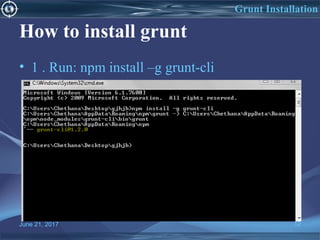
How to install grunt
• 1 . Run: npm install –g grunt-cli
June 21, 2017 12
Grunt Installation
June 21, 2017 13
Grunt Installation
How do I use grunt?
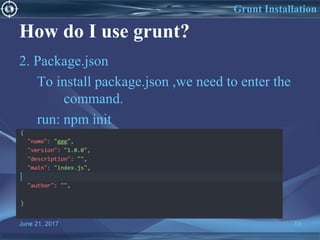
2. Package.json
To install package.json ,we need to enter the
command.
run: npm init
June 21, 2017 14
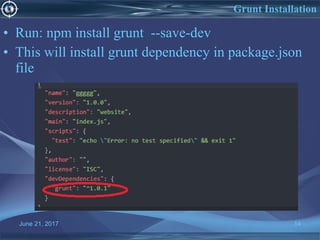
• Run: npm install grunt --save-dev
• This will install grunt dependency in package.json
file
Grunt Installation
Grunt plug-ins
1.Contrib-uglify
Minify JavaScript files
2.contrib-cssmin
minify css
3.contrib-concat
concatenate files
4. Grunt-contrib-watch
 Run tasks whenever watched files are changed
5. Grunt-contrib-less
 Compile LESS files to CSS
June 21, 2017 15
Grunt plugins
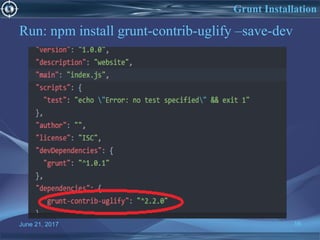
Run: npm install grunt-contrib-uglify –save-dev
June 21, 2017 16
Grunt Installation
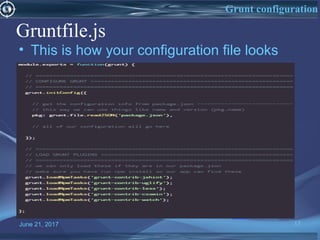
Gruntfile.js
• This is how your configuration file looks
June 21, 2017 17
Grunt configuration
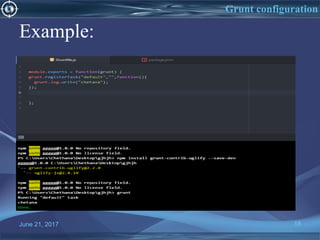
Example:
June 21, 2017 18
Grunt configuration
Advantages of grunt
• Grunt unifies the workflows of web
developers.
• It speeds up the development workflow and
enhances the performance of projects.
• Grunt includes built-in tasks that extend the
functionality of your plugins and scripts.
June 21, 2017 19
Grunt Advantages
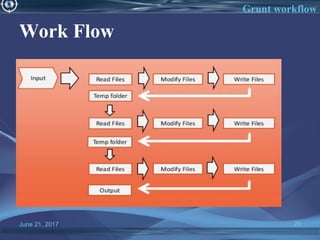
Work Flow
June 21, 2017 20
Grunt workflow
GULP
June 21, 2017 21
Gulp
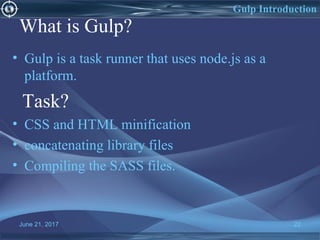
What is Gulp?
• Gulp is a task runner that uses node.js as a
platform.
Task?
• CSS and HTML minification
• concatenating library files
• Compiling the SASS files.
June 21, 2017 22
Gulp Introduction
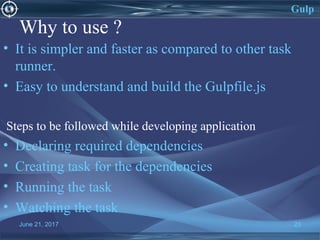
Why to use ?
• It is simpler and faster as compared to other task
runner.
• Easy to understand and build the Gulpfile.js
Steps to be followed while developing application
• Declaring required dependencies
• Creating task for the dependencies
• Running the task
• Watching the task
June 21, 2017 23
Gulp
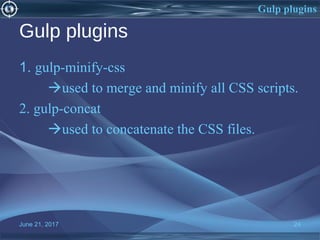
Gulp plugins
1. gulp-minify-css
used to merge and minify all CSS scripts.
2. gulp-concat
used to concatenate the CSS files.
June 21, 2017 24
Gulp plugins
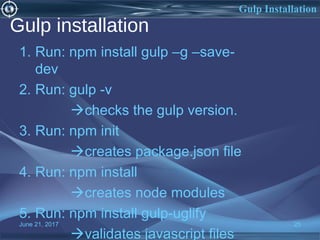
Gulp installation
1. Run: npm install gulp –g –save-
dev
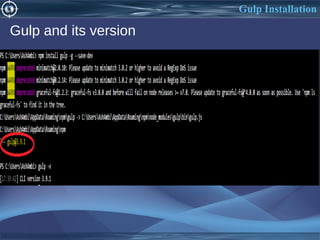
2. Run: gulp -v
checks the gulp version.
3. Run: npm init
creates package.json file
4. Run: npm install
creates node modules
5. Run: npm install gulp-uglify
validates javascript files
June 21, 2017 25
Gulp Installation
Gulp Installation
Gulp and its version
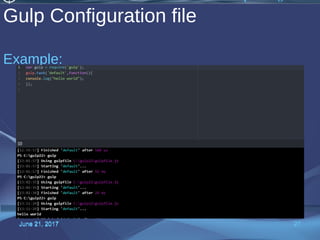
Gulp Configuration file
Example:
June 21, 2017 27June 21, 2017 27
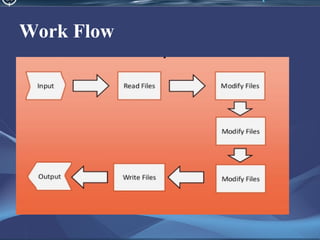
Work Flow
References
1. https://www.npmjs.com/
2. https://gruntjs.com/
3. https://www.npmjs.com/package/gulp
Npmgruntgulp
Npmgruntgulp
Npmgruntgulp
Npmgruntgulp

Npmgruntgulp

  • 1.
    June 21, 2017www.snipe.co.in 1 Prepared :Snipe Team
  • 2.
    June 21, 20172 NPM,GULP,GRUNT Front-End Task Automation with NPM, Grunt and Gulp 2
  • 3.
    June 21, 20173 Content Content • Npm • Grunt • Gulp 3
  • 4.
    June 21, 20174 NPM NPM 4
  • 5.
    June 21, 20175 NPM • What is npm? • Understanding package.json • Installing packages
  • 6.
    What is npm? •A node package manager • Free and open source Understanding package.json • It is a valid JSON object June 21, 2017 6 NPM
  • 7.
    NPM Install June 21,2017 7 Npm Installation
  • 8.
    Installing Packages • npmcomes along with node.js • To install a package run: npm install <package-name> • Install a package globally npm install –g <package-name> • Note: Global installation makes the package available globally irrespective of the directory you installed it from. June 21, 2017 8 Npm Packages
  • 9.
    June 21, 20179 GRUNT 9 Grunt
  • 10.
    • Grunt isa javascript task runner. • Open source • Easy to use • Hundreds of plugins June 21, 2017 10 Grunt introduction INTRODUCTION
  • 11.
    June 21, 201711 Task? •Replace scripts in html files. •Concatenating/minifying •JS linting •Unit testing •Image optimization Grunt Tasks
  • 12.
    How to installgrunt • 1 . Run: npm install –g grunt-cli June 21, 2017 12 Grunt Installation
  • 13.
    June 21, 201713 Grunt Installation How do I use grunt? 2. Package.json To install package.json ,we need to enter the command. run: npm init
  • 14.
    June 21, 201714 • Run: npm install grunt --save-dev • This will install grunt dependency in package.json file Grunt Installation
  • 15.
    Grunt plug-ins 1.Contrib-uglify Minify JavaScriptfiles 2.contrib-cssmin minify css 3.contrib-concat concatenate files 4. Grunt-contrib-watch  Run tasks whenever watched files are changed 5. Grunt-contrib-less  Compile LESS files to CSS June 21, 2017 15 Grunt plugins
  • 16.
    Run: npm installgrunt-contrib-uglify –save-dev June 21, 2017 16 Grunt Installation
  • 17.
    Gruntfile.js • This ishow your configuration file looks June 21, 2017 17 Grunt configuration
  • 18.
    Example: June 21, 201718 Grunt configuration
  • 19.
    Advantages of grunt •Grunt unifies the workflows of web developers. • It speeds up the development workflow and enhances the performance of projects. • Grunt includes built-in tasks that extend the functionality of your plugins and scripts. June 21, 2017 19 Grunt Advantages
  • 20.
    Work Flow June 21,2017 20 Grunt workflow
  • 21.
  • 22.
    What is Gulp? •Gulp is a task runner that uses node.js as a platform. Task? • CSS and HTML minification • concatenating library files • Compiling the SASS files. June 21, 2017 22 Gulp Introduction
  • 23.
    Why to use? • It is simpler and faster as compared to other task runner. • Easy to understand and build the Gulpfile.js Steps to be followed while developing application • Declaring required dependencies • Creating task for the dependencies • Running the task • Watching the task June 21, 2017 23 Gulp
  • 24.
    Gulp plugins 1. gulp-minify-css usedto merge and minify all CSS scripts. 2. gulp-concat used to concatenate the CSS files. June 21, 2017 24 Gulp plugins
  • 25.
    Gulp installation 1. Run:npm install gulp –g –save- dev 2. Run: gulp -v checks the gulp version. 3. Run: npm init creates package.json file 4. Run: npm install creates node modules 5. Run: npm install gulp-uglify validates javascript files June 21, 2017 25 Gulp Installation
  • 26.
  • 27.
    Gulp Configuration file Example: June21, 2017 27June 21, 2017 27
  • 28.
  • 29.