What is Gulp?
Gulp is a javascript task runner for front end
development built in node.js and npm that
lets you automate tasks such as…
● Bundling and minifying libraries and stylesheets.
● Refreshing your browser when you save a file.
● Less/Sass to CSS compilation
● Copying modified files to an output directory
Why Gulp?
● Saving time
● Easy to use
● Repetitive, tedious tasks
The simple gulp API
There are only 4 api’s in gulp!
API Purpose
gulp.task Define a task
gulp.src Read file in
gulp.dest Write file out
gulp.watch Watch file for change
More technically ..
● gulpfile.js - Tells Gulp for every tasks, what those tasks are, when to run them.
● Package.json - List of installed plugins
Create both of them at root directory
Installing gulp
via npm
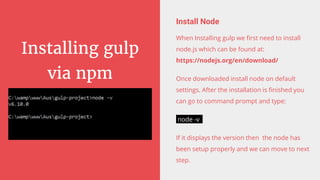
Install Node
When Installing gulp we first need to install
node.js which can be found at:
https://nodejs.org/en/download/
Once downloaded install node on default
settings. After the installation is finished you
can go to command prompt and type:
node -v
If it displays the version then the node has
been setup properly and we can move to next
step.
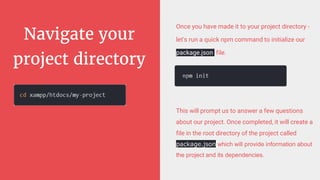
Navigate your
project directory
Once you have made it to your project directory -
let's run a quick npm command to initialize our
package.json file.
This will prompt us to answer a few questions
about our project. Once completed, it will create a
file in the root directory of the project called
package.json which will provide information about
the project and its dependencies.
Next step :
Installing gulp
globally
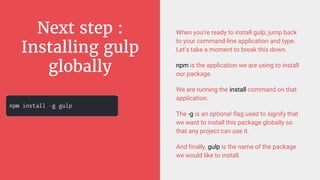
When you're ready to install gulp, jump back
to your command-line application and type:
Let’s take a moment to break this down.
npm is the application we are using to install
our package.
We are running the install command on that
application.
The -g is an optional flag used to signify that
we want to install this package globally so
that any project can use it.
And finally, gulp is the name of the package
we would like to install.
Next step : check
gulp version and
install locally
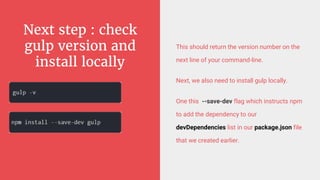
This should return the version number on the
next line of your command-line.
Next, we also need to install gulp locally.
One this --save-dev flag which instructs npm
to add the dependency to our
devDependencies list in our package.json file
that we created earlier.
Find npm gulp
packages
We can search gulp packages in link below:
https://www.npmjs.com/package/gulp
Setting up gulp
dependencies
We have our package.json file initialised and gulp
setup completed.
Now, we are installing the dependencies required for
compiling your SASS file into CSS file.
Examples of npm packages for gulp are showed on
the left side of the slide.
The first one will install sass compiler for gulp.
Similarly, the second one will install the package for
generating sourcemap for our compiled CSS file and
finally the last one will install the package to check
js/javascript.
These are just the examples of packages and you can
use any package you want according to your
preferences, you can search for packages at:
https://www.npmjs.com/
npm install gulp-sass --save-dev
npm install gulp-sourcemaps --save-dev
npm install gulp-jshint --save-dev
Or alternatively you can run
npm install gulp-jshint gulp-sass gulp-
concat gulp-uglify gulp-sourcemaps --save-
dev
Create our gulpfile.js
In the root directory of the project create a
new file and name it gulpfile.js
The main task of gulpfile.js is to give
instruction to gulp to perform certain tasks
and this is where our automation will start.
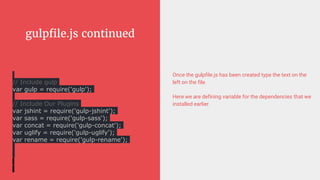
gulpfile.js continued
Once the gulpfile.js has been created type the text on the
left on the file.
Here we are defining variable for the dependencies that we
installed earlier.
// Include gulp
var gulp = require('gulp');
// Include Our Plugins
var jshint = require('gulp-jshint');
var sass = require('gulp-sass');
var concat = require('gulp-concat');
var uglify = require('gulp-uglify');
var rename = require('gulp-rename');
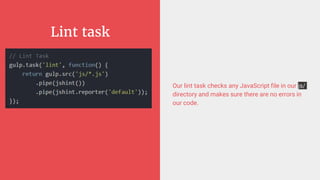
Lint task
Our lint task checks any JavaScript file in our js/
directory and makes sure there are no errors in
our code.
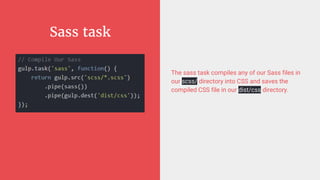
Sass task
The sass task compiles any of our Sass files in
our scss/ directory into CSS and saves the
compiled CSS file in our dist/css directory.
Script task
The scripts task concatenates all JavaScript files
in our js/ directory and saves the ouput to our
dist/js directory. Then gulp takes that
concatenated file, minifies it, renames it and
saves it to the dist/js directory alongside the
concatenated file.
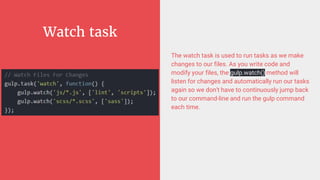
Watch task
The watch task is used to run tasks as we make
changes to our files. As you write code and
modify your files, the gulp.watch() method will
listen for changes and automatically run our tasks
again so we don't have to continuously jump back
to our command-line and run the gulp command
each time.
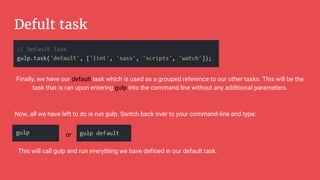
Defult task
Finally, we have our default task which is used as a grouped reference to our other tasks. This will be the
task that is ran upon entering gulp into the command line without any additional parameters.
Now, all we have left to do is run gulp. Switch back over to your command-line and type:
or
This will call gulp and run everything we have defined in our default task.
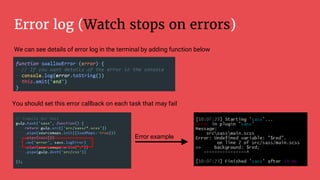
Error log (Watch stops on errors)
We can see details of error log in the terminal by adding function below
You should set this error callback on each task that may fail
Error example
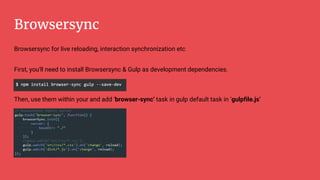
Browsersync
Browsersync for live reloading, interaction synchronization etc
First, you'll need to install Browsersync & Gulp as development dependencies.
Then, use them within your and add ‘browser-sync’ task in gulp default task in ‘gulpfile.js’
Final gulpfile.js
https://drive.google.com/file/d/0B8Z_CmQuqInKbDFmWl9abFlucTQ/view?usp=sharing
What is bower?
a Package manager for the Web
Bower is a front-end package manager built
by Twitter.
Bower can manage components that contain
HTML, CSS, JavaScript, fonts or even image
files.
Bower doesn’t concatenate or minify code or
do anything else - it just installs the right
versions of the packages you need and their
dependencies.
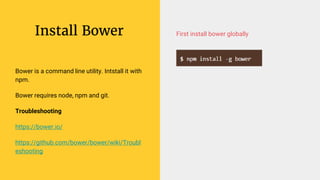
Install Bower
Bower is a command line utility. Intstall it with
npm.
Bower requires node, npm and git.
Troubleshooting
https://bower.io/
https://github.com/bower/bower/wiki/Troubl
eshooting
First install bower globally
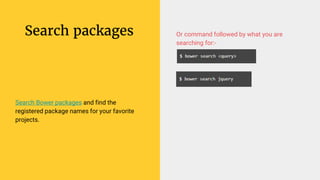
Search packages
Search Bower packages and find the
registered package names for your favorite
projects.
Or command followed by what you are
searching for:-
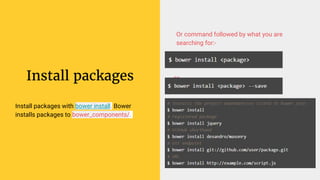
Install packages
Install packages with bower install. Bower
installs packages to bower_components/.
Or command followed by what you are
searching for:-
or
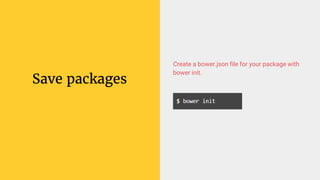
Save packages
Create a bower.json file for your package with
bower init.
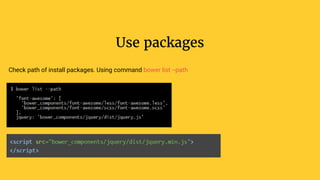
Use packages
Check path of install packages. Using command bower list --path
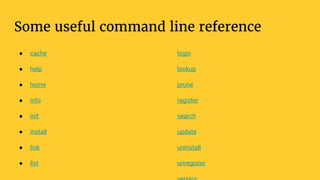
Some useful command line reference
● cache
● help
● home
● info
● init
● install
● link
● list
login
lookup
prune
register
search
update
uninstall
unregister

Gulp and bower Implementation

  • 2.
    What is Gulp? Gulpis a javascript task runner for front end development built in node.js and npm that lets you automate tasks such as… ● Bundling and minifying libraries and stylesheets. ● Refreshing your browser when you save a file. ● Less/Sass to CSS compilation ● Copying modified files to an output directory
  • 3.
    Why Gulp? ● Savingtime ● Easy to use ● Repetitive, tedious tasks
  • 4.
    The simple gulpAPI There are only 4 api’s in gulp! API Purpose gulp.task Define a task gulp.src Read file in gulp.dest Write file out gulp.watch Watch file for change
  • 5.
    More technically .. ●gulpfile.js - Tells Gulp for every tasks, what those tasks are, when to run them. ● Package.json - List of installed plugins Create both of them at root directory
  • 6.
    Installing gulp via npm InstallNode When Installing gulp we first need to install node.js which can be found at: https://nodejs.org/en/download/ Once downloaded install node on default settings. After the installation is finished you can go to command prompt and type: node -v If it displays the version then the node has been setup properly and we can move to next step.
  • 7.
    Navigate your project directory Onceyou have made it to your project directory - let's run a quick npm command to initialize our package.json file. This will prompt us to answer a few questions about our project. Once completed, it will create a file in the root directory of the project called package.json which will provide information about the project and its dependencies.
  • 8.
    Next step : Installinggulp globally When you're ready to install gulp, jump back to your command-line application and type: Let’s take a moment to break this down. npm is the application we are using to install our package. We are running the install command on that application. The -g is an optional flag used to signify that we want to install this package globally so that any project can use it. And finally, gulp is the name of the package we would like to install.
  • 9.
    Next step :check gulp version and install locally This should return the version number on the next line of your command-line. Next, we also need to install gulp locally. One this --save-dev flag which instructs npm to add the dependency to our devDependencies list in our package.json file that we created earlier.
  • 10.
    Find npm gulp packages Wecan search gulp packages in link below: https://www.npmjs.com/package/gulp
  • 11.
    Setting up gulp dependencies Wehave our package.json file initialised and gulp setup completed. Now, we are installing the dependencies required for compiling your SASS file into CSS file. Examples of npm packages for gulp are showed on the left side of the slide. The first one will install sass compiler for gulp. Similarly, the second one will install the package for generating sourcemap for our compiled CSS file and finally the last one will install the package to check js/javascript. These are just the examples of packages and you can use any package you want according to your preferences, you can search for packages at: https://www.npmjs.com/ npm install gulp-sass --save-dev npm install gulp-sourcemaps --save-dev npm install gulp-jshint --save-dev Or alternatively you can run npm install gulp-jshint gulp-sass gulp- concat gulp-uglify gulp-sourcemaps --save- dev
  • 12.
    Create our gulpfile.js Inthe root directory of the project create a new file and name it gulpfile.js The main task of gulpfile.js is to give instruction to gulp to perform certain tasks and this is where our automation will start.
  • 13.
    gulpfile.js continued Once thegulpfile.js has been created type the text on the left on the file. Here we are defining variable for the dependencies that we installed earlier. // Include gulp var gulp = require('gulp'); // Include Our Plugins var jshint = require('gulp-jshint'); var sass = require('gulp-sass'); var concat = require('gulp-concat'); var uglify = require('gulp-uglify'); var rename = require('gulp-rename');
  • 14.
    Lint task Our linttask checks any JavaScript file in our js/ directory and makes sure there are no errors in our code.
  • 15.
    Sass task The sasstask compiles any of our Sass files in our scss/ directory into CSS and saves the compiled CSS file in our dist/css directory.
  • 16.
    Script task The scriptstask concatenates all JavaScript files in our js/ directory and saves the ouput to our dist/js directory. Then gulp takes that concatenated file, minifies it, renames it and saves it to the dist/js directory alongside the concatenated file.
  • 17.
    Watch task The watchtask is used to run tasks as we make changes to our files. As you write code and modify your files, the gulp.watch() method will listen for changes and automatically run our tasks again so we don't have to continuously jump back to our command-line and run the gulp command each time.
  • 18.
    Defult task Finally, wehave our default task which is used as a grouped reference to our other tasks. This will be the task that is ran upon entering gulp into the command line without any additional parameters. Now, all we have left to do is run gulp. Switch back over to your command-line and type: or This will call gulp and run everything we have defined in our default task.
  • 19.
    Error log (Watchstops on errors) We can see details of error log in the terminal by adding function below You should set this error callback on each task that may fail Error example
  • 20.
    Browsersync Browsersync for livereloading, interaction synchronization etc First, you'll need to install Browsersync & Gulp as development dependencies. Then, use them within your and add ‘browser-sync’ task in gulp default task in ‘gulpfile.js’
  • 21.
  • 22.
    What is bower? aPackage manager for the Web Bower is a front-end package manager built by Twitter. Bower can manage components that contain HTML, CSS, JavaScript, fonts or even image files. Bower doesn’t concatenate or minify code or do anything else - it just installs the right versions of the packages you need and their dependencies.
  • 23.
    Install Bower Bower isa command line utility. Intstall it with npm. Bower requires node, npm and git. Troubleshooting https://bower.io/ https://github.com/bower/bower/wiki/Troubl eshooting First install bower globally
  • 24.
    Search packages Search Bowerpackages and find the registered package names for your favorite projects. Or command followed by what you are searching for:-
  • 25.
    Install packages Install packageswith bower install. Bower installs packages to bower_components/. Or command followed by what you are searching for:- or
  • 26.
    Save packages Create abower.json file for your package with bower init.
  • 27.
    Use packages Check pathof install packages. Using command bower list --path
  • 28.
    Some useful commandline reference ● cache ● help ● home ● info ● init ● install ● link ● list login lookup prune register search update uninstall unregister