Five Ways to Improve
the Usability of Your
Web Site
Molly Malsam, User Experience Designer
What is Usability and Why Should I
Care?
The ease of use and learnability of a human-made
object:
your web site
Most web sites get one chance to do their job, and if
the customer can’t do what they came for, you lost
them
Usable web sites = satisfied users = loyal customers
Usable web sites = less customer support, less
maintenance and development costs = more profits for
you
5: Write for Online, Not Print
On the Web, users are engaged – they want to go places
and get things done, whereas print is often a more
passive medium
Users read approximately 20% of the content on an
average page
Use well-documented ways of chunking text for
scannability:
Headings and subheadings
Short sentences (no more than 15-20 words); fragments
acceptable
Short paragraphs
Bulleted lists
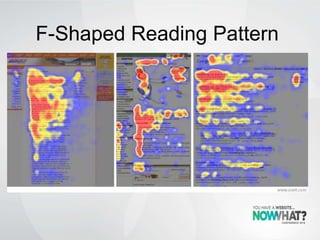
F-Shaped Reading Pattern
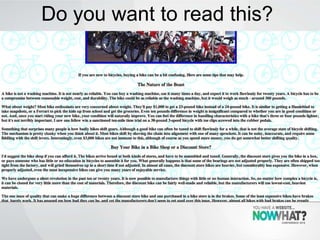
Do you want to read this?
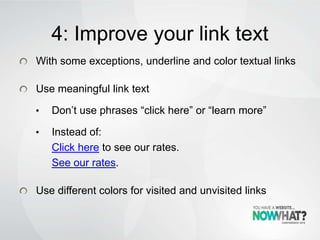
4: Improve your link text
With some exceptions, underline and color textual links
Use meaningful link text
• Don’t use phrases “click here” or “learn more”
• Instead of:
Click here to see our rates.
See our rates.
Use different colors for visited and unvisited links
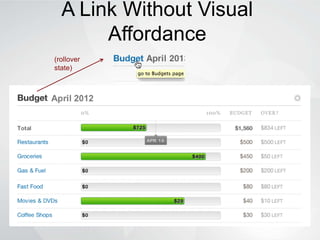
A Link Without Visual
Affordance
(rollover
state)
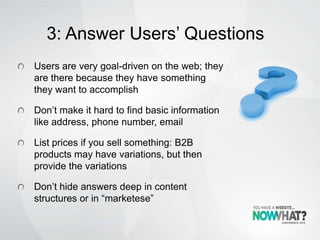
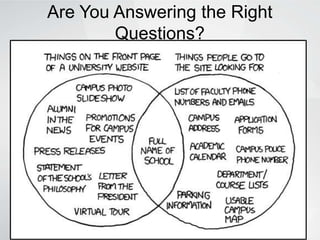
3: Answer Users’ Questions
Users are very goal-driven on the web; they
are there because they have something
they want to accomplish
Don’t make it hard to find basic information
like address, phone number, email
List prices if you sell something: B2B
products may have variations, but then
provide the variations
Don’t hide answers deep in content
structures or in “marketese”
Are You Answering the Right
Questions?
2: Look at Web Metrics
Basic web metrics service is free with Google Analytics
You can find a wealth of information about your web
site visitors:
How many there are and how often they visit
How they got to your site (search terms, referring sites)
Where they are located geographically
What pages they visit and how long they stay on each
page
What operating system, browsers, and devices they are
using
Whether they “convert” if you have ecommerce or some
other basic call to action
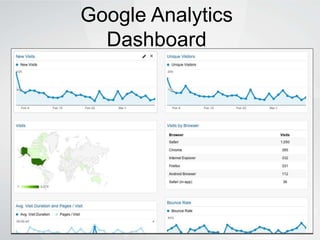
Google Analytics
Dashboard
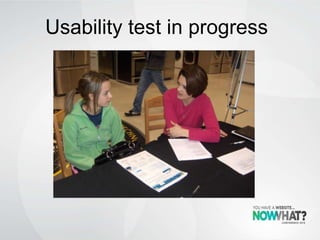
1: Do a Usability Test
Usability testing doesn’t have to be expensive or time-
consuming
It’s as easy as getting a few people who are similar to your
users to sit down and use your web site
Make a list of the main tasks you expect people to do on your
site and have them do it
Ask them to tell you what they are thinking as they use your
site
Ask lots of non-leading questions
You’ll always be surprised and you will definitely learn
something new that will help you improve your site design
Usability test in progress
More Resources
Alertbox, Nielsen Norman Group useit.com
User Interface Engineering blogs, podcasts,
articles uie.com
Uxmatters.com articles
Usability.gov

"Five Ways to Improve the Usability of Your Web Site" - Molly Malsam, Now What? Conference 2013

  • 1.
    Five Ways toImprove the Usability of Your Web Site Molly Malsam, User Experience Designer
  • 2.
    What is Usabilityand Why Should I Care? The ease of use and learnability of a human-made object: your web site Most web sites get one chance to do their job, and if the customer can’t do what they came for, you lost them Usable web sites = satisfied users = loyal customers Usable web sites = less customer support, less maintenance and development costs = more profits for you
  • 3.
    5: Write forOnline, Not Print On the Web, users are engaged – they want to go places and get things done, whereas print is often a more passive medium Users read approximately 20% of the content on an average page Use well-documented ways of chunking text for scannability: Headings and subheadings Short sentences (no more than 15-20 words); fragments acceptable Short paragraphs Bulleted lists
  • 4.
  • 5.
    Do you wantto read this?
  • 6.
    4: Improve yourlink text With some exceptions, underline and color textual links Use meaningful link text • Don’t use phrases “click here” or “learn more” • Instead of: Click here to see our rates. See our rates. Use different colors for visited and unvisited links
  • 7.
    A Link WithoutVisual Affordance (rollover state)
  • 8.
    3: Answer Users’Questions Users are very goal-driven on the web; they are there because they have something they want to accomplish Don’t make it hard to find basic information like address, phone number, email List prices if you sell something: B2B products may have variations, but then provide the variations Don’t hide answers deep in content structures or in “marketese”
  • 9.
    Are You Answeringthe Right Questions?
  • 10.
    2: Look atWeb Metrics Basic web metrics service is free with Google Analytics You can find a wealth of information about your web site visitors: How many there are and how often they visit How they got to your site (search terms, referring sites) Where they are located geographically What pages they visit and how long they stay on each page What operating system, browsers, and devices they are using Whether they “convert” if you have ecommerce or some other basic call to action
  • 11.
  • 12.
    1: Do aUsability Test Usability testing doesn’t have to be expensive or time- consuming It’s as easy as getting a few people who are similar to your users to sit down and use your web site Make a list of the main tasks you expect people to do on your site and have them do it Ask them to tell you what they are thinking as they use your site Ask lots of non-leading questions You’ll always be surprised and you will definitely learn something new that will help you improve your site design
  • 13.
  • 14.
    More Resources Alertbox, NielsenNorman Group useit.com User Interface Engineering blogs, podcasts, articles uie.com Uxmatters.com articles Usability.gov

Editor's Notes

  • #7 4: Improve your link textWith some exceptions, underline and strong color textual links. Don’t rely on rollover effects. Exceptions: navigation menus and other lists of linksUse meaningful link text: Don’t use phrases “click here” or “learn more”:the phrase has no meaning; for scanning and accessibility, use words that describe what’s going to happen. Also, touch users don’t “click”Instead of:Click hereto see our rates. See our rates.Use different colors for visited and unvisited links